Bose
®
Model 1801/1800
Power Amplifier
SUPPLEMENT
Q4, part number 102428 and Q5, part number 102429 are no longer available with the lead length needed for soldering to the PCB. Use the part numbers listed below when ordering these transis-tors. Make a note in your Model 1801/1800 power amplifier service manual, part number 192527.
Reference Designator Description Part Number Note Q4 SIM, 2N2219 102428-1K 1 Q5 SIM, 2N5415 102429-1K 2
NOTE: The part numbers listed are kits. They include the following parts: 1. Q4 kit: 1 102428 transistor 3 264371 extension pins 1 192527-S1 supplement. 2. Q5 kit: 1 102429 transistor 3 264371 extension pins 1 192527-S1 supplement.
PROPRIETARY INFORMATION
THIS DOCUMENT CONTAINS PROPRIETARY INFORMATION OF
BOSE® CORPORATION WHICH IS BEING FURNISHED ONLY FOR
THE PURPOSE OF SERVICING THE IDENTIFIED BOSE PRODUCT BY AN AUTHORIZED BOSE SERVICE CENTER OR OWNER OF THE BOSE PRODUCT, AND SHALL NOT BE REPRODUCED OR USED FOR ANY OTHER PURPOSE.
Contents
Specifications ... 2
Safety Information ... 3
Electrostatic Discharge Sensitive (ESDS) Device Handling ... 4
Disassembly/Assembly Procedures ... 5-8 Test Procedures ... 9
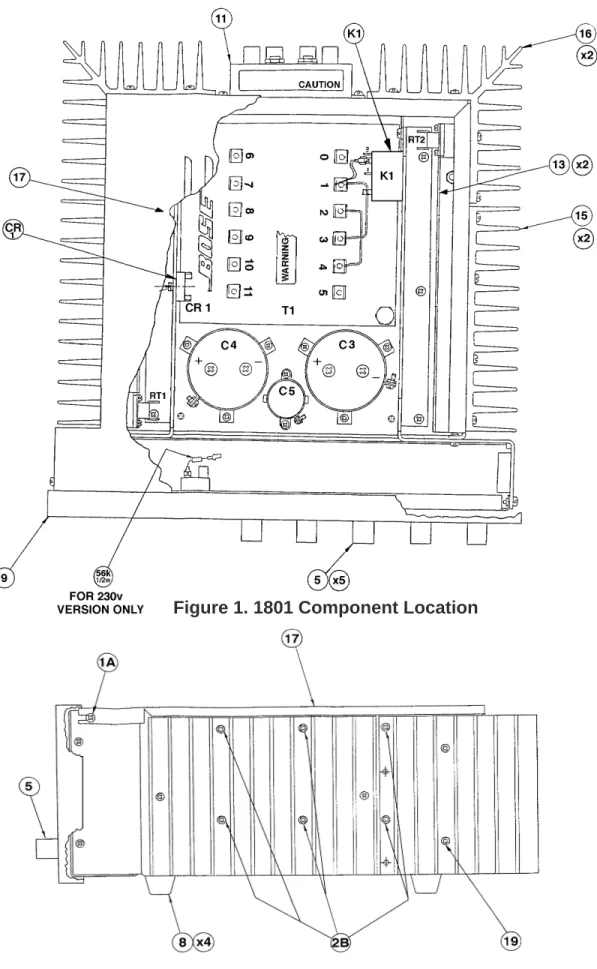
Figure 1. 1801 Component Location ... 10
Figure 2. 1801 Side View ... 10
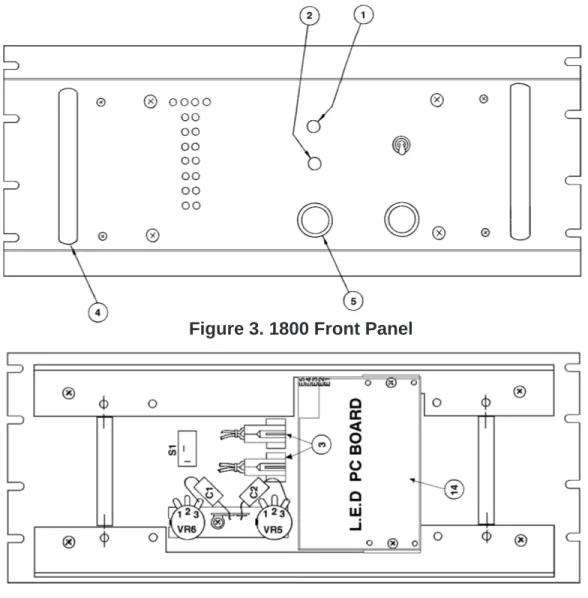
Figure 3. 1800 Front Panel ... 11
Figure 4. 1800 Rear View of Front Panel ... 11
Figure 5. 1801 Rear View of Front Panel ... 11
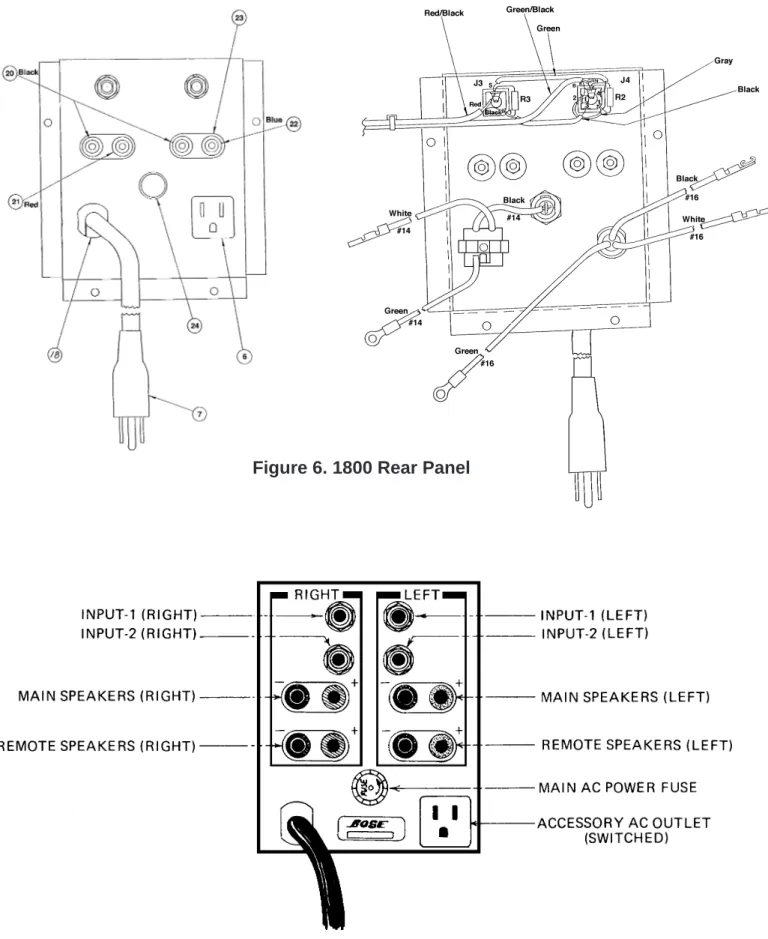
Figure 6. 1800 Rear Panel ... 12
Figure 7. 1801 Rear Panel ... 12
Part List Notes ... 13
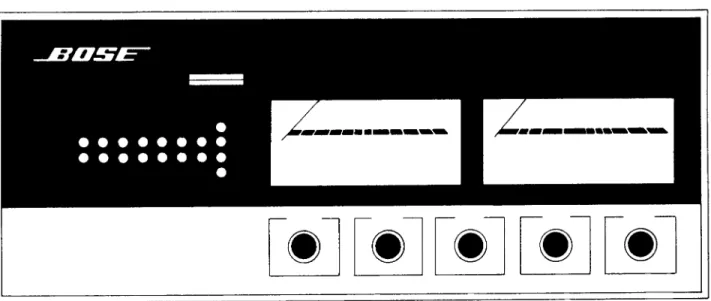
Figure 8. 1801 Front Panel ... 13
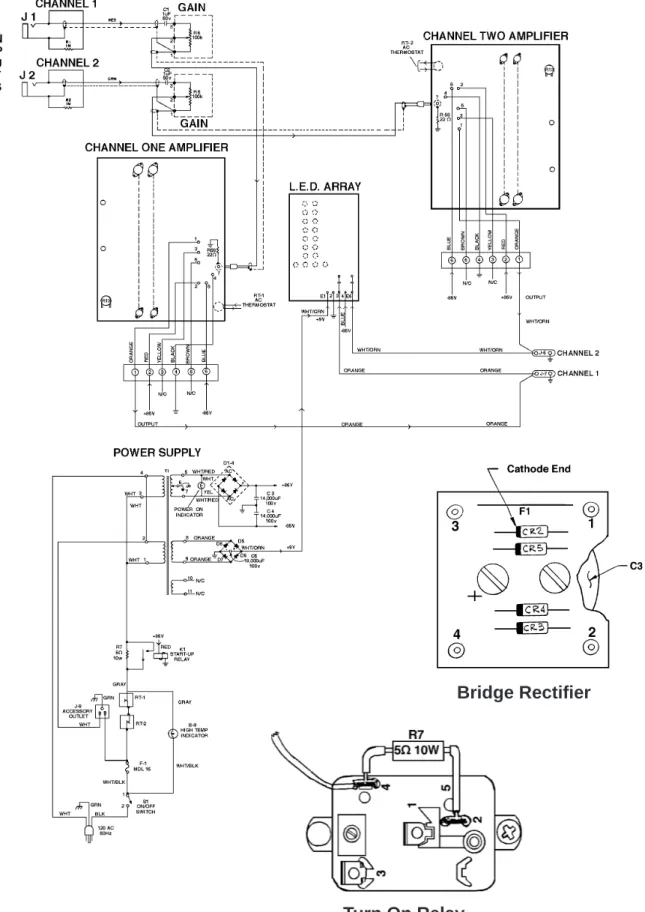
Part List ... 14-17 Figure 9. 1801/1800 Block Diagram ... 18
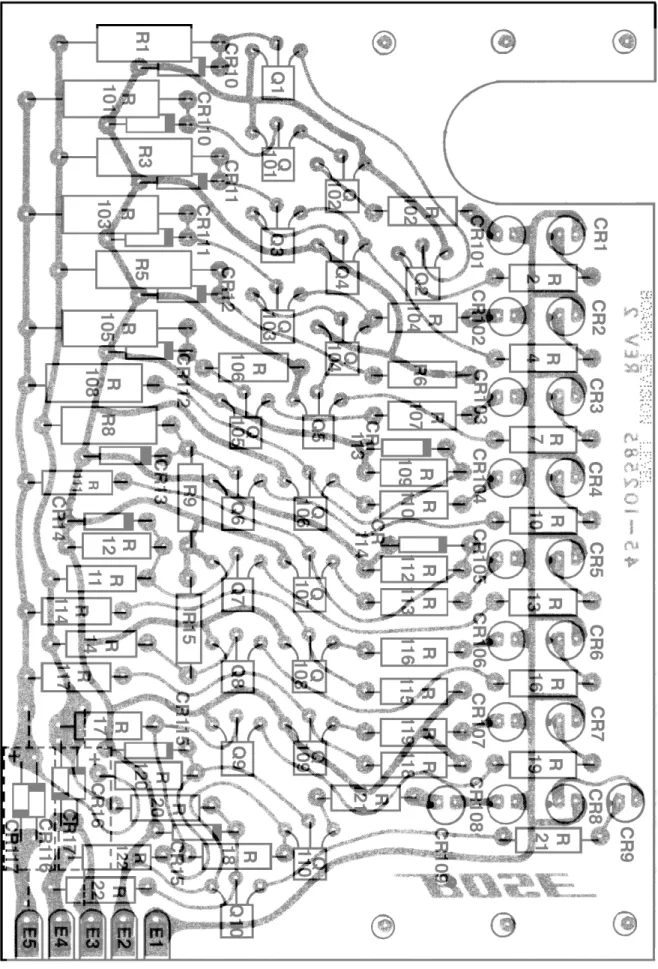
Figure 10. LED PCB Layout ... 19
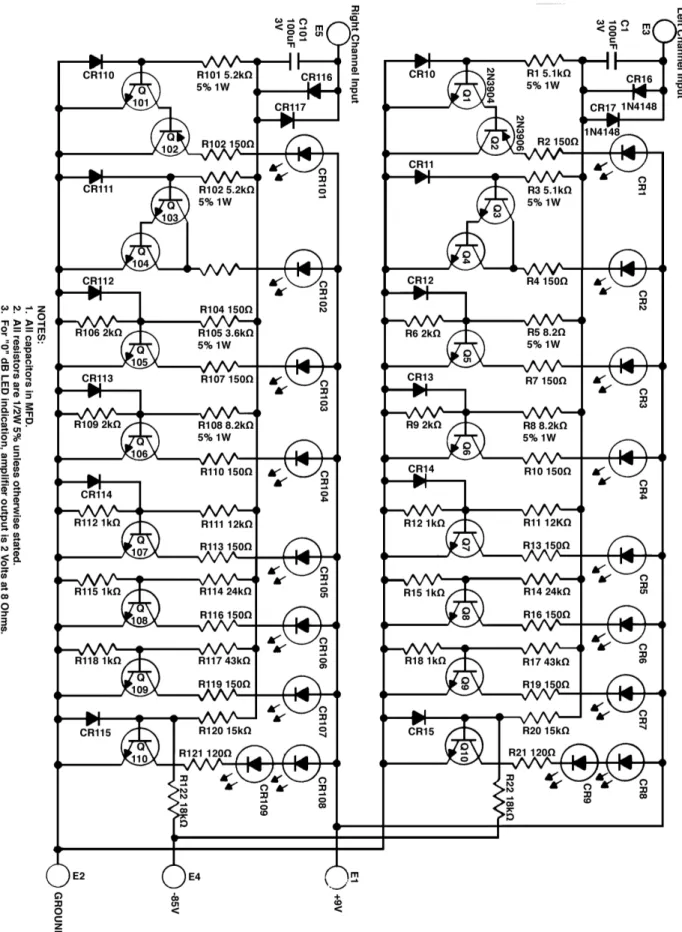
Figure 11. LED PCB Schematic Diagram ... 20
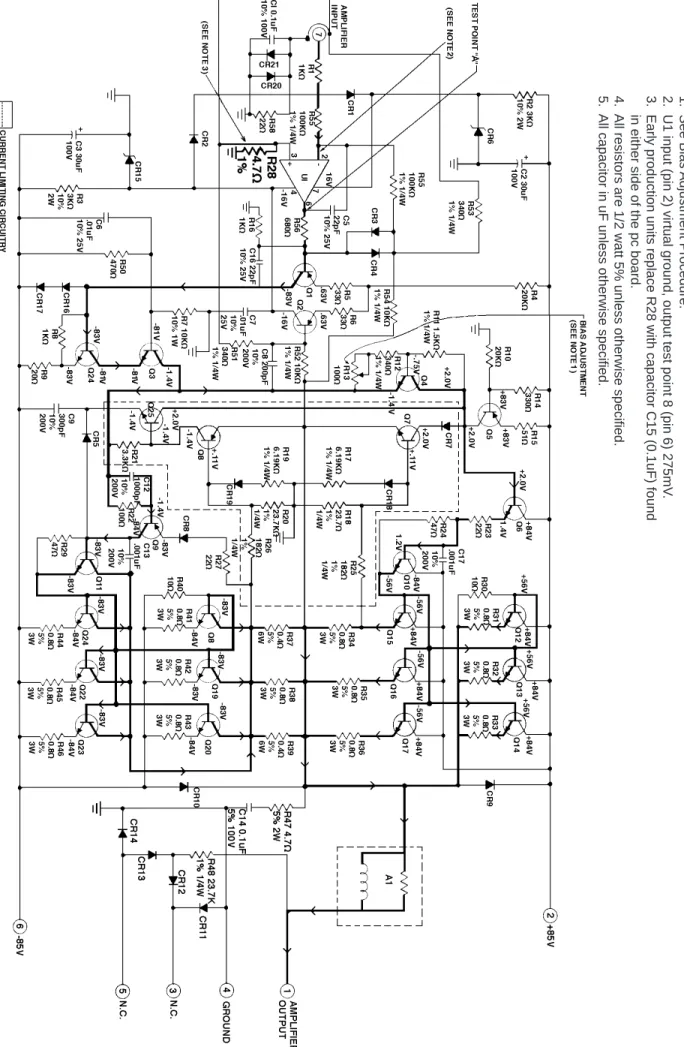
Figure 12. Amplifier Schematic Diagram ... 21
Figure 13. Amplifier PCB Layout ... 22
Troubleshooting Guide ... 23
Voltage Conversion Instructions ... 24 Service Bulletin ... 25-28
SPECIFICATIONS
Mechanical
Dimensions:
1801
1800
7 3/16" H x 18" W x 18 1/2" D
(Including Knobs)
81/4"H x 19"W x 15"D
(not including handles)
Weight:
1801
1800
82 lbs
95 lbs (shipping)
80 lbs
91 lbs (shipping)
Power Requirements
Voltage:
105-125 AC USA, 210-250 AC EUR
Frequency:
50-60 Hz
Power Consumption:
Minimum 60 watts
Normal 1000 watts
Maximum 1960 watts
Integral Design™
Amplifier
Output :
(both channels operating )
250/250 watts @8 ohms
400/400 watts @4 ohms
Harmonic Distortion:
(THD) @ 250 watts
Less Than .15% (20Hz-5kHz)
Less Than .5% (5kHz-10kHz)
IM Distortion:
(4:1 60-7kHz) 150 watts
Less Than .15%
Frequency Response:
20Hz-10kHz
±
.25dB
10kHz-15kHz
±
.7dB
15kHz-20kHz
±
1dB
Signal to Noise Ratio:
(unweighted)
-100dB
≤
.5mV across 8
Ω
at zero volume
Load Impedance:
4 ohms or higher
Input Sensitivity:
1.5 Vrms for 250 watts output into 8 ohms
SAFETY INFORMATION
1. Parts that have special safety characteristics are identified by the symbol on schematics or by special notes on the parts list. Use only replacement parts that
have critical characteristics recommended by the manufacturer.
2. Make leakage current or resistance measurements to determine that exposed parts are acceptably insulated from the supply circuit before returning the unit
to the customer. Use the following checks to perform these measurements: A. Leakage Current Hot Check-With the unit completely reassembled, plug the AC line cord directly into a 120V AC outlet. (Do not use an isolation transformer during this test.) Use a leakage current tester or a metering system that complies with American National Standards Institute (ANSI) C101.1 “Leakage Current for Appliances” and Underwriters Laboratories (UL) 1492 (71). With the unit AC switch first in the ON position, then in the OFF position, measure from a known earth ground (metal water pipe,
conduit, etc.) to all exposed metal parts of the unit (antennas, handle bracket, metal cabinet, screwheads, metallic overlays, control shafts, etc.), especially any exposed metal parts that offer an electrical return path to the chassis. Any current measured must not exceed 0.5 milliamp. Reverse the unit power cord plug in the outlet and repeat test. ANY MEASUREMENTS NOT WITHIN THE LIMITS SPECIFIED HEREIN INDICATE A POTENTIAL SHOCK ARD THAT MUST BE ELIMINATED BEFORE RETURNING THE UNIT TO THE CUSTOMER.
B. Insulation Resistance Test Cold Check-(1) Unplug the power supply and connect a jumper wire between the two prongs of the plug. (2) Turn on the power switch of the unit. (3) Measure the resistance with an ohmmeter
tween the jumpered AC plug and each exposed metallic cabinet part on the unit. When the exposed metallic part has a return path to the chassis, the reading should be between 1 and 5.2 Megohms. When there is no return path to the chassis, the reading must be “infinite”. If it is not within the limits specified, there is the possibility of a shock hazard, and the unit must be repaired and checked before it is returned to the customer.
ELECTROSTATIC DISCHARGE SENSITIVE (ESDS)
DEVICE HANDLING
CAUTION: THE BOSE® 1801/1800 POWER AMPLIFIERS CONTAIN NO
USER-SERVICE-ABLE PARTS. TO PREVENT WARRANTY INFRACTIONS, REFER SERVICE TO WAR-RANTY SERVICE STATIONS OR FACTORY SERVICE.
This unit contains ESDS devices. We recommend the following precautions when repairing, replacing or transporting ESDS devices:
• Perform work at an electrically grounded work station.
• Wear wrist straps that connect to the station or heel straps that connect to conductive floor mats.
• Avoid touching the leads or contacts of ESDS devices or PC boards even if properly grounded. Handle boards by the edges only.
• Transport or store ESDS devices in ESD protective bags, bins, or totes. Do not insert unpro-tected devices into materials such as plastic, polystyrene foam, clear plastic bags, bubble wrap or plastic trays.
General Description
The 1801 and 1800 are Integral Design™ Power Amplifiers with all Silicon Solid-State Circuitry using 14 power transistors per channel. Capable of complete stability with all loudspeaker loads regardless of capacitive or inductive character. They employ fast acting electronic pro-tection circuits for current limiting. They use computer grade capacitors throughout the power supply, along with a 2.0kW power transformer and 1300 sq. inches of heat sink area. They also have a power monitor display using a light emitting diode array and in the case of the 1801 signal meters as well.
DISASSEMBLY/ASSEMBLY PROCEDURES
1801 Power Amplifier
Note: Refer to Figure 1 for the following procedures.
1. Top Cover Removal
1.1 Remove the two screws that secure the top cover at the rear of the unit. Loosen the two screws located on each side of the unit towards the front.
1.2 Slide the top cover towards the rear of the unit and lift the cover off the unit. 2. Top Cover Replacement
2.1 Slide the top cover onto the unit while making sure the screws on the side of the unit are lining up with the slots in the top cover.
2.2 Secure the top cover to the unit. 3. Amplifier PCB Removal
3.1 Perform procedure 1.
3.2 Disconnect the wire harness, the two wires connected to the thermal cutout, and the input cable going to the PCB.
3.3 Remove the six screws (2B) located on the side of the unit between the heat sink fins (see Figure 2).
3.4 Carefully pry the PCB inward towards the power transformer (the PCB is stuck to the chassis by the heat sinking compound) and lift the board out of the unit.
4. Amplifier PCB Replacement
4.1 Slide the PCB into place. Be sure there is sufficient heat sink compound on the PCB's heat sink.
4.2 Align the six screws that secure the PCB into place and secure the PCB to the chassis.
4.3 Connect the wire harness, thermal cutout wires, and the input cable to the PCB.
5. Front Panel Removal 5.1 Perform procedure 1.
5.2 Remove the nut securing the top of the front panel. The nut is located on the inside of the front chassis beside the thermal cutout indicator.
5.3 Remove the knobs on the controls and remove the two shaft nuts holding the front panel in place.
6. Front Panel Replacement
6.1 Align the front panel over the controls and secure it in place.
6.2 Secure the top of the front panel and replace the knobs.
6.3 Perform procedure 2.
7. Front Chassis Assembly Removal 7.1 Perform procedure 5.
7.2 Locate and remove the four screws that secure the front assembly to the chassis.
7.3 Push down on the top of the front assembly to release the bottom of the assembly and pull the assembly towards you.
8. Front Chassis Assembly Replacement 8.1 While pushing down on the front assembly slide the assembly in towards the unit.
8.2 Pull up on the front assembly to align the screw holes with the unit and secure the assembly in place.
1801 Power Amplifier
DISASSEMBLY/ASSEMBLY PROCEDURES
assembly. Connect the wires going to the meter.
12.2 Place the meter lamp housing over the meters and secure it to the front assem-bly.
12.3 Perform procedure 8. Note: Refer to Figure 5 for the following
procedures.
9. LED PCB Removal 9.1 Perform procedure 7.
9.2 Unsolder the wires to the LED PCB and make a note of the wiring configura-tion.
9.3 Remove the center nut located on each side on the LED lamp housing. 9.4 Lift the LED assembly out from the front chassis.
9.5 Disassemble the LED assembly to gain access to the PCB.
Note: Remember how the lamp housing spacers are placed.
10. LED PCB Replacement
10.1 After reassembling the LED assem-bly, place it onto the front panel assembly and secure it in place.
10.2 Resolder the wires to the PCB. 10.3 Perform procedure 8.
11. Meter Assembly Removal 11.1 Perform procedure 7.
11.2 Remove the three nuts holding the meter lamp housing assembly to the front panel assembly.
11.3 Remove the two nuts holding the wires to the meter you want to replace and remove the meter.
12. Meter Assembly Replacement 12.1 Place the new meter on to the front
13. Front Panel Controls Removal 13.1 Perform procedure 7.
13.2 Locate the control or switch you want to replace and unsolder the wires and components on that control or switch. 13.3 Remove the shaft nut holding the control or switch to the front assembly and remove it.
14. Front Panel Controls Replacement 14.1 Place the new control or switch into the front assembly and secure it in place. 14.2 Resolder the wires and/ or compo-nents to the control or switch.
14.3 Perform procedure 8. 15. Lamp Removal
15.1 Perform procedure 7.
15.2 Using a flat blade screwdriver, pry under the edge of the socket and lift the socket out.
16. Lamp Replacement
16.1 Replace the defective lamp.
16.2 Place the lamp socket back into the lamp housing.
16.3 Perform procedure 8.
Note: It may be necessary to remove the LED PCB Assembly to replace the lamps see procedure 9.
DISASSEMBLY/ASSEMBLY PROCEDURES
5.2 Locate and remove the eight screws holding the front panel to the chassis. Four of the screws are located just inside the two handles and the other four are the larger screws on the front panel.
5.3 Using the handles pull the front panel away from the chassis enough to access the gain controls and LED PCB.
6. Front Panel Replacement
6.1 Slide the front panel into place. Be careful not to pinch the wiring harness at the bottom of the front panel between it and the chassis.
6.2 Align the holes in the front panel with the chassis, place the screws into their location by hand and then tighten with a screwdriver.
Note: While tightening the screws lift up on the top lip of the panel to provide enough room to slide the top cover under the lip.
7. LED PCB Removal 7.1 Perform procedure 5.
7.2 Remove the two screws that secure the PCB to the front panel.
7.3 Unsolder the wires at the LED PCB, make a note of the wiring configuration, and remove the board from the unit. 8. LED PCB Replacement
8.1 Place the LED PCB into place on the front panel.
8.2 Secure the PCB to the front panel. 8.3 Resolder the wires to the LED PCB. Note: Refer to Figure 1 for the following
procedures.
1. Top Cover Removal
1.1 Remove the four screws that secure the top cover to the unit.
1.2 Slide the top cover towards the back of the unit and lift it off.
2. Top Cover Replacement
2.1 Place the top cover on to the unit and slide it under the front panel lip.
2.2 Secure the top cover to the unit. 3. Amplifier PCB Removal
3.1 Perform procedure 1.
3.2 Disconnect the wire harness, input cable, and the two wires going to the thermal cutout.
3.3 Remove the six screws (2B) located on the side of the unit between the heat sink fins (see Figure 2).
3.4 Carefully pry the PCB inward towards the power transformer (the PCB is stuck to the chassis by the heat sinking compound) and lift the board out of the unit.
4. Amplifier PCB Replacement
4.1 Slide the PCB into place. Be sure there is sufficient heat sinking compound on the PCB's heat sink.
4.2 Align the six screws that secure the PCB into place and secure the PCB to the chassis.
4.3 Connect the wire harness, thermal cutout wires, and the input cable to the PCB.
5. Front Panel Removal 5.1 Perform procedure 1.
1800 Power Amplifier
DISASSEMBLY/ASSEMBLY PROCEDURES
13. Rear Panel Removal 13.1 Perform procedure 1.
13.2 Locate and remove the four screws securing the rear panel and the rear panel bracket to the unit.
Note: One of the screws holds the ground wires to the chassis. Take care not to lose the nuts that secure this screw and the wires.
14. Rear Panel Replacement
14.1 Align the rear panel with the chassis. 14.2 Secure the rear panel to the chassis. Be sure to use the rear panel bracket on the bottom of the panel.
14.3 Secure the ground wires to the chassis.
14.4 Perform procedure 2. 9. Gain Control Removal
9.1 Perform procedure 5.
9.2 Remove the gain control knobs. 9.3 Unsolder the capacitor lead and wires from the control.
9.4 Remove the nut that secures the control to the front panel and remove the control.
10. Gain Control Replacement
10.1 Place the new control into the front panel and secure it into place.
10.2 Resolder the capacitor lead and the wires to the terminals on the gain control. 10.3 Perform procedure 6.
11. Power Switch Removal 11.1 Perform procedure 5.
11.2 Remove the wires on the rear of the power switch.
11.3 Remove the nut securing the switch to the front panel and remove the switch. 12. Power Switch Replacement
12.1 Place the new power switch into the front panel and secure it in place.
12.2 Reconnect the wires on the rear of the switch.
12.3 Perform procedure 6.
Note: Refer to Figure 6 for the following procedures.
Note: Refer to Figures 3, and 4 for the following procedures.
TEST PROCEDURES
1. Bias Adjustment Setup and Procedure1.1 Locate the -85V negative terminal found on the capacitor (C4). See Figure 1 for the location of C4.
Note: The 1801 and very early 1800's had two lugs on the caps. One with two or three wires and one single wire. The later pro-duction 1800 had three lugs on the capaci-tor. Either way the lug with the two or three wires is the lug to disconnect from the capacitor. All other lugs remain.
1.2 Remove the lug with two or three wires connected to it.
1.3 Connect a 0-200mA meter between the disconnected lug and the - terminal on the capacitor C4.
1.4 Disconnect the PCB that is not being tested by unplugging the multiple pin connector.
1.5 Turn the amplifier on with no input signal applied and adjust the bias pot (R13) for 90mA with the board cold.
Note: The PCB must be removed from the chassis for the bias to be adjusted. 2. Frequency Response Procedure
2.1 Apply a 1Vrms, 1kHz signal to the input.
2.2 Reference a dB meter to the output. 2.3 Check the response from 20Hz to
20kHz. The response should not exceed ±1
dB. Refer to the response specification on page 2.
3. DC Offset Procedure
3.1 With no signal applied measure the DC offset at the output. It should measure 250mV or less.
4. Power Output Procedure
4.1 Connect an 8 ohm, 250 Watt load to the output.
4.2 Apply a 1.75Vrms, 1kHz signal to the input.
4.3 Turn the gain controls up to the point where the clipping LED's just begin to light up and check the output for 250 watts.
4.4 Repeat the steps above for a 4 ohm load. The output measurement should be 400 watts.
5. Harmonic Distortion Procedure 5.1 With the unit connected as in proce-dure 3, turn the gains up to just before clipping and check the distortion at the frequencies of 20Hz, 5kHz, and 10kHz. 5.2 The distortion limits are ≤.15% from
20Hz to 5kHz and ≤.5% from 5kHz to
10kHz.
6. Thermal Cutoff Procedure
6.1 Apply a signal to the unit with the outputs loaded ( 8 or 4 ohms ). Short one channel at a time until the unit goes into thermal cutoff. The thermal indicator should turn on and the output of the unit should be off.
6.2 Disconnect the short from the output. Wait until the unit comes out of thermal cutoff. You can speed this process by cooling the PCB with a fan.
6.3 Once the unit is cooled apply a signal to the channel you had shorted to check to see if its operational.
6.4 Apply a signal to the other channel and short the output. Wait for the thermal indicator to come on then remove the short and cool the PCB.
Figure 1. 1801 Component Location
Figure 4. 1800 Rear View of Front Panel
Figure 5. 1801 Rear View of Front Panel
Figure 3. 1800 Front Panel
Figure 7. 1801 Rear Panel
Figure 6. 1800 Rear Panel
PART LIST NOTES
1. This part is not normally available from Customer Service. Approval from the Field Service Manager is required before ordering.
2. The reference designators in bold are located on the LED PCB. 3. This part is not located on the PCB'S.
4. The reference designators marked with a ‡ symbol are located on the Front Panel. 5. The part numbers listed with SIM are selected components and may not be directly inter-changeable with standard available parts.
6. This part is located on the amplifier PCB. 7. This part is used on the 1801 Power Amplifier. 8. This part is used on the 1800 Power Amplifier.
9. Items marked with a ¥ symbol are not shown in the exploded views.
PART LIST
Item
Number
Description
Part
Number
N o t e
A1
Preload Network
102666
6
RT-1, RT-2
Thermal Cut-Out
102440
6
¥
RCA Jack
102784
6, 9
Q10-23
Screw, 6/32 x 1/2 Stainless Steel
106348
6
Q10-23
Washer
103032
6
Q10-23
Plastic Insulator
102901
6
Q10-23
Nut, Brass, 6/32 x 5/16 x 1/8
103016
6
Q4, 5
Heat Sink Assy
102571
6
¥
Top Wiring Harness
102929-1
1, 7, 9
¥
Bottom Wiring Harness
103281-1
1, 7, 9
¥
Top Wiring Harness
103365
1, 8, 9
¥
Bottom Wiring Harness
103366
1, 8, 9
¥
Audio Cable
102838
9
S 1
Toggle Switch, ON/OFF
103291
8
S 1
Switch, ON/OFF
102740
7
S 2
Input Switch
102576
7
S 3
Speaker Switch
103400
7
J3, 4 (J5, 6 1801 )
Phone Jack
102704
R5, 6
Gain Control, 100k
Ω
102406
7
R5, 6
Gain Control, 100k
Ω
103260
8
1
Indicator Lens, White
103479-1
2
Indicator Lens, Red
103479-0
3
Lens Housing
103478
4
Front Handle
121914
8
5
Knob
128907
7
5
Knob
121911
8
M1, 2
VU Meters
102570
7
B1-4
Meter Lamps
103063
7
B5, 6, 7
L.E.D / Bose® Logo Lamp 1847
102580
7
B8
Thermal Cutout Indicator
102582
7
K1
Start-up Relay
102818
6
Accy Outlet
107558
7
Line Cord
103441
T1
Transformer
102434
1, 7
T1
Transformer (110v)
110185
1
T1
Transformer (220v)
112669
1
PART LIST
Main Part List (per figures 1-7)
Item
Number
Description
Part
Number
N o t e
8
Rubber Foot
121929
F1
Fuse (110v)15A, 1 1/4 x 1/4Slo-Blo
103608
F1
Fuse (220v) 8A, 5 x 20mm
108190-800
F1
Fuse (220v) 7A, 1 1/4 x 1/4Slo-Blo
103609
¥
Fuse Cap for 1 1/4 x 1/4
109484
9
¥
Fuse Cap for 5 x 20mm
109493
9
9
Front Panel Assy
103380
1, 7
10
Front Panel Assy
121910
1, 8
11¥
Rear Panel Assy
103282
1, 7, 9
12
Rear Panel Assy
103266
1, 8
13
Amp PCB Complete
102735-1
1
14
L.E.D Board Complete
102751
1
Carton and Fillers
103268
15
Heat Sink Side
102536
1
16
Heat Sink Corner
102474
1
17
Top Cover
102544
1, 7
18
Top Cover
121930
1, 8
19
Screw Heat Sink
103041
¥
Accessory Kit
102745
1, 7, 9
¥
Accessory Kit
103361
1, 8, 9
20
Black Binding Post
109068-0
21
Red Binding Post
109068-2
22
Blue Binding Post
109068-6
23
Black Binding Post Base
109069-0
24
Fuse Holder
109485
25
Strain Relief
102708
PART LIST
Resistors
Reference
Designator
Description
Part
Number
N o t e
R1-4
1M
Ω
, 1/2W, 10%
102944-105
3
R2
8.2k
Ω
, 1/2W, 10%
104064-822
R3
3k
Ω
, 2W, 10%
108676-302
R9, 17
6.19
Ω
, 1/4W, 1%
104095-6191
R11
1.5k
Ω
, 1/4W, 1%
104095-1501
R12, 51, 53
340
Ω
, 1/4W, 1%
104095-3400
R13
100
Ω
, Bias Pot
102832
R18, 20, 48
23.7k
Ω
, 1/4W, 1%
104095-2372
R25, 26
182
Ω
, 1/4W, 1%
104095-1820
R31-36, 41-46
0.8
Ω
, Wirewound, 3W, 5%
102394
R37-39
0.4
Ω
, Wirewound, 6W, 5%
102395
R47
4.7
Ω
, 2W, 5%
102393
R50
470
Ω
, 1/2W, 5%
102942-471
R52, 54
10k
Ω
, 1/4W, 1%
104095-1002
R55, 57
100k
Ω
, 1/4W, 1%
104095-1003
R56
680
Ω
, 1/2W, 5%
102942-681
R 1 , 3 , 1 0 1 , 1 0 3
5.1k
Ω
, 1W, 5%
104064-512
2
R 2 , 4 , 1 0 , 1 3 , 1 6 , 1 9
1 0 2 , 1 0 4 , 1 0 7 , 1 1 0
1 1 3 , 1 1 6 , 1 1 9
150
Ω
1/2W, 5%
102942-151
2
R 5 , 1 0 5
3.6k
Ω
, 1W, 5%
104064-362
2
R 6 , 9 , 1 0 6 , 1 0 9
2k
Ω
, 1/2W, 5%
102942-202
2
R 8 , 1 0 8
8.2k
Ω
, 1W, 5%
104064-822
2
R 1 1 , 1 1 1
12k
Ω
, 1/2W, 5%
102942-123
2
R 1 2 , 1 5 , 1 8 , 1 1 2 ,
1 1 5 , 1 1 8
1k
Ω
, 1/2W, 5%
102942-102
2
R 1 4 , 1 1 4
24k
Ω
, 1/2W, 5%
102942-243
2
R 1 7 , 1 1 7
43k
Ω
, 1/2W, 5%
102942-433
2
R 2 0 , 1 2 0
15k
Ω
, 1/2W, 5%
102942-153
2
R 2 1 , 1 2 1
120
Ω
, 1/2W, 5%
102942-121
2
R 2 2 , 1 2 2
18k
Ω
, 1/2W, 5%
102942-183
2
PART LIST
Diodes and Transistors
Capacitors
Reference
Designator
Description
Part
Number
N o t e
C1‡, 2‡
1uF, Mylar, 50v, 10%
102751
4
C1, 14, 15
.1uF, Electrolytic, 100v, 10%, NP
102403
C 1 , 1 0 1
100uF Electrolytic, 3v
102836
2
C2, 3
30uF Electrolytic, 100v
102405
C3, 4
14,000uF, Electrolytic, 100v
102438
3
C5
18,000uF, Electrolytic, 10v
104229
3
C5, 16
27pF, Ceramic Disc, 25v, 10%
102397
C6, 7, 10, 11
.01uF, Ceramic Disc, 25v, 10%
102399
C8
200pF, Ceramic Disc, 200v, 10%
102400
C9
300pF, Ceramic Disc, 200v, 10%
102396
C12, 13, 17
1000pF, Ceramic Disc, 200v, 10%
102453
Reference
Designator
Description
Part
Number
N o t e
D1-4
Bridge Rectifier
102578
D5-8
Diodes
102422
CR1-4, 7, 16, 17
C R 1 0 - 1 7 , 1 1 0 - 1 1 7
Diode 1N4148
116997
2
C R 1 - 9 , 1 0 1 - 1 0 9
L.E.D Diode
106864
2
CR5, 18, 19
Diode SIM 1N3070
102411
CR6, 15
Diode 1N5425, Zener, 15V, 1/2w
102423
CR8-14, 20, 21
Diode SIM 1N4003
102422
Q1 SIM MM-4001 102425 5
Q2, 8
Q 2 , 1 0 2
SIM 2N3906
102426
5
2
Q3
SIM 2N6175
102427
5
Q4
SIM 2N2219
102428
5
Q5
SIM 2N5415
102429
5
Q6
SIM 2N3584
102430
5
Q7, 24, 25
Q 1 , 3 1 0 , 1 0 1 , 1 0 3
-1 -1 0
SIM 2N3904
102432
5
2
Q9
SIM 2N6211
102431
5
Q10-23
MJ15011
117579
U1
Integrated Circuit, MC1556G
102409
Figure 9. 1801/1800 Block Diagram
Bridge Rectifier
Notes:
1. See Bias
Adjustment Procedure.
2. U1 input (pin 2) virtual ground, output test point 8 (pin 6) 275mV
.
3. Early production units replace R28 with capacitor C15 (0.1uF) found
in either side of the pc board.
4.
All resistors are 1/2 watt 5% unless otherwise specified.
5.
All capacitor in uF unless otherwise specified.
TROUBLESHOOTING GUIDE
S Y M P T O M
POSSIBLE CAUSE
1. DC Offset:
≤2v
Defective U1
Defective Q1
≥2v
Defective U1
Defective CR1, 2, 6, 15
Open ground at the RCA
input jack
Test point "A" polarity
the same as DC offset
(see Figure 11)
Defective Q1-8, Q24
Defective CR16, 17
Test point "A" polarity
opposite to the DC offset
(see Figure 11)
2. High Current:
Short between transistor
and heat coupler
Shorted driver or output
transistor
Trouble shoot (by removing
collector screws) in this
sequence.
Negative: Q9, 11, 23, 21,
22, 19, 20, 18
Positive: Q6, 10, 17, 16,
14, 13, 12, 15
3. Oscillation:
Unloaded
Defective C5
Defective Q6, Q9
Defective CR8
Loaded
Open C4, 5, 9, 11
Defective R24, 29, 30,
51, 52
4. Excessive Noise:
Defective U1, Q1
Defective R57, 58
5. No Bias Adjustment:
Defective Q4, 6, 7, 9
Open R11, 12, 13
6. Incorrect Frequency
Response:
Defective C5, C8
Shorted Mica Insulator Q3
7. Excessive Distortion: Defective Q7, Q8, Q25
Defective CR18, 19
Defective CR5 ( at full
output only)
VOLTAGE CONVERSION INSTRUCTIONS
1. Perform Top Cover removal procedures for the model amplifier your going to convert. 2. Refer to the figures below for the voltage conversion being performed.
3. On the 1801 when converting to 110 volts remove the in-line resistor found wired to the thermal cutoff indicator. Connect the wire directly. For 220 voltage conversion connect a 56k ohm 1/2 Watt resistor directly to the thermal cutoff indicator terminal.
4. Use an MDL 10 amp fuse for 110 volt operation. 5. Use an MDL 5 amp fuse for 220 volt operation.
NOTE: FOR 220 VOLT AC USERS ONLY
For 110 volt operation of the accessory outlet, move the wire labeled "TO RECEPTACLE" from transformer connector #4 to connector #2. The amplifier will operate on 220 volts and provide 110 volts to the accessory outlet (up to a maximum of 3 amps).
Subject: Interchangeability of repaired amplifier PCB. Torroidal Power Transformer.
1800 Amplifier used with a TC-18 Transit Case.
SERVICE BULLETIN
Date: 09/19/1977
Remarks:
The 1801 power amplifier board ( part # 102735 ) will no longer be shipped as a standard repair part. Instead, a universal replacement board ( part # 102735-1 ) with a special thermo-static clip connection allowing the use of this board in the 1801 and early production 1800 wire harness assembly.
In the case of the 1801, amplifier boards may be intermixed with no difficulty, using the clip connection.
In the case of the 1800, amplifier boards may be intermixed below serial #750. However, for serial numbers above 750, use of the larger heat sink version (102735-1) is required.
When replacing amplifier boards in either unit, be certain to use additional thermal grease and to tighten the screws holding the board to the chassis.
The 1800/1801 amplifiers are now using a torroidal power transformer that reduces the unit's overall weight by 20 Lbs. The new transformer, ( P/N 107968 ) is found in 1800 amplifiers ( S/N 1630 and above ) and in 1801 amplifiers ( S/N 6838 and above ). Connections for the trans-former are the same as indicated in the Service Manual for both units.
The 1800 power amplifier, when used with the TC-18 transit case, should be inspected periodi-cally for dirt and dust accumulation on the heat sink surfaces. Any accumulation should be removed as this significantly reduces the amplifier's ability to dissipate heat and increases the likelihood of thermal overload.
SERVICE BULLETIN
Subject: Resistor Failure Date: 09/19/1977 Remarks:
We have found that the resistor R3 on the 1801/1800 amplifier PCB's have shown a higher
failure rate than normal. Studies reveal that the resistor normally runs at about 150-170°F. The
etch layout at R3 is not sufficient to provide adequate heat sink for this component, and the resistor eventually changes value due to the heat.
This changing value causes the resistor, capacitor C2, and the zener diode CR15, to fail. The symmetrical circuit, R2, C2, and CR6 all have sufficient heat sinking capability on the etch layout and does not cause failures.
To improve the reliability of the boards, R3 should be changed from a carbon resistor to a ceramic resistor of the same value. The ceramic resistor should be elevated slightly above the PCB surface to provide adequate air ventilation for self cooling purposes. The new ceramic resistor P/N is 108676-302.
In addition, R2 should also be changed to a new value. The resistor will be changed from 3kΩ
to 8.2kΩ, P/N 104064-822. This resistor is carbon, and due to the etch layout, need not be
elevated.
This modification must be preformed on all PCB's brought in for repair, regardless of the actual failure.
SERVICE BULLETIN
Subject: Thermal Improvement Date 10/05/1979 Remarks:
I'm pleased to inform you that we have developed a method for improving the thermal stability of the 1800 amplifier, which may have been a problem to you during the last several months. This problem was caused by a change we were forced to make when RCA discontinued the manufacture of the transistor we had been using as Q3 on the 1800 PCB's.
The following change should be made on 1800 PCB,s which have the new Q3 ( MMPS U10 ). 1. Change R13, the bias pot (P/N 102832), to a new one which has not been sealed with glyptol. This will allow you to adjust the bias current later.
2. Change R11 (P/N 102977-1501) from 1.5kΩ to 1.8kΩ (P/N 107170-182).
3. Apply a piece of Mylar insulating tape over the small (3/4" x 1/4") vertical surface of the heat coupler bracket that is immediately above and parallel to C12.
4. Apply a small blob of thermal grease to the Mylar tape.
5. Obtain a 10kΩ thermistor (P/N 111153) and place insulating tubing over the leads, leaving them about 1 inch long.
6. Solder the thermistor across (in parallel) the new R11.
7. Place the body of the thermistor against the blob of thermal grease applied in step 4. 8. Obtain a thin piece of polypropylene or other springy plastic and cut it to about 3/8" x 3/4". Punch a small hole in one end of it and fasten it to the heat bracket using the screw that mounts Q3 to the bracket. The tension of the bent piece of plastic will keep the thermistor pressed into the thermal grease.
9. Adjust the bias current to 90ma according to the service manual.
NOTE: This change will be made on all future production units of the 1800 amplifier. Bulletin #17
SERVICE BULLETIN
Subject: Output Transistors Date: 10/13/1980 Remarks:
Due to supply demands, Bose® Corporation has changed the output transistors on the PM-2
and the 1800 amplifier boards currently being produced. The transistors have been change from Bose P/N 102433 (2N5840) to P/N 117579 ( Motorola MJ15011). The new output transis-tors are not compatible with the original 102433 transistransis-tors. If you service an 1800 power amplifier or PM-2 mixer, check the serial numbers on the printed circuit board and the P/N on the output transistors to see which output device is being used. Below is a list of the approxi-mate serial number break for the newer P/N 117579 transistors.
PM-2 Boards: Approximately 30800 and above 1800 Boards: Approximately 30800 and above PM-1 Boards: All have P/N 102433
1801 Boards: All have P/N 102433
When replacing output transistors, you must use the correct replacement device. Older units with P/N 102433 on the output transistors must be replaced with 102433 (2N5840) transistors. Units with output transistors with P/N 117579 must be replaced with 117579 (MJ15011) transis-tors.
®
®
Bose Model 1801/1800
Power Amplifiers
SPECIFICATIONS AND FEATURES SUBJECT TO CHANGE WITHOUT NOTICE
®
®
Bose Corporation The Mountain