Luke A. Williamson. Exploring Mobile Knowledge Workers’ Technological Barriers and Adoptive Strategies. A Master’s Paper for the M.S. in I.S. degree. December, 2014. 48 pages. Advisor: Mohammad Jarrahi
This paper focuses on the technological barriers mobile knowledge workers contend with in their professional activities. In conducting an exploratory study of a small group, themes emerged regarding their technological barriers that eroded their capacity for mobility, which included interacting with associates remotely, incorporating mobile technologies into the suite of professional tools, and building a portfolio of applications and services that prioritized their efficiency. My analysis is developed from concepts in Ubiquitous Computing and sociotechnical theory. By analyzing their barriers and adoptive strategies, I suggest a framework that aims to identify barriers and associate them with solutions.
Headings:
Mobile Knowledge Work
Nomadic Work
Digital barriers
ICTs
Informal knowledge sharing
EXPLORING MOBILE KNOWLEDGE WORKERS’ TECHNOLOGICAL BARRIERS AND
ADOPTIVE STRATEGIES
by
Luke A. Williamson
A Master’s paper submitted to the faculty of the School of Information and Library Science of the University of North Carolina at Chapel Hill
in partial fulfillment of the requirements for the degree of Master of Science in
Information Science.
Chapel Hill, North Carolina
December 2014
Approved by
_______________________________________
Table of Contents
Introduction ... 3
Literature Review... 6
(Mobile) Knowledge Workers ... 6
Associated forms of boundary ... 9
Strategies for mobilization ... 10
Importance of ICTs in Mobilization ... 12
Analytical Framework ... 14
Methods... 17
Research Design... 17
Data Collection ... 17
Data Analysis ... 19
Findings... 19
Communication and Collaboration ... 20
Infrastructural limitations... 20
Platform multiplicity ... 21
Information and Data Management ... 25
Data preservation through VPN ... 25
Platform multiplicity ... 26
Organizational Boundaries ... 27
Server restrictions ... 27
Data transfer ... 28
Spatial considerations ... 29
Device Privation... 29
VPN access ... 29
Network Privation ... 30
Discussion ... 30
Infrastructural Assemblages ... 31
Pairing ... 31
Specialized ICTs ... 34
Integrative ICTs ... 34
Mobile-capable ICTs ... 35
Interoperable ICTs ... 35
Integration of data and services ... 36
Centralizing ... 36
Distributing ... 37
Local assets awareness ... 37
Conclusion ... 38
Introduction
Well, you know, they have a lot more in terms of easier access. There is, for example, when I was in the New York office, there’s a vending machine, where you can vend out gear, like a mouse, or an Ethernet cable for your MacBook, or a power supply for your MacBook. You just press a button like you’re getting a Coke, only a piece of technology comes out. And so that’s how they provision small stuff. So you don’t have to go through IT to get like another cable.
So they have access to that. I do not have a vending machine for technology in my office. So that was cool. But I actually haven’t been there so I don’t know. I’m assuming they have better internet connection. But otherwise, what’s happened with technology is the stuff that used to be wildly expensive and really complicated—you had to be a major U.S. corporation to use it—is now down to the individual level, in terms of cost, in terms of ease of use, in terms of everything. So, that’s what I take advantage of (P6).
This account describes a work situation relevant to whole class of knowledge
professionals today. Like many fellow knowledge workers, this informant had turned
nomad. Forgoing the diurnal engagements of the office, he plies his trade where
convenient or necessary: at home, at coffee shops, at airports, and shared spaces, etc.
Knowledge workers constitute a rocketing class in the global workforce (Florida,
2002; Liegl, 2014). In fact, in the U.S. this class of workers has doubled in one
generation, from 22 percent in 1960 to 43 percent in 2006 (Rainie & Wellman, 2012).
This global phenomenon issues from an economic evolution where actors engage with
commercial commodities on an abstract plane instead of concrete (Erickson, Jarrahi,
Moreover, the effects of the Great Recession and the expansion of the global economy
have engendered modular and project-focused knowledge work models (Barley &
Kunda, 2006; Herbsleb, 2007; Schultze & Boland, 2000).
Organizations and individuals have enacted work arrangements such as
telecommuting, home-working, shared offices, hot-desking, global virtual team working
and mobile working (Sørensen 2011). Generally, mobile knowledge workers are defined
by work that is knowledge-intensive and mobile (Rainie & Wellmen, 2012). Primarily,
they are a product of technological, social, and economic factors, as well as personal
choice (Barley & Kunda, 2006; Herbsleb, 2007; Schultz & Boland). Their work spaces
and projects may range spatially, temporally, and in clientele (Middleton, 2008; Su &
Mark, 2008).
A critical factor for knowledge work mobility is use of technology, specifically
information and communication technologies (ICTs). While this class may actively work
while in a mobile state, their mobile flexibility is portrayed in their behavior as well as
the technologies they employ (Davis, 2012). Integration of ICTs into knowledge work
practice has changed its landscape (Jarrahi & Sawyer, 2013; Mazmanian, Orlikowski, &
Yates, 2013), enabling flexible work practices and extended mobility among the
knowledge workforce. Moreover, with the maturation of ICTs (Su & Mark, 2008;
Cousins & Robey, 2005), a sociotechnical revolution has spawned a recognizable cadre
of mobile knowledge workers: satellites orbiting spheres of both traditional and
non-traditional entities of enterprise and commerce (Costas, 2013; Czarniawska, 2011; Jones,
Advancement in ICTs features and magnitude have not only given rise to this
mobile knowledge workforce, but subsequently and successively shaped it. When
examining the interplay of these technologies and the professionals who use them, they
should not be viewed separate from past technologies used (Carroll, 2008) or from how
users combine them with both complementary and dissimilar technologies. Instead, a
holistic approach is needed, an underlying concept in what Carroll (2008) refers to as a
technology portfolio, a metaphor of users’ approach and interaction with ICTs stemming
from their past experiences, evaluations, and impressions of contemporary technologies.
Furthermore, competition among technologies, enhancing their natural evolution,
innovates them and affects users’ impressions through experiences using them singly and
collectively (Rogers, 1995). Innovations can serve to replace or displace, but also
enhance use of technologies in a cluster (Shih & Venkatesh, 2004). It is the through the
medium in which technologies can complement or clash that concerns their effectiveness
when in active use (Vertesi, 2014), for it is the integration of ICTs that extend their
usefulness and influence. Moreover, it is the synergistic effects between users and
technology that extend their de facto effectiveness (Rossio, Bodgan, Severinson-Eklundh,
2014). While users may hope for interoperability, they are often faced with barriers that
cause breakdowns, curbing operative intent.
Without the ubiquity of networked infrastructures today, mobile knowledge work
would be impossible. But just as ICTs are enablers, they can also be disablers. When
technological breakdowns occur, work is disturbed. Conceiving the dimensions of
mobility, technology, and knowledge work as a reciprocally linked triad (Erickson,
knowledge creation and manipulation, technical acuity, and flexible mobility manifest
themselves. Thus, knowledge is employed not just to one’s work, but managing of work
as well, reacting to or avoiding technological breakdowns. Consequently, the adaptive
strategies that these workers employ determine their own operational effectiveness.
My research question entails the digital barriers existing in networked
infrastructure that hamper mobile knowledge workers, and how they overcome these
barriers by connecting technologies together. Peering through the lens of individual
mobile knowledge workers’ accounts of their technology use, their impressions,
experiences of success or failure, and active use, we can identify infrastructural barriers
mobile knowledge workers face. Employing the language of seams (Vertesi, 2014), which describes physical and digital connecting links and disconnects among layered
infrastructures, I attempt to identify these barriers and along with them, the strategies that
a contingent of mobile knowledge workers enact.
Literature Review
There has been a significant amount of research on mobile work and knowledge
mobile work, particularly in the last two decades. What follows is a survey of the relevant
literature, which explores the sociological, physical, and technical aspects of
mobile-knowledge work practices.
(Mobile) Knowledge Workers
Several scholarship domains have defined knowledge work (e.g. information
entails knowledge production and transmission drawing from intellectual and analytic
acuity and theoretical and technical knowledge (Creplet, Dupouet, Kern, Mehmanpazir,
& Munier, 2001; Davis, 2002; Schultze, 2000). Moreover, knowledge work entails not
concrete but abstract work (Erickson, Jarrahi, Thomson, & Sawyer, 2013), what Rainie
and Wellman (2013, p.173) describe as “atom” work and “bit” work, because knowledge
workers interact with digital rather than physical artifacts. Davis (2002) emphasizes the
dimension of “human mental work” while Erickson, et al. (2013) stress the
“unpredictable” aspects of knowledge work that promotes novel approaches toward tasks
and solutions.
Mobile work is not a new phenomenon. Historically, professions include sailors,
drivers, pilots, postmen, etc. In the literature, the terms mobile and nomad are recurrent.
According to de Carvalho (2009), mobility entails transporting work resources (i.e.
devices, office artifacts, etc.) to generic spaces in order to get work done. Mobility is
related to nomadicity: while similar, their differences are highlighted by Coilfi and de
Carvalho (2014) in that the former entails movement across sites for work, while the
latter’s threshold for productivity is entrenched in greater complexity of resource use.
However, they also detail information work as being primarily digital, and consequently,
for mobile knowledge work, distinctions begin to blur.
Mobile knowledge work can be appropriately defined by its actors’ professions
and movement. As concerns movement, Underscoring the involved mobility, Su and
Mark (2008) state that mobile knowledge workers regularly travel to meet with clients,
vendors, and colleagues to conduct work knowledge-intensive work, while Dahlbom and
environment, or engage in short or long travel. They have been defined as employees
lacking a stable work environment (Rossitto and Eklundh (2007), as those with two or
more work settings (Lilischkis 2003), as not location restricted (de Carvalho, Ciolfi, &
Gray 2011) and as workers engaged in activity across diverse locations (de Carvalho
(2009). They may be a part of an organization or be self-employed; professions include
mathematicians, software engineers, computer scientists, economist, etc. (de Carvalho, et
al., 2011), students, and Information Technology (IT) consultants (Carroll, 2008).
Among mobile environments, de Carvalho et al. claim that spaces are those
chosen for productivity, convenience, tranquility, transportation. Rossitto (2008)
highlights their fluidity, that they are successively designed and re-designed. Within the
metaphor of actors on a stage, Su and Mark (2008) label mobile assets as actants. Yoo
and Lyytinen (2005) underscores the lack of technological infrastructure in the setting.
Perry et al. (2001) contend that mobile workers regulate their temporal and spatial access
to information resources through mobile technologies, with which they can remove the
uncertainty involved in contextual constraints.
Bridging the knowledge work and technology use with mobility, Erickson,
Jarrahi, Thomson, and Sawyer (2013, p.2) conceptualize these workers based on three
vocational attributes, embodied by “its bit-related, knowledge composition; its requisite
mobility; and its infrastructural engagement.” Indeed, they argue, their “singular
expertise” in a knowledge domain prompts expanded engagement with associates, and it
is at this convergence of specialization and mobilization, the authors contend, that
boundary navigation occurs, temporal, spatial, organizational, infrastructural, social, and
Associated forms of boundary
Mobile knowledge workers confront various types of boundaries in their work:
temporal, spatial, physical, digital, and social. It is these barriers than can cause personal
and professional conflict, disrupting work flows and processes.
Considering spatial aspects, examining the properties of infrastructure help
characterize its physical aspects. Star and Ruhleder (1996) listed 1) the embedding of
structures, social arrangements, and technologies; 2) transparency, its ease of use in
recurrent use; 3) scope, its use with a multiplicity of devices (e.g., such as use with
WiFi); 4) learning through community of practice; 5) invisibility of services until
breakdown. This is manifest in Perry’s (2001) exploration of the differences between
mobile and office workers: that the latter have a given familiarity and certainty with their
work environment and physical, digital and human resources, around which they can
structure their work with information and documents (2001). However, Mark & Su
(2010) explain, some advantages are lessened by or nullified by the universality of
systems and consequently their transferability among users.
Su & Mark (2008) add that the features of the portable office not only lack the
traditional organization support structure, including human resources and office artifacts,
but that artifacts must be carried from site to site, including portable printers, backup
devices, batteries, SIM cards, and paper, and other supplies (Su & Mark, 2008). This
speaks to the added work load in mobile working, with factors such as uncontrollable
spatial situations and associated resource deprivation (Perry, 2007). Cousins and Robey
(2005) posit that the operational complexities of working mobile give rise to conflicts
Temporal dimensions of mobile work are commonly examined through specific
structural properties, which allow delineation of a situation or event. According to
Zerubavel (1981), these properties are 1) sequence, the order in which events typically
occur; 2) duration of events or situations; 3) temporal location, the locations and
sequence of events across time; and 4) rate of recurrence, suggesting patterns and cycles
of activity. Using this framework, Lee & Liebenau (2000) posit that increasing
deployment and adoption of technologies results in changes to this temporal order;
moreover, they disrupt work flows (Rennecker and Godwin, 2005) and that they induce
more rigid temporal patterns to organizations like universities (Pollock and Conrford
(2004).
Advancing on the contextual dimension, Cousins and Robey (2005) ascribes
mobile workers with multiple roles (e.g. CEO, mother, wife, club president) since they
are not confined to specific time and space, and consequently may experience conflicts
between personal and professional roles. Middleton (2007) notes that people have trouble
disconnecting between personal and professional boundaries which ensues in conflicting
roles. Prasopoulou (2006) studied how cell phones compared to landlines erode temporal
and spatial boundaries and thus the workers’ professional and personal lives.
Strategies for mobilization
Mobile workers adopt adaptations to the aforementioned barriers. Cousins and
Robey (2005) explored the recursive work elements in mobile work, how people
mobilize activity and strategize their time and resources in formulating work
arrangements per locale, maintaining ties and project-coordination. Considering work
identity while Liegl (2014) emphasizes the importance of the collective nature of social, technical, and atmospheric traits instills positive feelings or moods.
Solutions to temporal issues focuses on nomadic workers exhibitive traits of
adaptive behaviors, given dynamic technological, individual and institutional
environments. In managing information for the time and space of work they plan for
temporal uncertainty and take advantage of down time (Perry et al., 2001). Because they
align their work schedules based on past experiences, future projections, and,
significantly, present dilemmas, they display diverse practices when engaged in the same
technological and organizational environment (Cousins & Robey, 2005). Networking
with clients is also important for a sense of identity and place within an organization
(Perry et al., 2001), being bound to specific nodes of people and associated places.
Use of technology is very important in completing work. Erickson et al. (2014)
argue that workers’ technical acuity constitutes a module of their professional knowledge,
and furthermore understanding how to use their technology is vital for planning and
determining potential conflicts. Rossio et al. (2014) speak of a constellation of
technologies created to complete a project. They posit that orchestration of a constellation
of technologies within a group of users fosters mobility and work practice. Leveraging
ICTs to complete work is the lifeblood of mobile knowledge work. ICTs empower people
to control their mobility with provisions to perform daily tasks, fostering locational
independence through robust communicative and information retrieval and processing
Importance of ICTs in Mobilization
Several authors have examined the use of ICTs among mobile knowledge workers
(e.g. Chen & Nath, 2005; Kleinrock, 1996; Kristensen, 2002; Kristoffersen &
Lujungberg, I999; Lilischkis, 2003; Lyytinen & Yoo, 2002; Perry et al., 2001; Su & Mark, 2008). Carroll (2008) explains the emergence of ICTs from Information
Technology (IT) with an information systems shift that caters to mobile users, linking
them with digital resources essentially communicatory in nature, notably social, personal,
entertainment, education, and leisure.
Rossitto, Bogdan, & Severinson-Eklundh (2014) posit that mobile knowledge
workers use a multiplicity of devices and Web resources. De Carvalho et al. (2011) listed
considerations communicative features for collaboration, the latter feeding the need that
these workers have for staying connected and preserving a community with associates.
Technological multi-mediation of devices, platforms, and applications with cloud
computing and Web 2.0 technologies (Bødker 2006), has provided expanded access to
tools. Furthermore, portable ICTs endow autonomy and flexibility in (Kakihara &
Sorensen, 2002) in establishing a fixed conduit with associates for immediate
connectivity and communication (Arnold, 2003).
Laptops are the cornerstone of mobile knowledge work technology; they are key
non-human actant for mobile knowledge workers, and may represent the office in its lead
technological role in work assemblages (Su & Mark, 2008). Examples of handhelds
include mobile phones (e.g. smart phones and feature phones) Personal Digital Assistants
(PDAs), and mini tablets. These devices are ideal for diverse communication and
an onscreen keyboard; tasks may include short notes and voice memos, appointment
maintenance, and access to easily digestible information (de Carvalho et al, 2011).
Perry’s (2007) found mobile phones as the primary tool for study participants.
Email allows workers spatial and temporal freedoms (Lawrence & Er, 2007;
Rossitto & Eklundh, 2007), device independence, file-transfer, and access to ephemeral
and long-lived information (de Carvalho et al, 2011). Phone and Voice over IP (VoIP)
communication technologies are a form of synchronous communication, useful for
conveying feeling and immediacy where email is insufficient (Su & Mark, 2008). Video
Conference software enables virtual communication and collaboration, limiting travel
needs to mobile workers, and conveys emotion better than voice-only communication (de
Carvalho et al, 2011). Cloud storage is a relative late-comer to ICTs and has quickly
become popular with advent of broadband connection, allowing large data storage and
transference (Li, 2009).
Orlikowski and Iacono (2001), examining the treatment of IT artifacts in
Information Systems literature from a ten-year period, found that the bulk of research
concentrated on the use of a single technology platform. Wiberg (2012) has addressed the
need for systems integration, emphasizing the necessity of concurrent interaction with
multiple devices, applications, and platforms. In terms of resources selection and use,
Carroll (2008) draws upon the temporal dimensions of human agency explored by earlier
authors (e.g. Emirbayer and Mische, 1998; Rogers, 1995, Chae and Poole, 2005),
contending that selection and use is tempered by past experience, the circumstances of
the present, and future potentialities. She studied users’ selection of their technological
circumstances, curiosity, information needs, need for control, and sensitivity to system
shortcomings.
These technological suites enable a mobility that, at its best, manifests itself as
Weiser’s original vision of ubiquitous computing (Weiser, 1991; 1993), conceptually rooted
in the idea of technological environments instilled with an invisibleintegration. In this
scenario, users would not detect any gaps among systems, but instead they would enact
seamlessness. Beyond this Sci-Fi illusion of seamlessness, other voices in Ubiquitous
Computing address the constancy of seams in architecture. (Dourish & Bell). A few
researchers have even embraced infrastructural heterogeneity and posit that users take
advantage of them (e.g., see Chalmers and Galani 2004; Chalmers et al. 2005). This
conceptualization, together with a gap in mobile-knowledge-worker research on information
practices and technology use prompts a study of these workers using technology that is not
illusionary, but real and actively used in concert within layers of infrastructures. By
examining what technical barriers they face and how they contend with them, by strategizing
and deploying ad hoc or recurrent solutions to work across seam in technology, is the goal of
this research.
Analytical Framework
Several reasons led me to adopt the analytical framework and vocabulary espoused by
Vertesi (2014) that she used to in a six-year study knowledge workers of two large-scale
planetary science organizations. Through this analytical study, and importing
vocabularies from Ubiquitous Computing, she constructed a vocabulary to describe both
physical and digital infrastructural layers. Principally fundamental to my study is the
users, and the language of seams, a way to define the structural boundaries and overlaps among systems.
Vertesi (2014) builds on the studies in technoscience that examine the effects of
infrastructure in knowledge production and practice. Her analysis penetrates the concepts
of infrastructural inversion (Bowker, 1994), examining the roles that boundary objects,
translation, trading zones play as users navigate through infrastructural domains (Star and
Griesemer 1989; Galison 1997; Gieryn 1999).
In her analytical framework, Vertesi (2014) adopts two vocabularies: the first,
heterogeneity: given the existence of multiple actors and systems, of diverse
classification, “overlapping,” each infrastructure or infrastructure layer supports,
includes, or excludes features (p. 268). Second, from Ubiquitous Computing, the
language of seams, fathered by sociotechnical visionary Mark Weiser. Weiser (1993) described this as “the nonintrusive availability of computers throughout the physical
environment, virtually, if not effectively, invisible to the user” (p. 71). Vertesi (2014)
claims, in the last two decades, as technology and its user have evolved, his vision of
seamless integration among devices and digital space has begun to be realized. Indeed,
“this language of seamlessness, invisibility, and non-intrusion” (p. 269) in HCI and
systems design has instrumented system ecologies.
Vertesi (2014) claims that using the language of seams, seamlessness, and
seamfulness highlights the integration and tensions among technological infrastructures. They “often collide: their seams are visible in their many edges, endings, and exclusions”
(p. 269), so that systems are dispersed among infrastructural layers in implicit or explicit
about infrastructural boundaries than it is about patching the seams of heterogeneous
systems together to complete tasks, albeit ephemeral, alternate infrastructural alignment and misalignment. Working in this infrastructural complexity, users aggregate tools, forming layers of systems with devices and system ecologies and engage in seamless or seamful information practices.
Vertesi witnessed local, dynamic engagement with digital actants and among actors to
achieve task completion. Success meant using two distinct systems to complete a task; for
example, a scientist aligning systems of voice communications and e-messaging, the first,
to relay critical data, the second, to expound on mission potentialities. Conflict among
device ecologies created “multi-infrastructural torque,” (Latour 1990; Shapin and
Schaffer, 1985) as in a scenario involving scientist trying to align Mac and PC platforms
and media formats in order to present data.
As Vertesi’s research followed knowledge workers’ technology use the confines of an
organizations, illuminating scenarios of seamful and seamless practices, it follows that it can be applied to the mobile knowledge worker community. Thus, there is an imperative
to examine their digital-information practices with digital technologies in order to
identify common barriers and technological seams that aid or hamper work. Such
examination will uncover the scope of seamful and seamless in these workers’ digital practices that has not yet been addressed in the literature. Applying her framework to
mobile knowledge workers should uncover yet unidentified strategies they employ to
interact with the technological infrastructures and how they align infrastructures and
Methods
Research Design
This exploratory study of mobile knowledge workers was advanced to understand
the information practices, mobile behaviors, and digital technology use. Twelve mobile
knowledge workers comprise the participant sampling. Data was collected through
comprehensive, semi-structured interviews. A significant theme that emerged in data
analysis is mobile knowledge workers’ interactions with technology. This paper aims to
show the relationships between mobile knowledge workers’ information practices in lieu
of the associated technological infrastructures.
Data Collection
Before selecting participants, an interview protocol was created that concentrated
on probing the nature of participants’ professional domain; organizational role and
responsibilities; work arrangement, mobility threshold, and environment; the
configuration of their professional networks, professional tools and resources, with
emphasis on digital infrastructure, and entailing personal or organizational acquirement,
mobilization capacity; and their perceptions of resource availability, organizational
challenges, and work-life balances affordances.
Initial participants were identified through purposive sampling; successive
participants were found through purposive snowballing techniques. Any attempt of data
saturation is implausible. Given the scope of the exploration, a limited sample was
considered sufficient to investigate common elements of this demographic. Thus, the
Participants span a domain of fields, including education, IT, journalism, web
and software development and consulting. Some were self-employed and other were
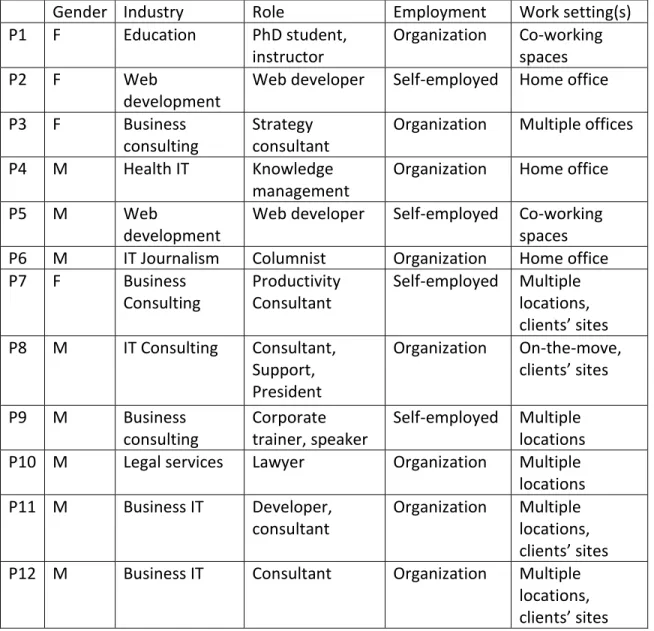
employed by an organization. Relevant demographic details are listed in Table 1 below.
Interviews ranged from 50 to 100 minutes. Information gleaned from early sampling
identified notable issues and further research to explore. All interviews were audio
recorded.
Table 1: Study Participants Demographics
Gender Industry Role Employment Work setting(s)
P1 F Education PhD student,
instructor
Organization Co-working spaces
P2 F Web
development
Web developer Self-employed Home office
P3 F Business
consulting
Strategy consultant
Organization Multiple offices
P4 M Health IT Knowledge
management
Organization Home office
P5 M Web
development
Web developer Self-employed Co-working spaces
P6 M IT Journalism Columnist Organization Home office
P7 F Business
Consulting
Productivity Consultant
Self-employed Multiple locations, clients’ sites
P8 M IT Consulting Consultant,
Support, President
Organization On-the-move, clients’ sites
P9 M Business
consulting
Corporate trainer, speaker
Self-employed Multiple locations
P10 M Legal services Lawyer Organization Multiple
locations
P11 M Business IT Developer,
consultant
Organization Multiple locations, clients’ sites
P12 M Business IT Consultant Organization Multiple
Data Analysis
Data collection and analysis followed initial interviews of a minority of the
participants. I first listened to the first ten transcripts before starting active analysis. I then
selected instances that involved digital practices, barriers and adaptation. Given the
emergence of particular themes over others, notably affordances and conflicts associated
with digital-technology use, subsequent interviews aimed to develop these themes
further, however, without losing focus of the preliminary intent of the project. Audio
recordings were transcribed verbatim and loaded into the analytical software application
NVivo 10.
Primary data analysis was inductive and guided by digital barriers in
technological infrastructures. Qualitative research methodologies included open coding,
initial memoing, focused coding, and integrative memoing. Initial themes were found
through open coding following inductive analysis and further research of IS and Human
Computer Interaction (HCI) literature.
Findings
After analysis, barriers were identified and categorized into groups: 1)
communications and collaboration, which includes knowledge sharing; 2) information
and data management, involving data transfer, preservation, and security; 3)
organizational boundaries, entailing organization restrictions; 4) and spatial
considerations. While there is an admitted overlap between these sections, each
Communication and Collaboration
Through the course of the interviews, the necessity of good communication tools,
was apparent. Many needs were time-sensitive, others for clarity. All participants
indicated that many or all of their associates were remote, that keeping up with them was
priority. Others who were remote from their organization or collaborated with a network
of clients, associated communication technologies as a central locus, one of virtual
spaces, where information was transmitted and knowledge disseminated. Technologies
included phone, email, instant messaging, text messaging, video conference, and
chatrooms.
Infrastructural limitations
Barriers involving infrastructural platforms ranged from devices and applications.
These were proscribed by user limits, perceived or actual; device limitations in features
or capability, application feature depravation, or a combination of the last two. For
instance, most users preferred laptops over tablets for robust or interactive information
work, while a few were explicit about it: “I can’t write on the phone. I—you know—I’m
too old” (P6). When asked whether Dropbox was on her phone, she explicitly reasoned
why she disliked it:
One participant complained about the audio quality on her laptop: “But then I
got an external microphone because the one with my laptop was so crappy that it doesn’t
work” (P1). Another distinguished certain things he could do on his smart phone and
thing he could not:
It’s very limited what you can do. Remote access works, no problem. Anything that re—Skype for example, would not work, because streaming surfaces on the, that type of Wi-Fi connection is terrible. It doesn’t work well. I checked FaceTime, doesn’t work. Doesn’t work at all. So,
iMessage works well, and literally if you do remote access, that’s about it. So yeah, and you cannot be doing anything else. You cannot be
multitasking in any aspect (P8).
Platform multiplicity.
All of our subjects indicated that they use multiple technologies for
communication and collaboration. They include email, phone, instant messaging services,
social media, and text messaging. Working with associates remotely, many participant
emphasized the importance of open communication channels and managing multiple
documents.
Obviously from a lawyer perspective it’s very document driven. So, that’s where being able to manage documents and be able to access documents on the move is very important. Obviously we’ve got, you know,
communications coming in from the clients, so whether that’s coming in via email, phone, video conference, whatever that is, that comes in, in a lot different ways (P10).
For one participant, integrating social technologies into his communication with clients
and vendors had become common, and monitoring them for correspondence necessary.
His experience had shown the emergence of social media as a platform for professional
engagement, even with Facebook:
through. And I never thought it would be a channel. Now LinkedIn has been a very big channel for vendors to me. Vendors use LinkedIn all the time. For clients they’ve used Facebook to message us. They’ve even used Twitter (P8).
He continues with his view of the decline of email as a platform:
Because I think now email is kind of reaching that evolutionary stage where it’s almost as inconvenient as paper mail. Because everybody’s on Facebook, everybody’s on some form of social media. I mean you can look at the statistics. People are checking those type of avenues multiple times a day (P8).
A doctoral student and lecturer said she has a lot of email traffic with students
taking her class.
For my students I always communicate through the course management software, because that way if I send it as an announcement then even if it gets lost in the email. It’s recorded on the announcements page. So even if they’re like, “Oh, I didn’t see the e-mail,” but if you came to the course page you would have seen that the announcement is there with the information (P1).
Information and communication services multiplicity
Checking for those updates, whether on-site or through email notifications, was
not just necessary for the majority. A participant who works with multiple clients and
through multiple mediums bundles those email into one account:
I have a lot of emails. I have the email here, I have email for each of my clients, I have my own corporate email, a Ravel Communications, I’ve got Gmail. They all go to my Outlook. And then Outlook is all structured so that they’ve got their own folders. So I’ve got a Gmail folder within Outlook, and then it’s broken down. I’ve got an A. Ravel Communications folder, I’ve got a Business Radio X folder, I’ve got a CED folder, I have a Smashing Boxes folder, and all of those come into their own, and then they’ve got, Outlook has such great rules you know, I just say every time something comes in from [name] put it in this folder, and it does. I’ll look at it here; if it’s critical I’ll respond to it. But only if it’s absolutely time sensitive and can’t wait another two hours anyway (P3).
This informant bundle voice communication, where his Google Works calls are
I have a Google Works account. I really only use it for voicemail and for recording. It’s silly, but, when you call my Google voice number, it redirects you to my cellphone and my Skype. And if someone calls me, I can record the conversation by pressing 4, before they talk. I have
recorded many conversations. I have yet to listen to a single recording, so I stopped. But it was backup. Really I that’s the main reason I use Google Voice, that it chases me and it records. And I mostly picked it because I could record while talking on the cellphone in case I didn’t have a keyboard in front me. But that very rarely happens.
Client-driven.
Most informants emphasized the importance of maintaining open communication
channels with clients on their preferred platforms (P2, P3, P4, P5, P7, P8, P9, P10, P11).
One imparted perceived difference between his ICT suite and those of his clients:
So they have one organization they need to focus on right, potentially a third party provider. They sit in a tall building in Charlotte, there’s really no need for them necessarily to have five or six different tools to do a job. Whereas for me I need to be able to communicate with various different clients with various different capabilities and the need is different. In an organization they can address their specific needs and find a tool for them whereas us we, some tools are really awesome when it comes to sharing screens, some are much better when it comes to recording an interview and they all have their benefits, and again talking about knowledge sharing. GoToMeeting, they have a phone app, so if you know you have people on the road who might need to literally drive into the side of the road and join a meeting on the phone like a GoToMeeting with a shared screen and you know that’s going to happen and let’s do a go to meeting (P11).
Another commented on the changing role of text messaging with clients, saying that some even preferred it over email and social media channels (P8).
Because clients do not have the same technology use, proficiency, or tendencies,
interacting with them caused more diversity for the majority of participants.
Colleague-driven.
Dynamic use of multiple communication devices also extends with colleagues. Most
colleagues to complete projects or immediate tasks. For the latter, instant messaging
was stressed (P4, P6, P11, P12). A consultant counterpointed the communication practice
difference between himself and his clients:
If that’s not the case and it’s just me and my developer from Georgia I just want to quickly look at something, let’s do Lync; don’t have to schedule anything, it’s right there in the chat and we don’t impair anyone else. It’s a choice, I guess it’s just what you’re comfortable with (P11).
In his organizational practice among colleagues, communication is chosen based on the
efficiency of the task. Collaboration can bounce from email, to instant message, to phone:
whatever is practical.
One noted that even though his company has its own email domain, he and many
of his colleagues use Gmail accounts extensively for company communication (P6). The
downside to this flexibility is that those Gmail and the company one are regularly used
interchangeably. They also use chat in that back-and-forth process:
And then he will read it, and if he has questions, he will shoot me questions via chat usually, or sometimes email, and then I will answer them, we’ll get it in shape, it goes to a copy editor, copy editor makes sure I didn’t misspell Marissa Meyer’s name or anything, and, then she says it’s ready, and then an editorial assistant posts it to the site. (P6).
He also related that they can be concurrently working on the draft together, while
communicating through instant messaging. The breakdown occurs because he doesn’t
know what email service his editor will use: “He actually did the other night. But it
wasn’t anything urgent. I think he knows better than to send me anything urgent on the
[company email]” (P6).
Knowledge management barriers
Knowledge sharing is part and parcel in remote communication. Informants
one device (e.g., P2, P10, P12). One participant admitted a technological generation
gap between her and her colleagues. For collaborative projects with colleagues, email is
the preferred method of sharing drafts of papers, so that there are multiple drafts of the
paper floating around. She persuaded the group to share over the cloud, as she regularly
has done with student peers. She shared her tactic for document naming with metadata,
which was, however, not followed.
There’s the ideal version and then there’s what actually happens that I am a compulsive saver so like every draft of my dissertation that I open up on a given day I will save as dissertation draft 22614 and then if I open it tomorrow it’s 22714 so I go over and over and over and then I have a folder that just says past drafts and then just shovel it all in there. So I’ve been trying to get [a colleague] and the other grant folks to get in the habit of saying you know, we would have like our last project the acronym was CHRIL, Center for Health Reform and Independent Living, and so we would say like CHRIL Grant Proposal 22614, and then so that would be the document and then if [my colleague] was like okay let’s go through and proofread that I would go through track changes, make my edits with the track changes saved and then save it as CHRIL Grant Proposal 22614 Liz edits and then he would go through and either accept them or reject them and save it back as sort of the master document.
Breakdowns occur when users don’t follow the same naming conventions.
Information and Data Management
These barriers can cause issues with data preservation and dispersion of data across
multiple platforms. Breakdowns occur in the latter for information retrieval (P1, P10).
Data preservation through VPN
Saving and preserving documents on a server or machine while using VPN has potential
problems with connections. Internet and server connections can cause disruptions as well
as another user logging in. For participant 12, this mistake manifested itself when he
There are a number of clients, some that have usernames and passwords for your individual users and then there’s others that have one user and you can, you know, any of us can login to do things. Actually this came up in the first couple weeks of me working because I kicked somebody off or I got kicked off myself cause if I’m on the clients machine and then someone else logs in with that I get, I don’t get to keep my session and they don’t, and it doesn’t say oh this user started it just kicks me off completely (P12).
Platform multiplicity
Barriers with integrating data into systems or distributing data were common.
Issues with cloud service multiplicity and preference (e.g. P10, P11, P12) and calendaring
integration (e.g., P3, P6, P10) occurred.
There are issues with having multiple devices and having all the right data in the right place. So in terms of calendaring specifically, you know, anything that’s… so, CED’s, CED, this client that I’m here for, this calendar’s real important. A lot a people here I have to communicate with based on calendaring, and meetings. Because when I’m here we meet, right, that’s what we do more than anything else, because that’s why you have face time, right. So, they’re on Exchange. They’re on Microsoft Exchange. Their Exchange system works better for communicating with Android devices than just Outlook, or even Outlook in the cloud now. So I would like Outlook in the cloud to be as good as Outlook Exchange (P10).
Another use had issues with integration and privacy, and control:
Organizational Boundaries
Participants who were a part of an organization or closely aligned with one indicated
significant boundaries. These involved security measures involving server and software
restrictions.
Server restrictions
Getting access to the company’s servers, and hence vital work information, can be
problematic. For participant 4, when traveling, even though he can find Internet access, if
not an authorized network, he cannot access the company’s servers. Therefore the
accessibility of work resources is compromised.
Getting on internet is really difficult, because if you’re not on a password protected internet, you can’t get on the [company] network. But we do have a way to access our email outside of the [company] network. So I can actually work with anything that comes through my email. I’ll have stuff that’s saved on my desktop, but I can’t access my share drive, or anything like that.
Consequently, he emails himself documents ahead of time, so that he can work with them
on the trip.
Participant 11 related the same problem in working with some clients. Clients may
restrict access to their network by authorizing only specific IP addresses.
So you have situations where companies have set up constraints that I couldn’t connect to their site right here, right now if I wanted to. There are places that have some higher level of security clearances where down to a point where they need to know what IP your request is coming from. I can’t really elaborate too much on the details but the point is there are companies where you know you shouldn’t log on to your phone for instance, because phones are notoriously insecure. Public WiFi is
His spatial freedom is circumscribed by this restriction. He indicated that in
consequence he would prefer not to work outside of the office or his home office.
Data transfer
Since data security is important to many organizations, they may enforce
technological restrictions that prevent data download from company devices and servers.
Such is the case for participant 4. When faced with the challenge of transferring
unclassified work media to his personal computer, on which he had software to modify
the media, he had to leverage numerous strategies and technologies.
I need to get this movie file between my work and my personal computer, and I was trying to figure out ways to do it. I was like, I wish I had
Dropbox. I just can’t—because, our inbox, in addition to being our primary mode of communication, is very, very restricted in the size limitation, so we’re constantly in email jail. So I constantly have to move things to my ShareDrive, in order to make room on my email.
And he’s sending me like video clips that, you know, to download, and I can’t download them on my work computer, so I have to do it on my, I— somehow get it on my home computer, so that I can manipulate it with personal movie software. Then I have to put it on a disk, because they don’t allow flash drives on our work computers. Like you cannot use them at all. You can’t use them at all. So I have to put it on a disk because for some reason they have no way of blocking [that] (P4).
Lack of support
The previous instance illustrates the lack of organizational support, if only
implicit, in which that knowledge worker felt forced to circumnavigate the regulations to
complete project work. Another participant complained that his organization would not
support migrating company email to with his Gmail account, his primary. He felt
Spatial considerations
Among the participants, it was clear that they are presented with challenges when
on both long and short trips. These can be device related, Internet and network access,
and security issues, as discussed in the previous section..
Device Privation
Battery life can be an issue for longer trips, on long flights or in cars where AC
outlets are not available. Aforementioned organizational security measures can also
prevent access to servers and use of information and technologies. As participant 4
explained, he takes both his personal and work laptop on trips:
I actually take both. I’ve been taking my personal laptop and my work laptop, because typically when I’m traveling for work, I’m constantly having to go to the east coast, which is a long flight, so for just for battery life sake, I’ll bring both.
All participants but one indicated that their laptop was crucial for mobility; the
minority found his tablet sufficient in some cases.
VPN access
Smart phones can be used to broadcast networks to which other devices can join.
Participant 9 uses two devices concurrently, one to get the network and the other to do
work: “So I can turn the iPhone on if I’m in area that doesn’t have Wi-Fi, I can turn the
iPhone on to be a hot spot, then I have it for the laptop or the tablet” (P9).
Participant 11 said that he had done this from a client’s site as well as in the car (as a
passenger) on long-distance road travel.
problem in writing it in Word and then once I get to my destination copy and paste it into an e-mail.
Network Privation
These mobile workers sometimes were in states without Internet or network access (e.g.
P4, P9, P11). In the previous section, there was a stated need of employing the
technologies at hand to get work done (P11) but this is not always possible: “Right, but
not in the airplane. So in the airplane, some of them do now. Like on Southwest you can
get Wi-Fi and all that stuff” (P5).
Discussion
Participants in this study employed various strategies to overcome the barriers
existing among systems, whether built into the infrastructural or institutionalized by their
organization; the multiplicity of systems and services; and spatial barriers among
associates and organizational digital infrastructures and support. Analysis of these
barriers expose three primary adoptive strategies. Communication, collaboration, and
organization barriers are addressed through the adoption of particular technology
assemblages: orchestrated infrastructural constellations of technologies that address
contextual, temporal, and spatial dimensional issues (Rossito et al., 2014). Information
and data management barriers are remedied by data and service integration: migrating
data from one or more sources into a central repository, or vice versa. Spatial barriers are
ameliorated by familiarizing oneself with local infrastructure and services and leveraging
Infrastructural Assemblages
While not all participants had free reign to choose their technology, made salient
by organizational, particularly security, concerns, most were able to construct what
Carroll (2008) describes as portfolios of technology: a sense of collecting digital resource
for integration rather than just mere accumulation, which addresses dimensions of
mobility and knowledge work. Those that did not were actants in the classic “push”
models as described by Hagel and Brown (2006) in which organizations push tools on to
workers in a top-down, tightly controlled practice (Huotari & Wilson, 2001). It is
understandable that this model is unpopular among knowledge workers, given their
definition as experts in their field (Drucker, 1999) and independent agents unconstrained
by traditional work roles as well as physical and digital infrastructure. As Emirbayer and
Mische (1998) impart, they garner past experiences, taken with situational relevancy of
the present, to choose technology that facilitates what seamless integration of
technological infrastructure. This phenomenon of smart portfolio development invariably
emerged in all self-employed participants as well as three participants with organizational
membership (P1, P6, P8).
Pairing
A theme that emerged during the interviews was the instance of combining
platforms for communicatory or collaborative tasks. These could be ad hoc or habitual
integrations. Pairing entails combining media for communicating. Leonardi, Needley, and
Greber (2011) explored sequential media pairings of communication devices among
ICTs respective of the richness entailed in the task and practice simultaneous media
paring, using multiple devices conjunctively in simultaneous and antecedent
multi-communicating. They resolved that these practices are ideal for knowledge sharing,
resolving conflicts, and persuading colleagues, but can result in attention fragmentation
and heightened stress.
Concurrent pairing
Participant strategies included using two laptops to circumnavigate organizational
security measures (P4), collaborating through chatroom while writing on word processor
and researching on the Internet (P6), and using his email service to record notes while on
a phone call (P5):
Usually I open up a new mail and, and I just type there, because it’s automatically saved as a draft and everything, and then, you know, at the end of the call, if there’s anything important I’ll send it to myself, or if not I’ll just delete it.
Many participants indicated using several storage services or platforms for the same data:
internal and external hard drives, cloud storage, and other software like OneNote and
EverNote. (e.g. P6, P7, P11) One participant leveraged cloud storage to transfer among
devices, mechanizing a seamless transfer through iCloud between her iPhone and iPad
Mini (P7).
For support with remote clients, this participant leveraged the immediacy and
clarity of phone conversations and then remotely accessed user machines during the call:
Right. So I’m on the phone with the client, and then what I’ll do is, I’ll give an explanation of the issue. I can dial right into their computer, whether it’s from my cell phone, or any device. And then I get to see exactly what they’re doing, and they can create—recreate that scenario (P8).
able to creating a seamless experience for the client.
Sequential pairing
This strategy can involve planning ahead and responding to developing situations.
In communication practices Watson-Manheim and Belanger (2007) found that sequential
media pairings aided managers in resolving conflicts and sharing knowledge. This is
manifest with several participants’ revelations. One informant said she uses email for
most communication while phone calls are reserved for things needing clarification (P2).
Two participants talked about dialogue bouncing from email, to instant message, to
phone, given the circumstances and practically of the situation, both contextually and
spatially (P6, P11, P12).
Another adaption using sequential pairing was to deal with this informant’s
barrier with network security restrictions. When he traveled he could not login to the
network unless at designated work sites, so he consequently emails himself documents
ahead of time, so that he can work with them on the trip (P4). Another participant, while
offline, has a practice of writing emails and blogs in a word processor, and then copying
them to respective platforms once online.
Technology switchbacks
Some of the participants said they switch between two different technologies for the same
task, depending on the richness. Even with technologies that share the same function,
note-taking, it is not uncommon to have disparate features and complexity. One
participant used OneNote for robust notes and an iPhone app for short or ephemeral note
Specialized ICTs
These are technologies that users employed for efficiency, mobility, and
ease-of-use, or collaborative features. Organizational software allowed one user to make lists of
things-to-do, tag tasks, and show completions (P1, P10). Social media apps on her phone
help one participant stay in connection with associates while on the go, and removed
email out of the loop of checking social-media notifications and inter-service
communication (P3).
Integrative ICTs
Technologies that integrated features, data, and services aided participants’
efficiency, efficacy, and diffused information overload in minimizing the number of
applications and processes with which they would otherwise interact. The key here was
seamless integration of features. Google Drive was a popular medium for collaborating in
composing documents, sharing documents and files. (e.g. P1, P10, P12). Project
management web-software package BaseCamp integrated communication, file storage,
and task management into one environment, keeping clients abreast of development
lifecycle with information and email alerts (P11, P12). Using Siri on the iPhone
incorporated voice technologies to read email, allowing the participant to digest email
while driving (P8). Among instant messaging services, technologies such as
GoToMeeting or ShareStream were advantageous for screen-sharing and taking control,
instrumental for working on others’ computers remotely (e.g., P8, P11, P12). An
infrastructure that was pushed in a top-down was a popular mode of collaborative
In the process of communicating the practice seamless, they are able to dynamically
drive multiple infrastructures to share data and screens as well as transmit and preserve
knowledge.
Mobile-capable ICTs
Mobile friend technologies enable spatial, and consequently, temporal, freedoms. By
granting users the ability to access information and tools while on the go, their flexibility
to meet with clients, short- and long-distance travel, and to work from anywhere
immediately convenient is heightened. Using specialized phone apps like WorkFlowy
(P1), BaseCamp (P11, P12), social media services (P3, P4) and voice-enabled, Natural
Language Processing (NLP) services like Siri (P7, P8) are examples for leveraging
portable ICT devices to stay up to date and manage information.
Interoperable ICTs
Using cross-platform technologies were important for participants using multiple devices,
like tablets, and for sharing ICT platforms among team members and client, enabling
personal and group flexibility and extended mobility. Basecamp and Google Drive are
prime examples previously mentioned. Because these ICT platform are web-based, they
enable shared experiences for collaborators whether using Mac or PC devices. While
device screen sizes result in different viewing experience, since these platforms use
responsive design techniques, there is no actual loss of information conveyance. This
Integration of data and services
These are strategies which participants enacted to embrace one or more platforms for
richer, extended features, for convenience, and data assurance. By bring together seamful
technologies, they create seamless experiences in one platform.
Centralizing
A participant has a centralizing strategy for voice communication, where his Google
Works calls are forwarded to his phone or Skype. He leverages these technologies for
their greatest use of their features, recording for Google Works calls and the convenience
of using the mediums of phone or Skype. Although he admits he quit the practice after
determining he didn’t need recordings, this tactic instilled confidence that he had a saved
recording, thus enabling his mobility and spatial flexibility. Although he admits he quit
the practice after determining he didn’t need recordings, this tactic instilled confidence
that he had a saved recording, thus enabling his mobility and spatial flexibility (P6).
One participant explained her method to aggregate and organize all her email.
Because she works with multiple clients and through multiple mediums, her strategy was
to centralize all her emails by importing them into one Outlook account, creating folders
for each email (P3). Another manages all incoming documents from clients into one
cloud storage systems called Box; he states that preserving them in one manageable
Distributing
This involves transferring data among systems that are not interoperable, so require
manipulation in order to achieve. This could be in-place by a system or not. One
participant distributed communications with students through the course management
software, for in so doing she has an official record of communication besides email (P1).
Although students could find announcements in a centralized repository, since they were
also emailed, it is a distribution tactic.
Two participants said they migrated data among systems, to make it accessible across
devices and software platforms. (P10, P11). One explained his organization’s practice
migrating data across applications and platforms:
But they integrate with each other. So what we’ll do is if we have a deadline in the case, it gets entered into Clio, which then gets pushed to the Google Calendar that we have, then, then gets pushed to mobile devices, or computers. So of people want it locally. So, for that gaze into Clio and it shows up on my calendar on my iPhone or iPad. You know, so all nicely integrated. So that’s why we chose these systems. So you can be able to access information wherever. And you know, people have multiple calendars, so I’ve got you know my law firm calendar, my Curio calendar, I’ve got a family calendar, and those are Google oriented, so they all tie together nicely, so I can access those from any device (P10).
Local assets awareness
Taking advantage of local assets while mobile is a key strategy to overcome
spatial barriers. All of the participants said that they need Internet or network access to
get their daily work done. Strategies including using airport and coffee-shop WiFi, VPN
hotspots using cellular networks (P9, P11), or client’s infrastructures (P8, P11).
Informants emphasized the important of understanding local infrastructures capabilities
To overcome spatial barriers where WiFi was unavailable, two participants
created hot spots with their phones to VPN on laptops, even in highly mobile states (P9,
P11). One organization where employees VPN into multiple clients’ computers had a
problem with users getting kicked out when another use logged in with the company
account. They decided to leverage Lync to broadcast when and what machine employees
are on (P12). Another adaption was using Siri to leave voicemail messages to, as
reminders, appointment time, etc. (P7).
Conclusion
In this exploratory examination of a small representative group of mobile
knowledge workers, digital barriers among participants’ infrastructural systems emerged.
By importing the language of seams (Vertesi, 2014) into this analytical framework,
manifested the existence of conflicts among device ecologies that cause single- or
multi-instance multi-infrastructural torque and gaps in technologies that cause recurrent
breakdowns and which warrant solutions. This trend of dichotomies underscored the
necessity of adoptive solutions.
Participants were seen overlaying or stitching together infrastructural seams,
pairing technologies to perform various tasks, ad hoc and habitually; integrating
technologies and data into constellations (Rossitto, 2014) of platforms and services; and
taking advantage resources at their fingertip. Both success and failures were seen.
Failures prompted an urgency to enact changes. With these adoptive strategies, they
across time and space, and guard from information overload, by discriminating among
the number of platforms to use.
This analysis identifies barriers and strategies to overcome them. While some
barriers may remain persistent, such as organizational barriers, this study hopes to aid the
studied community, along with their organizations. Given the rising population of mobile
knowledge work, and the emergence of new technologies, it is hoped that future studies
will delve into these issues more deeply through shadowing techniques, diaries, and
Works Cited
Barley, S. R., & Kunda, G. (2006). Contracting: A new form of professional practice. The Academy of Management Perspectives, 20(1), 45-66.
Bowker, G. C. (1994). Science on the run: Information management and industrial geophysics at Schlumberger, 1920-1940. MIT press.
Carroll, J. (2008). Theorizing the IT artifact for mobility: a portfolio, not a singularity. ICIS 2008 Proceedings, 64.
Chae, B., & Poole, M. S. (2005). The surface of emergence in systems development: agency,
institutions, and large-scale information systems. European Journal of Information Systems, 14(1), 19-36.
Chen, L., & Nath, R. (2008). A socio-technical perspective of mobile work. Information, Knowledge, Systems Management, 7(1), 41-60.
Ciolfi, L., & de Carvalho, A. F. P. (2014). Work Practices, Nomadicity and the Mediational Role
of Technology. Computer Supported Cooperative Work (CSCW), 23(2), 119-136. Costas, J. (2013). Problematizing mobility: A metaphor of stickiness, non-places and the kinetic
elite. Organization Studies, 34(10), 1467-1485.
Cousins, K. C., & Robey, D. (2005). Human agency in a wireless world: Patterns of technology
use in nomadic computing environments. Information and Organization, 15(2), 151-180. Creplet, F., Dupouet, O., Kern, F., Mehmanpazir, B., & Munier, F. (2001). Consultants and
Czarniawska, B. (2011). Nomadic work as life-story plot. Computer Supported Cooperative Work (CSCW), 22(2-3), 1-17.
Davis, G. B. (2002). Anytime/anyplace computing and the future of knowledge
work. Communications of the ACM, 45(12), 67-73.
de Carvalho, A., Ciolfi, L., & Gray, B. (2011). The Making of Nomadic Work: Understanding
the Mediational Role of ICTs. In M. Cruz-Cunha & F. Moreira (Eds.), Handbook of Research on Mobility and Computing: Evolving Technologies and Ubiquitous Impacts (pp. 381-396). Hershey, PA: IGI Global.
Drucker, P. F. (1999). Knowledge-worker productivity: The biggest challenge. The knowledge management yearbook 2000-2001.
Emirbayer, M., & Mische, A. (1998). What is agency? 1. American journal of sociology, 103(4), 962-1023.
Erickson, I., Jarrahi, M. H., Thomson, L., & Sawyer, S. MORE THAN NOMADS: MOBILITY,
KNOWLEDGE WORK, AND INFRASTRUCTURE.
Florida, R. L. (2002). The rise of the creative class: and how it's transforming work, leisure,
community and everyday life. Basic books.
Galison, P. (1997). Image and logic: A material culture of microphysics. University of Chicago
Press.
Gieryn, T. F. (1999). Cultural boundaries of science: Credibility on the line. University of
Chicago Press.
Herbsleb, J. D. (2007). Global software engineering: The future of socio-technical coordination.