UNIVERSITY OF ZAGREB
FACULTY OF ELECTRICAL ENGINEERING AND COMPUTING
MASTER’S THESIS no. 608
Network Host Discovery and Service
Detection Tools
Marin Marži´c
Zagreb, Croatia
July 2013.
C
ONTENTS
1. Introduction 1
2. Host Discovery in Nmap 2
2.1. Host Discovery . . . 2
2.2. Introduction to Host Discovery in Nmap . . . 2
2.3. No Port Scan (-sn) . . . 3 2.4. No Ping (-Pn) . . . 3 2.5. List Scan (-sL) . . . 3 2.5.1. Examples . . . 4 2.6. TCP SYN Ping (-PS) . . . 4 2.6.1. Examples . . . 4
2.7. TCP ACK Ping (-PA) . . . 6
2.7.1. Examples . . . 7
2.8. UDP Ping (-PU) . . . 8
2.8.1. UDP Payloads: Thenmap-payloadsFile . . . 8
2.8.2. Examples . . . 9
2.9. SCTP INIT Ping (-PY) . . . 11
2.9.1. Examples . . . 11
2.10. ICMP Ping Types (-PE,-PP,-PM) . . . 14
2.10.1. Examples . . . 14
2.11. IP Protocol Ping (-PO) . . . 16
2.11.1. Examples . . . 16
2.12. ARP Ping (-PR) . . . 18
2.12.1. Examples . . . 18
3. Service Detection in Nmap 19 3.1. Service Detection . . . 19
3.2. Introduction to Service Detection in Nmap . . . 19
3.3. Thenmap-service-probesApproach . . . 20
3.3.1. Thenmap-service-probesFile Format . . . 21
3.3.2. The Process . . . 25
3.4. The Nmap Scripting Engine (NSE) Approach . . . 26
3.4.1. Script Categories . . . 28
3.4.2. Script Format . . . 30
3.4.3. Information Passed to a Script . . . 33
3.4.4. The Registry . . . 36
3.4.5. Mutexes . . . 36
4. Developing Extensions to Nmap’s Service Detection 38
4.1. Introduction . . . 38
4.2. Murmur . . . 39
4.3. Ventrilo . . . 41
4.4. TeamSpeak 2 . . . 47
4.4.1. TCP: The TCPQuery Interface (Admin Telnetd) Port . . . 47
4.4.2. TCP: The Web Admin Interface (HTTP) Port . . . 48
4.4.3. UDP: The Voice and Control Port (The TeamSpeak 2 Protocol) . . 48
4.5. TeamSpeak 3 . . . 51
4.5.1. TCP: The ServerQuery Interface (Admin Telnetd) Port . . . 52
4.5.2. UDP: The Voice and Control Port (The TeamSpeak 3 Protocol) . . 53
4.6. The All-Seeing Eye Protocol . . . 54
4.7. Freelancer . . . 57
5. Summary 60
Bibliography 61
1. Introduction
Network host discovery and service detection are at the core of any network exploration en-deavor. Being able to tell the status of machines on a network is an obvious requirement for continuous network maintenance. Assessing which hosts are active and, more importantly, knowing which applications and services they are running is critical to network security. System and network administrators have been known to continue using deprecated software versions, which is in itself a cause for vigil. On top of that, the ordinary user is unpredictable and liable to run almost anything on a corporate computer, potentially exposing the network to unexpected vectors of attack. As a network grows in scale and complexity, the likeli-hood of such unchecked vulnerabilities existing increases. Therefore, it is wise to regularly scan for out of date and otherwise vulnerable or unknown applications and services, so that potential security holes can quickly be detected and made subject to further inspection.
It is commonplace today that an organization should have servers and various network segments spread out across the globe, but maintained and audited over the Internet from a few fixed locations. To do such crucial operations in a timely manner and offset the high latencies caused by long distance communication, developing efficient host discovery and service detection methods is necessary. Time is rarely an abundant resource, and that in itself provides a constant motivation to further improve on these methods. Furthermore, the never-ending influx of new applications and service versions ensures that service detection will always need patching in order to keep up.
Whether it is a network administrator performing regular inventory, a security expert conducting an audit, or an enthusiast probing to satisfy their curiosity, they must choose ap-propriate tools for the job at hand. Nmap was chosen for this thesis as the token network exploration and security auditing utility. It is free and open-source, has an active developer and user community, and offers powerful and relatively simple ways of developing exten-sions to its service detection. It also features different host discovery methods and enables for forging custom probes. Several additions to Nmap’s service detection were developed as a part of this thesis. Nmap Versions 6.25 and 6.26SVN r30898 (fixed SCTP INIT ping patch) were used for most of the development, and while creating examples of usage. A comprehensive description of Nmap’s features can be found in Nmap Network Scanning [1], and some of it has been updated in the online version [2] to reflect recent changes. That work has been used throughout the thesis as the base source when addressing Nmap functionality, and will generally not be explicitly cited further.
Chapter two first introduces some basic terms and issues that arise when dealing with network host discovery, and then continues to discuss it through Nmap’s host discovery tech-niques and examples depicting their use in some common scenarios. As with host discovery, service detection is first introduced and then addressed in greater detail through Nmap’s im-plementation in chapter three. Chapter four holds descriptions and usage examples of devel-oped additions to Nmap’s service detection, as well as descriptions of the service protocols involved.
The focus of the thesis will be almost exclusively on IPv4 networks, most often on TCP, UDP, and SCTP, so services will generally be assumed to run behind port numbers. Some familiarity with IPv4, TCP, UDP, SCTP, and general networking concepts is assumed.
2. Host Discovery in Nmap
2.1.
Host Discovery
Network host discovery (or simply host discovery) is the process of determining whether an IP address is registered to an active host. A host will be considered active if it implements any network service that is responsive when given the proper input, even if it is only a func-tional IP, TCP or UDP stack. An inactive host cannot be coerced into responding, making it effectively nonexistent within the context of the network. Host discovery techniques involve sending probes that are known to commonly cause hosts to respond, e.g. an ICMP echo re-quest (as sent by the ubiquitous ping program) or an ARP rere-quest on a local area network. If a host responds in any way to to any probe it receives, it can be marked as active. However, if such techniques do not procure a reply, it does not necessarily mean the host is inactive. The right probes may just not have been sent.
If a there is a service process running and listening on a port number, the port is said to be
open. In the case of TCP an open port means that the remote host responds with a SYN/ACK packet upon receiving a SYN packet. For UDP an open port means that the service running behind the port is responsive when sent the proper payload. If there is no service running on a port number, the port is said to beclosed. Attempting to communicate with a closed port via TCP will usually cause the remote host to reply with a RST packet. Sending to a closed UDP port will generally cause the remote host to reply with an ICMP port unreachable error packet. If the remote host is simply ignoring (i.e. dropping, blocking, not responding to) packets sent to a certain port, the port is said to befiltered. The port is also said to be filtered, orpolitely filtered, if the host does not directly respond to the what it was sent, but instead of ignoring received packets it replies with an ICMP port or protocol unreachable error.
Using host discovery to reduce a set of IP ranges into a list of active hosts before con-ducting extensive port scans and service detection can greatly reduce the total scan duration, because only hosts determined to be active are interrogated further. Such filtering may ex-clude potentially interesting active hosts that remain undiscovered by the chosen host dis-covery probes. Yet running a full port and service scan on the entire IP range may take far too long. That is why choosing the appropriate host discovery probes is crucial in achieving an acceptable scan duration, while still discovering the right active hosts.
2.2.
Introduction to Host Discovery in Nmap
A more comprehensive look at these and other Nmap features can be found in Nmap Network Scanning [1] and the online Nmap Reference Guide [2]. These are the sources from which most of the information in this chapter was gathered (some taken verbatim or with minor alterations).
By default, Nmap only performs heavy probing such as port scans and version detection against hosts that are found to be active during the host discovery phase. It is possible to perform only host discovery (the-snoption), or to skip it altogether and run scans against all specified targets (the-Pnoption).
Nmap allows for customizing the set of host discovery probes used when determining if the chosen target hosts are active. If no specific host discovery technique has been specified, a default set of probes is used (an ICMP echo request, TCP SYN to port 443, TCP ACK to port 80, and an ICMP timestamp request). If multiple probes are specified, they will be sent in parallel.
Using most host discovery techniques and port scan types usually requires a privileged (root) user account on Unix systems as Nmap needs to send and receive raw packets. A
connectsystem call is automatically initiated as a workaround for unprivileged users at-tempting to perform TCP or ICMP based host discovery. In that case only SYN packets are sent to ports 80 and 443 on the target hosts, instead of the previously mentioned default set of probes. Ifconnectreturns with a quick success or anECONNREFUSEDfailure, the under-lying TCP stack must have received a SYN/ACK or RST and the host is marked active. If
connecttimes out, the host is marked as inactive. Using an administrator account on Win-dows is recommended, although Nmap sometimes works for unprivileged users on that plat-form when WinPcap1 has already been loaded into the OS. If a privileged user tries to scan
targets on a local area network, ARP requests are used unless the--disable-arp-ping
or--send-ipoptions are specified.
Following are descriptions of host discovery techniques and related options employed by Nmap, as well as examples of some common usage scenarios. Nmap’s output in the examples has been cut for brevity.
2.3.
No Port Scan (
-sn
)
Selecting this option puts Nmap in a pure host discovery mode and is often known as aping scanorping sweep, as it only prints out confirmed active hosts without performing further port scanning. It allows for light reconnaissance of a target network without attracting much attention. It is also more reliable than pinging the broadcast address because many hosts do not reply to broadcast queries. System administrators often find this option valuable as it can be used to count available machines on a network or monitor server availability.
In previous versions of Nmap, the option-snwas known as-sP.
2.4.
No Ping (
-Pn
)
Selecting this option causes Nmap to skip the host discovery stage altogether and to port scan all targets as though they were found to be active. For machines on a local area network, ARP scanning will still be performed (unless--disable-arp-pingis specified) because Nmap needs MAC addresses to further scan target hosts.
In previous versions of Nmap, the option-Pnwas known as-P0and-PN.
2.5.
List Scan (
-sL
)
The list scan is not an actual host discovery technique in that selecting it simply lists each of the specified target hosts, without sending any packets their way. Options for higher level functionality such as port scanning, OS detection, or ping scanning cannot be combined
1A tool Nmap relies on for link-layer network access in Windows environments. Allows applications to
with this option. By default, reverse-DNS resolution is performed on the hosts, which may provide useful information. The total number of listed IP addresses (target hosts) is reported at the end. The list scan can serve as a good sanity check by helping ensure that the proper targets have been chosen.
2.5.1.
Examples
The list scan is useful for checking exactly which targets have been selected, when more complicated target hosts and networks are specified.
# nmap -n -sL www.google.com www.nmap.org 192.168.1-3.10,20 192.168.4.1/30
Starting Nmap 6.25 ( http://nmap.org )
Nmap scan report for www.google.com (173.194.35.48) Nmap scan report for www.nmap.org (173.255.243.189) Nmap scan report for 192.168.1.10
Nmap scan report for 192.168.1.20 Nmap scan report for 192.168.2.10 Nmap scan report for 192.168.2.20 Nmap scan report for 192.168.3.10 Nmap scan report for 192.168.3.20 Nmap scan report for 192.168.4.0 Nmap scan report for 192.168.4.1 Nmap scan report for 192.168.4.2 Nmap scan report for 192.168.4.3
Nmap done: 12 IP addresses (0 hosts up) scanned in 0.04 seconds
2.6.
TCP SYN Ping (
-PS
)
An empty TCP packet with the SYN flag set is sent as a host discovery probe. If specified by an unprivileged user on a Unix system, theconnectworkaround will be used instead. The default destination port is 80. Alternate ports can be specified as a parameter (e.g.-PS22or
-PS22-25,80,113,1050,35000).
The SYN flag suggests to the target host that there is an attempt to establish a connection. If the destination port is closed, a RST packet will be sent back. If the port happens to be open, the target will take the second step of a TCP three-way-handshake by responding with a SYN/ACK TCP packet. The machine running Nmap then breaks the process by responding with a RST, rather than sending an ACK packet which would complete the three-way-handshake and establish a full connection. The RST packet is sent by the kernel of the machine running Nmap in response to the unexpected SYN/ACK, not by Nmap itself. Receiving either the RST or SYN/ACK response would indicate that the host is active.
2.6.1.
Examples
TCP SYN Ping of Open Port 80
A SYN ping of port 80 on one of Google’s web servers discovers that it is active, as expected.
# nmap -d --packet-trace -n -sn -PS www.google.com
Starting Nmap 6.25 ( http://nmap.org ) Initiating Ping Scan
Scanning www.google.com (173.194.35.52) [1 port]
SENT (0.0149s) TCP 192.168.1.20:33305 > 173.194.35.52:80 S RCVD (0.0607s) TCP 173.194.35.52:80 > 192.168.1.20:33305 SA We got a TCP ping packet back from 173.194.35.52 port 80 Completed Ping Scan, 0.05s elapsed (1 total hosts)
Nmap scan report for www.google.com (173.194.35.52) Host is up, received syn-ack (0.046s latency).
Nmap done: 1 IP address (1 host up) scanned in 0.06 seconds Raw packets sent: 1 (44B) | Rcvd: 1 (44B)
# nmap -PS SYN (request port 80 connection)
SYN/ACK (open port; connection accepted) RST (break handshake; sent by kernel)
Figure 2.1:TCP SYN ping of open port 80
TCP SYN Ping of Closed Port 80
A SYN ping of port 80 on an IRC server discovers the host when a RST response is received. This IRC server does not seem to be hosting a web site and was found to be active by a probe sent to the closed port 80.
# nmap -d --packet-trace -n -sn -PS quakenet.underworld.no
Starting Nmap 6.25 ( http://nmap.org ) Initiating Ping Scan
Scanning quakenet.underworld.no (158.38.8.251) [1 port] SENT (0.0146s) TCP 192.168.1.20:58641 > 158.38.8.251:80 S RCVD (0.0880s) TCP 158.38.8.251:80 > 192.168.1.20:58641 RA We got a TCP ping packet back from 158.38.8.251 port 80 Completed Ping Scan, 0.07s elapsed (1 total hosts)
Nmap scan report for quakenet.underworld.no (158.38.8.251) Host is up, received reset (0.073s latency).
Nmap done: 1 IP address (1 host up) scanned in 0.09 seconds Raw packets sent: 1 (44B) | Rcvd: 1 (40B)
# nmap -PS SYN (request port 80 connection)
RST (closed port; connection rejected)
Figure 2.2:TCP SYN ping of closed port 80
TCP SYN Ping of Filtered Port 80
A SYN ping of port 80 on another IRC server gets no response. Nmap is not able to determine that the host is active.
# nmap -d --packet-trace -n -sn -PS quakenet.xs4all.nl
Starting Nmap 6.25 ( http://nmap.org ) Initiating Ping Scan
Scanning quakenet.xs4all.nl (194.109.129.222) [1 port]
SENT (0.0718s) TCP 192.168.1.20:40502 > 194.109.129.222:80 S SENT (1.0728s) TCP 192.168.1.20:40503 > 194.109.129.222:80 S Completed Ping Scan, 2.00s elapsed (1 total hosts)
Nmap scan report for quakenet.xs4all.nl (194.109.129.222) [host down, received no-response]
Nmap done: 1 IP address (0 hosts up) scanned in 2.08 seconds Raw packets sent: 2 (88B) | Rcvd: 0 (0B)
A SYN ping of port 6667 (IRC server port) shows that the host is, in fact, active.
# nmap -d --packet-trace -n -sn -PS6667 quakenet.xs4all.nl
Starting Nmap 6.25 ( http://nmap.org ) Initiating Ping Scan
Scanning quakenet.xs4all.nl (194.109.129.222) [1 port]
SENT (0.0134s) TCP 192.168.1.20:63982 > 194.109.129.222:6667 S RCVD (0.0476s) TCP 194.109.129.222:6667 > 192.168.1.20:63982 SA We got a TCP ping packet back from 194.109.129.222 port 6667 Completed Ping Scan, 0.04s elapsed (1 total hosts)
Nmap scan report for quakenet.xs4all.nl (194.109.129.222) Host is up, received syn-ack (0.034s latency).
Nmap done: 1 IP address (1 host up) scanned in 0.05 seconds Raw packets sent: 1 (44B) | Rcvd: 1 (44B)
# nmap -PS SYN (request port 80 connection)
SYN (no response; try again)
Figure 2.3:TCP SYN ping of filtered port 80
2.7.
TCP ACK Ping (
-PA
)
An empty TCP packet with the ACK flag set is sent as a host discovery probe. If specified by an unprivileged user on a Unix system, theconnect workaround will be used instead (effectively sending a SYN packet instead of an ACK packet). The default destination port is 80. Alternate ports can be specified as a parameter (e.g. -PA22or-PA22-25,80,113, 1050,35000).
The ACK packet purports to be acknowledging data over an established TCP connection, but no such connection exists. Remote hosts should always respond with a RST packet, disclosing their existence in the process.
Stateless firewalls will often be configured to block incoming TCP connections (SYN packets) except for those destined for public services. When such a firewall is in place, SYN probes will likely be filtered when sent to closed ports, but the ACK probe would go through
those rules. Firewalls with stateful rules can be configured to block unexpected packets, in which case an ACK probe will probably fail, but the SYN probe might go through. Prop-erly configured firewalls that combine these approaches are commonplace now. Regardless, using both SYN and ACK ping probes maximizes the chances of bypassing firewalls and discovering an active host.
2.7.1.
Examples
TCP ACK Ping of Open or Closed Port 80
An ACK ping of port 80 on a LAN router makes a discovery. The port is actually open and hosts an HTTP management service for the router, but the results would be the same with a closed port. The host replies with a RST packet and reveals itself.
# nmap --disable-arp-ping -d --packet-trace -n -sn -PA 192.168.1.1
Starting Nmap 6.25 ( http://nmap.org ) Initiating Ping Scan
Scanning 192.168.1.1 [1 port]
SENT (0.0020s) TCP 192.168.1.20:64116 > 192.168.1.1:80 A RCVD (0.0046s) TCP 192.168.1.1:80 > 192.168.1.20:64116 R We got a TCP ping packet back from 192.168.1.1 port 80 Completed Ping Scan, 0.00s elapsed (1 total hosts)
Nmap scan report for 192.168.1.1
Host is up, received reset (0.0027s latency). MAC Address: 38:C8:5C:00:DE:AD (Cisco Spvtg)
Nmap done: 1 IP address (1 host up) scanned in 0.01 seconds Raw packets sent: 1 (40B) | Rcvd: 1 (40B)
# nmap -PA ACK
RST (received an unexpected ACK)
Figure 2.4:TCP ACK ping of open or closed port 80
TCP ACK Ping of Filtered Port 80
An ACK ping of port 80 on one of Google’s web servers produces no results. Google must be filtering invalid TCP traffic on this port.
# nmap -d --packet-trace -n -sn -PA www.google.com
Starting Nmap 6.25 ( http://nmap.org ) Initiating Ping Scan
Scanning www.google.com (173.194.35.50) [1 port]
SENT (0.0142s) TCP 192.168.1.20:53269 > 173.194.35.50:80 A SENT (1.0151s) TCP 192.168.1.20:53270 > 173.194.35.50:80 A Completed Ping Scan, 2.00s elapsed (1 total hosts)
[host down, received no-response]
Nmap done: 1 IP address (0 hosts up) scanned in 2.02 seconds Raw packets sent: 2 (80B) | Rcvd: 0 (0B)
# nmap -PA ACK
ACK (no response; try again)
Figure 2.5: TCP ACK ping of filtered port 80
2.8.
UDP Ping (
-PU
)
A UDP packet is sent as a host discovery probe. It cannot be used by an unprivileged user on a Unix system. The default destination port is 40125. Alternate ports can be specified as a parameter (e.g. -PU31337or-PU22-25,80,113,1050,35000).
For most ports the packet will be empty. A protocol-specific payload that is more likely to get a response will be sent to ports specified in the nmap-payloads file. The
--data-lengthoption can be used to send a fixed-length random payload to every port or to disable payloads (--data-length 0).
The UDP probe should elicit an ICMP port unreachable packet when sent to a closed port, which signifies to Nmap that the machine is active. A lack of a response or the arrival of other ICMP errors such as host/network unreachable or TTL exceeded is indicative of a down or unreachable host. If an open port is reached, most services ignore the empty packet, hence the default probe port 40125 which is highly unlikely to be in use. If a service happens to respond to a UDP packet, the host will also be marked as active. The primary advantage of the UDP ping technique is that it bypasses firewalls and filters that only screen TCP.
2.8.1.
UDP Payloads: The
nmap-payloadsFile
UDP scanning is difficult because most services do not send a reply to an empty probe, making it impossible to distinguishopenandfilteredports. For some ports, Nmap knows a payload that tends to elicit a response and is safe to send instead of an empty probe. Such payloads are stored in thenmap-payloadsfile.
Each entry in the nmap-payloadsfile begins with a protocol name (only udp is sup-ported), followed by a comma-separated list of ports. After that comes the payload data as one or more C-style quoted strings that will be concatenated. Comments preceding each entry typically say what the probe means and what kind of response is expected.
Example entry fromnmap-payloads:
# DNSStatusRequest
udp 53 "\x00\x00\x10\x00\x00\x00\x00\x00\x00\x00\x00\x00"
This example shows that Nmap will send a specific UDP probe payload that is more likely to get a response than an empty probe when probing the UDP port 53.
2.8.2.
Examples
UDP Ping of Open Port 53 (nmap-payloadsprobe)
A UDP ping of port 53 finds an active Yahoo DNS server. The sent UDP probe has a specific payload (iplen=40) chosen to elicit responses from DNS servers, as they are often found on port number 53. The payload is read from thenmap-payloadsfile (described in "2.8.1 UDP Payloads: Thenmap-payloadsFile").
# nmap -d --packet-trace -n -sn -PU53 ns1.yahoo.com
Starting Nmap 6.25 ( http://nmap.org ) Initiating Ping Scan
Scanning ns1.yahoo.com (68.180.131.16) [1 port]
SENT (0.0235s) UDP 192.168.1.20:48922 > 68.180.131.16:53 iplen=40 RCVD (0.1560s) UDP 68.180.131.16:53 > 192.168.1.20:48922
In response to UDP-ping, we got UDP packet back from 68.180.131.16:53 Completed Ping Scan, 0.13s elapsed (1 total hosts)
Nmap scan report for ns1.yahoo.com (68.180.131.16) Host is up, received udp-response (0.13s latency).
Nmap done: 1 IP address (1 host up) scanned in 0.16 seconds Raw packets sent: 1 (40B) | Rcvd: 1 (40B)
# nmap -PU Nmap’s service-specific UDP payload
UDP service response
Figure 2.6:UDP ping of open port 53 (nmap-payloadsprobe)
UDP Ping of Open or Filtered Port 53 (ignored payload or dropped packets)
A UDP ping of port 53 on the same Yahoo DNS server as in the previous example. This time an empty probe is sent instead of the service-specific probe (the relevant line was commented out of the nmap-payloads file). The empty UDP probe (iplen=28) is unsuccessful in getting the host to reply, so Nmap can not conclude that the host is active. The port is actually open as demonstrated by the previous example, but in this case it is indistinguishable from a filtered port. This situation represents the main issue with UDP pings sent to open ports.
# nmap -d --packet-trace -n -sn -PU53 ns1.yahoo.com
Starting Nmap 6.25 ( http://nmap.org ) Initiating Ping Scan
Scanning ns1.yahoo.com (68.180.131.16) [1 port]
SENT (0.0144s) UDP 192.168.1.20:57132 > 68.180.131.16:53 iplen=28 SENT (1.0156s) UDP 192.168.1.20:57133 > 68.180.131.16:53 iplen=28 Completed Ping Scan, 2.00s elapsed (1 total hosts)
Nmap scan report for ns1.yahoo.com (68.180.131.16) [host down, received no-response]
Nmap done: 1 IP address (0 hosts up) scanned in 2.02 seconds Raw packets sent: 2 (56B) | Rcvd: 0 (0B)
# nmap -PU Empty UDP packet
Empty UDP packet (no response; try again)
Figure 2.7:UDP ping of open or filtered port 53 (ignored payload or dropped packets)
UDP Ping of Closed Port 53
A UDP ping of port 53 on an IRC server gets an ICMP port unreachable reply, which indi-cates that the port is closed and the host active. The IRC server was unlikely to also function as a DNS server. UDP probes work best when sent to ports unlikely to be in use, because they can cause hosts to reply with such ICMP port unreachable errors.
# nmap -d --packet-trace -n -sn -PU53 quakenet.underworld.no
Starting Nmap 6.25 ( http://nmap.org ) Initiating Ping Scan
Scanning quakenet.underworld.no (158.38.8.251) [1 port]
SENT (0.0947s) UDP 192.168.1.20:40033 > 158.38.8.251:53 iplen=40 RCVD (0.1952s) ICMP 158.38.8.251 > 192.168.1.20
Port 53 unreachable (type=3/code=3) Got port unreachable for 158.38.8.251
Completed Ping Scan, 0.10s elapsed (1 total hosts)
Nmap scan report for quakenet.underworld.no (158.38.8.251) Host is up, received port-unreach (0.10s latency).
Nmap done: 1 IP address (1 host up) scanned in 0.20 seconds Raw packets sent: 1 (40B) | Rcvd: 1 (68B)
# nmap -PU Nmap’s service-specific UDP payload
ICMP port unreachable error (type 3, code 3)
Figure 2.8:UDP ping of closed port 53
UDP Ping of Filtered Port 53 (Other ICMP Destination Unreachable Errors)
A UDP ping of port 53 discovers a Deutsche Telekom router. It replied with an ICMP destination unreachable: "Communication administratively prohibited" packet (type 3, code 13). Nmap classifies UDP ports as filtered not only if the host does not reply, but also if it replies with certain ICMP destination unreachable packets (type 3, codes 1, 2, 9, 10, or 13). The latter kind of filtered port reveals the host as active.
# nmap -d --packet-trace -n -sn -PU53 pD9E227CA.dip0.t-ipconnect.de
Starting Nmap 6.25 ( http://nmap.org ) Initiating Ping Scan
Scanning pD9E227CA.dip0.t-ipconnect.de (217.226.39.202) [1 port] SENT (0.1528s) UDP 192.168.1.20:34845 > 217.226.39.202:53 iplen=40 RCVD (0.2335s) ICMP 217.226.39.202 > 192.168.1.20
Communication administratively prohibited by filtering (type=3/code=13) Got destination unreachable for 217.226.39.202
Completed Ping Scan, 0.08s elapsed (1 total hosts)
Nmap scan report for pD9E227CA.dip0.t-ipconnect.de (217.226.39.202) Host is up, received admin-prohibited (0.081s latency).
Nmap done: 1 IP address (1 host up) scanned in 0.23 seconds Raw packets sent: 1 (40B) | Rcvd: 1 (56B)
# nmap -PU Nmap’s service-specific UDP payload
Other ICMP destination unreachable errors
Figure 2.9:UDP ping of filtered port 53 (other ICMP destination unreachable errors)
2.9.
SCTP INIT Ping (
-PY
)
An SCTP packet containing a minimal INIT chunk is sent as a host discovery probe. It cannot be used by an unprivileged user on a Unix system. The default destination port is 80. Alternate ports can be specified as a parameter (e.g. -PY22or-PY22,80,179,5060).
The INIT chunk suggests to the remote system that there is an attempt to establish an association. Normally the destination port will be closed, and an ABORT chunk will be sent back. If the port happens to be open, the target will take the second step of an SCTP four-way-handshake by responding with an INIT-ACK chunk. If the machine running Nmap has a functional SCTP stack, then it breaks the association by responding with an ABORT chunk rather than sending a COOKIE-ECHO chunk which would be the next step in the four-way-handshake. The ABORT packet is sent by the kernel of the machine running Nmap in response to the unexpected INIT-ACK, not by Nmap itself. The INIT-ACK and ABORT responses tell Nmap that the host is active. Hosts may more often reply with ICMP errors such as "protocol unreachable" or various "administratively prohibited" messages, indicating that SCTP is not supported or is being politely filtered. These responses also give away the host’s presence.
The following examples were produced with a version of Nmap 6.26 patched to make the -PY host discovery work properly. The patch has been submitted, and will be included in the next Nmap update. More details about it can be found in "A. SCTP INIT Ping (-PY) Patch".
2.9.1.
Examples
SCTP INIT Ping of Open Port 80
An SCTP INIT ping discovers an active host when an INIT-ACK packet is received in re-sponse to the INIT probe sent to port 80.
# nmap -d --packet-trace -n -sn -PY scanme.roe.ch
Starting Nmap 6.26SVN ( http://nmap.org ) Initiating Ping Scan
Scanning scanme.roe.ch (213.144.141.28) [1 port]
SENT (0.0368s) SCTP 192.168.1.20:35160 > 213.144.141.28:80 RCVD (0.0980s) SCTP 213.144.141.28:80 > 192.168.1.20:35160 Completed Ping Scan, 0.06s elapsed (1 total hosts)
Nmap scan report for scanme.roe.ch (213.144.141.28) Host is up, received init-ack (0.061s latency).
Nmap done: 1 IP address (1 host up) scanned in 0.10 seconds Raw packets sent: 1 (52B) | Rcvd: 1 (236B)
# nmap -PY INIT (request port 80 connection)
INIT-ACK (open port; connection accepted) ABORT (break handshake; sent by kernel)
Figure 2.10:SCTP INIT ping of open port 80
SCTP INIT Ping of Closed Port 22
An SCTP INIT ping probe sent to the closed port 22 also reveals the active host when an ABORT packet is received in response.
# nmap -d --packet-trace -n -sn -PY22 scanme.roe.ch
Starting Nmap 6.26SVN ( http://nmap.org ) Initiating Ping Scan
Scanning scanme.roe.ch (213.144.141.28) [1 port]
SENT (0.1889s) SCTP 192.168.1.20:55071 > 213.144.141.28:22 RCVD (0.2397s) SCTP 213.144.141.28:22 > 192.168.1.20:55071 Completed Ping Scan, 0.05s elapsed (1 total hosts)
Nmap scan report for scanme.roe.ch (213.144.141.28) Host is up, received abort (0.051s latency).
Nmap done: 1 IP address (1 host up) scanned in 0.24 seconds Raw packets sent: 1 (52B) | Rcvd: 1 (36B)
# nmap -PY INIT (request port 80 connection)
ABORT (closed port; connection rejected)
SCTP INIT Ping of Filtered Port 80 (Packet Ignored)
An SCTP INIT ping of one of Google’s web servers is ignored and the host is not found to be active.
# nmap -d --packet-trace -n -sn -PY www.google.com
Starting Nmap 6.26SVN ( http://nmap.org ) Initiating Ping Scan
Scanning www.google.com (173.194.35.51) [1 port]
SENT (0.0853s) SCTP 192.168.1.20:63640 > 173.194.35.51:80 SENT (1.0872s) SCTP 192.168.1.20:63641 > 173.194.35.51:80 Completed Ping Scan, 2.01s elapsed (1 total hosts)
Nmap scan report for www.google.com (173.194.35.51) [host down, received no-response]
Nmap done: 1 IP address (0 hosts up) scanned in 2.09 seconds Raw packets sent: 2 (104B) | Rcvd: 0 (0B)
# nmap -PY INIT (request port 80 connection)
INIT (no response; try again)
Figure 2.12: SCTP INIT ping of filtered port 80
SCTP INIT Ping of Filtered Port 80 (ICMP Protocol Unreachable)
An SCTP INIT (IP protocol number 132) ping of one of Microsoft Bing web servers. The server shows its activity by replying with an ICMP protocol 132 unreachable (type 3, code 2) error packet.
# nmap -d --packet-trace -n -sn -PY www.bing.com
Starting Nmap 6.26SVN ( http://nmap.org ) Initiating Ping Scan
Scanning www.bing.com (213.191.147.214) [1 port]
SENT (0.0148s) SCTP 192.168.1.20:53817 > 213.191.147.214:80 RCVD (0.0306s) ICMP 213.191.147.214 > 192.168.1.20
Protocol 132 unreachable (type=3/code=2) Got destination unreachable for 213.191.147.214 Completed Ping Scan, 0.02s elapsed (1 total hosts)
Nmap scan report for www.bing.com (213.191.147.214) Host is up, received proto-unreach (0.016s latency).
Nmap done: 1 IP address (1 host up) scanned in 0.03 seconds Raw packets sent: 1 (52B) | Rcvd: 1 (80B)
# nmap -PY INIT (request port 80 connection)
ICMP protocol 132 unreachable (type 3, code 2)
Figure 2.13:SCTP INIT ping of filtered port 80 (ICMP protocol unreachable)
2.10.
ICMP Ping Types (
-PE
,
-PP
,
-PM
)
An ICMP packet of one of the following types is sent as a host discovery probe:
-PE an ICMP type 8 (echo request) packet is sent, expecting a type 0 (echo reply)
-PP an ICMP type 13 (timestamp request) packet is sent, expecting a type 14 (timestamp reply)
-PM an ICMP type 17 (address mask request) packet is sent, expecting a type 18 (address mask reply)
If specified by an unprivileged user on a Unix system, theconnectworkaround will be used instead (effectively sending a SYN packet instead of an ICMP packet). The echo request is the standard ICMP query as sent by the ping program. The timestamp and address mask re-quests are also specified as ICMP standards and can be used for host discovery [3][4]. These two queries can be valuable when administrators specifically block echo request packets while forgetting that other ICMP queries can be used for the same purpose. If the target host responds to any sent ICMP packet, it is marked active.
Many hosts and firewalls now block these packets, rather than responding as required by RFC 1122 [5]. For this reason, ICMP-only scans are rarely reliable enough against unknown targets over the Internet. Nonetheless, they can be a practical and efficient approach for system administrators monitoring an internal network.
2.10.1.
Examples
ICMP Ping Type 8 (Echo Request) With a Reply Google’s web servers respond to ICMP echo requests.
# nmap -d --packet-trace -n -sn -PE www.google.com
Starting Nmap 6.25 ( http://nmap.org ) Initiating Ping Scan
Scanning www.google.com (173.194.35.18) [1 port] SENT (0.0194s) ICMP 192.168.1.20 > 173.194.35.18
Echo request (type=8/code=0)
RCVD (0.0665s) ICMP 173.194.35.18 > 192.168.1.20 Echo reply (type=0/code=0)
We got a ping packet back from 173.194.35.18
Completed Ping Scan, 0.05s elapsed (1 total hosts)
Nmap scan report for www.google.com (173.194.35.18) Host is up, received echo-reply (0.047s latency).
Nmap done: 1 IP address (1 host up) scanned in 0.07 seconds Raw packets sent: 1 (28B) | Rcvd: 1 (28B)
# nmap -PE ICMP echo request (type 8, code 0)
ICMP echo reply (type 0, code 0)
Figure 2.14:ICMP ping type 8 (echo request) with a reply
ICMP Ping Type 13 (Timestamp Request) With a Reply
Microsoft Bing web servers respond to ICMP timestamp request pings.
# nmap -d --packet-trace -n -sn -PP www.bing.com
Starting Nmap 6.25 ( http://nmap.org ) Initiating Ping Scan
Scanning www.bing.com (213.191.147.216) [1 port] SENT (0.0145s) ICMP 192.168.1.20 > 213.191.147.216
Timestamp request (type=13/code=0)
RCVD (0.0252s) ICMP 213.191.147.216 > 192.168.1.20 Timestamp reply (type=14/code=0)
We got a ping packet back from 213.191.147.216 Completed Ping Scan, 0.01s elapsed (1 total hosts)
Nmap scan report for www.bing.com (213.191.147.216) Host is up, received timestamp-reply (0.011s latency). Nmap done: 1 IP address (1 host up) scanned in 0.03 seconds
Raw packets sent: 1 (40B) | Rcvd: 1 (40B)
# nmap -PP ICMP timestamp request (type 13, code 0)
ICMP timestamp reply (type 14, code 0)
Figure 2.15:ICMP ping type 13 (timestamp request) with a reply
ICMP Ping Type 17 (Address Mask Request) With No Reply
Google’s web server seems to be ignoring ICMP address mask requests.
# nmap -d --packet-trace -n -sn -PM www.google.com
Starting Nmap 6.25 ( http://nmap.org ) Initiating Ping Scan
Scanning www.google.com (173.194.35.19) [1 port] SENT (0.0105s) ICMP 192.168.1.20 > 173.194.35.19
Address mask request (type=17/code=0)
SENT (1.0116s) ICMP 192.168.1.20 > 173.194.35.19 Address mask request (type=17/code=0)
Completed Ping Scan, 2.00s elapsed (1 total hosts)
[host down, received no-response]
Nmap done: 1 IP address (0 hosts up) scanned in 2.01 seconds Raw packets sent: 2 (64B) | Rcvd: 0 (0B)
# nmap -PS ICMP address mask request (type 17, code 0)
ICMP address mask request (try again)
Figure 2.16: ICMP ping type 17 (address mask request) with a reply
2.11.
IP Protocol Ping (
-PO
)
An IP packet with the specified protocol number set in its IP header is sent as a host dis-covery probe. It cannot be used by an unprivileged user on a Unix system. If no protocols are specified, the default is to send multiple IP packets for ICMP (protocol 1), IGMP (pro-tocol 2), and IP-in-IP (pro(pro-tocol 4). Alternate pro(pro-tocols can be specified as a parameter (e.g.
-PO136or-PO6,17,132).
For the ICMP, IGMP, TCP (protocol 6), UDP (protocol 17) and SCTP (protocol 132), the packets are sent with the proper protocol headers while other protocols are sent with no additional data beyond the IP header (unless the--data-lengthoption is specified).
If the protocol is supported on the target host, the host should respond using the same protocol as the probe. Otherwise, the host should respond with an ICMP protocol unreach-able message, indicating that it does not support the specified protocol. Any response would mark the target host as active.
2.11.1.
Examples
IP Protocol Ping of Supported Protocol 1 (ICMP Echo Request)
An IP protocol 1 ping is actually equivalent to an ICMP echo request ping, as illustrated in "2.10.1 ICMP Ping Types (-PE, -PP, -PM): Examples". Like before, the probe elicits an echo reply which reveals an active Google web server.
# nmap -d --packet-trace -n -sn -PO1 www.google.com
Starting Nmap 6.25 ( http://nmap.org ) Initiating Ping Scan
Scanning www.google.com (83.139.106.230) [1 port] SENT (0.0183s) ICMP 192.168.1.20 > 83.139.106.230
Echo request (type=8/code=0)
RCVD (0.0348s) ICMP 83.139.106.230 > 192.168.1.20 Echo reply (type=0/code=0)
Completed Ping Scan, 0.02s elapsed (1 total hosts)
Nmap scan report for www.google.com (83.139.106.230) Host is up, received proto-response (0.017s latency).
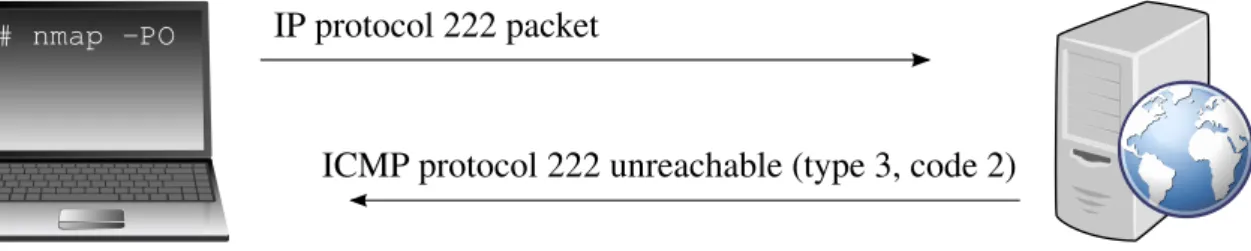
IP Protocol Ping of Unsupported Protocol 222 (ICMP Protocol Unreachable)
An IP protocol 222 ping probe references an unassigned protocol number, to which a Mi-crosoft Bing web server responds with an ICMP protocol unreachable error.
# nmap -d --packet-trace -n -sn -PO222 www.bing.com
Starting Nmap 6.25 ( http://nmap.org ) Initiating Ping Scan
Scanning www.bing.com (213.191.147.216) [1 port]
SENT (0.0141s) Unknown protocol (222) 192.168.1.20 > 213.191.147.216 RCVD (0.0217s) ICMP 213.191.147.216 > 192.168.1.20
Protocol 222 unreachable (type=3/code=2) Got destination unreachable for 213.191.147.216
Completed Ping Scan at 10:11, 0.01s elapsed (1 total hosts)
Nmap scan report for www.bing.com (213.191.147.216) Host is up, received proto-unreach (0.0077s latency).
Nmap done: 1 IP address (1 host up) scanned in 0.02 seconds
# nmap -PO IP protocol 222 packet
ICMP protocol 222 unreachable (type 3, code 2)
Figure 2.17:IP protocol ping of unsupported protocol 222 (ICMP protocol unreachable)
IP Protocol Ping of Unsupported Protocol 222 (Packet Ignored)
Google’s web servers ignore the IP protocol 222 ping, and are not discovered by the probe.
# nmap -d --packet-trace -n -sn -PO222 www.google.com
Starting Nmap 6.25 ( http://nmap.org ) Initiating Ping Scan
Scanning www.google.com (83.139.106.212) [1 port]
SENT (0.0194s) Unknown protocol (222) 192.168.1.20 > 83.139.106.212 SENT (1.0205s) Unknown protocol (222) 192.168.1.20 > 83.139.106.212 Completed Ping Scan at 10:18, 2.00s elapsed (1 total hosts)
Nmap scan report for www.google.com (83.139.106.212) [host down, received no-response]
Nmap done: 1 IP address (0 hosts up) scanned in 2.02 seconds
# nmap -PO IP protocol 222 packet
IP protocol 222 packet (no response; try again)
2.12.
ARP Ping (
-PR
)
An ARP request is sent as a host discovery probe. It cannot be used by an unprivileged user on a Unix system.
One of the most common Nmap usage scenarios is to scan a local area network. On most LANs, especially those using private address ranges (as specified by RFC 1918 [6]), the vast majority of IP addresses are unused at any given time. When Nmap tries to send a raw IP packet such as an ICMP echo request, the operating system must determine the destination hardware (ARP) address corresponding to the target IP so that it can properly address the Ethernet frame. This is often slow and problematic, since operating systems were not written with the expectation that they would need to do millions of ARP requests against unavailable hosts in a short time period.
ARP scan uses Nmap’s optimized algorithms for ARP requests. If it gets a response back, Nmap knows the host is up and has no further need for IP-based ping packets. This makes the ARP scan much faster and more reliable than IP-based scans.
The ARP scan is done by default when scanning hosts that Nmap detects are on a local area network. Even if different host discovery methods (such as -PE or -PS) are speci-fied, Nmap uses ARP instead for any of the targets which are on the same LAN (unless
--disable-arp-pingor--send-ipare specified).
When used with IPv6 (the-6option), the-PRoption uses ICMPv6 Neighbor Discovery (as specified by RFC 4861 [7]) instead of ARP. Neighbor Discovery can be seen as the IPv6 equivalent of ARP.
2.12.1.
Examples
ARP Ping
A LAN gateway router responds to an ARP ping.
# nmap -d --packet-trace -n -sn -PR 192.168.1.1
Starting Nmap 6.25 ( http://nmap.org ) Initiating ARP Ping Scan
Scanning 192.168.1.1 [1 port]
SENT (0.0200s) ARP who-has 192.168.1.1 tell 192.168.1.20 RCVD (0.0210s) ARP reply 192.168.1.1 is-at 38:C8:5C:00:DE:AD Completed ARP Ping Scan, 0.00s elapsed (1 total hosts)
Nmap scan report for 192.168.1.1
Host is up, received arp-response (0.0010s latency). MAC Address: 38:C8:5C:00:DE:AD (Cisco Spvtg)
Nmap done: 1 IP address (1 host up) scanned in 0.05 seconds Raw packets sent: 1 (28B) | Rcvd: 1 (28B)
# nmap -PR ARP who-has TARGET IP tell NMAP IP
ARP reply TARGET IP is-at TARGET MAC
3. Service Detection in Nmap
3.1.
Service Detection
Service detection is the process of identifying the service running on a specific port. A simple port scan may reveal an open port at a certain port number. An educated guess based on the port number can then be made as to what service the open port offers. Such guesses are often based on common protocol/port to service name mappings (e.g. the IANA service registry [8]). This method does not require any additional network communication, which makes it useful for quick assessments. However, services can run on arbitrary port numbers, and multiple services can share a common port number. The information gained is minimal even when the port number is correctly resolved to a service name. These drawbacks mean that this method is not reliable enough to be used by itself in any serious network exploration endeavor. This is especially relevant in the case of vulnerability assessments, network inventory, and any other tasks related to maintaining security where knowing the exact version of a service is crucial.
A more reliable and informative method involves gathering and analyzing responses to service-specific probes sent to the target host. This approach can yield invaluable additional details, such as the service version number, host operating system, host device type, and other miscellaneous information. Developing service detection additions for Nmap by using this method will be the main focus of the thesis. The following chapter describes service detection in greater detail through Nmap’s implementation.
3.2.
Introduction to Service Detection in Nmap
A more comprehensive look at these and other Nmap features can be found in Nmap Network Scanning [1] and the online Nmap Reference Guide [2]. These are the sources from which most of the information in this chapter was gathered (some taken verbatim or with minor alterations).
Nmap does the basic protocol/port to service name resolution by querying its database (thenmap-services file) of about 2200 well-known services. This approach will report the service most likely running on a scanned port, e.g. port 25/tcp would be identified as a probable SMTP service port. As discussed in the previous chapter, this provides little information and can generally not be relied upon.
Performing service detection means accurately identifying a service, including detecting its version and any other distinguishing details. This is referred to in the Nmap documen-tation as "Service and Application Version Detection", "Service and Version Detection", or just "Version Detection". In the context of describing Nmap’s features, service detection may further be referred to as in the official Nmap documentation (mostly as version detection).
Nmap’s version detection starts up after a port scan has been completed and open ports have been discovered. Using a database of service-specific probes (the nmap-service-probesfile) is the first of two approaches to implementing service detection in Nmap. The second approach involves utilizing the Nmap Scripting Engine (NSE) which runs after the
previous approach has finished. The-sVoption enables version detection of both kinds.
3.3.
The
nmap-service-probes
Approach
Thenmap-service-probesdatabase contains probes for querying various services, and match expressions to recognize and parse responses. Nmap tries to determine the service protocol (e.g. FTP, SSH, Telnet, HTTP), the application name (e.g. ISC BIND, Apache httpd, Solaris telnetd), the version number, hostname, device type (e.g. printer, router), the OS family (e.g. Windows, Linux), miscellaneous details (e.g. whether an X server is open to connections, the SSH protocol version), and the Common Platform Enumeration (CPE) [9] representation of this information. If Nmap was compiled with OpenSSL support, it will connect to SSL servers to deduce the service listening behind that encryption layer. Some ports may be left in theopen|filteredstate after a port scan if the port scan was unable to determine whether the port is open or filtered. Version detection will try to elicit a response from these ports (just as it does with open ports), and change their state to open if it succeeds. When RPC services are discovered, the Nmap "RPC grinder" is automatically used to determine the RPC program and version numbers. All the ports detected as RPC are flooded with SunRPC program NULL commands in an attempt to determine whether they are RPC ports, and if so, what their program and version numbers are.
When Nmap receives responses from a service but cannot match them to its database, it prints out a special service fingerprint and a URL. This URL can be used to submit informa-tion about the unknown service if the user knows what service version it is.
Short descriptions of options related to version detection usingnmap-service-probes:
--allports
Disables excluding some problematic ports from version detection, e.g. printer ports that print anything sent to them. These ports are specified by theExcludedirective in
nmap-service-probes.
--version-intensity <intensity>
Sets the version scan intensity to an integer value between 0 and 9. Nmap’s version scan probes are assigned a rarity value between 1 and 9. Probes with a low rarity value are effective against many common services, while the high rarity probes are not often useful. The default intensity is 7, which means that all probes with a lower or equal rarity value than 7 will be sent. High intensity scans have a higher chance to identify the service, but take longer. A probe registered to the target port in the
nmap-service-probesfile will be tried regardless of intensity level.
--version-light
A convenience alias for --version-intensity 2. Light version detection. Faster but less likely to identify services.
--version-all
A convenience alias for --version-intensity 9. Full version detection. Slower but maximizes chances of identifying services.
--version-trace
Causes Nmap to print out extensive debugging information about what version scan-ning is doing.
3.3.1.
The
nmap-service-probesFile Format
Version detection probes and match strings are stored in a flat line-oriented file named
nmap-service-probes. Understanding the file format allows users to add their own ser-vices to the detection engine. Lines starting with a "#" (comments) and blank lines are ignored by the parser. Other lines must contain one of the directives described below.
Exclude <port specification>
This directive excludes the specified ports from the version scan. It can only be used once and should be near the top of the file, above anyProbedirectives. TheExcludedirective uses the same format as the Nmap-p switch, so ranges and comma separated lists of ports are supported. The only ports excluded innmap-service-probesby default are TCP ports 9100 through 9107. These are common ports for printers to listen on and they often print any data sent to them, such as Nmap’s service probe payloads, which is often undesirable behavior during a scan. The--allportsoption overrides theExcludedirective, causing version detection to interrogate all open ports.
Example:
Exclude 53,T:9100,U:30000-40000
Probe <protocol> <probename> <probestring>
This directive tells Nmap what payload string to send to an open port in order to provoke a response which can then be matched to a service. All of the directives discussed later operate on the most recentProbestatement. The arguments to this directive are:
<protocol>
This must be either TCP or UDP. Nmap only uses probes that match the protocol of the service it is trying to scan.
<probename>
This is a plain English name for the probe. It is used in service fingerprints to describe which probes elicited responses.
<probestring>
A formatted payload string to send. It must start with a q, then an arbitrary delimiter character (that is not a part of the string) which begins and ends the string that rep-resents the data that is actually sent. It is formatted similarly to a C or Perl string in that it allows the following standard escape characters: \\, \0, \a, \b, \f, \n, \r,
\t,\v, and\xHH(whereHis any hexadecimal digit). Only the TCP NULL probe has an empty probe string innmap-service-probes, as it just listens for initial banners that many services send.
Examples:
Probe TCP NULL q||
Probe TCP GetRequest q|GET / HTTP/1.0\r\n\r\n|
Probe UDP DNSStatusRequest q|\0\0\x10\0\0\0\0\0\0\0\0\0|
match <service> <pattern> [<versioninfo>]
This directive tells Nmap how to recognize services based on responses to the string sent by the previousProbe directive. A single Probe line may be followed by numerous match
statements. If the given pattern matches, optional specifiers can extract the application name, version number, and additional info for Nmap to report. It is sometimes referred to as a hard
match, as opposed to a soft match (by the softmatch directive described below). The arguments to this directive are:
<service>
This is the service name that the pattern matches (e.g. ssh,smtp,http,snmp). Ser-vices tunneled by SSL which can be fully recognized without the overhead of making an SSL connection can have their name prefixed withssl/(e.g.ssl/vmware-auth).
<pattern>
This pattern is used to determine if the received data matches what is known about the service’s response. If the received data matches the pattern, the service has been conclusively identified. The pattern format is similar to Perl’s, with the syntax be-ing m/[regex]/[opts]. The "m" tells Nmap that a match string is beginning. The slashes ("/") are delimiters and can be substituted by almost any printable character (that is not in the pattern). The regex is a Perl-style regular expression [10]. The only options currently supported are "i" which makes a match case-insensitive, and "s" which includes newlines in the "." specifier. Subexpressions to be captured, such as version numbers and other information worthy of extraction, are surrounded by paren-theses as shown in most of the examples.
<versioninfo>
The<versioninfo>section is comprised of several optional fields:
p/vendorproductname/
Includes the vendor and often service name and is of the form "Sun Solaris rex-ecd", "ISC BIND named", or "Apache httpd".
v/version/
The application version string, which may include non-numeric characters.
i/info/
Miscellaneous information which was immediately available and might be use-ful, e.g. whether an X server is open to unauthenticated connections, or the protocol number of SSH servers.
h/hostname/
The hostname (if any) offered up by a service. This is common for protocols such as SMTP and POP3 and is useful because these hostnames may be for internal networks or otherwise differ from the straightforward reverse DNS responses.
o/operatingsystem/
The operating system the service is running on. This may legitimately be differ-ent than the OS reported by Nmap IP stack based OS detection. For example, the target IP might be a Linux box which uses NAT to forward requests to an Microsoft IIS server in the DMZ. In this case, stack OS detection should report the OS as Linux, while service detection reports port 80 as being Windows.
d/devicetype/
The type of device the service is running on, a string like "print server" or "web-cam". Some services disclose this information, and sometimes it can be inferred (e.g. the "HP-ChaiServer" web server runs only on printers).
cpe:/cpename/[a]
A CPE name [9] for some aspect of the service. This may be used multiple times to identify the service (cpe:/a names), the operating system (cpe:/o names) or hardware platform (cpe:/h names).
The preferred delimiter character is slash ("/"), but almost any printable character not part of the field value string can be arbitrarily chosen. Any, and even all of the fields can be omitted if no such information on the service is available. Any of the version fields can include numbered strings such as $1 or $2, which are replaced with the corresponding parenthesized substring in the<pattern>.
Examples:
match ftp m/^220.*Welcome to .*Pure-?FTPd (\d\S+\s*)/ p/Pure-FTPd/ v/$1/ cpe:/a:pureftpd:pure-ftpd:$1/
match ssh m/^SSH-([\d.]+)-OpenSSH[_-]([\w.]+)\r?\n/i p/OpenSSH/ v/$2/ i/protocol $1/ cpe:/a:openbsd:openssh:$2/
match mysql m|^\x10\0\0\x01\xff\x13\x04Bad handshake$| p/MySQL/ cpe:/a:mysql:mysql/
match chargen m|@ABCDEFGHIJKLMNOPQRSTUVWXYZ|
match uucp m|^login: login: login: $| p/NetBSD uucpd/ o/NetBSD/ cpe:/o:netbsd:netbsd/a
match printer m|^([\w-_.]+): lpd: Illegal service request\n$| p/lpd/ h/$1/ match afs m|^[\d\D]{28}\s*(OpenAFS)([\d\.]{3}[^\s\0]*)\0| p/$1/ v/$2/
softmatch <service> <pattern>
This directive is similar in format to thematchdirective. The main difference is that scan-ning continues after a softmatch, but it is limited to probes that are known to match the specified service. This allows for a hard match to be found later, which may provide useful version information. Arguments are the same as with match, except there is no
<versioninfo>argument. Examples:
softmatch ftp m/^220 [-.\w ]+ftp.*\r\n$/i softmatch smtp m|^220 [-.\w ]+SMTP.*\r\n|
softmatch pop3 m|^\+OK [-\[\]\(\)!,/+:<>@.\w ]+\r\n$|
ports <portlist>
This directive tells Nmap what ports the services identified by this probe are commonly found on. It should only be used once within eachProbesection. The syntax is a simplified version of what is accepted by the Nmap-poption.
Examples:
ports 21,43,110,113,199,505,540,1248,5432,30444 ports 111,4045,32750-32810,38978
sslports <portlist>
This directive is similar to the ports directive described above, except that these are the ports often used to wrap the service in SSL. For example, the HTTP probe declaressslports 443and SMTP probes have ansslports 465line because those are the standard ports for HTTPS and SMTPS respectively.
Example:
sslports 443
totalwaitms <milliseconds>
This optional directive specifies the amount of time Nmap should wait before giving up on the most recently definedProbeagainst a particular service. It is rarely necessary as Nmap’s default value is usually suitable.
Example:
totalwaitms 5000
rarity <value between 1 and 9>
This directive roughly corresponds to how infrequently this probe can be expected to re-turn useful results. The higher the number, the rarer the probe is considered and the less likely it is to be tried against a service. By default, probes with a rarity of 7 or less are used during version detection. The--version-intensityoption (described in "3.3 The
nmap-service-probesApproach") can be used to make Nmap consider less rare or even rarer probes.
Example:
rarity 9
fallback <comma separated list of probes>
This optional directive specifies whichProbes’ match patterns should be used as fallbacks if there are no matches in the currentProbesection. Nmap first tries match lines from the probe itself, then those from the probes specified in the fallback directive (from left to right), if the directive is present. Finally, if it is a TCP probe, Nmap will always try to fall back to the TCP NULL probe.
Example:
fallback GetRequest,GenericLines
Annmap-service-probesExample
A somewhat representative example of the nmap-service-probes file follows. Many lines have been cut for brevity.
# The Exclude directive takes a comma separated list of ports. # The format is exactly the same as the -p switch.
Exclude T:9100-9107
# This is the NULL probe that just compares any banners given to us ##############################NEXT PROBE############################## Probe TCP NULL q||
# Wait for at least 5 seconds for data. Otherwise an Nmap default is used. totalwaitms 5000
# Windows 2003
match ftp m/^220[ -]Microsoft FTP Service\r\n/ p/Microsoft ftpd/ match ftp m/^220 ProFTPD (\d\S+) Server/ p/ProFTPD/ v/$1/
softmatch ftp m/^220 [-.\w ]+ftp.*\r\n$/i
match ident m|^flock\(\) on closed filehandle .*midentd| p/midentd/
match imap m|^\* OK Welcome to Binc IMAP v(\d[-.\w]+)| p/Binc IMAPd/ v$1/ softmatch imap m/^\* OK [-.\w ]+imap[-.\w ]+\r\n$/i
match lucent-fwadm m|^0001;2$| p/Lucent Secure Management Server/ match meetingmaker m/^\xc1,$/ p/Meeting Maker calendaring/
# lopster 1.2.0.1 on Linux 1.1
match napster m|^1$| p/Lopster Napster P2P client/
Probe UDP Help q|help\r\n\r\n| rarity 3
ports 7,13,37
match chargen m|@ABCDEFGHIJKLMNOPQRSTUVWXYZ| match echo m|^help\r\n\r\n$|
3.3.2.
The Process
Nmap first does a port scan as instructed, and then passes all theopenandopen|filtered
ports to the service scanning module. Those ports are then interrogated in parallel, al-though a single port is described here for simplicity. Service probes are defined in the
nmap-service-probes file, and many of the terms used in this chapter have been de-scribed previously in "3.3.1 Thenmap-service-probesFile Format".
1. Nmap checks to see if the port is one of the ports to be excluded, as specified by the
Excludedirective innmap-service-probes. If it is, this port will not be scanned. 2. If the port protocol is TCP, Nmap starts by connecting to it (UDP probes continue at step 4). If the connection succeeds and the port had been in theopen|filteredstate, it is changed toopen.
3. Once the TCP connection is made, Nmap listens for roughly six seconds. Many com-mon services, including most FTP, SSH, SMTP, Telnet, POP3, and IMAP servers, identify themselves in an initial welcome banner. Nmap refers to this as the TCP NULL probe because Nmap just listens for responses without sending any probe data. If a response is received and a hard match is made, the service is fully identified and the process ends for this port. If a softmatch is made, Nmap continues but only considers probes that are known to recognize the soft-matched service type.
4. This point is where Nmap starts for UDP probes, and TCP connections continue here if the TCP NULL probe fails (no data received) or soft-matches. Every probe has a list of port numbers it is considered to be most effective against, i.e. most probable to provoke a reply from (theportsdirective). Nmap sequentially (in the order they appear in the file) executes the probes that match the port number being scanned. Responses are handled in the same way as for the TCP NULL probe described above. The exact list of regular expressions that Nmap uses to test for a match depends on the probe
fallback configuration. If any response during version detection is ever received from a UDP port which was in the open|filtered state, that state is changed to
open. This makes version detection an excellent complement to the UDP scan, which is forced to label all scanned UDP ports as open|filtered when some common firewall rules are in effect. While combining UDP scanning with version detection can take many times as long as a plain UDP scan, it is an effective and useful technique. 5. The scan continues here if the TCP NULL probe and probable port probes have failed
to produce and hard-match a response. Nmap goes through other existing probes se-quentially. In the case of TCP, Nmap must make a new connection for each probe to avoid having previous probes corrupt the results. This worst-case scenario can take time, especially since Nmap must wait about five seconds for the results from each probe because of slow network connections and otherwise slowly responding services. 6. One of the probes tests whether the target port is running SSL. If so (and if OpenSSL is available), Nmap connects back via SSL and restarts the service scan to determine what is listening behind the encryption. This new service scan probing behind the SSL layer uses probable ports from thesslportsdirective.
7. Another generic probe identifies RPC-based services. When these are found, the Nmap "RPC grinder" is initiated to brute force the RPC program number/name and supported version numbers. Similarly, an SMB post-processor for fingerprinting Windows ser-vices is available as part of the Nmap Scripting Engine (NSE).
8. If at least one of the probes elicits some sort of response, yet Nmap is unable to recog-nize the service, the response content is printed to the user in the form of a fingerprint. If users know what services are actually listening, they are encouraged to submit the fingerprint to Nmap developers for integration into Nmap.
A summary of the algorithm Nmap uses when determining which probes to use follows: 1. For TCP, the TCP NULL probe is always tried first.
2. All probes that have the port being scanned listed as a probable port (theports direc-tive) are tried in the order they appear innmap-service-probes.
3. All other probes that have a rarityvalue less than or equal to the current intensity value of the scan are tried, also in the order they appear innmap-service-probes. Nmap uses several automatic techniques to speed up scans:
– Most probes are generic enough to match many services, thus minimizing the amount of connections necessary. For example, theGenericLinesprobe sends two blank lines (\r\n\r\n) to the service. This matches daemons of many diverse service types, including FTP, ident, POP3, UUCP, Postgres, and whois.
– If a service matches asoftmatch directive, only probes that can potentially match that service are tried.
– The rarity metric is used to avoid trying probes that are extremely unlikely to match.
3.4.
The Nmap Scripting Engine (NSE) Approach
The regular expression based approach is powerful, but it cannot recognize everything. Some services cannot be recognized by simply sending a standard probe and matching a pattern to the response. The service protocol might require a multi-step handshaking process, or communication with more than one port, protocol or host. The received response may need more advanced processing, beyond what a regular expression can provide. Responses can have valuable information not encoded in text form, which can be matched by hardcoding it into the pattern (e.g. for a single binary version number), but cannot be captured and pre-sented. A less than elegant solution for that particular case could involve forging a separate pattern for every possible combination of binary field values. Such tasks are not well suited for traditional Nmap version detection, but are easily accomplished with the Nmap Scripting Language (NSE).
The NSE allows users to write scripts to automate a variety of networking tasks. Its possible applications include network discovery, backdoor detection, vulnerability detection and exploitation, and more sophisticated version detection. Script results are integrated into Nmap’s normal and XML output. Scripts are written in the embedded Lua programming language (version 5.2) [11], for which there is a freely available reference manual online [12]. Lua was chosen as the base for Nmap scripting because it is a lightweight language, distributed under the liberal MIT open-source license, allows the scripts to be efficiently executed in parallel, was designed with embeddability in mind, has excellent documentation, and is actively developed by a large and committed community. General programming in Lua is outside the scope of this thesis and will be discussed mostly in the context of the NSE.
The core of the NSE is an embeddable Lua interpreter, and the NSE Library is what connects Lua to Nmap. The NSE Library layer handles issues such as initialization of the
Lua interpreter, scheduling of parallel script execution, and script retrieval. It is a key part of the NSE network I/O framework and the exception handling mechanism. It also includes many useful utility libraries.
Scripts are not run in a sandbox and thus could accidentally or maliciously damage the system or invade privacy. Running scripts from untrusted third parties without carefully au-diting them is strongly discouraged. The online NSE Documentation Portal [13] documents the scripts included with Nmap.
This chapter is not meant as an exhaustive reference manual on NSE (such sources al-ready exist [1][2][13]). Rather, it is meant as an overview of basic concepts helpful in reading and using NSE scripts, as well as understanding the context and approaches in developing them. A service detection script is very similar to any other script, so this chapter will mostly be introducing NSE scripting in general.
The NSE is controlled by the following options:
-sC Performs a script scan using the default set of scripts. It is equivalent to--script= default. Some of the scripts in this category are considered intrusive and it is advised that they should not be run against a target network without permission.
--script <file>|<category>|<directory>|<expression>|all[,...]
Runs a script scan using the comma-separated list of filenames, script categories, and directories. Each element in the list may also be a Boolean expression describing a more complex set of scripts. Each element is interpreted first as an expression, then as a category, and finally as a file or directory name.
The argumentallmay be used to specify every script in Nmap’s database. Prefixing script names and expressions with "+" will force them to run even if they normally would not, e.g. when the relevant service was not detected on the target port.
File and directory names may be relative or absolute. Relative paths are looked for in thescriptssubdirectory of each of the following places until found:
1. --datadir
2. $NMAPDIR
3. /.nmap(not searched on Windows)
4. <HOME>\AppData\Roaming\nmap(only on Windows) 5. the directory containing the nmap executable
6. the directory containing the nmap executable/../share/nmap
7. NMAPDATADIR
8. the current directory
When a directory name is given, Nmap loads every.nsefile in the directory. All other files are ignored and directories are not searched recursively.
Nmap scripts are stored in thescriptssubdirectory of the Nmap data directory by de-fault. For efficiency, scripts are indexed in a database stored inscripts/script.db. When referring to scripts fromscript.dbby name, a shell-style "*" wildcard can be
used.
An example command loading scripts in the default, safe, andintrusive cate-gories, except for those whose names start with "http-":