Oracle White Paper June 2014
Introduction ... 3
Executive Summary ... 3
Business Requirements ... 4
Common Database Migration Challenges and Risks ... 5
Migration Technologies... 6
Oracle Migration Service ... 7
Overview ... 7
Customer Benefits ... 8
Covered Products ... 9
Scope of Service ... 9
The Migration Tool ... 13
Reporting ... 14
Delivery Architecture ... 15
Example Migration Project ... 16
Conclusion ... 20
References ... 21
Patents ... 21
Glossary ... 21
Introduction
This technical introduction document addresses managers and executives of IT organizations considering a database migration. Business requirements, benefits, and risks will be discussed. An overview of the most-common methodologies and tools will give an understanding of a variety of options for the migration of Oracle databases. This document outlines in detail Oracle Migration Service, its features, benefits, and delivery architecture. An example customer scenario will further describe the capabilities of this service.
Executive Summary
Oracle databases are critical systems at the heart of any organization that relies heavily on its IT to function. They need to be maintained at the highest performance levels, with availability around the clock to support the goals of the business. If an Oracle database no longer sufficiently fulfills the current or future requirements, migration to a new version, platform, or location may be in order. This can be a risky undertaking requiring special skills and extensive experience, because mission-critical systems can be quite complex and allow only very limited downtime windows for maintenance and changes. To be successful, it is critical to understand up front the implications the changes may have on the entire IT environment, on the staff, and on the budget.
Oracle Advanced Customer Support Services has an offering that combines automation and expert guidance. Oracle Migration Service delivers unique automated technology, interactive tools, and migration expertise to help plan, validate, and migrate all database content quickly and effectively with minimal downtime. With more than ten years of experience with Oracle migrations, experts from Oracle Advanced Customer Support Services deliver a complete solution.
Oracle Migration Service delivers Oracle Database migrations and improvements safely, rapidly, and at a predictable cost.
Business Requirements
An IT infrastructure that will efficiently support changing business conditions is a key success factor. IT organizations must have the agility to respond to changing requirements such as offering new IT services, larger organizational expansions, or a relocation of a physical data center.
Modifications are also essential to maintain the highest quality of service through changing conditions in the IT lifecycle. Massive data growth, legacy software versions running out of support, and the increase in general complexity don’t help with business continuity and cost control.
A future-ready IT platform has to continuously and efficiently provide
Performance and reliability of the systems in the operations environment
Scalability and the ability to adapt to new business challenges quickly
Cost efficiency and low total cost of ownership (TCO)
Seamless interoperability across all components of the IT infrastructure
Database migrations, expertly managed and successfully completed, can help to address those needs. They should be seen as an integral part of the IT lifecycle.
Companies and organizations can derive significant benefits from database migrations:
Achieve business goals through fast adoption of required IT infrastructure
Improve performance and business continuity
Leverage new functionality and features through migration to a new version, hardware platform, or operating system (OS)
Safely move to new physical data center locations
Reduce complexity and achieve improvements through consolidation, updates, compression, and reconfiguration
Common Database Migration Challenges and Risks
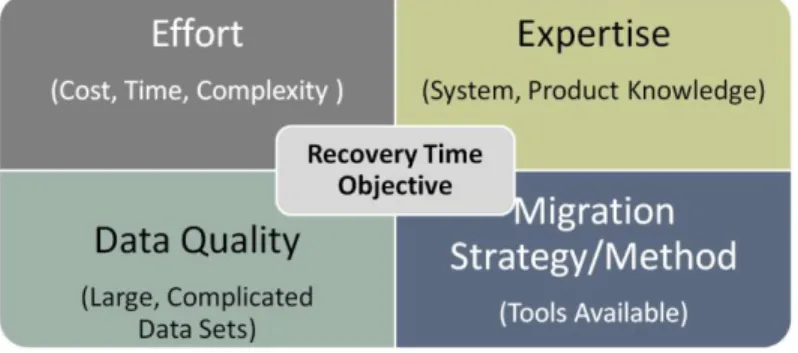
Figure 1. Common Challenges and Risks
Recovery Time Objective (RTO)
The recovery time objective (RTO) for a customer is defined as the period of time when the business can be unavailable while the migration takes place. In mission-critical environments this period can be very short, but it may be larger for test or disaster recovery environments.Which RTO is acceptable for which system/environment?
Effort
A complex migration can easily require hundreds of person-days of migration experts, as detailed in the case study at the end of this document. Are sufficient skilled resources available to plan and execute the migration? What is the time frame, and what is the budget?
Expertise
Deep expertise is necessary to plan and execute a migration project properly. Otherwise there is a risk to exceed the time and cost boundaries of the project. Migration projects are usually not planned and executed everyday by in-house database administrators (DBAs). Will they need help in identifying all possible risks and dependencies up front? Can they fully leverage the features and capabilities of Oracle Database? Will they have the bandwidth to focus on the migration in addition to their core responsibilities?
Data Quality
Oracle Database systems can grow extremely large and complex over time. When has the latest large cleanup taken place? Are all data sets still required?
Strategy, Technology
Which migration technology should be chosen, considering the criteria above? How can unplanned outages, project complications, delays, interoperability issues, cost explosions, overburdened staff, and other risks be avoided?
Migration Technologies
A variety of migration technologies exist for Oracle databases. Selection and proper use of the right migration technology is a key success factor.
Oracle Transportable Tablespaces
The transportable tablespace (TTS) allows a subset of an Oracle database to be “plugged” into another Oracle database, essentially moving tablespaces between Oracle databases. This can be much faster than a traditional export/import or unload/load of data because transporting the tablespace only requires the copying of the data files and then integration of the structural information into the new Oracle database.
Oracle Transportable Databases
The transportable database (TDB) allows users to migrate databases quickly to another platform. Historically, prior to Oracle Database 10g, a migration to a different platform was delivered by
exporting and importing the data from the legacy system into the new systems. This process could take a number of days. With TDBs, higher transfer rates can be achieved.
Oracle Data Pump
Oracle Data Pump is a flexible tool for server-based bulk data movement that supersedes the old import and export utilities. It can load and unload data and data structures from a database.
Recovery Manager (RMAN)
Recovery Manager (RMAN) is a complete backup and recovery manager for Oracle databases. It performs backup and recovery operations in both an online and an offline manner. Oracle RMAN 9i
onward allows the software to duplicate an Oracle database as a physical/logical standby for the use of Oracle Data Guard (including Oracle Active Data Guard). This effectively allows a migration to take place while keeping the source and target in sync. Oracle Database 12c allows cross-platform backup and recovery to simplify the migration.
Procedural
Procedural migrations encompass a selection of the above technologies. No single tool will suit all migrations in an enterprise. For example, TTSs and TDBs may be suited to smaller machines, while Oracle RMAN may be suitable for migrations during small outage windows. Oracle Data Pump may be useful for systems that require certain objects or object types to be migrated that are natural or unnatural limitations of other tools or jumps from older versions, such as from Oracle8i Database to Oracle Database 12c.
The Migration Tool
The migration tool is proprietary technology developed by Oracle Advanced Customer Support Services and is the automation technology used within Oracle Migration Service. It was designed to
combine all advantages of all migration technologies into one integrated solution. The migration tool simplifies the processes and provides a unique feature set:
Cross-platform migration
Simultaneous upgrades
Consolidation of data sets
Simultaneous reconfiguration during a migration
Jumps across multiple versions of the database software
Dynamic administration to speed up and slow down a migration, should the host and target system wish to utilize machine resources to suit existing application need
The migration tool is highly automated and provides detailed reporting at every step. It is an integral part of Oracle Migration Service.
Oracle Migration Service
Overview
Oracle Migration Service delivers unique automated technology, interactive tools, and migration expertise to help plan, validate, and migrate all database content quickly and effectively. With more than ten years of migration experience with Oracle and non-Oracle migrations, experts from Oracle Advanced Customer Support Services deliver a complete solution. Key activities include premigration analysis of aspects essential to migrate successfully:
High automation and tuning with the ability to run migrations in parallel
Migration validation
Comprehensive reporting during each step of the process
Production execution
The migration happens in a matter of days - not the weeks or even months that customers might expect from a typical migration.
Oracle Migration Service can help customers with their database migration, including hardware migrations such as technology refresh scenarios in either partial and/or complete database
reorganizations with a lower risk to their production environment. This service supports all OSs with Oracle9i Database or later installed, and it is fully hardware independent.
Customer Benefits
Expertise
The process of researching, testing, and performing a complex database migration in-house can be expensive and time consuming, and requires a special skill set. With Oracle Migration Service, customers can be sure that their mission-critical Oracle databases will be migrated in a planned, structured, and transparent way, without overburdening their IT organization.
Safety
Oracle Advanced Customer Support Services has well-established processes, a comprehensive knowledgebase, and trained migration engineers with years of experience to mitigate areas of risk. Once in progress, the migration can be stopped and restarted anytime as needed—a unique ability of this service. Oracle Migration Service helps customers to complete the migrations of Oracle databases safely and successfully on time, on budget, and within the predefined downtime windows. This includes those databases that are used for Oracle E-Business Suite or SAP systems.
Speed
Once the migration is properly planned and prepared by Oracle Migration Service, the actual data migration is very fast. The automation built into the service can reduce the overall project time massively, from months to weeks or even days. With the appropriate hardware, the target Oracle database can be migrated at a rate of more than 2 terabytes (TB) per hour, using special algorithms within the tooling. Thus, large and complex Oracle databases can be migrated within a single weekend. Very large tables of more than 100 GB can be split into multiple chunks that can be copied in parallel, allowing a single table to be copied with more than 300 GB per hour from source to target.
Fixed-Scope, Fixed-Price Service for Accurate Budget Planning
Service charges depend on the volume of data. Scope and price are clearly defined up front. Thus, customers have full clarity on the cost and deliverables before the service starts.
Flexibility
The number of executed migration scripts can be changed dynamically during the migration to optimize resource usage. As many hardware resources as possible can be used without overloading the system.
Recovery Time Objectives / Planned Downtime
Oracle Migration Service requires very little planned downtime because large amounts of data can be migrated quickly. Configurable engineered algorithms decide what types of data are best suited to which migration transport method and what size “chunk” this piece of data should be. The service then executes these chunks and methods in a managed console that is fully controlled by Oracle Advanced Support Engineers.
Downtime can be minimized further through Oracle GoldenGate 12c software. This high-performance software application caters for real-time transactional change data capture, transformation, and
delivery. Oracle Migration Service assists with configuration and use of the Oracle GoldenGate 12c
software application.
Oracle Database Improvements While Migrating
An efficient and safe migration is not the only customer benefit.
Re-creation and not migration of indexes, providing space savings and postmigration performance improvements
Up to 50 percent reduction of space utilization through database defragmentation and migration to Oracle Automatic Storage Management
Database consolidation by reduction of data sets; in other words, migrating only the users needed and not the whole logical data set
Migration to Oracle Database 12c including Pluggable Database (PDB), a new feature of Oracle Database 12c
Bypassing problems associated with cross-platform migration, particularly endianness The service helps customers leverage all the features of their target release, and allows easy introduction of the latest technologies, such as index and table compression or transparent data encryption for sensitive data. Multiple Oracle databases can be consolidated into a single target.
Covered Products
TABLE 1. PRODUCTS THAT ORACLE MIGRATION SERVICE COVERS
SOURCE DESTINATION
Oracle9i Database, Oracle Database 10g, Oracle Database 11g, Oracle Database 12c; non-Oracle hardware, legacy Oracle hardware
Oracle Database 10g (nonengineered systems), Oracle Database 11g, Oracle Database 12c; Oracle platforms, including Oracle Exadata and Oracle SuperCluster, Oracle’s SPARC T5-8, and Oracle’s SPARC M6-32
In addition, Oracle Migration Service has been specifically designed and tested for migrations of Oracle databases with SAP, and Oracle E-Business Suite applications to an Oracle database.
Scope of Service
Service execution follows a detailed, predefined process, managed and coordinated by an experienced Oracle technical account manager, leveraging the migration tool. A migration can be delivered remotely or locally in an online or offline fashion as per customer requirements.
Online migration. This is the preferred method for Oracle databases with very short RTO, and when Oracle GoldenGate software is used. Through the online method, Oracle databases can be kept in sync as the customer’s business goals require.
Offline migration. This method is preferred if the Oracle database RTO is very long and Oracle GoldenGate software is not utilized. No synchronization of changes between the legacy and migrated system will be required.
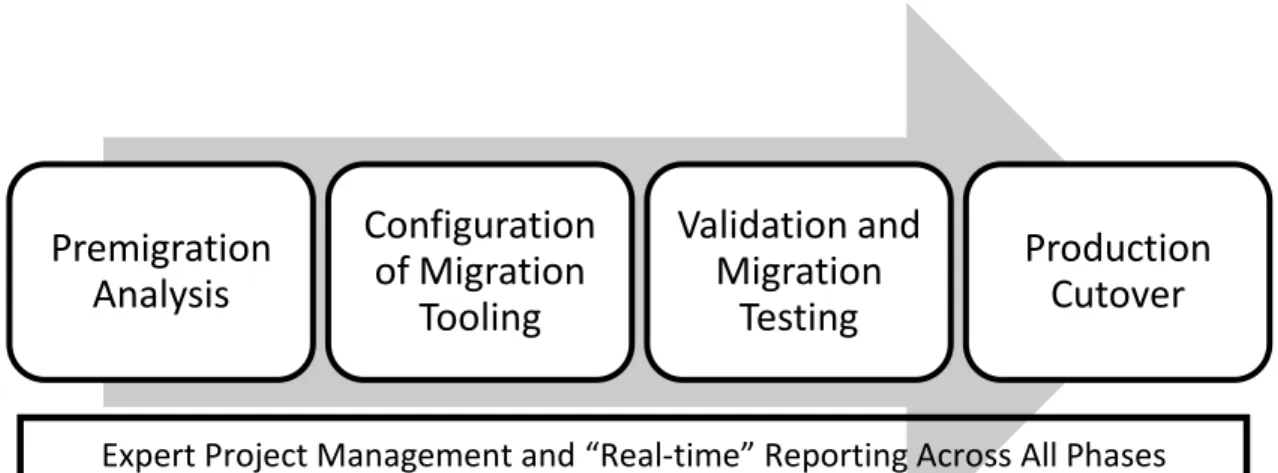
Figure 2. Migration Phases
Premigration Analysis
The service is initiated with a workshop to define and agree upon goals and scope of the migration, including definition of downtime windows and RTOs.
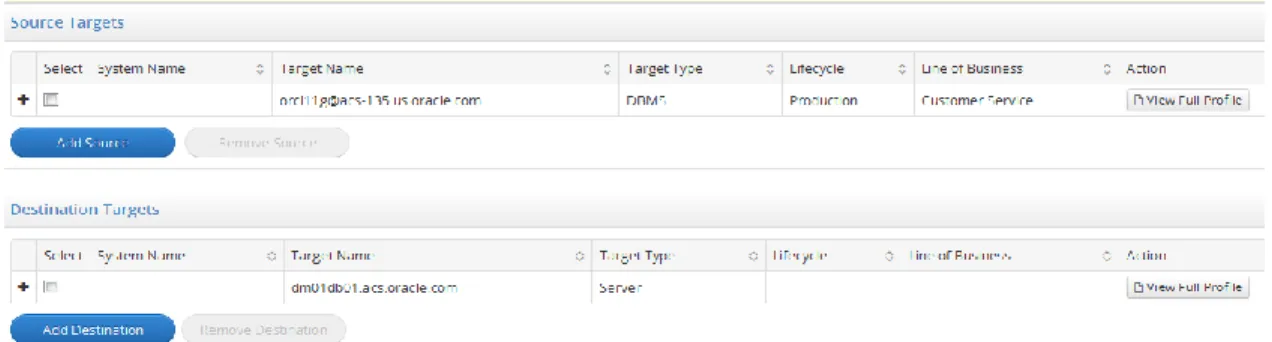
The source and destination Oracle databases are assessed in detail to identify opportunities for improvements. Significant performance improvements and query optimizations can be achieved through defragmentation of tables, reduction of space utilization, and re-creation of indexes. Space, users, table, and tablespace redundancies can be identified and cleaned up as well.
Premigration
Analysis
Configuration
of Migration
Tooling
Validation and
Migration
Testing
Production
Cutover
Figure 3. Premigration Analysis Report
A breakdown of all invalid objects provides a baseline to aid in the diagnosis of any potential issues at the cutover time, should an object become invalid on the target after migration.
Oracle Migration Service looks for ways to enhance the actual migration, for example by saving time through the parallelization of data migration for large tables.
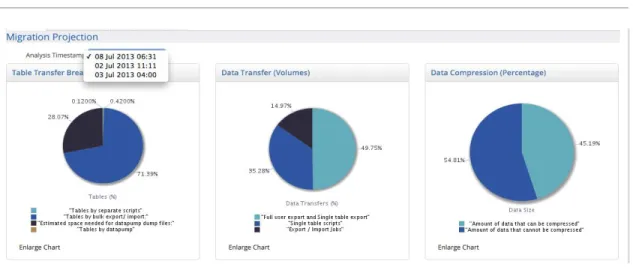
Figure 4. Migration Compression Projection
Configuration of Migration Tooling
Oracle Migration Service is delivered using Oracle Advanced Support Gateway software. This software can be used to deliver Oracle Migration Service either remotely or locally in a fully disconnected mode. Oracle Advanced Support Gateway is described in the section titled “Delivery Architecture.”
If the customer chooses to use Oracle GoldenGate software to minimize downtime as part of Oracle Migration Service, Oracle will assist with configuration, tuning, and setup as per customer requirements. Autocreation of Oracle GoldenGate scripts will be enabled as well.
Validation and Migration Testing
To ensure high-quality and optimal migration, and to validate acceptable production impact, Oracle Migration Service may run up to three full test migrations. The tests identify potential hotspots and issues, which will be mitigated proactively by tuning the migration process. Another important value of the test cycle is the ability to improve the speed of the migration process through adjustments such as
Production Cutover
Once the test cycles have been completed successfully and all change recommendations have been implemented, Oracle Migration Service prepares and executes the production migration within the agreed downtime window. Oracle Migration Service allows the migration to be stopped and restarted midprocess. The service includes the implementation of new features such as compression,
partitioning, and Oracle Automatic Storage Management.
The migration process and production performance are being monitored continuously. Reports are accessible via Oracle Advanced Support Portal.
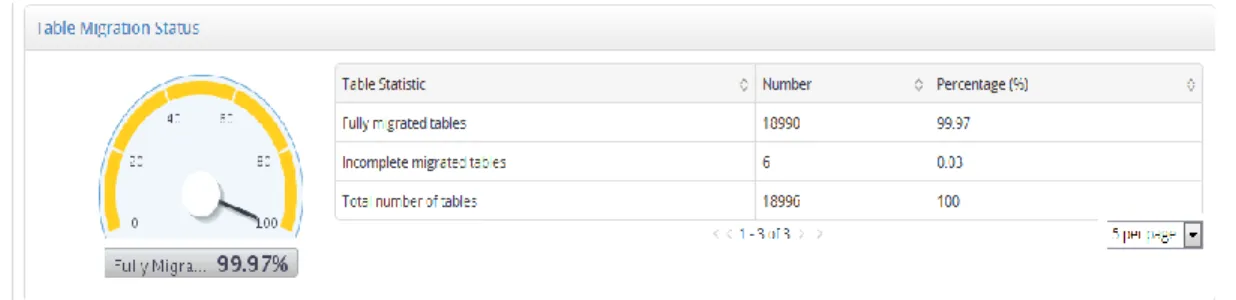
Figure 5. Migration Status Report
The validation of timings, object and row counts ensure complete and consistent migration. Recovery procedures are in place for the rare event of a power outage or other unexpected major incidents through point-in-time recovery of the migration and fallback to production.
Figure 6. Migration Execution Summary
Comprehensive validation reporting detailing the results of a migration—including timings, and any objects that were not copied.
To ensure a smooth transition to production, Oracle Migration Service provides up to 48 hours of go-live support to assist customers with issues attributed to the migration such as fault diagnosis and resolution while the new database is being accepted to the new environment.
The Migration Tool
The migration tool is the automation technology used to migrate Oracle databases. It can be configured on a project level or across a full migration. It performs the automated analysis of the source database, including identifying what areas require special attention, such as large tables or datatypes. It also identifies opportunities for optimization, such as compression, and identifies tables that should be migrated using specific methods. The migration tool is ideally executed remotely using a secure online connection via Oracle Advanced Support Gateway, but can also be used locally.
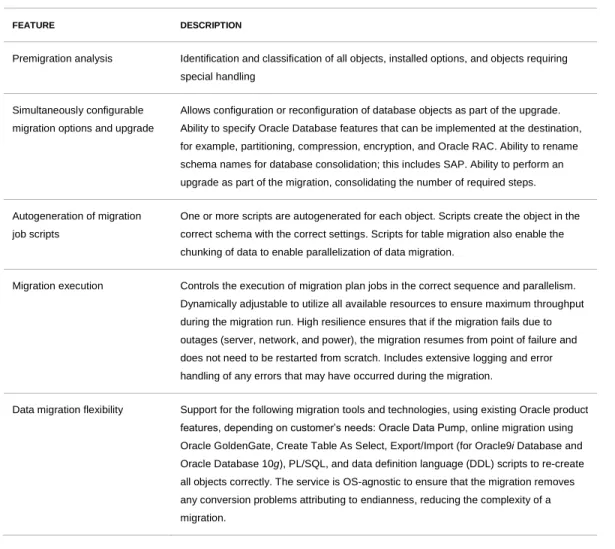
TABLE 2. MAIN FEATURES OF THE MIGRATION TOOL
FEATURE DESCRIPTION
Premigration analysis Identification and classification of all objects, installed options, and objects requiring special handling
Simultaneously configurable migration options and upgrade
Allows configuration or reconfiguration of database objects as part of the upgrade. Ability to specify Oracle Database features that can be implemented at the destination, for example, partitioning, compression, encryption, and Oracle RAC. Ability to rename schema names for database consolidation; this includes SAP. Ability to perform an upgrade as part of the migration, consolidating the number of required steps.
Autogeneration of migration job scripts
One or more scripts are autogenerated for each object. Scripts create the object in the correct schema with the correct settings. Scripts for table migration also enable the chunking of data to enable parallelization of data migration.
Migration execution Controls the execution of migration plan jobs in the correct sequence and parallelism. Dynamically adjustable to utilize all available resources to ensure maximum throughput during the migration run. High resilience ensures that if the migration fails due to outages (server, network, and power), the migration resumes from point of failure and does not need to be restarted from scratch. Includes extensive logging and error handling of any errors that may have occurred during the migration.
Data migration flexibility Support for the following migration tools and technologies, using existing Oracle product features, depending on customer’s needs: Oracle Data Pump, online migration using Oracle GoldenGate, Create Table As Select, Export/Import (for Oracle9i Database and Oracle Database 10g), PL/SQL, and data definition language (DDL) scripts to re-create all objects correctly. The service is OS-agnostic to ensure that the migration removes any conversion problems attributing to endianness, reducing the complexity of a migration.
FEATURE DESCRIPTION
Validation Validation of migrated objects and migrated data reporting on any database objects that have not copied correctly, including tables that are missing data.
Logging Logging of all operations enables progress tracking and error management throughout all steps of the migration, acting as “quality gates” for the migration.
Portal-based reporting Comprehensive migration reports, accessible on Oracle Advanced Support Portal, detailing all steps of a migration.
Reporting
Many DBAs are looking for more-detailed reports than the standard reports available in most off-the-shelf migration tools.
Oracle Migration Service provides comprehensive status reports for all migration phases in Oracle Advanced Support Portal. The status of any in-progress migration can be viewed at a mouse click.
Figure 7. High-Level Entry Page
Oracle Advanced Support Portal outlines basic steps to simplify the process. Documents specific to individual systems such as technical details can be uploaded and assigned to any particular migration.
Delivery Architecture
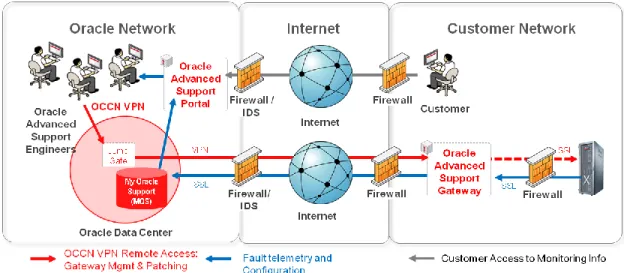
Oracle Migration Service is delivered through Oracle Advanced Support Gateway using an online connection, or offline, as per customer requirements.
Figure 9. Delivery Architecture of Oracle Migration Service Where the Customer Is Connected Back to Oracle
Components of the Delivery Infrastructure
Oracle Advanced Support Portal is the access point for reporting and documentation of all aspects of the migration, including premigration analysis, migration configuration, migration execution, and migration validation. The portal keeps customers updated throughout the migration process.
Oracle Advanced Support Gateway is a secure, patented software connection (patent information provided at the end of this document), located at the customer site on a specific hardware or software component. It allows remote access and data transportation between the customer’s physical
architecture and Oracle Data Center when delivering the service locally or remotely. Oracle Migration Service utilizes the tiered architecture to perform all the tasks needed to complete a remote migration safely and securely. All access requests are validated in real time against the platform authorization system and pass through multiple layers of security and validation.
Oracle Continuous Connection Network (OCCN) is a closed virtual private network (VPN) separated from the Oracle intranet, and solely used for remote access to customer environments. Access to customer authentication data and customer sites is only possible from this network.
Data Security
Oracle Advanced Support Gateway can be deployed in a number of ways within an organization, for example, within the customer’s Demilitarized Zone (DMZ) or within a trusted network. The gateway
the rules engine can perform actions on the message based on predefined rules implemented by the organization—such as message enrichment, noise suppression, and event correlation—and can provide autonomic response capabilities to validate and/or remediate a fault alarm. If a telemetry message passes through the rules engine and if the rules determine that the message should be sent to the Oracle Advanced Support Platform core infrastructure for processing, then the message is encoded in an XML data structure and sent to the platform core infrastructure via HyperText Transfer Protocol Secure (HTTPS), using 128-bit Secure Sockets Layer (SSL) for transport encryption.
In addition to collecting telemetry data and relaying it to the platform core infrastructure, the gateway also acts as a proxy host for incoming remote management access requests from authorized access management servers. The access management system allows Oracle’s authorized staff to access - using native management protocols such as Secure Shell (SSH), HTTP(S), Microsoft Remote Desktop Protocol (RDP), and so on - the target device and perform real-time remote management services such as patching. All connections between the access management system and the gateway are part of the segregated OCCN network. Between Oracle and the customer, OCCN is implemented as a VPN based on SSL encryption. Optionally, an Internet Protocol Security (IPSec) VPN is also available. Oracle Advanced Support Gateway will only accept incoming remote management connections from an authorized access management host within Oracle Advanced Support Platform. Additionally, the access management system server will enforce per-user connection security to each connection request, based on user permissions defined within the platform. Only if all valid permissions and authorization are in place will Oracle Advanced Support Gateway allow the remote session to begin and attempt to connect to the target device.
Oracle Advanced Support Gateway, as a separate device or a virtual machine, is always managed by Oracle. Oracle does not provide system access to the customer. For audit purposes, a temporary read access can be provided.
Example Migration Project
A typical customer engagement may illustrate the capabilities of Oracle Migration Service.
Company Example Inc. was running an Oracle database with 20 TB of data for multiple in-house and third-party applications. The company planned to migrate Oracle Database 10g Real Application Clusters from IBM AIX (Big Endian) to Oracle Exadata, and to move from Oracle Database 10g to Oracle Database 11g. The outage window for the mission-critical application was not to exceed 1.5 hours. The Oracle database was busy day and night. During business hours it supported online, telephone, and store activities. Each night the data was summarized and batch-fed into data
warehouses and other systems. Updates were also batch-fed into these systems to ensure that the latest versions were available for the users the next business day. The amount of activity equated to several hundred GB per day per node but no more than 1 TB overall.
Database Environment Had Become Complex and Inefficient
At Example Inc., Oracle Database has grown organically over many years. Originating in the Oracle8i
Databaseversion, it underwent several iterations to Oracle9i Databaseand Oracle Database 10g. Some database parameters were still being used despite being obsolete in the newer versions. Several database objects held within the database suffered from fragmentation, plus there was also lots of data held in the database that was no longer needed. The customer’s database administrator (DBA) team was struggling to perform maintenance tasks and changes due to the lack of scheduled downtimes. This often led to pushing out necessary database housekeeping routines to the deployment of new release phases.
Determining the Best Way to Success
These challenges had to be translated into requirements for the migration strategy. Which migration methodology would best meet the customer’s needs?
Some migration methods such as TTS/TDB fell through due to the low outage windows, endianness, and the size of the Oracle database.
The introduction of compression, partitioning, and defragmentation could reduce the size of the Oracle database. Thus migration methodologies such as Oracle RMAN, Export/Import, and Create Table As Select (CTAS) could still be applicable.
Because the migration of legacy data was not desired, Oracle Data Guard and RMAN could not be used. With those migration methodologies, the whole logical data set would be copied, which would take up storage space on the target.
The requirement for a low outage window could be achieved with a migration combined with Oracle GoldenGate data synchronization.
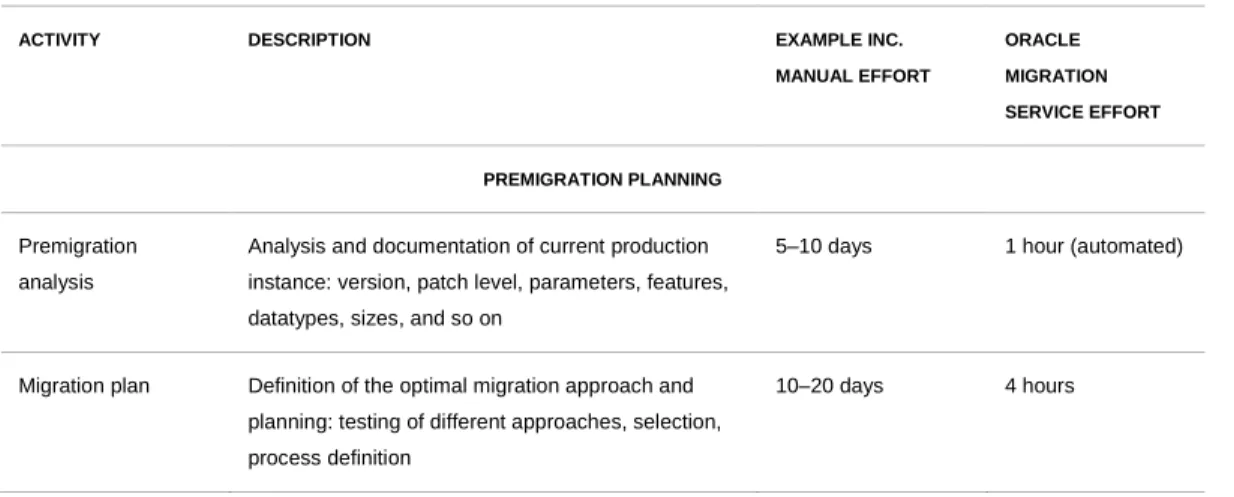
Oracle Migration Service provided a transparent offering with fixed scope and fixed price. A comparison showed how much time, effort, and expertise this migration project might require if executed manually in-house by Example Inc. versus using Oracle Migration Service:
TABLE 3. MIGRATION OF AN ORACLE DATABASE WITH 20 TB OF DATA FOR EXAMPLE INC.
ACTIVITY DESCRIPTION EXAMPLE INC.
MANUAL EFFORT ORACLE MIGRATION SERVICE EFFORT PREMIGRATION PLANNING Premigration analysis
Analysis and documentation of current production instance: version, patch level, parameters, features, datatypes, sizes, and so on
5–10 days 1 hour (automated)
ACTIVITY DESCRIPTION EXAMPLE INC. MANUAL EFFORT ORACLE MIGRATION SERVICE EFFORT CONFIGURATION Generate job scripts
Building and adjusting migration, test, and validation scripts to migrate objects and data successfully; installation of target software and so on
15 days 6 hours
Test and debug script logic
Testing, debugging, rewriting, checking 15+ days 0 hours
Destination database
Create destination database structure;
validate target system suitability: database instance, tablespaces, data files, users, and schema
10–15 days 4 days
Oracle GoldenGate software
Install and configure Oracle GoldenGate software for replication in an online Oracle database migration including tuning
5–10 days 4 days
PRODUCTION MIGRATION
Migrate data Execution of scripts, and/or execution of manual steps to migrate data
2–5 days 2 days (automated, monitored)
Validate Checking of all rows, tables, and data; review of log files
2–5 days 1 hour (automated)
Test Testing that all relevant schemas and data migrated successfully
5 days 4 days (customer)
Improvements Improvements of Oracle Database; application of new features, optimization for the new platform
5 days 1 hour (automated)
SERVICE MANAGEMENT
Project management Planning, coordination, and oversight of the entire migration project end to end by an experienced Oracle ACS technical account manager; single point of contact toward stakeholders
4 days 4 days
TOTAL EFFORT PER MIGRATION CYCLE
78–109 days 20 days1
1
Expert Delivery
Example Inc. accepted the comprehensive fixed-price offering by Oracle Advanced Customer Support Services. Oracle Migration Service was delivered according to the predefined processes and
methodologies described above. An Oracle ACS technical account manager provided end-to-end project management and kept the customer updated about progress. Oracle Migration Service was delivered online, and Oracle GoldenGate software was used to minimize downtime. The complete Oracle Database 10g RAC with 20 TB of data was upgraded to Oracle Database 11g and migrated from IBM AIX (Big Endian) to Oracle Exadata. The project required two migration cycles of 20 days each, and was performed well within the allotted downtime window of 1.5 hours. So the entire change was completed in 7 weeks, and Example Inc. could take advantage of a fully functional, upgraded, and restructured Oracle-on-Oracle database.
Database Migrations, Upgrade Versions, On Time, and On Budget
Customer benefits:
Migration and relocation without disruption of operational systems through Oracle GoldenGate technology
Access to a fully operational system precisely on time
Reduced complexity of migration project
Reduced downtime window through simultaneous upgrade
Conclusion
The complexity of the database and applications stack is a major impediment to controlling the TCO that enterprises face today. Many layers of applications interact with a database at various levels and affect the ability for the business to function. There are also hidden costs that can inflate the TCO when undertaking a migration, namely the following:
Migration planning. Many organizations intend to increase flexibility of their IT environments to meet changing market conditions. They require the latest infrastructure and technology to achieve fast turnaround time. Planning which technology achieves which business goal in short- and long-term TCO strategies is key. A migration project will incorporate all aspects of the stack that are attributable to a particular system. Effective planning reduces the TCO, as does fast completion of the migration to that infrastructure and technology.
Execution. Execution of a migration efficiently and correctly within the allotted time window can present unprecedented challenges. Coupled with large data sets, customers will often try their best to adopt the new platform. This often leads to migrating legacy problems to the new environment. Being able to move the right data set and all of its components (consolidated or individual) quickly and safely without having to perform interim steps mitigates risk, reduces complexity and TCO, and thus increases the ROI.
Oracle Migration Service’s automation can reduce migration of large, complex Oracle databases from days to hours. Expert planning, project management, and best-practice guidance ensure safe migration within the predefined boundaries. Continuous reporting provides full transparency and control throughout all steps of the process.
Oracle Migration Service is the answer to the demand for faster, safer migrations at a fixed price— delivered by Oracle Database experts.
References
Patents
Patent No. 20100241722 - Method and System for Transporting Telemetry Data Across a Network
Patent No. 7979521 - Method and System for Relocating and Using Enterprise Management Tools in a Service Provider Model
Patent No. 7904536 - Method and System for Remote Management of Customer Servers
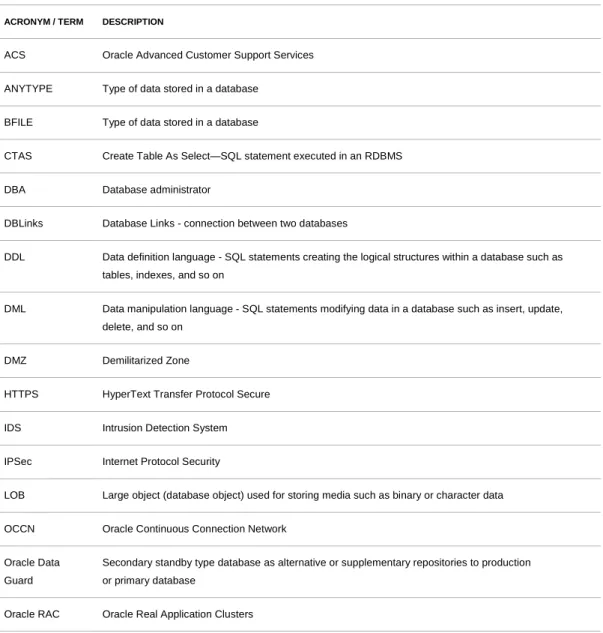
Glossary
TABLE 4. GLOSSARY
ACRONYM / TERM DESCRIPTION
ACS Oracle Advanced Customer Support Services
ANYTYPE Type of data stored in a database
BFILE Type of data stored in a database
CTAS Create Table As Select—SQL statement executed in an RDBMS
DBA Database administrator
DBLinks Database Links - connection between two databases
DDL Data definition language - SQL statements creating the logical structures within a database such as tables, indexes, and so on
DML Data manipulation language - SQL statements modifying data in a database such as insert, update, delete, and so on
DMZ Demilitarized Zone
HTTPS HyperText Transfer Protocol Secure
IDS Intrusion Detection System
IPSec Internet Protocol Security
LOB Large object (database object) used for storing media such as binary or character data
OCCN Oracle Continuous Connection Network
ACRONYM / TERM DESCRIPTION
OS Operating system
PDB Pluggable Database, a new feature of Oracle Database 12c
PL/SQL Procedural Language/Structured Query Language - extension language for the database
RAW Type of data stored in a database
RDP Remote Desktop Protocol
RMAN Recovery Manager
ROI Return on investment
RTO Recovery time objective
SSH Secure Shell
SSL Secure Sockets Layer
TB Terabyte
TCO Total cost of ownership
TDB Transportable database
TTS Transportable tablespace
VPN Virtual private network
XML Extensible Markup Language - type of data stored in a database
Links
Oracle Advanced Customer Support Services
Oracle GoldenGate 12
c
Oracle Advanced Customer Support Services for Oracle Database
Oracle Migration Service Data Sheet
Migrating Oracle Databases June 2014
Authors: Birgit Kreuz, Antony Higginson
Oracle Corporation World Headquarters 500 Oracle Parkway Redwood Shores, CA 94065 U.S.A. Worldwide Inquiries: Phone: +1.650.506.7000 Fax: +1.650.506.7200
Copyright © 2014, Oracle and/or its affiliates. All rights reserved.
This document is provided for information purposes only, and the contents hereof are subject to change without notice. This document is not warranted to be error-free, nor subject to any other warranties or conditions, whether expressed orally or implied in law, including implied warranties and conditions of merchantability or fitness for a particular purpose. We specifically disclaim any liability with respect to this document, and no contractual obligations are formed either directly or indirectly by this document. This document may not be reproduced or transmitted in any form or by any means, electronic or mechanical, for any purpose, without our prior written permission.
Oracle and Java are registered trademarks of Oracle and/or its affiliates. Other names may be trademarks of their respective owners.
Intel and Intel Xeon arhe trademarks or registered trademarks of Intel Corporation. All SPARC trademarks are used under license and are trademarks or registered trademarks of SPARC International, Inc. AMD, Opteron, the AMD logo, and the AMD Opteron logo