Condor for the Grid
1) Condor and the Grid. Douglas Thain, Todd Tannenbaum, and Miron Livny. In Grid Computing: Making The Global Infrastructure a Reality, Fran Berman, Anthony J.G. Hey, Geoffrey Fox, editors. John Wiley, 2003.
2) Condor-G: A Computation Management Agent for Multi-Institutional Grids. J. Frey, T.
Tannenbaum, I. Foster, M. Livny, S. Tuecke. In Proceedings of 10th International Symposium on High Performance Distributed Computing (HPDC-10), August 2001
Utilization of Diverse Resources
Most users “could” access diverse resources
Tasks such as simulation, image processing, rendering
Problem of “potential barrier” to these resources
Diverse mechanisms, policies, failure modes, performance Arise when crossing administrative domains
A solution must follow 3 key user requirements
Discover, acquire, and reliably manage computational resources dynamically in the course of everyday activities
Shouldn’t be bothered with resource location, mechanisms to use them, the computational tasks on the resources, or reacting to failure
Condor Background
Started in 1988 by Dr. Miron Livny
Takes advantage of computing resources that might
otherwise be wasted
“Condor is a reliable, scalable, and proven
distributed system, with many years of operating
experience. It manages a computing system with
multiple owners, multiple users, and no centralized
administrative structure. It deals gracefully with
failures and delivers a large number of computing
cycles on the time scale of months to years.
“ (3)
Condor Features
ClassAds
Matches job requests with machines
Job checkpoint and migration
Records checkpoints
Able to resume applications from the checpoint file
Safeguards computation time of the job
Remote System Calls
Can preserve the local execution environment
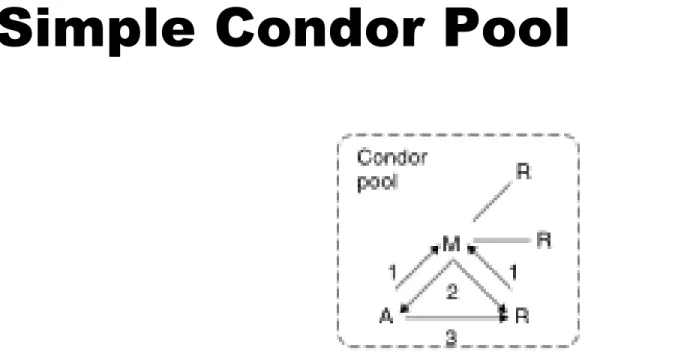
Simple Condor Pool
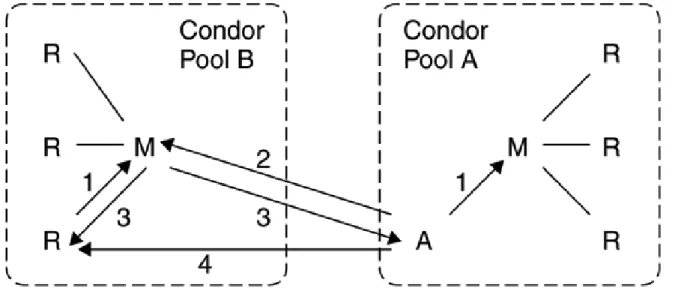
Gateway Flocking
Condor software spread, creating various pools
User could only participate in one community
1994-a solution, gateway flocking, was developed
Figure
11.5
Direct flocking
Problems with Gateway flocking
Only allows sharing at the organizational level
Direct Flocking
Allows agent to report itself to multiple matchmakers
Figure 11.7 from (1)
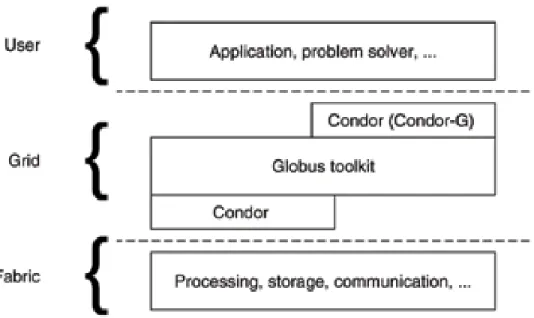
Condor in relation to the Grid
Slight Grid Detour
Condor-G exploits a few Grid protocols
GSI (Grid Security Infrastructure)
Essential building blocks for other Grid protocols
Handles authentication and authorization
MDS-2 (Methods for Discovering and Disseminating)
Resource uses GRRP (Grid Resource Registration Protocol) for
notification to other Grid entities
Those entities use GRIP(Grid Resource Information Protocol) to
obtain information about the resource status
GASS(Global Access to Secondary Storage)
Mechanisms for transferring data between a remote HTTP, FTP, or
GASS Server
GRAM
In 1998, Globus designed GRAM
GRAM (Grid Resource Allocation and Management Protocol) Provides an abstraction for remote process queuing
Three Aspects important in relation to Condor
Security
Two-phase commit
Fault tolerance
To take advantage of GRAM, the user needs a system to:
Remember what jobs have been submitted, where the jobs are, andwhat those jobs are doing
Handle job failure and possible resubmitting of jobs
Track large numbers of jobs with queueing, prioritization, logging
Condor-G was created to do these things
Intro to Condor-G
Treats Grids as a local resource
API and command line tools to
Submit jobs
Query a job’s status or cancel the job
Be informed of job termination or problems
Obtain access to detailed logs
Condor-G (under the hood)
Stages a job’s standard I/O and executable using GASS
Can use GRAM to submit jobs to remote queues
Problems
Must direct job to a particular queue without knowing the availability of resources
Does not support the features of each system underlying GRAM Many of Condor’s features like checkpointing also missing
Wait a tick … I think we can fix that last problem
“Gliding in” allows us to have reach of Condor-G and the
Condor without “gliding in”
Job Submission Machine Job Execution Site
Globus GateKeeper Condor-G Scheduler Globus JobManager
Site Job Scheduler (PBS, Condor, LSF, LoadLeveler, NQE, etc.)
Job X Globus JobManager Job Y Submit Condor-G GridManager GASS Server Submit Fork Fork Fork Persistant Job Queue End User Requests
Gliding In
(all figures from 11.9(3))Condor-G with “gliding in”
Job Submission Machine Job Execution Site
Job
Condor-G GridManager GASS Server Condor-G Scheduler Persistant Job Queue End User Requests Condor Shadow Process for Job X Condor-G Collector Fork Globus Daemons +Local Site Scheduler [See Figure 1]
Fork
Condor Daemons
Job X
Condor System Call Trapping & Checkpoint
Library Fork Resource Information Transfer Job X Redirected System Call Data
Figure 2 from (2)
More Condor-G tidbits
Failure handling
Crash of Globus JobManager
Crash of the machine that manages the remote resource
Crash of the machine on which the GridManager is executing Network failure between two machines
Credential management
GSI proxy given finite lifetime Condor-G agaent periodically analyzes credentials for users with queued jobs
Credentials may have to be forwarded to a remote location
Resource discovery and scheduling
Different strategies
User supplied list of GRAM servers
Condor-G FAQ
From (3)
Do I need to have a Condor pool installed to use Condor-G?
No, you do not. Condor-G is only the job management part of Condor. It makes perfect sense to install Condor-G on just one machine within anorganization. Note that access to remote resources using a Globus interface will be done through that one machine using Condor-G.2.
I am an existing Condor pool administrator, and I want to be
able to let my users access resources managed by Globus, as
well as access the Condor pool. Should I install Condor-G?
Yes
I want to install Globus on my Condor pool, and have external
users submit jobs into the pool. Do I need to install Condor-G?
No, you do not need to install Condor-G. You need to install Globus, to get the "Condor jobmanager setup package."
More from the Condor-G FAQ
I am the administrator at Physics, and I have a 64-node cluster running Condor. The
administrator at Chemistry is also running Condor on her 64-node cluster. We would like to be able to share resources. Do I need to install Globus and Condor-G?
You may, but you do not have a need to. Condor has a feature called flocking, which lets multiple Condor pools share resources. By setting configuration variables, jobs may be executed on either cluster. Flocking is good (better than Condor-G) because all the Condor features continue to work. Examples of features are checkpointing remote system calls. Unfortunately, flocking only works between Condor pools. So, access to a resource managed by PBS, for example, will still require Globus and Condor-G to submit jobs into the PBS queue.
Why would I want to use Condor-G?
If you have more than a trivial set of work to get done, you will find that you spend a great deal of time managing your jobs without Condor. Your time would be better spent working with your results. For example, imagine you want to run 1000 jobs on the NCSA Itanium cluster without Condor-G. To use the Globus interface directly, you will type 'globusrun' 1000 times. Now imagine that you want to check on the status of your jobs. Using 'globus-job-status' 1000 times will not be much fun. And, heaven help you if you find a bug and need to cancel your thousand jobs. This will be followed by resubmitting all 1000 jobs. Under Condor-G, job submission and management is simplified. Condor-G will also ease submission and management of jobs when job flow is
complex. For example, if the first 100 jobs must run before any of the next 100 jobs, and once those 200 jobs are done, the next 700 may start. The last 100 may run only after the first 900 finish. Condor DAGMan manages all of the dependencies for you. You can avoid writing a rather complex Perl script.
Problem Solvers
High level structure built on top of the Condor agent
Relies on a Condor agent in two ways
Uses agent as service for reliably executing jobs
Making the problem solver reliable
Two are provided with Condor
Master-worker (MW)
Master-Worker
Solves problems of indeterminate size on a large
and unreliable workforce
Master consists of three components
Work list - outstanding work master wants done
Tracking mode - accounts for remote worker processes
Steering Module - directs computation by examining results,
modifying the work list, obtaining a sufficient number of workers
DAGMan
Meta-scheduler for Condor
Service for executing multiple jobs
Deals with explicitly declared dependencies
Keeps private logs
DAGMan properties
Can be in any order but must
maintaing properties of a DAG
No cycles
Directed edges
JOB statement associates abstract
name (A) with file (a.condor) which describes complete Condor job
B and C can’t run until A finishes in.pl and out.pl run before and after C
gets executed, respectively
PRE - usually prepare environment
DAGMan logistics
DAGs are defined by .dag files
Command “condor_submit_dag” <dagfile>
DAGMan daemon runs as its own Condor job
With a joib failure, DAGMan will go as long as it
can and then will generate a rescue file
The rescue file is then used to restore the state when ready
Process will continue as if nothing happened
Split Execution
Making the job feel at home in its environment
Cooperation between submission mach. and execution machine
This cooperation is called “split execution”
2 distinct components, shadow and sandbox Shadow - represents the user to the system
Provides executable, arguments, environment, etc.
Sandbox - gives job safe place to play
Sand - gives everything jobs needs to properly run
Box - protects job from harm from outside world
Condor Universes
Standard
Supplied with earliest Condor facilities
Provides emulation for standard system calls Allows checkpointing
Converts all job’s standard calls into RPC’s back to shadow
The Java Universe
Added to Condor in late 2001
Originally, users had to submit entire JVM binary as job Worked, but it was inefficient
Level of abstraction introduced to create complete Java environment Location of JVM is provided by local administrator
Sandbox must place this and oteher components in private execution directory, and start JVM based on the users’ credentials