Uniform School
Accounting System
USAS Version 6.1 Release
Notes
Release Date: 2014.12
This document contains information about changes, enhancements and problems corrected with the 2014.12 release of USAS Version 6.1.
1
Functional Enhancements and Changes
1.1
General: Removed obsolete funds
The funds 494, 504, and 532 have been removed from the software as valid funds, per Appendix A of the AOS USAS Manual.
1.2
F1099: Increase size of vendor address line and other fields
For the F1099 the size of the vendor address line as well as the district name, address, and city has been increased to 40 characters. This will match what is currently on the TAP submission file. Also when entering the district name, address, and city it will now accept 40 characters.
1.3
USAEXP/PO_EXP: Added column for multivendor
A new column was added to the PO Header export file to indicate if the purchase order was a multi-vendor purchase order. This was done for use in the USAS-R import process.
1.4
USAEXP/REQ_EXP: Added column for multivendor
A new column was added to the Requisition Header export file to indicate if the requisition was a multi-vendor requisition. This was done for use in the USAS-R import process.
1.5
VALACT: Added OPU warnings
Warnings were added to VALACT when ODE requires an OPU based on the chart in the Expenditure Record chapter of the EMIS Guide. ODE added similar warnings to the Period H level 1 validation errors toward the end of fiscal year 2014 Period H reporting.
2
Problems Corrected
2.1
AUDITS: Fixed account selections
The account selection options were not being asked when the user selected the option to run the report for a single program and selected ACCTXML for the program.
2.2
FINDET: Increased maximum number of cash accounts
FINDET stores a table of cash accounts which had a maximum of 2500 cash accounts for the program to run. This maximum was increased to 5000 to accomodate large city schools with more than 2500 cash accounts.
3
Technical Enhancements and Changes
4
Modifications to Menu Files
5
Documentation
The documentation is maintained by the SSDT in electronic form at the following web site: http://wiki.ssdt-ohio.org/display/usas/Home
5.1
Documentation Summary
The following are documentation files for the Uniform School Accounting System (USAS) package. Below is a brief description of the contents and the intended audience of the document.
Table 1 Documentation Summary
Document File Revision Date Description
http://wiki.ssdt-ohio.org/x/5gQZ
USAS Reference Manual
http://wiki.ssdt-ohio.org/x/7wQZ
USAS User’s Guide
http://wiki.ssdt-ohio.org/x/OgUZ
USAS System Manager Manual
http://wiki.ssdt-ohio.org/x/7AMZ
March, 1999 System Manager Documentation for the File Structures Used by the USASAUD Program.
http://wiki.ssdt-ohio.org/x/6wMZ
September, 1996
System Manager Documentation describing how to write an interface between the USAS/AR system and other databases. This interface allows ARF to access customer numbers, names and addresses in non-state software files.
http://wiki.ssdt-ohio.org/x/6gMZ
September, 2010
System Manager Documentation for the File Structures used by the AUTOPOST Program.
http://wiki.ssdt-ohio.org/x/7gMZ
May, 1999 System Manager Documentation for the File Structures Used by the ACCLOAD Program.
5.2
Training Manuals
A general training manual for USAS is available in electronic form at http://wiki.ssdt-ohio.org/x/fQsZ. A set of data files to go along with the manual are included with the release in TRAINING:[USAS]. Please see the AAAREADME.1ST in this directory for more information.
A training manual for the Accounts Receivable Facility (ARF) is also available in electronic form at http://wiki.ssdt-ohio.org/x/agsZ. An AAAREADME.1ST file and a set of data files can be found in TRAINING:[ARF].
Table 2 Documentation Summary
Document File Revision Date Description
http://wiki.ssdt-ohio.org/x/agsZ
May, 2003 Training Manual for the ARF Software. http://wiki.ssdt-ohio.org/x/fQsZ Uniform School Accounting System Training Guide.
6
Package Installation and Logicals
Installing USAS involves first using the OECN_INSTALL procedure to unpack the savesets into the OECN$ROOT:[USAS.V6P1.DIST]. After the distribution directories have been prepared, INSTALL_
PACKAGE is used to transfer the package from the distribution directory into the user execution directory. See the VAXMGR_HANDBOOK in OECN$ROOT:[DOCUMENT.DIST] for more information about OECN_ INSTALL and INSTALL_PACKAGE.
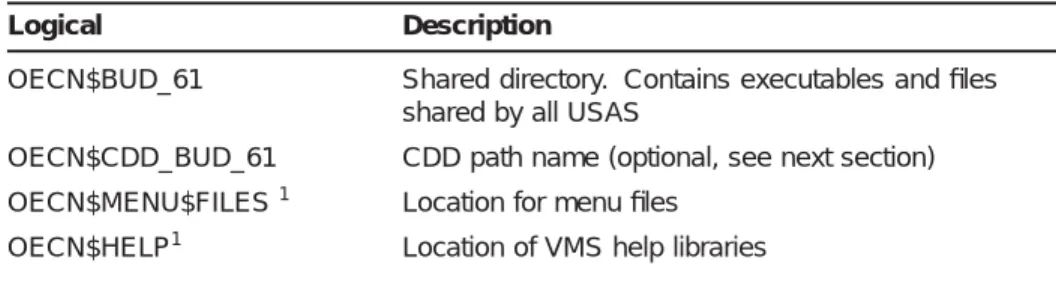
Prior to executing INSTALL_PACKAGE it is necessary to define several system logicals required by the package. The table below lists the logicals which should be defined prior to executing INSTALL_PACKAGE for USAS:
Table 3 System Logicals
Logical Description
OECN$BUD_61 Shared directory. Contains executables and files shared by all USAS
OECN$CDD_BUD_61 CDD path name (optional, see next section) OECN$MENU$FILES1 Location for menu files
OECN$HELP1 Location of VMS help libraries 1
Also used by other packages
Note: USAS also requires components from the OECN and CSSR
packages. These packages should be installed prior to installation of this package.
6.1
Installing CDD/DTR Definitions
The USAS distribution contains optional CDD and DTR definitions that are acceptable for use with DTR, 20/20 and other products that are integrated with DEC CDD/Repository. Data names for COBOL are provided in the record definitions. The CDD definitions are optional and are not necessary to successfully install and utilize the base USAS
package. However, there are a few "supported" DTR reports. If you wish to be able to use these reports, you must install the CDD definitions. The INSTALL_PACKAGE procedure in OECN$UTL will load the CDD definitions into the CDD when either the "CDD" or "FULL" option is used to install USAS. INSTALL_PACKAGE is the only supported method for installation of CDD definitions for USAS Version 6.1.
The USAS CDD definitions for USAS Version 6.1 will be loaded into the CDD path referenced by the OECN$CDD_BUD_61 logical. This logical must be defined prior to executing INSTALL_PACKAGE and should be defined as a system logical. SSDT recommends that the USAS definitions be placed in a separate CDD directory from other CDD definitions. This increases the efficiency of the CDD, allows the USAS definitions to be treated as a ’database’ from 20/20, and simplifies security maintenance. For example:
$ DEFINE/SYSTEM OECN$CDD_BUD_61 CDD$TOP.OECN.USAS61
After defining the OECN$CDD_BUD logical, the INSTALL_PACKAGE may be executed. Below is sample run of the CDD installation:
$
$ @OECN$UTL:INSTALL_PACKAGE CDD OECN$ROOT:[USAS.V6P1.DIST]
OECN INSTALL_PACKAGE (V1.1-010) Copyright © 1991, Ohio Dept of Ed, IMS %OECNINS-I-BEGIN, Begin CDD installation for USAS Version 6.1 on NWOCA0:: at 14-MAR-1994 15:09:36.41
%OECNINS-I-CDD, Loading CDD definitions to CDD$TOP.OECN.USAS61 OECN INSTALL_CDD (V1.0-001) Copyright © 1994, Ohio Dept of Ed, IMS %OECNINS-I-START, Starting CDD install for USAS Version 6.1
%OECNINS-I-RECORD, Processing record OECN$CDD_BUD.PERMANENT_4502_REC .
. .
7
UDMS Dictionary Implementation
USAS contains a dictionary for use with the UDMS Report Writer product. The dictionary will be installed automatically when
OECN$UTL:INSTALL_PACKAGE is executed with either the FULL or UDMS option. If a version of the dictionary has already been installed, INSTALL_PACKAGE will merge the updated version into the local copy. Thus, reports and additional views developed locally will be preserved. USAS also contains a sharable image which is used by UDMS. The sharable image provides 3GL functions which are used in calculated fields by the UDMS dictionary. To make this image available to UDMS, you must define the following logical during system startup:
$ DEFINE/SYSTEM OECN$USAS_SHR OECN$BUD:USASSHR.EXE
8
Implementation of this Release
Please implement this release as soon as possible. It is difficult for the SSDT to provide assistance to your problems if you are not utilizing the current version of the software supplied.
Please refer to the documentation files contained on the release tape to obtain a history of the modifications the software has gone through. The release documentation files are named in the format of "RELyymm.DOC" where yymm is the release date.
Should you experience any problems, or have any questions, concerning the OpenVMS/Alpha version of the USAS Version 6.1 software please feel free to contact SSDT for assistance using one of the following options:
Visit the OECN Public Forum at http://forums.oecn.k12.oh.us/forums/oecn/
DAS restricted Forum at http://forums.oecn.k12.oh.us/forums/das/ SSDT Home Page at http://ssdt.oecn.k12.oh.us/
End of Documentation for USAS Version 6.1 Release: 2014.12