University of New Orleans Theses and
Dissertations Dissertations and Theses
5-21-2004
Security and Authentication for 802.11 Wireless Networks
Security and Authentication for 802.11 Wireless Networks
Michel Getraide
University of New Orleans
Follow this and additional works at: https://scholarworks.uno.edu/td
Recommended Citation Recommended Citation
Getraide, Michel, "Security and Authentication for 802.11 Wireless Networks" (2004). University of New Orleans Theses and Dissertations. 88.
https://scholarworks.uno.edu/td/88
This Thesis is protected by copyright and/or related rights. It has been brought to you by ScholarWorks@UNO with permission from the rights-holder(s). You are free to use this Thesis in any way that is permitted by the copyright and related rights legislation that applies to your use. For other uses you need to obtain permission from the rights-holder(s) directly, unless additional rights are indicated by a Creative Commons license in the record and/or on the work itself.
WIRELESS NETWORKS
A Thesis
Submitted to the Graduate Faculty of the
University of New Orleans
in partial fulfillment of
the requirements for the degree of
Master of Science
in
The Department of Computer Science
by
Michel Getraide
B.Sc, M.Sc, Université de Marne La Vallée, 2002
ii
Acknowledgments
First of all, I want to express my gratitude to my advisor Dr. Golden Richard for supervising my thesis and for his help.
I would also like to thank the members of my committee Dr. Adlai DePano and Dr. Shengru Tu.
Venkata Mahadevan has been a great help for me during the practical part of my work. I owe him a special thank.
iii
Table of Contents
List of Figures ...v
List of Tables ...vii
Abstract ... viii
Chapter 1: Introduction ...1
1. Advantages of wireless networks...1
2. What is 802.11? ...2
3. Wireless security requirements ...3
3.1. Strengthen authentication...3
3.2. Encrypt all traffic ...3
3.3. Ensure integrity...3
Chapter 2: WEP Security Scheme ...4
1. Introduction...4
2. Access Control / Authentication ...5
3. Data Integrity ...7
4. Confidentiality. ...7
4.1. Stream ciphers ...7
4.2. RC4 stream cipher...8
5. Conclusion ...9
Chapter 3: WEP flaws...10
1. Introduction...10
2. Weak key attacks ...11
3. Collision attacks (keystream reuse) ...12
4. Forgery attacks (Message modification, injection)...13
5. Replay attacks ...14
6. Rogue access points ...14
7. Absence of automatic key management ...14
8. Conclusion ...15
Chapter 4: Improving security ...16
1. Introduction...16
2. Task Group I ...16
3. WPA before RSN...17
4. TKIP...19
4.1. Message Integrity Code (MIC) ...20
4.2. Extended IV / New IV sequence counter...21
4.3. Per-packet key construction...22
4.4. Sum up of WEP fixes...23
5. 802.1x: Standard for port-based network access control ...24
5.1. 802.1x authentication at a glance...24
5.2. 802.1x architecture and terminology ...24
5.3. RADIUS...26
5.4. EAP: Transport protocol between the supplicant and the access point ...26
5.5. Overview of EAP packets...27
iv
5.7.1. Certificates ...32
5.8. EAP keying framework...33
5.8.1. Three-party exchange (with an authentication server)...34
5.8.2. Two-party exchange (SOHO mode - without authentication server) ....36
5.8.3. Advantage of using transient keys:...37
6. CCMP ...37
1. Authentication...37
2. Encryption...38
Chapter 5: Other security measures ...39
1. Firewalls...39
2. VPN...40
3. MAC address filtering...40
4. Closed network ...41
Chapter 6: Security in practice: Installation of a RADIUS server...42
1. Introduction...42
2. Identify the security requirements / strategy / policy...42
3. Current security measures...42
4. Shortcomings ...43
5. New Security Measures Chosen ...43
6. Deploying these new Security Measures ...43
6.1. Introduction...43
6.2. Access point configuration ...44
6.3. FreeRADIUS configuration ...47
7. Tests and results...49
7.1. Client (Windows XP) configuration ...49
7.2. Tests ...51
7.3. Advantages and recommendations ...52
Conclusion ...53
Sources...54
v
List of Figures
Figure 1: All the communications between access points (AP) and wireless stations have to be encrypted. However, access points decrypt the data intended to the
wired network. ...4
Figure 2: Shared-key authentication ...6
Figure 3: The 3 possible state machine of 802.11 (a station has to authenticate before associating with an access point) ...6
Figure 4: Stream cipher [1] ...8
Figure 5: WEP data processing...9
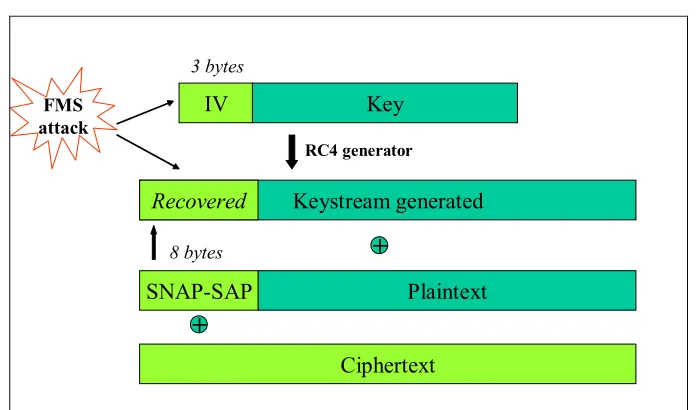
Figure 6: Weak keys, the FMS attack...11
Figure 7: Areas of development of TGi...17
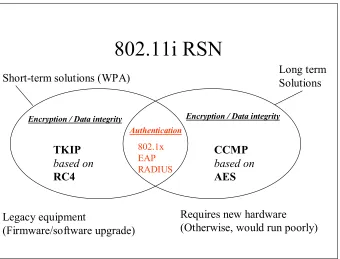
Figure 8: Overview of 802.11 Robust Security Network. It includes both short term and long-term solutions. WPA takes the legacy solutions (left part) from the 802.11i draft plus 802.1x. ...18
Figure 9: MIC computation ...20
Figure 10: TKIP: Per packet Key construction and MIC computation ...23
Figure 11: The 3 components of 802.1x ...25
Figure 12: Port-based network access control ...25
Figure 13:A typical RADIUS exchange...28
Figure 14:Two kinds of EAP packets...28
Figure 15: A typical EAP exchange...28
Figure 16: 802.1x over 802.11...30
Figure 17: Encapsulation in EAPOL and RADIUS protocol ...30
Figure 18: Creation of a server certificate: signature by the Certificate Authority ...32
Figure 19: Verification of the certificate by the client – Two steps ...33
Figure 20: The 3 steps of EAP keying framework: The EAP authentication protocol, the AAA protocol and the TSK derivation protocol (adapted from [16]) ...35
Figure 21: Authentication (upper part) and encryption (bottom part) with CCMP (adapted from [4]) ...38
Figure 22: Separate the wireless network from the wired network ...39
Figure 23: Integration of VPN in a WLAN ...40
Figure 24: Security configuration (MAC access) ...44
Figure 25: Security configuration (WEP encryption)...45
Figure 26: Security configuration (802.1x) ...46
Figure 27: RADIUS configuration...47
Figure 28: Portion of clients. conf file ...48
vi
List of Tables
vii
Abstract
Wireless Networks is a very growing market. However, the security measures are not strong enough; the WEP security protocol is flawed. The 802.11 Task Group I is working on new security measures in order to strengthen the access control of users, the privacy and the integrity of data.
Chapter 1: Introduction
1. Advantages of wireless networks
Productivity and profitability have become a key problem for businesses today. Return on investment is one of the deciding factors in any business decision. This is true for investment in IT infrastructure. Wireless networks present some advantages for businesses: [18]
• Stay connected.
According to surveys, using wireless LANs allows users to stay connected to their network more time each day. A user with a laptop and a wireless connection can roam their office building without losing their connection, or having to log in again on a new machine in a different location. This translates to a very real increase in productivity.
• Accurate information:
In the healthcare field, a study showed that the fact to have information "anywhere, anytime" allows increased access to accurate information.
• Simplicity and increase of productivity:
The simplicity to set up a wireless network (no need to open a trench to bury network cables beneath the ground) is a gain of time and allows a company to save money. The installation is quick and can also be removed easily (in case if the company moves location often). According to a study, "wireless networking has a measurable impact on return on investment, with organizations saving an average of $164,000 annually on cabling costs and labour". “While the initial investment required for WLAN may be higher than the cost of traditional wired LAN hardware, overall installation expenses and life-cycle costs can be significantly lower. Long-term cost benefits are greatest in dynamic environment requiring frequent moves and changes”. [19]
• Flexibility and increase productivity:
Wireless networks give a better quality of life to employees and a more productive and flexible working environment.
it is not convenient or even dangerous to connect wires. In that case, wireless deployment is a better solution and often cheaper.
• Mobility advantages:
The world has changed. People have become more mobile. The development of transportation and the global economy are the main reasons of this mobility. Most of the big companies have offices worldwide and their employees need to travel more often. They need access to the Internet or to the company’s network while being out of their office (airports, meetings, congress).
Other mobility advantages include: students attending class on campus accesses information in the Internet, managers or professors can do lectures without carrying papers.
• Costs and technologies:
The cost of access points and wireless cards has reduced considerably. The technology helps making the wireless network a reality: the capacity of batteries has increased and laptops can be autonomous for a longer amount of time.
So, we see that wireless networks are simpler, more convenient, cost saving and thus very attractive for businesses but also for personal use. This market is growing.
2. What is 802.11?
IEEE standard 802.11 is a series of specifications for wireless local area network (WLAN). The goal of 802.11 is to define an Ethernet-like communication channel using radio waves instead of cables.
802.11 is divided into 2 layers: The Media Access Control (MAC) layer, and the Physical media (PHY) layer. The MAC layer is a set of rules to determine how to access the medium and send the data but the details of transmission is left to the PHY layer [8]. Different variations of 802.11 correspond to different PHY layers. Frequency hopping spread spectrum (FHSS) and direct sequence spread spectrum (DSSS) were the first two techniques used. 802.11b uses DSSS where as 802.11a uses another radio technique called orthogonal frequency division multiplexing (OFDM). Those different techniques use different frequency band and generates different speeds: 802.11b has a maximum bandwidth of 11 Mbps and operates in the 2.4 GHz frequency band where as 802.11a has a maximum bandwidth of 54 Mbps and operates in the 5 GHz frequency band.
3. Wireless security requirements
Due to its insecure medium of communication, wireless networks need more security than traditional wired networks. We can distinguish three different areas of security.
3.1. Strengthen authentication
With wireless networks, there is no physical access to the network infrastructure (e.g. access points); that is you can associate with an access point without the knowledge of its location. For that reason, users need to ensure they are connecting to legitimate access points that are part of the organization’s network, not “rogue” access points. Thus, not only the user has to authenticate to the network but the network also need to authenticate to the user. This is called mutual authentication.
3.2. Encrypt all traffic
Wireless networks are much easier to perform traffic analysis on because physical access to the network does not require physical access to the equipment since transmissions are broadcasted over radio waves. Frames can be easily intercepted in transit with wireless network analysis software. All the communication between access points and stations need to be encrypted.
3.3. Ensure integrity
Since a third party can intercept the data, there is a risk of malicious modification of the data. The receiver would have no way of knowing if the data received is the original data sent or if the data has really been sent by the specified sender. So, a mechanism to ensure integrity is necessary.
Chapter 2 will present the WEP scheme.
Chapter 2: WEP Security Scheme
1. Introduction
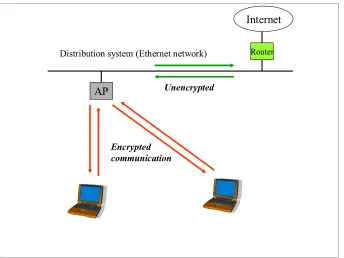
Because of the broadcast transmission of data, the main concern with radio communication is that anyone can eavesdrop with a receiver. So the primary goal of WEP1 is to protect the confidentiality of user data from eavesdropping and other attacks. WEP protects the link-layer communication. It is used by stations to protect data as it traverses the wireless medium, which means all the communication exchanges between a wireless station and an access point. However, it provides no protection past the access point. See figure 1.
AP
Distribution system (Ethernet network) Router Internet
Encrypted communication
Unencrypted
Figure 1: All the communications between access points (AP) and wireless stations have to be encrypted. However, access points decrypt the data intended to the wired network.
WEP make use of a 40-bit or 128-bit key for encryption and decryption. The encryptor (station or access point) encrypts the data with a key. Then the decryptor (access point or station) decrypts the data with the same key. So, both the key of the stations and the key of the access points have to be identical. We will see in the next
1 WEP = Wired Equivalent Privacy. It is aimed at make a wireless LAN equivalent to an unsecured
section that this is precisely what the authentication scheme is checking: the station will be authenticated if and only if it has the same key as the access point.
However, 802.11 does not provide any mechanism to manage the keys. So, most of the time, they are entered manually in the device drivers and access points.
The 3 services that WEP provides are authentication (access control), confidentiality, and data integrity. Each of theses services is reviewed in the next 3 sections.
2. Access Control / Authentication
The goal of authentication is to identify users in the network and prevent unauthorized access. 802.11 uses the Shared-key authentication scheme. Actually, shared-key authentication uses WEP encryption and therefore can be used only on products that implement WEP. Any stations implementing WEP have to implement shared-key authentication.
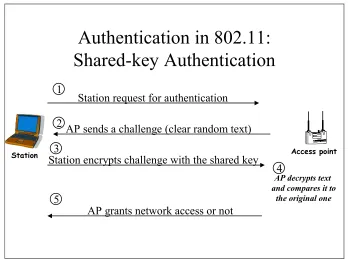
The protocol will check if the mobile station has the same set of keys2 as the access point. (In a given service set, the set of keys are shared among all the stations.) So, it requires that those default keys be distributed to stations before attempting authentication. When a mobile station sends a request for authentication, the access point sends to the station a challenge. The wireless station encrypts this challenge text with its shared key and sends the message back to the access point. The access point decrypts the message using its key. If the original challenge text is recovered, then both the station and the access point share the same secret key and the station will be authenticated. Otherwise, the network access will not be granted. Figure 2 depicts the different steps of the authentication process.
Authentication in 802.11:
Shared-key Authentication
Station request for authentication
AP sends a challenge (clear random text)
Station encrypts challenge with the shared key
AP decrypts text and compares it to
the original one
AP grants network access or not
Station Access point
1
3 2
5
4
Figure 2: Shared-key authentication
802.11 provides another authentication scheme called open-system authentication. But it provides no security since the access is granted if the name of the network (SSID) is known!
Once the network has authenticated the station, the station has to associate with a specific access point. Figure 3 shows the 3 possible states of 802.11 state machine.
Unauthenticated Unassociated Authenticated Unassociated Authenticated Associated Authentication to Authentication to the network the network (Shared
(Shared--key orkey or
Open system)
Open system)
Deauthentication
Deauthentication
Association
Association //
Reassociation
Reassociation
with an access
with an access
Point of the
Point of the
network
network
Disassociation
Disassociation
Both the problems of data integrity and confidentiality are due because of the broadcasting transmission over the air. An eavesdropper could record traffic – called passive attack – or even modify the data – called active attack. To prevent those attacks, WEP provides means for data integrity and confidentiality.
3. Data Integrity
The role of data integrity is to prevent modification of data by a third (unauthorized) party. An integrity check value (ICV) is computed over the unencrypted message to insure that the data has not been modified during its transmission. The ICV is added to the unencrypted message. They both are encrypted3 before being sent. The ICV is a function of the data. If a third party modifies the data, the ICV will no longer correspond to the data. The receiver basically computes the ICV over the data received (and decrypted) and compares it with the ICV computed by the transmitter. If they don’t match, then the data was modified during the transmission. (The ICV is encrypted to prevent a third party from modifying the data and the ICV accordingly). The CRC-32 algorithm is used to compute the ICV.
4. Confidentiality
The goal of confidentiality is to prevent eavesdropping. As we said in the chapter 2, frames on wireless networks can be easily intercepted because of the broadcast nature of the wireless medium. For this reason, we need to encrypt all data communication over the wireless network. The algorithm used to encrypt and decrypt traffic is RC4 stream cipher. Let’s explain what a stream cipher is and then, we will introduce the RC4 stream cipher.
4.1. Stream ciphers
Stream ciphers convert plaintext to ciphertext one bit at a time. A pseudo-random4 number generator (PRNG) uses a specific algorithm to expand the key (seed). The keystream produced (as long as the plaintext) is xored with the plaintext to produce the ciphertext. During the decryption process, the same keystream is xored with the ciphertext to recover the plaintext. It works since (P ⊕ k) ⊕ k = P. The generator that decrypts the message should use the same key and the same algorithm in order to get the same keystream. Cf. figure 4.
3 See section 4 below.
4 It is called pseudo-random since a real random generator is impossible. The closer the keystream
PRNG PRNG
P C P
K K
Sender Receiver
Key = seed Key = seed
Encryption: P K = C
Decryption: C K = P
(P K ) K = P (XOR property)
Figure 4: Stream cipher [1]
4.2. RC4 stream cipher
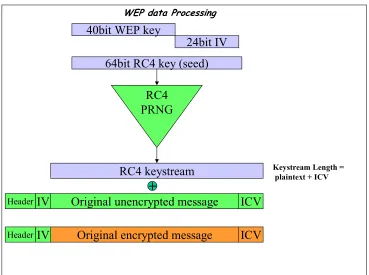
The stream cipher used to encrypt data is RC4. The key used is the concatenation of a 40-bit shared key5 with a 24-bit initialization vector (IV). The RC4 pseudo-random number generator will take the 64-bit key (seed) as input and will expand it into a keystream. The generator uses a specific algorithm to expand the key. Both the message and the ICV6 are encrypted. The encryption simply consists of doing a XOR with the RC4 keystream. The knowledge of the IV is necessary to decrypt the message, so it is not encrypted. Before the frame is sent over the air, the PHY layer adds a checksum (It is not part of the WEP processing though). (Cf. figure 5 below)
40bit WEP key
24bit IV
64bit RC4 key (seed)
RC4 keystream
Keystream Length =plaintext + ICV+
Original unencrypted message
IV
ICV
Header
Original encrypted message
IV
ICV
Header
WEP data Processing
RC4
PRNG
Figure 5: WEP data processing
5. Conclusion
We described the 3 services that WEP is supposed to provide. We will see in the next chapter that they all have flaws. Here is an overview of these flaws:
Authentication flaws:
The authentication is of user’s MAC addresses and not users themselves. There is no mutual authentication: only the user is authenticated but not the access point. So, there is a risk of “rogue access points”.
Encryption flaws:
The keystream is a function of the tuple (key, IV). We will see in the next chapter that it is very insecure to encrypt 2 different frames with the same keystream. That is why a different IV is needed for each frame. However, it happens that the same IV is reused along with the same key (Cf. next chapter). A keystream reuse could lead to a collision attack.
Data integrity flaws:
Chapter 3: WEP flaws
1. Introduction
In the previous chapter, we explained the WEP scheme. Here, we will describe the WEP flaws and the possible attacks to recover the WEP key or the original plaintext. Let’s recall that WEP uses a stream cipher – RC4 - to encrypt and decrypt data and that the plaintext is xored with the generated pseudo-random stream to produce ciphertext. The decryptor uses the same generated keystream to recover the plaintext.
C = P ⊕ K Plaintext encryption C transmitted over the air P = C ⊕ K Plaintext decryption
If C is modified during the transmission over the air – it is possible since 802.11 Media Access Control (MAC) is not reliable, the decryptor could use the wrong byte of keystream for decryption and then the recovered plaintext would be wrong. Since, the encryptor and decryptor cannot remain synchronized there is a need for a random access property stream cipher7. But RC4 does not have this property. So a per-packet key has been introduced in order to thwart this problem [2]. The per-packet key solves this specific problem since the plaintext will be encrypted by blocks (the encryption process should start for each packet) but it raises another problem: if 2 ciphertexts encrypted with the same key are xored then the result is equivalent to the 2 xored plaintexts. (P1 + K) + (P2 + K) = P1 + P2 and thus reveals a lot of information about the plaintext. So, each packet should be encrypted with a different key. The reason why an initialization vector has been introduced is to make every per-packet key unique. But we will see that this idea is not sufficient. The IV that is used to construct the per-packet key is transmitted in clear - lead to weak key attack, Cf. 4.2 - and also is too small which lead to collision attack, Cf. 4.3-. An automatic management of keys would solve the collision problem by updating keys as often as necessary.
A stream cipher cannot be safely used in a datagram environment without a key management to replace keys before they can be reused [2].
We will also see that the integrity check value (ICV) is not cryptographically secure and does not protect against a malicious message modification: the forgery attack Cf. 4.4. The forgery attack leads to another type of attack: replay/bit-flip attack, Cf.4.5. The weak key attack and collision attack are called passive attacks: the attacker only
7 A random access property stream cipher can generate any specified byte of the keystream in a
has to eavesdrop and record traffic. On the other hand, forgery attack and replay attack is called active attack since the attacker modifies the data.
2. Weak key attacks
Keystream generated
Ciphertext Key IV
3 bytes
RC4 generator
Plaintext SNAP-SAP
8 bytes
+
+
RecoveredFMS attack
FMS attack: If the first 2 bytes of enough keystreams can be observed, Then the RC4 key can be recovered
Figure 6: Weak keys, the FMS attack.
A drawback in WEP implementation is that the 24-bit IV is transmitted in the clear with the encrypted data. This transmission in clear is mandatory because the decryptor needs to know the IV in order to generate the same keystream. In August 2001, Scott Fluhrer, Itsik Mantin, and Adi Shamir noticed a weakness in the way that RC4 PRNG generates the keystream. When a portion of the RC4 key is known – in our case the IV – the RC4 key schedule construct reflects patterns in the keys themselves by producing patterns at the beginning of the generated keystream. If the first two bytes of enough key streams can be discovered, then the RC4 key can be recovered. [2] This technique is called FMS. It would be difficult to mount such an attack since we need to recover the beginning of the keystream. But another flaw in the WEP design will be helpful! The first eight bytes of every plaintext are known to be the LLC (logical link control) encapsulation, (the first byte is a particular header -the SNAP-SAP header- and always starts with 0xAA). So, we just need to XOR the first bytes of the ciphertext with the first bytes of the plaintext in order to recover the first bytes of the generated keystream! Then, the FMS attack can be executed8. Cf. figure 6.
8 AirSnort is a software that implements the FMS attack. It currently requires about 20000 packets to
In WEP, the secret key is static9, which means that the user or the manager will not change the key often. Therefore, the RC4 algorithm (keystream) is only function of the initialization vector (IV). The numbers of different possible IVs (space) is limited to 2^24. To prevent a frame to be encrypted with the exact same key, the key must be changed at least every 2^24 packets to avoid collisions.
Some statistics show that there is a 99% collision after 12430 packets which correspond to 3 seconds in 11Mbps traffics [5]. It means that keys cannot be updated as frequently as necessary without an automatic key management. Let’s say someone knows a frame in clear and its associated encrypted frame. He could be able to decrypt another encrypted frame (with the same IV) without the knowledge of the key! A reuse of IV leads to a reuse of RC4 keystream! In general, stream ciphers are not appropriate for packets environment. The example below shows how to decrypt a ciphertext frame with the knowledge of a pair (ciphertext-plaintext).
Let’s call: P = plaintext frame C= ciphertext frame K = key
IV = initialization vector RC4(k, IV) = keystream
⊕ = exclusive or
C1 = P1 ⊕ RC4(k, IV) C2 = P2 ⊕ RC4 (k, IV)
C1 ⊕ C2 = [P1 ⊕ RC4(k, IV)] ⊕ [P2 ⊕ RC4 (k, IV)] C1 ⊕ C2 = P1 ⊕ P2
This means that the addition of 2 plaintext frames is equivalent to the addition of 2 ciphertext frames given the same key. Let’s do an example:
P1 = 10101010 C1 = 01100110
C2 = 01000001 P2 = ???
C1 ⊕ C2 = 00100111 = P1 ⊕ P2
We can now deduce P2:
P1 ⊕ P2 = 00100111 10101010 ⊕ P2 = 00100111 P2 = 10001101
There is another way to recover P2:
by computing the keystream thanks to P1 and C1:
P1 ⊕ RC4(k, IV) = C1 RC4(k, IV) = 11001100
Then, P2 ⊕ RC4(k, IV) = C2 P2 = 10001101
9 WEP does not provide automatic key management. If a network has a lot of access points, we can
4. Forgery attacks (Message modification, injection)
We saw in chapter 3 that to ensure the integrity of the message, we add to the plaintext message an integrity check value (ICV). The algorithm used is CRC-32. Although this algorithm is useful for detecting bit errors, it does not prevent malicious attacks. It is not cryptographically secure because of its linear property:
CRC(A ⊕ B) = CRC(A) ⊕ CRC(B)
Recall that both the plaintext message and the ICV are encrypted.
The ICV is only function of the data. It does not depend on the key. If an attacker knows the plaintext of the message, he can compute the ICV.
A possible attack a hacker could do is to produce a new ciphertext that will not be discarded by the “ICV test”. He would modify the ciphertext and would compute the ICV accordingly. This message modification is called forgery attack.
The example below shows how this attack is possible: [12]
M = message
CRC(M) = ICV of the message
Plaintext P = [M, CRC(M)] = concatenation of M and CRC(M)
K = WEP key
IV = initialization vector
RC4(k, IV) = keystream produced by the RC4 generator
⊕ = exclusive or (1+1=0; 0+0=0; 1+0=1; 0+1=1)
Ciphertext C:
C = RC4(k, IV) ⊕ Plaintext P C = RC4(k, IV) ⊕ [M, CRC(M)]
How to find a new ciphertext C’ that will decrypt to a message M’ desired by the attacker? In general, the attacker does not know the original plaintext but he still needs to know the original ciphertext (traffic recording) and the desired plaintext difference (diff) in order to calculate C’ (encrypted desired plaintext)
M’ = M + diff
What happens if we add the plaintext difference to the original ciphertext?
C’ = C ⊕ [diff, CRC(diff)]
C’ = RC4(k, IV) ⊕ [M, CRC(M)] ⊕ [diff, CRC(diff)] C’ = RC4(k, IV) ⊕ [(M ⊕ diff), CRC(M) ⊕ CRC(diff)] C’ = RC4(k, IV) ⊕ [(M’, CRC(M’)]
The result is the message M’ encrypted!
M 1010101010 Original plaintext
⊕ RC4 1101001100 ---
C 0111100110 Original ciphertext
⊕diff 1000000000 Diff between M and M’ = Diff between C and C’10
---
C’ 1111100110 Forged ciphertext
⊕ RC4 1101001100 ---
M’ 0010101010 Forged plaintext
5. Replay attacks
The forgery attack can help to mount another type of attack: the replay attack.
Let’s say there is an authorized WEP communication between a station and an access point. A hacker could eavesdrop and record traffic between the station and the AP. He could then resend the data to a station A – by modifying the destination address - on the wired network. The access point will decrypt11 the message and then send it to the station A. The attacker uses the access point to decrypt the message! WEP provides no mechanism to avoid replay attack. WEP only verifies that the message is encrypted with the right key. Connectionless protocols – like UDP – can be exposed to this kind of attack [2]. To avoid replay attacks, each frame should be assigned a sequence number and the access point should discard any out-of-order received frames. Cf. chapter 5.
6. Rogue access points
Shared-key authentication (chapter 2, section2) does not provide mutual authentication since the network does not prove its identity to the user. Only the user authenticates to the network. There is a risk of rogue access points installed by a hacker. Users trying to authenticate are fooled into believing that the rogue access point is a legitimate one. The hacker can get authentication information from users that authenticate themselves through this rogue access point. The hacker would then reuse that information to connect to the network.
7. Absence of automatic key management
802.11 provides no automatic key management. Keys have to be entered manually either in the driver software or the firmware on the wireless card. Either way, the key cannot be protected from a local user who wants to discover it. If keys are accessible
10To flip the bit, we should add 1 and to keep the same bit, we should add 0.
11 Recall that the WEP encryption only occurs on the wireless part of the network. The access point
to users, then all keys must be changed whenever a staff member leave the organization [8]. The absence of automatic key management leads to collision (section 3) and indirectly to weak key (section 5) attacks.
8. Conclusion
Chapter 4: Improving security
1. Introduction
We have just seen in the previous chapter several flaws in the WEP protocol. Actually RC4 is a robust encryption method but WEP is a poor implementation of it. The wireless community is working hard in order to fix those flaws.
The requirements for the new protocols are:
• Eliminate repetition of keystream to avoid collision attacks • Provide a stronger message integrity code to avoid forgery attacks • Mutual authentication to avoid rogue access points
2. Task Group I
The role of Task Group 802.11i (TGi) is to develop an enhanced security standard to replace WEP called Robust Security Network (RSN).12
TGi incorporates a number of techniques used to improve or to replace WEP security protocol. It addresses WEP flaws and known attacks described in the previous chapter.
Right now, TGi propose solutions for both legacy devices as well as future Wi-Fi equipment. These protocols are Temporal Integrity Key Protocol (TKIP) based on legacy equipment – make use of RC4 - , and Counter Mode with CBC-MAC (CCMP) designed for future equipment- based on the new encryption protocol AES. TGi also includes 802.1X, a port-based access control for user and device authentication. It replaces 802.11 authentication and provides cryptographic key distribution.13 Cf. 802.1x section.
These protocols can be divided in 2 layers: one for encryption and one for access control. The encryption layer includes TKIP and CCMP. The access control layer is made possible by 802.1x. Cf. Figure 7.
Task Group I Organization
2 layers
Encryption layer TKIP -Based on RC4
CCMP–Based on new encryption protocol AES
Access control layer –User authentication / Key distribution Integration of 802.1x (Legacy or future equipment)
Figure 7: Areas of development of TGi.
We can distinguish two kinds of fixes; short-term solutions and long-term solutions. Short-term solutions improve the existing protocol while making use of legacy hardware. Those solutions are also software or firmware14 upgradeable. Long-term solutions generally use new protocols (authentication protocols, encryption protocol). It sometimes requires new hardware.
3. WPA before RSN
Short-term solutions may be less secure (patch – make use of legacy algorithms etc...) compared to long-term solutions but they have the advantage to address the immediate needs of the market. Since 802.11 networks are already widely deployed, and the new protocol RSN is not yet ratified, it is important to have a security solution - that replaces WEP - available today. This stopgap measure between WEP and the new stronger protocol is called Wi-Fi Protected Access (WPA) and has been created by the Wi-Fi Alliance15 in collaboration with TGi. WPA takes the techniques
14 Programming that is inserted into programmable read-only memory, thus becoming part of a
computing device.
15 Industry organization that certifies the interoperability of devices based on the 802.11 standard. It
includes a group of vendors: Cisco Systems, Enterasys, Microsoft, Proxim/Agere, and Symbol Technologies.
upgradeable. Cf. figure 8.
WPA increases the level of authentication, confidentiality and integrity. It is designed for both home and enterprise users. Another requirement of WPA is that it has to be compatible with the future 802.11i standard.
WPA uses TKIP along 802.1x. TKIP enhances data privacy and data integrity. 802.1x enhances the user authentication, the access control and provides key distribution.
802.1x EAP RADIUS
Long term Solutions Short-term solutions (WPA)
TKIP
based on
RC4
CCMP
based on
AES
Legacy equipment
(Firmware/software upgrade)
Requires new hardware (Otherwise, would run poorly) Authentication
Encryption / Data integrity Encryption / Data integrity
802.11i RSN
Figure 8: Overview of 802.11 Robust Security Network. It includes both short term and long-term solutions. WPA takes the legacy solutions (left part) from the 802.11i draft plus 802.1x.
4. TKIP
Temporal Key Integrity Protocol (TKIP) is a part of 802.11i. As we said above, TKIP fixes WEP flaws using existing hardware and thus keeps the original encryption protocol RC4. It changes the way keys are derived and rotates keys more often for security. Unlike WEP, TKIP provides a dynamic key management. TKIP can be viewed as an encapsulation of WEP.
Based on WEP flaws, here are the foundations of TKIP:
Never reuse the same initialization vector (IV) with a particular session key.
We said in chapter 4.5 that 2 different packets should not be encrypted with the same key in order to avoid collision attacks (keystream reuse).
Use a sequence number and discard packets which are not received in order
Each packet must have a sequence number. If a packet is received with a sequence number less or equal to the last successfully received packet, then it is discarded in order to prevent replay attacks.
Automatic generation of new random keys
In order to enforce the foundation 1, session keys should be generated before the IV counter rolls over.
New per-packet key generation
In order to avoid weak keys, session keys go through a complex mixing algorithm to produce per-packet keys used for the RC4 generator.
New message integrity function
To avoid forgery attack as seen in chapter 4.3, a cryptographically secure hash function is used instead of the linear CRC in WEP.
We will describe the mechanisms that enforce the foundations of TKIP. It can be divided in 4 main components:
o Message Integrity Code (MIC) o IV sequencing / Extended IV o Per packet key construction
The Integrity Check Value (ICV) in WEP was a linear algorithm and was only function of the data. We have seen that ICV was not secure. To remediate, TKIP uses a cryptographically secure hash called MIC. It makes use of a key (MIC key). The requirements of the MIC key are [10]:
• Different keys for the two directions of communication
• Keys computationally independent of the encryption keys used
• Keys unpredictable for a third party
Furthermore, MIC is also function of the MAC addresses. See figure 9.
Message Integrity Code (MIC)
Src MAC Dest MAC Data
MIC algo MIC Key
(64 bits) seeds
64-bit MIC Hash
MIC
1 1 1
2
3
Figure 9: MIC computation
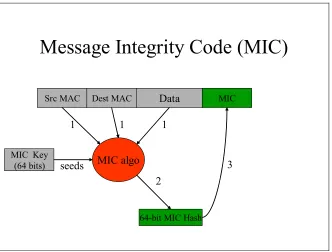
1) The MIC algorithm is function of the source MAC address, the destination MAC address, and the data. The MIC key seeds the MIC algorithm.
2) A 64-bit MIC hash is generated
3) The MIC hash is appended to the frame (before WEP encryption starts).
Figure 10 shows how the MIC is integrated in TKIP and its encapsulation in WEP. By computing the hash over the source and destination MAC addresses, the frame is linked to the sender and the receiver thwarting forgery attacks.
The receiver of an encrypted frame computes the MIC = function (MAC ad. source, MAC ad. destination, Data). If the result is the same as the MIC sent, then the message is presumed to be authentic. Otherwise, the message has been forged.
Countermeasure:
if 2 forgeries occur in one second, then the keys are deleted and the station is disassociated and has to reassociate.
4.2. Extended IV / New IV sequence counter
TKIP uses an extended 48-bit IV.
The classical WEP makes use of a 24-bit IV. It turned out the number of different IVs was too small to have a unique couple (key, IV) during the lifetime of the key.
Let’s recall how the WEP frame is:
WEP frame: (IV = 3 bytes)
WEP IV 3 bytes
Key
Id N bytes Data 4 bytes ICV
So it has been decided to extend the size of the IV in order to extend the IV space. The new IV in TKIP is constructed from the first and last bytes of the WEP IV and the 4 bytes of a new extended IV (Cf. TKIP frame below). The frame in TKIP is 12 bytes longer than WEP’s one. (4 bytes for the extended IV and 8 bytes for the MIC.)
TKIP frame: (IV = 6 bytes)
ICV = CRC(Data, MIC)
1st byte
Last
byte Key Id Ext IV 4 bytes N bytes Data 8 bytes MIC 4 bytes ICV
W E P I V
The extended IV (4-bytes) has 2 roles:
It is used to prevent collision attacks (keystream reuse).
With 6 bytes, the IV space is largely expanded and defeats collision attacks. 2^48 packets can be exchanged using a single session key. Thus, it ensures that given a session key, the same IV is used at most once16.
The 2-bytes IV taken from WEP IV is called TKIP sequence counter (TSC). It is used as a sequence counter. The receiver will discard any packets – for a given key - with a sequence number less or equal than the previously received packet. This prevents replay attacks.
Here are the IV management rules of the TSC:
Initialize sequence to zero whenever the base keys are established, and not at every restart.
The TSC is increased by one on each packet.
Data traffic stops if the TSC reaches its maximum value Receiver discards any packets received out-of-sequence
16 Under steady, heavy traffic conditions, it would take approximately 100 years for key reuse to occur.
attack and the replay attack. Thanks to the expansion of the IV, no rekey should be required during a single association. Figure 10 shows at what step of the TKIP processing the new IV is used. The 48-bit IV is also used in the per-packet key construction, described in the next section.
4.3. Per-packet key construction
The goal of the per-packet key construction is to correct the WEP’s misuse of RC4 that lead to weak key attacks.
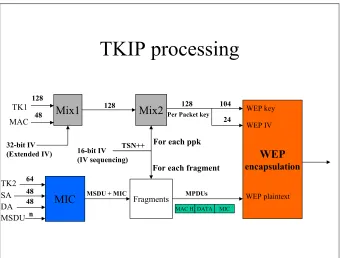
The per-packet key is computed by mixing the transmitter address, the 48-bit IV and a 128-bit key called temporalkey. The per-packet key is then used to encrypt the data, the MIC and the ICV. Each data or each fragment of data is encrypted with a unique key. Cf. figure 10. The use of the 48-bit IV extends the life of the temporal key and eliminates the need to re-key the temporal key during a single association.
The temporal key is named so since it is changed as soon as the sequence number rolls out.
TKIP processing
Mix1 Mix2 WEP encapsulation MIC TK1 MAC SA DA MSDU TK2 Fragments 64 128 4848 MSDU + MIC
128
48
TSN++
For each fragment For each ppk
128 104 24
MPDUs
MAC H.DATA MIC Per Packet key
n
WEP plaintext WEP key
WEP IV
32-bit IV
(Extended IV) 16-bit IV (IV sequencing)
Figure 10: TKIP: Per packet Key construction and MIC computation
through a complex process that eliminates the patterns that are used to mount weak key attacks.
Phase 1 of the mixing function (Mix 1 in the figure 10) is used to eliminate the same key for use by all links.
Phase 2 of the mixing function (Mix 2 in the figure 10) is used to de-correlates the IV from know the per-packet key. [3]
4.4. Sum up of WEP fixes
Algorithm
Fixes
(Prevents/Improves)
MIC (TKIP) Prevents forgery
Extended IV (TKIP) Prevents
Collision/key reuse IV sequencing - TSC
(TKIP) Prevents replay
Per-packet key const. (TKIP)
Prevents weak keys
802.1x (see next section)
Improve access control/ authentication, and key management
Table 1: Summary of WEP fixes
The 3 basic components to ensure security are confidentiality, integrity and authentication. We saw that the confidentiality is ensured by RC4 encryption, the integrity by an integrity check value (CRC-32 or MIC). Regarding the authentication, WEP provides an optional authentication called Shared-key authentication17 (SKA). We’ve seen that SKA authenticates user’s MAC addresses and not users themselves. Moreover, there is no mutual authentication: the access point does not authenticate to the wireless station. When a user connects to a wireless network, he does not know where the access point is. He could connect to a rogue access point set up by a hacker who has a connection to the network. In this case, the user may not even know that the traffic is routed through the rogue access point! Another problem specific to wireless network: the communication channel between the user and the access point should be secure. Also, there is no centralized user authentication. In order to strengthen authentication, 802.11 TGi integrates the 802.1x standard described in the next section.
17 Actually, the default is Open System Authentication that authenticates any stations. So, it cannot be
The standard IEEE 802.1x defines a port-based network access control. It is based on Extensible Authentication Protocol (EAP)18, which provides a wide variety of authentication mechanisms. 802.1x is designed to collect authentication information from users – credentials - and grant or deny access based on this information. The access control is performed at the MAC level (it is PHY-independent). 802.1x provides network access control through the concept of a port. A port is any kind of controlled access (router, switch, modem line for dial-up etc). 802.1x was not initially designed for wireless networks. So, to adapt this concept to 802.11, we need to define what a port in this context is: The IEEE community defines a virtual port as an association between a station and an access point. To associate with an access point, the station has to authenticate first (802.11 authentication19). Once associated with a specific access point, the station can go through 802.1x authentication.
802.1x provides per-station, per-session keys, and causes these keys to be changed often, solving reuse issues.
The use of EAP and RADIUS along with 802.1x provides a user-based identification, a choice of authentication methods and a centralized user management as well as a dynamic key management. EAP and RADIUS are described later in the chapter.
5.1. 802.1x authentication at a glance
When a client device attempts to connect with an access point, the access point responds by enabling a port for passing only EAP traffic from the client to an authentication server (typically a RADIUS server) located on the wired side of the access point. The access point blocks all other traffic, such as HTTP, DHCP, and POP3 packets, until the authentication server can verify the client's identity. Once authenticated, the access point allows other types of traffic on the client's port. In general, the protocol of communication between the client and the access point is EAP over LAN20 (EAPOL) and the one between the access point and the authentication server is EAP over RADIUS21 (or RADIUS).
5.2. 802.1x architecture and terminology
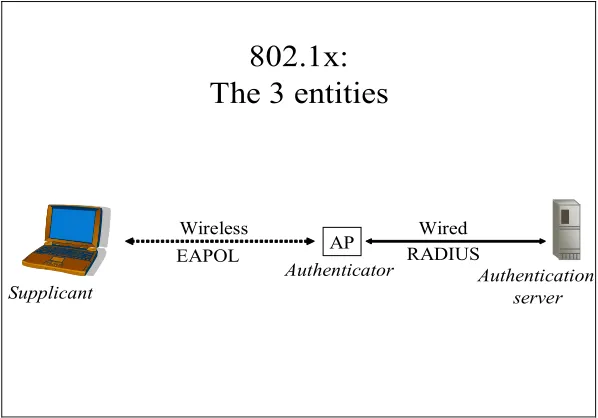
There are 3 principal entities in 802.1x. Each of them has a specific role to make the mechanism work. The client that desires the service is called a supplicant and the access point is referred as an authenticator.
1) The authenticator is responsible for:
Enforcing the authentication of the device that attaches to its controlled port. Controlling the authorization state of its ports accordingly
Route the traffic to an authentication server
18 EAP is described later in the chapter.
19 Open System Authentication or Shared-key authentication 20Encapsulate EAP messages in Ethernet frames.
802.1x was not specifically design for WLAN. For wireless networks, it is referred as EAPOW (EAP over WLAN)
2) The supplicant is responsible for communicating its credentials - via a port on the authenticator – to the authentication server. (The supplicant may either initiate the authentication exchange or being requested by the authenticator). A supplicant is a network adapter; typically an Ethernet card adapter running 802.1x compliant client software or a WLAN client that supports 802.1x.
3) The authentication server performs the authentication function to check the credentials of the supplicant. It is usually a RADIUS server with EAP support (Cf. next chapter).
Figure 11 shows the 3 components of 802.1x. Figure 12 illustrates the port-based authentication.
802.1x:
The 3 entities
AP
Supplicant
Authenticator Authentication server
Wireless EAPOL
Wired RADIUS
Figure 11: The 3 components of 802.1x
802.1x:
Port-based network access control
Supplicant
Auth. server Authenticator
EAPOL
Authorized LAN services Uncontrolled port
Controlled port (Unauthorized / Authorized)
i.e RADIUS server
RADIUS
RADIUS (Remote Authentication Dial-In User Service) has been widely used by business and Internet Service Providers (ISPs) to control remote access.
A RADIUS client is a type of network access server (NAS) – in our case this is an access point, and sends authentication and accounting22 requests to the RADIUS server (authentication server) in order to gain network access. Communications between the RADIUS server and the RADIUS client are authenticated through a shared secret. Each access point has its own shared secret with the RADIUS server. In general the transport protocol used is UDP and the RADIUS server listens on the port 1812. RADIUS supports a variety of authentication protocols (CHAP, MS-CHAP, and EAP). The main advantage of EAP is that it supports different methods of authentication. The choice of EAP method is negotiated by the client and RADIUS server during the authentication phase.
Figure 13 shows a typical RADIUS exchange. The RADIUS server sends Access-Challenge messages depending on the authentication method. The RADIUS client sends Access-Request to provide its identity or to respond to challenges. Eventually, the RADIUS server authenticates or not the client (Access-Accept / Access-Reject).
Typical RADIUS exchange
Authenticator (RADIUS client)
Access-Request Access-Challenge Access-Request Access-Accept / Access Reject
RADIUS server
RADIUS protocol
Channel protected
Figure 13: A typical RADIUS exchange.
5.4. EAP: Transport protocol between the supplicant and the
access point
EAP (Extensible Authentication Protocol) is essentially a transport protocol. Its main advantage is that it provides an authentication framework and can be used by a variety of different authentication types known as EAP methods23. It is supposed to head off proprietary authentication systems. It is designed to allow authentication methods to be deployed with no changes to the access point. EAP is used to pass the authentication information between the supplicant and the authentication server. The choice of authentication type is defined by the EAP type. The software supporting the EAP type resides on the authentication server and within the operating system of the client24. The access point can be seen as a bridge between the supplicant and the authentication server. One of the goals of EAP is to enable development of new authentication methods without modifying the access point. One of the key points of 802.1X is that the authenticator can be simple and dumb---all of the brains have to be in the supplicant and the authentication server. This makes 802.1X ideal for wireless access points, which typically have little memory and processing power. [11]
Since the authentication mechanism is independent of the access point25, we can specify any EAP methods without updating access points.
5.5. Overview of EAP packets
EAP exchanges are composed of requests and responses. The authenticator (access point) sends requests to the supplicant (wireless station that wants to access the network). The supplicant responds. Based on the credentials of the supplicant, the access will be granted or denied. There are two kinds of EAP packets (Cf. figure 14):
• EAP request and response • EAP success and failure
The Data Type carried by the EAP request and response packets can be: Data-type 1: The ID of the supplicant
Data-type 2: Notification: used to provide messages to the user Data-type 3: NAK: used to suggest another authentication method
Data-type: 4-13 Kind of authentication type26 (EAP-MD5, EAP-TLS, EAP-TTLS, EAP-PEAP, LEAP etc...)
At the end of the EAP exchange, the authenticator grants access or not to the network. The EAP success and failure packets do not contain data. It only specifies if the user has been authenticated or not following the requests and responses. The Data Type carried by the EAP success and failure packets are either Data Type 3 in case of a success and Data Type 4 in case of a failure.
NAK is used to suggest another authentication method. That is the client and RADIUS server negotiate the choice of authentication during the authentication phase. Figure 15 shows a typical EAP exchange.
23 EAP supports both client-only authentication and strong mutual authentication.
24 For example, Windows XP has integrated 802.1x and supports two EAP types: EAP-MD-5 and
EAP-TLS
25 However, the access point has to be 802.1x compliant.
26 This is the key point of EAP. It provides an authentication framework. We can choose the
EAP frames
1. request
Code id length
3. success 4. failure
Length
2. response
Data-types data 1. id
2. notification 3. NAK
4-13. authentification types
Code id
EAP request and response
EAP success and failure
Figure 14: Two kinds of EAP packets
Typical EAP exchange
Authenticator (access point) Supplicant
(wireless station)
1: Request-Identity 2: Response-Identity 3: Request-MD5-challenge
4: Response-NAK, generic token card 5: Request-Generic token card 6: Response-Generic token card 7: Success
Figure 15: A typical EAP exchange
5.6. 802.1x over 802.11
In this section, we show how 802.1x can integrate with 802.11.
1) The station must first associates with an access point27. In 802.11, the association follows the authentication (Open-system or Shared-key). Once the association is made, the dialogue between the station and the access point can start. (Cf. green part in figure 16).
The authentication server uses specific authentication techniques, to verify client’s identity. (Passwords, digital certificates).
2.a) The supplicant can trigger the authentication process by sending an EAPOL start message. The authenticator allows only EAP traffic and blocks all other traffic, such as HTTP, DHCP, and POP3 packets
2.b) The authenticator sends an EAP-Request/Identity packet to the supplicant once it has associated with the access point.
3) The supplicant sends an EAP-Response/Identity packet to the authenticator to prove its identity. The packet is then routed to the authentication server encapsulated in RADIUS protocol (an EAP-Message attribute is used to encapsulate EAP packets for transmission from the authenticator to the RADIUS server).
4) The authentication server sends back a challenge to the authenticator. The challenge depends on the EAP method chosen. The authenticator unpacks this from RADIUS and re-packs it into EAPOL and sends it to the supplicant. At this point, the number of exchanged messages will vary according to the EAP method. Only mutual authentication is considered appropriate for wireless networks.
5) The supplicant replies to the challenge via the authenticator, which routes the response to the back-end server.
6) If the supplicant provides appropriate credentials, the authentication server responds with a success message -Access Accept-, which is then forwarded to the supplicant. The authenticator now unblocks the controlled port and allows normal traffic. However, RADIUS allows a per-user configuration. Certain users may have restricted access. In this case, the restrictions are specified in the RADIUS message Access-accept sent to the access point. For example, the authenticator might switch the supplicant to a particular VLAN or install a set of firewall rules.
EAP supports dynamic keying. That happens when the authentication succeeds. 7) EAPOW-key is used to transport the global keys. The section EAP keying – later in the chapter- describes the EAP key mechanism.
8) An EAPOL logoff notification can be sent to the authenticator to announce the end of the connection. 802.1X also defines a re-authentication timer, which can be used to periodically require the Supplicant to re-authenticate.
Figure 16 sums up the steps explained above. Figure 17 shows the encapsulation for both EAPOL and RADIUS protocol.
27 This step can be viewed as the physical connection to the communication medium. It is similar as
wireless
wired
EAPOL-EAP Request / identity
RADIUS-Access-Challenge (Eap type) EAPOL-EAP request
EAPOL-EAP Response / identity RADIUS-Access-Request (ID) EAPOL Start message
EAPOL-EAP response (credentials) RADIUS-Access-Request (Cred.)
EAPOW-key Association request Association response 802.11 802.1x EAPOL/EAPOW EAP methods
RADIUS-Access-Accept + session keys
EAPOL-EAP success ACCESS ALLOWED Authentication server
Radius
ACCESSBLOCKED (HTTP, DHCP etc...)
Association (virtual port)
1)
2.a)
2.b)
3)
4)
5)
6)
7)
EAPOL Logoff message
8)
Authenticator (Access point)
Figure 16: 802.1x over 802.11. Prior the 802.1x exchange, the station has to associate (in green in the figure – 802.11 part) to the access point (virtual port).
Ethernet EAPoL EAP EAP payload
IP UDP RADIUS EAP EAP payload
CRC EAPoL protocol:
Between supplicant and access point
RADIUS protocol:
Between access point and RADIUS server EAP messages encapsulated in Ethernet frames
EAP messages encapsulated in RADIUS packets
5.7. Choice of EAP methods
802.1x was initially developed for authentication of users on wired LANs. So, the level of encryption needed was not as high as in wireless networks (easy to eavesdrop). Furthermore, wireless networks are subject to rogue access points, a problem that does not occur in a wired LAN. So, the client should ensure it connects a legitimate network. Both the client and the WLAN have to authenticate each other (mutual authentication). Cf. Table 2.
New requirements for WLANs How to meet the requirements Stronger encryption to prevent
eavesdropping Encrypt communication between the client and the access point Mutual authentication to prevent
connection to rogue access points
Certificates to authenticate the network
Table 2: Two additional requirements for wireless networks
The EAP-MD5 method is the simplest to implement but is not recommended for wireless networks since there is no mutual authentication (network authentication) and no automatic keying.
It is a challenge response authentication protocol using a one-way hash function to encrypt the response. The authentication server sends a challenge text to the supplicant. This latter encrypts the challenge text along with the password and sends it to the authentication server. Since MD-5 is a one-way hash function, it is not possible to decrypt the message. So, the authentication server also encrypt the challenge it produced but with its copy of the password. Eventually, he compared the two hash generated. If there are equals, it means that the password stored by the authentication server and the supplicant’s one are the same. The fact that the password is not sent in clear over the air is the advantage of this technique.
A common way of authentication is certificates. Many EAP methods use certificates. Though we will not describe all the EAP methods using certificates, it is important to understand the basics principles of certificates. The next section will describe what a certificate is and how a client can verify the certificate of the server.
Some EAP methods based on public-key certificates and Transport Layer Security (TLS) protocol: EAP-TLS, EAP-TTLS, and PEAP.
EAP-TLS:
It is a hybrid method combining EAP-TLS and a traditional password-based method or another legacy method. This is to remove the burden of managing user certificates. Only the server needs a certificate. Like with EAP-TLS, encryption keys are generated during the authentication exchange.
5.7.1. Certificates
A certificate is a file containing several information among them the name of the client or server. It also contains the public key of the certificate authority (CA) that delivers the certificate. The server or client should recognize this authority.
Signature of the certificate by the CA:
The certificate goes through a hash function - the algorithm (SHA, MD-5) is specified in the certificate. The hash is then encrypted with the private key of the CA (only known by the CA). This step corresponds to the CA’s signature. This signature is then added to the certificate. Figure 18 shows the creation of a server certificate (i.e. a bank).
Certificates:
Creation
Name: Authority: Public key:
---Algo: RC5
Server certificate
(e.g. bank) Certificate Authority
RC5
Hash
Signature
PrK of CA (Encryption)
Signature
Figure 18: Creation of a server certificate: signature by the Certificate Authority
Verification of the certificate by the client:
Certificates’ Authentication:
Client Verifies the Server’s Certificate
Name: Authority: Public key:
---Algo: RC5
Signature
Hash 1
Hash 2
RC5 algo
Public key of CA
(Decryption)Figure 19: Verification of the certificate by the client – Two steps
5.8. EAP keying framework
We’ve seen that a lot of problems in WEP came from the absence of dynamic key management. Dynamic key management in 802.1x rectifies the drawbacks in the WEP security mechanism by deploying per-user session keys. Though 802.1x supports per-session keys (one session key for each user per session), most of the implementations only support global keys. But the difference is that if global keys are supported (WEP), the session key is only used to encrypt the global key and thus keeps the confidentiality of global keys unlike WEP.
There are 3 steps in the EAP keying framework [14][16]. They are:
802.1x authentication (EAP authentication protocol): (Between the client and the authentication server)
During this phase, the EAP method is negotiated between the EAP client (supplicant) and the EAP server (authentication server).
An EAP master key (EMK) is derived between those two entities. Since this key is only held by the EAP client and EAP server, proof of possession of the EMK is a proof of mutual authentication and maybe used for fast reauthentication. This key must not be shared since it would enable a third party (e.g. access point) to impersonate the EAP client or server. To protect the EMK against compromising, EMK is not used directly (that’s why TEKs are used to protect data) and should not be derivable from other keys like the MSK.
Transient EAP Keys (TEKs) are derived from EMK and are used to protect the EAP exchange itself.
EAP methods generate a master session key (MSK) directly from a successful EAP authentication. The MSK is either exported by the EAP method to the EAP client within the CS-Token28 or is derived from the EMK, via a one-way function. This depends of the EAP method. For instance, EAP-TLS uses a one-way function. Whether the MSK is derived or transported, possession of the MSK must not provide information useful in determining the EMK and used in derivation of TSK.
RADIUS-based key distribution – Token distribution (AAA29 protocol) (Between the access point and the authentication server)
Between the access point and the authentication server, a mutual authentication must be ensured to avoid rogue access points or rogue authentication server.
The communication channel between the access point and the authentication server must provide per-packet integrity protection, authentication and confidentiality. For example, RADIUS uses a static key to protect this channel. However, a session key is more secure like in RADIUS over IPSec [16]. The authentication server transports the MSK to the access point within the AN-Token30.
802.1x key management (4-way handshake): TSK derivation (Between the client and the access point)
28 Package that provides integrity, authentication and encryption, in order to protect the MSK from
compromise. Support for the CS-Token is optional and most current EAP methods do not support it, since they derive the MSK as part of the EMK (like EAP-TLS)
29 Authentication, Authorization and Accounting
30 Package within which the MSK and one or more AAA attributes (client MAC address, access point
After successful authentication and generation of the MSK, Both the client and the access point are supposed to possess the MSK. Transient Session Keys (TSKs) are derived from the MSK by a 4-way handshake: the 4-way handshake confirms that both the access point and the station possess the MSK. The TSK derivation should support mutual authentication so that the client will have the assurance that it is connected to the right access point.
The MSK is 192 bytes long. The first 32 bytes are called PMK (or pairwise master key). The MSK is ciphersuite independent. So that the MSK is usable with any ciphersuite (WEP-40, WEP-128, TKIP, CCMP etc…), it is often longer than necessary. So, it is cut to fit. For instance, TKIP and CCMP ciphersuites derive their TSK exclusively from the PMK.
The ciphersuite is negotiated between the EAP client and the access point using the link layer. The authentication server is not supposed to know the ciphersuite that will be used since it is not a party of the ciphersuite negotiation. So, the key generation in EAP methods should not be ciphersuite specific. This is the reason why the MSK is ciphersuite independent.
Figure 20 sums up the EAP keying framework.
EAP client (supplicant) AAA server (RADIUS server) NAS (access point)
TSK derivation Protocol
Mutual authentication Key: TSK EAP Protocol Mutual authentication Keys: EMK, /\ TEKs, MSK AAA Protocol Mutual authentication
Key: AAA session key (MSK) Distributes AN-Token to NAS
C S-Tok
en (M SK
)
AN-Token (MSK)
TEK s
Shared secret (if RADIUS)
![Figure 4: Stream cipher [1]](https://thumb-us.123doks.com/thumbv2/123dok_us/8931553.1846741/16.612.110.455.63.329/figure-stream-cipher.webp)