University of New Orleans University of New Orleans
ScholarWorks@UNO
ScholarWorks@UNO
University of New Orleans Theses and
Dissertations Dissertations and Theses
Summer 8-9-2017
Forensic Analysis of G Suite Collaborative Protocols
Forensic Analysis of G Suite Collaborative Protocols
Shane McCulley
University of New Orleans, [email protected]
Follow this and additional works at: https://scholarworks.uno.edu/td Part of the Information Security Commons
Recommended Citation Recommended Citation
McCulley, Shane, "Forensic Analysis of G Suite Collaborative Protocols" (2017). University of New Orleans Theses and Dissertations. 2386.
https://scholarworks.uno.edu/td/2386
This Thesis is protected by copyright and/or related rights. It has been brought to you by ScholarWorks@UNO with permission from the rights-holder(s). You are free to use this Thesis in any way that is permitted by the copyright and related rights legislation that applies to your use. For other uses you need to obtain permission from the rights-holder(s) directly, unless additional rights are indicated by a Creative Commons license in the record and/or on the work itself.
Forensic Analysis of G Suite Collaborative Protocols
A Thesis
submitted to the Graduate Faculty of the University of New Orleans
in partial fulfillment of the requirements for the degree of
Master of Science
in
Computer Science
by
Shane McCulley
B.S., Louisiana State University, 2008
Contents
List of Figures iv
List of Tables v
List of Listings vi
Abstract vii
1 Introduction 1
2 Related Work 6
2.1 Client acquisition and analysis . . . 6
2.2 Limitations of client-side acquisition and analysis . . . 8
2.2.1 Partial replication . . . 8
2.2.2 Artifact revisions . . . 9
2.2.3 Cloud-native artifacts. . . 9
2.3 API-based acquisition . . . 10
2.3.1 Kumodd and motivation for G-Suite Study . . . 10
3 G Suite Analysis 12 3.1 Draftback . . . 12
3.2 Background . . . 13
3.3 Documents . . . 14
3.3.1 Google’s collaboration technologies . . . 15
3.3.2 Revisions . . . 23
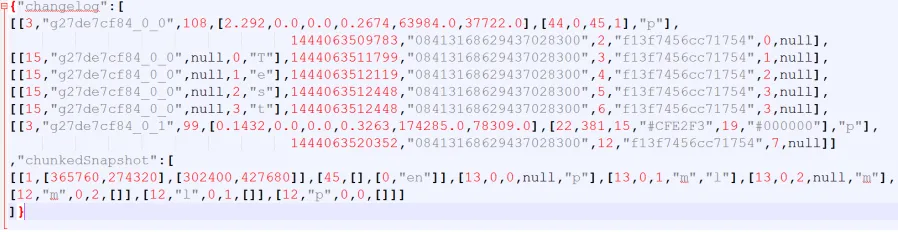
3.3.3 Changelog data . . . 26
3.3.4 Retrieval and processing . . . 30
3.4 Images . . . 31
3.5 Slides/Drawings . . . 34
3.6 Sheets . . . 37
3.7 Forms . . . 39
3.8 Sites . . . 41
3.9 Suggestions and comments . . . 42
3.10 Recoverable Information . . . 44
Table of Contents
4 Kumodocs 48
4.1 Installation . . . 48
4.1.1 Requirements . . . 48
4.1.2 Python 2.7. . . 49
4.1.3 Kumodocs . . . 50
4.1.4 Python packages . . . 50
4.1.5 Configuration . . . 51
4.2 Use . . . 52
4.3 Quill playback . . . 53
4.4 Google Drive API . . . 54
4.4.1 Public Drive API . . . 54
4.4.2 Private Drive API . . . 55
4.5 Intermediate format. . . 56
4.6 Summary . . . 57
5 Discussion 58
6 Conclusion 61
Bibliography 67
Vita 69
List of Figures
1.1 Cloud drive architecture [14] . . . 3
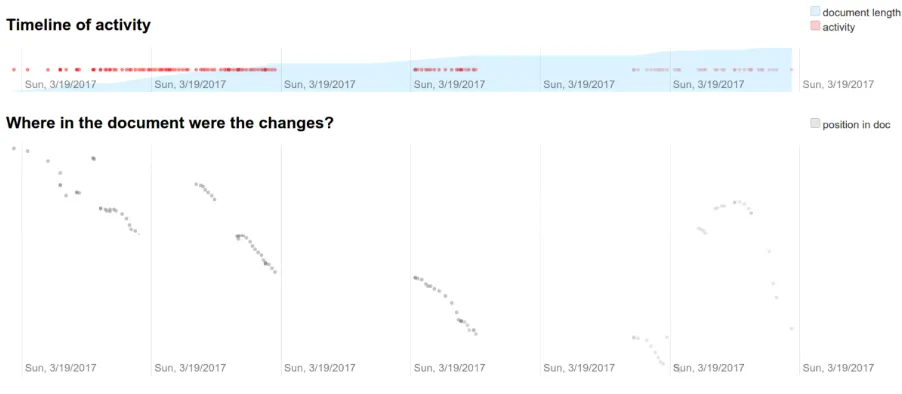
3.1 DraftBack edit visualization . . . 13
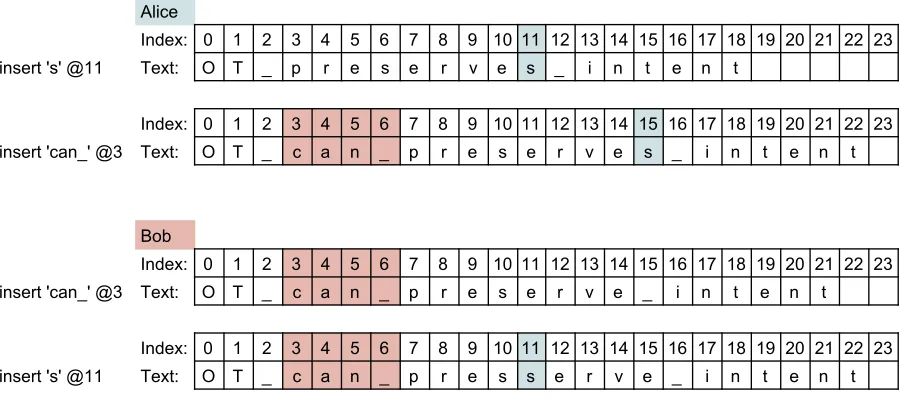
3.2 Each view with only local changes applied. . . 16
3.3 Inconsistent documents after all edits applied. . . 17
3.4 Luiz types"Hello" into his browser[4] . . . 19
3.5 Luiz writes "world", and John writes "!" simultaneously.[4] . . . 20
3.6 Luiz receives server ack, and John receives Luiz’s first change.[4] . . . 20
3.7 Both clients send a new edit and receive the latest revision {insert "world" @6}[4] . . . 21
3.8 After all edits have been received, both clients have a consistent view[4] . 22 3.9 Drawings revision log excerpt, single text box after "Test"is typed . . 37
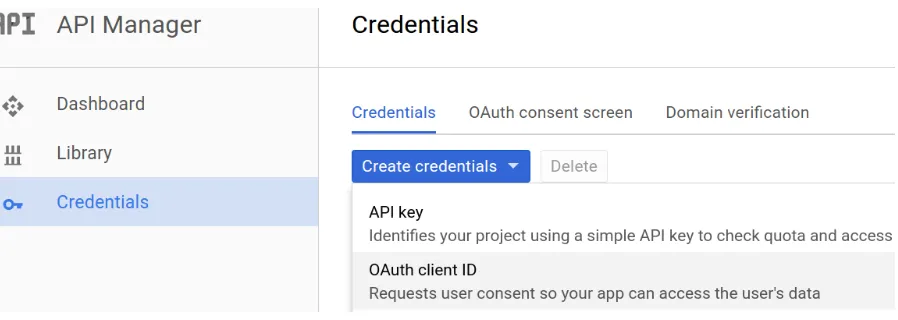
4.1 Creating OAuth client ID and secret . . . 51
4.2 Successful creation screen . . . 51
List of Tables
Listings
3.1 Example element actions, adjust (ae) and tether (te). . . 28
3.2 Renderdata request body and response . . . 32
3.3 Creating a new slide, revision 35 . . . 34
3.4 TypingAdded with 2 backspaces into gle...b 0 7; ID data trimmed . 36 3.5 Sheets revision log, typingTest D7 and Test E7 . . . 38
3.6 F5=AVERAGE(C4:D9) entered in a spreadsheet. . . 39
3.7 Forms revision log; identification data omitted for brevity . . . 40
3.8 Comment pane creation in Sites response . . . 42
3.9 Suggestion example, revisions 291-296. Insert in yellow, delete in red . . 43
3.10 Creating a new comment in Docs . . . 44
3.11 Deleted comment metadata . . . 46
4.1 Checking python version . . . 49
4.2 Installing Python 2.7 on Ubuntu. . . 49
4.3 Cloning kumodocs repository . . . 50
4.4 Downloading zipped contents without Git . . . 50
4.5 Example use case, selecting file test-doc from revision 1 to 50 . . . 53
4.6 Renderdata form data . . . 55
4.7 Constructing a renderdata request . . . 55
Abstract
Widespread adoption of cloud services is fundamentally changing the way IT services
are delivered and how data is stored. Current forensic tools and techniques have been
slow to adapt to new challenges and demands of collecting and analyzing cloud artifacts.
Traditional methods focusing only on client data collection are incomplete, as the client
may have only a (partial) snapshot and misses cloud-native artifacts that may contain
valuable historical information.
In this work, we demonstrate the importance of recovering and analyzing cloud-native
artifacts using G Suite as a case study. We develop a tool that extracts and processes
the history of Google Documents and Google Slides by reverse engineering the web
appli-cations private protocol. Combined with previous work that has focused on API-based
acquisition of cloud drives, this presents a more complete solution to cloud forensics, and
Chapter 1
Introduction
In the past few years, cloud computing has rapidly changed from an emerging technology
with great promise to the preferred method of delivering IT services, with nearly 95% of
businesses adopting cloud solutions [12]. This has been led by a surge in cloud services,
which surpassed cloud infrastructure in sales for the first time in 2016, growing at 3 times
the rate of cloud infrastructure hardware and software.
The leader in cloud services is software as a service (SaaS), which accounts for the largest
segment of cloud services [6]. In SaaS, the provider manages all aspects of deployment, and
applications provided are accessible from a web browser or intermediate interface. This
permits customers to delegate control over infrastructure and applications to the cloud
service provider in exchange for ease of use, reduced maintenance costs, and scalability.
This has major implications for digital forensics, as the norm shifts from using software
products to using software services. The distributed nature of these cloud services
intro-duces many barriers to identification, preservation, acquisition, and analysis of evidence.
Physical media no longer contains only a single user’s data, and artifacts of interest are
spread across multiple servers and locations. As cloud storage becomes cheaper, more
data is migrating from hard drives to cloud drives like OneDrive, included with Windows,
and Google Drive, a complete office and storage solution available anywhere. Features
unique to cloud environments like multi-tenancy and data replication exacerbate existing
technological, legal, and organizational challenges in data acquisition. Cloud forensics
emerges as an important subfield to address these problems, with early efforts focusing
The traditional analytical model of digital forensics has primarily focused on working with
physical media to recover all traces of activity and remnant processing data from both
applications and OS. The SaaS model disrupts this view, as the investigator no longer has
full control over sources of forensic evidence. Since code and data are delivered on demand,
these artifacts become moving forensic targets. For example, a Google Docs document
is represented on the local machine by a text document containing its url, document
ID, and email address; the content may only be viewed or edited by using the browser.
This shift in the way IT services are developed, maintained, and delivered necessitates
a complementary shift in forensics, where the validity and reliability of forensic science
is crucial in this new context and requires new methodologies for identifying, collecting,
preserving, and analyzing evidence in multi-tenant cloud environments that offer rapid
provisioning, global elasticity and broad-network accessibility. [9]
This paradigm shift requires substantial changes to the entire forensic process. Methods
focused on low-level physical acquisition are becoming irrelevant — logical acquisition is
becoming the norm. In particular, data acquisition in cloud drives introduces a number
of challenges for client-centric analysis. Primary computation records and user history
are no longer stored on the local machine, but reside in the cloud. Residual artifacts on
the client are temporary with unknown provenance, as the cloud is the authoritative data
source. As shown in figure1.1, the client is used mainly as a cache for SaaS applications,
and is not guaranteed to have a complete or updated copy of the data. Most cloud drive
services provide some sort of revision history, but clients only maintain a single version on
the local machine. Thus a client-centric approach to cloud drive acquisition is inherently
Public protocol (REST)
Service API
Cloud service data
Client cache
Client device
Private protocol &
data
Service agent
Figure 1.1: Cloud drive architecture [14]
The move from a standalone device to the cloud is accompanied by an exponential increase
in the amount of data as it becomes the primary delivery method of IT services. This is
exacerbated by the presence of multiple revisions for each file. The sheer volume of data
requires new methods to identify, acquire, and analyze relevant evidence.
One promising area of analysis includescloud-native artifacts, data objects that maintain
the persistent state of web/Saas applications [14]. These artifacts are downloaded as
needed by the application and have no serialized representation on the client. For example,
a document or slide from G Suite does not maintain a permanent presence on the local
machine. Each time it is opened, the state of the document is interpreted by the browser
after receiving a cloud-native artifact. This is simultaneously a new problem and a new
opportunity, as a large part of forensics involves reasoning about prior states and the
effects of user actions. Direct access to the source of state change for an application
would give us a clear picture of user actions and document evolution. This requires
solving the problem of acquiring, storing, and standardizing a local representation of
cloud-natives for analysis.
Though these are big challenges to overcome, cloud-native artifacts show great promise
for forensic analysis. We find that in Google Docs and Google Slides, these internal data
structures are requested in terms of document revisions, comprising a chunked snapshot
object and an append-only changelog of user edits. The snapshot contains text and
a list of actions in the order they were performed. These logs contain the entire editing
history of a document or presentation, which is perfect for forensics — the document
can be examined at any point in time. Instead of piecing together history from a series
of (possibly incomplete) snapshots, we have the full revision history available. This is a
wealth of information which is unusual for traditional forensics, which has few analogs;
most forensic tools are developed to handle a single version of an artifact. As the changelog
is append-only, there is no chance of spoiling the history of the artifact. Clearly, there is
a need to develop forensic tools that can acquire, process, and storecloud-native artifacts
as well as development of new models that incorporate these artifacts.
Previous work on API-based acquisition from cloud drives approaches these problems by
working directly with the authoritative data source. Relying on the provider’s public
interface has many advantages, such as ease of use, access to file metadata, and
avoid-ing the necessity of reverse engineeravoid-ing each cloud drive servicee. These API calls have
well-defined semantics and detailed specifications which lends itself to forensic tool
de-velopment. The proof-of-concept tool kumodd [13] showcases these features, enabling
total or partial acquisition of cloud drive data, including revisions. However, cloud-native
artifacts such as Google Docs andGoogle Slides are only available as snapshots converted
to standard document formats. This provides a forensically sound solution to basic
ac-quisition challenges, but it also omits a significant amount of information of forensic
interest.
To address the shortcomings of the public API-based approach, we examine the private
communication protocols used by these services. With persistent state being maintained
in the cloud and the browser performing mostly user interaction functions, we target
these private calls through which the browser sends and receives updates. We provide
a baseline forensic analysis of cloud-native artifacts, using G Suite as a case study to
discuss the issues and approaches on working with these artifacts. Specifically, we:
• Analyze the shortcomings of traditional client-based forensic approaches and
artifacts. We analyze and document G Suite collaboration protocols with a focus
on the internal changelog of Google Docs and Google Slides.
• Develop a prototype, kumodocs, that acquires cloud-native artifacts for Google
Docs andGoogle Slides for any revision range, allowing us to extract plain text,
im-ages, comments, and suggestions from the document at any point in time. Kumodocs
also recovers deleted images as well as resolved comments and suggestions no longer
visible on the document, and provides a means to store and interpret these artifacts
independently of G Suite.
• Present an intermediate format for changelog storage in an effort to standardize
tools and methods forcloud-native artifacts analysis. This modular approach
facil-itates tool reuse, as artifacts from new services only need to be translated into this
intermediate format. Any changes in the internal data structure can also be fixed
quickly by addressing the parser for that particular service.
The remainder of this work is organized as follows: Chapter 2 provides an overview
of traditional client-based cloud forensics and improvements made through API-based
methods; Chapter 3 presents our analysis of G Suite collaboration protocols; Chapter 4
details our proof-of-concept tool, kumodocs, and our challenges in creating it. Chapter
Chapter 2
Related Work
Previous research in cloud storage forensics has consisted mainly of adapting traditional
application forensics to finding artifacts remaining on the client after using cloud services.
Disk and memory images of the client are taken before and after some particular use case,
and differential analysis is applied to locate every trace of computation and activity left
by popular services.
Section2.1provides a review of several representative studies of client-side acquisition and
analysis. Section 2.2 summarizes inherent flaws in the client-side approach. Section 2.3
presents newer work that suggests solutions to these shortcomings by utilizing APIs in a
service-centric approach.
2.1
Client acquisition and analysis
Chung et al. [2] examined popular cloud service providers among a range of services,
including Amazon S3, Google Docs, Box, and Evernote to determine artifacts left on
systems running Windows, MacOS, Android, and iOS. They proposed a process model
for forensic investigation of cloud storage services based on artifact analysis on the client
to determine what kind of data exists, where this data is located, and how it can be
utilized. Key areas targeted include physical memory (if available), internet history, log
files, and directories. Android phones were rooted to provide backup information and
AccessingGoogle Docs through a web browser created temporary files with the content of
current documents and presentations open. Once the browser was closed, these files were
deleted. This lack of permanent data on the client demonstrates one of the shortcomings
of client-based analysis.
Hale [7] analyzed digital artifacts left behind afterAmazon Cloud Services been accessed
or manipulated from a Windows machine. Like Google Drive, Amazon Cloud Services
can be accessed through a standalone application, a web browser, or a mobile device;
however, mobile devices were not explored in this study. Using the browser, artifacts were
found in browser history and cache files. He analyzed traces left from the installation
and usage of the client application, finding artifacts in theWindows registry, application
installation files, SQLite database, and an append-only transaction log. The database
contained records of pending upload/download operations, which were moved to the log
after completion or interruption.
Quick and Choo [10] analyzed data remnants on a Windows 7 computer and an Apple
iPhone after accessing aDropbox account to store, upload, and access data. Hash analysis,
common file locations, and keyword searches were used to determine if aDropbox account
has been active. They found evidence of usage including usernames in browser history
after web access from Mozilla Firefox, Google Chrome, and Microsoft Internet Explorer.
Further artifacts were found in directory listings, prefetch files, link files, thumbnails,
registry, and memory captures. The same methodology was applied by Quick and Choo
to Google Drive [11] in a follow-up work that documented client-side operations and
artifacts useful as a starting point for investigators.
Martini and Choo [8] researched ownCloud, a self-hosted open source file sync and share
server. OwnCloud offers a unique solution and opportunity of study, as both the server
and client are under control of the user. They were able to extract sync and file
manage-ment metadata, cached files, authentication data, browser, and mobile client artifacts.
Client analysis revealed artifacts able to link a user to a particular ownCloud instance,
even after deletion of evidence on the client. They argued the open-source nature of
which may include similar artifacts.
2.2
Limitations of client-side acquisition and analysis
The approaches so far involve extensive analysis of the client in search of artifacts left by
cloud services. The key assumption underlying these studies is that all artifacts of interest
can be obtained from the client. However, the client is not the authoritative source of
data; there is no guarantee the client has the latest data, or that the client contains a
complete record of activies. In addition, application artifacts are not persistently stored
on the client, and web applications tend to use local storage as a cache with no guarantees
to its completeness or accuracy. There are three major inherent shortcomings in client
acquisition and analysis of artifacts [14]:
2.2.1
Partial replication
In the studies listed above, researchers were able to find evidence of cloud-specific usage,
and occasionally which files were accessed or modified. However, they were unable to find
these files on the client. As cloud storage is a distributed storage solution, it makes sense
that none of the clients would have a complete copy of the data. Selective replication
of data is necessary to allow access to mobile devices with small local storage. Current
trends show exponential growth in digital content, a conclusion that is unlikely to change
in the future as cloud storage becomes cheaper and users generate even more data. In
addition, metadata artifacts recovered from the client are only relevant to transient local
data, and tell us little about what artifacts are available in the cloud. It is necessary to
have direct access to the cloud drive’s metadata in order to identify missing artifacts and
verify integrity; without this information, the completeness and accuracy of client-side
2.2.2
Artifact revisions
Most cloud service providers, especially offering collaborative services, have some
provi-sion for accessing previous verprovi-sions of files for editing or recovery. While the user rarely
has control over when and how revisions are stored, it does offer a small means of version
control and the ability to revert major mistakes, a feature users have come to expect.
These file revisions are a particularly interesting source of forensic data, which has few
analogs in traditional forensic targets. The ability to view a document’s evolution over
time directly instead of composing a best guess from scraps of user actions gleaned from
log and timestamp data is invaluable, and reduces the chance of evidence deletion if these
revision artifacts can be recovered. However, the client has only one revision at best,
usually the latest version. Client-side acquisition will miss these revisions, and as
men-tioned previously the lack of metadata means it is impossible to know what revisions are
available or missing.
2.2.3
Cloud-native artifacts
Web applications rarely store persistent state on the client. As code and data are sent
as needed, the cloud must maintain this state information incloud-native artifacts, data
objects that have no serialized representation in the local filesystem. [14] This is a new
problem for forensics, as there is no way to obtain these artifacts from the client; they
must be requested from the cloud service itself or captured in private communication
protocols as the browser sends and receives updates. In G Suite collaboration services,
we find that these internal data structures are append-only revision logs that contain the
entire history of a document. API support for these artifacts is limited — for example,
Google Docs and Google Slides presents a method for downloading a snapshot of these
artifacts at some point in time in PDF or standard file formats, but this misses the rich
2.3
API-based acquisition
The key to a forensically sound acquisition of data relies on targeting the source of data —
namely, the cloud service provider. The most direct way involves utilizing the provider’s
infrastructure through the publically offered API. This is the lowest available level of
abstraction for forensic acquisition. Methods are often provided for metadata access,
giving a wealth of information of how and when data was accessed or modified as well as
integrity guarantees for acquisition. Cloud service providers offer well-defined mechanisms
for access through the API, which is the same mechanism that web applications use (with
the exception of private/undocumented calls). These can be modeled and tested, allowing
a formal and precise approach tool development.
2.3.1
Kumodd and motivation for G-Suite Study
In [13], Roussev et al. demonstrate the feasibility of an API-based approach through the
development of kumodd, an API-based acquisition tool that works with Google Drive,
Dropbox, OneDrive, and Box. Public API methods are utilized to perform content
dis-covery, target selection, and target acquisition. Kumodd acquires files and associated
metadata, with filtering options based on targets of interest. These filtering options
can be used to obtain a subset of the cloud drive, or the entire drive may be requested
for a complete acquisition. Revisions are also enumerated and downloaded for all files
requested, with creation timestamps appended to the filenames for distinction. It can
also obtain snapshots of cloud-native artifacts in standard formats such as PDF, ODT,
DOCX, etc.
Kumodd fully addresses 2 of the major problems with client-side acquisition — that of
partial replication and revisions. However, kumodd only partially addresses the third
challenge, as is only able to obtain snapshots of documents and notcloud-native artifacts
themselves. Since these artifacts are internal data structures utilized by the the browser
to communicate state information, there is no reason to expose these artifacts via the
web applications as noted in figure 1.1. Thus, any acquisition and analysis efforts would
involve reverse engineering these private protocols, which motivates our case study of G
Chapter 3
G Suite Analysis
Our study of G Suite protocols is partially motivated by Draftback, a browser extension
that allows character-by-character playback of Google Docs history. This extension,
cre-ated by writer and programmer James Somers [15], was developed to study how writing
documents evolve over time. Specifically, by knowing where and when edits occur in a
document, the entire document history can be replayed from any point. The history of
each character is recorded and assigned a unique persistent ID, allowing a user to follow
the history of particular sections of a document over time. Mapping this data to a chart
creates a visual representation of edited history.
3.1
Draftback
Being able to rewind a document to any point in time – even to the beginning – is
exactly the kind of information forensic examiners are interested in. Google records and
preserves elementary actions used in building up a document in a revision log, which is
used to power Draftback’s functionality. While intending to be a tool for analyzing and
improving writing, this is likely the first cloud-native tool with forensic applications. All
plain-text from a document can be replayed in the browser with real-time delays, or at
super speed, with detailed statistical visualizations mapping those changes to document
location. The extension is started from within a Google Document, which retrieves and
processes the revision log; this process took 6 minutes for a x-page document with 7600
Figure 3.1: DraftBack edit visualization
For large documents such a history is invaluable, enabling focused investigation of relevant
sections. The revision log is obtained by (partially) reverse engineering web protocols –
no client-side data collection is performed. The only requirement consists of valid user
credentials; with this in hand, examination can be performed anywhere with Internet
access. Draftback’s major drawback is its incomplete handling of the Docs protocol –
reverting to a prior version breaks all functionality past that point.
While not motivated by forensics, this is an example of SaaS analysis that showcases
the kind of interesting and useful cloud-native artifacts that can be obtained by going
directly to the data source. Recall that we defined cloud-native artifacts as data objects
that maintain the persistent state of web/Saas applications and have no serialized
rep-resentation on the client. The forensic application of these results served as a starting
point for our work in reverse engineering G Suite collaborative protocols to acquire and
analyze these cloud natives.
3.2
Background
Most online text editors use contentEditable, the native browser widget for editing rich
text. An application notifies the browser to make a string of text editable and lets the
the layout of text, the browser interprets these commands and changes the page’s HTML
accordingly. This delegation means creating behaviors consistent across all browsers is
exceedingly difficult.
Advantages to using native browser rendering include ease of implementation and
op-timization. Layout performance is heavily optimized in modern web browsers, freeing
apps from handling the most resource-intensive task. However, this comes at a cost of
limited control over document behavior and feature implementation. Bugs arising from
browser interactions are unable to be fixed, and a consistent user experience cannot be
guaranteed. This motivated Google to create an editor that keeps full layout control and
bypasses the browser itself.
3.3
Documents
In 2010, Google revealed a new version of Google Docs [3] showcasing greater real-time
online collaboration. The new Google Docs editor, codenamed kix, was custom-built to
look and feel like a traditional word processor. This was achieved by avoiding the
con-tentEditable field, bypassing the browser completely by developing a new editing surface
and layout engine in JavaScript. All text entered is captured and displayed on a
dynami-cally changing surface according to kix’s layout manager. Even the cursor is a simulated
element, a 2-pixel-wide div manually placed on the screen at the appropriate coordinates.
This allows multiple concurrent users to each have their own cursor displayed on the
screen, giving visual cues that aid in collaboration by indicating areas currently being
edited. These changes also allow simple features like, tab stops, floating images, and
a ruler to be added, which were impossible to support with a browser’s native HTML
layout engine at the time. [5]
Determining the location of elements on the editing surface is the most difficult thing
the kix editor does. Typing a single letter goes through several steps before appearing
on screen. First, the letter is drawn off-screen, measured for size, and the screen location
pushed forward with boundary checking creating new lines as appropriate. Once the new
character positions are determined, the page is updated with dynamic HTML elements
and filled with content. Due to the efficiency and optimizations of an engine built from
scratch this happens at an incredible speed, giving the look and feel of a desktop word
processor.
3.3.1
Google’s collaboration technologies
The kix editor is not just an online clone of existing standalone word processors. It
was “designed specifically for character-by-character real time collaboration” [5]. By
writing their editor from the ground up, Google solved two major problems of real-time
collaboration:
1. Maintaining consistency when multiple users edit the same area of a document, and
2. Properly merging multiple simultaneous edits.
The key technology enabling the first point is operational transformation(OT)[4], a
con-sistency and concurrency management solution that avoids locking by transforming edits
relative to each other. Each change in a document involves one of three elementary
ac-tions: inserting text, deleting text, or applying styles to text. These actions occur at
specific indices in a document, which can be transformed against prior edits to achieve
a consistent version for every user. The second issue is solved by Google’s collaboration
protocol, which allows rapid communication between clients and determines when OT is
used.
To see how these elementary actions can be transformed against each other, consider a
document with the text “OT preserve intent” being edited simultaneously by two users,
Alice and Bob. The document contains a grammar error that can be fixed two ways
— “OT preserves intent” or “OT can preserve intent”. Alice adds "s" to preserve,
@11}. At the same time, Bob writes "can "before preserve, which the editor interprets
as {insert "can" @3}.
Alice
Index: 0 1 2 3 4 5 6 7 8 9 10 11 12 13 14 15 16 17 18 19 20 21 22 Text: O T _ p r e s e r v e _ i n t e n t
Index: 0 1 2 3 4 5 6 7 8 9 10 11 12 13 14 15 16 17 18 19 20 21 22 insert 's' @11 Text: O T _ p r e s e r v e s _ i n t e n t
Bob
Index: 0 1 2 3 4 5 6 7 8 9 10 11 12 13 14 15 16 17 18 19 20 21 22 Text: O T _ p r e s e r v e _ i n t e n t
Index: 0 1 2 3 4 5 6 7 8 9 10 11 12 13 14 15 16 17 18 19 20 21 22 insert 'can_' @3 Text: O T _ c a n _ p r e s e r v e _ i n t e n t
Figure 3.2: Each view with only local changes applied.
Without operational transformation, each user would apply their own changes locally,
and then receive the other’s change from the server. Alice’s client would apply ‘s’ at
index 11 and then receive an action from the server instructing his client to insert ‘can ’
at index 3, ending in “OT can preserves intent”.
Simultaneously, Bob’s client inserts"can " at index 3, giving “OT can preserve intent”.
The server sends Alice’s edit as {insert "s" @11}. Since the index sent to Bob from
Alice’s update is not relative to local changes made, the final version on Bob’s client is
“OT can presserve intent”. The order in which the operations are applied result in two
different outcomes and an inconsistent document.
OT fixes this problem by translating the indices based on local changes when an edit
is received from the server. In the first case, inserting text at index 11 does not effect
the position of characters before it – so no change is necessary. In the second case when
Bob’s client inserts “can ” at index 3, each character’s new position is increased by 4,
the length of the string inserted. Any changes Bob’s client receives referencing old index
positions must be shifted by 4 to account for the local changes that Alice’s client was
Alice
Index: 0 1 2 3 4 5 6 7 8 9 10 11 12 13 14 15 16 17 18 19 20 21 22 23 insert 's' @11 Text: O T _ p r e s e r v e s _ i n t e n t
Index: 0 1 2 3 4 5 6 7 8 9 10 11 12 13 14 15 16 17 18 19 20 21 22 23 insert 'can_' @3 Text: O T _ c a n _ p r e s e r v e s _ i n t e n t
Bob
Index: 0 1 2 3 4 5 6 7 8 9 10 11 12 13 14 15 16 17 18 19 20 21 22 23 insert 'can_' @3 Text: O T _ c a n _ p r e s e r v e _ i n t e n t
Index: 0 1 2 3 4 5 6 7 8 9 10 11 12 13 14 15 16 17 18 19 20 21 22 23 insert 's' @11 Text: O T _ c a n _ p r e s s e r v e _ i n t e n t
Figure 3.3: Inconsistent documents after all edits applied.
"s" @15}. The letter inserts at the correct position, and both users see the same final
product — “OT can preserves intent”
Correct implementation of operational transformation assures every collaborator will have
a consistent document once all changes have been applied. The basic process involves
edits being applied locally and then sent to a server, which is then distributed to all
collaborators. Actions are transformed relative to the local document when incoming
edits are received. For instance, a style change of {italicize @10-20} transformed
against {insert "key" @15} would result in {italicize @10-23}. If there are
no conflicts, the actions are applied without transformation - such as in the first case
of our example. This technology allows real-time collaboration in the same area of a
document without conflicts.
While operational transformation is the mechanism that unifies primitive actions sent
and received from users, the collaboration protocol is what enables and determines when
it is used. Collaboration consists of a series of edits being sent from a client to the server,
and those changes being transmitted from the server to other collaborators. This protocol
outlines what data clients and servers are responsible for maintaining, how this data is
updated, and when these updates are communicated. The client tracks four key elements
1. The most recent revision number received from the server.
2. Local changes queued to be sent to the server.
3. Local changes sent to the server but not acknowledged.
4. The current state of the document with local changes applied.
The server is responsible for maintaining the internal representation of the document,
which is a complete history of all processed changes called a revision log. When edits are
made in the document, the client sends these changes to the server. The client waits for
the server to acknowledge processing the changes; until then, all local changes are saved
in a pending log. Only one pending change is sent to the server at a time.
The server also has a queue of pending changes yet to be processed and applied to the
document. Once an update is accepted into the revision log, the server informs the client.
The client now repeats this process from the beginning, sending the contents of its pending
log, erasing the pending log, and storing new changes until the next acknowledgement.
The differences in pending logs between client and server result in two separate views of
the document. The client views the document’s state with all local changes applied, and
from the server’s perspective the document state consists of the last processed change.
When changes get processed, the server updates all other clients with the accepted edit
and the corresponding edit number. These incoming changes are compared to the list of
pending changes the client maintains. In the case of simultaneous or conflicting edits,
operational transformation is used to change the pending actions. The client applies these
transformed changes along with the server’s edits, and the revision number is updated to
match the server’s version. The server processes changes in the other in which they are
received, informing clients of the current “official” state and the revision number after
each change.
To see how this process works, consider the following example with 2 users editing a
shared document, Luiz and John. The server is represented in the middle, while Luiz
and John’s editors are represented on the left and right sides, respectively. User edits are
The document starts empty, with Luiz typing "Hello". These edits are added to the
pending list to be sent to the server, and the local document is updated immediately.
Luiz’s client has no sent changes awaiting confirmation, so the pending log is sent to the
server. The edits are moved to the sent list, and any new changes will remain in the
pending list until confirmation of the last update.
Figure 3.4: Luiz types "Hello"into his browser[4]
Next, John enters "!" as Luiz simultaneously types"world". At this point, the server
has Luiz’s first edit in its list of pending changes. Luiz’s view of the document includes
all local changes made, and readsHello world. Luiz’s client has sentHelloto the server,
and all further changes will go into the pending list until receiving acknowledgement from
the server. John types "!"; his client has not received any changes from the server, so
his document view is a single exclamation point.
The server has a single edit in its pending changes, so this is applied to the document.
The document is now at revision 1, and every client is notified to sync with the new
Figure 3.5: Luiz writes "world", and John writes"!" simultaneously.[4]
the list of sent changes, and the document updates to revision 1. John’s client receives the
revision as an instruction: {insert "Hello" @1, revision 1}. Pending changes
are transformed against the incoming changes - since "Hello" is 5 characters long,
John’s edit of "!" should be transformed to index 6. John’s document now reads Hello!
at revision 1, and there is a pending change to send to the server.
Figure 3.6: Luiz receives server ack, and John receives Luiz’s first change.[4]
from the pending list to the sent list. The server receives each change and places it
into the pending queue. Since Luiz’s message {insert "world" @6} was received
first, the server processes this request and sends an update to all clients. John’s client
receives the new edit; since John’s edit has not been processed, {insert "!" @6} is
still pending. Pending changes are again transformed with operational transformation,
and John’s insertion is moved from index 6 to index 12, as world occupies indices 7-11.
John’s client now readsHello world!, and Luiz seesHello world, with both clients
updating to revision 2.
The server now has one final edit to process, {insert "!" @6} from John as revision
2. A previous change was already entered as revision 2, so this edit must be transformed
against previous changes. This results in the same edit John’s client applied locally,
{insert "!" @12} and is sent to each client as revision 3. Luiz’s client updates the
view to Hello world! and John’s client removes the change from the sent list. Both
clients now update their last synced version torevision 3 and have a consistent view now
that all changes have been applied.
3.3.2
Revisions
Google’s approach to storing revisions is motivated by the desire for fast and efficient
communication between client and server. Rather than revisions being stored as snapshots
and compared with previous versions, the complete editing history of a document is kept.
The revision log is populated by a series of updates from each editing client as mentioned
above. The client sends an update using the save method, where the new revision
number and edit are sent as form data in JSON encoding:
{rev:254
bundles:[{"commands":[{ "ty":"is","ibi":11645,"s":"ten" }],
"sid":"7c0694922e589fca","reqId":164}]
This example shows a user typing the word ten, which is inserted before index 11645.
The current session is marked by thesid(session ID), which has submitted 164 revisions.
As a whole, this is the document’s254threvision as noted by rev. A new session could be
started by closing the browser, and reopening the same document; the first edit would then
be issued a newsidandreqIdwould be reset at0. While waiting for acknowledgement,
the client will collect all further edits into the pending log as described above. The
server commits the change to the revision log after processing, and attaches a server-side
timestamp.
This revision log is the internal representation of a document’s state, requested by the
client whenever a document is displayed. There is no permanent record of the log on the
local machine after processing, an example of a cloud-native artifact. Any range in the
document may be requested by specifying a starting and ending revision number to view
prior versions. The general structure of the revision log consists of a chunked snapshot
followed by a changelog, which are deeply nested JSON structures consisting of arrays
and objects with key/value pairs. The keys are abbreviated, with most of them being 2-4
The chunked snapshot contains all information required to create the document as of
the starting revision. Length varies greatly, depending upon the number of embedded
kix objects and paragraphs, as well as the starting revision. The first revision of a page,
before any user edits, consists of applying default text and paragraph styles. A chunked
snapshot from revision 1 contains only 2 objects representing the application of text and
paragraph styles.
For documents containing text, the first element of the snapshot consists of a plaintext
string of all text in the document. This is followed by several style definitions that hold
over the entire document, such as margins, language, and default heading styles fortitle,
subtitle, and headings H1 through H6. Inserted elements are listed by referring to their
kix anchor ID and associated styles. Following this is a list of contiguous format areas
and associated styles, as well as any comments or suggestions that appear in between. A
new format area is created whenever a character contains some text style differing from
the previous character; the associated change and the index are noted as a new span.
New paragraphs have a list of style modifiers to denote any paragraph changes, such as
indentation or alignment, as well as IDs that can be associated with a table of contents for
quick navigation. Extremely long documents have the snapshot broken up into multiple
sections, with plaintext strings of approximately 4100 characters. After the first object,
they all follow the same form - the plaintext string comes first, followed by the list of
spans and paragraphs with associated styles. The browser then constructs the snapshot
by pasting the given plaintext and applying styles over indicated ranges.
The changelog contains a list of arrays of each elementary action performed on the
doc-ument, allowing any revision to be viewed. The basic form of each revision contains
a dictionary of attribute styles to apply, an action (insert, delete, or apply style), any
inserted text and indices for the action, followed by identifying information. The
iden-tifying information consists of an epoch timestamp in Unix format, the Google ID of
the author, revision number, session ID, session revision number, and the revision itself.
Every time the document is opened, a new session is generated and given a unique ID;
number. Some revisions, such as inserting objects, appear as a single ”entry”, a
transac-tion consisting of several actransac-tions that were applied at the same time. A version requested
from revision 200-300 would contain a chunked snapshot as of revision 200, followed by
100 arrays in the changelog for each revision. The ability to request exact ranges allows
kix to present detailed revision history in the browser with minimal effort, avoiding the
need to constantly replay the same history.
To display a specific version in the browser, the log is played from the beginning until the
requested revision is reached; replaying the entire log produces the most recent version.
This greatly reduces the amount of storage for each file and communication overhead, and
allows for edits from multiple users to be integrated seamlessly due to the granularity of
the changes. When viewing the history in the browser, each revision is accompanied by a
revisions/load request from the client, specifying a start and end revision. insert picture
This load request can be used to access the changelog directly, which is sent as a JSON
file.
Collaborative editing is supported by quick client updates, with a new revision being
saved as often as every 150 ms under constant input. This update time depends upon
several factors, including the minimum update time, speed of user input, and the amount
of time the client spends waiting for the server to acknowledge the last update. Most
revisions consist of adding or deleting 1-3 characters at a time. While collaborating,
the granularity of these changes together with operational transformations result in a
consistent document, able to handle multiple simultaneous edits in the same location
from different users.
Revisions can be accessed through the browser and retrieved through the public API,
although the options presented are limited. Only major revisions are presented to the
user. The mechanism behind major revision creation is unclear; however, major style
changes and length of time since last update seem to be major factors. For example, a
document tracking experiments with over 7600 revision actions has 20 major revisions,
while another used for reverse engineering purposes has 30 major revisions with only 750
has been a day or longer. Creating a new session by exiting the browser and accessing
Google Docs again was not enough to trigger a major revision.
As the revision log contains the internal state of a document, it is sent to the browser upon
loading or after requesting a revision. This network traffic can be viewed by using
devel-oper tools that come with most modern browsers. Upon loading a specific revision, the
client sends a request of the formhttps://docs.google.com/document/d/<doc_id>
/revisions/load?id=<doc_id>&start=<start_rev>&end=<end_rev>&token=<auth_
token>. The doc id is the unique document identifier, which is part of the standard
URL for editing a document;start revandend revdenote the start and end revision
number, and auth token is an OAuth2 authentication token. Requests must be well
formed; the starting revision can not be less than 1 or greater than the ending revision,
and the ending revision cannot exceed the most recent revision number of the document.
This request can be manually copied and pasted into the browser, editing the starting and
ending revision ranges as required. Chrome and Firefox also provide a “save as cURL”
option in developer tools, which can be entered into the command line. The response to
this request is a standard JSON file as described above, which begins with the closing
braces )]}’, likely a safety closure or requirement of some internal protocol.
3.3.3
Changelog data
Each revision in the changelog corresponds to a single JSON array, where the first element
of the array is a JSON object, which is represented as key/value pairs. The structure
becomes deeply nested when values contain further arrays, with even more objects
con-tained within them. The keys are abbreviated, most likely due to performance reasons,
and not easily readable by humans. Revisions in the changelog have a similar structure
to the chunked snapshot, with the addition of identifying information. Elementary
ac-tions consist of insert, delete, adjust style acac-tions, followed by a dictionary of parameters
Occasionally, revisions will contain multiple elementary actions to be performed
simulta-neously. These actions are wrapped in an overall type of mlti (multiaction), a
trans-actional action allowing several insert or delete edits to occur with the same timestamp.
Multiactions most commonly occur with manipulating page objects, but can also be found
when a single revision update contains both an insert and a delete action. Any updates
that contain multiple differing actions will be resolved into a single transaction.
Due to the append-only nature of the changelog, we were able to map each possible action
in the document to a corresponding revision. While this gave a list of keys associated
with each action, deciphering the meaning of each key was not as straightforward. Text
and paragraph styles were the most common style keys, each being prefixed by ts or
ps , respectively. Text keys consisted mostly of straightforward abbreviations – ts_ff
fortext style font family, ts_bfforbold font, andts_itfor italic. Each paragraph and
text style has a corresponding flag key ending in _i, such as ts_bf_i for bold font.
This flag denotes whether the style continues to be inherited from the preceding span;
false indicates a change, true continues the implied style.
Paragraph styles include default header settings for title, subtitle, and custom headers H1
through H6. Each header provides settings for alignment, indentation, line spacing, spaces
before and after paragraph, and several unknown keys. Text styles include parameters
for bold, italic, strike-through, underline, background and foreground color, font family,
font size, vertical alignment, and small caps. A full listing of key mappings can be found
in the appendix.
Actions that manipulate page elements, such as inserting or deleting tables, equations,
pictures, etc., are bundled as a transaction of multiple elementary actions. The first action
inserts a placeholder character at the appropriate index, usually a star (*). Element
properties are modified through an adjust element (ae) action, which sets values
such as margins, width and height, title, and ID. The remainder involves adjusting page
and text styles as necessary. Inserted objects are associated with a kix ”anchor” and
ID by the tether element (te) action. Deleting an object requires a combination of
placeholder value.
{ "ty": "ae",
"et": "inline", "id": "kix.iz8zrpzcxarv", "epm": { "ee_eo": { "eo_ml": 9, "eo_mr": 9, "eo_mt": 9, "eo_mb": 9,
"i cid": "fee3481971000e 0" ,
"eo_at": "Points scored", . . . "i_wth": 450, "i_ht": 278.25 }}} { "ty": "te", "id": "kix.iz8zrpzcxarv", "spi": 2 }
Listing 3.1: Example element actions, adjust (ae) and tether (te)
Picture elements may be inserted from a given URL, uploaded from the local file system,
or taken from the user’s Google Drive. Insertion is similar to other page elements,
con-taining a string placeholder, element properties, and a tether. Picture properties noted
in the changelog include margins, width, height, source, ID, and element type. Contents
of image source vary with the method of insertion: for local files, it is blank; for URL
uploads, the external address is listed; and for drive uploads, source points to a
tem-porary googleusercontent.com address. The temporary link hosted by Google’s
content delivery network(CDN) requires authorization to view, showing a forbidden 403
error otherwise. This URL saved to the changelog is only valid for about an hour until
Suggestions are recorded in the changelog as regular revisions. Changing the edit mode
to suggesting creates suggestions when altering the page. Each suggestion has a unique
ID associated to it, and is recorded as a regular revision. Actions are tagged with s for
suggestion types, such as ste (suggestion tether element) instead of te or iss (insert
string suggestion) for is. All text entered or deleted in suggesting mode becomes a part
of the permanent record of the document.
The layout engine colors any suggestion text, and text deletion ranges are indicated by a
strike-through. Element insertion or removal contains colored borders, with the suggested
action listed on the right side of the screen. Each collaborator has an associated color
marking their changes. Suggestions are resolved by accepting or rejecting them on the
page. Resolving a suggestion with either choice removes the it permanently, adding the
necessary actions to the changelog for removal. Text ranges marked for deletion are
unmarked, suggested insertion text is deleted, and any manipulated objects are returned
to the original state. Upon accepting a suggestion, the actions are replayed in the log
”normally” without the suggestion tag on each action.
Comments are the last embedded object with specific changelog behavior. Similar to
suggestions, comments are considered page elements and are tethered to the page with
an anchor and unique ID. However, the changelog contains only this reference to thekix
object. Any comments and replies made on the page are not sent to the revision log.
The editor sends a POST /document/d/:id/save request when adding revisions to
the log, where :id is the unique document ID and edits are sent as form data. When
adding comments or replies, however, a POST /document/d/:id/sync request adds
the comments directly to the page using the comment API, without any trace left in
the changelog. The server’s response to a sync update is a list of all suggestions and
comments associated with the current document.
While viewing revision history in the browser, users are given an option to ”restore” a
previous revision. This does not change any previous history in the changelog. Rather,
the necessary steps to create a snapshot as of the reverted version are combined in a large
same format as chunked snapshot, a list of instructions required to create the document
as of the listed revision.
3.3.4
Retrieval and processing
To facilitate acquisition of this revision log, we built a tool inPython, called kumodocs,
which acquires the revision logs for a given document. The tool requires a user to sign in
to a Google account, which creates the necessary OAuth2 authentication tokens required.
The Google Drive API is then used to list all available documents, along with the available
number of revisions. Revision logs are then retrieved using a revisions/loadrequest
as above with the authenticated process.
In order to simplify processing with existing tools, kumodocs parses the nested JSON
result into a flat CSV format. Nested style dictionaries are merged into a single dictionary
object. Each line contains a timestamp, user id, revision number, session id, session
revision, action type, followed by the merged dictionary of key/value pairs involved in
any modifications. Transactions are decomposed into separate actions, with each sharing
the same identification information. This format is human-readable and easier to use
text processing tools via the command line. The style modifications are encoded in
dictionaries, which are easily parsed by Python or JavaScript to replay the events in a
different editor.
The second benefit to creating an intermediate log format is an attempt at
standard-ization. By writing tools that process this CSV instead of the raw revision JSON, we
can generalize the process to any service that records fine-grain revisions. New services
would require only a parsing tool to convert their protocol to the intermediate standard.
This format we have suggested contains an arbitrary number of identification elements,
3.4
Images
Examining the HTML elements themselves in the page, we discovered some interesting
behavior associated with images. The image element loaded on the page did not use the
corresponding source URL in the changelog, but a different CDN link. Local uploads were
referenced using HTML5’s FileSystem API as (filesystem:https://docs.google.
com/persistent/docs/documents/:id/image/:i_cid), where :id is the document
ID and:i cid is the image Cosmo ID. However, when viewed on another client, a similar
link from googleusercontent.com was generated. The CDN link referenced by the
image element didnotrequire permission to view and seemed to be permanent, in contrast
to the temporary link requiring authorization in the changelog. This link persisted even
after the image was deleted from the document, with the image being available to anyone
with the appropriate CDN address.
Image insertions were found to involve an API call to createphoto, which returns an
image ID along with height and width parameters. An image copy is created in Google’s
CDN by Cosmo, the storage backend for G Suite. Another private API method was
discovered with a document containing images - renderData. This request is similar
to the load method used to retrieve the changelog:
https://docs.google.com/document/d/:id/renderdata?id=:id
renderOps:{"r0": ["image",{"cosmoId":"1aC ... LTJs",
"container":"1UP ... uxk"}],
"r1": ["image",{"cosmoId":"1MS ... HGM",
"container":"1UP ... uxk"}],
...
}
response:
)]}’
{"r0":"https://lh4. googleusercontent .com/kk15-B6fEX2i29PZs_uEh ... 2Cu",
"r1":"https://lh4. googleusercontent .com/njSAZEAvDS2AAYaoPhMlY ... Wdl"}
Listing 3.2: Renderdata request body and response
CosmoId corresponds to the changelog field i cid for every embedded image, and the
container value was the same as the document ID. The renderData response
con-tained a list of the same CDN links referenced by the inserted image HTML elements.
We found these links to be accessible by anyone regardless of authorization.
We then tested access to these private API calls with Cosmo IDs obtained from the
changelog. Posting a generic HTTP request was insufficient; redirection to a sign-in page
was received. UsingGoogle’s API through Python, we were able to send arenderData
request with an authorized service, returning a list of accessible image URLs. Editing
access to a document was found to be sufficient to access the CDN links, and once the
URLs were obtained they could be viewed by anyone.
Since the image links returned were visible without authentication, we tested various
configurations of the request to see if there were any security holes. Pictures were inserted
into 2 documents; our test account had editing access to the first but no permissions for the
second. Calling renderdata without access gave no results as expected. However, we
found that replacing thecontainerand:idto the authorized document but requesting
denied error, even for the account that uploaded the image; we were unable to find
any meaningful use for this link, but its existance is strange. Following this test, used
authorized an container and :id to obtain images from a different document; this
was successful, returning the expected CDN-hosted images. This shows the origin is
unimportant as long as the account sending therenderdatarequest has editing access
to the document containing the cosmoId.
We conducted several experiments to determine the nature of the CDN links, as the
permanent ones persisted even after image deletion. Two new photos were taken, ensuring
no possibility of Google having previously cached these images. One photo was uploaded
to Google Drive, and then added to a document; the other was embedded directly in
the page from the local file system. Both images were deleted in the document, and the
CDN-hosted links continued to be available without authentication for over a month.
The second experiment involved uploading two images in the same way, fromGoogle Drive
and the local system. However, instead of deleting the images within the document, the
entire document was deleted. The images were no longer available through the CDN link
after approximately 1 hour.
Our experiments show that, as long as at least one revision has a reference to an image,
this link remains. They are accessible throughrenderDataand the response is viewable
by anyone. This behavior is forensically interesting, as recovering images thought
long-deleted is possible while the original document remains. However, users generally expect
that objects deleted from a document do not remain indefinitely.
The CDN links have extremely long identifiers of over 100 characters. The size and
appar-ent randomness of the idappar-entifier makes it extremely unlikely to be guessed;renderData
requires authorization to access the CDN links. This feature seems reasonable from a
security standpoint, as images need to be kept as long as a user can restore a previous
version containing that image. The identifier has no obvious relation to its container ID
3.5
Slides/Drawings
Slides andDrawings utilize the same internal API asDocs, which transmits state through
revision logs. The client interprets and renders these logs with a JavaScript layout engine
similar to kix to produce each presentation or drawing. Using the same private load
request as before, the logs were accessible. The overall structure was similar, with each
revision corresponding to a single ”action” array (which may be a transaction of several
simultaneous actions).
{ "changelog":
[[ 4 ,[ # 4: transaction
[ 12 ,"g1e...b_0_5",2,0,[1,"simple-light-2"]], # 12: Create slide/theme
[ 18 ,["g1e...b_0_5"],[],[2,"TITLE_AND_BODY"]], # 18: Set layout
[ 3 ,"g1e...b_0_6",108, # 3: create text box
[2.8402,0.0,0.0,0.1909,12468.0,17801.0],[55,0,54,15],"g1e...b_0_5"]},
[ 3 ,"g1e...b_0_7",108,
[2.8402,0.0,0.0,1.1388,12468.0,46099.0],[55,0,54,1],"g1e...b_0_5"],
[ 3 ,"g1e...b_0_8",158,
[2.032,0.0,0.0,1.143,15252.0,27432.0],[55,0,54,16],"g1e...b_0_5:notes"],
[ 3 ,"g1e...b_0_9",108,
[1.8288,0.0,0.0,1.3716,27432.0,1736.0],[55,1,54,1],"g1e...b_0_5:notes"]]],
148...381,"138...163",35,"10b...bb0",15,null],]
Listing 3.3: Creating a new slide, revision 35
The most important structural difference from previous revision logs is the lack of key
values. Instead of being an array of JSON objects (key:value pairs), these logs are an
array of arrays — further increasing the ambiguity of each value. Each array ended with
the same identifying information: an epoch timestamp in Unix format, a unique 20-digit
Google account ID, revision number, session ID, session number, and the same ending null
value. We also found the granularity of changes to be higher, with each typed character
having its own revision; pasted data would appear as a single revision, but regular typing
Using differential analysis, we examined how each value changed with varying page
ac-tions. The first value in each array corresponds to a type field, with major types noted
as follows:
• 15 : inserting text in the box with the given ID
• 16 : deleting a range of text in the box with the given ID
• 3 : Text box creation with coordinate data for positioning
• 12 : slide creation
• 4 : Transaction operation (multiple elementary actions)
Listing 3.3and Listing 3.4show several entries in aSlides revision log from version 36 to
44. A new slide is created, causing a transaction ([4]) of simultaneous actions. Revision
35 is a single array with type 4 containing 6 nested actions. Types 12 and 18 initialize
the slide canvas with the corresponding theme (12) and layout (18), followed by creation
of the default text boxes with action 3. The last element denotes the parent of each
object, which is the slide ID g1e...b 0 5 in this case. Title and subtitle boxes are the
first two text boxes created, followed by text box creation for speaker notes; default boxes
created vary depending on layout selected.
Each slide and text box has a unique ID associated with it, as well as a parent container.
Text or objects are inserted directly using this ID. Actions creating or moving objects
with size contain a 6-element array describing the (x, y) position, orientation (text boxes
[[15,"g1e...b_0_7",null,0, "A" ],148...381,"138...163",36,...], [[15,"g1e...b_0_7",null,1, "d" ],148...381,"138...163",37,...]}, [[15,"g1e...b_0_7",null,2, "d" ],148...381,"138...163",38,...]}, [[15,"g1e...b_0_7",null,1, "i" ],148...381,"138...163",39,...]}, [[15,"g1e...b_0_7",null,2, "n" ],148...381,"138...163",40,...]}, [[16,"g1e...b_0_7",null, 2,3 ],148...381,"138...163",41,...]}, [[16,"g1e...b_0_7",null, 1,2 ],148...381,"138...163",42,...]}, [[15,"g1e...b_0_7",null,1, "e" ],148...381,"138...163",43,...]}, [[15,"g1e...b_0_7",null,2, "d" ],148...381,"138...163",44,...]}
Listing 3.4: TypingAdded with 2 backspaces intogle...b 0 7; ID data trimmed
In Listing 3.4, we have a user typing "Addin", followed by 2 backspaces and then
"ed". Inserted text is highlighted in yellow, and deletion ranges are highlighted in red.
The second value of the array,g1e...b 0 7, is the target container; this corresponds to the
subtitle box, as it was the second text box created in slide creation transaction. Insertion
does not require the slide ID which holds the container, as membership is established at
time of creation or when an object is moved.
Duplicating slides is a large transaction; there is no single ”copy” command. Rather, the
entire page is recreated in the same theme and layout, followed by text box creations for
each text box on the old slide. Any text currently displayed is pasted into the boxes in
the appropriate format. These new objects are given unique IDs and the new slide is
added to the list of top-level slides in the correct order.
Theme modification is a similar transaction to duplication; however, the creation of each
element involves style changes consistent with the requested theme. After each element
is duplicated in the new theme, the old page has every existing text box deleted, and
then the slide itself is removed. Deleting a slide follows this same procedure, where the
slide itself is cleared of all contained objects before being removed itself. The slide itself
is recreated in the requested layout and theme, followed by construction of each existing
![Figure 1.1: Cloud drive architecture [14]](https://thumb-us.123doks.com/thumbv2/123dok_us/8922140.1842574/11.596.110.474.104.248/figure-cloud-drive-architecture.webp)

![Figure 3.4: Luiz types "Hello" into his browser[4]](https://thumb-us.123doks.com/thumbv2/123dok_us/8922140.1842574/27.596.92.537.224.517/figure-luiz-types-hello-into-his-browser.webp)
![Figure 3.5: Luiz writes "world", and John writes "!" simultaneously.[4]](https://thumb-us.123doks.com/thumbv2/123dok_us/8922140.1842574/28.596.93.537.450.702/figure-luiz-writes-world-john-writes-simultaneously.webp)
![Figure 3.7: Both clients send a new edit and receive the latest revision {insert"world" @6}[4]](https://thumb-us.123doks.com/thumbv2/123dok_us/8922140.1842574/29.596.81.526.278.726/figure-clients-send-receive-latest-revision-insert-world.webp)
![Figure 3.8: After all edits have been received, both clients have a consistent view[4]](https://thumb-us.123doks.com/thumbv2/123dok_us/8922140.1842574/30.596.89.538.265.672/figure-edits-received-clients-consistent-view.webp)