I. Introduction
N
owadays, the rise has occurred in the application of virtual reality for areas outside of video games it’s getting higher, and this is thanks to the impulse that this technology has had thanks to the appearance of the VR headset, that were originally intended for video games but have proven to offer potential in other applications. Nevertheless, the use of these technologies is not yet being exploited for the creation of simulation environments in training centers which requires performing practices with dangerous equipment dangerous equipment of high cost or that incorporates risk for other people, despite the advantages and the chances it offers that are not possible in real environments or in environments where a lot of precautions need to be taken, for example, put students at risk, in reality, most of the time it’s not possible. But, in a virtual environment, where the risk doesn’t really exist, can lead to even extreme situations that will help the student to have a deeper understanding of his or her profession and the risks involved.It’s true that, since many years [1], there are virtual simulators applied to the training of personnel in the industrial sector, however, its use is much lower in terms of training centers that increasingly
apply technologies to teaching but the use of VR is still very scarce [2]. However, this is a trend that is changing with the impact of virtual immersion, that has increased with the release of these VR headset to the market. These devices have a relatively low cost and are compatible with different programming systems and creation of virtual environments. The combination of both technologies has boosted the proliferation of simulation systems with surprising results. Nevertheless, most of these simulators have been developed for the purpose of creating 3D environments that support specific practices and courses.
The difference between the project PRACTICA with these simulators lies in that PRACTICA has been conceived as a tool for the creation of simulation environments of free access to the community of developers and creatives, with the differential value regarding existing solutions, that the goal of PRACTICA is to provide a means for the creation of these simulators without the need to write a line of code. This facilitates access to a tool for the creation of simulators based on virtual reality for (non-ICT) professionals. PRACTICA provides a scene editing system, fully parameterize and configurable through visual elements.
This article describes how the PRACTICA project works, from its conception, design and development, to the results obtained in the creation of prototype simulators adapted to the needs of real cases of companies that carry out training for professionals that have improved the content of the courses they provide to their students, given by access to a system of practices that simulates the operation of high-cost machinery and that puts students in situations that could actually pose a risk to their integrity.
In addition to that, the capabilities of the different tools studied and the ease with which artificial intelligence techniques can be
Keywords
Virtual Reality, Simulator, Immersion (Virtual Reality), Occupational-Hazards, Training, Virtual Reality-Headset, Artificial Intelligence, Pathfinder.
Abstract
With the proliferation of Virtual reality headset that are emerging into a consumer-oriented market for video games, it will open new possibilities for exploiting the virtual reality (VR). Therefore, the PRACTICA project is defined as a new service aimed to offering a system for creating courses based on a VR simulator for specialized training companies that allows offering to the students an experience close to reality. The general problem of creating these virtual courses derives from the need to have programmers that can generate them. Therefore, the PRACTICA project allows the creation of courses without the need to program source code. In addition, elements of virtual interaction have been incorporated that cannot be used in a real environment due to risks for the staff, such as the introduction of fictional characters or obstacles that interact with the environment. So to do this, artificial intelligence techniques have been incorporated so these elements can interact with the user, as it may be, the movement of these fictional characters on stage with a certain behavior. This feature offers the opportunity to create situations and scenarios that are even more complex and realistic.This project aims to create a service to bring virtual reality technologies closer and artificial intelligence for non-technological companies, so that they can generate (or acquire) their own content and give it the desired shape for their purposes.
PRACTICA. A Virtual Reality Platform for Specialized
Training Oriented to Improve the Productivity
Juan Manuel Lombardo, Miguel Ángel López, Vicente M. García, Mabel López, Rubén Cañadas, Susana
Velasco, Mónica León *
Fundación I+D del Software Libre (FIDESOL), Granada (Spain)
Received 12 December 2017 | Accepted 19 March 2018 | Published 27 April 2018
* Corresponding author.
E-mail addresses: [email protected] (J. M. Lombardo), [email protected] (M. Á. López), [email protected] (V. M. García), [email protected] (M. López), rjcanadas@ fidesol.org (R. Cañadas), [email protected] (S. Velasco), [email protected] (M. León).
incorporated have been analyzed for the insertion of elements that function as obstacles or challenges within the exercise, that could not be used in a real environment because of the risk it would entail, such as the incorporation of fictitious people.
II. State of the Art
Since the first virtual reality devices appeared, the potential of this technology for education has been noted [3], mainly, about the access to content that may have access limitations, either by its cost or accessibility, or because of the difficulty of carrying out. Nevertheless, it’s important to know if through a VR system you can achieve results similar to a real environment [4] and whether the result of learning from the use of a simulator is really effective.
A virtual reality system has the ability to offer an immersive experience in an environment similar to reality, which incorporates elements that can be viewed from a first-person perspective through self-centered vision [5], being able to even perceive a virtual body that interacts with the rest of the elements. This makes the user identify quickly with his avatar and the feeling of immersion be superior.
Thus, in the PRACTICA project, one of the elements that should not be missing in the creation of a course is the incorporation of an element or avatar that is directly related to parts of our body and that allows a better understanding of the reality that is being seen. In order to contribute to this, it has also been necessary to have a device that allows the incorporation of hand gestures by means of infrared recognition, or, through the use of physical controls, to enhance interaction with the environment. Among those technologies stand out by type: (1) virtual reality systems, which are mainly composed of headsets that allow stereoscopic vision, although some include some additional features; (2) systems of interaction between the user and the virtual environment, and no less important; (3) a flexible virtual environment creation tool that is compatible with the virtual reality systems under analysis.
A. Analysis of Virtual Reality Headset Suitable for PRACTICA
Currently there are different virtual reality systems. Which, depending on their characteristics and cost, may have one use or another. For this project, the analysis has focused on more or less affordable VR headsets for a domestic market with the following minimum characteristics: (1) allow virtual immersion; (2) have support for Cross-platform for creating virtual environments; (3) are available in a domestic market; (4) have freely usable drivers that meet the above requirements. There are several systems however, the study conducted for this project has focused on technologies that have emerged in recent years, and which are the most widely accepted in the market: Google Cardboard, Oculus Rift, HTC Vive y PlayStation VR.
1) Google Cardboard
Google Cardboard [6], is now the simplest and most economical VR system. His concept is basic: the mobile devices screen is used, in this case: smartphones based in Android o iOS, divided with two scenes so that the mobile phone is inserted into a viewfinder, which can be cardboard, plastic o ABS, that has two lenses through which you can see the screen of mobile phone and provides the basic stereoscopic vision for virtual immersion.
2) Daydream
The evolution of Cardboard is Daydream [7]. Google Daydream is an enhanced VR platform from Google for compatible mobile devices (Daydream Ready) from the version 7.x of Android (also known as Nougat). For it, they have put new VR headsets on the market called DayDream View which has a remote control that allows you
to control the device and the visualization. Further, that for show VR environments, is designed for immersive reproduction of 360-degree audiovisual content.
3) Oculus Rift
Oculus Rift, they are the reference VR headsets, it was the consumption of virtual reality. In 2009, Palmer Luckey designed the first prototype, called The Rift [8] that he carried out a demonstration of its potential along with John Carmark with a modified version of Doom 3. From then on, a campaign was launched in Kickstarter for the first mass wear VR headsets that were widely accepted, which was the final takeoff of this device. Nowadays, the latest version of the Oculus Rift is composed of a series of elements, along with the VR headsets, that allow to get a much better immersion experience than the one obtained with the first device. These elements are: (1) VR headsets or viewfinder with two state-of-the-art monitors and customized optics [9]; (2) Touch controllers that allow user interaction through these controls showing some arms on the scene that provide a greater sense of reality; (3) also incorporates two sensors with an infrared mesh to capture hand movement, as do other devices such as LeapMotion [10] or Kinect [11].
4) HTC Vive
After the initial success of Oculus Rift, and other major companies in the world of technology and video games, they bet on virtual reality to offer their customers new experiences. This is the case of two large companies such as HTC y Valve (company that initially collaborated with Oculus, however, with the acquisition by Facebook of the latter, this collaboration would be broken.) who came together to compete with Oculus in this emerging market [12].
The first VR headsets that emerged from this collaboration were called VIVE PRE and were offered to video game developers. The policy of these companies is open, and the community has therefore had a great influence on the penetration of this device in the VR video game sector.
The HTC Vive has two OLED screens and its field of view is 110 degrees. They come with two controls, as well as the Oculus Rift and two laser devices for motion detection, that detect the movement of the controls and the VR headsets. Currently working on a new wireless version.
5) Sony Playstation VR
Finally, there is another great company that has bet on the creation of its own virtual reality headsets, focused on the world of entertainment and video games. This company is Sony and has launched the Playstation VR [13].
These VR headsets do not come with specific controls and motion sensors but take advantage of the technology that comes with the console to offer an immersive experience. These technological elements are the controls of the console and the second-generation camera that have taken to the market. Unlike the previous two, these VR headsets have a 5.7-inch OLED display with FullHD resolution, refresh rate of up to 120Hz and a field of view of 110 degrees. They can be connected to a PC using specific drivers.
6) Comparative
TABLE I. Comparison of the Characteristics of Cardboard/Daydream, Oculus Rift, HTC Vive and Playstation VR
Name Viewfinder type Refresh rate Resolution Field of view movementArea of
Cardboard /
Daydream Optical Lenses Depends on the device Depends on the device degrees90 relevantIt’s not Oculus Rift 2 monit. OLED 90HZ 2160x1200 degrees 1,5mx3,3m110
HTC Vive 2 monit. OLED 90Hz 2160x1200 degrees110 5mx5m
Playstation VR
1 monit. OLED of
5,7” 120Hz 1920x1080 100
degrees relevantIt’s not
As can be seen in Table I, the Google VR headsets (Cardboard / Daydream) depend on the device used, so the experience can be very variable with them. Also, the angle of view is somewhat limited. On the other hand, it can be seen that Oculus Rift and HTC Vive have a very similar technology, except for the difference in movement area between the two technologies, according to which Vive allows a larger area, which can be interesting from the point of view of creating courses that require large movement space. Finally, Sony virtual reality headsets is designed for a sitting experience in front of the Playstation console, so it’s very limited in terms of the ability to use it to create courses. In addition, it’s only intended for use with the Sony console.
Considering the above, the best options for use in the development of the Practica project are Oculus Rift and HTC Vive, due to their similar features. However, due to economic cost (HTC Vive have a higher cost at the time of writing) the decanting is carried out in favour of Oculus Rift.
B. Tools for Creating Virtual Environments
Another fundamental element for the development of a platform for the creation of virtual environments has been to choose the right base tool that already exists and is freely available. There are currently several frameworks for the creation of applications and games that recreate virtual scenarios in two and three dimensions. For this project, the incorporation of the following has been studied: (1) Unity 3D; (2) Unreal Engine; (3) Blender.
1) Unity 3D
Unity3D is a framework for the creation of application and video games 2D/3D, with strong support from major technology and software partners such as Facebook, Google, Intel, Microsoft, Nintendo, Samsung, Sony, etc., with a great acceptance and success stories, both by independent developers (Monument Valley, Crossy Road, Temple Run, etc.), and by large companies, such as EA, Square Enix, Ubisoft, Eidos, etc.
It has great support for virtual reality peripherals, both native and external using 3rd party SDKs such as Oculus Rift, HTC Vive/ SteamVR, Ximmerse, Leap Motion, Google Cardboard/Daydream, etc.
In addition, it allows you to export to a wide range of platforms, including Windows, Linux, MacOS, Android, iOS, PlayStation 4, XBox One, etc.
Also, the IDE can be extended through a specific API for the creation and support of plugins, which allows to extend its functionality and adjust it to the needs of each developer and/or project.
The Unity3D personal license allows for free and unlimited use for personal or educational development. It is also free for commercial use as long as the annual income does not exceed $100,000.
The strength of Unity3D is its extensive documentation, a large and
growing community, along with a large Asset Store where you can find all kinds of high quality resources, both free and paid.
2) Unreal Engine 4
Is a 3D game development framework with a more powerful and professional finishing engine, more geared towards AAA projects and companies, such as Square Enix, THQ, Sony Interactive Entertainment, Bandai Namco, etc, and an IDE more focused on designers than developers.
Like Unity3D, it can export to a wide range of systems, including Windows, MacOS, Android, iOS, PlayStation 4, Xbox One, etc, and also has extensive support for virtual reality peripherals such as Oculus Rift, HTC Vive/SteamVR and Daydream.
Besides, Unreal Engine 4 incorporates a VR Editor, which allows you to design 3D scenarios using virtual reality headsets and therefore design virtual reality from virtual reality.
However, both the documentation and community of Unreal Engine 4 is smaller, and its Asset Store is much smaller and more expensive than Unity3D, which is a higher handicap.
3) Blender
Blender, on the other hand, is a software designed for modeling, lighting, rendering, animation, video editing and creation of virtual scenarios that also has its own physics and scripting engine, which allows the creation of video games.
It’s free software since 2002, under GPLv2 license, and is widely used by the 3D design community, and maintained by numerous volunteer developers, led by its creator Ton Roosendaal.
It has extensive documentation, a multitude of tutorials and books, but very focused on modeling and design in general, but this, in general, leaves aside the development of video games, since it is not its main purpose, and its use, with this aim, is not very widespread.
Support for virtual reality devices is in development and partially supported naively, having to resort to external plugins or blender adaptations, such as BlenderVR, to achieve somewhat more robust support. Even so, its use is primarily intended for editing and modeling in virtual reality.
TABLE II Comparative Advantages and Disadvantages of Analyzed Framework: Unity3D, Unreal Engine 4, Blender and Amazon Sumerian
Frameworks Advantages and disadvantages
Unity 3D
It’s not free software but it does have free access to the community.
It’s got a great community behind it. Supports all headsets studied. Exports to different platforms: Android, iOS,
Windows, Linux, etc.
The IDE can be extended through a specific API for plugin creation and support.
Unreal Engine 4
It has the most powerful rendering engine. Designed for video games.
It incorporates a VR Editor to design the VR within the VR.
Little documentation and community.
Blender
It’s free software.
It has smaller capabilities for application and video game development.
The VR spectacle holder is still under development.
Amazon Sumerian
Applications hosted on Amazon. Pay per use.
4) Amazon Sumerian
In the final phase of the project, it has been detected that Amazon has acquired a new environment for creating and executing 3D virtual reality and augmented reality applications, called Amazon Sumerian, whose use for creation is free.
Applications are hosted on Amazon servers, so you pay for them from a certain size and from a certain number of plays per month. However, this platform is still in a preliminary version, and can only be used by requesting a trial of this version from Amazon.
5) Comparative
In Table II, a comparison of the different frameworks analyzed for PRACTICA is shown, referring to the advantages and disadvantages they have according to the needs of the project.
III. Conception of the Project
One of the most important decisions to carry out the PRACTICA project was to decide which Hardware and Software would eventually be used in the development of the project. To make the decision it was necessary to take into account that the development of the project required working in three-dimensional scenarios, both for the design of the training activities and for their execution or reproduction. Therefore, it was necessary to use some kind of basic 3D engine to give this three-dimensional support and create the PRACTICA tool as a layer on this engine.
To this end, as already indicated, four engines were studied which, due to their technical characteristics, acceptance in the world of 3D development and technical support, could fit into the development of the project: Unity3D, Unreal Engine, Blender and Amazon Sumerian.
Finally, it was determined that Unity3D is the one that best adapts to the needs of the project, since, despite not being open source, its use is free as long as it does not exceed a certain amount of revenue, it has the strongest community, more documentation, more assets (most of them created by the community), exports to a greater number of platforms, and supports more Hardware, mainly virtual reality, than the other two engines. NUnreal Engine has a much more professional profile and, despite being a better graphics engine, suffers from less documentation and community, and support for virtual reality devices is less. Blender is open source, however, has less support for exporting to different platforms and virtual reality devices.
Therefore, Unity3D is better suited to the needs of device support, and provides greater export possibilities to different platforms, such as Android, Windows and even PlayStation, which support Virtual Reality devices and headsets, and on which the PRACTICA activity player client could be generated.
A. Main Elements of PRACTICA. Editor and Player.
PRACTICA is divided into a scene editor and an activity Player.
1) Editor
Analyzed the characteristics of Unity3D as a development platform of this project, it was detected that one of its qualities was the creation of extensions of it. For this reason, the PRACTICA Editor has been conceived as a plugin for Unity3D, focused on the creation of training activities by trainers, whose profile is more technical.
It will be the trainers themselves who will be in charge of creating the activities, starting from a common set of resources and objects, editing the 3D environment in which the student will move, preparing the events that will arise in response to the actions of the student, deciding which of them involve a beneficial or successful action, and which are a mistake in their performance. Once the creation is complete, the
trainer will be able to share the activity in an online service to make it accessible in all the PRACTICA reproduction applications. Therefore, the student can access all these shared activities online using the PRACTICA Reproductor and, through the use of VR headsets, be evaluated in them, obtaining a result of success or failure depending on their performance in the 3D world they have created.
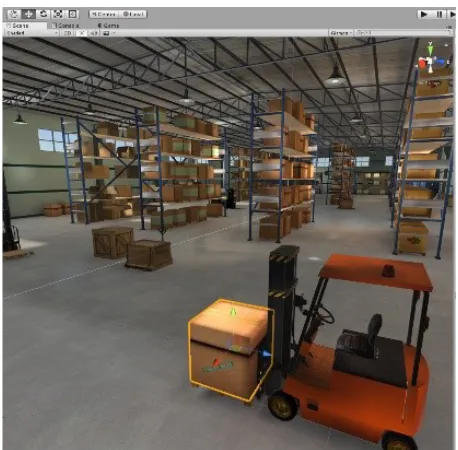
Fig. 1 shows an example of creating an exercise with a forklift truck. This Editor allows you to clearly and easily enter all the actions that can be performed on this element, in this case, the forklift truck. Fig. 1 shows the look of Unity3D with the PRACTICA Editor plugin in activity editing mode.
Fig. 1. Example of the creation of a scene for a forklift truck course in which all the elements of the scene can be selected and modified.
And in the image in Fig. 2, an example of the configuration of the Practica activity editor is shown, which shows the edition of an activity, with a scenario, success and failure events, a vehicle with its dashboard and functionalities, an object and a reactive object that triggers an event when it detects that it no longer touches the object.
2) Player
The PRACTICA Player is a stand-alone application independent of the Editor, as it shares only the resource and object package, which is common to both and accessible via a cloud service. These resource packages contain 3D objects, images, audios, environments, vehicles and activation zones, which are the basis for the creation of the activities, through the PRACTICA Editor, and with which the 3D world described in them will be created in the PRACTICA Player.
As they are hosted in an online service, they are not part of the playback application or plugin Editor, so they can be updated with more resources without having to redistribute a new version of the playback application or plugin Editor.
B. Architectural Design
Due to the 3D nature of the project and the need to modify the 3D environments in which the training activities are carried out, it has been necessary to have an Editor powerful enough to allow objects to be located, rotated and scaled in a 3D environment as faithful as possible to the final result perceived through the VR headsets. This led to the idea of taking advantage of Unity3D own scene Editor, as it is an unbeatable tool, specifically designed and developed for this purpose.
On the other hand, the fact that PRACTICA has been designed as a plugin, in addition to providing a simple tool for users who do not have technical knowledge, does not limit those users with deeper knowledge of Unity3D who want to take the editing of their activities a step further.
In addition, being an open source project, the distribution of PRACTICA as a plugin installable in Unity3D, is easier to deploy and put into operation, which can allow reaching a larger number of users and, therefore, potential partners.
Considering the above, and the fact that activity editing is a centralized and separate tool, technically and physically, from the reproduction of activities, as well as contributing to the decision to develop PRACTICA as an extension of Unity3D, led to two more technical decisions:
1) JSON as Activity Descriptor
On the one hand, the Editor should generate a description file of the training activity, which is simple to interpret and easy to share through cloud hosting.
With this premise in mind, the use of XML and JSON was evaluated, and the latter was finally adopted due to its simplicity, readability and suitability for transfer through web services.
Therefore, PRACTICA describes, using JSON, both the training activities it generates and the 3D elements available for its creation, such as scenarios, vehicles, objects, passageways, and other resources previously prepared and distributed, in the form of downloadable online packages.
That is to say, starting from a fixed, although expandable, set of 3D elements, whose functionality and properties would be described in a JSON catalog, PRACTICA had to be able to generate a JSON file describing a training activity, and its operation, being able to be shared online, making it available to the distributive part of PRACTICA in charge of the reproduction and execution of the activities.
2) 3D Resources Had to Be Accessible
Both for editing and reproduction, these being shared online, thus allowing new resources to be added without the need to update the PRACTICA software or redistribute it each time the catalog of objects available for training activities is extended. Therefore, a file format was required that would allow it to be served online, that could be readable by Unity3D, and where 3D models and audios, texts and behaviors typical of the engine could be packed.
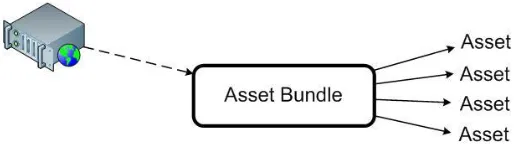
As an additional feature, Unity3D implements a mechanism to share and update resources and content without the need to update and re-release new versions of the software. This functionality is provided by Unity3D through the AssetBundles: these are packages that can contain models, images, sounds and other Unity3D content, and can be shared online and downloaded later by the software (Fig. 3 ), allowing you to add or modify content to them, without having to update or modify the code.
Fig. 3. Packaged resources into assets that can be easily redistributed later.
PRACTICA therefore makes use of them by adding, in addition to the resource itself, a catalog in JSON format, which describes the resources and tells the Editor what type they are and how they can be used when creating a training activity. PRACTICA provides a package (Fig. 4), common to the Editor and Player, where the elements that are part of the training activity are found, as well as the description of the type and its possible uses.
Fig. 4. PRACTICA encapsulates all the resources, descriptors and scenes to make course playback as easy as possible.
In this way, resources such as environments, objects, vehicles and controls are shared through these AssetBundles and described in the JSON catalog, where, for example, the functionalities of the vehicles, how they handle the controls and what type they are, allowing the Editor to link objects to each other in order to shoot them and make them work together, without the Editor being aware of whether he has more or less content, being able to increase or update it, without the Editor and the Player really being aware of it.
C. Search for Paths for NPC
Elements of artificial intelligence have been incorporated for the recreation of scenes that allow the incorporation of fictitious characters, also known as non-player characters (NPC) that allow the recreation of situations in which another person could be put at risk by doing an exercise. To achieve this, it has been necessary to analyze different techniques [19][20] that allow these characters to move around the stage fulfilling a series of criteria or heuristics so that their movement makes sense within the scene [21].
as a basis for searching for paths and managing the behavior of these characters. This tool allows you to establish the criteria for a character to move intelligently within the stage using a mesh configuration that will establish the areas of the stage through which the character can move.
The first thing to define is the navigation area through which the fictitious persons will move. This is called the NavMesh or navigation mesh. We’ll have to define a data structure that will contain information about the areas that will be walkable by these characters. In this way, it will be limited to our criteria the places through which they can pass. The next step will be to find the paths between the different points that make up the navigation grid. To do this, the navigation grid is divided into different polygons that, as the character progresses, will be visited. In this way, we’ll know at each moment which zones the character has passed through and that he will advance to the next marked zone on the route without returning along the same path.
This tool has allowed us to configure characters with a certain behavior in the face of obstacles and to define their interaction with elements of the scene, such as opening a door. Three types of basic elements have been used: NavMesh Agent, NavMesh Obstacle and Off-Mesh Link[23].
On the one hand, NavMesh Agent is a component that will help define the behavior of an NPC or fictional person within our scene. This component allows us to configure criteria such as the character’s movement, speed and behavior in the face of obstacles. In this project, basic behaviors have been programmed, such as, for example, that if a driver passes by with a forklift they will try to avoid it, or they will stop according to the distance. These behaviors may become more complex, but for the exercises defined during the prototype no higher level of behavioral complexity has been required.
On the other hand, NavMesh Obstacle refers to dynamic obstacles that may be present in the scene. This allows us to define more realistic situations, where we can find boxes on the floor that are hindering the passage. This type of object will have a behavior that we will determine according to its nature. NavMesh Agents can interact with these objects in the way that best suits the conditions of the scenario, for example, if there is a box on the ground, we can try to avoid it by changing course so as not to collide with it.
Finally, Off-Mesh Link allows NavMesh Agents to interact with each other to make movements between unconnected points within the navigation mesh, such as jumping over a wall or opening a door.
Therefore, we can give these characters and objects the behavior we want according to the needs of the exercise to be developed.
D. Virtual Reality Toolkit (VRTK)
Currently, VR headsets SDK, such as Oculus Rift, don’t provide support for the high-level interactions required for the control of objects within a scene, and are limited to more basic interactions, leaving the programming of more elaborate interactions to the developers.
On the other hand, the SDK of the different VR headsets are not compatible with each other; that is to say, in order to give support in PRACTICA to several headsets, such as Oculus Rift, HTC Vive and Daydream, it would be necessary to make a specific programming for each one of them, with the cost that this entails taking into account the development particularities of each one of them.
Taking these two factors into account, it became necessary to use a library that would act as a unified interface for all virtual reality devices, and at the same time provide a higher level of management of user interaction in the virtual world.
The answer to these needs is the VRTK library [24], which provides unified support for different brands of virtual reality devices, such as Daydream, Oculus Rift, Steam VR and Ximmerse, and also supports
much higher-level functionality than that provided by the SDK themselves.
Thanks to this, PRACTICA supports the VR Oculus Rift, HTC Vive, Samsung Gear VR, Daydream and Ximmerse devices; it also includes controls that require very detailed and precise manual movements by the user in the virtual world, which results in greater realism, and practically similar interactions to those that would be done in reality.
IV. Results Obtained During the Pilot
The results of the project have been evaluated together with a training company, Proyectos Integrales Clave, which helped to define the needs of simulating the driving of a forklift truck so that the students can obtain their operator’s licence.
The platform allows you to learn how to use a”tool” / “machinery” and to put it in situations of risk that could never be learned in a traditional training. For example, that the forklift demo has individuals walking, or that a box falls nearby.
In PRACTICA, we are faced with the challenge of starting from an empty 3D scene and generating it in playback time following a script previously generated using another of the project’s components and starting from a set of pre-defined and pre-packaged resources.
During the development of this prototype, we found that the teachers who received the courses were satisfied with the experience and requested that they continue to be offered more courses of this nature, proposing future extensions to other areas that they could offer as part of their catalog of courses and activities, either independently or as a complement to existing ones.
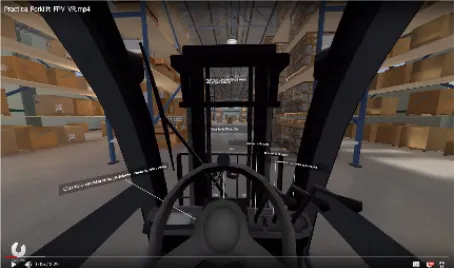
From a practical and application of a methodological approach, the objective of these sessions was both the practice of the exercises already carried out (Fig. 5) and that the participant build educational or training solutions to situations and/or needs of the classroom through creative proposals, through the use of the didactic potential of virtual reality, through a PC, due to its universality and adaptation to the characteristics of these potential educational tools.
The course uses specific resources for each type of training, in this case, a footswitch has been adapted to adjust the feeling of the students and give more realism to the exercise used in the proposal (pilot) and resolution of activities and tasks supervised and oriented to achieve the objectives of the course and the development of skills of participants.
Fig. 5. Visualization of the scene from the student’s point of view during the exercise.
V. Conclusion
the use of a simulator that will provide added value to the content already offered.
In the case of the forklift driving course, companies, when offering training and work experience to their students, cannot run the risk of putting people in a warehouse to check whether the student will be able to avoid them and not run over them. However, in a virtual simulation, these situations can be offered to better evaluate the response of students to this type of incident.
On the other hand, the realism and immersion provided by the virtual reality environment, through the use of headsets and virtual reality controls, offers an extremely realistic simulation, providing students with training comparable to the real thing. This allows students to be trained in complex skills or machinery, which are not available to trainers, are particularly dangerous to use or have very limited time for use.
Thanks to this level of realism, provided by the VR, the student who trains with PRACTICA will find a great similarity with what he has practiced when he is in a situation or manipulating real machinery, as will have acquired habits and mechanized movements that correspond one by one with the real world. This also eliminates the initial blockage, or fear of the unknown, in risky or dangerous situations, since, although in a virtual environment, they have already been in a similar situation and will know how to act.
Another added value of this platform is the way it is presented to end users, who can create exercises or share them with other users, without the need to have knowledge of software programming, since the PRACTICA Editor has been built to offer all the options regarding objects, scenes and controls, so that their configuration is as clear and intuitive for the trainer.
In addition, the components with which the exercises are prepared have been designed to encourage reuse and, above all, future expansion in number and functionality, without the need for further development or updating of the platform. Therefore, the prototype for the simulation of a mechanical forklift could be, in the future and without much effort, a crane simulator, a fire extinguisher simulator or any other training activity.
Acknowledgment
This Project has been financed thanks to the Program of Incentives to the Knowledge System Agents of the Andalusian (call 2012), which depends on the Ministry of Economy and Knowledge of the Junta de Andalucía. The project code is PI12 / 1166.
References
[1] Miller, M. (2014) Virtual Reality: The Next Big Thing in Education?
Product Lifecycle Report. PTC blog. Available from:http://blogs.ptc. com/2014/08/13/virtual-reality-the-next-big-thing-in-education/
[2] Valentín L-, Carrasco A, Konya K, Burgos D. Emerging Technologies Landscape on Education. A review. International Journal of Interactive Multimedia and Artificial Intelligence. 2013;2 (Special Issue on Improvements in Information Systems and Technologies): 55-70.
[3] Greenwald, S., Kulik, A., Kunert, A. (2017) Technology and applications for collaborative learning in virtual reality. In CSCL, 12th International Conference on Computer Supported Collaborative Learning (CSCL), Pennsylvania, USA, 18 - 22 June 2017. Philadelphia, PA, USA: International Society of the Learning Sciences, pp. 719-726.
[4] Hu, B.; Ma, LA., Zhang, W., Salvendy, G., Chablat, D., Bennis, F. (2011) Predicting real-world ergonomic measurements by simulation in a virtual environment. International Journal of Industrial Ergonomics. Volume: 41 Issue: 1 Pages: 64-71.
[5] Interrante, V., Ries, B., Lindquist, J., Kaeding, M., and Anderson, L. (2008). Elucidating factors that can facilitate veridical spatial perception
in immersive virtual environments. Presence: Teleoperators and Virtual Environments, 17(2):176–198.
[6] Google VR Cardboard. Available in: https://vr.google.com/cardboard/
[7] DayDream. Available in: https://vr.google.com/daydream/
[8] A short history of Oculus Rift. Available in: http://www.tomshardware. com/reviews/ar-vr-technology-discussion,3811-5.html
[9] Oculus Rift. Available in: https://www.oculus.com/rift
[10] Leap Motion. Available in: https://www.leapmotion.com/
[11] Kinect para Windows. Available in: https://developer.microsoft.com/es-es/ windows/kinect
[12] How HTC and Valve built the Vive. Available in: https://www.engadget. com/2016/03/18/htc-vive-an-oral-history/
[13] Playstation VR Technical Specifications. Available in: https://www. playstation.com/es-es/explore/playstation-vr/tech-specs/
[14] Unity3D Documentation. Available in: https://docs.unity3d.com/es/ current/Manual/index.html
[15] Features of Unreal Engine 4. Available in: https://www.unrealengine.com/ en-US/features
[16] Features of Blender. Available in: https://www.blender.org/features/
[17] Amazon Sumerian. Available in: https://aws.amazon.com/es/blogs/aws/ launch-presenting-amazon-sumerian/
[18] Asset Bundles de Unity3D. Available in: https://docs.unity3d.com/es/ current/Manual/AssetBundlesIntro.html
[19] S. M. Lucas, ‘Computational intelligence and AI in games: A New IEEE transactions’, IEEE Trans. Comput. Intell. AI Games, vol. 1, no. 1, pp. 1–3, 2009.
[20] Pandit, D. (2017) 3D Pathfinding and Collision Avoidance Using Uneven Search-space Quantization and Visual Cone Search. ResearchGate, article. Available on: https://www.researchgate.net/publication/317356810_3D_ Pathfinding_and_Collision_Avoidance_Using_Uneven_Search-space_ Quantization_and_Visual_Cone_Search
[21] Khantanapoka, Khammapun & Chinnasarn, Krisana. (2009). Pathfinding of 2D & 3D Game Real-Time Strategy with Depth Direction A*Algorithm for Multi-Layer. 184 - 188. 10.1109/SNLP.2009.5340922.
[22] Unity3D. Navigation and Pathfinding. Available in: https://docs.unity3d. com/es/current/Manual/Navigation.html
[23] Unity3D. Navigation and Pathfinding. Navigation reference: Available in:https://docs.unity3d.com/es/current/Manual/class-NavMeshAgent.html
[24] VRTK – Virtual Reality Toolkit. Available in: https://vrtoolkit.readme.io/
Juan Manuel Lombardo
PhD in Computer Science from the Pontifical University of Salamanca, was graduated in Economics and Business Administration in the University of Granada, Spain, Diploma of Advanced Studies (DEA) in Economics from UNED, Research Sufficiency in Business Science from the Complutense University of Madrid and Diploma of Advanced Studies (DEA) in Sociology from the Pontifical University of Salamanca. He is CEO at Fidesol and Professor at Andalusia Business School. Dr. Lombardo is the author of numerous articles and research papers published in journals and books of national and international conferences. Visiting Professor at the Private Technical University of Loja (UTPL Ecuador), The National University of the Northeast (Argentina), University Francisco José de Caldas (Colombia), Catholic University of Colombia, Catholic University of Ibarra (Ecuador), University of Lisbon (Portugal) and National Engineering University (Peru). Member of the Knowledge Management committee of AEC (Spanish Association for Quality) and the Institute CICTES (Ibero-American Centre on Science, Technology and Society).
Miguel Ángel López
Vicente M. García
He has a degree in Technical Engineering in Computer Systems from the University of Catalunya. Currently he is a researcher at Fidesol where performs the role of programmer analyst on frontend and fullstack software projects. He is an experienced Unity3D and VR developer. He has developed various games in Unity3D and his final degree thesis was a VR Cinema and 360 degrees Video Player for Android smartphones using Google Cardboard technology.
Mabel López
She has a degree of Computer Science Engineering. She is Knowledge Manager at Fidesol. Participates in the research and development strategy of this entity, technology transfer and analysis of technological trends, such as big data, internet of things, virtual reality, cognitive engines, machine learning, etc. Currently, she is involved in several R & D projects related to the mentioned technologies.
Ruben Jose Cañadas Sastre
Master’s degree after graduating from the University of Almería in computer science. Currently hold the position of Project Manager in FIDESOL where is in charge of the fit gap analysis, project planning, budgeting, customer requirements, client advise and offshore training for several public and private projects.
Susana Velasco
She has a Technical Engineer in Computer from the University of Granada. In the past, she worked in manufacturing, financial and service sector enterprises as software engineer and analyst programmer. Her research interests include quality assurance, software quality management systems, Ambient Intelligence (AmI) systems and devices, and new generation of ICT technologies.
Mónica León