Computer aided interactive histology - summary of 10 years
Göran Sandberg
Department of Neuroscience, Karolinska Institutet, S-171 77, Stockholm, Sweden
Abstract
Different computer based learning/teaching aids in histology were developed and tested during a period of ten years. The following conclusions are drawn regarding the advantages of computers as compared to conventional methods.
Solving a problem presented by a computer often encourages cooperation between students.
Computerized expert systems are useful for the training of certain aspects of our subject, such as the difference in structure between various parts of the digestive system, between different lymphatic organs, skin on different locations of the body, and so on.
Images with 'hot spots' and hidden explanatory texts are very useful.
A possibility of distance learning of microscopic slides during a course is technically possible and is very much appreciated by students.
By using hyperlinked text, information is easier to find and the study can be made more individual and interactive.
It is possible to design systems with short answer questions that become very interactive. An immediate feedback about the performance of a student is often appreciated.
A test can be more fun by designing it like an adventure game or by giving access to more complicated questions only after completing a qualification test.
Presentation of the content of a lecture via the Internet (or a closed part of the home page of a course) is much appreciated and can improve learning.
A program does not have to be technically advanced to function as long as there is a pedagogical value.
Regarding possible disadvantages with computer programs, one is that everything you create has to be updated continuously. There is a risk that this may develop into a full time job. A
conclusion is that it may be wise to concentrate on a few projects. Furthermore, although the students are usually very positive to the use of computers in teaching and learning, the effect on learning is often scored rather low. The reason for this will have to be explored.
Introduction
By that time there was practically no IT support available so I decided to do the programming myself. An advantage was that I got full control over the creation process. It was, of course, important to have some input during the process, so colleagues and students were involved in this work.
It was rather time consuming to find a proper tool for programming and then to do the actual programming. A tool called XpertPRIZ (Institute of Cybernetics, Tallinn, Estonia) seemed to fulfil my demands. It was mainly designed for construction of expert systems, but I found it highly suitable for other uses and I was lucky since a programmer involved in the production of the program in Estonia turned out to be extremely helpful in the program development process. It is inevitable that one faces different problems during programming, and her assistance was definitely an absolute requirement for a successful result.
There were different problems involved in the initial program construction. I wanted to use short answer questions for the self-assessment section of the programs. The reason for this was that such questions are better from a pedagogical view than the more commonly used multiple choice questions. The correction template of a question was in the form of an expert system which directed the path to be followed after a certain answer had been given by a student. In many cases there may be many possible answers to a question though, with different spellings and synonyms or languages (latin/english/swedish). With, for instance, 15 possible answers to a question, the expert system became rather large and time consuming to construct. However, I was lucky to find out that it was possible to cheat, although this would not work according to my expert in the program. By using a very strict programming routine it was indeed possible to make correction templates of quite acceptable size, and this has worked without a problem for a
decade.
Another special problem was that the program used did not have a module for showing images, such as bmp or pcx files. Instead there was a rather primitive module by which very simple schematic drawings could be created. However, by trial and error it was found that a shareware program called CVUIMAGE could be combined with my program and used for the full screen display of any pcx file.
Today this initial program, called Interactive Histology, consists of 2500 different data files which are linked together. It is possible to create a 'runtime module', which is a file containing the entire material (except certain file types) and which is coded so that the files cannot be manipulated. So far, no hackers have interfered with the program.
This first program was operated in DOS. With Windows95 changes had to be performed in the autoexec.bat and config.sys files for the program to work properly. This meant that distribution to students was stopped since we did not want to make students manipulate these files in their own computers. With Windows98, however, this problem disappeared.
was if this could replace the lecture, or if it could improve the learning process. It is clearly appreciated by students and it was even possible to demonstrate an effect on learning. In a lecture there is not time to show very many slides and most often students forget them as quickly as they are shown. On the Internet site it is possible to display a large number of images which the students can study at their preferred rate. It has subsequently become more and more common to present the content of a lecture (either in full or in the form of a synopsis) on the home page of a course so that students get the opportunity to prepare themselves in advance or check out details after the lecture.
The next project focused more on the problem of how to recognize a tissue or organ in the microscope. Images are presented in a tutorial and it is then also possible to obtain information about structures seen in an image by pointing with a mouse on 'hot spots'. In a third module a simulation of microscopy is created with the use of a web browser plug-in.
After the production of such aids for the study of the gastrointestinal and urogenital tracts, another type of CAL aid was developed for the study of bone marrow morphology - a
particularly difficult area of histology teaching dealing with the recognition of different stages and types of blood cell precursor cells in the bone marrow. At present we are also producing a CAL aid about connective tissue, cartilage and bone. This is in part an adaptation of previous ideas in the old DOS program to the Internet milieu but with new components made possible thanks to the new technology. Furthermore a program for the creation of adaptive tests on the Internet is in the planning stage. Such tests were earlier designed in the DOS environment and used for computer steered group work. I am particularly fond of such tests since they enable an 'automatic' dialogue between the student and the teacher through the computer.
All of these web applications are totally free for anyone to use. One limitation is the language, of course - since, from the beginning, our strategy has been to produce all programs in Swedish. The reason for this is that practically all of our course literature is in English and therefore the need for learning aids in Swedish is great.
One very much discussed matter is whether earlier tests should be made available on the Internet (or in other form) and particularly if the answers to questions should be given to the students. We have reached a compromise which means that all answers are given to questions on one test in order to give the students an idea about the type of answers we expect. However, in addition to this we have selected questions from other tests which have rather extensive answers and we have published the corresponding answers.
Detailed description of some programs
The first computer based learning aid that we developed was Interactive Histology. The program is made with the shell program XpertPRIZ which is particularly suitable for making expert systems and also for creating correction templates for questions. Our program contains the following types of components:
a limited number of multiple choice questions supplemented with comments to answers; short answer questions - these are more demanding as regards programming and are
described in detail below - by including new comments and questions to any response (right or wrong) given by students, a feeling of real dialogue with the teacher can be created;
animations - there is a built-in system in XpertPRIZ for the design of simple graphics, and it includes a time function making it possible, for instance, to show the sliding of skeletal muscle filaments;
expert systems - these deal with matters such as how to be able to match a special type of skin to a certain location of the body, or how to identify different parts of the digestive system histologically (type of epithelium, type of muscle, arrangement of muscle, type of folds, etc.). Other expert systems deal with the different lymphatic organs (presence of cortex and medulla, germinal centres, epithelium, special characteristics, etc.), or how to identify a certain type of blood cell. The expert system automatically chooses which question is relevant for a certain purpose;
a database on some facts like the properties of different blood cells; and
histological images of slides used during the course were prepared and supplemented with explanatory texts. There was no built-in routine for doing this in the shell program XpertPRIZ, so it was complemented with a program called CVUIMAGE (Offe
Enterprises, Naperville, Ill, USA), which enabled the display of images of the pcx format.
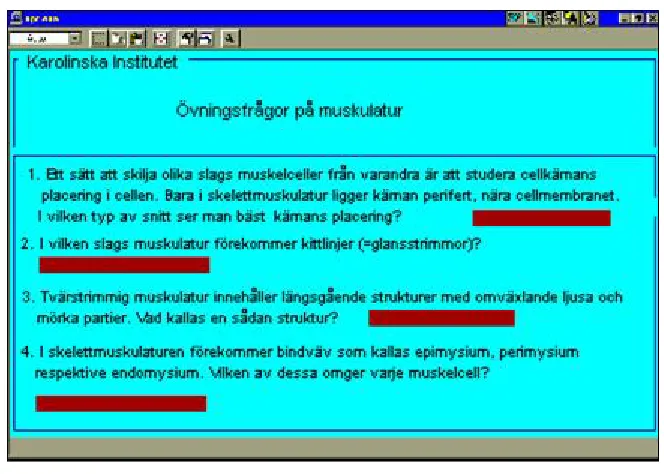
Short answer questions
Figure 1.
The answers are to be written in the shaded fields, and after answering the question on one page the answers are corrected. For incorrect answers the expected answer is given. After a whole subject is completed this way there is a summation of the students achievement both in terms of the number of correct answers and a comparison with what could be expected.
Many different variations on this theme have been tested. One approach is to present one question at a time with comments on the answers - so-called dialogue questions. The idea is to create a feeling of dialogue between student and teacher.
A more playful variant is to present the student with a new goal after performing well, much like a computer game, where questions are asked in each room of a house and where good
performance enables one to climb to a higher floor and level with more difficult questions. The goal is to get to the highest floor.
One further model we investigated made questions available first after a qualification round. If the student performs well enough a new set of more difficult questions are automatically presented. It turns out that students are very eager to find out which the difficult questions are.
lead to more questions in the same field so that the student gets a thorough exposure to the subject.
Correction templates
The correction templates were designed as small expert systems where each response can potentially lead to a unique response or new path within the program. In the case when there are many possible answers in the template the expert file would become rather large and
complicated, but we found a way to avoid this. By following certain strict rules, each possible new answer requires one additional line in the template file. One example of this is shown in Figure 2.
Figure 2.
Here some possible answers to question 's6a' are listed and these are read vertically by the program. When a given answer is identical to one in the template the line is then read
horizontally and the action to follow is defined in the column called 'result'. If the last line of the column '<' is reached, that line is also read horizontally and the action would be to open the expert file grupp41a.exp, where there may be a command to open a new question or a command to show a comment, for instance. What we do not see in this picture is a column to the left with program instructions.
A lecture on the Internet
My own lecture about the skin is available in a modified way at
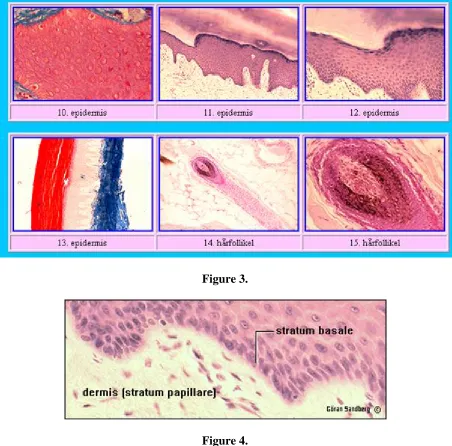
http://www.neuro.ki.se/neuro/KK2/huden.html. The different topics are presented separately and with hyperlinks to other parts of the subject. Students very much appreciate being able to check certain facts before or after the lecture, and find them in a structured way. This is in contrast to textbooks where an item may be mentioned on ten separate pages and it may be time consuming to collect all the data. There is a collection of 43 histological images on the skin which can be selected from an alphabetical list, from a list on different structures of the skin, or from a collection of icons, some of which are shown in Figure 3.
Figure 3.
Figure 4.
There are also some questions for students' self-assessment. These were made by use of
In an evaluation it was shown that students who used this service performed better in the examination than the students who had only attended the lecture in a lecture hall and possibly used other teaching aids.
The digestive and urogenital systems on the Internet
http://www.neuro.ki.se/neuro/KK2/huvovers.html http://www.neuro.ki.se/neuro/KK2/ugoversram.html
These programs are concerned with the histology of some of the most difficult areas of the subject and were developed by Gunilla Jacobsson-Ekman and myself and encompass three levels of detail.
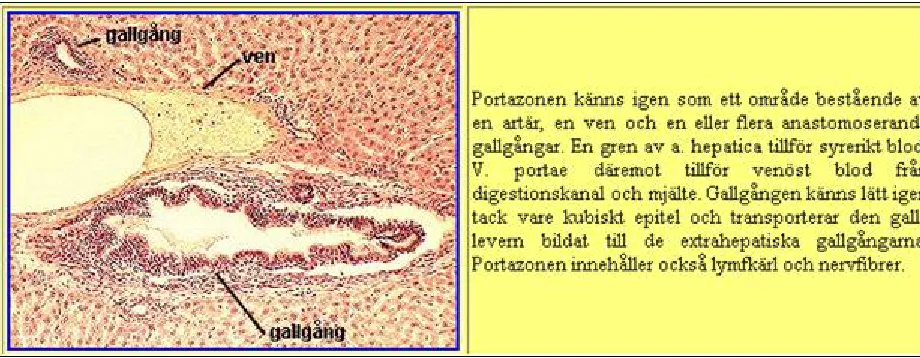
Level one is a tutorial with short descriptive texts in association with histological images with marked structures (see Figure 5).
Figure 5.
Figure 6.
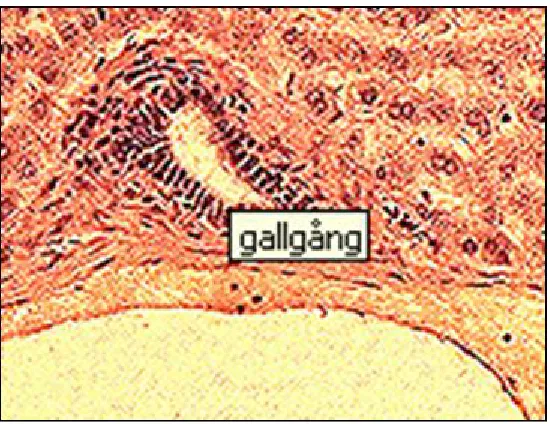
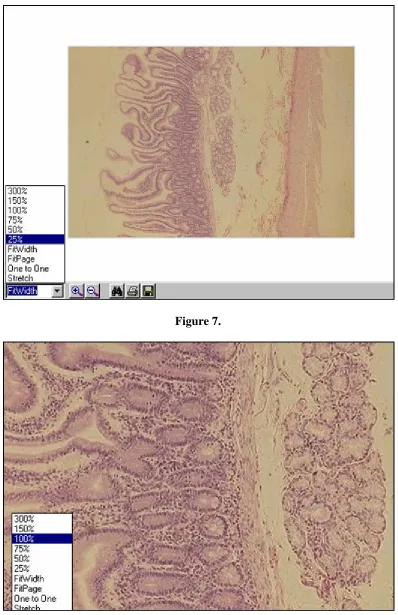
The coordinates of a certain area of the image are then given. The entire area of the image was thus associated with some unique text. One complication was that when an image is larger than the screen the scrolling down resulted in failure to show the text. It was, however possible to circumvent this by a special programming trick.
Figure 7.
This was made possible by compressing the files into DjVu files (Lizardtech software). Although, in this process we lose some colour. A plug-in (available free of charge from
Lizardtech) has to be installed. The size of the image file in this example is only 177 kbytes. The file sizes are deliberately small since students might use slow modems at home for connection to the Internet.
Blood and bone marrow morphology
Figure 9.
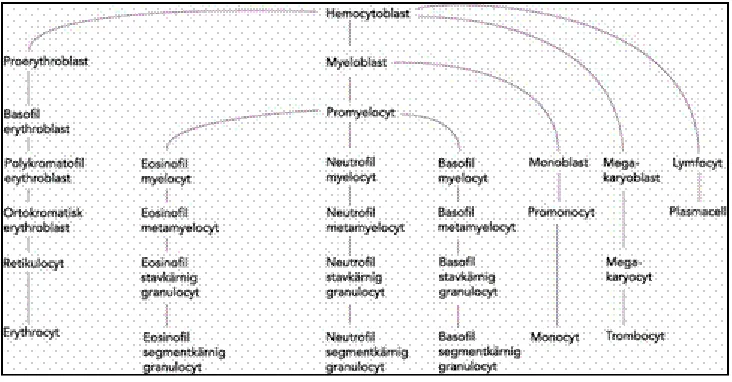
One of the difficult areas of histology is the identification of blood cells and their precursors in bone marrow. The support from teachers or books is not sufficient when students study smears in the microscope. For that reason we designed a blood and bone marrow morphology Internet site with a tutorial which systematically deals with the various properties of cells. The (temporary) address is: http://vision.kib.ki.se/projects/netsim_bloodcells/index_se.html.
The comparison of staining of different blood cells is shown in Figure 10.
Figure 10.
Figure 11.
In case of an error in the identification of a certain cell, the user is transferred to a test of the ability to describe the cell on the basis of size, granules and stainability, as well as the shape, chromatin pattern, and location of the nucleus. Thus the student becomes familiar with the stages of reasoning used when identifying a cell. Both the ability to recognize a cell directly and to reason are evaluated in the test, and the student gets immediate feedback.
An archive with all the images of a certain cell type is included on the Internet site in order to be able to compare them and find out the common properties.
A separate administrative area of the site exists where the teacher can add new images or remove old ones, change the description of a cell, or add a comment of the kind 'yes, this cell might be described as a myelocyte, but if you consider the presence of a few large azurophilic granules and the relatively large size it is more likely that this cell is actually a promyelocyte'.
Evaluation
Figure 12.
On the other hand, when asking the students to compare different learning aids, the computer based options often get a rather critical judgement. There may be several reasons for this. Either the traditional ways of learning are well rooted in the minds of students, or the use of computers is just not optimal yet.
The opinion of CAL among our students is shown in Figure 13, according to the question: 'To what extent do you think that IT (computers, programs, Internet) was a support for learning?'.
It will be an important task to find out in which way the CAL options might become higher rated.
Figure 13.
Based on our experience so far, the following will probably be true for our future IT efforts:
when technically possible - use the Internet, and without the need to log in; continue the use of intelligent adaptive tests which are built to improve with time; make use of the 'hot spot' function of web browsers to identify details of an image; and let the students be involved in the process.
Göran Sandberg
Department of Neuroscience Karolinska Institutet
S-171 77 Stockholm Sweden