555-235-100 June 1999 Issue 2
Release 2.0
Copyright and legal notices
Copyright 1999, Lucent Technologies All Rights Reserved
Printed in U.S.A.
Notice
Every effort was made to ensure that the information in this book was complete and accurate at the time of printing. However, information is subject to change.
Your Responsibility for Your System’s Security
toll fraud and the steps that can be taken to reduce that risk. Lucent Technologies does not warrant that this product is immune from or will prevent unauthorized use of common-carrier telecommunication services or facilities accessed through or connected to it. Lucent Technologies will not be responsible for any charges that result from such unauthorized use. Lucent Technologies Fraud Intervention
If you suspect that you are being victimized by toll fraud and you need technical support or assistance, call Technical Service Center Toll Fraud Intervention Hotline at 1 800 643-2353.
Trademarks
AUDIX, CALLMASTER, CentreVu, CONVERSANT, DEFINITY, Magic On Hold, and PassageWay are registered trademarks and INTUITY, ProLogix, and TransTalk are trademarks of Lucent Technologies, Inc.
Microsoft and Windows are registered trademarks and Windows NT is a trademark of Microsoft Corporation.
Macintosh is a registered trademark of Apple Computer, Inc. Pentium is trademark of Intel Corporation.
UNIX is a registered trademark of X/Open Company, Ltd. pcANYWHERE is a trademark of SYMANTEC.
Commence is a trademark of Commence Corporation.
Octel is a registered trademark of Octel Communications Corporation. PagePac Plus is a registered trademark of Harris Corporation.
PhoneLine is a registered trademark of CCOM Information Systems. Bay Networks is a registered trademark of Bay Networks.
Paradyne is a trademark of Paradyne Corporation.
Ascend and Pipeline are registered trademarks of Ascend Communications, Inc.
Hypercom is a registered trademark of Hypercom. Ordering Information
Call: Lucent Technologies BCS Publications Center
Voice 1 800 457-1235International Voice 317 322-6791 Fax 1 800 457-1764International Fax 317 322-6699
Write: Lucent Technologies BCS Publications Center
2855 North Franklin Road Indianapolis, IN 46219-1385
Order: Document No. 555-235-100
Comcode 108432139 Issue 2, June 1999
You can be placed on a standing order list for this and other documents you may need. Standing order will enable you to automatically receive updated versions of individual documents or document sets, billed to account information that you provide. For more information on standing orders, or to be put on a list to receive future issues of this document, contact the Lucent Technologies Publications Center.
Warranty
The CD software and documentation are not warranted and are provided by Lucent Technologies as is.
Disclaimer
Intellectual property related to this product and registered to AT&T Corporation has been transferred to Lucent Technologies Incorporated. Any references within this text to American Telephone and Telegraph Corporation or AT&T should be interpreted as references to Lucent Technologies Incorporated. The exception is cross references to books published prior to December 31, 1996, which retain their original AT&T titles. Heritage
Contents
Copyright and legal notices
iii
About This Document
xv
Purpose . . . . xv
Intended Audiences . . . . xv
How to Use This Document . . . . xvi
Conventions Used in This Document . . . xviii
Security . . . xviii
How to Order Documentation . . . . xix
How to Comment on This Document . . . . xx
1 Introduction
1-1
DEFINITY ProLogix Solutions Overview. . . 1-1 Supported Applications . . . 1-2 Application Starter Packages . . . 1-4 Differences between
Cabinets. . . 1-8 Compact Modular Cabinets . . . 1-9 Software . . . . 1-11 Reliability. . . . 1-12
2 Desktop/Console Solutions
2-1
Telephones for the Global Marketplace . . . 2-1 Digital DCP Telephones. . . 2-3 ISDN BRI Telephones . . . 2-16 Analog (Single-Line) Telephones. . . 2-18 Attendant Consoles . . . . 2-24 DEFINITY Attendant Console . . . 2-24 DEFINITY PC Console . . . 2-25
3 Adjuncts
3-1
4 Messaging/Voice Response Solutions
4-1
Messaging Systems and
Call Coverage . . . 4-2 Messaging Integration . . . 4-3 INTUITY AUDIX. . . 4-3 DEFINITY AUDIX . . . 4-8 Centralized Messaging vs. Networked Messaging . . . 4-8 INTUITY AUDIX Messaging Solutions . . . 4-9 INTUITY AUDIX Features . . . 4-9 INTUITY Message Manager . . . . 4-13 DEFINITY AUDIX Voice Messaging System. . . . 4-15 DEFINITY AUDIX Features . . . 4-17 INTUITY CONVERSANT . . . . 4-20 Octel 100. . . . 4-22 Octel 100 Features . . . 4-22
5 Call Center Solutions
5-1
Basic Call Management System Vu . . . . 5-15 Requirements . . . 5-16 Call Center Basic . . . . 5-17 Call Center Deluxe . . . . 5-18 Call Center Elite . . . . 5-19 CentreVu Virtual Routing. . . . 5-20 CentreVu Advocate . . . . 5-22 CentreVu Compact Call Center Drop-In Solutions . . . . 5-25
6 Wireless Solutions
6-1
Medium Range Mobility Solution. . . 6-1 Long Range Mobility Solutions. . . 6-4 DEFINITY Wireless Business System R2 - PWT . . . 6-6 DEFINITY Wireless Business System - DECT Adjunct . . . 6-7 Starter Application Package . . . 6-9
7 Computer Telephony Integration Solutions
7-1
Requirements . . . 7-10 Third-Party Applications. . . 7-13
8 Telecommuting/Virtual Office Solutions
8-1
DEFINITY ProLogix Features for Telecommuting . . . 8-1 Remote Call Coverage/
Call Forwarding Off-Net/Coverage of Calls Redirected Off-Net . . . 8-2 Extended User Administration of Redirected
Calls (Telecommuting Access) . . . 8-2 Personal Station Access . . . 8-2 Station Security Codes . . . 8-3 Pipeline 15 . . . 8-3 DEFINITY Extender . . . 8-4 AUDIX Features for Telecommuting . . . 8-5 Starter Application Package . . . 8-6
9 System Administration Solutions
9-1
System Management Terminal
Scheduling . . . . 9-11 Basic Reporting . . . . 9-12 Performance Measurements. . . . 9-13 Call Charge Information . . . . 9-15 Call Detail Recording . . . . 9-16 Call Detail Recording Features . . . 9-16 Call Detail Recording Devices . . . 9-18 Call Accounting Systems . . . 9-18 Security . . . . 9-20 Security Violation Notification . . . 9-20 Call Restrictions. . . 9-20
10 Trunking and Networking Solutions
10-1
Facility Restriction Level . . . 10-13 Authorization Codes . . . 10-14 Network Interfaces and Equipment . . . 10-15 Trunk Group Circuits . . . 10-15 Centralized Attendant Service . . . 10-22 Main/Satellite/Tributary . . . 10-23 Electronic Tandem Network . . . 10-24 Multimedia Communications . . . 10-25 Starter Application Package . . . 10-28
Appendix A: Features
A-1
Automatic Routing Features . . . A-2 Basic Features . . . A-3 Call Center Features . . . .A-12 Hospitality Features . . . .A-14 Private Networking Features. . . .A-15 Trunk Group Features . . . .A-18
Appendix B: Documentation Library
B-1
DEFINITY ECS Release 7.1 (and later) Installation & Maintenance for Compact Modular Cabinets. . . B-4 DEFINITY Adjuncts . . . B-5 DEFINITY AUDIX System Release 4 . . . B-5 Guide Builder . . . B-6 INTUITY Messaging Solutions Release 5 . . . B-7 PC Applications and CALLMASTER. . . B-7 Telephones. . . B-8
About This Document
Purpose
This document provides an overview of the features, components, and capabilities of DEFINITY®
ProLogix™ Solutions. This document provides high-level information about the system; it does not describe how to install, administer, or maintain DEFINITY ProLogix Solutions. For this information, refer to the enclosed documentation library compact disk (CD) (document number 555-235-807). See Appendix B for a listing of the libraries contained on this CD.
You should read this document to understand
• the features of DEFINITY ProLogix Solutions, • the components of DEFINITY ProLogix Solutions, and
• the additional capabilities that are available for you to further tailor DEFINITY ProLogix Solutions to your needs in the future.
Intended Audiences
How to Use This Document
Since this document provides an overview of the features, components, and capabilities of DEFINITY ProLogix Solutions, you should read this document to get a basic understanding of DEFINITY ProLogix Solutions. This document describes all of the capabilities that you can add to your DEFINITY ProLogix Solutions, helping you to identify applications that increase the productivity and effectiveness of employees in your company.
This document consists of the following chapters:
• Chapter 1, “Introduction,” provides an overview of DEFINITY ProLogix Solutions, including the features and hardware and software components.
• Chapter 2, “Desktop/Console Solutions,” describes the telephones and consoles that are available with DEFINITY ProLogix Solutions.
• Chapter 3, “Adjuncts,” describes the adjuncts that are available with DEFINITY ProLogix Solutions.
• Chapter 4, “Messaging/Voice Response Solutions,” describes the voice messaging systems that are available with DEFINITY ProLogix Solutions.
• Chapter 5, “Call Center Solutions,” describes applications that provide advanced call-handling and call center management capabilities.
• Chapter 7, “Computer Telephony Integration Solutions,” describes the
applications that merge computer and telephone functions, enabling employees in your company to control their telephones from their personal computers and to use caller ID to access client information.
• Chapter 8, “Telecommuting/Virtual Office Solutions,” describes applications that enable employees in your company to work effectively off-site.
• Chapter 9, “System Administration Solutions,” describes applications that can help you manage DEFINITY ProLogix Solutions.
• Chapter 10, “Trunking and Networking Solutions,” describes applications that provide connections to a variety of voice and data networks, helping you to network your equipment and solutions.
• Appendix A, “Features,” lists the features of DEFINITY ProLogix Solutions. • Appendix B, “Documentation Library,” lists the documents contained in the
Document Library CD.
Conventions Used in This Document
The following conventions are used in this document:
• The term system is used in general to represent DEFINITY ProLogix Solutions. • The term switch is used to represent other telecommunications switching
products.
Security
How to Order Documentation
This document’s order number is 555-235-100, Issue 2. The comcode for this document is 108432139. To order this document, contact:
Lucent Technologies BCS Publications Center 2855 North Franklin Road
Indianapolis, IN 46219-1385 U.S.A.
Voice: 1 800 457-1235 Fax: 1 800 457-1764
International Voice: 317 322-6791 International Fax: 317 322-6699
To order paper versions of the documents contained on the documentation library CD or any other
documents, provide the order number(s) for the document(s) you want to order. Appendix B contains the list of ordering numbers for all documentation contained on the CD.
How to Comment on This Document
Lucent Technologies welcomes your feedback. Please fill out the reader comment form at the back of the document and return it.
1
Introduction
DEFINITY ProLogix Solutions Overview
DEFINITY® ProLogix™ Solutions is an extremely flexible, global communications system that you can design to get precisely the features and functionality your mid-sized business locations need. As your business grows and your needs change, you can select the tools you need to help manage your time and communications processes effectively, including an array of prepackaged advanced applications (known as “Application Starter Packages”) and service and support options.
DEFINITY ProLogix Solutions is a member of the powerful DEFINITY family and provides many of the features found in the other DEFINITY ECS systems. As your company grows, DEFINITY ProLogix Solutions gives you the ability to migrate easily and cost-effectively to the larger DEFINITY ECS. If you move to the DEFINITY ECS, you will keep all of the DEFINITY ProLogix Solutions applications and almost all of your hardware, thereby protecting your initial investment.
Supported Applications
DEFINITY ProLogix Solutions Release 2 supports the following platforms:
• INTUITY™ AUDIX® Voice Messaging System, Release 4.3 or later • DEFINITY AUDIX Voice Messaging System, Release 3.2 or later • Octel® 100 Messaging
• BCMS and/or BCMS Vu software • CentreVu Call Management System
• INTUITY CONVERSANT® Interactive Voice Response • ASAI/TSAPI via MAPD
• ATM-CES
• IP-Trunks (voice and fax over IP) • BRI Trunks and Stations
• Multimedia Call Handling (MMCH)
• C-LAN (TCP/IP connectivity for networking, INTUITY, and CentreVu Call Management System)
• DEFINITY Site Administration (DSA) • PassageWay® Direct Connection
• Data access products from Paradyne™, Ascend® Communications, and Hypercom®
• DEFINITY PC Console Release 2 or later • DEFINITY Attendant Console
• Telephones including the globally-designed 6400 series as well as 8500, 8400, 9400, 9100, 8100, 7400, 7300/ATL, and 6200 series
• MasterDirectory and PhoneLine applications
• Access Security Gateway (ASG) Guard and other security devices • Miscellaneous adjuncts including Uninterruptible Power Supply (UPS),
Overhead Paging, and Call Accounting software
Application Starter Packages
DEFINITY ProLogix Solutions offers Application Starter Packages that enable you to implement advanced applications at your own pace, easily and cost effectively in small sizes. When you are ready, you can increase the capacity of the Starter Packages you purchase. Refer to the individual section for more details about each Starter Package.
The following Starter Packages are available:
• Virtual Office
The Virtual Office Starter Package lets you provide voice and data access for off-site workers and telecommuters. Ideal for businesses with employees who often work at home or other remote locations, this package allows workers to access your business LAN or the Internet from a remote office or home. Off-site workers can even receive telephone calls using a single telephone number no matter where they are, enabling them to work where needed.
• Wireless
The Wireless Starter Package enhances mobility within your business locations by enabling employees to receive important calls when they are away from their desks. Available in single-zone and multizone packages for anywhere from 1 to 25 users, the Wireless Starter Package gives workers convenient business calling features in compact handsets.
• Networking
The Networking Starter Package includes the hardware and software you need to provide consistent, enhanced communications among multiple company locations cost effectively. Depending on your business needs, you can select a networking package to provide centralized voice mail, remote call coverage, interoffice Calling Party/Called Party displays, and other productivity-enhancing features.
• Information Management
Differences between
DEFINITY ProLogix Solutions and DEFINITY ECS
DEFINITY ProLogix Solutions is a member of the powerful DEFINITY family and provides most of the features found in other DEFINITY ECS systems. (Appendix A provides a list of the features supported by DEFINITY ProLogix Solutions.) However, there are some differences between DEFINITY ProLogix Solutions and the DEFINITY ECS as listed below:
• DEFINITY ProLogix Solutions uses a new cabinet, processor, and power supply (R7csi).
• DEFINITY ProLogix Solutions does not support DC power.
• DEFINITY ProLogix Solutions does not support Common Control duplication. • DEFINITY ProLogix Solutions does not support an internal modem for the
remote access port. Instead, an external modem is used.
• DEFINITY ProLogix Solutions supports a maximum of 600 total ports: a maximum of 400 trunks/500 stations.
• DEFINITY ProLogix Solutions does not support BX.25 system links that are used for INTUITY/DEFINITY AUDIX DCIU Integration, R3 Call Management System (CMS), CentreVu CMS, or for signaling for DCS networks. However, C-LAN supports TCP/IP connectivity for DCS networking and adjuncts such as CentreVu CMS and AUDIX systems.
Hardware
The main component of DEFINITY ProLogix Solutions is the new R7csi model, which uses the TN798B processor (a RISC-based central processing unit) and TN2182B Tone-Clock. The TN798B supervises system operation.
Cabinets
Cabinets are enclosed shelves composed of vertical slots that hold circuit packs. Circuit packs make up the logic, memory, and switching circuitry for the system. Port circuit packs connect to telephones, computers, and trunks. The cabinets are designed to accept any type of port circuit pack in each circuit pack position.
Compact Modular Cabinets
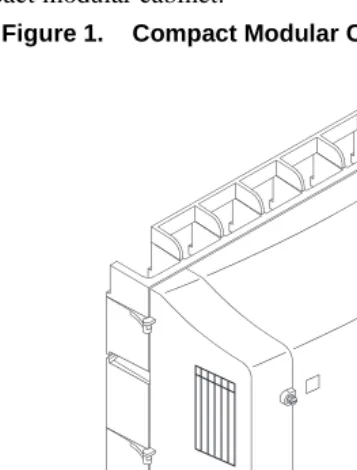
Figure 1 shows a compact modular cabinet.
The compact modular cabinet weighs 50 to 60 lbs. and has the following dimensions:
• height: 24.5 inches (62.2 cm) • width: 25.5 inches (64.8 cm) • depth: 11.3 inches (28.7 cm) The R7csi has the following characteristics:
• It uses the compact modular cabinet (CMC). • Each CMC has its own power supply.
• Up to three cabinets can be connected together in a single-port network. • It enables small organizations to expand while keeping the initial investment
moderate.
• It is mounted on a wall. However, it can be mounted on a table or floor as long as only one cabinet is required. For approved mounting configurations, refer to the
Installation and Maintenance guide on the Library CD.
• It contains 10 universal port slots.
Software
All DEFINITY ProLogix Solutions throughout the world use the same basic software. To provide this commonality while still accommodating wide variations in configurations and options, the system
dynamically allocates internal memory storage. Memory is sized when the system is initialized, selecting the proper software parameters based on the hardware configuration.
Reliability
DEFINITY ProLogix Solutions provides the following capabilities:
• The system can survive minor power surges (including lightning-induced surges up to 2500 Volts peak) without service interruption. Surge protectors can be purchased for increased coverage.
• The system can be placed in less-than-ideal locations since it can handle above-average temperatures and humidity.
• In case of power outages, the system automatically restores the last saved version of user translations and runs them at system restart.
• The system supports the remote diagnostics capability, which enables quick troubleshooting and maintenance.
• The system conducts self-diagnostics and can self-correct a large portion of system errors. If further technical assistance is required, the ProLogix system will call the Lucent Technical Assistance Center for remote diagnostics support.
• The system conducts standard maintenance routines automatically.
2
Desktop/Console Solutions
The communications needs of the people in your company may vary widely. Some may need only basic telephone service. Others may need effective messaging services to save valuable time. Still others may require high-speed data communications and access to a variety of host and personal computers.
DEFINITY ProLogix Solutions brings voice communications, data communications, and messaging together on the desktop and enables you to customize the types of service for various individuals.
Note: Some applications and products are unavailable in some countries. Please check with your local distributor for further information about the features and applications that are available to you.
Telephones for the Global Marketplace
A wide variety of telephones ranging from basic single-line telephones to sophisticated digital telephones that integrate voice and data communications are available with DEFINITY ProLogix Solutions. You can incorporate a mixture of telephone types based on the job functions of the users. All of the telephones are easy to use and give you the ability to tap into the power of your DEFINITY ProLogix Solutions.
These families of telephones are designed to accommodate the types of communications various users require. All telephones have touch-tone dialing and the message-waiting lamp for notification of messages.
The following DEFINITY telephones are supported:
• 6400 Series digital telephones • 7400 Series digital telephones • 8400 Series digital telephones • 8500 Series ISDN BRI telephones
• 9400 Series digital telephones (available in select European countries only) • 7300/ATL Series hybrid telephones
Digital DCP Telephones
Digital telephones using the Digital Communications Protocol (DCP) employ digital transmission for integrated voice and data signals and control signals. Transmission is over a connection consisting of one or two pair of wires. However, the 7400 Series telephones require four pair of wires. Each connection supports one signalling channel and two information (voice and data) channels.
DCP telephones are used most effectively by those who have a high volume of calls, require access to multiple applications or databases, use switch features heavily, or require messaging services. They can be used with personal computers to expand their capabilities.
These telephones provide the full range of DEFINITY ECS features on your desktop. In addition to multiline and multifunction capabilities, they provide access to integrated voice and data applications and messaging services. Some models include displays. DCP telephones can actually save you money by reducing the number of lines, modems, and ports that would normally be needed for analog facilities.
The following DCP telephones are available for sale:
• 6400 Series digital telephones • 8400 Series digital telephones
6400 Series Digital Telephones
The 6400 Series digital telephones are versatile 2-wire DCP telephones that support all of the key/hybrid features of DEFINITY ProLogix Solutions. These telephones have a new, global design and include the following additional features:
• date and time display
• Group Listen capability, which enables you to use your handset or headset normally while others in the room listen via a speakerphone. This 2-way handset, 1-way speaker mode allows you to serve as a spokesperson for a group
• Station User Administration capability, which allows you to program certain features on the telephone yourself
• Conference, Transfer, Hold, and Last Number Dialed fixed feature buttons • Whisper Page, which enables an assistant to announce another call to the boss
during an active call on the boss’ telephone. This announcement is heard by the boss only.
• Auto Call Timer, which enables each call to be timed automatically upon answer. You can see the elapsed time on the telephone’s display. The timer is stopped automatically when a call is ended or placed on hold.
There are several 6400 Series telephones available:
• 6402 telephone
• 6402D telephone
The 6402D telephone is a digital, single-line DCP telephone with a 2-line by 16-character display. This telephone has a Feature button for accessing up to 12 system features. The 6402D has a 1-way speakerphone and can be wall mounted. There are no soft keys associated with the display.
• 6408+ telephone
The 6408+ telephone is a digital, multiline DCP telephone that has eight call appearance/feature buttons. This telephone has no display and can be wall mounted. The 6408+ is designed for users who need multiple line appearances and extensive features. The 6408+ has a built-in 2-way speakerphone and programmable keys so users can access more system features from the telephone.
• 6408D+ telephone
• 6416D+ telephone
The 6416D+ telephone is a digital, multiline DCP telephone that has 16 call appearance/feature buttons and a 2-line by 24-character display. This telephone is designed for users with call coverage responsibilities who need multiple line appearances and extensive features. The 6416D+ has 12 additional features that are accessible via the 2-line by 24-character display and are selected by the four display-associated soft keys. A 24-button expansion module can be added to provide 24 additional auxiliary buttons. (The 24-button expansion module requires power from the station or the closet.) The 6416D+ has a built-in 2-way speakerphone and can be wall mounted.
• 6416D+M telephone
The 6416D+M allows you to install a 100A Tip/Ring module, providing a connection between the telephone and such analog adjuncts as modems, fax machines, analog conference-quality speakerphones, answering machines, and TDD machines commonly used by the hearing impaired. The 6416D+M has a built-in 2-way speakerphone and can be wall mounted. The 6416D+M also has a built-in headset jack.
• 6424D+ telephone
The 6424D+ telephone is a digital, multiline DCP telephone that has 24 call appearance/feature buttons and a 2-line by 24-character display. This telephone is designed for the busy executive or executive assistant who requires extensive call handling and call coverage flexibility. The 6424D+ has 12 additional features that are accessible via the 2-line by 24-character display and are selected by the four display-associated soft keys. The 6424D+ has a built-in 2-way speakerphone and can be wall mounted. A 24-button expansion module can be added to provide 24 additional auxiliary buttons. (The 24-button expansion module requires power from the station or the closet.)
• 6424D+M telephone
The 6424D+M allows you to install a 100A Tip/Ring module, providing a connection between the telephone and such analog adjuncts as modems, fax machines, analog conference-quality speakerphones, answering machines, and TDD machines commonly used by the hearing impaired. The 6424D+M has a built-in 2-way speakerphone and can be wall mounted. A 24-button expansion module can be added to provide 24 additional auxiliary buttons. (The 24-button expansion module requires power from the station or the closet.) The 6424D+M also has a built-in headset jack.
Requirements
The 6400 Series telephones are compatible with the following 2-wire DCP circuit packs:
• TN 2181 (16-port circuit pack) • TN 2224 (24-port circuit pack)
• TN 2214 (international 24-port circuit pack) 7400 Series Digital
Telephones
8400 Series Digital Telephones
The 8400 Series telephones are versatile 2-wire/4-wire DCP telephones that offer flexibility and cost savings and support most of the key/hybrid features of DEFINITY ProLogix Solutions. (Table 1 shows the differences between the 8400 Series telephones and 6400 Series telephones.) These telephones detect automatically whether they are plugged into a 2-wire or 4-wire digital line circuit card. This significant benefit provides an easier transition to either a 2-line or a 4-line environment, thereby reducing wiring expenses and installation adjustments. These telephones also enable you to save space inside of the DEFINITY ProLogix Solutions cabinet by using 24-port 2-wire boards in place of 8-port 4-wire boards.
There are several models of 8400 Series telephones:
• 8403 telephone
The 8403 is a 3-line telephone without a display that can be wall mounted. This telephone has a built-in, 1-way (listen-only) speakerphone and three
programmable buttons. This telephone is not currently sold as new.
• 8405B telephone
The 8405B is a 5-line telephone without a display that can be wall mounted. The 8405B has a built-in 1-way speaker and programmable keys. This telephone is not currently sold as new.
• 8405B+ telephone
• 8405D telephone
The 8405D is a 5-line telephone with a 2-line, 24-character display that can be wall mounted. This telephone has a built-in 2-way speaker and programmable keys.
• 8410B telephone
The 8410B is a 10-line telephone without a display that can be wall mounted. The 8410B has a built-in 2-way speakerphone and programmable keys.
• 8410D telephone
The 8410D is a 10-line telephone with a 2-line, 24-character display. The 8410D has 12 additional features that are accessible via the 2-line by 24-character display and are selected by the four display-associated soft keys. This telephone has the same features as the 8410B and can be wall mounted.
• 8411B telephone
• 8411D telephone
The 8411D is a 10-line telephone with a 2-line, 24-character display. This telephone is an enhanced version of the 8410D telephone that has a built-in RJ11C jack, which provides an interface to analog telephone devices (such as a telecopier or a modem) and an RS232 data interface for PassageWay Direct Connection. The 8411D has a built-in 2-way speakerphone and programmable keys. The 8411D has 12 additional features that are accessible via the 2-line by 24-character display and are selected by the four display-associated soft keys. This telephone cannot be wall mounted.
• 8434DX telephone
Table 1. Differences between the 6400 Series Telephones and 8400 Series Telephones
Feature
6400 Series Telephones
8400 Series Telephones
Whisper Page Yes Yes
Group Page Yes Yes
Bridged Appearance Yes Yes
Personal CO Line Appearance
Yes Yes
Directed Call Pick-up Yes Yes
Group Listening Yes No
Station User Administration
Yes No
Time/Day Default Yes No
Adjustable Display Yes No
Pull-out Tray Yes No
Headset without handset offhook
Yes No
Requirements
The 8400 Series telephones are compatible with all 2-wire and 4-wire DCP circuit packs.
Dual-Purpose NEXT button
Yes No
Auxiliary Jack 6416D+M and 6424D+M only
Yes
Tip/Ring Interface Yes Yes (8411)
2 and 4 wire 2-wire only Yes
RS-232 CTI Interface No Yes (8411)
AD Labeling Yes Yes
Active Dialing Yes Yes
Context-Sensitive Help Yes Yes
Automatic Timer Yes No
Table 1. Differences between the 6400 Series Telephones and 8400 Series Telephones
Feature
6400 Series Telephones
8400 Series Telephones
9400 Series Digital Telephones
The 9400 Series telephones (used only in selected European countries) are digital telephones. The 9403 and 9434 telephones operate in both 2-wire and 4-wire configurations. The 9410D telephone operates only in the 2-wire DCP configuration.
DEFINITY ProLogix Solutions supports the following 9400 Series telephones:
• 9403 telephone
The 9403 telephone is a 3-line digital telephone without a display and can be wall mounted. This entry-level telephone is designed for users with basic call handling requirements. The 9403 is ideal for areas where there is minimum use, such as reception areas, copy rooms, file rooms, or warehouse locations. This telephone has a built-in, 1-way (listen-only) speakerphone that facilitates off-hook dialing and listening to voice mail or broadcast messages. You can add an S201A speakerphone and use the cost-effective 9403 in a conference room. The 9403 operates in both 2-wire and 4-wire configurations.
• 9410D telephone
The 9410D telephone is a digital, multiline telephone that has 10 call
• 9434 telephone
The 9434 telephone is a digital, multiline telephone that has 34 call
appearance/feature buttons and a 2-line by 24-character display. This telephone is designed for the busy executive or executive assistant who requires extensive call handling and call coverage flexibility. The 9434 has a built-in 2-way
speakerphone and can be wall mounted. A 24-button expansion module can be added to provide 24 additional auxiliary buttons. (The 24-button expansion module requires power from the station or the closet.) The 9434 operates only in both 2-wire and 4-wire configurations.
Requirements The 9400 Series telephones are compatible with all 2-wire circuit packs. The connection is made via a 2-wire, 16-port or 24-port DCP interface card.
7300/ATL Series Hybrid Telephones
ISDN BRI Telephones
Like the digital DCP telephones, ISDN telephones transmit voice, data, and control signals digitally. With the ISDN telephones, however, the transmission employs the world-wide standard BRI protocol between the switch and the telephone. The TN556C BRI station card permits the use of 8500 Series ISDN telephones.
Also like the DCP telephones, these telephones can be used with personal computers to expand their digital capabilities. The DEFINITY ISDN BRI telephones include models that have unique features such as call logs and personal directories.
8500 Series ISDN BRI Telephones
The 8500 Series telephones are multiline ISDN BRI telephones.
The following models of 8500 Series telephones are available:
• 8503T ISDN BRI telephone
The 8503T ISDN BRI telephone is ideal for staff workers, entry-level associates, lobbies, and conference rooms. This telephone provides three buttons for call appearances/flexible features, nine fixed feature buttons, and 12 programmable memory-dialing locations on the dialpad keys. The 8503T can support a S201A speakerphone or a 500A headset adapter and can be wall mounted.
• 8510T ISDN BRI telephone
The 8510T provides 10 buttons for call appearances/flexible features, nine fixed feature buttons, a built-in speakerphone, and a 2-line by 24-character display with four control keys and four soft keys. The display soft keys provide access to a personal directory of up to 30 names and numbers, incoming and outgoing call logs, display contrast adjustment, ringer pattern selection, self-test, clock setting, and a 3-digit password lock. The 8510T can support a Digital and Analog SoundPoint speakerphone or a 500A headset adapter and can be wall mounted.
• 8520T ISDN BRI telephone
The 8520T ISDN BRI telephone is an all-around, multi-purpose, mid-range telephone that provides a full array of features for very active telephone users and busy managers, allowing quick and easy access to switch and personal features. This telephone is ideal for managers, conference rooms, and small office/home office environments.
• 8528T ISDN BRI telephone
The 8528T ISDN BRI telephone is an all-around, multi-purpose, mid-range telephone that provides a full array of features for very active telephone users and busy managers, allowing quick and easy access to switch and personal features. This telephone is ideal for executive assistants, top-level managers, conference rooms, and small office/home office environments.
The 8528T provides 28 buttons for call appearances/flexible features, nine fixed feature buttons, a built-in speakerphone, and a 2-line by 24-character display with four control keys and 10 soft keys. The display soft keys provide access to a personal directory of up to 30 names and numbers, incoming and outgoing call logs, display contrast adjustment, ringer pattern selection, self-test, clock setting, and a 3-digit password lock. The 8528T can support a Digital and Analog SoundPoint speakerphone or a 500A headset adapter.
Analog (Single-Line) Telephones
Single-line telephones are an economical choice for users who do not handle many calls and do not use modems and fax machines extensively.
The following analog telephones are available:
• 6200 Series analog telephones • 8100 Series analog telephones • 9100 Series analog telephones 6200 Series Analog
Telephones
The 6200 Series telephones are single-line, analog telephones.
There are two 6200 telephones available:
• 6210 telephone
The 6210 telephone is a single-line analog telephone that can be wall mounted. This telephone has a built-in Data jack that allows a user to bridge a fax machine, modem, or laptop computer onto the single analog line.
• 6220 telephone
8100 Series Analog Telephones
The 8100 Series telephones are single-line analog telephones that require one tip-and-ring pair for operation. These telephones are not currently sold as new.
There are several models of 8100 Series telephones:
• 8101M telephone
The 8101M telephone is a single-line analog telephone that contains a Message light, selectable personalized ringing pattern, and a Data jack. This telephone allows users to access system features with the Flash button.
• 8101 telephone
The 8101 telephone is a single-line analog telephone that contains a Message light, selectable personalized ringing pattern, and a Data jack. This telephone allows users to access system features with the Flash button. The 8101 provides the added features of automatic redial, (with a Redial button) and a Hold button.
• 8102M telephone
The 8102M telephone is a single-line analog telephone that contains 12 programmable dialing buttons, automatic redial, selectable personalized ringing pattern, a Message light, a Hold button, a Data jack, and an Adjunct jack. This telephone allows users to access system features with the Flash button.
• 8110M telephone
The 8110M telephone is a single-line analog telephone that contains 12
9100 Series Analog Telephones
The 9100 Series telephones are cost-effective analog telephones (sold outside North America only). These telephones are not currently sold as new.
There are three models of 9100 Series telephones:
• 9101 telephone
The 9101 telephone has the following features:
~ standard alphanumeric dial pad
~ convenient pulse or push-button tone dialing
~ a fully modular connection that provides maximum ease of installation ~ telephone-line powered, unaffected by power interruption
~ easily installed on desk or table
~ user-selectable ringer volume and pitch control ~ flashing ringer light that indicates an incoming call ~ flashing Message light
~ Flash button for accessing system features such as Hold and Transfer • 9103 telephone
The 9103 telephone has the following features:
~ convenient pulse or push-button tone dialing
~ easily installed on desk or table
~ user-selectable ringer volume and pitch control ~ flashing ringer light that indicates an incoming call ~ flashing Message light
~ Flash button for accessing system features such as Hold and Transfer ~ three memory-dialing buttons
~ ability for you to program ten memory-dialing numbers on the numeric dial pad keys (0 and 1 through 9)
~ on-hook dialing with 1-way speaker ~ Last Number Redial feature
~ Save feature, which enables you to save a number in memory for a temporary period of time
• 9110 telephone
The 9110 telephone has the following features:
~ convenient pulse or push-button tone dialing ~ easily installed on desk or table
~ hands-free 2-way speakerphone
~ ten memory-dialing buttons to which you can program 20 memory-dialing numbers
~ flashing Message light
~ Flash button for accessing system features such as Hold and Transfer ~ Last Number Redial feature
~ Save feature, which enables you to save a number in memory for a temporary period of time
~ Mute button
~ Speaker volume control
Attendant Consoles
To increase the effectiveness of attendants handling calls, DEFINITY ProLogix Solutions offers the following tools:
• DEFINITY 302C Attendant Console (requires connectivity to a 2-wire circuit pack)
The DEFINITY 302B Attendant console requires connectivity to a 4-wire circuit pack.
• DEFINITY PC Console Release 2.0 or later
DEFINITY Attendant Console
DEFINITY PC Console
The DEFINITY PC Console is a software application that enables your call attendants to handle incoming calls efficiently by personal computer. Using the familiar Microsoft® Windows® graphical interface, the attendants can easily keep track of how long callers have been on hold and for whom they are waiting. Attendants can monitor up to six calls at once. They need not fumble with pen and paper when handling calls, as they can make notes on their computers about what each caller needs. All this contributes to making a favorable first impression with your customers. Having the call processing software on the same computer with spreadsheet, word processing, or other software enables the attendants to stay productive between calls.
Your company directory is displayed on screen with busy extensions shaded. A variety of search functions are available, so attendants can find names and extensions easily. On-line telephone identification enables attendants to identify employees quickly. Calls are transferred with the press of a button. On-line help makes it easy for attendants to remind themselves how to use the system.
Requirements The following requirements must be met for PC Console to function properly: • an IBM-compatible personal computer with:
~ a Pentium™-based, 100 Megahertz or higher processor ~ a minimum of 16 megabytes (MB) of RAM
~ a minimum of 4 MB of ROM ~ a 3.5-inch disk drive
~ an available COM port
~ sufficient hard disk space. The space required to support PC Console depends on the number of users you are supporting, the amount of information stored for each person, and whether you will include each person’s photograph in PC Console.
• any of the following operating systems: ~ Microsoft Windows 3.1 or later (R2.0 only)
~ Microsoft Windows for Workgroups 3.11 or later (R2.0 only) ~ Microsoft Windows 95
~ Microsoft Windows NT ~ Windows 98 (R3.0 only)
• a 2- or 4-wire DCP telephone with a PassageWay adapter, an 8411 telephone, a CALLMASTER IV, a CALLMASTER VI, a 6424D+M telephone, or a 6416D+M telephone.
3
Adjuncts
DEFINITY ProLogix Solutions provides the following equipment to supplement services and features of your system and telephones:
• power systems
• on hold and delayed announcement systems • headsets
Power Systems
Lucent Technologies offers the following solutions to help provide protection from power disturbances and disasters and to provide power for equipment:
• Uninterruptible Power Systems (UPS)
A UPS helps safeguard your DEFINITY ProLogix Solutions and associated applications from utility power irregularities. During a power failure, the UPS battery activates, supplying power for a limited amount of time.
• Surge Protectors
Surge protectors help protect PCs, fax machines, and other equipment from electrical surge damage. AC Protectors prevent voltage surges from entering the system via the AC utility line. Line Protectors prevent voltage surges from entering the system via incoming central office (CO) lines or via wiring for telephones (tip and ring) that extend to or from another building (In-Range Out-of-Building).
• Terminal Power Supplies
On Hold and Delayed Announcement Systems
Lucent Technologies offers the following external announcement systems for DEFINITY ProLogix Solutions:
• Magic On Hold® Express Systems
Magic On Hold Express systems provide businesses with fully customized, professionally produced announcements for customer-specific “on hold” environments. The professionally produced announcements are delivered remotely to your company directly from the production studio. Production options include legally licensed background music and/or customized information messages that play when a caller is placed on hold or in queue.
• Magic On Hold Systems
• Professional Announcement Recordings
Professional announcement recordings (PARs) enhance Auto Attendant, Automatic Call Distribution (ACD), and Integrated Voice Response (IVR) applications. Professional announcement recordings greet and guide business callers using crisp, clear, and concise voice messages that help optimize the caller’s personal perception of automated communications. With professional announcement recordings, callers hear professional productions that deliver important information.
• Delay Announcement Systems
Delay announcement systems provide announce only, information
announcement, in-queue announcement, and broadcast messaging for businesses with automatic messaging applications. These systems enhance the image of your business by helping to prevent the callers from feeling abandoned during the call.
Headsets
Audio and Visual Paging
Lucent Technologies provides overhead voice paging equipment that enables telephone users to make announcements by simply speaking into the handset of their telephone. DEFINITY ProLogix Solutions can support as many as nine paging zones, and one zone can be set up to activate all zones at the same time. (A zone is the location of the loudspeakers: for example, conference rooms, warehouses, or storerooms.)
Visual paging includes indoor LED message display signboards, wireless keyboards for sign programming, connector kits for integrating with the PagePac Plus® equipment, and optional software for “ad-hoc” visual message programming.
Alerts and Sensors
Lucent Technologies provides a complete product line of alerts and sensors for your business. With alert devices, you can select the type of sound for incoming calls (for example, bell, horn, or chime sounds) or use visual signals (such as flashing lights) to indicate the presence of a ringing call, a voice mailbox message, or a voice paging message.
External Speakerphones
External speakerphones are available for providing total telephone operation without the use of the handset. Turning on the speakerphone is equivalent to lifting the telephone handset when placing or answering a call. Turning off the speakerphone is equivalent to hanging up the handset. Although the majority of Lucent telephones have built-in speakerphones, external speakerphones are the preferred solution for use in large conference rooms.
Security Devices
To help secure your DEFINITY ProLogix Solutions, Lucent Technologies provides the following products:
• Access Security Gateway (ASG)
The Access Security Gateway consists of two components:
~ Access Security Gateway Guard
The Access Security Gateway Guard protects the DEFINITY ProLogix system from unauthorized access. When users attempt to access the ProLogix system remotely, the Access Security Gateway Guard prompts the users to enter their login ID and then issues a challenge. Using the Access Security Gateway Key, authorized users are able to provide the correct response to the challenge issued by the DEFINITY ProLogix system. The challenge issued by the DEFINITY ProLogix system and the response that the system expects are constantly changed, helping to prevent unauthorized users from accessing the DEFINITY ProLogix system.
~ Access Security Gateway Key
• Remote Port Security Device
The Remote Port Security Device is a single-line dial-up port protection system that prevents unauthorized access to a host resource. Host resource dial-up ports are protected by installing the Remote Port Security Device Lock on the analog telephone line leading to the port. Access is provided only when the calling party uses the Remote Port Security Device Key, a unit that is installed on the analog telephone line at the calling party end.
The Remote Port Security Device works with all data communications protocols and can be used in the following applications:
~ protecting organizations with remote and home offices that communicate over the public telephone network via dial-up lines
~ safeguarding companies that administer their communication and voice processing systems remotely from their office headquarters, helping to ensure that critical network routing information, traffic data, and PBX feature translations are not compromised
Call Accounting Systems
Lucent Technologies provides the following products to help you reduce telephone expenses, optimize resources, assign costs, identify abuse, and clearly understand your telephone expenses and convey that understanding to others:
• Telecommunications Management System (TMS)
Telecommunications Management System is a state-of-the-art, multi-user telemanagement system. Designed in the industrial-strength, on-line, dynamic server-based Informix NT, this application is unmatched in its performance and speed.
Telecommunications Management System provides a full 32-bit seamless application that targets client/server environments that use local area networks (LANs) and wide area networks (WANs). Telecommunications Management System is ODBC compliant and uses MAPI/TAPI conventions.
Telecommunications Management System is a fully distributed network-based product.
• Call Accounting System for Windows
The Call Accounting System for Windows allows you to generate comprehensive and accurate accounting reports using the Microsoft Windows 98 or 95
environment. Detailed or summary reports can be expressed in two or three dimensional, color charts and graphs, or in text files suitable for downloading to other applications.The optional toll-fraud detection module enables you to detect fraudulent use of your long-distance services.
You can generate reports that identify:
~ most frequently dialed numbers ~ most expensive calls
~ longest duration calls
In addition, you can search the accounting data for a great variety of information, including dialed numbers, partial numbers, dates, times, call types, departments, and calling extensions.
You can define up to five levels of reporting hierarchy to which you can assign costs. The system archives your data for one accounting period. A flexible markup capability allows service businesses to adjust call pricing for each client.
A traffic engineering option allows you to monitor trunk usage, calling patterns, incoming traffic, and outgoing calls by area code. This allows you to analyze trends summarizing how your equipment is being used.
Call Accounting System for Windows is widely compatible and requires little maintenance, even while collecting data, generating reports, and managing remote data collection sites.
• Call Accounting System NT
Call Accounting System NT has equivalent functionality as Telecommunications Management System, but only offers call accounting. Call Accounting System NT is a LAN/WAN-based application that supports customers with multi-user requirements. It is offered at a base size of 500 stations, but can be upgraded in 500 station increments.
• INTUITY Call Accounting System
If you are using any of the INTUITY voice messaging products, the INTUITY Call Accounting System is probably the best call accounting solution for you. The system works exclusively with INTUITY products, which reside on MAP5P, MAP/40, or MAP/100 computers. (For more information on INTUITY products, see Chapter 4, “Messaging/Voice Response Solutions.”) Offering many of same features as the Call Accounting System for Windows, the system also serves to help integrate your INTUITY applications.
You can use the INTUITY Call Accounting System to optimize DEFINITY ProLogix Solutions’ resources, detect toll fraud, and allocate costs. More creative applications of the system’s reporting capabilities include:
~ measuring response of advertising campaigns by assigning an account number for the media (radio, television, etc.) that prompted incoming calls.
~ increasing productivity by tracking the costs of telemarketing and customer service calls
~ detecting and finding the cause of abandoned calls The system can handle up to 500 extensions.
4
Messaging/Voice Response
Solutions
With less than 30 percent of person-to-person business calls reaching the intended party on the first attempt, day-to-day business can be frustrating. Integration with Lucent Technologies’ multimedia messaging products can help ensure that important calls are not lost.
Lucent Technologies’ multimedia messaging and voice response systems provide businesses with the voice processing tools to communicate more efficiently and make time spent on the job more productive. Whether your company has ten employees or thousands, Lucent Technologies can provide you with an innovative voice processing solution.
DEFINITY ProLogix Solutions supports the following multimedia messaging and voice response solutions:
• INTUITY AUDIX Multimedia Messaging System (Release 4.3 or higher) • INTUITY Message Manager
• DEFINITY AUDIX Voice Messaging System • INTUITY Conversant Voice Information System • Octel 100
Integrating each of these products with your DEFINITY ProLogix Solutions measurably reduces overhead costs and improves efficiency — while ensuring that important calls are not lost.
Messaging Systems and
Call Coverage
The INTUITY AUDIX system and DEFINITY AUDIX system can be set up as the last points on a coverage path. Calls are then redirected to AUDIX if they are not answered by a previous station on the path. In addition, a secretary or messaging agent who answers a call can transfer a caller to the AUDIX system “mailbox” of the original called party upon request. The caller may prefer to leave a voice mail message if the message is personal, lengthy, or highly technical.
Many other options are available for maximum flexibility. For example, a caller can choose to transfer from the system to an attendant or operator. Or the caller can transfer to another extension instead of leaving a message. Your company can choose to have an automated attendant answer calls to the company and direct these calls to the right department quickly, so callers do not have to wait on hold. With an automated attendant, callers can be instructed to enter keypad commands to direct the call to the appropriate point. This feature gives customers choice and control. It also enables you to make the most effective use of your personnel, while still providing your customers with the service they expect.
Messaging Integration
INTUITY AUDIX
DEFINITY ProLogix Solutions supports the following integration methods for use with the Lucent INTUITY systems:
• LAN Link
• Mode Code (in band) communications
LAN Link The LAN link allows the DEFINITY ProLogix Solutions system and the Lucent INTUITY system to communicate over a private, dedicated LAN or using a customer’s LAN. The DEFINITY ProLogix Solutions system is a server, and the Lucent INTUITY system is a client that always initiates the communications session. This link uses a LAN circuit card installed in the Lucent INTUITY system and a C-LAN circuit pack (TN799) installed in the DEFINITY ProLogix Solutions system. The two systems use TCP/IP and a specialized DEFINITY protocol to communicate. The LAN link provides the same functionality as a DCIU link.
The DEFINITY Prologix Solutions system with Release 7 or later software can support two C-LAN circuit packs. Each C-LAN circuit pack (TN799) can support 17 LAN ports per circuit pack. Of these ports, only one port supports an Ethernet connection required for use with the Lucent INTUITY system. The Lucent INTUITY system LAN link does not operate with the synchronous point-to-point protocol (PPP) provided by the other ports. The other ports can be used for other DEFINITY systems for PPP connections as part of a DCS network. (See Chapter 10 for further details about DCS using C-LAN.)
Mode Code The mode code (in band) link allows the Lucent INTUITY system and a DEFINITY ProLogix Solutions system to communicate using the same analog telephone lines that connect the two systems for call answer and message retrieval. This integration uses touch-tone signaling, call-progress signals, and switch hook flashes over the ordinary tip and ring analog wiring to transfer information about the telephone call between the two systems. This integration does not require a separate link as needed for LAN integrations.
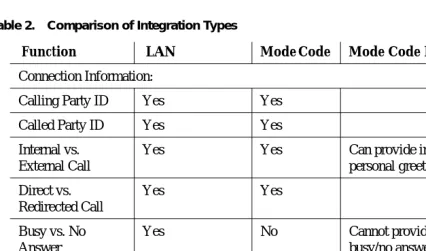
Table 2. Comparison of Integration Types
Function LAN Mode Code Mode Code Notes
Connection Information:
Calling Party ID Yes Yes
Called Party ID Yes Yes
Internal vs. External Call
Yes Yes Can provide internal and external personal greetings
Direct vs. Redirected Call
Yes Yes
Busy vs. No Answer
Yes No Cannot provide personal greeting for
busy/no answer.
Call Disconnect Message
Yes No Mode Code uses “wink” on line.
Distributed Communications Networking
Yes No
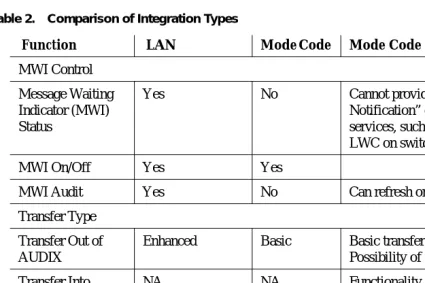
MWI Control
Message Waiting Indicator (MWI) Status
Yes No Cannot provide “Integrated
Notification” of new messages in other services, such as Message Center or LWC on switch.
MWI On/Off Yes Yes
MWI Audit Yes No Can refresh one at a time.
Transfer Type
Transfer Out of AUDIX
Enhanced Basic Basic transfer via switch-hook flash. Possibility of toll fraud.*
Transfer Into AUDIX
NA NA Functionality is provided by switch.
Maintenance Features:
Call Screening/ Bridging
No No
*R for Call Answer Yes Yes
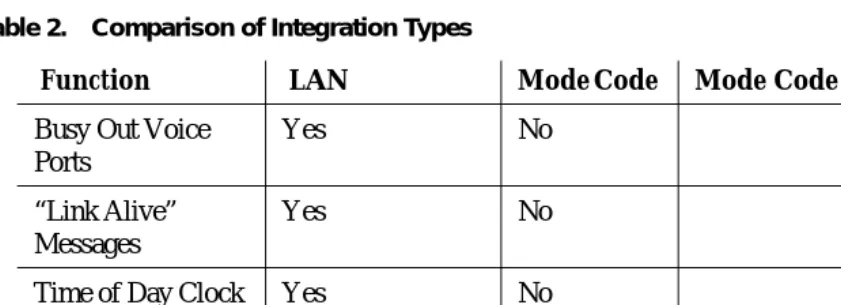
Table 2. Comparison of Integration Types
Function LAN Mode Code Mode Code Notes
Busy Out Voice Ports
Yes No
“Link Alive” Messages
Yes No
Time of Day Clock Sync
Yes No
DCS Transparency Yes No Future work for Mode Code switches.
Digital Networking NA NA Not dependent on switch integration.
* With “Basic Transfer”, calls transferred to the switch look like direct calls from the Lucent INTUITY system. They follow the switch's coverage path for the “transfer-to” destination. With “Enhanced Transfer”, the Lu-cent INTUITY system provides the original calling and called party information, along with an indication of whether or not the switch should allow the call to follow the coverage path for the destination endpoint. Since basic transfer does not provide this information, it can potentially increase the risk of toll fraud. Al-ways monitor your system for evidence of toll fraud and take corrective action immediately if you suspect that there may be a problem.
Table 2. Comparison of Integration Types
Function LAN Mode Code Mode Code Notes
DEFINITY AUDIX
The DEFINITY ProLogix Solutions system also supports the DEFINITY AUDIX Release 4.0 system, which is integrated with the DEFINITY ProLogix Solutions system using Displays Set Integration. DEFINITY AUDIX Release 4.0 requires only one slot when slot 6 is used, otherwise it is a two-slot board.
Centralized Messaging vs. Networked Messaging
If your company has multiple DEFINITY ProLogix Solutions and/or other DEFINITY ECS systems, you can implement a multimedia messaging system (such as the INTUITY AUDIX system) in a centralized and/or a networked environment. With Release 7.1 DEFINITY software, DEFINITY ProLogix Solutions can now be a hub in a shared voice mail environment.
INTUITY AUDIX Messaging Solutions
Lucent Technologies INTUITY Messaging Solutions is a powerful messaging system that enables you to record, distribute, and receive messages in various media (for example, voice, fax, and email). The system runs on a MAP5P, MAP/40, MAP/40s, or MAP/100 computer connected to the switch and can
accommodate up to 64 voice ports and 1255 hours of stored messages. MAP/40, MAP/40s, and MAP/100 are new with Release 7.1 of DEFINITY software.
INTUITY AUDIX Release 5 supports the Mode Code analog interface connectivity and TCP/IP
connectivity. (Some INTUITY features may behave differently when you use the Mode Code interface. See the INTUITY documentation for more information.) TCP/IP connectivity requires using the C-LAN board with Release 7.1 of DEFINITY software.
INTUITY AUDIX Features
INTUITY Messaging Solutions offers the following features.
• Fax Messaging enables you to handle faxes as easily as you handle voice mail.
You can send, receive, store, scan, delete, skip, or forward faxes. This feature is fully integrated with voice messaging, so you can attach faxes to voice messages, for example. You can also create special mailboxes for each of your fax
• Integrated Messaging enables you access and manage incoming voice, fax, and
e-mail messages and file attachments from your personal computer or your telephone. A voice message will thus appear in your e-mail mailbox, for example, and vice versa. You can also set options to have just the message headers appear in the alternate mailbox. You can also create a voice or fax message by telephone and send it to an e-mail recipient.
• Text-to-Speech allows you listen to a voice rendering of text messages sent from
a supported e-mail system and/or INTUITY Message Manager.
• Print Text enables you to print messages sent from a supported e-mail system
and/or INTUITY Message Manager.
• Pre-Addressing enables you to address a message before recording it.
• Enhanced Lists enables you to send a message to up to 1500 recipients.
• Call Answer Disable enables you to turn off call answering to conserve system
resources. For example, you can create a message that tells callers they cannot leave a message and gives them another number to call.
• Transfer Restrictions enable you to control toll fraud by restricting transfers
going through the multimedia messaging system.
• Shared Extensions provide personal mailboxes for each person sharing a
• Multiple Personal Greetings enable you to prepare a pool of up to nine personal
greetings to save time and provide more personal customer service. Separate messages can indicate you are on the telephone, away from the desk, on vacation, etc. You can assign different messages to internal, external, or after-hours calls.
Note: This feature only works in a centralized environment. (With the Mode Codes interface, you cannot set up separate internal and external greetings.)
• Priority Messaging places important messages ahead of others.
• Outcalling automatically dials a prearranged telephone number or pager when
you have messages in your voice mailbox.
• Priority Outcalling automatically dials a prearranged telephone number or pager
when you have priority messages in your voice mailbox.
• Broadcasting enables you to send a single message to multiple recipients or to all
users on the system.
• System Broadcast enables you to send broadcast messages as regular voice
messages or as messages that recipients hear as they log in.
• AUDIX Directory enables you to look up the extension number of any other user
by simply entering the user’s name on the telephone keypad.
• Personal Directory enables you to create a list of nicknames for quick access to
• Call Answering for Nonresident Subscribers provides voice mailboxes for users
who do not have an extension number on DEFINITY ProLogix Solutions.
• Full Mailbox Answer Mode informs callers whenever messages cannot be left
because there is no room in a subscriber’s mailbox.
• Name Record by Subscriber lets you record your own name on the system.
• Automatic Message Scan can play all new messages in part or in their entirety
without requiring you to press additional buttons, which is particularly useful when you are getting messages from your mobile telephone.
• Sending Restrictions by Community enables you to limit the communities of
callers who can communicate via AUDIX Multimedia Messaging.
• Group Lists enables you to create mailing lists of up to 250 people to use for
broadcasting messages.
• Message Forwarding enables you to forward messages with or without attached
comments.
• Name Addressing enables you to address messages by name if you do not know
the extension.
• Private Messaging is a special coding feature that prevents recipients from
forwarding messages.
• Leave Word Calling enables you to simply press a button on your telephone in
• On-Line Help provides you with instant access to voiced instructions at any time
when you are using the system.
• Internet Messaging enables you to send or receive messages to anyone via the
Internet.
INTUITY Message Manager
The INTUITY Message Manager provides access to INTUITY AUDIX multimedia messaging processing features on a personal computer connected to a local area network (LAN). It also works with the DEFINITY AUDIX system. This feature requires three distinct components to operate.
• The AUDIX server software can be purchased with the INTUITY AUDIX system as an INTUITY Message Manager Right-to-Use. Also, this feature has INTUITY AUDIX hardware requirements.
• The Message Manager software diskettes can be purchased separately and are installed either on each user’s PC or on a LAN server.
Message processing features available at a subscriber’s PC with INTUITY Message Manager include:
• looking at up to sixteen message headers at a time and listening to messages in the order you choose. For subscribers who get many messages, this provides an easy way to view and prioritize messages.
• ability to send and receive fax-only or voice-fax messages, to view faxes on your PC, and optionally print faxes, text, email, and binary attachmen