ABSTRACT
BRANSCOMB, ANDREW SCOTT. Behaviorally Identifying Smartphone Users. (Under the direction of Ting Yu and William Enck.)
© Copyright 2013 by Andrew Scott Branscomb
Behaviorally Identifying Smartphone Users
by
Andrew Scott Branscomb
A thesis submitted to the Graduate Faculty of North Carolina State University
in partial fulfillment of the requirements for the Degree of
Master of Science
Computer Science
Raleigh, North Carolina
2013
APPROVED BY:
Ting Yu
Co-chair of Advisory Committee
William Enck
DEDICATION
BIOGRAPHY
ACKNOWLEDGEMENTS
I would like to thank both of my co-chairs, Drs. Enck and Yu for their instrumental help in preparing this thesis. Their guidance has been invaluable in directing me in the proper ways to conduct this research.
I would also like to thank Dr. Avent for his help in preparation and him and his son Miles for the idea that led to this research.
I would like to thank Zach Jorgensen for his help with feature definition and machine learning.
I would like to thank the anonymous study volunteers who provided the data necessary for this research.
I would like to thank my grandfather for providing support throughout my educational career.
TABLE OF CONTENTS
LIST OF TABLES . . . vii
LIST OF FIGURES . . . .viii
Chapter 1 Introduction . . . 1
Chapter 2 Background. . . 3
2.1 Overview of Approach . . . 3
2.2 Android Background . . . 4
2.2.1 Application Components . . . 4
2.2.2 Permissions . . . 5
2.2.3 Logs . . . 6
2.3 Active Authentication . . . 6
2.4 Application Usage Behavior . . . 6
2.5 Summary . . . 7
Chapter 3 Design . . . 8
3.1 MouflonRecorder . . . 8
3.1.1 Activities . . . 8
3.1.2 Services . . . 11
3.1.3 BroadcastReceiver . . . 15
3.1.4 Other . . . 15
3.2 Server . . . 15
3.3 Decryption . . . 16
3.4 Data Preprocessing . . . 16
3.4.1 Cross-Validation . . . 18
3.5 Data Analysis Techniques . . . 18
3.6 User Test . . . 19
3.7 MouflonTester . . . 20
Chapter 4 Results . . . 21
4.1 Difficulties . . . 22
4.1.1 Data Missing From Logs . . . 22
4.1.2 Missing Power Events . . . 22
4.1.3 Small Number of Users . . . 23
4.2 IBk . . . 23
4.2.1 User 5a5 . . . 24
4.2.2 User c59 . . . 24
4.2.3 User ca8 . . . 25
4.2.4 User cb8 . . . 25
4.3 NaiveBayes . . . 28
4.4 Performance . . . 28
Chapter 5 Related Work . . . 29
5.1 Behavioral Profiling on Mobile Devices . . . 29
5.1.1 Symbian . . . 29
5.1.2 Windows Phone . . . 29
5.1.3 Ultra-Mobile PCs . . . 30
5.1.4 Android . . . 31
5.2 Behavioral Profiling through Application Usage . . . 31
5.3 Active Authentication Methods . . . 32
5.3.1 Actively Enhanced Authentication . . . 32
5.3.2 Active Biometric Authentication . . . 32
5.4 Extensions . . . 33
5.4.1 Cloud Processing of Data . . . 33
5.4.2 Guest User Fallback . . . 33
Chapter 6 Discussion . . . 34
6.1 Simplifying Assumptions . . . 34
6.2 Training Data . . . 35
6.2.1 Disjoint vs. Non-Disjoint intruder sets . . . 36
Chapter 7 Conclusions. . . 37
7.1 Extensions/Future Work . . . 38
7.1.1 Intra-application profiling . . . 38
7.1.2 Target profiling . . . 39
7.1.3 Application White- or Blacklisting . . . 39
7.1.4 Cloud processing . . . 40
7.1.5 Guest Mode . . . 40
7.1.6 Development as a System App . . . 40
References. . . 41
Appendices . . . 44
Appendix A Data Formats . . . 45
Appendix B Additional Data . . . 46
LIST OF TABLES
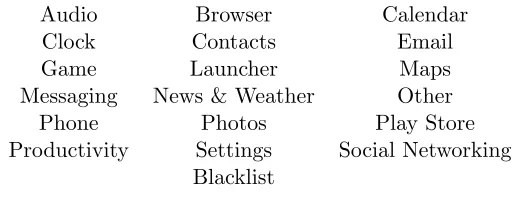
Table 3.1 The categories applications were divided among . . . 17
Table 4.1 The amounts of data from different users . . . 23
Table 4.2 IBk on the test data with disjoint train and test intruder sets (see Sec-tion 3.4.1) and attribute preselecSec-tion. To generate these data, each user was compared to others as described in Section 3.4.1. . . 24
Table 4.3 Examining attribute selection on 5a5’s data . . . 24
Table 4.4 Examining attribute selection on c59’s data . . . 25
Table 4.5 Examining attribute selection on ca8’s data . . . 25
Table 4.6 Examining attribute selection on cb8’s data . . . 26
Table 4.7 Examining attribute selection on d48’s data . . . 26
Table 4.8 Examining attribute selection on e35’s data . . . 27
Table 4.9 NaiveBayeson the test data with disjoint train and test intruder sets (see Section 3.4.1) and attribute preselection . . . 28
Table B.1 IBk on the test data with non-disjoint train and test intruder sets (see Section 3.4.1) and attribute preselection . . . 46
LIST OF FIGURES
Figure 3.1 Screenshots of MainScreen . . . 9
Figure 3.2 Screenshots of StatsActivity and SQLActivity . . . 11
Figure 3.3 The preferences menu . . . 12
Figure 3.4 The structure of the file uploaded to the server . . . 14
Chapter 1
Introduction
As smartphones become increasingly capable and omnipresent, users will certainly continue to store highly sensitive personal information on them. A user has a strong desire to protect this information from access by a third party who picks up an unattended phone. To that end, many users opt to use a PIN or password to protect the device. These obtrusive authentication methods dramatically slow down the user who wishes to perform a quick task on the device. Smartphone locking systems should strive to protect the phone from unauthorized use while minimizing impact on the convenience of authorized use. The passwords entered on small virtual (or, less often, physical) keyboards are cumbersome and PINs or swipe patterns over a grid of points are easy to watch and duplicate.
modifying the phone or consuming large amounts of system resources such as processing time and energy. Therefore, in this thesis we will attempt to show that
Because different people use their phones in different ways, it is possible to determine the identity of a user of a smartphone from among a set of other smartphone users based solely on these metrics of his or her usage of applications on that phone.
If it is possible to identify the phone owner from other users based on these behaviors, it should be possible to use the same behaviors to authenticate a user. A device secured with a system derived from Mouflon would allow a user identified as the owner to use the device normally, but if the user is identified as a foreign user, he will be presented with a prompt for a password. Clearly, this is not as secure as using a strong password that is required every time the device wakes; however, it provides a middle ground for users who can accept the trade-off of security for convenience.
This project builds off of existing research in the area of transparent unlocking for mobile devices. A team of researchers has designed a system which recognizes the motion a user makes when bringing the phone to his ear to answer a call. They found their system was able to recognize the user upwards of 80% of the time while accepting the input of an impostor less than 10% of the time if enough training data was acquired [16]. Another group has developed a method for behaviorally profiling a user’s actions and raising an alarm (i.e. locking the phone) if an unauthorized user is detected. This group looked at telephone, SMS, and application usage behaviors separately and attained error rates under 15% on data collected by other researchers years before the study [23]. A third group uses an approach similar to Mouflon, but with different specific methods. They consider the phone calls, SMSes, web browsing behavior, and location data when analyzing user behavior. The model also takes into account time of day and day of week to more fully capture usage patterns. In their model known phone numbers and websites are considered “good” and unknown ones “bad.” The model is based primarily on the time since the last “good” interaction. There are many ways to interact with an Android phone that do not involve any of these actions, so Mouflon hopes to provide a more holistic picture [30].
Chapter 2
Background
2.1
Overview of Approach
We seek to provide a path to a method for a user to protect his smartphone from an intruder without sacrificing the convenience of a passwordless unlocking interaction. A password can take a few seconds to enter, and sometimes a user may want to perform a quick task, such as checking a sports score, that may take less time than putting in his password. This inconvenience can inspire users to eschew the password option altogether, opting for a much weaker PIN or swipe pattern or even no authentication at all. A PIN or swipe pattern can be easily observed and duplicated, as evidenced by the myriad of techniques reported in the popular press for obtaining ATM PINs such as those given in [22].
2.2
Android Background
Android is an open-source smartphone operating system developed and maintained by Google. The operating system is based on the Linux kernel, but there are substantial differences between the Android OS and a standard GNU/Linux OS. The major unique feature of Android relevant for Mouflon is the Android API that is exposed to applications running on the phone. This is an interface through which applications written in Java1 but compiled to non-standard bytecode can interface with the hardware, other apps, or the Internet. This API provides some useful abstractions that make developing an application easier, discussed in Section 2.2.1, a permission system for controlling the capabilities of apps, discussed in Section 2.2.2, and a logging system, discussed in Section 2.2.3. Of course, it also provides additional functionality, but these are the pieces most relevant to Mouflon.
2.2.1 Application Components
The Android API defines four basic component types that each provide specific functionali-ties [8]. These components can all interact with each other within an app to enable a broad range of functionality.
Activity: These are components that are visible to the user and provide the user interface to every Android application. When a user launches an app, its mainActivityis created by the Android framework and brought to the foreground of the display. These are the only components that a user will interact with directly, so they are the only ones we need to keep track of when analyzing user behavior for Mouflon. Subclasses of Activityare used by Mouflon to allow the user to interact with the collected data (e.g. by viewing, uploading, or deleting it) or modify settings. When it launches a new Activity, the Android OS component ActivityManager handles the launching and creates a log entry, which is where Mouflon gets its data. With the ability to modify the OS,ActivityManagercould be instrumented to provide this data directly.
Service: These are components that run in the background and have no user interface. They are commonly used to preform background computation when an app is not in the foreground of the display. Mouflon uses Services to do the bulk of its work: collecting and uploading data. A user does not interact with a service directly, so Mouflon does not include them in its analysis of user behavior.
BroadcastReceiver: These are components that are started by the Android framework when another app or the system sends out a broadcast message that theBroadcastReceiver
1
in question is designated to receive. This allows an app to be started by a general broad-cast event. An example of this is the android.intent.action.BOOT COMPLETED broad-cast that the system sends out whenever it finished booting. Any BroadcastReceiver that registers to receive this event (and has the requisite permission) will be started by the system whenever the system finished booting. Mouflon uses this mechanism to set up the scheduling of the data collection and upload components.
ContentProvider: These are components that provide data to other applications. They are not used or tracked by Mouflon.
For more on the specific components of MouflonRecorder, see Section 3.1.
2.2.2 Permissions
The Android framework restricts access to certain actions or data only to applications that have declared the appropriate permissions at install time. Permissions serve to warn a user about what capabilities the application has. Some of these permissions serve to restrict access to sensitive pieces of data such as the GPS, contacts, or SMS messages. Other permissions restrict what the application can do such as communicate over the Internet or write to external storage (formerly referred to as the SD card). There are also permissions deemed unsafe for any third-party app that are only available to apps signed by the signer of the OS. The important permission for Mouflon is the permission that allows it to read the logs created by the OS and other apps.
Android 4.1 Changes
2.2.3 Logs
The Android system logs a large amount of data about what the system is doing. Of particular interest to Mouflon are the log entries that detail when an Activity is started. These log files are accessed through the logcatutility rather than through an API because the Android developers never wanted the interface to be used extensively [19]. Accessing the log files of an Android device requires theREAD LOGSpermission since they contain sensitive data. Requesting this permission is uncommon but not unheard of for apps in the Play Store.
2.3
Active Authentication
Active authentication refers to any of a wide range of techniques where the device performing the authentication (in this case a smartphone) actively analyzes information about the user in order to determine if the user is authorized to use the device. In this setup the user performs no special actions, and, ideally, the authorized user will not know the authentication is being performed. Hence, it is sometimes referred to as transparent authentication. In a smartphone environment, this equates to allowing the user to unlock the device without a password and to use the device until and unless the user fails an authentication check. In this scenario, a false negative (false alarm) only means that the system falls back to the existing authentication method. A false positive is much more damaging as it allows an intruder to access the device and is the main disadvantage of using this method of authentication.
2.4
Application Usage Behavior
interaction patterns.
2.5
Summary
Chapter 3
Design
This chapter covers the design of the various components of the system that was constructed to evaluate the idea that a user of an Android device can be classified as either the device’s owner or another user. For the purposes of this work, the other user is considered the intruder regardless of her intent. In Section 3.1, we describe the application that collects and transmits test user data. In Section 3.2 we describe the web server that is used to collect the uploaded data from the users. In Section 3.3, Section 3.4, and Section 3.5 we cover the tools used to process and analyze the collected data.
3.1
MouflonRecorder
In order to collect large amounts of usage data, an app called MouflonRecorder has been devel-oped. This app was uploaded to the Google Play Store for distribution to study participants. Its purpose is to allow study participants to collect and upload data about their usage habits to the authors. From a participant’s perspective data collection is passive onceMouflonRecorder is installed, and uploading is either active or passive depending on participant preference. If the participant chooses to allow automatic uploading, their usage data is uploaded weekly. This app consists of eleven components, each of which is implemented as a Java class. This section is organized according to which of the main Android component classes the class extends (see Section 2.2.1 for an explanation of these).
3.1.1 Activities
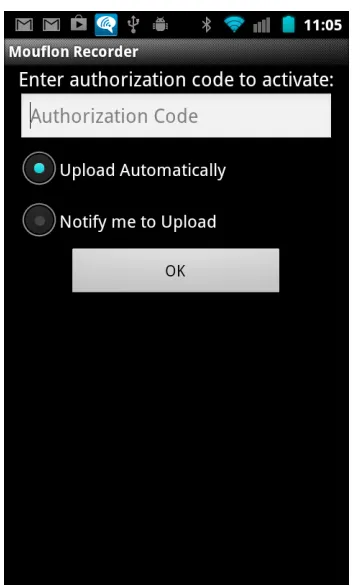
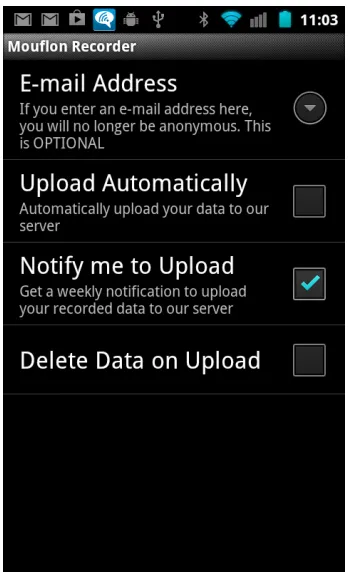
data and contaminating the study. The user is also presented with a choice of whether to upload data automatically or be notified to upload. On subsequent launches thisActivityis the main menu. A screenshot is presented in Figure 3.1b. This screen provides several choices to the user. The user can upload his logs to the server manually, which some users may choose to do so that they may review the logs before submitting them. Viewing the statistics will allow the user to see a brief summary of the data collected on the device since the previous upload. This screen is further described below. The next option allows the user to clear the log data stored on the device. The user may want to do this if he uses an app he doesn’t want logged and reported to the authors. The fourth option allows the user to search through the stored data for a specific string, allowing the user to determine if a specific piece of sensitive information has been recorded in the logged data. This option is discussed further below. The final option takes the user to the settings menu where he can modify how the app behaves. The settings are explained below.
(a) The code request shown on the first run. (b) The main screen of MouflonRecorder
StatsActivity This Activityseeks to present a user-friendly view of the data collected by the app. A technical or non-technical user can quickly scan the data presented on this screen to confirm the app is working and to look for anything he does not wish to report to the authors. A screenshot is presented in Figure 3.2a. This screen contains the following data:
The total number of events. This measure consists of the number of application launches and the number of screen on and screen off events. These three numbers are also presented individually.
A list of Activitys that have been launched on the device since the last time the data was cleared. The strings listed here are the fully qualified class names of the Activitys rather than the more user-friendly names users generally associate with apps. Fortunately there is often a strong correlation between the two different types of application names. For example the main UI Activity of the Pocket Casts app is au.com.shiftyjelly.
pocketcasts/.ui.MainActivity, which is fairly easy to interpret. Sometimes the cor-relation is more subtle such as the Google Play Store which is com.android.vending/
com.google.android.finsky.activities.MainActivity. There is no guarantee that an application developer will give her app a common name that is similar to the fully qualified name. A user may therefore struggle to recognize the name of a sensitive app. However, if a user is unable to identify a sensitive app due to this issue, it is unlikely that those the user wishes to keep the sensitive app from would notice it.
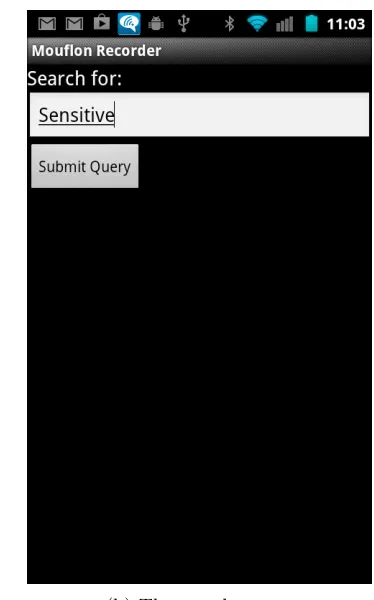
SQLActivity ThisActivityallows the user to search through the data thatMouflonRecorder has recorded. The interface (see Figure 3.2b) allows the user to enter a string and search for it. After the user performs a search the results in the form of the raw data format that Mouflon uses internally are printed to the screen as in the example in Figure A.1b. The user is likely to mainly be concerned with the presence or absence of results. The use of the raw data format allows the user to ensure that if the data sent to the server contains the data they search for, it will be found.
(a) The statistics screen (b) The search screen
Figure 3.2: Screenshots of StatsActivity and SQLActivity
3.1.2 Services
As covered in Section 2.2.1 an AndroidServiceruns in the background to perform tasks without requiring or affecting user interaction. MouflonRecorderuses several services to complete the required background tasks of recording the data and uploading it to the server. These services are set to run automatically by theRegisterAlarm BroadcastReceiver, which is described in Section 3.1.3.
Figure 3.3: The preferences menu
4.0 and earlier without modifying the device or administrative access. All that is required is that the application declare the READ LOGS permission in the manifest (see Section 2.2.2 for more information on permissions).
The Android logs are accessed through a program calledlogcatwhich can be executed from within an app with the required permissions. This program takes command line arguments that specify what data it should return. In Mouflon, we are interested in power and application start events so we ask for events from thepowerandActivityManagertags. We also request a format that includes the date and time for each event. This information is then parsed to separate the plain text input into fields corresponding to the data we wish to store and later analyze. First, the date and time of the most recent event in the Mouflon database (from the last time this
Service was run) is retrieved so that only subsequent events will be examined on this run to avoid any double counting. The following data are then stored in the database:
Date and time
Tag (powerorActivityManager)
events, the string START
Component name. ActivityManager events only. This is the fully qualified class name of the Activityas described in Section 3.1.1.
Action String. ActivityManager events only. This is an optional instruction to the app being started.
Category. ActivityManagerevents only. This is more optional data. Most often used to indicate that an app was launched from the home screen (as opposed to by another app) or that the home button was pressed.
Before storing into the database, any URLs beginning with http(s) are redacted to help preserve user privacy. Some of the log entries examined during early development included URLs, but only in fields that were not stored in the database, so this redaction is purely as a precaution against the case that an unexamined app leaks URLs in one of the fields we do store.
UploadFile This Serviceis responsible for returning the data that is collected by Mouflon
Recorder to the researchers for analysis. It is set to run every week (if the study partic-ipant chooses to do so) or launched manually from the main MouflonRecorder menu (see Section 3.1.1). In order to preserve user privacy the uploaded data are encrypted during trans-mission and storage on the server. Rather than separately encrypt the data during transtrans-mission (using, for example, https) and storage on the server, the data are encrypted once on the user’s device and left in that format until they are decrypted for analysis off line. Thus if the trans-mission line or the server is compromised, the attacker could not read the user data. This decision also obviated the need for an SSL certificate and the associated complexity. A public-key encryption system is used to encrypt the data. The private public-key is in the sole control of the researchers and is not stored on the server.
The participant’s e-mail address if he chose to enter it on the settings page
The CSV file previously generated from the database
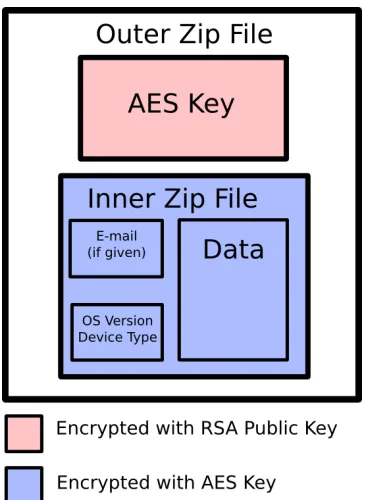
This encrypted zip (encrypted with the secret key) and the secret key (encrypted with the public key) are put into a second zip file to be uploaded to the server. This final file is represented graphically in Figure 3.4. At this point, an HttpURLConnection is initiated with the server, and a manually constructed POST request is sent. This request contains the second zip file encoded in Base64. Upon a successful upload (one that did not generate any JavaExceptions) the intermediate files are deleted and the database containing the data that was just uploaded is cleared. If the upload is not successful, the data used byWeeklyCheckeris modified so that the upload will be retried the next day instead of the next week. If the upload was manually initiated, a notification is put in the status bar informing the user that it is complete.
Figure 3.4: The structure of the file uploaded to the server
WeeklyChecker ThisServiceis responsible for determining if it has been a week since the previous upload. MouflonRecorder uses the inexact alarm interface provided by Android to allow the device some flexibility when scheduling background tasks to avoid waking the device if possible. The longest interval that one of these alarms can be set for is daily. Therefore this service is started every day by the alarm and it increments a counter from 0 to 6, at which point it launches a file upload (or presents the user with a notification to do so) and resets the counter.
3.1.3 BroadcastReceiver
There is a singleBroadcastReceiverclass, calledRegisterAlarm, inMouflonRecorder. This class serves the purpose of setting up the alarms that run the scheduled components of this app,RecorderServiceandWeeklyChecker. It uses theAlarmManager[7] interface provided by Android to set a twice-hourly alarm forRecorderServiceand a daily alarm forWeeklyChecker. It uses an inexact-repeating alarm, which Android will try to schedule with other alarms or when the phone is already awake to avoid waking the phone up if possible. This has the potential to decrease power usage.
3.1.4 Other
A class calledDbAdapter, derived from an example in the Android documentation [2], provides a simple interface to the SQLite database that stores the recorded data.
3.2
Server
3.3
Decryption
As discussed in the sections above, when the participants in the study submit their data to the server it is encrypted to protect their privacy. In order to perform analysis on this data, it must first be decrypted. A decryption program called DecryptLogs was written in Java using the Bouncy Castle [4] API to perform the reverse of the operations described above in Section 3.1.2 (see Figure 3.4 for a visual representation of the uploaded file). First the decryption program reads the private key from the disk and uses it to decrypt the encrypted symmetric key from the participant. This symmetric key is then used to decrypt the other zip file and extract the data the user uploaded. This process was made somewhat more complicated by the existence of a bug in some versions of Android that creates invalid zip files [1]. Fortunately, there is a workaround [27] that allows these files to be fixed at any time. This workaround and the decryption code were combined with existing Linux programs for unzipping and other file management tasks in scripts that automate the process of obtaining the desired data from the encrypted files.
3.4
Data Preprocessing
In order to minimize the amount of work performed by the smartphone running Mouflon
are ignored in the data analysis as it would unfairly bias the results by potentially making it easier to identify the developers of these custom applications.
Table 3.1: The categories applications were divided among
Audio Browser Calendar
Clock Contacts Email
Game Launcher Maps
Messaging News & Weather Other
Phone Photos Play Store
Productivity Settings Social Networking Blacklist
Before converting the CSV files into arff files, the CSV files from all participants’ weekly uploads must be combined into a single CSV file for each participant. In order to avoid unfair fine-tuning of the classification algorithm, the first 20% of this data for each participant was then split off and used to determine which classifier, parameters, and categories to use. The remaining 80% was held in reserve until a procedure had been established. This 80% was then used to generate the data presented in this thesis. A Perl script was written to translate the files from the line-per-app CSV format to the instance-per-interaction arff format. It reads in the data from all of the study participants and creates a list of all interaction sequences, each labeled with the identifier of the participant who generated it. Each of these interaction sequences has the 56 attributes described above, three for each of the 18 categories plus average time per app and whether it’s a weekend.
durations of time on the order of seconds or minutes are used, the two dates are immediately subtracted from each other and adding a constant offset (the year) to each does not impact the calculation unless the sequence starts and ends in different years. This did not end up being a problem in practice because no sequences reported by participants spanned a new year.
3.4.1 Cross-Validation
It was determined that it might unfairly bias the classifier to provide it with the same user as an intruder for both training and testing, so for each participant the other participants’ data is used as a simulation of intruder data. Disjoint sets of other participants were selected to provide the training and testing data for the classifier. The Weka framework does not provide a facility to divide the training and test instances in this manner, so the 10-fold cross-validation algorithm was manually re-created in Perl scripts. These scripts take a list of all interaction sequences from all users and divide them up into 10 cross-validation folds with 90% of the data used for training and 10% for testing in each fold. Each data instance is used in exactly one test set. For each fold, the number of instances of authorized user data is equal to the number of instances of intruder data to avoid biasing the classifier one way or the other by providing too many instances of one type.
3.5
Data Analysis Techniques
by dividing the problem space up into a regions in a tree structure which allows the algorithm to quickly find an approximation for the nearest neighbor, and, more importantly, prune large sections of the tree [33]. Some other classifiers that were examined include NaiveBayes, Logistic, RBFNetwork, KStar, HyperPipes, and DecisionTable. The results of this analysis are presented in Chapter 4.
3.6
User Test
3.7
MouflonTester
A proof-of-concept app for testing whether Weka can be run in an Android application called MouflonTester was also developed. This app also consists of three main components:
An Activity that registers the BroadcastReceiver because an Intent Filter for the ACTION SCREEN ONIntent cannot be registered in the manifest file [20].
A BroadcastReceiver that gets started by the operating system when the screen is turned on. It starts theEnforcerService
A Service, EnforcerService, that examines the system log to find the relevant data and processes it with Weka to determine whether or not the user is authorized.
Chapter 4
Results
The data collected byMouflonRecorderfrom nine users were analyzed using the Weka machine learning framework, version 3.6.6, as obtained from the Ubuntu repositories. The data were processed according to the procedure outlined in Section 3.4 to generate the files for analysis in Weka. Then the data were analyzed according to the procedure in Section 3.5. The users par-ticipating in the study were assigned UUIDs by MouflonRecorder. These users are identified in this paper by the first three hexadecimal digits of their UUID. Some users in the beta phase either did not have UUIDs because that feature had not been added yet or multiple UUIDs stemming from uninstalling and reinstalling the app. These users are identified by the first three hexadecimal digits of a hash of the filename their data was stored in.
experiment. NaiveBayes is a very popular classifier used in papers seeking to do similar things to this one, such as [25], and is included for comparison.
4.1
Difficulties
There were some difficulties encountered in analyzing the data.
4.1.1 Data Missing From Logs
Not all users’ phones reported the same data. Two of the most common modified Android implementations are Samsung’s TouchWiz and HTC’s Sense. None of the users in the beta phase of data gathering used a phone with either of these pieces of software. Once the full user study came online, it was found that three of the recruited users used phones with either Sense or TouchWiz. Two phones only reported power on and off data1. These were excluded from all analysis as no user behavior beyond the length of time the screen is on can be derived from the reported data. The third phone’s logs contained all of the events expected (power and application start), but the application start events had all of the information about application identity removed. The raw logs were examined, and it was observed that the problem was that the information was not present rather than a bug in MouflonRecorder’s parsing algorithms. It is possible this information was scrubbed by the device vendor to protect user privacy.
4.1.2 Missing Power Events
Upon manual examination of some of the returned logs, it became evident that some power on and off events were missing. Sometimes applications would be started without a preceding power on event. In these cases, the first application launch is considered time zero instead of the power on event being time zero. In other cases, power on and off events were missing entirely, sometimes for weeks at a time. It is inconceivable that a user would have used the phone for that long without a break, so such long sequences were split whenever a gap of an hour or more existed between events. It is possible that these events were missed because the recording interval of 30 minutes was too long, and the power events had already been cleared from the circular buffer by the timeMouflonRecorderrecorded the data.
4.1.3 Small Number of Users
Only five users responded to the call for volunteers, and only one of these returned useful data for the reasons outlined in Section 4.1.1. Therefore we fell back onto data collected from the beta phase of this study, and used that for this analysis. We therefore have six users with various amounts of data, as shown in Table 4.1. As can be seen from the table, different users produced instances of interactions with the phone at quite different rates, ranging from twenty per week to two hundred per week. The number of instances in Table 4.1 is different from the number of instances in Table 4.2 because the first 20% of the data was sequestered for tuning the classification methods and, for some users, we weren’t able to provide enough “other” instances to achieve a 50/50 user/“other” balance, so the size of the dataset was restricted. Users were also demographically similar, with all being students or faculty in the Computer Science department at North Carolina State University.
Table 4.1: The amounts of data from different users
5a5 c59 ca8 cb8 d48 e35 Instances 414 3266 98 187 644 992
Weeks 2 30 5 2 11 20
Instances/week 207 109 20 94 59 50
4.2
IBk
Table 4.2: IBk on the test data with disjoint train and test intruder sets (see Section 3.4.1) and attribute preselection. To generate these data, each user was compared to others as described in Section 3.4.1.
5a5 c59 ca8 cb8 d48 e35
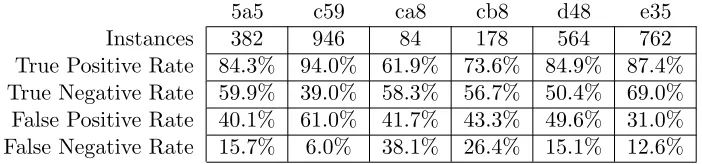
Instances 382 946 84 178 564 762 True Positive Rate 84.3% 94.0% 61.9% 73.6% 84.9% 87.4% True Negative Rate 59.9% 39.0% 58.3% 56.7% 50.4% 69.0% False Positive Rate 40.1% 61.0% 41.7% 43.3% 49.6% 31.0% False Negative Rate 15.7% 6.0% 38.1% 26.4% 15.1% 12.6%
The results of running IBk on all users’ data are presented in Table 4.2 to facilitate com-parison between users. For all users except c59, the classifier is able to correctly identify both authorized users and intruders at least 50% of the time. Were this not the case for at least one group, the classification would be useless and no better than a coin flip. This ability for five of the six study participants leads to the conclusion that this Mouflon system can identify users from their application usage data. The use of the procedure in Section 3.4.1 to ensure that the test instances are drawn from users who the classification model has never seen before makes this conclusion particularly robust. See Section 3.4.1 and Section 6.2 for further discussion.
4.2.1 User 5a5
Table 4.3: Examining attribute selection on 5a5’s data
5a5 other 5a5 322 60 other 153 229
(a) Selected Attributes
5a5 other 5a5 271 111 other 161 221
(b) All Attributes
Referencing Table 4.2, user 5a5’s interactions are accepted 84% of the time and the unknown intruder’s instances are accepted only 40% of the time. Selecting the most useful attributes using the method from Section 3.5 considerably improves this algorithm’s ability to find 5a5’s instances, finding about 50 more in Table 4.3a than in Table 4.3b.
4.2.2 User c59
Table 4.4: Examining attribute selection on c59’s data
c59 other c59 889 57 other 577 369
(a) Selected Attributes
c59 other c59 827 119 other 583 363
(b) All Attributes
useful as more attackers would be let in than locked out. A possible reason for this is discussed with user d48’s data in Section 4.2.5. User c59 generated considerably more data than any other user, but not all of that data was able to be used because the ratio of positive data to negative data was constrained to 1:1. This meant that when dividing the data into test and training sets, a significant (randomly-selected) proportion of c59’s instances were dropped. Running the same algorithm on the same data without the Section 3.4.1 restriction requiring training intruders and test intruders to be disjoint produces much better results. However, it is not realistic for the reasons discussed therein. See Section 6.2.1 for more discussion and Table B.2b for the raw data. User c59 is also well-served by attribute selection, lowering the number of false negatives by about half comparing Table 4.4b to Table 4.4a.
4.2.3 User ca8
Table 4.5: Examining attribute selection on ca8’s data
ca8 other ca8 52 32 other 35 49
(a) Selected Attributes
ca8 other ca8 53 31 other 35 49
(b) All Attributes
Referencing Table 4.2, user ca8’s interactions are accepted only 61% of the time; however the unknown intruder’s instances are accepted only 41% of the time. Ideally, the false positive rate would be lower than 41%, but user ca8 only produced 84 instances that were able to be tested. Considering how small this dataset is, the performance of the classifier is impressive. Attribute selection makes an insignificant difference for user ca8.
Table 4.6: Examining attribute selection on cb8’s data
cb8 other cb8 131 47 other 77 101
(a) Selected Attributes
cb8 other cb8 121 57 other 86 92
(b) All Attributes
instances as user ca8, and this seems to be reflected in the rise in true positive rate; however, the false positive rate is almost unchanged. Attribute selection produces considerable improvement for user cb8 as shown in Table 4.6.
4.2.5 User d48
Table 4.7: Examining attribute selection on d48’s data
d48 other d48 479 85 other 280 284
(a) Selected Attributes
d48 other d48 461 103 other 216 348
(b) All Attributes
Table 4.8: Examining attribute selection on e35’s data
e35 other e35 666 96 other 236 526
(a) Selected Attributes
e35 other e35 621 141 other 270 492
(b) All Attributes
4.2.6 User e35
Referencing Table 4.2, user e35’s interactions are accepted 87% of the time and the unknown intruder’s instances are accepted only 31% of the time. Attribute selection marginally improves the performance for user e35. The performance of the algorithm for user e35 is not as heavily impacted by switching to disjoint train and test intruders. This provides further evidence that users d48 and c59 are similar to each other because, due to their dataset sizes, one will be in the training dataset and the other will be in the test dataset. If this weren’t the case, most of user e35’s data would have to be thrown away. If d48 and c59 are so similar that the classifier confuses them, perhaps when classifying e35, the classifier matches up d48 instances in the training set with c59 instances in the test set (or vice versa) Both are labeled “other”, so the classifier rejects the test instance. Alternative interpretations are of course possible, but this one seems to make sense.
4.2.7 Best and Worst Features
indicate that these features caused the correct or incorrect classification, just that there was a correlation.
4.3
NaiveBayes
For comparison, the same analysis was performed with NaiveBayes as the classifier with less compelling results. These results are presented in Table 4.9. The results in this table do not compare favorably with Table 4.2. For every user either the false positive rate is unaccept-ably high, indicating that this algorithm provides little security, or the false negative rate is unacceptably high, providing little improvement in convenience. For user 5a5, for example, the intruder is locked out only slightly more often than the authorized user, and both are locked out less than one time in twenty. This is essentially equivalent to no security. On the other hand, user cb8 will be presented with a password upon unlocking the phone more than 4 times out of every 5. This is nearly equivalent to setting a traditional password. Mouflon should not be implemented using NaiveBayes for this reason.
Table 4.9: NaiveBayes on the test data with disjoint train and test intruder sets (see Sec-tion 3.4.1) and attribute preselecSec-tion
5a5 c59 ca8 cb8 d48 e35
Instances 382 946 84 178 564 762 True Positive Rate 96.6% 96.0% 33.3% 16.9% 97.5% 26.6% True Negative Rate 4.7% 20.0% 98.8% 93.8% 11.0% 76.8% False Positive Rate 95.3% 80.0% 1.2% 6.2% 89.0% 23,2% False Negative Rate 3.4% 4.0% 66.7% 83.1% 2.5% 73.4%
4.4
Performance
Chapter 5
Related Work
5.1
Behavioral Profiling on Mobile Devices
5.1.1 Symbian
Li et al. [23] have already profiled users by examining which applications they launch and on what date. However, they did not consider any timing features relative to other apps, just the date. In addition, the data they used was collected in 2004-2005 by users of Nokia 6600 phones running Symbian. The smartphone world has changed so significantly since then that it is very likely current smartphone users use their phones in very different ways to those of 8 years ago. Application markets now contain hundreds of thousands of apps and device sales grew from tens of millions per year in 2004-05 [5] to nearly one billion per year for 2012-2013 [6]. Given the much broader user base and the much larger variety of applications available, it is difficult to compare today’s smartphone user behavior to that of 8 years ago.
5.1.2 Windows Phone
be that the person using it is authorized to do so. They have tuned their algorithm so that (in their experiments) it allows no intruders to access the phone. However, the number of times the authorized user is recognized is only reduced by 42%.
Polling the sensors and doing the processing they need in order to make a classification can be quite power consuming at 325 mW1. Recent Windows phones tend to have batteries with a capacity of 6-7 Whr [31], which would be drained in less than 24 hours at that rate. This seems to be the power draw just during computation, so it would not be continuous. However, with all processing offloaded to the computer, the system still draws 307 mW just by powering the sensors, and, given that it seems like the phone must be constantly polling the sensors in order to establish continuous authentication, this still is a large drain on the battery. If the sensors are polled intermittently when the phone’s screen is off, the total energy consumption will depend on the duty cycle of these polling events. Perhaps it can be made quite infrequent. Exact power number are not available fromMouflonRecorderfor comparison, but anecdotally, no users reported negative effects on battery life. Granted, MouflonRecorder only activates every 30 minutes, and in a real system, the authentication would need to activate whenever the phone screen turns on. This could negatively impact battery life. Assuming a system derived from Mouflon that detects behavior by applications performs similarly to the results in this paper, it seems like a system like progressive authentication and a Mouflon-based system have a power/security/convenience trade-off, as the data presented in this paper show that the current Mouflon algorithms grant access to both authorized users and intruders at a higher rate, but at what is likely to be a lower power draw.
These authors also introduce the idea of having three lists for applications based on how private their content is. They allow users of their system to define an application as public (not requiring any authentication), private (requiring moderate confidence that the current user is the owner), and confidential (requiring high confidence). This idea is similar to guest mode frameworks such as those in Section 5.4.2. This three-level model is possible in this approach because, under progressive authentication, the system has a more granular view of whether the current user is authorized or not, rather than the binary view provided by password authentication.
5.1.3 Ultra-Mobile PCs
In [15], Clarke et al. performed an extensive user study to determine the effectiveness of and user attitudes toward a system that seeks to transparently authenticate a user of a mobile device using various biometrics. These biometrics were facial recognition, voice recognition, and keystroke analysis. The system maintains a current state that moves on a scale from -5 to
5 where numbers with larger magnitude indicate more certainty. Positive numbers represent the authorized user, and negative numbers a foreign user. The current state slides up and down the scale as the user passes or fails the continuous transparent authentication tests. The authors used a pair of ultra-mobile computers running full versions of Windows rather than true mobile devices because they wished to write their system in VisualBasic. Their results indicated that the majority of users preferred this method of authentication to the standard password-based methods. When the users were asked to act as a foreign user, the majority were satisfied with how quickly the system locked them out. The ultra-mobile computer environment is quite different from the smartphone environment as they run a traditional desktop operating system rather than a purpose-built mobile OS.
5.1.4 Android
Shi et al. [30] used the combination of several different measurements to actively authenticate a user. The system trains itself on user behavior such as where the user is on the planet on Monday at 10 A.M. (for example) and how long it has been since he has sent a text message to a known number. When the system is activated, these statistics are collected again and compared to the training data to determine whether the user is the correct user. Mouflon analyzes the user’s phone call and text message behavior to the extent that these behaviors require starting
Activitys. However, the identity of the other party of the phone call or text message is not analyzed. In addition, Mouflon also analyzes the usage of all other apps. Some of these ideas could be adapted into Mouflon by reading the call and text history and comparing it to the contact list, for example. This was not included in this research out of concern for the privacy of the study participants. Normalizing user activity to a specific point in the weekly cycle could be a useful addition to Mouflon.
5.2
Behavioral Profiling through Application Usage
one of the advantages of Mouflon is that it is not always-on; a production version would likely be configured to stop monitoring behavior after a few application launches that are consistent with the device owner.
5.3
Active Authentication Methods
5.3.1 Actively Enhanced Authentication
De Luca et al. [17] have sought to improve the swipe pattern method of authentication since it is so easy to observe and duplicate. They examine how the user performs the swipe pattern beyond just which points he swipes his finger over. This biometric information from the touchscreen (e.g. speed, pressure) allows them to differentiate between users even when the users are inputting the same swipe pattern into the phone. This is an alternative approach to the one presented in this paper: they seek to make an existing method more effective; we seek to replace it entirely. Their method made an incorrect decision about 20% of the time, which would be a high but possibly attainable goal for Mouflon.
5.3.2 Active Biometric Authentication
Lifting Phone to Ear Gesture-based authentication was accomplished with an admirable success rate by Conti et al. [16], who developed a system that can recognize the motion a user makes when lifting the phone to the ear. This system works well for a scenario where the user is answering a phone call, but it seems inconvenient to use as a general authentication method as that would require the user to make this gesture every time she wants to use her phone. However, they demonstrate the feasibility of using the behavior that the user would perform anyway to authenticate the user. Since a Mouflon-based system cannot make a decision about the user when the only action the user takes is to answer the phone, these two approaches complement each other nicely. This approach can be used when the phone is ringing, and the Mouflon-based system can be used at all other times.
walking away, giving the system no time to reject her. However, it does further demonstrate the power of using a smartphone’s sensory capabilities to identify people.
5.4
Extensions
5.4.1 Cloud Processing of Data
A paper by Chow et al. [14] presented a system that offloads the heavy processing work of behavioral profiling into the cloud to avoid draining the resources of the phone. These authors sought to solve a different problem than Mouflon; they wish to detect theft of a mobile device, theft of a credit card, or theft of a password by combining behavioral data across all of these sources. Since not all of this data is available on the mobile device, the processing must be done in the cloud. This approach could be used by Mouflon to solve some of its drawbacks such as battery usage and speed. The data could likely be scrubbed sufficiently to defuse any privacy concerns without compromising the ability to analyze it by using the data processing techniques discussed in Section 3.4 remove the identities of the individual applications and absolute times, replacing them with categories and times spent in those categories. Since Mouflon depends on categorizing apps, one of the major maintenance tasks will be to keep these categories up to date. If the processing is done in the cloud, the lists of apps in each category can be stored off the device, which would remove the need for Mouflon to receive constant updates with updated categories. This would, unfortunately, remove any privacy benefit from the categorization.
5.4.2 Guest User Fallback
Chapter 6
Discussion
In this study we show that profiling user behavior on a smartphone can be an effective way to differentiate between Alice and Carol, each using her own phone. This is not the problem that would be faced in the real world, however. In the real world problem, we would need to differentiate between Alice and Bob, both using Alice’s phone. There are two effects that could make this problem easier or more difficult than the one studied in this paper. This problem could be made easier because Alice and Bob will have different levels of familiarity with Alice’s phone. Alice will likely tend to find applications and bounce between them more quickly than Bob. This problem could be made harder because while Alice and Carol may have different sets of applications installed, Alice and Bob are both constrained to the applications installed on Alice’s phone. It is possible that this second effect will not be strong because the study in this paper contains data from several months of usage, during which time the study users are likely to have installed and removed apps. Thus, it can be concluded that, while this data is not directly indicative of the ability of Mouflon to be an effective user authentication system, it is highly suggestive of that ability.
6.1
Simplifying Assumptions
This paper requires several simplifying assumptions in order to justify its claims. First, we assume that the user’s habits are fairly consistent over the short and intermediate term. If a user’s habits change, a Mouflon-based system can be retrained, but retraining the classifier costs time and energy. Any behavioral authentication system necessarily depends on consistent behavior. However, if users were incapable of consistently entering passwords, password-based authentication would fail too, so user consistency requirements are not limited to behavioral authentication.
user. A Mouflon-based system would likely not work well on an Android tablet shared by multiple members of a family. Each one would have different behaviors, and a Mouflon-based system would have a difficult time determining if an intruder’s behavior did not fit with any of the several authorized users.
We must also assumes that a foreign user interacts with the device differently than its owner. Intruder tests could potentially show that some foreign users interact with the device in the exact same way as the authorized user. In this case a Mouflon-based system would be unable to tell the difference and the false positive and false negative rates would grow.
In this study we also lack a true intruder model. We choose instead to use other users using their own phones as intruders. This simplifies data collection as we do not need to find any phone thieves or get users (who may have an inaccurate picture of what a phone thief does) to pretend to be phone thieves. The intruder could also be an information thief, who seeks not to use or sell a phone but to get sensitive information off of a phone without the owner’s knowledge. These two types of intruders may behave quite differently. The former may use the phone like his own, whereas the latter may use the phone quite differently than a phone owner.
6.2
Training Data
could be used to train Mouflon as she uses the device, there must be some mechanism that permits updating the classification model as the user exhibits new behavior (e.g. a newly installed application) while keeping the overall size of the training dataset relatively constant. Perhaps some algorithm could be found or created that can take a set of interaction sequences and create something analogous to a minimum spanning tree, i.e., the minimum set of instances needed to sufficiently characterize user behavior.
6.2.1 Disjoint vs. Non-Disjoint intruder sets
Chapter 7
Conclusions
The data presented in this paper show that we can gain some information about the identity of a user based on his behavior. However, the accuracy with which this determination can be made varies greatly from user to user. The analysis was also impeded by the small number of users from whom data was available and the restriction that each foreign user’s data could be used for training or testing, but not both. Without this latter restriction, which meant that only two foreign users’ data was available for training and three foreign users’ data was available for testing, the accuracy with which users are recognized was much higher (see Appendix B). However, in the most realistic model, the false positive rate is approximately 40% for most users. This would not be acceptable for an authentication system because an intruder is allowed in far too often.
This could be gleaned from the data gathered in this study, but it is a rather small sample as it draws from only six users.
A second possibility is that the features we extracted from the data were not the best features to extract. Some other potential features include
Sequences of apps: this would allow us to differentiate between a user who habitually checks e-mail first then SMS messages from a user who does the reverse.
Time of day (perhaps binned into two to three hour bins): if a user is always driving and not using his phone at a certain time, an intruder who uses the phone during that commute would be easily flagged.
More categories: some categories (e.g. weather) were dropped because only one user in the sample used an app that fell into that category. More categories would allow for fewer apps to be lumped into the “other” category.
More specific categories: the data allow us to distinguish between sending an e-mail and checking e-mail (because they are different Activitys). This could be leveraged.
These additional features could potentially add to the ability to discriminate between users. A deployment of an authentication system based off of this work is not directly doable for several reasons. First, the classifier is used in a supervised way. In a real scenario, the system would have no way to differentiate between a false and real positive, even after the fact. Therefore, it would be difficult to train on new behavior without compromising the ability to detect an intruder. A semi-supervised classifier would need to be employed. As previously discussed in Section 6.2, we require training data from a better simulation of an intruder. However, the observations in this paper suggest the conclusion that this method of distinguishing users based on their application usage behavior on a smartphone is possible and that further research into an authentication system based on this method is warranted.
7.1
Extensions/Future Work
7.1.1 Intra-application profiling
these actions. In order to get the information necessary to form a profile of the user’s behavior within the SMS app, it would be necessary to modify the SMS app to record this information. The modifications should be localized to a small part of the application code related to handling user input. It would be easier to create a modified SMS app than it would be for many apps, as the default SMS app is open source [13]. The default Gmail app, on the other hand, is not.
7.1.2 Target profiling
Another extension along a similar vein is to pay attention to whom the user texts or calls as well as what websites he visits. This is referred to as target profiling because it is based on the targets the user performs actions on in addition to the actions themselves. This is some of a user’s most private information, but it need not leave the phone in a production version of Mouflon. It would be compared with that user’s history of sending text messages, making calls, or browsing the web, also all stored on-device. The user’s contact list would make a good starting point for a whitelist of contact information. All of this information should be accessible from an Android app with the proper permissions without modifying any other applications. This modification was not included in MouflonRecorder for the user study because it would be too invasive of the study participants’ privacy, but MouflonRecorder could be modified to collect this information as well. Shi et al. [30] use this method to create a behavioral profile of users as discussed in Section 5.1.4.
7.1.3 Application White- or Blacklisting
7.1.4 Cloud processing
In order to alleviate some of the computational strain of running the machine learning algo-rithms in Mouflon and collect data from a large number of users to form the intruder dataset, the data processing pieces of Mouflon could be relocated to the cloud as in [14]. All of the infrastructure for the processing of data in the cloud was created for the user study with
MouflonRecorder except for the automation of the analysis. However, enough of the analysis is automated through scripts that only a small amount of glue code would be necessary to tie it all together and report the result back to the user’s device.
7.1.5 Guest Mode
The DiffUser [26] and xShare [24] systems allow a device owner to put the device into a guest mode to allow a guest user only limited access to the device. Mouflon could fall into the guest mode provided by one of these systems when a user fails the behavioral authentication check. This would allow any user, even the owner, to continue using the device if only limited functionality is needed. The reverse transition could also be implemented, with the device exiting guest mode into full-functionality mode once the behavioral authentication check is passed.
7.1.6 Development as a System App
The changes to theREAD LOGSpermission discussed in Section 2.2.2 require any implementation of Mouflon that will work on new Android devices to be a system app. The proportion of devices running 4.1 and later versions of Android is at about 15% and rising at the time of writing [9]. It is likely possible to make a Mouflon-based system work entirely as an app in the Play Store for versions of Android prior to 4.1, but even before the recent changes, developing a Mouflon-based system app always provided distinct advantages. Developing a Mouflon-Mouflon-based system app allows the developers to build in additional functionality, such as interfacing with the internals of other system apps to profile the usage of that app as in Section 7.1.1 or perhaps gathering data on how the user touches the screen as in [17]. A hook could also be built into
REFERENCES
[1] Issue 20214: java.util.zip.ZipOutputStream composes malformed zip file. http://code.google.com/p/android/issues/detail?id=20214.
[2] Notepad Exercise 1. http://developer.android.com/training/notepad/notepad-ex1.html.
[3] Saving and Loading Models. http://weka.wikispaces.com/Saving+and+loading+models.
[4] The Legion of the Bouncy Castle. http://www.bouncycastle.org/.
[5] Smartphone Sales to Jump 40% This Year, 2006. http://www.cellular-news.com/story/19886.php.
[6] Gartner Says Worldwide Mobile Phone Sales Declined 1.7 Percent in 2012, 2013. http://www.gartner.com/newsroom/id/2335616.
[7] Android Open Source Project. AlarmManager. http://developer.android.com/reference/ android/app/AlarmManager.html.
[8] Android Open Source Project. Application Fundamentals. http://developer.android.com/ guide/components/fundamentals.html.
[9] Android Open Source Project. Dashboards. http://developer.android.com/about/ dashboards/index.html.
[10] Android Open Source Project. KeyGenerator. http://developer.android.com/ reference/javax/crypto/KeyGenerator.html.
[11] Android Open Source Project. SecureRandom. http://developer.android.com/reference/ java/security/SecureRandom.html.
[12] Android Open Source Project. StringBuffer. http://developer.android.com/reference/ java/lang/StringBuffer.html.
[13] Android Open Source Project, 2013. https://android.googlesource.com/platform/ packages/apps/Mms.git.
[16] Conti, Mauro and Zachia-Zlatea, Irina and Crispo, Bruno. Mind how you answer me!: transparently authenticating the user of a smartphone when answering or placing a call. In Proceedings of the 6th ACM Symposium on Information, Computer and Communications Security, ASIACCS ’11, pages 249–259, New York, NY, USA, 2011. ACM.
[17] Alexander De Luca, Alina Hang, Frederik Brudy, Christian Lindner, and Heinrich Huss-mann. Touch Me Once And I Know It’s You!: Implicit Authentication Based on Touch Screen Patterns. In Proceedings of the 2012 ACM annual conference on Human Factors in Computing Systems, CHI ’12, pages 987–996, New York, NY, USA, 2012. ACM. [18] Derawi, Mohammad and Nickel, Claudia and Bours, Patrick and Busch, Christoph.
Un-obtrusive User-Authentication on Mobile Phones using Biometric Gait Recognition. In Proceedings of the 2010 Sixth International Conference on Intelligent Information Hiding and Multimedia Signal Processing, 2010.
[19] Dianne Hackborn, 2012. https://groups.google.com/d/msg/android-developers/6U4A5irWang/AvZsrTdfICIJ.
[20] jwei. Handling Screen OFF and Screen ON Intents, January 2010. http://thinkandroid.wordpress.com/2010/01/24/handling-screen-off-and-screen-on-intents/.
[21] Kaufman, Charlie and Perlman, Radia and Speciner, Mike. Network Security: PRIVATE Communication in a PUBLIC World. Prentice Hall PTR, 2002.
[22] Lanford, Audri and Lanford Jim. 5 Clever ATM Theft Scams and How To Avoid Them: Internet ScamBusters #213. http://www.scambusters.org/atmtheft.html.
[23] Li, Fudong and Clarke, Nathan and Papadaki, Maria and Dowland, Paul. Behaviour Profiling for Transparent Authentication for Mobile Devices. In Proceedings of the 10th European Conference on Information Warfare and Security, 2011.
[24] Liu, Yunxin and Rahmati, Ahmad and Huang, Yuanhe and Jang, Hyukjae and Zhong, Lin and Zhang, Yongguang and Zhang, Shensheng. xShare: supporting impromptu sharing of mobile phones. In Proceedings of the 7th international conference on Mobile systems, applications, and services, MobiSys ’09, pages 15–28, New York, NY, USA, 2009. ACM. [25] Steve McKinney and Douglas S. Reeves. User Identification via Process Profiling. In
Proceedings of the 5th Annual Workshop on Cyber Security and Information Intelligence Research: Cyber Security and Information Intelligence Challenges and Strategies, CSIIRW ’09, pages 51:1–51:4, New York, NY, USA, 2009. ACM.
[26] Ni, Xudong and Yang, Zhimin and Bai, Xiaole and Champion, A.C. and Xuan, Dong. DiffUser: Differentiated user access control on smartphones. InProceedings of the IEEE 6th International Conference on Mobile Adhoc and Sensor Systems, 2009.
[28] Riva, Oriana and Qin, Chuan and Strauss, Karin and Lymberopoulos, Dimitrios. Progres-sive authentication: deciding when to authenticate on mobile phones. In Proceedings of the 21st Annual USENIX Security Symposium. USENIX, 2012.
[29] Shafranovich, Y. Common Format and MIME Type for Comma-Separated Values (CSV) Files. RFC 4180, The Internet Engineering Task Force, October 2005.
[30] Shi, Elaine and Niu, Yuan and Jakobsson, Markus and Chow, Richard. Implicit Authen-tication through Learning User Behavior. InInformation Security Conference 2010, 2010. [31] Shimpi, Anand Lal. The Windows Phone 8X and 8S by HTC.
http://www.anandtech.com/show/6310/the-windows-phone-8x-and-8s-by-htc.
[32] The University of Waikato. Weka 3 - Data Mining with Open Source Machine Learning Software in Java, 2012. http://www.cs.waikato.ac.nz/ml/weka/.
Appendix A
Data Formats
03-11 11:06:02.368: I/ActivityManager(1110): Starting: Intent act=android.intent.action.MAIN cat=[android.intent.category.LAUNCHER]
flg=0x10200000 cmp=edu.ncsu.asbransc.mouflon.recorder/.MainScreen from pid 1110
(a) Android Log Format
03-11 11:06:02.368:::ActivityManager:::START:::cmp=edu.ncsu.
asbransc.mouflon.recorder/.MainScreen:::act=android.intent.action.MAIN::: cat=[android.intent.category.LAUNCHER]
(b)MouflonRecorderSearch Result Format. The colons are used as a highly visible separator.
03-11,11:06:02.368,ActivityManager,START,cmp=edu.ncsu.
asbransc.mouflon.recorder/.MainScreen,act=android.intent.action.MAIN, cat=[android.intent.category.LAUNCHER]
(c) CSV Format
155,"...13.808,53...",e35
(d) One line ofarff Format. The ellipses indicate the other attributes in the instance.
Appendix B
Additional Data
B.1
Non-Disjoint Intruder Datasets
The data was also analyzed without separating the other users into disjoint datasets for training and testing. These data may include bias derived from additional data not available in a real-world scenario. Section 3.4.1 and Section 6.2.1 discuss this in detail.
Table B.1: IBkon the test data with non-disjoint train and test intruder sets (see Section 3.4.1) and attribute preselection
5a5 c59 ca8 cb8 d48 e35
Table B.2: Confusion matrices for the non-disjoint intruder data
5a5 other 5a5 286 97 other 62 321
(a) User 5a5
c59 other c59 1792 180 other 429 1542
(b) User c59
ca8 other ca8 57 27 other 26 59
(c) User ca8
cb8 other cb8 110 68 other 49 129
(d) User cb8
d48 other d48 474 89 other 91 472
(e) User d48
e35 other e35 575 187 other 100 662