DSX-1 PASSTHRU OPTION MODULE
USER MANUAL
Table of Contents
CHAPTER 1. INTRODUCTIONPassthru Overview ...1
Functional Description ...1
Features ...1
Interfaces ...2
DSX-1 Passthru Option Module Specifications ... 2
Physical Description ...3
CHAPTER 2. INSTALLA TION Unpack and Inspect ...5
Shipped by ADTRAN ...5
Provided by Customer ...5
Installing the Option Module ...6
Placement of the OM ...6
Power Connection ...6
Wiring ...7
Power-Up Testing and Initialization ...8
Successful Self Test ...8
Failed Self Test ...8
Operation Alarms ...8
Warranty and Customer Service ...9
CHAPTER 3. OPERA TION Overview ... 11
Menu Structure ... 11
Menu Operation ... 11
Passthru Menu Items ... 13
Port Status ...13
CRC ...13
BPV ... 14
XS0 ... 14
FER ... 14
Table of Contents
Format ... 14
Code ... 14
Yellow Alarm ... 14
Line Length (ft) ... 14
In-band Loopback (INBAND LPBACK) ... 15
Clock Source ... 15
Port Utility (PORT UTIL) ... 15
Port Test ... 16
Loopback ... 16
TSU Features Used With Passthru Options ... 18
Factory Restore ... 18
Run Self Test ... 18
APPENDIX A. PASSTHRU FAILURE MESSAGES Failure Messages At Power-Up ... 19
Passthru Alarm Messages ... 19
FIGURES Figure 1-1 DSX-1 Passthru Option Module ...3
Figure 2-1 Installing Option Module ...6
Figure 3-1 TSU 100 Main Menu ...12
Figure 3-2 Port Status Display ... 13
Figure 3-3 Diagram of Loopbacks ... 17
TABLES Table 2-A Pinout Connectors for Eight-Position Modular Jack Interface ... 7
Table 2-B Pinout Connectors for 15 Pin “D” Shell Interface ... 7
Chapter 1. Introduction
Chapter 1
Introduction
PASSTHRU OVER
VIEW
The DSX-1 Passthru is one of the secondary interface option modules available for use with the ADTRAN TSU 100/600. The Passthru option card should be selected to provide DSX-1 access for PBXs, or other equipment, that use a DSX-1 interface. When used with a PBX, this interface permits the combination of voice and data in a single T1 stream. The allocation of the amount of bandwidth for the Passthru is selectable.
FUNCTIONAL DESCRIPTION
The Passthru is designed to fit in the option slot of the TSU 100/600 and is subject to its operation and control. The Passthru is configured from the front panel of the TSU 100/600 or by an external personal computer (PC) program. The internal menus for its configuration are a part of the Passthru card and are automatically installed when the Passthru is plugged into the unit.
Features
The DSX-1 Passthru Option Module has the following features:
• Operates using 1 to 24 DS0s
Chapter 1. Introduction
• Accommodates an additional plug-on (piggyback) interface such as the Nx56/64
• Includes an elastic store and controlled frame slip permitting loop timing on the network interface, as well as on the DSX-1 interface
• Provides timing for the TSU 100/600 as an option • Displays menu options for easy configuration • Executes an extensive self test
Interfaces
The DSX-1 Passthru Option Module has the following interfaces:
• DSX-1 per ANSI T1.102
• Interface connectors RJ48C and DB15
• Alternate mark inversion (AMI) or B8ZS coding • ESF or SF (D4) formatting (independent of T1 facility
interface)
• Line length up to 655 feet
• Line loopback (front panel/remote/inband)
DSX-1 Passthru Option Module Specifications
The DSX-1 Passthru Option Module conforms to the following specifications:
DSX-1 Interface per ANSI T1.102 Line rate 1.544 Mbps
Chapter 1. Introduction
Line codes AMI
Bipolar return to zero (B8ZS) Framing options ESF per ANSI T1.403 and AT&T
Publication TR 54016
D4 per AT&T Publication 62411 Line length up to 655 ft. in 110 ft. steps Clock source allows PBX to be master timing
source
Tests power-on circuit self test line loopback
port loopback (internal toward Mux) Connectors DB15 (female)
RJ45C
PHYSICAL DESCRIPTION
The Passthru is an option module which plugs into the option slot in the rear of the TSU 100/600. See Figure 1-1.
PASS THRU PORT X.1 NX 56/64 PORT X.2 V.35 DSX-1 Figure 1-1
DSX-1 Passthru Option Module
Chapter 1. Introduction
Chapter 2. Installation
Chapter 2
Installation
UNP A CK AND INSPECT
Carefully inspect the DSX-1 module for any shipping damages. If damage is suspected, file a claim immedi-ately with the carrier and then contact ADTRAN Customer Service. If possible, keep the original shipping container for use in shipping the DSX-1 Module back for repair or for verification of damage during shipment.
Shipped by ADTRAN
The following items are included in the ADTRAN shipment:
• DSX-1 Module • User Manual
(to be inserted into main TSU 100/600 User Manual)
Provided by Customer
The customer must provide the following: • Cable for connection to PBX
Chapter 2. Installation
INSTALLING THE OPTION MODULE
Power to the TSU 100/600 should be off when installing the DSX-1 Module.
Placement of the Option M
odule
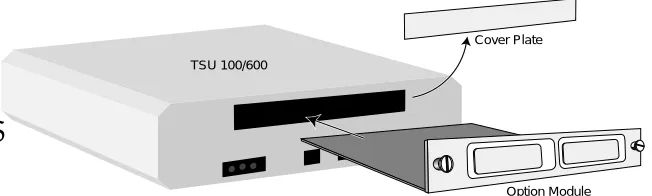
Figure 2-1 represents the action required for proper placement of the option module.
1. Remove cover plate from the TSU 100/600rear panel.
2. Slide option module into the rear panel until it is positioned firmly against the front of the TSU 100/600.
3. Fasten thumb-screws at both edges of option module.
Cover Plate
Option Module TSU 100/600
Figure 2-1
Installing Option Module
Pow er Connection
Chapter 2. Installation
W iring
The Passthru offers two connectors for interfaces. Only one is used in an installation and each is connected to the same interface.
The required wiring connections are Connector Type (USOC) = RJ48C Part number = AMP # 555164-1
Table 2-A
Pinout Connectors for Eight-Position Modular Jack Interface
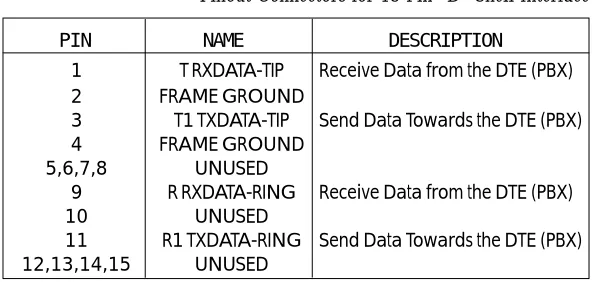
Table 2-B
Pinout Connectors for 15 Pin “D” Shell Interface
PIN 1 2 3 4 5 6,7,8 NAME R1 TXDATA-RING T RXDATA-TIP UNUSED R RXDATA-RING T RXDATA-TIP UNUSED DESCRIPTION
Send Data Towards the DTE (PBX) Send Data Towards the DTE (PBX)
Receive Data from the DTE (PBX) Receive Data from the DTE (PBX)
DESCRIPTION
Receive Data from the DTE (PBX)
Send Data Towards the DTE (PBX)
Receive Data from the DTE (PBX)
Send Data Towards the DTE (PBX)
Chapter 2. Installation
PO WER-UP TESTING AND INITIALIZA TION
The Passthru option module executes a self test during the power-up sequence, as described in the TSU 100/600 User Manual. No initialization input is required. Any previously configured setting for the Passthru is restored automatically upon power-up.
Successful Self T
est
The green OK LED, located with the Module LEDs on the front panel, illuminates when a successful self test is completed and the configuration is successfully restored. See Front Panel Operation, TSU 100/600 User Manual.
Failed Self T
est
If the Passthru module fails one or more of the self tests a message is displayed in the LCD during power-up. See
TSU 100/600 User Manual. Specific failures of the Passthru module are identified in the alarm listings in the appendix.
Operation Alarms
Chapter 2. Installation
WARRANTY AND CUST
O MER SER VICE
ADTRAN will replace or repair this product within five years from the date of shipment if the product does not meet its published specifications or if it fails while in service. For detailed warranty, repair and return infor-mation refer to ADTRAN's Equipment Warranty and Repair and Return Policy Procedure.
Return Material Authorization (RMA) is required prior to returning equipment to ADTRAN.
Chapter 3. Operation
Chapter 3
Operation
OVER VIEW
The Passthru (DSX-1) module is controlled as part of the TSU 100/600 using the same methods as described in theuser manual.
Refer to the user manual for the TSU 100/600 for descriptions of front panel indicators and buttons.
M enu Structure
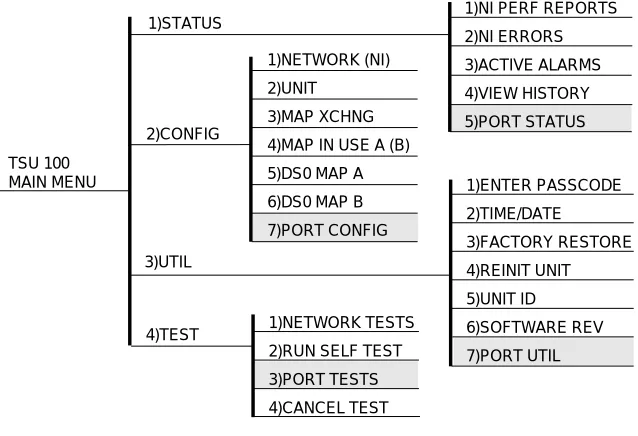
When an option card is installed in the TSU 100/600, the unit adds it to the list of selectable options under the Port menu items. These menu items are shaded in the limited overview of the TSU 100 menu shown in Figure 3-1. The appendix, TSU 100 Complete Menu, of the TSU 100 User Manual shows a complete menu diagram.
M enu Operation
An option module must be selected from the listing in one of the Port menu options before its menus are applicable. With the cursor on one of the Port menu items, press Enter to display a list of the currently installed option modules. To activate menus for the Passthru Option Module scroll through the list to display 1.1 DSX PT and press Enter.
Chapter 3. Operation
for the TSU 100/600. With the cursor on one of the TSU 100/600 four main menu choices press Enter or a menu number to display the first two submenu items. Use the up and down Arrows to place the cursor on the desired item and press Enter to display the first two submenu choices. TSU 100 MAIN MENU 1)STATUS 2)CONFIG 3)UTIL
1)NI PERF REPORTS
2)NI ERRORS 3)ACTIVE ALARMS 4)VIEW HISTORY 5)PORT STATUS 1)ENTER PASSCODE 2)TIME/DATE 3)FACTORY RESTORE 4)REINIT UNIT 5)UNIT ID 6)SOFTWARE REV 7)PORT UTIL 1)NETWORK TESTS
2)RUN SELF TEST
3)PORT TESTS 4)CANCEL TEST 4)TEST 1)NETWORK (NI) 2)UNIT 3)MAP XCHNG
4)MAP IN USE A (B)
5)DS0 MAP A
6)DS0 MAP B
7)PORT CONFIG
Figure 3-1
Chapter 3. Operation
PASSTHRU MENU ITEMS
The Passthru menus are accessed from and operated the same as menus for the TSU 100/600. The Passthru items are submenu choices of the TSU 100/600 four main menus, as shown in Figure 3-1. For information on Factory Restore and Run Self Test, see TSU Features Used With Passthru Options in this chapter.
The Passthru menu items are • Port Status
• Port Configuration • Port Utility • Port Test.
Port Status
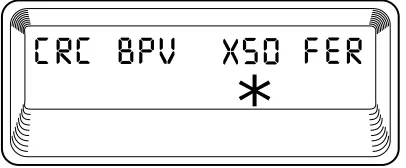
Port Status, a submenu of TSU 100/600 main menu item Status, displays error information about the DSX-1 interface. There are four information fields. See Figure 3-2. An asterisk (*) indicates an item is active.
*
Figure 3-2
Port Status Display
CRC
Chapter 3. Operation
BPV
An asterisk is displayed under the BPV if the DSX-1 is detecting bipolar violations.
XS0
An asterisk is displayed under the XS0 if the DSX-1 is detecting excessive zeroes. (Eight consecutive zeroes in B8ZS or 16 consecutive zeroes in AMI.)
FER
An asterisk is displayed under the FER if the DSX-1 is detecting frame bit synchronization errors.
Port Configuration (POR
T CONFIG)
Port Configuration, a submenu of TSU 100/600 main menu item Configuration, is used to configure the DSX-1 Passthru Option Card.
When Port Configuration is displayed, place the cursor on it and press Enter to activate. Scroll to display the desired configuration and activate with Enter.
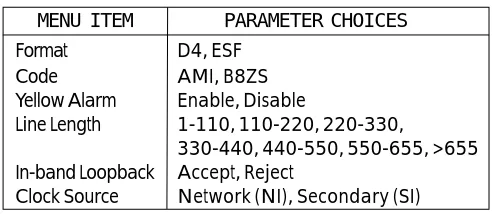
The unit displays the first of six submenu items. Table 3-A identifies the available selections for Port Configura-tion. Continue with standard operating procedures.
Format
Format sets the frame format for the Passthru.
Code
Code sets the data code for the Passthru.
Yellow Alarm
YEL Alarm enables and disables the transmitting of yellow alarms.
Line Length (ft)
Chapter 3. Operation
In-band Loopback (INBAND LPBA CK)
In-band Loopback sets the Passthru to accept or reject in-band loopup and loopdown codes (per ANSI T1.403 specification) which may be sent to the card over the DSX-1 interface. This loopback is a line loopback.
Clock Source
Clock Source selects the clock source for transmission toward the PBX or device connected to the Passthru.
Table 3-A
Port Configuration Parameters
Port Utility (POR
T UTIL)
Port Utility, a submenu of the TSU 100/600 main menu item Utilities (UTIL) displays the current software information for each port installed in the unit. This information is required when requesting assistance from ADTRAN Customer Service or when updates are needed. When Port Utility is displayed, place the cursor on it and press Enter to display the first available port.
Scroll to display 1.1 DSX1 PT, and press Enter to activate. The unit displays the option card name and the software version installed. Press Cancel to exit or select another port.
PARAMETER CHOICES
D4, ESF AMI, B8ZS Enable, Disable
1-110, 110-220, 220-330,
330-440, 440-550, 550-655, >655 Accept, Reject
Network (NI), Secondary (SI)
Chapter 3. Operation
Port T
est
Port Test, a submenu of the TSU 100/600 main menu item Test, activates tests of the selected data ports. Selecting the Passthru displays two loopback tests available for this option module.
When Port Test is displayed, place the cursor on it and press Enter to display the first available port. Scroll to select 1.1 DSX1 PT and press Enter to activate.
Loopback
Loopback activates the loopback function on the Passthru card. All ports contain a local loopback (toward the DTE) and a port loopback (toward the NI) as explained in the section Function Description of the
TSU 100/600 User Manual.
Line Loopback
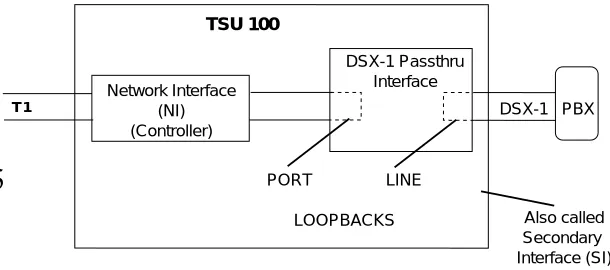
On the Passthru card, the line loopback causes data received at the DSX-1 interface to be looped back toward the DTE (PBX) achieving a local loopback.
Port Loopback
The port loopback is internal and loops all data mapped to the Passthru back toward the network interface on the controller. The loopback (when used in conjunction with an external bit error rate tester (BERT) driving the network interface) exercises the entire data path from the network interface (NI) controller, through the Passthru option card, and back out the network inter-face controller. See Figure 3-3.
Chapter 3. Operation
TSU 100
Network Interface (NI) (Controller)
T 1
DSX-1 Passthru Interface
DSX-1 PBX
PORT LINE
LOOPBACKS Also called
Secondary Interface (SI)
Figure 3-3
Chapter 3. Operation
TSU FEATURES USED WITH PASSTHRU OPTIONS
In addition to the Passthru menu items, two additional menu items of the TSU 100/600 may be operated in conjunction with the Passthru Option Module. These are Factory Restore and Run Self Test.
Factory Restore
Factory Restore, a submenu of the TSU 100/600 main menu item Utilities (UTIL) restores the factory installed default setting for all Passthru option module param-eters.
When Factory Restore is displayed, place the cursor on it and press Enter to restore preset factory defaults and return to the main TSU 100/600 menu.
Run Self T
est
Run Self Test, a submenu of the TSU 100/600 main menu item Test, executes both the Passthru internal test and the TSU 100/600 internal test. The TSU 100/600 internal test is the same self test executed upon power-up. The results of the self test are displayed in the LCD. For additional information on Self Test see the TSU 100/ 600 User Manual.
Appendix A. Passthru Failure Messages
Appendix A
Passthru Failure Messages
FAILURE MESSAGES AT PO WER-UP
The following messages indicate a probable component failure on the Passthru Module:
EPROM CS - EPROM checksum error
RAM ERR - Static RAM error
PASSTHRU ALARM MESSAGES
The following messages indicate an alarm condition on the Passthru Module:
Red Alarm - not able to frame data coming from the DSX-1 interface; sometimes referred to as out of frame (OOF)
Yellow Alarm - remote alarm indicator (RAI) being received from the DSX-1 Interface
Blue Alarm - receiving unframed all 1s from the DSX-1 interface, alarm indicator signal (AIS)
Appendix A. Passthru Failure Messages
ADTRAN Customer Service:
RMA (205) 971-8722
Technical Support (800) 726-8663 Applications Engineering (800) 615-1176 Sales (800) 827-0807
Repair and Return Address:
ADTRAN, Inc.
Customer Service Department 901 Explorer Boulevard