Marketfocus Report
Deploying Web-based Applications:
Citrix MetaFrame XP
Presentation Server,
Feature Release 3
What’s Inside…
Citrix at a Glance
This section provides a capsule of information about Citrix and its MetaFrame XP Presentation Server, Feature Release 3 solution
Executive Summary
This section provides a high-level overview of Doculabs’ evaluation of MetaFrame XP Presentation Server, Feature Release 3.
Understanding Different Computing Models
This section describes three types of computing models that organizations deploy.
Evaluation Methodology
This section describes Doculabs’ approach to evaluating MetaFrame XP Presentation Server, Feature Release 3, the application scenario, and the test environment.
Results and Analysis
This section provides the results and Doculabs’ analysis of its evaluation of MetaFrame XP Presentation Server, Feature Release 3.
Customer Studies
This section provides case studies of organizations that have implemented MetaFrame XP Presentation Server, Feature Release 3.
The Final Word
This section summarizes Doculabs’ overall opinion of the MetaFrame XP Presentation Server, Feature Release 3 solution.
Citrix at a Glance
Citrix
Fort Lauderdale, Florida 800-424-8749
www.citrix.com
Founded 1989
Stock Symbol NASDAQ: CTXS
Employees 1670
2002 Revenues $527.4 million
Office Locations Worldwide; Headquartered in Fort Lauderdale, FL
Overview Citrix Systems, Inc. (Nasdaq:CTXS) is the global leader in access infrastructure solutions for businesses, government agencies, and educational institutions. The Citrix MetaFrame Access Suite enables people to easily and securely access their enterprise, from anywhere, anytime, using any device over any connection. With nearly 50 million users in more than 120,000 organizations around the world, Citrix customers include 100 of the Fortune 100 companies, 95 percent of the Fortune 500 and 95 of the Financial Times European 100.
Recognizing the need to optimize its popular application deployment solution for modern web-based application technology, Citrix has added key features into its Feature Release 3 of MetaFrame XP Presentation Server. These key features provide organizations with the ability to improve their users’ experience and enable them to be more productive, especially when working over low-bandwidth
Executive Summary
With business’s concerns for web performance in mind, Citrixcommissioned Doculabs to validate the performance of its MetaFrame XP Presentation Server, Feature Release 3. Specifically, Doculabs:
Faced with managing more complex technology infrastructures than ever before, today’s organizations are trying to minimize the costs associated with owning, deploying, and managing applications, while providing users with the best performance and reliability possible. Furthermore, with the increasing use of browser-based interfaces in application software, organizations need the same type of centralized control for users accessing web sites or running applications in web browsers. Of course, in these situations, performance is critical to enable users to work effectively.
• Conducted formal benchmark
testing that evaluated the
performance of browsing web sites and pages from a web browser running on a MetaFrame XP
Presentation Server, Feature Release 3, and compared it with the
performance of browsing the same sites and pages using a web browser deployed on a Windows desktop client.
Since 1989, Citrix Systems, Inc. has provided solutions that dramatically improve the way applications are deployed and managed through the use of a server-based computing model. In its ongoing efforts to improve its product line, Citrix has introduced MetaFrame XP Presentation Server, Feature Release 3. The latest version of MetaFrame XP Presentation Server aims to provide faster performance and more options to tune performance for users with low-bandwidth connections, like telecommuters and mobile users.
• Conducted benchmark testing that compared the performance of MetaFrame XP Presentation Server, Feature Release 3 with the
performance of the base version of MetaFrame XP Presentation Server.
• Interviewed Citrix customers to better understand how they are leveraging MetaFrame XP Presentation Server technology.
This report provides the results of Doculabs’ testing and research, along with relevant details about the test environment and methodology.
• MetaFrame XP Presentation Server, Feature Release 3 uses 30 to 45% less CPU power than the version of MetaFrame XP without Feature Release 3 when using deployed web browser technology.
Summary of Key Findings
Doculabs’ key findings from its evaluation of MetaFrame XPPresentation Server, Feature Release 3 include the following:
• Tuning MetaFrame XP Presentation Server, Feature Release 3 can
improve overall performance (reduce bandwidth) by 8 to 10%. Low-bandwidth applications with small screen size may show much greater gains.
• MetaFrame XP Presentation Server, Feature Release 3 provides 200 to 250% more efficient network bandwidth utilization than locally installed browsers (depending on the configuration and tuning options selected).
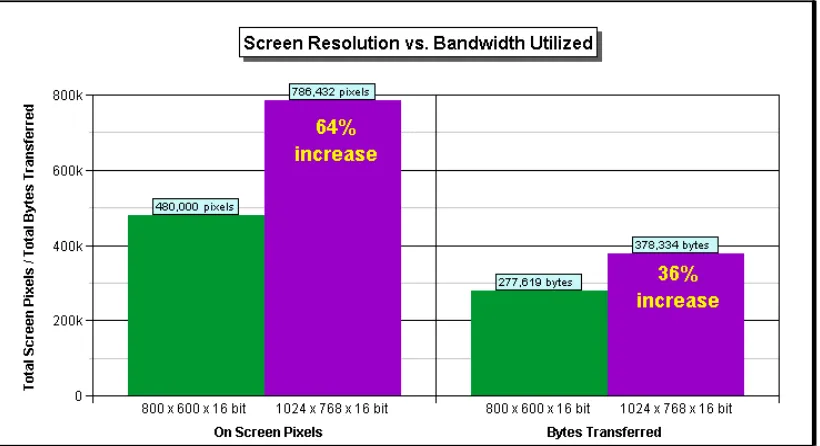
• Increasing the resolution of the Citrix deployed browser from 800 x 600 bit color) to 1024 x 768 (16-bit color) results in an increase of 64% effective pixels on the screen, but only an increase of 36% bytes transferred, highlighting the efficiency of Citrix technology.
• MetaFrame XP Presentation Server, Feature Release 3 may provide users with two-fold or greater increase in page loading performance when browsing the web compared with low-bandwidth connections.
• MetaFrame XP Presentation Server, Feature Release 3 can improve the performance of SSL-secured
applications by eliminating the need to enable SSL on server-side browser deployments – increasing
performance between 10 and 20% over using locally installed browsers.
• MetaFrame XP Presentation Server, Feature Release 3 is over 210% faster than the version of MetaFrame XP Presentation Server without Feature Release 3.
Each of these models presents unique cost and support implications.
Typically, the unmanaged desktop is the most costly, with server-based
computing offering the lowest desktop management costs.
Understanding Different
Computing Models
Today’s organizations use three primary computing models to deploy
applications, including:
Most organizations employ more than one of these computing models. This not only increases overall cost, it also creates technical delivery challenges for users who need access to applications that run under different models. The fact that these same organizations also need to support multiple platforms (such as Windows, Unix, and Macintosh) and multiple delivery mechanisms (such as desktops, network appliances, PDAs, and smart phones) complicates matters further, and dramatically increases costs under one or more of the models.
• The unmanaged desktop computing model defines an environment in which users each have their own desktop systems. System
administrators manage each system individually, including the
installation and upgrade of operating systems and software.
• The managed desktop model allows administrators to install and manage applications on desktops from a separate, centralized (and often remote) location.
• The server-based model, which is the approach used by Citrix with its MetaFrame XP Presentation Server product. In this environment, all of the application processing takes place on centralized servers. Users can access these applications, locally or remotely, via virtually any
connection using a standard desktop device, a thin client appliance, a wireless device, or a web browser.
Organizations that seek to lower costs by moving to a server-based model often have concerns about performance, particularly for users in low-bandwidth environments. Thus, Citrix
commissioned Doculabs to conduct the performance testing presented in this report, to help organizations better understand the impact of different computing models on user performance.
Evaluation Methodology
Test Application Overview
The application scenario used for the performance testing was for client machines to browse an established number of web pages. Two different client scenarios were used:This section describes Doculabs’ approach to evaluating MetaFrame XP Presentation Server, Feature Release 3. The following were the goals that were used in the creation of the test scenario:
• Browsing through a locally-installed web browser
• Determine the performance implications of deploying a web browser through MetaFrame XP Presentation Server, Feature Release 3 rather than a locally installed browser
• Browsing through a Citrix ICA client that was connected to a web browser running within a MetaFrame XP Presentation Server.
• Discover the effects of deploying a browser through Citrix technology in low-bandwidth applications
The test was designed so that a single client machine could simulate five concurrent users simultaneously
browsing through a set of 99 web pages on a web server. The pages consisted of both text-heavy and graphics-heavy web pages from publicly-available web sites, which had been downloaded to a web server in the test environment.
• Evaluate the benefits of upgrading to MetaFrame XP Presentation Server, Feature Release 3 from Citrix MetaFrame XP Presentation Server
• Assess the performance and bandwidth utilization effects of tweaking different settings in MetaFrame XP Presentation Server, Feature Release 3
Mercury Interactive LoadRunner
software was used to execute test scripts to simulate the load and navigation, and to log the results achieved under both test configurations (i.e. browsing via a locally-installed web browser, and browsing via MetaFrame XP
Presentation Server running a browser on the Citrix server).
• Evaluate the performance and bandwidth implications of using different screen resolutions
All testing was conducted at Citrix’s test lab facility in Fort Lauderdale, Florida. Doculabs collaborated with Citrix in creating the test methodology and application scenario. Citrix created and configured the test environment, and Doculabs executed the testing within the environment.
• Two different LoadRunner clients were used to run the test scripts:
Test Details
Key details of the test application
described above are as follows: o A standard web/HTTP client that
simulated five concurrent users accessing the web server using a standard browser on the desktop
• The test application consisted of a set of 99 web pages.
o A headless Citrix ICA client that simulated five concurrent users interacting with a MetaFrame XP server running a web browser o This included pages from
commercial web sites such as Google, Yahoo, Microsoft.com, and Javasoft.com.
• A “test run” consisted of five
successive executions of the scripts – for a total of 2475 pages accessed by the client in each test run (99 pages x 5 users x 5 executions).
o These pages were downloaded from the Internet and served from a local web server in the test environment.
o Each of the 99 pages was navigated from a master index page.
• The following metrics were captured in each test run:
o The total number of bytes transferred over the network
• Pages ranged from simple HTML
content to complex information
portals. o CPU utilization on the clients
and servers in the test
environment (to show the effects of load on various parts of the infrastructure)
o 50% of the pages were mostly text, and the other 50% were graphically intense (with over 95% of the total page download
coming from image loading) o Network bandwidth utilization
(to analyze the effect of local vs. remote browser access)
o The average page size, including graphics, was approximately 225 kilobytes
• Mercury Interactive LoadRunner software was used to record test scripts, run the scripts in an automated fashion, and log the results on the client machines. The test scripts were designed to simulate a load of five concurrent users executing the test scripts.
o The steady-state network bandwidth before and after the test (to determine how much normal traffic was being used above and beyond the test-specific network traffic). This steady-state traffic was
Test Environment
A dual-processor Intel server was used as the web server. The test web pages were loaded on the local web server to minimize the effects of Internet latency. Two different configurations were usedto test browsing performance, including running the test using Microsoft Internet Explorer 6.0 installed locally on a client machine, and running the test using Microsoft Internet Explorer 6.0 deployed on MetaFrame XP
Presentation Server and MetaFrame XP Presentation Server, Feature Release 3
For the testing that involved the use of Citrix MetaFrame XP Presentation Server and MetaFrame XP Presentation Server, Feature Release 3, a second dual-processor machine was used for the MetaFrame XP Presentation server. This represented the only change to the server tier of the test environment. A consistent network configuration was
maintained across both sets of tests. A flat network topology was used. A single client machine was used for the testing. The machine hosted the
LoadRunner client and Test Controller. The automation client executed
recorded test scripts (submitted requests) and monitored results using either the Web/HTTP client or the Citrix ICA headless client. The software
The web browsers used in the testing (whether running locally on the client or within the MetaFrame XP Presentation server) were configured with default security settings, and with cookies enabled. The browser cache and other settings were left in their default configurations.
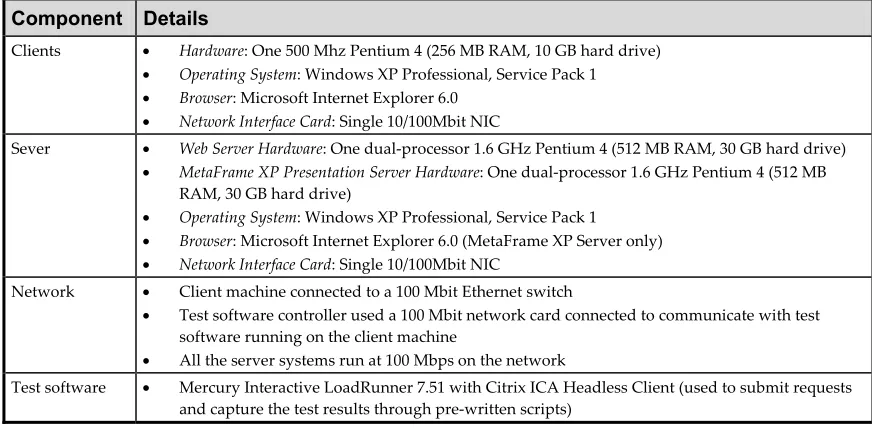
Component Details
Clients • Hardware: One 500 Mhz Pentium 4 (256 MB RAM, 10 GB hard drive)
• Operating System: Windows XP Professional, Service Pack 1 • Browser: Microsoft Internet Explorer 6.0
• Network Interface Card: Single 10/100Mbit NIC
Sever • Web Server Hardware: One dual-processor 1.6 GHz Pentium 4 (512 MB RAM, 30 GB hard drive)
• MetaFrame XP Presentation Server Hardware: One dual-processor 1.6 GHz Pentium 4 (512 MB RAM, 30 GB hard drive)
• Operating System: Windows XP Professional, Service Pack 1 • Browser: Microsoft Internet Explorer 6.0 (MetaFrame XP Server only) • Network Interface Card: Single 10/100Mbit NIC
Network • Client machine connected to a 100 Mbit Ethernet switch
• Test software controller used a 100 Mbit network card connected to communicate with test
software running on the client machine
• All the server systems run at 100 Mbps on the network
Test software • Mercury Interactive LoadRunner 7.51 with Citrix ICA Headless Client (used to submit requests
and capture the test results through pre-written scripts)
Performance Test Results
and Analysis
Bandwidth Utilization
Comparison (Local Browsing vs.
Browsing through MetaFrame
XP Presentation Server, Feature
Release 3)
This section presents the results of the performance testing in the following areas:
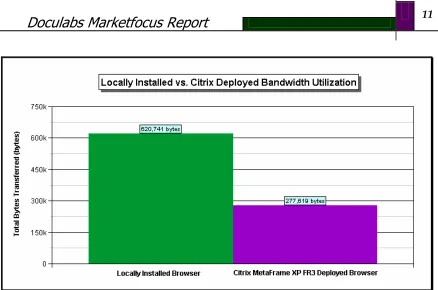
The test results showed that browsing via the Citrix-deployed browser resulted in a transfer of 55% less data than when browsing with the locally installed browser. This means that pages on the Citrix-deployed browser loaded approximately 220% faster than when browsing with the locally-installed browser.
• Bandwidth utilization of browsing via MetaFrame XP Presentation Server, Feature Release 3 versus browsing via a locally-installed web browser
• Page download performance of browsing via MetaFrame XP
Presentation Server, Feature Release 3 versus browsing via a locally-installed web browser
For users, this information translates into faster response times. Individuals using locally installed browsers are subject to the bandwidth and latency of their current network connection. Thus, minimizing data transfer during
browser use is one of the keys to performance.
• Bandwidth utilization of browsing via MetaFrame XP Presentation Server, Feature Release 3 versus browsing via the base version of MetaFrame XP Presentation Server
• Performance impact of tuning MetaFrame XP Presentation Server, Feature Release 3
One of the key benefits of a centralized Citrix-deployed browser model is the way in which organizations can
optimize the performance of the server-side browser. The organization can tweak the browser cache size and provide an extremely high bandwidth and extra low-latency connection from their data center to the Internet.
• Performance impact of increasing screen resolution with MetaFrame XP Presentation Server, Feature Release 3
Page Download Performance
Comparison (Local Browsing vs.
Browsing through MetaFrame
XP Presentation Server, Feature
Release 3)
The average page size in this evaluation was approximately 250 kilobytes
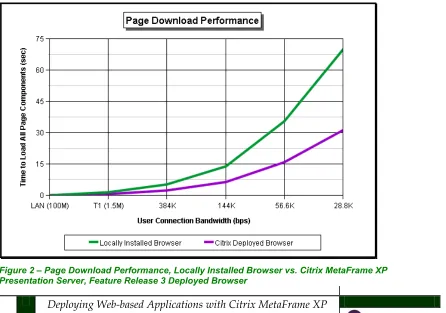
(approximately 2 million bits of data). Using the bandwidth utilization results above, Doculabs calculated the average page download performance that each configuration could deliver over connections of various bandwidths – ranging from LAN connections to a 28.8K leased line, wired, or wireless modem connections.
The results show that while page download performance is similar in
high-speed environments (such as in LAN environments or over T1 connections), the benefits of using a Citrix-deployed browser increase as connection bandwidth decreases – reducing page load times from a painful 70 seconds on a local browser to just over 31 seconds on a Citrix-deployed browser (over a 28.8K connection).
These results were achieved with default settings on the MetaFrame XP Presentation server. Note that the software also includes tuning
parameters that can further improve performance, such as parameters for configuring bitmap caching, latency, and data compression.
Bandwidth Utilization
Comparison (Browsing through
MetaFrame XP Presentation
Server, Feature Release 3 vs.
Browsing through MetaFrame
XP Presentation Server)
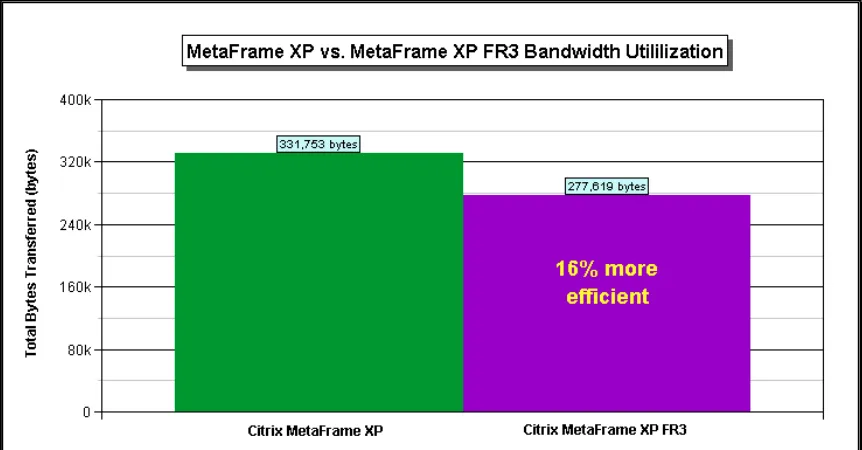
As part of the testing, we were interested in determining the incremental performance gains that MetaFrame XP Presentation Server, Feature Release 3 in comparison with
the base MetaFrame XP Presentation Server software.
The testing showed that Citrix MetaFrame XP Presentation Server, Feature Release 3 was 16% faster than Citrix MetaFrame XP Presentation Server. For organizations that have already invested in MetaFrame XP Presentation Server, these results make a case for upgrading to Feature Release 3 to achieve improved performance.
Performance Impact of Tuning
MetaFrame XP Presentation
Server, Feature Release 3
As mentioned, the evaluation used standard data compression for the locally-installed browser (through the operating system) and the Citrix deployed browser. The defaultcompression level was used. Note that higher compression comes at the expense of CPU utilization.
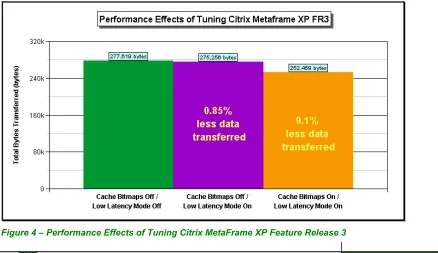
MetaFrame XP Presentation Server, Feature Release 3 also includes other performance-tuning parameters, including bitmap caching and low latency mode. We conducted additional testing using these parameters to determine the impact on browsing performance.
We found that simply enabling low-latency mode improves performance a negligible 0.85%. This marginal improvement was expected, since low-latency mode is designed to improve perceptual user experience in very high-latency environments, and not to directly reduce data transferred. Enabling low-latency mode in high-latency environments did significantly improve perceived system
responsiveness in tests.
Enabling bitmap caching had a more significant impact on user experience, reducing transferred data by 9.1%. Tests in this evaluation were run using 800 x 600 with 16-bit color depth (65536 colors). Although this is still the dominant web browser size used by corporate users, many are using or will soon be using 1024 x 768 screen
resolution.
Figure 4 – Performance Effects of Tuning Citrix MetaFrame XP Feature Release 3
Performance Impact of
Increasing Screen Resolution
with MetaFrame XP
Presentation Server, Feature
Release 3
Although a locally installed browser was not tested at different resolutions, it is reasonable to assume that browsing performance will be affected only slightly by a large screen, as drawing the page will take longer. For the Citrix solution, we expect the performance change to be more significant when using a larger browser interface.
The difference between 800 x 600 and 1024 x 768 interfaces is 306,432 on-screen pixels – translating into an increase of about 64% of data to be transferred. The test results show that when running the
larger browser interface on the MetaFrame XP Presentation Server, Feature Release 3 server, only 36% more data was transferred.
This shows that the Citrix solution can effectively compress the data being transferred, and only transfers the data that needs to be transferred to a given browsing device. For example, a locally installed web browser on a smart phone would typically still transfer all of the contents on a page, even though the 160 x 100 resolution screen could not hold even a fraction of the data. A Citrix-deployed application would only send that data needed to properly populate the 160 x 100 resolution screen,
minimizing wasted bandwidth and dramatically reducing transfer time.
Customer Studies
In an effort to better understand and validate the value proposition of MetaFrame XP Presentation Server, Feature Release 3 interviewed a number of Citrix customers to determine how they are using web technology, and how they see Citrix technology fitting in.
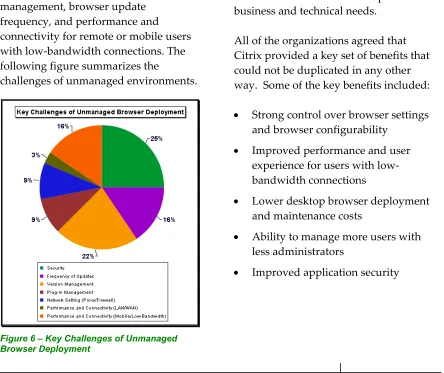
The first set of questions focused on the challenges and benefits of web-based applications and managing and deploying them effectively. The major concerns that customers cited included browser security, browser version management, browser update frequency, and performance and connectivity for remote or mobile users with low-bandwidth connections. The following figure summarizes the
challenges of unmanaged environments.
Figure 6 – Key Challenges of Unmanaged Browser Deployment
We asked a second set of questions about how the organizations intended to benefit from deploying web-browsers using MetaFrame XP Presentation Server. We asked these questions of a smaller set of five organizations in the financial, transportation, food
processing, and telecommunications markets.
Three of these organizations have already standardized on Citrix-deployed browser technology throughout their organizations. The other two organizations have deployed browsers on Citrix based on specific business and technical needs.
All of the organizations agreed that Citrix provided a key set of benefits that could not be duplicated in any other way. Some of the key benefits included:
• Strong control over browser settings and browser configurability
• Improved performance and user experience for users with low-bandwidth connections
• Lower desktop browser deployment
and maintenance costs
• Ability to manage more users with less administrators
• Improved application security
These benefits were claimed by
organizations that had standardized on thin-client network devices on the desktop as well as those that used full-fledged high-end workstations. This was also true of organizations that had very mixed environments that needed to provide access to Windows
applications on Unix and Apple Macintosh workstations.
All of the organizations that had performed their own evaluations of Citrix MetaFrame XP Presentation Server performance corroborated the performance improvements seen in the lab environment. Most of these
The Final Word
Recognizing the need to optimize its popular MetaFrame deployment solution for modern web-based
application technology, Citrix has added key features into its Feature Release 3 of MetaFrame XP Presentation Server. These key features provide
organizations with the ability to improve their users’ experience and enable them to be more productive, especially when working over low-bandwidth connections.
Our test results show that browsing via a MetaFrame XP Presentation Server, Feature Release 3 provides more
efficient bandwidth utilization and page loading than browsing via a locally-installed browser. In addition, MetaFrame XP Presentation Server, Feature Release 3 provides incremental
benefits over the base version of MetaFrame XP Presentation Server.
Overall, Citrix’s technologies provide organizations with the ability to improve their users experience while enabling them to be more productive. This is especially true of users that do not have high-bandwidth connections – such as mobile workers using low-bandwidth leased lines or accessing powerful corporate applications from their PDAs or notebook computers over wired or wireless modems.
For these types of users, any bandwidth savings translates directly into
productivity gains. The findings in this report make it clear that Citrix
MetaFrame XP Presentation Server, Feature Release 3 can deliver results.
Doculabs is an independent research and consulting firm that improves the way companies plan for, select, and optimize emerging technologies through project-based services. Its clients include both the companies that purchase emerging technologies and the leading vendors that supply those technologies.
Based in Chicago and founded in 1993, Doculabs provides consulting services that are grounded in research that combines hands-on evaluation of technology with real-time business knowledge gained from engagements with Fortune 1000 clients. Doculabs helps its clients deliver on their business strategies through solutions in areas such as enterprise content management, relationship management, and infrastructure.
Doculabs leverages its research to provide deliverables customized to vendors’ go-to-market initiatives. Specifically, it offers short-term consulting projects designed to:
• Improve time to market by accelerating strategy development and product lifecycle
• Reduce product development costs by leveraging critical market information
• Increase market penetration by enhancing a competitive value proposition
In addition to fixed-bid, short-term project engagements, Doculabs channels its analysis through speaking engagements, interviews, and authored articles to a number of leading trade organizations and publications, including AIIM, BAI, DIA, NACHA,
InformationWeek, CIO, Insurance & Technology, Transform, Energy IT, The Wall Street Journal, and BusinessWeek, among many others.
120 South LaSalle Street, Suite 2300 Chicago, IL 60603
(312) 433-7793 www.doculabs.com