Flashvvriter
IT
Users GUideFLASHWRITER II BOARD
Manual Revision
3
March 29, 1979
Copyright 1979 Vector Graphic Inc.
Revision Numbers
The revision number and date of release of each page herein appears
at the bottom of each page. The revision number and date of release
on the Title Page corresponds to that of the page most recently revised.
The r'liH31l'.4riter II L\oal:'(j ';/)id n::;i-'lllcier L~; st)leJ "as is", witr, all
f. au 1 t s a n d wit h 0 u t ,HI j wa { r ',<Ii l I:' ,L 'l t: ( eX IJ res s e cl 0
r
i Ttl pI i (,: d 1inc 1 u din 1] any imp 1 i e d 'vi 'J r-r ant y : J
r
i i t n (; s s t 'J I: i n ten (1 e d use 0 j-lncrchantability. Howev(;t-, the 2l.I'\/('; lloLvJithstandin\j, vr:CI'U](
GRAPHIC, INC., will, for a period of ninety (90) days fo11owiny delivery to custoGer, re~Dir or re0'~ce ny F12shwriter II noard that is found to contain d(::rr:;cts in l!;diJ::r.ials or workrnanf3bip, ,)r.ovidl'd;
t .i me
1. Such uE:Eect
t ; F.? F 1 ash w r iu? r I I
'dctory;
in :.nat:.l~ria
lj 0 c;. t- (J 1 C i. 1
~c wurkmanshi~ eXlsted dt the
the VL.:CTuH GEAPlJ Ie, 1[,;(,.,
2. VCC]'U.F. GRAPHIC, I!~'-:. f ~ :dVe:fi notice of tnt: ~rl~cise
Je[ect claimed within ten (10) days d[ter its discovery;
3. 'I'he Flashwr i tel:' I I 150ard i:, prOTllLJt1y returned to V8CTOl<
CfU\PHIC, INC., at custome'C's txpen;::.'.?, for examination by VECTOR GlV\P1IIC, INC., to confirm the a11~;jeJ deJ:(?ct, and for subsequellt repair or replacement j f found to be: in order.
H'-'i~air, replacement or coctTctifJl: u: any c1eLects if! iilc..terial or
wockmanship \Jhich ar<:: discoV(;f',?rj afte::- expil-ation of the perioc sc~t
l<)t-th above wil.l be perfon,led IJY \it~;~'l't;l, '~E/·dJt;J.Ct INC., at i3u er's 2xpense, provided the Plashwriter II Goard is returne
-f.'luye-r.-rs expense, to VEC'l'OlZ GH!'>.Pl:lI'~:f 1[\1(. I for such repair,
n;placement or correct ton. In fJ;rfuni.l ily aIlY rel:-'ai r, reF.i.aceli,cnt. r correction after expiration uL t.h(? lJeriuJ set forLh above, BUj(::r
~iJl be charged in addition to the cost of parts the then-current VEC'rOi{ GRAPHIC, INC., repair r",t(;" At: the present time the a p p 1 i cab 1 e r a t e is $ 3 5 • 00 L)[: t:. iH: [ i r::i t h o U 1.- r a n d $ 1 8 • 0 0 per b 0 u r
for e,very hour of work required thereafter. Prior to commE'nC~n\_! any
~: epa 1. r, rep 1 a .: e III e n t o r cor r ',,-' C t 1 C Ii 0 f i j e
r
'2 C t s i n ,hCl t. e r- 1 ci 1'Jr-W 0 r k !Ti a n s hip d i ~~ r:; 0 v ere d aft c' r e x I. ~ .i rat ion 0 f t h Eo per' i 0 (; f (j
r-no-cost-to-I3uyer repairs, Vi>~:'l'U}\ Cl<..i~ [I , I~JC .• , will sui..J .•. it to buyer i \{ r i t t G n (' s t i If< a t f.: () f t b E: e x
r;,
e etc d ': 11 r; l 9 E: ;-;, a n c; V L C 'l' 0 H li RAP Iii (..' :1'~ C . , VI i 11 no t c () Ii1 :.n en c e r e p a i l~ un t. J t 1::: u,= 11 t ,.11 c; a :3 t h (; w r i t t e n
estlrtl2te of char'::les has been re:tt.1r:H2d by buyer to VECTOH GE[",Pi1iC, IrK., signet.. by dlJly author'ized n:lJl'(':,C tati.v:;: c"utlJot'izing VL'-..f .. ul:
,fU\PHIC, INC., t·) COH1HlenCe y.lit ,ti" t-CpiJl: work involved. VEC'i'Of< Gl<,\PHIC, INC" shall hav2 no {)oliSbt on t (epai I replace or
corrt.::ct any Flashwriter II Boar<: unt.il the \"'Litten estimate has bee'l rpturncr1 with approval to p~OCeedl 2nd VECTU[·; GRAPHIC, INC., Day at its option also require pLepayment of the estimated repair cbarges rrior to c~nmencing work.
Hepair t~'3ree!llent void if the enc:los(:d card i~.> not returned to Vl:C'rOlZ
GRAPHIC, INC. ,.,ithin ten (10) days of: r"nd consumer purchase.
lector Graphic P13shwrit~r II Board
neDa; r j',.lj re'~r.1ent
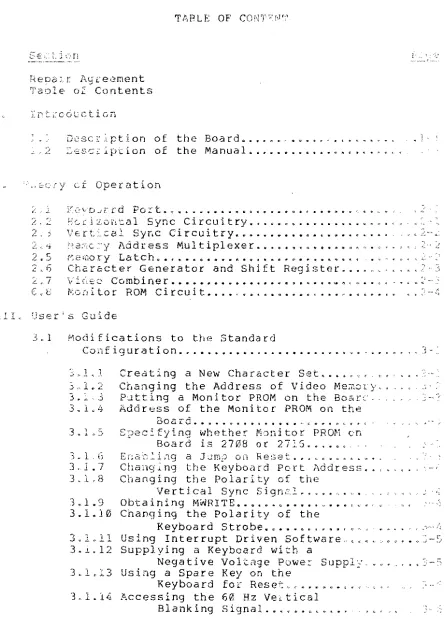
TaDle o~ Contents
I. Irt:c6ccticn
TABLE OF CONT~~~
02scr'ption of the Board • . • . • . . • • . • . . .
. 2 ~esc~iption of the Manual •.•.•••.•••.•••... L.
<',,'£:cr.::"y ci Operation
~~~ .. : ~~'c[i 0.'11:a1 Sync Circuitry •.. ".c'" •• *' . . . ~~,'-,.<
2 > '5 ') E: r t ~_ cal S y 14 C C ire u i try. *. .,. • • • .. .. • • t'( • ~ . . ." • " ~ . . • ... '" , i ' ,. ..': ,f...
~:,.I~ ~'~2:(;C~,~:l }\~ddre5s Multiplexer .•.•• ~.-;u..~.A .. , ; l , . . r ' . ~,,',::
-. r:; L. '", -' ;ZJi
L,7
~emory Latch ••.•••••••••••.•.•••••.•••••.
Char&cter Generator and Shift Register . . . .
Vi0sc Combiner ••••••••.•••.••••.•••.••• , •.. ,. - ..• ~
C.2 ~cn~lor ROM Circuit... .••.••.••.. -~
IrI~~ User-is Gu1·oe
3.1 Modifications to the Standard
COl1figuration. «' . . . "' . . . ...
3.1.1 Creating a New Character Set •.•..•.
:"l~'2 Changing the Address of Video Me:-.-,o·cy .•
3 .. ~~,.3 PJ-tting a Monitor PROM on the BOCiLC
3.1.4 Address of the Monitor PROM on the
"3 .. 1 . G
3.1. 7 3 _ 1 .8
3.1.9
3.1.10
80 a r d ... t • • • c- . . . ' 0: . . . ('t ~, v ." (
S c!fying whether Monitor PROM en
Board is 2708 or 27~.5 •••• o • .
E(:a~}~.i.n.g a JJrn.:J on He~:;et. ~ .. ~, ~ .. tA ~ I. ... ~. h
Chang~ng the Keyboard Pert ;\ddress .. "
Changing the Polarity of the
Vertical Sync Sign21 . . . 0 . >
Obtaining MWRITE •••..••••••..•••.••. Changing the Polarity of the
Keyboard Strobe~ •••.••..•. ''' ..
3 - __
3...t.12
Using Interrupt Driven Software .•.•• _ ••••• ~-5
Supplying a Keyboard with a
Negative Voltage Powe~ Suppl!.
Using a Spare Key on the
Keyboa rd fo i: Reset '. , •.•••• , . ,
Accessing the 60 Hz Ve~tical
Blanking signal .••.•••.•.•..
Vector Graphic F13shwri' ~L II Board
Section
3.2 Programming for the ~lashwriter II Board •••••.••• 3-6
3.2.1 3.2.2
3.2.3 3.2.4
3.2.5
Vector Graphic Monitors •••••••••••••.•.••• 3-6 Displaying Characters Without Using the
Vector Graphic Monitor Video
Dr i ve r ••••••••••••••••••••••••••••••• 3- 8
Producing Reverse Video ••••••.•••••••.•••• 3-8 Determining Whether a Character
is in the Keyboard Buffer •••••••.••• 3-10 Accessir.g the 60 Hz Vertical
BIEnking Signal ••••.••••••.••.••.••• 3-10
3.3 Adjustinq Your TV Monitor ••••••••.•••••••..••••• 3-10
.3.4 Connecting the Board to the Video
Display and the Keyboard ••••••.•••••••.•••• 3-11
3.4.1 Connecting a Video Display Requiring
Separate Sync and Video •••••••.••••. 3-12
3.4.2 Connecting a Video Display Requiring
Combined Sync and Video ••••••..••••• 3-12
3.4.3 Connecting a Keyboar-d • • . . . • • . • . . • . • . . . 3-13
IV. Diagrams
Character Set, Low Order 128 Characters •..•••••••••.•• 4-1 Character Set, High Order 128 Characters ••••••.•••••.• 4-2 Blank Form, Low Order Character Set ••.•••.•.•••••••..• 4-3 Blank Form, High Order Character Set ••••••.••.••••••.• 4-4 80 X 24 Video Display Module Block Diagram •••••••••.•• 4-5 Board Layout with Jumper Pads •.••••••••.•••••••.•••••• 4-6
Schema tic •••••••• " ••••••.••••••••••.•••••••••••••.••.• 4-7
Vector Graphic Flashwriter I I Boa~d 1-1
I. INTRODUCTON
1.1 Description of the Board
The Flashwriter II Video Board is Vector Graphic's advanced 80 x 24
memory mapped video board. By "80 x 24" we mean that the board
displays characters on the screen in 24 rows of 80 characters each. Each character is made up of an 8 x 10 matrix of dots.
The Flashwriter II can be installed in ANY S-lOO 8080 or Z-80 computer, including existing Vector Graphic computers, in order to convert the existing memory mapped display to 80 x 24, or to make use of memory mapped video for the first time if a serial terminal
had been used. It can be used with almost any standard computer
video monitor, since i t can produce either separate or combined
video and sync signals. However, the monitor must have a band width
of at least 12 MHz. The board is definitely applicable to the
Vector Graphic Mindless Terminal, which requires separate signals. (Note: in this manual, the word "monitor" refers to a video display unit, and the word "Monitor" with an upper-case M refers to a kind of canputer program which handles basic housekeeping functions for the computer.)
The Flashwriter II makes use of the most up-to-date ideas in circuit design such as flicker-free updating of the screen, separate sync outputs for video monitors requiring it, on-board user-programmable PROMs storing the character set, on-board socket for a video-driver
and/or Moni tor, Jump-on-Reset capability, to be used i f the on-board
video-driver socket is used, the availability of inverted or non-inverted vertical sync signals, the availability of combined or separate video and sync signals, and the capability for reverse
video. To make the board adaptable to many different systems, you
are free by us ing j uwpers to spec ify the memory addresses used by the on-board video memory RAM and the on-board video driver.
Further, a parallel keyboard input port is incorporated on the board, with the port numbers changeable by jumper anywhere from 00
and 01 (status and data) up to OE and OF. Although the board is
shipped jumpered so that it strobes the keyboard data into the input latch on the rising edge of the key-depression strobe, a jumper can be installed to strobe the data on the falling edge, as required by
some keyboards. The board can also be jumpered to generate an
interrupt when a key is depressed, instead of waiting to be polled.
A particularly useful feature of the board is the ability to accept
a user-created character set, which can be either a 128 or 256
character set. If a 256 character set is desired, then the user
must Racrifice the use of reverse video. The board is shipped with
a 128 character set, on a PROM. This set consists of the 96
standard ASCII characters and 16 special graphics characters
which
can be used to build graphics images or large characters.
1-2 Vector Graphic Flashwriter II Board
Instructions are provided for creating your own character set and encoding i t on 2708 or 2716 EPROMs (the latter for a 256 character set), if desired.
Instructions are given in this manual for writing programs to use the board. In addition, the user can purchase, if not already included in his computer system, the Vector Graphic Extended Systems
Monitor with video driver, Version 3 EV-II. Before making this
decision, section 3.2.1 should be read. Use of this Monitor will eliminate some or all of the assembly language programming necessary to use the board. The EVIOS program, a sophisticated video driver used with the Flashwriter I board, canNOT be used with the Flashwriter II board, but Version 3 of the Monitor makes i t largely unnecessary. For user's familiar with Flashwriter I, this is partly due to the fact that Flashwriter II does not have a separate memory block containing character attributes. In Flashwriter II, there are no special vertical and horizontal lines outside of those in the graphics characters, there is no reduced intensity, and the graphics characters are produced in response to ASCII codes 00 to IF and 80 to 9F.
The Flashwriter II board is a major addition to the Vector Graphic product line. Vector Graphic has now applied i t s well known excellence in video display quality and product flexibility to the creation of an advanced 80 x 24 video display board.
1.2 Description of the Manual
This manual provides a discussion of the theory of operation of the Flashwriter II, and a User's Guide describing 1) when and how to modify the board's electronics and PROM's, 2) how to program for the board, how to adjust the TV monitor, and how to connect the board to keyboard and video. Since the board is not sold as a kit, assembly information and parts list are not included.
Revision 2 2/7/79
Vector Graphic Flashwritpr 71 Board 2-1
II. THEORY OF OPERATION
A block diagram of the video display module is shown on page 4-5. Each of the blocks is comprised of several integrated circuits as shown on the schematic diagram on page 4-7.
2.1 Keyboard Port
Starting with the keyboard port, U46 is an 8 bit latch which internally stores the data from the keyboard coming through Jl when
the STB (pin 11) input goes low. A jumper option allows the correct
strobe polarity to be selected. U46 contains a service request flip
flop which is set by the same strobe edge that latches the data,
causing INT to go low (pin 23). This signal can optionally be
connected to PINT on the bus (pin 73) for interrupt driven keyboard
input, or can be tested by accessing the status port. Two adjacent
ports are always occupied by the status and data with the status
being the lower one. The port address is decoded by U39 and the
as soc i a ted se ct iOlls of U27 and U38. A jumper allows the selection
of port addresses from 0 and 1 to E and F. (Each pair of ports
refers to status and data, respectively.) Signals INPS and INPD
enable tristate bus drivers U45 and U21 to gate the INT signal and
data onto the bus at the appropriate time. Both inverted and
non-inverted status are available, for keyboard drivers using
different conventions. The vertical blanking signal is also
available, from the status port, for use as a 60Hz clock signal, or for synchronizing data transfers with the vertical retrace.
2.2 Horizontal Sync Circuitry
The timing for the characters, horizontal blanking and horizontal
sync pulse is provided by U15, U29, U3 and Ul. A crystal oscillator
at 14.318 MHz provides the clock for all the signals. This is the
frequency at which the individual dots making up the characters are
displayed. U15 divides this clock by
a
to generate a characterclock output every time a new character is to be displayed. This
signal is further divided by U29 and U3 to generate a horizontal
period of 63.69 micro-seconds. The outputs HO-H6 are binary outputs
representing the 80 character positions per line. H7 goes high at
the end of the displayed line of characters, and is used as the
horizontal blanking signal. At the count of 207, decoded by U2 pin
8, the counter string is preset to the value of 94 and starts
counting over agai~. This signal also triggers Ul, a dual one-shot
to generate a horizontal sync pulse. The delay of this pulse can be
varied by the hor1zontal position potentiometer to allow centering the display on the TV screen.
2 - 2 ' ; ' ' ? c t ' ) t " Graphic Flashwri.ter II Board
2.3 Vertical Sync Circuitry
The vertical sync counters U6, U4 and US are clocked by the
horizontal sync pulse from Ul pin 5 to produce a count from
a
to261. Each row of characters occupies 10 scan lines. U6 is a decade
counter, so it generates a terminal count (TC) every 10 lines. The
displayed characters occupy 240 lines, and U19 pin 12 goes low at
the count of 240 to blank the display. A vertical sync pulse is
generated by a section of US and U20 pin 1 which is 2 lines long,
from 240 to 242. This is slightly shorter than a standard TV sync
signal, and produces a minimum disturbance to the horizontal sync of
the TV. The video output remains blanked until the counters are
preset to 0 at the count of 261 for a total of 262 scan lines.
2.4 Memory Address Multiplexer
The on board memory is multiplexed between the CPU and the sync
circuitry. This is done using tristate drivers U40, U41, U28 and
the tristate outputs of U16. Thus when the CPU addresses memory,
the address uus signals drive the memory address inputs, and wh ile the characters are displayed on the screen, the address inputs are
generated by the sync circuitry. One complication is that since 80
is not a binary power, there is not a convenient separation of
horizontal and vertical address inputs. 80 is divisible by 16, so
the least significant 4 bits from U29 are applied directly to the
memory address inputs. The remaining 3 hor izontal counter outputs
H4-H6 and the vertical sync signals VO-V4 are mapped into 7 bits
using a 256 x 8 ROM U16. This effectively maps the displayed
characters in a linear fashion into the 2K of address space occupied
by the memory. Since 80 X 24
=
1920, there are 128 locations in RAMthat are not displayed on the screen.
If the memory is addressed by the CPU, i t will not be able to
generate the proper output to be displayed on the screen. This
would cause undesirable glitches, or flashes of light on the screen
as the display was being written into. To prevent this, access is
inhibited by the CPU except during the horizontal retrace interval. U12 provides the necessary arbitration and pulls PRDY (pin 72) low
to put the CPU in a wait state until it can access the memory. Two
sections of U12 provide delays to ensure that control is transferred
properly. u12 pin 13 provides a delay to ensure that the CPU has
fin1shed its current memory access cycle, and U12 provides a similar delay to ensure that the memory access time is satisfied before the
CPU proceeds. lhe data bus is buffered by U44 and U33.
2.5 Memory Latch
The combi ned access time of the hlemory and the character generator
ROM exceeds the character period of 558 ns. Thus the data is
"pipelined" using U34 and U35 to latch the memory
data.
This
Vector Graphic Flashwriter II Boar~ 2-3
provides 558 ns access time for both the RAM and character
generator. The output of U34, U35 is delayed by one character clock
period from the sync counter outputs, while the data strobed into
the dot shift register U8 is delayed two character clocks. To
compensatp for this delay, it is necessary to delay the horizontal
blanking signal also. This is done using sections of U35, and the
output of pin 12 is H Blank DLD, the delayed horizontal blanking signal.
2.6 Character Generator and Shift Register
The dot patterns for each character are generated by U22 and U23. The 8 bit output from these user programmable EPROMs is supplied in parallel to U8 which shifts the dots out at the high dot clock
(14.318 MHz) rate. The addressing of U22, 23 is arranged so that
there are several options as far as the ROMs are concerned. U22
generates the top 8 lines of each character cell. If only upper
case characters are used with no descenders, this is the only ROM
required. For the descenders of lower case characters and graphic
symbols, a second ROM is required (U23) which generates the bottom
two lines of each character cell. If in addition, a full 256
characters are used, U22 is replaced with a TMS 2716. For the 128
character ASCII character set, the most significant memory bit is
not required. This is normally jumpered to U7 pin 12 to control the
reverse video. If the 256 character set is used, this bit is
connected to U22 pin 20 to select the upper half of the ROM. More
information on this subject is provided in the User's Guide, Section III of this manual.
2.7 Video Combiner
The horizontal and vertical sync signals are available at J2 pin 4,5 for monitors such as the Ball Brothers TV 120 used in the Vector Graphic Mindless Terminal which require separate sync and video. U19 pin 8 is the combined video and blanking signal which is
available at J2 pin 3 with the proper polarity for the Mindless
Terminal. The sync signals and video are combined in the circuitry
associated with 010, and are available at J2 pin 1. The hor.izontal
and vertical sync are first crnnbined in U7 and then summed with the video using the open collector outputs of UlO and the resistive
neLwork. The resistor values have been chosen to give the proper
sync and video amplitudes and to provide a 75 ohm source impedance
to drive a terminated video cable. Very good video rise and fall
times are obtained with this circuit. In order to compensate for
the limited bandwidth of most TV monitors, some high frequency preemphasis is provided by the 470 pf capacitor shunting the 100 ohm
output resistor. If the video display is not satisfactory, it may
be improved by changing this value.
2-4 Vector Graphic Flashwriter II Board
2.8 Monitor ROM Circuit
A socket is provided for a 2708/2716 ROM to be used as a monitor
and/or video driver. U26 selects both the address for the video
memory RAM and also the ROM with jumper options every 2K in the
upper 16K of memory. A Jump on Reset flip flop consisting of U9
sections has two functions: 1) to disable RAM after the system is
powered up or reset; 2) to enable the on-board Monitor ROM at
address
o.
If the first three instructions of the ROM are JMP XX03,where XXOO is the normal ROM address, then when the system is
powered on or the reset key is depressed, these instructions will be
executed, causing the CPU to continue executing with the 4th byte of
the ROM. After the jump takes place, the circuitry automatically
resets the flip flop and restores normal operation of the RAM.
Circuitry is also provided to generate MWRITE, a signal produced in
some computers by the front panel. This is not required in Vector
Graphic equipment as it is generated by the Z-80 CPU board.
1 Modific(;Jti ('i'
The sUb-sectio :3
modifications h!'
Board, both lG :,~
boa rd. In e a c)': < "
board is u S € d c '
might make thi': m:.
This section :3li'<
constitutes t~~ ~,
find the locatin:'
refer to the di2 1-' _ ,
.;::3:... __ 1 ___ 1 _ _ C_r_e_3 t i~ g .. iL
The Flashwri tel"
ASCII character se find a diagram P
char ac ter s c EH! be ;;."
large variety 0 '
characters are th0se
when the correspo~
code for each Clio!
each :tored byte.
into r'everse vio
normal video. Re~L
found on page
4-2.
!. "
The c h a r act e r s are ::',' ,': i ' ;'
character consists 0
page 4-1. PROtA '2 st
stores the 18Bt;; c.',
" f
addresses on U22 con '.-." til '"
come the second p
eighth line o f ;"
characters wi tr-~ T. h.? ( , , '
c
I ' j
{'
If you wish to 1'(, j ';'"
P air 0 f PRO ["1 's, , . C ; " (.
nominal fee, VectO:" Graohtc: h.1~}.1 n h~
Vector Graphic \ < , i ' c . i l " C ' f , '
a p pro p ria t e e e 1 ~)' ", r, I.' v ,:! t" i3 t r ~;
form on p a g € IJ _.>
upper-case ch~raat -~
c h a r act e r, you h'i l 1 I',
C h a r act e r PRO II, I s f r (j f1l V e ]"- (:,' n 1- , c , directly to make arra~~em n~
You can also 2 r e :.:.; t e :.:' f 1 i ;,:' ( i," , (: L , :
"'" !
\.. i, I .
.' " . P~.
, ,
::::~.:,rc:rn
r-iA
{
,
C r: ~, - , : "t ? E (' t :: :~
F 0 j ' (;j I' Y cu. You m l; f: t p r r;'J ide
t ' ; C12¥"\'ening the
th~ blank character
your ("If' to cnly
\'; ] i ncs in each I. I !~I t T (; (' 0 e 1.... C U .5 t 0 r:l
,~~r: onta t ttle c:ompZtiY
3-2 V~ctor Graphic Flashwriter II Board
TMS 2716 2K x 8 PROM or equivalent for U22, and 2708 for U23. The
data is organized in the same way as with a 128 character set, except that 256, instead of 128, consecutive addresses contain the first lines of all the characters, and so on for each line in the
character matrices. With a 256 character set, you sacrifice the use
of reverse video, because all 8 bits of each byte are used to
designate the character. Vector Graphic will also create the PROM's
for you for a 256 character set, for an appropriate fee. Use both
of the blank character forms found on pages 4-3 and 4-4 when sending your character set to Vector Graphic, putting the first 128 characters on thp- first page, and the second 128 characters on the second page.
The board is shipped jumpered for a 128 character set. Jumpers must
be changed as follows for a 256 character set.
Area I
Area B
Area E
3.1.2
128 character set
2 - 1
2 - 4
3 - 1
1 - 3 2 - 5
256
Cut
2
-3 -Cut Cut1
-Cut 2-character
2
-
1I
4
2
-
43
-
13
2
-
54
Changing the Address of the Video Memory
set
2K of RAM are provided on-board for storage of the current screen
image. Since the screen contains only 1920 character locations, the
last 128 bytes of this RAM is available for any other purpose. 'l'he
board is shipped with th RAM addressed at DODO. Since the Vector
Graphic Extended Systems Monitor assumes this location, do not change it if you are using the video driver in this Monitor, unless
you are willing to modify the Monitor on PROM. If you do want to
change the addr"ess of video memory, a jumper must be changed in Area
F. The jumper Which determines the address of the RAM goes from pad
2 to one of the 8 pads below it. Each of the 8 pads corresponds to
one address, as indicated in the diagram below. Cut the existing
jumper and install a new one as required •
.1
• 3
COOO
.2
.4 .5C800
0000
.6
0800
F
.7
E 00
a
.8
E 80
a
.9
F
000
.10
F8 00
3-3
3.1.3 Putti~g a Monitor PROM on the Board
The Flashwrit.er- II board is not shipped with a Monitor PROM on the board. However, socket U42 is available for either a 1K 2708 or a 2K 2716 Pf/(.WI ;-:c·j(]ln<c: 2t ~'ionitor and/or video driver. This program can
be one of tb',;J('ctCJC Graphic ('1onitors (see section 3.2.1) or one you have writter y;,)(H;::,:eJ_f (see section 3.2.2.) (Note that in Vector Graphic C;jJ\,p .... :'("s tile l>1onitor PRON resides on the 12K PROM/RAM board.) If Y'>'-., ::1) i :1stall a Monitor PROM on the Flashwriter board
in U42# it \<"L,' ;,!:,_l ::')1'1 if the board is properly jumpered. Refer to sect ion.s, :::, .• , i , ' ) , and 3.1.6.
3.1.4 Adcd~~'~'~~' f" <11 the Monitor PROM on the Board
.--'.-.~-.-.. ,---.---.-"
I f you ChOOE;\' ,_ t:sc the socket pro'! ideo on the board for a Moni tor
and/or Video £:~ ;\.<c[ PfWI<, you must put a jumper in Area F to s,I)ecify the address ci ,::: PHDf'!,. Tbe jumper qoes from pad 1 to one of the
8 pads belm; it. i:c!..;r; of the 8 pads corresponds to one address I as indicated lL L~:tC ':;:"oST:i!ln in section 3.1.2. Obviously, you cannot use the same:; ulcd, r)C r;v;:;mory that is used for the on-board RAM.
I f you chao f.'': c,~ U,~·;,: ',:he socke t prov ided on the board for a Moni tor and/or vidE:O ~>":~'.j,_,:" ?.lhJtvl, the chip used can be either a lK or 2K chip, i.e. c: 27C:~ Cd .. 2716 respectively. 'l'he board is shipped to
accept a lK Pi.i);vl, 0:; det,<:rrained by the jumper-s in Area D. In order to use a 271(. f'l:GM, cut the jumpers from 1 - 4 and from 2 - 3 and replace wit.h ':i jur;\pcL from 1 - 3 and a jumper from 4 to Area M.
(There is on:;'y uni.~ i .• ii,l in P.rea 1'1.)
3.1.6 Enab1 i d !,;.,:; .;,1l Reset
-.---.~""-..
At this timc,::f;{" ~: A:":h',,,d ter I I board is not. shipped witb a Monitor PROM, and th<::'niu;'- ;,;)-: ::-esponsille for Jump-on-Reset. If you install D. FEC!'" ',~;' ". ;:Joi'ird, you wi.-: \,'ant to enable Jump-on-Reset. 1 f t his i :s e nil L .1 :';",' ',.' Ii ':... j 1 t.1l(: 0 p c: r d J ) r power s o n the s y s t e m 0 r depresses t.h': L nne ~"clnel re,;(',t Ewitch, the CPU will automatically read the fil.-st ~j Lyt(:~" 01 thi' Monitor PI<OM on the board. 'l'hus, the first three Lyt.'JS ,_)[ ~::::"',: ~onito:r PROM must be a jump to some other address in men,ory. U:;:Ja11i tl,.i..:; address is simply tbe next address on the same PHOfl, ;i<lJiE! 1:; the l:>c9 i .. ni ng address of the PROM plus 3.
.. ! .-, •
. '~~raph ic Flashwr i tar I I HOi:! cd
3 .. 1.7 Changing Ute Keyboard Port Address
}forma lly the kay boa rd is acces sed through ports 00 and 01 (status and data, respectively). You can change this to any consecutive pair of ports up to OE and OF. This is done by changing the jumper ill Area J. Cut. the existing jumper. Then, install a jumper from pad 1 to the pad corresponding to the desired port address, as illustrated below.
_3_._1_",_B ___ C_h_a_n_g",,--i_n-=9_ t.h.e Polarity of vertical Sync Signal
The board is shipped to output an inverted vertical sync signal, as required by the V2ctor Graphic Mindless Terminal. If you are using a video monitor whict J::equires a non-inverted vertical sync signal, then cut the jl.lwper if'. Area A from 1 - 2, and install a jumper from 1 - 3.
The compcs i t 2 S--lGO 2 ignal r'H'IllITE is produced by the Vector Graphic
2-30 CPU board, In other C01 •. iputers, i t is produced by the front
panel. If your computer does not generate MWRITE, then you will need it in order to write to hl~mory. The Flashwriter I I board will generate i t iE you place a jumper in area G, from 1 - 2.
3 .. 1.10 Changi"9 the Polarity of t.he Keyboard Strobe
There are 4 commO.l types of strobes generated by keyboards to indicate that a key has been depressed, as illustrated below:
Vector Gr?phic Flashwrit0r II Board 3-5
DATA AVAILABLE AT
+
+
+
~
-
~
1 2 3
The first type is the one used by the keyboard on the Vector Graphic Mindless Terminal. Both i t and the fourth type require that the key data be strobed into the Flashwriter keyboard latch on the rising edge of the strobe •. The Flashwriter II board is shipped to strobe the data into the latch on the rising edge. On the other hand, if your keyboard generates the second or third type of strobe, cut the jumper in Area H.
3.1.11 Using Interrupt Driven Software
If you want the keyboard to generate an interrupt whenever a key is depressed, put a jumper in Area L from 1 - 2. If this jumper is not in place, then keyboard data can only be obtained by polling the status port. (See section 3.2).
3.1.12 Supplying a Keyboard with a Negative Voltage Power Supply If you have a keyboard which requires a negative voltage power supply in addition to the +5V, and you are technically oriented, then there are pads in Area N of the board to install a zener regulated power supply. The circuit diagram on the left, below, will be completed if you insert the correct resistor and zener in Area N, as shown on the right, below.
Jl-9
R
z
AREA
N
aD
RZThe zener voltage will depend on the keybard requirements if it is needed at all, and the resister should be selected to bias the zener with at least 10 mA of current in addition to the current required by the keyboard. For example, with a keyboard requiring 10 rnA of current at -6V, the zener could be a IN752A (5.6V) and the resistor
could be 10/.02
=
500 ohms (470 nominal).The zener power
dissipation would
be 60
mw and the resistor dissipation would be 2003-6
Vector Graphic Flashwriter II Boardmw. Use a 1/2 watt resistor to allow for higher supply voltages.
Using a Spare Key on the Keyboard for Reset
If your keyboard has an eKtra key not connected to the keyboard
encoder logic, it can be used to reset the system, as an alternate
to the reset key on the front panel. This is not possible with the
Vector Graphic Mindless Terminal. Simply connect the key so that
when it is depress it grounds pin
11
ofJ1,
the keyboard socket.See section
3.4.3
for a diagram ofJ1.
This pin is connected co pin 75 on the bus (PRESET). When the line
is grounded by depressing the key, the jump-on-reset circuit on this or another board will enable the Monitor PROM on the same board .
3 .. 1 .. 14 .A(!ce3sii1f1--:ch~
60 Hz Vertical Blanking Signal
Bit 5 of the input sta~us port is low during vertical retrace.
3 .. 2 Programming for the Flashwriter
II
Board3.201 Vectoi
Graphic Extended Systems Monitor
3
EV-II
By far the most convenient way to use the Flashwriter II board is through the use of the Vector Graphic Extended Systems Monitor,
Version
3,
Option EV-II or CV-II. This program comes on a PROM tobe installed in position 8 on the Vector Graphic 12K PROM/RAM board. The Monitor is NOT automatically included with any order of the Flashwriter II board! and therefore must be ordered as a separate
item. If you are upgrading a system from a Flashwriter I board, the
Extended System Monitnr used for that board will not work with
Flashwriter II. You must order Monitor
3.
In contrast with earlier Vector Graphic Monitors, the video driver in Monitor Version 3 allows you to write anywhere on the scrcen, either by moving the cursor from the keyboard or entering X,Y
coordinates from an assembly language or BASIC program. (BASIC must
have POKE, as does M.B
Ie
provided with Vector Graphic Systems.)It also allows you to toggle reverse video from program or keyboard,
and offers several !es] Eignificant additional features. Both
Monitor Version
3
a~0 earlier versions contain keyboard inputroutines. Option EV-II interfaces to parallel keyboards, while
Option CV-II interfaCds to serial keyboards as on printing
•
Vector Graphic Flashwriter II Board terminals.3-7
In addition to the video driver, and keyboard input routines, theVersion
3
Monitor offers a wide range of useful utility programs,including ASCII Dump, Hex Dump, Jump to Micropolis Bootstrap Loader (D800), Compare Blocks of Memory, Jump to Extension PROM (C400 - the
start of MZOS or a user written PROM), Find Two Bytes, Go To and
Execute, Input from a Port, Jump to Loaded DOS (jumps to the warmstart location of MZOS or MDOS, whichever is running), Jump to 0000, Move Memory Block, Non-destructive Memory Test, Output to Port, Accessing Program Memory (for displaying and changing consecutive addresses), Compute Checksum, Jump to DCOO, Search for Single Byte, Test Memory, Jump to 2AOO, Wide Screen ASCII Dump, Exchange Memory Blocks, Keyboard Echo, and Zero or Fill Memory. These routines are accessed when the Monitor Executive routine is
running, as indicated by the Monitor prompt
*.
Version 3 of the Monitor contains several methods of displaying
characters. Although the documentation to the Monitor describes
these, a review here is useful. The basic technique is to call the
video driver (CALL C006) with the desired cnaracter in the A
register. This is sometimes called "sending" a character to the
driver. This is the method used by all Vector Graphic operating
system software such as MDOS and MZOS to display characters. By
itself, this can only be used to display normal alphanumeric
characters, those with codes between 20 and 7F (Hex). (The driver
converts the codes higher than 7F to the corresponding code from 00
to 7F, by changing the 8th bit from 1 to 0.) Then, only the codes
between 20 and 7F are displayed. Any c~de between 00 and 1F is
interpreted as a command rather than a character, or if not a valid command, then ignored.
How then are graphics characters displayed? To get around the above
resrictions in order to print characters outside the range 20 to 7F, fjrst put the character you want to print in the B register, then put Hex 05 in the A register, and then call the-video driver at
C006. If the character is from 80 to FF, then it will be displayed
in reverse video if your board is jumpered for reverse video as
shipped. If not jumpered for reverse video and
you
areusing
a256
character set, then codes 80 to FF will produce whatever characters are specified in the character generator PROM (see section 3.1.1.) If the character is from 00 to IF, the corresponding graphics character will be displayed, or whatever other character is stored
3-8 Vf:~tor. Graphic Flashwriter II Board
cancel, send anothpr C~n~rGI-T.
Extende~ ~~~C~~5 dr::tv~?::{.,
. ""; t '.: ~. C ,;:: r r'" i f
" 1. ,> ~.~ v .~ d e 0
Without Using the Vector GraE~l~
you are bypassing the Vector Graphic driver, or writing your own video
To d:;;;
:0:
7' a <~~.'.':'r ,~c. :::·:')f'!(:'A'here on the screen, simply write thecor'C(,spondL:r; lS,:' I '~;(!:'e- into the appropriate RAM location, using
the :RAM C.1 c.r,:' , :1·,'r'._,or II board. Unless you have changed the
1 0 c; a. t i 0 r, .} f ; ' , ' d ' : : . : ; ,::'::: :3 c rib e d i n sec t ion 3. 1 • 2, i t i s the 2 K
block fl0rn J ~~; ~7f: Since the screen is 80 x 24, the last 128
bytes of th i "".~ .... ". ." ret: used. The fi rst location of this RAM
correspo:lGS ::.,) " :C,':' ;~ft-hand corner of the screen, and
successiv':: ::. ;"2;' .. , " , , , , , ( ' ;::-: ;3cross the screen from left to right,
going to the l~~t 0a~c ~ the next line down at the end of each
line.
If the board is Lsed as shipped, the characters which will be
produced ty 00C. ASC~~ code are shown on the diagrams on pages 4-1
nnd 4-2, Thi;;, :!nc>.~'l~c:> ,:::.:J.",·cial graphics characters which you can
use to b~i~e S~6 l~ i X l as such as pictures or large letters. Note
that the C:!;f,;(;~:ti::{' ~':':;FI 30 to 9F are reverse video versions of
those ieem ~0 ~ ~F. 31milarily, if you display a character having
a cede £X":)ID ;,:Q to ~7!" j ' _ w:ll be the reverse video vers ion of normal
alphanume~lc c~3~a~~er~ ro~ 20 to 7F. (This assumes that the board
is jun:p(Hej i=<)f .:: \',';(~ .. ~ ,>rId::;,), as shipped.) As explained in 3.1.1,
you may c:c~c\t:2 .. . , ) ' . t , ' characters to replace those supplied with
the board,
If you are writing your own Monitor program, including a video
driver, you can if you =hoose install this PROM on the Flashwriter
Board. The socket is labelled U42 on the board. If you do this,
you should refer to sections 3.1.3, 3.1.4, and 3.1.5 in order to
make appropriate hR~dware modifications if necessary.
erse Video
~---,---~~.,--.----This section spec:f:~al1y covers reverse video, even though it has
been discuSS2C: in pr2c:.~d~nj sections. Reverse video refers to
displaying a chara=ter in black, on a white background. This
section is only relevd t if the Flashwriter Board is jumpered for
reverse video, as shi?ped f~om Vector Graphic, rather than for a 256
character set. (See section 3.1.1.)
The easiest ~ay to cause reverse video is to go the Monitor
Executive routill"? (l.'~ you have the Vector Graphic Monitor Version 3)
by depressing ESC on t~!e keyboard. Then depress Control-T (CTRL and
Vector Graphic Flashwriter II Board 3-9
T keys simultaneously). Any characters displayed after that will be
in reverse video, until another Control-T is depressed.
Any character stored in the Video Memory RAM will be displ ayed as a reverse video character if the 8th bit of the character is a 1.
Th is corresponds to Hex codes 80 to FF. If the 8 th bi t is 0, i . e .
codes 00 to 7F, video will be normal. In other words, if you
display a character with a code between 80 and FF, it will be the reverse video version of the corresponding character between 00 and
7F. The chart on page 4-1 shows characters corresponding to 00 to
7F (Hex). On page 4-2 a number of additional graphics characters
are shown having codes froIn 80 to 9F (Hex). Notice that the
graphics characters from 80 to 9F are reverse video versions of
those from 00 to IF. In the same way, if you store in video RAM the
codes beyond 9F, that is AD to FF, they will be displayed as the reverse video versions of the normal ASCII characters, having codes 20 to 7F.
There are three ways to store the reverse video characters in video
memory. First, you can create the appropriate 8 bit code in a
program and then store it in video RAM. For the second and third
methods you must have the Vector Graphic Monitor Version 3.
As the second method, you can send the character Control-T (14 Hex)
to the video driver. This is how the method given in the first
paragraph of this section works. Control-T toggles reverse video,
so that any characters sent after it, assuming they are in the displayable range, i.e. between 20 and 7F, will be displayed in
reverse video (i.e. the driver will set the 8th bit.) The
Control-T itself will not be displayed.
(Sending a character to the video driver means putting the code in
the A register and calling C006. The Monitor Executive routine, and
M.BASIC and MDOS do this automatically when displaying a character on the screen, so that all you have to do is cause the character to
be displayed in any way available. For example, since the Monitor
Executive echoes characters as they are entered, just depress
Control-T on the keyboard after the Monitor prompt
*
in order totoggle reverse video. In contrast, the MZOS executive will pass
Control-T (and all other Control characters) only if it is the first
character of a line. The CP/M executive will nct pass it at all, so
that you cannot send a control-T from the keyboard under the CP/M executive.
Third, you can send the character Control-E (05 Hex) to the video
driver. Following this, you can put any charactpr code in register
~ and call C006, and the code will be displayed. If it is in the
range 80 to FF, then it will be reverse video because the 8th bit is
set in these codes. Refer to the Monitor documentation for more
discussion of Monitor commands.
3-10 Vector Graphic Flashwriter II Board
3.2.4 Determining Whether a Character is in the Keyboard Buffer
This section is of concern if you are not using the keyboard input
routine in the Vector Graphic Monitor. Bit 6 of the status port
(usually port 00, unless the board is jumpered as described in section 3.1.6) is high and bit 0 is low when a character is
available in the data port. You can test either one of these bits.
When the test is successful, simply input the data from the data
port (data port
=
status port + I).3.2.5 Accessing the Vertical Blanking Signal
For programmers interested in accessing the vertical blankiny signal, bit 5 of the status port is low during vertical retrace and high at all other times.
3.3 Adjusting Your TV Monitor
If your monitor is t.he Mindless Terminal from Vector Graphic, then refer to the handbook for the Mindless Terminal instead of this section.
The FLASIlWRITER is designed to utilize every line of the TV raster
(picture). Therefore, some adjustment of the TV monitor is usually
required to make all of the characters visible on the screen. Other
adjustments may also be necessary. Most monitors have the following
controls, either at the rear of the set, or as in the case of the
Hitachi, inside the back panel. Often times an insulated screw
driver is necessary to turn the controls.
1. IIEIGHT - controls the amplitude of the vertical
deflection.
2. VERTICAL LINEARITY - controls the line spacing
usually at the top of the picture.
3. WIDTH - controls the ~mplitude of the horizontal
deflection.
4. CENTERING - controls the positioning of the raster on the tube.
5. HORIZONTAL HOLD - sets the frequency of the
horizontal oscillator.
6. VERTICAL HOLD - sets the frequency of tte vertical osc ilIa tor.
7. BRIGHTNES5 - sets the background picture
brightness.
8. CONTRAST - sets the video amplifier <;lain.
Begin the adjustment of the set with the HEIGHT and VERTICAL
linearity. Fill the screen witb a pattern of characters. {Ii you
Qre using the Vector Graphic Extended Systems Monitor, then enter Z
Vector Gr~phic Flashwrit~~ ~ 3-11
uc
0C 'Y; f 30 fcJ.lc"",·ing t':li2 JVloni tor pn .. lInl}L 'r'he misi.' in<J character inthe t tt~m line is no~mal - i t is the cursc~ loc&tion.) Adjust the
\~EI':;·:j~'. c:~:,\",t.rol. which is usually at tbe rear of ttl.;:; set, until all l:..he C'::Di~:';c;;:e:~s fi.t: on the Bcr'een 'V.'ith C.n adequate margin on top and Dott.OJ1: .. w:.:ti(·;-,:: whether the top line of cr,ii:acters i.s exactly the same ·· .. ;~::igf)t d2 tb0 bottom line. If i t is pot, adjust the VERTICAL
LINEAR~TY c0~t~cl ~ntil it is. These controls tend to interact to some deg:~e~ ~c ssveral adjus~ments back and forth may be necessary until a 3a;:,i.f;f.::(t;~Yri najustm€Pt is obtaineCi .. Do not be concerned if tte ~i~01~y lC no~ exactly ce~tere~ from top to bottom. The HOEI':
>"J.'.<.
:.~!", ~~. ;'O:'::),:1-d :~()~'! be adjt.:E:~cd se ~hat the control is in the ccr.:l:2r:::i·· ,. :(3I"'::;e over w:l?ch. the display is in sync, i . e . , noCh2!~C~e~~ 2~e ~issnapen. Fer some types of displays, this may be
OV2;'{ > , "
'<; .
.:.2 ~'::,,\"ge< At this point, the horizontal positionccr; t:::-r>~. () L;":' Flash;.,;.c i. L::[ Board should be adj us ted so that the rows of cha::' C.!.Ct ';-; ~s alt~ ce": terec1 on the screen hor izontally. Th is control
is the smal~ hlack ~t ter o~ the upper left hand corner of
the t·ca,r j 11
Eope;=::~::",:i.::i: c;,t tbis v:;int:. you have satisfactorily adjusted your
dispia~. I~ che characters extend f the sides of the display, i t will OE :?l:<",C:'3,'U,·Y'.() £.:(l]'st the ~;,iIDTH control. Some newer sets do
r.c,t f;,:,::.·.'E VI1::.c~;.: , .. ::'-;rrol:::. If you are elect.ronically oriented, YOll
can h2:lC,1c ci"s ;}:~ fol~~ows: y.':)u can install a choke in ser ies wi th the bc:,; ZCt1LaJ CE':~ ,i·2C'ci')n yoke. Local radio-TV stores may be able
to supp~y a width choke if this is necessary, or i t is possible to
wind one cn a sRall powdered iron form on a cut-and-try basis.
Anotiler ~',cssi'.:::~.1.i.'L1 to .sIightly increase the high voltage if the
sat bEtS 1~,hi_s ,2,CJ~~~~:.?'TU2nIC"
~ft~r t~J.:!.'::'5 L= .thr:· oisplo.y is. not ,exactly centered! i t may be
aeSlr~bJe to adJust the centerlng rIngs on the deflectIon yoke. On
the rear of th2 deflection YOke a~e two metal rings with tabs protrt.J(:<1.119 froD, them. These rings a.re magnetized, and by rotating them independen~_y, the display can be shifted in any direction up to 1/2 inch cr SQ,
rrhe d.6j ~tI'l2:r,,;~ of t~\:- 2RIGd'I'NESS and CONTHAST should be so that the
back9co~nd lS Just barely blacked out or slightly grey, while the
charaCCGfS d~f ~~st or ~ h. Too much contrast will result in
excessive overEh0c~ ~n the 1e[= ed~es of the characters, or "hot s pots~' in the clla r act:.el:S"
3.4 Cmmectir£g the Board to the Video Display and the Keyboard This section is only relevent if the board is purchased as a separate item, not already integrated into a computer at the factory.
The 6-pin molex connector, called
J2,
juttiny fromthe top left
corner of the board is used to connect the board to the video3-12 Vector. Graphic Flashwriter II Board
displayo The pins are numberd 1 to 6 from the left. Pin 1 is composite video, pin 2 is ground, pin 3 is TTL video, pin 4 is horizontal sync, and pin 5 is vertical sync. Accompanying the board in the same shipping container, you will find a small enevelope containing one 6-socket molex connector, and 6 small pins that insert into it. Solder the wires of a cable of your choice onto as many pins as you need. Then, insert these pins into the sockets corresponding to the pins on J2 which you require, as described in sections 3.4.1 and 3.4.2.
As an alternate to using the enclosed 6-socket connector and assembling your own cable, Vector Graphic supplies two cab.les factory assembled, which you can use if one or the other meets your needs. They are described in sections 3.4.1 and 3.4.2.
_3~.~4~._1 ____ C~o.nnecting a Video Display Requiring Separate Sy~c_~nd Video
Access pins 2, 3, 4, and 5 of J2.
The cable supplied with the Vector Graphic Mindless Terminal comes with an appropriate socket attached. If you have ordered the Vector Graphic Mindless Terminal, then this cable will be enclosed with i t . Use of this cable is described in the Mindless Terminal manual. You may discard the socket and insertable pins accompanying the Flashwriter II board.
3.4.2 Connectin~ a Video Display Requring Combined Sync and video
Access pins 1 and 2 of J2. If you are using a monitor having a coaxial cable, you will probably want to assemble a cable having a compatable socket at one end, and install i t in the rear of your computer, with the otber end connected to J2 of the Flashwri1er Board.
You can order from Vector Graphic a cable equiped with a 2-socket molex connector at one end and a BNC (circular) socket at the other end which can be installed in the rear panel of a computer. When ordering, refer to it as the "VBC" cable. Vector Graphic ~omputers
have cutouts at the rear which are the right size for this socket.
Vector Graphic Flashwriter II Board 3-13
3.4.3 Connecting a Keyboard
The keyboard is connected via a 24-pin dip plug to socket Jl on the
right side of the board. The following diagram shows the pin
assignments:
DATA 1 DATA 3
-v
(OPT)
PRESET STROBE
Jl
14
13
VCC (+5V)
DATA 5
DATA 8
DATA 2 DATA 7 DATA 6
DATA 4 GND
(24 PIN DIP)
KEYBOARD I/O CONNECTOR
The cable shipped with the Vector Graphic Mindless Terminal has a
properly wired 24-pin dip plug already attached. Simply plug it in.
The use of pins 9 and 11 are discussed in sections 3.1.12 and
3.1.13.
0 .Da".IR;;':IlAII:' 4-1 0 .liIlJiltillillFilQllca
.9SIDIiI'liIllI!!IIII11
t.L GLi:j[l:-:;[ICitiIlQ 1I1l"'''II . . . I!t.~.
"'- DO[ll,f'UOlf..Ir£U Oont'L·rJl--,SUrc
C. .:r:u;![J(-IC; • • •
5 • • ~)CO 1II111 • • • • • nco
0 &:'IIU\I-~)QO • • • S: • • • Oflr::
iUlI!1DO::- • • • • • • • {Jc,r,
W
• .,.,;,10
! ...
llIlfJOC 00:1111"111 ;-,:',~jttll.IE • • e"'- 0000=:0011.11 j 'j r-: • • • • 1\l • •
0 DOOD:'jOOalfli DOOC.:JcOef.i:. {'LJL!i.1:i20BM:. ! ;t:WI.!Gu"ftalil
0 0 0 0 "'-0 0 0 U m r-""'-
r-""'-N 0
""
N
C 0
0
0 -<
...
(fJ...
:> (l,l 00:: <>
0
0
0 CD
0
0
w
e
>
"'-.... 0 -<
~
0
C<
0 .0
Z 0 0 " l 0 0 0
'D
..
...
It! 0
0
00
M
H 0
H 0
...
(l,l 0
+J ....
...
0... 0
3:
.c (fJ
It! 0
,...; 0
u.. 0
u 0
...
...:::: 0
0. 0 0
It! 0
~
l?
t t
tt
...
... ...
-~~
.... 00
....
....
...
""
.0.w >- \I)
'" 0
lI<
U -< ~
..c 0
<1> ~ Q
"
C>:>
III 0..,
00 0 0
0 0 C
0 0 0
Vector Graphic Flashwriter II Board
/
I
0
I
I ~ , I 0...
")*
REVERSE VIDEO vERSIONS OF GRAPHICS CHARACTERS• • REVERSE VIDEO VERSIONS OF ASCII CHARACTERS
0 0
0
REVERSE VIDEO 8TH BIT IS SET
0 0
I
I
0
0 0
0 0
f
-5 6 7
Revision 2 2/7/79
0
0
!
1W
o ' 1 0
B C.
DO ~D~ D7
o
A
0
D
DO
0
E
D7 DO 107 DO
ii!S§~~'~ 5!55~~t~
....
::-....
::-; . " " •••• ~: •••• c-••• 8:-- ., ••• ~.~....
-"_'-":'- D.. '.-::::"-
-- , ~....
:""'':-_.=~~: ":'-
":...
.,.",-"~",...~.-~,4-3
0 Cl
I
I
_001
I
01-0
0'1
r-...
C- O
... 0 <X)
N 0
N
C
0 ...
...
U1 0
...
> 0
(J)
0:: -0
0
0
....
00 0
'0
...
1-1
10 0
0 ro
H 0 M
H 0
1-1
(J) 0
.jJ
N
... 0
1-1 0 ...
3: Cl
.c 0
U1 Cl
10 0
r l 0
ex.. 0 ...
Cl
()
0 0
'.-1 Cl
.c 0
0.. 0 0
10 0 ... Cl
1-1
t,
t t
t
t
-~ ~ ()o 0 ()o) ( - tIC tIC tIC
1-1 "'MC'<- w::r:ON O 0 M
...
'"
-0 ...0
.jJ
)0-lIO
....
0 0() "" .... 0 0
«
..,
0 0 0 0(J.l ZO ... 0
0 0 a
•
""
f""
lector Graphic Flashwriter II Board4 - 1 0 0 0
o~IO
BINARY 13 _ 0 0 0
DIGITS 2 - 0 0
1 - 0 0 I 0
0 '] 3 4 I
IDIGITSt--8 76 5
1 n (1 () I fl
! ". "
I "
L
( I
I
!
, I
II~
!"
I
I--I
I
t----I
1-- '"
t-,-~
Revision 2 2/ 79
B!H BIT IS SET
-I
o 0
I
o I 0
o
o o
o
0 o
o o o o
5 A B D E
l
,,~,,_.J...Ji..-L:''''::':'':''''';;':;'';'.L.:..:..:''''::'::':':':;'';;':;';':=:':..;:.;.L:''';'';';';;':::'::'';'';''L.:.;;..;.:':':;;:';;;.J...~.,....J.;.;';;''';'';';'~..;;..;;,,..j.,,_ .• ...;..,..J._-.. -. ...J..-.~--.-..L~:';;;';.:.:..J'-:'''''':'':''''''''''':'....L..-,..;..:,;;.;.;:..;....J...;.._---l,, _ _ ••. _~..J..._ _ __"'" REVERSE VIDEO VERSIONS OF GRAPHICS CHARACTERS
Vector Graphic Flashwriter II Board
'4.318
-
H SYNC-MHZ
-CIRCUITRY
-OSC
~
VIDEO VIDEO OUTPUTS
,
,
COMBINER-
~j
~
V SYNC...
CIRCUITRY
-SHIFT
V
REGISTERI
ADDRESSMEMORY
~~
BUS _
ADDRESS
-
MUL Tt PLEXERCHARACTER GENERATOR
~r
+
DATA2 K X 8 IUS
-
-MEMORY
-
LATCH-
.-
-ARRAY
--
KEYBO~RD-...
INPUTPORT
" - MONITOR
ROM CIRCUIT
10 X 24 VIDEO DISPLAY MODULE BLOCK DIAGRAM
•
4-6 Vector Graphic Flashwriter II Board
c::::J
..
YI 1111.~
IItl UI:: .9
a: ..
~.~.C:II
--,.r-000
W '""'\..T"
•
o
Ul '""'\..T" IJII '""'\..T" us '""'\..T" us '""'\..T" U1 '""'\..T"..
~~
1
ellUII
~
] 111/1.. CI~ ~
II
( Ull '""'\..T" !!:: UI2 UI3 - - U 1 4 - .9! UK! '""'\..T" U17 '""'\..T" UII '""'\..T" U I I - -- - CI2 WI
W4
?
?
WSQI
ell
CR
• • '""'\..T" '""'\..T"
I I
'""'\..T" '""'\..T" '""'\..T" '""'\..T"e·
l. . .
-
2' - - - - '
rn
~
1ft
:::t
U ~ ao '----'
] ITID
U,----t~
=
u~
al u28 M ,U29CD 3. ~ '""'\..T" ~.I-v--'
4.
.
5.
68 •
U30 0 ,~,
'""'\..T" '""'\..T" '""'\..T" u32
~JI~
'""'\..T" u34
'-v--'
__ 1.
.
. . - - - i r h . ,- •• I G
U 9. 2 .
F.IO,----, J '----' '--'
N
' - -
....
C26 ,e
'""'\..T" :2.
3.
'""'\..T" '""'\..T" .-...1"""' ~4.
s.
6.
7.
••
1.13. 9.,----,
IJH UtI
1(.. •.
L1:2 1:2
'""'\..T"
IJIII
'U4";J
SILK SCREEN
80X2Q DISPLAY BOARD
VECTCR GRAPHIC
IJIIJ C21 '""'\..T" U44 UI '""'\..T" WI '""'\..T" ~ '""'\..T" - C4 ts
C1 B • • • I :2 1
II
l
W2
r
CIS
~.
r
, 2 3
E·· •
•• ?
4 .s U3&H •• •
I 2:) 111/14••
II ('
2 Ia.
r
JJ..J
r
'* --
C)I'*
r-,~
1
1
asll
J c::J1
~
Re~ision 2 2/7/79
)\1,)1\ I::UUO a
.;:);) 1::000 .. ,1110 .1i10 lllU\l ;,lIlO (jUna ~JUOO li,l.m all,lU 0t100 Odll<) 01100 \lutlO tlllOG !lOllO IIOOU LlU"O nulJu !lOll<) Olllld 0000 )){JOO 0000 nooo 11l)00 O[)IIO !lUIlO 0000 0001.1 OUOO DOno 0006 OllUO (1)00 01100 OUOO (lUOO onoa 1)000 (lOUt) 1]1)(\0 (lliOO (111)0 00110 onoo ill100 000<) OUIIO t:UOO
0000 •
0001 a
0040 .. 0000 .. Ftl'lO '" PoOOO ..
E802 a
t:800:: a
F~'IO ..
Imoo C 11-'.)£0 1':001 C) lL'E I t:;OIIC. CH IE I
~,IlU'j ..: HI""- I
WOC Cntl7:1
LIAS": t"QJ OEOOOIl
PH a;)Il 01::00011
[,III< 'H6'
1'N'..t: I
;l\SSDoIBL'i I'II'lmESS 1I'IOI/IiAK I\OOO.ESS
• • • • • • • • ~ • • • • • • • • • • • • • • • • • t • • • • • • • • • • • • • • • * ••••••••
•
* ~IQI HZ IO'oIl~ - VE~[CtI 4.2
...
(
• R. S. HAkP 7/16/79 "'"Xl~I'Hl) 6/1/80
•••••••••••••••••••••••••••••••••••••••••••••••••••
• S'iSTfM a;)IM.'f£S
rotIS ftlU
(J)t.I) ftlU
fIlA ftlU
5'11<>1. ftlU
SM'I! ftlU
OOITJC1f fOJ
n;lo.l'l' a;)IJ
~U.::nf fOJ
()(Ill~;'t a;)Il
•
0 1 401 0 I'IH0 IrnoU
OE800n OE002l1 OEOOOI 01'1'1011
1a:»iS SfA'lUS Pin' 1a:»iS m'rA I?OIU' 1 RECEIVE I'LAG I STA'lUS IiO!AIUTI(
ISTACK fOItm:a
l[lll\l..S'1Ql 1lX//'S'l'llAP
; Hf.'GAS1OR InYrS'I'IW' I f'LCI'PlC fIOCIl'S'l'IW'
ICOtll'R)(JER fIlS'{ ... • • ... III o::tvv\NO rotf1A'r * .... ., ... ., ... ., ... * * *
A ss:.;S FFFF /\SCI ( D...HP 01' lflt1RY S JUI1I' 'ro CXXlI'STAAP II.VIO£H
• C SSSS fFFF ceo: CX"MPAUE flUX](S D SSSS FFFF 0lHP KtKlHY IN 1If:)( , /\SO I E £XTEIfw.. <n1H.JNICATIQ.iS
*
Pi' SSSS Ft'f'F 00 00 '1W) SITE SEAROt
G SSSS Q) 10 I!NO EXalrrE
H JllHP '10 1II0i IWt AT FCOO
I PI' INPUr FIOi fORr
J .JltiP '10 IX6
K UIL S£:r A 8RF.AIUOIllf
J, .lUHP TO u:w IW4 AT 0
H SSSS FFf'F IlI:ID M:NE Ilf.o:t(
N NCtI a::srrcr.tlVE ~IE>J)RY TfSl'
o Pi' 00 (lIrI'l1I' TO lOIn'
P IJlL PR.~ .!flt)R¥ o SSSS ff'Ff' IXIIl'U'r£ OIElJ<ruK
R lDIP :&-00 RffiISTEl6 *
*
S SSSS FFf't' 00 SEAAaI fOR SIOOLE 81rrE
T SSSS fl'FF TESt HI:)()HY
* *
•
U JU1P '10 USER AREA AT 21100 V OO'Jf FJOt 8 1001 DISK
I~ Il10r WlOOIEST'ER I)(SI(
)( ss.ss t'Ft"t' OIU) fj(OIJ\NGE llUX:J(
'i lCEYIl'lARl mao
z ssss Ft'~'f' DO z.£m OR 1'1 U, Hl11)R¥
..
_ ...•...OIG IlASE • ,lUMP Tl'\1I.E 01-' f'Hmr Rl UlI'S
Hltll'f JtU> INI'f
Kt..YI'Sf JHP Kt.."YsrA'r Kt;YflATA ,JHI' UltN£ll'f
cur JHP VIIlt::O
c::;c Jl1(' E!lCAI?&
IINI'I'IAl.IZE AlL
ITt::Sr K£YOOA.RO
IINl'Uf Kt.."YlJlII.R)
;CUI'I'IJI' 'I\) SCR£I:N
II<£YOOAIV [Nl'ur
;1
i
EOOF 1'.001'
£001' 00000040 EOIl CE27 £015 E015 311>OFI'
EOl8 CD2f1!1
E018 AP
EO Ie 32EAf't
EOIF J210rr
E022 E022 0E03 E024 0606 £026 210FE0 E029 t.lJI)J
£028 OC
£02C OC
£02D 19
£OlE F8Q9
EOlO 201'2 EOll Eon la:l E014 323800 £0)7 21eBE6 EOl\ 223900 EO:))
EO:)) CDCfE4
E040 .
E040 2AE1FI'
Eon IIE9FF
E046 fD51E1FF E04l'. II.
E0411 77 E04C 11001'1' E04F 2100l'0 £052 22nf'tf'
E055 C02M5 £058 C02P111 E05ll l81"8
£050 E65f'
E05F 214CSO E062 £5 E061 PII04
£065 CC78El
E068 FE41
EOliA 08
£068 FE5D
£060 00
E06E 211'9100
£071 F5
E072 87 E013 85
E074 6P
E075 58
E016 23
E071 56 E078 EO
I'IIf:E :I
• TAfl.E 01' o:::t4MJ\NOS fOR USARl'
INITA.ILE 00 0,0,0,401l,0C£1I,2711
INIT LXI SP,SI'l'R
CALL ESCAPE
XAA A
srI'. lCtFU\G STA OOUSY • INITIALIZE USARrS AT fORTS ],5,7 INII.£Q>
• PlI:lDI RST 1
HIlI C,l
HIlI 11,6
lXl 1I,IIHTAOC.B
O1l'IR INR INR I'CN CPI JftIZ HIll STA lXI SlUD C C A,C <} INILOP A,OC311 l811 1l,IX.KI'RB:lS 3911
• DISPLAY SI~ CtI
CALL Sl~
• CLEAR IlREJ\I(RlINT
Q..R8M1 UlW 1lKPl'Ul:
LXI , D,8M1CIl1'le SDEO 1lKPl'r.a:: I.Af.X D
I'CN M,A
STAR'l' LXI SP,SPTR
lXI II ,PAGE
SIIID ~
CALL PIO\P1'
KErfOL CALL ESCAPE
JRZ Kl::'lfOL
AHI SAl
LXI II,STAR'l'
Mil II
CPI 'D'-64
cz VllEO
CPI 'A'
/lC
CPI OSIJI
!tIC
LXI II,CfUI'Bt7E11 PllSlI 1'91
N>D A
100 L
I'CN L,A
KlV E.H <