Volume 6, No. 2, March-April 2015
International Journal of Advanced Research in Computer Science
RESEARCH PAPER
Available Online at www.ijarcs.info
New Ways of Learning OO Concepts through Visualization &Animation Techniques
for Novices
Uma Sharma
Computer Science Department
Atma Ram Sanatan Dharm College, Delhi University, Delhi, India
Abstract: Teaching fundamentals of object oriented programming at introductory level remains to be a serious pedagogical challenge. The fact remains that object oriented programming subsumes many of the constructs of structured programming in addition to its own special constructs and abstractions. Researchers abroad have made several studies on the first course in programming and have gathered data related to learning difficulties of novice vis-à-vis their dropout rate, including any gender biases etc. Animation of program execution can be used to help the student “put the pieces together”. Visualization is one approach to assisting the learner in finding out what task each piece can be expected to perform and how the pieces work together to perform the overall task of solving the problem at hand. The main purpose of this study has been to use the research findings to improve on the future offerings of the course in programming using “Object First" approach. In this paper, we try to find out different softwares which makes easier for novices to learn OO concepts through animation and visualisation techniques
Key-words:visualization tools, Animation tools, OO conceots, object-first approach,challenges to OO approach
I. INTRODUCTION
Teaching fundamentals of object oriented programming at introductory level remains to be a serious challenge. Even the most common concepts are inherently advanced and it is difficult to form the complete program without using them.
Object oriented programming require some design effort before actual programming starts as finding out the objects and deciding on the job allocation among them is not a programming task.
Animation of program execution can be used to help the student “put the pieces together”. Visualization is one approach to assisting the learner in finding out what task each piece can be expected to perform and how the pieces work together to perform the overall task of solving the problem at hand [1].
Visualization techniques allows students to immediately see how their animation programs run, enabling them to easily understand the relationship between the programming statements and the behaviour of objects in their animation. By manipulating the objects in their virtual world, students gain experience with all the programming constructs typically taught in an introductory programming course [1, 2].
II. OBJECTIVESOFTHESTUDY
First year computer science students face a wide variety of challenges. They have to immerse themselves into a discipline in which they may not have had any prior formal education and for which they must essentially learn a new language, a programming language. For many computer science courses, a rudimentary background in mathematics and English is all that is required to enter the degree and commence study.
The overall complexity of object-oriented design encountered at the very beginning may hinder the progress
of a learner and may undermine his/her enthusiasm to continue.
Over the last two decades, researchers have developed and used several visualization tools to overcome the problems faced by students while learning programming subjects. We can take advantage of the potential of human visual system by using Animation/visualization software systems. These systems are rooted in the conviction that we can better understand programs when represented graphically as compared to textual descriptions and representations [1, 3].
In this paper we will find out different software that can be used to teach OO concepts through visualization (3D objects) and animation techniques.
III. KEYCHALLENGESOF“OBJECTS-FIRST” APPROACH
“Objects-first” strategy adds complexity to teaching and learning introductory programming” [3.4]. Why is this so?
A. In “objects-first” strategy, students have to work immediately with objects. This means that the students must dive right into classes and objects, their encapsulation (public and private data, etc.) and methods.
B. All this is in addition to mastering the usual concepts of types, variables, values, and references, as well as with the often-frustrating details of syntax.
C. Some of the colleges also introduce event-driven concepts in their introductory courses in programming. Each of these skills presents with a different mental challenge.
D. Object-oriented design, although computationally a natural way of representation is a very abstract concept to new learners. They often fail to identify objects and relationships given a design problem. E. Programs have a dynamic nature, but most learning
makes it difficult to explain (and understand) the program’s dynamic behavior.
IV.VISUALIZATIONTOOLSUSEDTOLEARNOO CONCEPTS
A. BLUEJ:
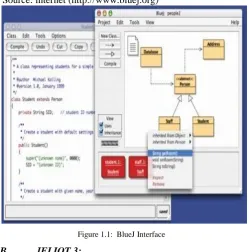
The aim of BlueJ is to provide an easy-to-use teaching environment for the Java language that facilitates the teaching of Java to first year students. BlueJ emphasizes on visualization and interaction techniques to create a highly interactive environment that encourages experimentation and exploration [5].
a. BlueJ supports:
a) fully integrated environment b) graphical class structure display c) graphical and textual editing
d) built-in editor, compiler, virtual machine, debugger, etc
e) easy-to-use interface, ideal for beginners f) interactive object creation
g) interactive object calls h) interactive testing
[image:2.595.318.565.83.315.2]i) incremental application development Source: internet (http://www.bluej.org)
Figure 1.1: BlueJ Interface
B. JELIOT 3:
Jeliot 3 visualizes the execution flow of a Java program by showing the current state of the program (e.g., methods, variables, and objects) and animations of expression evaluations and loops. Jeliot 3 evolved from a previous version called Jeliot 2000 [6]. The new version was developed in order to achieve two new goals:
a. To provide support for object-oriented programs b. And to improve software modularity.
Currently, Jeliot 3 animates a larger subset of the Java language than Jeliot 2000, with features like values and variables of primitive data types (e.g. int, boolean, char), strings, primitive type 1-dimensional arrays, expressions including operations and assignments, control structures, error reporting and I/O operations. Furthermore, it also
animates object-oriented programming (e.g. inheritance and method calls).
[image:2.595.36.286.345.598.2]Source: internet (http://cs.joensuu.fi/~jeliot/index.php)
Figure 1.2: The user interface of Jeliot 3.
C. KAREL ++:
Karel, a robot world simulation, was used in the early 1980’s to introduce structured programming concepts, similar to Pascal. Karel++ is an object-oriented descendant of the original Karel. Karel++ introduces the art of Object-Oriented Programming in a gentle approach. Karel J. Robot has been developed recently to be a Java-based sibling of Karel++. This tool supports three different programming languages, C++, Java, and LISP. Karel's descendants tend to require that students write new classes to extend a basic robot class. They also include features such as data types, variables, concurrency, and recursion [6,7].
Source: internet
(http://pclc.pace.edu/~bergin/karel.html)
Figure 1.3: Karel++ World in Action
D. JPie:
[image:2.595.317.559.459.704.2]classes in the underlying language, enabling development of sophisticated object-oriented applications and establishing a pathway for programmers who want to transition into more traditional textual programming. JPie's functionality is provided within a user-friendly environment that streamlines the software development process. For example, JPie's integrated graphical user interface builder supports property connections and automatic event handling [6.7].
[image:3.595.38.285.161.386.2]Source: internet (http://jpie.cse.wustle.edu/)
Figure 1.4: JPie Interface of Class Person
E. Green Foot:
Greenfoot is a software tool designed to let beginners get experience with object-oriented programming. It supports development of graphical applications in the Java™ programming Language. Greenfoot provides a painless, fun, and engaging entry point for novice programmers but also supports the full power of the Java programming language for more advanced programmers. Greenfoot is fun and engaging because it makes it relatively easy for novice programmers to create 2D games, animations, and simulations [8].
Source: internet (http://www.greenfoot.org)
Figure 1.5: The Greenfoot IDE in Run mode
F. jGRASP:
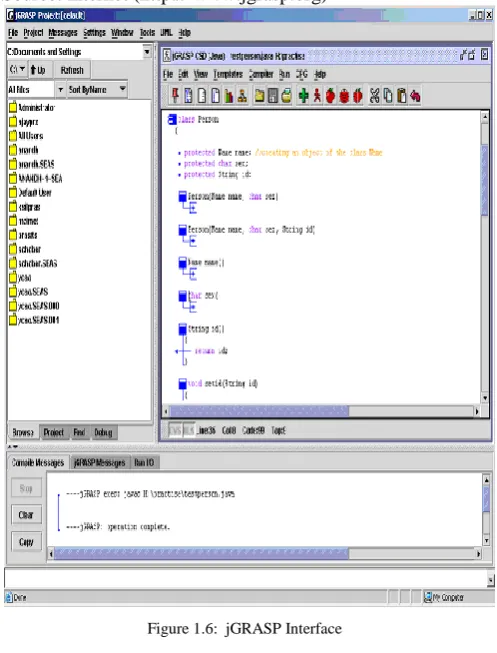
jGRASP (Graphical Representations of Algorithms, Structures, and Processes) is a software visualization tool that can perform a number of functions related to code development. It can be used to create, edit, compile and run Ada 95, C, C++ and Java programs. jGRASP is a lightweight development environment, created specifically to provide automatic generation of software visualizations to improve the comprehensibility of software. jGRASP is implemented in Java, and runs on all platforms with a Java Virtual Machine (Java version 1.5 or higher). jGRASP produces Control Structure Diagrams (CSDs) for Java, C, C++, Objective-C, Ada; and UML class diagrams for Java [9].
[image:3.595.315.564.227.554.2]Source: internet (http:// www.jgrasp.org)
Figure 1.6: jGRASP Interface
G. JEROO:
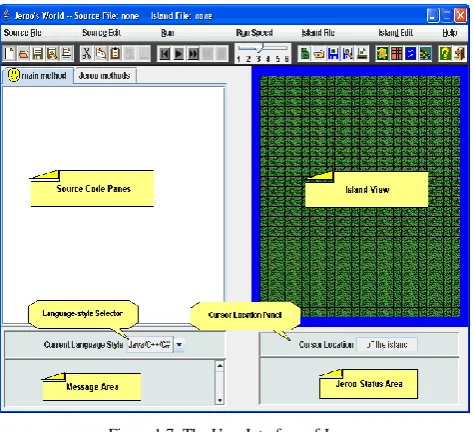
Jeroo is an educational tool designed for novice programming students. It is an integrated development environment and micro world that was inspired by Karel the Robot and its descendants. It was designed to help students learn to instantiate and use objects, to learn to design and write methods, and to learn about control structures. The Jeroo tool has four major components: (1) the user interface, (2) the Jeroo programming language, (3) editors, and (4) a runtime module [10].
Jeroo supports three language styles:
a. A Java/C++/C# style that is a subset of the common features of those languages
b. A VB.NET style that is a true subset of VB.NET c. A Python style that is a true subset of Python
[image:3.595.37.289.545.770.2]Source: internet (http://www.jeroo.org)
Figure 1.7: The User Interface of Jeroo
H. Alice:
Alice is a 3D Interactive Graphics Programming Environment built by the Stage 3 Research Group at Carnegie Mellon University under the direction of Randy Pausch. Alice can be free downloaded from http://www.alice.org/jalice. Originally designed for Windows, Alice now has an Open-GL rendering option suitable for any platform [11,12].
A goal of the Alice project is to make it easy for novices to develop interesting 3D environments and to explore the new medium of interactive 3D graphics.
a. Alice offers a full scripting and prototyping environment for 3D object behavior in a virtual world. 3D models of objects (e.g., animals and vehicles) populate a virtual world, providing an object-oriented flavor. By writing simple scripts, users can control object appearance and behavior.
b. It is not necessary to type lines of code at all. Using the smart editor, students can drag and drop the instructions that make up their programs. During script execution, objects respond to user input via mouse and keyboard. Each action is animated smoothly over a specified duration. This replaces the traditional animation methodology, where the animator prepares many frames and then uses a frame animator to view a succession of frames in rapid sequence.
c. Programming 3D animations allows students to immediately see how their program code executes. The visual feedback allows the student to connect individual lines of code to the animation action. This leads to an understanding of the actual functioning of different programming language constructs.
A. Alice comes in two different flavors:
a. The main program, Alice, was created for high schools and college age students by Carnegie Mellon University.
b. A doctoral student at Carnegie Mellon University designed Storytelling Alice, for middle schools (particularly girls).
The focus of the Alice project is to provide the best possible first exposure to programming for students ranging from middle school to college students [11].
B. Five Areas of ALICE Interface:
There are five basic areas of ALICE interface:
a. World Window: Shows the world you are building.
b. Object Tree: Contains of the objects in the world
c. Details Area: Provides more information about the world or an object in the world
d. Editor Area: Allows you to make objects in your world do new things like move and spin.
e. Events Area: Allows you to tell ALICE when to
[image:4.595.317.561.91.435.2]make objects do certain things. Source: Alice Software
Figure 1.8: The ALICE World Interface
Example: Program created in Alice [12]
Bubble sort program created in Alice
[image:4.595.316.569.442.739.2]Source: Alice Software [12] (Alice Interface: Bubble_sort.a2w)
Figure 1.8.1: Alice interface of Bubble Sort program
Fig1.8.2: Sorting process starts
V. CONCLUSIONS
We can use animated program visualization to support innovative instructional methods for teaching beginners about objects, their behavior and state. Students can able to watch what went wrong in their programs and easily debug and correct them.
The concepts of behavior and state as they apply to objects, present particular challenges to the instructor of introductory courses. The technology of animated program visualization offers a way to keep the focus on objects while teaching about behavior and state.
VI. REFERENCES
[1] Pausch, R. Cooper, S.,& Dann . Teaching Objects-first in Introductory Computer Science. ACM SIGCSE Bulletin 35(1), pp.191-195. March 2003
[2] Dann, W., Cooper, S. & Pausch, “Making the connection: Programming with animated small worlds”. Proceedings of the 5th Annual Conference on Innovation and Technology in Computer Science Education, Helsinki, Finland, pp.11-13, July 2000.
[3] Cooper, S., Dann, W., & Pausch, “Alice: A 3-D tool for introductory programming concepts.” In Proceedings of the 5th Annual CCSC Northeastern Conference 2000, Ramapo, NJ, pp.28-29, April 2000.
[4] Cooper, Stephen, Wanda Dann, and Randy Pausch (2000) “Developing Algorithmic Thinking with Alice.” Proceedings of ISECON 2000, v 17, pp. 506-539.
[5] Kolling, M., Quig, B., Patterson, A., and Rosenberg, J. “The BlueJ system and its pedagogy”. Journal of Computer Science Education, vol.13(4):pp.249–268, 2003.
[6] Moskel, Barbara, Deborah Lurie, and Stephen Cooper. “Evaluating the Effectiveness of a New Instructional Approach.” Proceedings of the 35th SIGCSE technical symposium on Computer Sci-ence Education, pp 75-79, June 2000.
[7] Jayaraman, B. and Baltus, “Visualizing program execution.” Vl. ’96: Proceedings of the 1996 IEEE Symposium on Visual Languages, Washington, DC, USA. IEEE Computer Society, pp. 30, 1996
[8] Kolling, M. “The Greenfoot Programming Envrion- ment”. ACM Transactions on Computing Education, vol.10(4),2010.
[9] Davy, J.D., Audin, K., Barkham, M. and Joyner, C. (2000) “Student well-being in a computing department.” Proceedings of the 5th Annual Conference on Innovation and Technology in Computer Science Education, Helsinki, Finland, pp.136-139.
[10] B. Dorn and D. Sanders. “Using Jeroo to introduce object-oriented programming, FIE '03: Proceedings of the 33rd annual Frontiers in Education Conference, volume 1, pp. T4C 22-27, 2003.
[11] Pausch, R. (head), Burnette, T, Capeheart, A.C., Conway, M., Cosgrove, D. DeLine, R., Durbin,J., Gossweiler,R., Koga,S., & White, J. “Alice: Rapid prototyping system for virtual reality”, IEEE Computer Graphics and Applications, vol.15(3),pp. 8-11, June 1995