-
--
....
...
-
-
- -
--
--
---===;='
= ":'
Program ProductAPL \360 Primer Program Nos. 5734-XM1
5736-XM1
This primer provides an introduction to the APL/360 system and to the APL programming language. I t discusses the mechanics of using the system, and shows how to write represent-ative programs for a variety of applications. The treatment is elementary. For a discussion of advanced system features and available opera-tions, refer to the APL/360 User's Manual
( GH 2 0 - 06 8 3) .
This Primer was written by Paul Berry of the IBM Research Division, T. J. Watson Research Center, Yorktown
Heights, New York. The text benefitted greatly from the
suggestions, criticisms, and comments of the readers of the various early drafts, and especially those of A. D. Falkoff, K. E. Iverson, J. C. McPherson, L. M. Breed, and R. H. Lathwell. The final draft was completed with the technical assistance of Miss C. Conroy.
The text was entered at a terminal, and edited and composed by an APL\360 program. The master pages were then typed by the computer at the terminal, using an IBM courier typing element.
This edition is a reprint incorporating Technical Newsletter GN20-2124. It does not obsolete the previous edition (GH20-0689-0) as updated by GN20-2124.
This manual and the program to which it applies are distributed without warranty on an "as is" basis by IBM under a modified License Agreement for IBM Program Products, and an Agreement of Understanding. Reference should be made to those documents for information on the con-ditions under which this manual and the program are distributed.
A form for readers' comments is provided at the back of this publication. If the form has been removed, comments may be addressed to IBM Corporation, Technical Publications Department, 112 East Post Road, White Plains, New York 10601.
This publication revises and supersedes C20-1702-0.
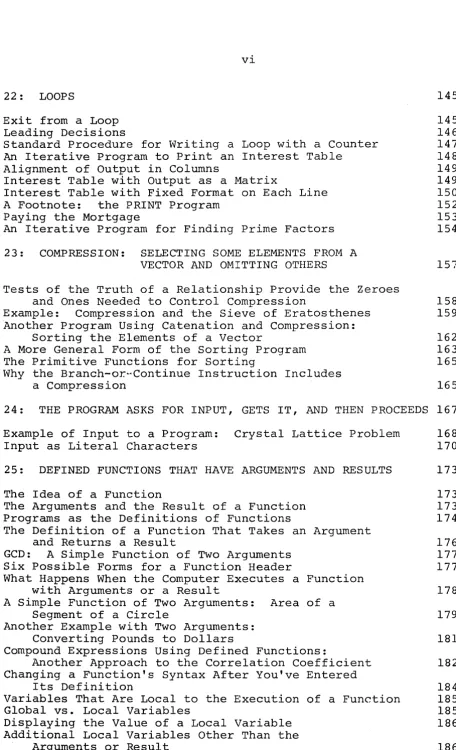
CON TEN T S = = =
=
==
PART J
1: INTRODUCTION 1
Why an APL Primer? 1
What Is a Remote-Terminal Time-Sharing System? 1
What Is a Computer Program? 2
What Is a Programming Language? 4
PO"v~er, Relevance, and Simplici ty in a Programming Language 4
How to Read This Primer 5
2: COMMUNICATING WITH THE COMPUTER
What Equipment Do You Need? The APL Typeface
Establishing the Telephone Link Whose Turn to Type?
Distinguishing Who Typed What Fixing Typing Errors As You Go Overstrikes Not Allowed
Visual Fidelity
Interrupting the Computer
3: BASIC OPERATIONS IN ARITHMETIC
7 7 7 8 9 10 10 11 11 12 13
The Workspace 13
The Two Modes of Operation: Execution vs. Definition 13
Addition, Subtraction, Multiplication, and Division 14
The Idea of a Variable: Associating a Name with a Value,
and Storing Them 15
Storing or Printing the Result of a Calculation 15
Using the Stored Valu~ of a Variable 16
Possible Names for Variables 17
Storing a Result under a Name That Has Already Been Used 17
Referring to a Variable Which Has No Value 18
Examples of Arithmetic with Variables 18
4: MORE ARITHMETIC OPERATIONS
Negation Reciprocals
Monadic and Dyadic Operators
Raising to a Power (Exponentiation) Taking a Root
Maximum: Taking the Larger of Two Numbers Minimum: Taking the Smaller of Two Numbers The Floor and the Ceiling of a Number
Rounding to the Nearest Integer
Summary of Arithmetic Operators Mentioned Thus Far
5: SEVERAL OPERATIONS IN THE SAHE INS'liRUCTION
Order in Which Operations Get Executed in APL Use of Parentheses
Rewriting the Earlier Examples
with Several Operations in the Same Instruction Do You HAVE to Write Many Operations
In a Single APL Instruction?
6: ENTERING THE DEFINITION OF A PROGRArvl SO THAT IT CAN
27
27
29
31
32
BE USED REPEATEDLY 33
Starting the Definition
Focal Length of a Lens: A Simple Calculcation to Illustrate Program Definition
Sample Use of the Program Just Defined
Another Sample Program: Efficiency of a Diesel Engine Writing the DIESEL Program in a Single Line
An Instruction in One Program Can Call for the Execution of Another Program
7: DISPLAYING OR CHANGING THE PROGRAM AFTER YOU'VE
33 34 36 37 38 39
DEFINED IT 41
Adding Another Line 41
Replacing a Line 42
Displaying What is Already on a Line 42
Displaying the Whole Stored Definition 44
Inserting a Line between Lines That Are Already Defined 44
Deleting a Line of the Definition 46
Changing the Program's Header 47
Erasing Programs or Variables Entirely from Your Norkspace 47
8: REPRESENTING NUMBERS
Decimal Form Exponential Form Negative Numbers
Negative Numbers in Exponential Form Very Small Numbers
Precision of Numbers Number Display
Which Form Does the Computer Use?
9: TESTING THE TRUTH OF A RELATIONSHIP
Example of Test for Equal How Close Is Equal?
10: MORE OPERATIONS IN ARITHMETIC
Absolute Value
Residue and Remainder
Powers of the Natural Constant e Logarithms
Natural Logarithms Antilogs
Logical Operations Logical OR
Logical AND Exclusive OR
NOT: Logical Negation
Getting a Variable's Sign with the Signum Function Sine, Cosine, and Tangent
11: CONTROLLING THE SEQUENCE IN WHICH THE LINES OF A PROGRAM ARE EXECUTED
59 59 59 60 61 62 62 62 63 63 64 65 65 66 67
"Ordinary" Order of Execution 67
Branches 67
Branching Out of a Program 68
Computed Branches 68
The Factorial: An Example of a Program with a Branch 69
Program Loops 70
The Roots of a Quadratic: Another Example of a Program
with a Conditional Branch Out 70
Branch or Continue 71
The Factorial Again: An Improved Version Using Two
Branch Instructions 73
12: ARRANGING THE WAY THE PROGRAM TYPES ITS OUTPUT
Printing Text
Results and Heading Appearing on the Same Line
13: LINE LABELS FOR EASIER BRANCHING
14: WHAT TO DO WHEN THE PROGRAM STOPS
Halt When an Instruction in Your Program Can't Be
77
77 80
81
83
Executed 83
A Program Error Doesn't Mean That Execution Is AllOver 84
Resuming Execution 85
Where Was Work Suspended? 86
Terminating Execution of All Halted Functions 87
Changing Individual Characters Within a Line 87
Illustration: Using Character Editing to Correct a Mistake
in a Program 88
Editing Characters in the Program Header 91
Tracing the Execution of a Program 91
Suspending Execution Part Way Through 92
'IS: SYSTEM COMMANDS 93
Distinguishing System Commands from Other Instructions 93
Signing On 93
Signing Off 94
Holding the Telephone Line for the Next User 94
Establishing a Sign-On Password 94
Saving a Workspace 95
Naming a Workspace 96
Your Library of Saved Workspaces 96
Bringing a Saved Workspace into the Active Area 97
Loading a Workspace from a Public Library 97
Saving a Workspace into a Public Library 98
Loading a Workspace from the Private Library of Another
User 98
Dropping a Workspace from Your Library 99
Automatic Saving: Signing Off with "Continue" 99
Automatic Continue When a Connection Is Broken 100
Diagram Summarizing Information Flow Between You,
Your Active Workspace, and Saved Workspaces 101
Clearing the Active Workspace 103
Sending a Message to the Operator 103
Broadcast Messages 104
PART II
16: VECTORS: PARALLEL PROCESSING OF THE ELEMENTS
OF ARRAYS 105
Entering a Vector of Numbers 105
Parallel Processing of Vectors 106
Using Parallel Processing in some of the Problems
Introduced Earlier 107
Vectors Must Have Matching Lengths 107
Extending a Single Number to Match the Length of a Vector 108 Parallel Processing Requires All the Elements
to Be Treated in the Same Way 110
Adjusting a Formula to Facilitate Work with Vectors III
A Vector in a Branch Instruction 112
17: "REDUCING" A VECTOR: APPLYING THE SAME OPERATION
TO ALL THE ELEMENTS 113
Summation 113
Product 114
Maximum Reduction: Looking for the Largest 114
Minimum Reduction: Looking for the Smallest 115
OR Reduction: Looking for "Any" 115
AND Reduction: Looking for "All" 116
Example Using the Sum of Products: Price Times Quantity
Ordered 117
18: GENERATING ARRAYS AND FINDING THEIR DIMENSIONS
Generating an Array by Reshaping vectors of Literal Characters An Array Can Have Zero Length Generating Consecutive Integers Finding Out the Shape of an Array What Is the Shape of a Single Number?
Another Example Using Parallel Processing of Vectors: The Correlation Coefficient
19: SELECTING PARTICULAR ELEMENTS FROM AN ARRAY BY USING INDEX NUMBERS
Respecifying Certain Elements Within an Array The Index Numbers May Result from an Expression Indexing an Expression
Indexing by an Empty Vector of Indices Indexing a Matrix
20: FINDING THE INDEX NUMBERS THAT LOCATE PARTICULAR ELEMENTS WITHIN A VECTOR
119
119 120 121 121 122 124
125
127
127 128 128 129 129
131
Finding Several Indices at Once 131
Indexing Works Just as Well for Arrays of Literal
Characters 132
Looking for the Index Number of a Value
That Isn't There 133
The Index for a Value that Occurs at Several Locations
In the Vector 134
An Example Using Iota to Find Index Numbers:
Evaluating Hexadecimal Representations 134
21: CATENATION: BUILDING A VECTOR BY CHAINING ITEMS TOGETHER
Building a Vector of Results by Catenating the Latest
137
Result to the Earlier Ones 139
Example Using Catenation: Accumulating Primes 139
Making Any Variable Into a Vector 141
Inserting New Elements Between Existing Elements
of a Vector 141
22: LOOPS
Exit from a Loop Leading Decisions
Standard Procedure for Writing a Loop with a Counter An Iterative Program to Print an Interest Table
Alignment of Output in Columns
Interest Table with Output as a Matrix
Interest Table with Fixed Format on Each Line A Footnote: the PRINT Program
Paying the Mortgage
An Iterative Program for Finding Prime Factors
23: COMPRESSION: SELECTING SOME ELEMENTS FROM A VECTOR AND OMITTING OTHERS
Tests of the Truth of a Relationship Provide the Zeroes
145 145 146 147 148 149 149 150 152 153 154 157
and Ones Needed to Control Compression 158
Example: Compression and the Sieve of Eratosthenes 159
Another Program Using Catenation and Compression:
Sorting the Elements of a Vector 162
A More General Form of the Sorting Program 163
The Primitive Functions for Sorting 165
Why the Branch-or-Continue Instruction Includes
a Compression 165
24: THE PROGRAM ASKS FOR INPUT, GETS IT, AND THEN PROCEEDS 167
Example of Input to a Program: Crystal Lattice Problem 168
Input as Literal Characters 170
25: DEFINED FUNCTIONS THAT HAVE ARGUMENTS AND RESULTS 173
The Idea of a Function 173
The Arguments and the Result of a Function 173
Programs as the Definitions of Functions 174
The Definition of a Function That Takes an Argument
and Returns a Result 176
GCD: A Simple Function of Two Arguments 177
Six Possible Forms for a Function Header 177
What Happens When the Computer Executes a Function
with Arguments or a Result 178
A Simple Function of Two Arguments: Area of a
Segment of a Circle 179
Another Example with Two Arguments:
Converting Pounds to Dollars 181
Compound Expressions Using Defined Functions:
Another Approach to the Correlation Coefficient 182
Changing a Function's Syntax After You've Entered
Its Definition 184
Variables That Are Local to the Execution of a Function 185
Global vs. Local Variables 185
Displaying the Value of a Local Variable 186
Additional Local Variables Other Than the
[image:8.615.70.527.32.783.2]A Mystification to Avoid 187 Editing the Definition of a Function that Has Arguments,
a Result, or Local Variables 187
Spaces Separate a Function from Its Arguments 187
26: TRANSFERRING PROGRAMS OR DATA FROM SAVED WORKSPACES TO THE ACTIVE WORKSPACE
Grouping of Functions and Variables
Listing the Names of Groups and Their Members Dispersing a Group
Erasing the Members of a Group Protected and Unprotected Copying
Copying an Entire Workspace into a Cleared Workspace Commands That Summarize ~vhat' s in Your ~'Vorkspace
APPENDIX A: NOTES ABOUT WHAT HASN'T BEEN MENTIONED
Encoding and Decoding the Representations of Numbers Factorial
Combinations Operator
Residue with Nonintegral Left Argument Nor and Nand
Multidimensional Arrays
Indexing of Multidimensional Arrays Matrix Products
Generalized Matrix Product Outer Product
Transposition of an Array Reversal of an Array
Rotation of an Array
Compressing a Multidimensional Array Expansion of an Array
Random Numbers: Roll and Deal System and Program Information Library Functions
Additional System Commands Change of Origin
Locking a Function Locking a Workspace Width Control
Messages Between Terminals
Identifying Who Else Is Signed On
APPENDIX B: SUMMARY OF SYSTEM COMMANDS
Terminal Control Commands Workspace Control Commands Library Control Commands Inquiry Commands
Communication Commands
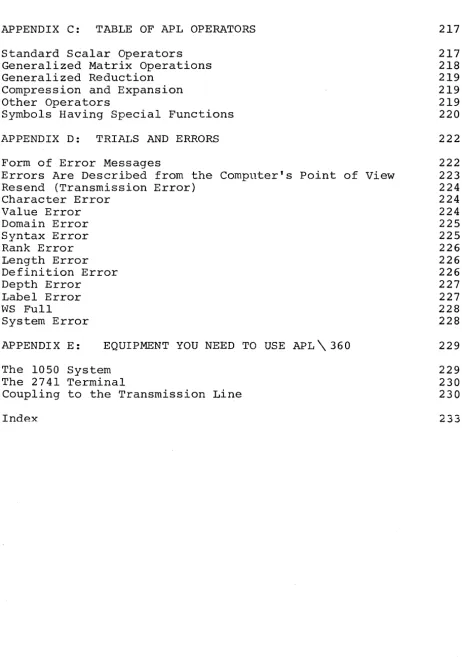
APPENDIX C: TABLE OF APL OPERATORS
Standard Scalar Operators Generalized Matrix Operations Generalized Reduction
Compression and Expansion Other Operators
Symbols Having Special Functions
APPENDIX D: TRIALS AND ERRORS
217
217 218 219 219 219 220
222
Form of Error Messages 222
Errors Are Described from the Computer's Point of View 223
Resend (Transmission Error) 224
Character Error 224
Value Error 224
Domain Error 225
Syntax Error 225
Rank Error 226
Length Error 226
Definition Error 226
Depth Error 227
Label Error 227
WS Full 228
System Error 228
APPENDIX E: EQUIPMENT YOU NEED TO USE APL \ 360
The 1050 System The 2741 Terminal
Coupling to the Transmission Line
Index
229
229 230 230
[image:10.621.69.532.94.751.2]Why an AP~ Primer?
The APL\360 System puts an advanced computing system
within the reach of a wide range of users. APL\360 is
distinguished from earlier systems of this type by its speed and power, and by the radical simplicity of the instructions which control it. This combination makes APL well suited not only to the advanced scientific or technical user, but also to the occasional user and to the user with little or no previous experience with computers.
This primer is intended to provide an introduction to the APL\360 System and to the APL programming language. It will show you the mechanics of using the system, and how to
write effective programs to cover a wide range of
applications. It explains in detail many points which the experienced user will find obvious--and you may therefore prefer to skip some portions.
Because this is a primer, little use will be made of a number of the more advanced features of the system; the primer doesn't describe all of the operations available, and mentions only a few of the specialized applications that are possible using APL. However, even at this rather elementary level, you will already have at your command all you will need for a wide range of uses--and frequently more than \.,as
available even to the experienced users of earlier systems. If you subsequently go on to more advanced material, you
will learn ways in which the programs included in this
primer could have been made neater or simpler or more
general. But that is beyond the scope of a primer. Complete definitions of all of the operations in the APL language and all of the features of the APL\360 System may be found in the APL\360 User's Manual. Here we are concerned with provid-ing you with a basic orientation to the way the system is used, and arming you with the fundamental skills needed to make APL\360 work effectivel1 for you.
What is a Remote-Terminal Time-Sharing System?
APL\360 is a time-sharing system with remote terminals. Let's consider each of those terms in turn.
of electric typewriter installed wherever i t is convenient. This typewriter is equipped for tele-processing: in addition
to serving as a regular office typewriter, i t can be
connected by telephone to a large computer located miles away. When you type something on the typewriter, what you type is transmitted to the computer. Within seconds you can receive the response transmitted over the telephone lines from a.computer you have never seen. The computer is able to take control of the typewriter and cause i t to type the
computer's reply. A typewriter that is connected to a
computer in this fashion is called a "terminal" of the computer. It is "remote" because the connection is by way of the public telephone lines, so that the typewriter can be located anywhere that a telephone line can reach.
"Time sharing" means that the central computer is
capable of serving many customers at once. Actually i t
serves them in rotation; each one gets a tiny fraction of the computer's time, but the computer's operating speed is so high that often there is no appreciable delay between the time you type your request and the time the computer types its response. Even for problems of moderate size, a response may be received within a few seconds. Time sharing permits you to have apparently continuous use of a large computer, while paying a charge based on the far smaller amount of time that the computer is actually working on your problem. APL\360 has a conversational style, which permits you to make a request, get an immediate answer, then make another request, and so on. This would be prohibitively expensive if you had to tie up an entire computer to do it. Time sharing serves both to keep the computer in efficient use and to share its cost among many customers.
The letters APL designate the programming language that is the outgrowth of the work of K. E. Iverson, first at Harvard and then at IBM. The name comes from the initials of his book A Programming Language (New York: Wiley, 1962). APL\360 is the computing system which uses this language with IBM System/360 computers.
What Is a Computer Program?
)
"program" has been used in this sense only since the advent of the computer. But the underlying idea of a set of precise instructions that are to be carried out literally and in
sequence is older and more familiar. A cook book is an
obvious example of an attempt to summarize, in order, those
things that the cook must do in order to produce an
unfamiliar dish. What is different about a computer program
is the speed with which the computer can carry out its
instructions, and the literal faithfulness with which the
computer follows what it is told.
Sometimes the literalness of the computer requires you
to be more precise than you would be if you were simply
giving directions to a friend. If the instruction you give a computer can be carried out, the computer will carry i t out,
regardless of whether it is what you really had in mind. So
you have to be careful to state your instructions in a way
that correctly describes what you want. If the instruction
is wrongly spelled, or otherwise impossible to accept as
stated, the computer will stop and report what you
instructed i t and why i t cannot proceed. Human beings might
hazard a guess at what you meant by an incorrect
instruction, but the computer doesn't.
The computer has to be able to understand the
instructions you give it. Computers do not understand
English; although they may be programmed to recognize a
handful of English words, the natural language is too rich,
too complex, and too ambiguous for them. Moreover, English
is ill-suited to describe many of the things that you might
want to ask a computer to do. Calculations can be described
far more neatly, clearly, and briefly by the symbols of
arithmetic. That is why we describe a calculation by a
formula rather than in English words.
The designers of the traditional notations of
arithmetic and algebra did not foresee all of the things you might want to ask a computer to do, and hence arithmetic and algebra do not contain all the symbols that are needed. This
makes i t necessary to have a speGial language for writing
programs of computer instruqtions. Tnat language is more
extensive than conv~nt~onal arithmetic, but much more
restricted and pre~ise thqn natural English~ The language in
Wha t ~ s ~_£E?-2E~~~~.'1.;
..
l:r~.~9:.~~9.~.?A programming language is the language in which you (the user) tell the computer what i t must do. Most of this primer is concerned with APL, the programming language of the APL\360 System. A set of instructions written in APL can also be carried out by any person who knows the language: they don't have to be executed by a machine. A progra~~ing language is thus
a
way of stating a procedure, regardless of who or what actually executes the procedure.Inside the hardware of the computer, all of its
instructions and all of the data i t works with are encoded as patterns of electronic pulses. This is the electronic language internal to the machine. You don't need to know anything about this language in order to use the computer. All of your communication with the computer ~vill be in APL. The computer will then translate that into instructions in
its own internal language, and then execute them.
Internally, the machine works by carrying out only one very small and very simple step at a time. One APL instruction that you type may easily start a sequence of hundreds or even thousands of machine instructions before the work is
completed. But these are executed so rapidly that the
machine completes several thousand a second. The machine
sets up its internal instructions in response to the brief
instructions that you type in APLi you need never be
concerned with the internal operation of the computer.
Power, Relevance r and S~mEli9,.t~.y In a Programmin~L L.a_llSL~~g.~.
A programming language should be relevant. That is, you should have to write only what is logically necessary to specify the job you want done. This may seem an obvious point, but many of the earlier programming languages forced
the user to be concerned as much with the internal
requirements of the machine as with his own statement of his problem. APL\360 takes care of those internal considerations automatically.
)
can't have the other, but that is not so. Simplicity does
not mean that the computer is confined to doing simple
tasks, but that the user has a simple way to write his
instructions to the computer. The power of APL as a
programming language comes in part from its simplicity; i t
is this simplicity that makes i t simultaneously well suited to the beginner and to the advanced user.
How to Read This Primer
If thLs is your first introduction to the use of
APL\360, after you've glanced through the primer to get a
general impression of its contents, i t would probably be
wise to sit down at an APL\360 terminal with the book beside
you. Then you should tryout the calculations and programs
in the text. Add variations or explorations of your own;
that's one of the advantages of a conversational system:
it's so easy to experiment. See for yourself how the system
responds to your instructions.
After this early stage, you will probably find i t more useful to come back to various passages as the need for them
arises; the table of contents and the index should help you
find what you need. You should also have q copy of the
APL\360 User's Manual, which gives complete but concise
descriptions of the APL operators and the features of the
APL\360 System. The manual includes coverage of a number of
advanced points which, for simplicity, are omitted from this primer.
The two most distinctive and valuable characteristics
of the APL language are the way i t treats arrays, and the
way i t permits you to use a program as you would use a
mathematical function. Neither of these topics is mentioned
at all in Part I of the primer, since i t seemed desirable to
lay a foundation of familiarity with other matters before
getting to them. But if you already feel familiar with these topics and with their treatment in programming systems, you
may wish to look ahead to Chapter 16, where the treatment
of arrays is introduced, and to Chapter 25, where we take up
programs that can be used as functions. The examples in all
~
CLR
[~
I;
I
~
DO
~
I
~
I
~
I
~
I
~
I
~
I
~
I;]
OOB
~[ ~
I
~
IT]
~
I ;
I
t
I
~
I
i
I
g
I
~
I
!) (
1f
ON1
[ -
~OCK
)(~
I
~
[D
F
I
~
I
~
I ; I
~
I
2
I
~
I
~
)
~
RETURN,l
SETJ[
SHIFT )[~
I;]
2
I
~
I
*
I ; I
~
I : I
~
I )
)~L
OFF2: CO~L\1UNICATING WITH THE COHPUTER
This chapter deals with some practical aspects of
getting your terminal connected to the APL\360 System,
communicating with the computer, and other such mundane but
essential matters. If you are about to try a terlninal for
yourself, this chapter logically precedes the ones that
describe the APL language and the way in which you carry out calculations in it. But if your interest is primarily in the
APL language, you may wish to skip this chapter now, and
return to i t when you are ready to use an APL\360
terminal.
You need:
a communications terminal with an APL typeball
a data telephone or telephone coupler
an APL\360 account number.
The typewriter may be either an IBM 2741 or an IBM
1050. The 1050 permits the attachment of certain extra
equipment, such as card readers and punches, but is slower
in operation and more expensive. Thus unless you have
special needs for the extra equipment, the 2741 is
preferable, and that is the terminal to which this primer
usually refers. A complete discussion of the alternative
models and features usable with the APL\360 System may be
found in Appendix E.
A data telephone may be rented from the telephone
company. The system uses the Western Electric Dataset, Model 103-A2, or equivalent equipment.
The APL Typeface
The APL typing element provides both a full upper-case alphabet and the special symbols used in the APL programming language but not found on an ordinary office typewriter. The
APL typeface was chosen so as to end confusion between the
letter 0 and the number 0, or between the letter I and the
number 1, or between the letter X and the sign that means
distinguish letters, numerals, and operation signs, as follows:
Alphabetics:
*
always capitalized*
always italic*
always condensed (higher than wide)*
always with serifsABC D E F G H I J K L M N 0 P Q R STU V W X Y Z
Numerals:
*
always upright*
always condensed1 2 3 4 5 6 7 8 9 0
Operators:
*
not condensed*
upright (except for Greek letters)+ - x t
*
r
L T L A V = ~ < > 1++ 1 p E a wThis typeface makes i t quite clear whether any character is a letter, a numeral, or an operator sign. For instance, the phrase that indicates "the letter 0 times the letter X plus the letter I minus ten" can be typed
OxX+I-l0
which leaves no doubt about which are the letters, which the numerals, and which the operator signs.
When you are ready to use APL\360 (assuming Lhat you are using a 2741 terminal) you proceed as follows:
1. Turn on the typewriter power. Set the switch on the left side of the 2741 type\.vri ter to
cor-1
(for "communicate") rather than to LCL (which stands for "localtl) .
2. Depress the TALK button on the data telephone, and dial the number of the APL\360 computer.
3. When you hear a high-pitched tone, press the DATA
button firmly and release it. Once DATA is
4. Type your sign-on.
When you first set the typewriter switch to COM, the
keyboard is locked. When the connection to the computer is
established, the keyboard will be unlocked, and you may type
your sign-on. This is a right parenthesis followed by your
user number and password (if any). When the computer
receives your sign-on command, i t acknowledges by typing
these things: your port number (which of the computer's
telephone extensions you reached), your name, the date and
time, and the system identification. Sometimes you will also
receive a broadcast message from the APL operator sent to
all users who are signing on. Until your sign-on is
accepted, you cannot do any other work. However, if you need
to, you can type a message to the APL operator even before
you're signed on (see p. 103). Here is a sample sign-on:
)4000000
OPR: MERRY CHRISTMAS, HAPPY CHANUKKAH, OR SEASON'S GREETINGS.
009) PCBERRY 12/23/67 39.12.37
A P L \ 3 6 0
Once your sign-on has been acknowledged, you are ready to
begin work. Most of the rest of the primer is devoted to
explaining the kinds of calculations you can perform and
programs you can write. The balance of this chapt~r deals
with the mechanics of typing your instructions to the
computer.
Whose Turn to Type?
You and the computer can't both type on the same
typewriter at the same time. You have to take turns. You can
type only when the keyboard is unlocked, whereas the
computer can type only when the keyboard is locked. While i t is the computer's turn to type, the keyboard remains locked, and you can't type anything.
When you complete the typing of an instruction, you
have to let the computer know that you have finished. The
carrier-return key serves to enter the instruction: that is,
to signal the computer that you have finished typing, and
that i t should start interpreting and executing the
instruction you have typed. When you hit the carrier-return
1. The carrier returns to the left margin and the
paper
is
moved up by one line.2. The keyboard
is
locked.3. The computer receives the signal that your message
is
complete.Locking the keyboard serves two purposes: i t keeps you
from typing any.more until the computer
is
ready for you,and i t keeps the typewriter available for the computer's
response to you. The computer never starts work on your
instruction until i t receives the signal that you have
finished typing. Since that signal
is
the carrier return,each message you type must fit on a single line. But
instructions in APL are so concise that you will rarely need as much as a whole line for an instruction.
As soon as the computer completes work on the
instruction you typed, i t does these three things:
l~ Prints the result (if called for) and moves the
paper up one line;
2. Indents by
six
spaces;3. Unlocks the
instruction.
keyboard
Distinguishing Who Typed What
to await your next
The paper in your typewriter will contain a complete record of your dialogue with the computer. When you read it,
i t
is
important to be able to tell who typed what. Becausethe computer makes the carrier space over by six spaces
before the keyboard is unlocked, everything you type will
ordinarily appear indented by six spaces, whereas what the
computer types will ordinarily start at the left margin.
(1050 terminals with two-color ribbon go a step further, by
typing your part in red and the computer's part in black.)
Fixing Typing Errors as You Go
If pe(or~_.--"you press the carrier return you notice a mistake in what you have typed, you have a chance to correct
You can do that in the following way:
1. Backspace to the position of
character that is in error.
the leftmost
2. Press the ATTN key (this key is sometimes marked
INDEX or LINEFEED).
When you do this, the computer types an inverted caret
under the character in error, and spaces the paper up an
additional line. Now that character and everything appearing
to the right of i t are considered "erased." You may resume
typing the balance of your instruction. Suppose you type
A-BxC, and then you realize that the mUltiplication should
have been a division. The "erasure" and correction would
look like this:
A-BxC
v
-i-C
Overstrikes Not Allowed
Don't overstrike or X out any part of what you type. Except for certain APL characters which are always formed by
overstriking, APL\360 cannot read overstruck characters. If
you enter a statement which contains an illegal overstrike
(i.e. if you type an illegal overstrike but don't erase i t
before you hit carrier return), the computer responds with
an error message and a reproduction of your instruction up
to the point that the illegal overstrike occurred. Like
this:
A-B-i-FJ CHARACTER ERROR
A-B-i-1\
You will have to retype the line in which an overstrike
occurs.
Visual Fidelity
While you are typing, you don't have to type each of
the characters in order. For instance, you could leave extra spaces near the beginning of a line and then backspace over
interpreted by the computer the way i t looks on the paper at the moment you press the carrier return. Within the line, the time sequence in which you hit the various keys doesn't matter. This principle can be summed up by the rule, "What you see goes in."
Interrupting the Computer
It may, happen that you cause the computer to start typing a very long result, or working on a very lengthy (or even interminable) calculation. If you decide that you want to cut short what the computer is doing, there are two ways of stopping it. The easiest way is to use the "interrupt" feature supplied with some 2741 typewriters. If you have a
2741 thus equipped, pressing the ATTN key while your
keyboard is locked ~ll bring whatever the computer is doing for you to a halt.
If you have a 1050 terminal, or a have the "interrupt" feature, you can effect as follows:
1. Uncradle the telephone.
2741 that doesn't produce the same
2. Press the TALK button for a few seconds (you'll hear the high-pitched tone again).
3. Press the DATA button again.
If you have a 1050, that's all. If you have a 2741, the following additional step may be necessary:
4. If the carrier does not space over 6 spaces before
unlocking, strike the carrier return repeatedly
3: BASIC OPERATIONS IN ARITHMETIC
The \vorks pace
As soon as your sign-on is completed, the computer puts
at your disposal a block of its internal storage (or
"memory"). This block of storage
is
called your workspace,since i t
is
where all of your calculations take place. In i twill be stored the definitions of programs that you enter,
and the names and values of variables used in your
calculations. Your workspace also includes locations used by
the computer for the temporary storage of partial results
while a calculation is in process, and specifications of a
number of other items that affect the way your calculation is carried out or the way its result is printed. As you will see in Chapter 15, i t is possible for a single user to have
several different workspaces within the computer. However,
only one of these is ever available for calculation at any
one time. The one workspace which is currently available is
called your ac~~y~ workspace.
The Two l-1odes of Operation: Execution vs. Definition
The computer has two modes of operation, called
execution mode and ¢lefinition mode.- When the computer is
in-execution mode, i t carries out any instruction immediately, as soon as you enter it. If you enter an arithmetic expres-sion, the computer immediately responds with the result:
12x13 156
Ordinarily, the computer is in execution mode; i t is in
execution mode when you first sign on, and i t stays in
execution mode unless you specifically direct i t to switch
to definition mode. When the computer
is
in definition mode,i t does not execute the instruction that you enter, but
stores i t as part of the definition of a program. The
instructions that make up the program are not executed until
(at some later time, when you're back in execution mode) you
call for execution of this program. How you enter the
definition of a program is taken up in Chapter 6. The
remainder of this chapter discusses the instructions you can use to get the computer to carry out some basic operations
in arithmetic. These instructions could just as well be
included as parts of a program, but the illustrations in
Addition, Subtraction, Multiplication, and Division
These operations are familiar from everyday arithmetic.
APL uses the familiar signs to indicate them:
+ - x f
The operation sign is typed between the numbers that
are to be operated on, just as 1n arithmetic. For instance,
if you want to multiply 1345.2 by 873.21, you simply type
1345.2x873.21
The computer executes that instruction immediately, and
replies with the answer:
1174642.092
Here are some more examples of simple instructions.
Because the computer always indents by six spaces before
unlocking the keyboard, the instructions you type always
appear indented by six spaces, while the responses from the
computer are typed starting at the left margin.
176f14.2 12.3943662
17228.1-14.2 17213.9
2+2
4
5+0
5
5 5
4x1.25 5
The Idea of a Variable:
Associating a Name with a Value, and Storin~ The~,
You can store data, or the results of calculations, in
your active workspace. A stored item of data is called a
variable. Every variable has a ~ and a value; the computer
associates the value with the name, and preserves that
association in your active workspace. Whenever you refer to a variable by its name, the computer automatically supplies the value that has been associated with that name.
The symbol for assigning a value to a variable is the
left-pointing arrow. If you enter the instruction
SPEED+1088.5
you cause the value 1088.5 to be associated with the name
SPEED.
The left-pointing arrow causes the value of the
expression to the right of the arrow to be stored under the
name which appears immediately to the left of the arrow.
This instruction may be read in several ways. You can read
i t as "SPEED is specified as 1088.5," or "SPEED is assigned the value 1088.5," or even "SPEED is 1088.5."
The variable SPEED is now stored in your active
workspace. The computer doesn't type any specific
acknowledgment that i t has stored SPEED, but as soon as the variable's name and value have been stored in the workspace, the computer again indents and unlocks the keyboard.
A variable must always have both a name and a value;
you can't create a variable which has a name but no value,
and you can't store a value unless you assign i t to a
name.
Storing or Printing the Result of a Calculation
When you enter an instruction that calls for a
calculation, as soon as the instruction is executed, the
computer needs to know what to do with the result. There are
three possibilities. All three are listed at the top of the
next page, but the third one will not be discussed until the
next chapter, where we take up compound expressions in a
1. You can have the result printed. If you don't
indicate that something else is to be done with
the result of a calculation, the computer always
assumes that you want to see it, and prints i t .
2. You can have the result associated with a name,
and stored in the workspace as a variable.
3. You can have the result of that operation used in another operation in the same instruction.
Using the Stored Value of a.V!riabl!
Once you have assigned a value to a variable, from then
on whenever you refer to that variable's name, the computer
supplies the associated value. If you simply type the name
of a variable, the computer responds by printing its
value:
SPEED
1088.5
If you use the name of a variable in an instruction,
the computer carries out the instruction, substituting the
associated value wherever the name appears in the
instruction. For instance, the value of SPEED is the speed
of sound in air at 0 degrees Centigrade, expressed in feet
per second. If you need to know how far sound travels in
15.5 seconds under those conditions, you can find out by the following instruction:
15.5xSPEED
168710 75
Or, since multiplication is commutative (i.e. order doesn't matter), you could just as well enter:
SPEEDx15.5
16871.75
If you'd prefer to have that result stored, the
following instruction assigns the result as the value of a
variable called DISTANCE:
DISTANCE+SPEEDx15.5
DISTANCE
16871.75
Possible Names for Variables
The name of a variable must begin with a letter of the alphabet. After that i t may have any combination of letters or numerals, and any length. A name may not contain a space,
or any punctuation, or any of the symbols used for
operations. You may often find i t helpful to select names that have some mnemonic significance to you ••• but of course the computer is unaffected by what names mayor may not mean in English. When naming a new variable, don't give i t a name that you want to keep in use for some other purpose in the same workspace.
Storing a Result Under a Name That Has Alreadl' Been
Us'ea---Suppose that at one point you type:
X+SPEEDx8
and then later on you type:
X+SPEEDf8
Each of these instructions calls for at result to be stored under the name X. What happens? The first time you use the name X to the left of a specification arrow, a variable is introduced, with the name X, and whatever value results when the value of SPEED is multiplied by 8.
The next time you specify a value for X, that new value replaces the former one. The value of SPEED is divided by 8, and the result of that division becomes the value of X. The old value is erased.
Clearly this would be the wrong way to write the
instruction which serves to update the counter, perhaps something like this:
COUNT+COUNT+l
Each time this instruction is executed, the computer adds 1 to whatever value i t finds already associated with the name COUNT, and then stores the resulting value back under the
name COUNT. (It should be noted that COUNT must have
received its very first value in some other instruction: i t can't always have been specified by referring to its own earlier value.)
Referring to a Variable t!hich_~~_NO _yal~!::
You can assign a value to almost any name you like. But i f you attempt to display or make use of the value of a variable before any value has been assigned to i t , the computer is unable to supply an associated value, and can't proceed with the execution of your instruction. It reports the trouble by sending you an error message. For instance,
suppose you have assigned a value to SPEED but not to
INTERVAL, and then you enter an instruction which refers to INTERVAL. Your dialogue with the machine looks like this:
INTERVALxSPEED VALUE ERROR
INTERVALxSPEED
A
The first of those typed lines is your instruction. On the
second line, the computer types its error message,
indicating the kind of error iL has found. On the third line the computer repeats the instruction as received. Then the computer types a caret under the point in the instruction at which i t ran into trouble.
Examples of Arithmetic with Variables
The instruction
AxE
means that the operation of multiplication is to be
performed on the value of A and the value of B. When the
computer executes that instruction, i t finds in the
performs the operation, using those values. (The associated with A and B in the workspace memory changed unless you specify that they should be.)
values are not
Suppose that A and B have been assigned the following
values:
A+-6.25 B+-144
Then you can use those values in simple instructions, and
the computer types results, like this:
A+B
150.25
A+l
7.25
BfA
23.04
B-A
137.75
AxB
900
900fB 6.25
Z+-l fA 1fZ 6.25
A-A
0
4: MORE ARITHMETIC OPERATIONS
Negation
.
If you place a minus sign in front of a number or variable, but nothing to the left of the minus sign, you get a result which has the same magnitude but opposite sign. For instance, if B has the value -17, then you get the negation of B like this:
-8
17
Reciprocals
When you use a division sign in the same manner, i t means that the reciprocal is to be found. If A s t i l l has the value 6.25, you can find the reciprocal of A like this:
0.16
Monadic and Dyadic Operators
Negation and the reciprocal are examples of monadic
operators. It is easy to distinguish them from ~yadic
operators such as subtraction or division: the monadic
operators have no value appearing to the left of them. That is, monadic operations such as negation and reciprocal each
take only one argument, whereas sUbtraction and division
take two arguments. The arguments of an operator are the values i t works oni an argument may be a variable, a number, or the value that results when an expression in parentheses is evaluated.
A dyadic operator is always written with the values on which i t works (i.e. its arguments) on either side of i t , as for instance in A-B. A monadic operator is always written with its argument to the right of the operator symbol, as in
-B.
APL often uses the same symbol in two senses, one
Raising to a Power (Exponentiation)
In conventional arithmetic, exponentiation is indicated
by writing the power to which a number is to be raised in a
smaller typeface and placing i t above the line. For
instance, 2 raised to the 3rd power is written:
23
This is hard to type. Moreover, i t seems odd that
exponentiation has no symbol of its own, although addition,
multiplication, division, etc., all have theirs. So APL uses
a special symbol for exponentiation, placed between the
number (or variable, expression, etc.) and the power to
which i t must be raised. The sign is
*
and is located on thekeyboard above the P (P for Power). For example:
8
Here's an example of a calculation that uses
exponentiation. It is based upon the familiar rules of
compound interest. The names chosen for the variables should be self explanatory.
PRINCIPAL+1045.28
INTEREST+-. 03
YEARS+17
RATE+1+INTEREST
MULTIPLIER+RATE*YEARS
TOTAL+PRINCIPALxMULTIPLIER TOTAL
1727.688573
This sequence of instructions estimates the total to which
$1045.28 would grow if invested for 17 years at 3 per cent,
compounded annually. The calculation could also be obtained
in a single instruction, but that must wait until the next
chapter.
Taking a Root
APL doesn't have any special sign for the extraction of
a root. It doesn't need one. Taking the square root of a
number is exactly the same thing as raising i t to the
one-half power. That's the way you write i t in APL. If A has the value 144, you find the square root of A like this:
Or you might get i t this way:
12
POWER+f2 A*POWER
This procedure isn't confined to taking square roots. Any root can be extracted; for instance, you can find the
fifth root of A by the following instruction:
A*0.2
2.701920077
The designers of musical instruments that are tuned to the "even tempered" scale (such as pianos) are faced with the problem of dividing an octave into 12 equal parts. The frequency of any note must be in a constant ratio to the note one semitone below it. Since i t takes twelve semitones to make an octave, the ratio between one semi tone and the next must be picked so that the product of all twelve of
them will just make an octave. The semitone ratio is
therefore the twelfth root of the octave ratio. Knowing that the octave ratio is exactly 2, you could find the size of an
even-tempered semitone by the following two instructions.
(Here again, this could also be done in a single
instruction, as will be seen in the next chapter.)
POWER+f12 2*POWEI?
1.059463094
Maximum: Taking the Larger of Two Numbers
It is often convenient to be able to pick whichever is the larger of two numbers. APL includes an operation which does this. When the sign
r
is typed between two numbers (or variables that have numerical values) the computer selects whichever value is greater. If you typeArB
the computer examines what has been stored under those
names. Then i t takes whichever value is greater. (R~call that the values associated with A and B in the workspace remain unchanged.)
Suppose that earlier calculations resulted in the
ABC has the value 12345679, and XYZ has the value 12345678
Then your dialogue with the computer might look like
this:
ABCrXYZ
12345679
Consider an illustration in which this operation might
be useful. Suppose you work for a department store. Each
month, the store calculates for each of its customers how
much he charged and how much he paid that month. You have a
program which handles the billing. You calculate for each
customer the value of a variable you call BALDUE, which
is
the difference between the total of the accumulated charges
and the total of the accumulated payments for that customer.
The store charges each customer a service charge of
1.5% of the unpaid balance each month. You might find this
charge by the following instruction:
CHARGE+BALDUEx.015
However, for one reason or another, some of the customers
have overpaid their bills. For them, BALDUE
is
a negativenumber, and shows as a credit on their monthly statements.
If you calculate the service charge by the instruction just
shown, you'll be paying them interest at 1.5% per month
whenever they overpay. Instead, the store prefers to
calculate the service charge as 1.5% either of the balance
due or of zero, whichever is greater. You can do this by
CHARGEABLE+orBALDUE
CHARGE+CHARGEABLEx.015
Minimum: Taking the Smaller of Two Numbers
In similar fashion, another primitive APL operator
selects whichever
is
the smaller of the two values on eitherside of it. If ABC and XYZ have the same values as before,
the lesser
is
selected by this instruction:ABCl XYZ
The annual amount a wage-earner pays for FICA (social security) tax is based upon how much he earns. However, any income he has beyond $7800 a year doesn't count for social security purposes. The FICA tax rate is currently 4.4%. If a man's yearly gross income is called YEARGROSS, and has a value of $8320, then his annual FICA tax might be found this way:
343.2
YEARGROSS+8320
FICAINCOME+7800LYEARGROSS .044xFICAINCOME
The Floor and the Ceiling of a Number
You can disregard the fractional portion of a number and just consider the integer portion. You have a choice of two ways of doing this: by rounding down to the next smaller integer than the fraction, or by rounding up to the next larger integer. The operators which do this are called the floor and the ceiling. If A has the value 3.14159, then you get the floor of A as follows:
LA
3
and the ceiling of A like this:
4
You will notice that ceiling is the meaning of the
r
symbol when i t is used monadically; when i t is used
dyadically (i.e. with a value on either $ide of it) i t means maximum. In the same way, L means floor whep i t
is
used monadically, but minimum when i t is used dyadically.r
XYZmeans the ceiling of XYZ. If XYZ is already an integer, then the ceiling of XYZ has the same value as XYZ. But if XYZ has a fractional part, the ceiling is the next (algebraically) larger integer than XYZ.
LXYZ
the floor of XYZ is the next (algebraically) smaller integer. In the case where XYZ has the value 3:
3 3
r
XYZLXYZ
Rounding to the Nearest Integer
It is common practice to round numbers to the nearest integer. This means that when the fractional part is less than .5, the number is rounded down, but if the fraction is .5 or greater, the number is rounded up. This effect is prod~ced if you first add .5 and then take the floor. Suppose A has the value 3.14159, and B has the value 3.5:
3
X+.S+A
LX
X+"S+B
LX
Summary of Arithmetic Operators Mentioned Thus Far
A+B means A plus B
A-B means A minus B
"'B
means the negation of B (i.e. 0 minus B)A~E means A times B
AfB
means A divided by BfB means the reciprocal of B (i.e. 1 divided by
ArB
means the maximum of A and BrB means the ceiling of B
ALB
means the ml.nl.mum of A and BL8 means the floor of B
A*B means A raised to the Bth power.
B)
5: SEVERAL OPERATIONS IN THE SAME INSTRUCTION
The preceding examples of APL instructions were all
written so that only one arithmetic operator occurred on
each line. APL\360 does not, of course, restrict you to
writing only instructions with but a single operator. The
examples were written that way so as to postpone for a
moment the discussion of some issues that arise when there are several operations in the same instruction.
APL permits you to write any number of operators in the
same instruction. But as soon as you write more than one
operator, you have to be clear about the order in which they get executed. It makes a difference.
Conventional arithmetic has a number of rules for this.
First of all, there is a hierarchy of operators. Some
operators are always executed ahead of others, regardless of
their position in the instruction. Exponentiation gets
highest priority. Then multiplication and division are
performed. Addition and subtraction are done last. There is
also a rule to apply if the instruction contains several
instances of the same operator. If those rules aren't
appropriate to indicate the order in which you want to
execute several operations, you can use parentheses to show
that what falls within them gets priority.
APL employs not only the operators + - x T but a great
many others as well. You have made the acquaintance of
*
andr.
There are several more. Moreover, in more advanced usesof APL, programs that you write yourself can be made to act
like operators. You can see that attempting to have a
hierarchical rule to determine which of all those operations should get done first could get very complicated.
Order in Which Operations Get Executed in APL
APL solves this problem by abolishing the hierarchy of
operators altogether. Instead, the order of execution
depends upon only two things:
1. Parentheses (in the usual way),
2. The order in which the operators appear in
This is the rule: An operator operates on everything to the right of i t . Stating i t more formally, any operator takes as its right argument everything to the right of it.
This order is the same as the usual order of English
speech. You may not have thought of English speech in that
way, but i t will be obvious in a brief example. Take the
following English sentence:
"They oppose a rise in the price of products from farms."
To examine the meaning of this sentence, let's pose
some questions about what applies to what.
Oppose what?
What rise?
Rise in what price?
Price of what products?
Here each of the key elements in the sentence refers to all the rest of the sentence after it.
The same structure occurs
example:
A+BxC-DfE
What is A added to? BxC-DfE
What is B multiplied by? C-DfE
What is subtracted from C? DfE
What is D divided by? E
in APL. Consider this
Suppose you have to explain that English sentence to
someone who knows about English grammar but doesn't know
what the particular nouns in that sentence apply to. You'll
find that your answer to each of the questions still
involves everything that comes later in the sentence. If the
questions are asked in the order we just used (starting at
the left), the answer to the first one isn't immediately
explanation in a logical way, you have to start with the
last word, "farms." Then, using that, you can work back to
"products," and that will permit you to get the meaning of "products from farms." And so on, working from right to left
until the meaning of the whole sentence is established.
Similarly, when the computer executes an instruction
such as
A+BxC-DfE
i t starts by looking for the value associated with the name
E. Then i t looks up the value of D. That gives i t enough
information to evaluate D divided by E. Next i t looks up the
value of C, which gives i t enough information to evaluate
the difference between C and D-divided-by-E.
Thus although an APL instruction reads aloud easily
from left to right, ,.,hen the computer comes to execute the
instruction, i t executes the various operations in
right-to-left"order. This has become known as the "right to
left rule." Notice that this doesn't mean that the computer
reads the line backwards, only that when i t executes the
various operations within an instruction i t does the
rightmost one first, then the next rightmost one, and so on.
Use of Parentheses
In APL, you use parentheses in the usual way. That is,
the operations inside the parenthesis are to be executed
before operations outside. When the expression inside a
parenthesis has been evaluated, the result must always be a
value: you can't just put an operator symbol alone inside
the parenthesis.
Consider the following
arithmetic:
expression in conventional
(a+b)x(c+d)
The hierarchy of operators in conventional arithmetic ,,,"ould
ordinarily cause the multiplication to be executed before
the addition. But this order is overridden by the
parentheses, which cause the two additions to be done first.
In APL, you could ,,,,rite the instruction in exactly the same
(A+B)x(C+D)
or you could also write i t like this:
(A+B) xC+D
Since in APL the rightmost operation is executed first
anyway, you don't really need to use the right pair of parentheses--although it's all right to include them if you want to. If you enter the following instruction:
(A+B) xC+D
here's how the computer will proceed. The rightmost
operation is the addition of C and 0, so i t does that first. Moving leftwards, i t finds that the next operation is the multiplication. But the left argument of the multiplication
is a parenthesis. The computer suspends work on the
multiplication until i t has evaluated the expression in the
parenthesis. When that is done, i t comes back to the
multiplication, and multiplies the sum-of-A-and-B by the
sum-of-C-and-D.
Because of the order of execution of operations in APL, many instructions that would otherwise require parentheses no longer need them. When you enter an APL instruction, you can often arrange i t so that the operators that you want
executed first appear furthest to the right in your
instruction. For instance, consider the instruction that in conventional arithmetic would have to be written as either
" ...
\oJ .... ..."\"""IJ-JI ,.. v I.,... ,Lh \
In APL, that can be written without any parentheses:
CxA+B
Where rearrangement doesn't eliminate the need for
parentheses, you can still use them in the usual way.
Rewriting the Earlier Examples
Nith Several Operations in the Same Instruction
The examples presented earlier in the