VICTORIA ~ UNIVERSITY
•
: n,. z 0 ~ 0
0
..
DEPARTMENT OF COMPUTER AND
MA THEMA TI CAL SCIENCES
Aditi Deductive Database System
and its Applications
Refyul Fatri, N alin K. Sharda
(44COMP14)
October, 1994
(AMS
: 68P20)
TECHNICAL REPORT
VICTORIA UNIVERSITY OF TECHNOLOGY
(P
0
BOX 14428) MELBOURNE MAIL CENTRE
MELBOURNE, VICTORIA,
3000
AUSTRALIA
Aditi Deductive Database System and its Applications
ABSTRACT
Refyul Fatri, N alin K. Sharda
Department of Computer and Mathematical Sciences Victoria University of Technology
PO Box 14428 MMC, Melbourne, VIC 3000, Australia { refyul, nalin }@matilda.vut.edu.au
This report presents an overview of the fundamental concepts used in deductive databases. Deductive databases use logic programming technology to generalise relational database by providing support for recursive views and non-atomic data. This technology makes database programming easier for many applications. Aditi is a deductive database system built by researchers at the University of Melbourne. It uses some implementation methods and optimisation techniques that m3ke its processing time faster than current relational databases. We are investigating the suitability of deductive database technology for network management-type applications. This paper also presents the structure and components of Aditi system and Xqsh, its graphical user interface.
1. INTRODUCTION
Deductive database systems have developed largely from the combined application of the ideas of logic programming and relational database systems. They are called "deductive" because they are able to make deductions from known facts and rules when answering user queries.
Deductive database theory subsumes the more popular relational database theory. A relational database consists of a collection of facts. Deductive databases contain not
The other inspiration for deductive database systems comes from logic programming. This is based on the premise that first order logic can be used as a programming language. One of the main results of research into logic programming has been the programming language PROLOG (PROgramming in LOGic ). Deductive databases use PROLOG-like languages for programming. Deductive database languages are also known as declarative relational language[Brod90].
A deductive database is, from a conceptual point of view, simply a PROLOG program. However, there is a practical difference between PROLOG programs and deductive databases. A PROLOG program generally consists of many rules, together with some facts. On the other hand, a deductive database would normally consist of only a small number of rules, but thousands, even hundreds of thousands, of facts[Nuss92]. PRO LOG programs are usually small enough to be kept in certain data structures in main memory so that they can be easily accessed by the interpreter. A deductive database must be kept on disk and only those parts of it required to answer the current query are read into main memory. Thus a deductive database system requires file structures similar to a relational database system so that the interpreter can quickly access any fact or rule it requires[Lloy83].
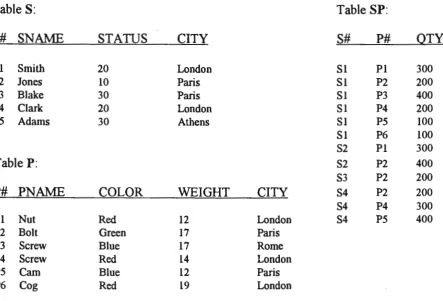
It can be shown that a relational database is a special case of deductive database. To illustrate this point, we use the supplier-part relational database from (Date88, page 46).
This database has three relations: a relation s of suppliers, a relation p of parts, and a relation sp, which contains both supplier and part information. More precisely, the relations have the following form (where the domain names are self-explanatory).
s(sno, sname, status, city) p(pno, pname, colour, weight, city)
sp(sno, pno, qty )
Relations are usually represented by tables containing tuples as shown
Table S: Table SP:
S# SN AME STATUS CITY S# P# QTY
Sl Smith 20 London SI Pl 300
S2 Jones 10 Paris SI P2 200
S3 Blake 30 Paris SI P3 400
S4 Clark 20 London SI P4 200
S5 Adams 30 Athens SI P5 100
SI P6 100
S2 Pl 300
Table P: S2 P2 400
S3 P2 200
P# PNAME COLOR WEIGHT CITY S4 P2 200
S4 P4 300
Pl Nut Red 12 London S4 P5 400
P2 Bolt Green 17 Paris
P3 Screw Blue 17 Rome
P4 Screw Red 14 London
P5 Carn Blue 12 Paris
P6 Cog Red 19 London
Here is the supplier-part database written using the syntax generally used m deductive databases:
Relation s of suppliers
s(sl, smith, 20, london) , s(s2, jones, 10, paris) s(s3, blake, 30, paris) s(s4, dark, 20, london) s(s5, adarns, 30, athens)
Relation p of parts
p(pl, nut, red ,12, london) p(p2, bolt, green, 17, paris) p(p3, screw, blue, 17, rome) p(p4, screw, red, 14, london) p(p5, cam, blue, 12, paris) p(p6,cog, red, 19, london)
Relation sp of suppliers & parts
sp(sl, pl, 300) sp(sl ,p2, 200) sp(sl ,p3, 400) sp(sl, p4, 200) sp(sl, p5, 100) sp(sl, p6, 100) sp(s2, pl, 300) sp(s2, p2, 400) sp(s3, p2, 200) sp(s4, p2, 200) sp(s4, p4, 300) sp(s4, p5, 400)
The tuples of the relations have been written as facts in a PRO LOG program. The supplier-part database could be made into a deductive database by adding some
london_s(X, Y, Z) :- s(X, Y, Z, london) major_s(X) :- sp(X, pl, Z), Z >=JOO
Sometimes such relations are called virtual relations because when a tuple from such a relation is required, it must be computed rather than retrieved. The first rule states that a london-supplier is any supplier based in London. The second rule states that a supplier is a major-supplier if it supplies more than 300 of part number pl. These rules implicitly define two new relations
london_s(sno, sname, status) major_s(sno)
For example the following query in SQL:
select sname from s, sp
where s.sno = sp.sno and sp.pno ='p2';
is translated into a deductive database query as:
?-sp(X, p2, U), s(X, Y, Z, W)
This query asks for the names of all suppliers which supply part p2. When answering this query, the PROLOG interpreter must "answer" each of the "sub queries" :- sp(X, p2, U) and :- s(X, Y, Z, W).
PROLOG interpreter answers the sub queries of a query by applying its computation rules. Standard PROLOG systems have a fixed left to right computation rule. However, NU-Prolog - which is designed to manipulate large number of facts efficiently - has a more sophisticated computation rule, which essentially allows it to reorder sub queries during the process of answering a query [RaSh88, Harl92a].
by John Doe and is attended by three students with student numbers 890001, 890002 and 890003:
course ( 101, john_doe, [890001, 890002, 890003)).
The same data requires at least two relations in SQL, one linking units to lecturers and one linking units to students.
The following section shows how deductive databases use logic as a database language. First we show how logic can be used to represent data [Vagh92].
We represent four facts as:
edge(a, b). edge(a, c). edge(b, c). edge(b, d).
These four facts say that there are edges from a to b, from a to c, from b to c and from b to d. The equivalent SQL statements are:
create table edge (source char(20) not null , sink char(20) not null); insert into edge values ('a', 'b') ;
insert into edge values ('a', 'c') ; insert into edge values ('b', 'c'); insert into edge values ('b', 'd');
In a deductive database, a query on the relation edge is
?-edge(a, Y).
asks for the names of all nodes Y that are at the ends of edges from a. Its answer is:
Y
=
{b, c}.select sink from edge where source= ' a';
Its answer will be:
'b'
'c'
We can define a new relation as a view on existing relations as:
twoedges(X, Y) :- edge(X, Z), edgc(Z, Y) .
This derivation rule defines a new relation called twoedges. It states that nodes X and Y are separated by two edges if there is an edge from X to a third node Z, and an edge from Z to Y. The equivalent SQL view definition is:
create view twoedges(el.source, e2.sink) as select el . source, el. sink
from edge e I, edge e2 where el .sink= e2.source;
Deductive databases allow 'database designers to generalise this notion. Using logic, one can define a relation path such that a tuple (X, Y) is in this relation if and only if there is a sequence of one or more edges in relation edge leading from X to Y.
path(X, Y) :-edge(X, Y).
path(X, Y) :-edge(X, Z), path(Z, Y).
The above derivation rules state that if there is an edge between X and Y then there is a path between X and Y~ and that if there is some node Z such that there is an edge between X and Z, and a path between Z and Y, then there is a path between X and Y. Relation path is thus the transitive closure of edge~ any changes to the edge relation will also be reflected in the path relation.
from, one would write:
?- path(a, Y). and the answer would be: y = {b, c, d}.
?- path(X, c). and the answer would be:
X ={a, b}.
These queries cannot be expressed directly in standard SQL because they involve recursion and SQL does not cater for recursion, at least directly. To allow users to ask recursive queries such as the first type of query given above, the database designer must write a program in a procedural programming language such as C using embedded SQL:
Some advantages of using predicate logic as a database language are [Harl92a, Nuss92]:
• Most of the database concepts of interest: queries, views and integrity constraints, as well as the data can be represented in a unique approach using logic. This allows the database to present a single unified interface to its users.
• Deductive databases provide more expressive power than most relational databases. In relational terms, they can naturally represent non-first-normal-form relations, and they allow the definition of a view to depend on itself (this comes in particularly handy when dealing with transitive closure problems).
2. ADITI DEDUCTIVE DATABASE SYSTEMS
2.1 The Structure of Aditi
Aditi is based on the client/server model found in many commercial relational
database systems[Harl92b]. Users interact with a front-end process (FE) that is
regarded as a client of the system. The client communicates with a back-end process
(server) that performs the usual set of database operations, such as joining, merging,
and subtracting relations, on behalf of the clients. Some systems have one server per
client, while others have one server supporting multiple clients. Aditi is a hybrid of
these two schemes: some of its server processes are dedicated to clients while
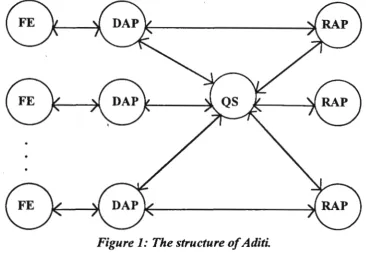
others are shared by all clients. Figure 1 illustrates the structure of Aditi.
Figure 1: The structure of Aditi.
The dedicated server process, called a Database Access Process (DAP), performs
the initial authorisation clearance of the client as well as all tasks connected with
query evaluation except the execution of relational algebra operations. The
relational algebra operations are performed by a pool of server processes called
Relational Algebra Processes (RAPs). These provide the relational operations
required for query evaluation. The pool of RAPs is managed by a master process
Brief description of the various processes is given below.
FE The clients of Aditi are the Front End (FE) processes. When making
interactive queries on the database, the user would use the query shell as a
front end. When one wants to write applications using Aditi embedded in an
interpreted language such as NU-Prolog, the front end would be the
(modified) NU-Prolog interpreter.
DAP Aditi requires each Front End process to access Aditi through a Database
Access Process or DAP. DAPs are responsible for database Security and they
oversee the execution of queries. There is one DAP per live Front End
process. A new DAP is created every time a FE tries to access ADITI.
QS The Query Server or QS is responsible for managing the load on the machine.
In operational environments, there will be one QS per machine .
RAP Relational Algebra Processes or RAPs carry out relational algebra operations
on behalf of the DAPs. RAPs are allocated to DAPs for the duration of each relational algebra operation.
2.2. The Database Interface
An Aditi database is a set of relations implemented as files and subdirectories. Every
database must have a data dictionary relation, which contains schema information
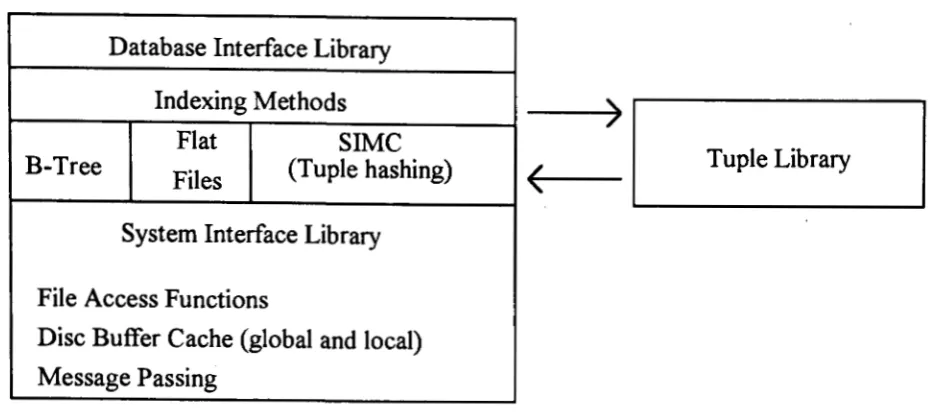
about all relations in the database. The Database Interface (DBI) library is a set of
routines within Aditi that are used by both DAPs and RAPs to access these
database. The interface provides routines for creating and deleting temporary or
permanent relations, as well as, inserting, deleting, retrieving tuples from
relations[Harl92b]. The most important function of the DBI layer is to act as a
switch between different indexing methods and to hide the differences between
these methods. The indexing methods currently supported are B-trees, sequential
files without indexing (flat files), and superimposed coding with and without
multi-attribute hashing. The lowest layer of Aditi is the system interface library,
which provides a set of services to the rest of Aditi which are independent of the
Adi ti.
Database Interface Library
Indexing Methods
)
Flat SIMCB-Tree
Files (Tuple hashing)
(
Tuple LibrarySystem Interface Library
File Access Functions
Disc Buffer Cache (global and local) Message Passing
Figure 2: Database interface structure.
2.3. Aditi Compiler
The compiler that turns programs written in Aditi-Prolog into RL is written in NU-Prolog. RL is Aditi's relational language, a simple procedural language augmented with algebra relational operations. Unlike most compilers, it represents programs in not one but two intermediate languages: HDS and LDS ("high-level data structure" and "low-level data structure", respectively). HDS provides an easy-to-manipulate representation of PROLOG rules while LDS provides an easy-to-manipulate representation of RL programs.
2.4 Setting Up the Aditi Environment
Aditi is a multi-user system with its own security mechanisms. The first thing one
must do to set up Aditi is to create a Unix user account and a Unix group, both
named "aditi". Files whose security should be controlled by Aditi have "aditi" as
their owner and group. The intention of the Aditi security system is that no ordinary
user should have the aditi user-id or group-id; not even the database administrator.
The home directory of the aditi user should be the directory in which the Aditi
distribution is installed; let's say this is "/users/aditi". Every Aditi user should have
one of the following lines in the startup files:
.cshrc: setenv ADITI HOME -aditi
This environment variable is used by some Aditi programs to construct paths to
other Aditi programs: scripts are assumed to be located in 11
$ADITI HOME/bin"
and binary executable in "$ADITI HO:rvffi/bin/sun4".
3. ADITI QUERY SERVER
The heart of Aditi is the process called the query server. This process is responsible
for allocating the necessary resources, initialising internal data structure, starting
other system processes and then managing their activities. The query server must be
running if Aditi facilities are to be available to users.
There may be several independent query servers active simultaneously and each
query server would represent a different incarnation of Aditi. The users must put
the incarnation name in startup file, e.g.: .cshrc: setenv ADITI aditi. This means
3.1. Starting Up the Query Server
Once the ADITI HOME and ADITI environment variables and the configuration
and authorization files have been set up, issue the following command as an Aditi
superuser:
% aditi start
This command starts the Aditi query server for the incarnation named in the ADITI
environment variable. The following messages are displayed: ·
Aditi Deductive Database System (Beta) Copyright University of Melbourne 1988-1992
The selected incarnation is aditi. Checking for existing query servers ... None exist.
Starting new query server ••• Query server started.
When we have finished working with Aditi for a while, we can shut down the query
server in an orderly manner by the command
% aditi stop
The following messages are displayed:
Aditi Deductive Database System (Beta) Copyright University of Melbourne 1988-1992
The selected incarnation is aditi. Stopping any existing query servers .••
3.2. Setting Up a Database
To create a new database, a command such as the following must be issued.
% oewdb /users/aditi/exam1>le
This command will create the directory "/users/aditi/example" if it does not already
exist. It will then create two subdirectories "db" and "rl" within it.
The "rl" subdirectory will initially be empty. Later, it will contain Aditi object files
giving the definitions of derived predicates. The name of the directory is "rl"
because the object code is a bytecode version ofRL, the Aditi Relational Language.
4. MANAGING BASE RELATION
This section describes facilities for managing base relations in Aditi.
4.1. Creating a relation
The command for creating a base relation is "newrel". For example, to create a
relation to store the location of the headquarters of each known airline, issue the
command [HaRa92]:
% oewrel hq 2
The response would be:
Creating relation hq in /users/aditi/example using schema tlex-2 and index type data ...
Created hq/2 in /users/aditi/example with index type data and schema tlex-2
The first argument gives the name of the relation being created, while the second
gives, directly or indirectly, the name of the schema that determines the shape of the
new relation. In this case, the second argument is a number (an arity), so the newrel
command converts it into a schema name by inserting the prefix "flex-". Thus the
arity "2" is a shorthand for the schema name "flex-2".
4.2. Creating a schema
A schema gives three things: an arity, a tuple type, and a list of key attributes. The
arity is number of attributes in a relation. In the current version of Aditi the tuple
type must be flexible ("flex"); later versions will support "fixed" and "free" tuple
types as well. Flexible tuples are general, each attribute can be an arbitrary term and
arbitrary size. Fixed tuples have attribute that have a predefined type and fixed size.
Free tuples are intended for the storage of compiled RL procedures in Aditi
relations. The list of key attributes is currently used only when the relation has a
B-tree index: the list provides the ordering function, and optionally prevents the
inclusion of duplicates.
The command to create such a schema is:
% newschema flight 2 flex
We can verify that the definition of flight schema entered the data dictionary by
displaying the contents of the data dictionary by using the command:
% showdict
The output of this command may look like:
Aditi 1.0: Show Dictionary Information
Aditi Dictionary Information for '/users/aditi/example/db':
predmode/3 rlregister/2 Schemas flight predmode-3 rlregister-2 Display completed. Schema: 1>redmode-3 Schema: flex-2
Type: Flexible Arity: 2
Type: Flexible Arity: 3
Ty1>e: Flexible Arity: 2
Index type: BTree
Index type: BTree
Key Attributes: 1,2
Key Attributes: 1,2
Key Attributes: 1
From the contents of data dictionary we can find out information about relations
and schemas, such as: relations name, types of schema, indexes type, and key
attributes.
4.3. Inserting data into a relation
The newrel command creates empty relations. The command to insert tuples into
relations is newtups:
% newtups flight 2
Aditi 1.0: Add Tuples
sydney, honolulu
honolulu, toronto
sydney, melbourne
melbourne, honolulu
"D
4 tuple(s) inserted
Addition completed.
*Command for entering tuples of arity 2 to flights relation
*Aditi prompts the user to add tuples
*User enters tuples. Attributes are separated by commas
and the tuples are separated by CR
*Exit newtups
*Message displayed by the newtups command.
In all Aditi commands except the newrel command, relations are identified by their
name and arity.
The next example shows that we can insert complex terms into Aditi relations and
% newtups hq 2 *Command for entering tuples of arity 2 to hq relation
Aditi 1.0: Add Tuples *Aditi prompts to the user
qantas, city(sydney, australia) *Enter attributes, where the second attribute has two
delta, city(atlanta, usa) constants
cathay_pacific, city(hongkong) *Enter attributes, where the second attribute has one
lufthansa, airport(frankfurt) constant.
"D
4 tuple(s) inserted
Addition completed.
From the example above, we can see both of the function symbols are used;
attribute city which has 1 or 2 constants.
4.4. Looking at the contents of a relation
To check that the tuples entered with the newtups command were inserted
correctly into the hq relation, we use the seerel (see relation) command as follows:
% seerel hq 2
Aditi 1.0: See relation
Relation name: hq
Arity: 2 Cardinality: 4
Nkeys: 1 Ntkeys: 0 TupSorted: 0
(1) cathay_pacific, city(hongkong)
(2) qantas, city(sydney, australia)
(3) lufthansa, airport(frankfurt)
(4) delta, city(atlanta, usa)
Display completed.
*Command to see the relation of hq with arity 2
*Aditi prompt
*Show the information about arity and cardinality
*Nkey is #of keys of the relation according to its
schema
*Ntkeys is #of temporary keys
4.5. Deleting data from a relation
The simplest way to delete tuples from a relation is via the deltups command. Input
to the deltups command is in the same format as used with the newtups command.
A list of tuples is given, one tuple per line. To delete one tuple from the hq database the command is issued as followed:
% deltups hq 2
Aditi 1.0: Delete Tur>les
delta, city(atlanta, usa)
"D
1 tuple(s) deleted
Deletion completed.
*Command for deleting tuples of relation ofhq with
arity 2
*Aditi prompt
*User enters the tuple to be deleted
*Exit from deltups
*Aditi message.
The input to deltups is in the same format as used by newtups; a list of tuples and
one per line. In the current version of Aditi, the tuples must be ground tuples (the
tuple that contains no variables), i.e. one cannot specify patterns such as "Airline,
city(hongkong)".
Deltups does not work as' an inverse of newtups. If the relation has two or more
copies of a given tuple, deltups will delete all copies. This is consistent with the idea
that Aditi actually implements set semantics, but represents sets as multisets for
implementation reasons.
To delete all the tuples in a relation, using deltups is inefficient. Use the clearrel
command instead:
% clearrel hq 2 *Command to delete all tuples in hq relation which
has arity 2
Aditi does not allow tuples to be modified directly. If we wish to do so, we must
4.6. Deleting a relation
To delete a relation completely, use the command delrel:
% delrel hq 2 *Command/or deleting the relation ofhq
Aditi will not let the user delete the system relations predmode and rlregister.
4.7. Deleting a schema
To delete a schema, use the command delschema:
% delschema flex-16 *Command/or deleting schemajlex-16
Aditi will let you delete the schemas of existing relations, even the schemas of
system relations. Nothing untoward will happen on deleting a schema. The reason
being that an Aditi relation requires its schema to exist only at the time when the
relation is created. At that time, the relevant information is copied into the data
dictionary record of the relation.
4.8. Security
Aditi implements a simple security system. Base relations newly created by newrel
are accessible only to the user who created them. Only the owner of a relation can
read that relation, write to it and delete the same. The owner of the relation can
however grant these rights to other users via the command aditiperms. The
following command grants all users read access to the relation flight/2:
% aditiperms +read flight/2
Aditi 1.0: Change/Show Relation Permissions
*This command grants all users read access
to the relation jlight/2
*Aditi prompt
Owner Id: Relation Type: public read: public write: public delete: superuser delete:
Change Permissions completed.
6 User yes no no no
With respect to the right to delete a relation, users are classified into not just two
but three classes: the owner of the relation, Aditi superusers, and others. The owner
always has the right to delete her own relation, and she can grant the right
separately to the two other classes of users, via commands such as:
% aditiperms +delete superuser flight/2
Aditi 1.0: Change/Show Relation Permissions
*Command to grant the superuser delete
relation jlight/2.
*Aditi prompts
Changing permissions for flight/2 in /users/aditi/example ...
Permissions are now:
Owner Id: Relation Type: public read: public write: public delete: superuser delete:
Change Permissions com1>leted.
6
User
yes
no
no
yes *The superuser has the right to delete the
relation
Only the owner of a relation can change the permissions on that relation, but every
user can have a look at what those permissions are:
% aditiperms show flight/2 *Command for looking the permission status
Showing permissions for flight/2 in /users/aditi/example ...
Owner Id: 6
Relation Type:
public read:
public write:
public delete:
superuser delete:
Show Permissions completed.
User
yes
no
yes
no
5. MANAGING DERIVED RELATIONS
The power of deductive databases lies in derived relations, relations that can infer
information at run-time. In Aditi, users define derived relations by writing programs
in Aditi-Prolog.
The file "stops.al" is an example from the flight database:
?-mode(stops(f,f,f)).
?-flag(stops, 3, diff).
stops(Origin, Destination, [])
:-*Aditi-Prolog declaration for the relation of stops
*Aditi uses differential evaluation to answer the query
flight(Origin, Destination).
stops(Origin, Destination, [StoplStoplist])
:-flight(Origin, Stop),
*Relation gives all possible routes between
all origin-city and destination-city
*Relation checks whether its first argument is
a member of the list that is its second
(stops) argument
stops(Stop, Destination, Stoplist),
not in_list(Stop, Stoplist).
?-mode(in_list(f,b)).
?-flag(in_list, 2, magic).
?-flag(in_list, 2, diff).
in_list(Head, [HeadLTail]).
in list(Item, [HeadlTail])
:-in_ list(Item, Tail).
*Aditi-Pro/og declaration for the relation of in _list
*Aditi uses magic set optimisation in the in_list
5.1. Compiling Aditi-Prolog Programs
The Aditi-Prolog compiler is called "ape". Its interface is intentionally similar to the
interface of other compilers on Unix systems, e.g. cc. As arguments, one just names the files to be compiled:
% ape stops.al
Aditi-Prolog Com1>iler 1.0
Compiling stops.al . . .
*Aditi command to compile 'stop.al' file.
*Aditi prompts
Compiler Statistics
-Read: [490, 60) Mode:[570, 80] Hds2Hds: [590, 20] Strata: [600, 10]
Compile: [910, 310) Lds2Lds: [1050, 140] Lds2 RL: [1330, 280]
Compilation finished.
The compiler statistics report user and system time in milliseconds for each part of
the compilation stage (the time values are accurate at most to the resolution of the
system clock). By convention, source files containing Aditi-Prolog programs must
have the suffix '.al'. The ape compiler leaves the corresponding object program in 'stop.ro', the suffix standing for "relational object" file.
5.2. Registering Derived Relations
Before a newly created ".ro" file can be used by all users of a database to help
answer queries, it must first be registered in the database. The command for doing
this is :
% newderived stops.ro
Registering file stop.ro in /users/aditi/example
Registration completed.
*Registered 'stops.ro'fi/e to the database
*Aditi responses
This copies "stops.ro" from the current directory to the "rl" subdirectory of the
database, and puts.the mode information from "stops.rm" into the predmode system
relation. The latter action allows other Aditi-Prolog predicates to refer to the
To de-register a ".ro" file from the database; for example, if we want to edit the file, use the following command:
% delderived stoJ>s.ro *Deregistered 'stops.ro'file from the database
Deregistering file stoJ>.ro from /users/aditi/examJ>le
Deregistration comJ>leted.
6. QUERYING THE DATABASE
The query shell has two slightly different user interfaces. One is part of xqsh, the
graphical front-end to Aditi . The other, which is described in this section, is for use
from dumb terminals and from workstation windows running terminal emulation
programs (e.g. xterm and xwsh). This version is started via the command:
%qsh *Command to activate query shell
Before it can do anything else, the query shell must log the user into Adi ti, 1. e.
present his credentials to the query server for checking. If this checking is
successful, qsh prints - as confirmation - the login name of the invoker and his
numeric ids for Aditi and for Unix. (The login process is actually performed by the
Database Access Process or DAP created by the query shell.)
6.1. Making Queries
The simplest kind of query is an open query on a single atom. The following query
asks for the headquarters of all known airlines[HaRa92]:
1 <-hq(Airline, Headquarters).
Answer Set for Airline, Headquarters:
(1) cathay_pacific, city(hongkong)
(2) qantas, city(sydney, australia)
(3) lufthansa, airport(frankfurt)
*Query all of airlines and their headquarters
Specifying some constants causes Aditi to perform a selection. This query asks for
the headquarters of Qantas:
2 <-hq(qantas, Headquarters).
Answer Set for Headquarters:
(1) city(sydney, australia)
*Query the headquarter of Qantas airline.
*Aditi response
If the query contains no variables, then the result is a zero arity relation. If the
answer to such a query is "true", then the answer relation will have cardinality one:
it will contain the special tuple "<true>". Otherwise the answer relation will have a
cardinality of zero. In the flight database, there is a direct flight from Honolulu to
Toronto but not from Sydney to Toronto:
3 <-flight(honolulu, toronto).
Answer Set:
<true>
4 <-flight(sydney, toronto).
Answer Set:
*Query is there any flight from Honolulu to Toronto
*The answer is that there is flight from Honolulu to
Toronto
*Query is there any flight from Sydney to Toronto
No Answers *There is no flight available
Queries that contain conjunctions implicitly ask for joins. This one asks for all
possible one-stop trips:
5 <-flight(Orig, Stop), flight(Stop, Dest).
Answer Set for Orig, Stop, Dest:
(1) sydney, honolulu, toronto
(2) sydney, melbourne, honolulu
(3) melbourne, honolulu, toronto
*Query for flight that has one stop trips
*Aditi response
6 <- flight(Orig, Stop), flight(Sto11, Dest), not flight(Orig, Dest).
Answer Set for Orig, Stop, Dest:
(1) melbourne, honolulu, toronto
(2) sydney, honolulu, toronto
*This query asks for all city-pairs that have one-stop
flights but no direct flights between them
If we are interested only in the origin and destination cities, and not in the location
of the intermediate stop, we can tell Aditi to project the result relation onto the
variables representing those cities:
7 <-Orig, Dest: flight(Orig, Stop), flight(Stop, Dest), not flight(Orig, Dest).
Answer Set for Orig, Dest:
(1) melbourne, toronto
(2) sydney, toronto
*Query the origin and destination cities
Queries can include arithmetic calculations as well as comparisons. If we have a
relation that records the distance between city-pairs, we can ask queries such as:
8 <- Orig, Dest, D: flightdist(Orig, Stop, Dl), flightdist(Stop, Dest, D2), Dl > 1000, D is Dl + D2.
*This query asks the total distance of all one-stop trips where
the first leg is longer than 1000 kilometres.
Answer Set for Orig, Dest, D:
(1) sydney, toronto, 15629
(2) melbourne, toronto, 15964
Queries can even include disjunctions (represented by semicolons) and grouping to
9 <- Orig, Dest: (flight(Orig, Dest) ; flight(Orig, Stop), flight(Stop, Dest)), not flight(Dest, melbourne).
Answer Set for Orig, Dest:
(1) sydney, honolulu (2) sydney, melbourne (3) sydney, toronto (4) honolulu, toronto (5) melbourne, honolulu (6) melbourne, toronto
*This query asks for all city pairs with non-stop or one-stop
flights where there is no direct flight from the destination to
Melbourne.
The explicit projection is essential. Without it, the query shell would try to include the variable Stop in the answer relation, and would fail because Stop exists in only one arm of the disjunction. In the terminology of modes, Stop has no producer in the other arm.
In Aditi, derived relations may be queried the same way as base relations; the query reference to a derived relation causes its RL object code to be loaded into the DAP:
10 <- stops(sydney, Dest,_), not flight(sydney, Dest).
*This query asks for all cities that are reachable from Sydney
but to which there are no direct flight.
Procedure file </users/aditi/example/rl/stops.ro> has 2 entries. *Aditi load the derivation rule
Loading stops_J_l Loading in list_2_1
Answer Set for Dest:
6.2. Assignments and Updates
The query shell allows the result of a query to be assigned to a temporary relation
that lasts for remainder of the current query shell session:
11 <-Dest: country(Orig, australia), sto1>s(Orig, Dest, Stops).
*This query asks for all destinations reachable from Australia
using a relation that associates cities with their countries
Answer Set for Dest:
(1) honolulu (2) melbourne (3) toronto
The next two queries redirect a flight from Toronto to Montreal. Each reports the
tuple being deleted or inserted:
12 <- flight(honolulu, toronto) -=true. Deleting answers from flight/2
Answer Set for honolulu, toro~to:
(1) honolulu, toronto
13 <- flight(honolulu, montreal) += true. Inserting answers into flight/2
Answer Set for honolulu, montreal:
(1) honolulu, montreal
These queries illustrate the simplest way to insert or delete single tuples. For
example, the following query states that every city that has a direct flight to
Montreal now also has a direct flight to Toronto:
14 <- flight(Origin, toronto) += flight(Origin, montreal).
Answer Set for Origin, toronto: (1) honolulu, toronto
We can ask for the destinations reachable from Melbourne together with the intermediate stops required:
15 <-stops(melbourne, Dest, Stops).
Answer Set for Dest, Stops: (1) toronto, [honolulu] (2) montreal, [honolulu] (3) honolulu, [)
7. THE X INTERFACE TO ADITI (XQSH)
Xqsh is a graphical user interface (GUI) that provides access to almost all the
facilities of Aditi, including the starting and stopping of query servers and log on
and log off Aditi. It works on machines using the X-window system. Xqsh is built
with the Tk/Tcl toolkit (public domain).
The main xqsh window has six main parts. From top to bottom, they are the menu
bar, the name of the current database, a window onto the query shell and an output
window. The query shell window and the output window are independently
scrollable using the standard mouse operations. The dividing line between these two
windows can be moved by dragging the small pane control box near the right side
astride the dividing line.
The options from the main menu are: Database, Relation, Schema, Security,
Load/Compile, and Edit.
The commands available through the Database menu are:
Database Info Create Database Change Database
The commands available through the Relation menu are: Create Relation
Modify Relation
Show Relation
Delete Relation
The commands available through the Schema menu are: Create Schema
Show Schema
Delete Schema
Through the Security menu there are two commands available:
Show permissions Set permissions
Two other options are Load/Compile and Edit. Load/Compile is used to register
or deregister the file to a particular database and Edit is used to edit the file in NU-Prolog editor format.
8. CONCLUSION
Deductive database systems are based on logic programming. Logic serves as a
language which can be used for giving data definitions, integrity constrains, views,
queries, and rules/programs. Programs written in a logic language are more
declarative than any other programming language, in the sense that one can express
algorithmic ideas at a very high level, without having to specify many of details of
order of computation.
Aditi was built to prove that deductive database systems can achieve performance
comparable to that of commercial relational database systems, especially with a very
large number of facts.
database has and how we write the derivation rules. With simple derivation rules
and appropriate optimisation methods, the compiler determine one suitable
transformation from the various algorithms in Aditi to reduce execution time to
answer the queries.
Future work will focus on building network management systems in which
management information base will be developed using the Aditi deductive database
system.
9. ACKNOWLEDGMENT
Aditi Deductive Database System has been installed in the Department of Computer
and Mathematical Sciences, Victoria University of Technology under licence
REFERENCES:
[Brod90]
[Date88]
[HaRa92]
[Harl92]
[Krish92]
[Lloy83]
[Nuss92]
[RaSh88]
[Vagh92]
Brodie, M.L., et al, Next Generation Database Management Systems
Technology, Deductive and Object-Oriented Databases, Elsevier
Science Publishers, 1990
Date, C.J., An Introduction to Database Systems, Addison Wesley, 1988.
Harland, J., Kotagiri Ramamohanarao, Experiences with a Flights
Database, CITRI-Technical Report 62, November 1992.
Harland J., et al, Aditi-Prolog Language Manual, CITRI-Technical
Report 64, November 1992.
Krishna, S., Introduction to Database and Knowledge-Base Systems,
World Scientific, 1992.
Lloyd, J.W., An Introduction to Deductive Database Systems, The
Australian Computer Journal, 15(2), pp. 52-57, May 1983.
Nussbaum, Miguel, Building a Deductive Database, Ablex
Publishing, 1992
Ramamohanarao, K., John Shepperd, et al, The NU-Prolog
Deductive Database System, Prolog and Database, Ellis Horwood,
1988
Vaghani, Jayen, et al, Introduction to Aditi Deductive Database
System, The Australian Computer Journal, 23(2), pp. 37-52, May