ABSTRACT
HAYWARD, LAUREN JANECE. Students‘ Perceptions of Distributed Pair Programming in an Upper-Level Undergraduate Software Engineering Course. (Under the direction of Dr. Laurie Williams).
Pair programming is a style of programming in which two programmers work together on the same software artifact. Pair programming has many demonstrated benefits including higher code quality and enhanced personal enjoyment. Unfortunately, students do not always find meeting together in the same physical location to pair program to be convenient or even possible. In this case, they may choose to pair program from distributed locations.
To examine student perceptions about distributed pair programming, we conducted three studies with undergraduate software engineering students over two semesters. In our first study, all 49 students enrolled in the course had the option of using two distributed pair programming tools. We then analyzed their responses to an end-of-course retrospective that included questions about pair programming. We also analyzed their responses to a pair programming extra credit option. In our second study, we interviewed students from the same semester to more closely examine their perceptions about distributed pair programming. In our third study, we surveyed students the following semester about the benefits and drawbacks of distributed pair programming before and after trying distributed pair programming in a structured setting for 90 minutes.
and personal enjoyment. Students are motivated to pair program remotely because of the feedback they receive from their partners, convenience and comfort of working from home, personal responsibilities that require them to work from home, and decreased scheduling issues of distributed pair programming compared to collocated pair programming. The main reason students described for not pair programming remotely was technical difficulties with the distributed pair programming tools. Students reported less productivity initially when pair programming remotely due to the learning curve of the tools. Students also listed scheduling conflicts and a preference for collocated work as other reasons for not pair programming remotely.
Students‘ Perceptions of Distributed Pair Programming in an Upper-Level Undergraduate Software Engineering Course
by
Lauren J. Hayward
A thesis submitted to the Graduate Faculty of North Carolina State University
in partial fulfillment of the requirements for the degree of
Master of Science
Computer Science
Raleigh, North Carolina 2009
APPROVED BY:
_______________________________ ______________________________
Dr. Laurie Williams Dr. Ed Gehringer
Committee Chair
DEDICATION
BIOGRAPHY
ACKNOWLEDGMENTS To Jason. Thank you for your love. We are a perfect pair!
To Mom and Dad. Thank you for you always loving and supporting me. Without your encouragement, I would not have entered computer science.
To Deanna. You always make me smile. I am finally finishing college, and you are just beginning. Have fun in college, little sister!
To Mom and Dad Schaefer. Thank you for all of the home-cooked meals and moving me multiple times over the last year. You enabled me to focus on my school work when the bed bugs bit.
To Laurie. Thank you for all of your assistance and guidance. I would not be graduating without your help. Most importantly, thank you for showing me that computer scientists can wear fabulous shoes!
To my committee. Thank you for your insightful feedback.
TABLE OF CONTENTS
LIST OF TABLES ... vii
LIST OF FIGURES ... viii
1 Introduction ... 1
2 About the Studies ... 3
2.1 About the Software Engineering Course ... 3
2.2 Data Analysis ... 5
3 Background ... 7
3.1 What is Pair Programming? ... 7
3.2 What Does Effective Pair Programming Look Like? ... 8
3.3 Why Pair Program? ... 9
3.4 Why Work in a Distributed Way? ... 10
3.5 Tools for Facilitating Distributed Pair Programming ... 11
4 Related Work ... 15
4.1 Underrepresented Groups in Computing ... 15
4.2 Distributed Pair Programming ... 16
5 Study 1: Student Perceptions about the Availability of Distributed Pair Programming ... 20
5.1 Research Methodology ... 21
5.2 Retrospective Results ... 23
5.2.1 Motivations for Pair Programming ... 23
5.2.2 Motivations for Not Pair Programming ... 25
5.2.3 Motivations for Pair Programming Remotely ... 25
5.2.4 Motivations for Not Pair Programming Remotely ... 26
5.3 Pair Programming Extra Credit Option Results... 29
5.4 Study Limitations ... 32
5.5 Observations and Discussion ... 33
5.6 Conclusions ... 35
6 Study 2: Interviewing Students about Their Pair Programming Experiences ... 37
6.1 Research Methodology ... 38
6.2.2 On Pair Programming ... 41
6.2.3 On Distributed Pair Programming ... 43
6.2.4 On the Increase of Skill Sets and Number of Friends ... 44
6.3 Study Limitations ... 44
6.4 Conclusions ... 44
7 Study 3: Student Perceptions Before and After Trying Distributed Pair Programming .... 46
7.1 Research Methodology ... 47
7.2 Results ... 48
7.2.1 Personal Enjoyment ... 48
7.2.2 Perceived Code Quality ... 50
7.2.3 Productivity ... 51
7.2.4 Pair Pressure ... 52
7.2.5 Continuing Pair Programming ... 52
7.2.6 Perceived Benefits of Distributed Pair Programming ... 54
7.2.7 Perceived Drawbacks of Distributed Pair Programming ... 55
7.2.8 Recommendations for Others Pair Programming Remotely ... 57
7.2.9 Suggestions for Improving Distributed Pair Programming Experience ... 58
7.3 Study Limitations ... 59
7.4 Observations and Discussion ... 60
7.5 Conclusions ... 61
8 Summary ... 63
8.1 Summary of Research Hypotheses and Questions... 63
8.2 Concluding Remarks ... 66
REFERENCES ... 68
APPENDICES ... 71
Appendix A. Interview Protocol for Beginning Interviews for Study 2 ... 72
Appendix B. Interview Protocol for Ending Interviews for Study 2 ... 74
Appendix C. Pre-Study Survey Questions for Study 3 ... 76
Appendix D. Post-Study Survey Questions for Study 3 ... 77
LIST OF TABLES
LIST OF FIGURES
Figure 1. Creating teams in PairEval. ... 5 Figure 2. Preferences for programming alone, collocated pair programming (CPP), and distributed pair programming (DPP). ... 49 Figure 3. Code quality comparisons of distributed pair programming (DPP) to solo
1 Introduction
Pair programming is a practice with many demonstrated benefits including higher code quality [6, 27, 28], enhanced technical skills of the programmers [6, 27], improved team communication [6, 27, 28], enhanced personal enjoyment [6, 27, 28], and ―pair pressure‖ where partners help keep each other on task [22, 27, 28, 33]. Traditionally, the programmers sit side-by-side at the same computer [27].
Unfortunately, students may not always find meeting together in the same physical location convenient or even possible. A student may not be able to meet in person due to schedule conflicts or family commitments [12]. Lab space with the necessary software may not be available. Students may desire to work from their dorm rooms, or students may need help debugging an unforeseen issue while working at home. Distance education courses are on the rise [24], and students in computer science distance education classes often need a way to complete group projects with their distributed teammates. In these cases, students may benefit from pair programming from distributed locations.
together on the same software artifact. We use pair programming to refer to the union of distributed pair programming and collocated pair programming.
The following five research hypotheses and two questions were examined:
H1a: Students who pair program remotely will enjoy many of the same benefits as those who pair program while collocated, including higher code quality and personal enjoyment.
H1b: Women and students from other underrepresented groups in computing who pair program remotely will enjoy many of the same benefits as those who pair program while collocated, including personal enjoyment.
H2: Distributed pair programming decreases the scheduling issues that arise for students trying to schedule collocated pair programming.
H3: Making distributed pair programming technology available to students increases the likelihood that they will pair program.
H4: Trying distributed pair programming increases the likelihood that students will pair program remotely in the future.
RQ1: What motivates students to or not to pair program remotely?
RQ2: What do students perceive as the benefits and drawbacks of distributed pair programming?
2 About the Studies
We conducted three studies with undergraduate software engineering students at North Carolina State University (NCSU) to examine the research hypotheses and questions presented in Chapter 1. The first two studies involved students in the fall semester of 2008, and the third study involved students in the spring semester of 2009.
2.1 About the Software Engineering Course
Early in each semester, the software engineering teaching staff introduces techniques for successful pair programming1 to students. The course has a two-hour weekly lab held in the Laboratory for Collaborative System Development (LCSD)2. The laboratory has a pair programming setup where each computer has two monitors, keyboards, and mice so that partners can easily work together without crowding around the same monitor. Students have no choice during the weekly lab but to pair (and ―bond‖) with their partner. Students can choose to obtain key fobs so they can access the LCSD at any time. Students in this course use Rational Team Concert3, which is built on Eclipse4, as their integrated development environment (IDE).
Students in this course have two, two-week paired assignments where they fix bugs in and implement new requirements for a web application. Students are encouraged to pair program as they complete these paired assignments. After the paired assignments, students
1 Students were shown the ―Fun with Pair Programming‖ video available at
http://agile.csc.ncsu.edu/pairlearning.
have a solo two-week assignment. Finally, students have a three, four, or five person team project that they have five weeks to complete. Students have a portion of the weekly labs to work on their assignments or team project but they typically must work for approximately four more hours a week to complete the assignments.
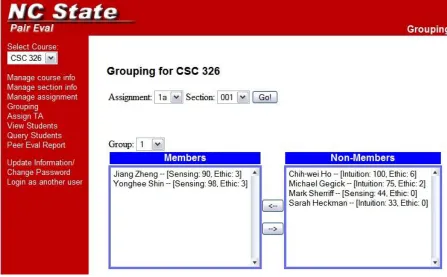
Throughout the course, students use PairEval5, a web-based peer evaluation tool, to document information about their personalities and evaluate their partners. As part of their first homework assignments, students take a Myers Briggs personality test6 and input the results in PairEval. They also rate their own work ethic on the following scale 1 (just barely get by) to 9 (get the best grade you possibly can) and record it in PairEval. The teaching staff assigns partners for assignments based on students‘ Myers Briggs Type Indicator [14] results and self-reported work ethic. Students with a difference in their sensing-intuition scale from their Myers Briggs Type Indicator are predicted to be compatible, and students with similar self-reported work ethic are also predicted to be compatible [29]. The teaching staff can use PairEval to create teams. For example, Figure 1 shows a teaching assistant placing Jiang and Yonghee in the same team. Students can then login to PairEval and evaluate their partners.
5 http://agile.csc.ncsu.edu/paireval
Figure 1. Creating teams in PairEval.
2.2 Data Analysis
3 Background
In this chapter, we discuss pair programming, the need for distributed pair programming, and tools that facilitate distributed pair programming.
3.1 What is Pair Programming?
Pair programming is a style of programming in which two programmers work together, continuously collaborating on the same design, algorithm, code, or test. When pair programming, one partner serves as the driver who actively writes the design, algorithm, code, or test. The other partner, the navigator, observes the driver‘s work to look for errors and thinks strategically about what should be done next. Both partners are constant brainstorming partners. Traditionally, the programmers sit at the same computer and periodically switch roles [27].
While the name ―pair programming‖ may imply pairing only during the implementation portion of the process while the partners are writing code, partners can pair during all phases of development including design, implementation and test. In fact, the more complex the task, the more beneficial having a partner becomes [27]. Pair programming is an agile [5] software development methodology that has gained acceptance among agile and plan-driven teams and also in education.
engaged jointly in discussion and brainstorm. In this case, the driver mainly served the role of typist. Programmers appeared to be most effective when they jointly took on the roles of driver and navigator. Programmers seemed more engaged when they were in possession of the keyboard or perceived keyboard control was imminent. Analyses performed by Höfer [13] and Freudenberg et al. [9] support the findings of Chong and Hurlbutt.
3.2 What Does Effective Pair Programming Look Like?
Researchers have found several best practices for effective pair programming, and we highlight six of them here:
Periodically switch who is driving. By switching who is driving fairly regularly, both partners remain engaged in the pair programming session. At any time, the navigator should be able to jump in and begin coding [23, 27, 32].
Leave your insecurities at the door. Pair programmers who work with partners with insecurities about their programming skills find it difficult to be successful. Programmers should use the pair programming session as an opportunity to become better programmers rather than dwelling on their insecurities [27, 32].
Be humble. Even the most experienced pair programmers can learn something from
Take a break! Pair programming can be fairly intense as partners typically keep each other on task. Partners should take breaks during the session so that they can come back to the session with a fresh mind [27, 32].
Resist competing with your partner. Pair programming partners should work together as equals to complete the tasks. They should not blame each other for defects or elevate one partner as the reason why they succeeded [27, 32].
Communicate constantly. Effective pair programmers chat constantly so that the driver is articulating what he is doing (which can sometimes even help the driver catch his own errors) and the navigator remains aware of what the driver is doing [27].
3.3 Why Pair Program?
While it may seem a bit redundant at first to ask two programmers to work together, researchers have reported several benefits of working in pairs:
Equivalent time spent. Pairs complete their work with only about a 15% cost (rather than 100% as might be expected) when they work together, and many pairs report completing their tasks in about half the time as they would working individually [6, 27, 28].
Enhanced technical skills. Those who pair program tend to enhance their technical skills as they work with their partners. They report learning from their partners as they pair program. Pair programmers may also introduce parts of the system to their partners that their partners may have not otherwise seen [6, 27, 28].
Improved team communication. Teams who make use of pair programming have
reported an improved level of team communication. As team members pair program, they get to know each others‘ strengths and weaknesses. When taking breaks during pair programming sessions, partners build informal relationships, which help improve communication [6, 27, 28].
Enhanced enjoyment. Pair programmers report that they enjoy their work more when working with a partner [6, 27, 28].
Pair pressure. Pair programmers have reported a feeling of ―pair pressure‖ that
positively influences their work. They set aside specific times to work with their partners rather than waiting until the last minute to begin as they may have if they were working alone. Additionally, since their partners are watching, programmers are less likely to waste time browsing their email or surfing the Internet [22, 27, 28, 33].
3.4 Why Work in a Distributed Way?
Distance education classes are on the rise. In the 2000-2001 school year, 56% of all 2-year and 4-year Title IV-eligible, degree-granting institutions offered distance education courses, and 12% of all institutions reported that they intended to begin offering distance education courses over the next three years [24]. Students in computer science distance education classes often need a way to complete group projects with their distributed teammates. Additionally, students in traditional classes may need to work remotely. A student may not be able to meet in person due to schedule conflicts or family commitments [12]. Lab space with the necessary software may not be available. Students may desire to work from their dorm rooms, or students may need help debugging an unforeseen issue while working at home.
Similarly, teams in industry have begun to work in a distributed way for many reasons including engineers‘ desires to not relocate, engineers being based at separate locations, high travel costs, and a lack of office space [8].
3.5 Tools for Facilitating Distributed Pair Programming
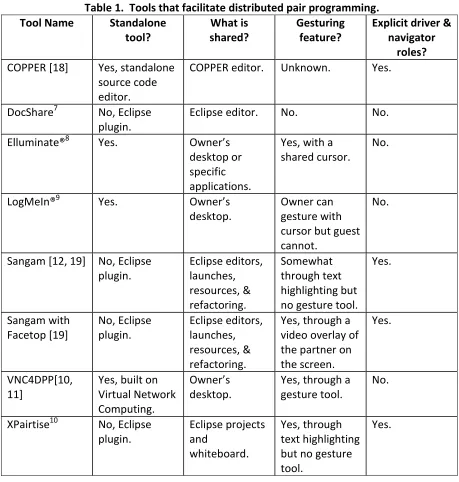
If distributed pair programmers are to achieve the same benefits as collocated pair programmers, they need tools to support cross-workspace visual, manual, and audio channels [7]. These channels enable partners to collaborate through sometimes subtle ways. For example, a small headshake or a mumble could serve as communication between the partners. Distributed pair programmers may want to use a video feed and/or voice feed to help facilitate communication while pairing.
Does the tool easily interface with the current integrated development environment
(IDE) being used? Desktop sharing tools like Elluminate, LogMeIn, and VNC4DPP work with any IDE. Other tools like COPPER have their own source code editors, so programmers would need to switch to using COPPER when pair programming remotely. Eclipse plugins like DocShare, Sangam, and XPairtise easily interface with Eclipse.
Does the tool share the necessary files and applications? The tool should support sharing the type of files, applications, and/or testing tools that the programmers will need. Does the tool support gesturing? Gesturing features allow partners to point to or
highlight portions of the screen, much as partners would gesture to the screen if they were at the same computer. Gesturing features can be useful to distributed pair programmers [11].
Does the tool have explicit driver and navigator roles? Pair programmers do not always follow the strict ―driver‖ and ―navigator‖ roles, so tools for distributed pair programming should allow for both partners to easily gain access to control the keyboard [4]. Many tools require users to indicate who is acting as the driver and who is acting as the navigator, which could inhibit programmers who do not want to strictly follow these roles.
Does the tool require too much bandwidth? Some tools transfer only the edits in the code that a partner makes, whereas other tools transfer an image of each partner‘s screen. Transferring screen images typically requires more bandwidth and can result in delays.
Table 1. Tools that facilitate distributed pair programming. Tool Name Standalone
tool?
What is shared?
Gesturing feature?
Explicit driver & navigator
roles?
COPPER [18] Yes, standalone source code editor.
COPPER editor. Unknown. Yes.
DocShare7 No, Eclipse
plugin.
Eclipse editor. No. No.
Elluminate®8 Yes. Owner’s
desktop or specific applications.
Yes, with a shared cursor.
No.
LogMeIn®9 Yes. Owner’s
desktop.
Owner can gesture with cursor but guest cannot.
No.
Sangam [12, 19] No, Eclipse plugin. Eclipse editors, launches, resources, & refactoring. Somewhat through text highlighting but no gesture tool.
Yes. Sangam with Facetop [19] No, Eclipse plugin. Eclipse editors, launches, resources, & refactoring.
Yes, through a video overlay of the partner on the screen.
Yes.
VNC4DPP[10, 11]
Yes, built on Virtual Network Computing.
Owner’s desktop.
Yes, through a gesture tool.
No.
XPairtise10 No, Eclipse plugin. Eclipse projects and whiteboard. Yes, through text highlighting but no gesture tool.
Yes.
7
http://www.eclipse.org/ecf/
4 Related Work
In this chapter, we describe related work on underrepresented groups in computing as well as distributed pair programming.
4.1 Underrepresented Groups in Computing
Diversity, which could include differences in gender or race, can lead to broader perspectives, greater creativity, and higher quality team performance [15]. However, computer science educational programs have largely underrepresented groups. In the 2006-2007 academic year, only 12.2% of bachelor‘s degree recipients in computer science were women [1]. Additionally, in the 2006-2007 academic school year, the ethnicity of bachelor‘s degree recipients was the following: 6.5% Nonresident Aliens; 3.4% African American, Non-Hispanic; .4% Native American/Alaskan Native; 14.6% Asian/Pacific Islander; 5.4% Hispanic, 67.3% Caucasian, Non-Hispanic; and 2.5% other/not listed [1]. Much effort has been put into increasing the recruitment and retention of women and African Americans in computing, and pair programming has been shown to help in this area [3, 17, 26, 30].
computing, women desire for their work in computing to make a positive impact on society [16].
Walton and Cohen define belonging uncertainty as ―in academic and professional settings, members of socially stigmatized groups are more uncertain of the quality of their social bonds and thus more sensitive to issues of social belonging‖ [25]. In their study, computer science students completed an activity that might lead them to believe they have few friends in the field. Caucasian students‘ sense of belonging and potential was unaffected by the activity, but the African American students‘ sense of belonging and potential were negatively affected [25]. Even though women are underrepresented in computing, women did not have a statistically significant response to the activity. Walton and Cohen [25] suggest that unlike racial stereotypes, gender stereotypes in computing focus on women‘s quantitative ability rather than their social belonging. The authors performed a similar study where participants completed an activity that might lead them to believe they have few skills in computing. Men‘s sense of belonging was unaffected by the activity, but women‘s sense of belonging and potential were negatively affected [25].
4.2 Distributed Pair Programming
Distributed pair programming is a style of programming in which two programmers who are geographically-distributed and synchronously collaborating over the Internet work together on the same software artifact. In this section, research results from other studies on distributed pair programming are presented.
students were assigned a team project for teams of size two to four. The students were able to choose their own teams (which could include both distance learning students and traditional classroom students) and one of four ways they wanted to work together: collocated team without pairs, collocated team with pairs, distributed team without pairs, and distributed team with pairs. The distributed pairs used headsets and microphones along with instant messaging to communicate with each other. They were able to view each other‘s screens by using desktop sharing software such as NetMeeting, PCAnywhere, or VNC, so the navigator had read-only access while the driver edited the code. Pairs were also provided with webcams but they chose not to use them [2].
Baheti et al. [2] measured productivity (lines of code per hour) and quality (team project grade). The researchers did not find statistically significant differences in productivity between distributed and collocated teams, though the distributed teams with pairs earned the highest project scores. Through student surveys, students on the distributed pair programming teams indicated that distributed pair programming helped increase teamwork and communication [2].
separately did not complete the project. The distributed pair programming teams had an average shorter development time [22].
Stotts et al. [22] produced a list of lessons they learned from their studies. They suggest that distributed pair programmers meet face-to-face when possible, which helps build informal relationships between the programmers. If meeting face to face is not possible, programmers should make an effort to get to know each other on a more personal level, even if it is just through the sharing of a personal webpage. Distributed pair programmers need to talk with each other almost constantly so the navigator knows what the driver is doing. Distributed pair programmers may have an advantage over most collocated pair programmers as they will each have their own monitors, increasing their ability to easily see the code. Additionally, the navigator also has the ability to search the Internet for resources while the driver is coding. The navigator needs to remain disciplined so he does not get off task. Distributed pair programmers are forced to keep electronic copies of their work (for example, design diagrams and notes) that may otherwise get lost. Distributed pair programming has an additional learning curve beyond the collocated pair programming jelling period as programmers learn to use the tool and adjust to working remotely. Also, distributed pair programmers may have to take more time to verbally explain a concept or idea that collocated pair programmers could simply sketch on a piece of paper [22].
sitting beside him—his voice was instead coming out of the computer‘s speakers. To eliminate this problem, when the driver noticed the navigator talking less, the driver would prompt the navigator to contribute. Second, they noticed that the distributed pair programmers did not form the informal relationships that the collocated pair programmers did. While none of the programmers knew each other before the study, the collocated pair programmers quickly became friends; however, the programmers who did not work together from the same location had a sense of unfamiliarity between them. They did not feel this unfamiliarity prevented them from working well together.
Hanks [11] studied students in four introductory programming classes at the University of California, Santa Cruz. Students had homework partners and had the option of dividing the work or pair programming to complete the homework assignments. Students were placed in either the control group (who did not have the option of using the distributed pair programming tool VNC4DPP [10, 11]) or the treatment group (who had the option of using VNC4DPP). Hanks found no statistically significant difference on students‘ assignment grades or final exam scores between the groups. Students who used VNC4DPP spent less time working alone than the students who did not have the option of using VNC4DPP. Hanks‘ work suggests students can successfully pair program remotely.
5 Study 1: Student Perceptions about the Availability of Distributed
Pair Programming
The goal of our first study is to examine student perceptions about distributed pair programming when a distributed pair programming tool is available for use.
We conducted a study with all 49 undergraduate software engineering students in the fall semester of 2008. We gave students instructions on how to install and use Sangam [12, 19] and DocShare11, two Eclipse plugins for distributed pair programming. All students submitted a retrospective with answers to questions about pair programming at the end of the semester. Students who chose to pair program during their team project answered additional questions about pair programming.
Through their retrospectives, the following research hypotheses and question were examined:
H1a: Students who pair program remotely will enjoy many of the same benefits as those who pair program while collocated, including higher code quality and personal enjoyment.
H1b: Women and students from other underrepresented groups in computing who pair program remotely will enjoy many of the same benefits as those who pair program while collocated, including personal enjoyment.
H3: Making distributed pair programming technology available to students increases the likelihood that they will pair program.
RQ1: What motivates students to or not to pair program remotely?
5.1 Research Methodology
We conducted a study12 with all 49 students in an undergraduate software engineering course at NCSU. Forty-three of the students were male and six of the students were female. During the first paired assignment, students are often overwhelmed as they learn new technology and languages in addition to learning the code base with which they will be working. To make it easier for students to adjust to this new technology, we did not introduce the distributed pair programming technology until the beginning of the second paired assignment.
During the lab session at the beginning of the second paired assignment, students were instructed to follow a tutorial that showed them how to install and use Sangam, a distributed pair programming tool. We chose to recommend Sangam because it is an Eclipse plugin that easily interfaces with Rational Team Concert, and it preserves students‘ privacy (unlike desktop sharing tools). The teaching staff encouraged students to use the tool to pair program remotely when they were unable to meet in the same location.
All students in the course were required to submit a retrospective after they submitted the team assignment. Forty-six of the 49 students submitted retrospectives. In their retrospectives, students reflected on their experiences in the course, including pair programming. Retrospective questions relevant to this study are:
R1: Pair programming or solo programming. How did it work? What percentage of time do you feel like you worked solo, what percentage of the time do you feel you worked in pairs? What made you decide when to work solo and when to work in pairs [time constraints, difficulty of work, etc.]?
R2: Distributed pair programming. If you chose not to do the distributed pair programming extra credit, briefly describe why not.
EC1: Which plugin did you use for distributed pair programming?
EC2: How often and for how long did you typically do distributed pair programming? EC3: How often and for how long did you typically do collocated pair programming?
EC4: Do you think you were more likely to pair program because you were able to do it in a distributed way?
EC5: Did you enjoy collocated or distributed pair programming more?
EC6: Do you feel that pair programming had a positive or negative effect on how much you accomplished? On the quality of your code? Why?
EC7: Did you tend to pair program with the same person or did you rotate?
EC8: Did you run into any technical issues that prevented you from doing distributed pair programming?
EC9: Are there any features you would like to see improved or added to either plugin? Answers to the pair programming extra credit and retrospectives were quantitatively and qualitatively analyzed as described in section 2.2.
5.2 Retrospective Results
This section presents the results from the analysis of students‘ retrospectives.
5.2.1 Motivations for Pair Programming
more than one student listed. The number of students who listed each answer is in parentheses.
Working on a complex requirement or code (7) Debugging (6)
Ensuring assignment was completed on time—―pair pressure‖ (4) Unsure of how to proceed (3)
Discussing implementation direction (2) Desiring a peer review of code (2)
Integrating different portions of the code (2)
Upon discovering that two tasks were interdependent (2)
The two most common reasons students chose to work in pairs was when the requirements or coding required was complex and when debugging. Distributed pair programming is an option when students are working alone in separate locations and are having difficulty debugging a problem. If their partners are online, they can share code and work together to debug the problem. They do not have to wait for the next time they see their partner or struggle alone.
Students reported "pair pressure" and used it to their advantage. One student purposely chose to pair program because,
5.2.2 Motivations for Not Pair Programming
In their retrospectives, 26 of the students explained their motivations for not pair programming in general. Below we present a ranked summary of the motivations that more than one student listed. The number of students who listed each motivation is in parentheses.
Scheduling conflicts (21)
Did not feel pair programming was time effective (6) Not collocated with his or her partner at similar times (4) Preference to work alone (2)
Eighty percent of the students who listed a reason for not pair programming stated that schedule conflicts were a reason why. Distributed pair programming can help in that programmers do not have to worry about travel time to a central meeting location; programmers can work together from wherever they are. However, if one partner can only program in the afternoon and the other partner can only program in the evening, distributed pair programming will not be able to assist.
5.2.3 Motivations for Pair Programming Remotely
Persons with visual impairments may prefer distributed pair programming, which allows them to pair program from their personalized workstations. Although his team decided not to do the extra credit option, one student with a visual impairment commented,
Because of these elements, distributed pair programming would have been a great technology to try out…
5.2.4 Motivations for Not Pair Programming Remotely
Students who chose not to do the distributed pair programming extra credit were asked why they chose not to do so. Students could list more than one reason, and 29 of the 46 students listed at least one reason. Below we present a ranked summary of the motivations that more than one student listed. The number of students who listed each motivation is in parentheses.
Did not want to learn the distributed pair programming technology or had difficulty getting the technology to work (11)
Scheduling conflicts (8)
Preference for collocated work (8)
Forgot the distributed pair programming extra credit was an option (3) Preference to work alone (3)
Did not find pair programming beneficial (2)
Team was effective without distributed pair programming (2) Divided the project into independent tasks (2)
learn another distributed pair programming tool, DocShare. Some said they ran into technical difficulties and chose to give up on distributed pair programming. This particular semester, the code repository server had technical problems, and students became frustrated with the course tools. We feel that these unrelated technical issues contributed to students‘ desire to not learn another distributed pair programming tool. We now have a tutorial to help students learn DocShare and are not asking students to try Sangam.
Two other common reasons why students chose not to try distributed pair programming were scheduling conflicts and a preference for collocated work. They found the benefits of being able to meet in person outweighed working the benefits of working remotely. Many students in the class were able to physically meet together in the LCSD. A majority of these students live on or near campus and visit campus for classes on a regular basis. Since students had access to the lab, many of them chose to have their team meetings and programming sessions in a collocated environment as they felt the face-to-face communication was much more beneficial. The following are excerpts from student retrospectives on their preference for collocated work:
While useful in theory, especially if your group is working from many different locations, we found it much easier to just meet often to work.
We decided not to do distributed pair programming because we as a team felt that if we were going to work as pairs, we might as well do it face to face so it [would] be more personal. It [is] easier to talk to someone rather than switch to some message program that is slow and takes time away from you looking at the coding task at hand.
I like meeting people face to face when I have to interact with them for an extended period of time.
We did not use the distributed pair programming extra credit because we were able to work together. I am sure that distributed pair programming would have been more helpful than working solo, but we felt it was even more beneficial to work together in person. Had there been reasons we could not meet up in person, I am sure we would have given a second thought about distributed pair programming.
the ability to point to the screen, really helps. This is all lost with dual monitors and especially over remote connection. I can't imagine it working too well.
Working in pairs was effective because we could point to things on the screen or reason things out in person. We did not feel that it would [have] been beneficial for 2 people to work on the same piece of code without the human-interaction.
Three students (about 6.5% of the students who submitted retrospectives) reported a general preference for working alone as they enjoy solving the problems by themselves. This is consistent with prior work [31] that about 5% of students typically enjoy working alone more than pair programming. One student said she was uncomfortable with the idea of someone watching her program. In her case, this seems to be more related to a low self-efficacy of her programming skills than a preference to be independent. She said,
The thought of someone else being able to type where I am typing and “looking over my shoulder” makes me very uncomfortable.
5.3 Pair Programming Extra Credit Option Results
This section presents the results from the analysis of students‘ pair programming extra credit option answers.
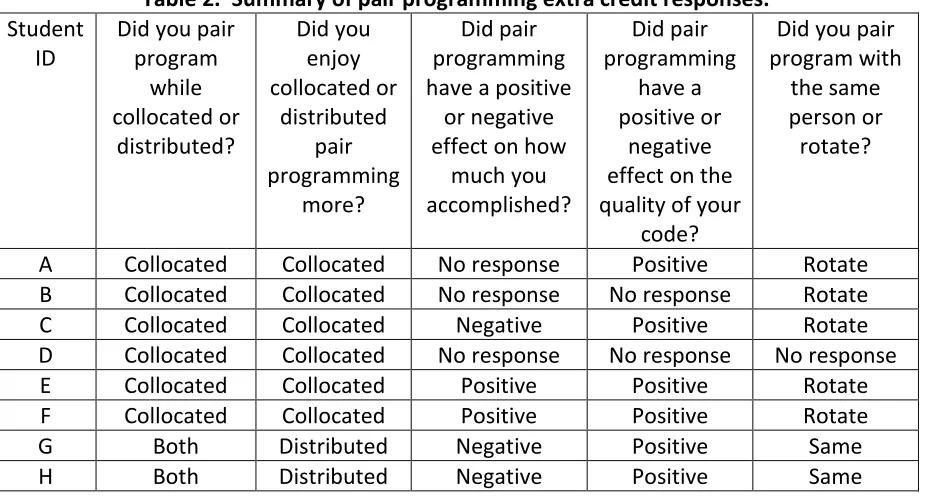
All six of the eight students who responded to the question, ―Do you feel that pair programming had a positive or negative effect on…the quality of your code?‖ answered ―positive.‖ Three of the eight students mentioned scheduling problems when writing about their experiences with pair programming although the questions they were answering did not lead to such an answer.
Table 2 presents a summary of student responses to the pair programming extra credit option.
Table 2. Summary of pair programming extra credit responses.
Student ID
Did you pair program while collocated or distributed? Did you enjoy collocated or distributed pair programming more? Did pair programming have a positive
or negative effect on how
much you accomplished? Did pair programming have a positive or negative effect on the quality of your
code?
Did you pair program with
the same person or rotate?
A Collocated Collocated No response Positive Rotate
B Collocated Collocated No response No response Rotate
C Collocated Collocated Negative Positive Rotate
D Collocated Collocated No response No response No response
E Collocated Collocated Positive Positive Rotate
F Collocated Collocated Positive Positive Rotate
G Both Distributed Negative Positive Same
H Both Distributed Negative Positive Same
personal responsibilities that do now allow them to meet on campus a method to collaborate with their teammates. The female partner wrote,
To be honest, the only reason we did the distributed paired programming was to get the five extra credit points. However, after I did the distributed paired programming, I learned that it is something for teams to look into. … Distributed paired programming is nice because it allows two people, who may need to be in certain places at a certain time, still work together to code. This makes it a more preferred plug in for me and other people that have a hard time meeting up in person…For some situations we found that distributed paired programming is a better tool then co-located paired programming. This is because [my partner] has two kids and other off-campus responsibilities so it is hard for him to come to school to do co-located pair programming. It is nice being able to work from home while still working together…
The male partner wrote,
The pair offered their chat log from when they distributed pair programmed so we could learn about their experience. During the session, they discussed a diagram they had previously created, which seemed to work well for them, but only one partner had a copy of the diagram. From reading their log, it was evident they were comfortable working together. They valued each other‘s opinions and asked about decisions as they went. They joked occasionally during the session and briefly discussed an email about another class. They seemed to be interacting much as they would in person. They also took short breaks much as collocated partners do. They took bathroom breaks and phone breaks but were able to jump back into programming, which may be because when one person took a break, the other person remained focused on the code.
5.4 Study Limitations
Not all students answered all questions. Three students did not submit retrospectives. All study results are subjective and based on student perceptions rather than actual measures of quality or productivity.
Twenty-nine students indicated they pair programmed during the team project, but only eight students submitted the extra credit option. Students may have thought they could only submit the extra credit option if they pair programmed for a majority of the team project or used the distributed pair programming tools.
5.5 Observations and Discussion
Several students noted or implied that they partner programmed; they worked together in the same room but were not pairing to work on the same software artifact. They noted that working in the same room as their teammates was beneficial so if they were ever stumped on what to do next, someone was available to help. Distributed pair programming tools can also provide a benefit similar to partner programming. If students are working from separate locations, they can share the artifact on which they need assistance, debug the issue, and then return to their individual work.
We found it interesting that although we offered the extra credit options to students to pair program remotely, many of the students chose not to pursue the option. In informal discussions with students, we found that many students perceived pair programming to take longer than the ―divide and conquer‖ approach. In talking with one student that chose to do the distributed pair programming, the extra credit was certainly a motivating factor. However, he said that one major benefit is that since he has two young children and cannot come in to the lab to work with the group, he appreciated being able to collaborate with the group but remain at home. We found that many students chose not to participate in distributed pair programming simply because they did not have a need to. Students attend the software engineering class and lab three times a week, so if they want to meet in person, they can do so without much difficulty. Therefore, distributed pair programming may not be a necessity for them. However, teams that are physically distributed on a regular basis could find distributed pair programming to be a major benefit. Our findings align with Olson and Olson‘s results. They suggest that when new groupware is introduced, incentives to use the groupware are necessary [20]. Many students found the extra credit incentive to not be worth the effort of learning new technology.
Based on the Myers-Briggs results students reported in PairEval, the software engineering course had 61% introverts and 39% extraverts. This increased percentage of introverts may have contributed to fewer students trying distributed pair programming.
5.6 Conclusions
In this study, three research hypotheses and one research question were examined. H1a: Students who pair program remotely will enjoy many of the same benefits as those who pair program while collocated, including higher code quality and personal enjoyment. Supported. The two students who reported distributed pair programming for the extra credit option reported that pair programming had a positive effect on their code quality. They also reported enjoying distributed pair programming.
H1b: Women and students from other underrepresented groups in computing who pair program remotely will enjoy many of the same benefits as those who pair program while collocated, including personal enjoyment. Supported. One of the two students who tried distributed pair programming was a female and she enjoyed it, so this hypothesis is supported.
H3: Making distributed pair programming technology available to students increases the likelihood that they will pair program. Partially supported. The availability of the distributed pair programming tools increased the amount that two students pair programmed. The other students in the class did not take advantage of pair programming remotely, so this hypothesis is partially supported.
6 Study 2: Interviewing Students about Their Pair Programming
Experiences
The goal of our second study is to examine student perceptions about distributed pair programming when a distributed pair programming tool is available for use.
To supplement the student responses from our first study, we interviewed students in the same software engineering course to discuss their perceptions about computer science as a field, teamwork, and pair programming. We conducted interviews with six students at the beginning of the semester and six students at the end of the semester. The interviews were transcribed and then quantitatively and qualitatively analyzed. Through the interviews, four research hypotheses and one research question were examined:
H1a: Students who pair program remotely will enjoy many of the same benefits as those who pair program while collocated, including higher code quality and personal enjoyment.
H1b: Women and students from other underrepresented groups in computing who pair program remotely will enjoy many of the same benefits as those who pair program while collocated, including personal enjoyment.
H2: Distributed pair programming decreases the scheduling issues that arise for students trying to schedule collocated pair programming.
H3: Making distributed pair programming technology available to students increases the likelihood that they will pair program.
6.1 Research Methodology
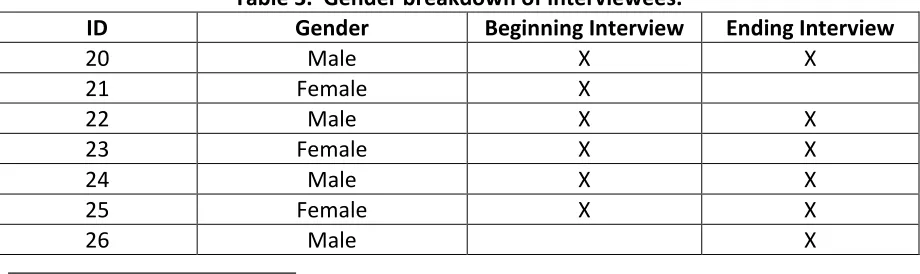
We conducted interviews13 with students in the software engineering course to discuss their perceptions about computer science as a field, teamwork, and pair programming. We visually identified nine students who were women and/or part of traditionally underrepresented groups in computing and randomly-selected nine other students in the class to invite for an interview at the beginning of the semester. At the end of the semester, we invited those same eighteen students to interview. We also invited the ten students who indicated to the teaching staff that they were working toward the pair programming extra credit described in Study 1. Four of these ten students were part of the original eighteen invited at the beginning of the semester. Six students participated in the beginning interview, and six students participated in the end interview. None of the students from traditionally underrepresented groups participated in the beginning or ending interviews.
Table 3 shows the gender breakdown of the interviewees. As an incentive, interviewees received a $20 gift certificate to a location of their choice for each interview in which they participated.
Table 3. Gender breakdown of interviewees.
ID Gender Beginning Interview Ending Interview
20 Male X X
21 Female X
22 Male X X
23 Female X X
24 Male X X
25 Female X X
26 Male X
The interviewer followed the protocols available in Appendices A and B; however, the interviewer inadvertently did not ask each interviewee every question. The interviews were sound recorded. The interviews were transcribed and then quantitatively and qualitatively analyzed as described in section 2.2.
6.2 Results
In this section, we discuss the results from our interviews.
6.2.1 On Teamwork
We asked interviewees what they liked and disliked about computer science and the software engineering course. Six interviewees mentioned problem solving as a reason why they liked computer science. Interviewee 20 mentioned that he enjoys computer science because he likes working alone, but he also finds working alone to be a drawback,
Being able to sit alone with my music in the zone is the plus side but on the other hand it’s kind of the minus side too because I also really like interacting with people and I like being able to talk to others and collaborate...
Four interviewees described working with others as something they liked about the course. Of the five interviewees who were asked whether they prefer to work in groups or alone, two (20 and 22) prefer to work alone and three (23, 24, and 25) prefer to work in groups. Interviewee 20, as mentioned above, favors working alone:
there’s no way I would take that job. There’s no way. I want to work on my own. That’s why I’m a computer scientist.
Interviewee 24, on the other hand, enjoys working with others:
I think our major needs to focus a lot more on actual communication and socialization amongst each other. Because when you get in industry, from what I’ve experienced, it’s definitely you are now working with these people, and it is your job regardless of how well you can code, you must code with these people and you have to get along with them…Some people you know, when you start coding you shut yourself off from the world and you put your headphones on and some people – I sit there with my best friend and we can sit there all day and write PHP and I can talk to him like hey how are you doing and what not. We can laugh and whatnot…I pump it out at the same time and I’m done two hours earlier. It’s the environment that you work in that’s very much benefited when you’re working in a team.
Interviewee 25 enjoys group work because she finds that she and her partner are able to take advantage of each other‘s strengths:
6.2.2 On Pair Programming
Interviewees described the benefits of pair programming including partners helping generate new innovations and ideas, higher code quality, positive pair pressure, and partner assistance when they are not sure how to proceed.
The five interviewees (21, 22, 23, 24, and 26) who were asked if they had pair programmed in previous classes reported that they had not. The two interviewees (24 and 26) who were asked if they had pair programmed at work reported that they had not.
Interviewees 25 and 26 reported pair programming during the software engineering course‘s team project. Why did they choose to pair program? Interviewee 26 pair programmed when he and his teammate were working on the same use case. Interviewee 25 chose to pair program because,
It actually cut down on the time we were actually working.
Both interviewees 25 and 26 reported pair programming in the same location rather than from separate locations. Interviewee 25 chose to pair program in the same location as her partner due to technical problems with the distributed pair programming technology:
I think people complained that it was too difficult to deal with. We didn’t want to waste time struggling over errors that came with the plugin at the same time as struggling with the errors of the program itself.
Interviewee 26 thought collocated work was easier:
The other four interviewees who chose not to pair program were asked why. Interviewee 20 disliked the scheduling aspect of pair programming:
I have kind of a bad attitude about paired programming in general just because everybody is so busy. Just to arrange our schedules and meet in the lab and just the pains we’ve had to go through.
In fact, three other interviewees mentioned scheduling issues in their interviews as a problem they encountered. Interviewee 23 felt that the students in the software engineering course had become so accustomed to working alone due to the environment of other programming courses that pair programming was too much of a transition. She described,
I think a large part of that is how CSC students have come up through N.C. State. It’s been a very individual thing. It’s been very much this is your project, do not talk to anyone else or we’ll shoot you in the face or whatever the rules are now. While I think it’s a very good idea, … it’s not one that’s going to work with any kind of success in the environment that State has…
Interviewees 20, 23, 24, and 26 all noted that they had not seen pair programming while working in industry, which seemed to make them question the value of pair programming. Interviewee 24 stated,
and Microsoft; we didn’t do paired programming there. So I do know there are certain shops they get away and do very well with paired programming.
Interviewee 24 went on to say,
Paired programming does exactly what they’re saying it does. [My partner has] caught a lot of times where I’ve left off a semi colon or I’ve misspelled a variable. We do get higher quality code.
6.2.3 On Distributed Pair Programming
Five of the interviewees (21, 22, 23, 24, and 25) during their beginning interview were asked if they would pair program more often if they could pair program remotely. All but one (23) said they would. When asked if she would pair program remotely, interviewee 22 replied,
Absolutely. I usually find my schedule to be quite hectic.
Interviewee 24 thought pair programming in a distributed way was almost a necessity for students:
So it’s almost like a requirement that you have some sort of way of remotely working. … I can see when you’re on your job site doing paired programming because you’re at the job because those are eight to five and you work these hours… So being able to work remotely would be amazing.
6.2.4 On the Increase of Skill Sets and Number of Friends
Based on the work of Walton and Cohen [25], we were curious how pair programming and this software engineering course affected students‘ computer science skill sets and number of friends within the computer science department. All of the interviewees who participated in the end interviews were asked if they felt they had more friends in the computer science department after taking this software engineering course. All but one interviewee (22) reported having more friends in the department. We also asked all of the interviewees who participated in the end interviews if they felt the course had increased their computer science skill sets and all but one interviewee (23) reported an increased skill set.
6.3 Study Limitations
Not all interviewees were asked exactly the same questions.
Not all interviewees participated in both the beginning and ending interviews.
All study results are subjective and based on student perceptions rather than actual measures of quality or productivity.
Due to time constraints, not all students in the course could be interviewed.
The sample size is small and the study took place in one course at one university with a pair programming lab. These results may not generalize to students at other universities.
6.4 Conclusions
In this study, four research hypotheses and one question were examined.
enjoyment. Not supported. None of our interviewees reported pair programming remotely during the course‘s team project, so we have no evidence for or against this hypothesis.
H1b: Women and students from other underrepresented groups in computing who pair program remotely will enjoy many of the same benefits as those who pair program while collocated, including personal enjoyment. Not supported. None of our interviewees reported pair programming remotely during the course‘s team project, so we have no evidence for or against this hypothesis.
H2: Distributed pair programming decreases the scheduling issues that arise for students trying to schedule collocated pair programming. Supported. Two of the four students who said they would pair program more often if they could pair program remotely said that remote pair programming would decrease scheduling issues.
H3: Making distributed pair programming technology available to students increases the likelihood that they will pair program. Partially supported. Four out of the five students who were asked if they would pair program more often if they could do so remotely said that they would. However, all of our interviewees had tools to pair program remotely, but none of them chose to do so.
7 Study 3: Student Perceptions Before and After Trying Distributed
Pair Programming
The goal of our third study is to examine student perceptions about the benefits and drawbacks of distributed pair programming before and after trying distributed pair programming.
We conducted a study with 24 undergraduate software engineering students at NCSU during the spring semester of 2009. Participants pair programmed remotely for 90 minutes as they worked on a programming assignment together. We surveyed participants before and after these distributed pair programming sessions.
Through their survey responses, four research hypotheses and one question were examined:
H1a: Students who pair program remotely will enjoy many of the same benefits as those who pair program while collocated, including higher code quality and personal enjoyment.
H1b: Women and students from other underrepresented groups in computing who pair program remotely will enjoy many of the same benefits as those who pair program while collocated, including personal enjoyment.
H2: Distributed pair programming decreases the scheduling issues that arise for students trying to schedule collocated pair programming.
RQ2: What do students perceive as the benefits and drawbacks of distributed pair programming?
7.1 Research Methodology
We conducted a study14 with 24 undergraduate software engineering students at NCSU. We limited this study to students in the software engineering course as we wanted participants to have a vested interested in accomplishing a similar programming task. We solicited all 69 students in the course, and 12 pairs chose to participate. No student volunteered to participate without his or her partner. Participants were given a $20 gift card as an incentive. Two of the participants were female. One male participant was African American/Black, which we consider to be a minority for this study. One male participant declined to report his ethnicity.
For the study, we asked participants to take a Pre-Study Survey (Appendix C), try distributed pair programming for approximately 90 minutes with their assigned partner for their second paired homework assignment, take a Post-Study Survey (Appendix D), and answer questions in a follow-up email (Appendix E). One of the students met a researcher in the LCSD while his partner remained in another location of his choice. We suggested participants share their code through DocShare, voice chat using TokBox15, and text chat using the DocShare chat tool, but we allowed them to communicate using any of the tools they had available. The researcher observed the participant in the LCSD during the study.
The homework assignment participants worked on during the study was the second paired assignments that students have three weeks to complete. At the end of the first week, students submit a UML class diagram and test plan for a provided requirement. At the end of the third week, students submit their project, which requires automating the insertion and deletion of test data, implementing the assignment requirement, and creating automated tests for their implementation. We conducted the study after week one of the assignment.
We recommended participants use DocShare because it easily interfaces with Rational Team Concert, it preserves students‘ privacy (unlike desktop sharing tools), and students in the previous semester preferred DocShare to Sangam. Prior to the study, all students in the course were asked to complete a tutorial16 on how to install and use DocShare. One pair chose to use LogMeIn instead of DocShare during the study.
We quantitatively and qualitatively analyzed the participants‘ responses to the Pre-Study Survey, Post-Pre-Study Survey, and follow-up email as described in section 2.2.
7.2 Results
This section provides the results from our study.
7.2.1 Personal Enjoyment
Sixty-seven percent of participants agreed that they enjoyed distributed pair programming. Only two participants disagreed (zero participants strongly disagreed) with the statement, ―I enjoyed pair programming remotely with my partner‖ (Q12). We compared participants‘ enjoyment of programming alone (Q25), collocated pair programming (Q26),
and distributed pair programming (Q12) of the 22 participants who responded to the follow-up email. Figure 2 illustrates that more participants enjoy collocated pair programming and distributed pair programming compared to programming alone.
Figure 2. Preferences for programming alone, collocated pair programming (CPP), and distributed pair programming (DPP).
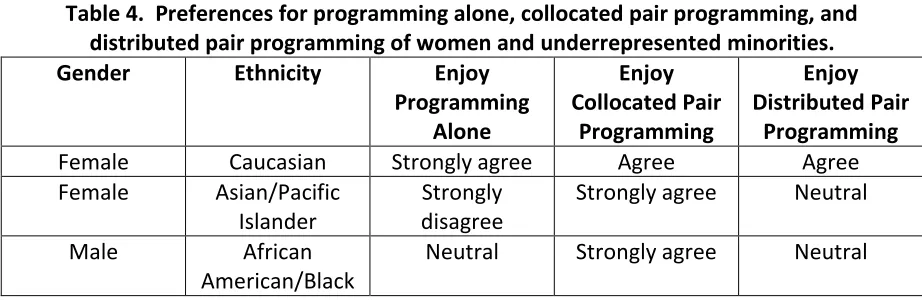
Table 4. Preferences for programming alone, collocated pair programming, and distributed pair programming of women and underrepresented minorities.
Gender Ethnicity Enjoy
Programming Alone Enjoy Collocated Pair Programming Enjoy Distributed Pair Programming
Female Caucasian Strongly agree Agree Agree
Female Asian/Pacific
Islander
Strongly disagree
Strongly agree Neutral
Male African
American/Black
Neutral Strongly agree Neutral
Participants who found DocShare easy to use were more likely to enjoy distributed pair programming. We used simple linear regression and found a statistically significant (p<.01, r=.5375) positive correlation between the perceived ease of use of the distributed pair programming tool and participants‘ enjoyment of distributed pair programming. Therefore, students may need to perceive the distributed pair programming tool as easy to use in order to enjoy distributed pair programming.
7.2.2 Perceived Code Quality
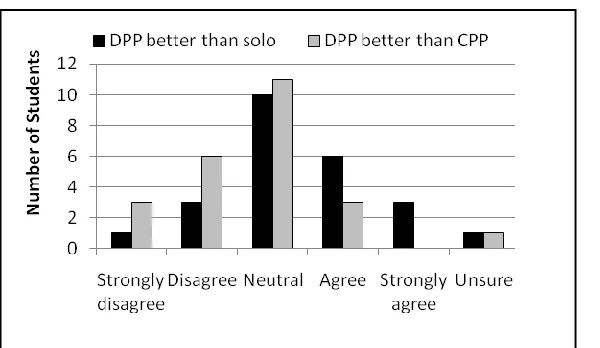
Figure 3. Code quality comparisons of distributed pair programming (DPP) to solo programming and collocated pair programming (CPP).
7.2.3 Productivity
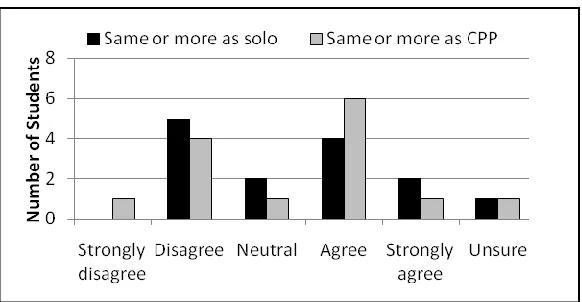
Figure 4. Productivity comparison of distributed pair programming to solo programming and collocated pair programming (CPP).
7.2.4 Pair Pressure
Seventy percent of participants agreed or strongly agreed that their partner helped keep them on task (Q18). Six participants were neutral, and only one participant disagreed with Q18.
7.2.5 Continuing Pair Programming
The percentage of participants who were likely or extremely likely to pair program remotely increased from 54% to 66% after trying distributed pair programming (Q6 and Q11). The percentage of participants who were likely or extremely likely to pair program while collocated increased from 58% to 83% after trying distributed pair programming (Q5 and Q10).