
A SURVEY BETWEEN GENERAL PURPOSE
COMPUTERS AND SPECIAL PURPOSE COMPUTERS
WITH ITS COMPONENTS AND DESCRIPTIONS
Tan Sea Ni
1, Chama Serenje
2, Farahsat Jabin
3 1,2,3BEng (Hons) EEE, Asia Pacific University, Kuala Lumpur, Malaysia
ABSTRACT
This paper is mostly about the research of the computers. The research basically divided into 2 parts, which are
general purpose computer and special purpose computer. In this research paper, 3 examples of the general
purpose computers and 7 examples of special purpose computers were discussed. The working principles and
the important components together with the descriptions involved are listed and discussed in detail. For better
explanations and illustrations, the appropriate figures are also included in this paper. The differences between
general computer and special computer also explained well. This paper will help in future for researches to
enhance more on special computer architectures.
Keywords: Computer Architecture, General Purpose Computer, Special Purpose Computer
I. INTRODUCTION
1.1 AIMS
To analyze and provide a detail documentation between general purpose computer and special purpose computer.
1.2 OBJECTIVES
To do research about the general purpose computer and special purpose computer and the ways to classify
them.
To explains in details the architecture of each computer chosen which is to develop knowledge on the basic
principles behind the design of the modern computers system.
To describe and explain the structure and organization of computer systems, including the role and
operation of each of the computer chosen.
1.3 PERSONAL COMPUTER STRUCTURE
Figure 1: The structure of a Personal Computer [1]
From “Fig.1” it shows the structure of a personal computer. As shown the computer is connected to the strip line which represent the computer main board which is motherboard. The ports of a personal computer include the basic port for printer, mouse, keyboard and additional ports for monitor, speaker, webcam and others. The port of the personal computer function as the interface to connect the personal computer to other computers or devices listed in “Table.1”.
1.3.1 DISC CONTROLLER
Personal computer has disk controller that used to control the hard drive and the disc drive. Hard drive is used to store the data for the personal computer while the disc drive is used to either read or write the data from the disc.
1.3.2 GRAPHIC CARD
and more detail. It also has its own processor. The use of graphic card in personal computer has prevented it from overloaded.
1.3.3
SOUND CARD
The main function of sound card in personal computer is to convert the digital signal into the analogue signal that human can hear. The output is connected to headphone or speakers. Not only that, the sound card can also be used to record audio by using microphone.
1.3.4 NETWORK CARD
The network card enables the personal computer to connect to the local data network. The network card translates the data of computer into electrical signals which is compatible with the signal of network. When the users log in to a website, the personal computer will pass the information to the network card. Then, the network card will then change the information into electrical impulses. The network cable will then carry those electrical impulses to a Web server that available from Internet. The web server will then respond to the electrical impulses and will give the response in the form of electrical impulses too. Then, the network card will convert the electrical signal (which is Web page) into the form of data and display to the users. By this method, computer can exchange information with the network.
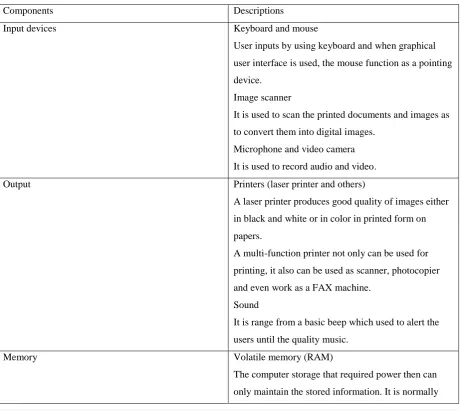
Table 1: The components and descriptions of the Personal Computer
Components Descriptions
Input devices Keyboard and mouse
User inputs by using keyboard and when graphical user interface is used, the mouse function as a pointing device.
Image scanner
It is used to scan the printed documents and images as to convert them into digital images.
Microphone and video camera It is used to record audio and video.
Output Printers (laser printer and others)
A laser printer produces good quality of images either in black and white or in color in printed form on papers.
A multi-function printer not only can be used for printing, it also can be used as scanner, photocopier and even work as a FAX machine.
Sound
It is range from a basic beep which used to alert the users until the quality music.
Memory Volatile memory (RAM)
from 2 GB to 16 GB depends how much the capacity of RAM that motherboard can support.
Non-volatile memory (Hard disk and USB flash drive) It is the memory that can maintain the stored
information even it is not powered. The capacities are varied from 320 GB until few TB while for USB flash drive, it is varied from 1 GB until few hundred GB. Internal Hard drive
It is the connected to the motherboard so it operates faster compared to external hard drive. The capacity of the internal hard drive normally is 500 GB.
Processor The basic processors that used are AMD Sempron and
Intel Celeron. It is the logic circuitry that responds and process the basic instructions which is used to operate a computer. The main 4 functions of it are fetch, decode, execute and also to write back.
Other components Other components which are WIFI port (LAN cable),
USB ports, microphone and speaker jack and CD rom.
2.1.2 RASPBERRY PI
Figure 2: The gpio and parts of Raspberry pi [2]
Table 2: The components and descriptions of Raspberry Pi 3 Model B
Components Descriptions
Input Keyboard and mouse
User inputs by using keyboard and when graphical user interface is used, the mouse function as a pointing device.
Micro USB
To supply power of DC 5V to the Raspberry pi.
Output HDMI output
This is used to transfer high quality images to the compatible screen for display.
3.5mm audio jack
Used as output for headphone or earphone and even speaker.
The storage that minimum used is 8GB.
Processor Raspberry Pi 3
Broadcom BCM2836 SoC with a 900 MHz 32-bit quad-core ARM Cortex-A7 processor with 256 KB shared L2 cache.
Other features Other components which are WIFI port (LAN cable),
Bluetooth device, USB ports (standard with 4 ports), male general-purpose input/output (GPIO) which is controllable by the users during the run time.
2.1.3 SMARTPHONE
Smartphone is a modern mobile phone with the combination of a personal computer and other features of mobile phone. The other features of mobile phone include calls, text messages, media player, video games, and digital video camera and so on. Not only have that, smartphone can also accessed to the Internet and also the third party software components which called as “apps”. Smartphone also normally a touchscreen, which the users can use the touchscreen to activate a virtual keyboard when type a message or to activate the “apps” that installed shown in “Fig.3” also in “Table.3”.
Figure 3: The structure of smart phone [3]
Table 3: The components and descriptions of the smart phone
Components Descriptions
Input Capacitive touchscreen keypad
It is for the users to enter inputs
Output Speaker and earphone
Used to play music and any other audio Screen display
is considered a high speed memory and used as a place to store data so as the smartphone can execute the data in faster way when needed.
Processor Many types such as Snapdragon, Quad-core and even
Octa-core. It is used to execute what the users want their smartphone to do.
Other features Other components which are micro USB to charge the
phone and to data transfer, Bluetooth and WIFI devices, the micro SD slot to put the micro SD which is for additional storage and also SIM card slot to put the SIM card for the users to make calls and send messages.
2.2 SPECIAL PURPOSE COMPUTER
2.2.1 TRAFFIC-LIGHT CONTROL SYSTEMS
Traffic-light control systems are a system which can be used to manage the traffic on the road. Some detectors are buried in or under the road. These detectors are used to detect the presence of traffic that wait for green light in order to pass the roadway. When there are a lot of traffic in one particular road, the time of green light that is given to the road will be longer compared to the empty road. In United States, all the controller that used for the traffic light are standardized by NEMA. The controller uses the concept of phases and ring control. The controller was limited to eight phases, dual ring control. This works well for most of the intersections but not for the very complex intersections. This illustrates in the “Fig.4”.
2.2.2 WEATHER-FORECASTING SIMULATORS
Weather-forecasting simulators is the technology of science that invented by human to predict the weather with the aid of computer simulators shown in “Fig.5”.
Figure 5: The workflow of the weather forecast [5]
The above Figure shows the workflow of the weather forecast. First of all, an area is chosen for weather forecast. Over a specified period of time, such as 6 hours, the different variables are observed and measured. It can be done by collecting the data for the current state of the atmosphere. The data such as wind speed, temperature, humidity and others are collected. The data collected will then entered into the computer. In the computer, the data will be use in the calculation to predict the weather based on the current state of the atmosphere. For the calculation, the equation that created based on the understanding of atmospheric such as thermodynamic equation is used. Therefore, the weather that forecasted is obey the law of thermodynamics which define the fundamental physical quantities which are energy, temperature and entropy. The mathematical modelling is done with the aid of computer.
2.2.3 GPS NAVIGATOR
Figure 6: An example of GPS navigator [6]
2.2.4 SMART WATCH
A smart watch is a computerized watch that not only used for timekeeping. The smart watch nowadays playing the role of the personnel assistant of the users that can be used to perform basic tasks which helps the users in daily life. In fact, the smart watch at the early stage can be used perform some basic tasks such as calculations. By the time passed, more and more function that can be performed by a smart watch. For now, most of the smart watch can be used to even run the mobile apps since it uses the mobile operating system. Due to this, the smart watch can perform most of the functions same like the mobile phone. Some of the smart watch can even be used to make and answer the incoming phone calls. Not only that, the smart watch can be used to help the users in their daily activities such as remind the users to carry out their task (reminders), personnel heath care (record the sleeping time, measure the pulse rate), alarm (to alert) and others shown in “Fig.7”.
The above figure shows the picture of the Samsung Gear S smart watch. For the outlook appearance, it uses the super AMOLED capacitive touchscreen as display. The advantages of using this is the AMOLED screen is battery saver. The smart watch has built in Li-ion battery. For the function, this smart watch can be used to view the photo and videos. It is also voice sensitive. The users can use voice to command the smart watch to perform specific task such as dial. Not only have that, the smart watched also use vibration as to alert the users.
2.2.5 SMART WASHING MACHINE
Washing machine is a machine that used to wash laundry, such as clothes and fabrics. The function such as spinning, washing, rinsing and draining is controlled by the computer that located in the washing machine. The above diagram shows the general parts of the washing machine. For the washing machine to function, there are some parts and components that play very important role for the washing machine to function. The basic idea for the washing machine to function is the washing machine sloshes the clothes in soap for a while then it will spin in high speed to remove the dirty water after done washing process. For this process to be carried out, the washing machine needs the parts as shown in the “Fig.8”.
Figure 8: The parts of the washing machine [8]
the water for the washing process which is aid by the used of thermostat. It also contains the heating element that used to warm the water up to the desired temperature to wash the clothes. Not only have that, the washing machine also needed some programming for it to operate. With the used of programming, the washing machine will operate step by step according to the code of the programming. The steps included are wash, rinse and spin. The programming also controls the valves of the pipes of the washing machine which is to control the flow of water in the washing machine.
2.2.6 CASH REGISTER
Cash register is a computer of for special purpose which is to use in the regulation of the transaction of the money with customers in the places of business. It has the compartment to put the cash and the copy of the bills. Not only that, it also displays the amount of money and the total of every sale and even record every single of them. The cash register also normally attached to a printer which is used for receipts printing.
Figure 2: The common parts of the cash register [9]
The above “Fig.9” shows the important parts of the cash register. The rotable customer display is to show the total amount that needed to pay by the customers and the LCD display is for the reference of the cashiers. While the purpose of the key slot is for security. The cash register will only be turned on when there is the right key used for the particular cash register. The money detector is used to detect the fake note. There are also a cash drawer with lock to keep the cash safely.
2.2.7 AUTOMATED TELLER MACHINE, ATM
two types of ATMs. The basic one only provide the service for the users to withdraw money from their bank account and to check their account balance only. While for the more complex machine, it provides additional services as it accepts deposits, facilitate the line of the credit payments and also can be used to report the account information.
Figure 10: ATM and the parts [10]
The above “Fig.10” shows the ATM machine with the labelled parts. First of all, the users put their debit card into the machine. Then the card will read the information from the card by using card reader. While the keypad is for the users to key in the numbers. The display screen is used to display the options for the users to choose and also shows the details of the cards. While the screen button is used to select the option from the options that displayed by the display screen. The deposit slot is for the users to do banking with the machine. The machine also has the slot for cash dispenser when the users withdraw money from their account.
III. DIFFERENCES BETWEEN GENERAL PURPOSE COMPUTER AND SPECIAL
PURPOSE COMPUTER
3.1 SPEED
In terms of speed, the special purpose computer tends to be perform faster compared to the general purpose computer. This is because the special purpose computer only needs to handle one specific task while the general purpose computer needs to handle more than one task.
3.2 COST
3.3 RELIABILITY
In terms of reliability, the special purpose computer tends to be more reliable compared to general purpose computer. A reliable product is totally with zero error. The probability of the special purpose computer to make error is much lower since they only handle one task unlike the general purpose computer.
3.4 MAINTENANCE
The maintenance is meant by keeping the any devices in a good state. The special purpose computer easier to be maintained compared to general purpose computer since they handled only single task. However, the process to repair them is more difficult compared to general purpose computer since it involves the complicated processes.
IV. CONCLUSION
In conclusion, computers play a very important role in human daily activities and involve in many major sectors include educational field, business field and others. The computers are divided into two which are general purpose computer and also the specific purpose computer. The general computer and specific computer are classified based on their characteristic and how they perform. General purpose computer can be used to handle tasks but the tasks that involve is basic. This is different from specific purpose computer. A specific purpose computer handles only one task and the task that handled are much complicated and in a more detail manner. For example, the calculator that contain in general purpose computers only handle basic calculations while the calculator that contain the weather forecast simulator needs to handle very complicated math equations and even thermodynamic equation. The general purpose computers also can receive more inputs and have many outputs compared to specific purpose computers since they are multi-tasking. One or more than one input is required for every single task that handled by computers. For every single task that handled by computer, there must be output for it to show to the users as respond for every instruction that given by users. In a nutshell, the research and development for computers need to be carried out from time to time due to their importance and contributions in human lives.
V. ACKNOWLEDGMENT
The author would like to share gratitude to Mr Umapathy Eaganathan, Lecturer in Computing, Asia Pacific University, Malaysia also Miss Angel Aron for her constant support and motivation helped me to participate in this International Conference and also for journal publication.
REFERENCES
[1] Pennstate 2015, University of Information Sciences and Technology, 2015, The Architecture of a Personal Computer. Available from: https://online.ist.psu.edu/ist140haynes/node/126. [18 Nov 2016].
[2] Google.com. (2016). the gpio pinout Diagram raspberry pi - Google Search. [online] Available at: https://www.google.com/search?q=the+gpio+pinout+Diagram+raspberry+pi [Accessed 20 Dec. 2016]. [3] Google.com. (2016). smartphone - Google Search. [online] Available at:
https://www.google.com/search?q=smartphone [Accessed 21 Dec. 2016].
[4] Ops.fhwa.dot.gov. (2016). Traffic Control Systems Handbook: Chapter 7 Local Controllers - FHWA
Office of Operations. [online] Available at:
[5] Google.com. (2016). weather forecast simulator - Google Search. [online] Available at: https://www.google.com/search?q=weather+forecast+simulator [Accessed 21 Dec. 2016].
[6] Google.com. (2016). GPS - Google Search. [online] Available at: https://www.google.com/search?q=GPS [Accessed 21 Dec. 2016].
[7] Gsmarena.com. (2016). Samsung Gear S - Full phone specifications. [online] Available at: http://www.gsmarena.com/samsung_gear_s-6620.php [Accessed 20 Dec. 2016].
[8] Google.com. (2016). smart washing machine - Google Search. [online] Available at: https://www.google.com/search?q=smart+washing+machine [Accessed 20 Dec. 2016].
[9] Google.com. (2016). cash register block diagram - Google Search. [online] Available at: https://www.google.com/search?q=cash+register+block+diagram [Accessed 20 Dec. 2016].
![Figure 1: The structure of a Personal Computer [1]](https://thumb-us.123doks.com/thumbv2/123dok_us/7771410.1279742/2.595.132.463.289.503/figure-structure-personal-computer.webp)
![Figure 2: The gpio and parts of Raspberry pi [2]](https://thumb-us.123doks.com/thumbv2/123dok_us/7771410.1279742/5.595.65.526.524.777/figure-gpio-parts-raspberry-pi.webp)
![Figure 3: The structure of smart phone [3]](https://thumb-us.123doks.com/thumbv2/123dok_us/7771410.1279742/6.595.88.486.376.596/figure-structure-smart-phone.webp)
![Figure 4: The working principle traffic light [4]](https://thumb-us.123doks.com/thumbv2/123dok_us/7771410.1279742/7.595.110.450.467.746/figure-working-principle-traffic-light.webp)
![Figure 5: The workflow of the weather forecast [5]](https://thumb-us.123doks.com/thumbv2/123dok_us/7771410.1279742/8.595.107.485.152.350/figure-workflow-weather-forecast.webp)
![Figure 6: An example of GPS navigator [6]](https://thumb-us.123doks.com/thumbv2/123dok_us/7771410.1279742/9.595.84.539.62.367/figure-an-example-of-gps-navigator.webp)
![Figure 8: The parts of the washing machine [8]](https://thumb-us.123doks.com/thumbv2/123dok_us/7771410.1279742/10.595.138.454.322.621/figure-parts-washing-machine.webp)
![Figure 2: The common parts of the cash register [9]](https://thumb-us.123doks.com/thumbv2/123dok_us/7771410.1279742/11.595.132.465.287.618/figure-common-parts-cash-register.webp)
![Figure 10: ATM and the parts [10]](https://thumb-us.123doks.com/thumbv2/123dok_us/7771410.1279742/12.595.156.438.162.464/figure-atm-and-the-parts.webp)
