Assessing the Usability and Effectiveness of a Remote Language Teaching
System
Anna Watson Angela Sasse
Department of Computer Science Department of Computer Science
University College London, UK University College London, UK
E-mail: [email protected] E-mail: [email protected]
Abstract: Distance learning is moving increasingly towards the use of computer technology as a
means for distributing courseware, for demonstrations, and for asynchronous collaboration and dis-cussion between students and tutors. Within a short time, however, the ability to communicate in real time using computers will exist for everyone. Multimedia conferencing over the Internet, using live audio, video and shared workspace, has until recently been restricted to the research domain. This paper describes a study in which this technology was used in a remote language teaching application. Small group tutorials were held over a number of months, in which students and tutors of foreign lan-guages were separated by distance, but not by time. The paper discusses the evaluation issues and observations from these trials.
1 Introduction
The ReLaTe (Remote Language Teaching over SuperJANET) project is a remote language teaching appli-cation which uses multicast multimedia conferencing technology over the Mbone (Multicast Backbone)[Buckett et al., 1995]. It is a joint project between University College London and the University of Exeter, and is funded by British Telecom as part of the BT/JISC SuperJANET research initiative. The project has developed a demon-strator system which supports remote interactive language tutoring by adapting and enhancing existing multime-dia conferencing technology piloted by the MICE (Multimemultime-dia Integrated Conferencing for Europe) project [Handley et al., 1993; Sasse & Bennett, 1995]. Prototypes of this demonstrator system were used in preliminary French teaching trials between the two partner sites during the course of July and August 1995, and more exten-sive trials were carried out using other languages between October and December 1995. Evaluation of this dem-onstrator system has two angles, the first looking at how easy the technology is to use, and the second looking at what aspects of language teaching can be engaged in successfully over the system.
This paper describes the methods employed in evaluating the system, and discusses the results of the study.
2 Components of Multimedia Conferencing
Multimedia conferencing technology has three main components: audio, video and shared workspace. The individual’s workstation has a camera mounted on it, and the participant uses a microphone and loudspeaker or a headset in order to speak and hear. It is usual practice to have to position the mouse in the audio tool window and hold down the mouse button throughout the duration of speech (a function known as push-to-talk). Likewise in order to use the shared workspace the mouse must be placed in the relevant window and clicked in order to be able to start writing. The shared workspace can be likened to a whiteboard on the computer screen. Whatever is written on the board can be seen and added to by all the participants. It is possible to import files onto this white-board and print the material out.
pro-duced some interesting results, but the conclusions drawn have yet to be assessed in a proper application. A new audio tool is under development in the ReLaTe project, and its performance will be assessed in future trials.
Synchronisation of the audio and video streams, in order to synchronise words and lip movements, is extremely difficult. One major reason for this is that real-time video places huge demands on the processing power of the workstation (audio is less processor intensive), which increases incrementally according to the number of video streams being received. It is common practice to send video at a speed of two or three frames per second (television quality is 25 frames per second). It is obviously meaningless to synchronise audio with video that is updated so infrequently. The video is perceived as being a point of reference rather than an aid to speech communication. Of course, in an application such as language teaching, it is anticipated that there will be much greater need for good, synchronised audio and video. The first implementation of lip synchronisation over the Internet, which works by delaying either the audio or video, is under development in the ReLaTe project.
3 Components of the ReLaTe Application
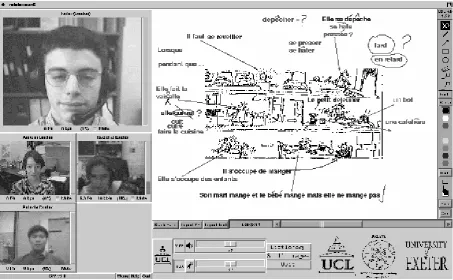
The tools that were used in the ReLaTe trials were the audio tool RAT [Hardman & Kouvelas, 1996] (which replaced vat [Jacobson, 1992] after the initial trials), the video tool vic [Jacobson, 1994], and the shared workspace tool wb [Jacobson, 1993]. The project modified the front-end of vic so that a single video window replaced the individual images which appear in the original version of vic. This single video window can display one large image and three smaller ones. The user can decide which of the participants should be in the larger win-dow by clicking on the name bar above the participant. The user interface is shown [Fig. 1] below.
Figure 1: The ReLaTe user interface
4 The ReLaTe Application
problem, rather than a pedagogical problem, normally used to overcome the problem of communicating with stu-dents who are geographically distributed”.
The main objective for the trials was to gain an understanding of where the technology failed in the goal of language teaching/learning, and whether this failure could be remedied for future users.
5 Evaluating the System
There are two distinct aspects of the ReLaTe system that needed to be taken into account in the evaluation: the effects of the technology and network conditions and the pedagogical effectiveness. Questions that needed to be addressed with the respect to the first aspect included: is the interface designed to enhance usability and is it intuitive to use? Do the users find the audio difficult to understand? Does having to manipulate the mouse affect the smoothness of the lesson? With respect to the second aspect, the pedagogical effectiveness, issues that needed to be looked at included: how does the ability of students learning with this system compare with that of subjects learning in the traditional way? How do users (teachers and students) find teaching and learning in this manner?
Conventional evaluative methods in the human factors and psychological literature include question-naires, interviews, participant observation, content analysis and empirical experimentation. However, multimedia conferencing is a new area of research and development, and little research has been carried out on evaluation methods for this area. The evaluations that have taken place have tended to focus on the technology employed e.g. which encoder and decoders are used, rather than the users’ performance with and perceptions of the system. There has been very little quantitative or qualitative analysis carried out using subjects and experimental tech-niques, although some informal evaluation of experiences has been reported, for example, on the MICE seminars [Sasse et al., 1994].
6 Pedagogical Evaluation
It was recognised that the ReLaTe project needs to work closely with methods of evaluating new technol-ogy in education. How has evaluation of new technoltechnol-ogy in learning been carried out? [Laurillard, 1993] reports “New technology methods are too frequently introduced to students on an experimental, pilot basis without being properly integrated into their teaching. Students therefore see them as peripheral to the real teaching, and invest less effort in them than they otherwise would”. Therefore the more favoured evaluation methods have not tended to be controlled experimental approaches - the technology has been introduced into real courses and evaluated over long periods of time, often years. This also helps counteract the steep learning curve that can be associated with the introduction of new technology. This is in keeping with the opinion in the education field that conclu-sions from evaluation of the pedagogical effectiveness of new technologies in learning can only be valid if the technology has become part of the normal course conditions. The approach requires integration with other teach-ing methods and assessment.
Unfortunately, this approach was not viable due to the time constraints of the project. However, a litera-ture search did result in some useful evaluative methods being identified. In their discussion of evaluation of CALL programs, [Scholfield & Ypsiladis, 1992] discuss a method whereby the teacher/researcher relies on per-sonal introspection, and makes use of a checklist of evaluation points. A similar approach has been termed ‘impressionistic judgement’ [Thomas, 1994], and was used in our evaluation.
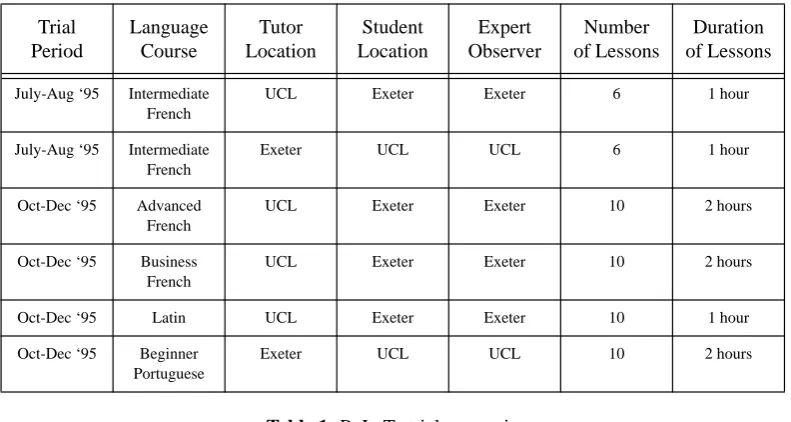
An evaluation plan was devised, whereby students would be taught by tutors at remote locations over a course of lessons. Each participant sat at a UNIX workstation (a Silicon Graphics Indy) equipped with a headset and a camera. Two or three students were involved per lesson. The trial details are shown in [Tab. 1]. Evaluation of the pedagogical and technological issues of the lessons took place through the techniques of observation, ques-tionnaires, rating scales, informal interviews, expert evaluation and comparison with face-to-face classes.
7 Results/Observations
Table 1: ReLaTe trials scenario
Table 2: ReLaTe trials - key observations and results 7.1 Audio
The first major audio issue to emerge from the trials was that the ‘push-to-talk’ requirement did not enable satisfactory communication between the lesson participants. Having to place the mouse in the audio tool dis-rupted the lesson in three ways. Firstly, the phatic function was interdis-rupted, and paraverbal (mmm, uhuh etc.) assurance was lost since only one participant could be heard at once. This was felt to be especially detrimental in a language teaching environment, where it can be expected that students will be more reluctant to speak in the target language without encouragement from the teacher. Secondly, since audio could only be transmitted when the mouse was placed in the audio tool area of the screen, when a participant switched from speaking to using the mouse in another part of the screen (e.g. selecting a whiteboard tool), other participants could be left unsure as to the cause of the ensuing silence - loss of audio connection with that person (system error), or side-effect of using another tool? Thirdly, it was observed that having to locate the mouse and place it on the audio tool meant that the participant did not maintain as much visual contact via the camera as desirable.
Once push-to-talk was abandoned, audio quality was the most frequently cited cause of dissatisfaction with the system. The problems seemed to be entirely due to the network conditions i.e.packet loss, rather than to background noise levels or volume differences between sites. It was the unpredictability of the sound quality that led to frustration - the quality could fluctuate dramatically within the course of one lesson. However, despite this fluctuation in quality, most of the participants said that they felt that they could rate the overall quality of the sound during the lesson. The results gathered from five-point rating scales indicated that most lessons were per-ceived as having fair or good quality audio. However, this result may reflect the overall enthusiasm of the stu-dents participating. There was a noticeable trend within some subjects to rate the audio quality as better towards the end of their sessions while the objective packet loss statistics suggested that this was not so. This suggests
Trial Period
Language Course
Tutor Location
Student Location
Expert Observer
Number of Lessons
Duration of Lessons
July-Aug ‘95 Intermediate French
UCL Exeter Exeter 6 1 hour
July-Aug ‘95 Intermediate French
Exeter UCL UCL 6 1 hour
Oct-Dec ‘95 Advanced French
UCL Exeter Exeter 10 2 hours
Oct-Dec ‘95 Business French
UCL Exeter Exeter 10 2 hours
Oct-Dec ‘95 Latin UCL Exeter Exeter 10 1 hour Oct-Dec ‘95 Beginner
Portuguese
Exeter UCL UCL 10 2 hours
Component Observation Comment
Audio 1. Push-to-talk problematic 2. Fluctuating audio quality
1. Abandoned in favour of full duplex 2. Methods of repair under development Video 1. Very slow frame rate
2. Psychologically important
1. Audio-video synchronisation under development
Whiteboard 1. Does not function as word processor 2. Mouse problems - ‘phantom click’ 3. Relied on heavily
that tolerance to poor audio quality increased as the subject became more familiar with the system and its inher-ent drawbacks.
7.2 Video
The main results concerning the use of video was that the frame rate was not fast enough to permit syn-chronisation, and as a result, it was not possible to use lip-movement as an aid to comprehension. However, one subject managed to find merit in the situation, commenting: “Tutor’s lip movement was delayed and didn’t match speech. Actually encouraged me to listen harder to the French sounds - very useful”.
The video images were made use of in many other ways, however, and was felt to be a valuable compo-nent. The other uses included as means of checking whether the other participant was speaking when there seemed to be an unusually long silence, indicating an audio problem; as a means of ascertaining comprehension on the other participants’ part (through smiling, laughing, nodding etc.); as a means of common reference, for example when the tutor indicates which worksheet to look at by holding it in front of the camera; as a means of picking up some of the nonverbal gestures pertinent to the target language; and as a psychological reassurance that the other participants are actually there (lack of sidetone in the microphone contributes to the feeling that the system is ‘dead’).
7.3 Whiteboard
Much innovative use was made of the whiteboard tool. Teachers used it for many varied tasks, including fill in the gap exercises, verb conjugations, spelling, reading comprehension, writing and description exercises. The tutors often imported text or postscript files, and used pictures that had been scanned in previous to the les-son. The students seemed to greatly enjoy using the tool. As one of the tutors pointed out, the opportunity for stu-dents to use the whiteboard is not usually present in a face-to-face class since it is usually in the teacher’s domain. However, some problems with the tool were brought to light. One unfortunate problem, specific to the workstations used in the project (SGIs), was what came to be termed the ‘phantom click’, whereby it often took 2 or 3 clicks of the mouse for it to register on wb. In addition, wb as a tool does not have the same functionality as a common word processing package: there is no cursor, no automatic carriage return, and it is not possible to delete or edit single words in an entered sentence. With respect to language teaching, it was unfortunate that there was no facility to type accents on text - participants often resorted to drawing them in after they had typed the text. Although all participants in the lesson can use wb simultaneously, it is not possible to delete what another participant has written. It is also not possible to see the other participants’ pointers, so any point of reference has to be drawn onto the screen. As a result of these problems, a recent development has been to offer a shared text editor (nt) [Handley, 1996] in addition to wb. nt will not replace wb completely because wb can cater for things that nt cannot e.g. drawing and importing scanned documents.
7.4 User and Expert Observer Viewpoints
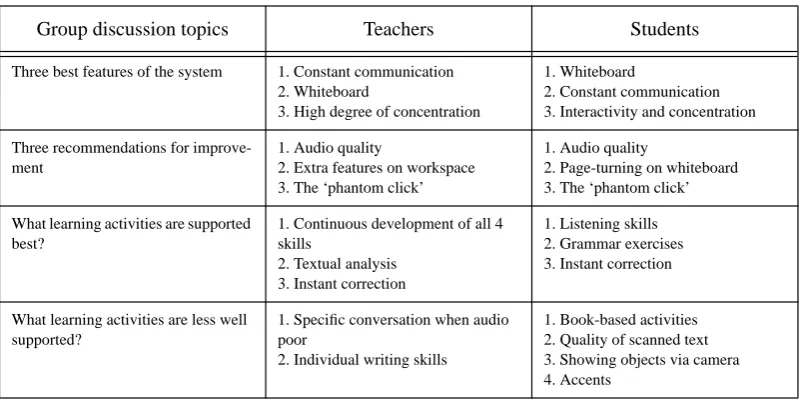
In addition to questionnaires and discussions with the participants and expert observers individually, all the participants from the trials were brought together for a group discussion workshop at the end of the trials, the main results of which are summarised in [Tab 3].
In the opinions of the tutors, both teachers and expert observers, who participated in the trials, the system shows a great deal of potential, and in its present state is capable of being used to teach effectively the four main language skills: reading, writing, speaking and listening. The system is especially valuable in that these 4 skills can be practised simultaneously, which is not something that can be easily achieved in conventional teaching sit-uations. Use of the whiteboard means that problems with grammar, spelling and syntax can be monitored con-stantly and corrected immediately. It was also possible to achieve a fine degree of textual analysis with wb, due to the fact that the size of the window permits only a certain amount of text to be visible at any one time, focusing attention.The students were of the general impression was that they spoke as least as much of the target language as they would normally in face-to-face lessons. The phatic function was increased, which was seen as a benefit.
Overall both the teachers and the students were very enthusiastic, and it was felt by the expert observers that the system produced at least ‘as good’ learning as can be achieved in a face-to-face class.
7.5 General Observations on Teaching/Learning Style
Table 3: ReLaTe group discussion results
8 Conclusion and Future Work
The observations and results indicate that remote language teaching over the Mbone is feasible, despite some problems stemming from network characteristics (namely packet loss) and from existing software function-ality. Both teachers and students enjoy using the system and find it a valuable educational tool.
Future work will look at the efficacy of a new audio tool encompassing redundancy to repair packet loss [Hardman et al., 1995]. Audio/video synchronisation will be implemented and the effects of this will be assessed.
9 References
[Buckett et al., 1995] Buckett, J., Campbell, I., Watson, T.J, Sasse, M.A., Hardman, V.J. & Watson, A. (1995). ReLaTe: Remote Language Teaching over SuperJANET. Proceedings of UKERNA 95 Networkshop, 209-214.
[Handley et al., 1993] Handley, M.J., Kirstein, P.T. & Sasse, M.A. (1993). Multimedia Integrated Conferencing for European Researchers (MICE): Piloting Activities and the Conference Management and Multiplexing Centre. Computer Networks and ISDN Systems, 26, 275-290.
[Handley, 1996] Handley, M.J. (1996). Network Text (nt) - A Scalable Shared Text Editor for the MBone. RN/96/14, Dept. of Computer Science, University College London, UK.
[Hardman & Kouvelas, 1996] Hardman, V. & Kouvelas, I. (1996). RAT General Architecture. IN/96/2, Dept. of Computer Science, University College London, UK.
[Hardman et al., 1995] Hardman, V., Sasse, M.A., Handley, M.J., & Watson, A. (1995). Reliable Audio for Use over the Inter-net. Proceeding of INET 95.
[Jacobson, 1992] Jacobson V. (1992). VAT manual pages. Lawrence Berkeley Laboratory (LBL), USA. [Jacobson, 1993] Jacobson V. (1993). WB README file. Lawrence Berkeley Laboratory (LBL), USA. [Jacobson, 1994] Jacobson V. (1994). VIC manual pages. Lawrence Berkeley Laboratory (LBL), USA. [Laurillard, 1993] Laurillard, D. (1993). Rethinking University Teaching. Routledge.
[Sasse & Bennett, 1995] Sasse, M.A. & Bennett, R. (1995). Multimedia Conferencing over the Internet: The MICE Project. Library and Information Systems Briefings, Issue 58.
[Sasse et al., 1994] Sasse, M.A., Bilting, U., Schulz, C-D. & Turletti, T. (1994). Remote Seminars through Multimedia Con-ferencing: Experiences from the MICE project. Proceedings of INET94/JENC5.
[Scholfield & Ypsiladis, 1994] Scholfield, P. & Ypsiladis, G. (1994). Evaluating Computer Assisted Language Learning from the Learners Point of View. In “Evaluating Language”, eds. D. Graddol &J. Swann, Multimedia Matters Ltd.
[Thomas, 1994] Thomas, M. (1994). Assessment of L2 Proficiency in Second Language Acquisition Research. Language Learning, 44(2), 307-336.
10 Acknowledgements
We would like to acknowledge Vicky Hardman and Isidor Kouvelas at UCL, and Tim Watson of Exeter University, who developed the ReLaTe demonstrator system. Special thanks also to the Foreign Language Centre at Exeter and UCL Lan-guage Centre for providing tutors and students.
Group discussion topics Teachers Students
Three best features of the system 1. Constant communication 2. Whiteboard
3. High degree of concentration
1. Whiteboard
2. Constant communication 3. Interactivity and concentration Three recommendations for
improve-ment
1. Audio quality
2. Extra features on workspace 3. The ‘phantom click’
1. Audio quality
2. Page-turning on whiteboard 3. The ‘phantom click’ What learning activities are supported
best?
1. Continuous development of all 4 skills
2. Textual analysis 3. Instant correction
1. Listening skills 2. Grammar exercises 3. Instant correction
What learning activities are less well supported?
1. Specific conversation when audio poor
2. Individual writing skills