Creating Annotation Tools with the Annotation Graph Toolkit
Kazuaki Maeda, Steven Bird, Xiaoyi Ma, and Haejoong Lee
Linguistic Data Consortium, University of Pennsylvania 3615 Market Street, Philadelphia, PA 19104-2608, USA
maeda, sb, xma, haejoong @ldc.upenn.edu
Abstract
The Annotation Graph Toolkit is a collection of software supporting the development of annotation tools based on the annotation graph model. The toolkit includes application programming interfaces for manipulating annotation graph data and for importing data from other formats. There are interfaces for the scripting languages Tcl and Python, a database interface, specialized graphical user interfaces for a variety of annotation tasks, and several sample applications. This paper describes all the toolkit components for the benefit of would-be application developers.
1.
Introduction
Linguistic databases are widely used in the scientific study of language and in language-technology research and development. Many software tools have been developed to support the creation of annotated linguistic databases, and some of them are documented in (Bird and Harrington, 2001). Bird and Liberman have developed a model for ex-pressing the logical structure of linguistic annotations, and have demonstrated that it can encode a great variety of ex-isting annotation types (Bird and Liberman, 2001). An an-notation graph is a directed acyclic graph where edges are labeled with fielded records, and nodes are (optionally) la-beled with time offsets. Figure 1 shows an annotation graph for a fragment of the TIMIT corpus (Garofolo et al., 1986).
10 12257
11 14120
P/aa
12 15240
P/r
8 11077
9 12019
P/dcl
14 16626
W/dark P/d
13 16200
P/kcl P/k
Figure 1: Annotation Graph for a fragment of TIMIT data
Annotation graphs have opened up new possibilities for creation, maintenance and search, and lead to new annota-tion tools with applicability across the text, audio and video modalities. Annotation graphs are also permitting existing annotation tools – each with large user-bases – to be made fully interoperable.
The Annotation Graph Toolkit (AGTK) is a collection of software supporting the development of annotation tools based on the annotation graph model. AGTK includes ap-plication programming interfaces for manipulating annota-tion graph data and for importing data from other formats, a database interface, wrappers for scripting languages, spe-cialized graphical user interfaces for annotation tasks, and sample applications.
This paper is addressed to developers of linguistic anno-tation tools. We begin with a high-level overview of the tool architecture ( 2), before presenting the most important fea-tures of the annotation graph library ( 3), the file I/O library ( 4), and their scripting language interfaces ( 5). In 6 we discuss our approach to tool creation, involving rapid high-level programming in scripting languages, interfaced to sta-ble and optimized C++ libraries. We describe our model of
inter-component communication, and our approach to GUI design, in which we create many special-purpose tools that are maximally ergonomic for the task at hand. All software, interface definitions, configuration files and data samples are available under an open source license.
2.
Architecture
Existing annotation tools are based on a two level model. The system we discuss in this paper is based on a three level model, in which annotation graphs provide a logical level independent of application and physical levels. This is the three-level model of modern database systems (Abiteboul et al., 1995) applied to linguistic databases in support of data independence, data reuse, and software in-tegration. The application level represents special-purpose tools built on top of the general-purpose infrastructure at the logical level.
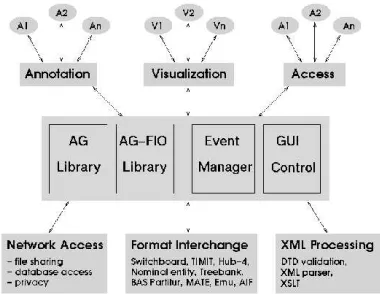
The toolkit is comprised of several components, struc-tured according to the architecture shown in Figure 2. This model permits applications to abstract away from file for-mat issues, and deal with annotations purely at the logical level, through the annotation graph API. Annotation tools provide graphical user interface components both for sig-nal visualization and for annotation, and the communica-tion between these components is handled by an extensible event language.
Figure 2: Architecture for Annotation Systems
3.
The Annotation Graph Library
The annotation graph library (libag) is implemented in C++,1and provides functions for creating, deleting, modi-fying and searching the following annotation graph objects:
AGSet, AG, Annotation, Anchor, Timeline, Signal, Feature
and Metadata. These objects are related to each other ac-cording to the object model shown in Figure 3. The various objects will be explained in more detail as we describe the API.
Figure 3: The AG Object Model
The annotation graph library also keeps indexes for the
Annotation, Anchor, Feature and Metadata types so that
searches can be done efficiently.
The API provides access to internal objects – signals, anchors, annotations, etc – through the use of identifier
1
The library has recently been ported to Java.
strings. The types of annotation graph identifiers include
AGSetId,AGId, andAnnotationId.
3.1. The structure of annotation graph identifiers
All identifiers are represented as strings. The inter-nal structure of an identifier can best be understood in terms of the object hierarchy in Figure 3. Annotation graph identifiers are fully-qualified: given an object iden-tifier, all of the ancestor objects can be discovered sim-ply by inspecting the identifier. For instance, an an-chor "Timit:AG1:Anchor2" belongs to the annotation graph"Timit:AG1", which in turn belongs to the AGSet
"Timit".
Internally, the annotation graph library maps these string identifiers to object references. A consequence of this design is that annotation graph objects can be ref-erenced from scripting languages using human-readable names. The use of fully-qualified identifiers also reduces the risk of collision – the accidental re-use of the same identifier in different places – which can have unpredictable consequences.
3.2. Annotation graph API functions
This section explains some typical API functions. The complete IDL definition of the AG-API is available online [http://www.ldc.upenn.edu/AG/].
3.2.1. AGSet and AG functions
An AGSet is an object which contains a set of annota-tion graphs. Typically, an AGSet corresponds to a corpus, but it might also correspond to a user-specified selection from a corpus, or to a selection spanning several different corpora. The first thing to do in working with annotation graphs is to create an AGSet object to hold them.
CreateAGSet. This creates an empty AGSet with a speci-fied AGSetId, and returns the AGSetId:
AGSetId CreateAGSet(AGSetId agSetId);
Once an AGSet is created, Timelines, Signals, AGs, and then Annotations and Anchors can also be created. Certain functions can then be called on these data types, for exam-ple, to test for their existence or to delete them. An AGSet can be deleted by usingDeleteAGSet. Its existence can be tested by usingExistsAGSet.
CreateAG. This creates an AG and returns the AGId; it throws an AGException if theiddoes not contain a valid AGSetId, or if the timeline does not exist:
AGSet CreateAG(Id id);
AGSet CreateAG(Id id, TimelineId timelineId);
The parameter id may be either an AGSetId or an AGId. If it is an AGSetId, an AGId will be assigned to the new AG. However, if it is an AGId, the library will try to use the supplied id. If this id is unavailable, it will assign a new AGId.
3.2.2. Timeline and Signal functions
A “timeline” is a collection of synchronized signals, such as separate audio and video recordings of the same event, or a multichannel recording of a conference call. The key defining property of a timeline is that the offsets into its signals are intertranslatable; any offsets into any one of the associated signals can be mapped to an offset into any of the others. Whenever multiple signals or channels are used in an annotation task, they are assigned to a distinctSignal
object.2 Multiple synchronized signals are grouped into a
singleTimelineobject.
The functions CreateTimeline, ExistsTimeline
andDeleteTimelinewill now be explained.
CreateTimeline. This creates a new Timeline and returns theTimelineId:
TimelineId CreateTimeline(Id id);
Id is AGSetId or TimelineId. In either case, the
AGSet to which the Timeline belongs must already exist;
otherwise an exception will be thrown. For example:
/* Create an AGSet with id "Timit" */ AGSetId agSetId = CreateAGSet("Timit");
/* Create a new timeline */
TimelineId timeline1 = CreateTimeline(agSetId);
/* Create another timeline */ TimelineId timeline2 =
CreateTimeline("Timit:Timeline2");
/* The following causes an exception since AGSet "CallHome" does not exist */ TimelineId timeline3 =
CreateTimeline("CallHome");
/* The following also causes an exception */ TimelineId timeline4 =
CreateTimeline("CallHome:Timeline2");
ExistsTimeline. This tests for the existence of the specified
Timeline, and returns true if it exists and false otherwise:
boolean ExistsTimeline(TimelineId timelineId);
DeleteTimeline. This deletes the specified Timeline if it exists:
void DeleteTimeline(TimelineId timelineId);
CreateSignal. This creates a new signal and adds it to the timeline.
SignalId CreateSignal(Id id, URI uri, MimeClass mimeClass, MimeType mimeType, Encoding encoding, Unit unit, Track track);
Theidargument might be TimelineId or SignalId. If it is a TimelineId, the library will generate a new SignalId. If it is a SignalId, the library will try the given id first, and if it’s taken, generate a new SignalId. If the id given is invalid, it throws an AGException.
Theuriargument specifies a location where the sig-nal is to be found. Applications may use this informa-tion to display and replay a signal. ThemimeClassand
2
An exception to this is the situation of a multichannel record-ing in which the different tracks are not discriminated in the anno-tation task; here they may be treated as a singleSignalobject.
mimeTypearguments tell an application about the format
of the signal, while theencodingargument specifies how samples are coded (e.g. mu-law). The unit argument specifies the sample rate of the signal; annotation appli-cations may use this information to set the granularity of time coding and time alignment in a user interface. The
trackargument records which track of the signal file
con-tains the signal. In this way, we can create two or more distinctSignalobjects which reference different tracks of the same signal file.
GetSignals. This returnsSignalIdsof the Signals con-tained in the specified Timeline:
SignalIds GetSignals(TimelineId timelineId);
TheSignalIdsare separated by spaces.
3.2.3. Annotation Functions
CreateAnnotation. This creates a new annotation:
AnnotationId CreateAnnotation(Id id,
AnchorId start, AnchorId end, AnnotationType annotationType);
Theidargument can be an AGId or an AnnotationId. If it is an AGId, an AnnotationId will be assigned to the new annotation. On the other hand, if it is an AnnotationId, the library will try to use the supplied id. If this id is un-available, it will assign a new AnnotationId. The other ar-guments are as follows: start is the id of the start anchor;
end is the id of the end anchor; annotationType is the type
of the annotation.
CreateAnnotationreturns the AnnotationId of the new annotation.
ExistsAnnotation. This returns true if the annotation ex-ists:
bool ExistsAnnotation(AnnotationId annotationId);
DeleteAnnotation. This deletes an annotation:
void DeleteAnnotation(AnnotationId annotationId);
CopyAnnotation. This copies an existing annotation, with a new identifier assigned to the new annotation:
AnnotationId CopyAnnotation(AnnotationId annotationId);
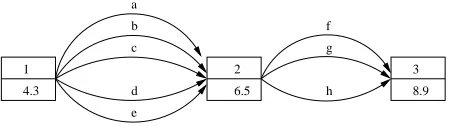
SplitAnnotation. This splits an annotation into two, creat-ing a new annotation with the same label data as the original one; returnsIdsof both annotations.
AnnotationIds SplitAnnotation(AnnotationId annotationId);
1 1 3 2
4.3 4.3 6.5
2 6.5 becomes
l
l l
Figure 4: Split an annotation
NSplitAnnotation. This splits an annotation into N anno-tations, creating N-1 new annotations having the same label data as the original one; returnsids of all annotations, in-cluding the original one:
AnnotationIds NSplitAnnotation(
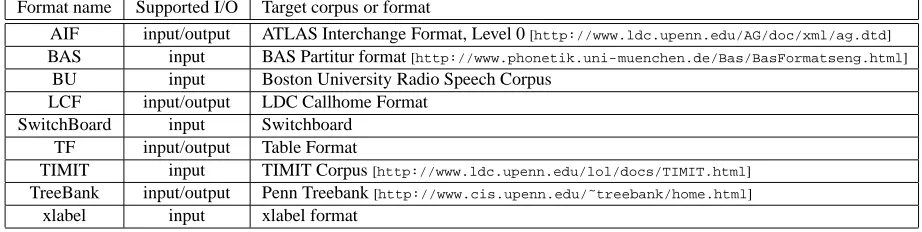
Format name Supported I/O Target corpus or format
AIF input/output ATLAS Interchange Format, Level 0[http://www.ldc.upenn.edu/AG/doc/xml/ag.dtd] BAS input BAS Partitur format[http://www.phonetik.uni-muenchen.de/Bas/BasFormatseng.html]
BU input Boston University Radio Speech Corpus LCF input/output LDC Callhome Format
SwitchBoard input Switchboard TF input/output Table Format
TIMIT input TIMIT Corpus[http://www.ldc.upenn.edu/lol/docs/TIMIT.html] TreeBank input/output Penn Treebank[http://www.cis.upenn.edu/˜treebank/home.html]
xlabel input xlabel format
Table 1: Supported file formats
package require ag
or
load ag_tcl.so source ag.tcl
The following Tcl statement creates an annotation.
AG_CreateAnnotation $agId $a1 $a2 $ann_type
Note that the function name has the prefixAG. Newer versions of AGTK support the Tcl namespace as follows.
AG::CreateAnnotation $agId $a1 $a2 $ann_type
The argument$agIdis an AG identifier, and the argu-ments$a1and$a2are Anchor identifiers. The argument
$ann typeis the type of the annotation (e.g. “word”). Similarly, for a Python program, we need to import the AG module first:
import ag
The following code fragment creates an AGSet, a time-line, an AG, two anchors and an annotation.
agSetId = ag.CreateAGSet(’Test’) timelineId = ag.CreateTimeline(agSetId) agId = ag.CreateAG(agSetId, timelineId) anc1 = ag.CreateAnchor(agId)
anc2 = ag.CreateAnchor(agId)
ann1 = ag.CreateAnnotation(agId, anc1, anc2, "Word")
The following fragment specifies features for a particu-lar annotation, and prints the AIF representation to standard output.
ag.SetFeature(ann1, "English", "cat") ag.SetFeature(ann1, "Japanese", "neko") print ag.toXML(agId),
6.
Building Annotation Tools with Tcl/Tk
and Python
Most large-scale annotation projects must deal with multiple tools and formats. If all required tools were devel-oped by a single project, and are used exactly as the orig-inal developers intended, there is usually no problem with interoperability. However, in 99% of the remaining cases, format translation and tool interoperability is a critical is-sue.
If annotation tools are created around a common ar-chitecture and a shared data model, these issues do not
arise. New file formats are supported by writing a con-verter between the the format and the general-purpose data model. The sharing of components among different anno-tation tools is straightforward, and new applications can be developed quickly using existing components. New func-tionalities added to a component can be used by all existing tools which include that component.
The annotation graph library and the file I/O library pro-vide the means to create, manipulate, read and write anno-tation graph data. In this section, we explain our approach to tool creation using these libraries as the core of the tool architecture.
All of our annotation tools are created using scripting languages having easy-to-use GUI libraries. This permits a rapid development cycle and easily customizable user in-terfaces. Tools are relatively small since much of the work is done by AGTK, and this small size and common data model mean that tool components are readily repurposable. We deliberately avoid the temptation to create general pur-pose annotation tools since each annotation task is idiosyn-cratic. Annotators work best when they use an interface which is maximally ergonomic for the peculiarities of the task, as compared with tools that include much irrelevant functionality and have an interface that is balanced for a wide variety of tasks.
This section describes the steps in creating a new special-purpose tool based on the general-purpose compo-nents provided by AGTK. It includes a discussion of inter-component communication, and of an example tool.
6.1. Building tools with Tcl/Tk
The Tk toolkit provides a graphical user-interface for Unix, Windows and Macintosh platforms. Some graphi-cal user-interface components, graphi-called widgets, are provided with the Tcl/Tk standard distribution. For example the fol-lowing fragment of Tcl/Tk code creates and displays a text widget:
set t [text .t] pack $t
6.2. Building tools with Python
Python has become very popular as a scripting lan-guage. Python provides an object-oriented programming framework, and is easy to learn. A GUI package called Tk-inter (Grayson, 2000) based on the Tk toolkit is included in the standard Python distribution. Tkinter provides class definitions for the standard widgets included in Tk. In addi-tion, it is relatively easy to write a Tkinter class for a third-party Tk widget that is not directly supported by Tkinter.
The following segment of Python code creates and dis-plays a Tk text widget.
from Tkinter import * root = Tk()
t = Text(root) t.pack
root.mainloop()
6.3. The inter-component communication model
An annotation tool built with the Annotation Graph Toolkit will consist of several major components, in-cluding: (i) a main program (script); (ii) an annota-tion/transcription component in which the user would en-ter annotations and transcriptions, and (iii) a signal display component giving access to recorded digital signals, such as speech waveforms. Typically, annotation/transcription components and waveform display components are reused by different specialized annotation tools. To create a new annotation tool, the developer writes a main program using the right selection of widgets and provides callback func-tions to handle widget events.
Events are passed around among components so that necessary tasks can be performed within each component. Consider the following example. Suppose that the user al-ready has an annotation assigned to a specific region in the signal. He/she now wants to assign new start and end off-sets for the signal to the annotation. Suppose the keyboard input Control-g, in the waveform component is assigned to such a task. When the user hits Control-g while there is a newly highlighted region in the waveform, this information (event) needs to be passed to the main program, and then to the annotation/transcription component and the annota-tion graph library. This propagaannota-tion of event informaannota-tion is illustrated in Figure 7.
Main program
Waveform display AG-API Transcription editor
User types Control-G Update Display
SetRegion t1 t2 AG::SetAnchorOffset SetRegion t1 t2
Update Internal Representation
Figure 7: An example of inter-component message passing
The event SetRegion is generated in the waveform com-ponent and passed to the main program with the two pa-rameters, the start time and the end time. Then, the main program sends SetRegion to the transcription component so
that the start and end offsets can be updated in the transcrip-tion component. Also, the main program uses the annota-tion graph funcannota-tion SetAnchorOffset to update the internal representation of the annotation graph data. Table 2 shows a list of typical events passed around in this manner.
Event name Typical parameters CreateAnnotation start time, end time DeleteAnnotation annotation identifier
SetFeature feature, value SetRegion start time, end time GetRegion start time, end time SetCurrentAnnotation annotation identifier
Play start time, end time Stop
Table 2: A list of common events
These events and their necessary arguments are passed as associative arrays (e.g., Tcl arrays and Python dictionar-ies). These arrays are passed to event handlers defined in the recipients.
6.4. GUI design
A critical aspect of designing a successful annotation tool is to make it highly ergonomic for the particular anno-tation task. Writing a tool in a scripting language makes it easy to experiment and change various aspects of a user interface, and facilitates “power users” who can tweak the code to help streamline their work.
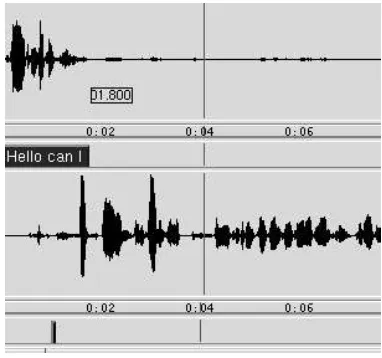
Where possible, our tools use simple keybindings that work in multiple contexts, making it easy for users to focus on the annotation task instead of having to hunt for obscure key combinations. In the MultiTrans annotation tool, a tool based on AGTK, the Return key is active in multiple con-texts. If a new region in the waveform display is chosen (i.e., highlighted), pressing the Return key will create and insert a new annotation into the transcription display. If an existing annotation in the transcription display is chosen, its corresponding region in the waveform is highlighted. A single mouse-button click in the highlighted region will set a point. If the Return key is pressed then, it will split the an-notation and the region. Figure 8 and Figure 9 show before and after split, respectively.
Figure 8: Before Split
Figure 9: After Split
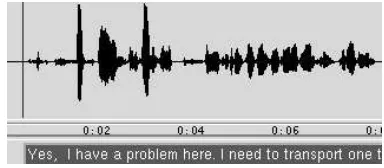
will appear below the waveform (Figure 10). This desig-nates the current starting position of the annotation. When
Return is pressed a second time the end anchor for the
an-notation is inserted and the anan-notation is created.
Figure 10: Setting Anchor Point during Playback
All these different actions have a common theme, namely to “create” something. This heavy re-use of a key-binding requires a little more effort in the coding process, but we have found that it makes the annotation process faster and easier. Using scripting languages, it is very easy to experiment with the user interface in this way.
6.5. Audio and video display using third-party software: WaveSurfer and QuickTime
WaveSurfer (Sj¨olander and Beskow, 2000) was devel-oped by K˚are Sj¨olander and Jonas Beskow of KTH as a tool for displaying and manipulating sound files. WaveSurfer uses Snack (Sj¨olander, 2000) as its signal processing mod-ule. Both packages are distributed under an open source license. WaveSurfer is written in Tcl/Tk and its widget, called wsurf, can be embedded in an application written in Tcl/Tk. A Python interface has also been developed. This makes WaveSurfer an excellent component to use with AGTK.
QuickTime Tcl is another component that can be used with AGTK. QuickTime Tcl requires the QuickTime player created by Apple Corporation. Currently, no UNIX version of QuickTime player is provided by Apple.
6.6. Embedding a third-party Tk widget in Python Tkinter provides class definitions only for the original Tk widgets. However, it is relatively easy to write an ex-tension of Tkinter for a third-party Tk widget. For exam-ple, AGTK includes a Python/Tkinter class definition for the Wsurf widget. The class Wsurf covers the Wsurf API. The class agWsurf, which is a subclass of Wsurf, provides methods specific to the tasks required by the tools we cre-ate.
6.7. A Tk table widget
AGTK comes with a table annotation compo-nent called agTable (or, ag-table as originally called in the Tcl version). The agTable component is based on TkTable written by Jeffrey Hobbs, et. al. [http://sourceforge.net/projects/tktable/].
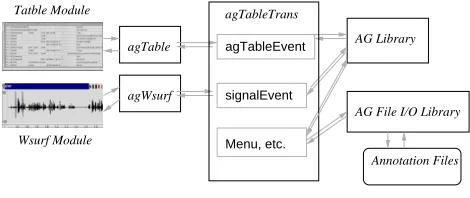
6.8. Putting it all together: the case of TableTrans Now that we have seen the major components of AGTK, we can examine how to build an annotation tool using these components. As an example, we will examine an annota-tion tool called TableTrans (Figure 11). TableTrans is a spreadsheet-style annotation tool that uses the components we have described in this paper.
Figure 11: TableTrans
TableTrans consists of three major components: (i) the main script, agTableTrans, (ii) the table component,
agTable, and (iii) the waveform display component, agW-surf. Here we will look at two common operations:
press-ing the Return key in the table to insert a new annotation, and pressing the Control-d key combination in the table to delete the highlighted annotation.
The keybindings for Return and Control-d are already defined in the agTable component. The operations above pass the events CreateAnnotation and DeleteAnnotation to the main script, respectively. A callback function (agTableEvent) is defined in the main script. When the
Re-turn key is pressed, the table component sends the event CreateAnnotation to the main script. The callback function
function CreateAnchor twice to create the start anchor and the end anchor:
a1 = ag.CreateAnchor(self._AGName)
ag.SetAnchorOffset(a1, self._currentStartPosition) a2 = ag.CreateAnchor(self._AGName)
ag.SetAnchorOffset(a2, self._currentEndPosition)
Second, it calls the annotation graph function
CreateAn-notation using the start and end anchors:
id = ag.CreateAnnotation(self._AGName,
a1, a2, annotationType)
This function returns the annotation identifier. Finally, the program returns the new identifier, along with the start and end offsets, to the table component. The table compo-nent inserts a new row using the annotation identifier and the start and end offsets.
Similarly when the Control-d key combination is pressed, the table component sends the event
DeleteAnno-tation to the main script together with the annoDeleteAnno-tation
iden-tifier of the highlighted row. The callback function in the main script performs the following command, where dic-tionary event contains the event message.
ag.DeleteAnnotation(event[’AnnotationId’])
Then, the table component can remove the highlighted row from its table. Figure 12 shows the components of TableTrans and their relationships.
agWsurf agTable
agTableTrans
agTableEvent
signalEvent
Menu, etc.
AG Library
AG File I/O Library
Wsurf Module Tatble Module
Annotation Files
Figure 12: Components in TableTrans
7.
Conclusion
This paper has described a new toolkit, AGTK, which supports rapid development of linguistic annotation soft-ware. AGTK is being used for annotation projects at the Linguistic Data Consortium [www.ldc.upenn. edu]. The toolkit is available for download at[http:// www.sourceforge.net/projects/agtk/]. For news and updates, please visit[http://www.ldc.upenn.edu/ AG/].
Existing third-party tools, namely Emu and Transcriber (Cassidy and Harrington, 2001; Barras et al., 2001), are being migrated to AGTK. They will share the same inter-nal data model and relatiointer-nal storage model, while keeping their distinctive user interfaces and file formats. Once these ports have been completed, we will have a shared library of user interfaces to complement the AG and file I/O libraries. We hope that these shared libraries will continue to grow as members of the wider community contribute I/O and GUI components to AGTK.
In future work, we hope to develop more applications for annotation in other areas, possibly including: soci-olinguistics, conversational analysis, sign and gesture, dis-course and dialogue. On the technical side, we hope to add interfaces to video widgets on all platforms, and to support data entry for extended-Roman and non-Roman scripts.
Acknowledgements
This material is based upon work supported by the Na-tional Science Foundation under Grant Nos. 9978056, 9980009 (Talkbank). The authors are grateful to Claude Barras, Steve Cassidy, Mark Liberman and many others for discussions on the material presented here.
8.
References
S. Abiteboul, R. Hull, and V. Vianu. 1995. Foundations of
Databases. Addison Wesley.
J. Allen, D. Byron, M. Dzikovska, G. Ferguson, L. Galescu, and A. Stent. 2000. An architecture for a generic dia-logue shell. Natural Language Engineering, 6:213–228. C. Barras, E. Geoffrois, Z. Wu, and M. Liberman. 2001. Transcriber: development and use of a tool for assist-ing speech corpora production. Speech Communication, 33:5–22.
S. Bird and J. Harrington, editors. 2001. Speech
Communi-cation: Special Issue on Speech Annotation and Corpus Tools, volume 33. Elsevier.
S. Bird and M. Liberman. 2001. A formal framework for linguistic annotation. Speech Communication, 33:23– 60.
S. Cassidy and J. Harrington. 2001. Multi-level annotation of speech: An overview of the emu speech database man-agement system. Speech Communication, 33:61–77. J. S. Garofolo, L. F. Lamel, W. M. Fisher, J. G. Fiscus, D. S.
Pallett, and N. L. Dahlgren. 1986. The DARPA TIMIT
Acoustic-Phonetic Continuous Speech Corpus CDROM.
NIST. http://www.ldc.upenn.edu/Catalog/
LDC93S1.html.
J. E. Grayson. 2000. Python and Tkinter Programming. Manning.
X. Ma, H. Lee, S. Bird, and K. Maeda. 2002. Models and tools for collaborative annotation. In Proceedings of the
Third International Conference on Language Resources and Evaluation.
K. Sj¨olander and J. Beskow. 2000. WaveSurfer – an open source speech tool. In Proceedings of the 6th
Inter-national Conference on Spoken Language Processing.
http://www.speech.kth.se/wavesurfer/.
K. Sj¨olander. 2000. The Snack sound toolkit. http://