ELAN development, keeping pace with communities’ needs
Han Sloetjes, Aarthy Somasundaram
Max Planck Institute for Psycholinguistics P.O. Box 310, 6500 AH Nijmegen, The Netherlands E-mail: [email protected], [email protected]Abstract
ELAN is a versatile multimedia annotation tool that is being developed at the Max Planck Institute for Psycholinguistics. About a decade ago it emerged out of a number of corpus tools and utilities and it has been extended ever since. This paper focuses on the efforts made to ensure that the application keeps up with the growing needs of that era in linguistics and multimodality research; growing needs in terms of length and resolution of recordings, the number of recordings made and transcribed and the number of levels of annotation per transcription.
Keywords: multimedia annotation, multimodality, transcription
1.
Introduction
ELAN [1] is a versatile multimedia annotation tool that is used in a variety of research areas in linguistics and beyond. Areas such as sign language research, field linguistics, gesture studies, or more general, multimodal interaction research. The direction of developments has largely been determined by the input and feedback of users from these communities. Long-term commitment and dedication are absolutely necessary for continued use and acceptance by the communities. General descriptions of the tool and its data model have been presented at previous LREC editions (Wittenburg et al., 2006, Crasborn et al., 2006). This paper outlines the most important changes and additions made in order to meet with the increased requirements of the user communities. These requirements have grown both qualitatively and quantitatively. Qualitatively in the sense of growing demands on usability/ease-of-use and transcription speed, quantitatively in the sense that an increase can be observed in media file sizes, in the number and length of the recordings and in the number of annotation levels created.
The rapid developments in media recording equipment in terms of supported resolutions (high definition) and increased storage capacity, has led to the production of large quantities of data. Not only in lab/studio situations, but also in the field it has become much easier to record for many hours and sometimes even with more than one camera. The original files are often too big and too unpractical to be used in ELAN directly, therefore often smaller files, of still high quality, are extracted. Especially the mp4/H.264 format has gained popularity and particularly on Windows this is still problematic. Additional codecs are necessary; only Windows 7 has built in support for mp4 and attempts have been made to make this support available in (the Java based) ELAN as well.
Not only more and larger media files are created, we can also observe an increase in the number of levels of
annotation that are added to the primary data. Many layers of analysis are added, resulting in transcription files with, in some cases, more than dozens of tiers. As a result of these changes two main requirements of ELAN are to improve the efficiency of common tasks and to allow to perform tasks on multiple files in a single action, where possible. The first task has been tackled by introducing new, task-based working modes and by adding more tier-based operations and more options for auto-creating annotations. The second task by increasing the number of operations that can be performed on multiple files.
2.
Task oriented working modes
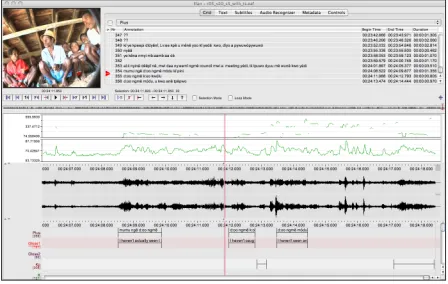
To accommodate a more efficient workflow new “working modes” have been implemented that are optimized for a specific task. In general the transcription process consists of two major components: segmentation and text input. In the main window of ELAN, as it has been for many years, both actions can be performed, while the interface is optimized for precision (accurate alignment) rather than speed. This traditional mode is still the default, now named “Annotation mode”.2.1 Segmentation mode
This mode has been designed for fast creation of segmentations, possibly while the media is playing. This functionality was previously available, in a rudimentary form, in a separate window. Now it has been enhanced and integrated as the working mode tailored to the segmentation task. It allows to quickly switch between tiers, create annotations with one or two keystrokes and conveniently adjust the alignment of annotations with the mouse. A segment can be easily split into two segments and two segments can be merged into one, as part of the fine tuning process after a coarse segmentation during play back. The behaviour of the segmentation mode can be customized in several ways. A delay can be specified to compensate for keystroke latency. Instead of marking both begin and end time of a segment, it is possible to create a segment of a fixed duration by a single keystroke. In conjunction with controlled vocabularies containing mappings of values to keyboard keys, the segmentation mode turns into a scoring tool that allows for segmenting and labeling at the same time by using different keys for marking segments.
2.2 Transcription mode
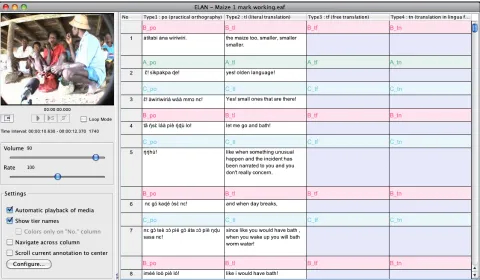
This mode has been introduced early 2011 (version 4.1.0). The Transcription mode is geared to rapid text entry into existing segments (annotations). In contrast to the previous two modes, transcription mode displays the annotations of selected tiers in a spreadsheet like table with a vertical orientation (the timeline goes top-down). Work in this mode is highly keyboard oriented; after typing in some text and hitting the Enter key, the next annotation is activated: the cell becomes editable and the media player automatically plays the corresponding
segment. The contents of the table is customizable; the user can decide which tier types or individual tiers are on display. The navigation between cells can be modified to either stay within one and the same column or between columns (jump to the next column in the same row). The introduction of this mode has proven to be very useful. It reduces the number of mouse clicks and the overall time needed to transcribe an hour of recording. Also, in field situations the ease of use of this mode has made it less problematic to engage local assistants, who often have limited computer experience, in the transcription process. This new transcription interface is discussed in more detail in Dingemanse et al. (2012). They claim that the new interface significantly reduces annotation time and that it improves on the workflow of some other commonly used tools.
2.3 Synchronization mode
The media synchronization mode has been available for many years already and has recently been updated to also visualize the waveform of audio files, making synchronization of different types of media (video, audio and timeseries data) more convenient. Although it is best to clip media files beforehand such that they are in sync, this mode allows to set an offset per file in the case they are not.
2.4 Interlinearization mode (in preparation)
The Interlinearization mode is designed for the task of semi-automatic, semi-supervised interlinearization of one layer of annotation into subordinate layers of annotation (parses and glosses). This functionality depends on the availability of a lexicon [2], a lexicon
Computers, 41(3), 841-849
Stehouwer, H., Auer, E. (2011). Unlocking language archives using search. In C. Vertan, M. Slavcheva, P. Osenova, & S. Piperidis (Eds.), Proceedings of the Workshop on Language Technologies for Digital Humanities and Cultural Heritage. Hissar, Bulgaria, 16 September 2011 (pp. 19-26). Shoumen, Bulgaria: Incoma Ltd.
Wittenburg, P., Brugman, H., Russel, A., Klassmann, A., Sloetjes, H. (2006). ELAN: a Professional Framework for Multimodality Research. In Proceedings of LREC 2006, Fifth International Conference on Language Resources and Evaluation.