ATN NVM14
o p e r a t o r ’ s m a n u a l
Important Export Restrictions! Commodities, products, technologies and services contained in this manual are subject to one or more of the export control laws and regulations of the U.S. Government and they fall under the control jurisdiction of either the US Department of State or the US BIS-Department of Commerce. It is unlawful and strictly prohibited to export, or attempt to export or otherwise transfer or sell any hardware or technical data or furnish any service to any foreign person, whether abroad or in the United States, for which a license or written approval of the U.S. Government is required, without first obtaining the required license or written approval from the Department of the U.S. Government having jurisdiction. Diversion contrary to U.S. law is prohibited.the information in this manual furnished for information use only, is subject to change without notice, is not to be construed as a commitment by atn Corp. atn Corp. assumes no responsibility or liability for any errors or inaccura-cies that may appear in this book.
© 2011 atn Corp. all right reserved.
Register your product warranty online at
www.atncorp.com/warranty
SAFETY SUMMARY
CAUTIONS• The ATN NVM-14 is a precision optical instrument and must be handled carefully at all times to prevent damage.
• Do not scratch the external lens surfaces or touch them with your fingers.
• Wiping demisting shield with lens paper while wet or with wet lens paper can damage the coating.
• To protect the image intensifier, keep the lens cap on the objec-tive lens when the monocular is not in use or when checked out in daylight conditions.
• The IR illuminator is the light that is invisible to the unaided eye for use during conditions of extreme darkness. However, the light from the illuminator can be detected by others when using night vision devices.
• If you use the rubber eyecaps for a long period of time, you may suffer skin inflammation. If you develop any symptoms, consult a doctor immediately.
ThIS pROdUCT CONTAINS NATURAl RUbbER lATEx whICh MAY CAUSE AllERgIC REACTIONS.
EqUIpMENT lIMITATIONS
to avoid physical and equipment damage when using the atn nVM-14, carefully read and understand the following safety pre-cautions.
• The equipment requires some night light (moonlight, starlight, etc.) to operate. the level of performance depends upon the level of light.
• Night light is reduced by passing cloud cover, while operating under trees, in building shadows, etc.
• The equipment is less effective viewing into shadows and other darkened areas.
• The equipment is less effective through rain, fog, sleet, snow or smoke.
• The equipment will not “see” through dense smoke. NOTES
• At operating temperatures below -20°C (-4°F), alkaline batteries are not recommended, as operating life will be severely reduced. lithium-iron disulfide 1.5V aa batteries or equivalent should be used below -20°C (-4°F).
• The purpose of the illuminator is to view at close distance up to 3 meters when additional illumination is needed.
TAblE OF CONTENTS
Section Title page
Safety Summary a
table of Contents i
List of Figures ii
list of tables iii
How to Use this Manual iv
Section I General Information 1-1
II equipment Description 2-1
III Mounting procedures 3-1
IV operating procedures 4-1
V operational Defects 5-1
VI Maintenance 6-1
appendix a end Item Components a-1
appendix B repair parts list B-1
lIST OF FIgURES
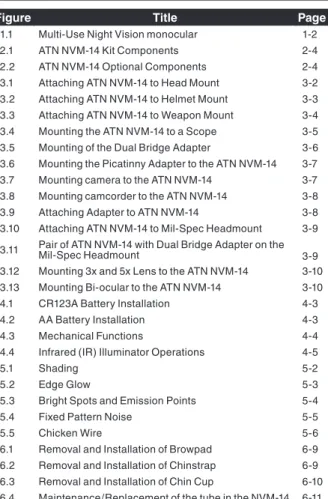
Figure Title page
1.1 Multi-Use night Vision monocular 1-2 2.1 atn nVM-14 Kit Components 2-4 2.2 atn nVM-14 optional Components 2-4 3.1 attaching atn nVM-14 to Head Mount 3-2 3.2 attaching atn nVM-14 to Helmet Mount 3-3 3.3 Attaching ATN NVM-14 to Weapon Mount 3-4 3.4 Mounting the atn nVM-14 to a Scope 3-5 3.5 Mounting of the Dual Bridge adapter 3-6 3.6 Mounting the picatinny adapter to the atn nVM-14 3-7 3.7 Mounting camera to the atn nVM-14 3-7 3.8 Mounting camcorder to the atn nVM-14 3-8 3.9 attaching adapter to atn nVM-14 3-8 3.10 attaching atn nVM-14 to Mil-Spec Headmount 3-9 3.11 pair of atn nVM-14 with Dual Bridge adapter on the Mil-Spec Headmount 3-9 3.12 Mounting 3x and 5x Lens to the ATN NVM-14 3-10 3.13 Mounting Bi-ocular to the atn nVM-14 3-10
4.1 CR123A Battery Installation 4-3
4.2 aa Battery Installation 4-3
4.3 Mechanical Functions 4-4
4.4 Infrared (Ir) Illuminator operations 4-5
5.1 Shading 5-2
5.2 edge Glow 5-3
5.3 Bright Spots and emission points 5-4
5.4 Fixed Pattern Noise 5-5
5.5 Chicken Wire 5-6
6.1 removal and Installation of Browpad 6-9 6.2 removal and Installation of Chinstrap 6-9 6.3 removal and Installation of Chin Cup 6-10 6.4 Maintenance/replacement of the tube in the nVM-14 6-11
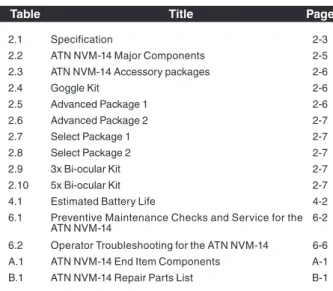
lIST OF TAblES
Table Title page
2.1 Specification 2-3
2.2 atn nVM-14 Major Components 2-5 2.3 atn nVM-14 accessory packages 2-6
2.4 Goggle Kit 2-6 2.5 advanced package 1 2-6 2.6 advanced package 2 2-7 2.7 Select package 1 2-7 2.8 Select package 2 2-7 2.9 3x Bi-ocular Kit 2-7 2.10 5x Bi-ocular Kit 2-7
4.1 estimated Battery life 4-2
6.1 preventive Maintenance Checks and Service for the
atn nVM-14 6-2
6.2 operator troubleshooting for the atn nVM-14 6-6 a.1 atn nVM-14 end Item Components a-1 B.1 atn nVM-14 repair parts list B-1
hOw TO USE ThIS MANUAl
USAgEYou must familiarize yourself with the entire manual before operating the equipment. read the complete maintenance task before performing maintenance and follow all wARNINgS, CAUTIONS, and NOTES.
MANUAl OVERVIEw
the manual contains sections for operating and Maintaining the Multi-Use night Vision Monocular atn nVM-14.
Components of end Item are in Appendix A. repair parts list is in Appendix b.
SECTION I
Figure 1.1
1.1 gENERAl INFORMATION
A. TYpE OF MANUAloperator (Including repair parts list).
b. MOdEl NUMbER ANd bASIC dESCRIpTION atn nVM-14 – Multi-Use night Vision Monocular C. SUpplIER
american technologies network Corp. 1341 San Mateo Avenue,
South San Francisco, CA 94080 USA d. pURpOSE OF EqUIpMENT
to provide the user with the ability to observe at night under moonlight and starlight conditions. the atn nVM-14 can be handheld, head mounted, helmet mounted or weapon mounted to enable walking, surveillance, security, map reading, vehicle maintenance, and administering first aid. the unit allows for horizontal and vertical adjustments when head or helmet mounted and is also equipped with an infrared light-emitting source.
1.2 wARRANTY INFORMATION
this item shall conform to design, manufacturing, and performance requirements and be free from defects in material and workmanship for a period of two (2) years from the date of acceptance. If item is defective, notify atn or point of purchase contact.
1.3 TEChNICAl INFORMATION
For technical information contact ATN Corp. directly at (650) 989-5100, or [email protected] or your point of purchase contact.
1.4 lIST OF AbbREVIATIONS
Bat - Battery Illum - Illuminator Ir - Infrared mm - MillimetersSECTION II
2.1 SYSTEM dESCRIpTION
the atn nVM-14 is a hand-held, head-mounted, helmet-mounted, or weapon-mounted night vision system that ena-bles walking, short-range surveillance, map reading, vehicle maintenance, and administering first aid in both moonlight and starlight. each unit allows for vertical adjustment (by using head straps), fore-and-aft adjustment, objective lens focus , and eye-piece focus. the device is also equipped with an infrared light-emitting source.
nVM-14 night Vision Monocular utilizes the principle of intensi-fication of the residual light which is reflected from the surround-ing objects. the optical system of the monocular consists of: an objective lens, an image intensifier tube and an eyepiece. even under unsteady brightness conditions, automatic Bright-ness Control System always keeps the IIt brightBright-ness level con-stant.
NOTE
Automatic brightness Control System do not protect a device from damage by bright light sources (a fire, headlights of the automobile, lanterns, etc.). do not point the device at a bright light source.
the automatic protective System controls the existing illumina-tion level through the photo receiver. If the illuminaillumina-tion level sur-passes 100-300 lx for the following 10 seconds, the monocular will shut off automatically.
the scope is equipped with the automatic Shut-off System. this system tracks when the scope is not used (the controls are not touched for 60 minutes continuous) and shuts the unit off automatically.
Built-in Ir Illuminator makes it possible to observe the objects when the monocular works in the conditions of low light or total darkness.
- reD – serves as an Ir Illuminator Indicator and an Battery low Indicator at a time. Ir is on when the indicator light becomes stable. If the indicator light starts flickering, it means there might be about 20% of battery charge left.
- Green – serves as an excessive Brightness Indicator. If the bright light remains unchanged for over 10 seconds after the indicator turns on, the monocular will automatically shut off. If you move the unit away from the bright/excessive light the unit will turn back on again.
2.2 wEIghT, dIMENSIONS, ANd
pERFORMANCE
TAblE 2.1 SpECIFICATION
wEIghT ANd dIMENSION
Weight (with battery) 340 grams
length 120 mm Width 49 mm Height 69 mm pERFOMANCE Magnification 1X f-number 1.2
Field of View 40 degrees
eyepiece Diopter adj. -6 to +2
eye relief 25 mm
Focusing range 0.25 m to infinity
Voltage 3.0 VDC or 1.5 VDC
power requirements 1 CR123A or 1 AA Ir Illumination range 3 meters
CONTINUOUS OpERATION
1 CR123A battery 60 hours (Gen. 2+) 50 hours (Gen. 3 and 4)
2.3 dESCRIpTION OF MAJOR
COMpONENTS
Figure 2.1
ATN NVM-14 Kit Components
1 3 10 7 3 4 6 5 2 Figure 2.2
ATN NVM-14 Optional Components
1 2 9 7 8 6 5 4 11 12 13 14 15 8 16 17 18 19 20 21 22 23
TAblE 2.2 ATN NVM-14 MAJOR COMpONENTS
ITEM dESCRIpTION
Kit Components
1 Multi-Use night Vision monocular 2 lens Cap
3 eyecup
4 Soft Carrying Case 5 operator's Manual 6 Battery 123A Lithium 7 Battery adapter 8 neck Cord Optional Components 1 3X Afocal Lens 2 5X lens 3 8X Lens 4 Camera/Camcorder adapter 5 Lens adapter for ITT 3X and 5X Lenses 6 Demist Shield
7 Sacrificial Window 8 Ir-450-B4
9 Mil-Spec Head Mount assembly Kit 10 Dual Bridge adapter for Mil-Spec Headmount 11 Goggle Kit
12 Flip-up Universal Helmet Mount 13 Brow pads
14 MICH Helmet Mount Kit 15 paSGt Helmet Mount Kit
16 Weapon Mount Adapter Piccatiny/Mil 1913 17 Scope adapter Mount with Inserts 18 Shoulder Strap
19 life tracker System 20 Dual Bridge 21 Bi-ocular
22 3x Binocular Lens (pair) 23 Hard Shipping/Storage Case
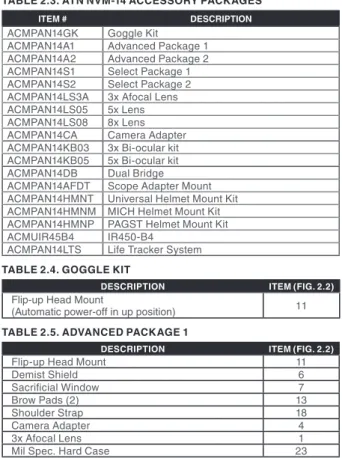
TAblE 2.3. ATN NVM-14 ACCESSORY pACKAgES
ITEM # dESCRIpTION
aCMpan14GK Goggle Kit
aCMpan14a1 advanced package 1 aCMpan14a2 advanced package 2 aCMpan14S1 Select package 1 aCMpan14S2 Select package 2
ACMPAN14LS3A 3x Afocal Lens
aCMpan14lS05 5x lens
ACMPAN14LS08 8x Lens
aCMpan14Ca Camera adapter
ACMPAN14KB03 3x Bi-ocular kit
aCMpan14KB05 5x Bi-ocular kit aCMpan14DB Dual Bridge
ACMPAN14AFDT Scope adapter Mount aCMpan14HMnt Universal Helmet Mount Kit aCMpan14HMnM MICH Helmet Mount Kit aCMpan14HMnp paGSt Helmet Mount Kit aCMUIr45B4 Ir450-B4
aCMpan14ltS life tracker System
TAblE 2.4. gOgglE KIT
dESCRIpTION ITEM (FIg. 2.2)
Flip-up Head Mount
(automatic power-off in up position) 11
TAblE 2.5. AdVANCEd pACKAgE 1
dESCRIpTION ITEM (FIg. 2.2)
Flip-up Head Mount 11
Demist Shield 6 Sacrificial Window 7 Brow pads (2) 13 Shoulder Strap 18 Camera adapter 4 3x Afocal Lens 1
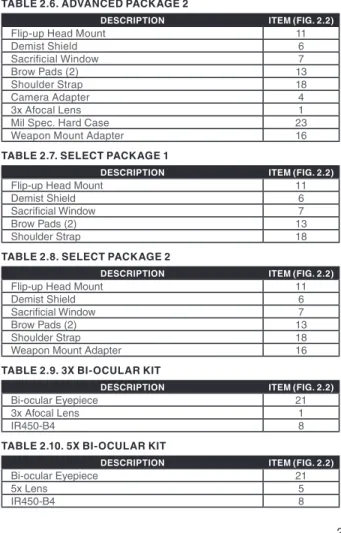
TAblE 2.6. AdVANCEd pACKAgE 2
dESCRIpTION ITEM (FIg. 2.2)
Flip-up Head Mount 11
Demist Shield 6 Sacrificial Window 7 Brow pads (2) 13 Shoulder Strap 18 Camera adapter 4 3x Afocal Lens 1
Mil Spec. Hard Case 23
Weapon Mount Adapter 16
TAblE 2.7. SElECT pACKAgE 1
dESCRIpTION ITEM (FIg. 2.2)
Flip-up Head Mount 11
Demist Shield 6
Sacrificial Window 7
Brow pads (2) 13
Shoulder Strap 18
TAblE 2.8. SElECT pACKAgE 2
dESCRIpTION ITEM (FIg. 2.2)
Flip-up Head Mount 11
Demist Shield 6
Sacrificial Window 7
Brow pads (2) 13
Shoulder Strap 18
Weapon Mount Adapter 16
TAblE 2.9. 3x bI-OCUlAR KIT
dESCRIpTION ITEM (FIg. 2.2)
Bi-ocular eyepiece 21
3x Afocal Lens 1
Ir450-B4 8
TAblE 2.10. 5x bI-OCUlAR KIT
dESCRIpTION ITEM (FIg. 2.2)
Bi-ocular eyepiece 21
5x lens 5
STANdARd KIT COMpONENTS
1) Multi-Use Night Vision Monocular
the monocular night vision device with 1x magnifica-tion.
2) lens Cap
a cap used to protect the lens and for testing the unit in the daylight.
3) Eyecup
a rubber cup used to protect eyepiece and for opera-tor comfort.
4) Soft Carrying Case
a protective bag used to store atn nVM-14 and accessories.
5) Operators Manual
provides equipment description, use of operator con-trols and preventative maintenance checks and ser-vice.
6) battery 123A lithium
A single, 123A lithium battery used to power the unit. 7) battery Adapter
Allows the ATN NVM-14 to accept the 123A Lithium and aa size batteries used to power the unit.
8) Neck Cord
OpTIONAl COMpONENTS
1) 3x Afocal lens
attaches to the atn nVM-14 for enhanced range per-formance; reducing the field of view to 13 deg. 2) 5x lens
attaches to the atn nVM-14 for enhanced range per-formance; reducing the field of view to 8 deg. 3) 8x lens
per-4) Camera/Camcorder Adapter
this adapter attaches to the atn nVM-14 eyepiece to collect imagery from the atn nVM-14.
5) lens Adapter (option for ITT lenses only)
This item serves to mount 3X or 5X Afocal lens (ITT part #A325639/2750SJ) to the ATN NVM-14.
6) demist Shield
Used to prevent eyepiece lenses from becoming fogged.
7) Sacrificial window
a replaceable window supplied to protect the objec-tive lens during operation in adverse conditions. 8) IR-450 IR Illuminator with picatinny Adapter
Powerful 450mW infra-red illuminator is an efficient tool for long range nighttime observation in the total darkness.
9) Mil-Spec head Mount Assembly Kit
this kit contain Mil-Spec head mount and adapter which allows to attach the nVM14 to the Mil-Spec head mount.
10) dual bridge Adapter for Mil-Spec headmount As-sembly
the adapter allows attaching atn nVM-14, while in the binocular configuration, to the Mil-Spec head mount or paGSt or MICH helmet mount.
11) goggle Kit
adjustable universal assembly that secures the atn nVM-14 to the operator’s head providing hands-free operation.
12) Flip-up Universal helmet Mount
provides mount interface for the atn nVM-14 to a range of ballistic helmets.
13) brow pads
Changeable pads for secure head mount fit. 14) MICh helmet Mount Kit
this kit contain MICH helmet mount and adapter which allows to attach the nVM14 to the MICH helmet mount.
15) pASgT helmet Mount Kit
this kit contain paSGt helmet mount and adapter which allows to attach the nVM14 to the paSGt helmet mount.
16) weapon Mount Adapter picatinny/Mil 1913 Small arms adapter that allows the atn nVM-14 to be mounted on a weapon using Picatinny or Mil 1913 rail. 17) Scope Adapter Mount with Inserts
Day/night System Flip-up Adapter with inserts for variety of scopes/telescopes.
18) Shoulder Strap 19) life Tracker System
this patented feature lets you measure the hours of operation that have been used on the system. 20) dual bridge
a Dual Bridge allows using the nVM14 as a pair of dual tube goggles.
21) bi-ocular
Bi-ocular eyepiece in combination with a 3x afocal Lens, a 5x Lens and a 8x Lens convert the NVM14 into a long range observation system.
22) 3x binocular lens (pair)
Pair of 3x Afocal Binocular Lenses connected to each other through a Dual Bridge provide for a compact dual channel binocular.
23) hard Shipping/Storage Case
SECTION III
3.1 MOUNTINg pROCEdURES
A. MOUNTINg ThE ATN NVM-14 TO A hEAdMOUNT to mount the atn nVM-14 to a headmount, perform the following: 1. loosen the screw (a). push the button (B) and insert the rail of
the nVM-14 into the socket (C) of the headset. 2. place the headmount with nVM-14 onto a head.
3. Loosen the screw (A) and move the unit along the rail for eye relief adjustment.
4. the nVM-14 headmount has a flip-up mechanism. push the button (D) on the side of mount and lift the unit up until the unit reaches in the top position. When the device is placed in the top/up position it will turn off automatically.
5. push the same button (D) to lower nVM-14 to the viewing position. turn the device on for continuation of the operation. 6. the nVM-14 can be placed before the right or left eye. In order
to re-adjust the monocular for use with another eye, take the unit off the adapter, turn the unit to other side (for 180º) and mount it on the headset through the rail on this side. push the button (E) and move the device along the slide-rail (F) for comfortable position.
Figure 3.1
Attaching ATN NVM-14 to head Mount Ab
C d
E F
b. MOUNTINg ThE ATN NVM-14 TO A hElMET attachment of atn nVM-14 to a range of ballistic helmets. the Helmet mount fits securely onto helmet via a rugged strapping device and grooved hooks. With helmet mount, the NVM-14 can be positioned directly in front of user’s eyes or flipped up out of viewing position.
1. Install the mount onto helmet as shown on the picture. 2. tighten and fixate the straps (a)
3. Attach the monocular to the rail.
4. loosen screw (C). push button (B) and insert the bracket of the nVM-14 into rail (D) of the helmet mount.
5. place the helmet with nVM-14 onto head.
6. loosen the screw (C) and move the your unit for proper eye relief adjustment.
7. the nVM-14 helmet mount has a flip-up mechanism. push the button (e) on the side of mount and lift the unit up until the unit reaches in the top position. When the device is placed in the top/up position it will turn off automatically.
8. Push the same button (E) to lower NVM-14 to viewing position. turn the device on for continuation of the operation.
9. The NVM-14 can be placed before the right or left eye. In order to re-adjust the monocular for use with another eye, take the unit off the helmet mount, turn the unit to other side (for 180º) and mount it on the mount through the rail on this side. push the button (e) and move the device along the slide-rail (G) for comfortable position.
Figure 3.2
Attaching ATN NVM-14 to helmet Mount b A A C d E g F
C. MOUNTINg ThE ATN NVM-14 TO ThE wEApON CAUTION
It is recommended that the eyecup be replaced with the eye-guard when used mounted on the weapon.
NOTE
the atn nVM-14 is not a weapon sight, however, it can be used in conjunction with a collimated dot sight or laser aiming device. to mount the atn nVM-14 perform the following:
1. loosen the clamping knob on the weapon mount. position the monocular mount onto the weapon’s mounting rail, adjust the fore/aft position of the monocular as necessary by loosening the clamping knob and repositioning the weapon mount on the rail. tighten by turning the clamping knob.
2. align the monocular and the weapon mount. Slide the monoc-ular rearwards until the alignment boss aligns with the align-ment groove on the weapon mount. push until the monocular locks into the weapon mount (Figure 3.3).
Figure 3.3
d. MOUNTINg ThE ATN NVM-14 TO A SCOpE OR TElESCOpE
the nVM-14 may be mounted to a variety of daytime scopes/ telescopes utilizing the Flip-up Scope Adapter Mount.
1. loosen the adapter fixing screws (a).
2. put the insert into the adapter (atn supplies inserts of diffe-rent sizes for their coupling with 38 mm to 43 mm eyepieces). 3. Now attach the monocular to the bracket (B). You can push the monocular rail into the bracket guide (C) and then take it off the bracket only when you loosen the fixation knob (D) holding the button (2) pressed at a time. With the fixation knob (D) tight-ened you secure the monocular on the bracket.
4. push a daytime riflescope or telescope eyepiece into the adapter attached to the monocular, making sure a small space is left between the scope eyepiece and the monocular front lens. 5. tighten the adapter screw (a) securely.
6. By pressing button (F) on the adapter you can raise the monocular 180 degrees upward in order to work with the day-time scope only.
Figure 3.4
Mounting the ATN NVM-14 to a scope b
A C d
E
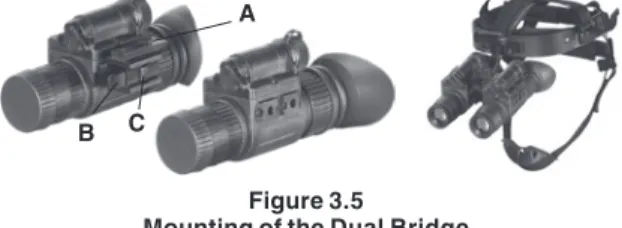
E. dUAl bRIdgE
the Dual Bridge (a) is designed to connect two units into a bin-ocular configuration.
Dual Bridge also allows the binocular configuration to be attached to the headmount or helmet mount.
to mount the units with Dual Bridge perform the following: 1. align the unit and the Dual Bridge.
2. push the clamps (B) on the front of Bridge.
3. Slide the unit rearwards until the alignment boss aligns with
the alignment groove (C) on the Bridge. push until the unit locks into the Bridge.
4. repeat for second unit.
to detach the unit push the clamps on the front of Dual Bridge and slide the unit forwards.
Dual Bridge allows using the NVM14 with 3x Binocular Lens as a pair of dual tube binocular.
Figure 3.5 Mounting of the dual bridge
h. MOUNTINg IR-450 TO ThE ATN NVM-14
Ir-450 may be mounted on the monocular through the picatinny adapter.
1. Mount picatinny adapter(a) onto one of the rails on the monocular. tighten two fixing screws(B) of the adapter. 2. loosen the Ir-450 fixing screw (C).
A
3. Mount the IR-450 on the Picatinny Adapter and tighten the fixing screw.
Figure 3.6 Mounting the IR450
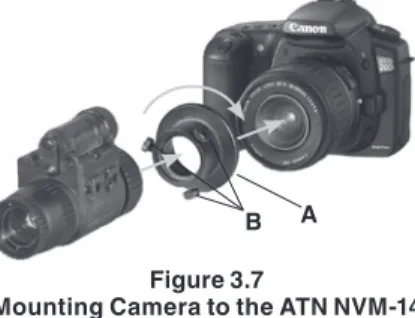
g. MOUNTINg CAMERA/CAMCORdER TO ThE ATN NVM-14
1. Screw Camera adapter into the front lens of a photographic camera with thread M52x0.75 (Figure 3.7) or a video camera with thread M37x0.75 (use adapter ring, Figure 3.8, B) . 2. remove the rubber eyecup off the monocular.
Figure 3.7
Mounting Camera to the ATN NVM-14
b A
A
b
3. Connect the adapter (Figure 3.7, A) with the eyepiece and gently tighten three fixing screws (Figure 3.7, B) on the adapter. I. MOUNTINg ThE ATN NVM-14 TO ThE MIl-SpEC hEAd MOUNT ANd MICh OR pASgT hElMET MOUNT
to mount the atn nVM-14 to a head/helmet mount, perform the following:
1. Attach the adapter (Figure 3.9, A) to the rail (B) of atn nVM-14. push the clip (C) and slide the rail of monocular into socket (D) of adapter. push the clip until the adapter will lock the alignment groove in the monocular.
Figure 3.9
Attaching Adapter to ATN NVM-14 A b E d C Figure 3.8
Mounting Camcorder to the ATN NVM-14 A
2. align the adapter and the head/helmet mount. Slide the monocular rearwards until the alignment boss (Figure 3.10, A) aligns with the alignment groove (B) on the head/helmet mount. push until the monocular locks into the head/helmet mount.
3. With this adapter you may see through the eyepiece using either right or left eye. to change the viewing eye, loosen the nut (Figure 3.9, E) and rotate the socket (D) 180 degrees. Tighten the nut (e) anew.
Figure 3.10
Attaching ATN NVM-14 to Mil-Spec headmount 4. Dual Bridge adapter for Mil-Spec headmount allows using the nVM14 as a pair of dual tube goggles with Mil-Spec headmount, MICH or paGSt helmet mount.
Figure 3.11
pair of ATN NVM-14 with dual bridge Adapter on the Mil-Spec headmount
J. MOUNTINg 3x, 5x OR 8x lENS TO ThE ATN NVM-14 The 3x lens is an afocal lens and screws into the existing lens.
The 5x and 8x lens requires removing the 1x lens. Unscrew the objective lens and screw 5x or 8x lens to the free place.
Figure 3.12
Mounting 3x, 5x and 8x lens to the ATN NVM-14
K. bIOCUlAR KIT
A 3x Afocal Lens, a 5x Lens or a 8x Lens in combination with a bi-ocular eyepiece convert the nVM14 into a long range observation system.
to replace an eyepiece with a biocular eyepiece unscrew the eyepiece off. Set the biocular eyepiece to the free place and screw its fixing screws.
Figure 3.13
Mounting bi-ocular to the ATN NVM-14
l. MOUNTINg 3x OR 5x lENS (ITT) TO ThE ATN NVM-14 Screw lens adapter into the front lens of the monocular. then screw the 3x or 5x IIT Afocal Lens into the threading of the Lens adapter.
SECTION IV
4.1 OpERATINg INSTRUCTIONS
A. bATTERY INSTAllATIONCAUTION
To protect the image intensifier, keep the lens cap on the objective lens when the monocular is not in use or when checked out in daylight conditions.
NOTE
At operating temperatures below –20°C (–4°F), alkaline bat-teries are not recommended, as operating life will be severely reduced. lithium-iron disulfide 1.5V aa batteries or equivalent should be used below –20°C (–4°F).
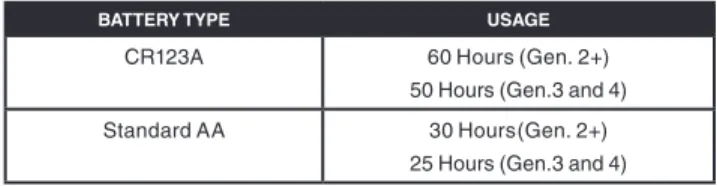
TAblE 4.1 ESTIMATEd bATTERY lIFE
bATTERY TYpE USAgE
CR123A 60 Hours (Gen. 2+)
50 Hours (Gen.3 and 4) Standard aa 30 Hours(Gen. 2+)
25 Hours (Gen.3 and 4)
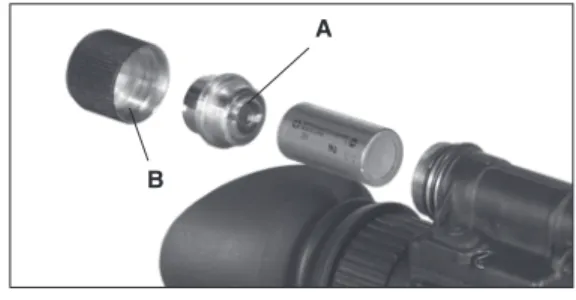
the atn nVM-14 operates with one CR123a battery or one aa battery using the battery adapter.
With the battery adapter (A) screwed in as shown on Figure 4.1 you may use one CR123A 3V lithium battery.
Figure 4.1 CR123A battery Installation
to install a aa battery, take the battery adapter (a) out of the battery cap (B), turn it over, and screw its smaller threading into the same battery cap. now you may put the aa battery observ-ing the polarity indications on the battery compartment surface.
Figure 4.2 AA battery Installation A b A b
b. MEChANICAl FUNCTIONS
the mechanical functions of the atn nVM-14 allow for dif-ferences in the physical features of individual operators and provide for the system operation. these functions include the On/Off/On IR control, eye relief (Section III Mounting pro-cedures), diopter adjustment, objective lens focus, and IR illuminator focusing. these mechanical controls are identified in Figure 4.3.
operation button (a) switches both the monocular and the Ir Illuminator on/off.
to turn the monocular on, press button (a) by one short push, to turn it off – press button (a) by another short push.
You may adjust the unit diopter by rotating the eyepiece ring (B). the total dioptric range is covered in 1/2 revolution.
to make the unit focus appropriate for different distances you should rotate the front lens ring (C). the total focusing range is covered in 1/3 ring revolution.
The ring (D) serves to fix the “infinity” position of the front lens focus. Figure 4.3 Mechanical Functions A C b d
C. INFRAREd (IR) IllUMINATOR OpERATIONS CAUTION
The IR illuminator is a light that is invisible to the unaided eye for use during conditions of extreme darkness. Please note that, the light from the illuminator can be detected by others that are using night vision devices.
NOTE
The purpose of the illuminator is to view at close distance up to 3 meters when additional illumination is needed.
Ir Illuminator gets activated when the monocular is already on by holding button (a) pressed for 1,5-2 seconds. a red light appears in the eyepiece to indicate that the Ir illuminator is operating.
You may focus the Ir light for additional distance by placing the focusing lens of the Ir pivot plate (B) onto the window of the Ir illuminator (C). this will extend the range the useful range of the Ir.
Figure 4.4
Infrared (IR) Illuminator Operations A
b
SECTION V
5.1 ZEROINg OpERATIONAl dEFECTS
operational defects relate to the reliability of the image intensi-fier and are an indication of instability. If identified, they are an immediate cause for rejecting the atn nVM-14. they include shading, edge glow, flashing, flickering, and intermittent opera-tion.A. ShAdINg
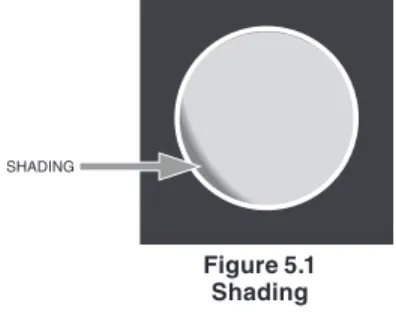
If shading is persistent, you will not see a fully circular image (Figure 5.1). Shading is very dark and you cannot see an image through it. Shading always begins on the edge and migrates inward eventually across the entire image area. Shading is a high contrast area with a distinct line of demarcation. Contact atn or point of purchase for warranty/repair procedures.
Figure 5.1 Shading
NOTE
Make sure the shading is not the result of improper exit pupil position.
b. EdgE glOw
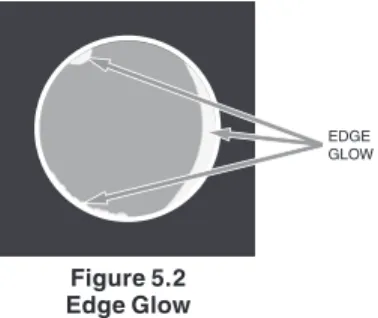
edge glow is a bright area (sometimes sparkling) in the outer portion of the viewing area (Figure 5.2). To check for edge glow, block out all light by cupping a hand over the lens. If the image tube is displaying edge glow the bright area will still show up. Contact atn or point of purchase for warranty/repair proce-dures.
Figure 5.2 Edge glow
C. FlAShINg, FlICKERINg, OR INTERMITTENT OpERATION
the image may appear to flicker or flash. If there is more than one flicker, check for loose battery adapter or weak battery. Con-tact atn or point of purchase for warranty/repair procedures. d. COSMETIC blEMIShES
these are usually the result of manufacturing imperfections that do not affect image intensifier reliability and are not normally a cause for warranty or repair work. However, some types of blemishes can get worse over time and interfere with the usability of the device. If you believe a blemish is a cause for rejection, warranty or repair please atn or point of purchase for warranty/repair procedures.
EDGE GLOW
1. bright Spots .
a bright spot is a small, non-uniform, bright area that may flicker or appear constant (Figure 5.3).
not all bright spots make the atn nVM-14 rejectable. Cup your hand over the lens to block out all light. If the bright spot remains, return the atn nVM-14. Bright spots usually go away when the light is blocked out. Make sure any bright spot is not simply a bright area in the scene you are viewing. bright spots are acceptable if they do not interfere with the ability to view the outside scene.
2. Emission points .
a steady or fluctuating pinpoint of bright light in the image area that does not go away when all light is blocked from the objective lens of the monocular (Figure 5.3). The position of an emission point within the image area does not move. not all emission points make the atn nVM-14 rejectable. Make sure any emission point is not simply a point light source in the scene you are viewing. Emission points are acceptable if they do not interfere with the usability of the device.
Figure 5.3
bright Spots and Emission points BRIGHT
SPOT EMISSION
3. black Spots .
these are cosmetic blemishes in the image intensifier or dirt or debris between the lenses. Black spots are acceptable as long as they do not interfere with viewing the image. No action is required if this condition is present unless the spots interfere with the usability of the device.
4. Fixed-pattern Noise .
this is usually a cosmetic blemish characterized by a faint hexagonal (honeycomb) pattern throughout the viewing area that most often occurs at high light levels or when viewing very bright lights (Figure 5.4). This pattern can be seen in every image intensifier if the light level is high enough. This condition is acceptable as long as the pattern does not interfere with viewing the image and usability of the device.
Figure 5.4 Fixed-pattern Noise 5. Chicken wire .
an irregular pattern of dark thin lines in the field of view either throughout the image area or in parts of the image area (Figure 5.5). Under the worst-case condition, these lines will form hexagonal or square-wave shaped lines. this is typically
viewed in high light conditions. No action is required if this condition is present unless it interferes with the viewing the image and interferes with the users usability of the device.
Figure 5.5 Chicken wire
SECTION VI
MAINTENANCE
6.1 pREVENTIVE MAINTENANCE
A. pURpOSE OF pMCSpMCS is performed daily when in use to be sure that the nVM-14 is ready at all times. procedures listed in table 6.1 are a syste-matic inspection of the nVM-14 that will enable you to discover defects that might cause the sight to fail on a mission.
b. FREqUENCY OF pERFORMINg pMCS
the frequency of performing pMCS is as follows:
1. Daily when the nVM-14 is in use.
2. When it is removed from the case for any reason. TAblE 6.1 pREVENTIVE MAINTENANCE ChECKS ANd SERVICES FOR ATN NVM-14
ITEM NO. lOCATION ITEM TO ChECK/ SERVICE pROCEdURE NOT FUNCTION-INg AT OpTIMAl lEVEl IF 1 Maintenance
open carrying case, inventory items.
previously recorded faults on maintenance records. not Current. Fault not corrected. MONOCUlAR 2 opticalSurfaces
Inspect lens for dirt, fingerprint residue, chips, or cracks. If necessary, clean and dry lens with water and lens tissue.
Scratches or chips hinder vision with monocular turned on, or if cracks are present. 3 external Surfaces Inspect for cracks or damage. Scratches and gouges are oK
if operation is not affected
Cracked or damaged.
ITEM NO. lOCATION ITEM TO ChECK/ SERVICE pROCEdURE NOT FUNCTION-INg AT OpTIMAl lEVEl IF
4 Battery adapter / Compartment
Check to make sure battery adapter is present. remove battery adapter and inspect for corrosion, moisture, cor-roded or defective contacts, and that o-ring is present.
adapter is mis-sing, contacts damaged or cor-roded, or o-ring is missing.
5 Diopter adjust-ment ring
rotate diopter adjust-ment ring to make sure the eyepiece is not too tight or too loose.
Binding, not moving freely or too loose.
6 eyecup
Inspect for dirt, dust, and cracked or torn cup. Inspect for bent, broken or improperly fitting eyecup. If necessary, clean with water.
7 objective lens Focus Ring rotate objective lens focus ring to ensure free move-ment.
Binding or not moving freely.
8 lens Cap Inspect for cracked, torn, or missing lens cap.
9 Viewed Image refer to Section V – opera-tion Defects – to inspect for operational defects.
Flickering, flashing, edge glow, or shading is observed. 10 Strap, pads Inspect for cuts, tears, fraying, holes, cracks, or defective
fasteners.
Damage causes straps or pads to be unservice-able.
ITEM NO. lOCATION ITEM TO ChECK/ SERVICE pROCEdURE NOT FUNCTION-INg AT OpTIMAl lEVEl IF 11 Socket
Inspect for dirt, dust, or cor-rosion. Insert the rail of atn nVM-14 into socket to verify secure attachment of atn nVM-14 to headmount. If necessary, clean socket with water.
Damaged, latch won’t work or too loose.
12 Socket press the socket-release button and check for free motion. Inspect for damage.
Binding, damaged or non-operational slide mecha-nism. 13 Headmount / Helmet Mount
adapter
Inspect for dirt, dust, or corro-sion. Insert adapter into head-mount or helmet head-mount socket to verify secure attachment.
Damaged, will not latch securely.
14 Weapon Mount Inspect for dust, dirt, or cor-rosion.
Damaged, will not mount to atn nVM-14 or will not mount to weapon mount rail.
CAUTION
The demist coating on the demist shield can be damaged if cleaned while wet or cleaned with wet lens paper. Clean only when the demist shield is dry and only use dry lens paper.
15 Demist Shield
Inspect for dirt, dust, scratches or damage. If necessary, clean when shield is dry with dry lens tissue only.
Damage or scratches hinder vision with atn nVM-14 on.
ITEM NO. lOCATION ITEM TO ChECK/ SERVICE pROCEdURE NOT FUNCTION-INg AT OpTIMAl lEVEl IF
16 Sacrificial Window Inspect for dirt, dust, scratches, or damage. If necessary, clean.
Damage or scratches hinder vision with atn nVM-14 on. 17 3X/5X/8X Magnifier Inspect optical surface for dirt, dust, scratches or cracks. Damage or scratches hinder
vision.
18 Carrying Case
remove all items and shake out loose dirt or foreign mate-rial. Inspect for tears, cuts, excess wear or damage to mounting clips.
6.2 TROUblEShOOTINg
Table 6.2 lists common malfunctions that you may find with your equipment. perform the tests, inspections, and corrective actions in the order they appear in the table.
this table cannot list all the malfunctions that may occur, all the tests and inspections needed to find the fault, or all the corrective actions needed to correct the fault. If the equipment malfunction is not listed or actions listed do not correct the fault, notify atn or your point of purchase.
TAblE 6.2 OpERATOR TROUblEShOOTINg FOR ATN NVM-14
MAlFUNCTION TEST OR INSpECTION CORRECTIVE ACTION
1 Monocular fails to acti-vate.
press operation button. Check for defective, missing or improperly installed batteries.
press button one short push. replace batteries or install correctly. 2 Ir illumina-tor fails to activate.
In a dark location with system turned on, activate Ir. Visually check Ir illuminator operation; scene should brighten.
If Ir illuminator fails to activate, refer to higher level of main-tenance.
3 Ir indicator fails to acti-vate.
Visual. refer to higher level of maintenance. 4 poor image
quality Check objective lens or eye-piece focus. Check for fogging or dirt on lens.
refocus. Clean lens surface. If image quality is still poor, refer to higher level of maintenance.
MAlFUNCTION TEST OR INSpECTION CORRECTIVE ACTION
5 light visible
around eyecupCheck eye-relief distance. Check eyecup for resiliency.
re-adjust for proper eye-relief distance. If eyecup is defec-tive, refer to higher level of maintenance. 6 Diopter
adjust-ment cannot be made
Check to see if the diopter adjustment ring is bent or broken If damaged, refer to higher level of maintenance. 7 Battery adapter diffi-cult to remove.
Check for damaged battery
adapter. If damaged, refer to higher level of maintenance. 8 Head straps
cannot be tightened
Check for defective buckles,
fasteners or straps. If damaged, refer to higher level of maintenance. 9 Headmount or
helmet mount socket does not catch.
Check socket for dirt. Check socket for damage.
Clean socket. If damaged, return headmount or helmet mount to higher level of maintenance. 10 Helmet mount
will not tighten to helmet.
Inspect mounting hardware for
damage. If damaged, refer to higher level of maintenance.
6.3 ClEANINg ThE ATN NVM-14
CAUTIONThe ATN NVM-14 is a precision optical instrument and must be handled carefully at all times to prevent damage. Do not scratch the external lens surfaces or touch them with your fingers.
Wiping demisting shield with lens paper while wet or with wet lens paper can damage the coating.
Clean monocular with water, if necessary, and dry thoroughly. Clean lenses with lens paper (and water, if necessary, except for demisting shield).
6.4 hEAdMOUNT MAINTENANCE
A. REMOVAl ANd INSTAllATION OF bROwpAd1. Remove old browpad (Figure 6.1) by grasping the headband. 2. replace the browpad by gently pressing on the new
brow-pad and smoothing out any wrinkles in new browbrow-pad.
Figure 6.1
Removal and Installation of browpad
b. REMOVAl ANd INSTAllATION OF ChINSTRAp 1. Remove the chinstrap (Figure 6.2) by unsnapping the
Velcro tape from the left side of the headband. Unbuckle the chinstraps from narrow strap assembly.
Figure 6.2
2. replace the chinstrap by using the Velcro tape on the left side of the headband. lace the right straps into their re-spective sliding bar buckles on the right side of the head-band for correct lacing (Figure 6.2).
C. REMOVAl ANd INSTAllATION OF ChIN CUp 1. Remove the chinstrap (Figure 6.3) by unsnapping the
Velcro tape from the left side of the headband.
2. replace the chin cup by sliding the cap on the chinstrap. Fix the Velcro tape onto the place.
Figure 6.3
6.5 TUbE MAINTENANCE /
REplACEMENT
1. Unscrew the eyepiece (e) from the case of device (a). 2. Unscrew the lock ring (D) from the case of device. 3. Extract the light guide (C) from the case of device.
4. extract the tube (B) to be replaced from the case of device (a). 5. Introduce the new tube (B) into the case of device (a). 6. Set the light guide (C) onto the place in the case. 7. Screw the lock ring (D) into the case of device. 8. Screw the eyepiece (E) into the case of device (A).
Figure 6.4
Maintenance/Replacement of the tube in the NVM-14 A
b C
6.6 pURgE SYSTEM
1. remove purge screw (a) from system. 2. Install purge valveinto system.
3. Open vacuum, draw vacuum on system to a minimum of 0.06 Mpa. Close vacuum port.
4. open nitrogen valve. purge system to a minimum pressure of 0.06 Mpa (gauge).
5. Close/remove purge valve. 6. return purge screw to system
Figure 6.5 purge System A
AppENdIx A
ENd ITEM COMpONENTS
TAblE A.1 ATN NVM-14 ENd ITEM COMpONENTSITEM dESCRIpTION
1 atn nVM-14 Monocular assembly 2 Swing arm Interface, Head/Helmet 3 Weapon Mount
4 operator Manual 5 Demist Shield, eyepiece 6 Soft Carrying Case 7 Sacrificial Window 8 Should Strap 9 Head Mount assembly 10 Brow pad (Small) 11 Brow pad (large) 12 lens Cap 13 eye Cup assembly
14 CR123A 3.0V DC Battery, Lithium 15 Battery adapter
AppENdIx b
REpAIR pARTS lIST
TAblE b.1 ATN NVM-14 REpAIR pARTS lISTITEM dESCRIpTION pART NO.
1 Battery Cap NVM-138
2 lithium Battery CR123A
alt aa alkaline Battery M30-044
3 purge Screw 7B315
4 Battery adapter NVM-198
5 lens Cap NVM-178
6 Sacrificial Window NVM-032
7 Demist Shield NVM-033
8 Battery Cap retainer nVM-156
9 objective lens assembly NVM-030 10 eyepiece lens assembly NVM-035 11 Head/Helmet Mount adapter nVM-042
12 Ship/Storage Case 7B257-2
13 neck Cord 7B306
14 Soft Carry Case 7B262
15 eyecup assembly 7B422
16 operator Manual nVM-015
17 Shoulder Strap 7B267
18 Goggle Kit 7B268-A1
19 Dual Bridge nVM-200
20 Scope adapter Mount nVM-201
21 Ir450 nVM-202 22 picatinny adapter NVM-203 23 Camera adapter nVM-204 24 3X Lens nVM-205 25 5X lens nVM-206 26 8X Lens NVM-209 27 lens adapter nVM-207 0 6 0 52 011
INdEx
A aBBreVIatIonS, 1-4 b BatterY InStallatIon, 4-2 BATTERY LIFE, 4-2 BlaCK SpotS, 5-5 BrIGHt SpotS, 5-4 C CaUtIonS, a, IV CHICKEN WIRE, 5-5 CLEANING, 6-8 COSMETIC BLEMISHES, 5-3 d DIOPTER ADJUSTMENT, 4-4, 6-3, 6-7 E EDGE GLOW, 5-3, 6-3 eMISSIon poIntS, 5-4 enD IteM CoMponentS, a-1EYE RELIEF, 2-3, 3-2, 3-3, 4-4,
6-7,
EYEPIECE DIOPTER ADJ., 2-3
F FIXED-PATTERN NOISE, 5-5 FLASHING, FLICKERING, OR InterMIttent operatIon, 5-2 F-NUMBER, 2-3 g GENERAL INFORMATION, 1-3 h HEIGHT, 2-3 I IR ILLUMINATION RANGE, 2-3 IR ILLUMINATOR, A, 2-2, 2-9, 4-4, 4-5, 6-6 l LENGTH, 2-3 M MAGNIFICATION, 2-3, 2-8 MAINTENANCE, IV, 2-2, 2-8, 6-1, 6-2, 6-6, 6-7, 6-9, 6-11 - HEADMOUNT, 6-9 - preVentIVe, 6-2 MECHANICAL FUNCTIONS, 4-4 MOUNTING PROCEDURES, 3-1, 3-2, 4-4 O
OBJECTIVE LENS FOCUS, A, 2-2, 4-4, 6-3 ON/OFF/ON IR CONTROL, 4-4 operatInG InStrUCtIonS, 4-2 OPERATIONAL DEFECTS, 5-1, 5-2, 6-4 operator troUBleSHoot-InG, 6-7 p POWER REqUIREMENTS, 2-3 R repaIr partS, B-1 S SAFETY SUMMARY, A SHADING, 5-2, 6-3 SYSteM DeSCrIptIon, 2-2 T TECHNICAL INFORMATION, 1-4 V VOLTAGE, 2-3 w WARRANTY INFORMATION, 1-4 WEIGHT, 2-3 WIDTH, 2-3
For customer service and technical support, please contact American Technologies Network Corp.
North American Office
1341 San Mateo Avenue, South San Francisco, CA 94080 phone: 800-910-2862, 650-989-5100; fax: 650-875-0129
European Office
the following countries can use our toll free number: 00 800 9102-8620
Austria, France, Germany, Holland, Italy, Spain, Sweden, Switzerland For other countries, please use
38 048-7770214 or 38 048-7770345
www.atncorp.com