1. Safety notes ... 4
2. Explanation of abbreviations and terms ... 5
2.1. General information ...5
2.2. Times ...5
3. Introduction ... 6
3.1 Product overview ...6
3.2 Application scenarios ...7
4. Applications of device ATS022 ... 8
4.1 Switching Main Line – Emergency Line (2CBs) ...8
4.2 Switching Main Line – Emergency generator (2CBs) ...9
4.3 Non priority loads control (NPL) ...10
4.4 Control of two independent power supply lines separated by Tie (3CBs Bus Tie) ...14
4.5 Automatic switching without inverse procedure ...15
4.6 Line Priority Selection ...16
5. Using the automatic transfer switch ... 17
5.1 Interface...17
5.2 LED indicators ...18
5.3 Keypad keys ...19
5.4 Setting the operating modes ...20
5.4.1 Manual mode ...20
5.4.2 Automatic mode ...20
5.5 Graphic Display ...21
5.5.1 LN1 and LN2 lines status indication ...22
5.5.2 Browsing through the Menu ...22
5.6 Using pushbuttons in manual mode ...26
5.7 Test Modes ...26
6. Input and output signals ... 28
6.1 Output signals (DO1…DO12) ...28
6.2 Input signals ...29
7. Technical data ... 36
8. Installation of device ATS022 ... 37
8.1. Door-mounted Automatic Transfer Switch ATS022 ...37
8.2. DIN rail-mounted Automatic Transfer Switch ATS022...38
9. Regulatory standards ... 39
1. Safety notes
If there are doubts about safe use, the unit must be put out of service.
The automatic transfer switch ATS022 must be prevented from operating the circuit breakers before: • accessing the circuit breakers
• performing maintenance on circuit breakers or any electrical circuits powered by them • performing any operation where opening/closing the circuit breaker could be dangerous During maintenance:
• set the "Manual" mode.
• lock the circuit breaker mechanically in the open position. Safe use is not guaranteed if:
• the device has been damaged during transport • the device shows visible signs of damage • the device does not work
• the device has been stored for a long period
Even if the device seems to be in stand-by status switch it off from the control circuit, as there is risk of it operating the circuits without warning.
Before using the ATS022 unit, read the following “Safety notes”:
using the unit without following the indications can lead to malfunctioning and, in some cases, hazardous conditions.
2. Explanation of abbreviations and terms
2.1. General information
ATS: Automatic Transfer Switch; automatic switching device.
ATS022: ATS of the ATS02x series, version with display and Modbus communication. CB: Circuit Breaker; low voltage automatic Circuit Breaker.
CB1: CB on line LN1. CB2: CB on line LN2.
CB3: CB for Bus Tie, NPL and NPL BUS TIE operating modes. LN1: Power supply line No.1.
LN2: Power supply line No.2.
Bus Tie: Operating mode with busbar tie circuit breaker. NPL: Operating mode with non priority control circuit breaker.
NPL BUS TIE: Operating mode with non priority control circuit breaker for non priority loads control. Modbus RTU: Communication protocol.
2.2. Times
NOTE: All the details of the times and switching logics are described in the Chapters concerned.
TS: - Opening delay of main line CB, after detection of fault in mains (generator is not in use).
- Generator start delay, after detection of fault in mains (generator in use). TCE: Closing delay of CB2 of line LN2.
TBS: Opening delay of emergency line CB, after detection of stabilised voltage on main line. TCN: Closing delay of CB1 of line LN1.
TGOFF: Generator switching off delay, after closure of main line CB. TC: Delay in opening and closing of CB3 in Bus Tie application.
TL Delay in activation of outlet DO7, after detection of the fault on both lines LN1 and LN2.
3. Introduction
3.1 Product overview
The automatic transfer switch ATS022 is used in all installations where switching is required between two lines to ensure the supply of loads in case of a fault on one line.
ATS022 selects the power supply line by acting directly on the CBs provided on the lines: ATS022 can be used with automatic CBs and ABB SACE switch-disconnectors.
The device monitors the voltage of the main line and emergency line and records the following faults: • Maximum and minimum voltage
• Maximum and minimum Frequency • Phase balance
• Voltage imbalance • Frequency imbalance
ATS022 does not require an auxiliary safety power supply since it is powered directly by the line voltages.
If both lines are absent, ATS022 enters Powersave mode (maximum duration 1 minute) in which the device is active and in stand-by for one of the power supply lines to be restored. When the Powersave period ends, the LED switches off and the device awaits a line voltage. The moment the main or the emergency line is restored, the unit analyses the conditions of the lines monitored and the status of the circuit breakers and proceeds with the switching operation in accordance with the situation concerned. The safety auxiliary supply is obligatory in the following cases:
• utilisation of Modbus RS485 communication • utilisation in systems with rated frequency 16 2/3Hz • utilisation in single-phase systems with Un 57,5…109VAC
A 24VDC ….110VDC auxiliary safety power supply can be used (-10%, +15%).
ATS022 can be used in systems with rated frequency 50Hz, 60Hz, 400Hz, 16 2/3 Hz that can be set from the menu.
The device can be used in systems with single-phase, three-phase with Neutral and three-phase without neutral, setting can be done from the menu. ATS022 makes it possible to select from the display a different distribution system between Line LN1 and Line LN2. ATS022 can be used in manual or automatic mode. In the first case the circuit breakers must be controlled by means of the pushbuttons present on the front panel of the device, while in automatic mode, the switching logic is controlled directly by the device
The device is equipped with a front graphic display by means of which the user can check the settings and display the status of the unit and the circuit breakers connected to it.
It is also possible to integrate the ATS022 device inside a communication network which uses the Modbus RS485 protocol.
3.2 Application scenarios
The ATS022 device can be used in the following applications: • Main line – Emergency line switching
• Main line – Emergency generator switching
ATS022 makes it possible to operate a thrid circuit breaker CB3 and can therefore also be used in the following applications which can be set on the menu:
• non priority loads control with CB3 on starting line (3CBs NPL) • non priority loads control with CB3 Bus Tie (3CBs NPL Bus Tie)
• control of two independent power supply lines separated by Bus Tie (3CBs Bus Tie) The ATS022 also makes it possible to select which of the lines is the main one and which one is secondary, also with the system running.
The following selections are possible, set from the menu: • Main line: Line LN1
• Main line: Line LN2 • No priority line
In automatic mode, it is possible to select whether or not the switching procedure must include inverse switching.
The following selections are possible: • with inverse procedure
4. Applications of device ATS022
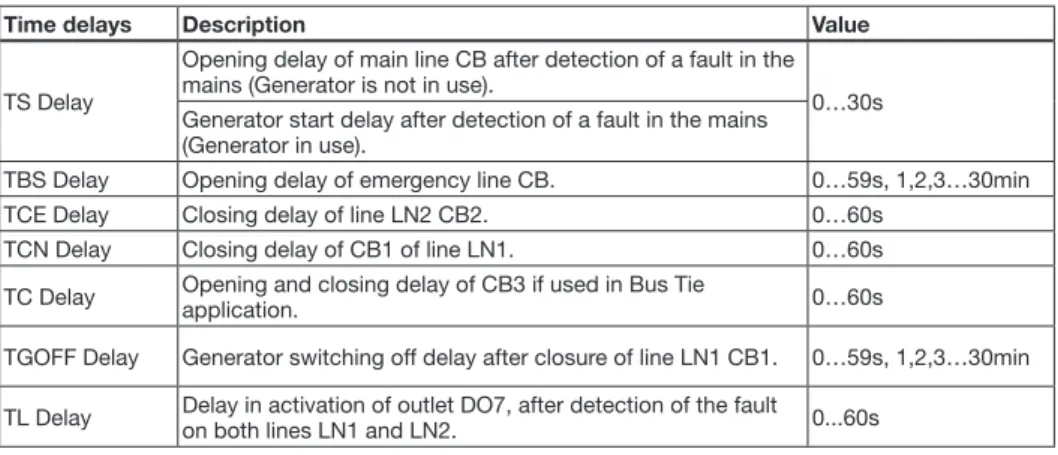
The ATS022 device controls all the switching sequences by applying the time delays that can be set:
Time delays Description Value
TS Delay
Opening delay of main line CB after detection of a fault in the mains (Generator is not in use).
0…30s Generator start delay after detection of a fault in the mains
(Generator in use).
TBS Delay Opening delay of emergency line CB. 0…59s, 1,2,3…30min
TCE Delay Closing delay of line LN2 CB2. 0…60s
TCN Delay Closing delay of CB1 of line LN1. 0…60s
TC Delay Opening and closing delay of CB3 if used in Bus Tie application. 0…60s
TGOFF Delay Generator switching off delay after closure of line LN1 CB1. 0…59s, 1,2,3…30min TL Delay Delay in activation of outlet DO7, after detection of the fault on both lines LN1 and LN2. 0...60s
Table 4.1: Description of time delays
4.1 Switching Main Line – Emergency Line (2CBs)
Description
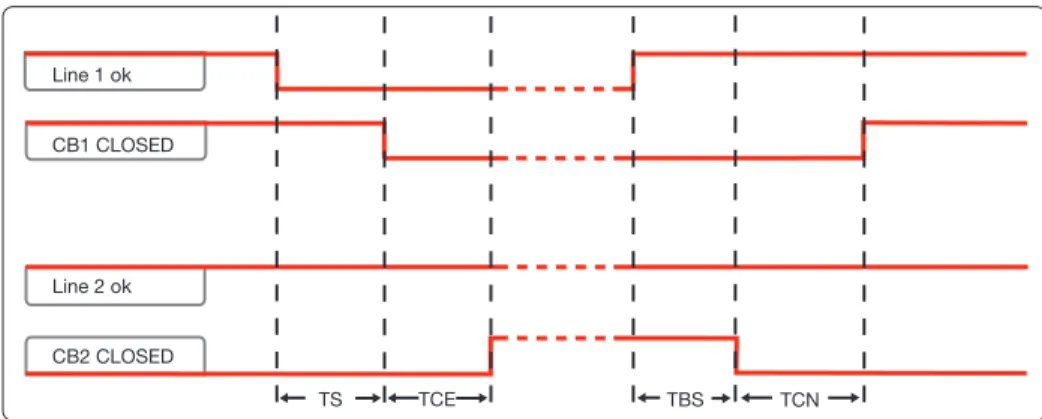
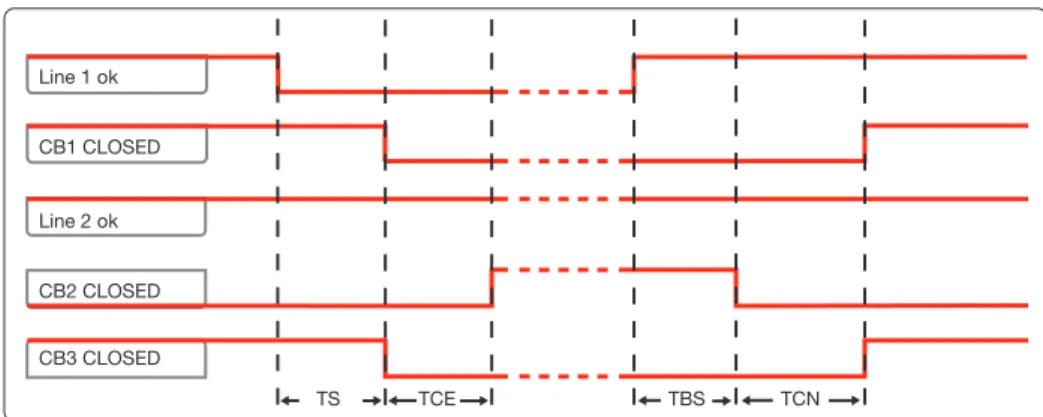
Both lines are normally present; in cause of anomaly on the main line, ATS022 switches to the emergency line used as the reserve line.
Time diagrams TS TCE TBS TCN Line 1 ok CB1 CLOSED Line 2 ok CB2 CLOSED
Figure 4.2: 2CBs application time diagram - main line LN1
Special cases: if LN1 returns to normal during TS, the changeover is interrupted; if LN1 returns to normal during TCE, the changeover is completed. If LN1 disappears during TBS, the changeover is interrupted; if LN1 disappears during TCN, the changeover is completed. If LN2 is absent, after TS the unit waits for the presence of LN2 in order to send the opening command to CB1. If LN2 disappears during TCE, the procedure is in any case completed.
4.2 Switching Main Line – Emergency generator (2CBs)
Description
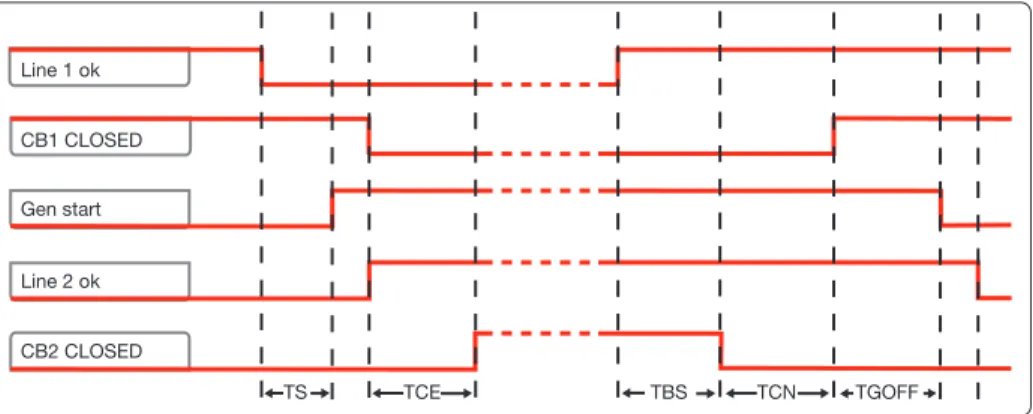
In case of main line failure ATS022 automatically starts up an emergency generator and, as soon as power on the generator side is available, ATS022 starts the automatic switching procedure.
G
Figure 4.3: 2CBs application layout – generator in use Time diagrams Line 1 ok CB1 CLOSED Gen start Line 2 ok CB2 CLOSED TS TCE TBS TCN TGOFF
Figure 4.4: 2CBs application time diagram - generator in use
Special cases: if LN1 returns to normal before LN2, the sequence is interrupted and the generator is turned off; if LN1 returns to normal during TCE, the sequence is completed. If LN1 disappears during TBS, the sequence is interrupted; if LN1 disappears during TCN, the switchboard starts TS running in order to re-enter on LN2. If LN2 disappears during TCE, the procedure is in any case completed.
4.3 Non priority loads control (NPL)
Description
In case of main line failure the ATS022 starts the switching procedure and controls the non priority loads by opening closing circuit breaker CB3.
ATS022 acquires the CB3 open/close status from the dedicated input DI11 and commands the opening and closing by activating output DO11.
The application of non priority loads requires the use of two CT-AWE typed timed relays for operating the opening and closing of CB3.
Two configurations are possible for utilisation depending on the position of circuit breaker CB3: • CB3 in Bus Tie position (3CBs NPL – BUS TIE)
• CB3 on starting line (3CBs NPL).
It is possible to select from two options from the menu on the display for the 3CBs NPL - Bus Tie configuration:
• only disconnection of non priority loads by opening CB3 (manual re-closure). In this case timed relays CT-AWE are not necessary
• disconnection and re-connection of non priority loads by opening and closing of CB3 For more details refer to the wiring diagrams of the product.
Usage notes: the NPL loads are always combined with line LN1: configuring the unit without a priority line or with LN2 as the priority line does not change the way changeover of CB3 is managed. NPL configuration requires configuration with 2 lines or with a line and an emergency generator.
CB1
CB2
CB3
NPL
Figure 4.5: Application layout 3CBs NPL BUSTIE
CB1
CB2
CB3
NPL
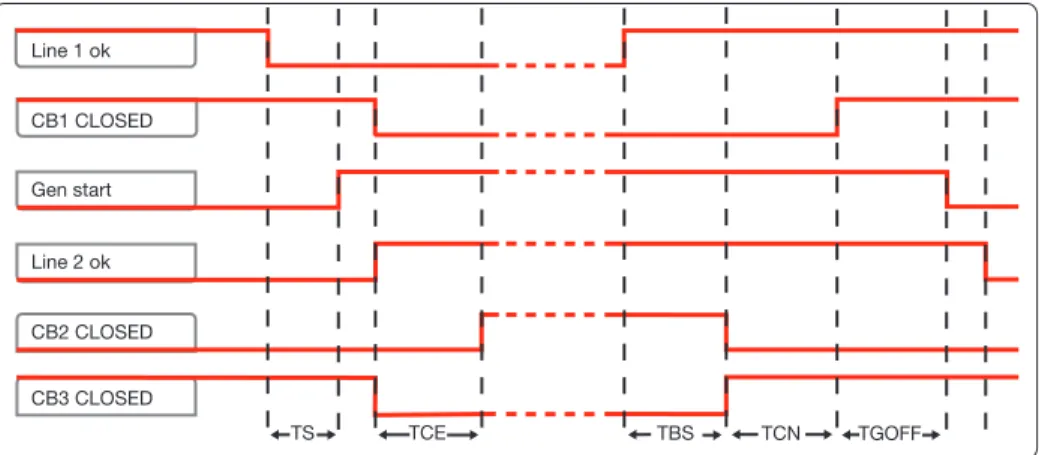
Figure 4.6: Application layout 3CBs NPLTime diagrams TS TCE TBS TCN TGOFF Line 1 ok CB1 CLOSED Gen start Line 2 ok CB2 CLOSED CB3 CLOSED
Figure 4.7: Application time diagram 3CBs NPL BUS TIE - generator in use
Line 1 ok CB1 CLOSED Line 2 ok CB2 CLOSED CB3 CLOSED TS TCE TBS TCN
Figure 4.8: Application time diagram 3CBs NPL BUS TIE - generator not in use Special cases: if LN1 returns to normal before LN2, the sequence is interrupted and the generator is switched off; if LN1 returns to normal during TCE, the sequence is completed. If LN1 disappears during TBS, the sequence is interrupted; if LN1 disappears during TCN, the switchboard starts TS running in order to re-enter on LN2. If LN2 disappears during TCE, the procedure is in any case completed. main line LN1.
TGOFF Line 1 ok CB1 CLOSED Line 2 ok Gen start CB2 CLOSED CB3 CLOSED TS TCE TBS TCN
Figure 4.9: Application time diagram 3CBs NPL- generator in use
TCE Line 1 ok CB1 CLOSED Line 2 ok CB2 CLOSED CB3 CLOSED TS TBS TCN
Figure 4.10: Application time diagram 3CBs NPL - generator not in use - main line LN1
Special cases: if LN1 returns to normal before LN2, the sequence is interrupted and the generator is switched off; if LN1 returns to normal during TCE, the sequence is completed. If LN1 disappears during TBS, the sequence is interrupted; if LN1 disappears during TCN, the switchboard starts TS running in order to re-enter on LN2. If LN2 disappears during TCE, the procedure is in any case completed.
4.4 Control of two independent power supply lines
separated by Tie (3CBs Bus Tie)
Description
Lines LN1 and LN2 supply two different sections of the plant separated by a bus tie circuit breaker CB3, normally open. In case of failure of one of the two supply lines, ATS022 closes CB3; the available line thus powers both the sections downline. When the line is restored ATS022 restores the normal plant conditions by opening CB3. ATS022 acquires the open/close status of the device by means of dedicated input DI11 and commands the opening and closing by activating output DO11. The Bus Tie application requires the use of two CT-AWE type timed relays for operating the opening and closing of CB3. The three circuit breakers CB1 – CB2 – CB3 must be interlocked mechanically for reasons of safety (Emax circuit breakers – C type interlock).
CB1
CB2
CB3
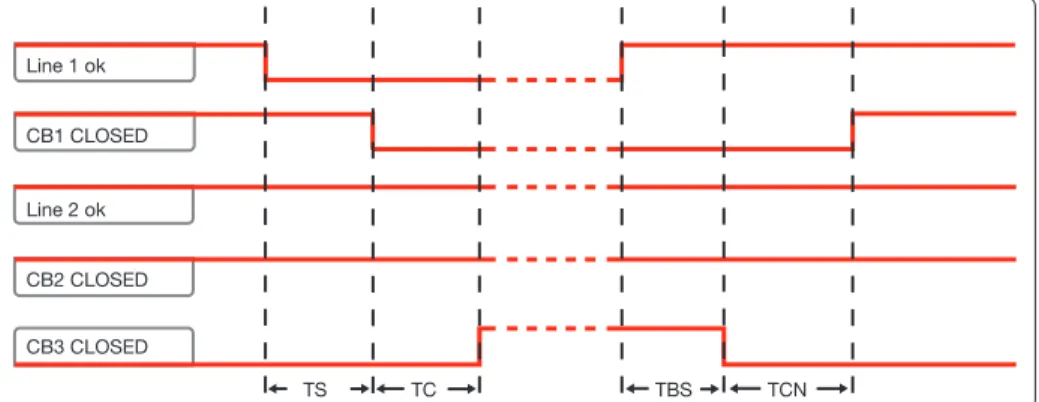
Figure 4.11: Application layout 3CBs BUS TIETime diagrams Line 1 ok CB1 CLOSED Line 2 ok CB2 CLOSED CB3 CLOSED TS TC TBS TCN
Figure 4.12: Application time diagram 3CBs BUS TIE – line LN1 failure
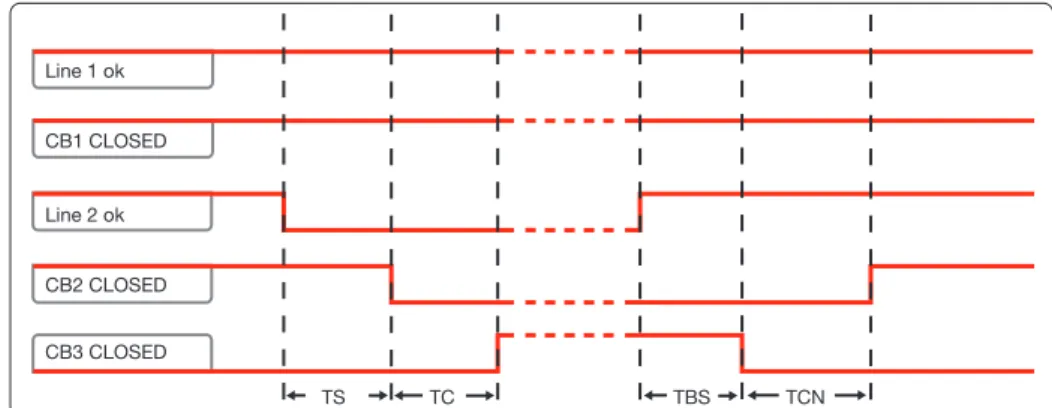
Special cases: if LN1 returns to normal during TS, the changeover is interrupted; if LN1 returns to normal during TC, the changeover is completed. If LN1 disappears during TBS, the changeover is interrupted; if LN1 disappears during TCN, the changeover is completed. If LN2 disappears during TS, the changeover is interrupted. If LN2 disappears during TC, the changeover is completed.
Line 1 ok CB1 CLOSED Line 2 ok CB2 CLOSED CB3 CLOSED TS TC TBS TCN
Figure 4.13: Application time diagram 3CBs BUS TIE – line LN2 failure
4.5 Automatic switching without inverse procedure
Description
Following an anomaly of the main line, ATS022 switches on an emergency line (1). If the mains supply is restored, the inverse switching procedure is not started up (2). If there is a fault in the reserve line, ATS022 must open the emergency switch (3) and wait for restoration of the emergency line to reclose (4), without in any case providing for switching on the main line. This operating mode is also applicable if the generator is present: in this case, after time Ts the generator is started up and as soon as the emergency line is available CB1 is opened.
ATTENTION If ATS022 is not powered by the auxiliary supply and by any of the two lines the device waits for at least one of the two lines (5) to return before proceeding with the switching procedure (6). The option is not available in case of 3CBs Bus Tie application and in case of selection of the no priority line option. Time diagrams TS TCE TBS TCE TBS (1) (2) (3) (4) (5) (6) Line 2 ok CB2 CLOSED Line 1 ok CB1 CLOSED
Figure 4.14: 2CBs application time diagram - generator not in use – without inverse switching procedure
4.6 Line Priority Selection
Description
ATS022 allows selection of the main line by means of the menu on the display. The following selections are possible:
- main line: Line LN1
- main line: Line LN2 (selection possible only if generator is not in use)
- no line priority: ATS022 ensures power supply to the load from any of the two lines without considering either of these as priority, therefore, for example, following switching on line LN2 due to failure of line LN1, ATS022 remains on line LN2 even if LN1 is restored.
Time diagrams Line 1 ok CB1 CLOSED Line 2 ok CB2 CLOSED TS TCE TBS TCN
Figure 4.16: Time Diagram no line priority – generator non in use
Line 1 ok CB1 CLOSED Gen start Line 2 ok CB2 CLOSED TS TCE
5. Using the automatic transfer switch
5.1 Interface
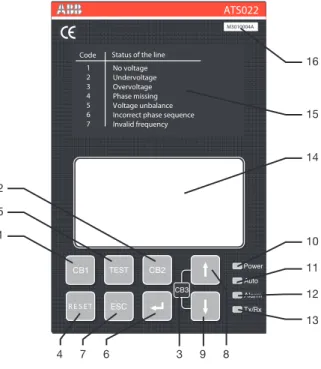
Code 1 2 3 4 5 6 7Status of the line No voltage Undervoltage Overvoltage Phase missing Voltage unbalance Incorrect phase sequence Invalid frequency R E S E T ATS022 M3010004A 16 15 14 10 11 9 7 3 4 6 8 12 1 5 2 13
Figure 5.1: Description of ATS022 front panel interface Ref. Description
1 CB1: pushbutton for opening/closing circuit breaker CB1 2 CB2: pushbutton for opening/closing circuit breaker CB2
3 CB3: CB3 opening/closure procedure graphic indication (combination of UP-DOWN keys for at least 2sec)
4 RESET: pushbutton for automatic/manual mode selection and alarms reset 5 TEST: test modes selection pushbutton
6 ENTER: pushbutton for confirming an action 7 ESC: pushbutton for returning to the previous step 8 UP: pushbutton for moving up on the menu 9 DOWN: pushbutton for moving down on the menu 10 LED POWER: indicates presence of power supply 11 LED AUTO: indicates automatic or manual mode
Ref. Description
12 LED ALARM: indicates active alarm
13 Tx/Rx LED: indicates bus communication status 14 GRAPHIC DISPLAY
15 PLATE SHOWING LINES STATUS CODES 16 Serial No.
Table 5.1: Description of ATS022 interface
5.2 LED indicators
Alarm
The steady red Alarm LED may indicate the switching logic disabled condition or one of the following events:
• circuit breakers command failed • protection releases tripped • removal of circuit breakers • generator alarm
• logic disabling from input DI3
• CBs closed (2 or 3 depending on the configuration)
The alarm LED switches Off indicating that the switching logic is enabled and no alarms are present
Auto
The Auto LED indicates the operating mode: • manual: LED Off
• automatic: steady green LED • test: flashing green LED
Power
LED Power LED indicates the presence of power supply:
• power supply present: steady green LED indicates power supply from line voltage or from auxiliary source present
• no power supply: LED Off indicates that both lines are not present and that the Powersave condition has ended. The switching logic is in stand-by for return of one of the line voltages
• Powersave: green flashing LED indicates, if both lines are absent and if no auxiliary power supply is present, that the device is active and is in stand-by for return of one of the line voltages (maximum duration 1 minute). When the Powersave period ends, the LED switches off and the device awaits a line voltage. The moment the normal or the emergency line is restored, with ATS022 in automatic, the unit analyses the conditions of the lines monitored and the status of the circuit breakers and proceeds with the switching operation in accordance with the situation concerned.
TX/RX
The TX/RX LED indicates the bus communication status.
• Communication via bus under way: green LED flashing at variable frequency • Communication via bus not active: LED Off
5.3 Keypad keys
CB1 key
In manual mode, press the CB1 key for Opening/Closure of circuit breaker CB1.
CB2 key
In manual mode, press the CB2 key for Opening/Closure of circuit breaker CB2.
RESET
Press RESET to select the Manual or Automatic operating mode.
In case of alarm, press RESET to reset the alarm and the device returns to manual mode. Press RESET again to bring the device to automatic mode.
TEST key
Press the TEST key to set the test modes of the direct and inverse switching sequences.
ATS022 must be in the manual position. To exit TEST mode press RESET.
Enter key
Used for confirming the action or entry to the menu.
ESC key
Used for cancelling an action and returning to previous menu.
UP key
Used for moving up on the menu.
DOWN key
5.4 Setting the operating modes
5.4.1 Manual mode
To select the Manual operating mode of unit ATS022: a. Make sure the Power LED is On, see Figure 5.2/1
b. If the Auto LED is OFF, see Figure 5.2/2, the automatic transfer switch is in Manual mode. c. If the AUTO LED is ON, press RESET, see Figure 5.2/3 . The Auto LED switches to OFF and the
device is in Manual Mode, see Figure 5.2/4 .
OR KA00345IT Manual mode Manual mode
!
TEST CB1 CB2!
1
2
2
3
4
Figure 5.2: Description of manual mode selection procedure for ATS022
5.4.2 Automatic mode
To select the Automatic operating mode of unit ATS022: a. Make sure the Power LED is On, see Figure 5.3/1
b. Press RESET once, see Figure 5.3/2. If the Auto LED is ON, the automatic transfer switch ATS022 is in Automatic mode, see Figure 5.3/3
c. If the Auto LED is OFF, press RESET again, see Figure 5.3/3; the Auto LED switches to ON and the device is in Automatic mode/ Figure 5.3/4
KA00347IT OR
!
TEST CB1 CB2 Automatic Mode TEST CB1 CB2!
Automatic Mode1
2
3
3
4
5
5.5 Graphic Display
0,0
0,0
LN1: 1
V
Hz
LN2: 1
0,0
0,0
V
Hz
GT
LN1
LN2
L
G
M
NPL
TBS..
8 1 5 9 21 3 12 6 20 17 11 16 13 7 2 15 19 10 4 14 18 Figure 5.4: Description of ATS022 displayRef. Description
1 LN1: line 1 2 LN2: line 2
3 CB1 status graphic indicator 4 CB2 status graphic indicator 5 CB3 status graphic indicator 6 LN1 power presence icon 7 LN2 power presence icon 8 application type indicator 9 manual mode indicator 10 test mode indicator 11 generator presence indicator
12 generator start (UP arrow)/stop (DOWN arrow) indicator 13 open/close command execution indicator
14 timing indicator 15 LN1 power measurement 16 LN2 power measurement 17 LN1 frequency measurement 18 LN2 frequency measurement 19 LN1 line status code 20 LN2 line status code 21 local/remote mode indicator 22 outlet DO7 activation indicator
Table 5.2: Description of ATS022 display 22
5.5.1 LN1 and LN2 lines status indication
The presence/absence of lines LN1 and LN2 is shown graphically on the display by means of filled/ empty icons, see Figure 5.4/6 – 5.4/7, and a specific status code
If there is an anomaly on the line voltage, the icon concerned is empty and the error code is displayed as defined by the following Table:
Line status Code Description
No power 1 No voltage on the phases (one in the case of a single-phase configuration, three in the case of a 3P or 3P+N three-phase configuration).
Minimum voltage 2 One or more phases with voltages less than the set threshold. Maximum voltage 3 One or more phases with voltages greater than the set threshold. Phase missing 4 Loss of one or two phases in 3P or 3P + N systems.
Phase imbalance 5 Imbalance between the voltages of the individual phases (the difference between the phase with the higher voltage value and that with the smaller is higher than the set voltage threshold) (*). Inverted sequence 6 Inversion of the sequence between two or more phases (the correct
sequence is L1, L2, L3).
Frequency out of range 7 One or more frequency values outside the set limits.
(*) = The check on the imbalance is performed between phase-to-phase voltages in the case of a 3P configuration, and between phase voltages in the case of a 3P + N configuration.
Table 5.3: Description of line status codes ATS022
5.5.2 Browsing through the Menu
Press Enter to access the main Menu. Three different levels of configuration of the unit can be accessed from the main menu:
Figure 5.5: Description of main menu ATS022
Access to the configuration pages requires a 4-digit password which must be entered using the UP, DOWN and ENTER keys.
The password is valid for one minute after the last pressing of a key.
For the first access to the system the password is 0001; subsequently change the password as desired. If the password is lost or forgotten, contact the service centre.
The system configuration section makes it possible to set:
- The parameters of the two lines
Parameters of lines LN1 - LN2 Value Factory settings
Rated voltage 100V/57V– 115V/66V - 120V/70V - 208V/120V 220V/127V 230V/132V 240V/138V 277V/160V 347V/200V -380V/220V - 400V/230V - 415V/240V - 440V/254V - 480V/277V 400V/230V Rated frequency 50Hz - 60 Hz, 16 2/3 Hz, 400 Hz 50Hz
Number of phases LN1 1 phase / 3 phases with N / 3 phases without N 3 phases with N Number of phases LN2 1 phase / 3 phases with N / 3 phases without N 3 phases with N Presence of external voltage
transformer
absent/present
(for voltages greater than 480VAC) absent
Primary voltage TV 100V/57V– 115V/66V - 120V/70V - 208V/120V 220V/127V 230V/132V 240V/138V 277V/160V 347V/200V 380V/220V 400V/230V 415V/240V 440V/254V 480V/277V 500V/288V 550V/317V 600V/347V 660V/380V -690V/400V - 910V/525V - 950V/550V - 1000V/577V - 1150V/660V 690V/400 V Secondary voltage TV 100V/57V– 115V/66V - 120V/70V - 208V/120V 220V/127V 230V/132V 240V/138V 277V/160V 347V/200V -380V/220V - 400V/230V - 415V/240V - 440V/254V - 480V/277V 400V/230 V
Table 5.4: Description of parameters of lines ATS022
- Type of application
Type of application Value Factory settings
Protection devices 2CBs / 3CBs NPL opening only / 3CBs NPLopening&closing / 3CBs NPL BusTie / 3CBs Bus Tie 2CBs
Utilisation of generator Generator not in use / Generator in use Generator not in use Priority Line Line LN1 / Line LN2 / No priority Line Line LN1
Switching With inverse procedure/Without inverse procedure With inverse procedure Table 5.5: Description of types of application ATS022
Device configuration
The device configuration section makes it possible to set:
- Limit thresholds
Limit thresholds Value Factory settings
Min/max voltage
threshold -30% …-5%, +5% … +30%, step ± 1%(Imbalance of voltage set at same threshold) -15%; +15% Min/max frequency -10% …-1%, +1% … +10%, step ± 1% -1%; +1%
- Time delays
Time delays Value Factory settings
TS Delay 0…30s, step 1s 0s
TBS Delay 0…59s, , step 1s, 1,2,3…30min, step 1min 0s
TCE Delay 0…60s, step 1s 3s
TCN Delay 0…60s, step 1s 3s
TC Delay 0…60s, step 1s 3s
TGOFF Delay 0…59s, , step 1s, 1,2,3…30min, step 1min 5s
TL Delay 0...60s, step 1s 0s
Table 5.7: Description of time delays ATS022
- Digital inputs
Digital Input Value Factory settings
Digital Input DI10 - function disabled/generator start/logic enabling/remote reset/EMERGENCY BLOCK Generator Start
Digital Input DI10 - type NO/NC NO
Digital Input DI8 - type NO/NC NO
Table 5.8: Description of inputs ATS022
- Modbus parameters
Modbus Value Factory settings
Modbus Address 1…247 1
Modbus Baud Rate 9600/19200/38400 bps 9600
Modbus Stop Bits 0,1 1
Modbus Parity even, odd, absent absent
mode local, remote local
Table 5.9: Description of Modbus parameters ATS022
- Language and backlit display
Function Value Factory settings
Backlighting duration Always On, 0…59s, step 1s, 1,2,3…30min, step 1min Always On Language English/Italian/German/French/Spanish/Finnish/Russian/Chinese English Table 5.10: Description of language and backlighting ATS022
The diagnostics section makes it possible to access the following pages:
Values Measured: the voltage and frequency values measured on lines LN1 and LN2 can be consulted on the display.
Alarms Log: the latest alarms/events are displayed, up to a maximum of 20. The number of alarms is shown at the top of the page and the latest alarm is always at the top of the list. The log is cleared by selecting Clear Log and pressing Enter.
Diagnostics
Measured Values
Alarm Log
2/2
KA00477
SW: 1A
SN: 12345678
Figure 5.5: Description of diagnostics menu ATS022
Figure 5.6: diagnostics – values measured page ATS022
5.6 Using pushbuttons in manual mode
Opening/Closing circuit breakers CB1, CB2
In manual mode the circuit breakers can be controlled by means of pushbuttons CB1 and CB2. In case of a fault, the alarms are activated by the same methods as those for the automatic switching sequence. Pressing the CB1 key:
• If CB1 is closed, the opening command is sent to CB1
• If CB1 and CB2 are both open, the closing command is sent to CB1 • If CB1 is open and CB2 is closed, no operation is carried out Pressing CB2 key:
• If CB2 is closed, the opening command is sent to CB2
• If CB2 and CB1 are both open, the closing command is sent to CB2 • If CB2 is open and CB1 is closed, no operation is carried out
Opening/Closing circuit breaker CB3
In manual mode, combination of the UP and DOWN keys allows Opening/Closing of circuit breaker CB3. • CB3 opening: press the UP and DOWN keys simultaneously for at least 2 seconds.
• CB3 closing: press the UP and DOWN keys simultaneously for at least 2 seconds.
Manual Start/Stop of generator
In manual mode, the combination of the RESET, CB1 and CB2 keys allows Start/Stop of the generator. • Generator Start: keeping RESET pressed, press CB1
• Generator Stop: keeping RESET pressed, press CB2
5.7 Test Modes
ATS022 makes it possible to select two different test modes: • testing the entire switching procedure (complete Test) • generator start/stop test (gen set test)
WARNING: when the test procedure ends, the user must make sure the device is not left accidentally in TEST mode
Complete Test
With ATS022 in manual mode, press TEST: all the LEDs, except Tx/Rx, flash twice simultaneously and then the Auto LED Auto flashes every 0.5 sec.; the graphic display shows the icon T.
1. Press TEST; start generator (not performed if generator is NOT in use) 2. Press TEST; CB1 Opening
4. Press TEST; CB2 Closure 5. Press TEST; CB2 Opening 6. Press TEST; CB1 Closure 8. Press TEST; stop generator (not performed if generator is NOT in use)
1. Press TEST; start generator
(not performed if generator is NOT in use) 2. Press TEST; CB1 Opening
3. Press TEST; CB3 Opening 4. Press TEST; CB2 Closure 5. Press TEST; CB2 Opening 6. Press TEST; CB1 Closure 7. Press TEST; CB3 Closure
(not performed if ATS022 has activated the DISCONNECTION ONLY function) 8. Press TEST; stop generator (not performed if generator is NOT in use)
3CBs NPL Bus Tie 3CBs Bus Tie
1. Press TEST; start generator (not performed if generator is NOT in use) 2. Press TEST; CB1 Opening
3. Press TEST; CB3 Opening 4. Press TEST; CB2 Closure 5. Press TEST; CB2 Opening 6. Press TEST; CB3 Closure 7. Press TEST; CB1 Closure 8. Press TEST; stop generator (not performed if generator is NOT in use)
1. Press TEST; CB1 Opening 2. Press TEST; CB3 Closure 3. Press TEST; CB3 Opening 4. Press TEST; CB1 Closure 5. Press TEST; CB2 Opening 6. Press TEST; CB3 Closure 7. Press TEST; CB3 Opening 8. Press TEST; CB2 Closure
Table 5.11: Description of complete TEST mode ATS022 At the end of the procedure, press TEST again to resume the sequence.
Alarms, if any, on the protection devices control are activated in the same manner as the automatic and manual operating modes.
The user can stop the TEST sequence by pressing the RESET.
Gen Set Test
This test mode makes it possible to test only the generator start and stop with the plant running without opreating the circuit breakers on the line in any manner whatsoever, only if the ATS022 is set with the generator in use, otherwise the Gen Set Test is not performed.
With ATS022 in manual mode, keep the TEST key pressed for at least 3 seconds, on releasing the TEST key, all the LEDs, except Tx/Rx, flash simultaneously four times and then the Auto LED flashes at 0.5Hz; the graphic display shows the GT icon.
The test procedure is as follows: 1. Press TEST; start generator 2. Press TEST; stop generator
6. Input and output signals
6.1 Output signals (DO1…DO12)
DO1, DO2, DO3, DO4: Circuit breakers open/close command
Output signals DO1, DO2, D03, DO4 control the opening and closure of circuit breakers CB1 and CB2 connected to ATS022.
The control logic integrated in the device punctually checks the correct operation of the circuit breakers following the command.
If the change in status of the circuit breaker is not received within 5 seconds of sending the command, the device considers the command as failed and operates as below:
• alarm LED lights up. • DO6 alarm output activation • DO9 alarm output activation
The alarm relative to the failed operation is recorded in the section concerned of the "Alarms Log". To reset the alarm press RESET:
the alarm is reset and ATS022 goes into manual mode. Press RESET again to bring ATS022 to automatic mode.
DO5 Emergency generator start/stop command
Start and stop of the Emergency generator are controlled by means of a bistable relay, making it possible to maintain the generator start command even when the powersave mode runs out.
• contact DO5 (X23:1 ; X23:2 - NO): - stop unit = contact open - start unit = contact closed • contact DO5 (X23:2 ; X23:3 - NC):
- stop unit = contact closed - start unit = contact open
DO6 Alarm signal
When an alarm is generated, contact DO6 switches, the switching logic is disabled and the alarm LED lights up.
To reset the alarm press RESET:
the alarm is reset, the Alarm LED turns Off and the ATS022 enters manual mode. Press RESET again to bring ATS022 to automatic mode.
DO7 Load protection device
the programmable contact DO7 closes for 1s if both the lines have one or more alarms of the same type, and is useful for protecting sensitive loads that could be damaged in the event of abnormal power supplies.
The contact can be programmed with 2 variables:
- Time TL: time that the fault is present on both lines after which the contact is activated.
- Function DO7: the parameter available on ATS022 is a number in decimal format that, if converted into binary, allows 6 bits to be managed corresponding to the types of alarms (bit set to 0= alarm deactivated; bit set to 1= alarm activated)
bit Alarm
0 (least significant) No voltage and undervoltage 1 Overvoltage
2 Phase missing 3 Unbalance
4 Incorrect phase sequence 5 Invalid frequency
the lines were in alarm for not valid frequency and/or over-voltage, as an example not valid frequency on LN1 and over-voltage on LN2.
For correct operation of DO7 the presence of an auxiliary power supply is required.
DO7 must not be used in installation configurations with circuit-breakers T1-T2-T3 and motor operator MOS.
The Unbalance alarm also includes cases of undervoltage or overvoltage (for example, the drop of one phase in a 3P or 3P + N system).
In the absence of voltages, ATS022 cannot calculate the angle between the various phases and therefore it considers this condition as: Incorrect phase sequence.
DO8 Not available
DO9 Circuit breaker operation failed alarm indication
When the opening or closing command of a circuit breaker fails, contact DO9 closes; the switching logic is disabled and the Alarm LED lights up.
To reset the alarm press RESET:
the alarm is reset, the Alarm LED turns Off and the ATS022 enters manual mode. Press RESET again to bring ATS022 to automatic mode.
DO10 Automatic/Manual mode indication
Contact DO10 indicates the operating mode of the device: • DO10 open: ATS022 operates in automatic mode • DO10 closed: ATS022 operates in manual mode
DO11 CB3 circuit breaker control
Depending on the operating mode set, contact DO11 allows control of only opening or opening/closing of circuit breaker CB3:
Protection Devices selection DO11 NOTES
2 CBs not used
3CBs NPL used CT-AWE type timed relays required if selected opening&closing option 3CBs NPL Bus Tie used CT-AWE* type timed relays required
3CBs Bus Tie used CT-AWE* type timed relays required
*The CT-AWE must be adjusted with a time between 200ms and 300ms. Table 6.1: Description of DO11 functions - ATS022
DO12 Logic enabled/disabled indication
Contact DO12 indicates whether switching logic is enabled or disabled: • DO12 open: logic enabled
• DO12 closed: logic disabled
6.2 Input signals
DI1, DI2 Status signals of circuit breakers CB1, CB2
Inputs DI1, DI2 must be connected to auxiliary contacts of the status of the circuit breakers of the normal and emergency lines
• DI1, DI2 closed: CB closed
DI3 Switching Logic Activation/Deactivation
Input DI3 is used for enabling/disabling the switching logic. The function may be used for integrating generic alarms coming from the plant the presence of which leads to disabling of ATS022 automatic switching logic.
• DI3 open: logic disabled • DI3 closed: logic enabled
DI4, DI5 Circuit breakers activation indication
The auxiliary opening contacts of the normal and emergency lines must be connected to contacts DI4, DI5 for activation of the trip.
• DI4, DI5 open: CB tripped • DI4, DI5 closed: CB not tripped
In case of trip of a circuit breaker (CB1 or CB2): • the trip indication contact opens
• the switching logic is disabled • Alartm contact DO6 is closed • contact DO12 is closed • the Alarm LED lights up • the Auto LED switches Off
To reset the TRIP indication press RESET. • The TRIP indication is reset
• Alarm LED switches Off
• ATS022 operates in manual mode • contact DO10 is closed
Press RESET again to bring ATS022 to Automatic mode • contact DO10 is opened
• the Auto LED lights up
DI6, DI7 Circuit breakers CB1, CB2 removed/inserted position indication
The auxiliary position contacts of the circuit breakers of the normal and emergency lines must be connected to inputs DI6 and DI7 in removable execution.
• DI6, DI7 open: CB removed • DI6, DI7 closed: CB inserted If the circuit breaker is removed:
• the position indication contact opens • the switching logic is disabled • Alartm contact DO6 is closed • contact DO12 is closed • the Alarm LED lights up • the Auto LED switches Off When the circuit breaker is inserted:
• the position indication contact closes • the switching logic is re-enabled • Alarm LED switches Off
• ATS022 operates in manual mode • contact DO10 is closed
• Alarm contact DO6 is opened • contact DO12 is opened
To set the device in automatic mode press RESET • contact DO10 is Opened
• the Auto LED lights up
DI8 Generator Alarm
Input DI8 is used for connecting various alarms coming from the emergency generator: drop in oil pressure, Over Temperature, etc.
Input DI8 may be set as normally open (NO) or normally closed (NC) by means of the menu on the graphic display.
In case of an active generator alarm • the switching logic is disabled • Alartm contact DO6 is closed • contact DO12 is closed • the Alarm LED lights up • the Auto LED switches Off • contact DO10 is closed
• the display shows "generator alarm" When the DI8 signal is deactivated:
• Alarm LED switches Off • Alarm contact DO6 is opened • contact DO12 is opened • ATS022 operates in manual mode
• the "generator alarm" message disappears from the display To set the device in automatic mode press RESET
• contact DO10 is Opened • the Auto LED lights up
DI9 Forced switching on emergency power supply line
In certain industrial processes, supply of power from the emergency generator may be required instead of from the normal power supply line, for brief moments, in order to avoid possible operating anomalies of the supply and ensure high levels of reliability.
In automatic mode, by activating input DI9 the forced switching procedure is started up on the emergency line:
• Generator Start
• opening of circuit breaker on normal line • closure of circuit breaker on emergency line
The power supply from the emergency line persists as long as the command remains active. When the command is deactivated, the unit proceeds with the switching procedure on the normal line.
2 CBs:
If DI9 is closed: • Generator Start
• Opening of circuit breaker CB1 • closure of circuit breaker CB2 If DI9 is open:
• opening of circuit breaker CB2 • closure of circuit breaker CB1 • generator stop
3CBs NPL:
If DI9 is closed: • Generator Start
• Opening of circuit breakers CB1 and CB3 • closure of circuit breaker CB2
If DI9 is open:
• opening of circuit breaker CB2 • closure of circuit breakers CB1 and CB3 • generator stop
3CBs NPL BUS TIE:
If DI9 is closed: • Generator Start
• Opening of circuit breakers CB1 and CB3 • closure of circuit breaker CB2
If DI9 is open:
• opening of circuit breaker CB2 • closure of circuit breakers CB3 and CB1 • generator stop
DI10 Programmable input
The function associated with input DI10 can be selected from the menu on the display, from among the following options:
• forced generator start: this function makes it possible to test the correct switching ON/OFF of the generator with the plant running
Contact type set Description of function
NC Open =gen start; Closed = gen stop
NO Closed =gen start; Open = gen stop
The DI10 contact programmed as a generator starting override is active with ATS022 configured with priority line LN1 and with backswitching.
If one of these conditions does not exist, the option is not available or, if activated previously, will be automatically DISABLED.
NOTE: if the generator is already active as a result of an automatic switching sequence, or because DI9 is active, the state of the DI10 is not taken in consideration by ATS022 in managing of the generator.
• Enabling automatic switching logic: this function makes it possible to inhibit the automatic switching logic of the device following an alarm present in the field.
The logic can, however, be disabled if one of the conditions involving the disabling exist
Contact type set Description of function
NC Closed = switching enabled; Open switching disabled NO Open = switching enabled; Closed switching disabled
• Reset from Remote: this function allows reset of the device logic in remote by means of remote actuator.
NC Closed = remote reset not active; Open = remote reset active NO Open = remote reset not activeClosed = remote reset active;
• Emergency Block: this function allows prior opening of both circuit breakers of the power supply and emergency lines and permanent disabling of the switching logic. This function can be used, for example, in case of an alarm coming from a fire-fighting system which requires immediate opening of the circuit breakers and disabling of the switching logic.
Contact type set Description of function
NC Closed = emergency block not active; Open = emergency block active NO Open = emergency block not activeClosed = emergency block active;
Input DI10 may be set as normally open (NO) or normally closed (NC) by means of the menu on the graphic display.
DI11 CB3 circuit breaker status signal
Input DI11 is connected to the CB3 circuit breaker status auxiliary contacts. • DI11 open: CB open
ATS022
Modbus Linea 2 Line 2 Linea 2 Ligne 2 Leitung 2 Linea 1 Line 1 Linea 1 Ligne 1 Leitung 1Uscita per controllo CB2 Output to control CB2 Salida para control CB2 Sortie pour controle CB2 Ausgang zur steuerung CB2 Uscita per controllo CB1 Output to control CB1 Salida para control CB1 Sortie pour controle CB1 Ausgang zur steuerung CB1
Uscita per controllo CB3 Output to control CB3 Salida para control CB3 Sortie pour controle CB3 Ausgang zur steuerung CB3 Uscita per controllo Gen Start/Stop Output to control Gen Start/Stop Salida para control Gen Start/Stop Sortie pour controle Gen Start/Stop Ausgang zur steuerung Gen Start/Stop
CB2 trip Com Com Com CB1 trip stato CB3 status CB3 estado CB3 etat CB3 zustand CB3 1 2 3 4 5 6 Allarme gen Generator alarm Entrada alarma gen Alarme gen Alarm Gen CB2 inserito CB2 inserted CB2 insertado CB2 embrochè CB2 eingefahren CB1 inserito CB1 inserted CB1 insertado CB1 embrochè CB1 eingefahren
Comando forzatura commutazione Command to force transfer Mando forzamiento conmutación Commande demarrage groupe Startbefehl Gruppe ingresso programmabile Programmable input entrada programables entree programmable eingang programmierbar X32 1 2 3
Ingresso logica abilitata/disabilitata Logic enable/disable input Entrada activacion/disactivacion logica Entree activaction/desactivaction logique Eingang aktivierung/deaktivierung logik Stato CB1 Status CB1 Estado CB1 Etat CB1 Zustand CB1 Stato CB2 Status CB2 Estado CB2 Etat CB2 Zustand CB2 X31 1 2 3 4 5 6 7 8 segnalazione allarme alarm signaling Señalización alarma signalisation alarme Alarmmeldung X29
Segnalazione allarme / trip interruttore Cb alarm signalling
Señal alarma / disparo interruptor Signalisation alarme / déclench. disjoncteur Alarmsignal / Auslösung Leistungsschalter CB2 inserito CB2 inserted CB2 insertado CB2 embrochè CB2 eingefahren CB1 inserito CB1 inserted CB1 insertado CB1 embrochè CB1 eingefahren Segnalazione AUTO / MANUAL Automatic/manual mode signalling Señalización AUTO/MANUAL Signalisation AUTO / MANUAL Meldung AUTO/HANDBETRIEB segnalazione logica abilitata/disabilitata Logic enabled/disabled signaling Señalización logica activa signalisation logique activee meldung logik aktivie non utilizzato Not used No utilizado non utilisé Nicht benutzt non utilizzato Not used No utilizado non utilisé Nicht benutzt
X11:1 Normal Line LN1: L1 - -X11:2 Normal Line LN1: L2 - -X11:3 Normal Line LN1: L3 - -X11:4 Normal Line LN1: N - -X12:1 Emergency Line LN2: L1 - -X12:2 Emergency Line LN2: L2 - -X12:3 Emergency Line LN2: L3 - -X12:4 Emergency Line LN2: N -
-X41:1 + Auxiliary power supply -
-X41:2 - Auxiliary power supply -
-X21:1 Com -
-X21:2 CB1 opening command DO1 NO
X21:3 CB1 closure command DO2 NO
X22:1 Com -
-X22:2 CB2 opening command DO3 NO
X22:3 CB2 closure command DO4 NO
X23:1 generator start/stop command D05 Open =gen stop; Closed = gen start
X23:2 Com -
-X23:3 generator start/stop command D05 Closed =gen stop; Open = gen start
X24:1 CB3 opening command D011 NO
X24:2 Com -
-X24:3 CB3 closure command D011 NC
X29:1 ATS022 unit alarm indication DO6 Open = no alarm; Closed = alarm X29.2 Load protection device DO7 Open = no alarm; Closed = alarm
X29:3 not used DO8
-X29:4 circuit breakers command alarm indication DO9 Open = no alarm;Closed = alarm X29.5 automatic/manual mode indication DO10 Open = Automatic;Closed = Manual X29:6 logic enabled/disabled indication DO12 Closed = logic disabledOpen = logic enabled;
X29:7 Com -
-X31:1 logic enabling input DI3 Closed = logic enabledOpen = logic disabled;
X31:2 CB1 status input DI1 0=CB open; I=CB closed
X31:3 CB2 status input DI2 0=CB open; I=CB closed
X31:4 Com -
-X32:1 CB3 status input DI11 0=CB open; I=CB closed
X32.2 programmable input DI10 NO/NC
X32:3 switching forcing input DI9 NO
Connectors Description DI/DO Type
X32.5 CB1 position input DI7 0=CB removed; I=CB inserted X32:6 CB2 position input DI6 0=CB removed; I=CB inserted
X32:7 CB1 trip input DI5 0=no CB trip; I=CB trip
X32:8 CB2 trip input DI4 0=no CB trip; I=CB trip
X32.9 Com -
-X51:1 Modbus DATA B -
-X51:2 Modbus DATA A -
-X52:3 Modbus GND -
-X61 Earth connection -
7. Technical data
ATS022 Value
Three-phase voltage used
Connected voltage 100Vac - 480Vac (+/-20%)
Phase voltage 57,7Vac - 277Vac (+/-20%)
Safety auxiliary voltage 24Vdc - 110 Vdc (-10% / +15%)
Frequency 50-60-400-16 2/3 Hz
Single-phase voltage used
Phase voltage 57,7Vac - 277Vac (+/-20%) (1
Safety auxiliary voltage 24Vdc - 110 Vdc (-10% / +15%) (2
Frequency 50-60-400-16 2/3 Hz (3
Measurement precision
Voltage 1%
Frequency 1%
Relay utilization category 8 A, AC1, 250 V Relay/connectors utilization category 6 A, AC1, 250 V
Over voltage category III, Uimp 6 kV
Power consumption Max 12W
IP rating IP20 Device weight 1314g Operating temperature -20 / +60 °C (4 Storage temperature -25 / +80°C Humidity r.h=95% T=25…60°C Altitude Max. 2000m NOTES
(1 In single-phase system it is not possible to select Un 100 V, 115 V, 120 V.
(2 In single-phase system, if Un is between 57.7 - 109 V an auxiliary safety power supply is necessary. (3 In case of rated frequency 16 2/3 Hz, an auxiliary safety power supply must be used. If the rated
voltage is greater than 100 VAC external transformers must be used.
(4 If the ATS022 is used in environments with extremely low temperatures (less than - 10°C) it is advisable to use a safety auxiliary power supply to avoid display problems of the graphic display. Table 7.1: Technical data ATS022
8. Installation of device ATS022
The automatic transfer switch ATS022 can be mounted on the front of the panel door or on DIN rail.
8.1. Door-mounted Automatic Transfer Switch ATS022
The Automatic Transfer Switch ATS022 can be door-mounted as shown in Figure 8.1.
160 KA00379 91 139
1
2
2a
2b
8.2. DIN rail-mounted Automatic Transfer Switch ATS022
The automatic transfer switch ATS022 can be mounted on a 35mm DIN rail as shown in Figure 8.2.
KA00500 35mm EN 50022
3
2
1
Togliere KA00484IT1
2
3
97 145 KA003779. Regulatory standards
ATS022 conforms to the following regulatory standards:• European Directive 73/23 “LVD – Low Voltage Directive” • EN 50178 electronic equipment for use in power Installations • EN-IEC 62103 electronic equipment for use in power Installations
• EN-IEC 60947-5-1 low voltage switchgear and control gear: control circuit devices and switching elements
• Electromagnetic compatibility EN 50081-2, EN 50082-2
• Environmental conditions IEC 68-2-1, IEC 68-2-2, and IEC 68-2-3
• EN-IEC 61000-4-2: Electromagnetic compatibility (EMC) - Part 4: Testing and measurement techniques Section 2: Electrostatic discharge immunity test Basic EMC Publication (IEC 61000-4-2 [8KV air, 4KV cont])
• EN-IEC 61000-4-3, Electromagnetic compatibility (EMC) - Part 4: Testing and measurement techniques Section 3: Radiated, radio-frequency, electromagnetic field immunity test (IEC 61000-4-3) • EN-IEC 61000-4-4, Electromagnetic compatibility (EMC) - Part 4: Testing and measurement
techniques Section 4: Electrical fast transient/burst immunity test Basic EMC Publication (IEC 61000-4-4)
• EN-IEC 61000-4-5, Electromagnetic compatibility (EMC) - Part 4: Testing and measurement techniques Section 5: Surge immunity test (IEC 61000-4-5)
• EN-IEC 61000-4-6: Electromagnetic compatibility (EMC) - Part 4: Testing and measurement techniques (IEC 61000-4-6)
• EN-IEC 61000-4-8: Electromagnetic compatibility (EMC) - Part 4: Testing and measurement techniques (IEC 61000-4-8)
• EN 50093, Electromagnetic compatibility (EMC) - Part 4: Testing and measurement techniques Section 11: Voltage dips, short interruptions and voltage variations immunity test (IEC 61000-4-11, [100ms/5s] B, C criterion)
• CISPR11 (30MHz...1GHz): Emission (Generic Standard, Industrial) – Radiated • CISPR11 (0.15MHz…30MHz): Emission (Generic Standard, Industrial) – Conducted
• CISPR/CEI 1000-6-3: Part 6: Generic standards – Section 3: Emission standard for residential, commercial and light-industrial environments
• IEC 60068-2-2: Environmental testing. Part 2: Tests. Test B: Dry heat
• IEC 60068-2-6: Environmental testing. Part 2: Tests. Test Fc: vibration (sinusoidal) • IEC 60068-2-27: Environmental testing. Part 2: Tests. Test Ea and guidance: shock
• IEC 60068-2-30: Environmental testing. Part 2: Tests. Test Db and guidance: Damp heat, cyclic • IEC 60068-2-1: Environmental testing. Part 2: Tests. Test A: cold (-20 °C ± 3 °C, 16 hours)
10. Troubleshooting
The alarms are shown by means of a message on the ATS022 display. The Alarm messages are shown in the Table below:
Table 10.1: Alarms ATS022
Alarm Fault Action
CB1 opening failed circuit breaker CB1 on normal line does not open within 5s the alarm can be reset by means of the RESET button. CB2 opening failed circuit breaker CB2 on emergency line does not open within 5s the alarm can be reset by means of the RESET button. CB3 Opening failed circuit breaker CB3 bus-tie does not open within 5s the alarm can be reset by means of the RESET button. CB1 closure failed circuit breaker CB1 on normal line does not close within 5s the alarm can be reset by means of the RESET button. CB2 closing failed circuit breaker CB2 on emergency line does not close within 5s the alarm can be reset by means of the RESET button.
CB1 removed circuit breaker CB2 is removed The logic is blocked and ATS enters manual mode. Reset by inserting CB1.
CB2 removed circuit breaker CB2 is removed The logic is blocked and ATS enters manual mode. Reset by inserting CB2.
Logic block Enabled/disabled logic input DI3 inactive The logic is blocked. Reset by activating DI3. External fault Both circuit breakers are closed (DI1 and DI2 active) Check wiring
Trip CB1 Circuit breaker CB1 has tripped The logic is blocked as long as input DI4 is deactivated. Trip CB2 Circuit breaker CB2 has tripped The logic is blocked as long as input DI5 is deactivated. Generator alarm Generator alarm input DI8 active The logic is blocked as long as input DI8 is activated. Table 10.1: Alarms ATS022
ABB SACE Division
Via Baioni, 35
24123 Bergamo - Italy
Phone: +39 035 395 111
Fax:
+39 035 395 306 - 433
www.abb.com
Due to possible development of Standards as well as of materials, the characteristics and dimensions specified in this Installation and operating instructions may be considered as binding only after confirmation by ABB SACE