VERITASClusterServerandVERITASVolumeReplicatorGuidelines
Version4.1
VERITASClusterServerandVERITASVolumeReplicatorGuidelines
Beforeusingthisinformationandtheproductitsupports,readtheinformationin“Notices”.
Thiseditionappliestoversion4.1ofIBMFileNetImageServices(productnumber5724-R95)andtoall subsequentreleasesandmodificationsuntilotherwiseindicatedinneweditions.
Contents
VERITAS Cluster Server and
VERITAS Volume Replicator Guidelines
7
Getting Started 7
Document revision history 7
Accessing IBM FileNet Documentation 7
VERITAS Cluster Server 8
Software 9
Hardware 9
Installation 9
VERITAS Volume Replicator 10
Software 10
Hardware 11
Installation 11
Supported Configurations 11
Operating Systems 12
Relational Database Management Systems 12
Additional Documentation 12
FileNet Image Services 13
VERITAS Cluster Server 13
VERITAS Volume Replicator 13
Cluster Server Overview 14
Contents
VERITAS Cluster Server (UNIX) 19
Installation Overview 19
Installing VERITAS Software 19
Verifying Cluster Failover 23
Creating Cluster Resources 24
Installing Image Services Software 24
Verifying the Installation 25
VERITAS Cluster Server (Windows) 29
Installation Overview 29
Installing VERITAS Cluster Server Software 29
Verifying Cluster Failover 30
Creating Cluster Resources 30
Configuring the Cluster Groups for Image Services 30
Installing Image Services Software 34
Configuring the IS ControlService 36
Enable Event Triggering for the Image Services Cluster 37
Verifying the Installation 38
Verifying Cluster Failover 41
VERITAS Volume Replicator (UNIX and Windows) 42
Installing VERITAS Volume Replicator Software 42
Installing Image Services Software 42
Switching to the Standby (Replicated) System 51
By Domain Name Services (DNS) 51
By Adding or Changing IP Addresses in Image Services 51
Notices
54
Trademarks 57
VERITAS Cluster Server and
VERITAS Volume Replicator Guidelines
Getting Started
This document outlines the procedures related to configuring an IBM FileNet Image Services system with VERITAS Cluster Server software and VERITAS Volume Replicator software, versions 4.0, 4.1, 5.0, and later.
Depending on your business requirements, you can install both of these two products, or you can install just one or the other.
Important This document is a supplement to the standard documentation that accompanies the VERITAS software. The VERITAS documentation should be your primary reference.
Document revision history
Accessing IBM FileNet Documentation
To access documentation for IBM FileNet products:
1. Navigate to the Information Management support page (www.ibm.com/software/data/support).
IS version Date Comment
VERITAS Cluster Server and VERITAS Volume Replicator Guidelines
Accessing IBM FileNet Documentation
2. Select the appropriate IBM FileNet product from the “Select a cate-gory” list.
3. From the Product Support page, click Product Documentation under Learn.
4. From the Product Documentation page
a. If necessary, click the Doc Link for the appropriate component product to display the document list.
b. Click the icon in the appropriate release column to access the document you need.
VERITAS Cluster Server
VERITAS Cluster Server (VCS) provides a network of servers that are capable of running applications in a high availability cluster environ-ment with shared storage.
VCS works by monitoring resources and applications associated with a provided service (for example a Root/Index or Combined server with a remote RDBMS server). When a provided service goes offline on one server in the cluster, it is automatically started on another node in the cluster.
VERITAS provides, for purchase, several Agents for popular products such as Oracle and Microsoft SQL Server. VCS Agents monitor, start, and stop services in a cluster. Agents are a middle layer between the user interface, and the services running in a cluster. Commands are given to the Agents and the Agents are responsible for fulfilling the command and verifying that everything executed without error. When
VERITAS Cluster Server and VERITAS Volume Replicator Guidelines
Accessing IBM FileNet Documentation
you execute a command in VCS to bring a resource offline this is in effect telling the Agent to go and take the resource offline.
VCS also provides a highly configurable framework for creating your own Agents to control services in a cluster.
Software
VERITAS Cluster Server (VCS) provides high availability
manage-ment for both hardware and software resources in clustered server configurations using RAID redundancy techniques.
VERITAS Volume Manager (VxVM) provides storage management for
enterprise computing and emerging Storage Area Network (SAN) envi-ronments. VERITAS Volume Manager provides a logical volume man-agement layer which overcomes the physical restrictions of hardware disk devices by spanning logical volumes across multiple physical vol-umes.
Hardware
VCS requires duplicate servers for each node in the cluster. Since Image Services supports two node clusters, you’ll need two identical, but separate servers for Image Services and, if Oracle RDBMS soft-ware and databases reside on a remote server, two identical but sepa-rate servers for the Oracle software and data.
Installation
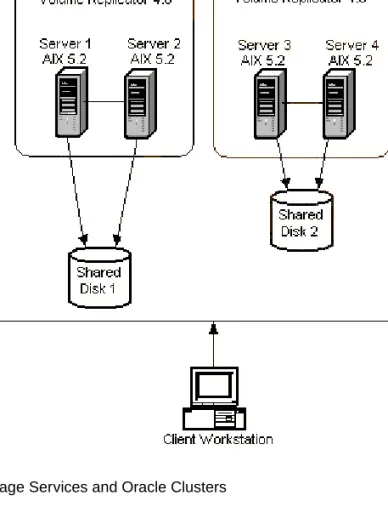
VCS requires that the Image Services software and Oracle software be installed and configured exactly the same on both servers in their respective clusters. Each cluster contains a shared disk for data
VERITAS Cluster Server and VERITAS Volume Replicator Guidelines
Accessing IBM FileNet Documentation
VERITAS Volume Replicator
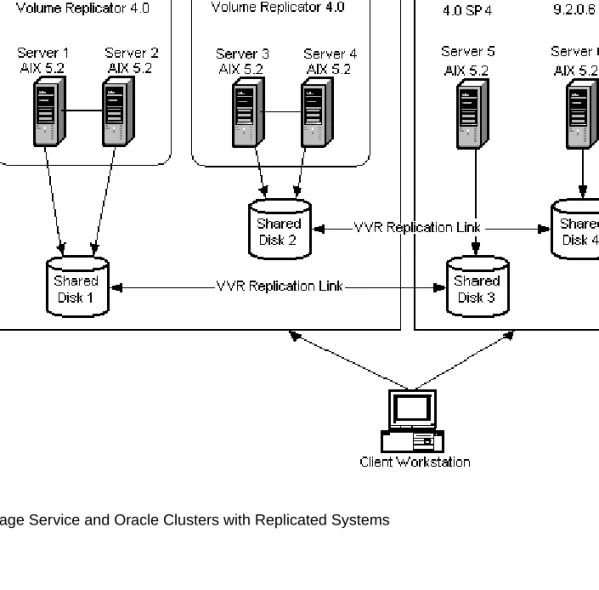
VERITAS Volume Replicator (VVR) is the core of the disaster recovery environment. VVR manages the replicated volume group or RVG at each site and sends block level updates to the replicated sites.
VVR replicates volumes by intercepting block level writes to volumes in the RVG and duplicating the same write on the peer cluster or system at the secondary site. The caveat to VVR replication is the difference in I/O throughput between local volumes and the remote replicated vol-umes. Two replication modes exist to address this deficiency: Sym-metric I/O and AsymSym-metric I/O.
• Symmetric I/O suspends write operations until all of the blocks on
the primary site have been replicated to the secondary. This slows down I/O throughput.
• Asymmetric I/O allows the write operation to return as soon as it
has been queued for replication and thus the impact to I/O is min-imal. The downside to this mode is the propensity for the sec-ondary site to be a number of I/O operations behind the primary. This solution then assumes the risk of losing the newest transac-tions that have not yet replicated when site failure occurs. This is the unfortunate reality of any disaster recovery solution.
Software
VERITAS Volume Replicator (VVR) provides the foundation for wide
area availability, site migration, and disaster recovery. Based on VER-ITAS Volume Manager, the VERVER-ITAS Volume Replicator mirrors data to remote locations over any IP network.
VERITAS Volume Manager (VxVM) provides storage management for
envi-VERITAS Cluster Server and envi-VERITAS Volume Replicator Guidelines
Supported Configurations
ronments. VERITAS Volume Manager provides a logical volume man-agement layer which overcomes the physical restrictions of hardware disk devices by spanning logical volumes across multiple physical vol-umes.
Hardware
VVR does not require any additional hardware not outlined in the initial disaster recovery plan. It is important that WAN connectivity to the remote site should be redundant. This will greatly improve the reliability of the disaster recovery environment.
Installation
VVR does not interact directly with Image Services, so little needs to be configured to operate VVR. In general, a VVR secondary replication log (SRL) should use the same performance tuning as the application. For instance, if a file system with a logical volume spans six physical volumes, so should the SRL. This is critical to maintaining optimal per-formance of Image Services components.
Supported Configurations
Image Services 4.1 supports VERITAS Cluster Server 4.0, 4.1, 5.0, and later, and VERITAS Volume Replicator for fresh installations only. Image Services supports two-node clusters.
Note Image Service Storage Library servers with SCSI optical libraries are not supported with VERITAS Cluster Server in this release.
VERITAS Cluster Server and VERITAS Volume Replicator Guidelines
Additional Documentation
It’s very important that the servers in a cluster environment and the servers in a replication environment be configured identically. The fol-lowing is a list of supported software versions for this release:
Operating Systems
• AIX 5.2 (32 and 64 bit) TL8 or higher • AIX 5.3 (64 bit) TL4 or higher
• Solaris 9 (32 and 64 bit) 09/05 release or higher • Solaris 10 (64 bit) 11/06 release or higher • HP-UX 11i (32 and 64 bit)
• Windows 2003 Server (32 bit)
Relational Database Management Systems
• Oracle 9i v9.2.0.8 • Oracle 10g v10.2.0.2 or higher • DB2 v8.2 FixPak 5 or higher • DB2 v8.1 FixPak 12 or higher • SQL Server 2000 SP4 or higher
Additional Documentation
The following list contains some of the many documents supplied by VERITAS and IBM FileNet product documentation. To download these documents from the IBM support page, see “Accessing IBM FileNet Documentation” on page 7.
VERITAS Cluster Server and VERITAS Volume Replicator Guidelines
Additional Documentation
FileNet Image Services
• Installation and Configuration Procedures for AIX • Installation and Configuration Procedures for HP-UX • Installation and Configuration Procedures for Solaris
• Installation and Configuration Procedures for Windows Server
VERITAS Cluster Server
• VERITAS Storage Foundation and High Availability Solutions - Get-ting Started Guide (UNIX)
• VERITAS Storage Solutions for Windows (VERITAS Storage Foun-dation and VERITAS Storage FounFoun-dation HA) - Getting Started Guide
• VERITAS Cluster Server Administrator’s Guide
VERITAS Volume Replicator
VERITAS Cluster Server and VERITAS Volume Replicator Guidelines
Cluster Server Overview
Cluster Server Overview
High availability is the ability to provide a service to an end-user with as little perceived downtime as possible. This does not mean that a ser-vice is guaranteed to always be available.
• Analysts such as META Group describe a range of high availability targets, from the so-called “five nines” availability, 99.999%, at the high end, to basic availability at 95%. This is a percentage of scheduled up time for a system, so five nines requires a system to be up 99.999% of that scheduled time. Five nines availability trans-lates to five minutes or less downtime in a full year of 24 by 7 oper-ations. By contrast, 99% availability allows up to 87 hours of downtime per year, and 95% allows up to 436 hours, or 18 days, of downtime.
• The Gartner Group notes that the cost of providing high availability increases exponentially as the target moves from 95% to 99% to 99.999%, so prudent system owners take into account the risk of downtime to their business when selecting their high availability tar-gets.
Even a high availability system can still fail for a number of reasons, including people and process problems, in addition to hardware or soft-ware failures. Making the hardsoft-ware and softsoft-ware high availability is a necessary component in high availability, but professional and reliable system administration and well designed applications are equally nec-essary, if not more so. This document addresses just the hardware and software issues, but you need to consider all the components in pro-viding high availability.
The goal of high availability is to continue to provide a user with a working system as seamlessly as possible in the event of a component failure. If a system component fails for any reason, the high availability solution ensures that another component takes over for the failed
com-VERITAS Cluster Server and com-VERITAS Volume Replicator Guidelines
Cluster Server Overview
ponent, and that the newly composed system will maintain the same machine identifications (hostnames and IP addresses) as the system prior to failure, minimizing the disruption to the user.
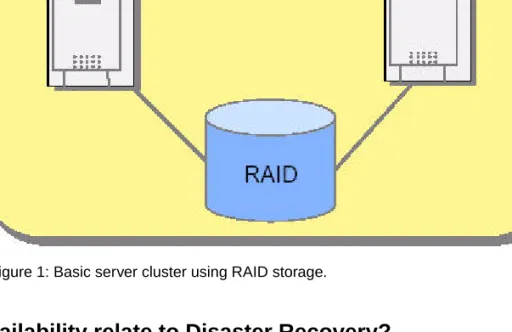
Figure 1: Basic server cluster using RAID storage.
How does High Availability relate to Disaster Recovery?
High availability solutions provide business continuity in the face of localized failures, such as a single server failure or hard disk crash. Disaster recovery solutions, on the other hand, provide for business continuity in the face of natural or man-made disasters that cause the loss of an entire production system.
VERITAS Cluster Server and VERITAS Volume Replicator Guidelines
Cluster Server Overview
While the goal of both high availability and disaster recovery solutions is the same-keeping the Image Services system available for con-tinued business operations-the solutions themselves are quite dif-ferent. A disaster recovery solution must provide a complete alternate system, with current or near-current data, typically at a geographically remote site unaffected by the disaster. Disaster recovery solutions may also include an alternate working site for users of the system, if their primary work location is no longer available due to a disaster. In con-trast, a high availability solution typically provides for an alternate system component that takes over for a failed component at the same site.
Server Clusters
Server clusters are based on the concept of shared data storage. Server hardware and software vendors offer vendor-specific server clustering products as their high availability offering for these kinds of data-centric servers. These products all have the following general characteristics:
• Two or more servers share a high availability disk array for data storage, shown in the figure below. The array incorporates redun-dant copies of the data, but appears as a single shared drive to the servers, thereby avoiding the need for data replication between servers. The servers may each have their own local disk for static storage of operating system, utilities, and other software.
• A common set of applications run on each server. • Server clients see the cluster as a single virtual server.
• If one of the servers fails, the other server picks up the workload of the failed server (a so-called failover). When the failed server is repaired and ready to run again, the workload is shifted back over from the other server (a so-called failback). In some configurations,
VERITAS Cluster Server and VERITAS Volume Replicator Guidelines
Cluster Server Overview
the repaired server simply becomes the new backup server, and no failback is required.
• The failover feature can mask both planned and unplanned out-ages from users. For instance, an intentional failover can be done to allow one of the servers to be upgraded or backed up and then brought back online in a failback.
• In most server clusters, only one server is actively serving clients at a time. This is called an active/passive configuration. Some cluster server products also support another mode, called an active/active configuration. In this mode, all the servers in the cluster can be actively sharing part of the workload at the same time. It typically requires an application designed to partition data sets among the servers to avoid data integrity problems resulting from concurrent updates to the same data from multiple servers.
Server clusters typically communicate through a broadcast or share a central repository to keep track of cluster information and cluster node status.
Each server in the cluster is referred to as a node. Each node in the cluster monitors the local services it is running and broadcasts this information on a private network connection. This private network con-nection allows all nodes in the cluster to know the status of all clus-tered resources. In the event that a service on one node fails, another node receives this status through the private network connection and in response, can start the service locally to maintain high availability for the service.
VERITAS Cluster Server and VERITAS Volume Replicator Guidelines
Cluster Server Overview
VERITAS Cluster Server and VERITAS Volume Replicator Guidelines
VERITAS Cluster Server (UNIX)
VERITAS Cluster Server (UNIX)
Installation Overview
The following high-level steps are necessary to make Image Services highly available in a cluster environment on UNIX platforms. These steps are described in more detail in the later sections:
• Install the appropriate VERITAS software prior to installing or con-figuring any FileNet services for high availability.
• Verify cluster failover.
• Create cluster resources for Image Services partitions. • Install Image Services software on all nodes in the cluster. • Verify the installation
Installing VERITAS Software
1 Install the appropriate VERITAS software prior to installing or config-uring any FileNet services for high availability. In addition to the VER-ITAS Volume Manager (VxVM), you can install either Cluster Server software, the Volume Replicator software, or both:
• VERITAS Volume Manager
• VERITAS Cluster Server - required for high availability • VERITAS Volume Replicator - optional for disaster recovery
2 For VERITAS Cluster Server, verify that a cluster group already exists with the following minimum resource:
VERITAS Cluster Server and VERITAS Volume Replicator Guidelines
VERITAS Cluster Server (UNIX)
• Shared storage resources (must include VERITAS Volume Group and/or Mount).
• Clustered IP resource
Required resource dependencies for IS and Oracle VCS Clusters
Dependencies determine the order VCS brings resources and service groups online and takes them offline. They also define whether a resource or service group failure impacts other resources or service groups configured in the cluster.
In VCS terminology, a parent resource is dependent upon a child resource. For example Mount resource (parent) depends on the Disk resource (child). The Mount agent mounts a block device on a direc-tory. The file system cannot be mounted without the physical disk parti-tion being available.
Please note that cyclical dependencies are not allowed for either resources or service groups.
VERITAS Cluster Server and VERITAS Volume Replicator Guidelines
VERITAS Cluster Server (UNIX)
Image Services VCS Cluster without VVR Replication
The following is a sample Resource Dependency Tree for an Image Services group named isgrp in a non-replication environment:
The example below illustrates the cluster configuration for a highly available Image Service cluster:
group isgrp { Application is_app { IP isip { NIC isnic } Mount ismount { DiskGroup isdatadg } Mount msarmount { DiskGroup isdatadg } } } include "types.cf" cluster iscluster (
UserNames = { admin = dijBidIfjEjjHrjDig } Administrators = { admin }
CounterInterval = 5 )
VERITAS Cluster Server and VERITAS Volume Replicator Guidelines
VERITAS Cluster Server (UNIX)
(continued from previous page) system hq-cfgaix5 (
)
system hq-cfgaix6 ( )
group isgrp (
SystemList = { hq-cfgaix5 = 1, hq-cfgaix6 = 2 } AutoStartList = { hq-cfgaix5 }
)
Application is_app ( User = fnsw
StartProgram = "/fnsw/bin/initfnsw start" StopProgram = "/fnsw/bin/initfnsw stop" MonitorProcesses = { "TM_daemon -s" } ) DiskGroup isdatadg ( DiskGroup = isdatadg ) IP isip ( Device = en0 Address = "10.15.16.171" NetMask = "255.255.252.0" )
VERITAS Cluster Server and VERITAS Volume Replicator Guidelines
VERITAS Cluster Server (UNIX)
Verifying Cluster Failover
Use VERITAS documentation procedures to verify that the cluster group can failover to all nodes in the cluster, and that the shared storage can be accessed from all nodes.
(continued from previous page) Mount ismount ( MountPoint = "/fnsw/local" BlockDevice = "/dev/vx/dsk/isdatadg/v_isdata" FSType = vxfs MountOpt = rw FsckOpt = "-y" ) Mount msarmount ( MountPoint = "/fnsw/msar" BlockDevice = "/dev/vx/dsk/isdatadg/msar" FSType = vxfs MountOpt = rw FsckOpt = "-y" ) NIC isnic ( Device = en0 )
is_app requires isip is_app requires ismount is_app requires msarmount isip requires isnic
ismount requires isdatadg msarmount requires isdatadg
VERITAS Cluster Server and VERITAS Volume Replicator Guidelines
VERITAS Cluster Server (UNIX)
Creating Cluster Resources
Create cluster resources for the Image Services partitions on the shared storage using the permission and size settings as documented in the FileNet Image Services Installation and Configuration
Proce-dures for your platform.
For Image Services:
• Create the /fnsw partition on local storage for each node. • Create the /fnsw/local partition on the shared drive. • Create the datasets on the shared drive.
Installing Image Services Software
The steps in this section apply only to servers requiring Image Ser-vices software.
Note This section does not apply to servers that do not require Image Ser-vices, such as remote relational database servers.
Install Image Services 4.1 on each node in the cluster. Refer to the
FileNet Image Services Installation and Configuration Procedures for
your platform.
1 On the active node in the cluster, Install Image Services.
• IS software (binary files) must be installed on the local drives of both nodes of the VCS Cluster. (If VERITAS Volume Replicator is installed, the IS software must also be installed on both nodes of the standby IS System.)
VERITAS Cluster Server and VERITAS Volume Replicator Guidelines
VERITAS Cluster Server (UNIX)
• IS configuration and data files (including MSAR and MKF); that is, everything in /fnsw/local on UNIX servers or \fnsw_loc on Windows servers, must be installed on the shared drive.
• /fnsw/local (UNIX) or \fnsw_loc (Windows) must be a VERITAS Volume and file system.
• IS datasets must be created in VERITAS raw partitions.
• IS datasets under the /fnsw/dev/1 folder are actually links pointing to the real datasets on the shared drive. (These were created in the last bullet of “Creating Cluster Resources” on page 24.) • Do not use fn_dataset_config -i to create the datasets. Instead,
use fn_util init to initialize the datasets on the shared drive.
2 After you have installed and configured the Image Services software, shutdown the Image Services software manually and failover the cluster to the other node.
3 Install Image Services on the next node, specifying the same informa-tion entered during the installainforma-tion on the first node.
4 After you have installed and configured the Image Services software on this node, shutdown the Image Services software manually.
Note Image Services uses the GenericService or Application resource and does not have a custom agent.
Verifying the Installation
VERITAS Cluster Server and VERITAS Volume Replicator Guidelines
VERITAS Cluster Server (UNIX)
2 The virtual IP address of the Image Services system must be resolv-able, either by the Domain Name Service (DNS) or by an entry in the local hosts file.
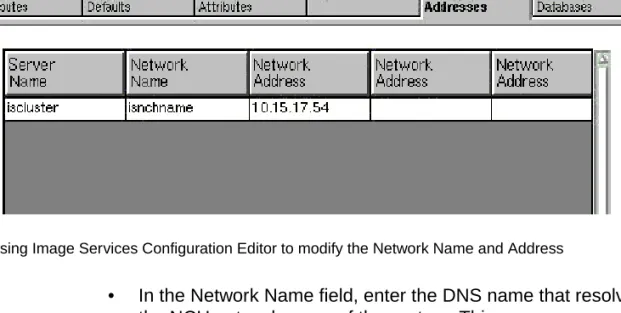
3 Use the FileNet Image Services System Configuration Editor, fn_edit to make sure the Network Addresses tab has the DNS network name and the virtual IP address of the cluster.
Figure 3: Using Image Services Configuration Editor to modify the Network Name and Address
• In the Network Name field, enter the DNS name that resolves to the NCH network name of the system. This name may or may not be the same as the Server Name; however, it must be unique, less than 256 characters, and be composed only of alpha, digits, dot, dash, and underline characters. Spaces are not allowed.
VERITAS Cluster Server and VERITAS Volume Replicator Guidelines
VERITAS Cluster Server (UNIX)
• In the Network Address field, enter the virtual IP address of the VCS cluster.
4 Make sure the IP address in the isgrp service group in the cluster has the same virtual IP address.
5 Start Image Services by entering:
initfnsw -y start
6 Check the status by entering:
initfnsw status
7 Image Services should start successfully.
Note If Image Services does not start successfully at this point, enter:
initfnsw -y stop killfnsw -D -A -y initfnsw start
If the shared drive does not failover, use VERITAS Volume Manager to troubleshoot the problem.
8 Failover to the second node in the cluster.
9 Make sure the current system owns the shared drive.
10 The hosts file or the Domain Name Service must have an entry for the virtual IP address.
VERITAS Cluster Server and VERITAS Volume Replicator Guidelines
VERITAS Cluster Server (UNIX)
initfnsw -y start
12 Check the status by entering:
initfnsw status
13 Image Services should start successfully on the second node. If Image Services does not start successfully, follow the recovery steps in Step 7 on page 27.
VERITAS Cluster Server and VERITAS Volume Replicator Guidelines
VERITAS Cluster Server (Windows)
VERITAS Cluster Server (Windows)
VERITAS uses "Service Groups" of resources to provide high avail-ability services to users. The following instructions specify how to add resources to a service group to provide a high availability Image Ser-vices service.
Installation Overview
The following high-level steps are required to make the Image Services server highly available in a cluster environment on Windows platforms. These steps are described in more detail in the later sections:
• Install the appropriate VERITAS software prior to installing or con-figuring any FileNet services for high availability.
• Verify cluster failover.
• Create cluster resources for Image Services partitions. • Configure the cluster groups for Image Services.
• Install Image Services software on all nodes in the cluster. • Configure the IS ControlService.
• Enable event triggering. • Verify the installation.
Installing VERITAS Cluster Server Software
Install the appropriate VERITAS software prior to installing or config-uring any FileNet services for high availability. You can install either Cluster Server software, the Volume Replicator software, or both: • VERITAS Volume Manager - if required
VERITAS Cluster Server and VERITAS Volume Replicator Guidelines
VERITAS Cluster Server (Windows)
• VERITAS Volume Replicator - optional for disaster recovery
Verifying Cluster Failover
Use VERITAS documentation procedures to verify that the cluster group can failover to all nodes in the cluster, and that the shared storage can be accessed from the active node.
Note Do not skip this step! It’s important to ensure the system has been set up correctly and is stable before continuing with the following sections.
Creating Cluster Resources
Create cluster resources for the Image Services partitions on the shared storage using the permission and size settings as documented in the FileNet Image Services Installation and Configuration
Proce-dures for Windows Server.
Configuring the Cluster Groups for Image Services
Configure the cluster groups with the following minimum resources: • Shared storage resources (can include VERITAS Volume Group
(VMDg) and MountV, or Mount for a basic disk) • Clustered IP resource
VERITAS Cluster Server and VERITAS Volume Replicator Guidelines
VERITAS Cluster Server (Windows)
Image Services VCS Cluster without VVR Replication
The following is a sample Resource Dependency Tree for the built-in
ClusterService group in a non-replication environment:
ClusterService group example:
group ClusterService { VRTSWebApp VCSweb { IP csg_ip { NIC csg_nic } } } include "types.cf" cluster vcs-win-cluster (
UserNames = { admin = iHIeHCgEHp } ClusterAddress = "10.14.101.102" Administrators = { admin } CredRenewFrequency = 0 CounterInterval = 5 ) system FONTANA ( ) system NTNINER ( )
VERITAS Cluster Server and VERITAS Volume Replicator Guidelines
VERITAS Cluster Server (Windows)
(continued from previous page) group ClusterService (
SystemList = { FONTANA = 0, NTNINER = 1 }
UserStrGlobal = "LocalCluster@https://10.14.100.90:8443;" Authority = 1
AutoStartList = { FONTANA, NTNINER } )
IP csg_ip (
Address = "10.14.101.102" SubNetMask = "255.255.252.0"
MACAddress @FONTANA = "00:C0:9F:27:14:E3" MACAddress @NTNINER = "00:C0:9F:35:0D:28" )
NIC csg_nic (
MACAddress @FONTANA = "00:C0:9F:27:14:E3" MACAddress @NTNINER = "00:C0:9F:35:0D:28" )
VRTSWebApp VCSweb ( AppName = vcs
InstallDir @FONTANA = "C:\\\\\\\\Program Files\\\\\\\\VERITAS\\\\\\\\VRTSweb\\\\\\\\VERITAS"
InstallDir @NTNINER = "C:\\\\\\\\Program Files\\\\\\\\VERITAS\\\\\\\\VRTSweb\\\\\\\\VERITAS"
)
csg_ip requires csg_nic VCSweb requires csg_ip
VERITAS Cluster Server and VERITAS Volume Replicator Guidelines
VERITAS Cluster Server (Windows)
The following is a sample Resource Dependency Tree for an Image Services fn_sg group in a non-replication environment:
fn_sg group example: group fn_sg { GenericService IS_ControlService IP is_ip_1 NIC ISNic MountV Mount } group fn_sg (
SystemList = { FONTANA = 0, NTNINER = 1 } )
GenericService IS_ControlService (
ServiceName = "IS ControlService" UserAccount = fnsw Password = hvlTitKtw Domain = "vcs.net" ) IP is_ip_1_1 ( Address = "10.14.101.106" SubNetMask = "255.255.252.0"
MACAddress @FONTANA = "00:C0:9F:27:14:E3" MACAddress @NTNINER = "00:C0:9F:35:0D:28" )
VERITAS Cluster Server and VERITAS Volume Replicator Guidelines
VERITAS Cluster Server (Windows)
Installing Image Services Software
Install Image Services 4.1 on each node in the cluster. Refer to the
FileNet Image Services Installation and Configuration Procedures for Windows Server.
Note The steps in this section apply only to servers requiring Image Ser-vices software. This section does not apply to servers that do not require Image Services, such as remote relational database servers.
Note Run the Image Services installer as a domain user who has at least Account Operator privileges. This is required as the fnsw user created by the installer needs to be a domain user so that both nodes recog-nize security over the shared fnsw_loc directory.
(coninued from previous page) MountV mount ( MountPath = I VolumeName = FileNetVol VMDGResName = VVRDg ) NIC ISNic (
MACAddress @FONTANA = "00-C0-9F-27-14-e3" MACAddress @NTNINER = "00-C0-9F-35-0D-28" )
VERITAS Cluster Server and VERITAS Volume Replicator Guidelines
VERITAS Cluster Server (Windows)
1 Make sure the cluster group is online on the node you are currently installing.
2 Begin the Image Services installation. Enter the same information for all nodes.
• Install FNSW (executables) on the local drive.
• Install FNSW_LOC (local files) on the same shared disk drive for all nodes in the cluster.
CAUTION During the first part of the installation, the installer will reboot the server. The rebooting will most likely fail the cluster group to another node. Before you login to the machine after the reboot to complete the Image Services installation, login to another machine in the cluster and fail the cluster group back to the node where the current installation is being run. Then you can login and continue the installation.
• IS software (binary files) must be installed on the local drives of both nodes of the VCS Cluster. (If VERITAS Volume Replicator is installed, the IS software must also be installed on all nodes of the standby IS System.)
• IS configuration and data files (including MSAR and MKF); that is, everything in \fnsw_loc and \fnsw\dev\1, must be installed on the shared drive.
3 When the installation is finished, verify the domain user fnsw has been added to the local server’s Administrators group. This allows the system to start and stop services using the fnsw user account.
4 After you have installed and configured the Image Services software, shutdown the Image Services software manually and failover the cluster to the other node.
VERITAS Cluster Server and VERITAS Volume Replicator Guidelines
VERITAS Cluster Server (Windows)
5 Install Image Services on the next node, specifying the same informa-tion entered during the installainforma-tion on the first node.
6 After you have installed and configured the Image Services software on this node, shutdown the Image Services software manually.
Note Image Services uses the GenericService resource and does not have a custom agent.
Configuring the IS ControlService
1 Modify the following service through the Windows Service Control Manager:
• IS ControlService
- Change 'startup types' to 'manual ' for Image Services in Window 'Services'.
- Set the Logon information to be the domain user fnsw (use the new password that was reset for this user earlier).
- Set the Logon format to (domain_name\fnsw), not ([email protected]).
- Start ISControlService.
2 Add a resource for the IS ControlService within the VCS Cluster: • Resource Type: GenericService
• Set the ServiceName to: IS_ControlService
• Set the Domain parameter to the fully qualified domain name of the Active Directory domain.
VERITAS Cluster Server and VERITAS Volume Replicator Guidelines
VERITAS Cluster Server (Windows)
• Set the UserAccount parameter to the domain user fnsw and supply a password.
• Make the resource dependent on the following resources: - Clustered IP resource
- Shared disk resource
3 Bring the current node in the cluster online.
Enable Event Triggering for the Image Services Cluster
You can enable Image Services to start up automatically after a failover by adding two configuration files.
Note Perform the following steps on each Image Services server in the cluster.
1 Use your preferred text editor to create a file named filenet_start.bat. This file can be located in any directory you choose, such as \fnsw.
<drive>:\fnsw\filenet_start.bat
2 Add the following lines to this file:
REM ---REM Make sure that Image Service starts cleanly. REM ---killfnsw -r killfnsw -D -y initfnsw -y start REM REM ---REM
VERITAS Cluster Server and VERITAS Volume Replicator Guidelines
VERITAS Cluster Server (Windows)
3 Copy the VERITAS postonline.pl sample script from:
<drive>:\Program Files\VERITAS\cluster server\bin\sample_Trig-gers\
to:
<drive>:\Program Files\VERITAS\cluster server\bin\Triggers\
4 Add the following lines at the beginning of the file:
Make sure the path you specify in the postonline.pl points to the full path of the filenet_start.bat script you created in Steps 1 and 2.
Verifying the Installation
1 Make sure the current node owns the shared drive.
2 The virtual IP address of the Image Services system must be resolv-able, either by the Domain Name Service (DNS) or by an entry in the local hosts file.
#
# FileNet - triggering for Image Services starts here # $SERVICE_GROUP = 'fn_sg'; if ($ARGV[1] eq "$SERVICE_GROUP") { system("c:\\fnsw\\filenet_start.bat"); } #
# FileNet - triggering for Image Services stops here #
VERITAS Cluster Server and VERITAS Volume Replicator Guidelines
VERITAS Cluster Server (Windows)
3 Use the FileNet Image Services System Configuration Editor, fn_edit to make sure the Network Addresses tab has the DNS network name and the virtual IP address of the cluster.
Figure 4: Using Image Services Configuration Editor to modify the Network Name and Address
• In the Network Name field, enter the DNS name that resolves to the NCH network name of the system. This name may or may not be the same as the Server Name; however, it must be unique, less than 256 characters, and be composed only of alpha, digits, dot, dash, and underline characters. Spaces are not allowed.
• In the Network Address field, enter the virtual IP address of the VCS cluster.
VERITAS Cluster Server and VERITAS Volume Replicator Guidelines
VERITAS Cluster Server (Windows)
5 On Windows servers:
a Change 'startup types' to 'manual ' for Image Services in Window 'Services'.
b Click 'Log On' tab in and 'This account', use 'fnsw' userid. c Start 'IS Control Service'.
6 Start Image Services by entering:
initfnsw -y start
7 Check the status by entering:
initfnsw status
8 Image Services should start successfully.
Note If Image Services does not start successfully at this point, enter:
initfnsw -y stop killfnsw -D -y initfnsw start
If the shared drive does not failover, use VERITAS Volume Manager to troubleshoot the problem.
9 Failover to the second node in the cluster.
VERITAS Cluster Server and VERITAS Volume Replicator Guidelines
VERITAS Cluster Server (Windows)
Verifying Cluster Failover
After the entire cluster has been successfully configured, use VER-ITAS documentation procedures to verify that the cluster group can failover to all nodes in the cluster, and that the shared storage can be accessed from the active node.
• Start Node 1
• Verify VCS runs with no problems on Node 1 • Failover to Node 2
VERITAS Cluster Server and VERITAS Volume Replicator Guidelines
VERITAS Volume Replicator (UNIX and Windows)
VERITAS Volume Replicator (UNIX and Windows)
Installing VERITAS Volume Replicator Software
Follow the instructions in the VERITAS Volume Replicator documenta-tion to install the appropriate software on all servers in the volume rep-lication environment.
Complete the following steps after VERITAS Volume Replicator has been installed and replication has started.
Installing Image Services Software
The steps in this section apply only to servers requiring Image Ser-vices software.
Note This section does not apply to servers that do not require Image Ser-vices, such as remote relational database servers.
1 Install IS 4.1 software on the servers in the cluster that will be repli-cated.
• For UNIX servers, follow the steps in the section, “Installing Image Services Software” on page 24
• For Windows servers, follow the steps in the section, “Installing Image Services Software” on page 34
2 Use VVR to failover the cluster servers and datasets on the shared disk to the standby system.
3 Repeat the installation of IS 4.1 software on the standby system as though it were a cluster node.
VERITAS Cluster Server and VERITAS Volume Replicator Guidelines
VERITAS Volume Replicator (UNIX and Windows)
VERITAS Cluster Server and VERITAS Volume Replicator Guidelines
VERITAS Volume Replicator (UNIX and Windows)
UNIX Image Services VCS Cluster with VVR Replication
The following is a sample Resource Dependency Tree for an Image Services group named isvvrgrp in a replication environment:
UNIX example: group isvvrgrp { RVG is_rvg { DiskGroup isdatadg IP isvvrip { NIC isvvrnic } } } include "types.cf" include "VVRTypes.cf" cluster iscluster (
UserNames = { admin = dijBidIfjEjjHrjDig } Administrators = { admin } CounterInterval = 5 ) system hq-cfgaix5 ( ) system hq-cfgaix6 ( )
VERITAS Cluster Server and VERITAS Volume Replicator Guidelines
VERITAS Volume Replicator (UNIX and Windows)
group isgrp (
SystemList = { hq-cfgaix5 = 1, hq-cfgaix6 = 2 } AutoStartList = { hq-cfgaix5 }
)
Application is_app ( User = fnsw
StartProgram = "/fnsw/bin/initfnsw start" StopProgram = "/fnsw/bin/initfnsw stop" MonitorProcesses = { "TM_daemon -s" } ) IP isip ( Device = en0 Address = "10.15.16.171" NetMask = "255.255.252.0" ) Mount ismount ( MountPoint = "/fnsw/local" BlockDevice = "/dev/vx/dsk/isdatadg/v_isdata" FSType = vxfs MountOpt = rw FsckOpt = "-y" ) Mount msarmount ( MountPoint = "/fnsw/msar" BlockDevice = "/dev/vx/dsk/isdatadg/msar" FSType = vxfs MountOpt = rw FsckOpt = "-y" )
VERITAS Cluster Server and VERITAS Volume Replicator Guidelines
VERITAS Volume Replicator (UNIX and Windows)
(continued from previous page) NIC isnic ( Device = en0 ) RVGPrimary rvg-pri ( RvgResourceName = is_rvg AutoResync = 1 )
requires group isvvrgrp online local hard is_app requires isip
is_app requires ismount is_app requires msarmount isip requires isnic
ismount requires rvg-pri msarmount requires rvg-pri group isvvrgrp (
SystemList = { hq-cfgaix5 = 1, hq-cfgaix6 = 2 } AutoStartList = { hq-cfgaix5 } ) DiskGroup isdatadg ( DiskGroup = isdatadg ) IP isvvrip ( Device = en0 Address = "10.15.16.126" NetMask = "255.255.252.0" )
VERITAS Cluster Server and VERITAS Volume Replicator Guidelines
VERITAS Volume Replicator (UNIX and Windows)
Windows Server Image Services VCS Cluster with VVR Replication
The following is a sample Resource Dependency Tree for an Image Services group named VVRGrp in a replication environment:
(continued from previous page) NIC isvvrnic ( Device = en0 ) RVG is_rvg ( RVG = rvg_isdatadg DiskGroup = isdatadg SRL = srl_oradata )
is_rvg requires isdatadg is_rvg requires isvvrip isvvrip requires isvvrnic
group VVRGrp { VvrRvg rvg { IP VVRip { NIC VVRNic } VMDg VVRDg } }
VERITAS Cluster Server and VERITAS Volume Replicator Guidelines
VERITAS Volume Replicator (UNIX and Windows)
Windows Server Example:
include "types.cf"
cluster vcs-win-cluster (
UserNames = { admin = iHIeHCgEHp } ClusterAddress = "10.14.101.102" Administrators = { admin } CredRenewFrequency = 0 CounterInterval = 5 ) system FONTANA ( ) system NTNINER ( ) group ClusterService (
SystemList = { FONTANA = 0, NTNINER = 1 }
UserStrGlobal = "LocalCluster@https://10.14.100.90:8443;" Authority = 1
AutoStartList = { FONTANA, NTNINER } )
IP csg_ip (
Address = "10.14.101.102" SubNetMask = "255.255.252.0"
MACAddress @FONTANA = "00:C0:9F:27:14:E3" MACAddress @NTNINER = "00:C0:9F:35:0D:28" )
VERITAS Cluster Server and VERITAS Volume Replicator Guidelines
VERITAS Volume Replicator (UNIX and Windows)
(continued from previous page) NIC csg_nic (
MACAddress @FONTANA = "00:C0:9F:27:14:E3" MACAddress @NTNINER = "00:C0:9F:35:0D:28" )
VRTSWebApp VCSweb ( AppName = vcs
InstallDir @FONTANA = "C:\\\\\\\\Program Files\\\\\\\\VERITAS\\\\\\\\VRTSweb\\\\\\\\VERITAS"
InstallDir @NTNINER = "C:\\\\\\\\Program Files\\\\\\\\VERITAS\\\\\\\\VRTSweb\\\\\\\\VERITAS"
)
csg_ip requires csg_nic VCSweb requires csg_ip
group VVRGrp (
SystemList = { FONTANA = 0, NTNINER = 1 } )
IP VVRip (
Address = "10.14.101.110" SubNetMask = "255.255.252.0"
MACAddress @FONTANA = "00-C0-9F-27-14-E3" MACAddress @NTNINER = "00-C0-9F-35-0D-28" )
NIC VVRNic (
MACAddress @FONTANA = "00-C0-9F-27-14-e3" MACAddress @NTNINER = "00-C0-9F-35-0D-28" )
VERITAS Cluster Server and VERITAS Volume Replicator Guidelines
VERITAS Volume Replicator (UNIX and Windows)
(continued from previous page) VMDg VVRDg ( DiskGroupName = winvcs DGGuid = ebc05a43-11d4-4d2a-9177-f4e638817954 ) VvrRvg rvg ( RVG = rvg_winvcs VMDgResName = VVRDg IPResName = VVRip SRL = rep_log RLinks = { "" } )
VVRip requires VVRNic rvg requires VVRip rvg requires VVRDg group fn_sg (
SystemList = { FONTANA = 0, NTNINER = 1 } )
GenericService IS_ControlService (
ServiceName = "IS ControlService" UserAccount = fnsw Password = hvlTitKtw Domain = "vcs.net" ) IP is_ip_1_1 ( Address = "10.14.101.106" SubNetMask = "255.255.252.0"
MACAddress @FONTANA = "00:C0:9F:27:14:E3" MACAddress @NTNINER = "00:C0:9F:35:0D:28" )
VERITAS Cluster Server and VERITAS Volume Replicator Guidelines
VERITAS Volume Replicator (UNIX and Windows)
Switching to the Standby (Replicated) System
When the time comes to switch to the standby (replicated) system, VVR reassigns the datasets and file systems from the production system to the standby system. See the VERITAS documentation for complete details.
By Domain Name Services (DNS)
The network administrator must modify the DNS server to change the network addresses.
By Adding or Changing IP Addresses in Image Services
If DNS is not being used, the Image Services System Administrator needs to log onto the standby IS root/index server and modify the net-work addresses appropriately using the IS Configuration Editor, fn_
(continued from previous page) MountV mount ( MountPath = I VolumeName = FileNetVol VMDGResName = VVRDg ) NIC ISNic (
MACAddress @FONTANA = "00-C0-9F-27-14-e3" MACAddress @NTNINER = "00-C0-9F-35-0D-28" )
VERITAS Cluster Server and VERITAS Volume Replicator Guidelines
VERITAS Volume Replicator (UNIX and Windows)
To change network addresses in Image Services:
1 Launch the Image Services Configuration Editor on the standby system.
Note You may receive some error messages resulting from the mismatched network addresses, but you can ignore them.
2 Click the Network Addresses tab.
3 In Network Address column modify the address to the IP address of the standby Image Services system.
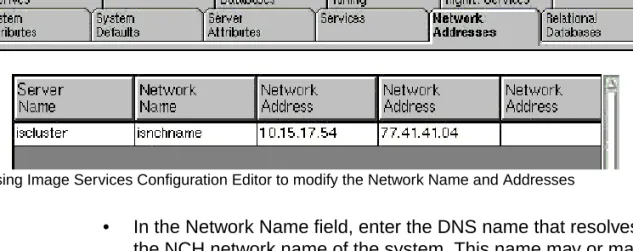
Figure 6: Using Image Services Configuration Editor to modify the Network Name and Addresses
• In the Network Name field, enter the DNS name that resolves to the NCH network name of the system. This name may or may not be the same as the Server Name; however, it must be unique, less than 256 characters, and be composed only of alpha, digits, dot, dash, and underline characters. Spaces are not allowed.
VERITAS Cluster Server and VERITAS Volume Replicator Guidelines
VERITAS Volume Replicator (UNIX and Windows)
The NCH network name resolves to either the production system when in production mode or the standby system in standby mode. It is recommended that this name be an alias to the virtual cluster name when in production mode and then switched to be an alias to the standby system when in standby mode. For example, DNS would look like this:
- In production mode: 10.15.17.54 iscluster isnchname 77.41.41.04 isstandby - In standby mode: 10.15.17.54 iscluster 77.41.41.04 isstandby isnchname
• The first Network Address is the IP address of the VCS cluster. • The second Network Address is the IP address of the VVR standby
system.
4 Click File then click Exit.
5 When asked if you would like to save your changes, select yes.
6 Rebuild the system configuration files by entering:
fn_build -a
7 Restart Image Services:
initfnsw restart
8 If necessary, clear any Image Services resource faults.
Notices
This information was developed for products and services offered in the U.S.A.
IBM may not offer the products, services, or features discussed in this document in other countries. Consult your local IBM representative for information on the products and services currently available in your area. Any reference to an IBM product, program, or service is not intended to state or imply that only that IBM product, program, or ser-vice may be used. Any functionally equivalent product, program, or service that does not infringe any IBM intellectual property right may be used instead. However, it is the user’s responsibility to evaluate and verify the operation of any non-IBM product, program, or service. IBM may have patents or pending patent applications covering subject matter described in this document. The furnishing of this document does not grant you any license to these patents. You can send license inquiries, in writing, to:
IBM Director of Licensing IBM Corporation
North Castle Drive Armonk, NY 10504-1785 U.S.A.
For license inquiries regarding double-byte (DBCS) information, con-tact the IBM Intellectual Property Department in your country or send inquiries, in writing, to:
IBM World Trade Asia Corporation Licensing
Notices
2-31 Roppongi 3-chome, Minato-ku Tokyo 106-0032, Japan
The following paragraph does not apply to the United Kingdom or any other country where such provisions are inconsistent with local law: INTERNATIONAL BUSINESS MACHINES CORPORATION
PROVIDES THIS PUBLICATION “AS IS” WITHOUT WARRANTY OF ANY KIND, EITHER EXPRESS OR IMPLIED, INCLUDING, BUT NOT LIMITED TO, THE IMPLIED WARRANTIES OF NON-INFRINGE-MENT, MERCHANTABILITY OR FITNESS FOR A PARTICULAR PURPOSE. Some states do not allow disclaimer of express or implied warranties in certain transactions, therefore, this statement may not apply to you.
This information could include technical inaccuracies or typographical errors. Changes are periodically made to the information herein; these changes will be incorporated in new editions of the publication. IBM may make improvements and/or changes in the product(s) and/or the program(s) described in this publication at any time without notice. Any references in this information to non-IBM Web sites are provided for convenience only and do not in any manner serve as an endorse-ment of those Web sites. The materials at those Web sites are not part of the materials for this IBM product and use of those Web sites is at your own risk.
IBM may use or distribute any of the information you supply in any way it believes appropriate without incurring any obligation to you.
Licensees of this program who wish to have information about it for the purpose of enabling: (i) the exchange of information between indepen-dently created programs and other programs (including this one) and
Notices
(ii) the mutual use of the information which has been exchanged, should contact: IBM Corporation J46A/G4 555 Bailey Avenue San Jose, CA 95141-1003 U.S.A.
Such information may be available, subject to appropriate terms and conditions, including in some cases, payment of a fee.
The licensed program described in this document and all licensed material available for it are provided by IBM under terms of the IBM Customer Agreement, IBM International Program License Agreement or any equivalent agreement between us.
Any performance data contained herein was determined in a controlled environment. Therefore, the results obtained in other operating envi-ronments may vary significantly. Some measurements may have been made on development-level systems and there is no guarantee that these measurements will be the same on generally available systems. Furthermore, some measurements may have been estimated through extrapolation. Actual results may vary. Users of this document should verify the applicable data for their specific environment.
Information concerning non-IBM products was obtained from the sup-pliers of those products, their published announcements or other pub-licly available sources. IBM has not tested those products and cannot confirm the accuracy of performance, compatibility or any other claims related to non-IBM products. Questions on the capabilities of non-IBM products should be addressed to the suppliers of those products.
Notices
Trademarks
All statements regarding IBM’s future direction or intent are subject to change or withdrawal without notice, and represent goals and objec-tives only.
This information contains examples of data and reports used in daily business operations. To illustrate them as completely as possible, the examples include the names of individuals, companies, brands, and products. All of these names are fictitious and any similarity to the names and addresses used by an actual business enterprise is entirely coincidental.
COPYRIGHT LICENSE:
This information contains sample application programs in source lan-guage, which illustrate programming techniques on various operating platforms. You may copy, modify, and distribute these sample programs in any form without payment to IBM, for the purposes of developing, using, marketing or distributing application programs conforming to the application programming interface for the operating platform for which the sample programs are written. These examples have not been thor-oughly tested under all conditions. IBM, therefore, cannot guarantee or imply reliability, serviceability, or function of these programs.
Trademarks
The following terms are trademarks of the International Business Machines Corporation in the United States, other countries, or both:
IBM AIX DB2
Notices
U.S. Patents Disclosure
FileNet is a registered trademark of FileNet Corporation, in the United States, other countries, or both.
Microsoft, Windows, Windows NT, and the Windows logo are trade-marks of Microsoft Corporation in the United States, other countries, or both.
UNIX is a registered trademark of The Open Group in the United States and other countries.
Other company, product, and service names may be trademarks or service marks of others.
U.S. Patents Disclosure
This product incorporates technology covered by one or more of the following patents: U.S. Patent Numbers: 6,094,505; 5,768,416; 5,625,465; 5,369,508; 5,258,855.
ProgramNumber: 5724-R95
PrintedinUSA