NIST Special Publication 800-42
C O M P U T E R S E C U R I T Y
Computer Security Division
Information Technology Laboratory
National Institute of Standards and Technology Gaithersburg, MD 20899-8930 ,C P W C T [
U.S. Department of Commerce Donald L. Evans, Secretary Technology Administration
Phillip J. Bond, Under Secretary for Technology
National Institute of Standards and Technology Arden L. Bement, Jr., Director
DRAFT Guideline on Network
Security Testing
Recommendations of the National Institute
of Standards and Technology
Reports on Computer Systems Technology
The Information Technology Laboratory (ITL) at the National Institute of Standards and Technology (NIST) promotes the U.S. economy and public welfare by providing technical leadership for the Nation’s measurement and standards infrastructure. ITL develops tests, test methods, reference data, proof of concept implementations, and technical analysis to advance the development and productive use of information technology. ITL’s responsibilities include the development of technical, physical, administrative, and management standards and guidelines for the cost-effective security and privacy of sensitive unclassified information in Federal computer systems. This Special Publication 800-series reports on ITL’s research, guidance, and outreach efforts in computer security, and its collaborative activities with industry, government, and academic organizations.
Certain commercial entities, equipment, or materials may be identified in this document in order to describe an experimental procedure or concept adequately. Such identification is
not intended to imply recommendation or endorsement by the National Institute of Stan-dards and Technology, nor is it intended to imply that the entities, materials, or equipment
are necessarily the best available for the purpose.
National Institute of Standards and Technology Special Publication 800-42 Natl. Inst. Stand. Technol. Spec. Publ. 800-42, XX pages (Feb. 2002)
CODEN: XXXXX
U.S. GOVERNMENT PRINTING OFFICE WASHINGTON: 2001
For sale by the Superintendent of Documents, U.S. Government Printing Office
Internet: bookstore.gpo.gov — Phone: (202) 512-1800 — Fax: (202) 512-2250
Acknowledgements
The authors, John Wack of NIST and Miles Tracy of Booz, Allen, and Hamilton (BAH), wish to acknowledge staff at NIST and BAH who reviewed drafts of this publication and made substantial improvements to its quality, including Murugiah Souppaya, Timothy Grance, and Peter Mell.
Table Of
Contents
1. Introduction... 3
1.1. Purpose and Scope... 3
1.2. Definitions... 4
1.3. Audience ... 5
1.4. Document Organization ... 5
2. Security Testing and the System Development Life Cycle... 7
2.1. Why Test? ... 7
2.2. Life cycle... 7
2.3. Documentation... 9
2.4. Security Management Staff... 9
3. Security Testing Techniques... 11
3.1. Network Mapping... 11
3.2. Vulnerability Scanning... 13
3.3. Penetration Testing... 16
3.4. Security Test and Evaluation ... 21
3.5. Password Cracking... 22
3.6. Log Reviews ... 23
3.7. File Integrity Checkers ... 24
3.8. Virus Detectors ... 25
3.9. War Dialing... 26
3.10. Summary Comparisons of Network testing Techniques... 27
4. Prioritizing Security Testing... 31
A. Terminology... 35
B. References ... 37
C. Common Testing Tools ... 39
C.1. File Integrity Checkers... 39
C.2. Network Sniffers... 39
C.3. Password Crackers... 40
C.4. Privilege Escalation and Back Door Tools... 40
C.5. Scanning and Enumeration Tools ... 41
C.7. War Dialing Tools ... 43
D. Example Usage Of Common Testing Tools ... 44
D.1. Using Nmap Port Scanner... 44
D.2. Using L0pht Crack ... 50
D.3. Using LANguard File Integrity Checker... 51
D.4. Using Tripwire... 53
D.5. Snort ... 57
List Of Tables
Table 3.1- Comparison of Testing Procedures... 29Table 3.2 - Summarized Evaluation Factors ... 30
List Of Figures
Figure 2.1 - Security Testing and the System Development Life Cycle... 8Figure 3.1 - Four-Stage Penetration Testing Methodology... 18
Executive Summary
Network security testing should be integrated into an organization’s security program to evaluate system security mechanisms and validate that systems are operating according to the organization’s security policies and system security requirements. To maximize their usefulness and ensure that they are affordable, organizations should prioritize network test-ing activities accordtest-ing to system criticality, testtest-ing costs, and the benefits that testtest-ing will provide. Organizations can use a prioritization process, described in this document, to de-termine minimum required sets of tests and appropriate frequencies for these tests
Routine testing of networks can greatly reduce the chances of a network compromise by helping to ensure that critical systems, e.g., firewalls, routers, servers, are configured, main-tained, and operated according to the organization's security policy. Exploitation of a sys-tem could have a costly impact on an organization’s operations. Network testing can be a valuable and cost effective measure of protecting a network and preventing costly compro-mise.
1. Introduction
The Internet has interconnected the world and produced many benefits. It is now possible to share ideas and resources instantaneously worldwide. Communication, business, govern-ment, and commerce no longer require face-to-face communication to operate. The same technology has also increased the efficiency of government and business alike. Unfortu-nately, this same technology allows attackers to exploit targeted systems and organizations to a degree not possible in the physical world. Although the threats in cyberspace remain largely the same as in the physical world (e.g., fraud, theft, and terrorism), they are different due to three important developments: increased profitability, action at a distance, and rapid technique propagation.
First, automation makes attacks, even those with minimal return, much more profitable. For example, in the physical world an attack that would succeed one in 10,000 attempts would be ineffectual due to the time and effort required for a single success. The time invested in getting a single success would be outweighed by the time invested in the 9,999 failures. On the Internet automation enables the same attack to be a stunning success. Computing power and bandwidth are getting cheaper and the number of hosts that can be targeted is growing exponentially. This combination means that almost any attack, no matter how low its suc-cess rate, will likely be exploited.
Second, the Internet allows action at a distance. The Internet has no borders and every point on the Internet is adjacent to every other point. This means that a distant attacker in a can now attack the United States without ever leaving his or her home.
Third, the Internet allows for easier and more rapid technique propagation. Prior to the Internet, techniques for attack were developed that would take years to propagate. This al-lowed time to develop effective countermeasures. Today, a new technique can be propa-gated in a matter of hours or days. It is now more difficult to develop effective countermea-sures in a timely fashion.
These circumstances result in the need to secure information systems and networks. Testing the security posture of an information system and network is a critical component of secur-ing a system. Testsecur-ing is one of the most conclusive methods for validatsecur-ing that existsecur-ing se-curity measures and procedures are working as intended. Testing can also assist in identify-ing previously unknown weaknesses or vulnerabilities.
1.1. Purpose and Scope
The purpose of this document is to provide guidance for security program managers and system and network administrators on when and how to perform tests for network security vulnerabilities and policy implementation. This document identifies network testing re-quirements and how to prioritize testing activities with limited resources. It describes secu-rity testing techniques and tools.1 This document provides guidance to assist organizations
1 There are many excellent freeware (no fee required for license) and shareware (requires nominal fee
for license) security tools. However great care should be used in selecting freely available tools. Gen-erally, freeware/shareware tools should not be used unless an expert has reviewed the source code or they are widely used and are downloaded from a known safe repository. Appendix C provides a list of
in avoiding redundancy and duplication of effort by providing a consistent approach to net-work security testing throughout an organization’s netnet-works. Furthermore, this document provides a feasible approach for organizations by offering varying levels of network security testing as mandated by an organization’s mission and security objectives.
The main thrust of this document is to provide the basic information about techniques and tools for individuals to begin a testing program. This document is by no means comprehen-sive and the assumption is made that individuals will consult the references provided in this document as well as vendor production descriptions and other sources of information. While this document describes generalized network security testing that is applicable to all networked systems, it is aimed more towards the testing of the following types of systems:
! Firewalls, both internal and external ! Routers and switches
! Related network-perimeter security systems such as intrusion detection systems ! Web Servers and Email Servers
! Other Servers such as for Domain Name Service (DNS) or Directory Servers These systems generally should be tested first before proceeding on to general staff and re-lated systems.
1.2. Definitions
This document uses the terms system and networksecurity testing extensively. For the pur-pose of this document, their definitions will be as follows:
System - A system is defined as any of the following: ! Computer system (e.g., mainframe, minicomputer) ! Network system (e.g., local area network [LAN]) ! Network domain
! Host (e.g., a computer system)
! Network node, routers, switches, firewall
! Network and/or computer application on each computer system.
Network Security Testing - Activities that provide information about the integrity of an
well-known tools and safe sources for downloading. The costs of supporting “freeware” applications can be significant, as in-house experts may have to be developed to support any widely used applica-tion. This cost of this support should be compared to the cost of a commercial product to determine which is the most cost effective.
ganization's networks and associated systems through testing network-related security con-trols on a regular basis.
1.3. Audience
This document is written for technical managers, functional managers, and other informa-tion technology (IT) staff members who deal with systems. It provides them a structured approach to the task of testing for security. Management personnel who are responsible for systems can use the testing procedures and tools discussed in this document to become fa-miliar with the status of the assets under their stewardship. It can also assist in evaluating their compliance with their organization’s security standards and requirements. Manage-ment personnel can also use this guide to provide technical basis and support during deci-sion-making processes.
1.4. Document Organization
This document includes five sections followed by four appendices. This subsection is a roadmap describing the structure of the document. The document is organized as follows:
! Section 1 provides an introduction and overview of this document
! Section 2 describes the rationale for testing and the overall relationship of security testing to the system’s life cycle
! Section 3 defines network security testing goals and objectives, identifies critical areas of testing, prioritizes testing requirements and describes active and passive types of testing
! Section 4 describes how to prioritize security testing with limited resources ! Appendix A lists acronyms used in this document
! Appendix B list the references used in this document ! Appendix C provides a list of testing tools
! Appendix D provides examples of tool usage.
Several sections require advanced knowledge of Linux/Unix, Windows NT/2000, and net-working.
2. Security Testing and the System Development Life Cycle
2.1. Why Test?The primary reason for testing a system is to identify potential vulnerabilities and subse-quently repair them. The number of reported vulnerabilities is growing daily, for example, the number of new information system vulnerabilities reported to the Bugtraq database has more that quintupled since the start of 1998, from an average of 20 to over 100 per month2.
In addition, the Computer Security Institute and the FBI’s joint survey of 643 computer se-curity practitioners in U.S. corporations, government agencies, financial institutions, medi-cal institutions, and universities found that 90 percent of survey respondents detected cyber attacks in the last year, with 273 organizations reporting $265,589,940 in financial losses3.
Typically, vulnerabilities are used repeatedly by hackers to exploit weaknesses that organi-zations have not corrected. A report in a SANS Security Alert, dated May 2000, provides a discussion of this issue: “A small number of flaws in software programs are responsible for the vast majority of successful Internet attacks…. A few software vulnerabilities account for the majority of successful attacks because attackers don't like to do extra work. They exploit the best-known flaws with the most effective and widely available attack tools. And they count on organizations not fixing the problems.”4
In a study involving federal agencies, security software vendors, security consulting firms, and incident response teams, a consensus was reached in developing a top 20 list of critical Internet security vulnerabilities.5 SANS Security Alert lists these vulnerabilities and outlines recommendations and suggestions for overcoming these weaknesses. In this environment security testing becomes critical to all organizations interested in protecting their networks. Testing is a fundamental security activity that can be conducted to achieve a secure operat-ing environment while fulfilloperat-ing an organization’s security requirements. Testoperat-ing allows an organization to accurately assess their system’s security posture. Also, testing, using the techniques recommended in this report, allows an organization to view its network the same way an attacker would, thus providing additional insight and advantage.
2.2. Life cycle
Evaluating system security can and should be conducted at different stages of system devel-opment. Security evaluation activities include, but are not limited to, risk assessment, certi-fication and accreditation (C&A), system audits, and security testing at appropriate periods during a system’s life cycle. These activities are geared toward ensuring that the system is
2http://www.securityfocus.com/vdb/stats.html
3http://www.gocsi.com
4 SANS Institute. SANS Security Alert, May 2000. P 1. 5 Ibid, P 1.
being developed and operated in accordance with an organization’s security policy. This section discusses how security testing, as a security evaluation activity, fits into the system development life cycle.
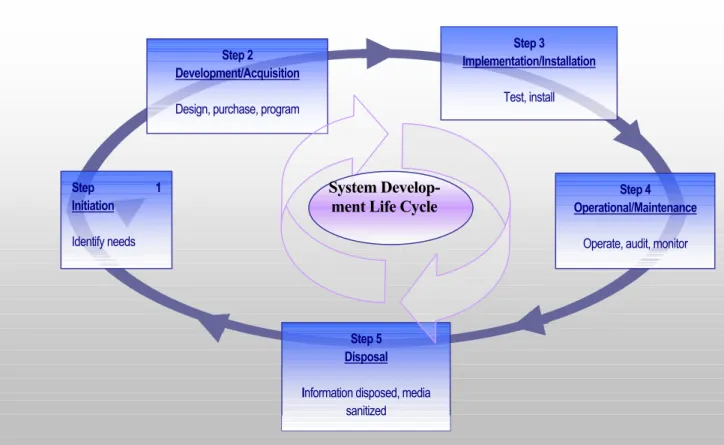
System Develop-ment Life Cycle
Step 2 Development/Acquisition
Design, purchase,program
Step 3
Implementation/Installation
Test, install
Step 5 Disposal Information disposed, media
sanitized Step 1 Initiation Identify needs Step 4 Operational/Maintenance
Operate, audit, monitor
Figure 2.1 - Security Testing and the System Development Life Cycle
Typically, testing is conducted after the system has been developed, installed, and integrated during implementation and operational steps. Figure 2.1 illustrates the system development life cycle along with suggested activities to be conducted during the steps. During the im-plementation step, security testing and evaluation (ST&E) should be conducted on particular parts of the system and on the entire system as a whole. Penetration testing is also recom-mended at this stage to ensure that the existing system configuration is secure prior to full implementation. These activities should be repeated periodically (e.g., at a minimum every three years for ST&E) or whenever a major change is made to the system. For systems that are exposed to constant threat (e.g., web servers) or that protect critical information (e.g., firewalls), testing should be conducted more frequently (e.g., quarterly).
Once a system is operational, it is important to ascertain its operational status, that is, “…whether a system is operated according to its current security requirements. This in-cludes both the actions of people who operate or use the system and the functioning of tech-nical controls.”6 Various types of tests can be conducted to gain assess the operational
6 National Institute of Standards and Technology, Generally Accepted Principles and Practices for
status of the system (see Step 4 in Figure 2-1). The types of tests selected and the frequency in which they are conducted depends on the importance of the system and the resources available for testing.
2.3. Documentation
Security testing provides insight into other system development life cycle activities. Security testing results should be documented and made available for staff involved in other IT and security related areas. Specifically, security-testing results can be used in the following ways:
! As a reference point for corrective action
! Defining mitigation activities to address identified vulnerabilities ! As a benchmark for tracing an organization’s progress
! To assess the implementation status of system security requirements ! To conduct cost/benefit analysis
! To enhance other life-cycle activities, such as risk assessments, C&A, and perform-ance improvement efforts.
2.4. Security Management Staff
Because security testing provides input into and can be a part of multiple system develop-ment life cycle phases, a number of IT and system security staff may be interested in its exe-cution and result. This section provides a list of those roles and identifies their responsibili-ties related to security testing. These roles may vary with the organization, however, and not all organizations will have the identical roles described here.
Senior IT Management/Chief Information Officer (CIO)
The Senior IT Management/CIO ensures that the organization’s security posture is ade-quate. The Senior IT Management provides direction and advisory services for the protec-tion of informaprotec-tion systems for the entire organizaprotec-tion. The Senior IT Management/CIO is responsible for the following activities that are associated with security testing:
! Coordinating the development and maintenance of the organization's information security policies, standards, and procedures
! Ensuring the establishment of, and compliance with, consistent security evaluation processes for departments throughout the organization
! Participating in developing processes for decision-making and prioritization of sys-tems for security testing.
Information Systems Security Program Managers
The Information Systems Security Program Managers oversee the implementation of, and compliance, with the standards, rules, and regulations specified in the organization's security policy. The ISSMs are responsible for the following activities associated with security
test-ing:
! Developing and implementing standard operating procedures (security policy) ! Complying with security policies, standards and requirements
! Ensure that critical systems are identified and scheduled for periodic testing accord-ing to the security policy requirements of each respective system
Information Systems Security Officers
Information Systems Security Officers (ISSOs) are responsible for overseeing all aspects of information security within a specific organizational entity. They ensure that the organiza-tion's information security practices comply with organizational and departmental policies, standards, and procedures. ISSOs are responsible for the following activities associated with security testing:
! Developing security standards and procedures for their area of responsibility ! Cooperating in the development and implementation of security tools and
mecha-nisms
! Maintaining configuration profiles of all systems controlled by the organization, in-cluding but not limited to, mainframes, distributed systems, microcomputers, and dial access ports
! Maintain operational integrity of systems by conducting tests and ensuring that des-ignated IT professionals are conducting scheduled testing on critical systems
System and Network Administrators
Daily, system and network administrators must address the security requirements of the spe-cific system(s) for which they are responsible. Security issues and solutions can originate from either outside (e.g., security patches and fixes from the vendor or computer security incident response teams) or within the organization (e.g., the Security Office). The adminis-trators are responsible for the following activities, associated with security testing:
! Monitoring system integrity, protection levels, and security related events
! Following-up with detected security anomalies associated with their information system resources
! Conducting security tests as required.
Managers and Owners
Managers and owners of a system oversee the overall compliance of their assets with their defined/identified security requirements. They are also responsible for ensuring that test re-sults and recommendations are adopted as appropriate.
3. Security Testing Techniques
There are several different types of security testing. The following section describes each testing technique, and provides additional information on the strengths and weakness of each. This information is also summarized in Tables 3-1 and 3-2. Some testing techniques are predominantly human-initiated and conducted. Other tests are highly automated and require less human involvement. Regardless of the type of testing, staff that setup and con-duct security testing should have significant security and networking knowledge, including significant expertise in one or more of the following areas: network security, firewalls, intru-sion detection systems, operating systems, programming and networking protocols (such as TCP/IP and Microsoft NetBIOS).
The following types of testing are described in this section: ! Network Mapping
! Vulnerability Scanning ! Penetration Testing ! Security Test & Evaluation ! Password Cracking ! Log Review ! Integrity Checkers ! Virus Detection ! War Dialing
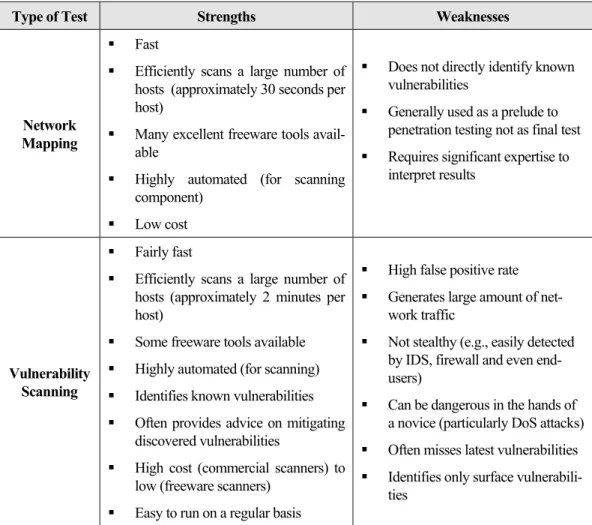
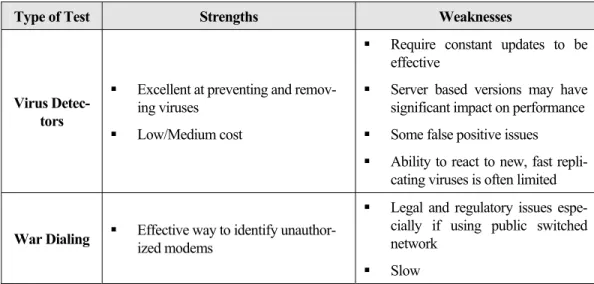
Often, several of these testing techniques are used in conjunction to gain more comprehen-sive assessment of the overall network security posture. For example penetration testing almost always includes network mapping and vulnerability scanning to identify vulnerable hosts and services that may be targeted for later penetration. None of these tests by them-selves will provide a complete picture of the network or its security posture. Table 3-1 at the end of this section summarizes the strengths and weaknesses of each test.
3.1. Network Mapping
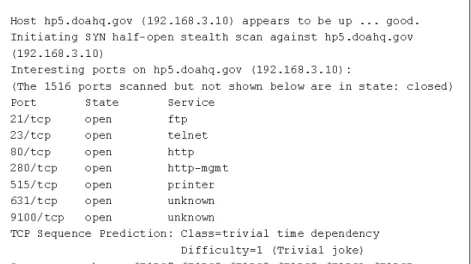
Network mapping involves using a port scanner to identify all active hosts connected to an organization's network, network services operating on those hosts (e.g., file transfer protocol [FTP] and hypertext transfer protocol [HTTP]), and the specific application running the identified service (e.g., Internet Information Server [IIS] and Apache for the HTTP service). The result of the scan is a comprehensive list of all active hosts and services operating in the address space scanned by the port-scanning tool. The name “network map” is a misnomer, as the port scanner sees the network as flat address space and does not typically provide any meaningful graphical representation of the scanned network.
Network scanners, such as nmap7 (see Appendix D for more information), first identify ac-tive hosts in the address range specified by the user using Transport Control Proto-col/Internet Protocol (TCP/IP) Internet Control Message Protocol (ICMP) ECHO and ICMP ECHO_REPLY packets. Once active hosts have been identified, they are scanned for open TCP and User Datagram Protocol (UDP) ports8 that will then identify the network services
operating on that host. A number of scanners support different scanning methods that have different strengths and weaknesses usually explained in the scanner documentation (see Ap-pendix D for more information). For example, certain scans are better suited for scans through firewalls and others are better suited for scans internal to the firewall. It is also sug-gested that individuals not familiar with the details of TCP/IP protocols familiarize them-selves with it using some of the references listed in Appendix B.
All basic port scanners will identify active hosts and open ports, but some scanners provide additional information on the scanned hosts. The information gathered during this open port scan will often identify the target operating system. This process is called operating system fingerprinting. For example, if a host has TCP port 135 and 139 open, it is most likely a Windows NT or 2000 host. Other items such as the TCP packet sequence number genera-tion and responses to ICMP packets also provide a clue to identifying the operating system. Operating system fingerprinting is not foolproof. Firewalls that filter (block) certain ports and types of traffic and system administrators can configure their systems to respond in non-standard ways in order to camouflage the true operating system.
In addition, some scanners will assist in identifying the application running on a particular port. For example, if a scanner identifies that TCP port 80 is open on a host it most likely means that the host is running a web (HTTP) server. However, identifying which web server product is installed can be critical for identifying vulnerabilities. For example, the vulnerabilities for Microsoft’s IIS server are very different from those associated with Apache web server. One way to identify the application is by “listening” on the port is to capture the “banner” information that is transmitted by the server when a client (web browser in this example) connects. Banner information is generally not visible to the end-user (at least in the case of web servers/browsers), however it is transmitted and can provide a wealth of information, including the application type, application version and even operat-ing system type and version. Again this is not foolproof since a security conscious adminis-trator can alter the transmitted banners. The process of capturing banner information is sometimes called “banner grabbing.”
A major limitation of using port scanners is that while they identify active hosts, services, applications and operating systems, they do NOT identify vulnerabilities.9 The determina-tion of vulnerability must be made by human interpretadetermina-tion. Identifying vulnerabilities re-quires interpretation of the mapping and scanning results. From these results, a qualified
7 See http://www.insecure.org/ for more information and free download.
8 In TCP/IP terminology, a port is where an application receives information from the transport
(TCP/UDP) layers. For example, all data received on TCP port 80 is forwarded to the Web server ap-plication. If an IP address identifies a particular host, the port is used to identify a particular service (HTTP, FTP, SMTP, etc.) running on that host.
9 A vulnerability is any weakness that can be exploited to gain access to an asset or a flaw in software
programming that allows attackers to gain unauthorized access to a computer or network and perform actions such as viewing, appropriating or modifying data and/or launching denial of service attacks.
individual can ascertain what services are vulnerable. Although the scanning itself is highly automated, the interpretation is not.
Organizations should conduct network mapping to:
! Check for unauthorized hosts connected to the organization's network ! Identify vulnerable services
! Identify deviations from the allowed services defined in the organization’s security policy
! Prepare for penetration testing.
Although network mapping is mostly an automated activity, it requires a relatively high level of human expertise to interpret the results. It can also be disrupt network operations by consuming bandwidth and slowing network response times. However, network mapping provides a means for an organization to maintain control of its IP address space and ensure that its hosts are configured to run only approved network services. Network mapping should be conducted quarterly to discover unauthorized hosts and to verify that only ap-proved services are run on the network. To minimize disruptions to operations, scanning software should be carefully selected (see Appendix C). Network mapping can also be con-ducted after hours to ensure minimal impact to operations.
Network mapping results should be documented and identified deficiencies corrected. The following corrective actions may be necessary as a result of network mapping:
! Disconnect unauthorized hosts
! Disable or remove unnecessary and vulnerable services
! Modify vulnerable hosts to restrict access to vulnerable services to limited number of required hosts (e.g., host level firewall or TCP wrappers)
! Modify enterprise firewalls to restrict outside access to known vulnerable services.
3.2. Vulnerability Scanning
Vulnerability scanners are commonly used in many organizations. Vulnerability scanners take the concept of a port scanner to the next level. The vulnerability scanner identifies not just hosts and open ports but any associated vulnerabilities automatically instead of relying on human interpretation of the results. Most vulnerability scanners also attempt to provide information on mitigating discovered vulnerabilities.
Vulnerability scanners provide system and network administrators with proactive tools that can be used to identify vulnerabilities before an adversary. A vulnerability scanner is a rela-tively fast and easy way to quantify an organization's exposure to surface vulnerabilities10.
10 A surface vulnerability is a weakness, as it exists in isolation, that is without any other vulnerability.
The difficultly in identifying the risk level of vulnerabilities is that they rarely exist in isolation. For exam-ple there could be several “low risk” vulnerabilities that exist on a particular network that, when
com-Vulnerability scanners attempt to identify vulnerabilities in the hosts scanned. com-Vulnerability scanners can help identify out-of-date software versions, vulnerabilities, applicable patches or system upgrades, and validate compliance with, or deviations from, the organization's security policy. To accomplish this, vulnerability scanners identify operating systems and major software applications running on hosts and match them with known vulnerabilities. Vulnerability scanners employ large databases of vulnerabilities to identify vulnerabilities associated with commonly used operating systems and applications.
For each discovered vulnerability, the scanner will often provide significant information and guidance on mitigating discovered vulnerabilities. In addition vulnerability scanners can automatically make corrections and fix certain discovered vulnerabilities. This assumes that the operator of the vulnerability scanners has “root” or administrator access to the vulner-able host.
However vulnerability scanners have some significant weaknesses. Generally, they only identify surface vulnerabilities and are unable to address the overall risk level of a scanned network. Although the scan process itself is highly automated, vulnerability scanners can have a high false positive error rate (reporting vulnerabilities when none exist). This means an individual with expertise in networking and operating system, security and administration must interpret the results.
Since vulnerability scanners require more information than port scanners to reliably identify the vulnerabilities on a host, vulnerability scanners tend to generate significantly more net-work traffic than port scanners. This may have a negative impact on the hosts or netnet-work being scanned or network segments through which scanning traffic is traversing. Many vulnerability scanners also include tests for denial of service (DoS) attacks that, in the hands of an inexperienced user, can have a considerable negative impact on scanned hosts. Another significant limitation of vulnerability scanners is that they rely on constant updating of the vulnerability database in order to recognize the latest vulnerabilities. Before running any scanner be sure to install the latest updates to its vulnerability database. Some vulner-ability scanner databases are updated more regularly than others (frequency of updates should be a major consideration when choosing a vulnerability scanner).
Vulnerability scanners are better at detecting well-known vulnerabilities at the expense of more esoteric ones, primarily because it is impossible for any one product to incorporate all known vulnerabilities in a timely manner. It is also due to the desire of the manufacturers to keep the speed of their scanners high (more vulnerabilities detected requires more tests which slows the overall scanning process).
Vulnerability scanners provide the following capabilities: ! Identifying active hosts on network
! Identifying active and vulnerable services (ports) on hosts
bined, present a high risk. A vulnerability scanner would generally not recognize the danger of the combined vulnerabilities and thus would assign a low risk to them leaving the network administrator with a false sense of confidence in his or her security measures. The reliable way to identify the risk of vulnerabilities in aggregate is through penetration testing.
! Identifying application and banner grabbing ! Identifying operating systems
! Identifying vulnerabilities associated with discovered operating systems and appli-cations
! Testing compliance with host application usage/security policies ! Establishing a foundation for penetration testing.
Vulnerability scanners can be of two types: network scanners and host scanners. Network scanners are used primarily for mapping an organization's network and identifying open ports. In most cases, these scanners are not limited by the operating system of targeted sys-tems. The scanners can be installed on a single system on the network and can quickly lo-cate and test numerous hosts. Host scanners have to be installed on each host to be tested and are used primarily to identify specific host operating system and application miscon-figurations and vulnerabilities. Host scanners have high-detection granularity and usually require not only host (local) access but also a “root” or administrative account. Some host scanners offer the capability to repair any misconfigurations.
Organizations should conduct vulnerability scanning to validate that operating systems and major applications are up to date on security patches and software version. Vulnerability scanning is a reasonably labor-intensive activity that requires a high degree of human in-volvement with interpreting the results. It may also be disruptive to network operations by taking up bandwidth and slowing response times. However, vulnerability scanning is ex-tremely important for ensuring that vulnerabilities are mitigated as soon as possible, before they are discovered and exploited by adversaries. Vulnerability scanning should be con-ducted at least quarterly. Highly critical systems such as firewalls, public web servers, and other perimeter points of entry should be scanned at least bi-monthly.
Vulnerability scanning results should be documented and discovered deficiencies corrected. The following corrective actions may be necessary as a result of vulnerability scanning:
! Upgrade or patch vulnerable systems to mitigate identified vulnerabilities as appro-priate
! Deploy mitigating measures (technical or procedural) if the system cannot be im-mediately patched (e.g., application system upgrade will make the application run-ning on top of the operating system inoperable), in order to minimize the probabil-ity of this system being compromised
! Tighten configuration management program and procedures to ensure that systems are upgraded routinely
! Assign a staff member to monitor vulnerability alerts and mailing lists, examine their applicability to the organization's environment and initiate appropriate system changes.
! Modify the organization's security policies, architecture, or other documentation to ensure that security practices include timely system updates and upgrades.
Network and host-based vulnerability scanners are available for free or for a fee. Appendix C contains a list of readily available vulnerability scanning tools.
3.3. Penetration Testing
Penetration testing is security testing in which evaluators attempt to circumvent the security features of a system based on their understanding of the system design and implementation. The purpose of penetration testing is to identify methods of gaining access to a system by using common tools and techniques developed by hackers. This testing is highly recom-mended for complex or critical systems (e.g., most organization’s networks).
Penetration testing can be an invaluable technique to any organization's information security program. However, it is a very labor-intensive activity and requires great expertise to minimize the risk to targeted systems. At a minimum, it may slow the organization's net-works response time due to network mapping and vulnerability scanning. Furthermore, the possibility exists that systems may be damaged in the course of penetration testing and may be rendered inoperable. Although this risk is mitigated by the use of experienced penetra-tion testers, it can never be fully eliminated.
Since penetration testing is designed to simulate an attack and use tools and techniques that may be restricted by law, federal regulations, and organizational policy, it is imperative to get written permission for conducting penetration testing prior to starting. This written per-mission, often called the rules of engagement, should include:
! Specific IP addresses/ranges to be tested
! Any restricted hosts (i.e., hosts, systems, subnets, not to be tested)
! A list of acceptable testing techniques (e.g. social engineering, DoS, etc.) and tools (password crackers, network sniffers, etc.)
! Times that scanning is to be conducted (e.g., during business hours, after business hours, etc.)
! IP addresses of the machines from which penetration testing will be conducted so that administrators can differentiate the legitimate penetration testing attacks from actual hacker attacks
! Points of contact for both the penetration testing team, the targeted systems and net-works
! Measures to prevent law enforcement being called with false alarms ! Handling of information collected by penetration testing team.
Generally, appropriate individuals should receive a warning before the testing begins to avoid law enforcement officials from being inappropriately called.
Penetration testing can be overt or covert. These two types of penetration testing are com-monly referred to as Blue Teaming and Red Teaming. Blue Teaming involves performing a penetration test with the knowledge and consent of the organization's IT staff. Red Teaming involves performing a penetration test without the knowledge of the organization's IT staff but with full knowledge and permission of the upper management. Some organizations
des-ignate a trusted third party for the Red Teaming exercises to ensure that an organization does not take measures associated with the real attack without verifying that an attack is indeed under way (i.e., the activity they are seeing does not originate from an exercise). The trusted third party provides an agent for the testers, the management, and the IT and security staff that mediates the activities and facilitates communications. This type of test is useful for testing not only network security, but also the IT staff's response to perceived security incidents and their knowledge and implementation of the organization's security policy. The Red Teaming may be conducted with or without warning.
Of the two types of penetration tests, Blue Teaming tends to be the least expensive and most used. Red Teaming, because of it stealth requirements, requires more time and expense. To be stealthy, a penetration testing team acting as a Red Team will have to slow its scans and other actions to move below the ability of the target organization’s Intrusion Detection Sys-tem (IDS) and firewall to detect their actions. However Red Teaming provides a better in-dication of everyday security of the target organization since system administrators will not be on heightened awareness.
A penetration test can be designed to simulate an inside and/or an outside attack. If both internal and external testing are to be performed, the external testing usually occurs first. With external penetration testing, firewalls usually limit the amount and types of traffic that are allowed into the internal network from external sources. Depending on what protocols are allowed through, initial attacks are generally focused on commonly used and allowed application protocols such as FTP or HTTP. With the external testing, the barriers between the internal and external networks are what can increase the time, difficulty, and cost of per-forming an external test.
To simulate an actual external attack, the testers are not provided with any real information about the target environment other than targeted IP address/ranges and must covertly collect information before the attack. They collect information on the target from public web pages, newsgroups and the like. They then use port scanners and vulnerability scanners to identify targeted hosts. Since they are, most likely, going through a firewall, the amount of information is far less than they would get if operating internally. After identifying hosts on the network that can be reached from the outside, they attempt to compromise one. If suc-cessful, they then leverage this access to compromise others hosts not generally accessible from outside. This is why penetration testing is an iterative process that leverages minimal access to eventually gain full access.
An internal penetration test is similar to an external except that the testers are now on the internal network (i.e., behind the firewall) and are granted some level of access to the net-work (generally as a user but sometimes at a higher level). The penetration testers will then try to gain a greater level of access to the network through privilege escalation. The testers are provided with information about a network as somebody with their provided privileges would have. This is generally as a standard employee although it can also be anything up to and including a system or network administrator depending on the goals of the test.
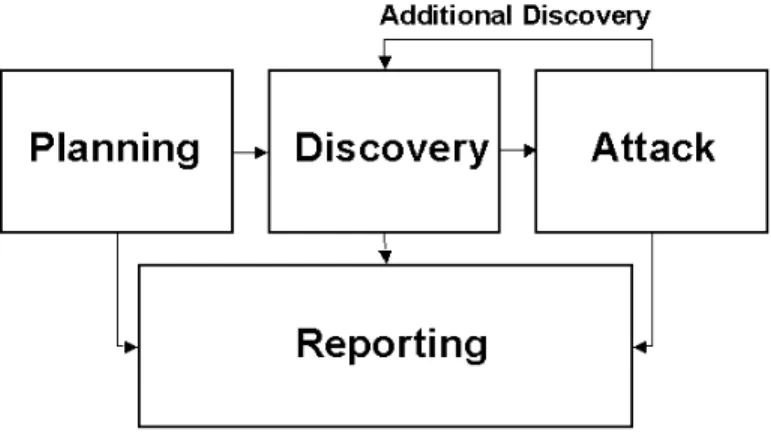
Figure 3.1 - Four-Stage Penetration Testing Methodology
In the planning phase, rules are identified, management approval is finalized, and the testing goals are set. The planning phase sets the groundwork for a successful penetration test. No actual testing occurs in the planning phase.
The discovery phase starts the actual testing. Network mapping (port scanning), as de-scribed in Section 3.1 is used to identify potential targets. In addition to port scanning, other techniques are commonly used to gather information on the targeted network:
! Domain Name System (DNS) interrogation ! InterNIC (whois) queries
! Searching target organization’s web server(s) for information
! Searching organization’s Lightweight Directory Access Protocol server(s) (LDAP) for information
! Packet capture (generally only during internal tests) ! NetBIOS enumeration (generally only during internal tests)
! Network Information System ([NIS] generally only during internal tests) ! Banner grabbing
The second part of the discovery phase is vulnerability analysis. During this phase, ser-vices, applications, and operating systems of scanned hosts are compared against vulnerabil-ity databases (for vulnerabilvulnerabil-ity scanners this process is automatic). Generally human testers use their own database or public databases to identify vulnerabilities manually11. This
11 Some popular vulnerability databases include:
http://icat.nist.gov/icat.cfm http://cve.mitre.org/
ual process is better for identifying new or obscure vulnerabilities, but is much slower than an automated scanner.
Executing an attack is at the heart of any penetration test. This is where previously identi-fied potential vulnerabilities are veriidenti-fied by attempting to exploit them. If an attack is suc-cessful, the vulnerability is verified and safeguards are identified to mitigate the associated security exposure. Frequently, exploits12that are executed during attack execution do not
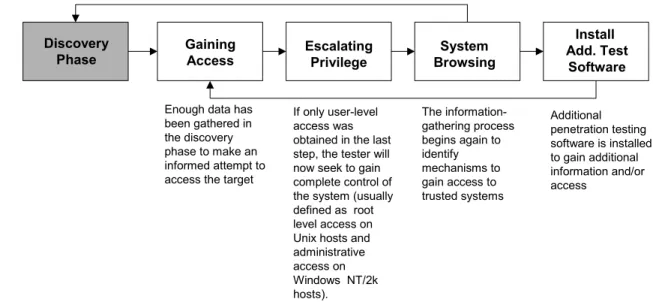
grant the maximum level of access that can be gained by an attacker. Instead they may re-sult in the testing team learning more about the targeted network and its potential vulner-abilities, or they may induce a change in the state of the security of the targeted network. In either case, additional analysis and testing is required to determine the true level of risk for the network. This is represented in the feedback loop in Figure 3.2 between the Attack and Discovery phase of a penetration test.
Discovery
Phase GainingAccess EscalatingPrivilege BrowsingSystem
Install Add. Test
Software Enough data has
been gathered in the discovery phase to make an informed attempt to access the target
If only user-level access was obtained in the last step, the tester will now seek to gain complete control of the system (usually defined as root level access on Unix hosts and administrative access on Windows NT/2k hosts). The information-gathering process begins again to identify mechanisms to gain access to trusted systems Additional penetration testing software is installed to gain additional information and/or access
Figure 3.2 - Attack Phase Steps with Loopback to Discovery Phase
Where vulnerability scanners only check that a vulnerability may exist, the attack phase of a penetration test exploits vulnerability, confirming its existence. Most vulnerabilities ex-ploited by penetration testing and malicious attackers fall into the following categories: ! Kernel Flaws—Kernel code is the core of an operating system. The kernel code
en-forces the overall security model for the system. Any security flaw that occurs in the kernel puts the entire system in danger.
12 Exploits are documented methods or programs/scripts that take advantage of vulnerabilities. The
same cautions that apply to freeware tools apply to exploit programs/scripts. Many vulnerability data-bases including www.securityfocus.com provide exploit instructions or code for most identified abilities. Exploit programs or scripts are actually just specialized tools for exploiting a specific vulner-ability.
! Buffer Overflows—A buffer overflow occurs when programs do not adequately check input for appropriate length and is usually a result of poor programming practice. When this occurs, arbitrary code can be introduced into the system and executed with the privileges of the running program. This code often can be run as root on Unix systems and SYSTEM (administrator equivalent) on Windows systems.
! Symbolic Links—A symbolic link or symlink is a file that points to another file. Often there are programs that will change the permissions of a file. If these programs run with privileged permissions, a user could strategically create symlinks to trick these pro-grams into modifying or listing critical system files.
! File Descriptor Attacks—File descriptors are nonnegative integers that the system uses to keep track of files rather than using specific filenames. Certain file descriptors have implied uses. When a privileged program assigns an inappropriate file descriptor it ex-poses that file to compromise.
! Race Conditions—Race conditions can occur when a program or process has entered into a privileged mode but before the program or process has given up its privileged mode. A user can time an attack to take advantage of this program or process while it is still in the privileged mode. If an attacker successfully manages to compromise the program or process during its privileged state then the attacker has won the “race”. Common race conditions include signal handling and core-file manipulation.
! File and Directory Permissions—File and directory permissions control which users and processes have access to what files and directories. Appropriate permissions are critical to the security of any system. Poor permissions could allow any number of at-tacks, including the reading or writing of password files or adding allowable hosts to connect in the rhost file.
! Trojans—Trojan programs can be custom built or could include programs such as BackOrifice, NetBus, and SubSeven. Kernel root kits could also be employed once ac-cess is obtained that allow a backdoor into the system at anytime.
! Social Engineering—Social engineering is the technique of using persuasion and/or deception to gain access to, or information about information systems. It is typically implemented through human conversation or other interaction. The usual medium of choice is telephone but can also be e-mail or even face-to-face. Social engineering gen-erally follows two standard approaches. In the first approach the penetration tester poses as a user experiencing difficultly and calls the organization’s help desk in order to gain information on the target network or host, obtain a login ID and credentials or get a password reset. The second approach is to pose as the help desk and call a user in order to get the user to provide his/her user id(s) and password(s). This technique can be ex-tremely effective.
The reporting phase occurs simultaneously with the other three phases of the penetration test (see Figure 4-1). In the planning phase, rules of engagement, test plans and written permis-sion are developed. In the discovery and attack phase, written logs are usually kept and pe-riodic reports are made to system administrators and/or management, as appropriate. Gen-erally, at the end of the test there is an overall testing report that describes the identified vul-nerabilities, provides a risk rating, and gives guidance on the mitigation of the discovered weaknesses.
Conducting penetration testing is extremely important for determining how vulnerable an organization's network is and the level of damage that can occur if compromised. Due to the high cost and potential impact of penetration testing, performing it annually may be suf-ficient. The results of penetration testing should be taken very seriously and discovered vulnerabilities should be mitigated. As soon as possible, the results should be presented to management. Corrective measures can range from closing discovered and exploited vulner-abilities to modifying an organization's security policies and procedures to improve security practices, to conducting security awareness training for personnel to ensure that they under-stand the implications of poor system configurations and poor security practices. Organiza-tions should consider conducting less labor-intensive testing activities on a regular basis to ensure that they are in compliance with their security policies and maintaining the required security posture. If an organization performs other tests (e.g., network mapping and vulner-ability scanning) regularly between the penetration testing exercises and corrects discovered deficiencies, it will be well prepared for the next penetration testing exercise and for a real attack.
3.4. Security Test and Evaluation
Security Test and Evaluation (ST&E) is an examination or analysis of the protective meas-ures that are placed on an information system once it is fully integrated and operational. The objectives of the ST&E are to:
! Uncover design, implementation, and operations flaws that could allow the viola-tion of security policy
! Determine the adequacy of security mechanisms, assurances, and other properties to enforce the security policy
! Assess the degree of consistency between the system documentation and its im-plementation.
The scope of an ST&E plan typically addresses computer security, communications secu-rity, emanations secusecu-rity, physical secusecu-rity, personnel secusecu-rity, administrative secusecu-rity, and operations security. Computer security is comprised of the measures and controls that pro-tect the system against DoS and unauthorized disclosure, modification, or destruction of the system's data. Computer security can be tested through configuration and operational test-ing to validate that system security mechanisms have been implemented and are worktest-ing properly. Configuration testing is performed by comparing the installed configuration against the approved configuration found in the security requirements, Security Concept of Operations, or another similar document. Operational testing provides an assessment of the systems security mechanisms in an operational environment to determine if the mechanisms are enforcing the site's security policy. Operational testing is performed through the execu-tion of predefined tests. These tests establish a baseline for configuraexecu-tion management and system testing.
Communication security comprises the measures and controls taken to prevent unauthorized access through telecommunications. Testing is performed to ensure that communications links are protected to a level commensurate with the sensitivity level of the data being trans-ferred. Additionally, communication testing should determine that the system connection does not introduce new vulnerabilities into the network.
Emanations security analyzes unintentional data-related or intelligence-bearing signals that, if intercepted and analyzed, disclose the information transmission received, handled, or oth-erwise processed by any information processing equipment. Emanations security testing is performed through interception and analysis of electronic signals emitted from the system. Proper emanation security protects the site from electronic eavesdropping.
The physical security portion of the ST&E is performed to determine if the physical envi-ronment where the system resides is adequate for the protection and operation of the system. This part of testing is performed through analysis of the security features of the facility, its adequacy to the protection of the system, and of power and environmental systems to ensure that a proper operating environment can be maintained.
Personnel security is the process whereby trustworthiness and suitability of personnel is verified. For the ST&E, this includes ensuring that access to the equipment is limited to only those personnel who require access.
Administrative security comprises the management constraints and supplemental controls established to provide an acceptable level of protection for data. Administrative security is also known as procedural security. Testing for the administrative section of the ST&E should include analysis of the design and adoption of day-to-day procedures for the opera-tion of the system. This part of the test should also determine the adequacy of the site's con-tingency plan.
Operations security is an analytical process by which potential adversaries are denied infor-mation about capabilities and intentions by identifying, controlling, and protecting evidence of the planning and execution of sensitive activities and operations. Operations security in the ST&E is performed through the analysis of the systems ability to limit access to this in-formation. The benefit derived from operations security testing is that it verifies that infor-mation is not being provided to adversaries that would help them to circumvent network security.
NIST Special Publication 800-26, Security Self-Assessment Guide for IT Systems, goes into more detail with ST&E; readers are encouraged to read this document. ST&E is a very labor-intensive activity that should be performed every 3 years or when a system undergoes a major change. ST&Es are usually performed as a part of C&A efforts for a new or sig-nificantly upgraded system. ST&E may include any of the other testing activities, described in this section.
3.5. Password Cracking
Password cracking programs can be used to identify weak passwords. Password cracking verifies that users are employing sufficiently strong passwords. Passwords are generally stored and transmitted in an encrypted form called a hash. When a user logs on to a com-puter/system and enters a password, a hash is generated and compared to a stored hash. If entered and stored hashes match the user is authenticated.
During a penetration test or a real attack, password cracking uses captured password hashes. Passwords hashes can be intercepted when they are transmitted across the network (using a network sniffer) or they can be retrieved from the targeted system. The latter generally re-quires administrative or “root” access on the target system.
Once the hashes are obtained, an automated password cracker rapidly generates hashes until a match is found. The fastest method for generating hashes is a dictionary attack that uses all words in a dictionary or text file. There are many dictionaries available on the Internet that cover most major and minor languages, names, favorite television shows, etc. So any “dictionary” word no matter how obscure is weak.
Another method of cracking is called a hybrid attack, which builds on the dictionary method by adding numeric and symbolic characters to dictionary words. Depending on the pass-word cracker being used, this type of attack will try a number of variations. It will try com-mon substitutes of characters and numbers for letters (e.g., p@ssword and h4ckme). Some will also try adding characters and numbers to the beginning and end of dictionary words (e.g., password99, password$%, etc.).
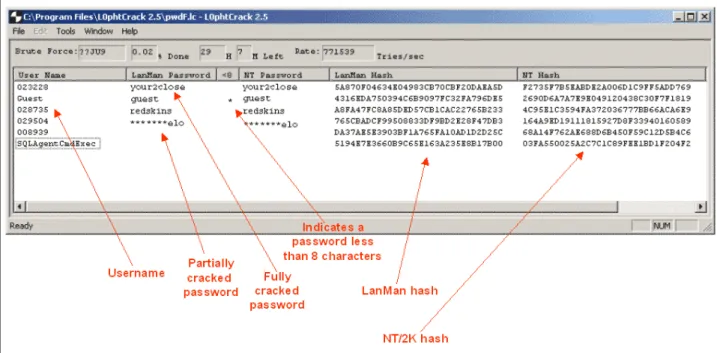
The most powerful password-cracking method is called the brute force method. Although brute force can take a long time, it usually takes far less time than most password policies specify for password changing. Consequently, passwords found during brute force attacks are still too weak. Brute force randomly generates passwords and their associated hashes. However since there are so many possibilities it can take months to crack a password. Theoretically all passwords are “crackable” from a brute force attack given enough time and processing power. Penetration testers and hackers often have multiple machines that they can spread the task of cracking password across. This can greatly shorten the length of time required to crack strong passwords. A strong password is one that is long (greater than 10 characters at least) and complex (contains both upper and lower case letters, characters and numbers). See Appendix D for an example of how to use the Windows password cracker, L0pht Crack.
Password crackers should be run on the system on a monthly basis or even continuously to ensure correct password composition throughout an organization. The following actions can be taken if an unacceptably high number of passwords can be cracked:
! If the cracked passwords were selected according to policy, the policy should be modified to reduce the percentage of crackable passwords. If such policy modifica-tion would lead to users writing down their passwords because they are difficult to memorize, an organization should consider replacing password authentication with another form of authentication.
! If cracked passwords were not selected according to policy, the users should be educated on possible impacts of weak password selections. If such violations by the same users are persistent, the management may consider a disciplinary action against those users. Many server platforms also allow the system administrator to set minimum password length and complexity.
3.6. Log Reviews
Various system logs can be used to identify deviations from the organization's security pol-icy, including firewall logs, IDS logs, server logs, and any other logs that are collecting audit data on system and network. While not traditionally considered a "testing" activity, log re-view and analysis can provide a dynamic picture of ongoing system activities that can be compared with the intent and content of the security policy. Essentially, audit logs can be used to validate that the system is operating according to policies.
For example, if an IDS sensor is placed behind the firewall (within the enclave), its logs can be used to examine the service requests and communications that are allowed into the net-work by the firewall. If this sensor registers unauthorized activities beyond the firewall, it indicates that the firewall is no longer configured securely.
A free IDS sensor with ample support is Snort. Snort is a lightweight network intrusion detection system, capable of performing real-time traffic analysis and packet logging on IP networks. It can perform protocol analysis, content searching/matching and can be used to detect a variety of attacks and probes, such as buffer overflows, stealth port scans, CGI at-tacks, SMB probes, and OS fingerprinting attempts. Snort uses a flexible rules language to describe traffic that it should collect or pass, as well as a detection engine that uses a modu-lar plugin architecture. Snort has a real-time alerting capability as well, incorporating alert-ing mechanisms for syslog, a user specified file, a UNIX socket, or WinPopup messages to Windows clients using Samba's smbclient. Snort has three primary uses. It can be used as a straight packet sniffer like tcpdump, a packet logger (useful for network traffic debugging, etc), or as a full-blown network intrusion detection system.
Manual audit log review is extremely cumbersome and time consuming. Automated audit tools provide a means to significantly reduce the required review time and will print reports (predefined and customized) that would summarize the log contents to a set of specific ac-tivities. It is critical that any filters applied to the logs filter out what is unwanted and pass everything else. If you filter only on what is wanted then any exception events will also be filtered.
Log reviews should be conducted at least weekly, regardless of how the results are used. For the specific purpose of testing implementation of required security configurations, a monthly frequency may be sufficient with the exception of on demand reviews resulting from major system upgrades that require validation. The following actions can be taken if a system is not configured according to policies:
! Reconfigure the system as required to reduce the chance of compromise ! Or change firewall policy to limit access to the vulnerable system or service
! Change firewall policy to limit accesses from the IP subnet that is the source of com-promise.
3.7. File Integrity Checkers
A file integrity checker computes and stores a checksum for every guarded file and estab-lishes a database of file checksums. It provides a tool for the system administrator to recog-nize changes to files, particularly unauthorized changes. Stored checksums should be re-computed regularly to test the current value against the stored value to identify any file modifications. A file integrity checker capability is usually included with any commercial host-based intrusion detection system.
While an integrity checker is a useful tool that does not require a high degree of human in-teraction, it needs to be used carefully to ensure that it is effective. A file integrity checker requires a system that is known as secure to create the first reference database. Otherwise, cryptographic hashes of a compromised system may be created and therefore, create a false
sense of security for the tester. The reference database should be stored off-line so that an attacker cannot compromise the system and hide their tracks by modifying the database. A file integrity checker can also generate false positive alarms. Each file update and system patch implementation changes the file and will, therefore, require an update of the checksum database. Therefore, keeping the database up-to-date may be difficult. However, even if the integrity checker is run only once (when the system is first installed) it can still be a useful activity for determining which files have been modified in case of a suspected compromise. Finally, attackers have demonstrated the ability to modify a file in ways the commonly used 32-bit Cyclic Redundancy Check (CRC) checksum could not detect. Therefore, stronger checksums are recommended to ensure the integrity of data that is stored in the checksum database.
Integrity checkers should be run daily on a selection of system files that would be affected by a compromise. Integrity checkers should also be used when a compromise is suspected for determining the extent of possible damage. If an integrity checker detects unauthorized system file modifications, the possibility of a security incident should be considered and investigated according to the organization's incident response and reporting policy and pro-cedures. See Appendix C for an example in using the LANguard freeware file integrity checkers.
3.8. Virus Detectors
All organizations are at risk of “contracting” computer viruses, Trojans and worms13 if they
are connected to the Internet, use removable media (e.g., floppy disks and CD-Roms), allow unsupervised access to users, or use shareware software.
A computer virus is a string of code that attaches itself to another computer program or document. Once it is attached it replicates itself by using some of the resources of the co-opted program or document to replicate and attach itself to other host programs and docu-ments. Malicious code is not limited to viruses; there are several types of malicious code that are generally detected by anti-virus software even though the code is not strictly speak-ing a virus. The other categories of malicious code include worms, Trojans and malicious mobile code.
The impact of a virus, Trojan, worm or malicious mobile code can be as harmless as a pop-up message on a computer screen, or as destructive as deleting all the files on a hard drive. With any malicious code, there is also the risk of exposing or destroying sensitive or confi-dential information.
There are two primary types of anti-virus programs available: those that are installed on the network infrastructure and those that are installed on end-user machines. Each has advan-tages and disadvanadvan-tages, but both used in conjunction are generally required for the highest level of security.
13 These are all examples of malicious computer code that are sometimes collectively referred to as
The virus detector installed on the network infrastructure is server based and is usually in-stalled on mail servers and on, or in conjunction with firewalls at the network border of an organization. The advantage of the server based virus detection programs is that they can detect viruses before they enter the network or before a user downloads his/her e-mail. The other advantage of server based virus detection is that all virus detectors require frequent updating to remain effective. This is much easier to accomplish on the server-based grams due to their limited number relative to client hosts. Unfortunately server based pro-grams can have a negative effect on performance of a network.
The other type of virus detection software is installed on end-user machines. This software detects malicious code in e-mails, floppies, hard disks, documents and the like but only for the local host. It also sometimes detects malicious code from web sites. This type of virus detection program has less impact on network performance but generally relies on end-users to update their signatures, which is not always reliable. Also end-user virus protection can-not protect the network from all virus threats.
No matter what type of virus detection program is being used, it cannot offer its full protec-tion unless is has an up-to-date virus identificaprotec-tion database (sometimes called virus signa-tures) that allow it to recognize all viruses. If the virus detection program is not up-to-date, it usually will not detect a new virus. To detect viruses, anti-virus software compares file contents with the known computer virus signatures, identifies infected files, and repairs them if possible, or deletes them if not. More sophisticated programs also look for virus-like activity in an attempt to identify new or mutated viruses that would not be recognized by the current virus detection database. While not perfect, this system can provide an addi-tional layer of protection with the cost of some false positives.
Viruses and other malicious code, such as worms and Trojans, can be enormously destruc-tive to a computer system, and information that are relied on for the success of an organiza-tion. The most important aspect of virus detection software is frequent regular updates of virus definition files and on-demand updates when a major virus is known to be spreading throughout the Internet. The more often the database is updated, the more viruses the anti-virus software will be equipped to detect. If these preliminary steps are taken, the chances of a major virus infection are minimized. Virus definition files should be updated at least bi-monthly and whenever a major outbreak of a new virus occurs. Appendix C provides a list of anti-virus software.
3.9. War Dialing
In a well-configured network, one of the vulnerable areas often overlooked is the presence of unauthorized modems. These unauthorized modems provide a means to bypass most or all of the security measures in place to stop unauthorized users from accessing a network. There are several software packages available (see Appendix C) that allow hackers and network administrators to dial large blocks of phone numbers in search of available mo-dems. This process is called war dialing. A computer with four modems can dial 10,000 numbers in a matter of days. Certain war dialers will even attempt some limited automatic hacking when a modem is discovered. All will provide a report on the “discovered” num-bers with modems.
War dialing should be conducted at least annually and performed after-hours to limit poten-tial disruption to employees and the organization’s phone system (this of course has to be