U
S E R
G
U I D E
Installation Manual
ES-3024G Managed GE Switch ES-3024GP Managed GE POE Switch
I
N S T A L L A T I O N
M
A N U A L
ES-3024G/3024GP
ES-3024G M
ANAGED24-P
ORTGE S
WITCHLayer 2 Managed Switch
with 24 10/100/1000BASE-T (RJ-45) Ports, and 4 shared Gigabit Combination Ports (SFP)
ES-3024GP M
ANAGED24-P
ORTGE P
OE S
WITCHLayer 2 Managed Switch
with 24 10/100/1000BASE-T (RJ-45) PoE Ports, and 4 shared Gigabit Combination Ports (SFP)
ES-3024G ES-3024GP E122009-DT-R01 150200000055A
ES-3024G/3024GP
C
OMPLIANCES
AND
S
AFETY
S
TATEMENTS
FCC CLASS A
This equipment has been tested and found to comply with the limits for a Class A digital device, pursuant to part 15 of the FCC Rules. These limits are designed to provide reasonable protection against harmful interference when the equipment is operated in a commercial environment. This
equipment generates, uses, and can radiate radio frequency energy and, if not installed and used in accordance with the instruction manual, may cause harmful interference to radio communications. Operation of this equipment in a residential area is likely to cause harmful interference in which case the user will be required to correct the interference at his own expense.
You are cautioned that changes or modifications not expressly approved by the party responsible for compliance could void your authority to operate the equipment.
You may use unshielded twisted-pair (UTP) for RJ-45 connections -
Category 3 or better for 10 Mbps connections, Category 5 or better for 100 Mbps connections, Category 5, 5e, or 6 for 1000 Mbps connections. For fiber optic connections, you may use 50/125 or 62.5/125 micron multimode fiber or 9/125 micron single-mode fiber.
INDUSTRY CANADA - CLASS A
This digital apparatus does not exceed the Class A limits for radio noise emissions from digital apparatus as set out in the interference-causing equipment standard entitled “Digital Apparatus,” ICES-003 of the Department of Communications.
Cet appareil numérique respecte les limites de bruits radioélectriques applicables aux appareils numériques de Classe A prescrites dans la norme sur le matériel brouilleur: “Appareils Numériques,” NMB-003 édictée par le ministère des Communications.
COMPLIANCES
ES-3024G/3024GP
CE MARK DECLARATIONOF CONFORMANCEFOR EMI AND SAFETY (EEC)
This information technology equipment complies with the requirements of the Council Directive 2004/108/EC on the Approximation of the laws of the Member States relating to Electromagnetic Compatibility and 2006/95/EC for electrical equipment used within certain voltage limits and the
Amendment Directive 93/68/EEC. For the evaluation of the compliance with these Directives, the following standards were applied:
RFI EMISSION: ◆ Limit class A according to EN 55022:1998
◆ Limit class A for harmonic current emission according to EN 61000-3-2/2006
◆ Limitation of voltage fluctuation and flicker in low-voltage supply system according to EN 61000-3-3/1995+A2:2005
IMMUNITY: ◆ Product family standard according to EN 55024:1998+A2:2003
◆ Electrostatic Discharge according to EN 61000-4-2:1995+A2:2001 (Contact Discharge: ±4 kV, Air Discharge: ±8 kV)
◆ Radio-frequency electromagnetic field according to EN 61000-4-3:2006
(80 - 1000 MHz with 1 kHz AM 80% Modulation: 3 V/m)
◆ Electrical fast transient/burst according to EN 61000-4-4:2004
(AC/DC power supply: ±1 kV, Data/Signal lines: ±0.5 kV)
◆ Surge immunity test according to EN 61000-4-5:2006
(AC/DC Line to Line: ±1 kV, AC/DC Line to Earth: ±2 kV)
◆ Immunity to conducted disturbances, Induced by radio-frequency fields: EN 61000-4-6:2007 (0.15 - 80 MHz with 1 kHz AM 80% Modulation: 3 V/m)
◆ Voltage dips, short interruptions and voltage variations immunity test according to EN 61000-4-11:2004 (>95% Reduction @10 ms, 30% Reduction @500 ms, >95% Reduction @5000 ms)
COMPLIANCES
ES-3024G/3024GP
SAFETY COMPLIANCE
Warning: Fiber Optic Port Safety:
Avertissment: Ports pour fibres optiques - sécurité sur le plan optique:
Warnhinweis: Faseroptikanschlüsse - Optische Sicherheit:
POWER CORD SAFETY
Please read the following safety information carefully before installing the switch:
WARNING: Installation and removal of the unit must be carried out by qualified personnel only.
◆ The unit must be connected to an earthed (grounded) outlet to comply with international safety standards.
◆ Do not connect the unit to an A.C. outlet (power supply) without an earth (ground) connection.
◆ The appliance coupler (the connector to the unit and not the wall plug) must have a configuration for mating with an EN 60320/IEC 320 appliance inlet.
◆ The socket outlet must be near to the unit and easily accessible. You can only remove power from the unit by disconnecting the power cord from the outlet.
◆ This unit operates under SELV (Safety Extra Low Voltage) conditions according to IEC 60950. The conditions are only maintained if the equipment to which it is connected also operates under SELV conditions.
France and Peru only
This unit cannot be powered from IT† supplies. If your supplies are of IT type, this unit must be powered by 230 V (2P+T) via an isolation
transformer ratio 1:1, with the secondary connection point labelled Neutral, connected directly to earth (ground).
† Impédance à la terre
When using a fiber optic port, never look at the transmit laser while it is powered on. Also, never look directly at the fiber TX port and fiber cable ends when they are powered on.
Ne regardez jamais le laser tant qu'il est sous tension. Ne regardez jamais directement le port TX (Transmission) à fibres optiques et les embouts de câbles à fibres optiques tant qu'ils sont sous tension.
Niemals ein Übertragungslaser betrachten, während dieses eingeschaltet ist. Niemals direkt auf den Faser-TX-Anschluß und auf die Faserkabelenden schauen, während diese eingeschaltet sind.
CLASS I LASER DEVICE DISPOSITIF LASER DE CLASSE I LASERGER DER KLASSE IÄT
COMPLIANCES
ES-3024G/3024GP
Important! Before making connections, make sure you have the correct cord set. Check it (read the label on the cable) against the following:
Veuillez lire à fond l'information de la sécurité suivante avant d'installer le Switch:
AVERTISSEMENT: L’installation et la dépose de ce groupe doivent être confiés à un personnel qualifié.
◆ Ne branchez pas votre appareil sur une prise secteur (alimentation électrique) lorsqu'il n'y a pas de connexion de mise à la terre (mise à la masse).
◆ Vous devez raccorder ce groupe à une sortie mise à la terre (mise à la masse) afin de respecter les normes internationales de sécurité.
◆ Le coupleur d’appareil (le connecteur du groupe et non pas la prise murale) doit respecter une configuration qui permet un branchement sur une entrée d’appareil EN 60320/IEC 320.
◆ La prise secteur doit se trouver à proximité de l’appareil et son accès doit être facile. Vous ne pouvez mettre l’appareil hors circuit qu’en débranchant son cordon électrique au niveau de cette prise.
◆ L’appareil fonctionne à une tension extrêmement basse de sécurité qui est conforme à la norme IEC 60950. Ces conditions ne sont maintenues que si l’équipement auquel il est raccordé fonctionne dans les mêmes conditions.
Power Cord Set
U.S.A. and Canada The cord set must be UL-approved and CSA certified. The minimum specifications for the flexible cord are: - No. 18 AWG - not longer than 2 meters, or 16 AWG. - Type SV or SJ
- 3-conductor
The cord set must have a rated current capacity of at least 10 A The attachment plug must be an earth-grounding type with NEMA 5-15P (15 A, 125 V) configuration.
Denmark The supply plug must comply with Section 107-2-D1, Standard DK2-1a or DK2-5a.
Switzerland The supply plug must comply with SEV/ASE 1011.
U.K. The supply plug must comply with BS1363 (3-pin 13 A) and be fitted with a 5 A fuse which complies with BS1362.
The mains cord must be <HAR> or <BASEC> marked and be of type HO3VVF3GO.75 (minimum).
Europe The supply plug must comply with CEE7/7 (“SCHUKO”).
The mains cord must be <HAR> or <BASEC> marked and be of type HO3VVF3GO.75 (minimum).
COMPLIANCES
ES-3024G/3024GP
France et Pérou uniquement:
Ce groupe ne peut pas être alimenté par un dispositif à impédance à la terre. Si vos alimentations sont du type impédance à la terre, ce groupe doit être alimenté par une tension de 230 V (2 P+T) par le biais d’un transformateur d’isolement à rapport 1:1, avec un point secondaire de connexion portant l’appellation Neutre et avec raccordement direct à la terre (masse).
Bitte unbedingt vor dem Einbauen des Switches die folgenden Sicherheitsanweisungen durchlesen:
WARNUNG: Die Installation und der Ausbau des Geräts darf nur durch Fachpersonal erfolgen.
◆ Das Gerät sollte nicht an eine ungeerdete Wechselstromsteckdose angeschlossen werden.
◆ Das Gerät muß an eine geerdete Steckdose angeschlossen werden, welche die internationalen Sicherheitsnormen erfüllt.
◆ Der Gerätestecker (der Anschluß an das Gerät, nicht der Wandsteckdosenstecker) muß einen gemäß EN 60320/IEC 320 konfigurierten Geräteeingang haben.
◆ Die Netzsteckdose muß in der Nähe des Geräts und leicht zugänglich sein. Die Stromversorgung des Geräts kann nur durch Herausziehen des Gerätenetzkabels aus der Netzsteckdose unterbrochen werden.
◆ Der Betrieb dieses Geräts erfolgt unter den SELV-Bedingungen (Sicherheitskleinstspannung) gemäß IEC 60950. Diese Bedingungen sind nur gegeben, wenn auch die an das Gerät angeschlossenen Geräte
Cordon électrique - Il doit être agréé dans le pays d’utilisation
Etats-Unis et Canada: Le cordon doit avoir reçu l’homologation des UL et un certificat de la CSA.
Les spécifications minimales pour un cable flexible sont AWG No. 18, ouAWG No. 16 pour un cable de longueur inférieure à 2 mètres. - type SV ou SJ
- 3 conducteurs
Le cordon doit être en mesure d’acheminer un courant nominal d’au moins 10 A.
La prise femelle de branchement doit être du type à mise à la terre (mise à la masse) et respecter la configuration NEMA 5-15P (15 A, 125 V).
Danemark: La prise mâle d’alimentation doit respecter la section 107-2 D1 de la norme DK2 1a ou DK2 5a.
Suisse: La prise mâle d’alimentation doit respecter la norme SEV/ASE 1011.
Europe La prise secteur doit être conforme aux normes CEE 7/7 (“SCHUKO”)
LE cordon secteur doit porter la mention <HAR> ou <BASEC> et doit être de type HO3VVF3GO.75 (minimum).
COMPLIANCES
ES-3024G/3024GP
WARNINGSAND CAUTIONARY MESSAGES
WARNING: This product does not contain any serviceable user parts. WARNING: Installation and removal of the unit must be carried out by
qualified personnel only.
WARNING: When connecting this device to a power outlet, connect the field
ground lead on the tri-pole power plug to a valid earth ground line to prevent electrical hazards.
WARNING: This switch uses lasers to transmit signals over fiber optic cable.
The lasers are compliant with the requirements of a Class 1 Laser Product and are inherently eye safe in normal operation. However, you should never look directly at a transmit port when it is powered on.
CAUTION: Wear an anti-static wrist strap or take other suitable measures to
prevent electrostatic discharge when handling this equipment.
CAUTION: Do not plug a phone jack connector in the RJ-45 port. This may
damage this device.
CAUTION: Use only twisted-pair cables with RJ-45 connectors that conform
to FCC standards.
ENVIRONMENTAL STATEMENTS
The manufacturer of this product endeavours to sustain an
environmentally-friendly policy throughout the entire production process. This is achieved though the following means:
◆ Adherence to national legislation and regulations on environmental production standards.
◆ Conservation of operational resources.
◆ Waste reduction and safe disposal of all harmful un-recyclable by-products.
◆ Recycling of all reusable waste content.
◆ Design of products to maximize recyclables at the end of the product’s life span.
◆ Continual monitoring of safety standards.
Stromkabel. Dies muss von dem Land, in dem es benutzt wird geprüft werden:
Schweiz Dieser Stromstecker muß die SEV/ASE 1011Bestimmungen einhalten. Europe Das Netzkabel muß vom Typ HO3VVF3GO.75 (Mindestanforderung) sein
und die Aufschrift <HAR> oder <BASEC> tragen.
COMPLIANCES
ES-3024G/3024GP
ENDOF PRODUCT LIFE SPAN
This product is manufactured in such a way as to allow for the recovery and disposal of all included electrical components once the product has reached the end of its life.
MANUFACTURING MATERIALS
There are no hazardous nor ozone-depleting materials in this product.
DOCUMENTATION
All printed documentation for this product uses biodegradable paper that originates from sustained and managed forests. The inks used in the printing process are non-toxic.
ES-3024G/3024GP
A
BOUT
T
HIS
G
UIDE
P
URPOSE This guide details the hardware features of the switches, including thephysical and performance-related characteristics, and how to install the switches.
A
UDIENCE The guide is intended for use by network administrators who areresponsible for installing and setting up network equipment; consequently, it assumes a basic working knowledge of LANs (Local Area Networks).
C
ONVENTIONS The following conventions are used throughout this guide to showinformation:
NOTE: Emphasizes important information or calls your attention to related
features or instructions.
CAUTION: Alerts you to a potential hazard that could cause loss of data, or
damage the system or equipment.
WARNING: Alerts you to a potential hazard that could cause personal injury.
R
ELATEDP
UBLICATIONS The following publication gives specific information on how to operate anduse the management functions of the switch:
The User Manual
Also, as part of the switch’s software, there is an online web-based help that describes all management related features.
R
EVISIONH
ISTORY This section summarizes the changes in each revision of this guide. SEPTEMBER 7TH 2009 REVISIONThis is the first revision of this guide. It is valid for the initial release for the standard version.
ES-3024G/3024GP
C
ONTENTS
C
OMPLIANCESANDS
AFETYS
TATEMENTS3
A
BOUTT
HISG
UIDE10
C
ONTENTS11
F
IGURES14
T
ABLES15
1 I
NTRODUCTION16
Overview 16 Switch Architecture 17Network Management Options 17
Power-over-Ethernet 17
Description of Hardware 18
10/100/1000BASE-T Ports 18
SFP Transceiver Slots 18
Port and System Status LEDs 19
Mode Button 20
Power Supply Inlet 20
Grounding Point 20 Reset Button 21 Console Port 21
2 N
ETWORKP
LANNING22
Introduction To Switching 22 Application Examples 22 Collapsed Backbone 22 PoE Connections 23Network Aggregation Plan 24
Remote Connections with Fiber Cable 24
Making VLAN Connections 25
CONTENTS
ES-3024G/3024GP
3 I
NSTALLINGTHES
WITCH27
Selecting a Site 27
Ethernet Cabling 27
Equipment Checklist 28
Optional Rack-Mounting Equipment 29
Mounting 29
Rack Mounting 29
Desktop or Shelf Mounting 32
Installing an Optional SFP Transceiver 32
Connecting to a Power Source 33
Connecting to the Console Port 34
Wiring Map for Serial Cable 34
4 M
AKINGN
ETWORKC
ONNECTIONS36
Connecting Network Devices 36
Twisted-Pair Devices 36
Power-over-Ethernet Connections 36
Cabling Guidelines 37
Connecting to PCs, Servers, Hubs, and Switches 37
Network Wiring Connections 38
Fiber Optic SFP Devices 39
Connectivity Rules 41
1000BASE-T Cable Requirements 41
1000 Mbps Gigabit Ethernet Collision Domain 41 100 Mbps Fast Ethernet Collision Domain 42 10 Mbps Ethernet Collision Domain 42 Cable Labeling and Connection Records 42
A T
ROUBLESHOOTING44
Diagnosing LED Indicators 44
Power and Cooling Problems 44
Installation 44
In-Band Access 45
B C
ABLESANDP
INOUTS46
Twisted-Pair Cable Assignments 46
10/100BASE-TX Pin Assignments 46
CONTENTS
ES-3024G/3024GP
Crossover Wiring 48
1000BASE-T Pin Assignments 48
Fiber Standards 50
C H
ARDWARES
PECIFICATIONS51
Physical Characteristics 51 Switch Features 52 Management Features 53 Standards 53 Compliances 53G
LOSSARY55
I
NDEX58
ES-3024G/3024GP
F
IGURES
Figure 1: Front and Rear Panels 16
Figure 2: Port and System LEDs 19
Figure 3: Power Supply Inlet 20
Figure 4: Reset Button 21
Figure 5: Console Port 21
Figure 6: Collapsed Backbone 23
Figure 7: Supplying PoE Power 24
Figure 8: Network Aggregation Plan 24
Figure 9: Remote Connections with Fiber Cable 25
Figure 10: Making VLAN Connections 25
Figure 11: RJ-45 Connections 28
Figure 12: Grounding 29
Figure 13: Attaching the Brackets 30
Figure 14: Installing the Switches in a Rack 31
Figure 15: Attaching the Adhesive Feet 32
Figure 16: Installing an Optional SFP Transceiver into a Slot 32
Figure 17: Power Inlet 33
Figure 18: Console Cable 34
Figure 19: Making-Twisted-Pair Connections 37
Figure 20: Network Wiring Connections 39
Figure 21: Making Fiber Port Connections 40
Figure 22: RJ-45 Connector 46
Figure 23: Straight Through Wiring 47
ES-3024G/3024GP
T
ABLES
Table 1: Supported SFP Transceivers 18
Table 2: Port Status LEDs 19
Table 3: System Status LEDs 20
Table 4: Serial Cable Wiring 34
Table 5: Maximum 1000BASE-T Gigabit Ethernet Cable Length 41 Table 6: Maximum 1000BASE-SX Gigabit Ethernet Cable Lengths 41 Table 7: Maximum 1000BASE-LX Gigabit Ethernet Cable Length 41 Table 8: Maximum 1000BASE-LH Gigabit Ethernet Cable Length 42 Table 9: Maximum 100BASE-FX Cable Length 42 Table 10: Maximum Fast Ethernet Cable Length 42 Table 11: Maximum Ethernet Cable Length 42
Table 12: LED Indicators 44
Table 13: 10/100BASE-TX MDI and MDI-X Port Pinouts 47 Table 14: 1000BASE-T MDI and MDI-X Port Pinouts 49
ES-3024G/3024GP
1
I
NTRODUCTION
O
VERVIEW
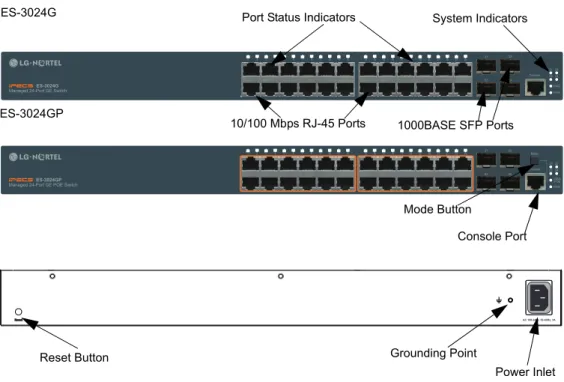
The ES-3024G and ES-3024GP are Gigabit Ethernet Layer 2 switches with 24 10/100/1000-BASE-T ports, and four Small Form Factor Pluggable (SFP) transceiver slots that operate in combination with ports 21~24 (see
Figure 1 on page 16, Ports 21-24). The ES-3024GP also provides PoE power to connected devices. The switches also include an SNMP-based management agent, which provides both in-band and out-of-band access for managing the switch.
Both switches provide a broad range of powerful features for Layer 2 switching, delivering reliability and consistent performance for your network traffic. They bring order to poorly performing networks by segregating them into separate broadcast domains with IEEE 802.1Q compliant VLANs, and empowers multimedia applications with multicast switching and CoS services.
Figure 1: Front and Rear Panels
AC 100-240V, 50-60Hz, 3A
ES-3024G
ES-3024GP
Port Status Indicators System Indicators
10/100 Mbps RJ-45 Ports 1000BASE SFP Ports
Reset Button Grounding Point
Power Inlet Console Port Mode Button
CHAPTER 1 | Introduction Switch Architecture
ES-3024G/3024GP
S
WITCH
A
RCHITECTURE
The switch employs a wire-speed, non-blocking switching fabric. This permits simultaneous wire-speed transport of multiple packets at low latency on all ports. The switch also features full-duplex capability on all ports, which effectively doubles the bandwidth of each connection. This switch uses store-and-forward switching to ensure maximum data integrity. With store-and-forward switching, the entire packet must be received into a buffer and checked for validity before being forwarded. This prevents errors from being propagated throughout the network.
N
ETWORK
M
ANAGEMENT
O
PTIONS
With a comprehensive array of LEDs, the switch provides “at a glance” monitoring of network and port status. The switch can be managed over the network with a web browser or Telnet application, or via a direct connection to the console port. The switch includes a built-in network management agent that allows it to be managed in-band using SNMP or RMON (Groups 1, 2, 3, 9) protocols. It also has an RJ-45 serial port (DB-9 connector) for out-of-band management. A PC may be connected to this port for configuration and monitoring out-of-band via the supplied RJ-45 to RS232 (DB-9 connector) serial cable.
For a detailed description of the management features, refer to the User Manual.
P
OWER
-
OVER
-E
THERNET
The first six ports (ports 1~6) of the ES-3024GP's 24 10/100/1000 Mbps ports support the IEEE802.3at Draft standard version that enables DC power to be supplied to attached devices using wires in the connecting Ethernet cable. The rest of the ES-3024GP's 24 10/100/1000 Mbps ports (ports 7~24) support the normal PoE (802.3af). The total PoE power delivered by all ports cannot exceed 185W power budget.
Any PoE-compliant device attached to a port can directly draw power from the switch over the Ethernet cable without requiring its own separate power source. This capability gives network administrators centralized power control for devices such as IP phones and wireless access points, which translates into greater network availability.
For each attached PoE-compliant device, the switch automatically senses the load and dynamically supplies the required power. The switch delivers power to a device using the wire pairs in UTP or STP cable. The first six ports on the switch can provide up to 30 W of power, while the remaining ports (ports 7~24) can provide 15.4W of power.
CHAPTER 1 | Introduction Description of Hardware ES-3024G/3024GP
D
ESCRIPTION
OF
H
ARDWARE
10/100/1000BASE-T
P
ORTSThe switch contains 24 Gigabit RJ-45 ports that operate at 10 Mbps or 100 Mbps, half or full duplex, or at 1000 Mbps, full duplex. Because these ports support automatic MDI/MDI-X operation, you can use straight-through cables for all network connections to PCs or servers, or to other switches or hubs.
Each of these ports supports auto-negotiation, so the optimum
transmission mode (half or full duplex), and data rate (10, 100 or 1000 Mbps) can be selected automatically. If a device connected to one of these ports does not support auto-negotiation, the communication mode of that port can be configured manually.
Each port also supports IEEE 802.3x auto-negotiation of flow control, so the switch can automatically prevent port buffers from becoming
saturated.
SFP T
RANSCEIVERS
LOTSThe Small Form Factor Pluggable (SFP) transceiver slots are shared with RJ-45 ports 21~24. In the default configuration, if an SFP transceiver (purchased separately) is installed in a slot and has a valid link on the port, the associated RJ-45 port is disabled. The switch can also be configured to force the use of an RJ-45 port or SFP slot, as required.
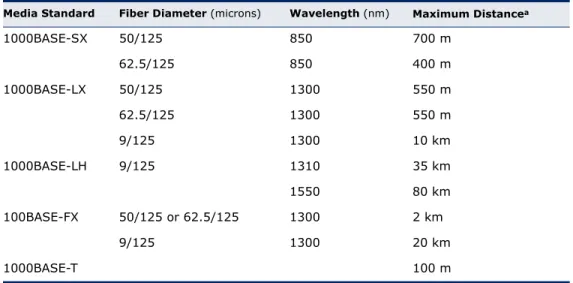
The following table shows a list of transceiver types which have been tested with the switch. For an updated list of vendors supplying these transceivers, contact your local dealer. For information on the
recommended standards for fiber optic cabling, see “Fiber Standards” on page 50.
Table 1: Supported SFP Transceivers
Media Standard Fiber Diameter (microns) Wavelength (nm) Maximum Distancea
a. Maximum distance may vary for different SFP vendors.
1000BASE-SX 50/125 850 700 m 62.5/125 850 400 m 1000BASE-LX 50/125 1300 550 m 62.5/125 1300 550 m 9/125 1300 10 km 1000BASE-LH 9/125 1310 35 km 1550 80 km 100BASE-FX 50/125 or 62.5/125 1300 2 km 9/125 1300 20 km 1000BASE-T 100 m
CHAPTER 1 | Introduction Description of Hardware
ES-3024G/3024GP
P
ORTANDS
YSTEMS
TATUSLED
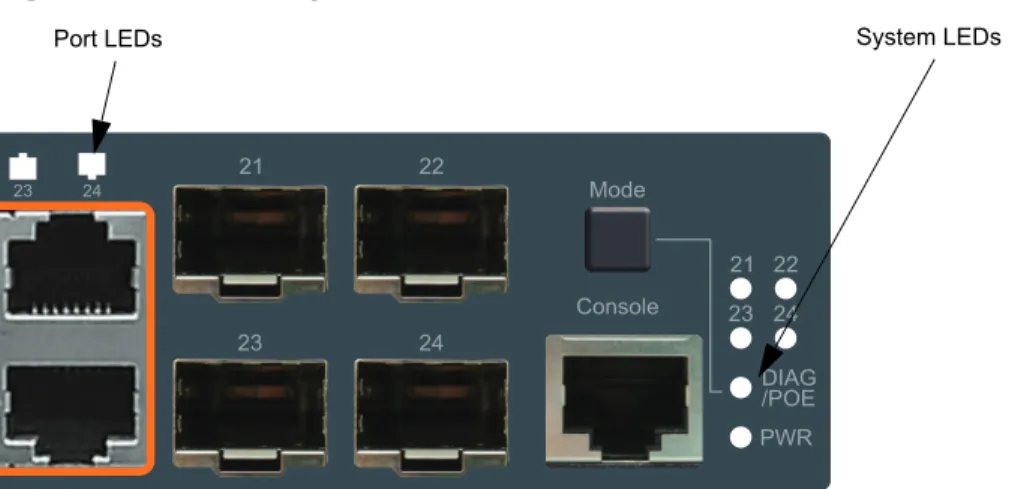
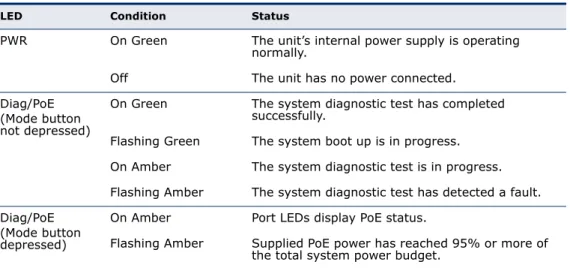
SThe switch includes a display panel for key system and port indications that simplify installation and network troubleshooting. The LEDs, which are located on the front panel for easy viewing, are shown below and described in the following tables.
Figure 2: Port and System LEDs
Table 2: Port Status LEDs
LED Condition Status
Gigabit Ethernet Ports (Ports 1-24) Link/Activity/
Speed (Mode button not depressed)
On/Flashing Amber Port has established a valid 10/100 Mbps network connection. Flashing indicates activity.
On/Flashing Green Port has established a valid 1000 Mbps network connection. Flashing indicates activity.
Off There is no valid link on the port. PoE Status
(Mode button is depressed)
On Amber A PoE device is connected. Off No PoE device is connected. SFP Gigabit Ethernet Ports (Ports 21-24)
(SFP Inserted) On Green A valid SFP transceiver is installed in the slot. Off No SFP transceiver is installed in the slot.
CHAPTER 1 | Introduction Description of Hardware
ES-3024G/3024GP
M
ODEB
UTTON When the Mode button is depressed, the port LEDs display PoE information.When the Mode button is not depressed, the port LEDs display link and activity information.
P
OWERS
UPPLYI
NLET There is one power inlet on the rear panel of the switch. The standardpower inlet is for the AC power cord.
Figure 3: Power Supply Inlet
G
ROUNDINGP
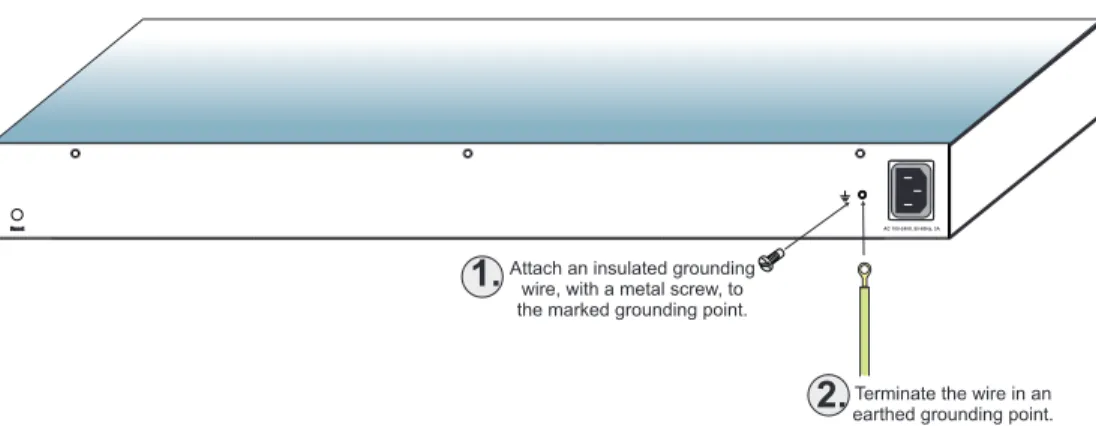
OINT To prevent accidental electrical shock or damage to your switch, it isrecommended that you ground the switch to an earth point by attaching a grounding wire (not supplied) to the grounding point located next to the power inlet, with a metal screw. If located in a tall building, grounding points include metal drain pipes, and other electrostatic conductive devices that lead to the ground, or if located on the first floor of a building, the ground outside itself.
Table 3: System Status LEDs
LED Condition Status
PWR On Green The unit’s internal power supply is operating normally.
Off The unit has no power connected. Diag/PoE
(Mode button not depressed)
On Green The system diagnostic test has completed successfully.
Flashing Green The system boot up is in progress. On Amber The system diagnostic test is in progress. Flashing Amber The system diagnostic test has detected a fault. Diag/PoE
(Mode button depressed)
On Amber Port LEDs display PoE status.
Flashing Amber Supplied PoE power has reached 95% or more of the total system power budget.
CHAPTER 1 | Introduction Description of Hardware
ES-3024G/3024GP
R
ESETB
UTTON If you encounter any switch malfunctions, such as a hang ornon-recoverable error, you might want to reset the switch to its default
configuration by pressing and holding the reset button for six seconds. The reset button is located on the rear panel on the opposing side of the power inlet.
Figure 4: Reset Button
C
ONSOLEP
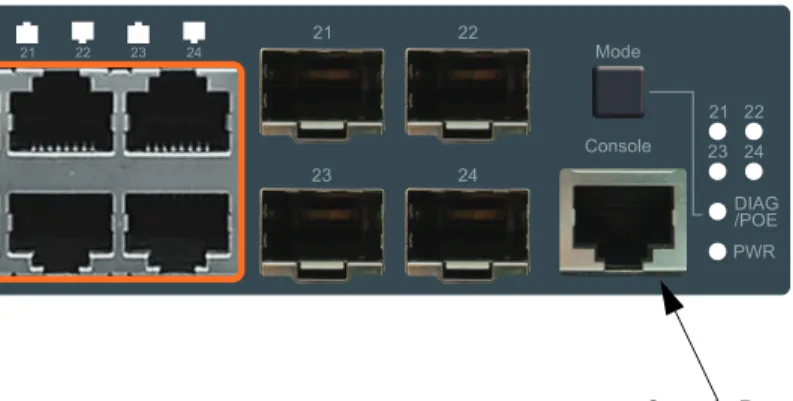
ORT This port is used to connect a console device to the switch through a serialcable. The console device can be a PC or workstation running a VT- 100 terminal emulator, or a VT-100 terminal. A crossover RJ-45 to DB-9 cable is supplied with the unit for connecting to the console port.
Figure 5: Console Port
ES-3024G/3024GP
2
N
ETWORK
P
LANNING
I
NTRODUCTION
T
O
S
WITCHING
A network switch allows simultaneous transmission of multiple packets via non-crossbar switching. This means that it can partition a network more efficiently than bridges or routers. The switch has, therefore, been recognized as one of the most important building blocks for today’s networking technology.
When performance bottlenecks are caused by congestion at the network access point (such as the network card for a high-volume file server), the device experiencing congestion (server, power user, or hub) can be attached directly to a switched port. And, by using full-duplex mode, the bandwidth of the dedicated segment can be doubled to maximize
throughput.
When networks are based on repeater (hub) technology, the distance between end stations is limited by a maximum hop count. However, a switch turns the hop count back to zero. So subdividing the network into smaller and more manageable segments, and linking them to the larger network by means of a switch, removes this limitation.
A switch can be easily configured in any Ethernet, Fast Ethernet, or Gigabit Ethernet network to significantly boost bandwidth while using conventional cabling and network cards.
A
PPLICATION
E
XAMPLES
The switches are not only designed to segment your network, but also to provide a wide range of options in setting up network connections. Some typical applications are described below.
C
OLLAPSEDB
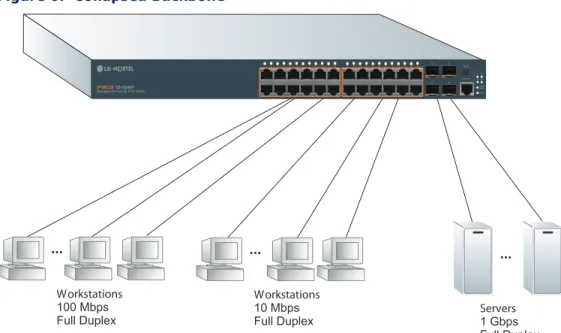
ACKBONEThe switches are an excellent choice for mixed Ethernet, Fast Ethernet, and Gigabit Ethernet installations where significant growth is expected in the near future. You can easily build on this basic configuration, adding direct full-duplex connections to workstations or servers. When the time comes for further expansion, just connect to another hub or switch using one of the Fast Ethernet ports, a Gigabit Ethernet port, or a plug-in SFP
transceiver on the front panel.
In the figure below, the ES-3024GP is operating as a collapsed backbone for a small LAN. It is providing dedicated 10 Mbps full-duplex connections
CHAPTER 2 | Network Planning Application Examples
ES-3024G/3024GP
to workstations, 100 Mbps full-duplex connections to power users, and 1 Gbps full-duplex connections to servers.
Figure 6: Collapsed Backbone
P
OE C
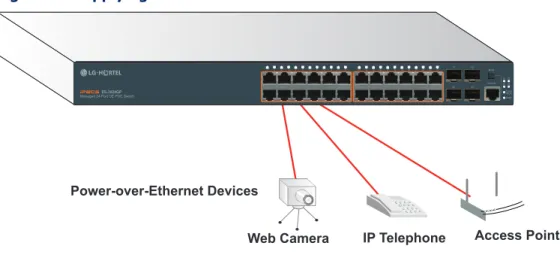
ONNECTIONS The ES-3024GP switch is an excellent choice for supplying power toconnected PoE devices such as web cameras, IP telephones, or access points.
The first six ports on the switch can provide up to 30 W of power to a connected device. The switch can supply 15.4 W simultaneously to 12 PoE devices among 24 Gigabit Ethernet ports, or 30 W simultanesously to six connected PoE devices. The total power can not exceed 185 W PoE power budget.
In the figure below, the switch is supplying power to three PoE devices. It is also providing dedicated 1000 Mbps full-duplex data connections to these devices. In addition, other non-PoE devices can be connected to the switch.
CHAPTER 2 | Network Planning Application Examples
ES-3024G/3024GP
Figure 7: Supplying PoE Power
N
ETWORKA
GGREGATIONP
LANWith 24 parallel bridging ports (i.e., 24 distinct collision domains), these switches can collapse a complex network down into a single efficient bridged node, increasing overall bandwidth and throughput.
In the figure below, the 10/100/1000BASE-T ports on the switch are providing 1000 Mbps connectivity for up to 24 segments, while the SFP ports are providing connectivity for two Gigabit segments.
Figure 8: Network Aggregation Plan
R
EMOTEC
ONNECTIONSWITHF
IBERC
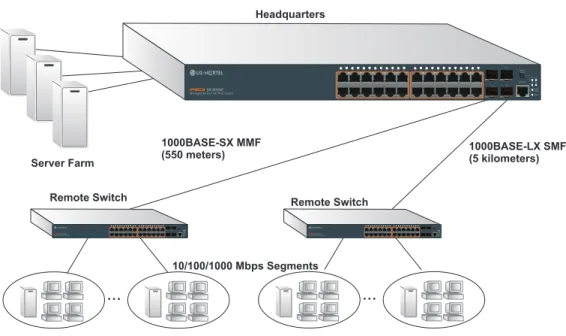
ABLEFiber optic technology allows for longer cabling than any other media type. A 1000BASE-SX (MMF) link can connect to a site up to 550 meters away, a 1000BASE-LX (SMF) link up to 5 km, a 1000BASE-LH link up to 70 km, and a 100BASE-FX (SMF) link up to 20 km. This allows the switches to serve as a collapsed backbone, providing direct connectivity for a widespread LAN. The figure below illustrates the ES-3024GP connecting multiple segments with fiber cable.
Power-over-Ethernet Devices
Web Camera IP Telephone Access Point
Server Farm 10/100/1000 Mbps Segments ... ... 1000 Mbps Segments
CHAPTER 2 | Network Planning Application Examples
ES-3024G/3024GP
Figure 9: Remote Connections with Fiber Cable
M
AKINGVLAN
C
ONNECTIONSThese switches support VLANs which can be used to organize any group of network nodes into separate broadcast domains. VLANs confine broadcast traffic to the originating group, and can eliminate broadcast storms in large networks. This provides a more secure and cleaner network environment. VLANs can be based on untagged port groups, or traffic can be explicitly tagged to identify the VLAN group to which it belongs. Untagged VLANs can be used for small networks attached to a single switch. However, tagged VLANs should be used for larger networks, and all the VLANs assigned to the inter-switch links.
Figure 10: Making VLAN Connections
NOTE: When connecting to a switch that does not support IEEE 802.1Q
VLAN tags, use untagged ports.
...
...
Headquarters 1000BASE-LX SMF (5 kilometers) Remote Switch 10/100/1000 Mbps Segments 1000BASE-SX MMF (550 meters) Remote Switch Server Farm 28 27 28 27 27 28 Finance Marketing VLAN 3Untagged Ports VLAN
unaware switch VLAN aware switch Finance VLAN 3 R&D VLAN 2 Testing R&D Testing VLAN 1 VLAN 2 VLAN 4 VLAN 1 Tagged Port Tagged Ports
CHAPTER 2 | Network Planning Application Notes
ES-3024G/3024GP
A
PPLICATION
N
OTES
1.
Full-duplex operation only applies to point-to-point access (such aswhen a switch is attached to a workstation, server, or another switch). When the switch is connected to a hub, both devices must operate in half-duplex mode.
2.
Avoid using flow control on a port connected to a hub unless it isactually required to solve a problem. Otherwise back pressure jamming signals may degrade overall performance for the segment attached to the hub.
3.
As a general rule the length of fiber optic cable for a single switched linkshould not exceed:
■ 1000BASE-SX: 550 m (1805 ft) for multimode fiber. ■ 1000BASE-LX: 5 km (3.1 miles) for single-mode fiber. ■ 1000BASE-LH: 70 km (43.5 miles) for single-mode fiber.
However, power budget constraints must also be considered when calculating the maximum cable length for your specific environment.
ES-3024G/3024GP
3
I
NSTALLING
THE
S
WITCH
This chapter describes how to install the switch.
S
ELECTING
A
S
ITE
◆ The site should:
■ be at the center of all the devices you want to link and near a power
outlet.
■ be able to maintain its temperature within 0 to 50 °C (32 to 122 °F)
and its humidity within 10% to 90%, non-condensing
■ provide adequate space (approximately two inches) on all sides for
proper air flow
■ be accessible for installing, cabling and maintaining the devices ■ allow the status LEDs to be clearly visible
◆ Make sure twisted-pair cable is always routed away from power lines, fluorescent lighting fixtures and other sources of electrical interference, such as radios and transmitters.
◆ Make sure that the unit is connected to a separate grounded power outlet that provides 100 to 240 VAC, 50 to 60 Hz, is within 2 m (6.6 feet) of each device and is powered from an independent circuit breaker. As with any equipment, using a filter or surge suppressor is recommended.
E
THERNET
C
ABLING
To ensure proper operation when installing the switch into a network, make sure that the current cables are suitable for 10BASE-T, 100BASE-TX, or 1000BASE-T operation. Check the following criteria against the current installation of your network:
◆ Cable type: Unshielded twisted pair (UTP) or shielded twisted pair (STP) cables with RJ-45 connectors; Category 3 or better for 10BASE-T, Category 5 or better for 100BASE-TX, and Category 5, 5e, or 6 for 1000BASE-T.
CHAPTER 3 | Installing the Switch Equipment Checklist
ES-3024G/3024GP
◆ Electrical surge suppression
◆ Separation of electrical wires (switch related or other) and electromagnetic fields from data based network wiring
◆ Safe connections with no damaged cables, connectors or shields
Figure 11: RJ-45 Connections
E
QUIPMENT
C
HECKLIST
After unpacking this switch, check the contents to be sure you have received all the components. Then, before beginning the installation, be sure you have all other necessary installation equipment.
◆ Managed 24-Port GE Switch (ES-3024G), or
◆ Managed 24-Port GE PoE Switch (ES-3024GP)
◆ RJ-45 to RS232 console cable
◆ Four adhesive foot pads
◆ Grounding screw
◆ Bracket Mounting Kit containing two brackets and eight screws for attaching the brackets to the switch
◆ Power Cord
◆ Quick Installation Guide
◆ Manual CD
CHAPTER 3 | Installing the Switch Optional Rack-Mounting Equipment
ES-3024G/3024GP
O
PTIONAL
R
ACK
-M
OUNTING
E
QUIPMENT
If you plan to rack-mount the switch, be sure to have the following equipment available:
◆ Four mounting screws for each device you plan to install in a rack— these are not included
◆ A screwdriver (Phillips or flathead, depending on the type of screws used)
M
OUNTING
The switch can be mounted in a standard 19-inch equipment rack or on a desktop or shelf. Mounting instructions for each type of site follow.
R
ACKM
OUNTING Before rack mounting the switch, pay particular attention to the followingfactors:
◆ Temperature: Since the temperature within a rack assembly may be higher than the ambient room temperature, check that the
rack-environment temperature is within the specified operating temperature range. (“Physical Characteristics” on page 51.)
◆ Mechanical Loading: Do not place any equipment on top of the rack-mounted unit.
◆ Circuit Overloading: Be sure that the supply circuit to the rack assembly is not overloaded.
◆ Grounding: Rack-mounted equipment should be properly grounded. Particular attention should be given to supply connections other than direct connections to the mains.
Figure 12: Grounding
AC 100-240V, 50-60Hz, 3A
Terminate the wire in an earthed grounding point. Attach an insulated grounding
wire, with a metal screw, to the marked grounding point.
1.
CHAPTER 3 | Installing the Switch Mounting
ES-3024G/3024GP
To rack-mount devices:
1.
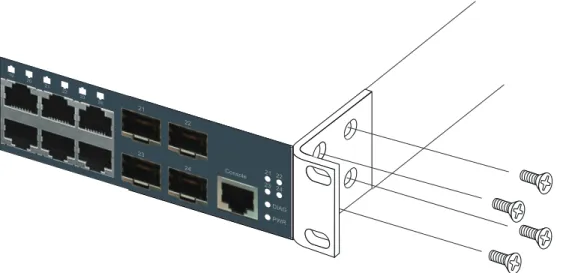
Attach the brackets to the device using the screws provided in theBracket Mounting Kit.
Figure 13: Attaching the Brackets
2.
Mount the device in the rack, using four rack-mounting screws (notprovided). Be sure to secure the lower rack-mounting screws first to prevent the brackets being bent by the weight of the switch.
28 27
CHAPTER 3 | Installing the Switch Mounting
ES-3024G/3024GP
Figure 14: Installing the Switches in a Rack
3.
If installing a single switch only, turn to “Connecting to a Power Source”on page 33 at the end of this chapter.
4.
If installing multiple switches, mount them in the rack, one below theCHAPTER 3 | Installing the Switch Installing an Optional SFP Transceiver
ES-3024G/3024GP
D
ESKTOPORS
HELFM
OUNTING1.
Attach the four adhesive feet to the bottom of the first switch.Figure 15: Attaching the Adhesive Feet
2.
Set the device on a flat surface near an AC power source, making surethere are at least two inches of space on all sides for proper air flow.
3.
If installing a single switch only, go to “Connecting to a Power Source”on page 33, at the end of this chapter.
4.
If installing multiple switches, attach four adhesive feet to each one.Place each device squarely on top of the one below, in any order.
I
NSTALLING
AN
O
PTIONAL
SFP T
RANSCEIVER
Figure 16: Installing an Optional SFP Transceiver into a Slot
28 27
CHAPTER 3 | Installing the Switch Connecting to a Power Source
ES-3024G/3024GP
The SFP slots support the following optional SFP transceivers:
■ 1000BASE-SX ■ 1000BASE-LX ■ 1000BASE-LH ■ 100BASE-FX
To install an SFP transceiver, do the following:
1.
Consider network and cabling requirements to select an appropriateSFP transceiver type.
2.
Insert the transceiver with the optical connector facing outward and theslot connector facing down. Note that SFP transceivers are keyed so they can only be installed in one orientation.
3.
Slide the SFP transceiver into the slot until it clicks into place.NOTE: SFP transceivers are hot-swappable. The switch does not need to be
powered off before installing or removing the transceiver. However, always first disconnect the network cable before removing the transceiver.
NOTE: SFP transceivers are not provided in the switch package.
C
ONNECTING
TO
A
P
OWER
S
OURCE
To connect a switch to a power source:
1.
Insert the power cable plug directly into the AC inlet located at the backof the switch.
Figure 17: Power Inlet
2.
Plug the other end of the cable into a grounded, 3-pin, AC powersource.
CHAPTER 3 | Installing the Switch Connecting to the Console Port
ES-3024G/3024GP
NOTE: For International use, you may need to change the AC line cord. You
must use a line cord set that has been approved for the wall socket type in your country.
3.
Check the front-panel LEDs as the device is powered on to be sure thePower LED is on green. If not, check that the power cable is correctly plugged in.
C
ONNECTING
TO
THE
C
ONSOLE
P
ORT
This port is used to connect a console device to the switch through a serial cable. The console device can be a PC or workstation running a VT-100 terminal emulator, or a VT-100 terminal. A crossover RJ-45 to DB-9 cable is supplied with the unit for connecting to the console port, as illustrated below. The PIN assignments used to connect to the serial port are described below.
Figure 18: Console Cable
W
IRINGM
APFORS
ERIALC
ABLEThe serial port’s configuration requirements are as follows:
■ Default Baud rate—115,200 bps ■ Character Size—8 Characters ■ Parity—None
RJ-45 Connector Console Port DB-9 Port aaa aaa aaa aaa aaa aaa
Table 4: Serial Cable Wiring
Switches 8-PIN Serial Port Null Modem PC’s 9-PIN DTE Port
6 RXD (receive data) <--- 3 TXD (transmit data) 3 TXD (transmit data) ---> 2 RXD (receive data) 5 SGND (signal ground) --- 5 SGND (signal ground)
CHAPTER 3 | Installing the Switch Connecting to the Console Port
ES-3024G/3024GP
■ Stop bit—One ■ Data bits—8
ES-3024G/3024GP
4
M
AKING
N
ETWORK
C
ONNECTIONS
C
ONNECTING
N
ETWORK
D
EVICES
The switches are designed to be connected to 10, 100, or 1000 Mbps network cards in PCs and servers, as well as to other switches and hubs. It may also be connected to remote devices using optional 1000BASE-SX, 1000BASE-LX, 1000BASE-LH, or 100BASE-FX SFP transceivers.
T
WISTED
-P
AIR
D
EVICES
Each device requires an unshielded twisted-pair (UTP) cable with RJ-45 connectors at both ends. Use Category 5, 5e, or 6 cable for 1000BASE-T connections, Category 5 or better for 100BASE-TX connections, and Category 3 or better for 10BASE-T connections.
P
OWER-
OVER-E
THERNETC
ONNECTIONSThe ES-3024GP switch automatically detects a PoE-compliant device by its authenticated PoE signature and senses its required load before turning on DC power to the port. This detection mechanism prevents damage to other network equipment that is not PoE compliant.
NOTE: Power-over-Ethernet connections work with all existing Category 3,
4, 5, 5e, or 6 network cabling, including patch cables and patch-panels, outlets, and other connecting hardware, without requiring modification. The switch delivers power to a device using the wire pairs in UTP or STP cable (RJ-45 pins 1, 2, 3, and 6). The switch can provide up to 30 W of power continuously on each of the first six ports. If a device tries to draw more than 30 W from a port, an overload condition occurs and the port disables the power. The rest of the ES-3024GP’s 24 10/100/1000 Mbps ports (ports 7 ~ 24) support the normal PoE (802.3af), which can provide up to 15.4 W of power.
The switch controls the power and data on a port independently. Power can be requested from a device that already has a data link to the switch. Also, the switch can supply power to a device even if the port’s data connection has been disabled. The power on a port is continuously monitored by the switch and it will be turned off as soon as a device connection is removed.
CHAPTER 4 | Making Network Connections Twisted-Pair Devices
ES-3024G/3024GP
C
ABLINGG
UIDELINES The RJ-45 ports on the switches support automatic MDI/MDI-X pinoutconfiguration, so you can use standard straight-through twisted-pair cables to connect to any other network device (PCs, servers, switches, routers, or hubs).
See “Cables and Pinouts” on page 46 for further information on cabling.
CAUTION: Do not plug a phone jack connector into an RJ-45 port. This will
damage the switch. Use only twisted-pair cables with RJ-45 connectors that conform to FCC standards.
C
ONNECTINGTOPC
S,
S
ERVERS, H
UBS,
ANDS
WITCHES1.
Connect one end of a twisted-pair cable segment to the device’s RJ-45connector.
Figure 19: Making-Twisted-Pair Connections
2.
If the device is a network card and the switches are in the wiring closet,connect the other end of the cable segment to a modular wall outlet that is connected to the wiring closet. (See “Network Wiring
Connections” on page 38.) Otherwise, connect the other end of the cable segment directly to an available port on the switch.
Make sure each twisted pair cable does not exceed 100 meters (328 ft) in length.
CHAPTER 4 | Making Network Connections Twisted-Pair Devices
ES-3024G/3024GP
NOTE: Avoid using flow control on a port connected to a hub unless it is
actually required to solve a problem. Otherwise back pressure jamming signals may degrade overall performance for the segment connected to the hub.
3.
As each connection is made, the Link LED (on the switch)corresponding to each port will turn on (green or amber) to indicate that the connection is valid.
N
ETWORKW
IRINGC
ONNECTIONSToday, the punch-down block is an integral part of many of the newer equipment racks. Actually it is a part of the patch panel. Instructions for making connections in the wiring closet with this type of equipment follows.
1.
Attach one end of a patch cable to an available port on the switch, andthe other end to the patch panel.
2.
If not already in place, attach one end of a cable segment to the backof the patch panel where the punch-down block is located, and the other end to a modular wall outlet.
3.
Label the cables to simplify future troubleshooting. See “Cable LabelingCHAPTER 4 | Making Network Connections Fiber Optic SFP Devices
ES-3024G/3024GP
Figure 20: Network Wiring Connections
F
IBER
O
PTIC
SFP D
EVICES
An optional Gigabit SFP (1000BASE-SX, 1000BASE-LX, 1000BASE-LH, or 100BASE-FX) transceiver can be used for a backbone connection between switches, or for connecting to a high-speed server.
Each single-mode fiber port requires 9/125 micron single-mode fiber optic cable with an LC connector at both ends. Each multimode fiber optic port requires 50/125 or 62.5/125 micron multimode fiber optic cabling with an LC connector at both ends.
Equipment Rack
(side view)
Switch
Patch Panel
Punch-Down Block
Wall
28 27CHAPTER 4 | Making Network Connections Fiber Optic SFP Devices
ES-3024G/3024GP
WARNING: These switches use lasers to transmit signals over fiber optic
cable. The lasers are compliant with the requirements of a Class 1 Laser Product and are inherently eye safe in normal operation. However, you should never look directly at a transmit port when it is powered on.
WARNING: When selecting a fiber SFP device, considering safety, please
make sure that it can function at a temperature that is not less than the recommended maximum operational temperature of the product. You must also use an approved Laser Class 1 SFP transceiver.
1.
Remove and keep the LC port’s rubber plug. When not connected to afiber cable, the rubber plug should be replaced to protect the optics.
2.
Check that the fiber terminators are clean. You can clean the cableplugs by wiping them gently with a clean tissue or cotton ball moistened with a little ethanol. Dirty fiber terminators on fiber optic cables will impair the quality of the light transmitted through the cable and lead to degraded performance on the port.
3.
Connect one end of the cable to the LC port on the switch and the otherend to the LC port on the other device. Since LC connectors are keyed, the cable can be attached in only one orientation.
Figure 21: Making Fiber Port Connections
4.
As a connection is made, check the Link LED on the switchcorresponding to the port to be sure that the connection is valid. The 1000BASE-SX, 1000BASE-LX, 1000BASE-LH fiber optic ports operate at 1 Gbps, full duplex, with auto-negotiation of flow control. The maximum length for fiber optic cable operating at Gigabit speed will depend on the fiber type as listed under “1000 Mbps Gigabit Ethernet Collision Domain” on page 41.
CHAPTER 4 | Making Network Connections Connectivity Rules
ES-3024G/3024GP
The 100BASE-FX fiber optic ports operate at 100 Mbps, full duplex, with auto-negotiation of flow control. The maximum length for fiber cable operating at 100 Mbps is listed under “100 Mbps Fast Ethernet Collision Domain” on page 42.
C
ONNECTIVITY
R
ULES
When adding hubs (repeaters) to your network, please follow the
connectivity rules listed in the manuals for these products. However, note that because switches break up the path for connected devices into
separate collision domains, you should not include the switch or connected cabling in your calculations for cascade length involving other devices.
1000BASE-T C
ABLER
EQUIREMENTSAll Category 5 UTP cables that are used for 100BASE-TX connections should also work for 1000BASE-T, providing that all four wire pairs are connected. However, it is recommended that for all critical connections, or any new cable installations, Category 5e (enhanced Category 5) or
Category 6 cable should be used. The Category 5e and 6 specifications include test parameters that are only recommendations for Category 5. Therefore, the first step in preparing existing Category 5 cabling for running 1000BASE-T is a simple test of the cable installation to be sure that it complies with the IEEE 802.3-2005 standards.
1000 M
BPSG
IGABITE
THERNETC
OLLISIOND
OMAINTable 5: Maximum 1000BASE-T Gigabit Ethernet Cable Length
Cable Type Maximum Cable Length Connector
Category 5, 5e, or 6 100-ohm UTP or STP 100 m (328 ft) RJ-45
Table 6: Maximum 1000BASE-SX Gigabit Ethernet Cable Lengths Fiber Size Fiber Bandwidth Maximum Cable Length Connector
62.5/125 micron multimode fiber 160 MHz/km 2-220 m (7-722 ft) LC 200 MHz/km 2-275 m (7-902 ft) LC 50/125 micron multimode fiber 400 MHz/km 2-500 m (7-1641 ft) LC 500 MHz/km 2-550 m (7-1805 ft) LC
Table 7: Maximum 1000BASE-LX Gigabit Ethernet Cable Length
Fiber Size Fiber Bandwidth Maximum Cable Length Connector
9/125 micron
CHAPTER 4 | Making Network Connections Cable Labeling and Connection Records
ES-3024G/3024GP
100 M
BPSF
ASTE
THERNETC
OLLISIOND
OMAIN10 M
BPSE
THERNETC
OLLISIOND
OMAINC
ABLE
L
ABELING
AND
C
ONNECTION
R
ECORDS
When planning a network installation, it is essential to label the opposing ends of cables and to record where each cable is connected. Doing so will enable you to easily locate inter-connected devices, isolate faults and change your topology without need for unnecessary time consumption. To best manage the physical implementations of your network, follow these guidelines:
◆ Clearly label the opposing ends of each cable.
◆ Using your building’s floor plans, draw a map of the location of all network-connected equipment. For each piece of equipment, identify the devices to which it is connected.
◆ Note the length of each cable and the maximum cable length supported by the switch ports.
◆ For ease of understanding, use a location-based key when assigning prefixes to your cable labeling.
Table 8: Maximum 1000BASE-LH Gigabit Ethernet Cable Length Fiber Size Fiber Bandwidth Maximum Cable Length Connector
9/125 micron
single-mode fiber N/A 2 m - 70 km (7 ft - 43.5 miles) LC
Table 9: Maximum 100BASE-FX Cable Length
Type Fiber Type Max. Cable Length Connector
100BASE-FX 9/125 micron single-mode
fiber 2 m - 20 km(7 ft - 12.43 miles) LC 62.5/125 or 50/125
multimode fiber up to 2 km (1.24 miles) LC
Table 10: Maximum Fast Ethernet Cable Length
Type Cable Type Max. Cable Length Connector
100BASE-TX Category 5 or better 100-ohm
UTP or STP 100 m (328 ft) RJ-45
Table 11: Maximum Ethernet Cable Length
Type Cable Type Max. Cable Length Connector
CHAPTER 4 | Making Network Connections Cable Labeling and Connection Records
ES-3024G/3024GP
◆ Use sequential numbers for cables that originate from the same equipment.
◆ Differentiate between racks by naming accordingly.
◆ Label each separate piece of equipment.
◆ Display a copy of your equipment map, including keys to all abbreviations at each equipment rack.
ES-3024G/3024GP
A
T
ROUBLESHOOTING
D
IAGNOSING
LED I
NDICATORS
P
OWER
AND
C
OOLING
P
ROBLEMS
If the power indicator does not turn on when the power cord is plugged in, you may have a problem with the power outlet, power cord, or internal power supply. However, if the unit powers off after running for a while, check for loose power connections, power losses, or surges at the power outlet. If you still cannot isolate the problem, the internal power supply may be defective.
I
NSTALLATION
Verify that all system components have been properly installed. If one or more components appear to be malfunctioning (such as the power cord or network cabling), test them in an alternate environment where you are sure that all the other components are functioning properly.
Table 12: LED Indicators
LED Status Action
Power LED is Off ◆ Check connections between the switch, the power cord, and the wall outlet.
◆ Contact your dealer for assistance. Diag LED is Flashing
Amber ◆ Power cycle the switch to try and clear the condition. ◆ If the condition does not clear, contact your dealer for
assistance.
Link LED is Off ◆ Verify that the switch and attached device are powered on. ◆ Be sure the cable is plugged into both the switch and
corresponding device.
◆ If the switch is installed in a rack, check the connections to the punch-down block and patch panel.
◆ Verify that the proper cable type is used and its length does not exceed specified limits.
◆ Check the adapter on the attached device and cable connections for possible defects. Replace the defective adapter or cable if necessary.
APPENDIX A | Troubleshooting In-Band Access
ES-3024G/3024GP
I
N
-B
AND
A
CCESS
You can access the management agent in the switch from anywhere within the attached network using a web browser, or other network management software tools. However, you must first configure the switch with a valid IP address, subnet mask, and default gateway. If you have trouble
establishing a link to the management agent, check to see if you have a valid network connection. Then verify that you entered the correct IP address. Also, be sure the port which you are connecting to the switch has not been disabled. If it has not been disabled, then check the network cabling that runs between your remote location and the switch.
CAUTION: The management agent can accept up to four simultaneous
Telnet sessions. If the maximum number of sessions already exists, an additional Telnet connection will not be able to log into the system.
ES-3024G/3024GP
B
C
ABLES
AND
P
INOUTS
T
WISTED
-P
AIR
C
ABLE
A
SSIGNMENTS
For 10/100BASE-TX connections, a twisted-pair cable must have two pairs of wires. For 1000BASE-T connections the twisted-pair cable must have four pairs of wires. Each wire pair is identified by two different colors. For example, one wire might be green and the other, green with white stripes. Also, an RJ-45 connector must be attached to both ends of the cable.
NOTE: Each wire pair must be attached to the RJ-45 connectors in a specific
orientation.
CAUTION: DO NOT plug a phone jack connector into the RJ-45 port. Use
only twisted-pair cables with RJ-45 connectors that conform with FCC standards.
The following figure illustrates how the pins on the RJ-45 connector are numbered. Be sure to hold the connectors in the same orientation when attaching the wires to the pins.
Figure 22: RJ-45 Connector
10/100BASE-TX P
INA
SSIGNMENTSUse unshielded twisted-pair (UTP) or shielded twisted-pair (STP) cable for RJ-45 connections: 100-ohm Category 3 or better cable for 10 Mbps connections. Also be sure that the length of any twisted-pair connection does not exceed 100 meters (328 feet).
The RJ-45 ports on the switch support automatic MDI/MDI-X operation, so you can use straight-through or crossover cables for all network
connections to PCs, switches, or hubs. In straight-through cable, pins 1, 2, 3, and 6, at one end of the cable, are connected straight through to pins 1, 2, 3, and 6 at the other end of the cable.
8
1
1
APPENDIX B | Cables and Pinouts Twisted-Pair Cable Assignments
ES-3024G/3024GP
S
TRAIGHT-T
HROUGHW
IRINGIf the twisted-pair cable is to join two ports and only one of the ports has an internal crossover (MDI-X), the two pairs of wires must be straight-through. (When auto-negotiation is enabled for any RJ-45 port on this switch, you can use either straight-through or crossover cable to connect to any device type.)
You must connect all four wire pairs as shown in the following diagram to support Gigabit Ethernet connections.
Figure 23: Straight Through Wiring
Table 13: 10/100BASE-TX MDI and MDI-X Port Pinouts
PIN MDI Signal Namea
a. The “+” and “-” signs represent the polarity of the wires that make up each wire pair.
MDI-X Signal Name
1 Transmit Data plus (TD+)
-52V power (Negative Vport) Receive Data plus (RD+)GND (Positive Vport) 2 Transmit Data minus (TD-)
-52V power (Negative Vport)
Receive Data minus (RD-) GND (Positive Vport)
3 Receive Data plus (RD+)
GND (Positive Vport) Transmit Data plus (TD+)-52V power (Negative Vport) 4 -52V power (Negative Vport) GND (Positive Vport) 5 -52V power (Negative Vport) GND (Positive Vport)
6 Receive Data minus (RD-) GND (Positive Vport)
Transmit Data minus (TD-) -52V power (Negative Vport)
7 GND (Positive Vport) -52V power (Negative Vport) 8 GND (Positive Vport) -52V power (Negative Vport)
White/Orange Stripe Orange White/Green Stripe Green 1 2 3 4 5 6 7 8 1 2 3 4 5 6 7 8 EIA/TIA 568B RJ-45 Wiring Standard
10/100BASE-TX Straight-Through Cable
End A End B
Blue White/Blue Stripe
Brown White/Brown Stripe
APPENDIX B | Cables and Pinouts Twisted-Pair Cable Assignments
ES-3024G/3024GP
C
ROSSOVERW
IRING If the twisted-pair cable is to join two ports and either both ports arelabeled with an “X” (MDI-X) or neither port is labeled with an “X” (MDI), a crossover must be implemented in the wiring. (When auto-negotiation is enabled for any RJ-45 port on this switch, you can use either straight-through or crossover cable to connect to any device type.)
You must connect all four wire pairs as shown in the following diagram to support Gigabit Ethernet connections.
Figure 24: Crossover Wiring
1000BASE-T P
INA
SSIGNMENTSAll 1000BASE-T ports support automatic MDI/MDI-X operation, so you can use straight-through cables for all network connections to PCs or servers, switches or hubs.
The table below shows the 1000BASE-T MDI and MDI-X port pinouts. These ports require that all four pairs of wires be connected. Note that for
1000BASE-T operation, all four pairs of wires are used for both transmit and receive.
Use 100-ohm Category 5, 5e or 6 unshielded twisted-pair (UTP) or shielded twisted-pair (STP) cable for 1000BASE-T connections. Also be sure that the length of any twisted-pair connection does not exceed 100 meters
(328 feet). White/Orange Stripe Orange White/Green Stripe 1 2 3 4 5 6 7 8 1 2 3 4 5 6 7 8 EIA/TIA 568B RJ-45 Wiring Standard
10/100BASE-TX Crossover Cable
EndA End B Green Blue White/Blue Stripe Brown White/Brown Stripe