INDIGO Help Desk Response to the Client Satisfaction with the
Indigo Help Desk
Contents
INDIGO Help Desk Response to the Client Satisfaction with the Indigo Help Desk ... 1
Introduction ... 1
Methodology ... 2
Survey results ... 3
Key findings ... 3
Graph 1 – Enquiries by User Type for Periods Jan-Jun in 2010 and 2011 ... 5
INDIGO Usage ... 6
INDIGO Help Desk Usage ... 6
Suggestions ... 7
Table 1 - 2011 Suggestions: ... 8
Table 2 - 2011 Action Items ... 8
Table 3 - 2010 Action Items ... 9
Appendix A – 2011 Questionnaire ... 11
Appendix B – Demographic Data ... 18
Appendix C – INDIGO Usage & Help Desk Usage ... 19
Appendix D – Online Resources ... 20
Appendix E – Client Satisfaction Data ... 22
Appendix F – Suggestions ... 27
Introduction
INDIGO is the Indigenous Education Online system used by DEEWR to manage
agreements, payments and associated reporting for Indigenous Education program
elements. The INDIGO Help Desk provides support to both DEEWR officers and
external Providers who seek assistance when using the INDIGO system.
The INDIGO Help Desk ran an online satisfaction survey over July and August 2011 to
determine how effectively they meet the needs of INDIGO users. In addition to
collecting client satisfaction data, the survey also gathered information about client
preferences when using the Help Desk and suggestions to improve the INDIGO Help
Desk service. A copy of the survey questionnaire is available at
Appendix A
. The key
findings from the 2010 survey, together with users’ suggestions, the department’s
responses and subsequent actions to improve our service, are available
on the
INDIGO page on the DEEWR website
.
Methodology
The survey was conducted online and there were 220 respondents of which 198
completed the survey. In statistical terms, with a sample size of 198 respondents and
a population size of 2038 INDIGO users, where
86 per cent
of respondents indicate
they are
satisfied
, we can be
95 per cent
confident that
81 to 90 per cent
of the
whole population are
satisfied
. The relative standard error (RSE) of the survey result
is low (2.6%), thereby making the data presented in this report reliable and a
reasonable basis on which to consider future decision making in relation to the Help
Desk service.
Just under half of the respondents were Performance Reporting Provider users,
approximately one third were DEEWR officers and the remainder were Provider
users split between IYLP and IYMP. Further demographic information about the
respondents is available at
Appendix B
, including the distribution of respondents
across states/territories and metropolitan/regional/remote areas.
For the purpose of this report, client satisfaction is defined as the sum of those
respondents that indicated ‘very satisfied’ and ‘satisfied’, or ‘strongly agree’ and
‘agree’ to the client satisfaction statements. For more detailed data please refer to
Appendix C
.
Survey results
Key findings
Overall,
86 per cent
of clients were
satisfied
with the service provided by the INDIGO
Help Desk. We note that a slightly higher percentage of DEEWR officers reported
overall satisfaction than Provider users (
88 per cent compared to 84 per cent
).
Clients were also asked to respond to a range of specific statements about the Help
Desk service. Their responses in rank order from highest to lowest level of
agreement were as follows:
89 per cent
agreed ‘The INDIGO Help Desk staff were
courteous
when dealing
with me’
87 per cent
agreed ‘The INDIGO Help Desk staff were able to
answer or resolve
my query or problem’
86 per cent
agreed ‘I generally
achieved my original objective
when contacting
the INDIGO Help Desk’
86 per cent
agreed ‘The INDIGO Help Desk staff
understood
my query or
problem’
85 per cent
agreed ‘The INDIGO Help Desk staff were
knowledgeable
about
INDIGO’
83 per cent
agreed ‘My INDIGO Help Desk problem or query was resolved in a
timely manner
’
82 per cent
agreed
‘The explanation I received from the INDIGO Help Desk staff
was
easy to understand
’
Just under half
(48 per cent) of all survey respondents indicated they were
very
satisfied
with a particular aspect of the service. In most cases, respondents identified
a particular task or enquiry with which they had received assistance. The
courteousness of Help Desk staff was also identified by several respondents.
Other highlights were also noted, such as the depth of understanding of staff,
thoroughness, clarity of advice and the prompt response times. A selection of client
comments about the facets of the service with which respondents were
most
satisfied
follows:
‘My query was dealt with in a professional and friendly manner. Their guidance was
'spot on'! Thank you for the great service.’
‘The turn-around time was fantastic’
‘Training assistance and clear processes in timely turnaround’
‘The INDIGO Help Desk Officer knowledge of INDIGO was exceptional. They knew
what I was talking about and how to resolve my query’
‘I am new to the Indigo reporting system; the staff were very patient and obliging
with my queries’
Only
one per cent
of respondents identified an aspect of the Help Desk service with
which they were
least satisfied
. Clients providing a response were most commonly
least satisfied with the advice or training they had received on how to complete
online Performance Reports.
INDIGO Task Cards and Videos (step-by-step guides) are available on the DEEWR
intranet to assist DEEWR staff in the use of various functions in INDIGO. Of the
85
DEEWR officers
responding to the survey,
84 per cent
were aware of the Task Cards
and
40 per cent
were aware of the Videos associated with some Task Cards.
Those DEEWR officers aware of the Task Cards and Videos had used them to varying
degrees:
Task Cards
24 per cent had never used the Task Cards
14 per cent had used the Task Cards once
51 per cent had used the Task Cards 2-10 times
11 per cent had used the Task Cards more than 10 times
89 per cent
of the DEEWR officers that used the Task Cards found them
helpful
.
Videos
71 per cent had never used the Videos
21 per cent had used the Videos once
9 per cent had used the Videos 2-10 times
80 per cent
of the DEEWR officers that used the Videos found them
helpful
.
Management Response:
The INDIGO Business Support Team (IBST) is very pleased with the 2011 results. The
results verify that the INDIGO Help Desk continued to deliver a high quality service to
INDIGO users and that strategies employed from the 2010 survey results to further
improve the level of service were effective.
We note that in 2010 there were 20 per cent of respondents who identified an aspect
of the INDIGO Help Desk service with which they were least satisfied; in 2011 this
number decreased to one per cent of respondents. Given that we received 2167
enquiries on the INDIGO Help Desk between 1 January 2011 and 31 July 2011, the
results show that the vast majority of Help Desk clients are satisfied with the service
they receive.
Training materials: The comments of dissatisfaction from Provider users relate to
issues with completing online Performance Reports. To address this, the IBST
published a number of Task Cards (step-by-step guides) on both the external DEEWR
website and our DEEWR intranet (dnet) for Provider users on how to complete online
Performance Reports. The link to this information is provided below:
http://www.deewr.gov.au/indigenous/resources/pages/indigo.aspx
Video versions of these Task Cards (step-by-step guides) are also available on our
DEEWR intranet (dnet) page for DEEWR officers to disseminate to Provider users. The
IBST will continue to develop and publish further training resources for INDIGO users.
Volume of enquiries: Graph 1 (below) indicates the number of DEEWR users vs.
Provider users (where ‘Provider users’ includes IYLP, IYMP, and Performance
Reporting Provider users) who contacted the INDIGO Help Desk with an enquiry
between 1
stJanuary and 31
stJuly for the years 2010 and 2011 (55 per cent DEEWR
users vs. 45 per cent Provider users in 2010 & 66 per cent DEEWR Users vs. 34 per
cent Provider users in 2011). In both years, the usual peak of enquiries associated
with completing Performance Reports and Financial Acquittals (due 31 May) are
evident, however the total volume of queries in the 2011 period are significantly
reduced from that of 2010 (2,937 enquiries in 2010, compared to 2,167 in 2012 (26
per cent less enquiries).
Graph 1 – Enquiries by User Type for Periods Jan-Jun in 2010 and 2011
Training delivery: The need to increase training resources was identified in the 2010
Help Desk Survey response. A number of regular INDIGO training sessions were
implemented in 2011 to address this issue. As a result, the volume of enquiries
received on the INDIGO Help Desk in 2011 from both DEEWR users and Provider users
decreased. DEEWR users showed the most significant decrease (43 per cent on
average) which coincides with the INDIGO training delivered to DEEWR users from
March – June of 2011.
0 50 100 150 200 250 300 350 400 450 N o . o f E n q u ir ie sEnquiries by User Type for Periods Jan-Jun
in 2010 and 2011
2010 DEEWR User 2010 Provider User 2011 DEEWR User 2011 Provider User
Help Desk Staffing: The need for an increased presence on the Help Desk was also
noted in the 2010 Help Desk Survey. As a result, the IBST implemented a new phone
system in the second half of 2010 to increase the number of calls we could answer, as
well as completed recruitment actions to provide additional Help Desk support. The
2011 Survey Response shows that despite having only two full-time staff to provide
Help Desk service (with part time support from other staff) the level of satisfaction of
users improved. With possible reductions in staff resources, further improvement in
levels of satisfaction is unlikely. While any staffing reduction would lead to an
increase in occasions where the Help Desk is not staffed (e.g. due to conducting
training exercises or staff absences due to illness), the IBST will endeavour to
maximise the availability of the Help Desk during operating hours.
INDIGO Usage
There was wide variation in the frequency of INDIGO usage in 2011 among
respondents:
22 per cent were daily users
13 per cent were weekly users
6 per cent were fortnightly users
12 per cent were monthly users
20 per cent were quarterly users
14 per cent were bi-annual
1users
These results are comparable to the 2010 usage values.
Management Response:
The system usage results above further illustrate the diversity and complexity of user
circumstance and experience with which the INDIGO Help Desk staff must engage to
provide a quality service to all INDIGO users.
INDIGO Help Desk Usage
40 percent
of respondents indicated their preference for contacting the Help Desk
depended on the type of query,
33 per cent
preferred contacting the Help Desk by
phone,
22 per cent
preferred email, and
4 per cent
did not have a preference.
Of those respondents that phoned the INDIGO Help Desk over the last 6 months the
frequency of calling was as follows:
5 per cent called weekly
8 per cent called fortnightly
19 per cent called monthly
21 per cent called quarterly
16 per cent called bi-annually
Of those respondents that emailed the INDIGO Help Desk over the last 6 months the
frequency of emailing was as follows:
2 per cent emailed weekly
5 per cent emailed fortnightly
17 per cent emailed monthly
29 per cent emailed quarterly
13 per cent emailed bi-annually
Compared to the 2010 Help Desk usage, the number of quarterly calls and emails has
reduced by nearly
50 per cent
. The frequency of weekly, fortnightly, monthly and
bi-annual
2calls and emails in 2011 is comparable to the 2010 values.
Management Response:
The Help Desk Usage results show that the preferred means of contact for INDIGO
users is via phone. As illustrated in many of the comments from users, they prefer to
resolve issues as quickly as possible and find that by talking to someone they can
either resolve the issue immediately or obtain advice as to when/how the issue will
be resolved.
Suggestions
Respondents offered a range of suggestions to improve the INDIGO Help Desk
service:
Increase the availability of staff to answer queries by phone
Be aware and support the need of users in different times zones
On page help/support
Performance Reporting reminders
Ongoing INDIGO training and refresher courses for INDIGO users
Automatic transfer of data/details from INDIGO to the Grants Register
For the full list of respondents’ suggestions refer to
Appendix F.
Management Response:
The IBST agrees that many of the suggested changes from INDIGO users can be used
to frame further direction for improvements to the INDIGO Help Desk service. The
IBST has categorised the Help Desk survey suggestions in the table below (Table 1 –
2011 Suggestions).
2
Table 1 - 2011 Suggestions:
Suggestion Category
Total
INDIGO Help Desk Responses
7
Contract information for Providers
3
INDIGO information sharing practices
2
INDIGO Help Desk Operating Hours
3
INDIGO Passwords
1
Staff Resources
10
INDIGO System
7
INDIGO Training / User Documentation
13
Grand Total
46
There were 46 suggestions provided out of a total of 220 respondents. In addition,
28 respondents provided affirmation that the Help Desk was providing a great
service and to continue the good work.
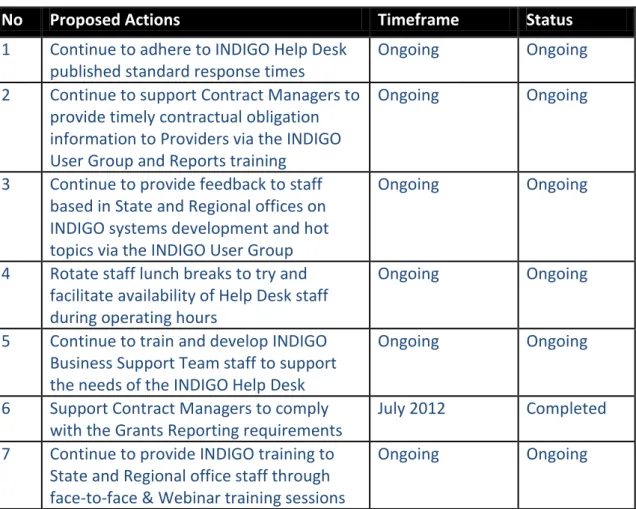
From the above user suggestions the IBST proposed the following actions (Table 2 –
2011 Action Items):
Table 2 - 2011 Action Items
No
Proposed Actions
Timeframe
Status
1
Continue to adhere to INDIGO Help Desk
published standard response times
Ongoing
Ongoing
2
Continue to support Contract Managers to
provide timely contractual obligation
information to Providers via the INDIGO
User Group and Reports training
Ongoing
Ongoing
3
Continue to provide feedback to staff
based in State and Regional offices on
INDIGO systems development and hot
topics via the INDIGO User Group
Ongoing
Ongoing
4
Rotate staff lunch breaks to try and
facilitate availability of Help Desk staff
during operating hours
Ongoing
Ongoing
5
Continue to train and develop INDIGO
Business Support Team staff to support
the needs of the INDIGO Help Desk
Ongoing
Ongoing
6
Support Contract Managers to comply
with the Grants Reporting requirements
July 2012
Completed
7
Continue to provide INDIGO training to
State and Regional office staff through
face-to-face & Webinar training sessions
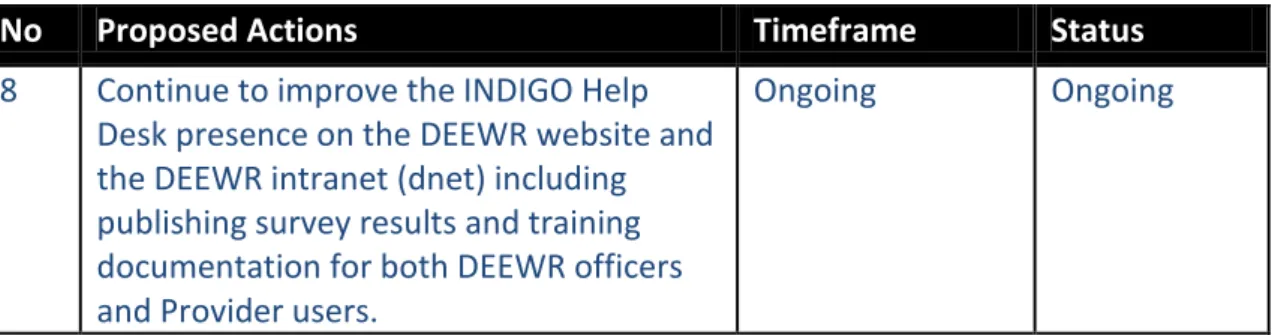
No
Proposed Actions
Timeframe
Status
8
Continue to improve the INDIGO Help
Desk presence on the DEEWR website and
the DEEWR intranet (dnet) including
publishing survey results and training
documentation for both DEEWR officers
and Provider users.
Ongoing
Ongoing
For a full list of respondents’ suggestions and INDIGO Help Desk responses please
see
Appendix F.
Table 3 - 2010 Action Items
No
Proposed Actions
Timeframe
Status (Aug
2012)
1
Review automated INDIGO
correspondence
September 2010
Completed
2
Discuss contract management preferences
regarding first point of contact (contract
manager vs. INDIGO Help Desk) for system
related issues with the User Group
Next User Group
meeting
Completed
3
Alerting the User Group and Contract
Managers to the Agreement Event
Tracking Report
September 2010
Completed
4
Improve the INDIGO Help Desk presence
on the DEEWR website and the DEEWR
Intranet (dnet) including publish survey
results
April 2011
Completed
5
Refer suggestion to the relevant business
area
September 2010
Completed
6
Continual development of the INDIGO
Help Desk staff through training including
INDIGO Business Support Team
workshops
Ongoing
Ongoing
7
Review INDIGO Help Desk Operating
Hours in line with team resources
As resources
change
Ongoing
8
Review the current timeframe for
password expiry and extend to 12 months
October 2010
Completed
(change not
possible)
9
Review the current password reset
practice
October 2010
Completed
(change not
possible)
10
Refer the suggestion to the IETA Business
Process Redesign Consultation
October 2010
Completed
11
Progress recruitment strategy for INDIGO
Business Support Team
As resources
change
No
Proposed Actions
Timeframe
Status (Aug
2012)
12
Develop training strategy for INDIGO
following from IETA Business Process
Redesign Consultancy and in line with
relevant program area training strategies
April 2011
Ongoing
13
Review Work Region Management
strategy including advising users to
contact the INDIGO Help Desk if current
Work Region structure is not appropriate
Appendix A – 2011 Questionnaire
INDIGO Help Desk Satisfaction Survey
INDIGO is the Indigenous Education Online system used by DEEWR to manage
agreements, payments and associated reporting for Indigenous Education program
elements. The INDIGO Help Desk team provides support to both DEEWR officers and
external Providers who seek assistance when using the INDIGO system.
The INDIGO Help Desk team runs a satisfaction survey annually to assess how
effectively they meet the needs of INDIGO users. The feedback you provide will be
used to guide improvements to the Help Desk service.
The key findings of last year’s survey, together with users’ suggestions, the
department’s responses and subsequent actions to improve our service, is available
here
. Thanks again to those who contributed to last year’s survey.
This survey will take approximately 5 to 10 minutes to complete.
The information you provide will remain private and confidential. To complete the
survey now select the ‘next page’ button below.
Questions
1. In which
state or territory
do you
work
?
o
ACT
o
NSW
o
NT
o
QLD
o
SA
o
TAS
o
VIC
o
WA
2. Select the category which best represents the location of your
place of work
:
o
Metropolitan
o
Rural/Provincial
o
Remote
o
Very remote
3. How
often
have
you logged
onto INDIGO
over the last six months
?
Select the option which best represents your usage.
o
Daily
o
Weekly
o
Fortnightly
o
Monthly
o
Quarterly
o
Yearly
4. Ideally, do you
prefer to call or email
the
INDIGO Help Desk
with your enquiries?
o
Call
o
o
It depends on the type of enquiry
o
No particular preference
5. How
often
have
you emailed
the INDIGO Help Desk
over the last six months
?
Select the option which best represents your frequency of emailing the Help Desk.
o
Never
o
Daily
o
Weekly
o
Fortnightly
o
Monthly
o
Quarterly
o
Yearly
6. How
often
have
you called
the INDIGO Help Desk
over the last six months
?
Select the option which best represents your frequency of calling the Help Desk.
o
Never
o
Daily
o
Weekly
o
Fortnightly
o
Monthly
o
Quarterly
o
Yearly
7. Select the category which best represents your
user type in INDIGO
:
o
DEEWR Officer user ---go to question 8
o
Provider user---go to question 16
o
IYMP Provider user---go to question 16
o
IYLP Provider user---go to question 16
o
Yes
o
No
o
Unsure
If you answered ‘No’ or ‘Unsure’ and would like to know more about Task Cards,
follow this link
http://dnet.hosts.network/services/indigenous/Pages/INDIGO.aspx
to the INDIGO Services page on dnet, and in the
INDIGO Help
section, click on the
INDIGO Documentation
link.
9.
How often
have you used the
Task Cards
for INDIGO over the last six months?
o
Never (go to question 16)
o
Once
o
More than once, but less than ten times
o
More than ten times
10.
Which Task Card(s)
have you used?
Performance Reports
o
PR-01P How to ACCESS a Performance Report
o
PR-02P How to ENTER Performance Report Data
o
PR-03P How to REVIEW and SUBMIT Performance Report
o
PR-04P How to COMPLETE the IIR review of a Performance Report
o
PR-01D How to DEEWR REVIEW Performance Reports
o
PR-02D How to RECORD a Delegate’s decision re Performance Reports
PaCE Task Cards
o
PCE-01 How to CREATE and REGISTER a PaCE Proposal Brief
o
PCE-02 How to SEARCH for a PaCE Proposal Brief
o
PCE-03 How to RECOMMEND a PaCE Proposal Brief
o
PCE-04 How to APPROVE a PaCE Proposal Brief
o
PCE-05 How to CREATE a PaCE Draft Initiative
o
PCE-06 How to REPORT on PaCE Proposal Briefs
Agreement/Contract Task Cards
o
AGR-01 How to SEARCH for an Agreement
o
AGR-02 How to CREATE an Agreement
o
AGR-03 How to CREATE a Schedule
o
AGR-04 How to CREATE an Initiative
o
AGR-05 How to ADD an Event Diary Template
o
AGR-06 How to ADD or EDIT a MILESTONE Event
o
AGR-07 How to ADD or EDIT a Schedule PAYMENT Event
o
AGR-09 How to ADD or EDIT Entitlements for Project Based Program
Elements
o
AGR-10 How to ADD or EDIT Entitlements for Per Capita Based
Program Elements
o
AGR-16 How to EXECUTE an Agreement or Schedule
o
AGR-17 How to APPROVE Entitlements
o
AGR-18 How to ACTION an ADD Schedule Payment Work Item
o
AGR-19 How to PROCESS a payment
o
AGR-25 How to VARY an Agreement or Schedule
o
AGR-31 How to SELECT a Payment Arrangement
Client Task Cards
o
CLI-01 How to SEARCH for a Client
o
CLI-02 How to ADD an Organisation Client
o
CLI-03 How to ADD or Edit Client Payment Arrangements
o
CLI-04 How to ADD an Individual Client
Ad Hoc Claim Task Cards
o
AHC-01 How to CREATE an AD HOC CLAIM
o
AHC-02 How to SEARCH for an AD HOC CLAIM
o
AHC-03 How to PROCESS an AD HOC CLAIM
o
AHC-04 How to ACQUIT an AD HOC CLAIM
Accounting Task Cards
o
INV-01 How to SEARCH for an INVOICE
Reports Task Cards
o
RPT-01 How to RUN a REPORT
Indigenous Remote Service Delivery Traineeships Task Cards
o
IRSDT-01 How to CREATE an Indigenous Traineeship Schedule
o
IRSDT-02 How to ADD or EDIT an Indigenous Traineeship Claim
Free text
11.
How helpful
do you find the
Task Cards
for INDIGO?
o
Very helpful
o
Somewhat helpful
o
Neither helpful or unhelpful
o
Somewhat unhelpful
12. Are you
aware of the Videos
associated with some Task Cards for INDIGO users
on the DEEWR intranet?
o
Yes
o
No
o
Unsure
Videos (virtual tours through INDIGO) of Task Cards are being developed and
published progressively to dnet. If you answered ‘No’ or ‘Unsure’ and would like to
know more about these Videos, click on this
INDIGO Documentation
link.
13.
How often
have you used the
Videos
for INDIGO over the last six months?
o
Never (go to question 16)
o
Once
o
More than once, but less than ten times
o
More than ten times
14.
Which Video(s)
have you used?
o
PR-01P Video How to ACCESS a Performance Report
o
PR-02P Video How to ENTER Performance Report Data
o
PR-03P Video How to REVIEW and SUBMIT Performance Report
o
PR-04P Video How to COMPLETE the IIR review of a Performance
Report
o
PR-01D Video How to DEEWR REVIEW Performance Reports
o
PR-02D Video How to Record a Delegate’s decision re Performance
Reports
Free text
15.
How helpful
do you find the
Videos
for INDIGO?
o
Very helpful
o
Somewhat helpful
o
Neither helpful or unhelpful
o
Somewhat unhelpful
o
Very unhelpful
16. The following questions relate to
experiences during any contact
you had with
the INDIGO Help Desk staff over the last six months.
(If you have not had contact with the INDIGO Help Desk staff over the last six months
please leave this question blank and proceed to the next question.)
Considering all your experiences with the INDIGO Help Desk staff over the last six
months please indicate how much you
agree or disagree
with the following
statements
.
Strongly
disagree Disagree
Neither
agree
nor
disagree
Agree
Strongly
agree
a) The INDIGO Help Desk staff
understood
my query or problem
□
□
□
□
□
b) The INDIGO Help Desk staff
were able to
answer or resolve
my query or problem
□
□
□
□
□
c) The INDIGO Help Desk staff
were
knowledgeable
about
INDIGO
□
□
□
□
□
d) The explanation I received from
the INDIGO Help Desk staff was
easy to understand.
□
□
□
□
□
e) My INDIGO Help Desk problem
or query was resolved in a
timely
manner
□
□
□
□
□
f) The INDIGO Help Desk staff
were
courteous
when dealing
with me
□
□
□
□
□
g) I generally
achieved my original
objective
when contacting the
INDIGO Help Desk
□
□
□
□
□
17. Now thinking about the service you received from the INDIGO Help Desk,
how
satisfied were you overall
?
o
Very dissatisfied
o
Dissatisfied
o
Neither satisfied nor dissatisfied
o
Satisfied
o
Very satisfied
18. What advice or experience with the INDIGO Help Desk were you
least satisfied
with?
19. What advice or experience with the INDIGO Help Desk were you
most satisfied
with?
Free text
20. Do you have any suggestions for
improving the service
provided by the INDIGO
Help Desk?
Free text
Appendix B – Demographic Data
As some questions in the survey were not mandatory there are differences in the
number of respondents (population size = n) recorded against the results below.
Table 1: Number (Count) and Distribution (%) of respondents across states and
territories
State/Territory
Count
%
Australian Capital Territory
27
12.3%
New South Wales
79
35.9%
Northern Territory
28
12.7%
Queensland
33
15.0%
South Australia
14
6.4%
Tasmania
7
3.2%
Victoria
18
8.2%
Western Australia
14
6.4%
n=220 (respondents who answered this question)
Table 2: Number (Count) and Distribution (%) of respondents by user type
User type
Count
%
DEEWR officer
85
39.2%
IYLP
8
3.7%
IYMP
17
7.8%
Provider (performance reporting)
107
49.3%
n=217 (respondents who answered this question)
Table 3: Number (Count) and Distribution (%) of respondents by user type by state
and territory
DEEWR
officer
IYLP
IYMP
Provider
(performance
reporting)
Australian Capital Territory
24 (10.9%) 2 (0.9%)
0 (0%)
1 (0.5%)
New South Wales
19 (8.6%)
4 (1.8%)
2 (0.9%)
52 (23.6%)
Northern Territory
18 (8.2%)
0 (0.0%)
0 (0.0%)
10 (4.5%)
Queensland
5 (2.3%)
2 (0.9%)
5 (2.3%)
21 (9.5%)
South Australia
7 (3.2%)
0 (0.0%)
4 (1.8%)
3 (1.4%)
Tasmania
3 (1.4%)
0 (0.0%)
1 (0.5%)
3 (1.4%)
Victoria
4 (1.8%)
1 (0.5%)
2 (0.9%)
10 (4.5%)
Western Australia
5 (2.3%)
1 (0.5%)
1 (0.5%)
7 (3.2%)
n=217 (respondents who answered this question)
Table 4: Number (Count) and Distribution (%) of respondents by level of remoteness
Level of remoteness
Count
%
Metropolitan
92
47%
Rural/Provincial
82
38%
Appendix C – INDIGO Usage & Help Desk Usage
Chart 1: Frequency of INDIGO Usage
n = 194
Chart 2: INDIGO Help Desk Contact Preference
n=220
49 29 12 27 45 32 0 10 20 30 40 50 60Daily Weekly Fortnightly Monthly Quarterly Yearly
73 50 88 9 0 10 20 30 40 50 60 70 80 90 100
Call Email It depends on the type of enquiry
No particular preference
Appendix D – Online Resources
Chart 1:
Awareness
of
Task Cards
and
Video
resources available for DEEWR users
n=84
Chart 2:
Frequency
of use of
Task Cards
and
Video
resources available for DEEWR
users
71 34 13 50 0 10 20 30 40 50 60 70 80Task Cards Videos
Aware Not aware 17 10 36 8 24 7 3 0 5 10 15 20 25 30 35 40
Never Once More than once, but less than ten
times
More than ten times
Task cards Videos
Chart 3: Response to ‘
How helpful
do you find the
Task Cards
and
Videos
for
INDIGO’?
n=54 (Task Cards) & n=10 (Videos)
29 19 4 2 5 3 2 0 5 10 15 20 25 30 35Very helpful Somewhat helpful Neither helpful nor unhelpful Somewhat unhelpful Very unhelpful Task Cards Videos
Appendix E – Client Satisfaction Data
Chart 1a: Overall satisfaction of respondents with the service received from the
INDIGO Help Desk (Count)
n=201
Chart 1b: Overall satisfaction of respondents with the service received from the
INDIGO Help Desk by user type (Count)
n=198
97 76 26 2 0 0 20 40 60 80 100 120Very satisfied Satisfied Neither satisfied nor dissatisfied
Dissatisfied Very dissatisfied
50 17 8 1 35 48 16 1 2 3 1 7 8 1 0 10 20 30 40 50 60
Very satisfied Satisfied Neither satisfied nor dissatisfied dissatisfied DEEWR Officer Provider user IYLP IYMP
Chart 2a: Response to the statement ‘The INDIGO Help Desk staff
understood
my
query or problem’ (Count)
n=181
Chart 2b: Response to the statement ‘The INDIGO Help Desk staff were able to
answer or resolve
my query or problem’ (Count)
n=181
63 92 19 2 5 0 10 20 30 40 50 60 70 80 90 100Strongly agree Agree Neither agree nor disagree
Disagree Strongly disagree
71 87 16 2 5 0 10 20 30 40 50 60 70 80 90 100
Strongly agree Agree Neither agree nor disagree
Chart 2c: Response to the statement ‘The INDIGO Help Desk staff were
knowledgeable
about INDIGO’ (Count)
n=181
Chart 2d: Response to the statement ‘The explanation I received from the INDIGO
Help Desk staff was
easy to understand
’ (Count)
n=180
72 81 20 3 5 0 10 20 30 40 50 60 70 80 90Strongly agree Agree Neither agree nor disagree
Disagree Strongly disagree
68 80 26 1 5 0 10 20 30 40 50 60 70 80 90
Strongly agree Agree Neither agree nor disagree
Chart 2e: Response to the statement ‘My INDIGO Help Desk problem or query was
resolved in a
timely manner
’ (Count)
n=182
Chart 2f: Response to the statement ‘The INDIGO Help Desk staff were
courteous
when dealing with me’ (Count)
n=181
69 82 23 4 4 0 10 20 30 40 50 60 70 80 90Strongly agree Agree Neither agree nor disagree
Disagree Strongly disagree
88 73 16 0 4 0 10 20 30 40 50 60 70 80 90 100
Strongly agree Agree Neither agree nor disagree
Chart 2g: Response to the statement ‘I generally
achieved my original objective
when contacting the INDIGO Help Desk’
n=179
74 80 18 3 4 0 10 20 30 40 50 60 70 80 90Strongly agree Agree Neither agree nor disagree
Appendix F – Suggestions
Suggestion Category
Suggestion User Type Response Action
Item No. INDIGO Help
Desk Response
job log numbers published standard response times
Performance Reporting Provider
The INDIGO Help Desk implemented a new phone system in the second half of 2010 to better manage the enquiries received on the INDIGO Help Desk. Where a Help Desk Operator is not available users are given an option to leave a voice mail message. Currently there are two full-time Help Desk Operators, with support provided by other team members on a part-time basis. The Help Desk aims to respond to all enquiries on the day received or at least within 1 business day, as stated in the Help Desk auto-response email that acknowledges receipt of an email/voice mail. Where response times are likely to be longer (e.g. due to the nature of the enquiry, complexity of the issue, or staff absences), a notification will be sent (via email or phone) to the user. Ongoing updates on the progression of the issue are provided until the matter has been resolved. The INDIGO Help Desk keeps a record of all Help Desk enquiries through an internal record keeping system so job identification numbers can be provided to users upon request.
No further action Maybe have better answering
services
DEEWR officer
INDIGO Help Desk Response
staff could work on being more contactable as at times we as a service had trouble firstly reaching someone and then getting them to return the call
Performance Reporting Provider
The INDIGO Help Desk implemented a new phone system in the second half of 2010 to better manage the enquiries received on the INDIGO Help Desk. Where a Help Desk Operator is not available users are given an option to leave a voice mail message. Currently there are two full-time Help Desk Operators, with support provided by other team members on a part-time basis. The Help Desk operating hours
Suggestion Category
Suggestion User Type Response Action
Item No. Yes they need to be able to
answer the phone especially when it is time for our reports to be in.
are 8.30 am to 5.00 pm (AEST) Monday to Friday and is not routinely closed at lunch time. The Help Desk aims to respond to all enquiries on the day received or at least within 1 business day, as stated in the Help Desk auto-response email that acknowledges receipt of an email/voice mail. Where response times are likely to be longer (e.g. due to the nature of the enquiry, complexity of the issue, or staff absences), a notification will be sent (via email or phone) to the user. Ongoing updates on the progression of the issue are provided until the matter has been resolved.
INDIGO Help Desk Response
At times when i rang the service i was not rang back to the following day. This was an inconvienece as i work in a preschool and only have certain times in the office to get things done. Time is very important and when it taked a whole day for someone to assist me with my query it can be frustrating
Performance Reporting Provider
Currently there are two full-time Help Desk Operators, with support provided by other team members on a part time basis. The Help Desk operating hours are 8.30 am to 5.00 pm (AEST) Monday to Friday and is not routinely closed at lunch time. The INDIGO Help Desk aims to respond to all enquiries on the day received or at least within 1 business day, as stated in the Help Desk auto-response email that acknowledges receipt of an email/voice mail. Where response times are likely to be longer (e.g. due to the nature of the enquiry,
complexity of the issue, or staff absences), a notification will be sent (via email or phone) to the user. Ongoing updates on the progression of the issue are provided until the matter has been resolved.
1
better timed responses
Suggestion Category
Suggestion User Type Response Action
Item No. Contract
information for Providers
Continued support of schools and provided up to date information on what is going on
Performance Reporting Provider
DEEWR Contract Managers are responsible for advising Providers of any issues relating to their contract, and Providers are responsible for managing their contractual requirements. Queries relating to your contract should be directed to your DEEWR Contract Manager who can run reports from INDIGO to identify any compliance issues on request. INDIGO is configured to send correspondence reminders for Performance Reports for some programs. This correspondence is sent to Provider users 30 days, 14 days and 1 day before the Performance Report is due and 14 days after the Performance Report is due. If you do not currently receive this alert for your program you should contact your DEEWR Contract Manager to discuss.
2
Monitoring the annual budget I am still having trouble with however I am not sure of any improvements
It would be helpful if we were sent more reminders for Performance Reporting prior to the closing date
INDIGO Information Sharing Practices
send or email more information regarding the process for logging the paperwork
DEEWR officer Task Cards (step-by-step guides) are published on both the external DEEWR website and our intranet (dnet) for Provider users on how to complete online Performance Reports.
8
INDIGO Information Sharing Practices
The INDIGO working group will be a useful way for staff based in State and Regional offices to give feedback on INDIGO and what is working and what needs to be looked at.
DEEWR officer User Group Meetings are scheduled bi-monthly. 3
INDIGO Help Desk Operating Hours
To be able to contact the help desk during the hours that are stated the the help desk is available
Performance Reporting Provider
Help Desk Operators stagger their lunch breaks to try and cover the Help Desk as much as possible during our core operating hours (8:30 am to 5:00 pm (AEST) Monday to Friday). Unfortunately, due to reduced staff resources across the department, it is not always possible for a Help Desk Operator to be available. The INDIGO Help
Suggestion Category
Suggestion User Type Response Action
Item No. have the service desk pph
operating all day including time differences for central and west time.
DEEWR officer Desk aims to respond to all enquiries on the day received or at least within 1 business day, as stated in the Help Desk auto-response email that acknowledges receipt of an email/voice mail. Voice mail messages are always treated as a high priority for response. In
acknowledgement of time differences, especially in summer, emails and messages left after INDIGO Help Desk hours by WA users are given priority the next morning to ensure that all users receive a response within one business day wherever possible.
INDIGO Help Desk Operating Hours
Be aware and supply the needs of different time zones e.g. WA
Performance Reporting Provider
In acknowledgement of time differences, especially in summer, emails and messages left after INDIGO Help Desk hours by WA users are given priority the next morning to ensure that all users receive a response within one business day wherever possible.
No further action
INDIGO Passwords
Password last for at least one year
Performance Reporting Provider
User passwords for INDIGO and a range of departmental applications are managed through a central system. This system does not allow for INDIGO to specify a different password expiry time than other
applications. The INDIGO Help Desk reviewed the timeframe for password expiry and found that it is not possible to extend the expiry to 12 months. The current password expiry is 6 months.
No further action
Staff Resources Keep it human, I prefer to still talk to persons over the phone
Performance Reporting Provider
The INDIGO Help Desk is aware of the peak periods of work for DEEWR Officers and Provider users. Unfortunately, due to reduced staff resources across the department, there are only two full-time Help Desk Operators, with support provided by other team members on a part time basis. The INDIGO Help Desk aims to respond to all enquiries on the day received or at least within 1 business day, as stated in the
Suggestion Category
Suggestion User Type Response Action
Item No. just be there for us Help Desk auto-response email that acknowledges receipt of an
email/voice mail. Where response times are likely to be longer (e.g. due to the nature of the enquiry, complexity of the issue, or staff absences), a notification will be sent (via email or phone) to the user. Ongoing updates on the progression of the issue are provided until the matter has been resolved. The Help Desk Operators appreciate the importance of being able to speak directly over the phone about queries and endeavour to support this service through our core operating hours 8:30 am to 5:00 pm (AEST) Monday to Friday. More staff for peak periods. DEEWR officer
Only the usual issue of lack of staff when you ring with a query and this has been over a long period of time and an issue becoming increasingly difficult to resolve.
I prefer phone contact rather than email and sometimes this can be difficult depending on demands I suppose that the Indigo Help Desk Staff have at any given time.
Staff Resources More staff for the INDIGO help desk team.
DEEWR officer We acknowledge that more staff would be well received.
Unfortunately, due to reduced staff resources across the department, there are only two full-time Help Desk Operators, with support provided by other team members on a part time basis. The INDIGO Help Desk aims to respond to all enquiries on the day received or at least within 1 business day, as stated in the Help Desk auto-response email that acknowledges receipt of an email/voice mail. Where response times are likely to be longer (e.g. due to the nature of the
No further action
More staff
Suggestion Category
Suggestion User Type Response Action
Item No. See question 13. The only way
to improve any Help Desk service is to have it staffed all the time and only go to answering service if all operators are busy. This may mean more staff are required as I understand Help Desk staff don't just answer the phone and our queries. ALL Help Desk staff over many years have always been very good at providing solutions to
sometimes very basic queries.
enquiry, complexity of the issue, or staff absences), a notification will be sent (via email or phone) to the user. Ongoing updates on the progression of the issue are provided until the matter has been resolved.
Staff Resources Maintain your experienced staff
DEEWR officer The INDIGO Business Support Team will continue to invest in the ongoing development of training documents and staff training to ensure that our team members are well equipped, knowledgeable and able to provide a quality Help Desk service.
5
INDIGO System The actual system could be easier to use.
Performance Reporting Provider
The INDIGO Business Support Team (IBST) constantly reviews the system functionality and seeks advice/input from DEEWR User Group members at the bi-monthly meetings on ways to improve the user interface for DEEWR users and Provider users. Changes to the system are limited by staff numbers and budget resources. Users are
encouraged to call or email any ideas/suggestions to the INDIGO Help Desk on (02) 6240 8852 or email [email protected]
No further action
Suggestion Category
Suggestion User Type Response Action
Item No. INDIGO System Allow the up load of additional
information as attachements where necessary to validate programs
Performance Reporting Provider
The Comments facility in Performance Reports allows for tables and other formatted data to be copied and pasted or entered and
formatted directly. Text can be spell-checked in Word before copying and pasting into INDIGO. The facility to upload attachments would require a significant change to the system and put pressure on database space, so the proposal is not currently supported by the INDIGO Business Support Team (IBST) given the existing functionality, our limited staff and budget resources.
No further action Not the help desk but the
program itself If the Indigo program could include a spell check and to be able to bold font
It would be helpful if there was a way of uploading statistical data from our student management system
AVETMISS files or similar rather that sorting data manually INDIGO System There would be less work for
the helpdesk if the errors in INDIGO that create incorrect payments were fixed.
DEEWR officer Incorrect payments in INDIGO can only be attributed to the Agreement Schedule or Initiative being set up incorrectly by the Contract Manager. The INDIGO Business Support Team can investigate any system errors if further details are provided.
No further action
Suggestion Category
Suggestion User Type Response Action
Item No. INDIGO System This suggestion isn't so much
about improving the service more so a suggestion with regards to a possible automatic transfer of data/details from INDIGO to the Grants Register. Maybe a tick in the box system which allows the information to be automatically linked to the Grants Register
DEEWR officer This request will be implemented in the July 2012 production release as part of addressing the IETA Business Process Re-design Consultancy recommendations.
6
INDIGO System My only concern was that I was unable to print the reports from Indigo.
Performance Reporting Provider
Performance Reports can be printed from the Provider Performance Reporting module in INDIGO. To-date there have been no issues raised with this functionality for users using Internet Explorer. The INDIGO Help Desk is happy to investigate any issues with printing reports if further details can be provided.
No further action INDIGO Training / User Documentation
On-going training seminars please
IYLP Provider The program areas are expected to provide training to Provider users on performing actions in INDIGO related to their program. The INDIGO Help Desk can assist program areas to provider webinar training sessions upon request. Provider users should liaise with their contract manager regarding training needs.
No further action
Train regional staff/contract managers about INDIGO.
Performance Reporting Provider
Performance Reports are designed in line with the program
requirements outlined by Program Managers. The program areas are expected to provide training to Provider users on performing actions in INDIGO related to their program. Task Cards (step-by-step guides) and Video simulations are published on the DEEWR Intranet (dnet) to assist Performance Reporting Provider users to complete their online
8 training be provided for new
users
on page help or examples of how to answer the questions
Suggestion Category
Suggestion User Type Response Action
Item No. New Director should be able to
use business email for password contact. Provide training days for Report and data entry at the end of 2011.
Performance Reports in INDIGO. These videos can be emailed to Providers upon request. The Task Cards are also available on the DEEWR website. Performance Reporting Provider users should contact their relevant Contract Manager if they have any queries regarding questions in the Performance Reports. Other training documentation is also available to DEEWR users on our DEEWR intranet. The IBST also provides training sessions throughout the course of the year for DEEWR users on how to use INDIGO. Users are encouraged to contact the Help Desk for any additional assistance. Note: PaCE Proposal Briefs are completed by DEEWR Officers (this functionality is not linked to Performance Reporting Provider users)
more information on how to use the system. It was very difficult to navigate for the first time
More refreshing training for user as we don't use INDIGO every day. When it is time to do reporting I forget some of the steps and need to contact the Help Desk, but if we have refresher training i may not need to contact the INDIGO help desk.
IYMP Provider user
The program areas are expected to provide training to Provider users on performing actions in INDIGO related to their program. The INDIGO Help Desk can assist program areas to provider webinar training sessions upon request. Provider users should liaise with their contract manager regarding training needs.
No further action
Suggestion Category
Suggestion User Type Response Action
Item No. I think it would be very helpful
for ACT schools to receive an email detailing all the videos (e.g. how to draft a PACE proposal) and online "How Tos" to available services. I had no idea that this valuable, comprehensive list of
resources was available until I participated in this survey.
DEEWR officer The PaCE Proposal Brief functionality in INDIGO is restricted to DEEWR Officers as a DEEWR Officer should draft the proposal (in consultation with the proponent) and submit it to their delegate. As such, training materials regarding this process are not available for external users (e.g. “ACT schools” as requested).
No further action INDIGO Training / User Documentation
Indigo to do come out into community/regions to do workshops with organisations, contractors and parents re: Indigo reporting.
DEEWR officer The INDIGO Business Support Team is continually developing training materials (Task Cards and Videos) that are published on the DEEWR Intranet (dnet) to assist DEEWR users to complete the online Performance Reports in INDIGO. A number of INDIGO Webinar Training sessions have also been planned, which can be booked through Connect. We also have the capacity to use remote access to logon to DEEWR users PC’s and provide on screen training support. Users are encouraged to contact the Help Desk for any additional assistance.
7
Annual INDIGO workshop to State Office to develop, refresh knowledge. Allow for hands on interaction for INDIGO staff, and exposure reciprocated around issues concerned with system.
Suggestion Category
Suggestion User Type Response Action
Item No. I like calling with a problem
while it's 'hot' operationally, that is, to let me get to the next step. The Help Desk has always assisted to get to the next step. The team makes themselves approachable and easy to communicate with, that's very much appreciated. I also like that they take the time to conduct training updates by visiting annually. That's very valuable because it provides first hand information, helps to set the overall scene, it
provides interpersonal
interaction, and builds rapport and understanding of each others needs and services. The reference materials are also good. Keep up the good work. As noted above, just keep reinforcing open
Suggestion Category
Suggestion User Type Response Action
Item No. online INDIGO training
I havent been along to the training and feel maybe that would help my knowlege base of the INDIGO system. There are gaps in my understandings of the INDIGO system