Imperial College London
BrowserAudit
A web application that tests the security of browser implementations
Charlie Hothersall-Thomas
Supervisor: Dr. Sergio Maffeis
June 2014
Submitted in part fulfilment of the requirements for the degree of
Bachelor of Engineering in Computing
The World Wide Web now reaches billions of users worldwide. It is used to run a wide range of applications for which security and privacy are essential. Web security is difficult. Even when a web developer follows all best security practices when developing and hosting his application, this is not always enough: he must still rely on his users to use a secure web browser when accessing his application. Whilst all web developers must assume that their users’ browsers implement standard security features that have existed for many years, many of today’s web applications also make use of modern security features that are also important.
The web browser world is incredibly diverse. Given any browser, it is difficult to determine precisely which browser security features it correctly implements. We explore a novel approach to browser security testing by automatically assessing the security of a browser with a web application. The resulting application, BrowserAudit, is able to test the security features of a browser by carefully combining the server- and client-side of the application. This means that we can assess the security of a browser by visiting a webpage. We face two key challenges in this project. Firstly, given a browser security feature, we must determine how best to test its implementation. We must then find a method to automatically test the feature in a way that works in all major browsers, with no input or interaction required from the user.
Our web application is able to automatically assess the security of most browsers with good accuracy. As a proof of its usefulness, BrowserAudit identifies two security bugs in the latest version of Mozilla Firefox. Looking towards the future, we propose many addi-tional security features that BrowserAudit could test, as well as discussing the possibility of open sourcing the application to invite other developers to build upon our existing test coverage.
I would like to thank my supervisor, Dr. Sergio Maffeis, for proposing the project and providing me with constant support, motivation and inspiration throughout. His feedback on a draft version of this report was invaluable. I am also grateful that Sergio was happy to provide funding for the long-term hosting of the application, as well as the necessary domain names and SSL certificates. Thanks also to my family and friends (both those at Imperial College London and those from home) for their ongoing and unconditional support throughout my time here.
1 Introduction 1 1.1 Motivation . . . 1 1.1.1 Objectives . . . 3 1.2 Contributions . . . 3 1.3 Report Structure . . . 4 2 Background 5 2.1 Web Basics . . . 5
2.1.1 Hypertext Transfer Protocol . . . 5
2.1.2 HTTP Secure . . . 10
2.2 Browser Security Features . . . 12
2.2.1 Same-Origin Policy . . . 12
2.2.2 Content Security Policy . . . 15
2.2.3 Cross-Origin Resource Sharing . . . 19
2.2.4 Cookies . . . 25
2.2.5 HTTP Strict Transport Security . . . 26
2.2.6 Clickjacking and X-Frame-Options . . . 27
2.3 Related Work . . . 29 2.3.1 Browserscope . . . 30 2.3.2 How’s My SSL? . . . 31 2.3.3 Panopticlick . . . 31 2.3.4 BrowserSpy . . . 33 2.3.5 Qualys SSL Labs . . . 34
2.3.6 CanIUse Test Suite . . . 35
3 Design 37 3.1 Client-Side . . . 37 3.1.1 Mocha . . . 38 3.1.2 Website Design . . . 40 3.2 Server-Side . . . 45 3.2.1 Go . . . 45 3.2.2 System Architecture . . . 46 3.2.3 Supervisor . . . 48 3.3 Testing . . . 48 3.3.1 Selenium WebDriver . . . 49
4 Implementation 50
4.1 Nginx server . . . 50
4.2 Go server . . . 52
4.2.1 Gorilla Web Toolkit . . . 52
4.2.2 Caching and the DontCache Function . . . 53
4.3 Mocha . . . 54
4.3.1 Tests . . . 54
4.3.2 BrowserAudit Reporter . . . 56
4.3.3 afterEach Frame Removal . . . 59
4.3.4 Stack Issues . . . 60 5 Browser Tests 61 5.1 Same-Origin Policy . . . 61 5.1.1 DOM Access . . . 61 5.1.2 XMLHttpRequest . . . 68 5.1.3 Cookies . . . 69
5.2 Content Security Policy . . . 72
5.2.1 Lack of Templating . . . 73 5.2.2 Detection of Features . . . 73 5.2.3 cspTest Function . . . 74 5.2.4 Testing default-src . . . 76 5.2.5 Stylesheets . . . 77 5.2.6 Scripts . . . 78 5.2.7 ‘unsafe-inline’ . . . 80 5.2.8 ‘unsafe-eval’ . . . 81 5.2.9 Objects . . . 83 5.2.10 Images . . . 84 5.2.11 Media . . . 84 5.2.12 Frames . . . 85
5.3 Cross-Origin Resource Sharing . . . 85
5.3.1 Access-Control-Allow-Origin . . . 86 5.3.2 Access-Control-Allow-Methods . . . 87 5.3.3 Access-Control-Allow-Headers . . . 89 5.3.4 Access-Control-Expose-Headers . . . 89 5.4 Cookies . . . 91 5.4.1 HttpOnly Flag . . . 91 5.4.2 Secure Flag . . . 93 5.5 Request Headers . . . 97 5.5.1 Referer . . . 97 5.6 Response Headers . . . 98 5.6.1 X-Frame-Options . . . 98 5.6.2 Strict-Transport-Security . . . 101
6 Evaluation 106
6.1 Mozilla Firefox Bugs . . . 106
6.1.1 CSP allows local CSS @import with only ‘unsafe-inline’ set . . . . 107
6.1.2 CSP allows local Worker construction with only ‘unsafe-inline’ set 107 6.2 Limitations . . . 108
6.2.1 Tests Using Timeouts . . . 108
6.2.2 Incomplete Test Coverage . . . 111
6.3 Browser Support . . . 112
6.3.1 Mozilla Firefox . . . 112
6.3.2 Internet Explorer . . . 113
6.3.3 Safari . . . 114
6.3.4 Android Stock Browser . . . 115
6.4 User Experience Feedback . . . 116
7 Conclusions 117 7.1 Future Work . . . 118
7.1.1 Testing More Security Features . . . 118
7.1.2 Better Coverage of Features Already Tested . . . 120
7.1.3 Improving Browser Support . . . 121
7.1.4 Open Sourcing BrowserAudit . . . 121
7.1.5 Automatic Testing . . . 122
7.1.6 Feature Ideas . . . 122
1.1 Motivation
The World Wide Web began as an exclusive system, used by just a handful of technically-minded individuals to share simple webpages about themselves and their work with other users around the world. Just a little over twenty years later, the Web now represents a medium reaching billions of casual users worldwide. The Web’s rate of growth was phenomenal; it has evolved into a widely-used platform not just for simple static content, but for a wide range of complex interactive applications.
The Web originally consisted entirely of static content: simple pages of hypertext that could link between each other. We then started producing these pages on demand, customising the contents of the page for each individual user. With a 1995 release of the Netscape Navigator browser came JavaScript [28], a client-side scripting language that is used extensively today to add even more interactivity to webpages. We have
XMLHttpRequest, an API allowing asynchronous HTTP communications between client-side JavaScript and the server without the need to load a new webpage. The introduction of this API into JavaScript resulted in a new wave of responsive web applications – called “Web 2.0” at the time – further contributing to the growth of the Web.
With the Web’s growth came an increased need for security. The platform is currently being used to run more and more applications in which security and privacy are essential. Such applications include online banking, cloud storage of documents and photos, and private communications such as email clients and instant messaging. In the last two years, cryptocurrencies such as Bitcoin have gained popularity, with plenty of web applications arising to facilitate the storage and spending of these digital funds. When the Web was first proposed, no one could have predicted just how big it would become, and hence not as much consideration was paid towards security as would be if the entire system were to be redesigned from scratch today. Whilst lots can be done on the server-side of a website to ensure its security, web application developers must also rely on the web browsers used by their visitors to access their websites to correctly implement various standard security features. Without these security features, the Web as we use it today could not be considered secure.
Experi-mental implementations are rolled out first; keen web developers then begin using these features immediately, at which point other browser vendors may choose to copy the fea-ture and write their own implementation. Eventually, if the feafea-ture becomes popular enough, it may be standardised formally by a body such as the World Wide Web Con-sortium (W3C). By this point, however, it is often already the case that there is a lack of standardisation across browsers. The fact that many browser features begin as ex-perimental implementations can also lead to undesirable designs that can’t be changed. This pattern perhaps began as early as 1994, when Netscape’s first implementation of web cookies led to a scenario in which there was no accurate or official account of cookie behaviour in any modern browsers [41]. The four-page proposal of a single Netscape engineer [30] quickly became the de facto standard for cookies, and laid the heavy found-ations for how we use cookies today. Many developers have written about problems in the design of the cookie system we use today, and a “Cookies 2.0” specification was even proposed [26], but the current system is far too widely adopted for it to be changed now. More recently, a browser security feature known as the Content Security Policy was born in experimental implementations. As such, in order to achieve maximum com-patibility across all browsers, a developer must now usethree different HTTP headers to achieve the same thing: Content-Security-Policy,X-Content-Security-Policy, and
X-WebKit-CSP. All of this is a side-effect of the Web’s rate of growth, and can make it very difficult to keep track of and standardise browser security.
The web browser world is highly diverse: there exist many different browsers, of which there are multiple versions covering a myriad of operating systems and hardware plat-forms. The big five are Mozilla Firefox (which evolved from the Netscape Navigator browser mentioned above), Google Chrome, Internet Explorer, Safari, and Opera. There are many derivatives of these, however, based on the underlying engines such as WebKit and Chromium. There are also many applications in the wild that embed customised browsers, for example Valve’s popular Steam gaming client uses the Chromium Embed-ded Framework to render web content [11]. Some ATMs have been seen in the wild using Internet Explorer 6! An incredibly old version of the browser which wouldn’t be considered secure by many today, yet is seemingly responsible for handling cash transac-tions. Each browser vendor is responsible for ensuring the security of their product across all such platforms but, at present, there is no good way to confirm whether or not a given browser has a complete set of standard security features correctly implemented.
There are still browsers in use today that do not implement the security features that we would expect a modern-day browser to implement. According to current Google Play Store statistics, 20.0% of devices running the Android platform use Android 2.3 Ginger-bread [12]. This is unsettling, since GingerGinger-bread’s default browser fails to implement many standard security features such as the HttpOnly cookie flag and Strict Transport Security [19]. The lack of an HttpOnly cookie implementation is especially hard to be-lieve, since it is a security feature that has been implemented in all major browsers for many years [22].
1.1.1 Objectives
The goal of this project is to create a web application, accessible primarily as a webpage, that tests the security features of the browser used to access the page. The security tests will run automatically, requiring minimal interaction from the user. The application will produce a comprehensive report for the user of those features that are implemented cor-rectly, and those that are not and therefore contain vulnerabilities. There are a number of beneficiaries who could make use of this application, namely browser developers, se-curity researchers, penetration testers, and even sese-curity-conscious users. Provided that the application front-end isn’t overwhelmingly technical, our application could also be used by more typical web users to educate them on browser security and the importance of keeping their browser(s) up to date.
We plan to achieve this by having the server-side of our application make use of as many browser security features as possible. The client-side of our application will then be used to ensure that these features are correctly implemented and report any issues to the user. This is an interesting problem because, for each security feature, we must come up with a means of testing it. In addition to this, we must implement the tests so that they run automatically with no input required from the user. All of this must be achieved whilst ensuring that our implementation works in as many different web browsers as possible.
1.2 Contributions
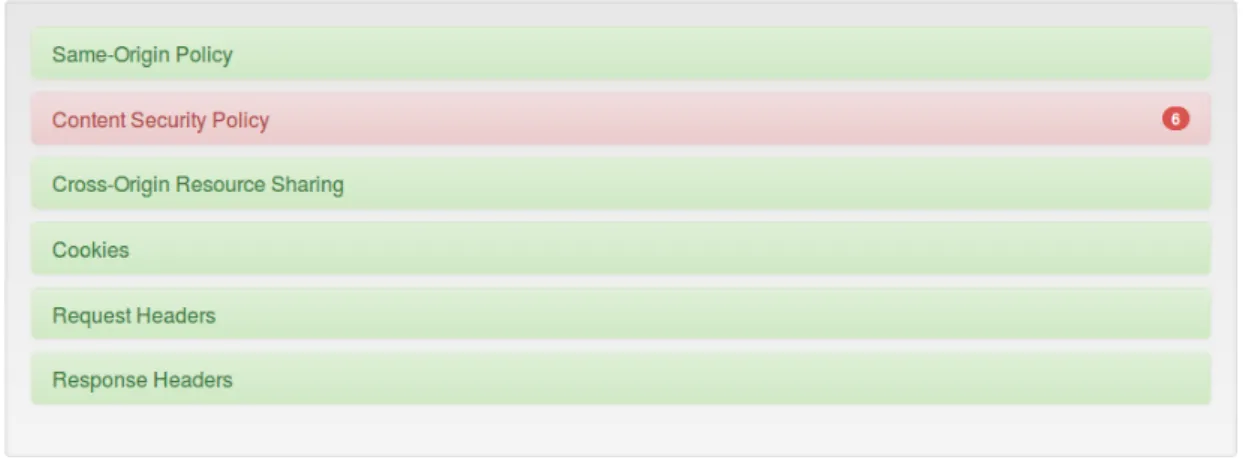
We have produced a web application, BrowserAudit, that automatically tests the imple-mentations of various security features in the browser used to access it. BrowserAudit automatically executes over 300 tests. We chose to implement a selection of tests that covers both the most important browser security concepts (features that should be imple-mented in any browser) and modern security features that are not yet impleimple-mented by all of today’s major browsers. We have designed the user interface of our application so that it can educate web developers and security-conscious web users about the security features we test. We provide textual descriptions of each security feature, and hope that by showing each individual test result, a user will be able to gain a better understanding of each security feature.
BrowserAudit has been developed in a way that allows new tests to be added in a simple and modular manner. We consider the possibility of releasing the source code to the public shortly, inviting like-minded developers to build upon our current codebase to test even more browser security features.
We have been able to evaluate the usefulness of our project already, since it identifies two security bugs in the latest version of Mozilla Firefox, a popular browser with 20.4%
usage share for desktop browsers as of January 2014 [35]! We reported the bugs to the Firefox development team, who promptly accepted them as valid bugs.
Our application is online today and can be accessed athttps://browseraudit.com/.
1.3 Report Structure
The remainder of this report is separated into six chapters:
• Background (page 5) — we cover the technical background necessary to explain how our browser tests work, by first discussing the basics of HTTP and then describing various browser security features in detail. We also discuss related work discovered during our background research for the project;
• Design (page 37) — we discuss the implementation languages chosen and the key libraries used. We showcase our front-end website design with screenshots. We also describe our server-side system architecture;
• Implementation (page 50) — general implementation topics. We discuss how our custom web server is implemented and important common code that is relevant to each of our browser tests;
• Browser Tests (page 61) — we explain how we are able to automatically test the browser security features described in the Background chapter, and problems en-countered along the way. This involves describing the implementations of the tests, supplemented with code listings and diagrams where appropriate;
• Evaluation (page 106) — we evaluate the success of our project. This includes discussing limitations of BrowserAudit in its current state, as well as assessing the project through primarily qualitative metrics;
• Conclusions (page 117) — closing thoughts. The majority of this chapter is the Future Work section, in which we propose various improvements that could be made to the project in the future.
In this chapter we first describe the basics of the Web, focusing primarily on the hypertext transfer protocol. We also use this background chapter to describe in detail the security features that BrowserAudit will test. This is necessary in order to understand how we test the features later on in Chapter 5. In Section 2.3 we discuss related work discovered during our background research for the project.
2.1 Web Basics
In this section we describe the basics of how the Web works. This is important in order for us to be able to describe how various browser security features work in Section 2.2, and how we test them in Chapter 5.
Although many people refer to the Web and the Internet synonymously, this is not correct. The Web is just one of many applications running on the Internet. Other common examples of Internet applications include email and DNS (domain name system).
2.1.1 Hypertext Transfer Protocol
The Web uses the hypertext transfer protocol (HTTP) for requests and responses. HTTP is an application protocol at level 7 of the OSI networking model. It presumes an under-lying and reliable transport layer protocol, and is most commonly used with TCP. The Web typically uses HTTP on port 80 for unencrypted requests and port 443 for secure (HTTPS) requests which are discussed in more detail in Section 2.1.2.
HTTP is a request/response protocol with a client and a server. In the case of the Web, a web browser is the client and makes requests to a web server. The server replies to these requests with responses. For example, a browser might send a request for a specific webpage http://example.com/index.html. The server’s response will include the contents of the document as well as other information about the request. An example of how this request might look is shown in Listing 1.
1 GET /index.html HTTP/1.1
2 Host: example.com
3 Accept: */*
1 HTTP/1.1 200 OK
2 Server: nginx/1.4.6 (Ubuntu)
3 Date: Sun, 01 Jun 2014 13:31:56 GMT
4 Content-Type: text/html
5 Content-Length: 164
6 Last-Modified: Sun, 01 Jun 2014 13:31:34 GMT
7 Connection: keep-alive 8 Vary: Accept-Encoding 9 ETag: "538b2b36-a4" 10 Accept-Ranges: bytes 11 12 <!DOCTYPE html> 13 <html lang="en"> 14 <head>
15 <meta charset="utf-8" />
16 <title>Test Page</title>
17 </head>
18 <body>
19 <h1>Hello, world!</h1>
20 </body>
21 </html>
Listing 1: An example HTTP request and response for an HTML webpage
In line 1 of the request we can see that the client is making aGETrequest for/index.html. It also states that it is using version 1.1 of the HTTP protocol. Here, GET is known as a request method (sometimes also known as HTTP verbs). GET is the most common of these methods, and requests a representation of the specified resource. The other two most common methods areHEADand POST.HEADrequests a response identical to the one that would be returned after aGET request, but without the response body. This means that the server will return only the response headers, i.e. lines 1–10 in Listing 1. The
POSTmethod is used to request that the server stores some data enclosed in the request’s body. For example, when one submits a registration form on a website, the form data will likely be transmitted in aPOSTrequest. The three verbs discussed so far are the only methods defined in the HTTP 1.0 specification [5]. HTTP 1.1 saw the introduction of many new methods, including anOPTIONSmethod to request the methods supported by the server for a given URL [15].
Request Headers
The remainder of the HTTP request (lines 2–3 in Listing 1) consists of request headers. We can see the Host header which specifies the domain name (and possibly port) of the server. This header exists so that one server can serve multiple domains, and is mandatory since HTTP 1.1. This is the only mandatory request header. There are many other request headers; some of the more common are:
• Accept– acceptable MIME content types (e.g. text/plain);
• Accept-Encoding – acceptable encodings, used for data compression (e.g. gzip, deflate);
• Accept-Language– acceptable content languages (e.g. en-gb);
• Cookie– a cookie stored by the browser that is relevant to the request (we discuss cookies on page 8);
• Origin – the origin of a request, used in cross-origin resource sharing (see Sec-tion 2.2.3);
• Referer – the address of the webpage that linked to the resource being requested. The name of this header was originally a misspelling of ‘referrer’;
• User-Agent – the user agent string, which can be used by the server to identify the browser being used to make the request.
Response Headers
In lines 2–10 of the HTTP response in Listing 1, we can see examples of HTTPresponse headers. These tell the client more information about the response. Some of the more common request headers are:
• Cache-Control – tells all caching mechanisms between the server and client (in-cluding the client) whether they may cache the object and for how long, measured in seconds (e.g. max-age=300);
• Content-Language– the (human) language of the content; • Content-Type– the MIME content type of the response;
• Set-Cookie – sets an HTTP cookie for the browser to store.
Uniform Resource Locators
A uniform resource locator (URL) identifies a specific resource on a remote server. Com-monly referred to as a web address, it is usually displayed prominently in a web browser’s user interface. The URL syntax is detailed in RFC 3986 [6]; there are many optional elements, but a good working example is as follows:
scheme://host:port/path?query_string#fragment
The schemes, otherwise referred to as protocols, used most commonly by web applications are http: and https:. Other examples of schemes are ftp: and file:, and pseudo-URLs that begin withdata: andjavascript:.
The host is most commonly a domain name (e.g. example.com) but can also be a literal IPv4 or IPv6 address. If not otherwise specified, the port defaults to the port associated with the scheme (80 for http: and 443 forhttps:).
The path is used to specify the resource being accessed. The query string parameters contain optional data to be passed to the software running on the server. The fragment identifier, also optional, specifies an exact location within the document. In HTML documents, these fragment IDs are often combined with anchor tags to allow hyperlinks to specific sections within a document.
The most important elements of a URL as far as we are concerned are the scheme, host and port. We will see later on that, together as a tuple, they form a concept known as an origin used in many browser security concepts.
Cookies
Cookies are pieces of data stored on a user’s computer by webpages they visit. When a browser requests a webpage from a server, it sends any cookies it has for that page with the request. Cookies are often used to store session information (for example, so that a user stays logged in-between browsing sessions), configuration settings (such as a preferred language), and sometimes even data for tracking a user’s browsing habits. A browser sends a cookie with its request using theCookieheader, whilst a server informs a client to save or overwrite a cookie with theSet-Cookie header. Below is an example
Set-Cookie: foo=bar; Path=/; Domain=example.com; Expires=Tue, 01 Jul 2014 16:39:25 UTC
This sets the value of the foo cookie to be bar. In theory, multiple cookies can be set in a single Set-Cookie header. In practice, however, most browsers only support a single cookie per header. The browser will then send the cookie back with subsequent requests for the same application (as defined by the Domain and Path attributes – see Section 2.2.1) with a Cookieheader like below:
Cookie: foo=bar
Unlike theSet-Cookieheader, most browsers support the sending of multiple cookies in a single Cookieheader, separated by semicolons.
The Expires attribute tells the browser the exact time when it should delete the cookie. Alternatively, although not as commonly used, the Max-Age attribute may be used to specify when the cookie should expire as a number of seconds in the future from when the browser receives the cookie. If no expiry time is set using either method, the cookie is termed a session cookie and is to be deleted when the browser is closed.
A cookie can be overwritten by sending a newSet-Cookieheader, as long as theDomain
andPath attributes are identical. To delete a cookie, a newSet-Cookieresponse header for a cookie with that name may be sent specifying an expiry date in the past. Again, it is important to ensure that theDomain andPath attributes are the same as the original cookie. To understand why, consider the case where the server sets two cookies with the same name:
Set-Cookie: foo=bar; Path=/; Domain=example.com
Set-Cookie: foo=baz; Path=/account; Domain=example.com
When sending a request to http://example.com/account, the browser now has two different cookiesfoo=bar andfoo=baz that are relevant to the request according to the
Domain andPath attributes. Which should it send with aCookieheader in the request? The answer is that a browser will send both cookies to the server, although there is no convention for the order in which a browser should send the conflicting cookies. The consequence of this is that the server will have no means of resolving the conflict – all it knows is the two values of the cookie, since the browser does not send any information about the age of the cookies in the Cookie header. Additional metadata to solve this problem is proposed in RFC 2965 [26] (the “Cookies 2.0” specification referred to in our introduction), but the standard did not become widely adopted.
There are two further cookie attributes, HttpOnly and Secure. These are discussed as browser security features in Section 2.2.4.
2.1.2 HTTP Secure
In HTTP as we have seen it so far, everything is transmitted over the wire in plaintext— both requests and responses, including any cookies and the documents themselves. Whilst this may not have been a concern in the early days of the Web, it holds many security and privacy consequences today. Wiretapping is a common threat, which could be used not only to spy on a user but also to steal his session cookies or other sensitive data. Man-in-the-middle attacks, in which an attacker pretends to be the intended web server and modifies a victim’s requests/responses on the fly, are also incredibly easy to pull off as long as everything is transmitted in plaintext.
The solution to this is HTTP Secure (HTTPS). Proposed in RFC 2818, it suggests the idea of running HTTP over transport layer security [31]. Transport layer security, often referred to as TLS or SSL, is a cryptographic protocol for secure communications over the Internet. It had already been developed many years before the HTTPS RFC. With TLS, public key cryptography is used to both encrypt and authenticate the communication between two endpoints. HTTP can be run on top of this without the need for any changes to be made. With HTTPS, the problems of both wiretapping and man-in-the-middle attacks are solved. Any attacker viewing a victim’s data over the wire cannot read the HTTP requests and responses due to the encryption1. A man-in-the-middle attack is not possible either since a web browser is able to authenticate the identity of the server with which it is communicating.
The authentication works using X.509 certificates which associate a public key with an identity. In the case of HTTPS, the certificates associate a public key with one or more domain names. These certificates are issued and cryptographically signed by certificate authorities (CAs). In order for this to work, browsers are shipped with a large set of public keys for the CAs that the browser vendors trust. The browser vendors trust these CAs to verify that a public key belongs to a particular website. When establishing a new HTTPS connection, the browser receives the certificate from the server. This certificate will have been signed by a CA – a signature that cannot be produced without their private key. The browser verifies the signature by following the trust chain to one of the CA public keys hardcoded in the browser. As well as checking that the certificate is trusted, the browser also checks that it is valid for the website being visited. It does this by checking that the site’s domain matches one of the domains in the certificate. Finally, the browser verifies that the certificate has not been included on any public revocation lists (which might be the case if, for example, a private key had been lost or compromised). If all of these tests pass, the browser can then begin sending encrypted communications to the server knowing that only the intended recipient will be able to decrypt them.
1Whilst the HTTP communication is encrypted, a wiretapping attacker may still be able to learn the
websites being viewed by his victim. This is because the DNS protocol used to resolve a domain name to an IP address is not usually encrypted
Session Keys and Perfect Forward Secrecy
TLS uses the long-term public and private keys to exchange a short-term session key that is used to encrypt the data for the rest of the session. This session key is used in symmetric cryptography, since this is less resource-intensive than asymmetric (public key) cryptography. An important property here isperfect forward secrecy(PFS). Perfect forward secrecy means that if a long-term private key were to become compromised in the future, the short-term session key used in a previous HTTPS session cannot be derived because of this. Usage of PFS has increased recently but is far from widespread – support for it is still lacking in two of the five major browsers [13].
Self-Signed Certificates
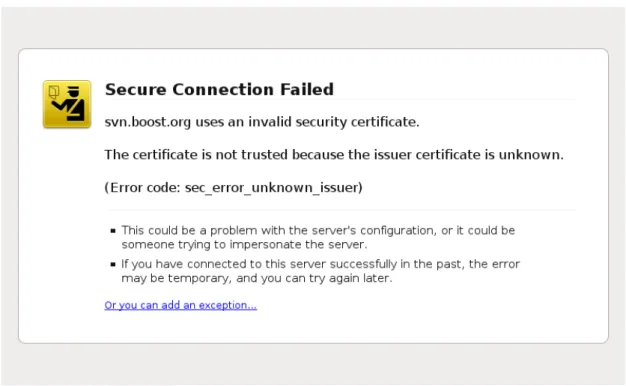
It is possible for a website to sign its own SSL certificate, claiming that its public key belongs to its domain. Since the browser will not trust the website as a certificate authority, this will lead to a warning in most web browsers. This is because the identity of the server cannot be identified by the browser. An example warning in Mozilla Firefox is shown in Figure 2.1.
Figure 2.1: A warning in Firefox caused by a self-signed SSL certificate
The warnings can usually be ignored by the user, except in the case of HTTP Strict Transport Security, a relatively young security feature which we visit in Section 2.2.5.
2.2 Browser Security Features
In this section we cover the technical background of many browser security features that exist to secure the Web. Some of these are absolute must-have features that should be implemented in any browser, whereas others are modern features that have appeared in some but not all browsers in recent years. This technical background is necessary to understand how BrowserAudit automatically tests these features in Chapter 5.
2.2.1 Same-Origin Policy
A big aspect of browser security is content isolation: the browser promises to isolate documents based on where they came from. The concept of the same-origin policy is arguably the most important idea in web browser security. The idea is a simple one: two webpages served by the sameorigin should be able to interact mostly unconstrained, whereas two webpages served by different origins should not be able to interfere with one another at all. We define an origin as a(scheme, host, port)tuple [3], with the major exception that Internet Explorer ignores the port when comparing origins. Table 2.1 gives example results of origin comparisons to the URLhttp://login.example.com/a/ page.html.
URL Outcome Reason
http://login.example.com/b/other.html Success
http://login.example.com/a/dir/another.html Success
https://login.example.com/secure.html Failure Scheme mismatch
http://login.example.com:81/a/contact.html Failure Port mismatch
http://payments.example.com/a/contact.html Failure Host mismatch
Table 2.1: Example origin comparisons when comparing tohttp://login.example.com/ a/page.html
Without the same-origin policy, a user’s session with an honest website could be interfered with as a result of the user visiting a dishonest website. This is exactly what the same-origin policy was designed to prevent, by isolating the content of each individual webpage open in a browser. Note that there is no single same-origin policy; the term instead refers to a set of related browser security policies, some of which we discuss below. The same-origin policy should definitely be implemented in all browsers, since it is such an important web security feature.
DOM Access
The Document Object Model (DOM) is an API for HTML and XML documents. It is a structured representation of a document that allows a developer to modify its content or appearance. The DOM is most commonly used in JavaScript, accessed by thedocument
object. There are many DOM methods and properties that can be accessed. As a trivial example, the JavaScript in Listing 2 shows how the DOM can be used to modify thesrc
attribute of an image myImageon a webpage.
1 var image = document.getElementById("myImage"); 2 image.src = "newPicture.png";
Listing 2: Using the DOM to modify an image’ssrc attribute
It should be clear that no website loaded in a browser should be able to access or modify the DOM of another. The same-origin policy for DOM access ensures that this is the case. The origins of the original document and the accessed object are compared. If they are equal then the browser allows access with no further checks. One might expect that if they don’t match then access is immediately denied, however there is one further step in the decision-making process thanks to thedocument.domain property.
document.domainallows two cooperating webpages to lift the same-origin policy restric-tions, provided both webpages agree to do so. For example, if a page athttp://example. com contains a frame with content from http://login.example.com, the same-origin policy would ordinarily block either page from accessing the DOM of the other due to the mismatching hostnames. However if they both set their document.domain property to example.com, the same-origin policy restrictions will be lifted by the browser and access will be allowed.
The use of the document.domain property as described above is not without its own restrictions. The most important rule is that, when a page sets the value, the new value must be a right-hand, fully-qualified fragment of its current hostname [40]. This means that a page athttp://login.secure.example.commay set itsdocument.domain
property to secure.example.comor example.com but not staff.secure.example.com
or ample.com. The other rule is that both webpages must set the property to the same value in order for DOM access between them to be granted – it is not sufficient for a page at http://login.example.comto set itsdocument.domainproperty toexample.comin order to access the DOM of a page athttp://example.com. For this to work, the page at
http://example.commust also explicitly set its domain property to example.com. The technical explanation for this is that the port number of each page is kept separately by the browser. When the document.domainproperty is written to, this causes the port to be overwritten withnull [33]. This means that setting the property on one page but not the other will result in one document having port null and the other its original value
(e.g. 80). The origins will then still mismatch, despite both documents appearing to have the same host. When both pages set their document.domain property, each page will have port null and so access will be allowed provided the domains and schemes are the same.
If the origins of two webpages do not match, and they don’t define the same (legal)
document.domain property, then DOM access between them should be denied by the browser.
XMLHttpRequest
XMLHttpRequest, as mentioned in our Introduction chapter, is an API whose introduction into JavaScript was responsible for the appearance of a new wave of responsive web applications referred to by the industry as “Web 2.0”. The API allows a developer to easily retrieve data from a URL without the need for a full page reload. This means that a small section of a webpage can be updated on the fly with no interruption to the user. Better still, this can be done asynchronously, so that theXMLHttpRequest calls are not blocking. This is known as AJAX, asynchronous JavaScript and XML, and is employed in many of today’s most popular web applications. In fact, we make heavy use of AJAX in BrowserAudit! It is necessary for our client-side testing scripts to retrieve data from the server-side.
The same-origin policy applies toXMLHttpRequest in a very similar manner to the DOM. That is to say, a client-side script may only make HTTP requests by XMLHttpRequest
for documents with the same origin that it came from. There are two key differences when comparing the same-origin policy forXMLHttpRequest to the one for the DOM:
• thedocument.domainproperty has no effect on origin checks forXMLHttpRequest
targets, meaning it is not possible for cooperating websites to agree for there to be cross-domain requests between them in this way;
• Internet Explorer takes the port number into account when comparing origins for
XMLHttpRequest targets.
In Section 2.2.3 we look at cross-origin resource sharing, a security mechanism that allows cross-domain requests usingXMLHttpRequest.
Cookies
There are many aspects to cookie security, however for now we will only discuss how the same-origin policy applies to cookies. It does so through one fairly simple concept: scope. The scope of a cookie defines which cookies a browser will send with each request that it makes, to ensure that it only sends cookies that should be relevant to the receiving server. We wouldn’t want our browser to send our online banking authentication cookie to a website hosting free Flash games, for example!
The scope of a cookie comprises of two attributes: Domain and Path. These are set by the server in the Set-Cookieheader. If not set, they default to the domain and path of the requested object that is being returned with the Set-Cookieheader [2].
The Domain parameter may be used to broaden the scope of a cookie. It can be set to any fully-qualified right-hand segment of the current hostname, up to one level below the TLD2. This means that a page atpayments.secure.example.com may tell the browser send a cookie to *.secure.example.com or *.example.com, but not to www.payments. secure.example.com (since this is more specific than the cookie origin) or*.com(since this is too broad). To set a cookie to be sent to *.example.com, the Domain parameter can be set to.example.comorexample.com(in practice, the former will now be rewritten to be the latter by the browser). This has the interesting consequence that it is not possible to scope a domain to a specific domain only. The only way to achieve this is to not set the Domain parameter at all, but even this does not function as expected in Internet Explorer.
The Path parameter is used to restrict the scope of a cookie. It specifies a path prefix, telling the browser to send the cookie only with requests matching that path. The paths are matched from the left, so a cookie with a path of /user will be sent with requests to both/user/status and /user/account.
Note that the scheme and port are not relevant in cookie scope like they are in the same-origin policies for the DOM andXMLHttpRequest. Only the hostname and path affect a cookie’s scope.
2.2.2 Content Security Policy
A cross-site scripting (XSS) attack is one in which an attacker injects malicious client-side script into a webpage. This can have devastating effects, for example an attacker may be able to access cookies containing session tokens or other sensitive information
2
A top-level domain (TLD) is a domain at the highest level in the hierarchical DNS system, for example .comand.netare TLDs
to do with the webpage being viewed. He may also modify the HTML contents of the page, perhaps tricking the user into clicking a malicious link or otherwise acting on false information planted by the attacker. TheContent Security Policyis a relatively new mechanism that can be used to mitigate XSS attacks.
The Content Security Policy (CSP) was introduced because it is otherwise impossible for a browser to tell the difference between benign client-side script that’s part of a web application, and client-side script that has somehow been maliciously injected by an attacker. For example, many popular websites choose to load common JavaScript libraries from content delivery networks (CDNs) such as ajax.googleapis.com. This is fine, since the developers trust the Google CDN, but as far as a browser is concerned
ajax.googleapis.comis just as trustworthy a script source asevil.attacker.com! XSS attack mitigation is difficult when a browser is willing to download and run scripts from any source.
The CSP aims to solve this problem with the concept of source whitelists. Through the introduction of a new HTTP response header, a web application developer can explicitly specify the sources from which scripts and other resources for his webpages may be loaded. This header isContent-Security-Policy and is employed by many of today’s most popular websites. When the header is set, a compliant browser will only load resources from the sources specified in the header. If the page tries to load a resource from some other source, it will not be loaded and a security exception will be thrown. This provides defence in depth, heavily reducing the damage an attacker could do in an XSS attack.
The policy applies not just to scripts but to many different kinds of resources such as images, stylesheets, media (<audio> and <video> tags), frames, fonts and objects (<object>,<embed>and <applet>tags). The allowed sources for each of these resource types may be different, allowing a web developer to be as specific as possible about where different resources may come from. The policy also allows a default source to be set, which is used as fallback whenever the source for a particular resource type has not been explicitly specified. A common usage pattern is therefore to set the default source to 'none'(stating that no resources may be loaded from anywhere) and then set individual allowed sources for each resource type used on the page. This exercises the principle of least privilege nicely, ensuring that only the required resources can be loaded.
The Content-Security-Policy header value is made up of one or more directives sep-arated by semicolons. Some of the more common directives are default-src (which specifies the default policy for all resource types), script-src,style-srcand img-src. Most directives contain a list of allowed sources for a resource type known as a source list.
Source Lists
Each source list can contain multiple source values separated by a space, except in the two special cases * and 'none' which should be the only value. Some example source values are:
• * – wildcard, allows any source;
• http://*.example.com– allows loading from any subdomain ofexample.comand
example.comitself using thehttp: scheme;
• https://payments.example.com– allows loading frompayments.example.com us-ing thehttps: scheme.
If no port number is specified, it defaults to the port associated with the specified scheme. When no scheme is specified, it is assumed to be the same scheme as the one used to access the document that is being protected. The CSP permits that a browser may follow redirects before checking the origin of a resource.
There are also four keywords that can be used in a source list:
• 'self'– allows loading from the same origin (scheme, host, port) as the page being served;
• 'none' – prevents loading from any source;
• 'unsafe-inline'– allows the use of unsafe inline resources, such as<script>and
<style> tags andstyle/onloadHTML attributes;
• 'unsafe-eval'– allows the use of eval()and other methods for executing strings of code.
The 'unsafe-inline' and 'unsafe-eval' keywords can open up a webpage to XSS vulnerabilities, and so they must be explicitly allowed by a developer. Wherever possible, these options should be avoided in favour of defining styles, scripts and event handlers in
.cssand.jsfiles which should be included in the document and allowed by the Content Security Policy in the normal way.
Content-Security-Policy-Report-Only and report-uri
Thereport-uridirective specifies a URL to which a browser should send a report about any policy violation. This report is a JSON object containing useful information such as the document URL, the blocked URL and the CSP directive that was violated. The report is sent to the server with a POSTrequest. This is useful for webmasters to learn about attempted attacks, or to learn about an error in theirContent-Security-Policy
header that is wrongly blocking a resource from being loaded. Note, however, that many anti-tracking browser extensions will block the report request from being sent.
There is also a completely different HTTP response header, Content-Security-Policy-Report-Only, that allows servers to experiment with the CSP by monitoring (rather than enforcing) a policy. This can be useful to test and fine-tune a policy before rolling it out on a large website and potentially blocking innocent resources from being loaded, causing interruptions to users.
Example: GitHub 1 Content-Security-Policy: default-src 2 *; 3 script-src 4 'self' 5 https://github.global.ssl.fastly.net 6 https://ssl.google-analytics.com 7 https://collector-cdn.github.com 8 https://embed.github.com 9 https://raw.github.com; 10 style-src 11 'self' 12 'unsafe-inline' 13 https://github.global.ssl.fastly.net; 14 object-src 15 https://github.global.ssl.fastly.net
Listing 3: GitHub’s usage of the Content Security Policy
Listing 3 shows GitHub’s Content-Security-Policy response header, which has been separated onto multiple lines for readability purposes only. Note that the CSP is being used not just to whitelist JavaScript sources, but also stylesheets (style-src) and plugins (object-src). Whenever a page served with this header tries to load a script, stylesheet or plugin from a source not in the whitelist, a compliant browser will throw an error. Other resource types can be loaded from anywhere due to the wildcard value used in the
default-src directive. We can also see how keywords in source lists can be combined with other keywords and allowed sources.
Browser Support
As with many web features, the Content Security Policy was introduced in multiple browsers before it became standardised. Earlier experimental implementations in Moz-illa Firefox and Google Chrome used header names X-Content-Security-Policy and
X-WebKit-CSPrespectively instead of the now-standardisedContent-Security-Policy
header which the latest versions of each browser use today. Internet Explorer versions 10 and 11 (the only versions of IE to support the CSP) still use the X-Content-Security-Policy header rather than the new standardised header [9]. This has the consequence that, despite CSP now being standardised, a website must serve its pages with all three CSP headers in order to achieve maximum compatibility with old and new browsers.
Content Security Policy 1.1
The standardised Content Security Policy described in this section refers to the Content Security Policy 1.0 Candidate Recommendation [36]. There also exists a working draft for a Content Security Policy 1.1 [4] which promises some interesting new features such as whitelisting specific inline script blocks via either nonces or hashes, and the ability to inject the policy through <meta />HTML tags as opposed to specifying it in an HTTP response header.
2.2.3 Cross-Origin Resource Sharing
When discussing the same-origin policy for XMLHttpRequest, we saw that there is no way for two cooperating websites to allow cross-domain requests between them. This is because the document.domain property isn’t used in same-origin policy checks for
XMLHttpRequest and therefore can’t be used to lift the browser’s security restrictions like we saw for DOM access. There is a modern solution, however, known ascross-origin resource sharing (CORS).
CORS is an extension to the XMLHttpRequest API that allows a website to carry out cross-origin communications. This means that client-side JavaScript can send an XML-HttpRequest to a URL on a domain (or scheme or port) other than the one from which it originated – something that is not otherwise possible due to the same-origin policy, which has frustrated web developers for quite some time. As of January 2014, CORS has been formally specified by the W3C [39], however the implementations in the browsers that
implement CORS today differ from the specification. CORS is supported in Chrome 3+,
Firefox 3.5+, Opera 12+, Safari 4+and Internet Explorer 10+[10]. The differences between
the implementations and the specification are highlighted below.
Cross-origin resource sharing allows a request to be made to a server at a different origin only if the server receiving the request explicitly allows it. That is, the server states whether or not the origin of the requesting document is allowed to make a cross-origin request to that URL. To achieve this, CORS defines a mechanism that allows the browser and server to know just enough about each other so that they can determine whether or not to allow the cross-origin request. This is primarily achieved by two key headers: anOriginheader sent by the browser with the request, and an Access-Control-Allow-Originheader sent in the server’s response. There are other CORS-related headers that we also discuss below.
When a webpage attempts to load a cross-origin document through theXMLHttpRequest
API, a browser implementing CORS first decides whether the request is simple or non-simple. A simple request is defined as one that meets the following criteria:
• HTTP method matches (case-sensitive) one of: – GET
– HEAD
– POST
• HTTP headers match (case-insensitive):
– Accept
– Accept-Language
– Content-Language
– Last-Event-ID
– Content-Type, where the value is one of:
∗ application/x-www-form-urlencoded
∗ multipart/form-data
A request is said to be non-simple if it does not meet the above criteria. This distinction is important because it defines how the request should be handled by the browser. Note, however, that the browsers implementing CORS today do not precisely follow the spe-cification above. They instead ignore the above recommended whitelist of headers and treat any requests with user-defined header values as non-simple requests. In addition to this, the implementation in WebKit-based browsers (e.g. Safari) treats any requests containing a payload as non-simple [42].
Simple Requests
A simple request is sent to the server immediately. The request is sent with an Origin
header containing the origin of the calling script. The retrieved data is only revealed to the caller if the server’s response contains an acceptableAccess-Control-Allow-Origin
header. This header specifies an origin that is allowed to access the content. If this header is not set, or its value does not match the origin of the calling script, then the browser must not pass the retrieved data onto script that made the request. The header may only contain a single origin value; this may seem problematic if a URL is to be accessed cross-origin from multiple different origins, which is why the Origin header is sent by the browser. The server can look at the Origin header and dynamically decide which
Access-Control-Allow-Origin header to send to allow the request if the origin is to be permitted. A wildcard value (*) is also valid, although rarely used in practice due to the security implications of allowing a document to be accessed with XMLHttpRequest
by any origin.
Non-Simple Requests
Unlike simple requests, a non-simple request is not immediately sent to the server. A “preflight” request is instead sent to the destination server in order to confirm that it is CORS-compliant and happy to receive non-standard traffic from that particular caller. This preflight request is sent with theOPTIONSHTTP method with headers containing an outline of the parameters of the underlyingXMLHttpRequest call. The most important information is sent in three headers:
• Origin – the origin of the calling script, just like is sent with a simple request (e.g.https://browseraudit.com);
• Access-Control-Request-Method – the HTTP method of the non-simple request the caller is trying to make (e.g. PUT);
• Access-Control-Request-Headers– a list of any non-simple headers3 that are in-cluded in the caller’s request, separated by commas (e.g. X-My-Header,X-Another-Header).
The two-step handshake is considered successful by the browser only if these three para-meters are properly acknowledged in the server’s response to the preflight request. The server acknowledges the parameters with the corresponding headers Access-Control-Allow-Origin, Access-Control-Allow-Method and, when relevant, Access-Control-Allow-Headers. The first two of these headers must be present – a response with no CORS headers is an error and so the non-simple request should not be made by the browser. Likewise, the handshake has failed if the headers are present but the values do not correspond to those sent by the browser in the preflight request. As with a simple request, the Access-Control-Allow-Origin header may only contain a single origin that is allowed to make the request – this must either be the wildcard value or match the origin of the calling script sent by the browser in the Origin header. The
Access-Control-Allow-Method header may contain a list of allowed HTTP methods. This list is comma-separated, and the browser must check that the method of the non-simple request is contained within the list of allowed methods. The server sends a list of methods since this will be useful in caching, as we will see shortly. Similarly, and for the same reason, the Access-Control-Allow-Headers header contains a list of all non-simple headers supported by the server. The browser must check that the headers (if any) it sent in theAccess-Control-Request-Headersheader are a subset of the headers the server says it supports. For example, in response to the preflight headers on page 21, the server might allow the request by replying with:
• Access-Control-Allow-Origin: https://browseraudit.com
• Access-Control-Allow-Method: GET, POST, PUT, DELETE
• Access-Control-Allow-Headers: X-My-Header, X-Another-Header
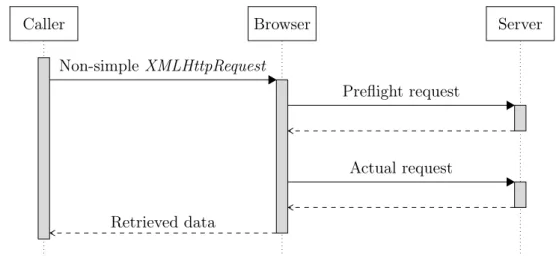
Following a successful handshake, the browser will send the actual non-simple request to the server. The request is still sent with the Originheader, and the server will respond with Access-Control-Allow-Origin just as with a simple request. The browser will check the origin one last time before passing the retrieved data onto the caller. Figure 2.2 shows an overview of a successful non-simple CORS request.
.. . Caller .. . Browser . . Server .... Non-simple XMLHttpRequest ... Preflight request ... Actual request ... Retrieved data
Figure 2.2: A high-level overview of a successful non-simple request with CORS
Caching
The result of a preflight check may be cached by the browser for performance reasons, since every non-simple request using CORS would otherwise require two HTTP requests. The server can specify the maximum age of this cache with theAccess-Control-Max-Age
response header, after which the browser must send a new preflight request. This explains why, in the server’s response to a preflight request, theAccess-Control-Allow-Method
and Access-Control-Request-Headers headers contain lists of allowed values rather than just repeating the values sent by the browser. Using lists makes the preflight responses as generic as possible so that a single cached response will apply to multiple different requests made by the browser. This avoids the need for another preflight request until the cache expires.
Requests with Credentials
By default, cookies are not included with CORS requests. The BooleanwithCredentials
property of an XMLHttpRequest can be used to enable cookies. For this to work, the server’s response must include the headerAccess-Control-Allow-Credentials: true. The browser should reject any request, and not pass its data back to the caller, if
withCredentials is set to true but the server’s response does not contain the correct header. When the server is responding to a credentialed request, it must specify an origin in theAccess-Control-Allow-Originheader and cannot use the wildcard value [21]. Once credentials are enabled, the browser will send any cookies it has for the remote domain with the CORS request. The response from the server can also set cookies for the remote domain. Note that the same-origin policy still applies to the cookies – the
JavaScript making the CORS request should not be able to view the cookies belonging to the remote domain just because they will be included in the request and returned with the response.
Access-Control-Expose-Headers
The Access-Control-Expose-Headers header can be set by the server to specify addi-tional response headers to which the XMLHttpRequest object should have access. The
XMLHttpRequest object has a getResponseHeader() method that can be used by the caller to access a given response header from the CORS response. By default, this method can only be used to access the simple response headers4. In order to enable the caller to read other headers, the server must use theAccess-Control-Expose-Headersheader.
Rationale for the Split
It is reasonable to question the rationale for separating CORS requests into simple and non-simple requests and handling each type differently. One might wonder why not all requests are treated the same. There is no comment on this in the Design Decision FAQ section of the CORS specification. We found two different explanations for this whilst researching the background on Cross-Origin Resource Sharing.
In his bookThe Tangled Web, Michal Zalewski states that the reason for the split comes down to a trick used in the past by some websites [42]. Before CORS, it was not possible for an attacker to insert custom request headers into a cross-origin XMLHttpRequest. Websites could therefore use the presence of some custom request header as proof that the request originated from the same origin as the destination. With the introduction of CORS, this no longer held true. It was originally the plan for almost all CORS requests to be passed straight to the server (like simple requests are today), but the specification had to be revised due to the problems caused by websites that used custom headers as a proof of XMLHttpRequest origin. The problem was fixed by the introduction of the two-step handshake.
The HTML5 Rocks tutorial on CORS states that “simple requests are characterised as such because they can already be made from a browser without using CORS” [20]. The author argues that an attacker could create simple CORS requests through other scripting methods if he was able to inject his own client-side script. For example, a POST request could be made by creating a form and then submitting it.
4
The simple response headers areCache-Control,Content-Language,Content-Type,Expires, Last-ModifiedandPragma
Internet Explorer’s Competitor: XDomainRequest
CORS as we have described it (i.e. an extension toXMLHttpRequest) is supported today in Internet Explorer versions 10 and 11. Prior to this, in versions 8 and 9, Microsoft implemented only a counterproposal to CORS. This counterproposal isXDomainRequest, an API similar toXMLHttpRequest but with some key differences when compared to the CORS specification. Cross-origin requests withXDomainRequest are much simpler than those with CORS: no custom HTTP headers or methods can be used, and there is no support for credentials. Microsoft’s proposal never became popular – the W3C backed the CORS specification and so there was no motivation for any other browsers to implement
XDomainRequest.
2.2.4 Cookies
When discussing the basics of HTTP cookies in Section 2.1.1, we mentioned two cookie attributesHttpOnly andSecure that are browser security features. These are both flags rather than attributes – they have no values. The presence of each merely defines a behaviour that the browser should follow when handling the cookie.
HttpOnly
TheHttpOnly flag instructs the browser to reveal that cookie only through an HTTP API. That is, the cookie may be transmitted to a server with an HTTP(S) request, but should not be made available to client-side scripts. This means that HttpOnly cookies cannot be read in JavaScript through thedocument.cookieproperty like normal cookies can be. The security benefit of this is that, even if a cross-site scripting vulnerability is exploited, the cookie cannot be stolen. Just like the Content Security Policy, the HttpOnly cookie flag provides defence in depth.
HttpOnly cookies are supported by all major browsers. The only notable exception is Android 2.3’s stock browser.
Secure
When a cookie has the Secure attribute set, a compliant browser will include the cookie in an HTTP request only if the request is transmitted over a secure channel, i.e. is an HTTPS request. This keeps the cookie confidential; an attacker would not be able to read it even if he were able to intercept the connection between the victim and the destination
server. In contrast, if the cookies were transmitted in plaintext HTTP requests and the attacker was observing the connection between the victim and the server, the attacker would be able to steal the cookies. This is what theSecure flag was designed to prevent, protecting sensitive cookies by ensuring they are only ever transmitted over a secure transport.
The Secure flag is supported by all major browsers.
2.2.5 HTTP Strict Transport Security
When discussing the motivations for HTTP Secure in Section 2.1.2, we briefly mentioned man-in-the-middle (MITM) attacks. These attacks take place when an attacker is able to intercept the traffic between a victim’s browser and the server. When successfully exploited, a MITM attack can cause a lot of damage. For example, over an unencrypted connection, the attacker is able to view the requests and responses (including cookies and any private data in the server responses). He can also modify the communications, for example he may modify the server’s response to inject some of his own content or malicious JavaScript code.
All of these attacks are only possible when the client/server communication is neither encrypted nor authenticated. Over a secure (HTTPS) connection, both requests and responses are encrypted and authenticated. This means that the attacker cannot read any plaintext data like he could earlier, nor can he modify any requests or responses. Assuming that the target server’s private key has not been compromised, the only case in which a MITM attack can be successful over HTTPS is if the client (browser) does not check the security certificate used. In this case, the attacker can generate his own (invalid) security certificate, pretending to be the server, and pass this to the victim’s
browser. This should result in a warning in all web browsers.
HTTP Strict Transport Security(HSTS) is a security mechanism that allows a server to instruct browsers to communicate with it only over a secure (HTTPS) connection for that domain. It exists mainly to defend against man-in-the-middle attacks as described above. The server sends this instruction with a Strict-Transport-Security response header, as defined in RFC 6797 [18]. The header is required to include amax-agedirective, specifying the number of seconds for which the browser should follow the HSTS policy. There is also an optionalincludeSubDomainsdirective, specifying that the HSTS policy should apply to subdomains of the current host as well as the host itself. Example HSTS headers might be:
• Strict-Transport-Security: max-age=300
When HSTS is enabled on a domain, the browser must rewrite any plain HTTP requests to that domain to use HTTPS. This includes both URLs entered in the navigation bar by the user and elements loaded by a webpage.
HSTS also instructs the browser to terminate any secure transport attempts upon any and all secure transport errors and warnings. This means that if there is any problem at all with the secure transport, the browser should terminate the request. This applies also to websites using self-signed certificates or certificates whose CA is not embedded in the browser or operating system. Once HSTS is enabled in these scenarios, the browser should refuse to communicate with the server. This applies even if the user has manually whitelisted the certificate in his browser. In other words, when a browser would normally display a bypassable warning regarding secure transport to the user, under HSTS it must instead immediately terminate the request.
The Strict-Transport-Security header should only be sent in a response sent over HTTPS. If a browser receives the header in a response sent over plain HTTP, it should be ignored.
2.2.6 Clickjacking and X-Frame-Options
Clickjacking, also known as UI redressing, is a type of attack in which a user is tricked into clicking on something other than what he believes he is clicking on. The attacker is “hijacking” clicks intended for one application and instead routing them to some other page. Clickjacking can be seen as an instance of the confused deputy problem. It is a very serious attack, since it can be used to take advantage of the fact that a typical web user is often logged into his personal user account on many web applications at any given time. If an attacker is able to hijack a user’s clicks, the attacker could trick the innocent user into carrying out a privileged action on his account on a website.
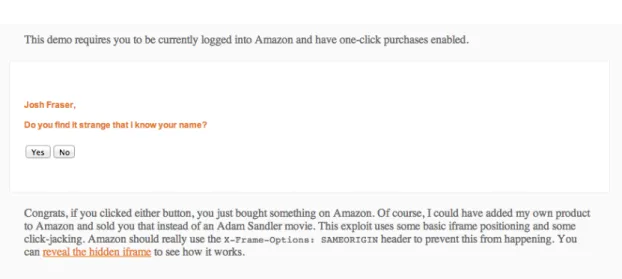
One real-world example of clickjacking is an attack in 2009 that tricked Twitter users into sending a tweet without realising [37, 34]. The attack took the form of a textual link that said “don’t click”. When logged-in Twitter users clicked the link, they inadvertently sent out a tweet that reposted the link for other people to click on. This attack worked by placing a transparent frame on top of the textual link. In this instance, the attack was fairly harmless, but could be perhaps extended into tricking users into “following” another account on Twitter. This is something that many individuals and companies are interested in doing (and can pay for as a service!) to boost their social media presence. Pictured in Figure 2.3 is a more serious real-world example of clickjacking. It is a proof-of-concept attack for online retailer Amazon that was recently disclosed [16]. The at-tack shows that a user could easily be tricked into purchasing any product on Amazon, provided he is logged in and has one-click purchasing enabled. As with the Twitter
Figure 2.3: A proof-of-concept clickjacking exploit on Amazon
clickjacking attack, it works by cleverly positioning a transparent frame containing an Amazon product page, tricking the user into clicking the “Buy Now” button. The exploit has since been fixed by Amazon, using the browser security feature we are about to describe.
Clickjacking is very much a browser vulnerability, and is one that is difficult to prevent.
X-Frame-Optionsis a server-side technique that aims to prevent clickjacking. It is sup-ported in all modern browsers, namely Internet Explorer 8+, Firefox 3.6.9+, Opera 10.5+,
Safari 4+ and Chrome 4.1+. Its implementation in current browsers is documented in
RFC 7034 [32].
X-Frame-Options is an HTTP response header that specifies whether or not the docu-ment being served is allowed to be rendered in a<frame>,<iframe>or <object>. More specifically, the header specifies an origin that is allowed to render the document in a frame. The header must have exactly one of three values:
• DENY
• SAMEORIGIN
• ALLOW-FROM src
DENY states that a browser must not display the content in any frame. SAMEORIGIN
states that a browser must not display the content in a frame from a page of different origin than the content itself. ALLOW-FROM states that a browser must not display the content in a frame from a page of different origin to the specified source. Only one origin may be stated in theALLOW-FROMvalue; there is no wildcard value. Some example
X-Frame-Optionsheaders are as follows:
• X-Frame-Options: DENY
• X-Frame-Options: SAMEORIGIN
• X-Frame-Options: ALLOW-FROM https://test.browseraudit.com/
Not all browsers supporting theX-Frame-Optionsheader support theALLOW-FROMvalue type. It is also important to note that today’s browsers implement differing behaviour when it comes to nested frames. Consider the case where a page A loads a page B inside a frame, which in turn loads a page C inside a frame. Page C is served with an X-Frame-Options header restricting the origin that is allowed to contain it within a frame. In this scenario, some browsers will compare the origin of page C to page A (the top-level browsing context) whereas other browsers will compare the origin of page C to page B. This limits the number of different cases we can test, which we describe in more detail when discussing the implementation of our tests for this feature in Section 5.6.1.
When anX-Frame-Optionspolicy is violated, i.e. an origin mismatch occurs when fram-ing a document that is served with the X-Frame-Options header, different browsers exhibit different behaviour. Some browsers will present the user a message that allows him to open the document in a new window, so that it becomes clear that it is a separ-ate document and there is no clickjacking threat. Other browsers are less forgiving and simply render an empty document.
X-Frame-Optionsmust be sent as an HTTP header field and should be explicitly ignored by browsers when declared with a metahttp-equiv tag.
2.3 Related Work
In this section we discuss related work found during the initial research for this project. There are some projects that have similarities to ours, but none of them tries to achieve what we believe to have achieved: a comprehensive report of the user’s browser security, produced purely by accessing a single webpage with minimal interaction required from the user. We consider the offerings of some of the related work, and what we learned from them with respect to our project.