IJISCS | 98
EARTHQUAKE INFORMATION PUSH
NOTIFICATION SYSTEM IN ANDROID
APPLICATION USING GOOGLE FIREBASE
Rakhmad Maulidi1, Bagus Kristomoyo Kristanto2, Yohanes Dwi Listio3
1,2,3Informatics Study Program, Sekolah Tinggi Informatika dan Komputer Indonesia, Malang, Indonesia
1,2,3Jalan Tidar no. 100 Karangbesuki, Sukun, Malang
*Corresponding author [email protected] Article history: Received: 27May 2020 Revised: 29 July 2020 Accepted: 08 August 2020 Keywords:
Push Notification System; Earthquake Information; Android Application; Google Firebase;
Firebase Push Notification;
Abstract
Indonesia is a country located between three tectonic plates, namely Eurasia, the Pacific and Indo-Australia, which is one of the active plates, so that there is the potential for earthquakes, which are sometimes followed by tsunami disasters. The latest accurate, precise, and trusted earthquake information is needed by all parties. For this reason, a system is needed to inform the latest earthquake so that the impact can be minimized. Departing from open data published by BMKG, which is an earthquake in real time, a push notification system for earthquake information was designed to the Android application using Google Firebase. Push notifications are adjusted for specific areas based on user wishes. When the user is in the vicinity of an earthquake-affected or surrounding area, or the location of an earthquake is in a city that is monitored by the user, the notifications that appear can be alerts. Whereas when the user is in a location that is not affected by an earthquake, the notification that appears is only as information that there is an earthquake in a certain area. After analyzing, designing, implementing and testing using the black box testing method, push notification system functionally produces results that are as expected.
1.0 INTRODUCTION
Indonesia is a country located between three tectonic plates, namely Eurasia, the Pacific, and Indo-Australia. The three tectonic plates are one of the active plates, which has the potential to cause an earthquake, which is sometimes also followed by a tsunami disaster. Some of the biggest earthquakes that have claimed lives have been in Aceh in 2004, Yogyakarta in 2006, and Papua in 2009. Even recently in 2018, there were earthquakes in Lombok in July - August, and in October followed by earthquakes that occurred in Palu and Donggala, Central Sulawesi, and Situbondo, East Java. Earthquake disaster is also one of the natural disasters that cannot be predicted when and where it will occur [1].
The latest accurate, precise, and trusted earthquake information is needed by all parties, both from disaster management agencies, voluntary organizations, and especially the general public, both at the epicenter and in the vicinity. For this reason, a system is needed to inform the latest earthquake so that the impact can be minimized. With technology growing rapidly,
Full Paper eISSN : 2598-246X pISSN : 2598-0793
International Journal Information System and Computer
IJISCS | 99 internet media and Android smartphones are becoming media that are often used by the people of Indonesia. Almost all Indonesian people have Android-based smartphone devices that are equipped with an internet connection and connectivity to Google. With these advantages, both of these media will greatly assist in the dissemination of earthquake information.
Departing from the open data published by BMKG, namely an earthquake in real-time, the author decided to design a push notification system for earthquake information to the Android application using Google Firebase. Push notifications that are running can be adjusted for certain areas based on user wishes. Thus, this notification also utilizes the location base of the user's smartphone, provided the user activates the global positioning system (GPS) feature. When the user is in the vicinity of an earthquake affected area or its surroundings or the location of an earthquake is in a city that is monitored by the user, the notification that appears can be an alert to remind the user to be more aware of the impact of the earthquake. Whereas when the user is in a location that is not affected by an earthquake, the notification that appears is only as information that there is an earthquake in a certain area. It is expected that the push notification of earthquake information to the Android application with Google Firebase will greatly assist in the dissemination of earthquake information. Also, the admin can find out from users who have received earthquake notifications and the confirmation status given by users when an earthquake occurs via the web.
2.0 THEORETICAL
2.1 Earthquake
Earthquakes are earth shocks caused by colliding earth plates, active faults from volcanic activity or rock debris. [2] The country of Indonesia is located between three tectonic plates of the world, namely Australia, Eurasia, and the Pacific. A collision of Eurasian and Australian plates occurs off the west coast of Sumatra Island, off the southern coast of Java Island, o ff the southern coast of the Nusa Tenggara Islands, and turns south of Maluku waters, while between the Australian and Pacific plates occur around Papua Island. While the meeting between the three plates occurred around the island of Sulawesi, which caused frequent earthquakes. 2.2 Push Notifications
A notification is a message that pops up on the user's device. Notifications can be triggered locally by an open application, or "pushed" from the server to the user even when the application is not running. They allow users to opt-in to timely updates and allow developers to effectively re-engage users with customized content [3].
Push Notifications are assembled using the Notifications API, which lets the application display system notifications to the user, and the Push API which allows service to handle Push Messages from a server, even while the application is inactive. Both are built on top of the Service Worker API which responds to push message events in the background and relays them to an application.
2.3 Android
Android is a Linux-based mobile operating system that includes an operating system, middleware, and applications. Android provides an open platform for developers to create applications[4].
Initially, Google Inc. buy Android Inc. to make cellphone/smartphone software. Then, Google formed the Open Handset Alliance, a consortium of 34 hardware, software and telecommunications vendors, to develop Android. When Android was first launched on November 5, 2007, Android together with the Open Handset Alliance supported the development of open standards on mobile devices. On the other hand, Google released Android codes under the Apache license. There are two types of Android operating system distributors, namely distributors who are fully supported by Google (Google Mail Services or GMS) and free distributors (Open Handset Distribution or OHD).
At this time most smartphone vendors already produce Android-based smartphones, because Android is an open-source operating system so that it is freely distributed and used by
IJISCS | 100 any vendor. Android is not only an operating system on smartphones, but also competes with Apple on the Tablet PC operating system. Android is growing rapidly in terms of technology and the number of devices, not because of its open-source, but also a very complete platform both the operating system, application development tools, Android application stores and supported by open source communities around the world.
2.4 PHP
PHP (Hypertext Preprocessor) is a general programming language created by Rasmus Lerdorf and was first released in 1995. PHP can be used to create desktop-based applications, Command-Line Interface (CLI), and mobile device applications (based on Android), but in general more widely used to develop web-based applications. Until now, many dynamic websites have been developed using PHP compared to other languages such as ASP.NET, Java, Ruby, Python, and Perl[5].
PHP has a simple syntax, based on the C and Perl programming languages, easy to learn, even for beginners, and has a complete library (both standard libraries and third-party libraries) so that many programming problems can be solved easily using PHP.
2.5 Framework
A framework is a collection of files, which contains program code commands and basic functions to perform certain tasks. Visually, the framework is pieces of program code or functions that are ready to use. Users only need to know how to apply and use them. A framework is a solution for developers and application makers to create an application quickly and structured. [6]
2.6 CodeIgniter
CodeIgniter is a PHP web framework, created by Rick Ellis in 2006. CodeIgniter has many features that make PHP web applications easier and faster. The advantages of CodeIgniter compared to other PHP web frameworks, lies in the design that is simpler and more flexible. CodeIgniter allows developers to use the framework in part or as a whole. [5]
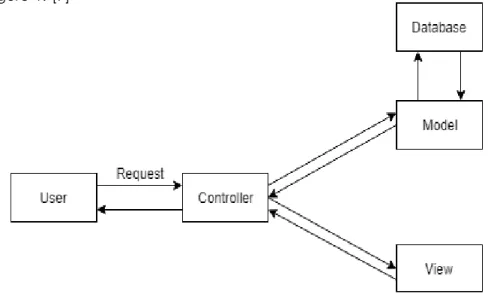
CodeIgniter is a PHP framework that uses the Model View Controller (MVC) system so that in general there are three main components, namely model, view, and controller. A simple description of the MVC applied by CodeIgniter and the relationship between the three can be seen in Figure 1. [7]
Figure 1. Relationship between MVC in CodeIgniter
From the diagram in Figure 1 it can be explained as follows:
a. The user requests a page for the application to be received by the controller.
b. The controller invokes the model in the data processing. If a query is needed to the database, then the query process is also performed in the model. The results of this processing are returned to the controller.
c. To display data generated by the model, the controller invokes the view, processes the data view in the view and returns the results to the user.
IJISCS | 101 2.7 Firebase Cloud Messaging
Firebase Cloud Messaging (FCM) is a cross-platform messaging solution that lets the developers reliably deliver messages at no cost. Three key capabilities of FCM consists
sending a notification message or data message, versatile message targeting, and sending a message from client applications. [8]
FCM implementation includes two main components for sending and receiving messages:
a. A trusted environment such as Cloud Functions for Firebase or an app server on which to
build, target, and send messages.
b. A client app that receives messages.
Developers can send messages via the Firebase Admin SDK or the FCM server protocols For testing or for sending marketing or engagement messages with powerful built-in targeting and analytics, the Notifications composer can also be useful.
2.8 Location-based Service
Location-based Service is a technology to get the location of the device being used. The two main elements of the location-based service are: [9]
a. Location Manager (Maps API): provides tools or resources for location-based services, namely the Application Programming Interface (API) Maps which provides map display and manipulation, along with satellite views, roads and combinations thereof.
b. Location Providers (API Location): provides device location search technology, which is related to GPS data and real-time location data. With the location manager, we can find out the current location, track movement, and proximity to certain locations through displacement detection.
2.9 Previous Research Studies
There have been several previous studies that have examined similar cases of earthquake information push notification systems on Android applications using Google Firebase. The research study will be described as follows. The first research proposes the use of notification based system on Android platform to improve communication in educational institution. [10] The proposed system implemented using Eclipse, where in this research the push notification system implemented using Android Studio. The push notification system using third-party Google Cloud Messaging (currently named Firebase Cloud Messaging).
The second research talks about the application named Nolong.in. This application send real time push notification to its user to assist every Nolong.in users to help other users who need urgent help when the time of incident in order to prevent unwanted situations. The push notification method has been implemented by using Firebase Cloud Messaging. Based on the questionnaires’ results given to the community conclude that Nolong.in application is very beneficial for Gojek Cikarang community's safety. This research has the result of click ratio in 90,91% and click time in 1 minute 27 seconds. [11]
Other research talks about the push notification usage as a malware to remotely trigger and control malware on victim’s device. Also, a backdoor prototype implemented based on their malware design on Android devices. Push notification also implemented using Firebase Cloud Messaging. The evaluation results showed that the malware effectively evade existing malware detection tools, and the backdoor successfully cracked about 98% of all the tested PINs and patterns in 5 seconds with only a fraction (less than 0.01%) of the total power consumption of the device. This research also proposed several defense strategies against push notification-based malware by carefully analyzing its attack process. [12]
There is also research on the notification system for students using the Android application. Research is aimed at making communication between teacher and student easier and faster through this notification feature. [13] Other research talks about the application named Campus Push as a user friendly mobile Android application. The key feature of this application is intelligent location based and time based notification system in the educational campus. The system implemented using a policy driven and context aware architecture. [14]
Compared to the four previous studies discussed above, this study will process text file data in XML format containing the latest earthquake information downloaded from the data.bmkg.go.id site. Data that has been downloaded will be processed in the web server with XML parsing method. The data that has been processed will be compared with the data that already exists in the database, so that if there is the latest earthquake data, this data will
IJISCS | 102 be pushed to the Android application using Firebase Cloud Messaging (FCM). A notification will be an alert when the location of the user's device is included in the earthquake-affect ed area, or if the city where the epicenter of the earthquake is is the city monitored by the user. In addition, the notification that appears will be the notification o nly. Users who are close to the earthquake location can also confirm via a button on the notification that the user is safe or is in an evacuation from the impact of the earthquake that occurred. There is also an admin menu and the general public to view earthquake data that has occurred and application users who have received notification alerts of an earthquake that has occurred.
3.0 METHODOLOGY
3.1 Problem Analysis
Indonesia is a country located between three active tectonic plates, namely Eurasia, the Pacific, and Indo-Australia. This increases the potential for earthquakes, which are sometimes followed by tsunamis. For example, the earthquake that occurred in Nias in March 2005 and the earthquake that caused the largest tsunami in Aceh and North Sumatra in December 2004 [1]. Therefore, community awareness is needed for the effects of the earthquake. Therefore, accurate, accurate and reliable earthquake information is needed. This information has been given by BMKG through open data published by BMKG, namely an earthquake in real -time. Unfortunately, these publications are often not timely, resulting in fatalities.
3.2 Problem Solving
Based on the analysis of these problems, the solution to the problem is obtained by the earthquake information push notification system. The information provided on the notification includes the time of the earthquake, the strength of the earthquake, and the location of the earthquake. This notification also implements location-based service, where the application will read the location of the user's device provided the user has activated GPS. Notifications will be alerts when the user is at a distance of less than 6 km from the location of the earthquake, or the location of the earthquake is in the city monitored by the user. If an earthquake has a tsunami potential, then the notification alert will also provide a warning of a potential tsunami, or if the user wants to monitor a city, for example, Bogor, the user will get a notification in the form of an alert as well, if an earthquake in Bogor occurs.
Users with earthquake-affected locations and getting alerts can confirm that the user is safe from the impact of the earthquake, or is in the process of evacuation by pressing the button found on the notification. If the user has not confirmed, this notification cannot be ignored by the user until the user confirms it. For managers, this feature is useful to find out from all users who are notified, users who are safe from the impact of the earthquake, users who are being evacuated, and users who are potentially affected by the earthquake (being a victim). With the push of earthquake information notification, of course, it will further increase public awareness of the impact caused by the earthquake, thereby reducing the number of victims affected.
3.3 Algorithm Design
The steps of the algorithm to push notification of earthquake information are as follows. 3.3.1 Data Collection
Data on earthquake information is obtained from BMKG online data in XML, which is processed using XML parsing. Details regarding earthquake information taken are date and time, coordinates of the epicenter, magnitude, location of the epicenter and areas that felt the earthquake. Every five seconds, the server will download the data from the data.bmkg.go.id site.
3.3.2 Earthquake Information Data Parsing Process
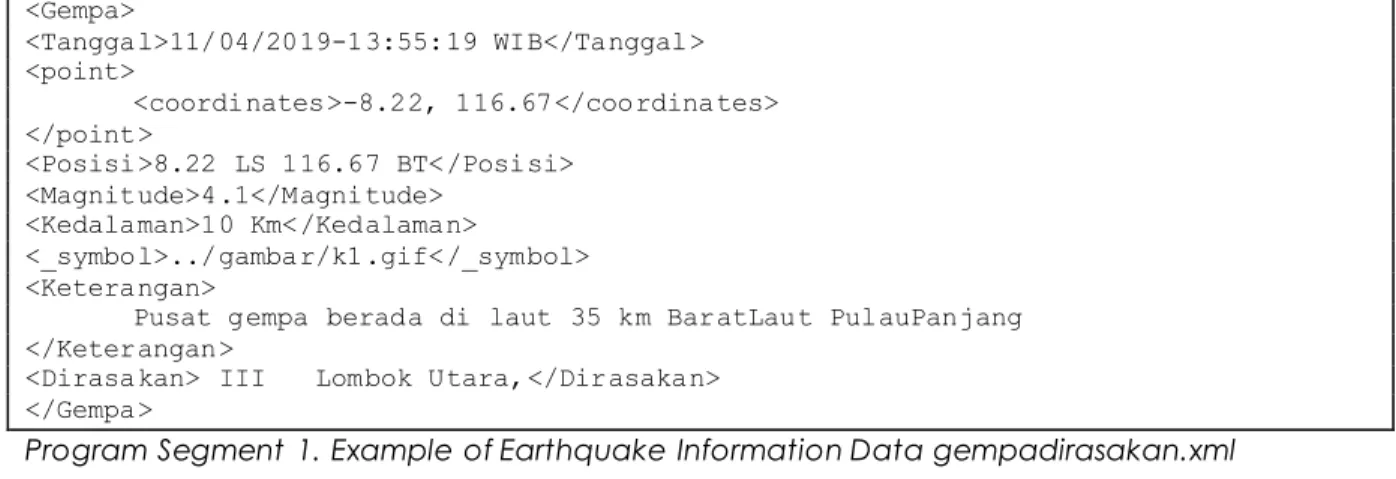
The data downloaded from data.bmkg.go.id is the file gempadirasakan.xml which contains 30 pieces of the latest earthquake data and the following is one example of earthquake information data contained in the file.
IJISCS | 103 <Gempa> <Tanggal>11/04/2019-13:55:19 WIB</Tanggal> <point> <coordinates>-8.22, 116.67</coordinates> </point> <Posisi>8.22 LS 116.67 BT</Posisi> <Magnitude>4.1</Magnitude> <Kedalaman>10 Km</Kedalaman> <_symbol>../gambar/k1.gif</_symbol> <Keterangan>
Pusat gempa berada di laut 35 km BaratLaut PulauPanjang </Keterangan>
<Dirasakan> III Lombok Utara,</Dirasakan> </Gempa>
Program Segment 1. Example of Earthquake Information Data gempadirasakan.xml
The data is parsed by converting it into a multidimensional associative array, so it looks like this.
Array(
[Tanggal] => 2019-04-11 13:55:19
[Koordinat] => SimpleXMLElement Object( [0] => -8.22, 116.67
)
[Magnitude] => SimpleXMLElement Object ( [0] => 4.1
)
[Kedalaman] => 10
[Keterangan] => SimpleXMLElement Object (
[0] => Pusat gempa berada di laut 35 km BaratLaut PulauPanjang )
[Dirasakan] => SimpleXMLElement Object (
[0] => III Lombok Utara,
) )
Program Segment 2. Resulf from Earthquake Information Data Parsing
The stage of the process of parsing earthquake information data with XML parsing can be seen in the flowchart of Figure 2.
IJISCS | 104 3.3.3 Process of Retrieving User's Last Location
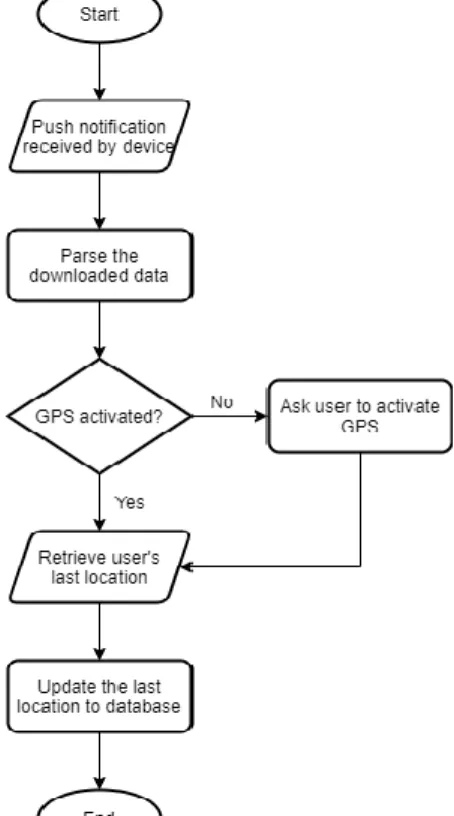
Every day at 8 o’clock in West Indonesian Time (WIB), the application will send push notifications containing information on the last earthquake that occurred in Indonesia, so users will be interested to open the notification and enter the application. If the user has no t activated GPS, a warning message will appear to activate GPS, so the application can retriev e the user's last location to be entered into the database, as described in the following flowchart.
Figure 3. Retrieving User's Last Location Stage
3.3.4 Process of Earthquake Information Push Notification
The stages of the push earthquake information notification to the user's Android device can be seen in the following flowchart.
IJISCS | 105 3.3.5 Calculation of User Device Distance to Earthquake Location
The formula for calculating the distance between two coordinates from GPS uses the haversine formula, which calculates the shortest distance between two points on the ball with latitude and longitude measured along the surface of the sphere. This measurement is not entirely accurate because it assumes the Earth is a perfect sphere, when in fact the Earth is an oblate spheroid. [15]
The haversine formula is as follows 𝑑 = 2𝑟 sin−1(√sin2(ϕ2− ϕ1
2 ) + cos(ϕ1) cos(ϕ2) sin2( 𝜆2− 𝜆1
2 ) )
where d is the distance between two points, r is the radius of the earth (6,317 kilometers), (𝜙1, 𝜙2) is the latitude of two points, and (𝜆1, 𝜆2)is the longitude of two points.
3.4 Application System’s Use Case
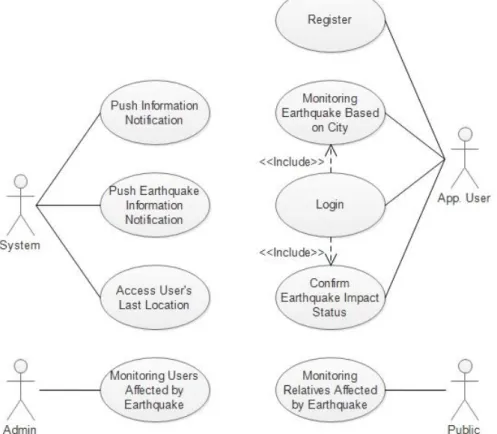
In the earthquake information push notification system, there are four actors, namely the system, application users, admin, and the general public. In the use case for the admin and the general public is almost the same, the difference is that the admin can monitor all users of the application affected by the earthquake, while the general public is limited to their relatives. Use cases for the four actors can be seen in Figure 6.
Figure 5. Use Case Diagram from Android Application with Earthquake Informat ion Push Notifications
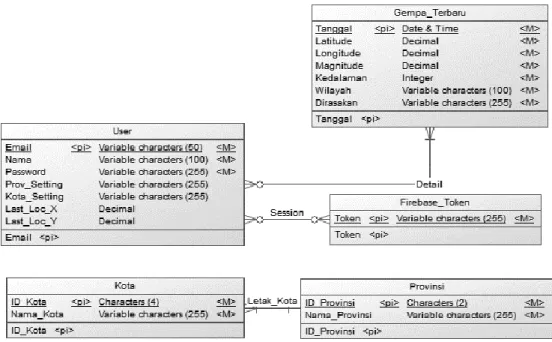
3.5 Database Design
In designing a database illustrated the relationship between entities that exist in the design of data to find the right relationship between entities, to produce the entities needed in the process of making the earthquake information push notification system using Google Firebase. The following is a database design of the earthquake information push notification system using Google Firebase.
IJISCS | 106
Figure 6. Database Design
4.0 RESULANTS AND DISCUSSION
4.1 User Interfaces
The earthquake information push notification system in this Android application was built using Java and PHP-MySQL with the CodeIgniter framework. The user can set the city to be monitored by the earthquake, through the settings page as in Figure 7. On this settings page, the user can also change the user's data if needed, including email, user name, and password.
Figure 7. Setting Page
Push notifications that users receive depend on the user's location at the time of the earthquake, or the city monitored by the user himself. If the user's location is in an area that feels the impact of an earthquake, the notification that comes in will be an alert with sound and vibration, and there is a confirmation button status of the impact of the earthquake experienced by the user. This notification can be seen in Figure 8.
IJISCS | 107
Figure 8. Earthquake Information Alert NotificatioN
If the user's location isn’t in the area that felt the earthquake, but the location of the earthquake is in the city that is monitored by the user, the incoming notification will be an alert with sound and vibration. Also, incoming notifications only become info notifications without sound and vibration. This notification can be seen in Figure 9.
Figure 9. Earthquake Information Info Notification
Admin and public (community) can see earthquake data that has occurred as well as the application users who get notification alerts of earthquakes that occur through the monitoring page. To enter the monitoring page as an admin, the admin must first enter through a link that can only be known by the admin itself. On the main page of earthquake monitoring as in Figure 7, there is a filter to display all earthquake data, earthquake data with magnitudes above 5.0, or potential tsunamis.
Figure 10. Earthquake Monitoring Main Page
On the earthquake monitoring detail page, the admin can see details about the earthquake that occurred, including all users who received notification alerts when the earthquake occurred, as in Figure 11.
IJISCS | 108
Figure 11. Earthquake Detail Page (Admin)
While public users (the public) can only see the details of the earthquake that occurred and the user's relatives who get notification alerts by entering the email of relatives who have registered in this application, as in Figure 12.
Figure 12. Earthquake Detail Page (Public)
4.2 Testing and Discussion
Testing programs that have been implemented using black-box testing. Testing is focused on functional specifications, without regard to design and program code [16], [17]. The result of this test is the compatibility between functions, input, and output of software with the functions needed. [18]
4.2.1 Testing of Push Notification Alert Features and Earthquake Information Info
In testing the push notification feature of earthquake information alerts, testing will be carried out whether push notification of earthquake information alerts that enter the user's device has the appropriate behavior or not, with a note that the user has logged into the application. Users who are close to the earthquake location will get an alert notification where there is a button to confirm that the user is safe or is being evacuated from the earthquake that occurred. The notification that the user gets will make a sound like a siren.
IJISCS | 109 Suppose an earthquake occurs with the epicenter located at coordinates ( -0.59, 127.71) and is felt in the Labuha area with a scale of III MMI. The Asus Zenfone Max M1 device is located at coordinates (-0.623433, 127.481175), while the LGE LGM-V300K is located at coordinates (-0.627642, 127.480185). Based on the geocode, the LGE LGM-V300K is located in Labuha while the Asus Zenfone Max M1 is located in Bacan, so the LGE LGM-V300K device should get an earthquake notification with a confirmation button that the user is safe or is being evacuated from the earthquake. The results of the push notifications received by both devices are shown in Figure 13.
(a) (b)
Figure 13. Earthquake Information Alert Notification in LGM LGE-V300K (a) and Info Notification in Asus Zenfone Max M1
The notification received by the LGE LGM-V300K device makes a sound, whereas the Asus Zenfone Max M1 does not. If a pull database is performed in the detail table, the LGE LGM-V300K device user data will appear due to receiving an earthquake alert notifica tion, and the initial confirmation status is "NOTIFIED", as in Figure 14.
Figure 14. Result from Detail Table Database Pull
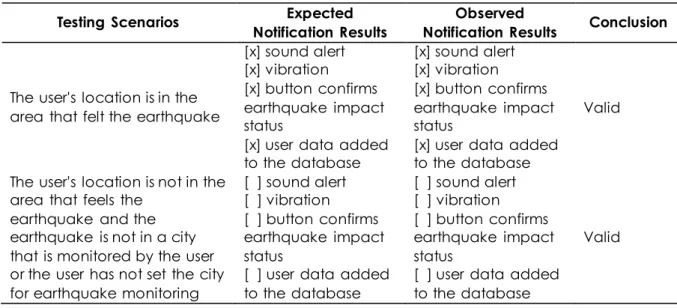
The results of the push notification alert and earthquake notification info features can be seen in the following Table 1.
Table 1. Testing of Push Notification Alert Features and Earthquake Information Info
Testing Scenarios Expected Notification Results
Observed
Notification Results Conclusion
The user's location is in the area that felt the earthquake
[x] sound alert [x] vibration [x] button confirms earthquake impact status
[x] user data added to the database [x] sound alert [x] vibration [x] button confirms earthquake impact status
[x] user data added to the database
Valid
The user's location is not in the area that feels the
earthquake and the earthquake is not in a city that is monitored by the user or the user has not set the city for earthquake monitoring
[ ] sound alert [ ] vibration [ ] button confirms earthquake impact status
[ ] user data added to the database [ ] sound alert [ ] vibration [ ] button confirms earthquake impact status
[ ] user data added to the database
Valid
4.2.2 Testing of Earthquake Affected User Status Confirmation Feature
In testing the confirmation of the user's status when an earthquake occurs, the expected results are, the user data that gets an alert notification and the date and time of the earthquake will be stored in the database along with the user's last location when the earthquake occurred. If the user has pressed the safe/evacuation confirmation button from the earthquake, the confirmation status will also be saved in the database. Users who have not made the confirmation cannot dismiss this notification (with a swipe on the notification) until the confirmation is done.
IJISCS | 110 Returning to the test example as in Section 4.2.1, for example a LGM LGE-V300K user taps the SAFE button in the notification as in Figure 13 (b), a toast will appear that says "Confirmation saved successfully" as in Figure 15.
Figure 15. Toast Confirmation has been Saved
And when checked on the database, the LGM LGE-V300K user confirmation status which initially was "NOTIFIED" will change to "SAFE" (if you tap the SAFE button) in this case, as shown in Figure 16 below.
Figure 16. Result from Detail Database Pull after Confirmation
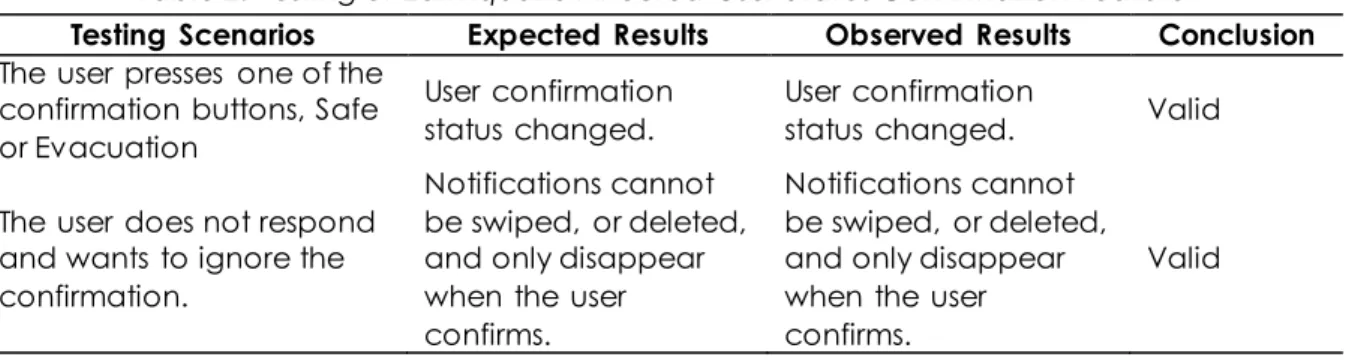
The results of testing the status of the earthquake-affected user status can be seen in the following Table 2.
Table 2. Testing of Earthquake Affected User Status Confirmation Feature
Testing Scenarios Expected Results Observed Results Conclusion The user presses one of the
confirmation buttons, Safe or Evacuation
User confirmation status changed.
User confirmation
status changed. Valid The user does not respond
and wants to ignore the confirmation.
Notifications cannot be swiped, or deleted, and only disappear when the user confirms.
Notifications cannot be swiped, or deleted, and only disappear when the user confirms.
Valid
4.2.3 Testing of City Earthquake Monitoring Push Notification Feature
In the push notification feature testing based on earthquake monitoring cities, testing will be carried out whether notifications that enter the user's device will be alerts when the earthquake is in the city monitored by the user. Alert notification that is obtained emits a sound, but it does not have a confirmation button like alert notification to users who are near the epicenter.
For example, an earthquake occurs with the epicenter at latitude -2.85 and longitude 119.41. Based on the Geocoder (a feature of the Google Maps API to change human readable addresses into map coordinates, latitude and longitude), the map coordinates are located in Mamasa Regency (West Sulawesi) if reverse geocode is performed. Users who control the earthquake monitoring city to Mamasa Regency will get an alert notification with the
“Earthquake Info” notification with sirens as well, as in Figure 17 below.
(a) (b)
Figure 17. Result of Earthquake Information Push Notification Based on Monitored City in Asus Zenfone Max M1 (a) and LGM LGE-V300K (b)
The results of the push notification feature of earthquake information based on the user's watch city can be seen in Table 3.
IJISCS | 111
Table 3. Testing of City Earthquake Monitoring Push Notification Feature
Testing Scenarios Expected Notification Results
Observed
Notification Results Conclusion The user's location is not in the
area that felt the earthquake, but the earthquake was in a city that was monitored by the user. [x] sound alert [x] vibration [ ] button confirms earthquake impact status
[ ] user data added to the database [x] sound alert [x] vibration [ ] button confirms earthquake impact status
[ ] user data added to the database
Valid
5.0 CONCLUSION
5.1. Conclusion
After analysis, design, implementation and testing of the earthquake information push notification system to the Android application using Google Firebase with the black box testing method, it can be concluded that the system is functionally producing results that are as expected, so that it can help disseminate the latest earthquake information precise, accurate and trusted to the community.
5.2. Suggestion
For further application or system development, a suggestion that can be used as a reference is to make an application in iOS version, so that all smartphone users can receiv e earthquake information notifications.
REFERENCES
[1]A. Anggoro, “Sistem Push SMS Notification untuk Memonitoring Gempa Bumi di Wilayah
Indonesia,” Sekolah Tinggi Manajemen Informatika dan Komputer AMIKOM Yogyakarta, Yogyakarta, 2014.
[2] Kementerian Energi dan Sumber Daya Mineral (ESDM) Badan Geologi Pusat Vulkanologi dan Mitigasi Bencana Geologi, Gempa Bumi dan Tsunami. Bandung, 2015.
[3] Google Developers, “Introduction to Push Notifications,” 2019. [Online]. Available:
https://developers.google.com/web/ilt/pwa/introduction-to-push-notifications. [Accessed: 14-Aug-2019].
[4] N. Safaat H., ANDROID: Pemrograman Aplikasi Mobile Smartphone dan Tablet PC Berbasis Android. Bandung: Penerbit Informatika, 2015.
5] B. Raharjo, Belajar Otodidak Framework CodeIgniter: Teknik Pemrograman Web dengan PHP dan Framework CodeIgniter 3. Bandung: Penerbit Informatika, 2015.
[6] Y. Purbadian, Trik Cepat Membangun Aplikasi Web dengan Framework CodeIgniter. Yogyakarta: Penerbit ANDI, 2016.
[7] A. P. Basuki, Menguasai Codeigniter: Kasus Membangun Aplikasi Perpustakaan. Yogyakarta: Penerbit Lokomedia, 2016.
8] Firebase, “Firebase Cloud Messaging | Firebase.” [Online]. Available:
https://firebase.google.com/docs/cloud-messaging/. [Accessed: 09-Nov-2018]
[9] S. Ahmad, “Pembangunan Mobile Application Store Alisha Fancy Shop Memanfaatkan
Sistem Push Notification dan Location Based Service (LBS) Berbasis Android,” J. Ilm.
Komput. dan Inform.
[10] R. Stohy, N. Khamesy, and H. Ghareeb, “A Proposed System for Push Messaging on
Android,” Int. J. Interact. Mob. Technol., vol. 10, no. 3, pp. 29–34, 2016.
[11] A. B. Gunawan, S. Hansun, and M. B. Kristanda, “Nolong.In: An android based incident
notification application with push notification technology,” Int. J. Electr. Comput. Eng.,
vol. 9, no. 1, pp. 485–495, 2019.
[12] S. Hyun, J. Cho, G. Cho, and H. Kim, “Design and Analysis of Push Notification-Based
Malware on Android,” Secur. Commun. Networks, vol. 2018, 2018.
[13] M. H. Riadh, “Notification System to Students using an Android Application,” Int. J. Comput. Appl., vol. 140, no. 1, pp. 22–27, 2016.
[14] R. Ravindran, N. Qazi, V. Atre, J. Rohira, and S. Narkar, “Campus Push, Location, Context, Policy Driven Push Notification Application for Mobile Devices,” Int. J. Eng. Tech. Res., vol.
IJISCS | 112 3, no. 1, pp. 143–147, 2015.
15] GeeksforGeeks, “Haversine formula to find distance between two points on a sphere -
GeeksforGeeks,” 2018. [Online]. Available: https://www.geeksforgeeks.
org/haversine-formula-to-find-distance-between-two-points-on-a-sphere/. [Accessed: 29-May-2019]. [16] M. S. Mustaqbal, R. F. Firdaus, and H. Rahmadi, “Pengujian Aplikasi Menggunakan Black
Box Testing Boundary Value Analysis (Studi Kasus: Aplikasi Prediksi Kelulusan SNMPTN),” J. Ilm. Teknol. Inf. Terap., vol. 2, no. 1, pp. 6–12, 2014.
[17] P. Astuti, “Penggunaan Metode Black Box Testing (Boundary Value Analysis) Pada Sistem
Akademik (SMA/SMK),” Fakt. Exacta, vol. 11, no. 2, p. 186, 2018.
[18] A. S. Rosa and M. Shalahuddin, Rekayasa Perangkat Lunak Terstruktur dan Berbasis Objek. Bandung: Penerbit Informatika, 2013.