CyberDesk: a framework for providing self-integrating context-aware services
Anind K. Dey
a ,*, Gregory D. Abowd
a, Andrew Wood
baGraphics, Visualization and Usability Center, Georgia Institute of Technology, Atlanta, GA 30332-0280, USA b
School of Computer Science, The University of Birmingham, Edgbaston, Birmingham, B15 2TT, UK
Received 19 May 1998; accepted 1 June 1998
Abstract
Applications are often designed to take advantage of the potential for integration with each other via shared information. Current approaches for integration are limited, affecting both the programmer and end-user. In this paper, we present CyberDesk, a framework for self-integrating software in which integration is driven by user context. It relieves the burden on programmers by removing the necessity to predict how software should be integrated. It also relieves the burden from users by removing the need to understand how to make different software components work together.䉷1998 Elsevier Science B.V. All rights reserved.
Keywords: Context-aware computing; Automated software integration; Dynamic mediation; Ubiquitous computing
1. Introduction
Software applications often work on similar information types such as names, addresses, dates, and locations. Collec-tions of applicaCollec-tions are often designed to take advantage of the potential for integration via shared information. As an example, an electronic mail reader can be enhanced to auto-matically recognize Web addresses, allowing a reader to select a URL to automatically launch a Web browser on that location. Even more complex and useful integrating behavior is available in a number of commercial suites of applications (e.g. Microsoft Office 97, Lotus SmartSuite, WordPerfect Suite, and Netscape Communicator).
We recognize the utility from the user’s perspective of integrating the behavior of a number of software applica-tions. With the emergence of Web-based applications and personal digital assistants (PDAs), there are even more opportunities to provide integration of software applica-tions. There are some limitations, however, to the current approaches for providing this integration. These limitations impact both the programmer and the user.
From the programmer’s perspective, the integrating behavior between applications is static. That is, this behavior must be identified and supported when the appli-cations are built. This means that a programmer has the impossible task of predicting all of the possible ways
users will want a given application to work with all other applications. This usually results in there being a limited number of software applications available in an application suite, with limited integration behavior.
From the user’s perspective, integrating behavior is limited to the applications that are bound to the particular suite being used. Further integration is either impossible to obtain or must be implemented by the user. In addition, the integrating behavior has a strong dependence on the indivi-dual applications in the suite. If a user would like to sub-stitute a comparable application for one in the suite (e.g. use a different contact manager, or word processor), the user does so at the risk of losing all integrating behavior.
The project described in this paper, CyberDesk, is aimed at providing a more flexible framework for integrating soft-ware behavior. We aim to reduce the programming burden in identifying and defining integrating behavior, while at the same time retaining as much user freedom in determining how integration is to occur. The main objective of the ubiquitous computing project, CyberDesk, is to provide the infrastructure for self-integrating software in which the integration is driven by user actions. We refer to this as context-aware integration, and it is aimed at producing a paradigm shift in human–computer interactions that is fundamental to ubiquitous computing. Rather than settle for the current situation, in which the user must seek out and find relevant software functionality when it is wanted, we instead want the ubiquitous computing infrastructure to seek out the user when and where it is wanted. In this paper,
Knowledge-Based Systems 11 (1998) 3–13
0950-7051/98/$ - see front matter䉷1998 Elsevier Science B.V. All rights reserved. PII: S 0 9 5 0 - 7 0 5 1 ( 9 8 ) 0 0 0 5 3 - 7
* Corresponding author. Tel.: +1 404 894 5103; fax: +1 404 894 2970; e-mail: anind, [email protected]
we demonstrate how CyberDesk supports this paradigm shift.
First, we describe CyberDesk and motivate our research with a sample scenario. In Section 3, we describe Cyber-Desk’s architecture and show how it supports context-aware computing. This is followed with a discussion on how CyberDesk can be extended to include more applications and integrating behavior. Finally, we summarize the contri-butions of this research and discuss some future directions.
2. What is CyberDesk?
CyberDesk is a component-based framework written in Java, that supports the automatic integration of software applications. The framework is flexible, and can be easily customized and extended. It is designed to allow ubiquitous access to services and data, regardless of whether they came from a desktop application, a PDA-based application, or a Web-based application.
CyberDesk is able to provide this ubiquitous access by having applications automatically provide their services to the user. Rather than displaying all the available services to the user at all times, the interface is limited to displaying those services that are relevant to the user’s current context. We define a service to be an action that an application can perform. A user’s context is any information about the user and the environment that can be used to enhance the user’s experiences. This includes the data the user is working with, the time of day, the user’s physical location, and user’s emotional state, social environment, objects in the room, etc. Initially, CyberDesk was able to work only with simple strings that a user was working with in a desktop applica-tion. Now, CyberDesk is also able to work with time and location in a desktop environment, networked environment, and mobile environment.
Desktop applications incorporated into CyberDesk include e-mail browsers, notepads, schedulers, and contact managers. Network applications include phone number lookups, e-mail writing, mailing address lookups, Web searches, Usenet searches, e-mail address lookups, map lookups, and Web page browsing. PDA-based applications include contact managers and notepads. All applications make their services available to the user via a common interface. The services available at any particular time depend on the user’s context at that time. By providing relevant suggestions and data to the user, CyberDesk gives the user useful, and possibly unexpected, help in com-pleting their tasks.
2.1. User scenario
To illustrate this behavior, an actual user experience follows.1As seen in Fig. 1, a user is checking his e-mail,
and reads a message about some interesting research. The user is interested in the research discussed and highlights the URL in the message. CyberDesk offers the following ser-vice suggestions through its interface (Fig. 2): search for the selected text using AltaVista, find pages that reference this URL using AltaVista, and display the URL in Netscape.
The user chooses the last option and views the selected URL in a web browser (Fig. 3).
The user wants to get more information, so selects the name of the person in charge of the research. CyberDesk offers the following suggestions (Fig. 4): search for the selected text using AltaVista, search for a phone number and mailing address for the selected name using Switch-board, lookup the selected name in the contact manager. The user wants to contact this researcher so checks to see if the name is in the contact manager, but it is not.
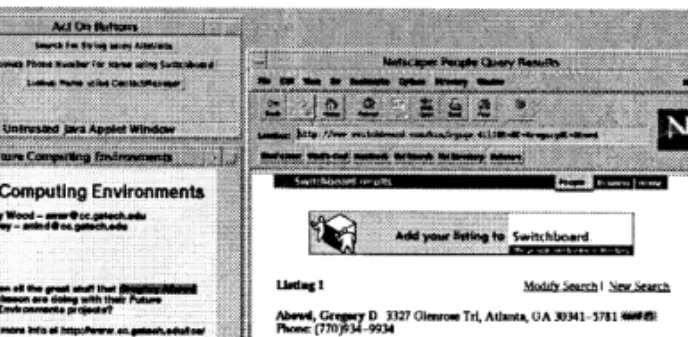
So, the user selects the phone number and mailing address lookup service (Fig. 5), and then creates a new entry in the contact manager with this new information.
1 All the scenarios described in the paper can be executed at http:// www.cc.gatech.edu/fce/cyberdesk/iui
Fig. 1. Content of user’s e-mail message.
Fig. 2. User selects the URL and is offered suggestions.
3. Architecture
The CyberDesk system has a simple architecture, based on the previously developed CAMEO infrastructure [1]. CAMEO defines a component-based framework in which individual components can observe the activities of other components and manipulate their interfaces. A centralized service allows for the dynamic registration of components and run-time support for querying the interfaces of regis-tered components. Observation and manipulation of other components and the dynamic registry of CAMEO were suf-ficient motivation for us to port it to Java and take advantage of simpler cross-platform network access to a multitude of Web-based, mobile and desktop information services.
The CyberDesk system consists of five main components: the Registry, the information services, the type converters, the Integrator, and the user interface. The Registry main-tains a list of components in the system and the interfaces that each supports. The information services are the tools and functions the user ultimately wants to use, such as an e-mail browser, a contact manager, or a Web-based search engine. These services register their interfaces with the Registry and announce events that provide data/information to the rest of the system (e.g. the name selected in the e-mail message in the scenario). The type converters accept announced data from the system and convert it recursively to other forms of data that may be useful (e.g. a string being converted to a URL). The Integrator uses the Registry to automatically find matches between user data and the ser-vices that can use that data, a task that would normally be
performed by the system designer. The matched services are then displayed to the user through the user interface.
The run-time relationship between the components from the user’s perspective is depicted in Fig. 6. The components are described in greater detail below.
3.1. Registry
The Registry maintains a directory of all the other com-ponents in the system: what interfaces they can support and what data they can provide, if any. As each component joins the CyberDesk system, it provides this information to the Registry. Some components, upon registration, tell the Registry that they are interested in other components. Here-after, whenever a component joins or leaves the system, the Registry notifies these interested components. The Registry also provides both a white pages and a yellow pages service. When queried, the Registry acts as a white pages directory by supplying information (object reference and interfaces) on individual components. It can also act as a yellow pages directory by providing a list of components that support a particular interface.
3.2. Services
Services are end-user function calls that perform actions on supplied data. Services can be stand-alone or part of a larger application. Examples of stand-alone services are network-based Web CGI scripts such as finding a phone number and address using Switchboard or searching for some text in AltaVista. Examples of services in larger appli-cations are creating an entry or searching for a name in a contact manager, or loading a schedule in a day planner.
Service wrappers are used to integrate existing services into CyberDesk. These wrappers adapt the interfaces of the existing services to conform to the CyberDesk registration and communication requirements. They make the function-ality of the services accessible to other components, and provide methods for communicating with other components and registering their interfaces with the Registry.
Services not only provide functionality to the user, but they can also provide data to the system, as seen in the
Fig. 4. User selects name and chooses the Contact lookup service.
Fig. 5. User selects the phone number lookup service.
Fig. 6. The run-time architecture of CyberDesk. Arrows indicate the flow of information a control in the system.
previous scenario. When users select data with a mouse in an application, that data is observed by interested compo-nents (a subset of the type converters and the Integrator described below). This data is the contextual information used by CyberDesk, as its origin is some user activity. The author of the service wrapper determines what informa-tion and funcinforma-tionality is made available to the CyberDesk system.
3.3. Type converters
Type converters are components that take data in the system and attempt to convert it to other forms of data. They use simple techniques to provide complex and intelligent-like behaviors to the system. For example, the scenario showed an example of a conversion from a string to a name. Data in the system can come from actions other than selection with a mouse. For example, position services provide location information such as coordinates within a space. Type converters can be used to convert these coordi-nates to a room within a building. This allows the user to see services that are only available within a particular room. Type converters create additional data types to match ser-vices against.
The type converters provide a separable context-inferencing engine with arbitrary power. As the conversion abilities of the converters improve, the ability of the system to make relevant service suggestions also improves. There-fore, the apparent intelligence of CyberDesk is also contained within the type converters. Since the type conver-ters are represented as a collection of Java classes, it is a simple matter to boost the overall power of this context-inferencing engine without impacting any of the function-ality of the rest of the system.
As mentioned in the section on the Registry, some com-ponents are interested in the addition and removal of other components. Type converters are an example of this. They monitor which services are added and removed from the system, so they can determine which components can pro-vide data, and can then observe these components.
3.4. Integrator
The Integrator also observes components that can provide data. It uses this information to find services that can act on the data. In the user scenario, when the user selected a name in the e-mail message, both a string and a name (via a type converter) were made available to the system. The Integra-tor took that data and found services that could act on both strings and names.
When components register or remove themselves from the Registry, the Integrator is notified. The Integrator uses this information to update its list of components that can act on various types of data. For example, when the Switch-board service is added to CyberDesk at run-time, it registers that it can perform a function on name information. The
Registry notifies all components interested in the addition and removal of components: type converters and the Inte-grator. The Integrator contacts the Registry to determine the kind of interface the Switchboard service supports and finds out that it can act on name data. When name data enters the system, the Integrator makes the Switchboard service avail-able to the user.
3.5. User interface
When the Integrator finds matching services for the data it has observed, it makes these services available to the user. We have experimented with creating buttons on a separate window to display the suggested services to the user, as shown in Fig. 1. Each button is associated with a service and the data the service can act on. When a user clicks on a button, the service is executed with this data.
The user interface, like the other components, is comple-tely interchangeable. If the provided user interface does not meet with the user’s approval, it can be easily replaced by another user interface that better informs the user of the connection to the current context and suggestions for future actions based on that context.
4. Adding applications to CyberDesk
As discussed earlier, the applications used in CyberDesk are the actual tools the user wants to use. CyberDesk pro-vides an easier and faster way for users to access the func-tionality of these applications and the data they contain (i.e. their services). From the user’s perspective, adding an appli-cation (or any CyberDesk component) to CyberDesk simply requires the addition of HTML applet tags to a CyberDesk Web page. From the programmer’s perspective, adding an application requires a little more effort.
Currently, CyberDesk is unable to automatically deter-mine the services an application provides. A service pro-grammer must construct a wrapper around each application. This wrapper performs two main functions [2]: registration of the provided services with CyberDesk and execution of the services when called. During the registration process, each application registers with the Integrator giving a list of services it provides: both actions it can perform on different data types and the data types it can produce. Examples of this from the user scenario are:
• the AltaVista wrapper declaring it can search the Web for a string and find pages that reference a given URL;
• the Contact Manager wrapper declaring it can lookup a given name, create a new entry, and can produce string objects when a user selects data in the contact manager. The second portion of the wrapper deals with actually executing the services that were registered. When the user selects a service from the interface, a method in the wrapper is called to execute the service. This method takes the user’s
context, retrieves the relevant parameters for the service and calls a method that will execute the user-selected service.
All the Web-based applications employed by CyberDesk use HTML forms. By analyzing the form, a programmer can easily generate the service wrapper. These applications generally have straightforward interfaces and require a small set of input parameters. The parameters are passed to a URL, which generates a resulting HTML page that can be displayed in a Web browser. For example, the Alta-Vista Web search service simply requires an input string and returns a list of all Web pages that match this string.
A service writer program has been written to automati-cally generate a wrapper for Web-based applications. This program is intended for use by service programmers, but is simple enough to be used by an end-user wanting to add a service to CyberDesk. The program takes a URL containing a form as input and presents an interface, as shown in Fig. 7. The service programmer selects the data type the service can act on, the values for the service parameters, and the output data type, if any. Upon receiving this information, the service writer program generates a wrapper for the service. Other Georgia Tech students have written all of the desk-top applications added to CyberDesk. This allows us access to both the application programming interfaces (APIs) and the source code. The APIs were needed to determine the names of methods for services the applications provided and the parameters that each method required. The source code allowed the service programmers to add additional services to the applications and add the data selection ability shown in the original scenario (e.g. user selecting the URL). It should be made clear that source code was only modified to enhance the existing applications. If only the API were available for an application, and not the source code, a wrapper could still be written to take advantage of the appli-cation’s existing functionality.
In addition, an automated service writer, similar to the one mentioned, is being designed for applications that are not Web-based. The service writer will be based on the newest release of the Java language (version 1.1). It pro-vides an automatic data selection feature, allowing for the transfer of data between (Java and non-Java) applications via a clipboard-style interface, and supports the use of
reusable software components called JavaBeans [3]. The data transfer feature will eliminate the need for any applica-tion source code. The use of JavaBeans would allow the service writer to query an application and determine its API at run-time, removing the need for a compile-time API and allowing the use of third-party applications.
We have tested the scalability of CyberDesk by adding more and more services and context types. Standard desktop applications currently included in the CyberDesk prototype include two e-mail browsers, a calendar, a scheduler, a con-tact manager, and a notepad. Currently, there are over 70 Web-based applications that have been integrated into CyberDesk.
4.1. Case study: accessing mobile data
LlamaShare [4], a research project at Georgia Tech, is an architecture and set of applications that provide users and programmers easy access to information stored on mobile devices. There are two main goals for the LlamaShare pro-ject. The first is to create an infrastructure that makes simple for programmers to take advantage of mobile data in their applications. The second is to provide applications that demonstrate ubiquitous access to information, a goal shared by CyberDesk. As a test of CyberDesk’s extensibility, we integrated the LlamaShare project with CyberDesk.
Currently, it is very difficult to retrieve information from a mobile device (a PDA like a Newton, for example) both for programmers and for users. From a user’s perspective, it is also very difficult to deal with information stored on a mobile device. The current method of accessing this data is typically through a ‘synchronization’ process, which does a reasonable job of copying the data to a user’s desktop machine, but does nothing to aid the users in actually doing anything with that information, such as integrating relevant pieces in their daily tasks. The LlamaShare infra-structure, consisting of a central server called the Llama-Server, provides routing for information requests between any mobile device on the network (wired or wireless) and any desktop machine on the Internet.
There were two reasons for integrating CyberDesk with LlamaShare. First, we wanted to illustrate the platform-neutrality and language-platform-neutrality of the LlamaServer, which CyberDesk allows us to do. More importantly, how-ever, CyberDesk’s vision of ubiquitous information access was the deciding factor. While LlamaShare provides a con-crete, visible object to represent the data on a mobile device, CyberDesk takes the approach that information is distribu-ted throughout a rather nebulous space (consisting of Inter-net, desktop, and mobile data) that can be retrieved at any moment depending on the context in which a user is cur-rently working. This new metaphor of seamless integration between mobile data and Internet (remote) data that Cyber-Desk supports, was a good match with LlamaShare.
Adding services and viewers to CyberDesk was quite simple. CyberDesk already supported the most common
data types that users would be interested in on their PDA (text, names, phone numbers, and dates), so nothing new needed to be added.
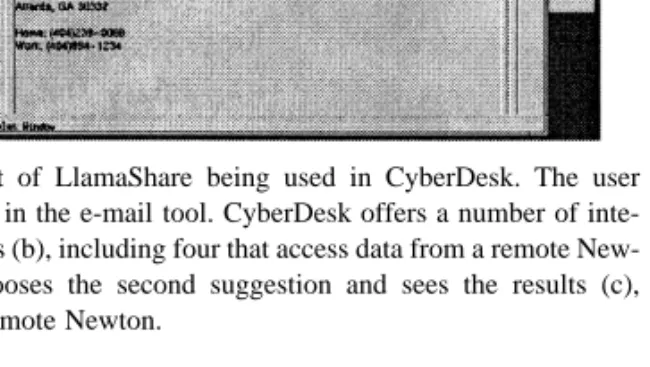
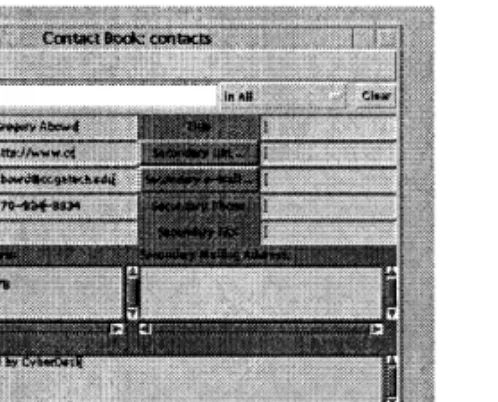
The next task involved adding the services that recog-nized the appropriate data types and created appropriate user actions for them. We added two services (Newton-Names and NewtonNotes) which request contact informa-tion from a Newton about a selected name and request notes from the Newton containing selected text in the body or title. The results of the integration between CyberDesk and LlamaShare can be seen in Fig. 8.
Here are some other examples of how we are using Lla-maShare and CyberDesk.
• A user is writing an e-mail and needs to retrieve some relevant text from the Newton. The user selects a key-word and searches Newton for all the notes containing that text and chooses the appropriate one for inclusion in the message.
• A user receives an e-mail message from a colleague and wants to call that colleague back. The user has the sender’s phone number on Newton, so simply selects the sender’s name and retrieves the contact entry from the Newton.
• While a user is in a meeting, his/her assistant takes down the number of someone who called, but not the caller’s name. The user can select the phone number and let the Newton search its name database. The Newton returns the name of the person/company with that phone number.
• A user needs to schedule a meeting with two other col-leagues. To find a time when all three parties are avail-able, the user can select each of their names and lets CyberDesk display their calendars. The user can sche-dule the meeting and make the change effective imme-diately in the colleagues’ Newton calendars.
5. Adding type converters to CyberDesk
CyberDesk applications can generate changes in the data the user is working with. As described above, CyberDesk
uses type converters to convert this user context (or location or time information, as will be shown in an upcoming sec-tion) into other useful forms of user context. For example, in the user scenario, a StringToURL converter took the data selected by the user and successfully converted it to a URL. This resulted in two pieces of data being sent to the Inte-grator, a string and a URL. The Integrator sought integrating behavior for both these types, allowing the user to access URL-relevant services where originally they would not have had the option.
The type converters work in a recursive fashion. That is, the new data is generated from a successful conversion is sent to the type converters. This process continues until no new data is created, or a cycle is found.
Initially, applications were hardcoded to generate differ-ent data types. For example, the e-mail browser declared that it could generate strings when text is highlighted, but also EmailAddress objects when the ‘To:’ or ‘From:’ field in an e-mail message was selected. When EmailAddress objects were generated, they were passed through the CyberDesk system, as described before, to the user inter-face, which displayed services that could consume Email Address objects (e.g. send an e-mail message to this e-mail address using Netscape). However, this required the applications themselves to be aware of the CyberDesk type system. It was also limiting since e-mail addresses could also appear in the unformatted body text of an e-mail message but would only be recognized as a string selection.
Consequently, a decision was made to use type conver-ters. Using simple heuristics, it is possible to identify poten-tial text strings that might be e-mail addresses. It would have been desirable to augment the e-mail browser with this capability, so that any time text was selected in it, it would try to convert the text to an e-mail address and create an EmailAddress object rather than just a string. But, instead of just giving this type conversion capability to the e-mail browser, that ability should be added to the system once, and allowed to be used in every application where e-mail addresses might appear. The type detection ability was removed from the individual applications and type conver-ters, an independent and extensible layer in the architecture, were created.
For the programmer, writing a type converter involves writing a method that accepts one data type and converts it to another. For the user, adding type converters to a CyberDesk session allows for the use of a wider variety of user context. When user context changes (change in time, location, or data selection), type converters improve the list of suggested actions given by CyberDesk by providing services specific to the content of the user context, not relying simply on the type of user context that has changed.
Currently the list of CyberDesk types includes Strings, Dates, PhoneNumbers, MailingAddresses, Names, URLs, EmailAddresses, GPSPositions, and Times. For each data
Fig. 8. Screenshot of LlamaShare being used in CyberDesk. The user selects a name (a) in the e-mail tool. CyberDesk offers a number of inte-grating suggestions (b), including four that access data from a remote New-ton. The user chooses the second suggestion and sees the results (c), obtained from a remote Newton.
type, there is a corresponding StringTo (data type) type converter.
6. Chaining
By making a simple extension to the service wrappers, applications can gain the same advantages as type conver-ters. Most of the services provided by applications require data types as input parameters and display their results through a graphical interface. This was seen in the scenario when the user searched for a phone number and mailing address (a Web page was displayed) and when the user looked for a name in the contact manager (a contact entry was displayed). Through the use of simple parsing, this data encoded in the graphical interface can be obtained. In the phone number search, the HTML page returned can be examined and parsed to retrieve a matching phone number. Similarly, if the name being looked up in the contact manager had an existing entry containing an e-mail address, the e-mail address could be easily retrieved. This additional data is part of the user’s context and is made accessible to CyberDesk.
When applications are able to generate additional pieces of context and perform user-selected actions, they are behaving both as type converters and as applications, pro-viding the advantages of both. Now, applications can asyn-chronously suggest both actions directly related and indirectly related to the change in user context, reducing the effort required by the user to find these services. This process of generating additional context for the purpose of increasing integrating behavior is called chaining.
A sample user scenario is described below. A user is reading an appointment in the scheduler and elects the name of the person he/she is supposed to be meeting (Fig. 9). As an experienced user, he/she expects to be presented with a list of all possible services that can use a Name: search for a phone number, mailing address, look for an entry in the contact manager, search for the name on the Web, etc. However, by using chaining, more powerful sug-gestions can be provided. The WhoWhere Web application takes a name as input and returns a Web browser showing a list of possible e-mail addresses corresponding to that name. If we make the assumption (not always a good one) that the first e-mail address returned in the list is the correct one, we
can now use this service to convert the name to an e-mail address. The service now creates a related EmailAddress object, and the user is supplied with all possible suggestions for both a Name and an EmailAddress.
Chaining is potentially a very powerful tool for the user to take advantage of. It provides another dimension of sugges-tions for each data type that the user context can be con-verted to.
7. Combining
Along the same line of thought, chaining can be used along with the concept of combining to make services more powerful. The services previously described were designed to only operate on a single data type (at a time). With data being converted to multiple types via chaining, we should enable services to take advantage of these multi-ple types. They can, through a process we call combining.
Combining, in CyberDesk terms, is the ability to collect multiple data types and dynamically bind them together, as needed, to create meta-objects which services can use. These meta-objects can be used to perform substantially more powerful actions.
Using the above example of a user reading an appoint-ment in the scheduler, the user selects a name, and a chain-ing service like Four11 is used to obtain a mailchain-ing address (and create a related MailingAddress object) for that name. Using combining, a meta-object containing both the name and the mailing address may now be used as input to a phone number lookup service like Switchboard. Switchboard can find phone numbers when given simply a name, but it can perform a more accurate search when provided with both a name and a mailing address.
Most services will perform better when provided with pertinent, additional context to work with. CyberDesk deter-mines how to bind data together based on the data it cur-rently has (the sum total of the current user context) and on the services available. It will not offer a suggestion to use Switchboard with just a name as input, when it can suggest it with both a name and mailing address.
Now that the concept of combining has been explained, a more complete example demonstrating its power is given below. Again, we will use the example of the user reading an appointment in the scheduler (Fig. 10). The user selects the name of a person to meet tomorrow. Immediately, the user is offered suggestions of actions that can be performed with the selected string and name. As the chaining-enhanced applications return their data, this suggested list of actions is asynchronously augmented with actions that can use an e-mail address (via WhoWhere), phone numbers and mail-ing addresses (via Switchboard) and URLs (via AltaVista). At the same time, the Integrator is dynamically binding these individual pieces of data for services that benefit from multiple data inputs.
The user chooses to create a new entry in the contact
manager. This results in a rich entry (Fig. 11), containing the original name selected, an e-mail address, a URL, a phone number, and a mailing address.
Combining, like chaining, can be very powerful to the user. It does not inhibit the list of options for individual pieces of user context, while at the same time it combines those pieces, improving the available services and their results. In essence, chaining and combining enhance the context-inferencing engine in CyberDesk.
8. Other forms of context
In a mobile setting, there are additional forms of context that are not necessarily available in a desktop environment. Examples include a user’s changing location, the changing objects in the environment, and the familiarity with the environment. As described earlier, CyberDesk has inte-grated services that allow access to data and applications on mobile devices. Now, we are looking at integrating ser-vices that are available when the user is mobile, to take advantage of these other forms of context.
Up until now, all of the examples shown have only used changes in context based on the data the user is currently working with. CyberDesk can deal with other forms of con-text in the same way as it deals with the user’s data. Inte-grated examples include significant changes in time and position. One application that has been added to CyberDesk is a clock that updates the system time every 5 min. Cur-rently, only one service that can use time has been integrated
into CyberDesk. This service is part of the scheduler and it acts as a reminder service for events listed in the scheduler. When the time input into the system is within 15 min of an event, the scheduler offers a suggestion to the user to check their scheduler. Another, but more intrusive option would be to create a window displaying the relevant information to the user. Ideally, the user would be able to set the type of feedback desired, and the event windows (i.e. how often the time service updates and how close to an event should a user be warned).
Position information has also been incorporated into CyberDesk, for use in a mobile setting. The current system uses global positioning system (GPS) data and is intended for outdoor use. The application providing GPS data updates the system position whenever the GPS coordinates change. Again, how often the application updates will be a user-controlled parameter. A service has been written that accepts GPS information for a location on the Georgia Tech campus and returns a URL corresponding to that loca-tion. CyberDesk then suggests all the activities it can per-form with a URL, including displaying it in a Web browser. An example of this is shown in Fig. 12.
A prototype of an indoor positioning system has been built at Georgia Tech [5]. This prototype could be used as an application offering information on a user’s location within a building, updated as a user moves between rooms. Possible services that incorporate both indoor and outdoor positioning information are real-time mapping and directions, access to equipment in the environment, and providing information on important landmarks (wash-rooms, ATMs, etc.). If these services were combined with knowledge of a user’s history, the services could be made even more useful to the user. When a user approaches a building or room they have never been to, the CyberDesk system should offer introductory information on the loca-tion. If the user has been there before, different sets of information should be offered.
Fig. 11. Combining example—user creates rich contact entry.
Fig. 12. Screenshot of position service: GPS coordinates are being input (a), causing changes in the user interface (b) when the coordinates correspond to a different Georgia Tech building. The user is keeping track of his trip in the scratchpad (c), and is able to view the building URLs in the Web browser (d).
Fig. 10. Combining example—user selects a name and is offered many integrating suggestions.
Additional forms of context can be used to generate new and more appropriate suggestions to the user. As Cyber-Desk’s knowledge of the user’s context grows, it is able to create more informed suggestions for the user. We are inter-ested in using CyberDesk’s context-inferencing engine as the basis for context-aware applications that we are devel-oping-applications that take advantage of knowing a user’s position, history, behavior, etc.
9. Background and related work
The underlying framework of CyberDesk that allows integration of isolated services is based on the concept of dynamic mediation. Mediation consists of two basic steps: registration of components and handling of events. Other systems that use mediation include UNIX pipes, Field [6], Smalltalk-80 MVC [7], Common Lisp Object System (CLOS) [8], and APPL/A [9]. UNIX pipes act as mediators that integrate UNIX programs. They are limited to reading and writing streams of data, where stream outputs can only be input to one stream, and they use only a single event. Field (and its extension Forest) integrate UNIX applications that have events and methods which can be manipulated through a method interface. Like CyberDesk, it uses cen-tralized mediation and implicit registration, allowing greater run-time flexibility. However, it suffers from the use of special object components, creating inconsistencies in the way that data is handled. Smalltalk uses a general event mechanism like CyberDesk, but it merges relationships between components into the components themselves, limiting flexibility. CLOS uses wrappers to access data and methods within objects, much like CyberDesk. But it limits the action a component can perform to a simple method call and return, thereby limiting its usefulness. Sullivan et al. [10] have developed a very flexible dynamic mediation system. However, their system allows only one-to-one relationships between components and requires explicit registration of event–action pairs, while CyberDesk allows one-to-many relationships and allows a looser, more flexible, registration process.
CyberDesk also depends on the use of component soft-ware and network objects. These concepts are important for system flexibility and reuse. Other systems that provide for these concepts are CORBA (Common Object Request Broker Architecture) [11] and IIOP [12] (Internet Inter-ORB Protocol), IBM’s DSOM [13] (Distributed System Object Model) and Microsoft’s OLE and DCOM [14]. These are object models that allow cross-network and cross-language integration of applications.
There are three systems that provide functionality similar to CyberDesk. They are OpenStep’s services facility [15], Intel’s Selection Recognition Agent [16], and Apple Research Lab’s Data Detectors [17].
The OpenStep computing environment uses a uniform object-messaging interface between objects in all of its
applications, similar to CyberDesk. Using this ability, appli-cations can declare the types of data they can generate and are integrated with services that can operate on that data. The largest difference between CyberDesk and OpenStep services is that CyberDesk acts on both the content and data type being used, rather than just the data type. Open-Step services are primarily used to convert file formats, create dynamic links between objects (i.e. updating an object updates the linking documents), and providing global services such as spell checking and printing. It works only with data the user is attending to, limiting the context types it can use, and does not support the concepts of chaining or combining.
Intel’s Selection Recognition Agent attempts to address the same issues as CyberDesk. Unlike CyberDesk, it uses a fixed data type–action pair, allowing for only one possible set of actions for each data type recognized. The actions performed by the agent are limited to launching an applica-tion. When a user selects data in an application, the agent attempts to convert the data to a particular type, and displays an icon representative of that type (e.g. a phone icon for a phone number). The user can view the available option by right clicking on the icon with a mouse. For applications that do not ‘reveal’ the data selected to the agent, the user must copy the selected data to an application that will reveal it. It does not support any of the advanced features of Cyber-Desk, like chaining or combining, nor does it use any other forms of context like time or position.
Apple Data Detectors is another component architecture that supports automatic integration of tools. It works at the operating system level, using the selection mechanism and Apple Events that most Apple applications support. It allows the selection of a large area of text and recognizes all user-registered data types in that selection. Users view suggested actions in a pop-up menu by pressing a modifier key and the mouse button. Like CyberDesk, it supports an arbitrary number of actions for each data type. It does not support chaining and supports only a very limited notion of combining. When a data type is chosen, a service can collect related information and use it, but this collected information is not made available to other services. The Apple Data Detectors system does not support the use of other forms of context. Its focus appears to be desktop applications, as opposed to CyberDesk’s ubiquitous services, existing either locally or remotely.
The three systems discussed deal only with informational context, i.e. the data a user is working with. The majority of context-aware computing to date has been restricted to location-aware computing for mobile applications. This includes the PARCTab [18] from Xerox PARC, the InfoPad project at Berkeley [19], and the Olivetti Active Badge sys-tem [20]. A more general programming framework for describing location-aware objects was the subject of Schilit’s thesis [21] and reflected a lot of the work done at PARC. While there has been a lot of research in context-aware computing [22], we are not context-aware of a general toolkit
that supports such a wide variety of user context and inte-gration behavior like CyberDesk does.
There has been some interesting work recently directly related to context-aware computing. Essa and Pentland [23] have used computational perception techniques in an attempt to match actual facial expressions with some pre-scribed expressions indicating the state of the human (e.g. smiling, frowning, surprized, etc.). Though this work does not claim to be a way to predict human emotions, there is a clear suggestion of how this and related perception research can improve the quality of contextual information that can be gathered. Picard’s work on affective computing [24] suggests a similar objective, only through the use of bio-electric signals, coupled with theories on emotion and cog-nition. The wearable computing community is also looking at the use of context-aware computing. As with mobile computing, a wearable computer user’s context is constantly changing. Applications in this area have ranged from under-standing sign language [25] to tour guides [26] to airplane maintenance [27]. In all these applications, context has been used to improve the user’s experience.
10. Issues and future work
The CyberDesk framework was designed to be easily extensible and easy to use; however, it suffers from a few limitations. There is still a programming burden involved with integrating services into CyberDesk. This process is not yet entirely automated. This issue is being addressed through the efforts of the Web-based service writer and the investigation of JavaBeans.
CyberDesk is still limited by the number of different types of user context it utilizes. Note that this is not a limit imposed by the CyberDesk infrastructure. The use of history, personal preferences, and the location of physical objects and landmarks is currently being examined for inte-gration into CyberDesk.
Perhaps the biggest limitation of the system is the user interface. It consists of a window that displays a list of suggested user actions. Although the system looks for repeated suggestions, it is clear that the number of possible suggestions could quickly become overwhelming to the user. Possible methods for limiting the number of sugges-tions are:
• before displaying a suggestion, contact the service cor-responding to the suggestion and ensure that it can suc-cessfully perform the action;
• pass the service name along with the data it generates, to see if the service has already acted on the data;
• use user history and preferences to select suggestions most likely to be accepted;
• use context to filter out suggestions.
For example, if a user selects a name in an e-mail mes-sage and the system knows that the name is not in the
contact manager, CyberDesk should not offer a suggestion to lookup the name in the contact manager, but instead should suggest to create a new entry in the contact manager. Another example is when the system has access to a user’s history, it could determine the most likely actions a user is likely to take, and limit the suggestions to those, or at least order the suggestions accordingly.
We are currently looking at different ways to adapt the interface to initially show actions that the user is likely to take, while providing a way for the user to see other possible actions as well. We are also looking at different presentation methods for the suggestions, including pop-up hierarchical menus, having menus associated with each individual appli-cation, and document lenses [28].
CyberDesk has also shown the potential for supporting more complex forms of context. For example, if an e-mail message contains information about a meeting, and the user selects the message content, a type converter could poten-tially convert the text to a Meeting object to be inserted in the user’s Calendar Manager. Of course, retrieving context from arbitrary text is a very difficult problem being inves-tigated by the artificial intelligence learning community. But the power of CyberDesk supports the ability to use this richer context, if available.
We will continue to add services to expand CyberDesk’s library of components but this will not be our main focus. We are more interested in the following research areas.
• Examining the use of advanced techniques like chaining and combining and searching for others.
• Investigating learning-by-example techniques [29] to allow the CyberDesk system to dynamically create chained suggestions based on a user’s repeated actions.
• Incorporating rich forms of context into CyberDesk, other than time, position, and meta-types. This will allow us to use CyberDesk as the platform for develop-ing context-aware, mobile applications.
• Experimenting with adaptive interfaces and different interface representations in order to determine better ways of presenting suggestions to our users.
• Applying CyberDesk’s context-inferencing engine to build other context-aware applications. This will include the use of both physical and emotional context, and group context (as opposed to that of a single individual).
11. Conclusions
Providing intelligence in a ubiquitous environment can be achieved by taking advantage of the user’s context. Context includes the information a user interacts with on a desktop or mobile device, location, time, etc. We have developed a framework for integrating software services based on a user’s context. CyberDesk eases the burden on program-mers by relieving the necessity to determine all integrating possibilities and eases the burden on users by relieving the
necessity to understand how applications work together. Through the use of advanced techniques like chaining and combining, we have shown the potential for integrating behavior that is too complicated for a programmer to stati-cally design. Context-aware integration changes the paradigm of interaction from a user seeking out functional-ity in software applications to the infrastructure seeking out the user at relevant times.
Acknowledgements
AD is supported by Motorola Corporation through the University Partnerships in Research (UPR) Program, spon-sored by Dr Ron Borgstahl. The authors would like to thank the members of the Future Computing Environments Group and the numerous other undergraduate and graduate stu-dents at Georgia Tech who have provided much inspiration and support in the development of the initial CyberDesk prototype and have offered us a lot of evidence for the scalability of the infrastructure.
References
[1] A. Wood, CAMEO: Supporting Observable APIs. Position paper for the WWW5 Programming the Web Workshop, Paris, France, May 1996. [2] A.K. Dey et al., CyberDesk: a framework for providing self-integrat-ing ubiquitous software services, Technical Report, GVU Center, Georgia Institute of Technology, GIT-GVU-97-20, 1997.
[3] Java Soft, JavaBeans homepage. Available at http://splash.javasoft.-com/beans/.
[4] M. Pinkerton, Ubiquitous computing: extending access to mobile data, Masters Thesis, Georgia Institute of Technology, June 1997. [5] S. Long et al., CyberGuide: prototype context-aware mobile
applica-tions, in: Proceedings of CHI ’96, ACM Press, Vancouver, Canada. [6] D. Garlan et al., Low-cost, adaptable tool integration policies for
integrated environments, in: Proceedings of SIGSOFT 90: Fourth Symposium on Software Development Environments, Irvine, CA, 1990.
[7] G. Krasner et al., A cookbook for using the model-view-controller user interface paradigm in Smalltalk-80, Journal of Object Oriented Programming 1 (3 August/September) (1988) 26–49.
[8] D. Bobrow et al., Common Lisp Object System Specification X3J13, Document 88-02R, ACM SIGPLAN Notices 23, September 1988. [9] S. Sutton et al., APPL/A: A prototype language for software process
programming. University of Colorado Technical Report CU-CS-448-89, University of Colorado, Boulder, CO, 1989.
[10] K. Sullivan et al., Reconciling environment integration and compo-nent independence, in: Proceedings of SIGSOFT 90: Fourth Sympo-sium on Software Development Environments, Irvine, CA, 1990. [11] T. Brando, Interoperability of the CORBA specification, MITRE
Document MP-95B-58, February, 1995.
[12] Object Management Group homepage. Available at http://www. omg.org.
[13] SOM Object homepage. Available at http://www.software.ibm.com/ ad/somobjects/.
[14] Microsoft, OLE development homepage. Available at http://www. microsoft.com/oledev.
[15] OpenStep, Topics in OpenStep programming. Available at http:// developer.apple.com/techpubs/rhapsody/system/Documentation/ Developer/YellowBox/TasksAndConcepts/ProgrammingTopics/ services.pdf.
[16] M. Pandit, S. Kalbag, The selection recognition agent: instant access to relevant information and operations, in: Proceedings of Intelligent User Interfaces ’97, ACM Press, Atlanta, GA.
[17] Apple Research Labs, Apple Data Detectors homepage. Available at http://www.research.apple.com/research/tech/AppleDataDetectors/. [18] R. Want et al., An overview of the PARCTAB ubiquitous computing
experiment, IEEE Personal Communications 2 (6) (1995) 28–43. [19] A.C. Long, Jr., et al., A prototype user interface for a multimedia
terminal, in: Proceedings of CHI ’95, Interactive experience demon-stration, ACM Press, Atlanta, GA, 1995.
[20] R. Want et al., The active badge location system, ACM Transactions on Information Systems 10 (1) (1992).
[21] B. Schilit, A context-aware system architecture for mobile distributed computing, Ph.D. Thesis, Columbia University, 1995.
[22] G.D. Abowd et al., Context-awareness in wearable and ubiquitous computing, Technical Report, GVU Center, Georgia Institute of Tech-nology, GIT-GVU-97-22, 1997.
[23] I. Essa, A. Pentland, A vision system for observing and extracting facial action parameters, in: Proceedings of the Computer Vision and Pattern Recognition Conference, IEEE Computer Society, 1994, pp. 76–83.
[24] R. Picard, Affective computing, Technical Report 321, MIT Media Lab, Perceptual Computing, November 1995. Available as MIT Media Lab Perceptual Computing Techreport 362.
[25] T. Starner et al., A wearable computing based American sign language recognizer, in: Proceedings of the IEEE International Symposium on Wearable Computers, Cambridge, MA, 1997.
[26] S. Feiner et al., A touring machine: prototyping 3D mobile augmented reality systems for exploring the urban environment, in: Proceedings of the IEEE International Symposium on Wearable Computers, Cam-bridge, MA, 1997.
[27] L. Bass et al., The design of a wearable computer, in: Proceedings of CHI ’97, ACM Press, Atlanta, GA, 1997.
[28] E.A. Bier et al., ToolGlass and Magic Lenses: the see-through inter-face, in: Computer Graphics Proceedings, Annual Conference Series, ACM SIGGRAPH, 1993, pp. 73–80.
[29] A. Cypher, EAGER: Programming repetitive tasks by example, in: Proceedings of CHI’91, ACM Press, Atlanta, GA, 1991.