• No results found

Pucsek Dean Msc 2013 pdf

N/A
N/A
Protected

Academic year: 2020

Share "Pucsek Dean Msc 2013 pdf"

Copied!
97
0
0

Loading.... (view fulltext now)

Full text

(1)

by

Dean W. Pucsek

B.Eng., Carleton University, 2008

A Thesis Submitted in Partial Fulfillment of the Requirements for the Degree of

MASTER OF SCIENCE

in the Department of Computer Science

c

Dean Pucsek, 2013 University of Victoria

(2)

Visualization and Analysis of Assembly Code in an Integrated Comprehension Environment

by

Dean W. Pucsek

B.Eng., Carleton University, 2008

Supervisory Committee

Dr. Y. Coady, Supervisor

(Department of Computer Science)

(3)

Supervisory Committee

Dr. Y. Coady, Supervisor

(Department of Computer Science)

Dr. H. Muller, Departmental Member (Department of Computer Science)

ABSTRACT

Computing has reached a point where it is visible in almost every aspect of one’s daily activities. Consider, for example, a typical household. There will be a desk-top computer, game console, tablet computer, and smartphones built using different types of processors and instruction sets. To support the pervasive and heterogeneous nature of computing there has been many advances in programming languages, hard-ware features, and increasingly complex softhard-ware systems. One task that is shared by all people who work with software is the need to develop a concrete understanding of foreign code so that tasks such as bug fixing, feature implementation, and security audits can be conducted. To do this tools are needed to help present the code in a manner that is conducive to comprehension and allows for knowledge to be trans-ferred. Current tools for program comprehension are aimed at high-level languages and do not provide a platform for assembly code comprehension that is extensible both in terms of the supported environment as well as the supported analysis.

(4)
(5)

Contents

Supervisory Committee ii

Abstract iii

Table of Contents v

List of Tables viii

List of Figures ix

List of Listings xi

Acknowledgements xii

Dedication xiii

1 Introduction and Related Work 1

1.1 Program Comprehension . . . 2

1.2 Assembly Code . . . 3

1.2.1 Disassembly . . . 4

1.2.2 Decompilation . . . 4

1.3 Visualizations . . . 5

1.4 Foundations for Comprehension . . . 7

1.4.1 Binary-Based Frameworks . . . 7

1.4.2 Intermediate Language-Based Frameworks . . . 12

1.5 Requirements for Comprehension . . . 15

1.6 Thesis Statement . . . 16

1.7 Thesis Organization . . . 16

(6)

2 ICE: Evolution, Design, and Implementation 18

2.1 Guiding Principles . . . 18

2.2 Evolution of ICE . . . 20

2.2.1 REIL Translator and Simulator . . . 20

2.2.2 Rails . . . 21

2.3 Design . . . 22

2.4 Implementation . . . 23

2.4.1 Communication . . . 24

2.4.2 Data Model . . . 26

2.4.3 Visualizations . . . 27

2.5 Summary . . . 33

3 Case Studies 34 3.1 Case Study: Dynamic Linker . . . 34

3.1.1 Overview of dyld . . . 34

3.1.2 Analysis with ICE . . . 35

3.1.3 Analysis with IDA Pro . . . 38

3.1.4 Analysis with Hopper . . . 41

3.1.5 Evaluation: Source Code . . . 43

3.2 Case Study: Malware . . . 45

3.2.1 Overview of Sample . . . 45

3.2.2 Initial Analysis . . . 48

3.2.3 Analysis with ICE . . . 49

3.2.4 Analysis with IDA Pro . . . 51

3.2.5 Analysis with Hopper . . . 53

3.2.6 Evaluation: Practical Malware Analysis . . . 55

3.2.7 Sample Restrictions . . . 56

3.3 Case Study: Data Source Integration . . . 56

3.3.1 Multiple Data Sources . . . 56

3.3.2 Data Source Integration . . . 58

3.4 Summary . . . 59

4 Validation 63 4.1 Validating the Requirements . . . 63

(7)

4.3 Limitations of ICE . . . 65 4.4 Summary . . . 66

5 Future Work and Conclusions 68

5.1 Conclusion . . . 68 5.2 Future Work . . . 69

Bibliography 70

A Source Code Listing for iced 76

(8)

List of Tables

(9)

List of Figures

Figure 1.1 A sample call graph . . . 6

Figure 1.2 A sample sequence diagram. . . 7

Figure 1.3 A software terrain map . . . 8

Figure 1.4 Control flow graph showing a for-loop. . . 8

Figure 1.5 Conceptual representation of a binary-based framework . . . . 9

Figure 1.6 IDA Pro during a typical reverse engineering session . . . 10

Figure 1.7 Main window of BinNavi . . . 11

Figure 1.8 Conceptual representation of a intermediate language . . . 12

Figure 2.1 Rails being used to analyze an a crackme . . . 21

Figure 2.2 High-level design of ICE . . . 22

Figure 2.3 Graph representation of a program . . . 23

Figure 2.4 Message passing between ICE and a data source . . . 24

Figure 2.5 ICE Data Model containing relationships between modules, functions, and instructions. . . 26

Figure 2.6 Screenshot of Cartographer . . . 28

Figure 2.7 Screenshot of Tracks . . . 30

Figure 2.8 Screenshot of Control Flow Graph . . . 31

Figure 2.9 Screenshot of Tours . . . 32

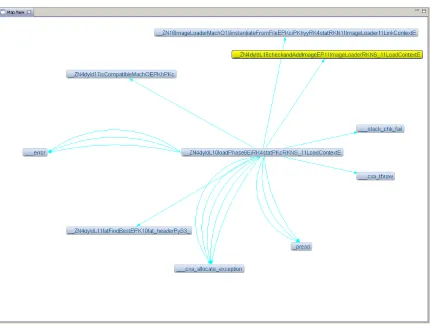
Figure 3.1 dlopen() as seen through Cartographer . . . 36

Figure 3.2 dlopen() as seen through Tracks . . . 37

Figure 3.3 dyld::load() as seen through Cartographer . . . 38

Figure 3.4 dyld::loadPhase0() as seen through Cartographer . . . 39

Figure 3.5 dyld::loadPhase6() as seen through Cartographer . . . 40

Figure 3.6 ImageLoaderMachO::instantiateFromFile() as seen through Car-tographer . . . 41

(10)

Figure 3.8 parseLoadCmds() in Cartographer . . . 43

Figure 3.9 CFG of parseLoadCmds() with the Joins filter . . . 44

Figure 3.10 CFG of parseLoadCmds() with the Loops filter . . . 45

Figure 3.11 Graph of references from dlopen() in IDA Pro . . . 46

Figure 3.12 List of references from dlopen() in IDA Pro . . . 46

Figure 3.13 Proximity View of dlopen() in IDA Pro . . . 47

Figure 3.14 Proximity View of parseLoadCmds() in IDA Pro . . . 47

Figure 3.15 Control flow graph of parseLoadCmds() in IDA Pro . . . 48

Figure 3.16 Disassembly of dlopen() in Hopper . . . 48

Figure 3.17 Call graph of main() produced by Cartographer . . . 50

Figure 3.18 Call graph of sub 401679() produced by Cartographer . . . 51

Figure 3.19 Call graph of DllMain() produced by Cartographer . . . 52

Figure 3.20 Call graph of WlxInitialize() produced by Cartographer . . . . 53

Figure 3.21 Call graph of sub 10001000() produced by Cartographer . . . 54

Figure 3.22 Function call graph of malware produced by IDA Pro . . . 55

Figure 3.23 Proximity view of main() produced by IDA Pro . . . 55

Figure 3.24 Call graph of LLDB’s main() function produced by Cartographer 57 Figure 3.25 LLDB’s main() as seen through Tracks . . . 60

Figure 3.26 Screenshot of Driver::parseArgs() in Cartographer . . . 61

Figure 3.27 Searching for push back() in Cartographer . . . 61

Figure 3.28 Control flow graph of push back() with Joins highlighted . . . 62

(11)

List of Listings

Listing 1.1 Implementation of string length in x86 . . . 3

Listing 1.2 Implementation of string length in ARM . . . 3

Listing 1.3 Implementation of string length in LLVM . . . 13

Listing 1.4 Implementation of string length in REIL . . . 15

Listing 2.1 Sample REIL Code . . . 20

(12)

ACKNOWLEDGEMENTS I would like to thank:

Mark, Sharon, Matthew, Blake, Kerry, Chris Aylard, and Bailey Adamson, for supporting me in all I do.

Yvonne Coady,

for mentoring, support, encouragement, and patience. Defence Research and Development Canada,

(13)

DEDICATION

UVic Vikes Rowing and Rowing Canada.

(14)

Introduction and Related Work

Computing has reached a point where it is visible in almost every aspect of one’s daily activities. Consider, for example, a typical household. There will be a desktop computer, game console, tablet computer, and smartphones built using a different types of processors and instruction sets. To support the pervasive and heteroge-neous nature of computing there has been many advances in programming languages, hardware features, and increasingly complex software systems. For example, modern processors now include hardware virtualization to better support cloud computing; software is now typically written in high-level languages that enable programmers to more easily express their ideas; and, technologies such as multi-threading are now commonplace in software.

In conjunction with all of the new software being developed there is also the issues of maintaining legacy software and performing security audits on existing software. Legacy software continues to be used, such as in some mainframes, and for one reason or another must continue to be maintained. Security audits are becoming increasingly important as people enlist computers in areas such as health care, military, and critical infrastructure.

(15)

1.1

Program Comprehension

Program comprehension is the task of developing an understanding of a particu-lar piece of software; the understanding can be either functional—how the software works—or holistic—what the software does [63, 50]. The need for program compre-hension is seen in all areas of computing such as: security audits, development [48, 45], and educational purposes [50].

Despite this need for program comprehension each group of people that interacts with software may have access to different types of information (e.g. source code, access to developers, documentation) and, as a result, a different set of tools available. A software engineer—and student—typically has access to a wealth of information and is able to leverage a wide variety of tools [16, 17, 24, 62, 15, 54, 41], including those that specifically target the language in use. Conversely, a reverse engineer is faced with a lack of information available and must rely on tools such as assembly-level debuggers [43, 28] and disassemblers [33, 32, 21]. It is these differences in information and tool availability, as well as the differences in the environment that lead to several issues for reverse engineers when faced with the task of understanding the implementation and functional details of a program.

Of the many groups that interact with software, reverse engineers are tasked with the job of taking already written code—usually in binary form—and developing an understanding of both the functional and holistic elements. In order to develop this understanding reverse engineers must work with assembly code which leads to three primary issues.

1. Information Overload: Reverse engineers must deal with an extremely large number of assembly instructions since each high-level statement is translated into at least one assembly instruction, if not more.

2. Information Loss: Assembly code does not include information such as variable types, function names, and structure definitions that, in other situations, can provide a great deal of insight.

(16)

1.2

Assembly Code

Even with an extraordinarily high affinity towards high-level languages, assembly code is still prevalent and widely used [59]. For example, assembly code is still widely used in mainframe programming.

Due to the fact that assembly code is a human-readable representation of a proces-sors machine instructions the syntax and semantics are not necessarily transferable. This unbreakable tie between assembly code and processors gives rise to the need for flexibility in approaches to program comprehension.

To help illustrate the wide variety of assembly code Listing 1.1 shows an imple-mentation of a string length routine in x86; the architecture found in most desktop computers.

Listing 1.1: Implementation of string length in x86

p u s h ebp ; s a v e p r e v i o u s s t a c k p o i n t e r mov ebp , esp ; a d j u s t s t a c k to c u r r e n t f r a m e mov eax , [ esp +4] ; get p o i n t e r to s t r i n g

n e x t : cmp b y t e ptr [ eax ] , 0 ; is n u l l t e r m i n a t o r ? je d o n e ; if t e r m i n a t o r , j u m p

inc eax ; else , i n c r e m e n t s t r i n g p o i n t e r jmp n e x t ; and l o o p

d o n e : sub eax , [ esp +4] ; s u b t r a c t s t a r t of s t r i n g p o i n t e r ; f r o m end of s t r i n g p o i n t e r

l e a v e ; r e l e a s e s t a c k f r a m e ret ; r e t u r n to c a l l e r

Similarly, Listing 1.2 is the same string length algorithm implemented in ARM, found in most smartphones and tablet computing devices.

Listing 1.2: Implementation of string length in ARM

s t m f d sp ! , { r1 , r2 , lr } @ p r e s e r v e c a l l e r v a l u e s of r1 and @ r2 , r e t u r n a d d r e s s on the s t a c k mov r2 , r0 @ k e e p c o p y of s t a r t s t r i n g p o i n t e r n e x t : l d r b r1 , [ r0 ] , #0 x1 @ p l a c e c u r r e n t c h a r a c t e r in r1 ,

@ i n c r e m e n t s t r i n g p o i n t e r by 1 cmp r1 , #0 x0 @ is c u r r e n t the n u l l t e r m i n a t o r ? beq d o n e @ if yes , go to d o n e

bal n e x t @ if no , c o n t i n u e l o o p

(17)

l d m f d sp ! , { r1 , r2 , pc } @ r e s t o r e c a l l e r v a l u e s of r1 and @ r2 , put r e t u r n a d d r e s s in

@ p r o g r a m c o u n t e r

Although assembly code may be encountered from numerous sources one of the most common is disassembly.

1.2.1

Disassembly

A disassembler takes as input a binary program and returns as output a representa-tion, usually textual, of the machine code. The need for disassembly is two-fold. On one hand, a reverse engineer may only have access to a binary and therefore must disassemble it in order to have a starting point for program comprehension. On the other hand, a reverse engineer may have access to the source code in addition to a binary and will disassemble the binary in order to verify that the source code provided could have generated the binary [4].

There are many tools [33, 32, 2, 1] and techniques [36, 13, 44] available to disas-semble code; however, IDA Pro [33] is generally accepted as the industry standard. IDA Pro boasts a long history coupled with support for multiple binary file formats, supported operating systems, and supported instruction sets.

As stated in Section 1.1, one of the major drawbacks to program comprehension based on assembly code is the sheer amount of code to be processed. The challenge here is largely cognitive in that it is extremely difficult for a reverse engineer to keep track of all pertinent details while developing a complete understanding of the program [8]. Furthermore, in malicious environments it is not reasonable to assume that the disassembly is correct due to techniques employed by malware authors [64, 26].

1.2.2

Decompilation

An approach to alleviating the cumbersome nature of assembly code is todecompile, or translate, it into a high-level language or pseudo-language. While the techniques [13, 14] used to decompile are outside the scope of this thesis, it is important to note some of the drawbacks of this approach.

(18)

around this by limiting themselves to specific classes of code (e.g. strictly conforming C code) or making assumptions about the resulting code. However, this limitation is magnified when one considers code outside the class the technique was developed for and especially when faced with potentially malicious code.

A second drawback to decompilation is that it is difficult to conclusively identify the data type or high-level control flow structure used [61]. Consider how a decompiler might differentiate between a 32-bit integer and a 32-bit pointer value. In this case the correct interpretation depends on the context the value is used in which is not necessarily possible to determine during decompilation.

A third drawback to decompilation is that it is not well suited to the object-oriented, and dynamic, nature of languages such as C++ [27]. In the case of C++ some of the issues that are encountered are related to reconstructing the class hi-erarchy, identifying and associating member functions, and reconstructing exception handling code blocks.

1.3

Visualizations

Through stakeholders, one aspect that was identified as necessary for a program comprehension environment suited for assembly code is the usage of visualizations to display different aspects of the code being analyzed. At the core of each visualization is a type of graph designed to show some specific type of information; for example, a function call graph displays the relationship between the caller and callee. The following is a brief survey of commonly used graphs and the type of information they focus on.

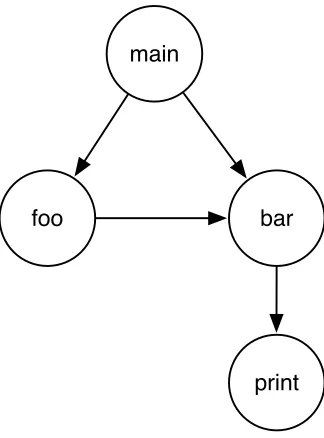
A call graph is a directed graph (Figure 1.3) that represents the caller-callee re-lationship in functions [49, 11]. Since every modern programming language supports the notion of a function the call graph is language and paradigm agnostic [29]. From the call graph a reverse engineer is able to form an understanding of the structure of the program and, provided accurate function names are available in the binary, able to deduce the action carried out in each function.

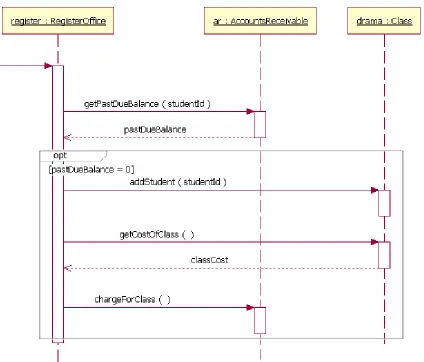
Sequence diagrams are a visualization that depict the interactions between objects in the sequential order they occur. Figure 1.31 shows a sample sequence diagram in

which the events required for a student to register in a class are examined. Sequence

1Image source:

(19)

main

foo bar

[image:19.612.241.403.95.314.2]

print

Figure 1.1: A sample call graph

diagrams were born in the Unified Model Language [34] and tend to be used when describing object-oriented code bases.

Continuing with the effort to identify relationships in program components are

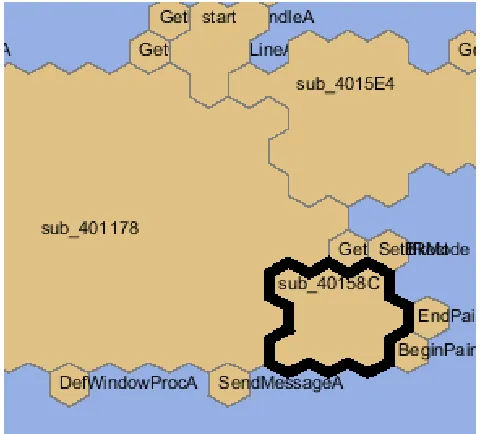
software terrain maps [19]. Software terrain maps (Figure 1.3) provide a spatial representation of relationships between functions. One notable feature of software terrain maps is that functions are placed in the map such that their size is indicative of the function size and location depicts the relationship with surrounding functions. Despite the amount of information and understanding that can be obtained at a functional (or global) level, at times it is necessary to delve into the implementation details of a single function. For this task, acontrol flow graph (CFG) [3] is commonly used. Control flow graphs operate on basic blocks, a set of assembly instructions that has at most one entrance and one exit, and provide insight into the paths that can be taken within a function as well as how the various paths relate to each other.

(20)
[image:20.612.109.533.92.454.2]

Figure 1.2: A sample sequence diagram.

1.4

Foundations for Comprehension

The primary goal of this thesis is to improve comprehension of assembly code through visualizations and analyses. Before developing the prototype discussed in the follow-ing chapters a survey of related approaches was conducted. We found that existfollow-ing solutions can be classified in one of two categories: binary-based frameworks and intermediate language-based frameworks.

1.4.1

Binary-Based Frameworks

(21)
[image:21.612.202.443.95.312.2]

Figure 1.3: A software terrain map

Figure 1.4: Control flow graph showing a for-loop.

knowledge about the binary being examined. For example, if a Portable Executable (PE) 2 binary that contains code for an Intel 32-bit system must be analyzed then

the framework would have specific knowledge of this type of binary and know how to access specific information such as the binary headers.

[image:21.612.181.467.347.576.2]
(22)

Binaries

[image:22.612.181.471.93.299.2]

Analysis

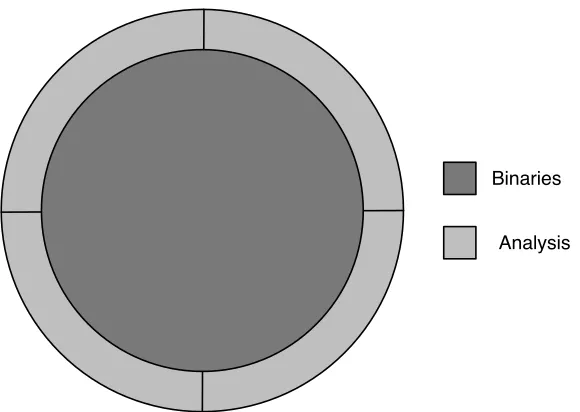
Figure 1.5: Conceptual representation of a binary-based framework

As seen in Figure 1.5, the binary is a central component and the analyses are developed around it. The benefit of this approach is that the coupling between the interface used by analyses and the binary is extremely tight enabling for very specific information to be extracted from the binary. Moreover, analyses are tightly integrated with each other enabling common functionality to be shared.

The tight integration found in a framework comes at the cost of having to develop a separate framework for each type of binary being analyzed. Therefore, if an analyst needed to examine a Mach-O 3 executable containing Intel 64-bit code an entirely

new framework must be developed.

A summary of numerous binary-based frameworks follows.

IDA Pro

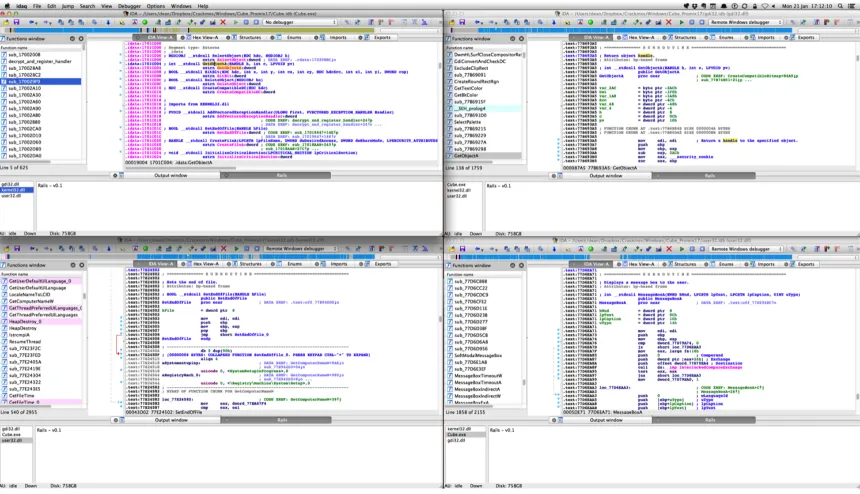
IDA Pro [30] is an industry-standard interactive disassembler. It has been designed such that it is able to integrate a suite of builtin analysis tools with those provided by third-parties in order to provide an extensible general-purpose binary analysis frame-work. IDA Pro provides this functionality through a traditional plugin architecture and a well-defined API that allows third-party developers to produce task-specific analysis algorithms [5]. The primary strength of IDA Pro is its disassembler which supports a multitude of instruction sets. Figure 1.6 shows a typical IDA Pro session.4

(23)

Figure 1.6: IDA Pro during a typical reverse engineering session

BitBlaze

BitBlaze [53] is an open-source project consisting of two integrated binary analysis frameworks (one static, one dynamic), and a mixed concrete and symbolic execution engine. BitBlaze was developed at UC Berkeley and aims to provide a better un-derstanding of software through a fusion of static and dynamic analysis. It supports both static and dynamic analysis of 32-bit x86 binaries. All tools produce textual output only through a command-line interface. The analysis tools are dependent on the intermediate language, which is generated using several third-party tools in-cluding an emulator called QEMU [9]; a recent study names QEMU as one of four emulators that allegedly unfaithfully emulates certain instructions [39]. The static analysis framework—Vine—can be extended by building tools on top of the Vine IL. In the dynamic analysis framework, extensibility is achieved through plugins to the BitBlaze emulator, TEMU, which is based on QEMU. Shortly after BitBlaze was de-veloped two members of the research team released another framework, BAP (Binary Analysis Platform) [18].

BinNavi

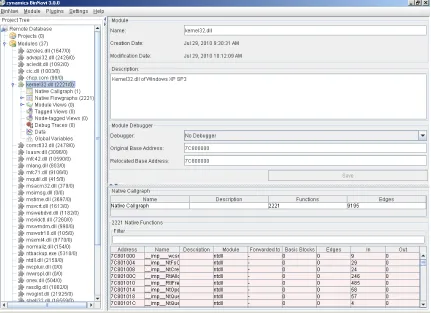
BinNavi [66], Figure 1.7 5, is a binary analysis framework produced by Zynamics and is specifically designed to facilitate vulnerability detection in executables. Bin-Navi makes heavy usage of graph-based visualizations during analysis and currently supports x66, PowerPC, and ARM code. As with IDA Pro, BinNavi provides

(24)
[image:24.612.110.541.97.410.2]

Figure 1.7: Main window of BinNavi

tensibility using a plug-in architecture and is platform-independent. BinNavi can be either used as a standalone tool or leverage the disassembling capabilities of IDA Pro. If IDA Pro is used then the disassembly data must be exported to BinNavi using an IDA Pro plugin.

HERO

(25)

Valgrind

Valgrind [42] is a robust, well-established framework that provides support for both static and dynamic analysis. It runs on multiple flavours of Linux and Mac OS X, with plans to extend to more operating systems. It uses two intermediate languages: VEX and UCode, a RISC-like language. Each instruction is translated individually and independently and unsupported instructions are inserted as comments to preserve dynamic analysis functionality.

1.4.2

Intermediate Language-Based Frameworks

The second approach, an intermediate language-based framework, focuses on encap-sulating common aspects of binaries in an intermediate language. This approach enables for a potentially limitless number of binary file format and instruction set combinations as well as enables analyses to be written once for the intermediate lan-guage. However, an intermediate language-based approach does require a translator to be written for each instruction set in order to be supported in the framework. Figure 1.8 depicts a schematic of this approach.

Binaries

Analysis Intermediate Language

Figure 1.8: Conceptual representation of a intermediate language

(26)

potential for incompatibilities between analysis tools. Second, the intermediate lan-guage must be designed to satisfactorily encapsulate various aspects of an instruction set and the associated processor. For example, the intermediate language should be able to encapsulate the notion of processor status flags which may differ across pro-cessors. Additionally, there is potential for complications to arise when attempting to incorporate functionality such as SIMD and hardware virtualization.

A summary of intermediate language-based frameworks follows.

LLVM Code

LLVM [37] is an open-source project that was initially designed as a framework for compiler construction but has now evolved to provide a collection of tools and li-braries including debuggers, disassemblers, and high-level language parsers. At the core of LLVM is a language that can be used in three forms: an in-memory com-piler intermediate representation, an on-disk byte-code representation, and a human readable representation. As noted in the LLVM language reference [38] aims to be a “universal IR” that is low-level yet capable of mapping to high-level constructs. The LLVM language contains a fully specified instruction set as well as many other functions and data types relevant to program comprehension. In particular, it de-fines a mechanism to attach metadata to any translation and supports FPU, MMX, and SSE instructions and data types. Extensibility in LLVM is almost unlimited, as mechanisms are provided to add instructions, types, and intrinsics6. Listing 1.3

shows the LLVM code output when compiling the implementation of string length presented in Section 1.2.

Listing 1.3: Implementation of string length in LLVM d e f i n e i32 @ l e n g t h ( i8 * % s t r 1 ) n o u n w i n d u w t a b l e ssp {

%1 = a l l o c a i8 * , a l i g n 8 % s t r 2 = a l l o c a i8 * , a l i g n 8

s t o r e i8 * % str1 , i8 ** %1 , a l i g n 8 %2 = l o a d i8 ** %1 , a l i g n 8

s t o r e i8 * %2 , i8 ** % str2 , a l i g n 8 br l a b e l %3

; < label >:3 ; p r e d s = %8 , %0

6An intrinsic is a compiler specific, highly optimized function provided by a language where the

(27)

%4 = l o a d i8 ** %1 , a l i g n 8 %5 = l o a d i8 * %4 , a l i g n 1 %6 = s e x t i8 %5 to i32 %7 = i c m p ne i32 %6 , 0

br i1 %7 , l a b e l %8 , l a b e l %11

; < label >:8 ; p r e d s = %3

%9 = l o a d i8 ** %1 , a l i g n 8

%10 = g e t e l e m e n t p t r i n b o u n d s i8 * %9 , i32 1 s t o r e i8 * %10 , i8 ** %1 , a l i g n 8

br l a b e l %3

; < label > : 1 1 ; p r e d s = %3 %12 = l o a d i8 ** %1 , a l i g n 8

%13 = l o a d i8 ** % str2 , a l i g n 8 %14 = p t r t o i n t i8 * %12 to i64 %15 = p t r t o i n t i8 * %13 to i64 %16 = sub i64 %14 , %15

%17 = t r u n c i64 %16 to i32 ret i32 %17

}

Reverse Engineering Intermediate Language (REIL)

REIL (Reverse Engineering Intermediate Language) [23] provides a platform-independent intermediate language of disassembled code for static analysis. REIL uses a side-effect-free, RISC-style intermediate language consisting of 17 instructions. Each in-struction contains exactly three operands (some inin-structions have operands of type

(28)

Listing 1.4: Implementation of string length in REIL s t r l e n 1 :

0 x 0 0 1 0 0 str esp , , t1 0 x 0 0 1 0 1 add t1 , 4 , t2 0 x 0 0 1 0 2 ldm t2 , , t3 0 x 0 0 1 0 3 str t3 , , eax 0 x 0 0 2 0 0 ldm eax , , t4 0 x 0 0 2 0 1 b i s z t4 , , t5 0 x 0 0 3 0 0 jcc t5 , , 0 x 0 0 6 0 0 0 x 0 0 4 0 0 add eax , 1 , t6 0 x 0 0 4 0 1 str t6 , , eax 0 x 0 0 5 0 0 jcc 1 , , 0 x 0 0 2 0 0 0 x 0 0 6 0 0 add esp , 4 , t7 0 x 0 0 6 0 1 ldm t7 , , t8 0 x 0 0 6 0 2 str t8 , , eax 0 x 0 0 6 0 3 sub t8 , t9 , eax 0 x 0 0 7 0 0 str esp , , t10 0 x 0 0 7 0 1 sub t10 , 4 , t11 0 x 0 0 7 0 2 ldm t11 , , eip 0 x 0 0 7 0 3 jcc 1 , , eip

Static Analysis Intermediate Language (SAIL)

SAIL (Static Analysis Intermediate Language) [20] is an open-source project that translates C—or C++—code into two complimentary intermediate languages: a high-level language, and a low-high-level language. The high-high-level language retains constructs from the original source code where as the low-level language is source code indepen-dent and is more amenable to static analysis.

1.5

Requirements for Comprehension

(29)

requirements for tools in the domain of program comprehension [7]. As a proof-of-concept, this work focuses on the following subset of requirements identified by the analysts in that study:

1. Multiple Executables: Their disassembler cannot disassemble more than one executable file at a time (e.g. DLL libraries) and link between them.

2. Map of Analysis: It is easy to get lost when going deeper into the code—hard to track where the exploration started and how a deeper point was arrived at. 3. Tagging: There is no tagging mechanism for assembly where, for example, one

could tag a global variable and see where it comes from.

4. Cross Reference Mechanism: Lack of a cross reference mechanism between a given function in an executable file to a DLL.

The requirements were ranked in the study and, although the above are a subset, the first listed (providing support for multiple executables) received the highest rank out of the total 15 requirements. The second and third in the above list were fourth and fifth respectively in the final ranking while the fourth listed was number 12.

1.6

Thesis Statement

The goal of this work is to explore the feasibility of applying principles from high-level program comprehension tools to low-level codebases. The design and implementation of ICE demonstrates that it is possible to build an extensible framework for interactive visualizations that is flexible in terms of the data acquisition.

1.7

Thesis Organization

The remainder of this thesis is organized as follows. Chapter 2 introduces ICE, an

(30)

1.8

Summary

(31)

Chapter 2

ICE: Evolution, Design, and

Implementation

Given the challenges outlined in Chapter 1—and further developed in [7]—my thesis proposesICE, anIntegrated Comprehension Environment, as a framework for program comprehension that is based on extensibility and modularity. This chapter delves into the evolution, design, and prototype implementation of ICE as well as the guiding principles that helped shape the overall development process.

2.1

Guiding Principles

Early in the project several guidelines were established that helped steer the devel-opment process and work completed. The guidelines are:

1. Instruction set independent 2. Extensible visualizations 3. Flexible data acquisition 4. Operating system independent

(32)

Instruction set independent. The first guideline conceived was the need for ICE to be instruction set and binary file format independent. This guideline came about because of the observation that there is an ever increasing number of instruction sets available on the market; especially as new computing paradigms become ubiquitous. A motivating example of this guideline comes from the domain of embedded devices as processors become better tailored to specific tasks. In this case, the ARM processor has become commonplace with the rise in smartphone and tablet computing devices. Similarly, the burgeoning domain of general purpose GPU computing has brought new, GPU specific, instruction sets into the main stream. The impact of this guideline on the development of ICE is that there is a need to better understand what differences exist between various instruction sets and how these differences could be reconciled. This guideline was a large motivating factor for the investigation of frameworks and intermediate languages discussed in Section 1.4.2.

Extensible visualizations. The next guideline was that the visualization infras-tructure provided by ICE must be extensible. The need for this guideline lies in the fact that (1) not all analysts will be interested in the same set of visualizations, and (2) in order to foster further research in program comprehension it is important to enable a researcher to develop and explore custom visualizations. As a result of this guideline ICE was developed around theModel-View-Controller (MVC)[46] paradigm in order to provide a clear boundary between the data available for visualizations and the visualizations themselves.

Flexible data acquisition. Since ICE currently does not parse or disassemble any binaries this guideline was put in place to allow ICE to be able to accept data from a wide variety of sources. For example, it may be necessary for an analyst to retrieve data from a disassembler while concurrently retrieving data from a debugger. Furthermore, this guideline also serves to support the need for ICE to be capable of working with multiple binaries simultaneously. In addition to the need for an extensible visualization infrastructure this guideline was another primary motivator to leverage the MVC paradigm. This guideline also shaped a large portion of the communication mechanism used between ICE and the data sources.

(33)

This guideline was largely founded in the growth of operating systems other than Microsoft Windows and the idea that to help future-proof ICE it should not mandate a specific operating system for the analyst to use. The impact of this guideline on ICE was that all supporting libraries used in the prototype must also be operating system independent; additionally, this guideline had a large influence on the selection of programming language and environment.

2.2

Evolution of ICE

Before delving into the design and implementation of ICE it is important to under-stand the process that lead to its inception. Following the investigation of frameworks and intermediate languages (Section 1.4.2) we decided that, to provide a reasonable solution to the problem of assembly code analysis, an approach that leveraged both frameworks and intermediate languages was required.

The need for a hybrid solution follows from the fact that multiple instruction sets need to be supported in order to support the wide variety of modern electronics. Through a hybrid solution it would be possible to write the vast majority of analyses and visualizations against a single intermediate language while providing access to arbitrary data in a binary through an API.

2.2.1

REIL Translator and Simulator

Due to the simplicity of leveraging a pre-existing intermediate language the first step taken after the initial investigation into intermediate languages was to develop a translator and simulator for REIL. Both of which were written in Python.

The translator took as input a disassembly of 32-bit Intel code and produced as output semantically equivalent REIL code. As an example, given the instruction

mov eax, [esp-4]the REIL code shown in Listing 2.1 would be generated. Listing 2.1: Sample REIL Code

sub t1 , esp , 4 ldm t2 , t1 mov eax , t2

(34)

With nearly 600 instructions in the Intel instruction set, the translator did not implement each instruction. Instead it focused on a core set that are commonly used by compilers. The translator was tested using various implementations of functions that computed the length of a null-terminated string.

As a proof-of-concept, a colleague developed a simulator that was able to evaluate the REIL code generated by the translator. The simulator allowed for inspection of the memory as well as registers in use. The veracity of the simulator was validated by comparing the results of the string length computations to values computed using the standard strlen()function available in C.

[image:34.612.109.539.311.558.2]

2.2.2

Rails

Figure 2.1: Rails being used to analyze an a crackme

As a result of the requirements solicited in [7] and discussed in Section 1.5, there was a clear need for functionality in IDA Pro that would ease the process of working with multiple binaries simultaneously.

(35)

was submitted to the 2012 Hex Rays Plugin Contest and was given an honourable mention.

2.3

Design

The design of ICE leverages the Model-View-Controller (MVC) [47] design pattern in which information from any Executable Entity, a binary or intermediate language representing assembly code, is stored in an extensible data model and visualizations act as views of that data model describing the Executable Entity being analyzed. The primary reason the MVC pattern was selected is because it allows for multiple visualizations to be created using a single description of the Executable Entity in question—enabling the creation of new visualizations in a way that is more language-agnostic than previous approaches in this domain.

Application Platform Communication Data Model Visualization Visualization Data Source Data Source Data Source Data Source Data Source Data Source

Figure 2.2: High-level design of ICE

A schematic representation of the design of ICE is shown in Figure 2.2. The lowest layer, the Application Platform, is responsible for providing all aspects of a graphi-cal user interface and application. This layer includes functionality such as window management, delivering mouse and keyboard events, and a minimal environment for the creation of an application.

(36)

from sources to the sink, ICE is capable of pushing changes—such as added comments and function name changes—to the sources.

Directly above the Communication layer is the Data Model; the “Model” in tra-ditional MVC terms. The Data Model is a core component of ICE and forms the foundation upon which analyses are built, and data pertaining to low-level repre-sentations being analyzed is stored. The Data Model is encapsulated in a directed graph that models the structure of the Executable Entity under analysis. Within an Executable Entity function calls are used as the “edges” of this model since they are a ubiquitous mechanism to connect sections of code. For example, Figure 2.3 depicts the directed graph representation of a small program in which main() calls foo()

and bar(), and bar() calls print().

main

foo bar

print

Figure 2.3: Graph representation of a program

Above the Data Model, ICE provides a mechanism for the development of visual-izations that can easily be created by an analyst. Visualvisual-izations are the components that an analyst interacts with and are the viewport into the data model, or the “View” in MVC. The MVC paradigm is rounded out with the “Controller” being the logic of ICE that enables a user to switch between the various Views and interact with them to better understand what is being presented.

2.4

Implementation

(37)

ICE was written in Java using theEclipse Rich Client Platform (RCP) [25] as its foundation. The selection of this environment was guided in part by the prevalence of Java and the Eclipse RCP; however, it also allowed for a large amount of code reuse, specifically in the Tracks visualization (Section 2.4.3) and the Zest framework [65] for rendering graphs. The following subsections delve into the current communication, data model, and visualizations present in ICE.

2.4.1

Communication

As previously described in Section 2.3, ICE allows bi-directional communication be-tween Data Sources and itself. Communication is carried out over a predetermined port on the loopback interface. Taking this approach restricts communication to the localhost which cuts down on network traffic and is beneficial in the context of mal-ware analysis, since machines dedicated to this task are typically separated from all networks to promote security.

ICE Data

Source

hello

request functions

response functions

sync

Figure 2.4: Message passing between ICE and a data source

The communication protocol used in ICE is built upon the JSON model [35] and is outlined in Figure 2.4. Communication begins by a Data Source sending a hello

(38)

Listing 2.2.

Listing 2.2: Sample JSON message {

o r i g i n = ‘ ‘ p r o g r a m . exe ’ ’ , i n s t a n c e _ i d = 1234 ,

a c t i o n = ‘ ‘ hello ’ ’ , a c t i o n T y p e = null , d a t a = n u l l

}

The fields presented in Listing 2.2 have all been chosen to allow for a flexible messaging protocol. The origin is the name assigned to the binary by the Data Source. For example, this could be the actual name of the binary or some other identifier such as a project name if Java byte-code was being analyzed. The next field, the instance id, is a unique numeric identifier of the Data Source. Currently this is taken to be the process ID of the Data Source since that is guaranteed to be unique due to ICE being restricted to a single machine. The action describes what the message does—it can be thought of as the ‘verb’ in the message. The messaging protocol defines numerous action values including: hello, request, and response. Similarly, the actionType field can be thought of as the ‘adverb’ of the message since it describes the action of the message being sent. Finally, the data field is specific to the combination of action and actionType and can contain any valid JSON object.

Once the entry in the Data Model has been created ICE then requests information about the functions contained in the Executable Entity—a binary or intermediate lan-guage representing assembly code—under analysis. For each function ICE requests:

• Module name

• Function name

• Entry point

• Starting location

• Ending location

(39)

Socket Instance Instance Socket Socket Instance Instance Socket Instance Map ID Name Functions Instance From To Target Call Entry Point Name Start End Module Comment Calls Function Instructions Address Instruction Instruction Map Instruction Address Address Instruction Address Flow Next Instruction

Figure 2.5: ICE Data Model containing relationships between modules, functions, and instructions.

Note that the starting and ending location may be either an address or a line number depending the Executable Entity being analyzed. Moreover, theEntry point

is a boolean value indicating if the function is reachable from outside the Executable Entity and the function request triggers the Data Source to return similar information about all calls made within the function.

Upon sending all requested information, the Data Source sends a sync message causing ICE to commit all the data it has received, analyze the data for relationships between functions, and notify any visualizations currently open to update their view.

2.4.2

Data Model

The Data Model in ICE, depicted in Figure 2.5, is based on a directed graph and models the relationships between modules, functions, and instructions. Since ICE is able to support multiple Data Sources, the top-level of the model is anInstance Map. The Instance Map serves the purpose of mapping eachInstanceonto its corresponding communication socket.

For each connected Data Source there is anInstance object that describes it. The Instance object contains metadata such as the instance identifier and name, along with a hash table containing a mapping of locations to Function objects. Each Function object contains the following metadata:

• Entry Point: Boolean value indicating if the function is an entry point.

(40)

• Start: Location the function starts at.

• End: Location the function ends at.

• Module: Name of the containing binary.

• Comment: Associated comment (if any).

In addition to this metadata, each Function object contains a list of Call Sites. These Call Sites contain pointers to their target Function object, creating a graph of functions.

Lastly, the Function object contains a mapping of locations to Instructions. Each Instruction object is comprised of the following attributes:

• Address: Location of this instruction.

• Container: Location of the function containing this instruction.

• Flow Type: The ”flow” of the instruction (e.g. normal, jump, call).

• Next: List containing pointers to the next instruction(s).

Through this directed graph model of an Executable Entity it is possible to apply existing graph analysis algorithms to explore the Executable Entity at the function- or instruction-level as well as analyze the relationships between multiple Data Sources, potentially representing multiple Executable Entities. This also enables ICE to show correspondence between several levels of abstraction such as a high-level code base coupled with its binary.

2.4.3

Visualizations

(41)
[image:41.612.112.540.97.445.2]

Figure 2.6: Screenshot of Cartographer

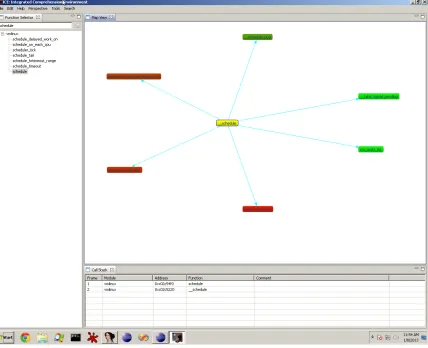
Cartographer

At the core of Cartographer, Figure 2.6, is a function call graph [49, 11], generated as ICE receives information about functions from its Data Sources. While the function call graph is a core component of Cartographer, there are two additional central aspects: interactivity, and navigation.

The key to the interactivity of Cartographer is that the call graph is not static, meaning that it accepts modifications by the analyst. Actions that allow the analyst to gain insight and manage the process of program comprehension include:

• Assigning names to functions

• Assigning comments to functions

(42)

• Navigating to associated code in the Data Source

With the ability to assign names and comments to functions the analyst is able to better track portions of code that have been analyzed as well as assign meaningful names to functions. For example, a default function name in IDA Pro is of the form sub_<address> where <address> is the start address of the function. This name leaves much to be desired and a descriptive name such as decryptCode would provide the analyst a much clearer idea of what the function does. Similarly, with comments the analyst is able to better describe what the purpose of a function is and track functions that have been analyzed.

Additionally, the analyst is able to place the nodes in a visualization on the screen as desired, allowing for logical groupings—such as these nodes have been analyzed— and to manage clutter in complex functions. The colour of the nodes is also used to indicate the number of instructions in a function. Nodes that have a greener tint to them are shorter in terms of the number of instructions and nodes that have a redder tint to them are longer. The colour helps quickly identify functions that may be potentially more complicated.

With respect to navigation, Cartographer supports navigation within the call graph and navigation to the code. Navigation within the call graph is achieved by double-clicking a node which will cause the call graph of the selected function to be displayed. In addition to displaying the call graph of the current function, Cartographer also keeps track of calls made—by doubling-clicking a function—in a call stack. The call stack displays a sequential view of all the calls made by the analyst along with information such as the address, name, and comment associated with the corresponding function. The call stack also supports navigation. Finally, it is possible to further navigate to the code in a function from Cartographer—in this case the function will be opened up in the containing Data Source.

Tracks

(43)

Figure 2.7: Screenshot of Tracks

as navigation to the code (either the function or specific call), setting breakpoints, and syncing renamed functions. Tracks was refactored to adhere to the design discussed in the previous Section, which allowed us an initial analysis of the plugin architecture that is used in ICE.

Tracks was built on top of Diver [10] to support extremely large traces so provides features such as hiding/collapsing call trees and package or module structures, setting new roots of diagrams, navigable thumbnail outline view, and saving the state of the diagram. Previous work has also investigated the use of comment threads within the sequence diagram itself [6].

Control Flow Graph (CFG)

(44)

Figure 2.8: Screenshot of Control Flow Graph

branches. As with Cartographer and Tracks, the CFG visualization—Figure 2.9—is also interactive and provides filters to help pinpoint how instructions are related.

With respect to interactivity, the CFG visualization supports zooming in and out, panning, and rotating the nodes of the graph. This is particularly important in this domain, where the number of lines of code in a function may have exploded several orders of magnitude relative to its high-level representation. In addition, individual nodes can be selected and moved to arbitrary locations, once again aiding in clutter management and comprehension.

(45)

Figure 2.9: Screenshot of Tours

within a function without the need to analyze the assembly code. The Joins filter highlights all nodes that have an in- or out-degree greater than one. These nodes represent locations in the function where high-level control flow constructs such as if-then-else, try-catch, switch, and other related statements are found. By identifying these nodes it can be seen if certain instructions have an abnormal number of incident edges aiding in the identification of “interesting” locations in the function. Finally, Loop detection is based on the Tarjan strongly connected component [57] algorithm.

Tours & TagSEA

Finally, given the challenges of scale and multiple levels of abstraction, in order to better support the transferal of knowledge between developers in these domains, ICE further leverages an existing Eclipse based plugin called Tours [12, 55]. Tours was developed in previous work at the University of Victoria in cooperation with IBM in order to provide programmers a lightweight method of developing walkthroughs of source code [12].

(46)

through, demonstrating significance between the segments. The tool comes with a number of presentation inspired features including highlighting and dimming of the workspace. The plug-in uses an XML representation of the line number and file name to create a tour point.

2.5

Summary

(47)

Chapter 3

Case Studies

This chapter presents three case studies that investigate different aspects of program comprehension. The first two case studies analyze a binary with notable characteris-tics using ICE, IDA Pro, and Hopper. Hopper is a disassembler recently released for Mac OS X and has quickly gained popularly within the Mac OS X reverse engineering community. The final case study investigates the ability for ICE to be integrated into existing Data Sources.

3.1

Case Study: Dynamic Linker

This case study investigates the ability of an analyst to comprehend an algorithm that has been implemented. This technique could be used to verify that an implementation is accurate or to identify weaknesses in an implementation. For this case study the

dynamic linker (dyld) that is used in Mac OS X and on iOS devices is analyzed. The implementation of dyld being analyzed is from iOS and is available from Apple’s open source repositories.

3.1.1

Overview of dyld

(48)

commands are what dyld uses to properly load the segments in the executable and handle other details that may be present in the executable.

In this case study we want to analyze the functionality that is executed up until the point where the load commands have been parsed. To do this our entry point into dyld will be the dlopen() function which has been selected due to its presence across multiple UNIX-based systems and its intention as a way to load a dynamic library.

3.1.2

Analysis with ICE

Using ICE an analysis of dyld was carried out with the goal of understanding the process used to load an executable up to the point where load commands have been parsed. As a first step in this analysis the executable for dyld was loaded in IDA Pro and then ICE was started. With ICE open, dlopen() was found in Cartographer as seen in Figure 3.1. A cursory look at dlopen() results in a lot of information to digest and no clear method of approaching it. To give the analysis some direction, we switch to Tracks and investigate dlopen() from that perspective.

Figure 3.2 is a screenshot of dlopen() viewed in Tracks. Since Tracks displays function calls ordered by the address of the call 1 a best guess of which function to

move to next is dyld::load(LoadContext *) 2.

Within dyld::load(LoadContext *)3.3 it is seen that a function exists named

dyld::loadPhase0() and it is selected as the best candidate to move forward. This selection was made because the function is called twice from dyld::load() as seen by the two lines connecting the nodes and the name hints at it being the path used to load an executable—our goal for this case study.

Continuing with dyld::loadPhase0()3.4 we see that there is a call to a function named dyld::loadPhase1(). The naming convention being used hints that loading an executable occurs in multiple stages.

Investigating dyld::loadPhase1() we discover that both dyld::loadPhase2()

and dyld::loadPhase3() are called. Both Cartographer and Tracks are unable to help decide which path to take so we investigate both of them to discover that they both call dyld::loadPhase4(). This likely means that either phase two or

1The order of function calls in Tracks is not necessarily the same as the order that the calls may

occur during execution.

2The function names shown are as IDA Pro has parsed them and include the namespace-mangling

(49)

Figure 3.1: dlopen() as seen through Cartographer

phase three of the loading process are a fallback of some kind or used to handle a special case. From dyld::loadPhase4() we are taken into dyld::loadPhase5()

and from there into dyld::loadPhase6(). In dyld::loadPhase6() 3.5 we do not find any references to further phases in the loading process but do find a call to

ImageLoaderMachO::instantiateFromFile().

Inside ImageLoaderMachO::instantiateFromFile() 3.6 there are calls to both ”Classic” and ”Compressed” variations of the loader. Without knowing the difference between these two variations we arbitrarily select the Classic variation. Following this path (Figure 3.7) we discover a call toImageLoaderMachO::parseLoadCmds()which sounds like a match for the goal of this case study.

Using Cartographer (Figure 3.8) and Tracks to investigateImageLoaderMachO::parseLoadCmds()

does not give much insight into the implementation of the function. However, by fo-cusing in on a control flow graph of the function we can gain some key insights before having to go to the level of reading and analyzing the assembly code directly.

(50)

Figure 3.2: dlopen() as seen through Tracks

where each node represents an instruction in the function being examined. The CFG provides three filters to help deal with a potential overload of information: Calls, Joins, and Loops. Each filter works by highlighting the nodes so that they stand out among the rest. For our analysis ofImageLoaderMachO::parseLoadCmds()the Calls filter does little to help further our understanding due to the small number of calls made.

Figure 3.9 shows the CFG of ImageLoaderMachO::parseLoadCmds() with the Joins filter enabled. Each highlighted node identifies an instruction that has one or more incident edges. In Figure 3.9 the nodes labelled 1 and 2 indicate points in ImageLoaderMachO::parseLoadCmds() where a switch-like statement appears to converge. The reason this is not conclusive is that the labelled nodes could be points where other statements, such as a loop, converges. The switch statement is an edu-cated guess based on the high number of incoming edges and our previous knowledge of the load commands used in Mach-O files.

(51)

Figure 3.3: dyld::load() as seen through Cartographer

In this figure the node labelled 1 appears to, once again, be a convergence of multiple code paths. Similarly, the node labelled 2 appears to be the entry point of a loop where as the node labelled 3 appears to be some kind of a boolean check point.

From our analysis using ICE we have found a potential path fromdlopen()to the code that parses Mach-O load commands. In the function for load command parsing we have identified numerous instructions that would be acceptable candidates for an analysis of the assembly code.

3.1.3

Analysis with IDA Pro

Analyzing the code executed by dlopen() to the point that the load commands are parsed with IDA Pro is now shown.

The first step taken during this analysis is to navigate in IDA Pro to thedlopen()

(52)

Figure 3.4: dyld::loadPhase0() as seen through Cartographer

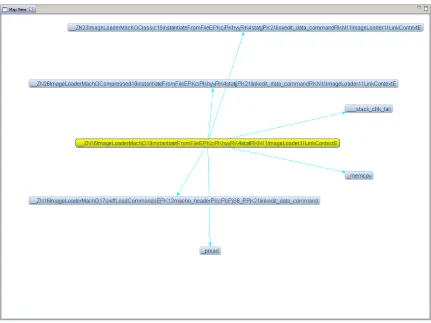
arises from the fact that graph includes sub-references, that is references made by references from dlopen(), and the graph does not take advantage of the available screen real estate. The graph does support zooming and panning which helps mitigate some of the complexity; but it is not possible to interact with nodes in any way. To try and make sense of this graph a list of references from dlopen()was requested in IDA Pro (Figure 3.12), unfortunately IDA Pro informs us that there are no references to be displayed.

A recent update to IDA Pro unveiled a new graph called the Proximity View. The Proximity View displays all references (data and calls) to and from a selected function. The graph supports panning and zooming as well as the interactivity of nodes. The next step in our analysis of dlopen() was to view it in the Proximity View (Figure 3.13). To make Figure 3.13 more readable the number of child references was limited to 1, parents and data references are not shown, and the layout was set to radial rather than the default tree-like layout.

(53)
[image:53.612.110.540.89.417.2]

Figure 3.5: dyld::loadPhase6() as seen through Cartographer

to dyld::load() as was done when analyzing with ICE. Using the Proximity View as the primary method of discovering code paths the same series of function calls was traversed as was done with ICE. This path eventually yielded a call do the function of interest for this case study which is ImageLoaderMachO::parseLoadCmds().

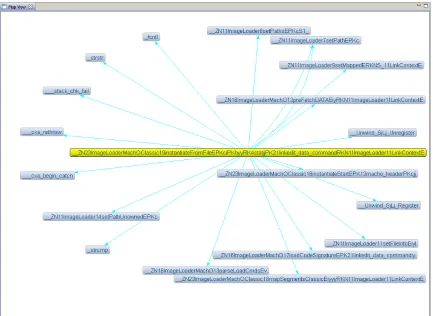
The Proximity View of ImageLoaderMachO::parseLoadCmds() is shown in Fig-ure 3.14. Like FigFig-ure 3.13, the Proximity View has references to data and parents disabled as well as the number child levels to display set to 1. The default layout was used for this graph because the graph is somewhat simple. From Figure 3.14 it is not clear what the ImageLoaderMachO::parseLoadCmds()function does so a closer look is necessary.

Figure 3.15 is the control flow graph of theImageLoaderMachO::parseLoadCmds()

(54)
[image:54.612.108.539.92.415.2]

Figure 3.6: ImageLoaderMachO::instantiateFromFile() as seen through Cartographer

all the instructions contained the basic block so the nodes end up consuming a large amount of space. The second aspect of this graph that stands out is that it is difficult to identify the loops found in the function. To discover the loops it is necessary to (1) understand the flow of the code and (2) trace the jumps through the basic blocks. The end result of this analysis was that ICE was able to display similar information in a manner that is a easier to understand due to the lack of assembly code being shown. It is also concerning that the graph of references from dlopen() displays a different set of information than the list of references fromdlopen().

3.1.4

Analysis with Hopper

Completing the analysis one last time with Hopper we begin by navigating to the

(55)
[image:55.612.109.542.94.410.2]

Figure 3.7: ImageLoaderMachOClassic::instantiateFromFile() as seen through Car-tographer

to dyld::load()3.16 after reading through 192 instructions. Furthermore, without the availability of a function call graph it is not known if any other relevant function calls occur after this point so dlopen()must be searched in its entirety.

Having performed the analysis with both ICE and IDA Pro we skip to the anal-ysis of ImageLoaderMachO::parseLoadCmds() to leverage previous knowledge and limit the amount of manual searching required. As with dlopen(), our analysis of

ImageLoaderMachO::parseLoadCmds()begins by first searching through the assem-bly to identify any function calls of interest. Like the analyses carried with ICE and IDA Pro this search yields no new information.

(56)
[image:56.612.109.539.92.416.2]

Figure 3.8: parseLoadCmds() in Cartographer

Through out the analysis of the dynamic linker with Hopper it was necessary to deal directly with the disassembly and it was not possible to leverage any high-level abstractions to aid the task of understanding how calling dlopen() leads to load commands being parsed.

3.1.5

Evaluation: Source Code

For this case study the authoritative source is the source code itself 3. As with each

analysis we begin by investigating the function dlopen().

Table 3.1 compares the number of functions identified by ICE as seen in Figure 3.1 to the source code and IDA Pro. It is seen that ICE identifies 34 function calls where as there are 30 identified by IDA Pro and 40 calls made in the source code.

Since ICE uses information from IDA Pro it is important to note that the addi-tional calls identified by ICE are a result of a function being called numerous times.

(57)
[image:57.612.109.543.95.422.2]

Figure 3.9: CFG of parseLoadCmds() with the Joins filter

For example, the call to dyld::mainExecutable()is made twice in the source code which is reflected in ICE. However, the graph used in IDA Pro—Figure 3.13—only displays connections for function calls made, not a connectionper function call made. The path from dlopen()to ImageLoaderMachO::parseLoadCmds()is as seen in both ICE and IDA Pro. Aside from identifying functions behind pointers and inline functions, ICE was able to assist in determining the correct path taken by code from

dlopen() toImageLoaderMachO::parseLoad().

(58)
[image:58.612.111.540.95.425.2]

Figure 3.10: CFG of parseLoadCmds() with the Loops filter

3.2

Case Study: Malware

The second case study looks at the ability to identify actions in malicious software. The study looks at the infection mechanism and system changes within a malware sample from the textbookPractical Malware Analysis [51].

3.2.1

Overview of Sample

The sample used in this case study is from Chapter 11 Lab 1 of the book Practical Malware Analysis [51]. The sample was chosen based on the criteria that it is not obfuscated and does not make use of self-modifying code. As a result of these criteria it is possible to analyze the sample without having to first reconstruct import address table or decrypt the code. The goal of this sample is malicious and it can still be extremely destructive to the infected system.

(59)
[image:59.612.109.542.97.344.2] [image:59.612.106.545.296.629.2]

Figure 3.11: Graph of references from dlopen() in IDA Pro

Figure 3.12: List of references from dlopen() in IDA Pro

(60)
[image:60.612.108.542.95.346.2]

Figure 3.13: Proximity View of dlopen() in IDA Pro

Figure 3.14: Proximity View of parseLoadCmds() in IDA Pro

analysis.

[image:60.612.107.541.374.638.2]
(61)
[image:61.612.109.541.94.346.2]

Figure 3.15: Control flow graph of parseLoadCmds() in IDA Pro

Figure 3.16: Disassembly of dlopen() in Hopper

sample is used to gauge to correctness and completeness of this study.

3.2.2

Initial Analysis

The first step taken during malware analysis is to conduct a static analysis on the bi-nary as a whole and then to conduct a behavioural analysis as the sample is executed. The goal of this initial analysis is to gain insight into the intentions and functionality of the sample before the process of reverse engineering begins.

The initial static analysis of this sample was conducted using a variety of tools (Appendix B) and we found that the sample makes several references to a file named

(62)

Method Functions Identified

Source Code 40

ICE 34

[image:62.612.228.420.95.155.2]

IDA Pro 30

Table 3.1: Summary of the functions identified in dlopen()

sample. Upon extracting the binary contained within the sample, we found that it is a dynamic link library (DLL) which is likely used as the replacement GINA [40] DLL.

A behavioural analysis was then conducted where the sample was observed during execution. During this analysis we observed that the sample makes no attempt to communicate over the network. We also saw that the sample extracts the DLL con-tained within it and modifies the Windows registry so that it is used as the GINA DLL as suspected. Ultimately, this sample allows Windows credentials to be harvested for later use.

3.2.3

Analysis with ICE

We begin the analysis by viewing the function calls made by the main() function in Cartographer 3.17.

From Cartographer it is seen that the malware sample makes two calls to code in the sample itself and the remainder to functions in Windows API. The two function calls to itself aresub_401000andsub_401080. Our analysis continues insub_401080. The call graph presented shows that the function makes calls to various functions in the Windows API related to loading and using resources as well as a single call to another function. Even without knowing the details of the function it is a fairly safe assumption that this function unpacks the DLL stored in the sample and writes it to file. At this point it is a good idea to rename the function so that it better describes what it does and assign a comment.

Moving deeper into the call stack, we encounter a function called sub_401679

(Figure 3.18). From the call graph produced by Cartographer it is not clear what the intent of this function is. However, we are able to see that there is a strong correlation between this function and get_int_arg as well as write_string and

(63)
[image:63.612.111.539.95.414.2]

Figure 3.17: Call graph of main() produced by Cartographer

Since the binary contained a DLL in the resource section it is also necessary to examine it. The main entry point of a DLL is a function called DllMain(), this will be our starting point and is shown in Figure 3.19.

From Figure 3.19 it is difficult to grasp fully what is going on in this function. While is clear that the function gets the path of the system directory, loads a library, and does a string concatenation it is not clear what library it is trying to load and why. To learn this we would need to turn to the assembly code and work through the data being accessed.

Another point of interest about this malware is that it appears to implement all required functions for a GINA DLL replacement 4. Moreover, as seen in Figure 3.20, each implementation of these functions calls another subroutine.

The function being called, sub_10001000, is shown in Figure 3.21. Here we see a call to sprintf(),GetProcAddress(), and ExitProcess().

4The full list of functions required in GINA DLL can be seen at

(64)
[image:64.612.111.542.95.418.2]

Figure 3.18: Call graph of sub 401679() produced by Cartographer

Since the intention of GetProcAddress() is to find the address of an exported function in a library it is likely that the library being loaded in DllMain() was official GINA library and that this usage ofGetProcAddress()is where the malware jumps back to the official implementation so that users don’t suspect any malicious activity. Note also the usage of sprintf() to print a message to a file, this is likely used to log passwords entered at the logon screen.

At this point we have covered both the main executable and the library dropped by this malware. Without having looked at a single assembly instruction we have information on the relationships between functions and even been able to take an educated guess at how the malware operates.

3.2.4

Analysis with IDA Pro

(65)
[image:65.612.110.540.93.411.2]

Figure 3.19: Call graph of DllMain() produced by Cartographer

Figure 3.22 shows the call graph of the main executable provided by IDA Pro. From this graph 5 it is seen that the main function makes a call to a function that deals with resources and one that makes calls to the API for the Windows registry. Although this is useful information, the graph is static and we are forced to search through IDA Pro for the main function.

At this point we focus our attention on the main function. Figure 3.23 is the

Proximity View of this function. The Proximity View is a visualization provided by IDA Pro that shows all references, both code and data, to and from a function. For this analysis we use the Proximity View to see what functions main calls and what data it manipulates. With the Proximity View we once again see that maincalls two functions in the sample in addition to some functions in the Windows API.

Turning our attention to the function sub_401080()we find, as we did with ICE, that this function is responsible for locating and extracting the DLL from the main

(66)
[image:66.612.114.539.93.413.2]

Figure 3.20: Call graph of WlxInitialize() produced by Cartographer

executable. If we now look at the functionsub_401000()in IDA Pro we will see that it is responsible for retrieving and setting the value of a registry key. To determine which key is set and where the library is stored it is necessary to analyze the data being accessed in the assembly code.

A similar analysis can be carried out for the library that was extracted from the main executable. The information available and ease of the analysis is on par with that of ICE, in particular because the high level does not require the usage of a control flow graph.

3.2.5

Analysis with Hopper

Finally, completing the analysis with Hopper is a bit more of a challenge. As with both ICE and IDA Pro we want to start our analysis of the main executable in the

(67)
[image:67.612.112.542.93.412.2]

Figure 3.21: Call graph of sub 10001000() produced by Cartographer

The search can be conducted in one of two ways. First, Hopper does identify the initial entry point of the executable (commonly referred to as start()). So we could work through the assembly code and eventually identify the function that looks the most promising. Second, since we have previously carried out the analysis we can search for references to the functionssub_401000()andsub_401080(). Regardless of which method is used it is either necessary to (1) work directly with the assembly code or (2) leverage knowledge from a previous analysis. Since there is no visualizations in Hopper it is necessary to analyze the assembly code to determine the functionality of the code.

The process of working through assembly code continues with bothsub_401000()

and sub_401080(). However, due to the ne

Figure

Figure 1.1: A sample call graph
Figure 1.2: A sample sequence diagram.
Figure 1.4: Control flow graph showing a for-loop.
Figure 1.5: Conceptual representation of a binary-based framework
+7

References

Related documents