Crowd Creation Pipeline for Games
R. McDonnell†1, S. Dobbyn1and C. O’Sullivan1
1Interaction, Simulation & Graphics Lab, Trinity College Dublin, Ireland
Abstract
With the increase in realism of games based in stadiums and urban environments, real-time crowds are becoming essential in order to provide a believable environment. However, realism is still largely lacking due to the com-putation required. In this paper, we describe the pipeline of work needed in order to prepare and export models from a 3D modelling package into a crowd system. For our crowd, we use a hybrid geometry/impostor approach which allows thousands of characters to be rendered of high visual quality. We use pre-simulated sequences of cloth to further enhance the characters appearance, along with perceptual metrics to balance computation with visual fidelity.
1. Introduction
In the games industry, real-time crowds are increasing in popularity due to the emergence of new level of detail (LOD) techniques. Currently, the humans that occupy crowd sys-tems in games use skinned meshes for their clothing, often resulting in rigid and unnatural motion of the individuals in a simulated crowd. While there have been advances in the area of cloth simulation, both offline and in real-time, inter-active cloth simulation for hundreds or thousands of clothed characters would not be possible with current methods. We addressed this problem in previous work by devising a sys-tem for animating large numbers of clothed characters using pre-simulated clothing.
In Dobbyn et al. [DMK∗06], we added realism to our crowd simulations by dressing the individuals in realistically simulated clothing, using an offline commercial cloth simu-lator, and integrating this into our real-time hybrid geome-try/impostor rendering system ( [DHOO05]). We have also improved the quality of the impostors in the system by using perceptual metrics described in [HMDO05,MDO05,
MDSC06] in order to drive the impostor rendering. In this paper, we discuss the necessary steps to advance from a sin-gle character in a modelling package such as 3D Studio Max, to a perceptually guided crowd of thousands of clothed char-acters in a real-time system. This useful step by step guide will enable others to incorporate pre-simulated deformable
clothing and perceptual metrics into their crowd systems. Our results show a system capable of rendering large real-istic clothed crowds in real-time.
2. Pipeline
We present the pipeline of work needed to achieve real-time crowds of clothed characters. In [MDSC06] we performed a rigorous series of psychophysical experiments in order to determine the most appropriate representations to use for depicting the deformations of cloth. We found that a hy-brid combination of impostor and detailed geometry meshes would be most suited to our purpose since participants were unable to tell the difference between this type of crowd and a crowd containing all high resolution geometry.
The system is an extension of the crowd system detailed in [DHOO05], and this paper describes all of the alterations necessary to convert that crowd of skinned characters, to a crowd of characters with deformable clothing.
There are three main stages in the pipeline process (see Figure1):
1. Stage 1: Model Prepping: The first stage involves mod-elling the character and adding a suitable animation for use in a crowd. The character’s clothes are then con-structed and fitted, and finally simulated in response to the underlying motion. Our novel technique detailed in [DMK∗06] for constructing a cyclical cloth animation is also applied here.
anima-Figure 1: Pipeline stages.
tion, cloth mesh and simulation, and impostors into a suit-able format for use in the system.
3. Stage 3: Crowd Rendering: The final stage involves de-tails on how the crowd is rendered in real-time.
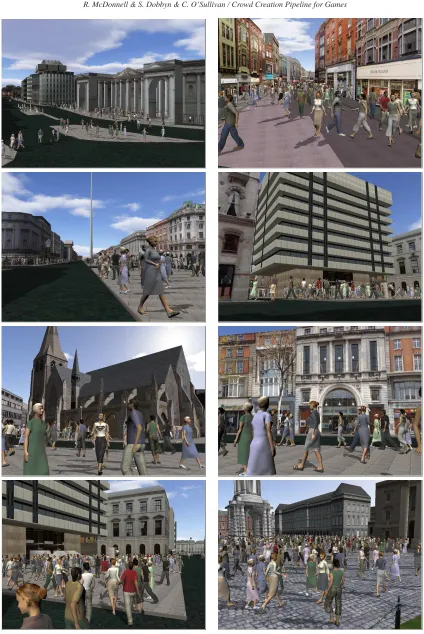
The following three sections will describe the stages in detail. We also present some images of the fi-nal crowd system integrated into the Virtual Dublin Model [Ham05].
3. Stage 1: Model Prepping
Stage 1 of the process is concerned with the processing that is necessary in order to prepare a virtual character to be ex-ported into the system.
3.1. Preparing the Human
Choosing a suitable model is the first thing that needs to be done. Characters in a crowd should look different from each other but should have the same overall style (e.g., a cartoon style character and a photorealistic character will not look good together in a crowd).
We discovered in [MDO05] that characters of lower reso-lution around the joints are not as capable as those with more detail of displaying subtle motion variations. Therefore, the character should be detailed enough for both realism and the accurate deformation of the mesh around the joints in or-der to produce good animations. However, when choosing how detailed the character will be, it should be remembered that, for a hybrid system, a number of the high level of detail characters will be displayed on-screen at one time, as well as many low level of detail characters. Therefore, the detail of the character is limited to what is achievable in real-time. Our characters ranged in detail from roughly 2000 to 9000 polygons, depending on the number of characters needed for the crowd. However, we also found in [MDO05] that the res-olution that we were using for our highest characters was actually perceptually equivalent to lower resolution charac-ters. Therefore, there is a tradeoff between the number of
polygons necessary for the virtual human to look good in appearance and the number necessary for displaying sub-tle motion information. This should be remembered when choosing the resolution of the high resolution character. We will use the example of a female character model called
An-gela with 6500 polygons for the remainder of our description
of the pipeline process.
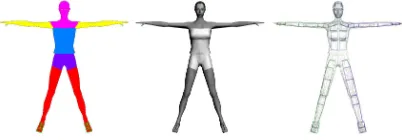
Figure 2: (a) material IDs assigned to mesh, (b) mesh with
greyscaled textures and diffuse colours set to white, (c) mesh with skeleton fitted.
Once a suitable character is chosen, it can be altered in one of the packages for 3D modelling. We used 3D Studio Max but any other modelling package with built-in scripting language or custom designed system could be used. Angela was purchased as a correctly texture mapped mesh. How-ever, in order to prepare her for exporting, some alterations had to be made.
[image:2.595.107.486.84.234.2] [image:2.595.318.519.374.444.2]This technique was used by [dHCSMT05] for the prepara-tion stage of their characters for a crowd of low resoluprepara-tion geometry. For our clothed crowds, we use this approach in order to add pattern variety (detailed in Section5.2). We will describe both techniques for completeness.
3.1.1. Grouping Triangles
The character’s triangles are first organised into groups, where each group is a body part that can be coloured ently from its surrounding parts. For Angela we had 8 differ-ent groups: eyes, head and shoulders, arms, fingernails, legs, top, shorts, and shoes (Figure 2(a)). Each of these groups were assigned different diffuse materials or texture maps. The reason for organising the triangles in this way is that it improves rendering when exported into the real-time sys-tem, due to the minimization of OpenGL states. Also, it al-lows for colour modulation, as each different group can have a palette of colours assigned to it, in order to create colour variety when duplicating characters in the crowd. The dif-fuse colour of each material is set to white, and each texture map is greyscaled to allow for colour modulation without the loss of detail (Figure2(b)).
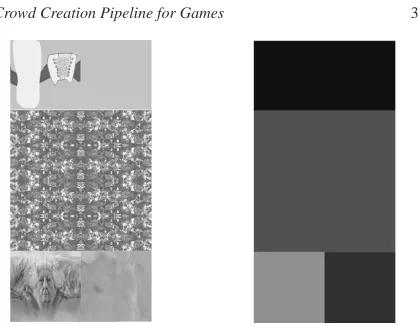
3.1.2. Specifying Regions in a Single Texture Map The alternative method is to apply a single texture map to the character. Some models are purchased with a single tex-ture map, but if not, it can be custom designed in an appli-cation like Photoshop to suit the character. The basic idea is to combine all of the texture maps into a single compact texture map (see Figure3(left)). The coloured areas with no detail are simply areas that have a single diffuse colour. The alpha channel of this texture is then manually encoded with different colour regions (Figure3(right)). Since we are using a single pass to render the impostors in the system (see [DHOO05]), as many regions as the user requires can be specified at this stage. Once this custom designed map has been created, it can be applied to the character. The tex-ture coordinates of the character need then to be matched up to the texture, which can be a time-consuming task. This matching can be accomplished in 3D Studio Max using the
Unwrap UVW modifier.
3.1.3. Skinning and Animating
The character now needs to be skinned, in order for an ani-mation to be applied. Typically, a biped skeleton is first fit-ted to the character (Figure2(c)), and then the vertices of the character mesh are weighted and linked to the different bones of the skeleton. This can be achieved in 3D Studio Max using the Physique or Skin modifier. We used both mo-tion capture from our Vicon system and keyframing in 3D Studio Max to obtain the animation for our character. The choice of animation depends on the type of crowd scene that is being produced. The amount of animation data also has to be restricted due to the memory limitations for the display of large crowds. In our system, an animation is typically one second long and then looped in the system to create long sequences. The animations should be cyclical in order that
Figure 3: (left) Example of a single greyscaled texture map
for Edith, (right) Corresponding alpha channel.
flickering animation artifacts do not occur when looping the animation in the system.
The amount of floor space that can be captured using a motion capture system is often quite limited. Therefore, cap-turing long sequences of humans walking is difficult, unless a treadmill is used. We can typically capture about 4 steps of a human walk, so it is unlikely that a cyclical walk could be extracted. Some postprocessing is usually necessary in 3D Studio Max, where we choose one walk cycle, and paste the pose at the start frame to the end frame and try to interpolate the motion curves to make it fit without loosing too much of the individuality and naturalness of the captured walk.
3.2. Preparing the Deformable Clothing
The commercial software that we used (ClothFX [Clo]) provided tools for constructing garment segments, and for changing the different material parameters, along with accu-rate collision detection. We simulated many different types of clothing using this software, including silky skirts, stiff dresses, sweaters and shorts. Cloth simulation is still limited in what it can achieve, and therefore the choice of clothing and materials is often compromised depending on the anima-tion of the virtual human. For example, a character perform-ing a back-flip in a tight fittperform-ing long dress would not produce nice results - cloth by its nature is resistant to stretching, but not to bending. We found that a lot of tuning was necessary to produce nice cloth animations, for the human animations that we wanted.
3.2.1. Template creation
[image:3.595.317.526.62.225.2]The shape of the segment is usually drawn by the user us-ing splines or imported from a software package designed for cloth manufacturers like Modaris or PAD [MOD,PAD]. Seams and seam connections are then specified by the user. A seam is usually an edge on a piece of fabric and can be attached to another seam using virtual sewing threads. The planar segments are then positioned around the virtual char-acter at approximately correct positions. A good initial po-sition for the clothing is very important and can determine how well the clothing fits. In order to achieve this, the seg-ments should first of all not collide with anything (the virtual character or each other). They should also be as close as pos-sible to the virtual character’s body and the sewing between seams should not penetrate the character. The start pose of the character can be changed in order to satisfy these rules; usually a T-pose is best.
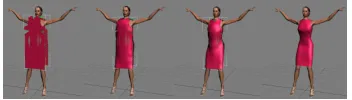
Figure 4: Fitting a garment using ClothFX.
Once the segments and sewing are lined up, the garment can be joined along the seam lines. In [KFW04] sewing is achieved by merging the segments along the seam lines. For every pair of vertices along the seams, the matching trian-gles are coupled and the seams are moved halfway between the two original points, as shown in Figure4. The segment pieces are attached and attain a shape influenced by the form of the body.
3.2.2. Material Modelling
The mass-spring model is the most commonly used tech-nique for deforming garments. It consists of a simple par-ticle system, where the parpar-ticles correspond to the vertices on a cloth mesh. These particles are connected by different springs: structural springs for tension, diagonal springs for shearing, and interleaving springs for bending. The forces exerted by the particles are determined by the type of spring that connects them. Forces for structural springs are very large, whereas bend and shear forces are small, which can lead to contradicting effects. In order to have a more gen-eral system, the mass-spring system can be thought of as a network of interwoven threads, where a thread is a chain of structural springs. Different threads can then interact at mass points. More complex forces are necessary to model this kind of behaviour.
The Kawabata Evaluation System (KES) for fabric is a technique used in the garment industry for measuring fabric mechanical properties through normalised proce-dures [Kaw80]. In this system, five experiments are con-ducted using different instruments, and from these experi-ments 15 curves are obtained, which allow 21 parameters of
fabric to be determined. These experiments measure shear-ing, bendshear-ing, friction, compression, and deformation. These energies can be modelled in the particle system using a rec-tangular grid, where each particle interacts with its four di-rect neighbours.
In commercial software, coefficients that describe these 21 parameters can be changed in order to produce cloths that behave differently. For example, for a material like silk the resistance to bending would be set to low, whereas it would be set to high for a stiffer material like burlap.
Good collision detection is also necessary when mod-elling clothing. When clothing a virtual human with de-formable garments, full and self collision detection need to be implemented in order for the clothing not to penetrate the human or itself. Commercial cloth simulation packages usually have full and self collision built-in. This is the most time-consuming task of cloth simulation, and is a major rea-son why real-time simulation of clothing is so difficult.
4. Cyclical Cloth Sequences
In order to prepare the clothing generated for our charac-ters to be exported into the system, the animation had to be cyclical. As previously described, in a real-time crowd sys-tem, the characters’ animations are often cyclical in nature, so that they can be smoothly linked to allow them to move in a fluid manner. Cyclical animations are commonly obtained by manually altering the underlying skeletal motion so that they loop in a realistic looking manner. However, creating looping animations for characters with pre-simulated cloth-ing is a more difficult task, as manual cleanup of the cloth to make it cyclical is very time-consuming, particularly for very deformable items of clothing like skirts, and can re-sult in unrealistic effects. In [DMK∗06], we describe an au-tomatic method for generating cyclical sequences of cloth simulation. This method should be used at this point before proceeding to export the animations.
5. Stage 2: Exporting the Data
At this point, we have pre-simulated the deformation of both the virtual human’s skin mesh using linear blend skinning and its cloth mesh using the physical simulator, based on the motion of its underlying skeleton. The cloth and human motion sequences are cyclical and the character should also have its triangles organised into the appropriate groups or has a single texture with specific alpha mapped coloured re-gions. The character is ready to be exported from 3D Studio Max into files that can be loaded into the crowd system.
5.1. Exporting the Geometry
poses, this avoids the cost of simulating the clothes at run-time. However, this also means that all animations are pre-determined and cannot be changed at run-time, which limits the motion variation in the crowd.
5.2. Exporting the Impostor
Generating the impostor representation of our character in-volves capturing two types of images from a number of viewpoints around the model: a detail map image to capture the detail of the model’s diffuse texture and a normal map image whereby the model’s surface normals are encoded as an RGB value. For more information on how these images are generated and rendered in the system see [DHOO05]. This section will describe any improvements to the algo-rithms and the necessary changes that were made in order to incorporate deformable cloth.
Figure 5: Mesh after each vertex has been automatically
painted with an RGB value corresponding to its normal.
Tecchia et al. [TLC02] saved on texture memory when generating impostors by exploiting the symmetric nature of the human body performing a walk animation (both the ani-mation and the body are symmetric). They halved the mem-ory needed by mirroring the animation: 32 samples were ac-quired by sampling the mesh at 16 different points along one side, and mirroring these images to produce the samples on the other side. This worked very well for skinned humans, as the human and the clothing could be made symmetric quite easily (i.e., by mirroring one side), and would remain so for the animation. This approach could not be taken for gener-ating impostors of humans wearing deformable clothing, as the folds in cloth are rarely symmetric in nature and mirror-ing them would produce artifacts at run-time. We tried gen-erating a mirrored cloth animation using tools in 3D Studio Max, but it involved too much manual tuning and the results were not convincing. Therefore, the human was sampled on both sides to create the cloth impostor images, which in-creased texture memory consumption, but avoided artifacts. In [MDSC06], we performed a psychophysical experi-ment that determined the optimal impostor update frequency, balancing texture memory consumption with visual fidelity. We found that an update rate of 17◦was necessary to pro-duce smooth transitions for normal pedestrian characters,
where as 9◦ was necessary for characters with large width to depth ratios. The number of impostor images to be gener-ated at this stage in the pipeline should be chosen based on these metrics.
Incorrect back-facing polygons was another issue which arose when implementing cloth impostors. The previous im-postor plug-in did not account for back-facing polygons as it was not a noticeable problem for skinned clothing, which clung tightly to the body and did not turn inside-out at any point. However, for flowing garments, this occurred quite regularly and resulted in incorrect normals in the impostor image. A simple approach was used to solve this, by testing the direction of the normal and flipping if it was back-facing. The normal maps in [DHOO05] took considerable time to generate, as per-pixel look ups and operations were needed, so we improved the algorithm using a less computation-ally intensive technique. A copy of the character’s mesh and cloth at the current frame was first needed. Each ver-tex normal was first converted into eye-space coordinates, to find the normal with respect to the camera, and then con-verted into an RGB colour (using the equations described in [Dob06]). Per-vertex colouring was then used to paint the RGB colours onto the vertices of the copied meshes (3D Stu-dio Max’s VertexPaint modifier was used to do this). These vertex colours were interpolated over the polygons, creating a character mesh with normal map colours (Figure5). The normal map image was then generated by rendered an image of this mesh, from the current viewpoint. Per-vertex colour-ing and interpolatcolour-ing are operations that are performed very quickly, as they are supported by graphics hardware. This meant that the image could be produced almost immediately, without the need for slow per-pixel operations.
The new technique for adding hardware assisted pattern variety to the impostors that we developed in [DMK∗06] in-volves a slightly different process for generating impostor images. The detail map image is replaced with a texture co-ordinate map or UV map. This is similar to a normal map just described. However, this time it is the texture coordinates that are converted into an RGB colour and then painted onto the vertices of the mesh. Similar to the normal map images, these images were generated for each viewpoint.
6. Stage 3: Crowd Rendering
We are finally at the stage where all data is ready to be im-ported into the crowd system and used to display crowds of clothed characters. A number of alterations needed to be made to the crowd system in order to incorporate our per-ceptual metrics and the pattern variation technique. In this section, we will first give a broad overview of how the sys-tem was written, then we will look at how each of the levels of detail were rendered and how switching was achieved. This work was based on the approaches detailed in [Dob06].
6.1. Setup
compute less accurate models when they would not be no-ticed. The highest level of detail was the mesh model and the lowest was the impostor, as previously described. The sys-tem is a C++ application running on the Win32 API, where the OpenGL rendering library is used as the core compo-nent of the rendering subsystem. The number of humans in the crowd is first specified and they are then given ran-dom initial positions in the scene. Algorithms can be imple-mented to make sure that no human intersects, or that they are all oriented in a certain way. Each crowd individual is then randomly allocated a human template model, and vari-ety is added by randomly choosing a specified outfit, which is a set of colours for each of the different parts of the body.
6.2. Rendering the Geometric Human and Cloth Models
The system is optimised by taking advantage of the fact that crowd individuals perform a default walk animation. Pre-viously, we used static meshes, where the deformation of the mesh is pre-calculated. However, with advancements in graphics hardware we now calculate the deformation of the mesh on the GPU using linear blend skinning. The cloth ani-mation is stored as pre-baked poses directly from 3D Studio Max, as described in Section5.1. The rendering speed is im-proved by using Vertex Buffer Objects (VBOs) to store the key-frames of animation for both human and cloth poses. The idea behind VBOs is to provide buffers (regions of VRAM) accessible through identifiers. A buffer is made ac-tive through binding (in a similar manner to display list binding). This allows graphics drivers to optimise internal memory management and also to choose the most suitable type of memory to store the buffers. At run-time, the cor-rect VBO pose is selected and rendered, depending on the current frame of animation of the virtual human.
Adding colour variation to the mesh involves first creat-ing different outfits, which specify the different colours to be used for each different region in the mesh. For example, an outfit for Angela would consist of: eyes coloured blue, head and shoulders coloured pale pink, arms pale pink, fin-gernails red, legs pale pink, top white, shorts blue, and shoes white. Many different outfits can be specified for each dif-ferent template human as described in [Dob06].
As mentioned in Section3.1, there are two techniques for setting up the virtual humans’ colours. We will now describe the two corresponding techniques to colour the human at run-time.
The first technique grouped together the triangles of the different regions of the mesh and then tagged them with IDs. At run-time, the OpenGL fixed function pipeline is used for rendering the mesh, where the diffuse colour of each mesh region is changed depending on its material ID and corresponding outfit colour. This was the technique used in [DHOO05] and is suitable for meshes that will be used alongside detail mapped impostors.
The second technique is needed to match the geometry with the UV mapped impostors. This method should be used
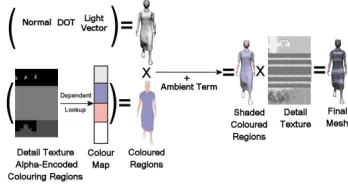
[image:6.595.330.504.174.266.2]if texture variation is important to add variety, as in the case of adding different designs to clothing. This technique uses programmable graphics hardware to add variation. As de-scribed in Section3.1, a single texture map was applied to the character, where the alpha channel of the texture speci-fied the different colour regions. The shading sequence for the geometry is shown in Figure6.
Figure 6: Geometric mesh shading sequence.
6.3. Rendering the Impostor
In order to render the impostor, the correct viewpoint image needs to be found. Using the camera position and the vir-tual humans position and direction, the most suitable view-point image can be calculated and retrieved from the large texture containing the pre-generated viewpoint images. This image is then mapped onto a quadrilateral. To dynamically orientate the quadrilateral towards the viewer, the amount to rotate can be calculated using the camera and virtual hu-mans position. See [DHOO05] for detailed descriptions of the equations.
6.3.1. Switching Between Representations
Ulicny et al. [UdCT04] noted that impostors were an effi-cient approach for rendering crowds of far-away humans, but that their pixellated appearance when displayed close to the viewer prevented them from being used for detailed crowds. Dobbyn et al [DHOO05] solved this problem by using a hybrid impostor/geometry system, similar to that described in this paper. In crowd scenes where the humans and the camera are moving, the distance from impostors to viewer will change throughout the viewing time. Thus, a switching mechanism was employed to allow impostors to switch to geometry and vice versa when they reach a certain distance. In Hamill et al. [HMDO05], we found a perceptual met-ric for the optimal pixel to texel ratio at which to switch representations, which ensures that users will not notice the switch. This ratio was one-to-one, which means that geome-try can be switched to impostor representation when one of its texels is displayed on one pixel on the screen. A seamless transition is achieved by matching the pose of the impostor to the geometry at the point of switching. This technique did not need to be altered for our clothed characters, as the poses of the cloth were inherently linked to the human poses.
We found that participants did not notice the difference be-tween a hybrid crowd of impostor/geometry and a crowd of all high resolution geometry, when the camera was zooming in and out of the crowd, which meant that popping between representations was not noticed.
7. Discussion
In this paper, we provided a useful step by step approach to realising crowds of clothed characters incorporating percep-tual principles. This pipeline should be of use to game devel-opers, to create and/or improve the quality of their crowds.
Our technique of adding pre-simulated clothing improved the realism of our crowd system. The visual quality of the clothed crowd is maintained by creating cyclical cloth mo-tions to avoid discontinuous motion artifacts. Additionally, the use of the impostor’s UV map complements the use of impostors with its mesh representation in a LOD crowd sys-tem, since it allows the matching of texture and colour varia-tion between the cloth and skin. In Figure7we show our vir-tual model of Dublin city inhabited by crowds of pedestrian characters wearing deformable clothing. All of the walk cy-cles were captured using a motion capture system, and pat-tern variety was added using our UV mapping technique. This pipeline could also be used to create characters with pre-simulated hair or fur, by replacing the cloth creation stage with hair simulation.
References
[Clo] ClothFX, cloth simulation software. Size8Software, 2004.
[dHCSMT05] DE HERASCIECHOMSKIP., SCHERTEN -LEIB S., MAÏM J., THALMANN D.: Reviving the ro-man odeon of aphrodisias: Dynamic animation and vari-ety control of crowds in virtual heritage. VSMM (2005), 601–610.
[DHOO05] DOBBYN S., HAMILL J., O’CONOR K., O’SULLIVANC.: Geopostors: a real-time geometry / im-postor crowd rendering system. In SI3D ’05: Proceedings
of the 2005 symposium on Interactive 3D graphics and games (2005), pp. 95–102.
[DMK∗06] DOBBYN S., MCDONNELL R., KAVAN L., COLLINS S., O’SULLIVAN C.: Clothing the masses: Real-time clothed crowds with variation. Eurographics
Short Papers (2006).
[Dob06] DOBBYN S.: Hybrid Representations and
Per-ceptual Metrics for Scalable Human Simulation. PhD
the-sis, University of Dublin, Trinity College, 2006.
[EWS96] EBERHARDTB., WEBERA., STRASSER W.: A fast, flexible, particle-system model for cloth draping.
IEEE Computer Graphics and Applications 16, 5 (1996),
52–59.
[GFL03] GROBC., FUHRMANNA., LUCKASV.: Auto-matic pre-positioning of virtual clothing. In SCCG ’03:
Proceedings of the 19th spring conference on Computer graphics (2003), pp. 99–108.
[Ham05] HAMILLJ.: Level of Detail Techniques for
Real-Time Urban Simulation. PhD thesis, University of Dublin,
Trinity College, 2005.
[HMDO05] HAMILLJ., MCDONNELLR., DOBBYN S., O’SULLIVANC.: Perceptual evaluation of impostor rep-resentations for virtual humans and buildings. Computer
Graphics Forum, (Eurographics 2005) 24, 3 (2005), 623–
633.
[Kaw80] KAWABATAS.: The standardization and analy-sis of hand evaluation. The Textile Machinery Society of
Japan (1980).
[KFW04] KECKEISEN M., FEURER M., WACKER M.: Tailor tools for interactive design of clothing in virtual en-vironments. In VRST ’04: Proceedings of the ACM
sym-posium on Virtual reality software and technology (2004),
pp. 182–185.
[MDO05] MCDONNELL R., DOBBYNS., O’SULLIVAN C.: LOD human representations: A comparative study.
Proceedings of the First International Workshop on Crowd Simulation (2005), 101–115.
[MDSC06] MCDONNELLR., DOBBYNS., S. COLLINS C. O.: Perceptual evaluation of LOD clothing for virtual humans. Proceedings of the 2006 ACM SIG-GRAPH/Eurographics Symposium on Computer Anima-tion (2006), 117–126.
[MOD] LECTRA SYSTEMS MODARIS Version 4. http://www.lectra.com/en/pds/modaris_fashion.html.
[PAD] PAD system Inc. http://www.padsystem.com/.
[PLAPMT02] PROTOPSALTOU D., LUIBLE C.,
AREVALO-POIZAT M., MAGNENAT-THALMANN
N.: A body and garment creation method for an internet based virtual fitting room. Computer Graphics
Interna-tional Conference Proceedings, Springer Verlag (2002),
105–122.
[TLC02] TECCHIA F., LOSCOS C., CHRYSANTHOUY.: Visualizing crowds in real-time. Computer Graphics
Fo-rum (Eurographics 2002) 21, 4 (2002), 753–765.
[UdCT04] ULICNY B., DEHERAS CIECHOMSKI P., THALMANN D.: Crowdbrush: interactive authoring of real-time crowd scenes. In Proceedings of the 2004 ACM
SIGGRAPH/Eurographics Symposium on Computer Ani-mation (2004), pp. 243–252.
Figure 7: Example screenshots from our clothed pedestrian crowd inhabiting a virtual model of Dublin city. The city is