Smart-device Potential for Student Learning.
WOODCOCK, Ben, ARMSTRONG, Matt, NORTCLIFFE, Anne
<http://orcid.org/0000-0001-6972-6051> and MIDDLETON, Andrew
Available from Sheffield Hallam University Research Archive (SHURA) at:
http://shura.shu.ac.uk/14459/
This document is the author deposited version. You are advised to consult the
publisher's version if you wish to cite from it.
Published version
WOODCOCK, Ben, ARMSTRONG, Matt, NORTCLIFFE, Anne and MIDDLETON,
Andrew (2012). Smart-device Potential for Student Learning. In: CSEDU 2012 :
International Conference on Computer Supported Education, Porto, Portugal, 16-18
April 2012. 410-415.
Copyright and re-use policy
See
http://shura.shu.ac.uk/information.html
SMART DEVICE POTENTIAL FOR STUDENT LEARNING
Ben Woodcock
1, Matt Armstrong
2, Anne Nortcliffe
3, and Andrew Middleton
41
Former Undergraduate Student in Department of Computing, Faculty of ACES, Sheffield Hallam University, Sheffield, S1 1WB, UK
2
Current Undergraduate Student in Department of Computing, Faculty of ACES, Sheffield Hallam University, Sheffield, S1 1WB, UK
3
Department of Engineering and Maths, Faculty of ACES, Sheffield Hallam University, Sheffield, S1 1WB, UK 3
Quality Enhancement & Student Success, Student and Learning Services, Sheffield Hallam University, Sheffield, S1 1WB, UK
, [email protected], and {a.nortcliffe, a.j.middleton}@shu.ac.uk,
Keywords: Mobile Learning (M-learning), Technology Support for Pervasive Learning, Technology Enhanced Learning, Student Technology Generated Learning
Abstract: Smartphones/devices have become the ubiquitous tool of choice for professionals to support their productivity and are increasingly becoming more common on university campuses. Many of the advantages of these devices have the potential to support student learning engagement and provide new opportunities for learning. This paper reports on an academic study conducted over the last two years by two final year students, supported by two academic learning technology researchers, examining the level of student smartphone/device ownership on campus and the extent students are harnessed the use of these devices to support their learning. The research shows that student smartphone/device ownership is increasing; however, how students are using the devices to support their learning appears to narrowing as the year progresses and consequently the students are missing out on the learning opportunities these devices can provide. The paper finally presents an analysis of smartphone/device apps that have the potential to support student learning.
1.
INTRODUCTION
1.1
Smartphones
For many professionals ready access to data underpins their productivity. Third Generation (3G): smartphone devices can provide mobile access to these resources at anytime and from any place (Lin and Brown, 2007). The general consumption of smartphones is also growing exponentially as awareness of their broad functionality and usefulness is understood (Young et al., 2011). As a consequence, the use of devices is blurring the distinction between home life and work, providing benefits for both the employee and the employer (Durbin, 2011). Potentially these devices can save time, lead to efficiency gains and increased
productivity for professionals, (Jewell, 2011). In a study of medical professionals the perceived usefulness of smart-devices, and their ease of use were influential factors in the professionals’ decision to adopt the technology to support their practice (Chen et al., 2010). Smartphones are also radically changing how health professionals conduct their practice and support patients with health information, communication and remote monitoring (Boulos, 2011).
1.2
M-Learning
identified that mobile technology presents new opportunities for expanding the learning within and beyond the classroom (Sharples et al., 2009). However, for the ubiquitous smartphone device to become the learning tool of choice, it needs to interoperate seamlessly, display of adequate resolution, and network services need to be accessible, reliable and secure (Yin et al., 2011).
Camargo et al. (2011) propose that the factors that encourage mobile learning on smartphones are: the learner’s ability to learn anywhere and to self-direct their learning; the personalization of learning; the capacity of the device to support human curiosity; game-based learning. However, gaming can be an inhibitor for some. Other inhibitors need to be noted, including: the diversity of smartphone devices, their costs, and technophobia. The latter inhibitor has been shown to be resolvable when more mature users are influenced by younger users (Mori and Harada, 2010). Strategically therefore, there are benefits in encouraging the more confident users to take a leadership role in sharing their approaches to smart-devices learning, even if this feels counter intuitive.
2.
METHODOLOGY
The research reported in this paper examines students' interests in, rational for and habits formed using smart-devices for learning. The research has been conducted over the last two years for final year undergraduate projects. The studies have been carried out by two students (Authors 1 and 2), being supervised by Author 3, and sponsored by Author 4. This relationship adds authenticity and meaning to the research as discussed by Diamond et al. (2010).
The aims of the research were to identify which smartphones and applications are being used by students, at their discretion, to support their learning, and the benefits and limitations of using the technology in this way.
An initial small-scale questionnaire by Author 1 was distributed using Facebook, to friends at Sheffield Hallam and other Institutions, statistically the average Facebook user has 120 Facebook
friends, Marlow (2009). This initial survey was to establish if students are using smartphones to support their learning (Author 1 et al., 2012). This survey was followed with a more in depth online surveys distributed to approximately 5,300 students via Virtual Learning Environment email to Faculty of Arts, Computing, Engineering and Science Sheffield Hallam University students. These more in-depth surveys were conducted in January 2011 by
Author 1 and by Author 2 in December 2011. Both of these surveys targeted all post and undergraduate students in the faculty. The surveys were created using Google Forms and deployed using a link embedded in a email distributed through the institutional virtual learning environment (VLE). Both surveys included open and closed questions and the form was dynamic so that questions were presented depending on how earlier questions had been answered; the intention was to improve the respondent’s experience of the survey and therefore increase their willingness to complete the questionnaire. It also helped to avoid collecting erroneous data by respondents filling in questions not relevant to them in light of their previous answers; something which can be difficult to achieve when designing paper-based questionnaires.
Adhering to good survey practice (Hague, 1993), the initial section of the surveys gathered relevant demographic and classification data on the respondent’s gender, age, current level of study, course of study and smartphone ownership. Author 2’s survey distinguished between ownership of smartphones and other smart devices. Depending on their response to the smartphone/device questions, the questionnaire continued by investigating information with respect to the respondent's use of the device for learning.
In addition the surveys conformed to the University policy and ethical guidance for conducting and storing survey results. The surveys did not seek the respondent's name, and had their permission to use the data statistical research purposes and reporting. The surveys received ethical approval by the Faculty.
3.
RESULTS
The in depth surveys deployed via VLE email to approximately 5,300 students, the students were asked to complete the survey in order to assist a fellow student's final year project research. Though the response rate was 272 useable responses for the first iteration of the survey by Author 1 and Author 2’s iteration survey generated another 474 useable responses, this response rate is comparable with the response rate of numerous prize incentivised University led learning, teaching and assessment research survey that previously achieved 5% response rate, (Holden et al, 2009). The majority of Author 1 and Author 2 surveys were returned within the 24 hours of deploying the surveys.
though 20 (7%) were in the 26-30 age range, 12 (4%) were 31-40, and 7 (3%) were older. 2 were younger than 18. 242 (89%) were undergraduate students, 22 (8%) were studying for a master's degree, 3 were graduates and the remainder did not state their level of study or occupation. 188 (69%) of the respondents declared owning at least one smartphone at the time of the survey. They represented the full spectrum of disciplines within the faculty including Computing, Art and Design, Film and Media Production, and Mechanical Engineering.
For the second survey, 474 responses, the demographics were 287 (61%) male; 426 (90%) aged 18-25, 28 (6%) aged 26-30, 13 (3%) aged 31-40, with 7 (1%) older than that. 437 (92%) were undergraduate students and 37 (8%) were postgraduates. In December 2011 410 (87%) declared owning a smartphone and 7 (15%) declared owning a tablet (smartpad). Again the respondents were from a broad range of courses in the faculty including Aerospace Engineering, Games Software Development, and Journalism.
[image:4.595.303.529.307.564.2]Table 1 shows the analysis of Author 1’s survey which identified which smartphone apps were being used to support learning, as initially reported by (Author 1 et al., 2011). This illustrates how students primarily use their smartphones as a substitute PC, using the devices primarily for productivity, managing their learning and to find information to support their academic work.
Table 1: 2010-2011 Analysis of the frequency of examples of how students are using smartphones for learning, note the question was multi-answer.
Category % Freq. Examples
1. Office productivity and assignment preparation
21% Word processing, spreadsheets, presentations, notes 2. Reading information 8% PDF readers,
newspapers 3. Searching for, browsing
information and reference
21% Web browser, dictionary, thesaurus 4. Audio, image and video
media capture
3% Camera, sketching, graphing, voice recorders, video camera 5. Managing learning 22% Blackboard, library,
group work, timetabling, personal organisation 6. Social media
connectivity
3% facebook, twitter, students union app 7. Communications 8% Email, txt
8. Data manipulation 12% Calculators, convertors, formulas
9. Subject specific tools 14% Periodic tables, languages, databases, programming tools, stock market
10. Other 9 Job sites, memory
training, puzzles,
backup and data storage
The initial Facebook survey in December 2010 (ibid) indicated that 29 (60%) students would pay up to £5 for apps to support their learning.
The analysis of Author 2’s survey suggests more students a trend in increase in smartphone or other smartdevice ownership. However, as Table 2 illustrates, this set of students’ perceptions of the uses of the devices for learning appears to be possibly narrowing, i.e. prefer to use the devices for searching for information oppose to other activities. It is not clear if this is due to different respondents or with experience resulted in focusing in on searching and browsing.
Table 2: 2011-2012 analysis of the frequency of examples of how students are using smartphone/smartpads for learning.
Category % Freq. Examples
1. Office productivity and assignment preparation
1% Word processing, spreadsheets, presentations, notes 2. Reading information 0.6% PDF readers,
newspapers 3. Searching for, browsing
information and reference
26% Web browser, dictionary, thesaurus 4. Audio, image and video
media capture
6% Camera, sketching, graphing, voice recorders, video camera 5. Managing learning 0.5% Blackboard, library,
group work, timetabling, personal organisation 6. Social media
connectivity
0.2% facebook, twitter, students union app 7. Communications 1% Email, txt
8. Data manipulation Calculators, convertors, formulas
9. Subject specific tools Periodic tables, languages, databases, programming tools, stock market
10. Other Job sites, memory
training, puzzles, backup and data storage
In December 2011 226 (47%) students indicated that they were prepared to pay between 59p and £5 for apps to support their learning, whilst 215 (45%) students indicated that they typically preferred free apps, even if the functionality is more limited. These results are consistent with previous research, male student are low price seeking consumers, (Bakewell and Vincent-Wayne, 2004).
3.1
Discussion
[image:4.595.69.293.482.725.2]bias observed in the earlier survey appears to be possibly reducing. The initial survey data also indicated that the students were using smartphones in a variety of ways to support, though mainly concerned with productivity, finding useful information and content to support their learning. The data suggests that though smart device ownership has increased, the way in which students are using them possibly appears to be narrowing over the course of the year, however is this question in experience or experience resulted in narrower focus. Therefore there is need to identify which is true, if the former is true a digital literacy agenda needs to be developed to illustrate the diverse ways the smart-devices can be used to support learning.
4.
POTENTIAL APPS FOR
LEARNING
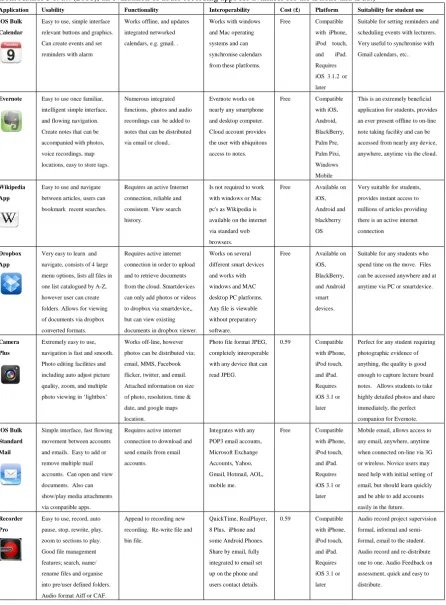
Table 3: Guide of Beneficial Applications, (Information regarding the Recorder Pro application has been taken directly from Author 3 et al. (2011), an evaluation of audio recording apps for available for the iPhone and iPad.)
Application Usability Functionality Interoperability Cost (£) Platform Suitability for student use
iOS Bulk
Calendar
Easy to use, simple interface relevant buttons and graphics. Can create events and set reminders with alarm
Works offline, and updates integrated networked calendars, e.g. gmail. .
Works with windows and Mac operating systems and can synchronise calendars from these platforms.
Free Compatible
with iPhone, iPod touch, and iPad. Requires iOS 3.1.2 or later
Suitable for setting reminders and scheduling events with lecturers. Very useful to synchronise with Gmail calendars, etc..
Evernote Easy to use once familiar, intelligent simple interface, and flowing navigation. Create notes that can be accompanied with photos, voice recordings, map locations, easy to store tags.
Numerous integrated functions, photos and audio recordings can be added to notes that can be distributed via email or cloud..
Evernote works on nearly any smartphone and desktop computer. Cloud account provides the user with ubiquitous access to notes.
Free Compatible
with iOS, Android, BlackBerry, Palm Pre, Palm Pixi, Windows Mobile
This is an extremely beneficial application for students, provides an ever present offline to on-line note taking facility and can be accessed from nearly any device, anywhere, anytime via the cloud.
Wikipedia
App
Easy to use and navigate between articles, users can bookmark recent searches.
Requires an active Internet connection, reliable and consistent. View search history.
Is not required to work with windows or Mac pc's as Wikipedia is available on the internet via standard web browsers.
Free Available on
iOS, Android and blackberry OS
Very suitable for students, provides instant access to millions of articles providing there is an active internet connection
Dropbox
App
Very easy to learn and navigate, consists of 4 large menu options, lists all files in one list catalogued by A-Z, however user can create folders. Allows for viewing of documents via dropbox converted formats.
Requires active internet connection in order to upload and to retrieve documents from the cloud. Smartdevices can only add photos or videos to dropbox via smartdevice,, but can view existing documents in dropbox viewer.
Works on several different smart devices and works with windows and MAC desktop PC platforms. Any file is viewable without preparatory software.
Free Available on
iOS, BlackBerry, and Android smart devices.
Suitable for any students who spend time on the move. Files can be accessed anywhere and at anytime via PC or smartdevice.
Camera Plus
Extremely easy to use, navigation is fast and smooth. Photo editing facilities and including auto adjust picture quality, zoom, and multiple photo viewing in ‘lightbox’
Works off-line, however photos can be distributed via; email, MMS, Facebook flicker, twitter, and email. Attached information on size of photo, resolution, time & date, and google maps location.
Photo file format JPEG, completely interoperable with any device that can read JPEG.
0.59 Compatible
with iPhone, iPod touch, and iPad. Requires iOS 3.1 or later
Perfect for any student requiring photographic evidence of anything, the quality is good enough to capture lecture board notes. Allows students to take highly detailed photos and share immediately, the perfect companion for Evernote.
iOS Bulk Standard
Simple interface, fast flowing movement between accounts and emails. Easy to add or remove multiple mail accounts. Can open and view documents. Also can show/play media attachments via compatible apps.
Requires active internet connection to download and send emails from email accounts.
Integrates with any POP3 email accounts, Microsoft Exchange Accounts, Yahoo, Gmail, Hotmail, AOL, mobile me.
Free Compatible
with iPhone, iPod touch, and iPad. Requires iOS 3.1 or later
Mobile email, allows access to any email, anywhere, anytime when connected on-line via 3G or wireless. Novice users may need help with initial setting of email, but should learn quickly and be able to add accounts easily in the future. Recorder
Pro
Easy to use, record, auto pause, stop, rewrite, play, zoom to sections to play. Good file management features; search, name/ rename files and organise into pre/user defined folders. Audio format Aiff or CAF.
Append to recording new recording. Re-write file and bin file.
QuickTime, RealPlayer, 8 Plus, iPhone and some Android Phones. Share by email, fully integrated to email set up on the phone and users contact details.
0.59 Compatible
with iPhone, iPod touch, and iPad. Requires iOS 3.1 or later
[image:6.595.75.522.113.719.2]The suitability of the applications for learning has been determined by a method of classification as used by Author 3 et al. (2011) to evaluate smartphone audio recording devices in which the applications were categorized according to:
Usability: Simple functionality set, uncluttered interface, consistent use of design compatible with iOS platform.
Functionality: Connectivity via Wi-Fi and mobile internet, added integration (e.g. integrated recorder in application or able to distribute via email), consistent and reliable (i.e. does not crash and works as expected)
Interoperability: PC/MAC OS platform, integration with other applications.
Other classifications were also noted, including the following:
Cost: Price of application
Suitability for student use: Target audience description of suitability.
5.
CONCLUSION
General computing appears to be moving away from fixed machines, and even specialised portable devices like the briefly popular Flip video camera are being superseded by equivalent smart device functionality (Dreir, 2011).
Research conducted during the last two academic years has shown that more students own smart devices, but only a small percentage of students declare using them for learning at university. Furthermore, and importantly, the autonomous use of mobile smart computing appears to be simple and relatively unadventurous. In this study there have been no accounts of students managing their feedback, e-PDP or connecting with webinar software for example. This indicates that there is a need for universities to develop and promote the potential with and amongst students towards enhancing wide-spread digital literacy in this area.
Equally the learning applications, in order to achieve student acceptance, need to fulfill Wagner’s (2005) attributes for satisfactory mobile internet experience, and application design requirements as identified by Author 1 (2011):
Ubiquity – Applications should be compatible with appropriate smart devices and provide the option of internet connectivity for downloadable content if necessary.
Efficiency – Applications should install, load and play any content within reasonable time periods, depending on quality of internet connection (Beckmann, 2010).
Reliability – Applications should provide the user with predictable experiences regardless the type of device it is being used on.
Accessibility – The user should be able to access all relevant content the application has to offer when a 3G/WiFi internet connection is available.
Richness – Content should load quickly, animations should be smooth and the streaming of internet related media should flow and playback at a sufficient rate (Wagner, 2005).
Flexibility – Designers should accommodate the variety of devices (PC, MAC, smart devices) and operating systems when designing applications (Beckmann, 2010).
Security – Applications should be designed with security measures in place to prevent data being intercepted by unintended recipients.
Interactivity – User-interfaces, feedback, navigation and functionality determine the user experience and should encourage the user to make effective use of the application (Yu and Hu, 2010).
The literature review of the field reveals that the application of smart devices for learning in higher education is relatively unexplored, whilst the study shows it to be in a continuous state of flux in response to the emerging nature of the technologies. This field requires much more research and thorough investigation to ensure that universities are ready to promote the effective use of smart devices and support students in developing their digital literacy in this area. Students have an important role to play here, but academics and educational developers need to review the disruptive potential of smart learning devices, thus leading to rewarding academic innovation in this area.
REFERENCES
Bakewell, C. and Vincent-Wayne, M. 2004, Male Consumer decision-Making Styles, The International Review of Retail Distribution and Consumer Research, 14(2), 223-240.
Beckmann, E. A. 2010. Learners on the move: mobile modalities in development studies. Distance Education, 21 (2), 159-173.
Boulos , M. N. , Wheeler , S. , Tavares , C. , & Jones , R., 2011. How smartphones are changing the face of mobile and participatory healthcare: An overview, with example from eCAALYX . Biomedical Engineering Online , 10 , 24
Chen, J., Park, Y., and Putzer, G. J., 2010 ‘An examination of the components that increase acceptance of Smartphones among Healthcare Professionals’, electronic Journal of Health Informatics, 5(2), 2010, e16
Diamond, S., Middleton, A., and Mather, R. (2011) A cross‐faculty simulation model for authentic learning. Innovations in Education and Teaching International, 48(1), pp.25 – 35.
Dreir, T. (2011) 'The Flip Camera Is Gone; Will a Smartphone Do the Job?' OnlineVideo.net blog, April 15, 2011. Online at: http://www.onlinevideo.net/ 2011/04/the-flip-camera-is-gone-will-a-smartphone-do-the-job/#axzz1kfwMkbz3
Durbin, S. 2011, Tackling converged threats: building a security-positive environment, Network Security, Volume 2011, Issue 6, June 2011, Pages 5-8, available at
http://www.sciencedirect.com/science/article/pii/S135 3485811700617), last accessed Jan’12
Jewell, S., 2011, Productivity via Mobile Phones: Using Smartphones in Smart Ways Journal of Electronic Resources in Medical Libraries Vol. 8, Iss. 1, 2011 Hague, P., 1993, Questionnaire Design. London, Kogan
Page.
Lin, P., & Brown, K. F., 2007, Smartphones Provide New Capabilities for Mobile Professionals. CPA Journal, 77(5), 66-71.
Marlow, C., (2009) Maintained Relationships on Facebook, Online at: http://www.facebook.com/note.php?note_id=5525722 8858
Mori, K., & Harada, E. T., 2010 Is learning a family matter?: Experimental study of the influence of social environment on learning by older adults in the use of mobile phones. Japanese Psychological Research, 52,
244–255.
Author 3, Author 4 and Author 1. (2011) Evaluating the use of audio smartphone apps for higher education learning. Audio Engineering Society 130th Conference, May 2011, London, UK.
Shin, D. Shin, Y, Choo, H., Beom, K. 2011 Smartphones as smart pedagogical tools: Implications for smartphones as u-learning devices, Computers in Human Behavior, Volume 27, Issue 6, November 2011, Pages 2207-2214
Traxler, J. 2009 Learning in a Mobile Age, International
Journal of Mobile and Blended Learning, 1(1), 1-12, January-March 2009
Wagner, Ellen D (2005). Enabling Mobile Learning.
EDUCASE Review, 3 (40), 40-53.
Author 1, Author 4, and Author 3, 2012, Considering the Smartphone Learner: an investigation into student interest in the use of personal technology to enhance their learning,
Author 1,. 2011 An investigation into the benefits and limitations of mobile learning applications used for computing studies in higher education, BSc Computer Networks Undergraduate Final Year Dissertation, Sheffield Hallam University,
Kang; Y. M., Cho, C.; Lee, S.; 2011 , Analysis of factors affecting the adoption of smartphones, Technology Management Conference (ITMC), 2011 IEEE International , 919-925, 27-30 June 2011