Apple Macintosh
as a
User Interface Agent
for
Unix System.s
A thesis
submitted in partial fulfillment
of the requirements for the Degree
of
Master of Science in Computer Science
in
the
University of Canterbury
by
J
.R.A. Collier
Chapter 1 The Macintosh as an Interface for UNIX Systems ... 1
1.1 Introduction ... 1
1.2 Sub-projects Contributing to the Research ... : .. 2
1.2.1 MPFW ... 2
1.2.2 Host to Macintosh Serial-line Protocol ... 3
1. 2. 3 Interface Programming Language ... 3
1.2 .4 A Pseudo-Temrinal Server Daemon for BSD Unix ... 4
1.2.5 Programming Support ... 4
Chapter 2 User Intetfaces For UNIX ... 6
2.1 Background to Unix ... 6
2.2 Problems in Designing a User Intetface for Unix ... 8
2.3 Survey of Existing Interfaces ... 10
2. 3.1 Character-Oriented Terminal Intetfaces ... 10
2.3.1.1 · Menunix ... 10
2.3.1.2 vsh ... 11
2. 3 .1. 3 The Mary land Window Systems - wsh ... 11
2, 3 .1. 4 Wll1 •••••••••••..•••.•.••.. , . . . • • • . • . • • • . . . • . . . • . . . • . . 11
. 2.3.2 Unix Workstation Intetfaces ... 12
2.3.2.1 Suntools ... 12
2.3.2.2 AT&T 5620-the Blit tetminal ... 13
2.3.3 Network Windowing Systems and Standards ... 13
2.3.3.1 X ... 14
2.3.3.2 NeWS ... 14
2.3.3.3 Jade ... 15
2.3.4 Macintosh-based Systems ... 15
2.3.4.1 uw ... 15
.2.3.4.2 MacNix ... 16
2.4 Targeting of Unix Utilities for Interface Improvement ... 16
2. 5 Proposed Interface Designs ... 17 .
2.5.1 Terminal Tool. ... 17
2.5.2 Shell Interface ... 17
2.5.3 "More" Interface- File and Manual display ... 19
2. 5. 4 Mail Intetface ... 20
2.5.5 Distributed Editor ... 20
2.6 Interface Prototyping ... 21
2.6.1 User-Level Customisation in Macscrewn ... 21
3.2 The Macintosh Operating System ... 27
3.2.1 Hardware ... 27
3.2.2 MemoryManagement. ... ~ .. 28
3.2.3 File Systen1 ... 30
3.2.4 Resources ... 31
3.2.5 Drivers and Desk Accessories ... 32
3.2.6 Events ... 32
3.2.7 Application Structure ... 33
3.3 Difficulties in Macintosh Programming ... 34
3. 3.1 Low Level of the Toolbox Interface ... 35
3. 3.2 Operating System Support ... 36
3.3.2.1 Addendum- the Limitations ofMultiFinder ... 37
3.3.3 File System ... 38
3 .4 Macintosh Devel(_)pment Environments ... 40
3.4.1 Procedural Programming Languages ... 40
3.4.2 Toolbox and OS Extension Systems ... 41
3.4.3 Object Oriented Systems ... 42
3.4.4 Choice of Development System for the Project ... 42
Chapter 4 Development Sup port ... 44
4.1 Distributed Development Environment ... 44
4.1.1 Remote Application Launching ... 44
4.1.2 Command Driven File Transfer ... 45
4.1.3 Cotnpilation Control ... 46
4.1.4 Communications Monitoring ... 49
4.1.5 Clock Synchronisation ... 49
4.2 Macintosh Library Extensions ... 50
4.2.
t
File Manipulation Librmy ... 514.2.2 Modal Dialog Mm1agement. ... 52
Chapter 5 MPFW - A Framework for Macintosh Development. ... 54
5.1 Overview of MPFW ... 54
5.2 Advantages of (Pre-Emptive) Multitasking ... 55
5.3 MPFW Execution ... 59
5.4 Systen1 Data Structures ... 60
5.5 Event Analysis ... 63
5.6 Data Space Integration ... 64
6.3 Multiplexing layer ... 74
6.4 Channel Allocation and Process Maintenance ... 76
6.5 MPFW Communications Implementation ... 78
6.6 JMUX Implen1entation ... 81
6.7 Protocol Evaluation ... · ... 84
Chapter 7 PTYD - A Pseudo-Tem1inal Server for BSD UNIX ... 86
7.1 Motivation ... 86
7.2 Package description ... 87
7.3 Security ... 89
7.4 Acknowledgement. ... 89
Chapter 8 Conclusion - Directions for UNIX and the Macintosh ... 90
Appendix I UNIX Operating System Architecture ... 93
1.1 Processes ... 93
1.2 Signals ... 94
1.3 File System ... 95
I.4 Inter-process Communication ... 96
1.5 Tertninal devices ... 97
Appendix II Project Library Routines ... 99
II.1 File Handling Package ... 99
II.2 Support Routines for Other File Handling Systems ... 103
II.3 Dialog Support Routines ... 105
II.4 Resource Management Routines ... 108
II.5 Error I-Iandling ... 109
II. 6 Men1oty Management. . . • . . . 110
II. 7. String Manipulation ... 111
II.8 Interface Graphics ... 112
II.9 Queues ... 113
II.10 Set Manipulation ... 114
II.11 Miscellaneous Routines ... 114
Appendix III Difficulties in MPFW Process Implementation ... 116
III.1 Shared Systetn Globals ... 116
III.2 Non-Reentrant System Code ... 116
III. 3 Asynchronous Process Exchange ... 119
III.4 Stack and Heap Management ... 120
IV.2 Structure of an IPL Program ... 125
IV.3 Compiler Implementation ... 126
Appendix V MPFW Event Handling ... 129
This thesis investigates the possibility of using the Apple Macintosh to provide a workstation-like interface for UNIX hosts. Problems of UNIX interface development are identified through a study of existing UNIX interface systems. Techniques from some of these are applied in the design and implementation of MPFW- the Macintosh £rogramming framework for Workstation Interfaces. This system provides communications and graphical interface support for developing application-specific interfaces on the Apple Macintosh.
Part of the thesis is devoted to .evaluating the programming facilities offered by the Macintosh. Several weaknesses are identified, and mechanisms for redressing these are featured in MPFW to simply interface programming. Pre-emptive multitasking is one such mechanism, and its implementation is described in some detail.
The Macintosh as an Interface for
UNIX
Systems
1.1
Introduction
This thesis is primarily an evaluation of the Apple Macintosh TM and its suitability as a user interface agent for a UNIX™ host. Emphasis is given to programming issues which arise in such a distributed system, particularly the difficulties of writing small Macintosh interface programs and using them concurrently to allow multiple application-specific intetfaces. A prototype support system which addresses these issues is presented.
The project was motivated in part by the machines in use at the Department of Computer Science: the Department runs 4.3BSD UNIX on a V AXTM-11/7 50 as its central host for research and undergraduate teaching, and Macintoshes are used by staff and students as terminal emulators and general purpose microcomputers. Recently the Department acquired a number of Sun/3 UNIX workstations and an Ethernet local area network, and the Macintoshes are now connected by a PhoneNET system· with a gateway to the Ethernet through a Kinetics FastPath™ bridge.
At the inception of the project, however, these Macintoshes communicated with the host via RS422 serial lines, and the systems discussed in this thesis employ this mode of communication. It was considered then that the simple single-windowing terminal emulators which were available for Macintosh to UNIX communications made poor use of the Macintosh's capabilities, and that it would be worthwhile to try to present a graphical interface to UNIX using the Macintosh interfacing standards.
Since then, this topic has received much attention from commercial developers and in universities, and a number of interface systems have been produced [uw, MacNix]. These systems have yet to integrate the Macintosh graphical interface at
™
'Macintosh' and 'Apple' are tmdemarks of Apple Computer Inc.™
UNIX is a trademm-k of AT&T Bell Labomtories.™
VAX is a registered tradenuu·k of the Digital Equipment Corporationthe level of specific applications, but their generalised interfaces are nevertheless as ambitious as was originally intended for this project. It is unlikely that a single style of interface will be suitable for all applications and classes of user. The focus has therefore shifted from development of a pre-programmed workstation to the implementation of a framework system which provides high-level communications and Macintosh development support for producing customised distributed intetfaces.
Part of this thesis is devoted to a general investigation of methods for integrating UNIX and the Macintosh, and the facilities which should be provided for the programmer in such a distributed environment. The two l)ystems exemplify opposite priorities in operating system design: UNIX giyes precedence to architectural regularity at the expense of the user interface; the Macintosh, vice versa. There are underlying architectural considerations which must be considered
carefully when designing a user interface for UNIX, and there are also limitations in the Macintosh programming environment which need to be addressed in order to assist experimental interface programming. The programming projects to be described in this thesis have been designed to explore ways of combining the advantages of both systems, either by using them together in an integrated system, or by importing some of the features of one into the programming environment of the other.
1.2 Sub-projects Contributing to the Research
1.2.1 Macintosh Programming Framework for Window interfaces
The largest part of the project has been a program which acts as an extra layer of management software between the Macintosh operating system and a running application, reducing the peed for programmers to support operating system and low-level window management functions. An important feature of MPFW1 is the implementation of multiple scheduled processes above the Macintosh operating system. Process management above an operating system which is not re-entrant has entailed considerable difficulties, but this design has been found to be effective in isolating the heterogeneous components
c5
a window intetface system.Most existing user interface management systems for UNIX (§2.3) require that any application which is to use a structured window interface (i.e. not a simple tenninal emulator) be re-wlitten on the host. The intention of MPFW is to provide a vehicle for experimenting with interfaces tailored for existing host applications. These interfaces should be designed to run on the Macintosh without modifying the hpst applications, directing output to the appropriate portion of the application's window, and generating textual input for the application in response to the user's keystrokes and interaction with Macintosh controls and dialog boxes.
MPFW was designed to ease the programming of these interfaces by automating features which most would hold in common, including window management and the low level host ... to~Macintosh communications. These enhancements to the Macintosh operating system solve some of the problems involved in Macintosh programming and may prove useful beyond the scope of UNIX interface design. Chapter 5 discusses the structure of MPFW in detail.
1.2.2 Host H Macintosh Serial-line Protocol
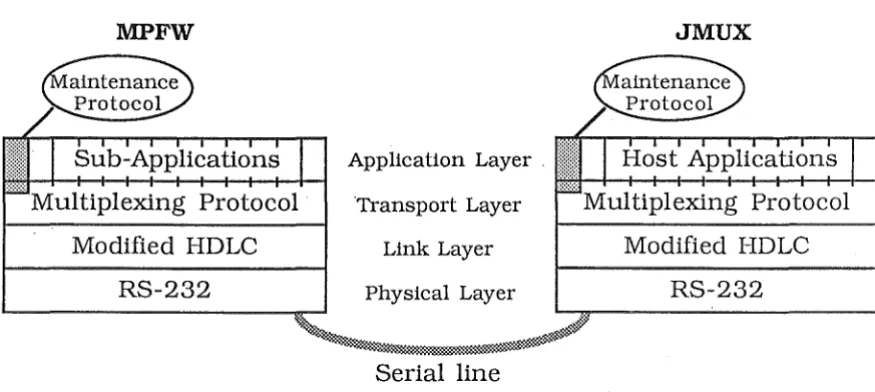
Unlike a simple terminal emulator, a graphical user interface system such as MPFW may pass lru~ge quantities of data without immediate echoing. A multiplexing capability is also required to support r.:~ultiple windows displaying output from sepru·ate host processes. For these reasons, it was considered necessary to run a reliable communications protocol over the serial connection between the host and the Macintosh. Such a protocol has been integrated into MPFW. Its design and implementation are described in Chapter 6.
1.2.3 Interface Programming Language
1.2.4 A Pseudo-Terminal Server Daemon for BSD UNIX (PTYD)
BSD UNIX provides devices to support multiple-window interface systems, but the means of obtaining ownership of these devices has adverse security ramifications and also adds some comv~exity to window management programs. PTYD, as described in Chapter 7, addresses both these problems. A copy of the p.rogram has been sent to the University of California at Berkeley to assist in the development of a generalised resource server for the next release of BSD UNIX.
1.2.5 Programming Support for Macintosh and UNIX projects
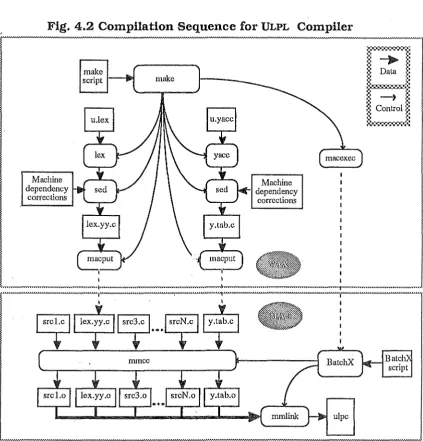
A number of support tools have been developed to assist in the management of the major thesis projects above. Chapter 4 gives a brief description of these tools. Many of the projects required compilation sequences with components on either machine; the interface programming language, for example, used a Macintosh-resident development system in conjunction with a parser generator on the host. In other cases, general purpose UNIX programming tools were used to aid the development of C programs on the Macintosh.
At the core of ~his distributed development environment is the communications program Macscrewn - a customised single-window terminal emulator based originally on Dr. Bruce McKenzie's TVI925 emulator Macscreen. Support of the Macscreen was taken up early in the project as an exercise in developing skills in Macintosh serial communications programming. Since then it has gradually been rewritten, and its name has been altered in recognition of the idiosyncrasies exhibited by early experimental versions. Performance gains and added features encouraged appropriation of these versions before they were fully tested.
User Interfaces For UNIX
2.1
Background to
UNIX
The UNIX operating system was originally developed by Dennis Ritchie and Ken Thompson at Bell Laboratories in 1973 [BELL 78]. Since then it has achieved great populadty with programmers, perhaps not least because the source code has been available to educational institutes and many have used UNIX as a model for the teaching and research of operating systems. Many computer 'manufacturers now support UNIX, often as an alternative to their own proprietary operating systems, and a number of variants have appeared over the years. Parts of this thesis are applicable only to those systems detiving from work at the University of California at Berkeley, known as the Berkeley Software Distribution (BSD) systems. Other major variants include the AT&T commercial releases, current of which is System V Release 3, and the Bell research systems known by the edition number of the manual (currently 8th and 9th).
The strength of UNIX lies less in the provision of highly developed monolithic applications than in the facilities which t~_y operating system kernel and core utilities provide for writing and combining small programs to automate complex tasks. In
order to use UNIX effectively, the novice is faced with some overheads in learning the functions of these utilities and the notational conventions they share, and also in acquiring a mental model of the operating system to guide the invocation of complex command sequences. For command line compactness and speed of typing, utility names are commonly two to four characters long; because of UNIX's development history, the mnemonic value of these names tends to be esoteric. Unsurptisingly, these pre-requisites often deter the general user. While computer professionals may find UNIX unsurpassed as a programming environment, others complain of "user-hostility".
- control of the dependencies between multiple source files in order to determine those sections of a large program requiring re-compilation when sources are updated. This is especially important in large projects and in cases where some components are derived from automatic source generation tools.
- revision maintenance and source cross-indexing in large scale development projects
- consultation of reference material, which may be presented fmmally with dedicated retrieval systems (on-line documentation) or scattered throughout the file system (as in the case of sample system code or saved news
·articles).
- adaption and re-fmmatting of existing information- e.g. imported source code, system configuration and status tables, and output from standard utilities.
- maintenance of a customised u.ser environment, including personal p:rogran1ming tools (libraries, command scripts etc) and preference selections for standard utilities. This must usually take into account such externally imposed factors as changing hardware configurations, different tenninal type& and work locations, and different machines in a distributed environment.
- preparation of program documentation and user manuals.
It would be impracticable to present monolithic applications which would automate these tasks to the satisfaction of most programmers, although there are high-level tools in UNIX which go far in providing automation of certain tasks (e.g. MAKE [FELDMAN 79] for dependency control). Instead, the UNIX programmer uses standard utilities- pattern searchers, stream editors, command interpreters and many others - to create customised tools as they are required. Most of these will be created as one-off interactive shell commands. A few will be seen to have general application and will be saved as command scripts, perhaps to be used later as components of still higher-level tools.
half-remembered library call, the editing session may be interrupted with a couple of keystrokes and a short command will initiate a keyword search of the on-line manual, probably providing the library routine's entry within a few seconds. For the latter case, the programmer would launch several background process groups, each involving a tree-walking utility and a pattern matcher, to search for the required code in appropriate subsections of the file system. If similar searches are used frequently, the programmer may decide to encapsulate this sequence of commands in a script. Future searches can then be made simply by invoking the script and passing the code pattern as an m·gument.
The populm·ity of UNIX is not only a reflection of the versatility of its standm·d utilities. UNIX is designed to be portable; its kernel and core utilities m·e written in a high-level language, and the operating system is not based around any proprietary hardwm·e system. The elegance of its kernel m·chitecture makes the operating system easy to comprehend and to program both at application and system level.
While a detailed description of UNIX architecture is beyond the scope of this thesis, some grounding may be necessary in order to appreciate the factors which impinge upon the design of a command interface. Appendix A gives an introduction to some relevant features, and further references are provided at the end of the text.
As a programming environment, UNIX has probably been successful because it was designed by programmers for their own use, not for release as a commercial product. Despite the many additional features which have been added for general use in modern vm·iants of UNIX, it has for the most part retained the simplicity and flexibility which programmers find desirable in adapting the operating system for their needs.
2.2 Problen1s in Designing a ·user Interface for
UNIX
For although various windowing systems have been produced and some experimental menu-based shells for novices have been developed, efforts to provide an interface suitable for general users have met with only limited success. In part this failure may perhaps be attributed to developers' desire to preserve the regularity· of the operating system, by attempting to fit the schemes into existing frameworks which are not entirely suitable.
One of the tenets of the UNIX "philosophy" is device independence, and this has therefore been one of the design goals of many user interface management systems -they have aimed at a general framework in which a variety of workstation designs can be accommodated. It is possible, however, that the design of an effective man-machine interface relies on psychological details which must be tailored minutely to a particular style of terminal in the context of any given application. This project looks only at the Macintosh, which has its own well defined style of interface, and no attempt is made to incorporate other workstations or window models.
While the flexibility of UNIX's standard I/0 conventions is beneficial to the programmer, it discourages highly interactive application design. A compromise must be made between the needs of a human reading the output of a program and those of another program which may act on the same output. Filters are often included in pipelines when the format needs to be modified for a particular purpose. For example, a streaming text processor (e.g. SED [MACMAHON 79], A WK [AHO 79]) might be used to discard column labels from the output of a system status command before the information is passed to a monitoring program. Pagers are often appended to interactive pipelines so that the human reader can control the rate of output. In order to make these filters practicable, the information must not be heavily formatted, and complex input device interaction cannot be embedded in the core application.
application is still an open question, but it is to be hoped that the systems developed in this project may help provide some answers.
2.3 Survey of Existing Interfaces
The first part of the project involved a study of various alternative UNIX interfaces, including a number of menu and window-based systems. The brief descriptions below include systems which were studied initially, and some (UW, NEWS) which became available during the development of the project.
2.3.1 Character-Oriented Terminal Interfaces
The first group consists of interfaces designed for terminals with little or no graphics capabilities. Their restrictions preclude fair comparison with bit-mapped display interfaces, but the models have been influential in interface design, and the structure of the windowing systems provided some guidance in the development of MPFW's window multiplexor.
2.3.1.1 ~~IX
MENUNIX was developed in 1981 by Gary Perlman of the University of California at San Diego. This system is intended primarily for novice users, and presents the file system and utilities through a hierarchy of menus. The intetface is designed for terminals without graphics capabilities. Menu choices are given by single keysu·okes, indicating command, menu or file selection according to context. Ordinary textual commands may also be given. Standard utilities are grouped into menus (workbenches ) by function (word-processing, programming etc.) rather than by location in the directory u·ee.
2.3.1.2 VSH
This was an early attempt by D.M. Sheibelhut to implement a menu-driven UNIX interface [SHEIBELHUT 79]. Like MENUNIX it is designed for text terminals. The current directory is displayed in a menu and files are selected by single keystrokes. A limited set of single keystroke commands is provided, but there are no "workbench" menus and no attempt is made to supply the full set of standard UNIX commands.
2.3.1.3 The Maryland Window Systems - WSH
This package, developed at the University of Maryland in 1983 [WEISEN 83], offers a library of C and LISP routines for providing menu and window intetfaces for applications, as well as a shell - WSH - which allows multiple overlapping windows on text terminals.
Each WSH window is bordered by lines of a given character, and each provides an independent pseudo-terminal in which standard utilities can be run. Window creation and manipulation is performed by issuing commands which are linked to the shell.
WSH and a similar system WM (see below) seem sufficiently fast and well-developed to demonstrate the advantages of multi-windowing intetfaces. For example, when using a debugger it is most useful to have source files visible at the same time as debugger output. In a shell or other interactive utility it is also helpful to be able to consult the on-line manual without breaking command input. More often, however, the time involved in setting up windows and manipulating them using textual commands is unwarranted, and the screen size available for each window in a character-oriented terminal is a serious limitation.
2.3.1.4 WM
2.3.2 UNIX Workstation Interfaces
A number of proprietary window management systems have been developed for UNIX workstations. Although some useful ideas were taken from the study of these systems, a close copy was considered inapproptiate for the Macintosh project, since the underlying application is usually running on the same machine as the interface controller, or at least in a standard environment of communicating processes where machines are networked. It did not appear viable to attempt to port the UNIX subsystems which would have been required to support a similar structure for a Macintosh workstation.
Also, the interface models are based upon the capabilities the vendors' hardware, and the differences between these and the Macintosh (e.g. small screen vs. large screen, single-button vs. multi-button mouse) might make such an implementation clumsy. Besides this, much of the interface automation in the Macintosh ROM could not be applied, which would result in a greater programming burden and would alienate the resulting system from the body of conventional Macintosh software.
2.3.2.1 Suntools
The SUN windows system [SUN 86a] comprises several standard utilities ("tools") with their own graphical interfaces:
- a text terminal emulator, (SHELL TOOL) with a cut-and-paste facility -a more sophisticated shell window (CMDTOOL) with a scrolling capability
and improved command editing - a graphics window tool
- a mouse based editor, similar to Macintosh editors - a multi-window debugging tool
- various non-interactive tools such as a graphical performance monitor and clock
hierarchical pop-up menus. Overall, the Suntools interface is more complex to manipulate, but judging by the tools provided it seems to have been designed to assist the more sophisticated UNIX user, rather than as a novice interface.
2.3.2.2 AT&T 5620 - the BLIT terminal
The AT&T 5620 Dot Mapped Display [PIKE 84] is of interest as one of the earliest UNIX diskless workstation systems - it has a powerful processor and its own UNIX-like operating system but no provision for secondary storage, and it is always used in conjunction with a remote host. Graphical applications run as co-operating processes on the host and on the display, with the workstation code downloaded from the host. This design is in some ways similar to that of MPFW, except that in MPFW the interface code is stored locally and executes in the non-UNIX environment of the Macintosh. Many applications have been developed for the DMD, one of the most widely acclaimed being a multi-window debugger [CARGILL 83]. The close reliance on host support for interface processes means that applications must usually be re-written in order to take advantage of the DMD; the "bolt-on" interface model proposed for MPFW has not been investigated.
2.3.3 Network· Windowing Systems and Standards
Vendor-independent windowing systems for UNIX have been the subject of several major research projects in recent years. X windows (MIT), NEWS (Sun Microsystems), and to a lesser extent ANDREW (CMU - [MORRIS 86]) have evolved from their experimental origins and are now in general use.
At one stage, a Macintosh implementation of one of these standards (X
windows) was considered as a possible vehicle for the project, but after delays in obtaining the source co~e this idea was abandoned. NEWS was brought to the attention of the author only at the latter stages of the MPFW's implementation, and its influence was therefore limited. Nevertheless, these are standards against which MPFW should be compared, and the issues raised in their design remain the subject of debate in the field of man-machine interaction.
decisions over those of other schemes. Although details of interface appearence are less heavily embedded in vendor-independent models than in workstation designs, the structural conflicts between the systems - such as event handling, graphics bases and screen management - would have been very difficult to resolve.
2.3.3.1 X
The X Window System™ from Project Athena at MIT [GETTYS 85a,b] has been promoted as a standard for window management under UNIX, notwithstanding recent gains in the popularity of NeWS.
X uses a server process on the workstation to drive the interface hardware (usually a mouse, keyboard and bit-mapped display). Client applications request services through a message passing protocol which runs over standard inter-process communications channels, allowing client processes to run oh a different machine from the server. The X server does not contain application-specific code - clients have access to a standard set of library calls from which they must build their own interfaces. Several ready-written client applications are provided with the package, including two windowing shells.
2.3.3.2 NEW S
NEWS™ [SUN 87] is a device-independent user intetface management system developed at Sun Microsystems after their in-house SunDew system [GOSLING 85]. The structure of NEWS is similar to that of X, only somewhat more flexible in that it uses the POSTSCRIPT™ language for communication between client and server instead of a non-extensible remote procedure call mechanism. Hence the functions required by the client can be programmed into the server if they are not already present ~s primitive operations, and this can reduce the amount of traffic considerably as well as simplifying the programming of client. For example, a routine to draw a particular style of window can be loaded into the server, avoiding the need to call each component primitive operation whenever the window must be re-drawn.
TM The X Window System is a tracemark of the Massachusetts Institute of Technology. TM NeWS is a trademark of Sun Microsy.;~ems, Inc.
The role of multi-threading in user interface management systems- particulal'ly in respect to event synchronisation, resource allocation and server state maintenance -is a current topic of research [TANNER 86, LANTZ 86a,b]. Internally, the NEWS server employs separate tlueads for each client, and in this respect it is similar to MPFW.
2.3.3.3 JADE
The JADE project was a series of experimental systems developed at the University of Calgary between 1983 and 1986. Part of the project was concerned with the study of user interface management systems in .an environment of distributed workstations, and included development of gener~l guidelines for user interfaces [HILL 84,86]. These guidelines were useful for designing the interfaces of §2.5 and for considering the range (and restriction) of capabilities which MPFW should support.
One experimental interface [GREENBERG 85] from the JADE project was considered as a model for the MPFW shell interface; the WATCHER system in Macscrewn (§2.6.2) also bears some similarity to this design.
2.3.4 Macintos·h-based Systems 2.3.4.1 u
w
The UW windowing package for UNIX [BRUNER 85] has much in common with MPFW, not least because it is designed to run on a Macintosh connected to the host through a serial line. Some of the ideas for the interfaces and for the communications structure of MPFW were guided by the design of
uw.
Each window is treated as a terminal emulator, with a choice of text-only or graphics capable emulators. Window sel~ction, sizing and placement are petformed locally using the mouse, although remote window creation is allowed and recent versions provide some other remote services (e.g. re-titling of windows) for host programs incorporating UW's library routines.
Terminal functions are invoked through escape sequences. The range and complexity of messages is not great, and the results of missing a character would not be disastrous - input or output being directed to the wrong window would probably be the worst case, and this could usually be detected arid corrected by the user. Protocol reliability is therefore not a major issue; visual feedback is sufficient for UW, as it is for a simple tenninal.
2.3.4.2 MacNix
MacNix is a recent commercial product from Eurosoft. I know of it only by reputation, and much of what follows is conjecture, but apparently it operates by mounting a section of a UNIX file system as a virtual disk. on the Macintosh -effectively, it implements a Network File System client. File operations are serviced by a host process which communicates with the Macintosh over a serial line or local area network.
This approach has much to recommend it, and in many ways finesses the problem of providing a Macintosh-like interface to UNIX: file system manipulation can be performed through the Finder, and standard Macintosh applications (text editors etc) can operate directly on UNIX files. It does nothing for utilities which have no direct Macintosh equivalent, however, and it is restricted by file system incompatibilities such as UNIX links and file modes.
MacNix alone does not address the same problem as MPFW and other UNIX inte1faces; a UNIX host makes a rather expensive Macintosh file server, so presumably the MacNix package offers some means of accessing UNIX utilities if only through a terminal emulator. But used in conjunction with a system such as MPFW, MacNix would obviate the need to re-implement functions which can be handled adequately by existing Macintosh applications.
2.4
Targeting of
UNIXUtilities for Interface hnprove1nent
In the paper "Interface Design and Multivariate Analysis of UNIX'' [Hansen 84], the authors describe a method of measuring:
-which commands and command groups are used most frequently, and -which commands commonly tenninate abnormally, probably indicating
Early in the project I intended to apply this scheme to local usage data, and to this end I taped daily accounting logs from March through May of 1986. It became apparent, however, that such an analysis would involve a major diversion from the project, and so the results of the aforementioned paper were taken as the guidelines for usage patterns.
It seemed reasonable to assume that frequently used commands, especially those which were often used incorrectly or in conjunction with the on-line manual, would be suitable targets for improved interfaces. For interactive commands, a custom window interface might be indicated. Commands with a large number of flag options could be launched with the help of a dialog box (c.f. §2.6.2). File system navigation commands, for which Hansen et al. measured the highest usage frequency, would probably benefit from close integration with the shell interface.
2.5
Proposed Interface Designs
Before implementing MPFW, it was necessary to consider a range of interface designs in order to gauge the facilities which would be required in the core application. Delays in the development of MPFW itself precluded the implementation of all but the terminal emulation sub-applications, although some of the ideas have been incorporated in Macscrewn.
2.5.1 Terminal Tool
The first sub-application to be invoked when MPFW is launched is a simple terminal emulator, similar to Macscreen. This enables logging in and initialisation of the host multiplexor. Another version can be used once the multiplexing protocol is established, thus providing multi-channel terminal emulation similar to UW. Shell cori:unand tools or application-specific interfaces would normally be used in preference to the straight terminal window, except perhaps in the case of interactive applications without custom interfaces. Currently, however, the two terminal tools are the only types which have been implemented.
2.5.2 Shell Interface
when processes can each be assigned a window. It is felt, however, that other mechanisms (such as file redirection, automatic pathname generation, variable substitution and control structures) would need to be implemented in any shell which could compete with the C-shell for experienced users. It would work against the nature of this project (and also be very time-consuming) to write a shell of this complexity.
Fig.2.1 Shelltool Window (simulated)
4.2bin/ Articles Xdoc/ bin/ blarg.at
?. man grep
ames bugfixes/ calendar etc/ jw/ letters/
?. grep Station Articles
?. I
?. grep Station Articles
macfile/ mbox monitor/ myuw/ papers/
Subject: MacWorkStation for UNIX 4.2bsd?
progbits/ safe/ scrtest/ src/ stats/ t!J1p/ vsh.doc/ X25/
View) which talked about 11MacWorkStation11
, a system to run on the Mac and a
The shell window is divided into three areas (Fig 2.1). The top section contains the name of the current directory and its listing, in the form produced by "Is -F". The user may treewalk the directory structure by double clicking directory names in this list. (Note that ls -F appends '/'to directory names.) The maintenance of these areas is perfmmed as follows:
1) the shell tool generates a "cd <filename>" command- any errors will be reflected in the standard output window.
2) it then issues the comh1and sequence "pwd > ttypXX; Is -F > ttypXX &"
Below these is the command area. Command input and output are kept separate to allow a more effective cut-and-paste mechanism and to maintain a visual reminder of the terminal session history. Command lines are buffered in the shell tool before being passed to the host. This enables local command editing, and also enables the. shell to recognise commands for which custom windows or. command option dialogs should be invoked. It also allows the trapping of directory changing commands, which are processed as described above, and ensures that automatically generated commands are not interspliced with keyboard commands.
The bottom of the screen is the terminal's standard output and standard error display. This area is normally used only for commands with short output, such as system status enquiries. File listing, manual consultation and editing are directed to separate sub-application windows. Whether command lines are re-echoed in this section is a matter of personal preference; echoing can be controlled by use of the standard STTY command.
In some ways this proposed design may be less robust than an intetface to dedicated host shell. Certain commands ("cd", "chdir", "pushd", and "popd", and also commandsw.ith custom interfaces) must be caught before they are passed to the shell, and the output of some commands must be posted to specific areas of the window. The commands may be issued erroneously (e.g. with invalid arguments or whep. the shell is not ready for input) or in ways which may fool a naive interface handler (e.g. issuing "cd" in parentheses, which results in the generation of a subshell whose current working directory is changed.)
To counteract these problems, a modified scheme would have the shell launched under the control of a small host monitor application, similar to WATCHER (§2.6.2). This would modify the shell's command responses through standard mechanisms (aliases and environment variables) and thereby supersede local parsing of shell input.
2.5.3 "More" Interface - File and Manual display
Each MORE window contains a dialog box (displayed optionally) with check boxes for options such as scrolling style, and buttons for commands such as reverse paging and pattern searching. An edit item in the dialog box is used for pattern specification. The window may also contain a scroll bar which will generate file positioning commands based in MORE's status line if the input is s~ekable.
When a MORE window is re-sized, a special request is sent to the host monitor to make an ioctl() call setting the pseudo-terminal's size parameters. This facility may also be employed by other tools, but note that few UNIX applications currently take notice of these parameters.
As with the shell tool, this design may prove susceptibl~ to synchronisation problems. One of the design philosophies of MPFW was that no specialised UNIX software (apart from the multiplexor) should be required. In this case, however, a small dedicated file viewing utility would be a great advantage. All that would be required of this utility would be the ability to read specified lines from its standard input file and pass them to the terminal. When its standard input was a non-seekable device rather than a reguar file, the stream could be stored in a temporary file for subsequent seeking. (This method is used in the Suntools CMDTOOL and in the paging utility YAP [Jacobs 85].)
2.5.4 Mail Interface
A basic interface for MAIL [SHOENS 86] consists of a standard te1minal emulator with a dialog box. The dialog box contains named buttons for the common mail commands, and check boxes for certain options such as header suppression. This design is similar to the Suntools mail interface, and has been implemented under the WATCHER system of Macscrewn (§2.6.2). A more sophisticated interface might provide separate window sections for disJ?laying the active headers and the contents of the folder directory.
2.5.5 Distributed Editor
editor's work file and passed to the tool, and are replaced after screen editing when they scroll out of the tool's local buffer.
Pattern matches and global replacements are performed using the facilities of the host editor, with commands issued from a dialog box. Before replacements are· performed, all lines in the local editing buffer are returned to the host.
Replacement of all lines is a simple solution to consistency problems. Unfortunately it generates unnecessary traffic when lines are not modified, and it may make the editing sub-application unacceptably slow. Alternative schemes for distributed editing have also been considered. Briefly
:--downloading the entire file and editing it locally. Using serial
communications, this would probably be unacceptably slow when loading and writing the file.
- using Macintosh controls to provide input for a standard display editor, such as VI [JOY 86] .
. -implementing a Network File System [SUN 86c] client for the Macintosh, thus allowing transparent use of standard Macintosh text editors. (c.f. §2.3.4.2 - MacNix)
2.6 Interface Prototyping
The viability of MPFW's communkations protocol and scheduled multitasking remained unproved (to the author's satisfaction) until very late in the project. If the system had foundered on either of these experimental techniques, this thesis would have been seriously undermined. It was therefore considered prudent to implement some of the user interface principles in an alternative environment. A number of small enhancerp.ents and one major interface - a variation of Greenberg's workbench dialogs - were incorporated into Macscrewn.
2.6.1 User-Level Customisation in Macscrewn
User-customisation of Macscrewn's interface was considered important for two reasons:
ii) because many of the extensions to Macscrewn were dependent upon the host characteristics (backspace translation etc.) and prefened software packages (e.g. text editor command mapping for the mouse and keypad)
In order to allow multiple invocations of the program from a shared file server, preferences aie not recorded in the application file, but users have personal configuration files whose resources override the defaults. These files can be used to launch the program, or loaded subsequently through a menu selection.
The following options can be set through menu selections, and may be saved in a configuration file
:-"" delay before a phosphor-protecting moire display is invoked when the program is idle
-code sent by the 'Backspace' key (erase "H or delete"?- reversed when shift-modified)
- code sent from a mouse click (repeated arrow key codes or an absolute positioning code)
-interpretation of option key (editing~code generation or high bit setting-'meta' key)
- verification of incoming file names during file transfer
- use of flow control, which is undesirable with some interactive applications -use of the 'Enter' key to toggle a mode in which outgoing characters are
preceded by appropriate insert/delete sequences to simulate continuous insertion for text editors which lack this capability
Other uses for configuration files include:
- replacement of the function button palette, as described in the following section
- re-mappin.g of the codes sent by key combinations. This can be used to map arrow and keypad keys for editing functions in interactive applications - alternative arrangements of the button palette and screen window - background patterns for the button palette to soften the otherwise stark
Configuration files can also be loaded in response to a command sequence from the host, allowing applications to configure the terminal according to their needs. Alternatively, applications can set many of the parameters with direct command sequences and thereby avoid the need for a separate file for each combination. The. use of configuration files to modify existing elements of the user intetface for particular applications has no direct parallel in MPFW or existing sub-applications, but has allowed verification of techniques which are used in the resource management of the sub-applications themselves.
Not all serial lines in the Department operate at the same default baud rate, and it is desirable if Macscrewn can start up at the correct rate. Whereas a given user may work in one of several locations, the Macintoshes themselves tend to remain in one place, so the initial speed should be stored. in the machine rather than in the application or its launch parameter file .. The non-volatile RAM unit contains a serial line configuration word for jus.t this purpose, but many communications applications appear to ignore it. Macscrewn sets this value whenever the user adjusts the line speed manually, and consults it before initialising the sedal driver.
2.6.2 The Watcher System
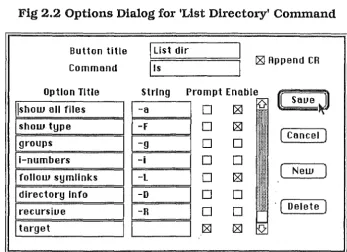
One experimental interface is the WATCHER system, based on a model proposed by Saul Greenberg in the JADE project [GREENBERG 85]. It provides button palettes for certain UNIX utilities, each containing buttons for commonly used commands.
Fig 2.2 Options Dialog for 'List Directory' Command
Button title
I
List dirCommand j1s i2SI Append CR
Option Title String Prompt Enable
tt
SaveJ
!show all filesB
D
I2SIUhU
D
[8J •'•'•!show type F
ill
ill
( Cancel )
1-g
I
!:!11:
groups
0
0
I !iii!lili!l
i-numbers
I
-iI
D
D
~11111
1•1•I
follow symlinksI
1-L
I
D
[8J !liihi!li 1! New WillI
directory InfoI
1-o
I
0
0
lli'i: tlllt•!!!!!!
I
recursiueI I
-RI
0
0
!i!ili
· ( Delete )I
targetI I
I
[8J [8JAs an example, a user might select the "Send mail" button from the C-shell palette. (Fig 2.3) The system puts up dialogs to prompt for the recipient and subject headings, and then sends the assembled command:
mail -s <subject> <recipient> CR
This invokes the MAIL utility on the host, which has its own WATCHER intetface, and the button palette is therefore replaced with commands pertaining to MAIL. The user starts to type, but at some point decides that the message requires editing. He or she selects the "Edit" button, which sends
CR ~v CR
MAIL launches the user's specified visual editor-EMACS, in this case- which again requires a new palette. Once the editing is done, the user hits the EMACS "Exit'' button, sending
CTRL-X CTRL-C
The editor terminates and MAIL resumes with its palette restored. (Note that WATCHER does not rely on the use of the palettes for correct operation: the sequence would still have worked if the appropriate sequence had been typed explicitly). Finally the user selects "End letter", which posts the letter, terminates MAIL and returns to the shell with the command
Fig
2.3 C-shell Command Button PaletteWATCHER is the name of a small UNIX program which strives to keep the
button palette and the foreground application matched conectly. Each UNIX
command which has a special interrace is overridden in the user's search path by a
link to WATCHER. When WATCHER is invoked through one of these links, it
consults a table which associates the command name w.ith the appropriate
configuration file and the full pathname of the UNIX execut~ble. WATCHER then installs the configuration file and spawns the command, adding the file name to the
environment list of the new process. When the command terminates or is
suspended, WATCHER intercepts the resulting signal and calls for the palette to be
replaced from the original configuration file named in the inherited environment; if
none exists, the default palette is restored. When a stopped command resumes,
WATCHER is woken with the command's process group and restores the palette. In
this way, the system can retain the correct intetface settings in the face of command
sub-execution and BSD-style job control, without requiring a modified shell.
Performance is acceptable; the major components of the delay are the loading of the
configuration file (~4s for the first invocation only) and the re-drawing of the palette
A Critical Introduction to the Macintosh
3.1 The Macintosh User Interface
The Apple Macintosh user interface - essentially a mouse and bit-mapped display windowing system - has become very popular since the first Macintosh was released in 1984. It differed from most experimental interface systems of the time in that far more attention was given to details of human interaction than to an abstract interface model and regular programming structure: the emphasis was on the implementation of a fixed set of graphical interaction entities - for example windows, dialogs, controls and menus and on providing detailed guidelines for the applications programmer on the use of these entities.
The routines which support the user inte1face are collectively known as the toolbox routines, and are stored in ROM along with the operating system support
routines. For documentation purposes these are grouped under managers, each of which covers a particular aspect of the user interface. The managers for graphical entities - menus, windows, controls etc. - usually include at least two levels of support, one for system defined templates and one for user defined types. Implementation of user-defined controls, windows etc. is considerably more difficult than using the pre-defined types; this factor has encouraged regularity in a wide range of applications. The major toolbox managers are:
- window manager: concemed with the maintenance of overlapping windows, including their allocation, drawing, positioning and sizing. - control manager: handles interactive graphical controls - buttons, check
boxes, scroll bars and user-defined types.
- dialog manager: supports dialogs, which are specialised windows (usually displayed only briefly) for diagnostic messages and prompts, and for the input of structured information through controls and fill-in text boxes. Dialogs may be modal, in which case no other actions can be performed while the dialog is displayed.
-menu manager: supports the pull-down menus featured in all conforming Macintosh applications.
- font manager: handles the accessibility and display of fonts, including size and typeface (bold, italic etc) transfmmation.
- event manager: provides a somewhat higher-level interface to the Operating System Event Manager (§3.2.6) for applications .
..
- TextEdit: is a collection of routines for sin1plifying basic text formatting and editing
- QuickDraw: is the underlying integer graphics system for all interface drawing, and also for application graphics.
There are also a number of packages, which do not reside in ROM but are stored in the system file (q.v.) and loaded by the application. Packages include floating point and transcendental mathematics libraries, international configurations for such things as currency, date and number fmmats, and a file selection package (Standard File).
Extensive collaboration with graphic designers and human factors experts is manifest in the standard interface. Its aesthetic details such as the edge shadowing and title-bar appeaiance of pre-defined windows play a surprising part in captivating the user in the graphical metaphors, as well as distinguishing objects on the screen. Subjectively, the interaction with the graphical interface entities seems more regular and predictable in most Macintosh applications than in comparable interface environments such as Suntools or IBM personal computer windowing applications.
3.2
The Macintosh Operating Systein
3.2.1 Hardware
this section. Models up to and including the Macintosh Plus contain the following built-in
I/0
devices:- a video display controller, supporting a built-in monochrome screen of 512x384 pixels
-a four-voice sound generator
- the "Integrated Woz Machine", controller for the internal 3112 inch diskette drive; (400K on early machines, 800K since Macintosh Plus)
- a Synertek SY6522 Versatile Intetface Adaptor ("VIA" in the
text)-interface for a number of devices, including the keyboard, mouse, and the battery-powered clock and non-volatile parameter RAM unit
- a Zilog Z8530 dual Serial Communications Controller ("SCC" in the text), used for RS422 asynchronous communications and the AppleTalk™ local area network
Operating system and toolbox routines in ROM are accessed through unimplemented MC68000 instructions ("A-traps", from the hexadecimal instruction fom1at AXXX). The A-trap vector leads to a trap dispatch routine, which reads the trap word referenced by the return address in the exception stack frame. The lower 8 bits of the trap word give an index into a table of system routine pointers, and this gives the correct address for the routine independent of ROM revisions and system patches. The 64K ROM table uses 15-bit routine offsets with one bit to determine whether the routine resides in RAM or ROM; the 128K ROM uses two tables of 32-bit offsets and must select the appropriate table with an extra bit in the trap word.
3.2.2 Memory Management
The Macintosh does ~1ot include a hardware memory management unit, which unfortunately precludes the use of protected address spaces for the multi-tasking system to be discussed in Chapter 5. The operating system also expects all code to execute in privileged (supervisor) mode. The 24-bit address space is divided into four equal areas, with RAM occupying the lowest 4M, ROM the next, and peripheral devices mapped into the upper areas.
comes the application area. In normal single-tasking operation, this space is overwritten each time a new application is launched, and is divided as follows:
-Jump Table
-Application Parameters (32 bytes- mostly obsolete): AS points to the base of this block
-.Application globals (Not used in Megamax C; A4 is used to access strings and global data)
- Stack (A 7: stack pointer; A6: frame pointer) - Application heap
Below the application area is the system heap. This contains various items which must remain intact between application launches - data structures for the file system, the event queue, ROM patches etc. The lowest addresses contain items whose absolute addresses are known to the operating system. These include:
- trap dispatch tables
- flags and temporary storage locations for toolbox and operating system managers, and areas for communicating infom1ation from interrupt level device driver routines
-pointers to mernory divisions and system data structures - 12 bytes reserved for use by the application (APPLSCRATCH) -hardware interrupt vectors
guidelines and support routines for avoiding heap fragmentation, such as reserving space at the bottom of the heap before requesting a fixed block.
Executable code is also stored in.,~,heap blocks. In order for code to be reiocatable, all branches must be made relative to the program counter and are hence limited to 16 bits. This restricts the the maximum code segment to 32K; cross segment references are made indirectly through the Jump Table, which is located at a known offset from register AS. The Segment Loader locks code segments into memory as they are needed, and supplies a routine to free them when the procedures they contain are no longer active.
The Memory Manager provides routines for initialising areas of memory as heap zones, each of which behaves as an independent heap. There are also facilities for
installing procedures to handle failed memory requests. Further detail may be found in Inside Macintosh [APPLE 85,86].
3.2.3 File System
A Macintosh file contains two ordered byte streams, called forks. The resource fork consists of formatted data structures which are manipulated by the resource
manager (qv). The data fork has no structure imposed by the operating system,
and is read and written directly by application programs.
Files are stored on volumes. A volume can be any appropriately formatted section of storage medium, for example a 3112 inch floppy diskette, a hard disk partition, or a fmmatted block of memory set aside as a ram disk ..
The original Macintosh file system (MFS) is a single level structure, with all files on a given volume referenced from a single index. A multi-level system of folders is imposed by the .Finder application through the per-volume Desktop file.
This file is private to the Finder and contains icons and other resources used to maintain the desktop metaphor of its I:,rraphical user interface.
catalogue file, which also contains some of the interface information previously stored in the Desktop file.
Several sets of standard subroutines make up the programming interface to the file system. Sufficient flexibility is rarely offered by language-specific routines such as the standard Pascal l/0 calls and the stdio libraries provided with many C development systems. For applications with few complex file manipulation requirements (a surprisingly small set) the high level file manager routines are adequate; these calls provide the basic read, write, open, create and delete functions with a few other utilities such as volume mounting and file locking.
For full functionality, it is necessary to use the low level file system calls, also called parameter block calls because they operate directly on a standard system queue element data structure. There are about 50 such calls, of which some 20 have been added for HFS support. The parameter block is a union of 11 major variants, each with 20-30 fields which are u'sed in vatious combinations by the low-level calk
3.2.4 Resources
The Resource Manager provides a standard mechanism for stoting and accessing formatted data structures in files. Each resource is tagged by a four-character resource type which identifies the data format; resource instances are numbered and may also be named. There is a set of routines for creating, loading and manipulating resources, based on the Memory and File Managers. These automate the process of swapping resources to and from disk, so that the in-memory copies can be pmged if necessary when they are not in active use.
~~
The system makes h,eavy use of resources. Code segments and drivers are implemented as resources, as are many structures used by the interface managers -fonts, menus, window templates, control templates and dialog boxes being just a few examples. In fact all elements of the Macintosh toolbox and operating system, apart from the unpatched ROM routines, are stored as resources in the system file. The system file is always open, and hence its resources are available to all applications.
and any application should be able to use them without modification. If the strings displayed in menus, dialogs, window titles etc. are stored as resources, they can be translated for use in a foreign country. There is an interactive application called ResEdit which displays standard resource types in appropriate graphical forms, and can be used to create, move and modify resources very easily.
3.2.5 Drivers and Desk Accessories
In common with most operating systems, the Macintosh requires device drivers to u·ansfer information between external devices and an executing application. Thesy have a synchronous side for the ~pplication, comprising open, close, read, write and control calls with semantics similar to the file system, and an interrupt-driven side which communicates with the hardware devices.
The single-threaded nature of the (original) Macintosh operating system was recognised as a considerable limitation. By extending the driver mechanism to handle
desk accessories
it was possible to provide access to a number of small accessory programs from a normal application. There are desk accessories for setting system parameters (Chooser and Control Panel) and manipulating files, as well as calculatol's, simple editors, and many others. Unfortunately they are difficult to write, since they consist of a few routines responding to external calls, and must maintain state information explicitly between these calls. There are also restrictions imposed by the necessity of sharing their environment with the application - for example they cannot use the jump table. Applications must be aware of the requirements of desk accessories and build in quite complex code to support them.3.2.6 Events
External events are communicated to applications through the
event queue.
The application callsgetnextevent()
to retrieve the nextevent record
from the head of the queue. (Some window events are not stored in the. queue and have special primities, so events may not be in strictly chronological order). Each event record contains information required for identifying and responding to the event,viz :
-event type
- event message (specific to type)
- time since startup (in ticks -
%
0 second)- location of the mouse in global co-ordinates There are 15 defined event types:
Event type Message field
Null. ... .ignored
key up/down/repeat ... key code and character code mouse up/down ... .ignored
window to be activated/updated ... window pointer disk inserted ... drive number network event ... variable driver notification ... variable
application defined (4 event types) ... as specified by the programmer
3.2.7 Application Structure
The Macintosh is essentially a single-tasking machine, allowing only one application to be active at a time, although there are programs such as SWITCHER which load several programs simultaneously and allow the user to alternate between them. The new MULTIFINDER froin Apple goes further by displaying windows from different applications, and uses non-preemptive multitasking to allow some background processing.
The first phase of a Macintosh application involves the initialisation of the toolbox managers (a single call for each), the menu bar, and the program's internal structures. The first three menus should conform to a standard format, as they may be required by Desk Accessories:
-the first (C) menu contains a program information item, followed by a separating line and then the names of the available desk accessories -the second (File) menu should contain certain standard entries such as
"open", "close", and "print"
- the third (Edit) mem,1 should strut with the standru·d editing commands in order, with their menu-key equivalents
For document oriented applications, if any documents have been selected with the launch they can be retrieved through system routines and should be opened; otherwisy the guidelines recommend that a new, untitled document be opened.
each loop pass normally includes such a call. Some event responses may take much longer than this and require extra SystemTask() calls during processing. This is petformed automatically by the system routines which handle modal dialogs and track the dragging of windows, controls and menus.
The Macintosh operating system allows applications to schedule asynchronous tasks in response to the completion of I/0 calls and at the 60Hz video vertical retrace interrupt. These tasks cannot use the Memory Manager safely, and this indirectly restricts their use of much of the toolbox.
There may also be times when a particular type of event is expected, and it would be cumbersome to return to the main loop to retrieve .it. It is possible to request only events of a given type, and this may be advisable in these cases, although care must be taken to avoid locking up the interface if the event is not forthcoming.
3.3
Difficulties in Macintosh Program1ning
An effective user's model is characterised by regularity in the user interface- the Macintosh is justifiably praised for its achievements in this respect. On the other hand, it is a long process for the programmer to attain a working level of familiarity with the Macintosh, and even experienced programmers find that considerable time must be devoted to slow and frustrating debugging. The Macintosh user inte1face is implemented through more than 800 system routines, and in any application of reasonable complexity it is necessary to use a surprising proportion of these. Support of menus, desk accessories, window management, cursor handling and countless other "standard" features rely ('_n the programmer's correct use of these calls and also on a continual awareness of operating system requirements which an application must meet. Memory management techniques repeatedly require the programmer to trade off efficiency against safety, and this is a common source of programming error. These problems are compounded by bugs and obscure side effects in ROM routines, documented through some 2000 pages of programming manuals and technical notes. [APPLE 85,86, APPLE TN]