An Exploratory Study in Displaying Interactive
Car Catalogue System on Multi-Touch Tabletop
Suziah Sulaiman, Dayang Rohaya Awang Rambli, Shanggar Mathawan, Ahsanullah Abro
Abstract—This paper presents an implementation of an interactive catalogue system for car industry using tabletop display. Such an effort is a proof of concept showing that multi-touch techniques can be useful in car industry as users could directly manipulate the catalogue when viewed on the tabletop display. The work is motivated by the fact that manual car catalogues available during car purchasing activity and road show is less interactive and low in usability. The main objective of this work is to investigate whether by having tabletop display will add value to users interaction which leads to influencing their decision making. The prototype system developed supports user collaboration, enabling more than one user to perform moving, resizing, zooming and rotating the car catalogue projected on the tabletop. Findings from a user testing indicate the usefulness of the multi-touch techniques in displaying interactive car catalogue system.
Index Terms—multi-touch tabletop display, interactive car catalogue, interaction, usability, user experience
I. INTRODUCTION
C
ATALOUGE is a list or itemized display, as of titles, course offerings, or articles for exhibition or sale, usu-ally including descriptive information or illustrations. It can be described as a book that contains organized information about products and illustrated with pictures. Catalogue helps customers in their decision making before purchasing an item [1], [2]. In terms of car catalogue system, the practice has been widely used on website and mail ordering but not common in multi-touch tabletop environment. Current online catalogues and other promotional tools induce low interactivity and usability [3], [4]. This is due to the online catalogue being static as the interaction depends mainly on mouse clicks. Smart devices such as smart phones used to display the catalogue could improve the interactivity [5] but the device is limited to single user interactions. Small screen display and images limitations create disadvantages to the smart phones. Such devices lack in supporting the presence of multiples images on the screen simultaneously. It consequently reduces the user experiences.Manuscript received January 09, 2015; revised February 12, 2015. Suziah Suliaman is associated as Senior Lecturer with the De-partment of Computer and Information Sciences, Universiti Teknologi PETRONAS, Malaysia, Bandar Seri Iskandar, 31750, Tronoh, Perak,e-mail: ([email protected]).
Dayang Rohaya Awang Rambli is associated as Associate Professor with the Departmentof Computer and Information Sciences, Universiti Teknologi PETRONAS, Malaysia,Bandar Seri Iskandar, 31750, Tronoh, Perak, e-mail: [email protected]).
Shanggar Mathawan is associated as Undergraduate Student with the Department of Computer and Information Sciences, Universiti Teknologi PETRONAS, Malaysia, Bandar Seri Iskandar, 31750, Tronoh, Perak,e-mail: ([email protected]).
Ahsanullah Abro is associated as Postgraduate Student with the De-partment of Computer and Information Sciences, Universiti Teknologi PETRONAS, Malaysia,Bandar Seri Iskandar, 31750, Tronoh, Perak, e-mail: ([email protected]).
This paper addresses the issue of low interactivity, and unsupported multi-user interaction in car catalogue systems. The objective of this research is to investigate the extent in which a car catalogue system developed could improve users interaction and better decision making. This include developing, and testing a multi-touch hand gestural car catalogue system on a tabletop display that allows multiple users moving, resizing and rotating car images.
II. LITERATURE REVIEW
This section is divided into two sub-sections. The first sub-section presents and discusses about design and imple-mentation of multi-touch tabletop displays using different sensing techniques and approaches. The second sub-section describes the potential applications of tabletop displays in different domains. Most specifically, it focuses and discusses how tabletop can be useful for car catalogue applications in the domain of car industry.
A. Multi-touch Tabletop Displays
The capacitive [6], and Frustrated Total Internal Reflection (FTIR)[7] sensing techniques are widely used to design and implement the multi-touch tabletop displays. Generally, tabletop displays are designed and constructed using the bottom-up and top-down approaches. Generally, the FTIR technique based systems are constructed using the bottom-up approach, in which, projector and cameras are deployed at rear side of tabletop screen. However, the capacitive technique based systems are implemented using the top-down approach, in which, the projector is mounted above the interactive tabletop surface [8]. Although, these designed approaches laid a foundation to construct the variety of systems in different shapes and sizes. At the same time, these approaches make the systems more bulky in nature due to inclusion of cameras, projectors and computers. It introduces the portability issue. It becomes very hard to shift the tabletop displays from one place to another [9], [10].
Keeping in view of these potential benefits, tabletop displays are emerging rapidly and being researched in academia and industry for wide variety of purposes in different fields. The tabletop systems have also been commercialized in markets, but are still very expensive.
B. Tabletop Applications
The existing literature presents that tabletop can be used in homes [17], offices [18], and public places [19], [20]. The much research is undertaken in the education domain for collaborative learning [21], [22], [23], [24], health for monitoring and diagnosing medical image analysis [25], [20]. Tabletop displays have been used in the homes for entertainment and playing games [26], [27]. They have been used in museums [27], [28] and restaurants [29] . In addition, they have been used for geographical information systems, oil and gas [30], astronomy [31], video surveillance systems to monitor and visualize the 2D/3D information and also many other fields. It shows an obvious evidence that tabletop systems can be used extensively for a wide variety of ap-plications for different purposes (e.g. discussions, meetings, brainstorming, decision making, and problem solving).
However, the variety of catalogue systems are designed and developed for different applications. It is observed that catalogue systems are very useful for marketing the products and service [1], [4], [5]. The availability of items or products in a systematic way on these systems assists customers to purchase the goods according to their needs. These systems also helps in brainstorming and decision making process while customers intend to purchase the products. Generally, these systems are designed and experienced on the desktop, laptop and mobile computers. It is noticed that these systems lack in supporting the co-located multi-user multi-touch interaction due to unidirectional user interface design. The conventional input/output devices (e.g. keyboard and mouse) are being used as a better choice for users to manipulate the digital information.
Despite the potential support of direct and multi-user multi-touch interaction, tabletop displays have not been re-searched and experienced for the catalogue systems. It is questioned that to what extent multi-touch tabletop displays support for manipulation of car catalogue systems. How multi-touch tabletop displays influence usability and user experience while manipulation of the digital contents. With the importance of catalogue applications in mind, they can be designed for marketing and selling the variety of products and services. Hence, this paper attempts to design and develop a car catalogue application for multi-touch tabletop display as a proof of a concept.
III. METHODOLOGY
This section describes the methods taken in order to conduct an exploratory study for displaying a car catalogue systems and manipulate the digital contents. It is consists of three main phases i.e. rationale for building the said prototype; the design and development of the prototype, and usability testing.
A. Rationale for Prototype Development
In a normal practice, only selected cars will be physically displayed in the showroom for viewing. A customer who wishes to see other type of cars may have to be taken to the store by the dealer or to view a book catalogue that is static in nature. It limits in providing a number of alternatives to customers while making a solid choice and make a proper decision. Even, it is hard for seller to convince and market the product due to having limited number of options of products and their relative specifications. It creates a need to digitalize the catalogue systems and make them more interactive and useful.
B. Design and Development of Prototype
The data was primarily collected from car dealers and trainers through conducting interviews. It helps to know the problems they are facing, requirements, and conventional tools used for launching car promotions. This data collection is necessary before introducing them with touch technologies and tabletop displays for car catalogue systems. This pre-survey helps to collect the requirements and assess the user acceptance towards the multi-touch technologies. Based on user requirements, the prototype is designed and developed using the Flash cs5.5, action script 3.0 and WPF touch framework for the multi touch functionalities [32]. The TUIO library is an open source that is available at Natural User In-terface (NUI) community group [33], [34]. The car catalogue prototype is developed and separated into pages according to gender. Each page provides an option that directs users to access the car catalogue systems. For example, the male user option at the page suggests them to access the car catalogue systems for different car choices. Similarly, the female option selection provides the intended buyers with a different set of choices. The development and calibration process undertaken follows the steps below.
• Coding on adding the multi-touch functionalities such as, zooming, dragging and rotating value on the car images
• Defining and developing multi-touch interaction style to manipulate with the car images using one finger to drag and two fingers to rotate and zoom
• Calibration of the tabletop hardware using the CCV 1.2 software to enable an accurate finger tracking and touch inputs
• Perform the linking of the application and hardware via the Udp-flashlc software bridge
C. Usability Testing
car catalogue system on Samsung Tablet while the second experiment was with multi-touch tabletop display. The order was reversed accordingly with the next test participant as not to be biased.
The user interaction with car catalogue system both on tablet and tabletop displays was also recorded to assess the system usability and user behaviour. A comparison was made for investigating the difference of user experience while interaction with both systems. This process helps to get user feedback about the car catalogue system developed. A post survey questionnaire was distributed to the test participants to collect their feedback. It helps to assess their experience interacting with the car catalogue system both on tabletop, and small displays.
IV. RESULTS ANDDISCUSSION
This section presents the study findings and discusses the results.
A. Interview
There were two target group of users for interview which are the car dealers, and trainees. A series of questions was asked to both groups. The interview conducted was basically to identity the current promotion tools being used and their opinion on the idea of having a car catalogue system on multi-touch tabletop. Two main key points were extracted from the interviews findings.
• The technology of multi touch tabletop is new and is an exciting prospect to be implemented to display car catalogue system.
• A categorized catalogues according to gender prefer-ences somehow will be helpful to the dealers in order to convince the customers and able to assists them in decision making.
A pre-survey questionnaire was also conducted to investi-gate the acceptance of user towards multi-touch technology. The information gathered from the pre survey signals the idea of implementing a categorized car catalogue system on tabletop to further enhance the promotion and display tool.
Figure 1 shows the participants opinions on whether they value first hand information. The pie chart results shows that 92.86 percent of the participants do value first hand informa-tion as very important before viewing the physical car. Before purchasing a product, information about the car must be gathered first. The information process must be interactive, providing greater user experiences such as enjoyable and user friendly environment which can be achieved by introducing car catalogue in tabletop compared than just using static fliers and book catalogue.
Fig. 1: Importance of First Hand Information
[image:3.595.333.517.189.404.2]Fig. 2: Preference for Car Catalogue Application
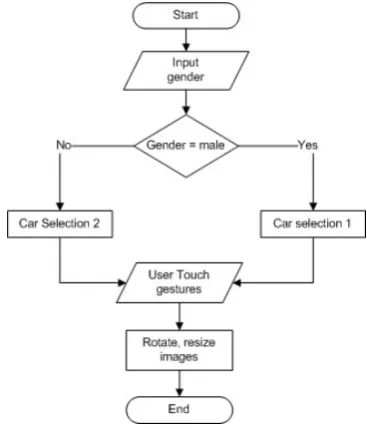
Fig. 3: System Flow Chart
Figure 2 shows participants response on whether they prefer having a multi-touch car catalogue as compared to fliers or book catalogue. 87 percent of the participant shows positive response of yes, indicating their interest in multi-touch technology. This shows that current generation is valuing the evolution of technology and felt that this multi-touch technology seems to be interesting and exciting to use. Figure 3 shows a basic process flow on user interaction between the application software and the related touch event input on the catalogues to be implemented in the system application.
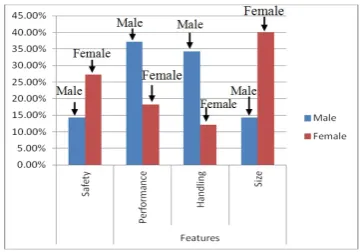
In order to create a categorized catalogue system, the in-formation pertaining to male and female gender preferences was gathered. A survey was distributed to investigate the gender differences in choosing car features. The result of the survey is shown in Figure 4. From the figure, it shows that there are four features being emphasized, i.e. safety, performance, handling and size. The findings reveal that the male participants have chosen performance and handling features higher than the female. The latter group has chosen safety, and size of car as the most important element. The male also looks for car with speed and performance driven features in mind. This is expected as the criteria suit their nature of gender. Even handling is a major concern for the male as they prefer to have good firm handling and stable even when driving the vehicle at higher speed.
Fig. 4: Comparison of Gender Preferences
of the car does matter. Based on the findings from the questionnaire, for those in the age range of 20-30 the result indicate that they much favor small size car rather than big car such as SUV or truck. This is because for the female group small car suits their nature, comfortable and easy to handle. They have their utmost confidence in driving smaller cars. The findings form a basis to design the car selection choices based on gender preference.
B. Project Development
The project development is divided into two phases. The first phase involves developing a real working car catalogue display that is compatible in computer using adobe flash. The car catalogue has a homepage and three buttons which are exit, model and gallery. When users click on the model, it will directly go to the gender page (Figure 5). Now the user has to choose their gender and later they will be directed to the respective choices of car (Figure 5).
The second phase of the project development are the multi-touch coding where the TUIO action script for multi-touch library downloaded from the NUI group was used. This library will add the multitouch functionalities to the car images such as value like zoom, drag and rotate. Thus, when the user touch on the exterior and interior design of the car, there will be a collection of images appearing that the users can manipulate and perform touch functions.
C. Tabletop Integration with Application
In order to enable touch input detected on the tabletop, integration needs to be done. The program needs to receive blob data and touch events created when our fingers touch on the screen surface. Udp-flashlc open source software found from the NUI group forum allows a client application to receive blob data and touch events (TUIO data) as it is built based on TUIO (Tangible User Interface) protocol. It needs a server to send TUIO data to the client application.
The NUI group author, in a guideline (2010) on CCV, states, in order to track fingers, CCV first needs to be configured. The main objective is to get a final perfect finger blob and tracked in the CCV coming from fingers with no background noise or false blobs. When a clear perfect finger tracked, later interacting with the application using fingers gestures will be easy and synchronize. In order to achieve the perfect image, several things need to be done as follows:
• Position the projector and camera align to screen
• Adjust the threshold, amplify and noise value on the CCV option for a clearer blob
[image:4.595.79.260.52.178.2]Fig. 5: Storyboard of the Car Catalogue System
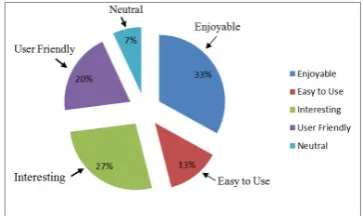
Fig. 6: Enjoyable Experience
• Adjust the camera configuration and exposure
After the configuration, CCV needs to be calibrated as well to detect the correct finger position. By performing calibration, when touching something displayed on screen, the touch is registered in the correct place as CCV translates camera space into screen space. (NUI group author, 2010, para. 1 on Calibration). CCV will guide users through the calibration process. Users just have to follow the instructions that appear on the screen and touch the individual calibration points.
D. Interaction Style with Car Images
In order to manipulate the images, the users have to use a suitable interaction style defined for specific purposes:Drag -To drag the images, only one finger needs to touch it until the blobs visible and then start dragging.
Rotate-To rotate images, two fingers need to touch and perform an arch in opposite direction.
Zoom-To zoom, two fingers needs to touch and wide spread the fingers to different direction.
E. Comparison of Testing Results
A comparative study was carried out to observe and investigate the users acceptance and feedback on this tabletop technology. The participants will have to use the application on android tablet and also on the tabletop to gather the com-parative results for this different technology. The results were collected and the participants showing a positive feedback as interacting with the application on tabletop induces higher user experiences (see Figure 6 and Figure 7).
[image:4.595.335.518.219.316.2]Fig. 7: Ranking on Enjoyable Experience
Table I shows the general differences between smart phone devices and tabletop display in terms of size, portability, cost, and nature of inputs based on the post-survey findings.
TABLE I: Smart Phones vs. Tabletop Display
Android Smart Phones
Tabletop Display
Size Smaller and very handheld
Large and heavy Large screen Portability /
Mo-bility
Very portable and mobile
Not portable
Cost Affordable Too costly for in-dividual Inputs Single User Multiple users
From Table I, despite tabletop display having drawbacks in terms of its size, portability, and cost when compared to using a smaller display, its nature enables it to support multiuser interactions. Thus, signaling its suitability to be used in displaying car catalogue systems or similar applications that require many users interacting and making a decision together.
V. CONCLUSION AND FUTURE WORK
This paper has reported the development of a car catalogue application that could be viewed on a tabletop display. The intention was to provide possible customers with an interac-tive catalogue. The work presented demonstrates the needs for multi-touch in car catalogue with additional interactivity features especially on the multiple user manipulation and touch features such as rotating, resizing, and zooming on the catalogue. Future work should include adding holographic functionalities in the application to further enhance the us-ability and user experience. A larger scale market study may also needed to confirm the findings on gender preferences as reported in this work.
REFERENCES
[1] T. O. Gallaway and M. F. Hines, “Competitive usability and the catalogue: A process for justification and selection of a next-generation catalogue or web-scale discovery system,”library trends, vol. 61, no. 1, pp. 173–185, 2012.
[2] D. D. Phan and D. R. Vogel, “A model of customer relationship management and business intelligence systems for catalogue and online retailers,”Information & management, vol. 47, no. 2, pp. 69–77, 2010.
[3] S. Thanuskodi, “Use of online public access catalogue at anna-malai university library,”International Journal of Information Science, vol. 2, no. 6, pp. 70–74, 2012.
[4] C. Pirmann, “Tags in the catalogue: insights from a usability study of librarything for libraries,”Library Trends, vol. 61, no. 1, pp. 234–247, 2012.
[5] A. H. Lashkari, B. Parhizkar, and M. A. Mohamedali, “Augmented reality tourist catalogue using mobile technology,” inComputer Re-search and Development, 2010 Second International Conference on. IEEE, 2010, pp. 121–125.
[6] M. Wu and R. Balakrishnan, “Multi-finger and whole hand gestural interaction techniques for multi-user tabletop displays,” inProceedings of the 16th annual ACM symposium on User interface software and technology. ACM, 2003, pp. 193–202.
[7] J. Y. Han, “Low-cost multi-touch sensing through frustrated total internal reflection,” inProceedings of the 18th annual ACM symposium on User interface software and technology. ACM, 2005, pp. 115–118. [8] J. Sch¨oning, J. Hook, T. Bartindale, D. Schmidt, P. Oliver, F. Echtler, N. Motamedi, P. Brandl, and U. von Zadow, “Building interactive multi-touch surfaces,” in Tabletops-Horizontal Interactive Displays. Springer, 2010, pp. 27–49.
[9] S. Hodges, S. Izadi, A. Butler, A. Rrustemi, and B. Buxton, “Thin-sight: versatile multi-touch sensing for thin form-factor displays,” in
Proceedings of the 20th annual ACM symposium on User interface software and technology. ACM, 2007, pp. 259–268.
[10] S. Izadi, S. Hodges, A. Butler, D. West, A. Rrustemi, M. Molloy, and W. Buxton, “Thinsight: a thin form-factor interactive surface technology,”Communications of the ACM, vol. 52, no. 12, pp. 90– 98, 2009.
[11] A. Bellucci, A. Malizia, and I. Aedo, “Light on horizontal interac-tive surfaces: Input space for tabletop computing,”ACM Computing Surveys (CSUR), vol. 46, no. 3, p. 32, 2014.
[12] R. Shadiev, W.-Y. Hwang, Y.-M. Huang, and Y.-S. Yang, “Study of using a multi-touch tabletop technology to facilitate collaboration, interaction, and awareness in co-located environment,”Behaviour & Information Technology, no. ahead-of-print, pp. 1–12, 2014. [13] L. Yu, P. Svetachov, P. Isenberg, M. H. Everts, and T. Isenberg,
“Fi3d: Direct-touch interaction for the exploration of 3d scientific visualization spaces,” Visualization and Computer Graphics, IEEE Transactions on, vol. 16, no. 6, pp. 1613–1622, 2010.
[14] S. Baraldi, A. Del Bimbo, and L. Landucci, “Natural interaction on tabletops,”Multimedia Tools and Applications, vol. 38, no. 3, pp. 385– 405, 2008.
[15] M. I. Berkman and A. Karahoca, “A direct touch table-top display as a multi-user information kiosk: Comparing the usability of a single display groupware either by a single user or people cooperating as a group,”Interacting with Computers, vol. 24, no. 5, pp. 423–437, 2012. [16] D. Wigdor and D. Wixon,Brave NUI world: designing natural user
interfaces for touch and gesture. Elsevier, 2011.
[17] D. Kirk, S. Izadi, O. Hilliges, R. Banks, S. Taylor, and A. Sellen, “At home with surface computing?” in Proceedings of the SIGCHI Conference on Human Factors in Computing Systems. ACM, 2012, pp. 159–168.
[18] D. Wigdor, G. Perm, K. Ryall, A. Esenther, and C. Shen, “Living with a tabletop: Analysis and observations of long term office use of a multi-touch table,” in Horizontal Interactive Human-Computer Systems, 2007. TABLETOP’07. Second Annual IEEE International Workshop on. IEEE, 2007, pp. 60–67.
[19] M. Seto, S. Scott, and M. Hancock, “Investigating menu discoverabil-ity on a digital tabletop in a public setting,” inProceedings of the 2012 ACM international conference on Interactive tabletops and surfaces. ACM, 2012, pp. 71–80.
[20] F. Echtler, S. Nestler, A. Dippon, and G. Klinker, “Supporting casual interactions between board games on public tabletop displays and mobile devices,”Personal and Ubiquitous Computing, vol. 13, no. 8, pp. 609–617, 2009.
[21] R. Martinez-Maldonado, Y. Dimitriadis, A. Martinez-Mon´es, J. Kay, and K. Yacef, “Capturing and analyzing verbal and physical col-laborative learning interactions at an enriched interactive tabletop,”
International Journal of Computer-Supported Collaborative Learning, vol. 8, no. 4, pp. 455–485, 2013.
[22] S. E. Higgins, E. Mercier, E. Burd, and A. Hatch, “Multi-touch tables and the relationship with collaborative classroom pedagogies: A synthetic review,” International Journal of Computer-Supported Collaborative Learning, vol. 6, no. 4, pp. 515–538, 2011.
[23] P. Dillenbourg and M. Evans, “Interactive tabletops in education,”
International Journal of Computer-Supported Collaborative Learning, vol. 6, no. 4, pp. 491–514, 2011.
[24] C. Lundstrom, T. Rydell, C. Forsell, A. Persson, and A. Ynnerman, “Multi-touch table system for medical visualization: Application to orthopedic surgery planning,”Visualization and Computer Graphics, IEEE Transactions on, vol. 17, no. 12, pp. 1775–1784, 2011. [25] A. M. Piper and J. D. Hollan, “Supporting medical communication
ACM international conference on Interactive tabletops and surfaces. ACM, 2012, pp. 61–70.
[27] N. Correia, T. Mota, R. N´obrega, L. Silva, and A. Almeida, “A multi-touch tabletop for robust multimedia interaction in museums,” in
ACM International Conference on Interactive Tabletops and Surfaces. ACM, 2010, pp. 117–120.
[28] D. Klinkhammer, M. Nitsche, M. Specht, and H. Reiterer, “Adaptive personal territories for co-located tabletop interaction in a museum setting,” in Proceedings of the ACM International Conference on Interactive Tabletops and Surfaces. ACM, 2011, pp. 107–110. [29] C. M¨uller-Tomfelde,Tabletops-Horizontal Interactive Displays:
Hor-izontal Interactive Displays. Springer Science & Business Media, 2010.
[30] T. Seyed, M. Costa Sousa, F. Maurer, and A. Tang, “Skyhunter: a multi-surface environment for supporting oil and gas exploration,” in
Proceedings of the 2013 ACM international conference on Interactive tabletops and surfaces. ACM, 2013, pp. 15–22.
[31] C.-W. Fu, W.-B. Goh, and J. A. Ng, “Multi-touch techniques for exploring large-scale 3d astrophysical simulations,” inProceedings of the SIGCHI Conference on Human Factors in Computing Systems. ACM, 2010, pp. 2213–2222.
[32] Adobe, “Adobe flash player,” http://www.adobe.com/software/flash/about, 2014 (accessed November 25, 2014).
[33] NUIs, “Natural user interfaces,” http://nuigroup.com/log/about, 2014 (accessed December 29, 2014).