1
Faculty of Electrical Engineering,
Mathematics & Computer Science
Marrying GUI and Git:
How Authoring Tools
for E-Learning Can Benefit
from Version Control
Simon Kreiser M.Sc. Thesis
March 2016
Supervisors:
Summary
The following thesis is an account of a research project concerned with the appli-cation of version control, a proven paradigm used in software development, to the authoring process of e-learning content. Version control is especially useful in set-tings of ever-changing text-based data that is created by a large number of people. Therefore, it fits the context of content authoring quite well.
But version control is notoriously hard to use, even for tech-savvy people. For this reason, this project’s goal was to develop a simple user interface for version control which could be employed inside a content authoring tool, that is used by a non-technical audience.
The interface design was based on a user analysis as well as insights gained from related research on the usability of version control. During the course of the project the interface went through 3 different design stages. Each iteration of the interface was evaluated by actual users during moderated usability studies. The results informed the evolution of the system and ultimately led to the final design, presented at the end of this thesis.
The research has shown that version control can be vastly simplified and thus benefit a non-technical user-base. The final usability study has shown that the sys-tem is intuitive enough to be sufficiently grasped during first-time-usage without prior training (82% task completion rate on average). Furthermore, users expressed great confidence to ”become productive quickly using the system” (1.77 on a scale from 1 to 7, where 1 is strong agreement). Additional improvements could be made regard-ing error messages and documentation (Information Quality: 3.31). In general, the user acceptance was high (Overall satisfaction: 2.11), which indicates a positive at-titude towards the novel version control features and a likely adoption of the system in the future.
The project’s intention is to kick off a discussion on the viability of version control outside the realm of programming and make advanced features, such as merging and diffing, available to a wider audience.
Contents
Summary iii
List of acronyms ix
Preface xi
1 Introduction 1
1.1 Babbel . . . 2
1.2 Motivation . . . 2
1.3 Research Questions . . . 3
1.4 Methodology . . . 4
1.5 Thesis Structure . . . 4
2 Version Control 5 2.1 Definition . . . 5
2.2 Taxonomy and Features . . . 6
2.3 Workflow . . . 7
2.4 Version Control Software . . . 8
2.5 Git and Github . . . 8
2.6 Conclusion . . . 9
3 Literature Review 11 3.1 Usability of Version Control Software . . . 11
3.2 Proposed Improvements to Version Control . . . 13
3.3 Version Control Outside of Software Development . . . 15
3.4 Conclusion . . . 17
4 User Analysis 19 4.1 User Groups . . . 19
4.1.1 Project Managers . . . 19
4.1.2 Content Editors . . . 20
4.1.3 Authors . . . 20
4.1.4 Translators and Proofreaders . . . 20
4.1.5 Quality Assurance Professionals . . . 20
4.2 Conclusion . . . 21
5 First Design Iteration 23 5.1 Comparison to Traditional VCSs . . . 24
5.2 Prototype . . . 25
5.2.1 Navigation . . . 25
5.2.2 Branches . . . 25
5.2.3 Saving Process and Diff View . . . 25
5.2.4 Content Editing . . . 26
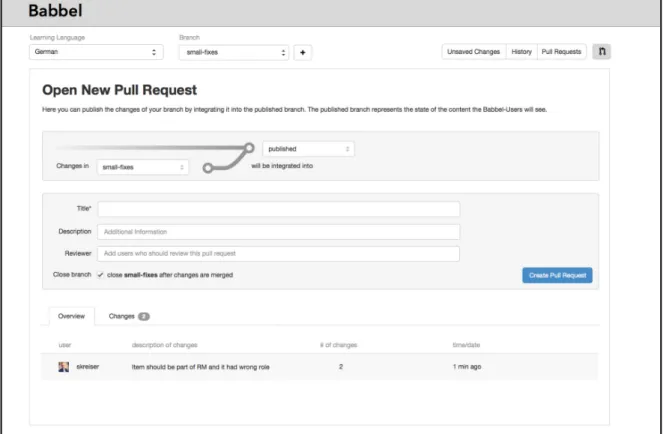
5.2.5 Pull Request . . . 27
6 First Usability Study 29 6.1 Study Design . . . 29
6.1.1 Participants . . . 30
6.1.2 Metrics . . . 30
6.1.3 Scenarios . . . 31
6.1.4 Sessions . . . 32
6.2 Findings . . . 32
6.2.1 Metrics . . . 32
6.2.2 Discovered Usability Issues . . . 33
6.2.3 Conclusion . . . 38
7 Focus Group 41 7.1 Procedure . . . 41
7.2 Most Problematic Terms . . . 42
7.3 First Phase . . . 42
7.4 Second Phase . . . 42
7.5 Conclusion . . . 43
8 Second Design Iteration 45 8.1 Navigation and Terminology . . . 45
8.2 Branches/Working Copies . . . 46
8.3 Improved Diff View . . . 47
8.4 Saving Process . . . 47
8.5 New Content Representation . . . 48
9 Second Usability Study 51 9.1 Study Design . . . 51
CONTENTS VII
9.1.2 Metrics . . . 53
9.1.3 Scenarios . . . 53
9.1.4 Post-Study Questionnaire . . . 53
9.1.5 Sessions . . . 54
9.2 Findings . . . 54
9.2.1 Metrics . . . 54
9.2.2 Impact of Design Changes . . . 56
9.2.3 Discovered Usability Issues . . . 58
9.2.4 Post-study Questionnaire . . . 61
9.2.5 Conclusion . . . 62
10 Final Design 65 10.1 Difference View . . . 65
10.2 Saving Process . . . 66
10.3 Error Messages . . . 68
10.4 Navigation Bar . . . 69
10.5 Miscellaneous Changes . . . 69
11 Results and Conclusion 71 11.1 Sub-question 1: Feature Reduction and Simplification . . . 71
11.2 Sub-question 2: Improve Learnability . . . 72
11.3 Sub-question 3: Reducing Initial Overhead . . . 73
11.4 Conclusion . . . 74
12 Future Work 75 Bibliography 77 Appendices A Background of First User Study 81 A.1 Pre-session Questionnaire . . . 81
B Background of Second User Study 83 B.1 Pre-session Questionnaire . . . 83
List of acronyms
CAT content authoring tool
CLI command line interface
DL display language
GUI graphical user interface
LL learn language
MOOCs massive open online courses
SD standard deviation
QA quality assurance
VCS version control system
Preface
The following thesis is an abridged public version of the original. The reason for this is that Babbel, the company at which the research was carried out, has requested to make some facts described in the thesis confidential and therefore not available to the public. A more extensive and complete version has been made available to the official thesis committee at the University of Twente.
Chapter 1
Introduction
The emergence of massive open online courses (MOOCs) has spawned a sharp growth in the e-learning industry in recent years [1]. In 2012, as much as one third of all enrollments in the US were registrations for online courses [2]. In addition, 77% of US companies offer advanced professional training based on e-learning to their employees [3]. But it is not just professional or academic education that has driven the growth of e-learning. More and more people are turning to online courses for pursuing personal interests as well. One area that is particularly popular in this regard is online language learning [4], [5].
The increasing popularity of online learning has also increased the demands on content creators and their tools. The systems that have been quietly powering most e-learning platforms are mostly invisible to its end-users. They are often re-ferred to aslearning management systems orauthoring systems or toolsand have
vastly simplified the creation, management and distribution of educational material. Some systems even track the learning progress and gather detailed usage statistics, thereby allowing educators to optimize the learning content continuously. But, with the increasing complexity of learning content and the rising numbers of contributors, these systems also quickly run into limits. Most of these systems were not built to be used by a large number of contributors at the same time. Furthermore, most lack the ability of keeping track of changes made to learning content or to quickly revert changes. These problems together with a growing user base and increasing expectations on e-learning services necessitate the development of a new kind of authoring system more sophisticated than its predecessors.
This thesis investigates how language learning content could be created and managed more easily by applying a proven paradigm from the realm of software development, called version control, to a content authoring tool (CAT) used at one of the European market leaders in the space of online language learning, called Babbel. Special emphasis is put on fostering collaboration between different profes-sionals and keeping track of an ever-changing and expanding course structure. The
goal is to exploit version control’s benefits and make them work for a non-technical user group.
1.1 Babbel
Babbel is a company offering interactive language courses online. It was founded in 2007 and employs about 350 people as of Fall 2015. Babbel users can choose one of 14 different languages to learn. Each course is created uniquely for one language combination, which consists of a user’s native language, called display language (DL), and the language he or she wants to learn, called learn language (LL). Education experts, linguists and language teachers working for Babbel are responsible for managing and improving existing courses as well as creating new ones. All courses can be accessed on the desktop as well as on iOS and Android devices. A speech recognition system helps users to practice their pronunciation. The service is subscription-based and customers can choose among 1- to 12-month payment plans1.
The research described in this thesis was conducted over the course of almost one year at the Babbel headquarters in Berlin. The author was part of a four-member team and responsible for user research and interaction design. The team was cre-ated as part of an effort to completely rethink the way language lessons were au-thored and maintained at Babbel. One particular aspect of this process, the collab-oration between authors, translators and quality assurance professionals, was the main research theme of this thesis, which is described in more detail below.
1.2 Motivation
With the accelerating adoption of e-learning and rising demands in regards to the user experience of e-learning platforms, the pressure on content creators to deliver high-quality learning content is increasing steadily. But, in order to deliver content that meets these expectations, authoring tools are needed that facilitate collabora-tion and quality assurance. It seems that many authoring tools were built under the assumption that creating new learning content is a mostly solitary task. But today, especially at Babbel, this is no longer the case. To create a new language course a number of experts are needed. Until a new course is released, there are at least 10-15 individuals who have participated in the production of the course, often even more. The authoring tool currently used at Babbel does not facilitate this workflow very well and has a couple of inherent problems:
1.3. RESEARCHQUESTIONS 3
• Collaboration is inconvenient: Concurrent editing is almost impossible and
content needs to be partially locked so that contributors do not interfere with each other.
• Reverting changes is difficult: A change, after it was saved, cannot be easily
reverted. Instead it needs to be undone manually.
• Changes are not tracked: The system is more or less blind to what was
changed, by whom and when. There is no history, which would allow inspect-ing past changes.
• Quality assurance: Because changes are not tracked, quality assurance (QA)
professionals need to do more work than necessary, just because they do not know what has changed exactly. Sometimes new content is also overlooked because of that.
1.3 Research Questions
The problems described above have one commonality: they are not exclusive to content authoring, but frequently occur during large software development projects as well. Most developers mitigate these problems by using a version control system (VCS). Initially, version control adds a small overhead to the software development workflow, but this usually pays off when projects become more complex [6].
Despite its obvious benefits, version control has not been widely adopted outside of the programming realm. This could be partially due to its usability issues [7], [8]. In the context of this thesis it was investigated if and how authoring tools could benefit from incorporating version control and how such a system could be made more user-friendly. The research question, as defined in the previous research proposal [9], reads as follows:
How could version control support the authoring process of e-learning content?
The research question can be further divided into several sub-questions:
1. Which features can be simplified or omitted while preserving the usefulness of version control?
2. How can the learnability of VCSs be improved in order to make them more attractive to a non-technical audience?
1.4 Methodology
In order to answer the research question stated above a rather practical approach was adopted, which involved designing and testing an interface for a new content authoring tool. In general, the research project consisted of two major phases: the analysis phase and the design and prototyping phase. During the analysis phase a literature review was conducted as well as two additional analyses performed. The literature review examined research concerned with the usability of popular version control software as well as examples where version control was applied outside of the programming realm. The subsequent analyses were mainly centered around the future users of the system. Different analyses were performed, which ensured that user needs and goals were properly addressed during the subsequent design phase.
Based on the insights gained during the first phase a prototype was designed that incorporated the most important version control features. The prototype was semi-interactive and tested with 5 users during a task-based usability study. This initial study was followed by a focus group meeting during which users discussed the problems they encountered. The focus group put special emphasis on the version control terminology since finding alternatives to the technical and abstract terms used in most version control systems was a key factor for improving the usability of the interface.
The results of the focus group and the first usability study were then used to design an improved version of the interface, which was tested again during a second usability study. The findings informed the final design of the authoring tool and additionally helped to answer the research question described above.
1.5 Thesis Structure
The next chapter (Chapter 2) will introduce the reader to version control software in more detail. Afterwards, Chapter 3, introduces the reader to relevant research in adjacent fields. This is followed by a more in-depth description of the user groups and the tasks that constitute the content authoring process in Chapter 4.
In the second half of the thesis the design process as well as the usability tests are covered. Chapter 6 is about the first prototype and the first round of user tests. This is followed by a description of the focus group (Chapter 7) and the second design iteration (Chapter 9).
Chapter 2
Version Control
The previous chapter posed the question whether version control can simplify the content authoring process of e-learning content. Before continuing, this chapter introduces the reader to the concept of version control in more detail. A solid un-derstanding of version control, its functionality and the context it is used in, will be necessary in order to follow the argument of this thesis during the subsequent chap-ters.
First, version control is defined and a summary of its most common features is provided. Afterwards, the history of version control is outlined and the most popular version control software is shortly introduced. The last section focuses on Git and Github, as it is the most widely adopted VCS as of today, and also the one that was used throughout this project.
2.1 Definition
Perhaps, version control is summarized best with the words of Hunt and Thomas: ”A source code control system [is] a giant UNDO key–a project-wide time ma-chine” [10]. Version control, as it is referred to throughout this thesis, goes by several other names as well, such as source code control, revision control or source code management. Nevertheless, these different terms all refer to more or less the same thing: a system that keeps track of changes made to a file or set of files in a par-ticular location [11]. A new version can be created bycommitting (explained below)
a changed file to the repository. This action creates a unique version number and associates author, time and a short description with the state of the content. This allows users to reverse changes and retrieve a particular version of a file from the past. Furthermore, version control simplifies collaboration by offering automated merging of distinct changes made to the same file. For these reasons, and because it works well with text-based documents and source code in particular, version
Figure 2.1: The lifecycle of a file, illustration adapted from Chacon [14, p. 45].
trol is used heavily within the software development community [12].
2.2 Taxonomy and Features
The features described below exist in most version control systems. Nevertheless, no system is like the other and the naming can vary somewhat from software to software. For this reason, Git, the most widely adopted version control software [12] was chosen as a basis. The features are explained conceptually, so that the reader will be equipped to follow the reasoning of this thesis. For a more technical and detailed description of the inner workings of version control other sources can be consulted [13]–[15].
• Repository: a database that holds meta data about all the files tracked by
the version control system. This includes a historical record of the changes made to a file over time. A new repository can be created by issuing the init
command inside a directory. This means that from that moment on all files in the directory and its sub-directories can be tracked by the version control system. Repositories can either be local (situated on the client machine) or re-mote (on the server). In a distributed version control system, such as Git, local repositories hold the same (complete) information as the remote repository.
• Tracking files: when a new repository is created it is empty. It has to be
specifically told which files should be tracked. This can be done by using the
add andcommit commands.
• Staging area: this is a layer in between working directory and repository. It
allows developers to control in a fine-grained way what exactly will be part of the next commit. Changed files can be added to the staging area using the
2.3. WORKFLOW 7
• Commit: When a file was changed and staged, it can be committed to the
repository in order to create a newversion of the file. Usually a commit
mes-sage is added which describes why the file was changed. This makes retriev-ing past versions at a later point of time simpler.
• File states: Once a file is added to the version control system it is in one of
three different states: unmodified, modified and staged. If certain files should not be tracked, they can also be ignored permanently. The different states a file can be in during its life cycle are visualized in Figure 2.1.
• Diff: Before staging a changed file a user can check how the new version
differs from the previous one by using thediff command. This tool can also be
used to compare historical file versions to one another.
• Branching: a branch is a named copy of the latest file versions as
repre-sented in the repository. A branch allows developers to build features without influencing the stable code of the main branch. Branches can also be utilized to experiment in case one does not know whether a certain direction will lead to the desired solution.
• Merging: the opposite of branching, merging brings different versions of the
same file back together. Usually this is automated, but sometimes conflicts occur, when two versions were changed in the same place.
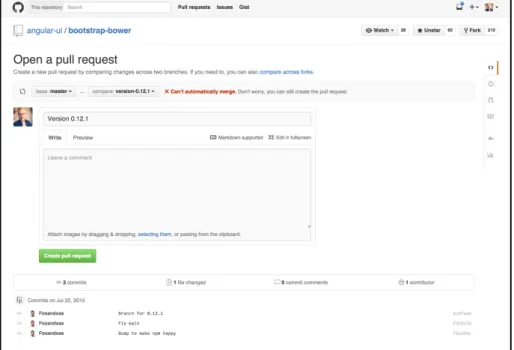
• Pull Request: a pull request is a formalized way of letting collaborators
re-view changes that are part of a particular branch before these changes are merged into another branch (usually the main branch). The feature enforces the best practice of peer reviews and simplifies the communication between
developers. It is not part of Git itself but was introduced by Github (Figure 2.3).
2.3 Workflow
Figure 2.2: A common version control workflow, illustration adapted from Github guides [16].
2.4 Version Control Software
The concept of version control is older than some people might think. Early imple-mentations, such as SCCS (Source Code Control System) or RCS (Revision Control System) date back to the 1970s and 80s [17]. According to Sink [18] version control software evolved in three stages: first generation systems only allowed editing one file at a time that had to be locked while changing it. Second generation systems introduced networking and a central repository for simplifying collaboration. Addi-tionally, the concurrent editing of files was now possible. Apache Subversion, still the second-most popular VCS as of 2015 [12], belongs to this generation. The third generation of version control systems were distributed (instead of centralized), no longer file-based and made branching more convenient. Distributed systems are faster, because the network latency for talking to a central repository is eliminated. Furthermore, third generation systems handle large code-bases more efficiently be-cause these systems do not store copies of each file, but only the changesets. This also makes branching a lot quicker and easier. The most widely used VCS among these third generation systems is Git, which is also described in more detail below.
2.5 Git and Github
2.6. CONCLUSION 9
again. As Linus Torvalds said in a presentation in 2007, Git is based on ”a network of trust”1. Companies can decide for themselves what kind of rules or workflows
they want to enforce. These characteristics have made Git the most popular VCS in software development by far, beating Subversion as a distant second (69% vs. 37% adoption) [12].
Figure 2.3: Pull request view on Github
Github, like the name gives away, is based on Git. It is a repository hosting ser-vice that adds additional features, such as access control and social networking ca-pabilities2. The service eliminates the need of setting up a personal server in order
to host a repository and makes collaboration simpler by offering wikis, task manage-ment and a mechanism for code reviews. All of this is offered through an easy to use graphical user interface. Furthermore, it has become the de-facto standard for sharing open-source projects.
2.6 Conclusion
Version control software is used to keep track of changing code-bases and to simplify the collaboration between developers. Even though some VCSs have been around for a few decades, the widespread adoption of version control has started only with the second generation of version control systems. Open source systems, such as Git and Subversion, have further accelerated this development. Furthermore, social
1https://www.youtube.com/watch?v=4XpnKHJAok8
Chapter 3
Literature Review
The previous chapter outlined the most common features of version control and introduced Github and Git, the most widely adopted version control software. The following chapter presents research that is concerned with version control and its different applications. The review aimed at identifying work, which is directly related to version control systems and their usability. The search for literature was based on three main criteria: (1) work which produced specific results that could be utilized for this project, (2) work that was concerned with the usability or interfaces of VCSs and (3) work that investigated the use of version control outside of the domain of programming.
The reviewed literature was key to create a foundation for the research described in this thesis. The first design iteration has drawn heavily on the insights gained through the review, which is described in more detail in Section 5.1. Furthermore, this review provides the necessary context in which the results of this thesis should be seen and enables the reader to assess the contribution of this work to the current state of research.
3.1 Usability of Version Control Software
During the 2011 Git User Survey participants were asked which parts of Git needed improvement. A total of 73% stated that the user interface needs improvement [19]. With this in mind, it is surprising how little research there is about the usability of ver-sion control systems in general and Git in particular. The two most notable studies have investigated the user experience as well as the conceptual design of different version control systems, among them Git [7], [8].
Church, S¨oderberg and Elango have conducted an empirical study on the usage of command line-based version control inside two large IT companies (Google & Autodesk) [7]. The study was based on interviews and observations within these
companies. Engineers who participated covered a diverse range of job positions and had varying experience. The study results show that common usage patterns emerge when version control systems such as Git or Subversion are incorporated into the software development workflow. In both companies, most engineers stuck to a small set of commands and showed a general risk aversion when using version control. Church et al. note that the observed ”ritualistic behaviour” of engineers is usually found among novice computer users and attribute this behaviour to a low user confidence in the version control systems used. They conclude that it is particularly problematic for a tool whose main premise it is to offer ”development without fear” to be perceived as risky to use.
Explaining these results, Church et al. present a cognitive dimensions analysis of Git. They point out that there are many hidden dependencies, such as between
files and branches, local and remote repositories as well as between untracked files and the repository. Moreover, Git has an ”abstraction barrier”, meaning that certain concepts, i.e. branching, need to be learned, before the system can be used in a meaningful way. The authors reason that a combination of hidden dependencies and abstraction mostly contribute to the aforementioned usability problems. These conceptual issues are also the reason why the graphical user interface (GUI) client by Github1 only offers a slight improvement in usability. It makes features more
discoverable and offers a more visually pleasing interface, but it suffers from the same deficiencies as the command line interface. The authors close by highlighting that the discovered issues need to be solved before version control can take the leap from computer science to a wider audience.
The second study mentioned above, by Jackson and Perez De Rosso [8], was based on an analysis of Git’s conceptual model. The researchers present the weak-nesses in Git’s conceptual design and propose an improved alternative called Git-less.
They argue that concepts have a strong influence of how users think about an application and therefore conceptual integrity should be an important consideration in software design. By concepts the researchers mean”the constructs and notions [...] that are invented for the purpose of structuring the functions of the system” [8,
p. 38]. Git’s concepts were scrutinized based on three main criteria that were de-fined by Frederick Brooks in the 1970s [20] and which he believed to be central to conceptual integrity. 1. orthogonality – individual concepts should be independent from each other, 2. propriety – a software should only have the essential functions that are needed for its operation, and 3. generality – a function should be applica-ble in different ways. After formally describing Git’s main concepts the researchers go on in explaining which concepts violate these criteria and why. Regarding the
3.2. PROPOSEDIMPROVEMENTS TOVERSION CONTROL 13
first criterion, orthogonality, the researchers point out that Git’s different file states, such as modified, staged and committed, are particularly troublesome. Commands that are primarily intended to modify one state, sometimes also affect the other. For example, if a user modifies a file, stages it and then goes on modifying the same file, the command git commitfile will commit both states of the file (the staged and
the unstaged). This happens, even though the commit command typically only ef-fects the staging area, unless told otherwise by a particular flag. According to the researchers, the staging area also violates the second criterion – propriety. They argue that an intermediate step between editing and committing is rarely useful and that most users just want to commit their changes right away. Although this is pos-sible through an additional flag (commit -a) this approach has some drawbacks as well, e.g. that untracked files will not be included in the commit and that a high ver-bosity is required when committing only a few files. The last criterion, generality, is violated by the branch concept. Even though branches allow users to save different parallel versions of a file, this concept does not apply to the working directory or the staging area. There is only one working directory and one staging area. This means that changes made to a file need to be committed before branches can be switched. This is unnecessarily troublesome and requires the use of another func-tion (git stash) in case the user does not want to commit a file, because the code is in a broken state for example.
Concluding, Jackson and Perez de Rosso suggest that software is designed from inside out and that interfaces can only be as good as the underlying concepts. Therefore, they propose a simplified command line interface (CLI) for Git, called Gitless2, that eliminates the aforementioned issues. Among other things the staging
area was removed and a more general branch concept got introduced. Gitless is an open-source project that is built on top of Git. The researchers hope that it will be further improved by the community and that it sparks a discussion on how version control can be made simpler and more user-friendly.
The results of this study can partially explain why the engineers interviewed for the study by Church et al. [7] acted so risk-averse when using Git. The inconsis-tencies throughout the system might have prevented them from forming an accurate mental model.
3.2 Proposed Improvements to Version Control
Gitless is not the only attempt to make version control systems easier to use. The official Git Wiki lists as many as 36 different GUI clients for Git3, whose main goal it is
2http://gitless.com
to make version control simpler and more accessible. Jackson and Perez De Rosso claim that these interfaces merely add an aesthetic layer to Git, but fail to make it simpler, because they are still operating within the boundaries of Git’s inherent concepts. Below, projects are described that tried to dismiss these boundaries by looking into new ways of approaching version control.
Bicer, Koc and Tansel note that even though version control was supposed to make collaboration easier, it only does so as long as there are no conflicting changes [21]. But so called merge conflicts happen regularly during the development pro-cess. They can only be resolved by direct communication between the engineers who are responsible for the changes. This works well as long as both engineers share the same location, but nowadays large companies span the whole globe and open source projects are being developed by a diverse group of people from all around the world. Bicer et al. state that most version control systems do not offer a platform for resolving these merge conflicts. They suggest the introduction of a new command, calledpeek, which allows developers to take a look at local changes
of other contributors in order to prevent conflicts from happening in the first place. The feature is accompanied by a social networking site that is believed to encourage communication between developers.
Even though Bicer et al. identified what seems to be a common problem with version control systems [22]–[24], their solutions did not succeed in reducing the number of conflicts. During a small experiment with 5 developers the users of the system were reluctant to utilize the new peek feature. The researchers blame the laborious process of having to request a peek first and the necessity of monitoring changes of colleagues regularly.
Because of the usability shortcomings of version control a solution to automate it entirely has been proposed [25]. The thesis describes a web-based IDE (Inte-grated Development Environment) that avoids conflicts by implementing an elab-orate change awareness system. This system will warn developers in case they try to change code that team members are working on as well. The IDE utilizes different colors to highlight sections that are conflicting. When a conflicting line is highlighted, the user has the option to adopt the changes of a collaborator first and base her subsequent work on this updated state. This means that conflicts can be avoided right from the start and reduces the need for laborious conflict resolution during the merge process.
This mechanism is enabled by a feature calledAutoShare, which basically means
3.3. VERSIONCONTROL OUTSIDE OF SOFTWAREDEVELOPMENT 15
For programmers who prefer a more granular control all version control features can also be operated manually.
Even though case studies have been described, no user tests were performed as part of the thesis. This makes it hard to gauge whether the proposed solution could be potentially adopted by programmers. Eventual downsides of the proposed solution are a harder to navigate project history, because automated commit mes-sages might not be as descriptive, and a possibly too disruptive IDE. For example if a developer consciously decides to ignore conflicting changes and the system keeps warning her.
3.3 Version Control Outside of Software Development
Given its usefulness it is surprising that version control has not become ubiquitous yet. As Grischenko notes, versioning was even part of the original hypertext con-cept [26], but today it is mostly found in highly specialized areas where collaboration on large sets of text-based documents takes place. Besides software development this is particularly digital publishing, where the emergence of Wikis has exposed the concept to a larger audience [27]. Within this area it is usually referred to as revi-sion control (Wikipedia, to stay inside the subject matter, treats the terms revirevi-sion control, version control and source control as synonymous4). The utilization of
ver-sion control inside wikis is not surprising, since the process of creating a wiki holds similar requirements as the software development workflow. (1) collaboration is very common, therefore (2) concurrent editing is an essential feature and (3) transparent edits should allow reviewing and reverting changes if necessary [27].
Version control is especially hard to find in consumer products. The most promi-nent examples might be thetrack changesfeature of Microsoft Word [28] and Google
Docs revision history5. Both are automated version control systems that allow users
to go back in time and look at different revisions of a document or changes that were introduced by collaborators.
When looking beyond publishing and text processing version control systems are less common. This might be due to the increased complexity of implementing version control for other domains. Computing and visualizing differences between text-files is much easier than for example between binary files on which most graph-ical and video file formats depend. There have been several attempts of bringing
version control to graphics6 7 8. Most of them have used a rather simplistic
ap-proach, storing revisions as individual files. Thus, the user gets a temporal history of changes, but is not able to look at a delta of two revisions, because the system is blind to the semantics of changes.
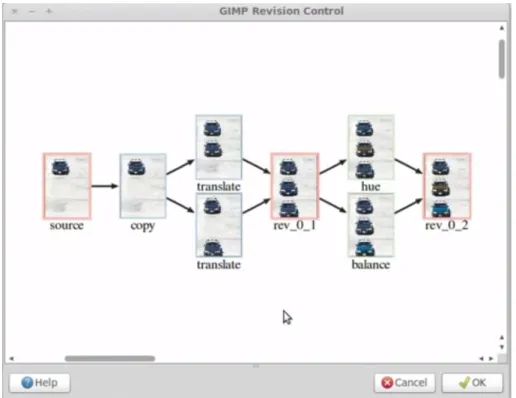
A more advanced version control system for graphics has been proposed by Chen, Wei and Chang [29]. The researchers implemented a non-linear revision control system for GIMP, an open source graphical editing tool9. In order to offer a
meaningful revision history the system records high-level user interactions. Based on these a graph-based representation is created that allows users to review spatial, temporal and semantic relations between different revisions. Nodes represent image editing operations whereas edges represent the relationship between these. On top of that, the graph nodes provide small thumbnails so that users can spot differences between revisions at a glance (Figure 3.1).
Figure 3.1: A screenshot from the GIMP revision control system
The system enables users to navigate different versions of a graphics file, com-pare them (diff) as well as create new branches and merge changes. Furthermore, the user can manually check in new revisions, even though this is generally unnec-essary since the system tracks all user actions automatically. Common use cases
6https://blogs.adobe.com/jnack/2009/03/new version control system for photoshop.html 7http://adobe.wikia.com/wiki/Adobe Version Cue
3.4. CONCLUSION 17
cited by the researchers are image editing and digital sketching. Especially the latter one often involves trial-and-error experiments that make revision control particularly useful. During usability tests Chen et al. found that participants were happy to integrate revision control features into their workflow. Especially the visual repre-sentation of the history was deemed useful. Merging on the other hand, seemed to be more difficult for some users. The researchers conclude that even though the system is easy to use and helpful it might take some time and practice to master it.
3.4 Conclusion
It seems like most research in the area of version control is concerned with the shortcomings of different systems, both in terms of usability and the conceptual design. In some research projects alternative solutions have been investigated, but those are usually situated within the programming realm. Unfortunately, there are not many examples in which version control has been applied to other domains. In general, most research is focused on the widely used open source VCSs Git and Subversion.
It has become apparent that Git has some conceptual deficiencies that cannot be solved by just creating a new interface. Instead the underlying structure needs to be questioned and features should be redesigned or dismissed. The fact that expe-rienced engineers at renowned software companies were anxious to freely interact with the system is proof that Git has some design flaws. These problems need to be eliminated before Git can be used by a non-technical audience.
On the other hand, fully automated version control does not seem to be the holy grail either. If users are not exposed to version control features at all it decreases the discoverability and might prevent them from forming an accurate mental model of the system. This might handicap their ability to solve problems in case the system does not work as intended. Furthermore, automated version control lacks a fine-grained control of how the work is structured and presented to collaborators (commit messages and history).
The findings of Bicer et al. showed that not every problem a software has can be fixed by adding new features. Sometimes, designers and researchers are better off accepting the boundaries of what software can achieve and focusing on build-ing a lean system that can do everythbuild-ing that is necessary but not more than that. This again highlights the importance ofpropriety, offering only the smallest possible
Chapter 4
User Analysis
The last chapter has shown that version control comes with several problems. Most systems are hard to use and therefore discourage even experienced users. This might be one of the reasons, why there are only few examples of version control applied outside of software development.
The following chapter offers a description of the different user groups and their respective responsibilities. This might help the reader to visualize the interplay be-tween the different individuals involved in the content creation process and the tasks that have to be performed in order to produce a new language course. This analysis plays an important part in ensuring the new system’s usefulness to its user base and the ultimate goal of creating an easy to use version control system.
4.1 User Groups
The so calleddidactics department consists of about 30 full-time employees and
al-most 100 freelancers. The department is responsible for creating new language learning content for Babbel’s 14 different languages and is divided into different teams, based on each person’s language expertise. Right now there are 7 differ-ent teams that consist of 2-5 people. Each team is led by a project manager who guides the process of creating new courses and lessons and also manages the collaboration with freelancers.
4.1.1 Project Managers
Project managers guide the content creation process and manage the various pro-fessionals involved. They have to set priorities and decide what needs to be worked on. Furthermore, they need to manage freelancers and make sure that they stick to an agreed upon schedule. Project managers are also responsible for the content quality and have the last word before a new course is released.
4.1.2 Content Editors
Content editors have different responsibilities, ranging from authorship over trans-lation to reviewing content. Editors ensure that new content meets a high quality benchmark and fulfills its didactic purpose. Their goal is to create content that al-lows Babbel’s end-users to successfully acquire new language skills. When involved in the localization of existing content, Editors make sure that specific language char-acteristics, such as idioms, are considered when translating from one language into another.
4.1.3 Authors
Authors conceptualize and create new language lessons and courses. Based on guidelines and specifications provided by project managers they decide how lessons look like in detail. What is the lesson trying to teach the end-user? What kind of vocabulary is introduced? Which type of exercise is suited best to convey this knowledge? If these decisions are made the author goes on to ”script” a lesson, meaning that a spreadsheet is filled in that defines the exercises, vocabulary items and translations. Please note, that initially there is only one translation for each lesson, which is usually English or German. The job of translating (localizing) a lesson into a new language is always performed by separate people, who are native speakers of the respective language.
4.1.4 Translators and Proofreaders
Translators and proofreaders are responsible for localizing lessons into new lan-guages. They get a clearly defined work package and work in unison. First, the translator translates all vocabulary items, exercise titles and descriptions and then hands over the work to the proofreader. The proofreader corrects spelling errors and provides feedback on issues of style, grammar or semantics.
The role of being a translator or proofreader is not permanent, but only true for the duration of a project. Someone who is proofreading during one project could be translating during the next. This is why they are regarded as one user group.
4.1.5 Quality Assurance Professionals
4.2. CONCLUSION 21
mistakes) or noted in a spreadsheet and send to the responsible editor or project manager. The responsible person then uses the content authoring tool to locate and fix the error.
4.2 Conclusion
The analysis made a few things obvious. First of all, collaborating and communicat-ing with colleagues is a reoccurrcommunicat-ing theme throughout the content authorcommunicat-ing process. For example, when a lesson is localized, there are at least three different individuals working together (project manager, translator, proofreader), who also need to com-municate in some way. Right now, email and spreadsheets are used extensively for that, but it is conceivable that at least some of this communication could be facili-tated by the new version control system. This could possibly speed up the whole process and streamline collaboration.
In general, version control features could potentially ease collaboration and allow full-time employees to give freelancers more freedom in their work, because the risk of breaking live content will be lower. Furthermore, a feature similar to Github’spull request could help to formalize the quality assurance that happen throughout the
Chapter 5
First Design Iteration
The analysis presented in the previous chapter has shown that the content author-ing process at Babbel is a highly collaborative process involvauthor-ing a lot of tasks. In order to simplify the collaboration and potentially speed up the content creation, the integration of version control features has been suggested earlier.
This chapter describes an early prototype, which exposed several version control features, which were deemed potentially useful for the content authoring process. Since the research presented throughout this thesis was mainly concerned with the applicability of version control to the content creation process, the prototype is an important first step towards answering this research question.
The chapter starts by highlighting the main differences between the integrated version control features and those of a more traditional VCS. Afterwards, the most important views comprising the prototype are shown and shortly explained. Figure 5.1 might help to visualize the relations between them: The main editing view as well as the diff comparison are very central, whereas the remaining features are more or less equally important. Please note that the diff is not an independent view of itself but is embedded in several other views, such as the history, the saving page and the merge request details.
Figure 5.1: Overview of main sections of the application
5.1 Comparison to Traditional VCSs
As compared to most other version control systems the interface only offers a min-imal set of features. Some of them have been vastly simplified or adapted to the domain of language content authoring. A few features, such as the pull request and the history, are very close to their ”originals”.
• There is no differentiation between local and remote repositories anymore.
Church et al.’s [7] work has shown that hidden dependencies between these two repositories often complicate matters for the user. Therefore, it was de-cided to have only one repository that is constantly up to date. This should, in theory, also simplify collaboration and avoid conflicts.
• Specificallytracking files is not necessary. Every course or lesson that is
cre-ated using the tool will be under version control.
• There is no staging area anymore. As mentioned in Chapter 3 this feature is
sometimes problematic and often inconvenient, because every change has to be staged before it can be saved (committed).
• The diff(erence)view is presented by default before the user saves his or her
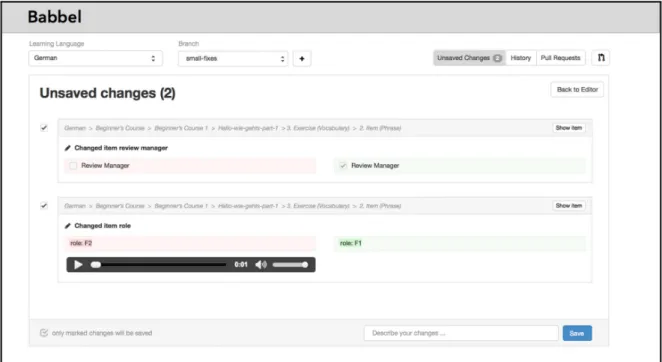
changes. This ensures that the user knows what will be saved and provides an additional review mechanism. When using the Git CLI, diff is a separate command that needs to be executed when the user wants to look at the things that have changed.
• The diff view is enriched by a domain-specific design. It does not only display
bare data as represented in the data format, but shows images, allows listening to sounds and visualizes boolean values, so that reviewing changes becomes simpler and is easier for users with a non-technical background.
• A pull request feature (as on Github) was added. Because Git offers no
for-malized way of reviewing code before it is merged, this feature enforces best practices. Furthermore, the user analysis has shown that reviewing new con-tent, which was produced by freelancers, is very important.
• Visualizations were added in order to help users understand some of the more
5.2. PROTOTYPE 25
5.2 Prototype
The overall interface was strongly influenced by existing code hosting platforms, such as Github1, Gitlab2 and Bitbucket3 as well as several Git GUIs4. The system
can be regarded as a crossbreed between version control and content authoring tool. Below, the main views of the prototype are shown.
5.2.1 Navigation
The upper-most navigation bar (Figure 5.2) offers a quick access to the most im-portant version control features as well as the language package and the current branch. Next to the branches dropdown a little plus-icon signifies how a new branch can be created. Furthermore, some buttons provide additional information, such as indicating whether changes can be saved or open pull requests exist.
Figure 5.2: The top-bar navigation exposing version control features
5.2.2 Branches
Branching is a fundamental concept of most version control systems and allows working in an isolated state. A lot of time went into the consideration of whether to include this feature or not. Finally, it was decided, to make this feature visible to users, which has the advantage of them being able to share branches with col-leagues or point to a particular state of content that is still being created.
5.2.3 Saving Process and Diff View
As mentioned before, when a user has edited some content, which shall be saved, a difference view is presented. This allows the user to review her changes before committing to a change. As is common with most version control systems, a commit message needs to be entered before saving. This allows collaborators to compre-hend why a particular piece of content was edited.
1https://github.com/about 2https://about.gitlab.com/ 3https://bitbucket.org/
Figure 5.3: The modal allowing users to create new branches
Figure 5.4:The difference view highlighting changes the user did recently
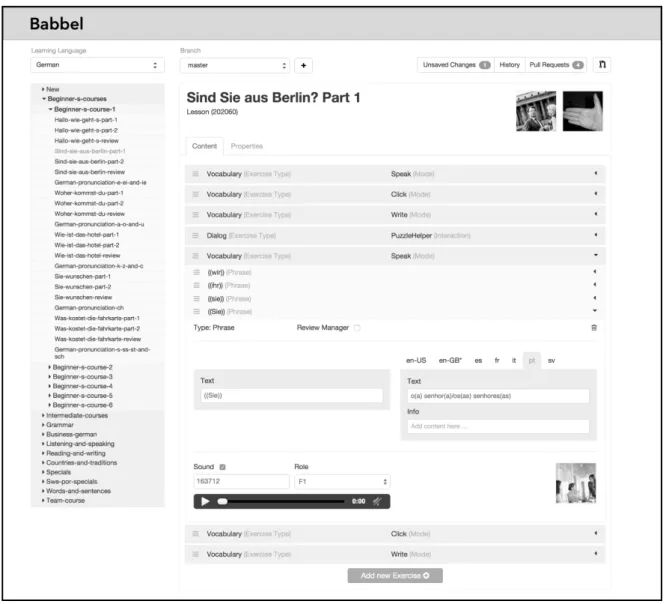
5.2.4 Content Editing
5.2. PROTOTYPE 27
Figure 5.5:The main editing view with an opened lesson
5.2.5 Pull Request
Chapter 6
First Usability Study
The prototype described in the previous chapter presents a first attempt at offering version control features inside a content authoring tool. Even though most of these features have been simplified, the system is still very feature-rich and might present a hurdle to first-time users.
The usability study presented in this chapter aimed at identifying possible weak spots and usability issues of the interface. The goal was to determine whether the system could be used without prior training and if the content authoring workflow could ultimately benefit from version control.
Below, the design of the study is described in more detail. In total, five users participated, each of which went through three different scenarios. The scenarios were designed in a way that users had to utilize the most important features of the interface in order to reach their goals. During the sessions participants were encour-aged to speak out loud and interference by the moderator was kept to a minimum. In addition to the observations, several metrics were recorded, which helped interpret the results.
6.1 Study Design
The purpose of this study was to evaluate whether users would be able to utilize the different version control features as part of the content authoring workflow. Addi-tionally, the aim was to expose severe usability issues that could prevent users from getting their jobs done. Therefore, the sessions were scenario-based, which means that participants had to perform a number of tasks which reflected their everyday work. This put more emphasis on the actual behavior of users instead of opin-ions and attitudes and allowed the test moderator to stay in the background. This method is often referred to as assessment or summative study [30], [31]. These
kind of studies can yield more honest results because the method involves less
terference than for example exploratory tests. The number of participants was kept rather small, informed by Nielsen’s insight that 5 users are sufficient to find 85% of the usability problems if the user group is more or less uniform [32].
In addition to observing users during the scenarios, a few quantitative metrics were measured, such as task completion or error rate. Because of the small sample size, these metrics are unlikely to deliver statistically significant results, which is why they should not be relied upon alone. Nevertheless, they can serve as an indicator of potential problem areas, which could then be investigated further (e.g. in the following focus group).
The study was conducted using a semi-interactive prototype that was based on simple graphical layouts. The prototype was mostly black and white and only those parts that were actually needed for the user tests were interactive. It should be noted, that the prototype already went through several iterations before being tested. Because of its rather low fidelity, tweaking or modifying the prototype, e.g. after design feedback rounds, was relatively easy.
6.1.1 Participants
The participants were recruited randomly on a first come first serve basis. All par-ticipants were full-time employees at Babbel, but some of them had also worked as freelancers before (Table 6.1). So, even though most of them worked as content editors at the time, they also had experience in translation, proofreading and quality assurance. This was important in order to cover all aspects of the content authoring process and test the tool regarding the different requirements of these groups.
Participant Language Team Job Position
1 French Content Editor, QA 2 Portuguese Content Editor
3 Portuguese Content Editor, Translator 4 Spanish, Portuguese Project Manager
5 Turkish, German Project Manager
Table 6.1: List of Participants
6.1.2 Metrics
6.1. STUDYDESIGN 31
• Successful Task Completion: percentage of tasks that were completed
suc-cessfully
• Time On Task: time that was needed to perform a task
• Error Rate: participant deviated from “ideal” path of navigation, such as
open-ing the wrong menu.
6.1.3 Scenarios
As suggested by Nielsen Norman Group the tasks given to the participants were situated within real-world scenarios [33]. This usually makes it easier for participants to engage with the interface in a realistic way. Furthermore, when some context is provided, the task itself does not need to be described as detailed, but rather the end-goal can be defined and the means of achieving this end-goal can be left open for the user. Three different task scenarios with an estimated duration of 4-8 minutes were created. The following task scenarios were given to the participants.
Scenario 1: Fix Error and Allow Review
A colleague (Firstname Lastname) has sent you a link to a lesson. She informed you that the second item in the vocabulary (write) exercise has the wrong speaker role (should be F1) and also should be added to the review manager. She asked you to correct the error and afterwards allow her to review your changes. Make sure you are not editing the live content.
Scenario 2: Publish Changed Content
A colleague (Firstname Lastname) has changed a lesson within the German lan-guage package. She asked you to review the changes. Look at the changes she made and if you do not find any errors make them available to the Babbel end-user.
Scenario 3: Eliminate Error and Save
6.1.4 Sessions
In the beginning of each session the participant received a short introduction to the reasons behind the study and the procedure of the session. In order to make him or her feel more comfortable, it was highlighted that the interface was being tested and not the participant. Each session was structured into three different parts: First, a short questionnaire had to be answered, then the participant had to go through the three different scenarios (as described above) and lastly, he or she was asked some follow-up questions and encouraged to provide feedback on the interface. While performing these tasks, participants were asked to think aloud, especially when running into problems. During each session the author was present as test moderator as well as one or two observers who took notes. The sessions usually took no longer than 30 to 45 minutes.
6.2 Findings
The results below are structured in the same way the testing sessions were. First, the results of the questionnaire are presented. Then, the quantitative metrics, recorded during the sessions, are shown in four different tables. In the end, problems that be-came apparent when observing the participants, are listed and described in detail.
6.2.1 Metrics
Several quantitative metrics were gathered during the user sessions. These include completion rates, error rates and time needed for the scenarios. The metrics serve as an add-on for the mostly qualitative user studies and help to interpret the obser-vations and findings of the test sessions.
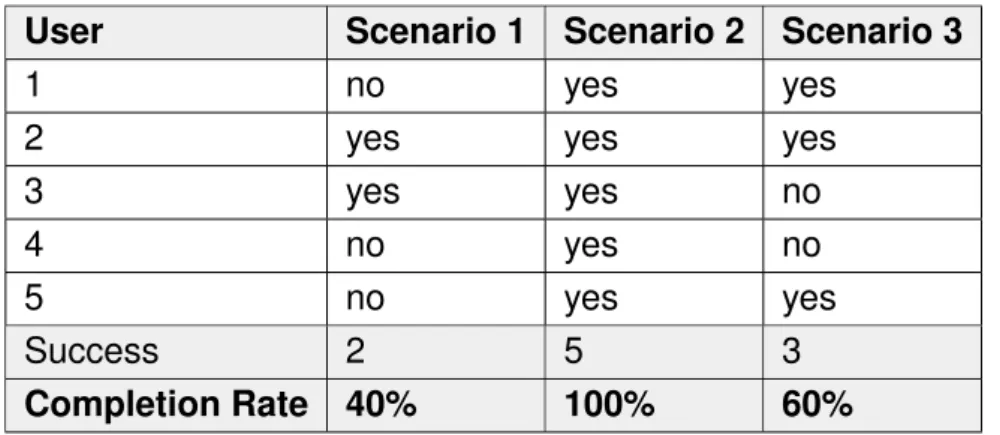
Task Completion Rate
The table below shows a summary of how many scenarios have been successfully completed. The completion rates for Scenario 1 and Scenario 3 could hint at poten-tial problems, which are further discussed below.
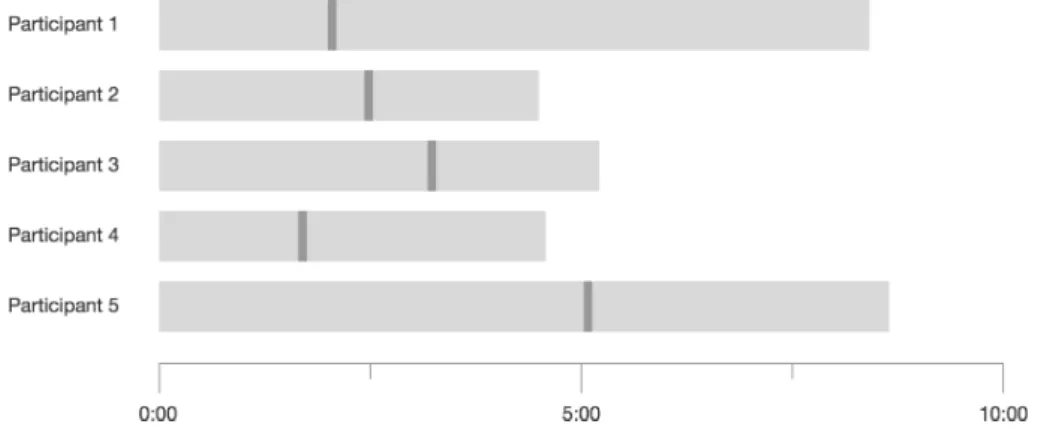
Time on Task
6.2. FINDINGS 33
User Scenario 1 Scenario 2 Scenario 3
1 no yes yes
2 yes yes yes
3 yes yes no
4 no yes no
5 no yes yes
Success 2 5 3
Completion Rate 40% 100% 60%
Table 6.2: Task completion rate
to finish a certain scenario. The mean for Scenario 1 has the highest standard deviation (SD), which could point towards potential usability problems which were not encountered by all users. Scenario 1 asked users to “not edit the live data”, which meant that they had to create a new branch. Since none of the participants had prior experience with version control, this was a particularly difficult scenario for some of them.
Scenario User 1 User 2 User 3 User 4 User 5 Mean SD
1 505 270 313 275 519 376 133.1 2 81 226 73 170 90 128 67.2 3 301 375 418 507 399 400 85.2
Table 6.3: Time needed to perform scenarios (in seconds)
Error Rates
An interaction was counted as an error if the user departed from the ideal path and thus the interaction did not contribute to solving the overall goal of the scenario. The table below helps to paint a picture of how much trial and error was necessary. The error rate is not necessarily a sign for bad usability, it can also reflect the difficulty of a scenario. For example, Scenario 1 and 3 involved using similar parts of the inter-face, but Scenario 3 challenged a participant’s mental model of the system whereas Scenario 1 was a little more straightforward.
6.2.2 Discovered Usability Issues
Scenario User 1 User 2 User 3 User 4 User 5 Mean SD
1 3 1 3 3 1 2.2 1.1
2 0 5 0 3 0 1.6 2.3
3 3 6 7 3 2 4.2 2.2
Table 6.4: Number of errors by each participant
tasks. 8 issues caused a significant delay or frustration for users. The remaining issues only caused minor problems or were suggestions for improvement.
In order to rank the issues by their impact on the user experience, a combination of severity and frequency was used to derive an impact score. The severity of each problem was determined based on four different definitions, based on Sauro and Lewis [34, p.14]:
• 10 points: Severe usability issues preventing users from completing the task
scenarios
• 5 points: Usability issues causing a significant delay or frustration
• 3 points: Minor usability issues which are merely a nuisance
• 1 point: Improvements suggested by participants
To calculate the impact score the severity was multiplied by the frequency of users who experienced the problem (severity * frequency / 10). A frequency of 40% means that 4 of 10 users encountered the problem, independent of whether they ran into the issue more than once. The scale ranges from 100 (most severe problem, experienced by all users) to 1 (suggestion by a single user).
The issues below are grouped by feature areas and ranked by their impact on the user experience. Issues with a high impact are shortly explained.
Branches
6.2. FINDINGS 35
There were two more issues with a severity score of 10. Issue #2: Some users dismissed the master branch warning (without reading it), which lead to even more confusion and prevented some of them from finishing the task.
The remaining issues highlight that the concept of a branch was only poorly derstood (Issue #3) and that the naming of the default branch (master) is rather un-fortunate (Issue #4), because it interferes with a different concept (master language) that describes the main translation language.
# Usability issue Severity Frequency Impact
1 Create new branch button was not found
10 40% 40
2 Warning about editing content inside the master branch was ignored
10 40% 40
3 It is not clear that the master branch represents the public content and the content in all other branches is not vis-ible to the end-user.
5 60% 30
4 The naming for the master branch was confused with the concept of a master language.
5 40% 20
5 After creating branch it is not clear that system switched to new branch already
5 20% 10
Table 6.5: Usability problems related to branches
Pull Requests
Pull requests are similar to branches in that they are one of the most complex con-cepts in version control. As suspected, they caused a couple of usability problems. The most important issue was related to the naming: deriving the functionality of a pull request just from its name is almost impossible (Table 6.6, Issue #6). When using a Git CLI thepull command fetches changes from the remote repository and
merges them into the local repository. Therefore, a pull request describes a request to ”pull a new set of changes”. But since this command is not exposed to users inside the GUI of the content authoring tool, it is fairly difficult for them to guess what kind of functionality is concealed behind this name.
# Usability issue Severity Frequency Impact
6 Concept of a pull request is not clear (term might be confusing)
5 80% 40
7 Some users missed the reviewer field 10 20% 20 8 Confused pull request title with lesson
title
5 20% 10
9 Branch visualization is unclear (re-lease branch)
3 20% 6
10 Changes vs. Overview unclear (pull request detail view)
3 20% 6
Table 6.6: Usability issues related to Pull Requests
Diff
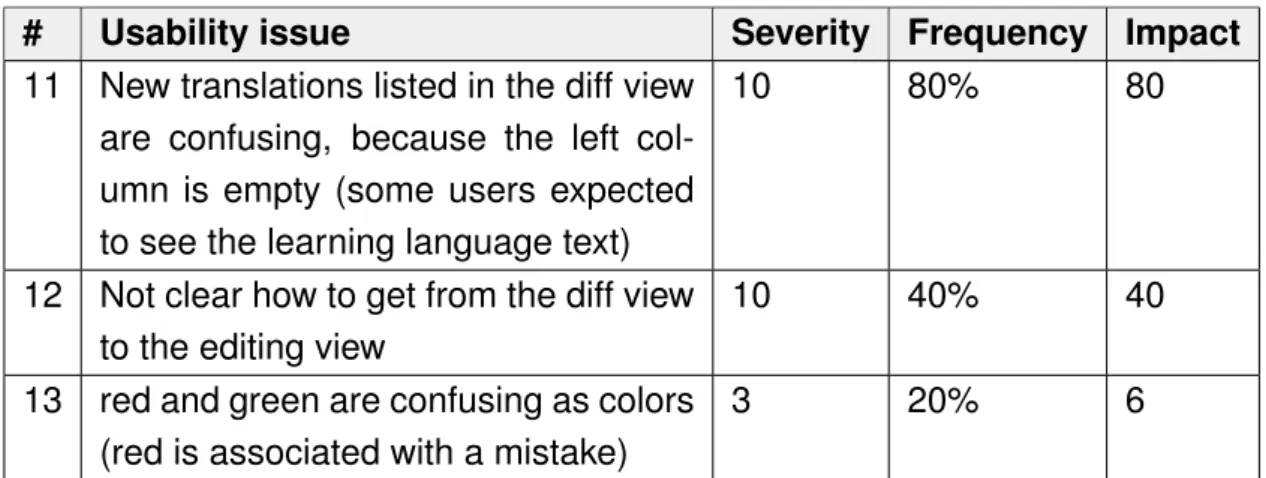
During Scenario 3, a high proportion of users had problems comprehending the list of changes presented to them (Table 6.7, Issue #11). In general, the diff view worked well, but when asked to find a missing translation, most users had a hard time understanding that something that had not been changed, would not appear in the diff view. Furthermore, the list of changes they did see, was confusing, because it showed empty fields, which some users mistook as the missing translation they were supposed to find (Figure 6.2).
6.2. FINDINGS 37
# Usability issue Severity Frequency Impact
11 New translations listed in the diff view are confusing, because the left col-umn is empty (some users expected to see the learning language text)
10 80% 80
12 Not clear how to get from the diff view to the editing view
10 40% 40
13 red and green are confusing as colors (red is associated with a mistake)
3 20% 6
Table 6.7: Usability issues related to the diff view
Saving Process
The most problematic issue related to saving was the non-existing save button at the bottom of the view (Table 6.8, Issue #14). Most users overlooked the saving feature in the navigation bar. It seems like most users would rather expect it to be attached to the lesson editor itself. The reason it is at the top is that saving is independent of content itself. In theory, several lessons could be edited and then only saved in the end altogether. This approach is very similar to how version control usually works, but it did not seem to resonate with most users. Many were anxious to navigate away from the current view after doing changes, because they feared losing the changes. In most interfaces, saving is directly associated with a change that was done before. A solution needs to be found that is less counter-intuitive, but which still offers users a way of reviewing what was changed.
# Usability issue Severity Frequency Impact
14 Save button was not found (expected at bottom of screen)
10 80% 80
15 Expects saved changes to be public right away
10 20% 20
16 Confused back-to-editor-button with review functionality
5 40% 20
17 Wording on saved changes confirma-tion page is somewhat confusing
3 20% 6
18 Concept of separated saving not en-tirely clear (across lessons)
3 20% 6
Main Editing View
The main editing view only caused a couple of minor problems. First and fore-most, the way the content was structured and presented to the user was not the most intuitive (Table 6.9, Issue #19). Most users struggled with envisioning how the representation would translate into the actual exercises provided to the Babbel end-user. Additionally, the design did not provide a very good overview, because every exercise or item had to be expanded and at any given moment one could only see one at most.
The remaining issues were suggestions (Issue #21 & Issue #22) or related to the visual design of the interface (Issue #20).
# Usability issue Severity Frequency Impact
19 Visual representation/hierarchy of items/exercises not entirely clear
3 60% 18
20 Learning language text is overlooked (looks different than translations)
3 20% 6
21 Suggested a search functionality to find content faster
1 40% 4
22 Suggested pro-active system for translations
1 20% 2
Table 6.9: Usability issues related to the main editing view
Miscellaneous
In addition to the issues related to the major feature areas a couple of miscellaneous problems appeared throughout the system. None of the issues was of the highest severity, but they still caused some frustration. Especially Issues #23 and #25 re-duced the smoothness with which users could move through the system. It seems that the naming for some of the navigation items was not descriptive enough and that icons without a label were more or less ignored. Some users proceeded by trial and error, which does not speak for the clarity of the information architecture.
6.2.3 Conclusion
6.2. FINDINGS 39
# Usability Issue Severity Frequency Impact
23 Main navigation not completely obvi-ous, clicking through (trial & error)
5 40% 20
24 History is not recognized for what it is. Most users take long to find it. (nam-ing might not be obvious)
5 40% 20
25 Navigation: Icons without text are not understood ”What is this?” (pull re-quest icon)
3 20% 6
26 No help offered when needed 1 20% 2
Table 6.10: Miscellaneous usability issues
and saving posed some serious problems, which reflected on the entire system. Last but not least, the use of technical terminology (e.g. branch or pull request) pre-vented some users from forming an accurate mental model of the system. But, de-spite these flaws, a majority of users still succeeded in reaching their goals, which is more important than having an accurate understanding of the underlying concepts, which will probably improve over time.
Chapter 7
Focus Group
As the previous usability study has shown, the naming of features was a major us-ability issue. Participants have been exposed to entirely new concepts. Errors that have been made during the sessions were often related to a misunderstanding of what a feature does. How things are phrased influences a user’s comprehension of a system, his or her mental model, strongly. As described in Chapter 3 Git’s con-ceptual model is flawed in certain ways, which is also reflected in its terminology. In order to avoid adopting these flaws for the content authoring tool, some Git concepts had to be revised, reconsidered or combined. This is why new names needed to be found for these concepts, which would properly reflect their purpose and help users to form an accurate mental model. The goal of the focus group was to identify these concepts that are particularly problematic as well as ideating on better names. The expected outcome were new ideas as well as valuable input for the second design iteration.
7.1 Procedure
The focus group was scheduled for 90 minutes with a short break in between. The first part consisted of an open discussion among the participants of the first usability study, during which they talked about their difficulties during the test sessions. They were briefed to put particular emphasis on the language used within the interface. In case the discussion steered off into another direction, the author, who acted as the facilitator, tried to direct it towards the terminology aspect again.
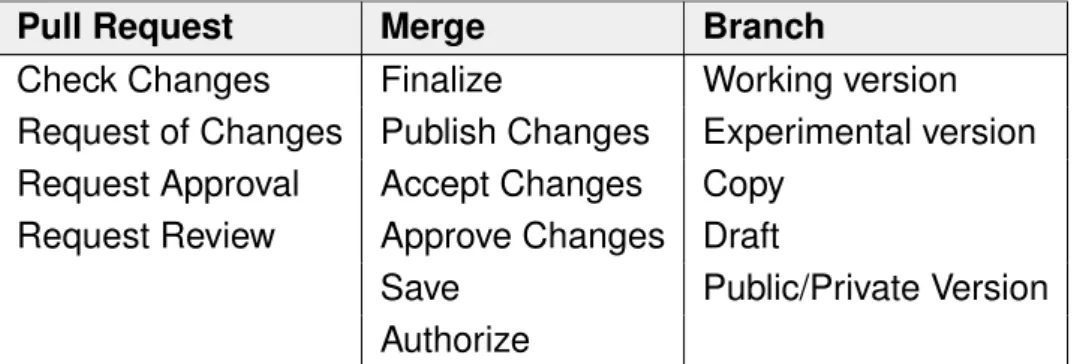
During the second phase, participants were expected to come up with alterna-tives for the current naming. In a short survey, prior to the meeting, participants had voted which features and terms they found most puzzling (See below). The results of the survey as well as the outcome of the previous usability study, formed the basis for the discussions during the second phase. In order to provide participants with a
![Figure 2.1: The lifecycle of a file, illustration adapted from Chacon [14, p. 45]. trol is used heavily within the software development community [12].](https://thumb-us.123doks.com/thumbv2/123dok_us/9786108.479721/18.892.216.634.125.342/figure-lifecycle-illustration-adapted-chacon-software-development-community.webp)