Bachelor of Science
Visualization and Analysis of Vortex
Propagation from a Jet Pump
Author: Koen’t Hart
Supervisor: Ir. J.P.Oosterhuis
Chairperson:
Prof. Dr. Ir. T.H.van der Meer
External Examiner: dr. H.K.Hemmes
A thesis submitted in fulfilment of the requirements for the degree of Bachelor of Science
at the
Research Group of Thermal Engineering
in the
Department of Engineering Technology
UNIVERSITY OF TWENTE
Abstract
Faculty CTW
Department of Engineering Technology
Bachelor of Science
Visualization and Analysis of Vortex Propagation from a Jet Pump
by Koen’t Hart
Traveling wave thermoacoustic engines lose efficiency due to Gedeon streaming. If a
jet pump is applied to the engine it counteracts the streaming by suppressing the
time-averaged mass flux through the closed loop of the engine. Placing the jet pump inside the
engine creates certain flow field effects due to “minor losses”.These flow field effects are
oscillatory and have not been qualitatively recorded. The set-up used at the University
of Twente to create acoustic sound waves allows flow visualization of the flow field
generated by the jet pump. A high speed camera records smoke inserted with a smoke
wire.
Vortices are found in the recorded images, and the purpose of this research is to create an
algorithm to trace these vortices as they propagate through the flow field. The algorithm
also calculates the speed with which they propagate but this is not the main focus. The
created algorithm is analyzed using ROC-curves to determine if the algorithm is
bene-ficial for the detection of vortices. The algorithm needs the input of some variables to
allow proper detection, the influence of these variables is documented. There is a relation
between the frequency of the acoustic sound wave and the size, speed and propagating
distance of vortices. The variables therefore need adjusting for the vortices of higher
acoustic sound waves. The development of the algorithm showed the potential of using
these algorithms in the analysis of the other flow field effects. Further improvements are
Acknowledgements
To start I would like to thank Joris Oosterhuis for the supervision during this bachelors
assignment. Thanks to his quick acceptance I was able to do this assignment on such
short notice. His help, guidance and great feedback contributed to the quality of this
bachelors assignment. Furthermore the approach of Theo van der Meer with the weekly
monday morning meeting created a platform for open discussion, encouragement and
creativity. These meetings would be pointless though without the contribution of the
participating members: Simon, Citra and Rob. I want to thank Citra personally too,
for allowing me to help with her master thesisn, through which I quickly got familiar in
the set-up and the theory of thermoacoustics. Joost also deserves some recognition for
putting me in touch with Joris.
Thanks also go out to my friends(especially Mateo for lunching and working hard with
me every day, and Jorrit for providing dinner), my girlfriend Bella, parents Edith and
Erik, sister Robin and the rest of my family for their unending support and always
present love.
Contents
Abstract i
Acknowledgements ii
Contents iii
1 Introduction 1
1.1 Thermoacoustic Devices . . . 1
1.1.1 A Brief History . . . 2
1.1.2 Acoustic Streaming. . . 3
1.1.2.1 Gedeon Streaming . . . 3
1.1.3 Jet Pump . . . 4
1.2 Flow Visualization . . . 6
1.2.1 Foreign Materials . . . 7
1.2.1.1 Smoke. . . 7
1.2.1.2 Particles . . . 7
2 Method 9 2.1 Experimental Set-up . . . 9
2.2 Image Acquisition . . . 10
2.2.1 Light. . . 10
2.2.2 Camera Setup . . . 11
Camera Triggering . . . 11
Image Extraction . . . 11
2.2.3 Smoke Injection . . . 12
2.3 Image Post-Processing . . . 13
2.3.1 Vortex Detection Algorithm . . . 13
2.3.1.1 Loading Images, Conversion and Mean Image subtraction 14 2.3.1.2 Cropping, Filtering and Normalizing . . . 14
Gaussian Filter . . . 15
Wiener Filter . . . 15
Median Filter . . . 16
2.3.1.3 Edge Detection. . . 16
Otsu’s algorithm . . . 17
Kittler . . . 17
Kapur . . . 18
Contents iv
Triangle . . . 18
2.3.1.4 Vortex Analysis . . . 19
2.3.2 Alternative Image Analysis Tools . . . 20
2.3.2.1 Image Registration. . . 20
Intensity Based Image Registration . . . 20
Optimal Mass Preservation Based Image Registration . . . 21
Continuous-Field Image-Correlation . . . 21
Tracking of Non-Rigid Objects . . . 22
Salient Motion Object Detection . . . 23
2.3.2.2 Summary . . . 23
2.4 Process Validation . . . 24
2.4.1 Statistical Analysis . . . 24
2.4.1.1 Receiver Operating Characteristic Curves . . . 24
Thresholds . . . 27
Filters . . . 27
Region of Interest. . . 27
Boundary Conditions. . . 28
Minimal and Maximal Area . . . 28
2.4.2 Optimal Input of the Algorithm . . . 28
2.4.3 Accuracy . . . 28
2.4.4 False Positive Rate Problem. . . 29
3 Results 30 4 Conclusion and Recommendations 36 4.1 Conclusion . . . 36
4.2 Recommendations . . . 37
4.2.1 Flow Visualization Improvements. . . 37
4.2.2 Algorithm Improvements . . . 38
A ROC-curves 40 Threshold . . . 40
Filters . . . 41
Region of interest . . . 41
Boundary Conditions. . . 41
Areas . . . 44
Chapter 1
Introduction
This research aims to study the flow field near a jet pump in a thermoacoustic setup.
The study focuses on registering vortices propagating from the jet pump, in images
recorded with a high speed camera, with Matlab software. The expected results consist
of an algorithm which tracks the propagating vortices for a wide range of images with
the required accuracy.
This thesis will give a basic explanation of thermoacoustics, to understand the streaming
effects and thus the reason for researching the jet pump. Furthermore the process
and the experimental setup for image acquisition is described. The final step of the
thesis is showing the post-processing steps and tools considered and applied, ending
with the conclusion on the accuracy of the developed algorithm and possibilities for
future improvements.
1.1
Thermoacoustic Devices
Thermoacoustics, as the name suggests, consists of two physical phenomena:
Acoustics is the science of all mechanical waves (i.e. vibration, sound, ultrasound and infrasound) in a particular medium (i.e. gasses, solids and liquids).
Thermodynamics is the transfer of energy from location with a high temperature to location with a low temperature.
This interaction is called thermoacoustics, wherein a generated temperature difference
is used to create sound waves and vice versa. A device using thermoacoustic
princi-ples is called a thermoacoustic device. These devices use acoustic waves, in a channel
where a temperature gradient is present, to cause thermal expansion and contraction.
Chapter 1. Introduction 2
If these are traveling waves, the thermoacoustic device is theoretically able to achieve a
Stirling efficiency[2]. An example of such a device is the Los Alamos National Laboratory (LANL) thermoacoustic traveling wave engine shown in Figure 1.1. This particular engine has been a reference for many studies including this thesis.
1.1.1 A Brief History
Figure 1.1: the Los Alamos National Laboraty researched
engine[2]. To get a better understanding of thermoacoustic
de-vices it is necessary to have a background in its
his-tory. Thermoacoustic effects have been noticed many
years ago. For instance, glassblowers experienced
sound generation by heating a closed-end tube. This
became known as the Sondhauss effect in 1850[9]. Air is heated at the closed end, and this
consequen-tially increases the pressure. The air then flows to
the cool open end, transferring heat to the wall of
the tube until it briefly compresses a small part of
the atmosphere. This creates a propagating sound
wave. Shortly after this compression, the atmosphere
pushes air back into the tube to repeat the cycle. The
Dutch professor P.L. Rijke invented a similar tube in
1859 but this particular variant requires a steady flow
of air with two open ends[8].
In 1877 it was John William Strutt, known as the 3rd Baron of Rayleigh, who wrote a book on sound waves
and researched the Rijke and Sondhauss tubes. Lord
Rayleigh wrote down the qualitative explanations for the effects and defined a criterion
for thermoacoustic effects as:
Lord Rayleigh - “If heat be given to the air at the moment of greatest
conden-sation or taken from it at the moment of greatest rarefaction, the vibration
is encouraged”[28]
This is a criterion for a heat-driven oscillation. Rayleigh basically states that if heat is
given or removed at either the highest or lowest density, oscillations are more likely to
happen. He described a relation between heat-injection and density variation.
After Lord Rayleigh’s discovery, research continued on the Sondhauss tube, the Rijke
Chapter 1. Introduction 3
cryogenic temperatures. Scientists like Lord Rayleigh, Kirchoff and Kramers created
a formal theoretical study of thermoacoustics but it was not until 1969 with Rott’s
breakthrough in modeling thermoacoustic phenomena that major progress was made[30].
N. Rott described acoustic oscillations for gas in a channel with an axial temperature
gradient, where its dimensions were out of proportion with the sound wavelength. The
lateral channel dimensions were in the order of the gas thermal penetration depth δk.
Penetration depth is the thickness of the layer of gas where heat can diffuse in oscillations,
typically in the order of 1mm. That is much shorter than the acoustic wavelength, which
is typically 1m for thermoacoustic cases. Rott’s linear theory has been verified and found
quantitatively accurate on multiple tests[43].
After this, thermoacoustics has become an important chapter in heat pumps (transfer of
heat by applying work) and prime movers (generation of work by applying heat gradient).
A similar research has been done by G.W. Swift and many others, but it was Swift who
implemented Rott’s theory to create thermoacoustic devices[31]. It was Backhaus with the contribution of Swift who invented the thermoacoustic engine in Figure1.1in 1999. This engine has been constructed by limiting the number of moving parts as motivation,
a topic where many researchers are working on[27][35][5][6][42]. The engine’s main part is the regenerator, with a hot and a cold heat exchanger, which creates the temperature
gradient needed for the conversion of heat to acoustic power. The lack of moving parts
proved to be a challenge, it introduced many side affects which lowered the efficiency
drastically[2]. One of these side effects is acoustic streaming, a mean mass flux through the torus of the engine.
1.1.2 Acoustic Streaming
Rayleigh started researching acoustic streaming more then a century ago. However, some
effects are still not entirely understood. Acoustic streaming is a net mean flow across
the acoustic system. This flow is the result of the generated sound waves, but it is not a
linear effect. This makes analysis with linear acoustic theory impossible. There is more
than one type of acoustic streaming with different characteristics but the common effect
is efficiency loss. In a looped geometry like the Backhaus and Swift engine, Gedeon
streaming can occur. This can be prevented when a jet pump is added.
1.1.2.1 Gedeon Streaming
This type of streaming is based on a net mean mass flow typical for traveling wave
Chapter 1. Introduction 4
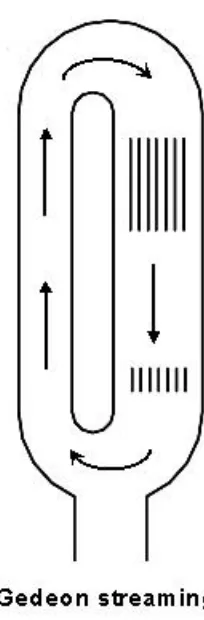
acoustic velocity and density. Gedeon streaming is relevant for oscillatory
thermoacous-tic engines, and an example of the effect can be seen in Figure1.2. Gedeon assumed the pressure drop, ∆P, linear with velocity U. With that assumption, Gedeon proved that
to have mean mass flow, it is necessary for the flow to fulfill a condition. The flow needs a
resistance in its path which can be seen as an asymmetrical return path to build up
pres-sure. These conditions can be fulfilled through device geometry, density, pressure and/or
[image:9.596.131.233.227.537.2]temperature variation[4].
Figure 1.2: An example of Gedeon streaming in a torus[31].
It is essential for the performance of a
thermoa-coustic engine to achieve complete elimination of
Gedeon streaming. Gedeon streaming leads to a
time-averaged mass flux M˙2 inside the torus shape
of the thermoacoustic engine[4]. This torus allows the mass flux to return via an asymmetrical path.
Equation1.1 is for time-averaged mass flux.
˙ M2 =
Re[ρ1U˜1]
2 +ρmU2,0 (1.1) Where U2,0 is the second order time-independent
volumetric velocity[2]. The time-averaged acoustic power flow is written as Re[ρ1U˜1]
2 = W˙ . In a case
where there are no actions taken to impose a U2,0
which cancels the first term, the time-averaged mass
flux would transfer heat from the hot to the cold heat
exchanger. This causes undesirable heat leak and
ef-ficiency loss.
Backhaus and Swift state that a non-zero U2,0 must
flow around the torus to enforce ˙M2= 0. Flow is
gen-erated through pressure difference. Hence we would
need an extra part called the jet pump to apply the
required pressure difference to cancel out the mass flux[32].
1.1.3 Jet Pump
A jet pump is a cylindrical part consistent of two openings and a tapered section
con-necting them. As can be seen in Figure 1.3, the jet pump has asymmetric radii Rb
and Rs,ef f where the flow is allowed to enter. The jet pump constricts flow and forces
it through its two openings of different sizes. This causes a sudden contraction and
Chapter 1. Introduction 5
either the big or small opening in the jet pump. Expansion occurs when the flow is
reversed and the opposite happens. This means due the oscillatory motion of the flow,
[image:10.596.179.455.148.288.2]both expansion and contraction occur.
Figure 1.3: A sliced jet pump where the dotted line represents a symmetrical axis. The dimensions are required to define the geometry of the jet pump[7].
If the cross-sectional area of a pipe gradually decreases, mass conservation requires
an increase in mean velocity and a decrease in pressure according to Bernoulli. The jet
pump makes this transition abruptly which gives rise to flow separation, vortex shedding,
turbulence, and jetting[26]. These dissipative effects are hydrodynamic and cause the Bernoulli equation to be invalid. More so, the abrupt transition generates an extra
pressure drop known as “minor losses”. This pressure drop allows us to generate a U2,0
[image:10.596.241.390.488.604.2]to control the mean mass fluxM˙2 from Equation1.1.
Figure 1.4: Schematic diagram of a jet pump. With flow going from a large cross-sectionalab to the small cross-sectional ason the left and in reverse on the right.
Figure 1.4shows two different states of flow. Flow is either going from the large cross-sectional ab to the small cross-sectional as or in reverse. This results in a ∆Pjp which
is dependent on the density of the fluid ρ, velocity of the flow U2 and a minor loss coefficient K. This minor loss coefficient is not symmetric so there is a Kexp s,b and
Kcon s,b for contracting and expanding the flow, the sand b are respectively the small
Chapter 1. Introduction 6
only valid in steady flow, they also fulfill the “Iguchi Hypothesis”[26]. Iguchi and Ohmi performed extensive measurements showing the results of an orifice placed across the
bottom of a tube. These results can be described as quasi-steady, so we can separate
the directions of flow[16]. That means that the flow in Figure 1.4 can be calculated separately and added later to find a net pressure drop across the system.
This is one of the assumptions made to calculate ∆Pjp defined by the dimensions of
the jet pump. Two other assumption are: stating that we are able to add the “minor
loss” coefficients for both directions of flow and that the velocity in the jet pump U1,jp
is harmonic. Backhaus and Swift made these assumptions to derive Equation 1.2, this equation is used for the design of jet pumps[2].
∆ ¯pjp=
ρ0|U1,jp|2
8as
"
(Kexp s−Kcon s) +
as
ab
2
(Kexp b−Kcon b)
#
(1.2)
ρ0 is the mean density of the fluid flowing through the jet pump. Equation 1.2 is
used to specify the parameters of the jet pump geometry. With this geometry and
computational fluid dynamics software, the jet pump designs are simulated. To validate
these simulations and research suggesting that the assumption of the ”Iguchi hypothesis”
does not hold up for higher taper angles, we want to visualize the flow field near the jet
pump[34]. If the flow field is made visible, the dissipative effects described above should be detected and those effects can be quantitatively analyzed.
1.2
Flow Visualization
Flow visualization is a means to making a flow field visible and allows an analysis of
the flow effects. These effects happen in fluids which are typically translucent, and
therefore the effects remain invisible. If we want to record the images which merit
flow visualization, we need to add an observable foreign material. The motion this
observable material undergoes is representative for the flow effects taking place in the
region of interest(ROI). Meaningful images can also be created with an optical method.
If density changes in the flow field are sufficiently large, light rays will be disturbed when
passing through. This optical disturbance can be recorded using Schlieren photography
and is representative for the flow field. Figure 1.5 and 1.6 are examples of options for both methods. Previous research done in flow visualization methods concluded that the
addition of foreign particles is most suitable for this situation. This is because the density
Chapter 1. Introduction 7
[image:12.596.129.296.91.258.2]Figure 1.5: Schlierenfoto Mach 1-2 gerader Fl¨ugel[39].
Figure 1.6: The instantaneous con-centration field in the far field of a tur-bulent jet. Made with a laser and
for-eign fluid reactive to light[36].
1.2.1 Foreign Materials
The common element for this type of visualizations is the addition of a foreign material.
The chosen material should not disturb the flow. For the same reason, insertion is a
delicate process. The medium flowing through the jet pump is air, thus transparent and
gaseous, that allows for the addition of either smoke or particles.
1.2.1.1 Smoke
Smoke is widely used as a tracer for visualization. Smoke can be used either as a smoke
screen or as smoke lines[21]. Smoke’s natural buoyancy is useful because it allows the smoke to move as one homogeneous tracer only to be disturbed by the flow. There exists
a great variety of smoke types, not limited to combustion products but any gas that is
visible without optical techniques. The optimal smoke would be nontoxic, naturally
buoyant, stable against mixing and well visible[22].
These requirements prove hard for smoke to fulfill. Inherently all smoke is toxic to a
certain degree. Smoke also has the tendency to accumulate and fill the ROI with smoke or
any deposit it might generate. Flow visualization with smoke is a consideration between
visibility; its susceptibility to disturbance, accumulation and the injection method.
1.2.1.2 Particles
Another option is to add numerous tracer particles to the air flow, these particles are
Chapter 1. Introduction 8
response time to the air flow and the quantity of scattered light. The concentration
of injected particles depends on the used technique. Laser Doppler velocimetry uses a
lower concentration, such a concentration that individual particle tracking is possible
between images. This allows the technique to measure particle speed at specified points
inside the ROI[21]. Another technique, particle image velocimetry (PIV), uses a higher concentration so that particle tracking between images is not certain anymore. This
technique uses a laser, a camera and a synchronizer. By illuminating the particles with
a laser sheet a 2D representation of the velocity is made. The particles are illuminated
for a short time, just for two laser pulses. This results in two images which can be cross
correlated to calculate vorticity and velocity. If the images are recorded in stereoscopy
which involves two cameras, PIV can also record a 3D representation of the flow field.
Drawbacks of PIV are the particles involved. The particle’s density will inhibit them
from following the flow field’s motion. The density has to match up with the fluid,
otherwise the natural buoyancy is not present. If the density of the particles cannot be
changed, there is the option to change the density of the fluid. Changing the fluid results
in a change in Reynolds number. Changing the Reynolds number for an experiment
comes with a change in fluid velocity or the object of interest’s size. Also with the use
of multiple cameras, lasers and the particles there are cost and safety concerns.
Therefore the choice is made to visualize the flow with smoke. This method is cheap and
easily reproducible with a constant performance. The drawbacks of smoke are solved by
adjusting the duration of injection or by geometric changes to the set-up. This proves
Chapter 2
Method
2.1
Experimental Set-up
In this section, the experimental set-up is briefly explained. 1.
Originally constructed at the TU Eindhoven[1], the set-up is re-purposed by the Ther-mal Engineering research group at University of Twente to perform measurements in
thermoacoustics. The set-up consists of three main parts: a loudspeaker, a cone and the
resonator section showed in figure2.1. The loudspeaker creates an acoustic wave which is amplified by the contraction of the diameter from cone to resonator. The resonator
can be modified to fit different purposes. For flow field visualization a test section is
placed. The jet pump, as well as the smoke injection system, can be mounted inside
this test section[34][7]. The test section is a clear acrylic (PMMA) glass tube to allow flow visualization recording. The PMMA material is cheaper to manufacture and is a
1The full explanation of specifics about the set-up can be found in the thesis of D. van der Gun[12]
Figure 2.1: A schematic drawing of the experimental set-up used throughout the experiments[21].
Chapter 2. Method 10
lot less fragile than glass. However, the downside of using a cylindrical shape are the
reflections of the light. The jet pump test section is showed in Figure 2.2.
The ending of the resonator tube, also called the termination, can be varied. The
termination is: closed, opened or configured with a resonator. This resonator
simu-lates a traveling wave going through the test section and works for a pre-determined
frequency[34]. The visualizations for this thesis are done with the open configuration.
Figure 2.2: A model of the jet pump test section as designed by F. Dixhoorn[7].
In the test section the different designs of the jet pump can be mounted. The high speed
camera and the smoke wire are not shown. Both specifics will be elaborated in Chapter
2.2.
2.2
Image Acquisition
The following chapter describes the process of acquiring the images of the flow. This
involves all actions to obtain qualitative images. Choices are to be made to obtain
the images. In the following chapter these choices will be discussed and in the end a
summary will conclude the choices made in the visualization of flow for this thesis.
2.2.1 Light
Light is required to capture the images. This light is supplied by a LED light source
shown in Figure 2.4. The PMMA tube is highly reflective, making the placement of the LED light source critical. Multiple different light locations were tested. The final
choice of the test section set-up is shown in Figure 2.3. To minimize the reflections, it was decided to illuminate the tube from the open end of the resonator. The inside of
Chapter 2. Method 11
Figure 2.3: A schematice drawing of the test section setup with cam-era and light for standing wave flow
visualization[34].
Figure 2.4: The LED light used to light up the set-up.
the jet pump is designed to function inside of a traveling wave thermoacoustic engine
as described in Chapter 1. Therefore flow visualization with the open termination will increase understanding in the flow patterns of the “minor losses” but it will not be a true
representation. Also this Tests are done with a jet pump with a black face, although
this decreases reflections it also decreases the light inside the tube drastically. This is
important because getting enough light in the tube improves the contrast of the image
and reduces noise.
2.2.2 Camera Setup
These flow effects are high speed oscillatory effects and cannot be seen by the human
eye. The frequencies of the oscillations are between 28Hz and 169Hz. The high speed
camera available is capable of shooting up to 1000 frames per second (fps) with the
limited light in the test section. The camera is a Phantom v7.3 high-speed camera with
a Nikkor 40mm lens at aperture f/3.6.
Camera Triggering A control software is used in operating the Phantom high speed
camera. Within this software, it is possible to control all parameters of the camera. It
shows a preview of what is to be recorded and allows for advanced image processing.
With the software the camera is also triggered.
Image Extraction The images are recorded inside the internal memory of the
cam-era. Its internal memory allows recording 8800 frames. The control software can save
these images in multiple formats and is not limited to just video. To import these
Chapter 2. Method 12
DNG images are digital negatives, an open standard RAW file developed by Adobe, and
accessible by numerous programs including Matlab while retaining their raw file quality.
2.2.3 Smoke Injection
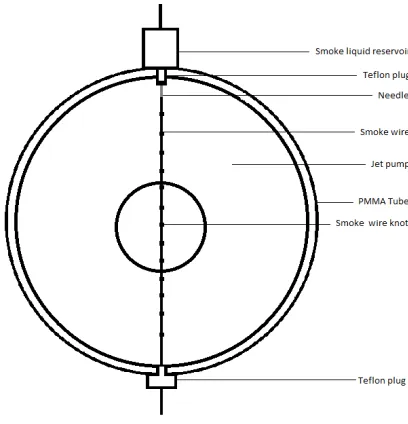
A smoke wire is used for smoke insertion. A heating wire is vertically placed inside the
tube and a smoke liquid steadily flows down while evaporating and generating smoke,
shown in Figure 2.5. The amount of smoke generated depends on the material of the smoke wire, smoke liquid, the liquid flow speed and the temperature of the wire. The
material chosen for the smoke wire is based on its strength, its temperature when current
is applied and its diameter. An NiCr 8020 material is chosen with a diameter of 0.2 mm
because of its flexibility and the range of temperatures it can withstand[34]. The wire is mounted between two Teflon plugs, that keep the smoke from leaving the PMMA tube,
prevent smoke liquid flowing along the sides of the tube but more importantly keep the
PMMA tube from melting. The upper plug consists of a reservoir which contains the
smoke liquid and a needle to apply it to the smoke wire. The liquid flows through the
[image:17.596.239.443.394.606.2]needle along the smoke wire.
Figure 2.5: A schematic drawing of the smoke wire applied to the test section.
When this flows too quick there is minimal evaporation of smoke liquid, hence resulting
in minimal smoke generation. This is solved by increasing the hindrance to flow of the
smoke liquid along the wire by tying knots which hold small amounts of oil to evaporate.
The knots are spaced 1 cm apart across the full length of the smoke wire to produce a
Chapter 2. Method 13
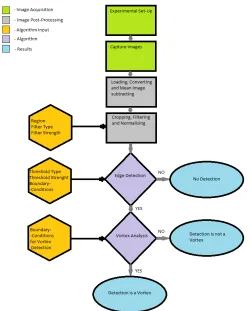
Figure 2.6: A flow chart showing the flow visualization process.
2.3
Image Post-Processing
There are almost 9000 images captured with each flow visualization and these images
re-quire analysis. The analysis is focused on vortex detection. Manually doing this involves
measuring pixel distance between vortices in subsequent frames. This is meticulous and
exhaustive work which is also prone to user induced errors. For these reasons, it is
pre-ferred to create an automated algorithm in Matlab which requires minimum user input
to detect the vortices and save their paths, a flow chart of the flow visualization is shown
in Figure 2.6. In the following section, the process of post-processing is discussed.
2.3.1 Vortex Detection Algorithm
The suggested algorithm needs to locate, track and measure the vortices leaving the jet
pump. This algorithm, would ideally be fully automated, where importing the images is
the only manual task. Realistically, it still requires parameters from the user to produce
Chapter 2. Method 14
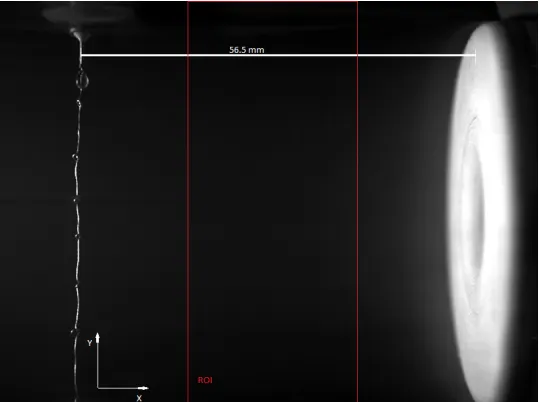
Figure 2.7: A schematic drawing showing the scale and the region of interest.
is a heavily researched subject and this provides many worked-out options with easy
implementation.
2.3.1.1 Loading Images, Conversion and Mean Image subtraction
The selected frames go through multiple steps to create gray-scale images. The images
are balanced. Balancing changes the distribution of the image data created by the
camera sensor. The images then undergo a demosaicing process, this aims to create the
true pixel values from the RGB values created by the Bayer image sensor in the high
speed camera. The remaining step is changing the image into a gray-scale, the result
is a matrix of 800×600. The length scale is determined from a sample image. The
length between the nozzle of the needle and the jet pump is taking as a reference. In
Figure 2.7 the length is shown and the scale derived from it is 0.0495 mm
pixel From the range of images loaded into Matlab, a mean image is taken. In this image all steady and
consistent image content is present. This is assumed as the background of the image.
If this background is subtracted, it leaves the foreground for further image processing.
This is called foreground detection and is widely used to detect moving objects from
static camera images. This background serves as a reference frame when subtracted.
This results in higher contrast of motion between subsequent frames.
2.3.1.2 Cropping, Filtering and Normalizing
The image is cropped to focus on the region of interest(ROI). The region is shown in
Chapter 2. Method 15
acoustic wave creating the vortices, the Y-axis is fully selected to be sure to capture the
vortices. This is further elaborated in Section2.4.1.1.
This cropped image is then filtered. Filtering is done to reduce the noise introduced by
the low light situation. There are 3 filters implemented in the algorithm. These filters
are chosen for their renown in image noise reduction. The following filters aim to reduce
noise but remain detailed on the edges of objects. To get the desired effect of a filter
it needs the input of a filter window size and a variance called standard deviation σ.
Filters are applied by multiplication in the form of Equation2.1.
IB =FG,W ×IA (2.1)
FG,W is the applied filter where G is a Gauss filter and W is a Wiener filter. IA,B are
the images on which the filters are applied. The median filter cannot be included here
because it uses a nonlinear method.
Gaussian Filter Is considered as the optimal linear smoothing filter. The negative contribution of frequency components in images is reduced in a controlled manner. the
software implementation of the Gaussian filter uses Equation 2.2.
FG(x, y) =e
− x2+y2 2σ2 (2.2)
The coefficients of the image FG(x, y) are calculated with the help of Equation 2.2, the
coefficients are based on the center of the image. The center size is determined with the
window size and standard deviation σ input[24]. X and y are the distances from the origin in respectively horizontal and vertical direction.
Wiener Filter This linear filter tries to improve images heavily degraded by noise.
It aims to restore the original image by applying a filter. The action of the filter is
deter-mined by the error between the image with corrupting noise and the filtered image[37]. In Equation 2.1the application of the filter is shown, the error with respect to timetis shown in Equation2.3.
e(t) =IA(t+α)−IB(t) (2.3)
Theα term is the delay introduced by applying the filter, in the case of Wiener filtering
α= 0. The filtered image can also be written as Equation 2.4.
IB(t) =
∞
Z
−∞
Chapter 2. Method 16
The error is squared and then minimized to find an optimal FW(t). This is done by
solving the Wiener and Hopf equation which goes beyond the scope of this thesis[37].
Median Filter This kind of filtering is nonlinear and used for noise reduction. It is based on creating a median value of am×nmatrix. the median value is thus a result
of the values from the neighboring values. The pattern of neighbors is called a window
and these windows can take complex shapes for 2D median filtering. The results are
a filter that has demonstrated the capability to reduce noise whilst retaining feature
boundaries. Matlab implements the filter using the same method. The application of
the filter could cause distorted edges as them×nmatrices which cross the edge of the
images are padded with zeros[24]. These zeros cause the median values of these matrices to be off.
The result is a cropped and filtered image. The type of filter chosen is important to
allow better processing in the following steps. Higher filter strength also lowers the
computational load for the edge detection as there is less detail in the edges to be
detected. The optimal filter for the flow visualization is discussed in Section2.4.1.1.
To make the image values more convenient in mathematical operations and plotting, the
images are normalized. The images are in 8-bit gray-scale so the values in the image
range anywhere between 256 for total presence (white) and 0 for no presence at all
(black). These are given more intuitive values. The values are scaled to be anywhere
between 0 for black and 1 for white.
2.3.1.3 Edge Detection
The vortices in the range of images need to be segmented from the rest of the image.
The grayscale images the algorithm has created can be converted into binary images
with thresholding. The vortices appear to be darker then the surrounding areas. When
a threshold is applied, an image with the vortex present should be segmented as a black
region with white surroundings. The threshold value needs to be correct: too low and
there is no detection; too high and there is over detection.
Because of the importance of the threshold, multiple methods are investigated. The
following thresholding methods are selected because of their performance on comparable
Chapter 2. Method 17
Otsu’s algorithm This method is available in Matlab within the “graythresh” func-tion. The algorithm assumes that pixels either belong to the foreground class or
back-ground. The optimal threshold is when the overlap of the histograms from these pixels
is minimal. the separated pixels belong to classes (foreground or background). The
process can also be described as minimizing intra-class variance, which is defined as the
weighted sum of variances of the two classes[10].
Every image has a histogram. The method assumes this histogram is divided into two
by threshold t. From the histogram the probability, ωi(t), of a pixel belonging to the
background class of foreground class is determined for both parts, i, of the histogram.
With the histogram, µi is also calculated, this term is described as the mean between
two classes. the intra-class variance,σ2b(t), is then calculated with Equation 2.5.
σb2(t) =ω1(t)ω2(t)(µ1(t)−µ2(t))2 (2.5)
Finding the maxima from Equation2.5forσ2b(t) for both parts of the histogram results in the corresponding thresholds. The desired threshold is then the average of these two.
Kittler The Kittler method is developed to create a computationally efficient method
to calculating minimum error thresholding. It works on the assumption that the pixel
grey level values are normally distributed[20] and can be separated for the foreground and background in two gaussian curves. A performance curve is made for correct
clas-sification between the foreground and background called the criterion function.
Figure 2.8: Left: A sample image of a grey square with black background; middle: histogram of the sample image; right: criterion function of the histogram with a clear
internal minimum[20].
The criterion function, shown in Figure 2.8, is a subtle manner of finding the right threshold value. for any threshold the criterion reflects indirectly the overlap between
the histograms of the foreground and background. A smaller overlap leads to better
segmentation between foreground and background. So the threshold value which gives
Chapter 2. Method 18
Kapur The Kapur method calculates the optimal threshold by optimizing the en-tropies for two different distributions of graylevels. Entropy is a statistical measure for
describing the randomness of graylevels in the image. Minimizing the random gray level
probability will increase the accuracy of the image’s histogram. With the histogram it is
possible to find the threshold which maximizes the segmentation of information between
the foreground and the background[19]
Triangle A method which originated from medical image analysis. The threshold is
geometrically determined from the histrogram of the pixel intensities. The maximum of
the histogram is detected and a line is drawn between this maximum and the highest
level of the histogram (usually 256 in 8-bit images). Now the distance between this
line and the main peak in the histogram is maximized, which gives a location on the
X-axis. In the research performed by G.W. Zack a factor A was added to this to
[image:23.596.216.415.368.539.2]increase segmentation. In figure 2.9 the geometrical process is shown, the threshold is also indicated[44].
Figure 2.9: The geometrical process of calculating the threshold (THR)[44].
To summarize, the thresholding methods are designed to separate pixels between
fore-ground and backfore-ground. So also between relevant and irrelevant objects. All methods
seem to over estimate the threshold. The threshold constantly gets set too high and to
attain good separation between the images a factor is introduced to reduce the threshold
level. This is undesired, as this increases the user involvement in the algorithm.
Af-ter the threshold is applied, the images are binary. Matlab has built in edge detection
Chapter 2. Method 19
Implemented in the Matlab algorithm are some basic boundary conditions to simplify
the ROI for the edge detection algorithm. There are three different types of boundary
conditions applied.
Detected regions in the top and bottom pixels of the ROI are removed from further processing. The vortices are propagating from the right to the left in the middle
of the ROI. Any detected regions in the top and bottom are considered pollution.
The left side of the ROI also neglects detected regions but for different reasons. With vortex analysis, in Chapter 2.3.1.4, the propagation speed is calculated but from the preliminary graphs it appeared vortices slowed down near the end. This
effect is not expected and caused by the edge detection algorithm. As the region
moves through the left side of the ROI, it is still detected which results in a lower
detected speed.
The size of the detected region, which has a minimum and a maximum.
2.3.1.4 Vortex Analysis
To improve the accuracy of the found regions and verify if they are vortices, a vortex
analysis is implemented. Verifying the regions is done with more conditions. But these
are specific for the properties of a vortex. The analysis runs through all detected regions
to check if there are any vortices. The conditions state:
Vortices have to propagate to the left. Any regions that is not moving left cannot be a vortex and is deleted. Whether the region is moving left, is determined by
evaluating the location of the center point of the detected region. If this center
point moves left in subsequent frames, the detected regions is consider a vortex.
More detected regions have to follow after the first vortex detection. If a vortex is detected, two other vortices need to be detected in the two subsequent frames.
A vortex can only propagate with a certain speed. To filter outliers from the detected regions a maximum speed of 10 m/s is set and a minimum speed of 0
m/s.
When a detected vortex fulfills these conditions, it is called a trace. These traces are
equal or longer than 3 detections in a row. From these traces the propagation speed is
calculated by differentiating the location of subsequent center points with respect to the
Chapter 2. Method 20
2.3.2 Alternative Image Analysis Tools
There are many alternative analytically tools to our disposal. The following section will
give a short description of promising techniques capable of correlating two images. The
current Matlab algorithm can detect vortices in frames but does not use any information
available from subsequent frames. This is a highly discussed topic in literature in medical
or surveillance fields of research. These research fields mainly use it to map images on
top of each other using subsequent image information, but that does not mean the
methods can be repurposed to benefit vortex detection and vortex propagation speed
calculations.
2.3.2.1 Image Registration
The following section describes the main algorithm of image correlation. The following
techniques all use this algorithm with only small differences. Image correlation
algo-rithms are used to find correspondences between images. These correspondences can
be found by using multiple techniques with various characteristics. The characteristics
range from landmark positions, contours, surfaces, and volume of intensity plots[17]. The algorithms try to achieve smooth transformation of the geometrically altered image
ZM (often referred to as a moved image) to the reference imageZR. The transformation
is denoted by matrix T(x, y) so that ZM(T(x, y)) is as close to the reference image as
possible[41].
Intensity Based Image Registration For intensity based image registration (IBIR), the geometrical transformationTis created by best matchingZM andZR on their
sim-ilar/dissimilar observed intensities. Applying the transformation matrix to ZM allows
for precision mapping on top of the reference image, establishing a point-by-point
corre-spondence. IBIR can achieve automatic mapping without any prior input about shapes
or features in the reference image. This saves a time consuming and calculation heavy
task for the computer doing the registration.
IBIR can be adapted easily, allowing it to detect vortices based on their generated
intensities, or lack there of. Lets assume frame A contains a vortex, the subsequent frameBalso contains a vortex. The IBIR technique let us match up these vortices and calculate the geometric transformation matrixT. This matrixTcontains the translation
information of the image from where the displacement of the vortex can be derived. This
displacement should be more accurate than with the edge detection method because it
Chapter 2. Method 21
the highest intesities are centered on each other which generates a more precise center
point of the vortex.
Optimal Mass Preservation Based Image Registration This is similar im-age registration as the IBIR technique but to calculate the transformation matrix T it uses the optimal mass transport theory developed by G. Monge[23] and improved by Kantorovich[18], and known as the Monge-Kantorovich transportation problem[47]. It is a study in the optimization of transportation and allocation of resources. It works
under the assumption of a constant mass during the process of transportation. The
theory behind this goes beyond the scope of this report. Understanding its application
to image registration is however, will be discussed in the following
The same frames are taking as described above,Aand B, and we assume each of them have a positive mass density function µA, B. The assumption that the total amount of
mass per image is the same is made as well. This gives Equation 2.6 for the Jacobian transformation whenu is used to map frameA to frame B.
µA=|Du|µB◦u (2.6)
|Du| is the determinant of the Jacobian of u and ◦ is the composition of functions.
We are now interested in finding a map u which changes the mass preserving mapping
minimally to find the closest match. Here the Kantorovich-Wasserstein penalty L2 is introduced, this places a penalty on the distance the map u has to move each pixel,
weighted by the pixels intensity. This results in a distribution of materials which is
forced to be frame B. This leaves the calculation of the “optimal” map of frame A on
B, this is a heavy computational step but also one with substantial literature research
with multiple strategies to reduce the computational load[46]. With this “optimal” map it is possible to determine the translation of the vortex and use this to calculate is
propagation speed.
Continuous-Field Image-Correlation Continuous-field image-correlation (CFICV)
uses regions instead of pixel intensity values to compare image ZM with image ZR[11].
Simultaneously the transformation matrix T is used to minimize the cost function de-scribed in Equation 2.7
= Z
Ω
[ZMT −ZR]2dΩ→min (2.7)
Ω is the correlation domain. This is the boundary region limited to the size of the image
but commonly split up in smaller regions to increase accuracy. Minimizing the cost
Chapter 2. Method 22
Figure 2.10: With the continuous-field image-correlation these are the results, from left to right: ZR,ZM andZMT −ZR[11].
In Figure 2.10 we can see examples of the procedure. From the translations of those cubes and its center points we can calculate vectors for velocity and vorticity.
Tracking of Non-Rigid Objects This is not necessarily a method of image
registra-tion but an alternative for edge detecregistra-tion. This technique works by specifying a template
of the object of interest. The process applies a parametric transformation to allow
vari-ability in the template shape. There are promising classical deformable template based
tracking algorithms developed but they function in similar manners[45]. The difference is the assumptions the algorithms make about the object of interest. Assumptions can
be made about the shape, the shape change and to what degree of change[25]. Also the location where the shape is detected can be assumed either anywhere in the image
or a certain region[15]. The algorithms are self learning to a point but still need basic input about the object of interest. In Figure 2.11 an example of non-rigid detection is shown[25]. The final decision on where the object of interest is detected depends on a voting stage, where in this case there were more votes for the right detection.
Figure 2.11: The left images shows the learned shaped and in the right image it shows the detected shape in the larger form. The crosses note the detected places
before voting on which is better matching[25].
The vortex has a particular shape different from the background of the footage. The
shape can be learned or supplied by the user to be implemented into one of the tracking
algorithms. As soon as the vortices are detected and tracked the calculation of the speed
Chapter 2. Method 23
Salient Motion Object Detection Salient motion means the important or inter-esting motion in recorded footage as opposed to non-salient motion. In the case of
this thesis, the vortices are considered as salient motion while all other movement is
non-salient. Salient motion detection works by performing these steps[40][33]
Step 1 - Calculate the region of change, which is calculated by subtracting subse-quent images and applying a threshold to extract the moving pixels
Step 2 - The optical flow, also known as a 2D motion field, of the pixels is calculated from frame-to-frame.
Step 3 - The direction of the pixel motion inside the region of change is determined. The direction is sorted in X and Y direction.
Step 4 - Pixels which continually move in a constant direction are used as seed pixels. The neighbor pixels are also checked until it grows in a N ×N region of
pixels moving in the same direction. Also described as the salience field.
Step 5 - Objects with salient motion are finally detected when the information form the previous steps is combined.
The result is a salient object, the steps of detecting salient motion can be seen in Figure
[image:28.596.238.394.453.568.2]2.12.
Figure 2.12: Showing the steps of detecting salient motion. Left top: original image; right top: difference image; left bottom: X-Component of the flow; right bottom: final
detected salient object[33].
The result is a black and white image where with edge detection the object can be
tracked. The tracked regions can undergo vortex propagation speed calculations.
2.3.2.2 Summary
Some of these methods calculate the vortex propagation speed with the same
Chapter 2. Method 24
the manner of calculating the transformation matrix. After this matrix is found the
algorithm for the vortex tracking would be the same. CFICV method is less useful
for the calculation of vortex speed because it looks in multiple regions spread over the
image and focuses on small changes within those regions. This would make it an
ineffec-tive method for vortex tracing but suitable for displacement velocity calculation. These
methods do have the advantage of tracking regardless of knowing which shape to track
as opposed to the non-rigid object tracking. Therefore this method seems ineffective.
Salient motion tracking seems the most promising method. The vortices move in a
con-stant direction from right to left which is the ideal movement to apply this method. The
implementation in Matlab is not straight forward. It requires an in-depth knowledge
about image/video manipulation and mathematics. However the computational load is
average compared with the other methods. Also taking into account the pixel by pixel
calculations involved in this method.
2.4
Process Validation
The created algorithm manages to track the vortices, plot their paths and calculate
their speeds. However, the accuracy of the acquired data is yet unknown. The following
section gives insight in the accuracy of the algorithm. A method will be introduced for
finding the parameters which dominate the algorithms accuracy.
2.4.1 Statistical Analysis
The algorithms accuracy will be estimated by commonly used methods in statistics.
These methods are often used in image post-processing fields to justify the use of certain
methods. For this reason the statistical tools will be applied on the Matlab algorithms
to justify using it to detect vortices.
A total of 500 images are imported into the algorithm. The investigated parameters are:
filter type, filter strength, threshold method, threshold multiplier, boundary conditions
for edge detection, boundary conditions for vortex detection and region of interest size.
The influence of these parameters is assessed with a ROC-curve, the imported frames
are sampled to find the values required to create these curves.
2.4.1.1 Receiver Operating Characteristic Curves
The ROC-curve is used in medical fields to determine whether a patient will need
Chapter 2. Method 25
Contingency Matrix
Positive Test Outcome
True: False:
Vortex undetected Vortex undetected where a vortex is present where no vortex is
Negative Test Outcome
False: True:
[image:30.596.147.495.310.459.2]Vortex undetected Vortex undetected where a vortex is present where no vortex is
Table 2.1: Table summarizing the results from the image post-processing in statistical terms.
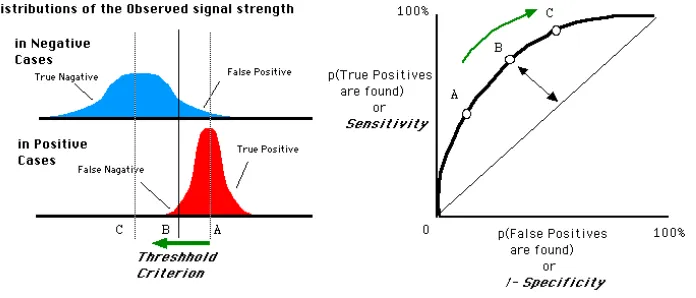
these decisions. The method compares two Gaussian distributions, one for negative
cases of the algorithm and one for positive cases. The lesser these distributions overlap
the better the separation is between good results and bad results. An example of a
ROC-curve is shown in Figure2.13.
Figure 2.13: An example of a ROC-curve with the distributions for negative and positive cases[38].
On the x axis 1−specificity is denoted, also known as the false positive rate (FPR). This can be written as FPR = FP/(FP+TN), where FP are false positives and TN are
true negatives. They axis is thesensitivityor the true positive rate (TPR). Written as TPR = TP/(TP+FN), where TP are the true positives and FN are the false negatives.
The ideal shape of the ROC-curve would keep close to the left side and only separate
for higher values on the y axis.
The different outcomes of the process, shown in Figure2.6, require reformatting in the terms FP, TP, FN and TN(this is shown in Table2.1).
These outcomes are acquired by sampling the imported images. The images are
manu-ally controlled to see if the detection made the correct conclusions. To get the necessary
accuracy of the outcomes there needs to be a certain amount of sampled images.
Chapter 2. Method 26
Figure 2.14: An example of a ROC-curve with the threshold data from Othu’s method and the true threshold values for 56Hz frequency.
term from normal distributions. p are the chances for the expected results, p= 50% is
used to give the largest sample size. On the accuracy a margin of error is added, this is
the amount of error tolerable for taking the sample. In the case for the ROC-curves the
desired accuracy is 95% with only 5% deviation.
NSS =NP S
Z2p(1−p) Z2p(1−p) + (N
P S−1)E2
(2.8)
So to achieve that accuracy it is necessary to sample 218 images. So for every plot point
on the ROC-curve 218 images are sampled to find the corresponding TPR and FPR.
ROC-curves are created for the input variables of the vortex tracing algorithm for three
different frequencies(28Hz, 56Hz and 80Hz), shown in Figure 2.6. The vortex decision step will be neglected in the ROC-curve. This decision is made because if a region is
positively detected it could be neglected by the vortex analysis step because it does not
comply with those conditions. If the vortex analysis step would be included this would
change the influence of the variables for the edge detection step. The found variables
might work for the vortex analysis step but are not beneficial for the overall algorithm.
This is due to inconsistency with the decisions for TP, FP, TN and FN. A TP for the
edge detection can be a FP for the vortex analysis if the detection does not comply as
Chapter 2. Method 27
Figure 2.15: A schematic of the size of the Region of Interest (ROI) which is varied in the x-direction.
In Figure 2.14 a typical ROC-curve is shown. The other ROC-curves are added in AppendixA.
Thresholds In Figure2.14 the effect of the boundary conditions is clearly visible as the decrease in TP comes earlier. The optimal value is different for each frequency but
seems to be significantly higher for higher frequencies. It varies from 0.04 for 28Hz, 0.06
for 56Hz and 0.45 for 80Hz.
Filters From the ROC-curve it becomes clear that Wiener filters are not as effective
as the Gauss filter. This could be explained by the different focus of the filters. The
Wiener filter focuses more on edges between object and the Gauss filter is smoothing of
the whole image. A lower filter standard deviation seems to work better for the lower
frequency acoustic waves.
Region of Interest The ROC-curve shows that if the ROI increases in size, the size of the ROI is varied in the x-direction as shown in Figure2.15, the performance of the lower frequencies is better while the higher frequency performance is less. Higher
frequency acoustic waves create more vortices. When the ROI size is increased, there
start to be more vortices in one frame and this results in faulty center points and thus
Chapter 2. Method 28
Variable 28Hz 56Hz 80Hz
Threshold 0.75 0.75 0.9
True Threshold 0.04 0.06 0.45
Filter Gaussσ = 5 Gauss σ= 5 Gaussσ= 10
Region of Interest 3 2 1
Boundary Conditions X: 10 X: 10 X: 10
Y: 50 Y: 50 Y: 50
[image:33.596.135.495.79.203.2]Minimal and Maximal Area Min: 50 Min: 50 Min: 25 Max: 150 Max: 150 Max: 150
Table 2.2: Summary of the optimal values used for the variables to run the vortex detection algorithm.
Boundary Conditions The influence of this variable is inconsequential, the detected points in the ROC-curve are scattered in a small region. When unrealistic values are
chosen though, the performance goes down. This proves that this variable does not
contribute to the algorithm but when the wrong value is chosen it can corrupt results.
The boundary condition on the left side of the ROI was not implemented to increase
the performance of the detection but of the propagation speed.
Minimal and Maximal Area The minimal area proves to be an important variable.
The maximal area influence increases for higher frequencies. While the data points for
the maximal area are calculated the minimal area was kept constant at 502pxwhich can
be seen for the lower frequencies. The minimal area however, proves that using a larger
area is better for lower frequency acoustic wave because the vortices are larger then.
2.4.2 Optimal Input of the Algorithm
From the ROC-curves the optimal settings are deduced for using the algorithm. Table
2.2gives a summary of the values used to create the results in Chapter 3.
2.4.3 Accuracy
The accuracy is related to the FPR and the TPR. A higher TPR means more TP results
which is desired. The opposite is true for the FPR, the optimal algorithm should detect
the least amount of FP. The FPR and TPR for the optimal settings is shown in Table
Chapter 2. Method 29
28Hz 56Hz 80Hz
TPR 0.7407 0.7159 0.7006
[image:34.596.237.395.81.134.2]FPR 0.276 0.1385 0.2951
Table 2.3: FPR and TPR of the optimal algorithm settings for three frequencies.
So the accuracy of the algorithm is best for the 56Hz acoustic sound waves. There the
algorithm detects the most vortices combined with the low FPR achieves the goals of
the algorithm. For the other frequencies the FPR is too high, there over 25% of the
detections are FP.
2.4.4 False Positive Rate Problem
When a high frequency acoustic sound wave creates vortices there is the possibility that
two vortices are in the same region of interest (ROI). In a situation where a vortex leaves
the left edge of the ROI and a new vortex enters on the right side, there is no frame
where there are no vortices. This causes problems for the ROC-curves, more precisely
for the false positive rate, Equation 2.9.
F P R= F P
F P + T N (2.9)
In the situation with no frames without vortices, the number of true negatives, T N,
would be zero. So as soon as the algorithm detects its first false positive, F P, the
F P R = 1 and this changes the interpretation of the ROC-curve. This is a special
situation but it applies in any case with few T N and makes the reliability of the
ROC-curve a discussion topic. It would mean that for higher frequencies the results of the
Chapter 3
Results
In the following chapter the results will be presented. The intermediate steps of the
algorithm will be shown. The steps are compared with the raw image to clearly show
the contribution of each step to the final detection.
This section shows the preparation of the image before thresholding and edge detection
can be applied. Figure3.1shows the foreground detection method, explained in Chapter
2.3.1.1. The right image contains the foreground information. The mean image contains the smoke wire and the jet pump as well as any reflections and other constant contents.
This technique proves to be very useful. The importance of image quality is diminished
due to the efficiency of the foreground detection method. It shows that the algorithm is
capable of creating qualitative images even if there is pollution in the image, as long as
this is constant. Creating a black jet pump or a black background seems less important
as the algorithm is able to remove this from the image.
Due to the low light situation, the created noise was indistinguishable from the smoke
displacement. Noise made analyzing the vortices manually difficult as the edges of the
[image:35.596.113.522.608.708.2]vortex could not be accurately determined. Noise was battled with the increase of light in
Figure 3.1: The subtraction of a mean image and the result it gives. Left: raw Image of the first frame; Middle: mean image created from a 500 image range; Right:
subtracted image and normalized to show foreground information.
Chapter 3. Results 31
Figure 3.2: This figure shows the improvement of filtering, cropping and normalizing. Left: raw image, noise is present; Right: mean subtracted, cropped, normalized and
filtered image ready for thresholding.
the set-up, but due to limitation of the light placement, noise was only slightly reduced.
The left image in Figure3.2 shows an average presence of noise.
The image on the right in Figure 3.2 is made after foreground detection, cropping, normalizing and filtering. This is done with a Gauss filter with standard deviation
σ = 5. The image has more contrast than the right image in Figure 3.1because of the normalization and the noise filtered out by smoothing the image. These are all the steps
performed before the algorithm applies thresholding and edge detection.
Figure 3.3: An identical frame before and after the vortex tracing algorithm is ap-plied. Left: frame with vortex present; middle: frame after post-processing steps and thresholding; Right: edge detection finds region, region fulfills boundary conditions and
could be considered a vortex.
To give an indication of the quality of the algorithm, the left image in Figure3.3shows a vortex in the middle of the image. This vortex is tough to spot. The middle image is the
binary image created by thresholding after all the steps above are also performed. The
binary image now shows a clear detection which could be a vortex. The edge detection
creates the image on the right. It creates a contour and marks it with a yellow center
[image:36.596.169.465.429.580.2]Chapter 3. Results 32
Figure 3.4: From right to left these are multiple detections put together to be a vortex. The acoustic sound wave is 80Hz and between eacht there is 1/1000s. This
trace is used for further calculations.
This detection is not necessarily a vortex, this has to be determined with the vortex
analysis. Only when this detection fulfills the conditions described in Chapter 2.3.1.4, is it assumed to be a vortex.
A detection which fulfills the conditions to be a vortex is shown in Figure 3.4. The leftmost image shows a purple detection, this is when one of the boundary conditions is
broken, in this case the detection crosses the left side boundary. In the rightmost image
there is a red detection. This detection breaks multiple boundary conditions.
Figure 3.5: A graph with all traces of three detections or more at 80Hz. The x location should be read in reverse as the origin is placed on the left side of the region
of interest.
When a batch of images is analyzed by the algorithm, it creates Figure3.5. There are 500 images analyzed of 80Hz by the algorithm which at 1000 frames per second gives 0.5
seconds worth of footage. Theoretically there should be 40 vortices traced. In reality the
[image:37.596.180.449.459.623.2]Chapter 3. Results 33
Figure 3.6: A Bar chart showing the manually calculated vortex speed and the speed calculated by the algorithm.
The propagation speed calculations are shown in Figure 3.6. There seems to be a difference between the propagation speed calculations done manually or done by the
algorithm. The manually calculated speeds are higher for lower frequencies and decreases
when the frequency gets higher. The trend is the same for both calculations methods but
the decrease is more rapid for the manual calculations. The averages for the algorithm
speed calculations are taken from the traces found for the different frequencies.
The results differ vastly per frequency, and are dependent on many variables. Not all
variables are from the algorithm: the lighting, the amount of smoke in the PMMA tube
are equally important for the algorithm to achieve accurate results. The lighting should
be as constant as possible for the threshold method to calculate the value better. If
the smoke is dispersed equally inside the PMMA tube the vortices appear with more
contrast compared to any other distortions in the smoke.
The results are not always accurate and the algorithm has some errors. In figure 3.7
examples of the errors are shown. The errors lead to missed vortices, faulty traces or no
Chapter 3. Results 34
Figure 3.7: From left to right, the four types of error. Error 1: incorrect detection; Error 2: multiple detections; Error 3: over detection; Error 4: under detection.
Error 1 - Incorrect Detection An incorrect detection is described as a detection which fulfills all boundary conditions but does not contain a vortex. These errors are
recorded as found regions but when the conditions for vortices are applied, the incorrectly
detected regions can be be neglected from further processing. This error happens when
the maximum area is set too large, and the boundaries too small.
Error 2 - Multiple Detections When multiple regions are detected the algorithm is not able to place the center point in the middle for the vortex because it is not able
to determine which it is. The center point is placed in the middle for all found regions.
So the center point is average between found regions. When multiple regions are found
the center point gives invalid data to the vector analysis algorithm. This could cause
non-vortices to be determined as vortices and vice versa.
The second issue with the center point is caused by the shape of the vortex. From this
camera angle the 2D images cause the vortex to be two dark circles and a slightly lighter
grey connecting them. The edge detection therefore sometimes detects two circles, one
of the two circles or both circles connected. This changes the location of the center point
Chapter 3. Results 35
The misplacing of the center point causes deviation in the calculated propagation speeds.
The propagation speeds are separated in x and y direction. For the propagation speed
in the x direction, the misplacing causes the speed to increase or decrease drastically.
This creates a large standard deviation of the speed and makes these results unusable for
any conclusions. The propagation speed in y direction should be close to zero because
the vortices move left to right with little to no up or downwards motion. The calculated
propagation speeds are spread between 0 m/s and 20 m/s. This seems to be caused by
the second issue of the center point, between subsequent frames the center point can
jump between any detected region of the vortex. The sudden jump gives rise to the
physically improbable propagation speeds.
Multiple regions are found when the threshold is set too high in combination with a
lot of disturbance in the smoke. The region of interest (ROI) is also important because
multiple detections can occur when the ROI is too large for higher frequencies. Then
before one vortex has propagated fully to the left another is already entering from the
right side of the ROI. The solution would be averaging the center point between found
regions which are close to one and another. This would reduce the inaccuracy introduced
by this error.
Error 3 - Over Detection When the threshold is set too high the segmentation between foreground and background decreases. This results in a detection that is too
large. The boundary conditions then cause the detection to be neglected. Over detection
causes missed vortices.
Error 4 - Under Detection This error is caused by the same reasons as error 3. The threshold in this case is too low, so the segmentation between the foreground and
background is not large enough. The regions are then too small to fulfill the boundary
![Figure 1.3: A sliced jet pump where the dotted line represents a symmetrical axis.The dimensions are required to define the geometry of the jet pump[7].](https://thumb-us.123doks.com/thumbv2/123dok_us/9865528.487731/10.596.179.455.148.288/figure-sliced-represents-symmetrical-dimensions-required-dene-geometry.webp)
![Figure 1.5:Schlierenfoto Mach 1-2gerader Fl¨ugel[39].](https://thumb-us.123doks.com/thumbv2/123dok_us/9865528.487731/12.596.336.504.82.249/figure-schlierenfoto-mach-gerader-fl-ugel.webp)
![Figure 2.9: The geometrical process of calculating the threshold (THR)[44].](https://thumb-us.123doks.com/thumbv2/123dok_us/9865528.487731/23.596.216.415.368.539/figure-geometrical-process-calculating-threshold-thr.webp)
![Figure 2.10: With the continuous-field image-correlation these are the results, fromleft to right: ZR,ZM and ZMT − ZR[11].](https://thumb-us.123doks.com/thumbv2/123dok_us/9865528.487731/27.596.242.394.519.615/figure-continuous-eld-image-correlation-results-fromleft-right.webp)
![Figure 2.12: Showing the steps of detecting salient motion. Left top: original image;right top: difference image; left bottom: X-Component of the flow; right bottom: finaldetected salient object[33].](https://thumb-us.123doks.com/thumbv2/123dok_us/9865528.487731/28.596.238.394.453.568/figure-showing-detecting-original-dierence-component-naldetected-salient.webp)