Thai Word Segmentation Verification Tool
Supon Klaithin Kanyanut Kriengket Sitthaa Phaholphinyo Krit Kosawat
Human Language Technology Laboratory, National Electronics and Computer
Technology Center, National Science and Technology Development Agency
112 Thailand Science Park, Klong Luang, Pathumthani 12120, Thailand
{supon.kla, kanyanut.kri, sitthaa.pha,
krit.kos}@nectec.or.th
Abstract
Since Thai has no explicit word boundary, word segmentation is the first thing to do be-fore developing any Thai NLP applications. In order to create large Thai word-segmented corpora to train a word segmentation model, an efficient verification tool is needed to help linguists work more conveniently to check the accuracy and consistency of the corpora. This paper proposes Thai Word Segmentation Verification Tool Version 2.0, which has sig-nificantly been improved from the version 1.0 in many aspects. By using hash table in its data structures, the new version works more rapidly and stably. In addition, the new user interfaces have been ameliorated to be more user-friendly too. The description on the new data structures is explained, while the modi-fication of the new user interfaces is de-scribed. An experimental evaluation, in com-paring with the previous version, shows the improvement in every aspect.
1
Introduction
Thai is an isolating language; each word form consists typically of a single morpheme. There are no clearly defined boundaries of words and sentences; for example, “
คนขบรถ
” /kh-o-n^-0/ kh-a-p^-1/r-o-t^-3/ can refer to two references: “a driver” or “a man drives a car”, which may be considered as a compound word or a sentence, depending on its context. Therefore, creating an NLP application that involves Thai language pro-cessing is more complicated than many other languages, such as English, Malay, Vietnamese, etc., in which word boundaries are clearly defined.Moreover, Thai word segmentation research has been separately conducted in many academic
institutes for more than 20 years without com-mon standard. Their word boundary definitions, segmentation methods and training/test data, etc. are usually incompatible and nonexchangeable. That is why a benchmark on their works is rather difficult. As a result, the research in Thai NLP has progressed more slowly than what it should be.
Furthermore, the trend in language processing research has now changed from rule-based ap-proaches to statistical-based ones, which need very large scale annotated corpora to train the system by means of a machine learning tech-nique. Unfortunately, none of such huge re-sources has been built for Thai (Kosawat et al., 2009).
1.1 BEST Project on Thai word segmenta-tion
BEST project was set up in 2009 to smooth out these problems. BEST or “Benchmark for En-hancing the Standard of Thai language pro-cessing” aims to establish useful common stand-ards for Thai language processing in various top-ics, to organize several contests in order to find the best algorithms by means of benchmarking them under the same criteria and test data, as well as to share knowledge and data among re-searchers. This strategy is expected to help accel-erate the growth of the NLP researches in Thail-and (Kosawat et al., 2009; Boriboon et al., 2009).
The BEST project was started with Thai word segmentation (BEST Academy, 2009), in which Thai word-segmented corpora of 8.7 million words had been developed as a training set in 12 balanced genres. The BEST corpora were origin-ally segmented by SWATH (Smart Word Ana-lysis for THai) (Meknavin et al., 1997),
tion of which word segmentation criteria differed from our BEST segmentation guidelines (BEST Academy, 2008). Therefore, it was the laborious works of our linguists to correct any wrongly segmented words, as well as any spelling errors, by hand.
1.2 Previous work
In order to facilitate our linguists to edit the BEST Corpora more conveniently, Word Seg-mentation Verification Tool Version 1.0 had been created. The program was written in Java language and had many useful features as follow:
• It could open simultaneously many text files, so we could work with several texts in the same time.
• It could accept text encoding both in UTF-8 and TIS-620 (Thai ASCII).
• Word list with word frequency was provided, as well as word concordance.
• Search and replace functions were avail-able.
• Content editor was provided.
However, the version 1.0 had some disadvant-ages, such as:
• It needed a powerful PC with a large size memory.
• Opening many files still caused a very long delay and sometimes a system halt.
• Its interface was not user-friendly.
• Quite a few bugs were reported.
That is why we decided to develop a new ver-sion of Word Segmentation Verification Tool. This new program has been changed in many fields, which will be described in the next sec-tion.
2
Word Segmentation Verification Tool
Version 2.0
To verify the accuracy and consistency of the BEST corpora, we need an efficient program that works fast and is easy to use. So, we have de-veloped “Word Segmentation Verification Tool Version 2.0” to reduce the time to work with a lot of files.
2.1 System architecture overview
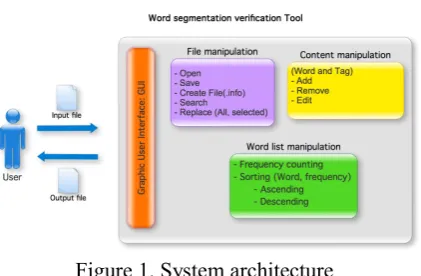
The new tool is composed of three main com-ponents: File manipulation, Word list manipula-tion and Content manipulamanipula-tion, as shown in Fig-ure 1.
• File manipulation: the module that handles text files. It can handle one or multiple files. The program begins by reading files and storing them in the data structure. It also includes related works, such as creating files, finding and repla-cing words in files.
• Word list manipulation: a word fre-quency analysis on text files. This module counts the frequency of words and dis-plays the list of words sorted by alphabet or frequency in ascending or descending order.
• Content manipulation: responsible for content and tag modification in text files. This module contains several functions such as add, remove and edit tag. The res-ult of these modifications will immedi-ately effect the content of the file. But the original file is saved as a backup before.
2.2 Work flow
Word Segmentation Verification Tool V2.0 ac-cepts an input text file in TIS-620 or UTF-8 en-coding. This program can read multiple files. Be-cause the program is a tool to validate Thai word segmentation, the input files must be word-separ-ated by pipe symbol “|”, as shown in Figure 2.
[image:2.595.313.524.155.293.2]After successfully reading input files, the tool will count all words, calculate word frequencies and store the full path of the file names and line numbers of words in a data structure. The in-formation, containing word position, line number and file name, will be displayed on the main in-terface, along with word concordance, when a word is selected from the word list. When user selects a line from the concordance, another win-dow will appear and allow user to edit its con-tent. A backup file (.info) is created before sav-ing the new content in the original file. The oper-ation's work flow is shown in Figure 3.
Other significant functions in the main inter-face are search and replace functions. These functions find the word positions in every opened file. All search results are displayed to user to select a replacement. There are two types of replacement: replace only selected line, or re-place all (every word in all opened files).
2.3 Data structure
A hash table is a data structure that uses a hash function to identify the values in array elements (buckets). The advantage of hash table is the ability to fast access the data in the large scale of corpus (Wikipedia, 2011). So, we have decided to use the hash table in our new application.
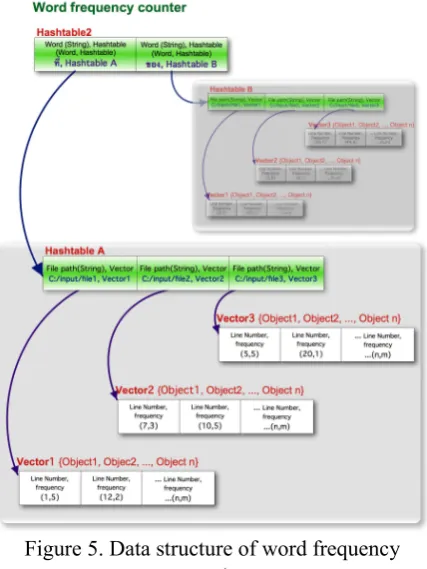
The data structure of “Word Segmentation Verification Tool V2.0” is stored in the hash table format. The file path is stored as a key in the hash table to identify its value. The content of the file is stored in a vector, which is the value of the hash table. The vector stores the content by sorting it from the first line to the last line. For example, Figure 4 shows that “C:/input/file1” is stored as a key and Vector1, which contains all lines of file1, is stored as a value in Hashtable1.
[image:3.595.312.522.84.243.2]In addition, the frequency of each word is col-lected in another hash table as shown in Figure 5. Hashtable2 stores the word as a key and the ad-dress of its child hash table as a value. The data structure of the child hash table is similar to the data structure of Figure 4 but different in vector elements, since the actual vector elements con-tain line number and frequency of word in that line.
Figure 5. Data structure of word frequency counter
[image:3.595.75.287.253.428.2]Figure 4. Data structure of input files
[image:3.595.309.523.401.686.2]2.4 Program interfaces
Main interface
We have developed a new main interface to be easy to use. This interface consists of four main components as follows:
• Word list - this section is quite useful to quickly explore words, frequency of words, and word segmentation's correct-ness. It counts the frequency of words from all opened files. The result displayed in this section can be sorted by alphabet or by frequency in ascending or descending order.
• Concordance display - this section is very important and helpful for linguists to immediately judge which words are cor-rectly segmented by glancing over their contexts, so it is not necessary to open every file to examine each line thoroughly. When a word is selected from the word list or user enters a keyword in the search function, the program will display the res-ult in this section. This section shows the word positions in all opened files by high-lighting the target word apart from its con-texts. The line numbers and file names of that word are also shown. By double-clicking at the content of each line, anoth-er window will appear to edit data, as will be described in the next section.
• Search and Replace - this operation is the most frequently used function in our tool. It is an important component of the main interface. This function allows user to easily search and replace words. The result of each search is displayed in the concordance table. There are two options for replacement; the first is replacing only in the selected line(s), and the second op-tion is replacing in all opened files. For adding a tag into the data, there are three options: merge, split and none.
• Finally, Tag history - it displays tag list that has been modified in the data. It shows which words were edited by mer-ging, splitting, or tagging any special sym-bols. This history can help users remind any former word segmentation modifica-tions in order not to commit the same er-rors again.
Particular interface
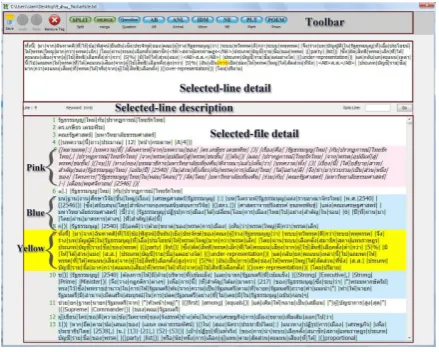
The particular interface is the second part of the software interfaces for editing misspelled and wrongly segmented words or texts thoroughly, and also marking words or texts with some tags to notify some particular structures or word am-biguities. An example of the particular interface's dialog box is shown below.
[image:4.595.306.528.80.260.2]According to the above figure, the window has four parts: Toolbar, Selected-line detail, Selec-ted-line description, and Selected-file detail. The first part is the toolbar consisting of several edit-ing and taggedit-ing menus: Save, Undo, Redo, Re-move tag, and nine symbols of tagging, which will be explained in the part of tag editor. The second part is the selected-line detail showing all words and tags which appear in the selected line. In this part, all words can be manually edited and tagged with symbols. The third part is the selec-ted-line description showing the line number and the keyword of the selected line. Moreover, in
[image:4.595.306.526.399.575.2]this part, users can change the selected line by filling any line number in the box on the right side. Finally, the last part is the selected-file de-tail showing all words and tags which appear in the file of the selected line. Each line in the file is highlighted differently to show the line status. Any lines without editing are not highlighted. The selected line is highlighted in yellow. Any lines having the keyword are highlighted in blue. Lastly, any edited lines are highlighted in pink with italic characters. The particular interface is very useful for editing texts more correctly.
Tag editor
Tag editor is the last part of the software inter-faces to notify any special structures of words or texts. Due to the fact that BEST corpora are com-posed of several text genres with various word structures inside, the tag editor is used to mark any words or texts having particular structures or ambiguities. Since the corpora, which were ori-ginally segmented by machine, have some mis-takes, the tag editor is used to edit the corpora correctly, as well. There are nine symbols to use for the mentioned purposes.
Firstly, the symbol <QUESTION>...</QUES-TION> is used to mark any ambiguous words or texts which have various meanings or are still in discussion. When linguists analyze them with their contexts to clarify the appropriate mean-ings, then the symbols will be removed, and the words will be segmented, split, or tagged with other symbols as the experts have already con-sidered.
Secondly, the symbols <MERGE>... </MERGE> and <SPLIT>...</SPLIT> are used to mark any words edited by being merged or split in order not to segment them wrongly again. The first one is used to tag the words that are correctly edited by being merged together be-cause, originally, at least two words were auto-matically segmented despite having to be com-bined1. The next one is used to tag the words that are correctly edited by being split because, formerly, at least two words were automatically combined together despite having to be divided.
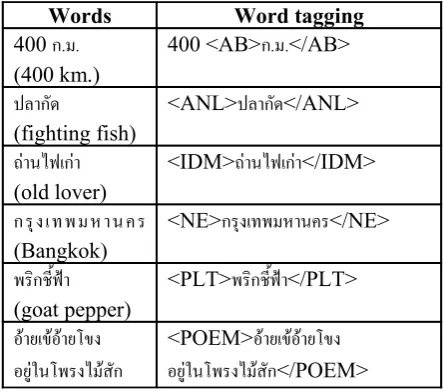
Lastly, six symbols are used to mark any words or texts having particular structures, which are quite different from general word formation, in order to manage them extraordinarily. These symbols are <AB>...</AB> for abbreviations, <ANL>...</ANL> for animal names and breeds, <IDM>...</IDM> for idioms, aphorisms, pro-1Any words being merged or split depend on the linguistic
rules in the BEST guidelines.
verbs and sayings, <NE>...</NE> for named en-tities, <PLT>...</PLT> for plant names and breeds, and <POEM>...</POEM> for poems, verses and poetry. Some examples are shown in the table below.
Words Word tagging
400
ก.ม.
(400 km.)400 <AB>
ก.ม.
</AB>ปลากด
(fighting fish)
<ANL>
ปลากด
</ANL>ถานไฟเกา
(old lover)
<IDM>
ถานไฟเกา
</IDM>กรงเทพมหานคร
(Bangkok)
<NE>
กรงเทพมหานคร
</NE>พรกชฟา
(goat pepper)
<PLT>
พรกชฟา
</PLT>อายเขอายโขง
อย"ในโพรงไมสก
<POEM>
อายเขอายโขง
[image:5.595.305.527.146.342.2]อย"ในโพรงไมสก
</POEM> Table 1. Examples of word tagging3
Experimental evaluation
According to the development of Word Segment-ation VerificSegment-ation Tool, the performance of the latest version is evaluated by doing an experi-ment on both previous and latest versions of the tools. They are tested on a desktop computer2 with 113-MB corpora, containing 880 files or 8,778,357 words in total. The corpora are com-posed of general words, abbreviations, animal names and breeds, idioms, named entities, plant names and breeds, poems, numbers and punctu-ation marks. It is found that the latest version is mainly improved in two aspects: time and user friendly.
The first aspect is time usage. The latest ver-sion of the software spends less time opening the software, files and keywords. In general, both versions spend almost equal time opening the software for the first time. However, for the latest version, every time opening the software is faster because it will open only the software, and then, users have to open files; on the contrary, for the previous version, if it is not the first time opening the software, it will take much time to open the software together with any files which were opened before closing the software.
2The test computer is a Personal Computer (PC) with Intel
Round Previous version
(min:sec:ms3) Latest version (min:sec:ms)
1 01:15:01 00:56:04
2 01:15:06 00:57:04
3 01:14:04 00:56:04
4 01:15:08 00:57:00
[image:6.595.306.525.74.263.2]5 01:14:08 00:57:00
Table 2. Time usage of opening files after firstly opening the software
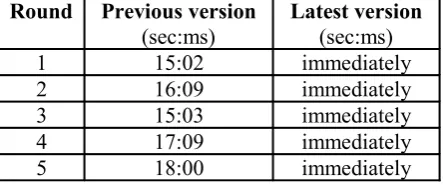
According to the above table, the latest ver-sion works faster. To open the test corpus files (880 files containing 8,778,357 words), it took almost 1 minute; on the contrary, the previous version spent about 1 minute 15 seconds doing it. Furthermore, the latest version is also much quicker than the previous one to show the lines containing the selected keywords with contexts, as shown in the table below. The latest version could immediately display the lines of the re-quired keyword while the previous one had to spend several seconds doing it. Also, more often the keywords were chosen to display, more slowly the previous version worked. In conclu-sion, the software's latest version works much quicker than the old one.
Round Previous version
(sec:ms)
Latest version
(sec:ms)
1 15:02 immediately
2 16:09 immediately
3 15:03 immediately
4 17:09 immediately
[image:6.595.69.290.84.178.2]5 18:00 immediately
Table 3. Time usage of showing lines containing the selected keywords with contexts
The second aspect is user friendly. The latest version of the software is easier and more con-venient. Firstly, it can work faster because it is not necessary to spend much time opening the files which is used to open before closing the program like the previous version, as told in the first aspect. Secondly, the function of asking to segment any long lines, which is a function of the previous version (as shown in Figure 8 be-low), is not necessary for this latest version any-more because the new version can completely manage any long lines without problem.
[image:6.595.70.292.441.534.2]3min = minute; sec = second; ms = millisecond
Figure 8. Function of asking to segment any long lines in the previous version
Thirdly, the main interface of the latest ver-sion looks easier to use because it contains only essential and necessary components: word list, concordance display, search and replace, and tag history (as explained in the main interface part). In contrast, the main interface of the previous one contained a useless component (shown in the bold square). It presented file names and lines of selected words, both of which also occurred in the concordance component. Moreover, the use-less component caused fewer space to display the word contexts in the concordance component. Therefore, it was inconvenient for linguists to quickly know which words were segmented cor-rectly. The useless component of the main inter-face of the previous version is shown in Figure 9 below.
Fourthly, it is easier to approach the data by one click; in contrast, double click is used for reaching the data in the previous software ver-sion.
[image:6.595.306.527.506.681.2]Lastly, user knows the status of the software. During the software's execution, every button, such as editing, searching and saving buttons is inactive, and a pop-up message and status-bar message show the software's working status. It is quite safe and useful for users not to edit or search other words during this time because they know that the software has not finished working yet and is not ready to do other functions. On the other hand, when it finishes working, every but-ton is active and ready to use again, and the pop-up message displays the number of edited words. It is very helpful for users because they will know when to be able to edit words, and not to correct the corpus during the software's execu-tion. If not, the corpus will have full of errors, and it will waste plenty of time to revise the cor-pus again and again. Therefore, the software's latest version has much improvement and is quite appropriate to the linguists' usage.
4
Conclusion and future works
We showed that our new tool, with its new data structures in the form of hash table, worked more rapidly than the previous version, both for open-ing files and for respondopen-ing to users. Moreover, finding and replacing function were very quick and stable too, for it never caused a system halt again. The new interface was more user-friendly. We can say that the overall improvement of the new program can help our linguists work more happily. In consequence, the BEST Corpora can be enlarged in a shorter period while their data follow better to the word segmentation standard guidelines too.
In the near future, we plan to integrate Thai spelling checker in our tool to detect automatic-ally any misspelled words. Moreover, making use of word statistics to decide how to segment words, especially words still in discussion (marked with <QUESTION> tag), may be anoth-er intanoth-eresting function to help our linguists pass their stressful days.
References
BEST Academy. 2008. “Guidelines for BEST 2009 : Thai Word Segmentation Software Contest (Re-lease4) (in Thai).” [online]. Available at: http://thailang.nectec.or.th/2009/
BEST Academy. 2009. “BEST 2009 : Thai Word Segmentation Software Contest.” [online]. Avail-able at: http://thailang.nectec.or.th/2009/
Monthika Boriboon, Kanyanut Kriengket, Patcharika Chootrakool, Sitthaa Phaholphinyo, Sumonmas
Purodakananda, Tipraporn Thanakulwarapas, and Krit Kosawat. 2009. “BEST Corpus Development and Analysis.” In Proceedings of the 2nd Interna-tional Conference on Asian Language Processing, IALP 2009. the IEEE Computer Society, Singa-pore:323-327.
Krit Kosawat, Monthika Boriboon, Patcharika Chootrakool, Ananlada Chotimongkol, Supon Klaithin, Sarawoot Kongyoung, Kanyanut Kri-engket, Sitthaa Phaholphinyo, Sumonmas Purodakananda, Tipraporn Thanakulwarapas, and Chai Wutiwiwatchai. 2009. “BEST 2009 : Thai Word Segmentation Software Contest.” In Pro-ceedings of the 8th International Symposium on
Natural Language Processing, SNLP 2009.
Dhurakij Pundit University, Thailand:83-88. Surapant Meknavin, Paisarn Charoenpornsawat, and
Boonserm Kijsirikul, 1997. “Feature-based Thai Word Segmentation.” In Proceedings of the Natur-al Language Processing Pacific Rim Symposium
1997(NLPRS’97), Phuket, Thailand.