Mostly Passive Information Delivery – a Prototype
J. Vystrˇcil, T. Macek, D. Luksch, M. Labsk´y, L. Kunc, J. Kleindienst, T. Kaˇsparov´a
IBM Prague Research and Development Lab V Parku 2294/4, 148 00 Prague 4
Czech Republic
{jan vystrcil, tomas macek, david.luksch, martin labsky, ladislav kunc1, jankle, tereza.kasparova}@cz.ibm.com
Abstract
In this paper we introduce a new UI paradigm that mimics radio broadcast along with a prototype called Radio One. The approach aims to present useful infor-mation from multiple domains to mobile users (e.g. drivers on the go or cell phone users). The information is served in an en-tertaining manner in a mostly passive style – without the user having to ask for it– as in real radio broadcast. The content is gen-erated on the fly by a machine and inte-grates a mix of personal (calendar, emails) and publicly available but customized in-formation (news, weather, POIs). Most of the spoken audio output is machine syn-thesized. The implemented prototype per-mits passive listening as well as interaction using voice commands or buttons. Initial feedback gathered while testing the proto-type while driving indicates good accep-tance of the system and relatively low dis-traction levels.
1 Introduction
The main purpose of this paper is to describe a prototype of the Radio One concept. Radio One presents music, news, emails, relevant POI and other information to the user in a mostly passive way, similarly to conventional radios. Users can interract with the system as well using voice com-mands or buttons. The concept was refined and initially tested with prerecorded audio-visual sce-narios using the Wizard-of-Oz (WOZ) technique (Macek et al., 2013).
Here we describe the early prototype implemen-tation of the system and summarize initial feed-back collected during informal testing.
2 Related Work
Applications that produce customized audio streams can be found in many online music deliv-ery services including Spotify, Pandora, or iTunes. While the above services often focus on music only, other providers (BBC, CNN) publish their spoken content in the form of podcasts. Spoken audio used for podcasts is often recorded by pro-fessional speakers as opposed to the concept pre-sented here. The Aha radio (Aha, 2014) provides various thematic streams of information including music, news, social network updates or Points of Interest (POI). Content can be selected manually by switching between channels. Similar strategies are utilized by Stitcher (Stitcher, 2014) and other services. The concept presented here attempts in-sted to preselect the content automatically and on the fly while preserving the option to request the content explicitely.
Many in-car infotainment systems adopted the use of voice control and utilize information di-rectly from on-line services; e.g. (BMW, 2014) and (Ford, 2014). All of the abovementioned ap-plications use mobile data connection to deliver audio stream (as opposed to text) to the user. This can lead to large data downloads and potentially to high bills from mobile network providers.
3 Radio One Concept
Radio One mimics radio broadcast by generating infotainment content on the fly. Unlike real radios, Radio One customizes its content to the particular listener and should even adapt automatically while the user interacts with it. In addition to the content typically played by radios, the synthetic content also includes private information like calendar or emails. Most of the spoken output is produced by a text-to-speech system with the exception of pod-casts.
The presented information stream is sparse with
the intervals between spoken segments filled with music and moderator small-talk. The content structure is configurable and can be adapted both automatically, based on observing habits of the user, or via explicit voice commands or buttons.
The main benefit of dynamically generated con-tent is that the system can easily include dynamic personal content and that the infotainment stream can be efficiently controlled by the user and in-fluenced by the environment (such as expected duration of the drive or current road conditions). From a technical perspective, the connection re-quirements are much smaller compared to audio transfers, as Radio One mostly downloads textual feeds only. Downloading redundant information can be avoided by knowing what has already been presented to the particular user. Further, the user can navigate in the broadcast, either to specific topics by using voice commands, or just backward and forward by using buttons. This option should reduce potential stress related to a driver concen-trating on a broadcasted topic knowing s/he would be unable to replay. The radio presents informa-tion from the covered domains continuously. The stream of presented information also serves as a natural way of teaching the user about the sup-ported domains. By hearing that news are read as part of the radio stream, the user finds out that news is one category that can be requested by voice commands.
4 System Description
Although previous WOZ tests (Macek et al., 2013) were sufficient to collect the initial user feedback, their flexibility and fidelity was limited. The prototype described in this paper is intended for testing of concepts and for conducting realistic usability tests in a car. The implemented prototype is a fully functioning system, although still with a limited feature set.
4.1 Architecture
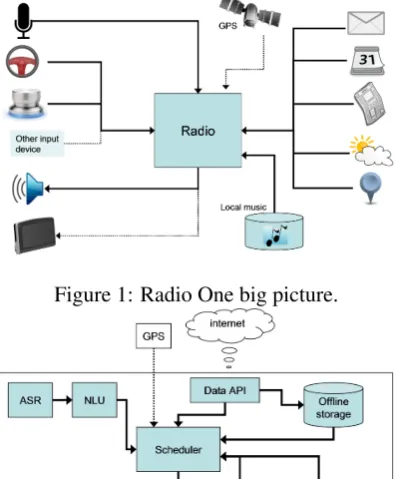
[image:2.595.318.516.77.317.2]The overall architecture of the system is depicted in Figure 1. The system collects inputs both from manual controls (steering wheel buttons, rotary knob) and from ASR (voice commands). Multi-ple on-line and off-line data sources provide con-tent. While driving, GPS information about the car position is used together with an optional cal-culated route and POI data to plan overall broad-casting. The core of the Radio One system (see
Figure 1: Radio One big picture.
Figure 2: Radio One architecture.
Figure 2) is the scheduler. The scheduler is re-sponsible for planning both the type of content and the time of its presentation. The content as-sociated with higher expected cognitive load (e.g. emails or calendar) can be planned for segments of the journey that have low driving difficulty (e.g. straight highway). The overall architecture aims to be highly configurable and context-aware to be able to produce heterogeneous content based on differing user preferences and changing state of the environment.
4.2 Controls
typically be available through voice commands only, or also through a touch interface where avail-able (e.g. on a cell phone or in a parked car).
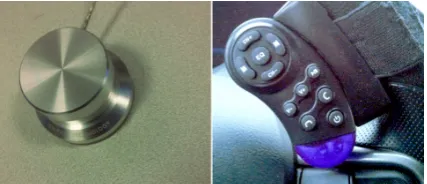
Alternatively to the buttons on the steering wheel, arotary knobcan be placed on the side of the driver’s seat (depicted on the left of Figure 3). Usually, a single knob press initiates speech input, while turning the knob navigates back and forth in items. Per-bundle navigation can be triggered ei-ther by using greater turns or by turning the knob while pressed.
The voice control subsystem is hybrid with speech recognition and understanding being done both remotely and locally. This way, functions are available even when off-line while benefit-ing from improved accuracy and coverage of the server models when on-line. Free-form commands are understood (e.g. “email” or “would you read my email please”).
4.3 Content and Presentation
Two modes of operation are implemented. The
off-line mode permits testing with locally saved data or data specifically tailored for various exper-iments. Theon-line modecollects data (e.g. email, calendar, news) periodically from the network and presents it at appropriate times.
News are collected periodically from config-urable network sources and grouped by topic. Two forms of news presentation are implemented. A shorter version is used during news summaries. A longer version can be requested by an explicit voice request like “tell me more” or by pressing a “details” button.
Emails undergo elementary pre-processing to improve their suitability for being read out loud. Emails longer than a configured threshold are shortened at the end of the sentence. Email his-tories are also skipped. The user can request a full version of the email using a voice command like “read the whole message”.
Moderator commentaries are tailored to the content they accompany. We use a set of hand-crafted prompt templates for natural language gen-eration. Prompt templates are grouped according to the context that triggers them into pools of al-ternatives, from which prompts are selected ran-domly while avoiding repetitions. Moderators can announce upcoming content or refer to content that just finished playing. Prompt templates often contain variables referring to various properties of
the neighbouring content (e.g. name of the preced-ing song or topic of the upcompreced-ing news).
Information is presented as a story, typically with a brief summary-of-the-broadcast at the be-ginning. This order can be interrupted by sudden events (e.g. emails arriving, hot breaking news, POI announcements) with proper moderator com-ments to indicate what is happening. The infor-mation is grouped together in bundles of the same type (e.g. email summaries are not mixed with cal-endar or news items). Typical in-car presentation order starts with music to allow the listener to get concentrated on driving. Then a summary is pro-vided followed by blocks of music and informa-tion bundles.
[image:3.595.310.524.361.453.2]In contrast to our earlier WOZ study, the cur-rent version of the prototype does not present any visual information as we focus on the driving sce-nario. The previous WOZ study indicated that this information was distracting to the driver and not much valued by the participants.
Figure 3: Alternative user interface controls
4.4 Implementation
The prototype is implemented in Java. It uses a local text-to-speech system (TTS). We use the Nuance Vocalizer premium voices to provide the best available TTS quality. Current implementa-tion is primarily in English (moderators and their comments) although playback of content in other languages (currently Czech) is supported as well. Language detection is done automatically (Cy-bozu Labs, 2014). The system was tested both on a PC (Windows 7) and on tablets and phones (Android, Windows 8). Emails are currently re-trieved using the IMAP protocol so various email providers can be used. News are currently down-loaded from the Feedzilla (Feedzilla, 2014) REST API and from other RSS feeds.
also plays summaries about the remaining events of the day (also can be requested by voice).
Like real radios, we use characteristic earcons and jingles to introduce particular types of infor-mation (e.g. email, news or calendar) and other sounds to separate individual information items from each other (e.g. earcons between emails or news titles).
For testing purposes we use infra-red remote control buttons (see right hand part of Figure 3) mounted to the steering wheel, with key events re-ceived by a special purpose hardware and passed to Radio One via Bluetooth.
We use either an AUX cable or a radio FM transmitter to integrate with the car’s audio sys-tem. The current prototype implements music playback, presents news, email, weather reports and calendar summaries. Initial work was done on presenting POIs near the current location. An arbitrary list of MP3 files can be used as a source of music. Ideally, user’s own collection of music is used during the tests. ID3 tags of music files are utilized in the process of generating voice prompts spoken by moderators as part of their small talk (e.g. “This was a song by the Beatles”).
5 Usability testing
Initially, a WOZ experiment was conducted with-out having the system implemented. Test subjects drove a low-fidelity driving simulator while lis-tening to a radio stream broadcasted by the wiz-ard, who played pre-recorded audio-visual snip-pets trying to satisfy user’s requests. We described results of this experiment previously in (Macek et al., 2013). The main feedback from this ex-periment was that the users perceived the quality of synthesized speech sufficiently. The visual in-formation shown by the wizard contained mostly static pictures or short texts in large fonts. Most of the users did not find the screen useful in this setup. Therefore the current radio prototype is screen-less. Two groups of users could be iden-tified. The first one used the system in the same way as a standard radio, with minimal interaction. The other group preferred to be “in control” and used both buttons and voice commands to ask for specific content.
Multiple informal tests were conducted by 4 test drivers in real traffic. More extensive testing is still in preparation. The feedback collected so far was positive, indicating that the TTS quality was
suf-ficient. Even with a small number of test drivers it became apparent that the roles of customization and automatic adaptation to preferences of a spe-cific user will be crucial.
Information-heavy content like certain kinds of news was sometimes considered difficult to lis-ten to while driving, which was in part due to all of the test drivers being non-native speakers of English. Adding jingles to separate the pre-sented news items from one another improved the perception of the system significantly. The news feeds used by the prototype were originally not intended for audio presentation, which does im-pact their understandability, but the effect does not seem to be major. Lighter content like weather forecasts and calendar announcements were con-sidered easy to understand.
The test drivers considered it important to be able to use their personal data (news, email, mu-sic). This motivated the inclusion of information sources in languages other than English and the addition of automatic language identification so as to select proper TTS voices. The fact that multi-ple languages were present in the broadcast was not perceived adversely. One shortcoming of the tested system was still a low variability of moder-ators’ comments.
6 Conclusion
We presented a work-in-progress demonstration prototype of a novel method for presenting in-formation to users on-the-go. A preceding WOZ study indicated promising user acceptance which was also confirmed using the described prototype. When comparing with existing systems, the sys-tem presented here has much lower requirements on communication bandwidth, requires less hu-man work for content authoring and permits a higher level of personalization. Amount of inter-activity depends very much on user preferences.
In future work we would like to pay attention to evaluation of user feedback on more extensive usability tests. It will be interesting to see to what extent the user will opt for active interaction with the system and for the particular interaction tech-niques.
Acknowledgments
References
Harman International Aha. 2014. Aha radio web-site. Retrieved from http://www.aharadio. com/.
BMW. 2014. Bmw connecteddrive ser-vices. Retrieved from http://www.bmw. com/com/en/insights/technology/ connecteddrive/2013/services_apps/ bmw_connecteddrive_services.html. Inc. Cybozu Labs. 2014. Language detection
li-brary for java. Retrieved from https://code. google.com/p/language-detection/. Feedzilla. 2014. Feedzilla - news feed directory.
Re-trieved fromhttp://www.feedzilla.com/. Ford. 2014. Sync with myford touch. Retrieved
fromhttp://www.ford.com/technology/ sync/.
Tom´aˇs Macek, Tereza Kaˇsparov´a, Jan Kleindienst, Ladislav Kunc, Martin Labsk´y, and Jan Vystrˇcil. 2013. Mostly passive information delivery in a car. InProceedings of the 5th International Confer-ence on Automotive User Interfaces and Interactive Vehicular Applications, AutomotiveUI ’13, pages 250–253, New York, NY, USA. ACM.
Inc. Stitcher. 2014. Stitcher website. Retrieved from