60499700
T.
0^\
CONTRPL DATA
CORPORATION
FORTRAN EXTENDED VERSION 4
USER'S GUIDE
r
0$>,
CDC® OPERATING SYSTEMS:
NOS 1
REVISION RECORD
REVISION
DESCRIPTION
A
Original release.
12/30/77
Publication No.
60499700
- *
, ^ \
REVISION LETTERS I, O. Q AND X ARE NOT USED
© 197?
Control Data Corporation
Printed in the United States of America
Address comments concerning
this manual to:
C O N T R O L D ATA C O R P O R AT I O N
Publications and Graphics Division
215 MOFFETT PARK DRIVE SUNNYVALE, CALIFORNIA 94086
or use Comment Sheet in the
back of this manual
0 £ \
,#SN
LIST OF EFFECTIVE PAGES
New features, as well as changes, deletions, and additions to information in this manual are indicated by bars in the
margins or by a dot near the page number if the entire page is affected. A bar by the page number indicates pagina
tion rather than content has changed.
0m\
Page
Cover
Title page
ii
iii/iv
v/vi
vii tliru ix
1-1 thru 1-4
2-1 thru 2-13
3-1 thru 3-12
4-1 thru 4-17
5-1 thru 5-12
6-1 thru 6-18
7-1 thru 7-11
A-l thru A-3
B-l, B-2
Index-1 thru -3
Cmt. Sheet
Reply envelope
Cover
Revision
A
A
A
A
A
A
A
A
A
A
A
A
A
A
A
Page Revision Page Revision
/ ^ \
/*^\
0%\
PREFACE
0 ^ \
/0fe\
This user's guide provides helpful information for the user of CDC FORTRAN Extended. FORTRAN Extended is sup ported by the following operating systems:
NOS 1 for the CONTROL DATA® CYBER 170 Models 171, 172, 173, 174, 175; CYBER 70 Models 71, 72, 73, 74; and 6000 Series Computer Systems
NOS/BE 1 for the CDC® CYBER 170 Series; CYBER 70 Models 71, 72, 73, 74; and 6000 Series Computer Systems
SCOPE 2 for the CONTROL DATA CYBER 170 Model 176, CYBER 70 Model 76, and 7600 Computer Systems
This user's guide is written primarily for the FORTRAN programmer who is unfamiliar with CDC operating systems. It is a supplement to the FORTRAN Extended Version 4 Reference Manual, with minimal duplication of information. T h i s g u i d e c o n c e n t r a t e s o n t h e i n t e r f a c e s b e t w e e n FORTRAN Extended and other software products, as well as on programming, debugging, and optimization techniques of particular interest to the FORTRAN Extended programmer.
S o m e t o p i c s o f i n t e r e s t t o t h e F O RT R A N E x t e n d e d programmer are discussed in other user's guides. These include the following:
9 I n t e r a c t i v e p r o g r a m c r e a t i o n a n d e x e c u t i o n . F o r NOS/BE, this topic is covered in the INTERCOM Guide for FORTRAN Extended Users. For NOS users, parallel material is included in the NOS Time-Sharing User's Guide and the NOS Text Editor Reference ManuaK
e Input/output implementation. This topic, with partic ular emphasis on the advanced input/output capabilities available through the CYBER Record Manager interface routines, is covered in the CYBER Record Manager Version 1 Guide for Users of FORTRAN Extended Version 4. SCOPE 2 users can find parallel information in the SCOPE 2 User's Guide.
9 Debugging facility. The C$ DEBUG capability included with the FORTRAN Extended compiler is described in
the FORTRAN Extended DEBUG User's Guide.
In addition, user's guides exist for SCOPE 2 and NOS/BE; these guides are recommended for programmers new to these systems.
/SjPN
Publication
NOS 1 Operating System Reference Manual, Volume 1
NOS/BE 1 Operating System Reference Manual
SCOPE 2 Reference Manual
NOS/BE 1 User's Guide
SCOPE 2 User's Guide
FORTRAN Extended Version 4 Reference Manual
CYBER Loader Version 1 Reference Manual
SCOPE 2 Loader Reference Manual
FORTRAN Extended DEBUG User's Guide
INTERCOM Interactive Guide for Users of FORTRAN Extended
CYBER Record Manager Version 1 Guide for Users of FORTRAN Extended Version 4
FORTRAN Common Library Mathematical Routines
UPDATE Reference Manual
CYBER Common Utilities Reference Manual
Publication Number
60435300
60493800
60342600
60494000
60372600
60497800
60429800
60454780
60498000
60495000
60495900
60498200
60449900
60495600
CDC manuals can be ordered from Control Data Literature and Distribution Services, 8001 East Bloomington Freeway, Minneapolis, MN 55420
This product is intended for use only as described in this document. Control Data cannot be responsible for the proper functioning of undescribed features or parameters.
^
*
CONTENTS
1. PROGRAMMING TECHNIQUES
Top-Down Programming Coding Style
SAMPLE PROGRAMS
A C C TA B NEWTON GAUSS OTOD LINK CORCO 3. OPTIMIZATION 0U^S
Compiler Optimization
Machine-Independent Optimizations Invariant Code Motion
Common Subexpression Elimination Dead Definition Elimination Constant Evaluation Test Replacement Machine-Dependent Optimization
Strength Reduction
Special Casing of Subscripts Functional Unit Scheduling Register Assignment Optimization Example Source Code Optimization
Helping the Compiler Optimize Loop Restructuring
Miscellaneous Optimizations Programming for Greater Accuracy
Sum Small to Large Avoid Ill-Conditioning
4. DEBUGGING
Desk Checking Compilation
Diagnostic Scan Cross-Reference Map Execution Time Debugging
DMPX and Load Map Debugging Facility
5. BATCH EXECUTION Sample Job Decks
Job Processing Control Statements Job Statement
ACCOUNT Control Statement RESOURC Control Statement EXIT Control Statement REWIND Control Statement RETURN Control Statement UNLOAD Control Statement
1-1 1-1 1-3 2-1 2-1 2-1 2-1 2-6 2-6 2-8 3-1 3-1 3-2 3-2 3-4 3-4 3-5 3-5 3-6 3-6 3-6 3-7 3-7 3-8 3-9 3-9 3-9 3-10 3-11 3-11 3-11 4-1 4-1 4-1 4-1 4-4 4-4 4-7 4-7 5-1 5-1 5-1 5-1 5-1 5-2 5-2 5-4 5-4 5-5
Copy and Skip Operations COPY Control Statement COPYBF and COPYCF Control
Statements
COPYBR Control Statement NOS/BE and SCOPE 2 Skip
Operations NOS Skip Operations Permanent File Usage
NOS/BE and SCOPE 2 Permanent Files REQUEST Control Statement CATALOG Control Statement
ATTACH Control Statement ALTER and EXTEND Control
Statements
PURGE Control Statement NOS Permanent Files
SAVE Control Statement GET Control Statement REPLACE Control Statement DEFINE Control Statement ATTACH Control Statement PURGE Control Statement Magnetic Tape Processing
LIBRARY FILES
7 . L O A D I N G F O RT R A N P R O G R A M S
Basic Loading
Name Call Statement EXECUTE Control Statement
5-5 5-5 5-6 5-6 5-6 5-7 5-7 5-7 5-8 5-8 5-8 5-8 5-8 5-9 5-9 5-9 5-9 5-9 5-10 5-10 5-10 6-1
User Libraries 6-2
NOS/BE and SCOPE 2 User Libraries 6-2 Directives in General 6-3 NOS/BE and SCOPE 2 Sample User
Library Creation 6-3 NOS/BE and SCOPE 2 Sample User
Library Modification 6-4 NOS/BE EDITLIB Control Statement
and Directives 6-4 SCOPE 2 LIBEDT Control Statement
and Directives 6-4 NOS User Libraries 6-6 Sample User Library Creation 6-6 Sample User Library Re-creation 6-6 LIBGEN Control Statement 6-8 LIBEDIT Control Statement and
Directives 6-8 GTR Control Statement 6-8 COPYL Control Statement 6-10 UPDATE Source File Maintenance 6-12 UPDATE Directives 6-12 UPDATE Control Statement 6-13 Creation Run 6-13
Decks 6-13
Sample Creation Run 6-14 Correction Run 6-15 Sample Correction Runs 6-15 UPDATE Listing 6-16
7-1 7-1 7-2 7-2
>*^ls
SLOAD Control Statement LOAD Control Statement NOGO Control Statement LIBRARY Control Statement
LDSET Control Statement Library Search Order Field Length Control
7 - 2 B a s i c L o a d E x a m p l e s 7 - 3 S e g m e n t L o a d i n g
7 - 3 S e g m e n t e d P r o g r a m S t r u c t u r e 7 - 4 B u i l d i n g a S e g m e n t e d P r o g r a m 7 - 4 S e g m e n t D i r e c t i v e s
7 - 4 L o a d i n g a n d E x e c u t i n g a S e g m e n t e d 7 - 5 P r o g r a m
7-5 7-6 7-6 7-7 7-8 7-10
/ S 5 \
APPENDIXES
Standard Character Set A - l Glossary B - l
1-1 Top-Down Programming Example 1-2 Coding Style Example
2 - 1 P r o g r a m A C C TA B
2-2 Second Degree Interpolation 2-3 Sample Input Deck
2 - 4 A C C TA B O u t p u t 2-5 Program NEWTON 2-6 Input to NEWTON 2-7 Output from NEWTON 2-8 Program GAUSS 2-9 Input to GAUSS 2-10 Output from GAUSS 2-11 Program OTOD
2-12 Arrays OCT and IA in Program OTOD 2-13 Program LINK
2-14 Record Format for INFIL 2-15 Record Format for NEWFIL 2-16 Program CORCO
2-17 Input Records for CORCO 2-18 Records on File PROBS
2-19 Formula for Correlation Coefficient 2-20 Printed Output from CORCO 3-1 Intermediate Language Example 3-2 Basic Block Example
3-3 Invariant Code Motion Example 3-4 Invariant Code (Example 1) 3-5 Invariant Code (Example 2) 3-6 Invariant Code (Example 3) 3-7 Variable Dead on Exit
3-8 Test Replacement Generated Code 3-9 FORTRAN Subprogram and Generated
Object Code
4-1 Program ACCTAB Before Debugging 4-2 Example after Desk Checking,
with Diagnostics 4-3 Cross-Reference Map
4-4 Example with Compilation Errors Corrected 4-5 Test Data for ACCTAB
4-6 Dayfile Showing Loader Errors and Mode 1 Errors
4-7 Load Map 4 - 8 D M P X
4-9 Object Listing (Partial) 4-10 Dayfile Showing Mode 2 Error 4-11 Sequence of Debug Statements 4-12 Debug Output Showing Array Contents
4-13 Example with Zero Value Test 4-14 Dayfile Showing Mode 2 Error 4-15 Debug Output and Printed Output 4-16 Example with Duplicate Point Test 4-17 Output from Figure 4-16
4-18 Final ACCTAB Source Listing 4-19 Output from Figure 4-18 5-1 Compilation and Execution
INDEX
FIGURES
1-2 5-2 1-4 5-3 2-2 2-3 5-4 2-3 5-5 2-3 5-6 2-4 5-7 2-4 5-8 2-4 5-9 2-5 5-10 2-6 5-11 2-6 5-12 2-7 2-8 5-13 2-9 5-14 2-10 5-15 2-10 2-11 5-16 2-12 2-12 5-17 2-13 2-13 5-18 3-2 3-2 5-19 3-3 3-3 5-20 3-3 3-3 5-21 3-5 3-6 5-22 3-8 5-23 4-2 5-24 4-3 5-25 4-5 5-26 4-6 5-27 4-7 5-28 5-29 4-8 5-30 4-9 5-31 4-11 5-32 4-12 4-12 6-1 4-12 6-2 4-12 4-13 6-3 4-14 6-4 4-14 4-15 6-5 4-16 4-16 6-6 4-16 6-1 5-2 6-8E x e c u t i o n w i t h D a t a o n M a g n e t i c Ta p e 5 - 3 Execution of Binary Program with
Two Sets of Data Cards Job Statement Format
ACCOUNT Control Statement Format RESOURC Control Statement Format EXIT Control Statement Format REWIND Control Statement Format RETURN Control Statement Format UNLOAD Control Statement Format COPY Control Statement Format
COPYBF and COPYCF Control Statement Formats
COPYBF Example
COPYBR Control Statement Format SKIPF and SKIPB Control Statement
Formats (NOS/BE, SCOPE 2) SKIPB and SKIPF Examples (NOS/BE,
SCOPE 2)
SKIPF, SKIPBF, SKIPR, and BKSP Control Statement Formats (NOS)
REQUEST Control Statement Format for Permanent Files (NOS/BE, SCOPE 2) CATALOG Control Statement Format
(NOS/BE, SCOPE 2)
ATTACH Control Statement Format (NOS/BE, SCOPE 2)
EXTEND and ALTER Control Statement Formats (NOS/BE, SCOPE 2) PURGE Control Statement Format for
Attached Files (NOS/BE, SCOPE 2) PURGE Control Statement Format for
Unattached Files (NOS/BE, SCOPE 2) SAVE Control Statement Format (NOS) GET Control Statement Format (NOS)
REPLACE Control Statement Format (NOS) DEFINE Control Statement Format (NOS)
ATTACH Control Statement Format (NOS) 5-10 PURGE Control Statement Format (NOS) 5-10 LABEL Control Statement Format (NOS) 5-11 LABEL Control Statement Format (NOS/BE) 5-12 REQUEST Control Statement Format for
T a p e s ( S C O P E 2 ) 5 - 1 2 NOS/BE and SCOPE 2 User Library Creation 6-2 Sample User Library Creation (NOS/BE,
S C O P E 2 ) 6 - 3 Output from Sample User Library Creation 6-5 NOS/BE and SCOPE 2 User Library
M o d i fi c a t i o n 6 - 6 Sample User Library Modification
( N O S / B E , S C O P E 2 ) 6 - 6 T y p i c a l L I S T L I B O u t p u t 6 - 7 E D I T L I B C o n t r o l S t a t e m e n t F o r m a t 6 - 8 L I B E D T C o n t r o l S t a t e m e n t F o r m a t 6 - 8 5-4 5-4 5-4 5-4 5-4
/
■
**%
5-5 5-5 s*v&\ 5-5 5-5 5-6 5-6 5-6 ,*SS\5-6 A ^ & K
5-7
5-7
5-8
5-8 A ^ & \
5-8 5-8 /^S\ 5-8 5-8 5-9 5-9 5-9 5-9
A ^ S
0s*
0^-
6-96-10 6-11
/|Sv 6-12
6-13
/ i g # r ^ 6-14
v
6-15 6-16 6-170^\
6-186-19 6-20 6-21
y ^ ^ \ 6-22
6-23 6-24 6-25
/Sfcv 6-26
v
6-27 6-28
NOS User Library Creation
Sample User Library Creation (NOS) Listing of NOS User Library COPYL Use in Re-creating a
User Library (NOS)
GTR and LIBEDIT Use in Re-creating a User Library (NOS)
LIBGEN Control Statement Format LIBEDIT Control Statement Format GTR Control Statement Format COPYL Control Statement Format UPDATE Program Library Creation Run UPDATE Program Library Correction Run UPDATE Control Statement Format Input Stream Cards
Sample Program Library Creation Listing of Card Identifiers
Using a Routine on a Program Library Sample Use of Program Library Sample Correction Run Creating a
New Program Library Listing from Corrected Deck Typical UPDATE Output Listing
6-8 7-1
6-8 7-2
6-9 7-3
7-4
6-10 7-5
7-6
6-10 7-7
6-10 7-8
6-11 7-9
6-11 7-10
6-11 7-11
6-12 7-12
6-12 7-13
6-14 7-14
6-14 7-15
6-14 • 7-16
6-15 7-17
6-15 7-18
6-16 7-19
7-20
6-16 7-21
6-17 7-22
6-18 7-23
7-24
N a m e C a l l S t a t e m e n t F o r m a t 7 - 2 A l t e r n a t e F i l e N a m e E x a m p l e s 7 - 3 E X E C U T E C o n t r o l S t a t e m e n t F o r m a t 7 - 3 S L O A D C o n t r o l S t a t e m e n t F o r m a t 7 - 3
L O A D C o n t r o l S t a t e m e n t F o r m a t 7 - 3 N O G O C o n t r o l S t a t e m e n t F o r m a t 7 - 3 L I B R A R Y C o n t r o l S t a t e m e n t F o r m a t 7 - 4 L D S E T C o n t r o l S t a t e m e n t F o r m a t 7 - 4 R E D U C E C o n t r o l S t a t e m e n t F o r m a t 7 - 5 R F L C o n t r o l S t a t e m e n t F o r m a t 7 - 5 B a s i c L o a d 7 - 5 S a m p l e T r e e S t r u c t u r e 7 - 6 S e g m e n t e d P r o g r a m w i t h T h r e e L e v e l s 7 - 7 S E G L O A D C o n t r o l S t a t e m e n t F o r m a t 7 - 8 T R E E D i r e c t i v e F o r m a t 7 - 8 T R E E D i r e c t i v e E x a m p l e s 7 - 8 I N C L U D E D i r e c t i v e F o r m a t 7 - 8 I N C L U D E D i r e c t i v e E x a m p l e 7 - 9 L E V E L D i r e c t i v e F o r m a t 7 - 9 G L O B A L D i r e c t i v e F o r m a t 7 - 9 E N D D i r e c t i v e F o r m a t 7 - 9 S e g m e n t D i r e c t i v e s E x a m p l e 1 7 - 1 0 S e g m e n t D i r e c t i v e s E x a m p l e 2 7 - 1 0 C A L L - R E T U R N C o n fl i c t 7 - 1 1
TABLES
3-1 Array Subscript Formulas 5-1 EXIT Processing
6 - 1 U t i l i t y S u p p o r t
3-1 6-2 EDITLIB Directives 5-5 6-3 LIBEDT Directives 6-1 6-4 LIBEDIT Directives
6-5 UPDATE Directives
6-7 6-9 6-11 6-13
/^In
0®&\
PROGRAMMING TECHNIQUES
0jB\
<|PK
This section outlines some procedures designed to simplify and safeguard the production of FORTRAN Extended pro grams, as well as some techniques to improve their a c c u r a c y. A l t h o u g h t h e p r o c e s s o f p r o g r a m m i n g i s essentially the same, regardless of the language in which the program is written, FORTRAN presents specific difficulties and specific opportunities.
TOP-DOWN PROGRAMMI NG
In recent years, the attempt to reduce the cost of computer systems has focused increasingly on the cost of software development and maintenance. The consensus is that these processes should be better controlled and more standardized than they have been in the past. The following criteria are those generally agreed upon for software, regardless of its function:
# It should be reliable. This requires extensive (and well planned) testing before the software is used for its intended purpose.
* It should be easy to read. This simplifies the process of maintenance, which is frequently done by different people than those who originally developed the soft ware. This goal is achieved by avoiding convoluted algorithms and implementation-dependent tricks, and by providing ample and useful documentation. Very large programs usually require external documentation, in addition to the comments in the code itself.
0 It should be modular. This is partly for the purpose of increased readability, and partly so that useful modules can be written once, to be used by many programs.
Several principal methods have been developed to achieve these goals. The method that has attracted the most interest, and that is advocated here, is top-down pro gramming. This is more than just the advice to design first and code later, which has always been followed by good programmers. The key component of top-down programming is the formalization of the successive steps between the original requirements of an application and the final coded version of the program. The idea is to hold in check the tendency, when beginning to write a program, to write F O RTR AN sta te m e n ts i mme di atel y. In top- dow n pro gramming, FORTRAN is not used until the very last step -earlier steps are written in English or in a more informal pseudo-FORTRAN. (It is important to note that all steps must actually be written, or the purpose of top-down programming is defeated.)
Another important component of top-down programming is modularity. Modularity means limiting the size of program units, and ensuring that each performs a well-defined function. A good rule of thumb is that each program unit should be about one page long. This ensures that the purpose and logic of each module are readily comprehensible. When the purpose of each module is well-defined, it is frequently possible to use the same subprogram in more than one program (as explained under User Libraries, in section 6). The division of a program into modules should not be arbitrary, but should follow as much as possible the separation of functions between program units.
Nevertheless, the advantages of modularity must be weighed against their effect on optimization (see section 2). Subpro gram calls are more expensive to execute than simple branches. Therefore, they should be kept to a minimum in frequently-executed loops. In any particular application, a balance must be struck between the decreased programmer time brought about by modularity, and the decreased execution time brought about by limiting subprogram calls.
The number of steps between problem definition and final coding depends on the size and complexity of the applica tion, but at least four steps are always necessary. These steps can be summarized as follows:
1. The problem to be solved is defined as precisely as possible (in English).
2. An algorithm covering only major steps of the program is written, in English and, where appropriate, in mathematical notation. The major modules of the program are also defined.
3. For each module defined in step 2, the algorithm is broken down into lower level steps, written in a higher-level language than FORTRAN. This step is repeated until the program is in a form of pseudo-FORTRAN.
4. The program is coded in FORTRAN. If step 3 was done properly, this process can take place practically line-by-line.
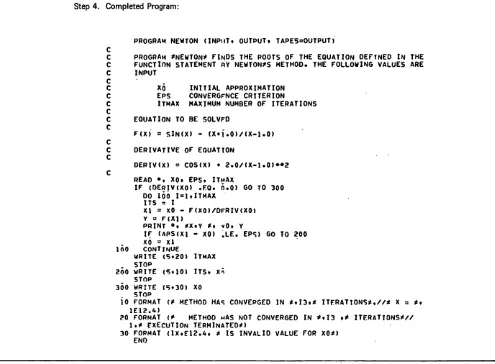
To illustrate this procedure, we will follow the various steps for a simple example. The example is not ideal; because it is so small, it uses no subprograms, and therefore does not illustrate the development of separate modules. The example is program NEWTON, which is explained more fully, with input and output, in section 2.
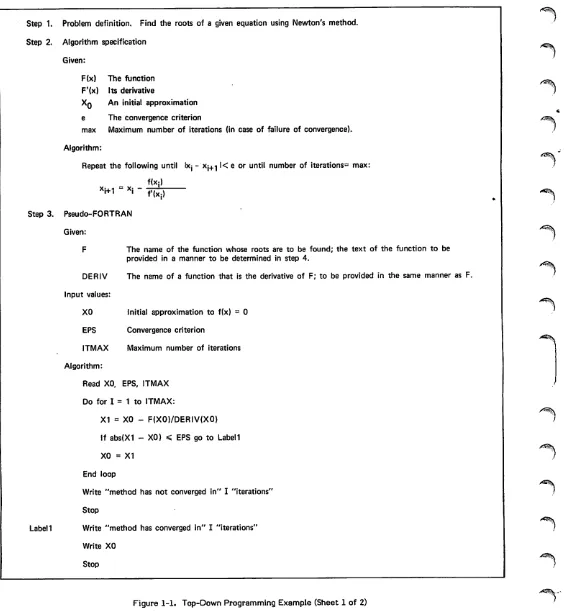
The origin of the program is an application that needs to find the roots of a polynomial equation (presumably part of a larger application). After considering various methods, the programmer decides on Newton's method. The stages of program development are then written down as shown in figure 1-1.
Step 1 defines the problem as precisely as possible. In this case, the reader of the description is assumed to be familiar with Newton's method, so little description is necessary.
Step 2 presents the algorithm to be used. At this stage, the order in which major steps are to be executed is determined. In order to describe the algorithm, some of the data structures to be used might be defined. In a program longer than NEWTON, the algorithm would probably not be detailed enough to include any mathematical formulas.
In step 3, the algorithm is made more detailed and, for the first time, the program logic is defined. The language used in this step is very casual; it is a mixture of ALGOL, English, and FORTRAN. A more standardized language could be developed; the main point is to defer actual FORTRAN statements as long as possible. By the last iteration of step 3, each module should be written in a sort of pseudo-FORTRAN, with the statements appearing in their fi n a l o r d e r. N o n - e x e c u t a b l e s t a t e m e n t s a r e g e n e r a l l y omitted in step 3, as are most statement labels. Input/-output statements are only sketched in.
Step 1. Problem definition. Find the roots of a given equation using Newton's method.
Step 2. Algorithm specification
Given:
F(x) The function F'(x) Its derivative
Xq An initial approximation e The convergence criterion
max Maximum number of iterations (in case of failure of convergence).
Algorithm:
Repeat the following until Ixj - Xj+^ l< e or until number of iterations3 max:
f(X:)
xi+1 - *i
Step 3. Pseudo-FORTRAN Given:
F
f ' ( x j )
Initial approximation to f(x) = 0
Convergence criterion
Maximum number of iterations
Label!
The name of the function whose roots are to be found; the text of the function to be provided in a manner to be determined in step 4.
DERIV The name of a function that is the derivative of F; to be provided in the same manner as F.
Input values:
XO
EPS
ITMAX
Algorithm:
Read XO, EPS, ITMAX
Do for I = 1 to ITMAX:
X1 = XO - F(X0)/DERIV(X0)
If abs(X1 - XO) < EPS go to Label 1
XO = X1
End loop
Write "method has not converged in" I "iterations
Stop
Write "method has converged in" I "iterations"
Write XO
Stop
<?S\ '
•^^K
Figure 1-1. Top-Down Programming Example (Sheet 1 of 2)
-^%.
^
[image:12.610.42.606.41.652.2]/ ^ \
/fp^*»
/$SN
Step 4. Completed Program:
PROGRAM NEWTON (INPUT. OUTPUT* TAPE5=0UTPUT) C
c
PROGRAM *NEWTON* FInDS THE ROOTS OF THE EQUATION DEFINED IN THEc
FUNCTION STATEMENT RY NEWTON*S METHOD. THE FOLLOWING VALUES AREc
INPUTc
c
XO INITIAL APPROXIMATIONc
EPS CONVERGFNCE CRITERIONc
c
c
c
c
c
c
c
ITMAX MAXIMUM NUMBER OF ITERATIONS EQUATION TO BE SOLVFD
F ( X ) = S l N ( X ) - ( X * f.0 ) /( X - 1 .0 ) DERIVATIVE OF EQUATION
DERIV(X) = COS(X> ♦ 2.0/(X-1.0>*«2 REAO •. XO. EPS. ITMAX
IF (DERIV(XO) .FQ. 6.0) GO TO 300 DO 100 1=1.ITMAX
ITS = I
XI = XO - F(X0)/DFRIV(X0) V = F(X1)
PRINT ». *X.Y #♦ vO. Y
IF (APS(XI - XO) .LE. EPS) GO TO 200 XO = Xl
100 CONTINUE
WRITE (5.20) ITMAX STOP
200 WRITE <S»10) ITS. Xo STOP
300 WRITE (S.30) XO STOP
io
FORMAT <* METHOO HAS CONVEPGED IN *.I3»* ITERATIONS*,//* X = ** 1E12.4)?0 FORMAT <* METHOD HAS NOT CONVERGED IN *.I3 • * ITERATIONS)*// 1.* EXECUTION TERMINATED*)
30 FORMAT (IX.F12.4. * IS INVALID VALUE FOR XO*) ENO
Figure 1-1. Top-Down Programming Example (Sheet 2 of 2)
/sP^V
Step 4 expands the version in step 3 into an actual FORTRAN program. This step requires a number of minor decisions, such as the types of variables, the sizes of arrays, the formats to be used for input/output, and the exact text of messages to be printed. The PROGRAM statement, non executable statements, and statement labels are all added at this time, as well as extensive comments. In many cases, the text of the comments can be taken verbatim from earlier stages of program preparation.
CODING STYLE
Top-down programming deals with the overall process of preparing a program. In addition, it has been found to be helpful for an installation to prepare standards dealing with the physical appearance of programs. FORTRAN allows a relatively free format of the text of a program. This feature allows a uniform appearance among all the programs prepared at an installation. This is time-saving and convenient for the programmers, and can also serve to reenforce the principles of top-down programming. The following set of rules is one possibility for coding standards: 1 . B e g i n e a c h p r o g r a m u n i t w i t h a c o m m e n t b l o c k ,
immediately after the header line. The block should briefly state the purpose (and possibly the algorithm) of the program. In a subprogram, each of the formal parameters should be identified.
2. Additional comments should be interspersed throughout the program. Comments are especially desirable before each major step of the program. If a label occurs a long distance from the statements branching to it, a com ment just before the label should explain how it is reached. Comments should also appear whenever the program does something devious, or non-obvious. Each comment should be preceded and followed by a line containing only a C in column 1. Code should be written in the form of paragraphs, with a comment preceding each paragraph.
3. Multiple statements per line (separated by the $ char acter) should not be used.
4. When continuation lines are necessary, the character in column 6 should be one that cannot be mistaken for part of the statement. The $ character can always be used for this purpose. For a very long statement, it may be useful to put numbers in column 6 to keep the cards in sequence (remember that 0 is not permitted). Contin uation lines should be indented (they should start in column 8 or later).
5. The body of a DO loop should be indented by at least two spaces. If loops are nested, each inner loop should be indented from its outer loop. DO loops should always terminate with a CONTINUE statement.
[image:13.610.72.567.70.434.2]6. Blanks should be used copiously to set off the compo nents of a statement. Blanks should especially be used in the following contexts:
Surrounding parentheses
Surrounding the + or - operator
Between the keyword of a statement and the rest of the statement
Surrounding the = character in an assignment state ment
Between elements of a list in a specification statement
Blanks should be omitted in the following contexts: On either side of the * / or ** operator (this sets off the components of an expression)
Inside parentheses in an array subscript or subpro gram reference
After the control variable and index parameters in a DO statement (DO 100 1=1,50,2)
7. The labels in a program should be in numerical order. The FORMAT statements should be grouped together just before the END statement. The labels should be consistent in size (such as 3-digit labels for executable statements, and 1-digit labels for FORMAT state ments).
Figure 1-2 shows a program unit before and after these standards are applied.
* * ^ v
Before:
PRCGRAMNA0A(INPUT,OUTPUT,TAPE5=INPUT> DIME NSI0NB( 10,10
COMMON/XYZ/C(10,10)
C CONTROLLING ROUTINE FOR THE PROGRAM R E A 0 ( 5 , 2 > 1 , J , K
2 FCRPATC2X3IM I F ( E O F ( 5 ) ) 1 0 G , 2 G 0 100 C O 3 0 Q H - l « I
300 B < J , M > = C ( M , K ) » » 2 * I » K CAILWHATSIS(B,C»M> STOP
200 STOP END
After:
C
PROGRAM NAOA (INPUT, OUTPUT, TAPE5-INPUT)
C
c
PROGRAM NADA COMPUTES THE LOWEST VALUE CF N (GREATER THANc
2) FOR WHICH X**N ♦ V»»N = Z*»N. MOST OF THE WORK IS DONEc
IN THE SUBPROGRAM WHATSIS; THE MAIN PROGRAM PERFORMSHOUSE-c
c
KEEPING CHORES.c
c
c
A U T H O R * A . A L L I V E R , C D C 1 9 7 7c
D I M E N S I O N 8 ( 1 0 , 1 0 ) COFMON /XYZ/ C(10,10). R E A O ( 5 , 2 ) I , J , K I F ( E O F ( 5 ) . N E . 0 . C ) S T O P
DO 10G M=1,I
B(J,M> = C(M,K>»»2 ♦ I»K 100 CONTINUE
CALL WHATSIS (B, C, M) STOP
2 FORMAT (2X, 314) END
A ^ $ \
a & ^ \
SAMPLE PROGRAMS
The programs in this section are intended to illustrate the programming practices discussed in section 1 through appli cation of some commonly used mathematical procedures and basic algorithms. The programs are typical of smaller special-purpose FORTRAN programs, rather than larger,
more complex applications.
NEWTON
Program NEWTON (figure 2-5) finds the roots of a poly nomial equation by Newton's method. The iterative formula
x. . = x. - f(x.)/f'(x.)l + l i i i
ACCTAB
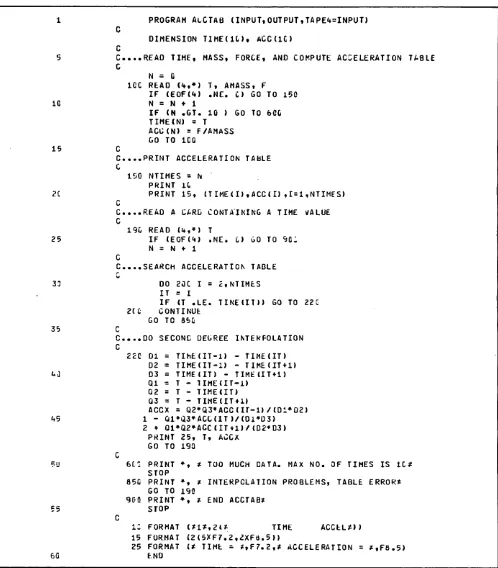
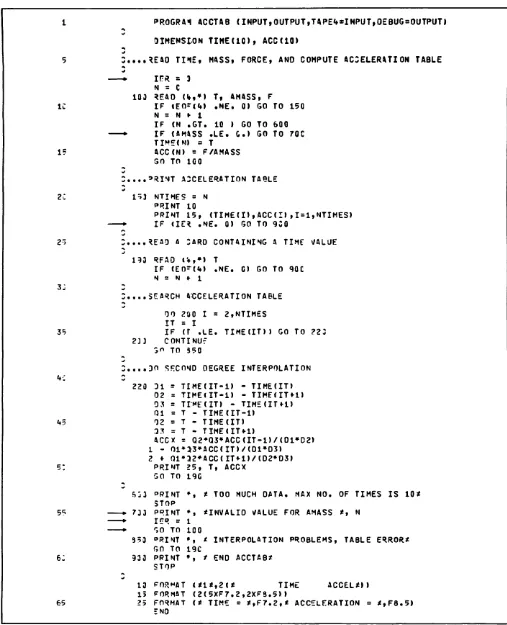
Program ACCTAB (figure 2-1) computes acceleration as a function of mass and force. It reads two sets of data cards. The first set is read in line 9 and contains three numbers per card, representing time, force and mass. These values are used to generate a table of time versus acceleration.
Acceleration is calculated in line 15 by the statement:
ACC (N) = F/AMASS
where ACC(N) is acceleration, F is force, and AMASS is mass. The variable AMASS is tested for a zero or negative value. The counter N is incremented each time a card is read. If N exceeds the maximum allowable table size, a message is printed and execution terminates. The variable NTIMES contains the total number of time values in the table. When the first set of cards has been read, the table is printed.
The program then reads the second set of cards, which contains selected time values, one per card. A table search is performed for the time values immediately above and below the input value. In lines 30 and 31, each time value is tested for validity. If a time is outside the table bounds, a message is printed and the next card is read. In lines 46 through 55, a second degree interpolation is performed for the acceleration value. This is accomplished by the formula:
A m y ( T - T 1 ) ( T - T 2 ) A 0 ACCX = (T0-T1)(T0-T2)
(T-T0)(T-T2)A1 " (T1-T0XT1-T2)
(T-T0)(T-T1)A2 + (T2-T0XT2-T1)
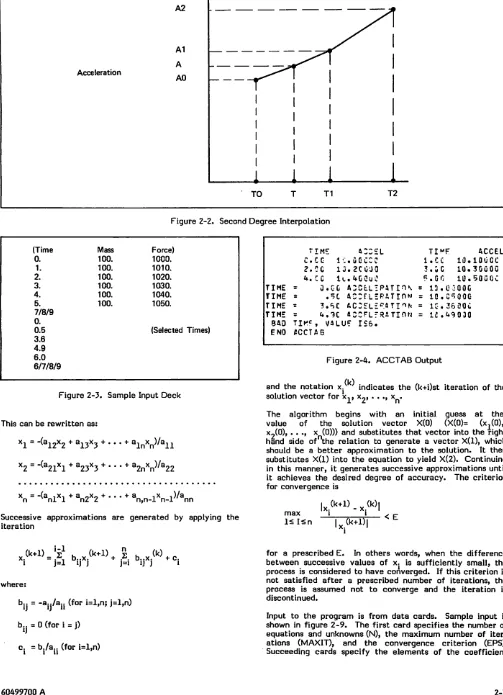
where T is the input time, AO, Al, and A2 are tabular acceleration values corresponding to the time points TO, Tl, and T2, and TO < T £ Tl. A diagram of interpolation is shown
in figure 2-2.
Since, for a given input time, two tabular points beyond that time are required for interpolation, special processing is included in lines 31 through 33 for times falling between TIME(N-l) and TIME(N), where TIME(N) is the last point in the table. After the interpolation has been performed, time and acceleration are printed, the next card is read, and so on, until all input times have been processed. A sample input deck is shown in figure 2-3; the output is shown in figure 2-4.
Statements in the program test for table overflow (line 12), for an invalid value for AMASS (line 13), and for a zero divisor in the formula (line 49). The development of this
program is explained in section 4.
is applied to generate successive approximations to the equation f(x) = 0, where x. is the current approximation, x. . is the new approximation, and f*(x) represents the derivative of f(x). The test for convergence is:
xi-l' < eps
where eps is a constant indicating the desired degree of accuracy.
In the example, the equation to be solved and its derivative are
f(x) = sin(x) - (x+l)/(x-l) f(x) = cos(x) + 2/(x-l)2
The equation and its derivative are provided in the form of statement functions (lines 13 and 17); these can be easily replaced to apply the procedure to other functions. A data card is read containing the following information:
XO Initial approximation to f(x) = 0 (real)
EPS Convergence criterion (real)
I T M A X M a x i m u m n u m b e r o f i t e r a t i o n s ( i n t e g e r ) ; ensures that the program terminates even when the function fails to converge.
The DO-loop applies the iteration formula to calculate a new approximation XI (line 23) and tests for convergence (line 26). If convergence has not occurred, the new approximation XI becomes the current approximation XO and the iteration is continued until either the process converges or the maximum number of iterations is reached. In either case, an appropriate message is printed and processing terminates. Sample input for the program is shown in figure 2-6, and the output generated from that input is shown in figure 2-7.
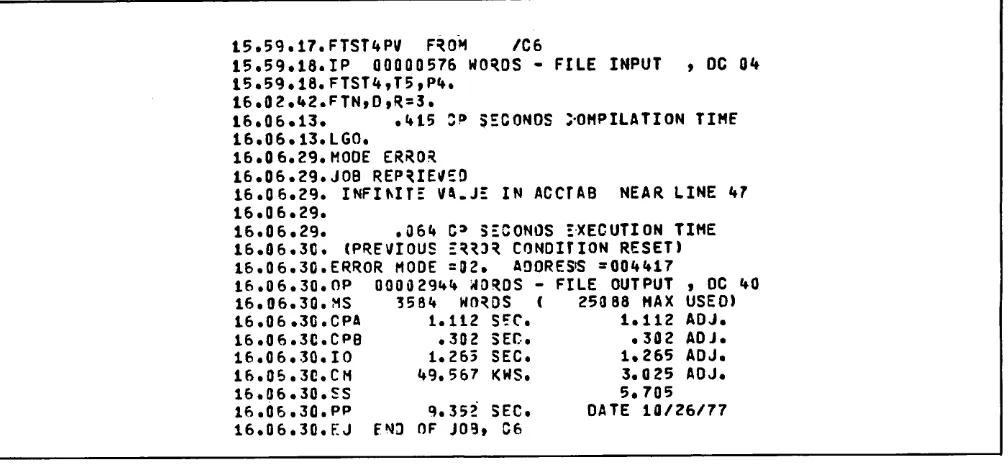
Line 20 tests for a zero value for the derivative; otherwise the division in line 23 produces an infinite value and the program aborts.
GAUSS
Program GAUSS (figure 2-8) solves a linear system of N equations in N unknowns by the Gauss-Seidel method. The system is of the form:
+ a. x = b. I n n 1
21xl + a22x2 + ,2nxn!sb2
nl*l * dn2*2 n n n n
15
2C
25
33
35
kC
V=>
55
65
7C
PR0GRA1 ACCTAB (INPUT,OUTPUT ,TAPE«»=INPUT> D I M E N S I O N T I M E ( 1 0 ) , A C C ( I C )
*SAO THE, MASS, FORCE, ANO COMPUTE ACCELERATION TABLE N * C
IER » 3
130 REAO (%,*) T, AMASS, F
IF <EO-(U) .NE. 0) GO TO 15C N = H *■ 1
IF IN .GT. 10 ) GO TO 600
ZF (AMASS .LE. 0.) GO TO 70C
TIME(N»; = T
ACC(NI * F/AMASS GO TO XOC
C....PRINT A3CELERATION TABLE 150 NTIMES * N
PRINT 10
PRINT 15, (TlMEm,ACCU),1 = 1,NTIMES) IF (IE* .NE. 0) GO TO 900
C
S....REAO A SARD CONTAINING A TIME VALUE C
130 REAO (!»,*) T
I F C E O F U ) . N E . fi ) G O T O 9 0 0
N = N r 1
IF (T .'LT. TIME(l) .OR. T .GT. TINECNTIMES) ) GO TO 800 IF (T .LE. TIME(NTIHES-D) GO TO 195
IT = NTIMES - 1 GO TO 220
.SEARCH ACCELERATION TABLE 195 LIH * HTINES - 1
OO 200 I * 2,LIM IT s I
IF if .LF. TIMEUTH GO TO 220 233 CONTINUE
GO TO 95C
DO SECOND DEGREE INTERPOLATION
223 DI = TIMECIT-1) - TIME(IT) 02 = TIME(IT-l) - TIME(IT*1) 03 = TIMEIITI - TIME<IT«-1)
I F ( D I . E Q . 0 . . O R . 0 2 . E O . C . . O R . 0 3 . E Q . 0 . ) G O T O 8 5 0
Ol = T - TIME(IT-l) 32 = T - TIME(IT) 03 = T - TIMEiIT»l)
ACCX = Q2»Q3»ACCCIT-1)/(01*D2> 1 - 0 1 » I 3 * A C C C I T ) / ( 0 1 * 0 3 ) 2 ♦ Q l * a 2 » A C C ( I T * l ) / ( D 2 » 0 3 )
P R I N T 2 5 , T, A C C X GO TO 190
SOD PRINT », * TOO MUCH OATA. MAX NO. OF TIMES IS 10* STOP
730 PRINT •;, ^INVALID VALUE FOR AMASS *, N I * R * t
GO TO 100
930 PRINT •, * BAD TIME, VftLUE IS*, T
SO TO 190
353 PRINT *, * INTERPOLATION PROBLEMS, TABLE ERROR* 30 TO 190
933 PRINT »;, t END ACCTAB* STOP
1 3 F O R M A T ( * 1 * , 2 < * T I M E A C C E L * ) ) 15 FORMAT (2(5XF7.2,2XF8.5))
2 5 F O R M AT < * T I M E = * , F 7 . 2 , * A C C E L E R AT I O N = * , F 8 . 5 ) END
A^S.
< ^ V
/"^(V
Figure 2-1. Program ACCTAB
2-2 60499700 A
/SiP^v
/fSN
Figure 2-2. Second Degree Interpolation
0m\
0§^S
(Time Mass Force) 0. 100. 1000. 1. 100. 1010. 2. 100. 1020. 3. 100. 1030. 4. 100. 1040. 5. 100. 1050. 7/8/9
0.
0.5 (Selected Times) 3.6
4.9 6.0 6/7/8/9
Figure 2-3. Sample Input Deck
This can be rewritten as:
x1 = -(a12x2 + a13X3 + ... + alnxn)/a11
x2 = -(a21x1 + a23x3 + ... + a2nxn)/a22
n n l 1 n Z Z n , n - l n - l n n
Successive approximations are generated by applying the iteration
x.^«=:^b..x.<i<*»,s b,x.«.o.
i j = i i j j j = i i j j iwhere:
yp&j^v
bj- = -aijA»ii (for i=l,n; j=l,n)
b.. = 0 (for i = j)
c. = b./a.. (for i=l,n)
t i m e : a : : s l
T I M F A C C E Lc c c l c . a e c c e
l . C C 1 0 . 1 0 0 C C2 . C C 1 3 . 2 C C a O 3 . G C 1 0 . 3 0 0 0 0 U . Z O l ( . , 4 C 0 u 0 F. G O 1 0 . 5 0 C O C TIME O . G C A 3 C t LT P 4 T i n \ = 13.0 3QOG TIME = . S l A C : r . L s R A T I O M = 10.C500G TIME = 3 . < S C A C : f L £ = , . a T I ^ N = 1C-.36 2QC TIME = 4 . 1 C « C C F L f R A T I 0 N = 1 2 . 4 9 0 3 0
BAO T I K C , VA L U ? I S 6 . ENO ACCTAB
Figure 2-4. ACCTAB Output
and the notation x solution vector for x
(k)
indicates the (k+i)st iteration of the
X o , • . . , x .
v «2
T h e a l g o r i t h m b e g i n s w i t h a n v a l u e o f t h e s o l u t i o n v e c t o r
i ni ti al X(0) (X(0)=guess
a t t h e (x^O), x?(0), .. ., x (0))) and substitutes that vector into the right hand side of the relation to generate a vector X(l), which should be a better approximation to the solution. It then substitutes X(l) into the equation to yield X(2). Continuing in this manner, it generates successive approximations until it achieves the desired degree of accuracy. The criterion for convergence is
lx5(k+1> - x<k>l m a x l i
l < I < n
T^kTITf
< E
for a prescribed E. In others words, when the difference between successive values of x. is sufficiently small, the process is considered to have converged. If this criterion is not satisfied after a prescribed number of iterations, the process is assumed not to converge and the iteration is discontinued.
Input to the program is from data cards. Sample input is shown in figure 2-9. The first card specifies the number of equations and unknowns (N), the maximum number of iter ations (MAXIT), and the convergence criterion (EPS). Succeeding cards specify the elements of the coefficient
[image:17.610.65.568.63.758.2]<* *
PROGRAH NEKTON (INPUT, OUTPUT, TAPE5«0UTPUT)
PROGRAM JNEMTON* FINOS THE ROOTS OF THE EQUATION OEFINEO IN THE FUNCTION STATEMENT BY NEHTON*S METHOO. THE FOLLOHIMG VALUES ARE
5
c
INPUT-J
c
X 9 . I N I T I A L A P P R O X I M A T I O Nc
EPS CONVERGENCE CRITERION10 f x I I'M AX MAXIMUM NUMBER OF ITERATIONS r t
EQUATION TO BE SOLVED
rf
* F I X ) = S I N ( X ) - < X » 1 . 0 ) / < X - 1 . 0 )
15 rf DERIVATIVE OF EQUATION
rf
D E R I V ( X ) = C O S < X ) ♦ 2 . 0 ' ( X - 1 . 0 > * * 2
rf
REAO *, XO, EPS, ITNAX
20 I F ( D E * | V ( X 0 » . E Q . 0 . 0 ) G O T O 3 0 0 DO 100 1*1,ITMAX
I T S * I !
X I = X B - F ( X Q ) / O E R I V ( X 0 ) Y » FCC1)
25 P R I N T • ; , * x , v a , X 0 V V
IF CAQSKX1 - X0) .LE, EPS) GO TO 200 XO s XI
100 CONTINUE
H R I T E ( 5 , 2 0 ) I T M A X
30 STOP
2 9 0 M R I T E 1 5 , 1 0 ) I T S , X O STOP
300 WRITE <5,30) X0 STOP
35
ia
FORMAT (* METHOO HAS CONVERGEO IN *,I3,* ITERATIONS*,//* X = *, L E 1 2 . 4 )29 FORMAT <* METHOO HAS NOT CONVERGED IN *,I3 ,* ITERATIONS*// 1,* EXECUTION TERMINATED*)
30 FORMAT <1X,E12.4, * IS INVALIO VALUE FOR X0«)
40 ENO
0ztf®§\
S * ^ K
Figure 2-5. Program NEWTON
0.0 ,0001 10
Figure 2-6. Input to NEWTON
matrix: each card contains the value of the element and two integers indicating the position of the element within the matrix. Zero elements need not be included.
The program begins by reading the input deck and scanning for errors (lines 42-48). If an error is encountered, the card number is printed along with an appropriate message and processing terminates after the entire deck is scanned.
Once the matrix has been read and stored in array A, the program applies the Gauss-Seidel scheme to generate the solution values. The solution values are stored in array X. An initial approximation for each value of X is required to initiate the process. For the sake of simplicity, the values of X are initially set to 0.
Three nested DO-loops control the iterative process (lines 56-72). Each pass through the outer loop constitutes
X , Y 0 . . 1 7 2 8 0 5 3 0 3 2 0 3 3
X,Y -.3333333333333 • 01 S76*»99«»5L7376 X,Y -,«»16815892«*31 .00Q0113375%253679 X , Y - . 4 2 0 3 5 6 4 5 3 5 8 ^ 2 3 . t 9 7 7 9 7 5 8 2 2 ' 8 8 E - U METHOO HAS CONVERGED IN h ITERATIONS
X = - . 4 2 0 4 E * 0 0
^*^\
Figure 2-7. Output from NEWTON
one iteration. The variable MAXIT is used as the upper limit, allowing the process to terminate if convergence does not occur within the specified number of iterations. Each pass through the middle loop yields a new approximation XNEW for a particular element of the solution vector. The
inner loop sums the rows of the matrix.
The variable CNV is initially set to 0. After an approxima tion to a particular x has been calculated, CNV is set to the difference between the new approximation and the previous approximation, if the difference is greater than the current contents of CNV. Thus, CNV always contains the maximum of the differences between the new and previous
values of the solution vector.
10
15
23
25
3C
35
40
45
50
55
6C
65
133 150
PROGRAH GAUSS <INPUT»0UTPUT,TAPE%*INPUT,TAPE5«0UTPUT)
PROGRA* 'GAUSS* SOLVES A LINEAR SYSTEM OF H EQUATIONS IN N JNKNOUNS BY THE GAUSS-SEIOEL METHOD. INPUT IS FROM CARDS. THE FIRST CARD CONTAINS THE
VALUES
N N U H B E R O F E Q U AT I O N S A N O U N K N O W N S MAXIT MAXIMUM NUHBER OF ITERATIONS E P S C O N V E R G E N C E C R I T E R I O N
SUCCEEDING CAROS CONTAIN ELEMENTS OF THE COEFFICIENT MATRIX. EACH CARO CONTAINS THE FOLLOWING VALUES
I R O W P O S I T I O N O F E L E M E N T ( I N T E G E R ) J C O L U M N P O S I T I O N O F E L E M E N T ( I N T E G E R ) ELEMNT VALUE OF COEFFICIENT (FLOATING POINT)
ZERO COEFFICIENTS NEEO NOT BE INCLUDED. THE INPUT OECK IS SCANNED FOR ERRORS.
AFTER A IS REAO, THE NEXT N CAROS CONTAIN VALUES FOR 8.
D I M E N S I O N A ( 5 0 , 5 1 ) , X ( 5 C )
INITIALIZE WORKING ARRAYS
NCARD * 1 i r R R * 0
OO 150 1=1,50 X U ) = 0 . 0
on ioo j=i,50
A l l , J ) = 0 . 0 CONTINUE CONTINUE
REAO FIRST CARO CONTAINING PARAMETER VALUES FOLLOWED BY CARDS CONTAINING COEFFICIENTS
900
233
353
359
330
READ ( V , * ) N , M A X I T, EPS I F »Ef>P(4I • NE. 0 . 0 ) GO TO I F (N . G T. 50) G 0 TO 910 RFAO <
'
♦
.»»
I t J i ELEMNT I F (EC - ( 4 ) ) 3 3 3 , 350 NCARO = NCARD ♦I F ( I .=LT. 1 .OR . I • GT. N I F ( J . L T . 1 .OR • J . G T. N A ( l , J » = ELEMNT
GO TO 200 IERR =
ORINT »., *ERROR ON CARD *, GO TO 200
I F ( I ? RR .1* E . 0 ) GO 'TO 650
GO TO 360 N fi ) G O TO 3 6 0
NCARO
'
♦0 9
509
BEGIN ITERATION
DO 600 ITS=1,MAXIT CNV = 0.0
DO 500 1=1,N S U I = 0 . 0
DO 400 J=1,N
I F ( J . N E . I ) S U M = S U M ♦ A ( I , J ) * X ( J ) CONTINUE
X N E W = ( A ( I , N + 1 ) - S U M ) / A ( I , I ) TEMP = ABS(X(I) - XNEW)/XNEW CN/ = AMAX1 (CNV,TEMP)
XU) = XNEW CONTINUE
TEST F:rR CONVERGENCE
Figure 2-8. Program GAUSS (Sheet 1 of 2)
70
IF ONV .LE. EPS) GO TO 700 630 CONTINUE
PRINT », ^PROCESS HAS NOT CONVERGED IN *,MAXIT,* ITERATIONS* 650 PRINT *, *EXECUTION TERMINATED*
75 STOP
739 PRINT »:, *PROCESS HAS CONVERGED IN *,ITS,* ITERATIONS* PRINT *, *SOLUTION VALUES ARE*
PRINT 30, (X(I),I=1,N> 33 FORMAT (1X,8E12.4)
80 STOP
930 PRINT *, *INSUFFICIENT INPUT OATA, CANNOT CONTINUE* STOP
910 PRINT », *N * *,N,* IS TOO LARGE: MUST BE .LE. 50* STOP
85 ENO
/*^\
Figure 2-8. Program GAUSS (Sheet 2 of 2)
3 50 .0001 1 1 10. 1 2 1. 1 3 1. 1 4 24. 2 1 1. 2 2 10.
2 3 1. 2 4 24. 3 1 1. 3 2 1. 3 3 10. 3 4 24.
Figure 2-9. Input to GAUSS
At the completion of each iteration, CNV is compared with the convergence criterion EPS; if convergence has occurred, the solution values are printed and processing terminates. If convergence does not occur within the specified number of iterations, an appropriate message is printed and processing terminates. Figure 2-10 shows the output produced from execution with the input shown in figure 2-9.
PROCESS HAS CONVERGED IN 5 ITERATIONS SOLUTION VALUES ARE
. 2 0 0 0 E « - 0 1 . 2 0 0 0 E + 0 1 . 2 0 0 0 E + 0 1
containing 3742B in columns 10-14. Then the array OCT would contain the values shown in figure 2-12. After the number is decoded, the contents of array IA would be as shown in the same figure.
For each character, the DO-loop does the following:
Lines 24, 25 Tests for blank or B; the B must be at the end of the string.
Line 28 Tests for sign; + or - is the last character processed
Line 29 Tests for non-octal digit
Line 30 Tests for too many digits
L i n e 3 1 C o n v e r t s d i s p l a y c o d e d o c t a l d i g i t t o internal format by subtracting 1R0 (33B)
Line 32 Sums place value of digit to form decimal number
When all digits of an octal number have been processed, the decimal number is signed and printed. In the above example, the procedure for converting to decimal is
3x83 + 7x82 + 4x8 + 2 = 201810 Figure 2-10. Output from GAUSS so that 2018 is printed.
OTOD
Program OTOD (figure 2-11) reads display coded octal numbers and converts them to decimal numbers. Input is from cards containing a single octal number, with up to 20 digits, appearing anywhere within the first 30 columns; the B suffix is optional. Octal digits are positive integers written in base 8 notation; therefore, they can only contain the digits 1 to 7.
The octal numbers are read according to 3R10 format specification. This produces a right-justified, zero-filled string 30 characters long contained in array OCT. The DECODE statement strips off each display coded octal digit and stores it in array IA in reverse order. The format specification produces an array of right-justified, zero-padded characters. For example, suppose a card is read
A test for end of file is included after the READ statement; when all input cards have been read, a message is printed and processing terminates.
LINK
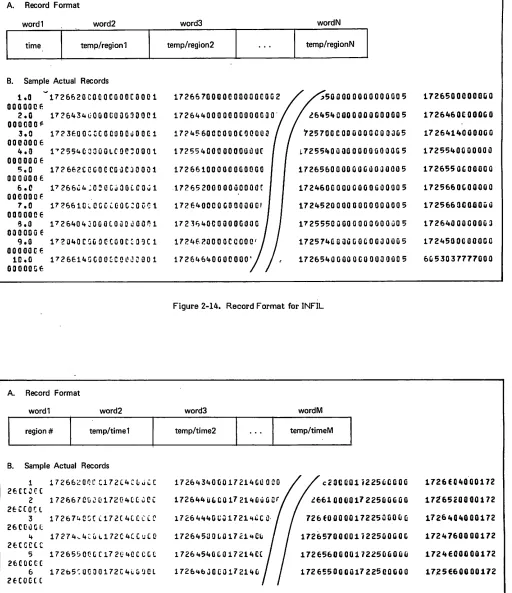
Program LINK (figure 2-13) assumes that a previously executed scientific program has calculated temperatures for regions of a grid at specified time intervals and that the results have been written to a file called INFIL. For each time point there is a record containing the time value, the region numbers, and the region temperatures. Regions and temperatures are packed into single words, with a region number in the lower half of a word and the temperature in the upper half. The record format and some sample records are shown in figure 2-14.
/SisSV--2-6 60499700 A
Program LINK reads the entire input file, reformats the data, and writes a new file called NEWFIL. In NEWFIL, there is one record for each region. Each record contains the region number, the time points, and the temperature at each time point, as shown in figure 2-15. Time values and associated temperatures are packed into a single word, with a temperature in the upper half of a word and the time in the lower half.
An array in ECS (Extended Core Storage) or LCM (Large Core Memory) is allocated for data read from the input file (line 8). The LEVEL statement defines the type of memory
allocated for the array. Since data assigned to level 3 cannot be referenced in expressions, the MOVLEV subroutine is used to transfer the data to and from central memory.
The first record is buffered in and the length is obtained from the LENGTH subroutine (lines 20-23). The loop (lines 26-34) does the following: the time value, from the first word of the record, is stored in a separate array and the record is moved from the input buffer to ECS with the MOVLEV subroutine. The variable I, used as a pointer to the next available location in the ECS array, is incremented by the record length. If the value of I exceeds the array
iijPx
r \ PROGRA"! OTOO (INPUT,TAPE4=INPUT,OUTPUT) Irf
n
rf PROGRAM *OTO0* REAOS OCTAL NUM9ERS CONTAINING UP TO 20 OIGITS
rf
AND CONVERTS THEM TO DECIMAL. INPUT IS ON CARDS? THE NUMBER MAY BE 5rf
ANYWHERE WITHIN THE FIRST 3C COLUMNS, AND THE B SUFFIX IS OPTIONALrf
INTEGER OCTC3), OEC D I M E N S I O N I A ( 3 3 )
i :
rf
PPINT 5 0
rf
RFAO AND OECOOE DISPLAY CODED OCTAL NUMBER
rf
130 R FAT 1 4 , 1 0 ) O C T
15 I F ( E 0 * ( 4 ) . N E . 0 ) G O T O 3 0 C J s C
OFC = 3
DECODE (3C,l5,OCT) (IA ( 30-H-l) ,1 = 1, 30)
2 ;
rf rf
r, CONVERT DISPLAY TO INTERNAL, THEN TO DECIMAL u
O O 2 0 0 I = l t 3 U I O I G = I A ( I )
IP(IDIG .EQ. 1R ) GO TO 2CC 25 I F ( I D I G . N E . 1 R 9 ) G O TO 1 5 0
I F ( J . E Q . 0 ) G O TO 2 0 0 GO TD 850
153 I F ( I D I G . E Q . 1 R « - . O R . I D I G . E Q . 1 R - ) G O T O 2 5 0 I F ( I D I G . LT. 1 R 0 . O R . I O I G . G T. 1 R 7 ) G O T O 7 0 0 33 I F ( J . G T. 1 9 ) G O T O 7 5 0
I O I G = I O I G - 1 R 0 OEC = DEC «• IOIG*8»»J
J = J f 1
35
%
*
223 CONTINUE
253 IF ( J .E Q. 0) GO TO 7G 0 I F ( I O I G . E Q . 1 R - ) O E C = - D E C P R I N T 2 0 , ( O C T ( I ) , I = l , 3 ) , O E C SO TO 100
4£ 730 P R I N T 3 0 , ( O C T ( I ) , I = l , 3 l GO TO 100
753 PRINT 30 sn TO 100 933 PRINT *0
45 STOP
35fl PPINT 7C GO TO 100 13 FORMAT (3R1C) 15 FORMAT (30R1)
50 23 F O R M AT ( 3 ( 1 X A 1 0 ) , 1 X 1 2 0 )
33 FORMAT (3(1XA10), * IS NOT AN OCTAL NUMBER*)
♦3 FORMAT (* END OTOD*)
33 F O R M AT ( * 1 O C TA L * , 2 0 X , * O E C I M A L * )
30 FORMAT (* INPUT NUMBER HAS MORE THAN 20 DISITS*) 55 73 FORMAT (3(1XA10), * CONTAINS B OUT OF SEQUENCE*)
ENO
Figure 2-11. Program OTOD
boundary, a warning message is printed; no more data is read but processing continues on the incomplete array. The next record is read and the record counter NTIMES is incre mented; if NTIMES exceeds its limit, a warning message is printed and the incomplete array is processed. Records are read and stored in this manner until either the end-of-file is reached or the ECS array is full.
The program reads the two files and, for each test, calculates the probability that a student will answer each question correctly, calculates a correlation coefficient, calculates a new probability for each question, and writes a new file. The output file record contains the test number, number of students, and the probability that a student will answer each question correctly. The output record format, along with some sample records, is shown in figure 2-18.
When the entire file, or as much of it as possible, has been read and stored in ECS, lines 38 through 48 construct the output records and write the output file NEWFIL. Each pass through the outer DO-loop constructs a single output record; each pass through the inner DO-loop stores a single word in the output record. On the first pass through the inner loop, the first input record is transferred to central memory via MOVLEV; its time value is packed with the temperature value of the first region and stored in the output buffer OUT to form the second word of the output record. On the second pass, the second input record is moved to central memory, and the time value is packed with the temperature, value for the first region to form the third word of the first output record. When all times and temperatures for the region have been stored in the output buffer (inner loop completed), the region number is stored in the first word of the output buffer and the new record is written. Then, under control of the outer loop, the subsequent records are constructed and written in a like manner, until the entire array has been processed.
CORCO
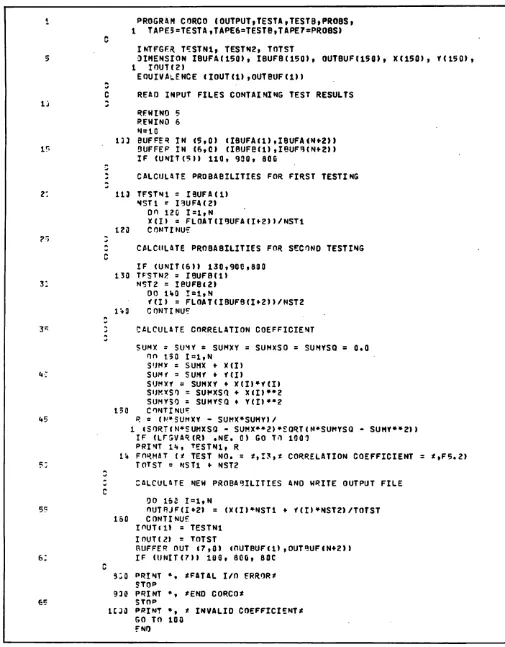
Program CORCO (figure 2-16) assumes that a series of standardized tests has been given to two groups of students, and that the results have been stored in two corresponding files. For each test there is a record containing the test number, the number of students who took the test, and the number of students who correctly answered each question on the test. The record format, along with some sample records from both files, is shown in figure 2-17.
OCT:
OCT(1) 55555555555555555536 OCT(2) 42373502555555555555 OCT(3) 55555555555555555555
IA:
IA(1) blanks IA(2) blanks
IA(17) 00000000000000000002 IA(18) 00000000000000000035 IA(19) 00000000000000000037 IA(20) 00000000000000000042 IA(21) 00000000000000000036 IA(22) blanks
The program begins by reading a record from each file. Since data from the first file is needed immediately, the input operation on unit 5 must be complete before proc essing can continue; unit 5 is tested immediately after the
BUFFER IN. However, data from the second file is not needed until later in the program; therefore, processing can continue while the input operation on unit 6 is in progress. Since execution of the UNIT function loops until input is complete, it should not be executed until just before the
data is needed.
When the first BUFFER IN has completed, the loop (lines 22-24) calculates the probability that a student will answer a question correctly.
P = No. of correct answers No. of students
Figure 2-12. Arrays OCT and IA in Program OTOD
After this calculation, data from the second file is needed. Unit 6 is tested; when the input operation has completed, the record from the second file is processed in the same manner as the record from the first file.
Lines 37 through 46 calculate the correlation coefficient for corresponding records of the two files. The formula is shown in figure 2-19. In the figure, X and Y are the probabilities for the first and second testings, respectively, and N is the number of students who took the test. The correlation coefficient has a value between -1 and 1. A negative coefficient indicates unreliable data. The test number and coefficient are printed. An example of the printed output is shown in figure 2-20.
When every question on a test was correctly answered by the same number of students, the divisor in the formula became zero, and the correlation coefficient infinite. Therefore, the LEGVAR function is used to check this possibility (line 47).
New probabilities are calculated by the relation:
NEWPR = (NXX + N2Y)/(N1 + N2)
where N, is the number of students in the first testing, N2 is the number in the second testing, and X and Y are as before.
The output record is written in line 55.
Records are read and processed in this manner until an end-of-file is encountered on either of the input files.
^ n ® £ \
. ' ^ ^ 1
«*^§\
'<s%
<*s^jl
PROGRAH LINK (OUTPUT,LNKFIL,TAPE4=LNKFIL,NEWFIL,TAPE5=NEMFIL)
PROGRAM »LINK* READS A BINARY FILE CONTAINING TINE
4 / HISTORY OATA, REFORMATS THE DATA, ANO WRITES THE REFORMATTED
5 DATA TO A NEW FILE
^
COMMON /ECSCOM/ ECSBLK(5000) LFVFL 3, ECSBLK
OIM EN SI ON IN 8U F( 50) , OU TB U F( 50) , T IH E C 5Q)
IG D ATA M A S K U / 7 7 7 7 7 7 7 7 7 7 0 0 0 0 0 0 0 0 0 0 3 / , M A S K L / 7 7 7 7 7 7 7 7 7 7 8 /
1 = 1 J = 1 NCARD = 1 15 NTIMES = 1
^ W I N P t ,
A
w RPAD FIRST RECORD TO DETERMINE RECORD LENGTH
2 : P U F F F F I N ( 4 , 0 ) ( I N 3 U F ( 1 ) , l N 9 U « r ( 5 0 ) ) IP (UNIT (4 M 100, 8GC, 802
133 LFMREC = LENGTH(4»
^ IF (LFNPEC.GT.5C) GO TO 9CC
2 " r\ RFAO PEMAINDER OF FILF AND STORE IN ECS/LCM
* S
110 T I M E ( N T I M E S ) = S H I F T ( I N B U F ( 1 ) , 3 C ) . A N O . M A S K L C A L L M O V L E V ( I N B U F ( l ) , E C S 9 L K ( I ) , L E N R E C ) I = I ♦■ LFNREC
3 : 5 U F F F P I N ( 4 , C ) ( I N R U F ( l ) , I N ? U F ( L E N R E C > ) NTIMES = NTIMES ♦ 1
IF (NTI«MES .GT. ^C) GO TO 9GC I r ( U M T C I I 1 1 0 , 2 C 0 , 3 C C
35 ALL OATA IS IN lCS. MOVE TO SCM, REFORMAT, ANO WRITE NEW FILE
2:o mtimpc = NTIMES - 1 OO 7ufl 1=2,LENREC I I = 1
U~ OO 25C J=l,NTIMES
C A L L M O V L E V ( E C S B L K d l ) , I N B U F ( l ) , I ) I I = I I * L E N R E C
OUTPUFU + l) = (INPUF(I) .ANC. MASKU) .OR. TIME(J) 253 COMTINUE
U5 O U " 3 U F ( l ) = I N B U F ( I > . A N D . M A S K L
S U F F E R O U T ( 5 , 0 ) l O U T B U F ( l ) , O U T B U F ( N T I M E S * l ) ) I F ( J N I T ( 5 ) ) 3 0 C , 8 C Q , 8 0 C
3 j 3 CONTINUE
5 .
«r
P O I N T * , * E N D L I N K *
313 PFINT ♦, * OISK I/O ERROR* STOP
9 i ? PRINT ♦, *INPUT FILE EXCEFOS PROGRAM LIMITS.*
55 PPINT *, *EXECUTION CONTINUING ?»UT SOME DATA MAY BE LOST* SO TO 2CC
END
0S&\
Figure 2-13. Program LINK
0^*,
A. Record Format
w o r d l w o r d 2 word3 wordN
time temp/region 1 temp/region2 temp/regionN
B. Sample Actual Records
1 . 0 ~ 1 7 2 6 6 2 0 C 0 C Q C Q 0 0 C 0 0 0 i 0 0 0 0 0 0 6
2 . 0 1 7 ? 6 4 3 u l - 0 0 O C 0 0 Q D 0 O 0 1 0 0 0 0 0 0 6
3 . 0 1 7 2 3 6 Q O C C C 0 G O 0 0 a 0 0 G l 0 0 0 0 0 0 6
4 . 0 l 7 2 5 5 4 C 3 C O O L C 0 C : 0 O 0 t 0 0 0 0 0 0 6
5 . 0 1 7 ? 6 6 2 C C C 0 C C 0 a C J O O G l 0 0 0 0 0 0 6
6 . C 1 7 2 6 6 C ^ : 0 2 C G j 0 0 u G 0 w 1 0 0 0 0 0 0 6
7 . 0 1 7 2 6 6 1 0 L C C C C 0 0 C : 0 C - C 1 0 0 0 0 0 0 6
8 . 0 1 7 2 6 4 Q 4 3 0 C 0 C Q G Q O 0 0 I H 0 0 0 0 0 0 6
9 . 0 1 7 ' 2 0 4 0 C C 0 0 C C C 0 C e 3 0 C l 0 0 0 0 0 G 6
1 D . 0 1 7 2 6 6 1 4 Q C 0 O G C O L ' J C a 0 1 0 0 0 0 0 & 6
1 7 2 6 6 7 0 0 0 0 0 0 0 0 0 0 C Q G 2
1 7 2 6 4 4 0 0 0 0 0 0 0 0 0 0 0 3 0 1 7 2 4 F 6 0 C C 0 0 0 C 0 0 0 0 0 1 7 2 5 5 4 0 0 0 0 0 0 0 0 0 0 C 1 7 2 6 6 1 0 0 0 0 0 0 C O O C Q 1 7 2 6 5 2 0 0 0 0 0 0 0 0 0 Q C 1 7 2 6 4 0 0 0 0 0 0 0 0 0 0 G I 1 7 2 3 6 4 0 C 0 0 0 0 G 0 0 C 1 7 2 4 6 2 0 0 0 0 C C O O C
17264640000000'
^500000000000005 264540000000000005 7257000000000000005 J.72554Q00Q000QGQ00G5 172656QQOOOQGG000005 172460G0OQCOGOC00005 17245200000000000005 17255500000000000005 1725740G0GCOCOO0QOG5 17265400000000000005
1726500000Q&0 1726460000000 1726414000OC0 1725540000000 172655OGOO000 1725660C0000Q 1725660000000 17264000G00G3 1724500C0OO0C
6053037777000
-^^•\
[image:24.610.39.551.56.649.2]z ' ' ^ .
Figure 2-14. Record Format for INFIL
A. Record Format
wordl word2 word3 wordM
region # temp/time 1 temp/time2 temp/timeM
B. Sample Actual Records
1 1 7 2 6 6 2 0 Q C C 1 7 2 C 4 C t u £ C 26CC0CC
2 1 7 2 6 6 ? C & : - i J 1 7 2 G 4 C C 0 e C 2 6 C C 0 C I
3 1 7 2 6 7 U 0 G C C 1 7 2 C 4 C C C L C 2 6 C 0 0 C t
4 1 7 2 7 4 . 4 C G L 1 7 2 C 4 C C u C 0 2€CCCCC
5 1 7 2 6 5 ' 3 0 G C C l 7 2 C ' ' t C e C C C 26CQCGC
6 1 7 2 b 5 r. 0 G 0 Q 1 7 2 C 4 i ; & f j e i 26C0CCC
172643400017214GC
172644u(,C0l72140vi
l 7 2 6 4 4 4 0 U 0 1 7 2 m t C
1 7 2 6 4 5 a 0 L fl l 7 2 l M C b
1726454GC017214CC
1726**6J0C0172140
c20CG01r£25i;COOO
6610000172250CG0O
6 ( 0 0 0 0 0 1 7 2 2 5 0 0 0 ( 1 0
6 5 7 0 0 0 0 1 7 2 2 5 0 0 0 0 0
6 5 6 0 0 0 0 1 7 2 2 5 0 0 0 0 0
6550G0017225GOCOO
1726(04000172 172*6520000172 1726404000172 1724760000172 1724600000172 17.25660000172
Figure 2-15. Record Format for NEWFIL
• ^ s
,/sffjtisv
0$S
PROGRAM CORCO (OUTPUTiTESTA,TESTB»PROBS,
c
1 TAPE5=TESTA,TAPE6=TESTB,TAPE7=PROBS)INTEGER TESTN1, TESTN2, TOTST
5 D I M E N S I O N I B U FA ( 1 5 0 ) , I B U F B ( 1 5 0 ) , O U T B U F ( 1 5 0 > , X ( 1 5 0 ) , Y ( 1 5 0 ) , 1 I O U T ( 2 »
r \
E O U I VA L E N C E ( I O U T ( l ) , O U T B U F ( D )
I J
READ INPUT FILES CONTAINING TEST RESULTS
w
RFWINO 5 REWIND 6 N=1G
133 BUFFER IN (5,0) (IBUFA(l) ,IBUFA (Nf 2) )
ir>
3 U F F E P I N ( 6 , 0 ) ( I B U F B ( l ) , I B U F 9 ( N » 2 ) )I F ( U N I T ( 5 ) ) 1 1 0 , 9 3 0 , 8 0 0
-*
CALCULATE PROBABILITIES FOR FIRST TESTING2 :
•*
113 T F S T N 1 = I B U FA ( l ) N S T 1 - I 9 U FA ( 2 )OO 120 1=1,N
X ( I ) = F L O AT ( I B U FA ( I f r 2 ) ) / N S T l
?ri
120 CONTINUE
c
CALCULATE PROBABILITIES FOR SECONO TESTINGI F ( U N I T ( 6 ) ) 1 3 0 , 9 0 0 , 8 0 0 130 T F S T N 2 = I B U F B ( l )
3: NST2 = IBUFB<2) OO 140 1=1,N
Y ( I > = F L O AT ( I B U F B ( I * 2 ) ) / N S T 2
f *
143 CONTINUE
3 * CALCULATE CORRELATION COEFFICIENT
*
»
SUMX r SUMY = SUMXY = SUMXSO = SUMYSQ = 0.0 OO 150 1=1,N
SUMX s SUMX «■ X(I)
u:
SUMY = SUMY * Y(I)SUMXr = SUMXY ♦ X(I)*Y(I) SUMXSO = SUMXSO ♦ X(I)**2 SUMYSO = SUMYSQ f Y(I)**2 150 CONTINUE
45 R = (M»SUMXY - SUMX*SUMY)/
1 (SORT(N*SUMXSQ - SUMX<^2>*EORT(N*SUMYSQ - SUMY»»2)) I F ( L F S VA R ( R ) . N E . 0 ) G O TO 1 0 0 0
PRINT 14, TFSTN1, R
14 F O R M AT ( * T E S T N O . = * , I 3 , * C O R R E L AT I O N C O E F F I C I E N T = * , F 5 . 2 ) ? : TOTST = NSTl f NST2
C
CALCULATE NEW PROBABILITIES AND WRITE OUTPUT FILE
OO 150 1=1,N
5? O U T R J F ( I * 2 ) = ( X ( I ) * N S T 1 *■ i ( I ) * N S T 2 ) / T O T S T 150 CONTINUE
I O U T ( l ) = T E S T N 1 I OUT (2) = TOTST
B U F F E R O U T ( 7 , 0 ) ( O U T B U F ( l ) , O U T « U F ( N * 2 ) ) 6 ; I F ( U N I T ( 7 ) ) 1 0 0 , 8 0 0 , 8 0 C
a;o
P R I N T * , * FATA L I / O E R R O R * STOP930 PRINT ♦, *ENO CORCO*
65 STOP
u j o
P R I N T • " , * I N VA L I D C O E F F I C I E N T * GO TO 100 [image:25.610.64.569.45.692.2]ENO
Figure 2-16. Program CORCO
A. Record Format
wordl word2 word3 word4
test no. no. of students #Q1 #Q2
B. Sample Actual Records
T E S TA
t I j C 99 93 97 96 95 94 9 3 9 2 9 1 9 0 2 ICC 65 76 95 95 * 8 31 97 3 5 9 8 4 7 3 ICC 93 64 97 54 65 71 9 3 1 7 9 2 8 9 4 ICC 65 66 26 98 94
°5
35 6 8 6 8 7 3 5 ICC 93 97 9U 93 65 65 8 7 87 5'+ 3 4 o 13 G 74 75 7*. 78 79 HI 9 3 5 6 6 5 9 3 7 IOC 99 98 95 9 3 89 84 78 7 1 6 3 5 4 3 ICC 71 72 73 74 75 76 77 7 3 7 9 8 0 9 10 0 21 23 25 27 29 31 3 3 35 3 7 3 9 10 ICC 94 66 59 73 * 1 - 25 98 6 3 1 2 5 8TEST B
1 ICC 6 9 89 73 43 53 93 68 98 9 9 8 8 2 IOC 63 31 79 77 75 73 7 1 6 9 6 7 6 5 'S IOC 99 69 11 79 21 6 9 31 5 9 4 1 4 IOC 9 9 69 11 80 22 7 2 34 6 5 4 7 5 1GC 98 61 73 91 47 85 9 8 6 6 7 9 5 8 6 ICC 94 94 85 73 48 93 &5 2 4 4 7 9 3 7 IOC 44 77 83 5 5 96 94 95 96 9 1 2 5 9 13G 75 75 75 75 75 75 * 75 7 5 7 5 7 5 9 IOC 75 42 75 31 75 22 75 1 2 7 5 1 6 10 IOC 96 94 65 32 21 54 . 65 8 7 6 5 3 2
Figure 2-17. Input Records for CORCO
A. Record Format
wordl word2 word3 word4
test no. no. of students P(Q1) P(Q2)
B. Sample Actual Records
1 2C0 . 8 4 . 9 4 . 3 8 72 . 7 7 . 9 6 . 8 1 . 9 5 . 9 5 . 8 9 2 2 0 0 . 7 4 . 7 9 . 8 7 86 . 7 2 . 5 2 • 84 . 5 2 .8 3- • 56 3 20Q . 9 9 . 3 3 . 9 3 38 . 8 2 . 4 6 . 8 1 . 2 4 . 7 6 . 6 5 4 2 0 0 . 3 2 . 3 5 . 5 9 . 55 . 8 7 . 5 9 . 7 9 . 5 1 . 6 7 . 6 3 5 2QG . 9 3 . 7 9 . 3 6 49 5 . 5 6 . 7 5 . 9 3 . 7 7 . 6 7 . 7 1 6 20C . 8 4 . 8 5 . 8 1 78 . 6 4 . 9 0 . 7 9 . 4 0 • 56 • 96 7 20C . 7 2 . 8 3 . 9 2 7 4 . 9 3 . 8 9 . 8 7 . 8 4 . 7 7 • 40 9 2 0 0 , . 4 3 . 3 3 . 5 0 29 . 5 2 . 2 7 . 5 4 . 2 4 • 56 . 2 8 ' 10
2 0 0 . 9 6 . 3 1 . 6 2 55 . 3 6 . 4 0 . 8 2 . 7 5 . 3 9 . 4 5
Figure 2-18. Records on File PROBS
j0Ss..
R =
N N N
N 2 XjYj - 2 Xj 2 Yj i = 1 i = 1 i = 1
/ N „ N " /
Vn 2 X:2 - ( 2 X:)2 Vn 2 Y:^ - ( 2 Y:
i=1 i=1 i=1 i=1
Figure 2-19. Formula for Correlation Coefficient
TEST KO. aoRRELATION COEFFICIENT - . 4 5 TEST NO, CORRELATION COEFFICIENT
.24
TEST KO. CORRELATION COEFFICIENT
.64
TFST NO. :oRRELArroN COFFrjciENT - . 4 2 TEST NO. CORRELATION COEFFICIENT • 27 TEST KO. CORRELATION COEFFICIENT
.59
TEST NO. CORRELATION COEFFICIENT
.12
INVALID (^EFFICIENT
TEST KO. CORRELATION COEFFICIENT - . 3 5 TEST KO.
IC
CORRELATION COEFFICIENT.26
END CCRCO
Figure 2-20. Printed Output from CORCO
0^\
y$SN