Digital
Technical
Journal
GRAPHICAL SOFTWARE D EVE LOPMENT
SYSTEMS ENGINEE RING
Editorial
Jan<.: C. 1\lakc, Managing Ediror Kathleen J\'1. Sr..:rson, Editor Hdcn L. Parrerson, Ediror
Circulation
Catherine: M. Phillips, Adrninisrrator Dor·orhea B. Cassady, Secretary
Production
Terri Aurieri, Producrion Editor AnneS. Katzcff, Typographer
Peter R. vVoodbury, Illustrator
Advisory Board
Samuel H. hrller, Chairman Richard W. Beam·
Donald Z. Harbert
William R. Hawe Ric bard J. Hollingsworrh Richard 1-'. Lrry Alan G. Ncmcrh Jean A. Proulx Roberr M. Supnik
Cover Design
DEC l'USE software, described in this issue,
is an integrated set of programming tools for UNIX developers. Our cover image of unique puzzle pieces being tittc:d rogcthcr conveys the DEC FUSE concept of an inte grated collection of independent tools cooperating within a graphical dcvclopmellt environment.
The cover was designed by Lucinda O'Neill of Digital's Design Group.
The: Digilctl Technical]ournu/ is a rdcrc:cd journal published quarterly by Digital Equipment Corporation, 30 Porter Road 1.)02/D I 0, Lirtleron, Massachusetts 01460. Subscriptions ro rhe.fournolare $40.00 (non-U.S $60) tor four issues and $75.00 (non-U.S. $115) lcH eight issues and musr be prepaid in U.S. tlrnds. University and collq;e prokssors and Ph. D. students in the electrical engineering and computer sci�nce fields receive complimentary sub scriptions upon request. Orders, inquir·ics, and address changes should be scm ro rhc D(qital Technical.fournalar the published by address. Inquir-\cs can also be scm elec tronically ro [email protected]. Single copies and back issues arc available for $16.00 each by calling DECdirect at 1-800-DJGITAL ( 1-800-344-4825 ). Recent back issues of t he journal are also available on rhe Internet at
hrrp:j jwww.digiral.com/into/DTJ/homc. hrml. Complete Digital Internet listings can be obtained by sending an electronic mail message to [email protected].
Digital employees may or-der subscriptions through Readers Choice by entering VTX PROFILE clt rhe system prompt. Comments on the conrenr of any paper are welcomed and may be sent ro the mmaging editor at the published-by or network address .
Copyright© l 995 Digital Equipment Corporation. Copying without fee is per mitted provided that such copies are made for usc in eduGrtional institutions by f.<eulry members and are nor distributed tor com mercial advantage. Abstracting wirh credit of Digital Equipment Corporation's author ship is perrnitted. All rights reserved. The intonmtion in rhejounwl is subject ro change without noricc and should nor be construed as a commitment by Digital Equipment Corporation or by rhc compa nies herein represented. Digital Equipment Corporation assumes no responsibility for any errors that may appear in the Journal. ISSN 0898-90 I X
Dou.rmcntation Number EY-UOO!E-TJ Book production was done by Quanti..: Communi..:cuions, Inc
Tbc following clrc rradem<rrks of Digital Equipment C:mporarion: Digital, the DIGITAL logo, ACrviS, CDD/ Repositorv, DEC, DEC: FUSE, DECI.rdebug, DECmcc, DEC:ner, DECsr:uion, DECwindows, ObjccrBrokcr, Open VMS, l'ATHWORKS, POLYCENTER, ULTIUX, VAX, VA)( 10000, VAX C, <lnd VAXcluster.
AJ X cmd IBM <lre registered trademarks and Common User Access is <1 trade mark of lntcrnarional Business Machines
C:orporarion.
AT&T and SeeSoft arc r·egisrcrcd trademarks of AnlCI·icm Telephone and Telegraph Company.
13T is a registered trademark of British Tekcon1municarions pic.
Fujitsu is a registered rradcm;lrk of Fujitsu Lim ired.
Hcwlerr-Packard, H P Soft Bench, and HP-UX are registered rradermrks of Hewlett-Packard Companv. Hitachi is a registered rrcrdemark of Hitachi, Ltd.
Hyper-Help is :r n·ackmark of Rrisrol Technology, Inc.
Lcgo is a registered rradernark of lnrerlego AG.
J'vlorif, OSF, and OSF/Morifarc regis tered trademarks of Open Sotnvarc Foundation, Inc.
MS and MS-DOS are regisren:d track marks and Windows and Windows NT are trademarks of Microsoft Corporation. NEC is a registered trademark ofNEC Corporation.
Object Plus is a trademark of Prorosoft, Inc. OPEN LOOK is a registered trademark of UNIX System Laboratories, Inc. Sun JVlicrosysrems is a registered trade mark and SPAR.Cworks <lnd Sun OS are trademarks of Sun Mi..:rosysrems, Inc. UNIX is a registered trademark in the United States and other countries, licensed exclusively through X/Open Colnpany Ltd. X/ Open is a trademark of X/Open Company Limited.
Contents
Foreword
GRAPHICAL SOFTWARE DEVELOPMENT
DEC FUSE: Building a Graphical Software Development Environment from UNIX Tools
Adding a Data Visualization Tool to DEC FUSE
SYSTEMS ENGINEERING
Multivendor Integration Architecture: Standards, Compliance Testing, and Applications
Integrating Applications with Digital's Framework-based Environment
Project Gabriel: Automated Software Deployment in a Large Commercial Network
Mal1endra R. Patel 3
Richard 0. Hart and Glenn Lupton 5
Donald A. Zaremba 20
Eric A. Newcomer 34
James R. Kirkley and William G. Nichols 47
Owen H. Tallman 56
2
Editor's
Introduction
The integration of distinct parts to form a useful alld dkctive whole is the underlying theme fix t\vo sets of topics in this issue. The opening papers describe the integration of program ming tools to create a graphical soft ware development environment. The second set of papers addresses the inte gration of large, complex systems systems that encompass all the software and hardware components needed to serve the user's purpose.
The DEC FUSE software develop ment product is designed to take advantage of UNIX workstations' graphical capabilities, supporting such programming languages as C, C++, and Fortran. Rich Hart and Glenn Lupton review the origins of DEC FUSE in the FIELD environ ment developed at Brown University and compare FUSE with similar envi ronments based on a tool integration model. The authors present t\vo key aspects of the product design: graphi cal user inrerf:1ces built on top of UNIX commands and a multicast messaging mechanism that allows the tools to work together.
A tool recently integrated into the
DEC FUSE suite is tl1e Data Visualizer, which allows software developers to display thousands oflines of code with associated statistics. Don Zaremba describes the process of taking the tool ri·om advanced development through implementation and relates what the engineers learned as they adapted current visualization research to their goals and built prototypes of the technology. He concludes with a description of the resulting product and plans for future work.
Digital Technical Journal
Our next three papers explore experiences with different aspects of systems-level engineering and inte gration. Eric Newcomer's overview ofrhe Multivendor Integration Architecture (MIA) effort, initiated by Nippon Telegraph and Telephone (NTT), highlights many factors that in general make systems imegration challenging. NIT sought, through standardization, to reso.lve the costly problem of incomp:nible application environments. Eric discusses the MIA's chosen direction based on the need
for portability, interoperability, and a common user interface. He then describes Digital's contribution in the area of distributed transaction processing and summarizes the MIA consortium's successes and continu ing work.
A specific object-oriented product developed to integrate systems appli cations is the subject ofJim Kirkley's and Wick Nichols' paper. Compris ing Jacobson's and Rumbaugh's methodologies, third -party software, and Digital's COREA-compliant ObjectBroker, the Framework-based Environment (FBE) product addresses the need for new and legacy applica tions to interoperate in a distributed manufacturing system. The authors step through a typical integration project and expand on trade-otis that must be addressed in an integration project that takes an object view of the system environment.
A major systems engineering proj ect to solve the problem of ongoing introductions of software into a large computer net\vork is described in the concluding paper by Owen Tallman.
Vol. 7 No.2 1995
The project, commissioned by a large French bank, extended over a net work of data center clustered servers, branch servers, and thousands of workstations and personal computers. Owen outlines tl1e customer's require ments and Digital's role as developer of the automated software deplov ment facility. He reviews the configu ration management model (CMM) and other models that were the basis for the project team's work. His dis cussion of the implemenration encom passes examples that illustrate the intricacies of a rigorously managed software deployment process.
The editors thank Mikacl Rolfhamre of Digital's UNIX Business Segment, Ed Balkovich of Digital's Corporate Research Group, and Hank Jakiela of the Systems Business Unit for their help in developing this issue. At the end of the issue, we also acknowledge and thank the referees for their very valuable reviews of manuscripts sub mitted during this past year.
Upcoming topics in the Journal are Digital's high-performance Fortran compiler and parallel somvare envi ronment, and the Sequoia 2000 global change research project.
Foreword
Mahendra R. Patel
Corporale Consulting Ellp,ineer
Vice President, Systems Engineering
Systems engineering is the engineer· ing of complete systems as opposed to parts of systems. Exactly vvbat this means depends on one's point of view. One person's system is another person's component. From chips to boards to boxes to clusters to net works, subsystems are combined into ever larger and more complex aggre gates. At Digital, systems engineering means the engineering of systems at a level of aggregation above individ ual hardware or software products. Individual processors, storage subsys tems, network hubs, operating systems, database systems, and applications are viewed as components of the system. For example, a nationwide network for interactive securities trading, built from hundreds of nodes at dozens of sites, is one system.
A number ofu·ends in the computer industry make it more challenging for a computer company to practice sys tems engineering:
• Commoditization: Component
products, from microprocessors to applications, are increasingly becoming low-cost, high-volume commodities . Ironically, as the cost of the components drops, the cost of integrating them into complete systems becomes a larger fraction of total system cost.
• Distributed systems: While they provide new opportunities for bet ter performance, scaJing, and fault tolerance, distributed systems also present new engineering challenges for ensuring these same attributes.
• Heterogeneous systems: Increas
ingly, computers from a variety of vendors, running a variety of oper ating systems, are being connected
together and are expected to work together correctly.
• Complexity: Distributed systems
arc becoming more complex tor a number of reasons. The number of components is growing. The number of types of components that must work together is grow ing. And the variety of unique configurations is growing.
During the last decade, the computer industry has changed fi-om one that oHered vertically integrated systems built hom proprietary crus, disks, networks, operating systems, and layered products to one that pro duces commodity products conf(>rm ing to de jure or de fJ.cto standards. Unlike the manufacture of automo biles or aircraft, a single computer manufacturer seldom produces all the components of a complete work ing system. The hardware, system software, and applications often come from three djffcrent vendors. Systems engineering, as now practiced in the computer industry, places less empha sis on top-down design of hardware and software components and their interfaces to meet system-level goals. Rather, it is based on anticipating a broad spectrum of system designs.
From the point of view of a com puter company, systems engineering
must now be concerned with assem blies of commodity hardware and software products. Thus, four areas are of special interest to systems engi neering in the computer industry: interoperability, performance, scala bilit)', and availabilit)'.
lnteroperability of components, including components from different vendors, is difficult to veri�' because
4
of the virtually infinite number of possible combinations of compo nents. For example, the introduction of a new component often can expose bugs in system components previously thought to be working. Systems engi neering work in this area includes the development of tools for effective testing and the development of indus try standards for interoperability.
The performance of a system can depend in a complicated way on the performance of its components. Sophisticated tools are needed to predict the performance of a complex system from the performance of its parts or to diagnose subtle interac tions between components. Today, performance tools for distributed sys tems are not as sophisticated as those for individual computers.
Scalability refers tO tl1e ability of a system to start small and grow big. Size may be measured in terms of numbers of users, computers, disks, applications, or a combination of parameters. The ability to scale up distributed systems over two orders of magnitude by adding components is one of their most attractive attrib utes. However, scaling effectively requires careful analysis and design of the system. For example, a system design based on cost-effective pack aging of functionality at a small scale can exhibit bottlenecks as computers are added to the system to handle increased workloads.
A distributed system is inherently less reliable unless care is taken tO improve availability by adding redun dant components. Simply partitioning functionality between a client and server computer requires that both the client and the server be working for the functionality to be available. Given technology with the same fail ure and repair characteristics, distrib uting functionality between two computers results in a system that is less available than one with the com plete functionality on one computer. Often this is an academic point in simple systems, given the levels of component reliability. However, dis tributed systems with critical availabil ity requirements (e.g., a nationwide
Digital Technical Journal
network for interactive securities trading) demand careful analysis and design tO add appropriate redundancy.
Systems engineering is important to Digital because even the best com ponent products are of no value to customers until they are integrated into complete working systems that meet business needs. Ideally, one would like to be able to build large, complex systems by simply snapping together small, simple components, as if they were Lego blocks. It is tempting to assume tl1at this should be easy because many of the compo nents are available as inexpensive, mass-produced, reliable commodities. However, building complex systems from simple parts is still difficult and requires engineering work, especially when the overall system stretches the limits of the technology.
Systems engineers play a vital role in major systems integration projects that push the edge of the technology envelope in some way. The system may combine components never before used together. The trend toward heterogeneous systems makes this more likely. The system may stretch scaling limits by having more nodes or nenvork connections or users or data than ever before. The trend toward large distributed systems makes this scaling possible. The sys tem may need to meet demanding requirements for overall system per formance or dependability. Increas ingly, heterogeneous, distributed systems are being used for mission critical business applications.
Engineering analysis and design is needed at all phases of a complex inte gration project, from the definition of the technical requirements to the design of the system to final testing and verification. Custom software or hardware may need to be developed, either to glue together components tl1at were not built to work togeilier or to substitute for standard components in order to meet demanding require ments for performance or scaling.
Systems engineers also develop tools and methods to simpli�, the task of integrating complete systems. Digital's systems engineers are active
Vol. 7 No.2 1995
in the development of industry stan dards for ensuring the interoperability of components from different ven dors. In this issue of the journal, Eric Newcomer's paper describes the development of standards for use in the telecommunications industry. Often, a system has legacy compo nents. Digital's systems engineers are also active in the development of frameworks that apply object-oriented programming technologies to encap sulate legacy applications and data, simplifYing the incorporation of legacy components into new systems. A framework for the integration of manufacturing applications is described in the paper by James Kirkley and William Nichols. The Systems Engi neering group has developed test tools and methods, and operates an extensive laboratory for testing, verifi cation, and performance characteriza tion of combinations of products from Digital and other vendors. Testing and characterization data are the basis for configuration guidelines for systems intended to run a number of popular commercial applications.
Computers, disks, network switches, database systems, desktop applications, and many other components are now available as inexpensive, reliable com modities. Hardware and software components from various manufac turers can be put together to build a wide variety of systems, from one as simple as a PC to one as complex as a worldwide distributed system.
DEC FUSE: Building
a Graphical Software
Development
Environment from
UNIX Tools
DEC FUSE is an integrated programming envi ronment for UNIX systems. It is an evolution of the FIELD environment developed at Brown University. To take advantage of the features of workstations developed during the 1980s, these environments were designed to provide graphical user i nterfaces for commands com monly used by UNIX software developers. DEC FUSE uses two methods to create an environ ment from smaller and simpler software com ponents. These methods are sending messages between components and layering graphical interfaces on top of UNIX commands. DEC FUSE uses these methods to create an easy-to-use, integrated environ ment with more features than its individual components.
I
Richard 0. Hart Glenn Lupton
The UNIX operating system originated at Bell Laboratories in 1969 and rapidly grew more popular, first within Bell Labs, then at universities and, since the early 1980s, at commercial enterprises. One reason cited tor its success is that it is a good operating system for programmers.1 The wealth of simple rools and the ability tO combine them easily into new tools provides an attractive environment for software development. Projects organize their development processes around the capabilities ofUNJX tools like sees tor version con trol and make for application building. Developers build project-specific tools using UNIX commands in shell scripts and have become proficient in the use of tools like the dbx debugger and the emacs and vi edi tors2 Developers have also become accustomed tO commands for text manipu lation (sed, awk), searching (grep ), and comparing ( diff), and the use of these in combination with other commands to do special tasks. In the late 1980s, workstations came into common use for soft\vare development. Workstations provided additional compute power and were capable of display ing complex graphics and providing point-and-click interfaces. The UNIX tools and shell environment, designed around character-cell video terminals and hard-copy devices, did not make effective use of these workstation capabilities. Different tools and a different approach to com bining them were needed tO provide an effective workstation-based development environ ment that would take advantage of the additional compute power available to workstation users and the graphical interfaces available using the X Window System3
In this paper, we define the characteristics of some integrated software development environments designed to take advantage of modern UNIX work stations. We describe the DEC FUSE product as an example of one of these environments and present two methods used to create the DEC FUSE product. With the first method, we show how roots are built as graphical user interfaces (GUis) on top of existing UNIX commands. Then, we show how messaging enables these tools to work together. We present trade-offs and design alternatives for each method .
6
Integrated Software Development Environments
Integrated software development environments are collections of software programs, or tools, that are used together to accomplish one or more phases of soft ware development. DEC FUSE and other integrated sothvare development environments, including HP SoftBench from Hewlett-Packard and SPARCworks ti·om Sun Microsystems, are based on a control inte gration model4-7 Control integration enables tools to make requests of other tools tor information or to do required tasks8
The DEC FUSE, HP Sott:Bench, and SPARCworks environments were strongly influenced by work done at Brown University on the FIELD programming environment by Steven P. Reiss8·9 DEC FUSE, in tact, continues to use some code originally written as part of FIELD. These environments share the following features with FIELD:
• Environments are collections of cooperating tools. Each tool addresses a single aspect of the sofhvare development process such as editing, searching, debugging, or building. This follows the UNIX philosophy of making tools or commands simple and focused on a single problem. As a result, they are easier to build, maintain, and use. The tools cooperate with each other by performing opera tions at the request of other tools. For example, the builder tool can request that the source code cor responding to an error be displayed, and the text editor will present the code.
• Tools use a selective broadcasting communications method. Tools send simple, usually textual, mes sages to communicate with other tools.1o A message may be either a request for a service or a notification of the occurrence of an event. Tools register their interest in receiving particular messages. A message is then broadcast without requiring the sender to spec if}' who will receive it. Since requests are not directed to a particular tool, a tool can be replaced with a sim ilar tool that responds to the same messages without making changes to the sender. Because messages are broadcast, multiple tools can receive a notification and each can take appropriate action.
• Source tiles and annotations are viewed using a sin
gle text editor. Each tool that needs to present source text to the user does so by sending request messages that are processed by a single source text editor. The text editor displays the desired source tiles, and it may also place annotations next to source lines ofinterest. Annotations are used to link the sources with other parts of the environment. For example, the location of breakpoints is pro vided by the debugger, the location of build errors by the builder, and the location of strings matching
a pattern by the search roo I. Each of these locations
Digit�\ TcchiJical Journal Vol. 7 No.2 1995
is identified with an annotation symbol next to a line of source code in the editor display.
• GUTs are built on top of UNIX tools. Many of the
tools in the environment are GU!s fitted to existing UNIX commands such as make, grep, and dbx. These interfaces provide menu and button access to these commands and their options; they also inter pret the results of the commands, presenting them in tonnatted, interactive displays.
• Program information is presented pictorially. The
graphical display capabilities of the workstation are used ro pictorially present information that may be complex or extensive. For DEC FUSE, this includes a program's function call graph, the dependencies in a makefile, or the execution times of each func
tion in a program. This issue of the Digital
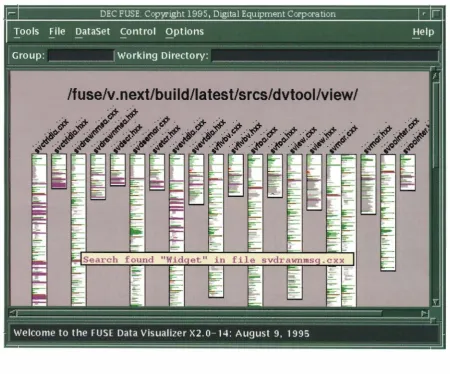
Technical Journal presents another example of displaying information pictorially with DEC FUSE in the paper "Adding a Data Visualization Tool to DEC FUSE."11
• Users continue to use familiar tools and methods.
Because the FIELD and DEC FUSE environments
are built using existing tools such as make, sees, and
dbx, users can continue to use tools vvith which they are familiar. They can also use existing makefiles and source libraries in the environment. In addi tion, users can make a gradual switch to an environ ment such as DEC FUSE. They can use DEC FUSE when it is most advantageous and continue to use older tools and methods when that is preferable.
DEC FUSE Overview
The primary goal of the DEC FUSE product was to create a commercially useful, integrated sofuvare
development environment supporting a variety of pro
gramming languages, including C, C++, and Fortran. The DEC FUSE environment takes advantage of the capabilities of the UNIX workstation, while allowing sothvare developers to preserve their investment in familiar UNIX tools. DEC FUSE designers adopted
some FIELD components, which were converted to
use Motif Extensions were also made to the FIELD environment to create the DEC FUSE product. These extensions are described in the next sections. Several tools have been added to the environment through successive releases of DEC FUSE. The tools supplied
with DEC FUSE version 2.1 are listed in Table 1 and
are described in subsequent sections.
Selective Broadcasting Mechanism
Ta ble 1
Tools Supplied with Digital's DEC FUSE Version 2.1
DEC FUSE Tool
Editors
Debugger
Search Builder Code manager Man page browser Cross-referencer Call graph browser C++ class browser Profiler
Compare Help
DEC FUSE shell
UNIX Commands Used
emacs, vi (and a Motif-based editor)
dbx or DECiadebug (on Digital platforms)
grep, fgrep, egrep make, gnumake sees, res
man
Use common data from compilers or other source scanners.
prof, gprof, pixie diff
Hyper Help sh, csh, ksh, ...
the sending tool and delivered to receiving tools. The receiving tools have registered an interest in particular messages by describing them using a pattern string.
DEC FUSE uses a more functional interface that more closely resembles a remore procedure calling mecha nism. Each tool detlnes the messages that it can send
and receive as function definitions using the DEC
FUSE tool integration language (TIL). Second, a set of
components called the DEC FUSE EnCASE facility has
been developed to support the integration of new tools
and new messages into the DEC FUSE environments
These components include the TIL compiler and the Message Monitor tool, described later in this paper.
Choice of Source Code Editor
Instead of having a different editor as part of each tool, the FIELD environment provided a single GUI-based editor. Because most users have strong preferences
about which text editor they use, DEC FUSE
extended the environment to allow each user to
choose from three different editors: emacs, vi, and the
DEC FUSE editor2 Both emacs and the DEC FUSE
editor support use of annotations supplied through
interactions with other tools. Users of the vi editor do
not see annotations, but other tools can still position vi
on source lines of interest.
DEC FUSE Tools
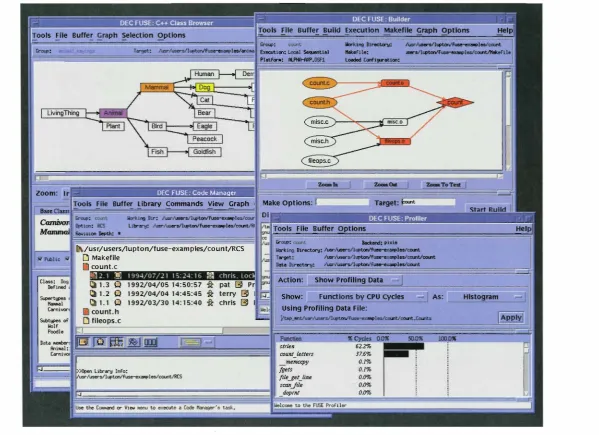
The tools described in this section are currently available in DEC FUSE. Figure 1 shows the DEC FUSE C++ class browser, builder, code manager, and profiler tools.
• The search tool searches files for strings matching
a literal string or regular expression using grep.
Options available through the user interface allow
for speci�'ing whether the search should be case
sensitive, whether Jines matching or not matching
should be displayed, and whether the search should be limited to a single directory or an entire direc tory tree.
• The builder builds applications using the make
or gnumake commands and existing makefiles or
makeflles generated by the builder. A scrollable
results window shows the output tor the build operation, including diagnostic messages. The build dependencies between the tiles for the application that are described in the makdile are displayed graphically. The builder also distributes build
actions across hosts on a local area network (LAi'\l)
and provides a user interface for speci�'ing those hosts and tor monitoring the progress of the build.
• The debugger provides a GUJ to command line
debuggers. This interface provides a source display with annotations for breaks, conditional breaks, and the current execution point. Debugging com mands can be executed using buttons, menus, and a command line interface. Special windows provide for viewing and changing variables, breakpoints, and machine registers, and for monitoring the values of expressions.
• The compare tool displays the differences benveen
two text files in a side-by-side display with related areas highlighted and graphically connected. The
analysis of the differences is provided by the diff
command.
• The code manager provides a GUI to the version
management tools res and sees. The code manager
displays the revision history of the managed files. Details such as author, date created, and comment can be displayed for each version. In addition, the code manager uses the compare tool to display dif ferences between revisions or revisions and files.
• The man page browser displays the reference pages
for commands, system calls, subroutines, and spe cial files. References to other manual pages in the text are hot links, and the user can click on a reference to display the other page. The man page browser can also display an index of selected reference pages. Users control the index content by specifying a keyword to match in the reference page description or a prefix to match to the refer ence page name. These allow users to find reference pages when they are unsure of the function or com mand name.
• The protiler runs an application to collect run-time statistics and displays the results at the function and line level. Statistics include the CPU time used by functions or source lines, function-call counts, line-execution counts, and function and .line test coverage.
• The cross-referencer displays source locations for
declarations, references, and function calls whose
00
Figure 1
::-- -- - DEC FUSE . Code Manager Buffer library Commands View Graph
llirllng
1----1111\ [j Makefile /us r /use rs/1 upton/fuse-examples/co u nt/RCS @I count.c
[image:10.796.117.717.77.512.2]names match a regular expression . Queries can be constrained by declaration types and locations among other things.
• The call graph browser graphically displays the call relationships within a program. Relationships between functions, source files, and source direc tories can be shown. The user can constrain the display to selected parts of the program.
• The C + + class browser displays the C + + -class hierarchy graphically. I nheritance paths and detailed information about each member and class can be displayed.
• Editors include the DEC FUSE text editor, emacs, and v i . The D EC FUSE and emacs editors allow other DEC FUSE tools to supply annotations on source text lines of interest. In addition, other DEC FUSE tools can be invoked from the editor, including the builder, the code manager, and the man page browser. The DEC FUSE emacs editor is a standard emacs, with additional keys defined for DEC FUSE functions.
• The help tool works with the HyperHelp tool from
Bristol Technology, Inc. to display on-line help and training.
• The D EC FUSE shell supplies a terminal emulator window running a standard UNIX shel l in the context of the user's DEC FUSE development environment.
In addition to the tools l isted above, DEC FUSE includes a control panel tool that starts tools and manages their environment.
Using the DEC FUSE Tools Together
The messaging mechanism allows each of the tools to make selected operations available to other tools. For example, the editor makes its ability to open and dis play a source file and to position to a specific line avail able to the other DEC FUSE rools through messages. The man page browser accepts a message that causes it to display a manual page for a specified topic. The fol lowing scenario, summarized in Figure 2, shows how messaging ties together DEC FUSE tools into an inte grated environment.
1 . To locate places in an application that need to be changed, the developer starts the DEC FUSE search tool and looks through C source files for occurrences of a particular name. The files and lines containing a match are displayed in the search tool . By double-clicking on a line, the corresponding file is loaded into the DEC FUSE editor, and the line is displayed with an annotation that the search tool provided the location. (The search roo! is used in this scenario, but the cross-referencer can also be used to do this task. )
...---. 1 . POSITION
TO LINE SEARCH
grep
2. CHECK OUT FILE
Figure 2
CODE MANAGER
res
DEC FUSE Tool Communications
BUILDER
make
3. OPEN FILE
2. After inspecting the source, the user decides to modify the code, but must first checi< it out using res. By choosing the "check out" menu item in the editor, the user starts the DEC FUSE code man ager, which shows the user the revision being checked out and allows the user to browse the library before confirming the check-out operation. 3. The code manager sends a message to the editor tel ling it to load the file to ensure that the user is editing the latest version.
4. The user edits the file and then starts a compilation using the "compile file" menu item in the editor. This startS the DEC FUSE builder, which runs make and displays compiler diagnostics.
5. By double-clicking on a diagnostic, the user gets back into the editor on the line containing tl1e error.
The messaging mechanism allows for automated switching benveen the tools. Information is passed between the tools, thus eliminating retyping or cut ting and pasting. Other features also contribute to the feeling of an integrated environment in DEC FUSE. These include consistent GUis for all tools, global preference setting, saving and restoring of state infor mation, and centralized help and training. However, it is the messaging that ties tools rogether, making DEC FUSE an integrated environment rather than a simple collection of tools.
We have now examined the features of integrated software development environments in general and the DEC FUSE environment as an example of these environments. In the next two sections, we examine
t\¥0 important aspects of the design of DEC FUSE. First, we discuss the mechanisms used to add graphical interfaces to existing UNIX commands. Then we pre sent the design of DEC FUSE messaging.
Building Graphical Interfaces for Existing UNIX Commands
Most DEC FUSE tools consist of a graphical program that provides a point-and-click interface for invoking UNIX commands. This program interprets the results ti·om the execution of the commands and presents these results graphically. This approach has several advantages over building a completely new tool. These are examined in this section, along with the implementation techniques used.
Rationale for Building a Graphical Interface for Existing Commands
Using an existing command to perform functions needed by a new command is a technique that is often used on UNIX systems. DEC F USE tools use existing commands for the following reasons:
User Investment Protection Two types of investments must be made in software development environments. One investment is training: software developers have learned the concepts and capabilities of the underlying tools. Since the graphical interfaces of an integrated environment are built on tools that are familiar to users, they can be learned in considerably Jess time. For example, the concept of revisions, the semantics of
revision numbers, and the capabilities of res are the
same whether res is invoked from the command line or
selected ti.-om the DEC FUSE code manager.
Second, a project may have invested in procedures and software that depend on project tools such as make and sees. Users often use many makefiles that have been tailored to meet the needs of their project. Likewise, most projects use sees and res in ways that must be supported by scripts. By building the code manager and builder on the existing res, sees, and make utilities, this investment is p reserved. (The DEC FUSE code manager provides mechanisms to support user written scripts used in combination with sees and res .)
Easier to I nvoke Operations Although tbe UNIX command line environment is extremely flexible, most users find themselves frequently ret-erring to reference pages to check command syntax and option flags. By replacing commands with menu items and buttons and by replacing flags with toggle buttons and till-in the- blank dialog boxes, users interact with the tools faster with less typing and less browsing through refer ence pages. This is especially true for novices who have not def-Ined their own collection of aliases and scripts.
For example, searching all the header files in a direc tory hierarch)' for the occurrence of a string requires a command like the following:
f i n d / u s r / i n c l u d e - n a m e " * . h "
- e x e c g r e p - i F L T M { } / d e v / n u l l \ ;
10 Digiral Technical journal Vol. 7 1 o. 2 1995
This is a typical example of a command that a software developer might need to use from time to time. The command would be entered on one line. A first-time user, however, might not correctly input all tbe details of tl1e command tor the toll owing reasons:
• The " *.h" designation includes q uotation marks so that it is not immediately expanded by the shell in the user's current directory, but instead expanded by find in all the subdirectories in the just/include tree.
• If the search is to be case-insensitive, the -i switch must be used with the grep command.
• The grep command supplies the name of the file where the string is found only if more than one file is supplied in the grep argument list. / devjnull is added to make grep include tl1e file names in the output.
• The find command requires that subcommands that it will execute be terminated with a semicolon. Because a semicolon is also recognized by the shell, it must be preceded with a backslash (escaped ), so that find will sec it.
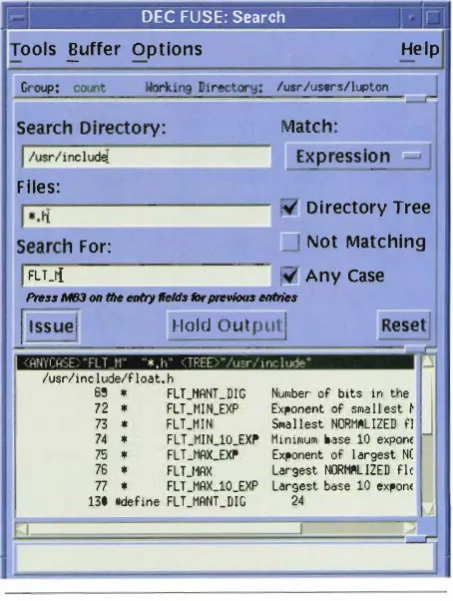
To do the same operation ti.·om the DEC FUSE search tool, the user fills in some fields and sets a toggle (see Figure 3). This can be done easily and correctly the first time by both novice and experienced U NIX users.
r�r--
DEC FUSE: Search_____
I 'ri
ools
!
uffe r O p t ions He lp/usr/�/1�
F l ies:
D i rectory Tree
search For: Not Matching
I
FLU[ Any Casel'rws NBI Ge tlle _, tlelft jbr,... Mtrfn
��s
ue}
Holdoutput!
[image:12.592.317.544.411.712.2]/usr /inc !ude/f !oat. h
Figure 3
69 * FLT_HANT_DIG 72 * FLT _MI N_EXP 73 * FLT_M l "' 74 * FLT_MIN_lO_EXP 75 * FL UIAX_EXP 76 * FL T_I1AX
77 * FLT _MAX_lO _EXP 130 -define FLT _MANT _DIG
DEC FUSE Search Tool
_)
Number of bits in the
J
Exponent of sma II est � Sma l l est NORMALIZED fl Minimum base 10 expon< Exponent of I argest N( Lar·gest NORMAL IZED fie Largest base 10 expon<When the user spots an interesting occurrence i n the output from a g rep command and wants to edit the file, a command line i nterface requires the user to enter the command to edit the file and to type the file name and line num ber. Using the DEC FUSE search interface, the user double-clicks on the i nteresting line i n the search tool and the editor automatically loads the file and sets the position to the desired line, saving typing and eliminating the possibility of errors.
Hid ing Details Another advantage of graphical inter faces on u nderlying commands is the ability to hide details of particular commands. For example, the DEC FUSE code manager supports both sees and res with the same graphical interface. A user does not need to know the differences between res and sees; by using the graphical interfaces, the user can see similar version his tory information from either u nderlying library tormat.
[image:13.591.52.513.320.728.2]Graph ical Presentation One advantage of a work station is its ability to present information graphically.
Figure 4
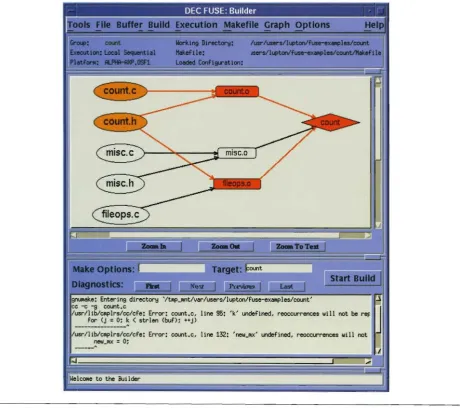
DEC FUSE Builder Tool wirh Dependency Graph
A GUI layered on a command line tool can analyze the output of the tool and present it to the user graphi cally, making the information in the output easier to understand.
An example of this is the dependency graph in the DEC FUSE builder, as shown i n Figure 4. The graph displays the build dependencies for the user's application as specified explicitly or implicitly in the application's makefile. This display is an analysis and presentation of the output provided by make when run with options that produce debugging information about m akefiles. Nodes designated orange in the graph represent the files that have changed . Nodes designated red in the graph represent the files that need to be rebu ilt because of their dependency on the changed files.
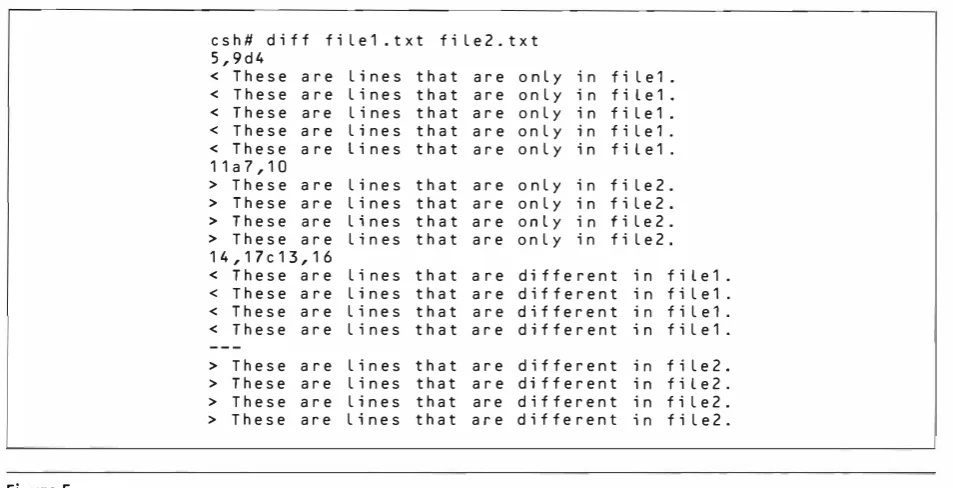
Another example of usi ng the graphical capabilities of the workstation is the DEC FUSE compare tool, which is built on the UNIX diff u ti lity. The output of the UNIX diff u tility is textual; an exam ple is shown i n Figure 5 . I n contrast, Figure 6 shows how the DEC
Figure 5
Sample diff Output
Figure 6
DEC FUSE Compare Tool
1 2 Digital Technical Journal
c s h # d i f f f i l e 1 . t x t f i l e 2 . t x t 5 , 9 d 4
< T h e s e a r e L i n e s t h a t a r e o n l y i n f i l e 1 .
< T h e s e a r e l i n e s t h a t a r e o n l y i n f i l e 1 . < T h e s e a r e l i n e s t h a t a r e o n l y i n f i L e 1 . < T h e s e a r e l i n e s t h a t a r e o n l y i n f i l e 1 . < T h e s e a r e L i n e s t h a t a r e o n l y i n f i l e 1 . 1 1 a 7 , 1 0
> T h e s e a r e l i n e s t h a t a r e o n l y i n f i l e 2 . > T h e s e a r e l i n e s t h a t a r e o n l y i n f i l e 2 . > T h e s e a r e l i n e s t h a t a r e o n l y i n f i l e 2 . > T h e s e a r e L i n e s t h a t a r e o n l y i n f i l e 2 . 1 4 , 1 7 c 1 3 , 1 6
< T h e s e a r e L i n e s t h a t a r e d i f f e r e n t i n f i l e 1 . < T h e s e a r e l i n e s t h a t a r e d i f f e r e n t i n f i l e 1 .
< T h e s e a r e l i n e s t h a t a r e d i f f e r e n t i n f i l e 1 . < T h e s e a r e l i n e s t h a t a r e d i f f e r e n t i n f i l e 1 .
> T h e s e a r e l i n e s t h a t a r e d i f f e r e n t > T h e s e a r e l i n e s t h a t a r e d i f f e r e n t > T h e s e a r e l i n e s t h a t a r e d i f f e r e n t > T h e s e a r e l i n e s t h a t a r e d i f f e r e n t
i n i n i n i n
f i l e 2 . f i l e 2 . f i l e 2 . f i l e 2 .
FUSE compare utility displays these differences graph ically, using highlighting to indicate the differences and shapes to connect regions in the two files that relate. The display allows differences to be viewed in the context of the lines before and after them and the lines that correspond to them in the other file.
Reduced Tool Development Work An obvious advan tage for the developers of the interface is that builcting on a command line tool may involve considerably less work than designing and implementing a new tool that includes all the capabilities of the command line tool . Furthermore, not every capability needs to be provided through the user interface of the tool, because users have access to less-used capabilities through the command line . For example, the seldom used administrative features of sees and res can be omit ted from the user interface . Thus, with a minimum amount of effort, it is possible to provide a convenient interface to the most important underlying capabilities.
Managing Command Interfaces
It is common on UNIX systems to use the output of one tool as input to another. In the case of DEC FUSE, the output of command-line tools is being used as input to DEC FUSE tools. The DEC FUSE tools construct commands and pass them to a separate process for execution. The results of these commands are then interpreted by the DEC FUSE tools so that desired information can be presented to the user. The methods used to issue commands and to analyze their results vary from one DEC FUSE tool to another.
One method used by DEC FUSE tools is to ctirectly issue commands using the popen li brary function, which both starts execution of the command and creates a pipe to the process running the command. This is done by tools like the man page browser and search. Output from the man or grep commands that they issue is parsed by the DEC FUSE tool, often using a simple mechanism such as the standard C library function fsea nf, which applies a format string to a line to parse it. Some tools also make use of lex with or without yaec to aid in parsing the output of the commands. 1 2•1 3
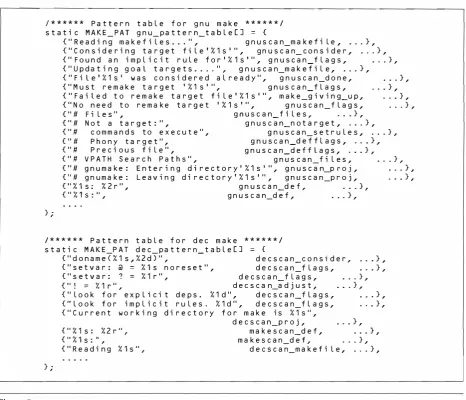
Other tools use PMAT (pattern matching) routines for examining command output for desired patterns. The PMAT functions were developed by Steven Reiss as part of the FIELD environment. They are used in FIELD both for managing messaging as well as for interpreting the output of UNIX commands. For DEC FUSE interfaces to UNIX commands, the patterns used by the PMAT routines are organized in tables. Portions of two of these tables are shown in Figure 7. These examples are for the output of gnumake and a make program supplied with Digital UNIX.l4 For this analysis, there are two significant parts of each
pattern table entry: a text pattern that may be found in the command output, and the name of a routine to be called if the associated pattern is found. For example, when the error message "Failed to remake target file ' % l s'" is recognized, the function named make_g ivi ng_up is called with arguments that match specifications in the pattern string.
Additional values from the table (omitted in the fig ure) are also passed as arguments to the routine. The string ' %ls' in the pattern is similar to the conversion specifications used by scanf. It represents a field in the output that will be passed to the recognition routine when a pattern is recognized. Some of the field specifi cation characters used are given in Table 2 . The num ber prececting most field specification characters tells the pattern match what position this field should hold in the argument list passed to the recognition routine. When there is no number with a field specification character, that field is not passed to the recognition routine.
Choosing the Appropriate Command Interface Method
The DEC FUSE product was designed to be portable across several hardware platforms and many operating system versions. DEC FUSE was developed on the UL TRIX system and has been ported to Sun OS, AJX, HP- UX, and Digital UNIX operating systems. It was released to customers on all these platforms, except AIX. Since portability across platforms and versions is a goal, interfaces for different command implemen tations and versions need to be considered. The choice of interface method is made based on the complexity of the interface (the number of commands and expected responses), the number of different inter faces needed because of system differences, and the rate at which the interfaces are evolving.
Most common UNIX commands, such as grep, man, and diff, have regular output that seldom changes. The versions of these commands on the desired platforms and operating systems have few ctifferences, so it is not difficult to write portable code that can issue these commands and interpret the output using the lex, yacc, or the seanf functions.
In cases in which the output is less regular and varies across commands and platforms, the PMAT facilities are more appropriate. This includes the DEC FUSE builder, which must support several ctifferent make programs on the supported platforms. The PMAT facilities allow for interpreting a large number of ctif ferent format lines and for selecting tables of patterns appropriate to the underlying command. This makes it easier for the builder to accommodate a variety of make programs and interpret both output from make and output from compilers.
14
Fig ure 7
! * * * * * * P a t t e r n t a b l e f o r g n u m a k e * * * * * * / s t a t i c M A K E _ P A T g n u_ p a t t e r n_t a b l e [ J = {
} . ,
{ " R e a d i n g m a k e f i l e s . . . " , g n u s c a n_m a k e f i L e , . . . } ,
{ " C o n s i d e r i n g t a r g e t f i l e 1 % 1 s 1 " , g n u s c a n_ c o n s i d e r , .. . } , { " F o u n d a n i m p l i c i t r u l e f o r 1 % 1 s 1 " , g n u s c a n _f l a g s , . . . } , { " U p d a t i n g g o a l t a r g e t s . . . . " , g n u s c a n_m a k e f i l e , . . . } ,
{ " F i l e 1 % 1 s 1 w a s c o n s i d e r e d a l r e a d y " , g n u s c a n _d o n e , { " M u s t r e m a k e t a r g e t 1 % 1 s 1 " , g n u s c a n_ f l a g s , { " F a i l e d t o r e m a k e t a r g e t f i l e 1 % 1 s 1 " , m a k e _g i v i n g_u p , { " N o n e e d t o r e m a k e t a r g e t 1 % 1 s 1 " , g n u s c a n _f l a g s ,
{ " # F i l e s " , g n u s c a n_ f i l e s , . . . } ,
. . . } , . . . } ,
. . . } , . . . } ,
{ " # N o t a t a r g e t : " , g n u s c a n_n o t a r g e t , . . . } ,
{ " # c o m m a n d s t o e x e c u t e " , g n u s c a n_ s e t r u l e s , . . . } , { " # P h o n y t a r g e t " , g n u s c a n _d e f f l a g s , . . . } , { " # P r e c i o u s f i l e " , g n u s c a n_d e f f l a g s , . . . } , { " # V P A T H S e a r c h P a t h s " , g n u s c a n _ f i l e s , .. . } , { " # g n u m a k e : E n t e r i n g d i r e c t o r y 1 % 1 s 1 " , g n u s c a n_p r o j , . . . } , { " # g n u m a k e : L e a v i n g d i r e c t o r y 1 % 1 s 1 " , g n u s c a n _p r o j , . . . } , { " % 1 s : % 2 r " , g n u s c a n_d e f , . .. } ,
{ " % 1 $ : I I , g n u s c a n_d e f , a • • } ,
/ * * * * * * P a t t e r n t a b l e f o r d e c m a k e * * * * * * / s t a t i c M A K E_P A T d e c _ p a t t e r n_ t a b l e [ J = {
} . ,
{ " d o n a m e ( % 1 s , % 2 d ) " , d e c s c a n _ c o n s i d e r , . . . } ,
{ " s e t v a r : @ % 1 s n o r e s e t " , d e c s c a n _ f l a g s , .. . } ,
{ " s e t v a r : ? = % 1 r " , d e c s c a n_ f l a g s , . . . } , { '' ! = % 1 r '' , d e c s c a n_a d j u s t , . . . } , { " l o o k f o r e x p l i c i t d e p s . % 1 d " , d e c s c a n_ f l a g s , . .. } , { " l o o k f o r i m p l i c i t r u l e s . % 1 d " , d e c s c a n_f l a g s , .. . } , { " C u r r e n t w o r k i n g d i r e c t o r y f o r m a k e i s % 1 s " ,
{ " % 1 s : % 2 r " , { II % 1 s : II ,
{ " R e a d i n g % 1 s " ,
d e c s c a n_p r o j , ... } , m a k e s c a n_d e f , . . . } , m a k e s c a n_d e f , . .. } ,
d e c s c a n_m a k e f i l e , . . . } ,
make PMAT Patterns
Table 2
Some PMAT Field Specification Cha racters
Field Character
d
X
c
q
e,f,g
Data Type
Deci mal num ber Hexadecimal n u m ber A single character
A string, delimited by wh ite space A stri ng, delimited by quotation ma rks A string, from the current location to the end of the line
Floating-point nu mbers
The tool with the most complex command interface is the debugger. The debugger shares the following issues with other tools, but demonstrates them most forcefully:
Digital Technical Journal Vol. 7 No. 2 1995
l . Debuggers are big and complex. Debuggers are more complex than the commands used in other DEC FUSE tools. Each debugger engine accepts many commands, all of which have their own out put that must be parsed. The debugger engine aJso continues to run while the user works . Unlike most other tools, the debugger engine is not restarted every time the user wants more information, so the debugger process must be managed over a long period of time.
[image:16.593.80.547.49.449.2] [image:16.593.79.299.525.660.2]must remain sync hronized with the debugger engine it is running. Preserving this synchroniza tion is made more diftl.cu l t for three reasons. First, users can enter debugger commands directly as text, making it difficult for the front end to deter mine their effect. These commands may require updates to the graphical displays or the internal state information used by the front end. Second, the debugger may nor be i n a state where it can accept commands (when the user program is run ning tor example), so the front end cannot update displays. Third, spontaneous and u nexpected debugger engine output may occur as the result of traces or certain breakpoints.
4. Different debuggers use dif'ferenr commands. Commands on different debuggers can be different in both name and design . For example , with the dbx debugger available on SunOS, A I X, and Digital UNIX, the commands func and file can be used to find the cu rrently active fu nction and the name of the source fi le where that fu nction is defi ned . The xdb debugger used on HP-UX, however, uses the L command to present both the current function and the name of the ti le where it is defined, as well as to display the current source code line.
5. The same debugger commands have different out put. Other commands, although similar in name and design, can prod uce output that is different enough to cause problems. One example is the where command used in d bx on both D igital UNIX and SunOS platf-orms. This command returns the current stack information. The Digital version includes a poi nter character ( > ) to show which stack entry is the current scope; however, the SunOS version does not supply this scope informa tion. Therefore, a debugger GUI program must be carefully designed to get needed scope information if it must support borh debugger engines.
6. The outpu t of some debugger commands is com plex, and the results of some debugger commands are difficult to parse. For example, in the display of the content of a data structure, the format of the output will vary depending on the source language used in the application.
Experiences with DEC FUSE suggest that there is no easy solution. Addressing these issues results in many specialized routines in the DEC FUSE debugger tool to both construct debugger commands and inter pret the results. Techniq ues that help to make the problems more manageable include the following:
• Cleanly separate generic-GUI and command
specific code. The design of the debugger G U l identifies the operations that it requires o f the
debugger engine and the data that it must get from the engine. T hese are provided by a set offu nctions whose implementation will vary fi·om one engine to another. These functions wil l be modified over ti me to accommodate the evolution of the engi nes. Another method being designed now is to use C + + classes to encapsulate code for each sup ported debugger engine.
• Limit the details that the GUI depe nds on. One way to l i mit the dependency of the G U I on the details of the e ngine is to provide GUI support for on ly the most freq uently used debugger opera tions, while providing a command intertace tor the remaining operations. Another technique is to avoid interpreti ng the output of the engine when possible and simply display the output of the com mand in a text window.
• I mplement special i ntertace commands i n the engine. When it is possible to change the u nderly ing debugger, special commands and output can be implemented by the debugger designed exclusively for use by the GUI ti·ont end . For examp le, the DECiadebug debugger e ngine bas been modified with the introduction of rwo new commands tor use by the graphical i nterface that simplit)r the task of d isplaying data structures in the G U I . AJ though other commands d isplay data structures for the user, the format of the output of these commands is designed to be easily i nterpreted by the G U I . These commands are designed for the exclusive use of the G U I . They need not be changed tor the user, for example, to improve readability; thus the evolution is controlled.
Fortunately, most UNIX tools are not as complex as the de bu gger. I n fact, building a GUI for commands with outpu t that seldom c hanges and is consistent across implementations is a str<lightforward task.
Using Messaging to Make Independent Tools Work Together
As described earlier, each DEC FUSE tool focuses on a single, separate software development task. This design philosophy, sometimes cal l e d "divide and con quer," comb i ned with the DEC FUSE mul ticast mes saging system ( MCMS) ma kes it easier to maintain or replace tools. DEC FUSE tools can therdore be easily replaced with alternative tools that provide the same function .
MCMS is the key to making independent tools work together. Any message sent by a tool is delivered to all tools that express an interest in receiving the message. Some messages, called notifications, are defined to have no response. Other messages, cal led requests,
1 6
have responses for which the sending tool usually waits. A tool can also eavesdrop on requests that will be han dled by other tools. A DEC FUSE component called the DEC FUSE message server keeps track of the active tools and which messages each can send and receive.
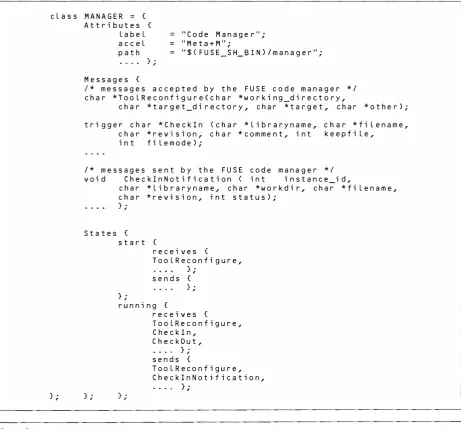
l . Attributes: This is a collection of tool attributes such as the string to be used in the DEC FUSE tools menu and the command to invoke the tool. 2. Messages: This section lists definitions for all mes
sages sent and received by the tool, including their arguments and return values. Messages that have return val ues defined are called requests, and the returned value is expected by both the message switch and the tool that sent the request. Messages with no return value (the type is void) are called notifications. The keyv ... ord trigger is used if the message should automatically start the tool . Messaging with MCMS
[image:18.592.80.542.266.695.2]Messages used by tools are easily defined in a TIL file, written in the DEC FUSE tool integration language. An example is the manager.til file used by the DEC FUSE code manager. Part of manager. ti l is shown in Figure 8 . Each TIL file can define one or more tool c lasses. Each class definition describes how a single DEC FUSE tool will be i ntegrated with the rest of DEC FUSE. A class definition contains three parts:
3. States: This section describes when each message may be used during the execution of the tool . This section defines one or more states in which the tool
c l a s s M A N A G E R = {
} ;
Figure 8
A t t r i b u t e s { l a b e l a c c e l p a t h
} . ,
M e s s a g e s {
= " C o d e M a n a g e r " ; = " M e t a + M " ;
" $ ( F U S E _S H_B I N ) I m a n a g e r " ;
I * m e s s a g e s a c c e p t e d b y t h e F U S E c o d e m a n a g e r * I c h a r * T o o l R e c o n f i g u r e < c h a r * w o r k i n g _d i r e c t o r y ,
c h a r * t a r g e t _d i r e c t o r y , c h a r * t a r g e t , c h a r * o t h e r ) ;
t r i g g e r c h a r * C h e c k ! n ( c h a r * l i b r a r y n a m e , c h a r * r e v i s i o n , c h a r * c o m m e n t , i n t i n t f i l e m o d e ) ;
c h a r * f i l e n a m e , k e e p f i l e ,
I * m e s s a g e s s e n t b y t h e F U S E c o d e m a n a g e r * I v o i d C h e c k l n N o t i f i c a t i o n ( i n t i n s t a n c e _ i d ,
c h a r * l i b r a r y n a m e , c h a r * w o r k d i r , c h a r * f i l e n a m e , c h a r * r e v i s i o n , i n t s t a t u s ) ;
} . ,
S t a t e s { s t a r t {
} ;
r e c e i v e s {
T o o l R e c o n f i g u r e ,
} ;
s e n d s {
} ;
} .
r
�
n n i n g {} . ,
r e c e i v e s {
T o o l R e c o n f i g u r e , C h e c k l n ,
C h e c k O u t , . . . . } ;
s e n d s {
T o o l R e c o n f i g u r e , C h e c k l n N o t i f i c a t i o n ,
. . . . } ;
DEC FUSE Tool Integration Language File
may exist. Tool s can change their state, and vvithi n each state only the listed messages may be used . Most DEC FUSE tools need only two states: an initialization or start state used during tool start-up and a running state. Other states may be needed by some tools. For example, the builder uses a build ing state to advise the message server that a build is in progress and that some requests ( .like another build request) are not allowed.
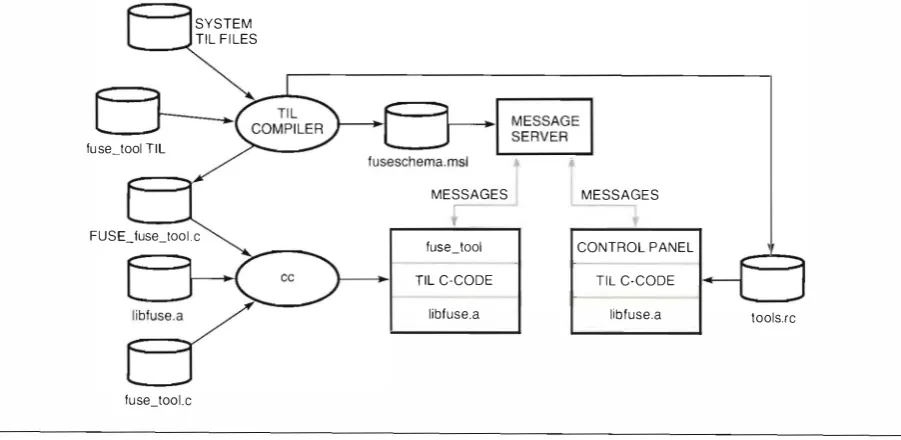
A TIL compiler translates the TIL ri les of DEC FUSE tools i nto the data files needed to run DEC FUSE. Figure 9 sum marizes how the files generated by the TIL compiler for a DEC FUSE tool (named fuse_tooJ) fit into the architecture of DEC FUSE.
The TIL compiler combines information from the fuse_tool TIL file with TIL tiles for tools already installed on a syste m . The TIL compiler generates three files:
1. fuseschema. msl - This file tells the message server which tools wish to receive which messages. 2. tools.rc - This file tells the control panel how to
start each tool . Tools may be started in response to a trigger message or manually from the Tools menu fou nd in each DEC F USE tool.
3. FUSE_fuse_tool .c - This file contains functions for each of the messages that the tool wishes to send. This file is compiled and linked with fuse_tool along with libfuse .a. Messages are sent by simply calling these fu nctions. This file also contains an ini tialization fu nction in which cal lback functions for messages that the tool receives are registered.
The use of the TIL compiler in DEC FUSE provides a mechanism similar to a remote procedure call faci lity.
SYSTEM TIL FI LES
--�
fuse_tool TIL
FUSE_fuse_loolc
This allows tools to send a message using a single func tion cal l . This contrasts with the messaging mecha nisms used in the HP Sofi:Bench and Sun SPARCworks products, which require a number of calls to the mes saging application programming interrace (API) to allocate, assembl e, send, and free a message. These mechanisms also require tools to assemble and register patterns corresponding to the messages that they want to receive, a function handled by the initialization func tion in the C source file generated by the TIL compiler.
To simpli�' the task of integrating tools, DEC FUSE also supplies a DEC FUSE message monitor. This tool monitors and debugs messages sent by tools and pro vides a mechanism for i ntegrating shell scripts as tools that can send and receive messages.
Simplified Tool Replacement
MCMS does not require the user to speci�' the tool that does the work. When a tool sends a message using MCMS, it does not specify what tool should service the message. This allows for replacement of the tool that services the messages with an equ ivalent tool, without making any change to the sender. This mech anism is used in DEC FUSE to allow users to select which of three editors they want to use and whether they want to use a GUI debugger based on dbx or DECladebug.
This mechanism also facil itates upgrading the DEC FUSE environment. Recently, the Motif help widget in DEC FUSE was replaced with the Hyper Help tool. The replacement was facilitated by continuing to use the existing messages. This isolated all changes to the DEC FUSE help tool . The help tool continues to receive messages of the form
MESSAGES MESSAGES
fuse_tool CONTROL PANEL
TIL C-CODE TIL C-CODE
libfuse.a libfuse.a tools.rc
[image:19.591.62.513.493.713.2]fuse_tool.c
Figure 9
Use ofTI L-generated Files i n the DEC F USE Architecture