The Use of an Integrated Tool to Support
Teaching and Learning in Artificial
Intelligence
T. L. McCluskey and R. M. SimpsonUniversity of Huddersfield,Queens Gate,Huddersfield, HD13DH, UK email: [email protected] [email protected]
Abstract: Teaching of knowledge-intensive AI is particularly hard as the process of how knowledge is acquired is difficult to grasp without practical experience. Ac-quiring and using knowledge about actions, events, processes is especially difficult because of the temporal nature of the subject matter. In this paper we report on a tool called GIPO that has been used for teaching AI students the areas of knowl-edge acquisition, knowlknowl-edge engineering, automated planning and machine learn-ing. We give a short walkthrough of some of GIPO’s functions, indicating some of the learning opportunities offered. We then compare GIPO with other interfaces used in the computing curriculum. We argue that using a high level integrated tool such as GIPO for supporting teaching and learning improves the students’ learning experience, and helps integrate the theory and practice in a range of AI and related subject areas.
1
Introduction
The teaching of knowledge-intensive AI is difficult both from a theoretical and practical perspective, because of the peculiar problems to do with acquiring and crafting knowledge bases. The process of how knowledge is acquired is not easy for a student to grasp without practical experience of the process. As is the case with programming and design, it seems that a tools environment that allows the student to effectively apply the theory in a practical scenario is desirable. From our experience, a useful tool to help in the teaching of AI within the computing curriculum should:
connect a range of theory taught during lectures with the application of the theory during practical classes; it should support a wide range of the curricu-lum, as the student has not the time to learn to use many tools
be as simple as possible to use, having a familiar look and feel, but also be effective in allowing the student to produce non-trivial implementations of AI
Traditionally AI has been taught within practical sessions by the introduction of declarative programming languages such as Prolog, Lisp and Haskell. While this satisfies the first two points, it is not easy to lead students to build or integrate advanced AI functions from the basis of a programming language. The tutor would implement AI algorithms to expose their workings, but knowledge intensive issues such as domain modelling would be harder to illustrate.
In this paper we report on a tool called GIPO that has been used for teaching AI students knowledge engineering for AI Planning for a number of years. We argue that GIPO meets the criteria set out above and helps students understand and integrate aspects of knowledge acquisition, knowledge engineering, automated planning and machine learning. We show how the tool’s features supports teaching and the student’s learning experience, and helps integrate the theory and practice in a range of AI and related subject areas.
1.1
History and Overview of GIPO
GIPO1the ’Graphical Interface for Planning with Objects’ [12] (pronounced GeePo) is the name of a family of experimental tools environments for building planning domain models, providing help for those involved in knowledge acquisition, do-main modelling, task description, plan generation and plan execution. GIPO was an output of the PLANFORM project [10], and has been demonstrated in several major AI conferences, for example at ECP’01 in Toledo, Spain, at ICAPS’03 con-ference in Trento, Italy, and at EKAW’04 in the UK. It was used in the tutorial track at AI-2003 in December 2003 at Cambridge, and is being entered to the ICAPS’05 knowledge engineering competition at Monterey, USA in June 2005. Two versions of GIPO - GIPO 1 and GIPO II - are available for downloading from the website, and new versions are currently being produced.
GIPO integrates a range of planning tools to help the user explore the domain encoding, and determine the kind of planner that may be suitable to use with the domain. In particular it has:
1) graphical tools and visual aids for the input/display of objects, object classes (sorts), predicates, constraints, states, operator schema, and tasks. There are famil-iar point and click, drag and drop functions to help the user build up a new domain or reuse existing components.
2) validation checks for consistency across parts of the developing domain model. Once operator schema have been developed GIPO features a ’plan stepper’ which helps the user build up their own solutions to problems in a kind of ’mixed-initiative’ mode.
3) resident plan generation engines, and an API for plugging in to third party AI planners. A plan animator / visualiser displays a planner’s solution to a problem in terms of the objects which are effected by the plan. This can be stepped through by the user to see the effects of operators on objects and their properties.
A key design goal in building the tool’s interface has been to allow the creation of a specification in terms of images that describe domain structure at a high level of generality. The tool takes care of the detail of the syntax of the underlying speci-fication, making it impossible to construct a syntactically ill-formed specification. The process of domain model development on which this is based is detailed in the literature, see references [6, 5] for more details.
In the next section we give a short walkthrough of some of GIPO’s functions, indicating some of the learning opportunities offered. We then compare GIPO with other interfaces and tools used in the computing curriculum - the B-tool, Protege and Petri Nets.
2
GIPO Walkthrough
We have found it useful to present the student with two paths through the material:
an online tutorial on how to construct domains: the student is led through a staged method of domain development
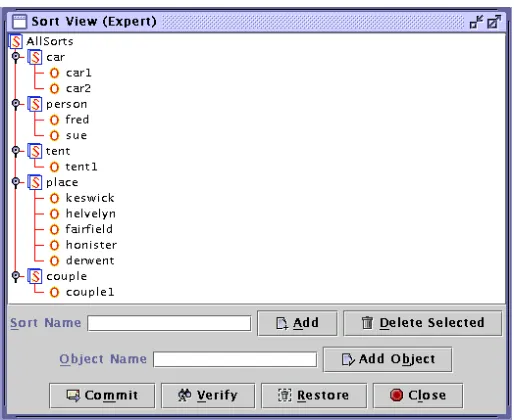
Figure 1: The Sort Editor
We sketch the main steps that the student is led through when using GIPO’s on-line tutorials. This follows a simple knowledge formulation method useful for building up structured planning domain models [6]. The central conception used to raise the level of abstraction in domain capture is that planning essentially in-volves changing properties and relationships of the objects that inhabit the domain. This appeals to computing students’ intuition and is consistent with their studies in object-oriented programming and design. Knowledge is structured around ob-ject descriptions, their relationships and the changes they undergo as a result of the application of operators during plan execution (in contrast to the traditional literal-based approach used in Planning languages such as PDDL [3]). The student identifies the kinds of objects that characterise the domain, and organises them around distinct collections of objects, which we call sorts, into a hierarchy. Object instances for each sort are identified. Each object instance in a sort is assumed to have identical behaviour to any other object in the sort. To assist in this element of the conceptualisation GIPO provides a visual tree editor (Figure 1). Domain checking at this initial stage involves enforcing the tree structure and requiring that node names (for sorts and objects) are unique.
sort tree previously defined. Sorts are static or dynamic depending on whether or not objects in that sort are affected by actions during plan execution (ie change state). Next the student specifies the constraints on dynamic objects/sorts. This is done primarily by characterising each valid state of an object of each dynamic sort. Typically each member of a sort may be in only one state at any time, and that during plan execution the object goes through transitions which change its state. A substate of an object (called here ’substate’ to distinguish it from a state of the world, which is formed from a collection of substates) is the set of all properties and relations referring to that object that are true.
For each sort s, the student uses GIPO to encode state constraints by specifying all the sensible interpretations of predicates describing s. The substate definitions derived from this process specify the possible Herbrand interpretations determined by considering the domain and its constraints. These form the basis of much of the static validity checks that can be carried out on the completed domain specification. For example, it the sort is ’door’, and predicates are closed, locked and unlocked, then the student would use the tool to state that the only possible interpretations that can be true are:
locked and closed; unlocked and open; unlocked and closed
Any other combinations (eg open and locked; or locked, closed and open) are excluded. The problem of forming a substate definition of a dynamic sort is more complex when there are relational predicates referring to that sort and possibly to other dynamic sorts as well. The collection of all such substates for the object will be such that at any instance in time exactly one such substate description will be true of the object.
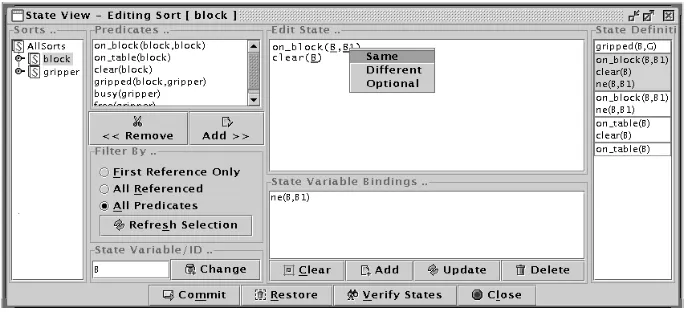
Figure 2: Substate Editor Tool
that it stands on another block. Specifying a set of Herbrand interpretations with the expression clear
Block on
Block Block is not adequate, as we assume that
any instantiation of a substate definition forms a valid ground substate. We require
clear
Block on
BlockOther Block
Other using the normal conventions
for the unification of parameters.
At this stage validity checks can be made to ensure that all dynamic predicates appear in one substate definition. If a predicate is dynamic then it must appear in at least one of the substate definitions for at least one of the sorts it refers to. On the other hand, if it appears in a definition for more than one sort the engineer will be warned that the formulation may contain redundant information as discussed above. This should provide the student with an initial view as to the adequacy of her selection of predicates to characterise the changes that the objects in the domain undergo.
2.1
Capturing Domain Operators
The next stage of the knowledge acquisition method, and most difficult task for the student, is to specify operators representing domain actions. Operators in GIPO are conceptualised as sets of parameterised object transitions, LHS RHS, where
RHS.
The GIPO operator editor helps the student create a graph representation of an op-erator where the nodes are the LHS and RHS states of the object sorts involved in the operator. Each such node contains an editable state definition. While the use of the ’Operator Editor’ is adequate to define operators, students have diffi-culty primarily due to the possible co-designation of variables across the different nodes presented to the user (although the underlining and right click mechanism described in the state editor is used). Using this manual operator tool illustrates to the student the difficulty of knowledge formulation, particularly to do with actions.
A semi-automated knowledge acquisition tool in GIPO is ’OpMaker [7]: this helps the user to create an operator set simply by providing example solution sequences. The exercise illustrates some of the concepts of ’Learning from Examples’ in ma-chine learning - in particular inductive generalisation.
To help explain OpMaker, we use a popular planning application that is supplied with GIPO - the ’Lazy Hikers’ domain. Two people (hikers) go hiking and driving around regions of the Lake District, with objects such as tents, cars, regions, and actions such as putdown, load, getin, getout, drive, unload, putup, walk,
sleepin-tent. They do one ’leg’ of a long circular track each day, as they get tired and have
to sleep in their tent to recover for the next leg. Their equipment is heavy, so they have two cars which can be used to carry their tent and themselves to the start/end of a leg. To use OpMaker, the student must first create a ’partial’ domain model, containing objects, sorts, predicates and state invariants describing the problem domain. The student then constructs (via a drag and drop process) a solution to a pre-defined task - for instance the following is a solution to the task of doing one leg of the circular track and being ready for the next leg in the morning:
putdown tent1 fred keswick; load fred tent1 car1 keswick; getin sue keswick car1;
drive sue car1 keswick buttermere; getout sue buttermere car1;
unload sue tent1 car1 buttermere; putup tent1 sue buttermere; getin sue buttermere car1;
drive sue car1 buttermere keswick; getout sue keswick car1;
The student is encouraged to think of each action in terms of a sentence describing what happens. For example in the last action we think of this as ’Sue and fred sleep in their tent in Buttermere’. Each ‘action’ consists of an action identifier followed by a sequence of objects that the action depends on or changes.
From the input of a plan such as the example above, and a partial domain model, a full operator set can be induced with the tool. After OpMaker has produced the set of induced operators, another learning opportunity for the student is to compare this set with the handcrafted set supplied with GIPO.
From this stage in process, the student learns:
1) the difficulty in acquiring knowledge about actions
2) how using machine learning techniques one can potentially avoid the need to hand craft action knowledge
3) the problems and limitations of learning from examples to do with convergence of generalisations, the need for knowledge refinement and the importance of ’good’ examples in learning.
The construction of operators provides a good opportunity to compare the planning model with work in formal specification of software. For example, many of our students used the ’B-tool’ to create software specifications. The pre- and post-condition version of a GIPO operator and an operation specified in B have great similarities as they both specify deterministic, instantaneous actions in terms of predicate descriptions.
2.2
Domain Validation Tools in GIPO
Continuing the analogy with formal specification of software, once the student has built up an initial model of the world it is natural to want to validate it. As in formal specification, this splits into two kinds of validation:
Type 1. checking the model for inconsistencies between component parts
Type 2. checking the model’s accuracy with respect to what is being modelled.
forms of ’static’ validation. Most effective in GIPO are the checks which verify that operator definitions do not compromise the substate definitions. Additionally the student has several opportunities to learn about and carry out ’dynamic’ validation of both Type 1 and 2, using:
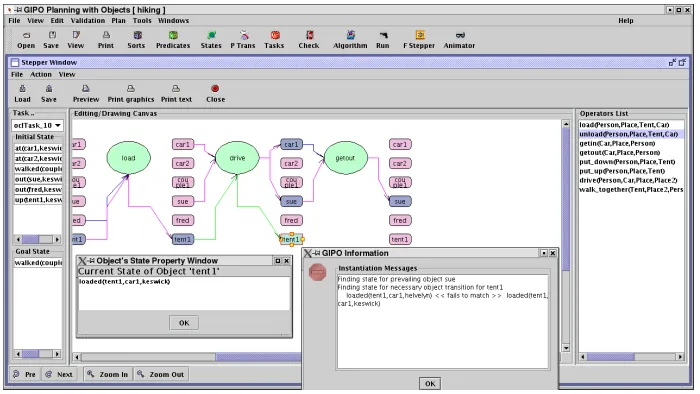
Figure 3: The GIPO Stepper
the reachability analysis tool: each substate that is defined for a sort can be indexed against the operators that use them either as consumers or producers. The reachability analysis tool reveals to the student substates that cannot be produced and hence could only ever be used in the initial state of an object; and substates that cannot be consumed and hence form a dead end for the development of an object. These dead end substates are only useful in the development of some other object or are of the kind specified only in a goal condition. The reachability tool can be used in conjunction with OpMaker: it can indicate if the deduced operators do not give an adequate coverage. This is shown by the existence of defined states that are not referenced by any operators.
consequent state. The student proceeds in this manner to verify that the do-main and operator definitions do support the known plans for given problems within the domain. The stepper operates as a manual forward planner, with results of each object transition caused by an operator shown graphically (see Figure 3).
running planning engines: the student can, of course, execute one of the supplied planners within GIPO on specified tasks. Such is the intractable nature of planning problems that his has to be carefully controlled by the tutor and GIPO. Depending on the planner / task combination chosen, the solution may not be found for a good period of time. GIPO has its own planning engines, but third party planners are easy to integrate (we often use the FF [4] planer, which was a past winner of the International Planning Competition). After a planner has returned a solution, the student can step through the solution using GIPO’s animator tool. This takes the results of a planner and produces a graphical representation of the object transitions using the same layout as the stepper.
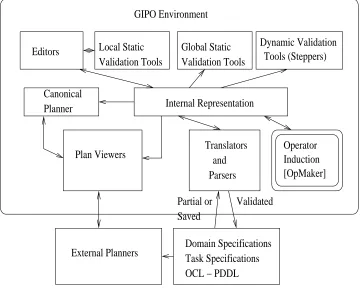
We have outlined the main components of GIPO above - more details can be found in the AI Planning literature e.g [7]. The overall architecture of the GIPO is shown in Figure 4. At the heart of GIPO is an object centred internal representation of domains (as shown in the figure in the Internal Representation box). To enable GIPO to be used as a general domain modelling tool we have developed translators between our internal language and the planning domain language PDDL [11]. The API enables external planning systems to interface to the tools, to provide scope for testing and fielding alternative planning algorithms to those internal to GIPO.
3
Using GIPO in Teaching and Learning
GIPO has been used in the teaching of intermediate and final year undergraduates, in both introductory and advanced AI modules. It offers a wide range of learning opportunities in AI, through knowledge acquisition, knowledge formulation, vali-dation and maintenance of domain models, inductive learning and automated plan generation. Although numbers of student groups (typically 15-20) are too small to make any statistical claims, anecdotally GIPO seems to help students seem to
integrate AI knowledge learned in lectures, and to reach a deeper level of
Operator Induction [OpMaker] Translators
and Parsers
Partial or Saved
Internal Representation Canonical
Planner Editors
Validation Tools Local Static
Validation Tools Global Static
Plan Viewers
Validated
Dynamic Validation Tools (Steppers) GIPO Environment
External Planners Domain SpecificationsTask Specifications
OCL − PDDL
Figure 4: Architectural Breakdown of GIPO
4
Comparison with other specification/modelling tools used
in IT Teaching
It is common now for undergraduate students to be expected to understand and use a wide range of GUI tools for constructing programs, designs and specifications. Here we describe some currently in use (in particular within our own undergraduate degree) and compare and contrast them with GIPO.
The B-Toolkit: As with AI, the teaching of rigorous specification and development of software is particularly challenging. The B-toolkit [1], though built and aimed at commercial applications, has been successfully used in teaching for a number of years in our own curriculum. It alleviates the onerous task of constructing and discharging proof obligations. The student can understand the need for such rigor and view the effects of such proof tools with respect to uncovering and identifying errors, without the need for them to produce hand proofs themselves. As mentioned above, state-based software specification languages have many features in common with ’classical’ AI planning domain languages. These shared features are used to provide useful analogies to the student, in particular:
the concept of a ’state’
the need to construct operators in terms of pre- and post-conditions and state transitions
the underlying assumptions of default persistence and the ’closed world’
the use of invariants to help in validation and model documentation.
Of course the objectives of both tools are different - one to rigorously develop soft-ware, the other to develop an application that solves planning problems. In general the B-tool allows the user to input more precise details of a domain, and is more meticulous at uncovering errors. On the other hand, GIPO’s range of dynamic tools (the stepper and the use of plan generators) give it an extra dimension that both stimulates students and allows more scrutiny of the domain model compo-nents. One can simulate operator execution using the B-tool (and hence this gives a primitive plan stepper), but not plan generation as with GIPO.
it is not designed originally for use in teaching and learning, but it has many fea-tures which make it usable by ’non-experts’. Our final year undergraduate students are exposed to it in a module entitled ”The Semantic Web”. Protege is quite a gen-eral tool: here we used it to build up ontologies written in the OWL language [9]. Its interface is similar in some ways to GIPO - the usual array of GUI features can be used to build up object hierarchies and input propositions and class constraints. Protege has many interesting features for the student:
there are online tutorials that slowly build up a student’s knowledge of rele-vant features
a DL theorem prover such as RACER can be hooked up to check classes for consistency (ie the definition allows at least one member). Also, class hierarchies can be re-assembled as more properties of the classes are input. This relies on the use of subsumption to check whether one class subsumes another.
the OWLViz plugin can be used to visualise the class hierarchy of the devel-oping DL theory. We found this feature crucial for students, as after chang-ing a theory and re-runnchang-ing subsumption the student can see clearly the new classes.
While there were similarities with GIPO in the initial stages of domain (ontology) acquisition, Protege lacked the facilities to ’execute’ the model in any way. This is not the fault of Protege, but the fact that OWL ontologies are currently capable of encoding only static knowledge. Students seemed to find GIPO more satisfying as they could build, view, validate and then execute the model. This ability to involve the model in some kind of constructive operation (ie plan generation) helped the student to see what the point of the knowledge acquisition process was.
for AI planning (b) PNs emphasise execution simulation rather than just domain modelling; (c) ’Places’ in PNs do not map across naturally to the idea of states as parameterised predicates.
5
Conclusions and Future Work
In this paper we have illustrated the use of the GIPO tool, and shown how it helps students apply theory (such as in knowledge representation, knowledge acquisition and formulation) that they have learned during lectures. Its interface and under-lying language uses the object metaphor similar to other tools that students use in the computing curriculum. Students are able to use it both to gain experience of a wide range of AI topics (knowledge acquisition, automated planning, learn-ing from examples) and to obtain a deep knowledge of topics in these areas. For example, a student may learn about algorithms for learning from examples, and representations for planning operators, but without application the knowledge is somewhat stale. Using GIPO the student can use the OpMaker tool to induce plan-ning operators, thus both sustaiplan-ning their knowledge of these areas and integrating the two together. Additionally, we have argued that GIPO helps students see the commonalities between AI with other subject areas, helping them to integrate new knowledge with other parts of the curriculum.
We plan to further widen the scope of the GIPO tool. Two new versions are cur-rently undergoing alpha-testing and will be available online shortly:
GIPO III: this version is for domain models that require a much more expres-sive representation language that a traditional ’propositional’ form. While GIPO III is based on the same object-centric view of the world as GIPO I and GIPO II, it allows the user to model continuous processes and events (as well as actions), and allows numeric properties of objects to be specified.
References
[1] B-Core (UK) Ltd. http://www.b-core.com/.
[2] John H. Gennari, Mark A. Musen, Ray W. Fergerson, William E. Grosso, Monica Crubezy, Henrik Eriksson, Natalya Fridman Noy, and Samson W. Tu. The evolution of Protege: an environment for knowledge-based systems development. Int. J. Hum.-Comput. Stud., 58, 2003.
[3] M. Ghallab, A. Howe, C. Knoblock, D. McDermott, A. Ram, M. Veloso, D. Weld, and D. Wilkins. Pddl - the planning domain definition language. Technical Report CVC TR-98-003/DCS TR-1165, Yale Center for Computa-tional Vision and Control, 1998.
[4] J. Hoffmann. A Heuristic for Domain Independent Planning and its Use in an Enforced Hill-climbing Algorithm. In Proceedings of the 14th Workshop
on Planning and Configuration - New Results in Planning, Scheduling and Design, 2000.
[5] D. Liu and T. L. McCluskey. The OCL Language Manual, Version 1.2. Tech-nical report, Department of Computing and Mathematical Sciences, Univer-sity of Huddersfield , 2000.
[6] T. L. McCluskey and J. M. Porteous. Engineering and Compiling Planning Domain Models to Promote Validity and Efficiency. Artificial Intelligence, 95:1–65, 1997.
[7] T. L. McCluskey, N. E. Richardson, and R. M. Simpson. An Interactive Method for Inducing Operator Descriptions. In The Sixth International
Con-ference on Artificial Intelligence Planning Systems, 2002.
[8] T. L. McCluskey and R. M. Simpson. Knowledge Formulation for AI Planning. Proceedings of 4th International Conference on Knowledge En-gineering and Knowledge Management (EKAW 2004) Whittlebury Hall, Northamptonshire, UK, 2004. Published by Springer in the LNAI series., 2004.
[9] P. F. Patel-Schneider, P. Hayes, and I. Horrocks. OWL web ontology lan-guage semantics and abstract syntax W3C recommendation 10 February 2004. http://www.w3.org/2004/OWL/, 2004.
[11] R. M. Simpson, T. L. McCluskey, D. Liu, and D. E. Kitchin. Knowledge Representation in Planning: A PDDL to OCLhTranslation. In Proceedings of the 12th International Symposium on Methodologies for Intelligent Systems,
2000.