2017 3rd International Conference on Computer Science and Mechanical Automation (CSMA 2017) ISBN: 978-1-60595-506-3
Design and Implementation of Web Page Calendar
Based on CSS and JavaScript
Ji-Ying XU
1and Peng-Jin MIN
21Zheng Zhou Normal University, China
2
Jilin University, China
Email: [email protected], [email protected]
Keywords: CSS, JavaScript, DOM, Web.
Abstract. With the continuous development of the web development technology, dynamic web pages with interaction ability will be the mainstream. JavaScript combined with CSS is used to design web pages with dynamic effects, which becomes a preferred scheme of many web designers. The article put forward a design method of web page calendar based on CSS and JavaScript. First of all, use CSS to achieve the appearance style effect of the calendar, then, use JavaScript to achieve the date display function of the calendar. Experiment results show that according to different system dates display a calendar of the corresponding month.
Introduction
JavaScript is a scripting language based on object and event driven, JavaScript can develop interactive web pages, in order to realize the JavaScript code execution, it needs to be embedded into HTML[1]. Using JavaScript can reconstruct the entire HTML document, JavaScript set up the document object model(DOM), the Document Object Model, or DOM, is the fundamental API for representing and manipulating the content of HTML documents. First, you should understand that the nested elements of an HTML document are represented in the DOM as a tree of objects. The tree representation of an HTML document contains nodes representing HTML tags or elements, such as <body> and<p>, and nodes representing strings of text. An HTML document may also contain nodes representing HTML comments. Through the DOM can create, add, delete, change the elements in the HTML document and its proper-ties and methods.
DOM provides a hierarchical object model is used to access the HTML page, the hierarchical object model is based on the HTML document structure, using HTML parser based on DOM can transform an HTML page into a collection of object model(A DOM node tree), through the DOM node tree to achieve access to elements in an HTML page[2]. The DOM can be seen as a objectification HTML data interface, which defines the logic structure of the HTML document, gives a method to access and handle HTML document. Using the DOM to dynamically create a HTML document elements, traverse the entire HTML document, add, delete, modify the HTML document elements, etc.
Design and Analysis
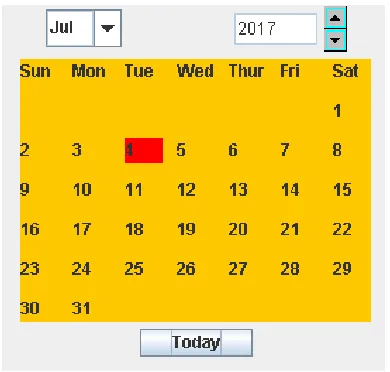
[image:2.612.209.404.342.528.2]When people browse the web, often use the calendar shows what day is today and what's the date today to prompt the visitors, with CSS + JavaScript can de-sign a friendly interface and convenient practical a calendar. First of all CSS is used to beautify the appearance of the calendar interface[3], then the methods of using the DOM to create a calendar in the HTML page, it can display the current month, and with red font said today's date. How to write JavaScript code to implement the calendar function, that is the core part of the design. In order to realize the page calendar two problems must be solved urgently. The first, using get Full Year(), get Month(), getDay(), getDate() method function to get information of the current month: including of the current month, what's date the last day of the current month, what day is the first day of the current month and what's date today. The second, first of all, according to the data provided by the Date object using the DOM methods to create a calendar table, then a calendar function “Create Calendar (Monthone, nDays)” is defined, Create Calendar can use “Monthone” and “nDays” these two parameters through the functional operation to create a calendar. At last, an empty array is created and named "myarray", using “myar-ray. push()” method function, computing results of the "CreateCalenda (Monthone, nDays)" are added to the “myarray” order by date. Then through the “myarray.shift()” method function and it uses a while loop statements (myarray. length>0) in turn to take out the calendar information in the “myarray”, with seven calendar information to one line, fill in calendar information into the corresponding position of the table. The effect after the design program is running, as shown in Fig.1.
Figure. 1. Calendar.
The Realization of the Calendar Design
Set the CSS Styles
Using CSS style change the appearance of the calendar, CSS uses inline citation[4], then, write CSS codes and put it into between <style> and </style> of the head, the CSS codes are as follows:
<style type="text/css"> table {
border-collapse:collapse; width:212px;
height:250px; text-align:center; vertical-align:center;
font-size:1.2em;
font-family:"Trebuchet MS", Arial, Helvetica, sans-serif; }
table,td,tr{
border: 1px solid #98bf21; }
td {
padding:10px; }
</style>
JavaScript Code is Designed and Embedded in the HTML Page
Step1: first, an empty Date object instance is created by using “new Date()”, it was named myDate, myDate initial value is the current system date. Then, using getFullYear(), getMonth() and getDate() these method functions get the current year, month and day, here,getMonth() function returns 0 to 11 numbers, 0 is to point to in January, 11 is to point to December[5], therefore, when the month is displayed in the calendar it should be used getMonth() +1.At last, through getDay(), getDate() functions calculate what day is the first day of every month and what's date the last day of every month. JavaScript codes are as follows:
var myDate = new Date();
var thisYear = myDate.getFullYear(); var thisMonth = myDate.getMonth(); var thisDate = myDate.getDate(); var Monthone=
new Date(thisYear,thisMonth,1).getDay(); var nDays=
new Date(thisYear,thisMonth,0).getDate();
Step2: first, the way of using the DOM to create the calendar table of elements: myTable means created table element node object, mytbody means created the main body of table element node object, titleTr means created header row element node object, titleTd means created cell element node object in header row. Second, the table header element properties are set: using titleTd.setAttribute (“colspan”, “7”) to set the header row of cell across the column numbers are seven; using titleTd.InnerHTML so it shows the current date in titleTd. Third, using ap-pendChild() method function will be created the element nodes add to the HTML page. JavaScript codes are as follows:
var myTable = document.createElement("table"); var mytbody = document.createElement("tbody"); var titleTr = document.createElement("tr"); var titleTd = document.createElement("td"); titleTd.setAttribute("colspan", "7");
titleTd.innerHTML = thisYear + "-" + (thisMonth + 1) + "-"+thisDate; titleTr.appendChild(titleTd);
mytbody.appendChild(titleTr); myTable.appendChild(mytbody); document.body.appendChild(myTable);
Step3: Custom two functions are used to create the td and tr tags. Because in the calendar every row has seven cells, the appendChild() method function is be repeated using 7 times so that cell element nodes are appended to the row element node. JavaScript codes are as follows:
function CreateTd(x) {
return myTable_Td; }
function CreateTr(x1, x2, x3, x4, x5, x6, x7) {
var myTable_Tr = document.createElement("tr"); myTable_Tr.appendChild(CreateTd(x1));
myTable_Tr.appendChild(CreateTd(x2)); myTable_Tr.appendChild(CreateTd(x3)); myTable_Tr.appendChild(CreateTd(x4)); myTable_Tr.appendChild(CreateTd(x5)); myTable_Tr.appendChild(CreateTd(x6)); myTable_Tr.appendChild(CreateTd(x7)); return myTable_Tr;
}
Step4: according to these data of what day is the first day of every month and what's date the last day of every month to create a calendar. JavaScript codes are as follows:
function CreateCalendar(Monthone, nDays) {
var myarray = new Array();
// According to what day is the first day of this month can judge how many empty cells in front of it. All these empty cells fill in empty strings, every empty string in turn is appended to myarray defined an empty array.
for (var i = 0; i < Monthone; i++) {
myarray.push(""); }
// According to what's date the last day of this month can judge how many days this month,then convert these dates to strings and they are appended at the end of myarray in turn.
for (var j = 1; j <= nDays; j++) {
if (thisDate == j)
{ // Today's date are shown in red. myarray.push("<div onclick=
'alert(titleTd.innerHTML);'><font color='red'>"+ j.toString() +"</font></div>"); }
else {
myarray.push(j.toString()); }
}
// Judgment after calendar is added into the myar-ray, how many spaces are not fill in the calendar table, they should be filled in empty strings, and are appended at the end of the myarray
if (myarray.length >= 28 && myarray.length <= 35) {
var nums = 35 - myarray.length; for (var k = 0; k < nums; k++) {
myarray.push(""); }
}
if (myarray.length >35 && myarray.length <= 42) {
for (var k = 0; k < nums; k++) {
myarray.push(""); }
}
// Take out every element in the array, put them in the calendar table corresponding to the position. Each take one element, the length of the array is mi-nus one.
while (myarray.length > 0) {
mytbody.appendChild(CreateTr(myarray.shift(), myarray.shift(),myarray.shift(),myarray.shift(), myar-ray.shift(), myarray.shift(), myarray.shift()));
} }
Step5:Create a ComboBoxfor the month of the query. codes are as follows: JComboBox combo=new JComboBox<String>(s1);
int z=combo.getSelectedIndex(); s+="-"+(z+1);
if(z==3||z==5||z==8||z==10){ if(days<=30){
s+="-"+days;} else{
s+="-"+30;} }
if(z==0||z==2||z==4||z==6||z==7||z==9||z==11){ s+="-"+days;
}
if(z==1){
if(year%400==0||year%4==0&&year%100!=0){ if(days<=29){
s+="-"+days; }
else{ s+="-"+29; }
} else{
if(days<=28){ s+="-"+days; }
else{ s+="-"+28; }
} }
Create the ArrowButton for the year query and display the query year in the text box.
arrowButtonUp=new
BasicArrowBut-ton(BasicArrowButton.NORTH,Color.lightGray,Color.cyan,Color.black,Color.cyan);
arrowButtonDown=new
BasicArrowBut-ton(BasicArrowButton.SOUTH,Color.lightGray,Color.cyan,Color.black,Color.cyan); int x=Integer.parseInt(text.getText());
s=String.valueOf(x);
int m=((BasicArrowButton)e.getSource()).getDirection(); if(m==BasicArrowButton.NORTH){
x=x+1;
s=String.valueOf(x); }
else if(m==BasicArrowButton.SOUTH){ x=x-1;
s=String.valueOf(x); }
}
Step6: Create a calendar header. JavaScript codes are as follows:
mytbody.appendChild(CreateTr("SUN", "MON", " TUE", " WED", " THU", " FRI", " SAT")); Step7: Create a calendar. JavaScript codes are as follows:
CreateCalendar(Monthone, nDays);
Conclusion
The emergence of CSS and JavaScript technology brings to the website design and development of the vitality and development[6]. In this paper the JavaScript were introduced briefly and through a calendar design example the JavaScript codes are implemented. In the implementation process this design use to DOM model, Date object, and each custom function and its call relations between them. The method to design the calendar function is relatively simple, if introducing JavaScript event handler in the design can achieve more complex web page of the calendar function.
References
[1]Xing-wei Hao, “Web development technology”, BeiJing: Higher Education Press, 2006.12.
[2]Ning Dong, “JavaScript and Ajax applications”, BeiJing: China Water Power Press, 2014.01.
[3]Chong Li, Shu-hua Xiong, Ying-ying Wei, “Design and Implementation of Tab Panel Based on CSS and JavaScript”, Computer Technology and Development, 2011, 21(3):28-30.
[4]Di Xiong, “Realization of dynamic Tabbed menu by CSS and JavaScript”, Journal of HuBei TV University, 2009, 29(2): 155- 156.
[5]Li-rong Zhou, “Making dynamic web page based on JavaScript”, Computer learning, 2005(3): 11- 13.