University of East London Institutional Repository: http://roar.uel.ac.uk
This paper is made available online in accordance with publisher policies. Please scroll down to view the document itself. Please refer to the repository record for this item and our policy information available from the repository home page for further information.
To see the final version of this paper please visit the publisher’s website. Access to the published version may require a subscription.
Author(s):
Draganova, Chrisina.Article title:
Asynchronous JavaScript Technology and XML (AJAX)Year of publication:
2007Citation:
Draganova, C. (2007), ‘Asynchronous JavaScript Technology and XML’, in JICC 11, 11th Annual Conference of Java in the Computing Curriculum, LondonLink to published version:
Asynchronous JavaScript Technology and XML (AJAX)
Chrisina DraganovaDepartment of Computing, Communication Technology and Mathematics London Metropolitan University
100 Minories, London EC3 1JY [email protected]
Abstract
AJAX is a web development technique for building responsive web applications. The paper gives an over-view of the AJAX technique and explores ideas for teaching this technique in modules related to Internet technologies and web development. Appropriate examples for use in lab sessions are also suggested.
1. Introduction
A new type of dynamic web applications with richer interactive and graphical capabilities has emerged recently. These web applications are developed using a technique called AJAX (short for Asynchronous JavaScript Technology and XML), which is based on well-established technologies. While in a traditional web application the user waits for a response and gets an entire page reloaded for each request, with an AJAX web application the user is not aware when the request is sent and he can continue to interact with the web browser. The communication with the web server happens in the background and the response returned to the user’s browser contains only a small amount of data, which is used to update the page without reloading.
The constant change in the technologies used to develop web applications requires continuous revision of the web related modules in order to prevent them from becoming obsolete. Before including a new ap-proach or technology in an existing module, several considerations should be taken in account, including the student’s background, the cohesiveness with the other technologies already taught in the module, the maturity of the technology, the available resources and the technical support. In addition to these consid-erations ways of linking the technologies to relevant theoretical concepts in appropriate contexts should be explored to improve the overall student’s understanding.
This paper aims to share some ideas of how to introduce the AJAX technique in modules related to web development. The paper is organised in five sections including the introduction. The second section gives an overview of the AJAX technology; the third section includes a practical example demonstrating the basic implementation issues, knowledge and skills required for learning the AJAX technique; the fourth section addresses the educational implications and the last section gives the conclusions.
2. AJAX overview
AJAX (short for Asynchronous JavaScript Technology and XML) is a technique, which combines several well-established standards. It enables building more interactive web applications behaving in a similar fashion to traditional desktop applications. James Garret [1] coined the term AJAX in 2005, but the tech-nique was known before as remote scripting with hidden frames or iFrames. Simple examples related to remote scripting without using the new AJAX technique can be found in [2], [3] and [4].
web site is blocked. There are many cases where reloading a whole page is not necessary such as real time data validation, auto completion, master details operations, sophisticated user interface controls, refreshing data on a page and server-side notifications [5]. AJAX provides a way of dealing with such cases, based on a model, which enables sending a request to the web server and receiving a response containing only a small amount of data in the background and refreshing only a specific part of the already loaded web page.
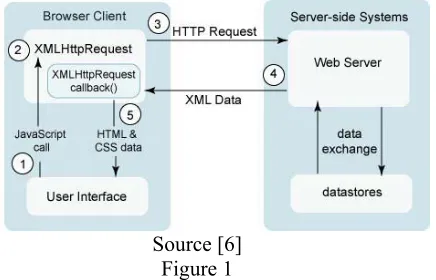
The main key to the AJAX technique is the so-called XmlHttpRequest object, which recently became part of the JavaScript technology [5] and all mainstream browsers support it. To build an AJAX solution three technologies are required: HTML/XHTML, DOM and JavaScript [2]. JavaScript language is used to de-velop the so-called AJAX engine or functionality that handles the communication with the web server, the user actions and the updates of the web page content. The DOM model of the XHTML pages enables dy-namic updating of a loaded page and HTML/XHTML languages are used for content representation of the web pages. In addition to these technologies XML can be used as a standard format for data exchange and CSS for defining the style of the XHTML/HTML elements. Figure 1 illustrates how the AJAX interaction model works.
[image:3.595.199.417.323.463.2]Source [6] Figure 1
The following sequence of steps occurs in a general AJAX request [6]:
1. The user generates an event (e.g. entering input or clicking a button). This event triggers a call to a JavaScript function.
2. An XmlHttpRequest object is created and configured with a request parameter that includes the ID of the component that generated the event and any value that the user has entered.
3. The XmlHttpRequest object makes an asynchronous request to the web server, i.e. while the re-quest is made the user interface is not blocked. The server processes the rere-quest, exchanges any data required from the data store.
4. Although Figure 1 shows that the web server returns XML Data in fact the server can return any fragment of data, which typically is an XML document or a plain text containing the result. 5. The XmlHttpRequest object calls a callback() function, it receives the data and processes the
re-sult.
6. The HTML DOM is updated.
The main factor for AJAX becoming so popular is the adoption of this technique by Google in their pro-jects: Gmail - gmail.google.com, Google Maps - http://maps.google.com/ and Google Suggest
http://www.google.com/webhp?complete=1&hl=en. Other popular web sites using the AJAX technique include Amazon A9 - http://a9.com, Yahoo! News - http://news.yahoo.com/, Yahoo Flickr -
http://www.flickr.com/ and Orkut - www.orkut.com. There are also a number of web sites, which use the AJAX technique to develop functionalities typical for desktop applications such as Writely -
http://www.writely.com/ - web word processor and Kiko - http://www.kiko.com/ - online calendar. These applications have raised the expectations of the users from the web and pushed the companies and devel-opers to adopt the new AJAX technique.
3.AJAX example
The best way to demonstrate the AJAX technique and to see the knowledge and skills required for its use is to look at a practical example. One simple and interesting Ajax application is Google Suggest, which implements a typical desktop functionality of suggesting values as the user types. The example given in this section simulates to some degree the behaviour of Google Suggest. It is a simplified version of the “Autosuggest Text Box” from Chapter 7 [2]. It implements the “Typeahead” [2] functionality, which helps the user to type the name of a county in England. More precisely described the functionality in-cludes the following:
• As the user types in a text box the rest of the text box fills with the name of a county that starts with the letters that the user has typed already.
• As the user continues to type the text box automatically adjusts its suggestion. • The suggested text appears selected (highlighted).
The example can be tested on http://www3.unl.ac.uk:8188/draganov/autosuggest/autosuggest.htm and its source code can be downloaded from [9].
The example consists of three components: an HTML component that gives the user interface, a JavaScript component that contains the AJAX engine and a server side component which handles the HTTP requests/responses and returns the relevant suggestions. In this example XML and CSS are not used in order to focus on understanding the principle steps in using the AJAX technique.
The HTML component contains a text box (see Figure 2) with an event attribute onkeyup set to a call of
the JavaScript function handleKeyUp(event, this.id). Two parameters are passed in this function: the event
object and the value of the attribute id. As the user types the onkeyupevent fires after a change is made to the text box. The autocomplete attribute of the text box must be turned off in order to eliminate the default
autocomplete functionality provided by most of the browsers.
Figure 2: autosuggest.htm
The JavaScript component consists of three functions (see Figure 3, 4 and 5). For simplicity the code shown in Figures 3 and 4 is applicable only for the Mozilla web browser.
The first function handleKeyUp(objEvent, txtID) detects the character keys using the keyCode property of the
event object and calls the second functionrequestSuggestions(txtID)passing the id of the text box as a pa-rameter.
function handleKeyUp(objEvent, txtID) {
var iKeyCode = objEvent.keyCode; // detects character keys
if (!(iKeyCode < 32 || (iKeyCode >= 33 && iKeyCode <= 46) || (iKeyCode >= 112 && iKeyCode <= 123)) ) requestSuggestions(txtID);
[image:5.595.64.536.119.183.2]}
Figure 3: handleKeyUp()
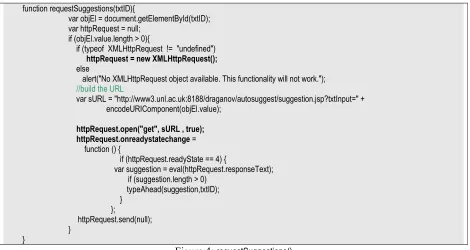
The requestSuggestions(txtID) function is the main element in the implementation of the AJAX technique. An XmlHttpRequest object is created and the method open() is called to initialise the object. The open()
method takes three arguments: Request Type – GET or POST, URL – a string indicating the URL to send the request to and a Boolean value indicating whether the request would be asynchronous. When this Boo-lean value is set to true the request is sent asynchronously enabling the execution of the JavaScript code to continue without waiting for a response and the user to continue to interact with the browser. Next an
event handler onreadystatechange has to be defined. This event handler is set to anonymous function,
which checks the readyState property of the XMLHttpRequest object. There are five possible values of this property, which are described for example in [2]. Every time the readyState property changes its value, the
readystatechange event fires and the respective event handler is called. Value 4 indicates that the request has been completed and all data from the response has been received and the connection has been closed. When this happens the function typeAhead(suggestion, txtID) is called passing the text retuned in the re-sponse and the id of the text box to be updated when the returned suggestion is not empty. Finally the request is sent by calling the send() method. This method requires a string parameter for the request body. The GET request does not have a body, therefore the parameter passed is null.
function requestSuggestions(txtID){
var objEl = document.getElementById(txtID); var httpRequest = null;
if (objEl.value.length > 0){
if (typeof XMLHttpRequest != "undefined") httpRequest = new XMLHttpRequest(); else
alert("No XMLHttpRequest object available. This functionality will not work."); //build the URL
var sURL = "http://www3.unl.ac.uk:8188/draganov/autosuggest/suggestion.jsp?txtInput=" + encodeURIComponent(objEl.value);
httpRequest.open("get", sURL , true); httpRequest.onreadystatechange = function () {
if (httpRequest.readyState == 4) {
var suggestion = eval(httpRequest.responseText); if (suggestion.length > 0)
typeAhead(suggestion,txtID); }
};
httpRequest.send(null); }
}
Figure 4: requestSuggestions()
[image:5.595.64.534.400.650.2]function typeAhead(suggestion,txtID){
var objEl = document.getElementById(txtID); var txtValue = objEl.value;
objEl.value = suggestion;
if (objEl.setSelectionRange) //Mozilla select
objEl.setSelectionRange(txtValue.length, objEl.value.length); objEl.focus();
[image:6.595.60.535.119.206.2]}
Figure 5: typeAhead()
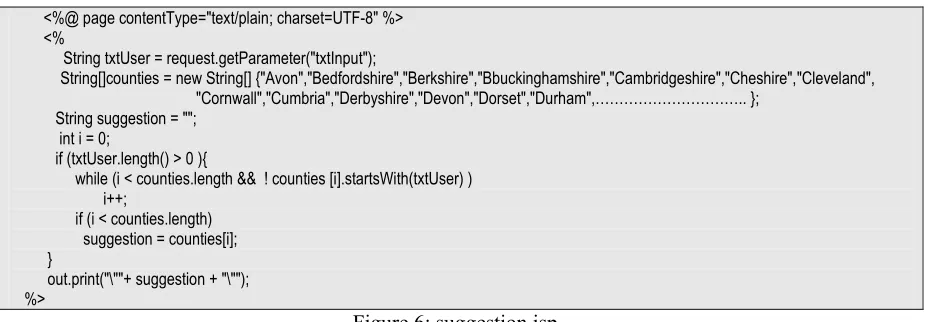
The last component is the server side JSP script. It handles the HTTP request and returns the relevant sug-gestion. To simplify the example the names of the counties are hard coded in an array. In real applications there will be a database tier that stores the names of the counties. The content type is set to text/plain since only text is sent back. This component could be implemented in any server side scripting language.
<%@ page contentType="text/plain; charset=UTF-8" %> <%
String txtUser = request.getParameter("txtInput");
String[]counties = new String[] {"Avon","Bedfordshire","Berkshire","Bbuckinghamshire","Cambridgeshire","Cheshire","Cleveland", "Cornwall","Cumbria","Derbyshire","Devon","Dorset","Durham",……….. };
String suggestion = ""; int i = 0;
if (txtUser.length() > 0 ){
while (i < counties.length && ! counties [i].startsWith(txtUser) ) i++;
if (i < counties.length) suggestion = counties[i]; }
out.print("\""+ suggestion + "\""); %>
Figure 6: suggestion.jsp
The implementation of the above example gives an indication of the knowledge, understanding and skills that are required to apply the AJAX technique. The first component requires basic knowledge of HTML. The second component requires good knowledge and understanding of the JavaScript language, event model, HTML DOM, the object-oriented paradigm and HTTP request/response model. It also assumes good programming skills. The last component requires skills in using a server side language and under-standing of the development of dynamic web applications.
4.AJAX educational implications
In all of the computing courses offered at London Metropolitan University students are given the option to study modules related to web development and Internet technologies at each level: certificate, intermedi-ate and honours. Each Internet relintermedi-ated module builds on the knowledge and skills gained in modules from the previous levels including Internet, programming and database modules.
[image:6.595.70.534.284.445.2]and mobile web application development shows that students find it interesting and motivating to learn innovative and popular technologies. The benefits from introducing the AJAX approach for the students include: developing broader skills and problem solving techniques in web development, improving under-standing of fundamental concepts related to event driven development, data tree structures, DOM, object
oriented programmingand acquiring knowledge in current trends in web development. Some challenges
also could be expected such as overcoming the different level of understanding of the prerequisite con-cepts by the students, developing more suitable examples and finding an appropriate tool or a framework for rapid development of AJAX applications.
In the certificate level all computing students study two core modules in object-oriented programming with Java. There are two sessions in the second programming module [10], which considers the event-driven paradigm in the context of building GUI applications. In the Internet modules students gain under-standing of key principles related to web applications and skills in design and development of static web sites. They are also introduced to the client side scripting language JavaScript, CSS and the XML technol-ogy. At this stage in order to prepare the students for using the AJAX technique examples that focus on using the HTML DOM, JavaScript Objects and the event model need to be considered. For instance, the W3 Schools [11] tutorials offer a large selection of appropriate examples.
The intermediate Internet modules cover development of data driven dynamic web sites. On completion of these modules the students are expected to be able to design and develop a multi-page web site allow-ing interaction with a database. The students gain experience of usallow-ing a server side language and the HTTP request/response model. The AJAX technique can be introduced at this level by comparing the traditional method for developing dynamic web sites with the AJAX approach. Ideally one lecture fol-lowed by a tutorial and a workshop would be sufficient to cover the basis of this topic. Simple AJAX ex-amples demonstrating real time data validation and periodic refresh for a mini chat room application based on the Ajax patterns suggested in Chapter 3 [2], have been developed. Exercises based on these examples that require small modifications are appropriate for the lab sessions to further develop the student’s under-standing of the AJAX approach.
The examples can be tested on http://www3.unl.ac.uk:8188/draganov/realtimedatavalidation/inputdata.jsp and http://www3.unl.ac.uk:8188/draganov/chatroom/chatroom.jsp, respectively, and their source code can be downloaded from [9]. These examples focus on implementing the basic AJAX engine in order to pro-vide students with understanding of the fundamental idea of the AJAX technique.
5. Conclusions
This paper has presented an overview of the AJAX technique for developing interactive web applications. Ideas of how to introduce the AJAX approach in teaching web development and examples for lab sessions have been suggested.
Incorporating popular technologies into the computing courses appears to motivate the students and in the same time it helps them understand better fundamental theoretical concepts. The AJAX technology re-quires relatively little new knowledge and can be easily included in teaching web development by focus-ing on specific parts of existfocus-ing technologies and demonstratfocus-ing appropriate applications. The challenge is the constant need of updating the material and selecting relevant examples and tools. However, the experi-ence of learning new technologies and related applications has been rewarding and exciting. The material presented here could be used as an example of embedding emerging technologies in the computing cur-riculum through existing modules.
6. References
[1] Garret J. J., Ajax: A New Approach to Web Applications, February 2005,
http://adaptivepath.com/publications/essays/archives/000385.php, last visited 27.09.2006
[2] N. C. Zakas, J. McPeak, J. Fawcett, Professional Ajax, Wiley Publishing, Inc, Prentice Hall, 2006
[3] Brattli, T., Dynamic data using DOM and Remote Scripting, 2002,
[4] Pallet D., Ajax & PHP without using XmlHttpRequest Object, http://www.phpit.net/article/ajax-php-without-xmlhttprequest/, last visited 27.09.2006
[5] Murray, G., Asynchronous JavaScript Technology and XML (AJAX) With Java 2 Platform,
Enter-prise Edition, 2005, http://java.sun.com/developer/technicalArticles/J2EE/AJAX/, last visited 27.09.2006
[6] Murray, G., Ball, J., Including AJAX Functionality in a Custom JavaServer Faces Component,
http://java.sun.com/javaee/javaserverfaces/ajax/tutorial.jsp, last visited 27.09.2006
[7] Paulson, L.D., Building rich applications with AJAX, Computer, p 14 - 17, Vol 38, Issue 10, Oct
2005
[8] Smith, K., Simplifying Ajax-Style Web Development, Computer, p. 98-101, Vol 39, Issue 5, May
2006
[9] http://www3.unl.ac.uk:8188/draganov/ajax_examples/ajax_examples.zip
[10] Fisher, K, Graphical User Interfaces, http://languages.londonmet.ac.uk/java2/week5/index.htm, last
visited 26.12.2006
[11] W3 Schools, www.w3schools.com, 2006
[12] Campbell, M., Lecture slides,
http://www.city.londonmet.ac.uk/~cambridg/qc310/AJAX/qc310-wk10B-Ajax.ppt, last visited 27.09.2006
[13] Google Maps API Version 2 Documentation, http://www.google.com/apis/maps/documentation/, last
visited 26.12.2006
[14] Java BluePrints AJAX Components, https://blueprints.dev.java.net/ajaxcomponents.html, last visited
27.09.2006