Layout Designer: customized web design application
R.B. Kulkarni
Associate Professor Dept. of Computer ScineceWalchand Institute of Technology,Solapur
Pooja R. Rajeshwarkar
Dept. of Computer ScineceWalchand Institute of Technology,Solapur
S.K. Dixit
Dept. of EXTC Walchand Institute ofTechnology,Solapur
ABSTRACT
Everyone is familiar with the search engines like Google, Altavista, etc. These search engines can search textual data and images which is useful to everyone. But, if a web designer has a rough idea regarding a web page that he wants to design and wants to see how these types of web pages look in real-time, he has no such application. This paper is the answer to the above hurdle in the way of the web designer. The proposed application, named Layout Designer, can search web pages of similar layout as drawn by the designer. In addition to that it also provides the facility to customize the page that the web designer likes. This application is actually, a Layout Search Engine and so named as Layout Designer.
This paper presents the development of such an application in a detailed fashion. It actually portraits the implementation of user interface, searching techniques and algorithms along-with database usage and customization techniques.
Keywords
layout design, web design, wireframe
1.
INTRODUCTION
Often when we speak of a web page the first thing that comes to our notice is how the page looks. If the page is good looking, simple and decent the user stays on the page. But, designing a web page needs creative efforts. Creative efforts help in laying out the components on the webpage in an artistic manner. Such a layout decides the design of the web page and ensures that its user will stick to it for a long time. Thus, Layout Designer strives to ensure the designer that he can complete the designing procedure in less time than the conventional method. It is also evident that like SDLC website development also follows a formal procedure [b]. In this procedure the design phase is important but such that not more time can be spent on it. The role of this application comes up here to enable designers to do accomplish this task.
A designer can draw web page layout using the GUI of the application and can search for similar web pages that already exist on the Internet. Referring these web pages he gets an idea to design his web page accordingly. He can also go a step further by editing the web page and saving it. Thus, this application is like a web page design search engine especially for web designers and novice web designers.
To understand the application better, it is necessary to know its position in the web site development formal procedure. For this reason in first section the Formal website development procedure is explained in brief. Then we look into the
literature review in this area. In next section we will see the details of the application. In last section we will see the working of the tool and conclude.
2.
WEBSITE CREATION CYCLE
Website creation is a process of conceptualization, planning, modeling, and execution of electronic media delivery via Internet in the form of Markup language suitable for interpretation by Web browser and display as Graphical user interface. [17]
There are basically3stages of website design. [18]
1. conceptualization/planning stage: flowcharts are created to portray the navigational structure of website.
2. modeling stage: static page layouts are created that illustrate the skeletal layout for each webpage of the website. After this, graphics, colors and text are used to create the design of the web pages based on the specified layout.
3. execution stage: your design is converted into a format supported by web browsers, text and content are added, and then website is published.
This application comes into picture in the second phase of the website creation. In this stage static pagelayout, called wireframes, are created. It’s a skeletal design of the webpage.In the modeling stage, static “wireframe” mockups are created for each unique web page. To create wireframes, one may use either:
1. paper and pencil
2. mockup software such as Adobe Photoshop or our personal choice [17]
The purpose of creating such wireframes is to be able to have a general idea of where each of the web page’s elements will be placed. It decides the place of logo, navigation bar, images, text or other sections on the webpage. Figure 1 demonstrates the typical wireframe of a web page. [17]
Fig.1 A Wireframe
In a website development project the time spent in all the activities is given in figure 2. Here we notice that only 30% of time is spent in both, designing and development i.e writing business logic. Even in that 30% more concentration needs to be given on functionality of the website and not on its looks. So it becomes mandatory for the designer to work promptly. But it is difficult for a designer to produce aesthetic design in less time. In a project of 14 to 30 days, web designing needs 7 to 14 days including the feedback and follow up steps which is not acceptable. Therefore, designer needs a special tool like layout designer so that he can refer to already created webpages and get inspired from them. Making slight changes to the selected webpages is also possible in layout designer. Thus Layout Designer tries to help the web designers to design impressive web page designs consuming less time.
Fig.2 web creation task distribution [17]
3.
LITERATURE REVIEW
There are popular applications for creating web pages such as GoLive, WebSphere, HomePageBuilder, Microsoft frontpage and Dreamweaver. These systems use WYSIWYG applications where the user can edit the document visually without explicitly typing HTML tags. However this approach is useful when the user has a specific layout already in mind and is familiar with the web page layout principles as to what kinds of layouts are possible. Thus, WYSIWYG interfaces are not very helpful in the early stages of design because the editing process in a WYSIWYG interface does not support the quick exploration of multiple possibilities. This inspired to construct such a application that automates every action of the website designer, in order to reduce his efforts. [1]
WebStyler generates an actual HTML file from a sketch. This will help the users to quickly obtain an html page corresponding to the input sketch.
Bouillon et al. also use a graphical drawing application for specifying the layout of web pages in their system for porting a web site from one platform to another. However, the resulting design might be not be very sophisticated because it relies completely on the limited design skill of the users. Using our system, even novice users can learn a lot from professionally designed web pages on the Internet and they can hover over multiple possibilities quickly, which is important for good design. [10]
Cullen et al. invented a layout-based search system for PDF documents .It is specialized for strongly formatted documents for print and is not applicable for HTML documents. To be specific, they focus on the detailed appearance of textual contents such as fonts and density of texts. However, web pages have a limited variety of text appearances and the general location of visual objects is far more important. Thus we can say that our application is working on location of visual objects (images, text-placement, etc), instead of only text as in this layout-based search system for PDF. [9]
DENIM is a sketch-based design application for early stage of web design. Their user study showed the rapid sketch interface is effective for making a design. However, DENIM is designed for professional designers who can easily derive more detailed web pages from their rough sketches. Novice users are not sure how their sketch might appear when converted into a HTML document. Our application helps them in the process of turning ambiguous layout designs in mind into actual web pages. [13]
Yasunari Hashimoto and Takeo Igarashi have built such a application in 2005. It provides user interface for sketching the web page layout, as a query to the system, which is now not as the current trend is. It is somewhat outdated UI. Also the work of the system is not smart as this application is. [1] Their system stops working just after the web samples are retrieved but this application will help the users to customize the sample that is chosen. It gives tips and suggestions according to the purpose of the website. Both the applications are same in their service. Both of them thus serves two purposes that are not served by any of the applications and systems described above, viz: automated web designing for professionals in significantly less time and as a guide for novice users helping to design masterpiece of the webpage design.
We are all familiar with the popular Google image search. Here we input query in the form of text but using the same idea in this application the query is in the form of web page layout created by the user. Unlike Google, we may say that our layout search engine uses content based retrieval method to find out the similar layout web page samples.
This application works as a search engine for web page layouts. The most familiar and widely used search engines use keywords while some search engines use various search methods including natural language and SQL-based queries. There are also search systems for finding visual contents such as images and 3D models.However, there is no such a search engine that helps the users (designers) to find web pages with a desired layout. Moreover, the application also helps to actually design the web page when the user picks a sample to customize it according to his purpose of website and interest.
4.
LAYOUT DESIGNER
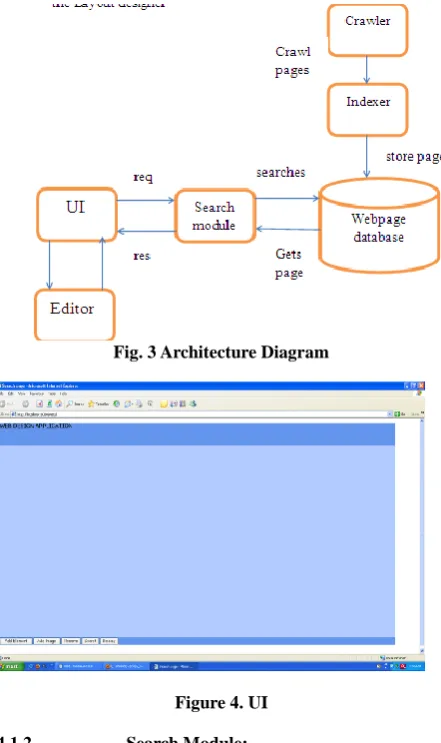
[image:2.595.55.265.424.551.2]features (dimensions) in the database. Whenever user submits the web page design from user interface or sketch pad, the processor renders the objects present on the web page layout. While the search module searches for the similar features of the pages that are present in the database. It returns the appropriate result to the user interface. It is upto the user to make the choice and edit the selected web page. This diagram makes clear, the conceptual picture of the working of the application.
4.1.
Components
of
the
Layout
Designer
The architecture diagram in figure 3 shows the components of the Layout designer
4.1.1. UI (user interface):
[image:3.595.56.277.352.724.2]The snapshot of user interface is as shown in the figure 4. User can draw the layout as desired and click on search button as shown in the figure. The main function of UI is to take layout as input and pass it as a query to search module, as shown in fig.3. UI. UI provides the facility to drag-n-drop the components on the page and allows adjusting their size. UI is implemented using HTML and javascript. The components on the web page i.e banner, navigation bar, menu bar, image etc are represented as rectangle in U, whose size is adjustable. UI is also used to display results to the designers.
Fig. 3 Architecture Diagram
Figure 4. UI
4.1.2. Search Module:
UI sends the query to search module, which is a servlet called SearchServlet.java .The servlet differentiates the x, y height
and width attributes of the components drawn by the designer in UI. These attributes are passed to the class file (webobjects.java). Here we calculate the distance from centre of each component of layout drawn by the designer with that of the component on the webpage stored in database that is crawled by the crawler module. If the distance between pair of component is found to be minimum it is preserved for further calculations. The page with minimum sum of such distances is selected as result. Here is the code snippet that shows the calculation of distance
public double distance(WebObject wo)
{
double
ed=Math.sqrt((x-wo.x)*(x-wo.x)+(y-wo.y)*(y-wo.y));
if(!type.equalsIgnoreCase(wo.type))
ed+=600;
double ad=Math.sqrt(Math.abs(w*h-wo.w*wo.h));
return ed+ad;
}
We use distance formula to calculate centre to centre distance between each component. If the component type are different, i.e if image is being compared with navigation menu bar, then we add a constant (600) to the calculated distance to make it maximum and avoid it appearing as result.
While doing so the drawn layout is compared with webpage layout and vice versa will lead to erroneous results.
[image:3.595.316.549.492.656.2]4.1.3. Editor:
Figure 5. Results page
Figure 6. Editor
In CK-editor it is possible to change background color, font size, font-type, indentation, adding images, etc. almost all editing options are provided.
4.1.4. Webpage database:
Layout designer uses MySQL as backend. The E-R diagram of backend is as shown in figure 7.
Figure 7. E-R Diagram
There are 2 tables in the backend viz: pagedb and objectdb. Pagedb stores 2 fields viz: pageid (primary key) and url. This helps to recognize the webpage that is crawled by the crawler, uniquely. Objectdb is other relational table that has pageid as its foreign key and objectid as its primary key. This table stores all the attributes of the objects on that particular page. The attributes are x & y co-ordinates of the object , height, width. Based on this, all the calculations in the search module are done and compared with the corresponding attributes of the pagelayout drawn by the designer. One of the drawbacks is that the crawler crawls all the web pages of the website and records all the pages of that site while actually there is no need, because all the webpages of single website has same layout so as to maintain the uniformity in the site. So as we can see in the figure 5. Multiple pages match, which belong to “archies” site. If the database has only one page from each site, then many other options would be available to the designer.
4.1.5. Crawler:
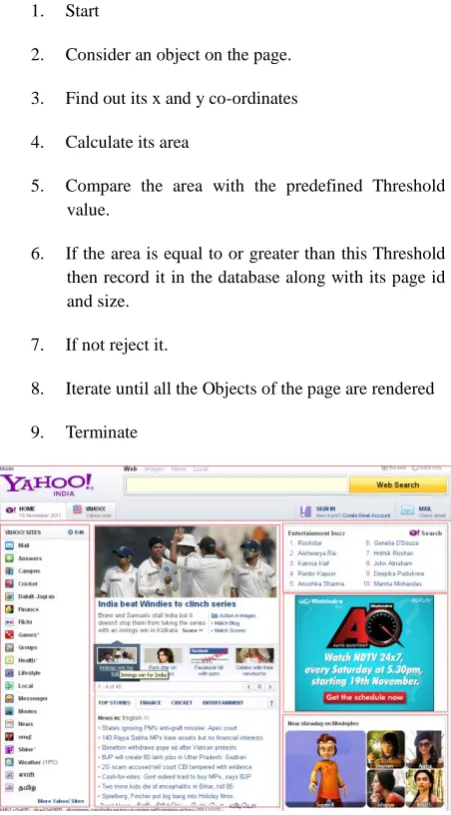
The crawler crawl the pages on the Internet and collects the attributes that are to be stored in the webpage database. It traverses the webpage for each object in a tree like manner. Accordingly these values are updated in the webpage database. While crawling, the crawler uses spatial segmentation algorithm to segment the webpage and record each object present on the webpage. The conceptual view of
the spatial segmentation algorithm is shown in figure 8 respectively.
Algorithm:
1. Start
2. Consider an object on the page.
3. Find out its x and y co-ordinates
4. Calculate its area
5. Compare the area with the predefined Threshold value.
6. If the area is equal to or greater than this Threshold then record it in the database along with its page id and size.
7. If not reject it.
8. Iterate until all the Objects of the page are rendered
[image:4.595.318.544.123.531.2]9. Terminate
Figure 8. Webpage segments
Explanation:
A segment is a fragment of HTML, which when rendered, produces a visually continuous and cohesive region on the browser window and has a unified theme in its content and purpose.Depending upon the definition of the segment, the following can be termed webpage segments:
left navigation menu bar
site-specific banner that might be at the top navigation footer
links and abstracts of related web pages
banner and other forms of advertisements scattered throughout a page
copyright notices, terms of service, and contact information
[image:4.595.57.285.366.440.2]It is necessary that all those applications that interact, manipulate, observe or use the web content in any way need to implement web page Segmentation. As this web application is related to spatial manipulation and matching web pages, it also needs to implement the Segmentation Algorithm.
Until recently, it was able to be performed reasonably by analyzing the HTML structure, but the introduction and rise in dynamic content of web pages does not fit the assumptions made by those algorithms. So we will use some different Segmentation Algorithm. The basis of our algorithm would be “area” on the web page. Thus, we will call it as Spatial Segmentation Algorithm. The above web page segments will definitely occupy different areas on the web page. So, based on this feature we can segment the web page.
The value of Threshold decides the granularity of the segments that are formed. If the Threshold value is small then the segment size is small i.e fine granularity and if Threshold value is large then segments size is also large resulting in coarse granularity. We have assumed the Threshold value as 22500 (150*150).
This algorithm starts from the larger segment. It decides if the considered object is greater than or equal to the threshold value. If it is greater, then the record of that object is made in the database along with its x,y co-ordinates and area. Otherwise the object is rejected.
It is not the case that the rejected Object will not be recorded, instead that Object has been already considered as constituent of the larger Object in which it is placed. Thus, no Object of the web page will be skipped. For Instance if we consider the Orange colored marking on the web page in fig8, we find that the Object marked with Red is considered first whose area is greater than threshold value. But when the algorithm iterates to reach the images marked in Orange in fig.8 they are rejected. However, notice that they are the constituents of the larger Object which the algorithm has recorded already.
It may be the case that the larger Object may have other Object and both of them are greater than threshold value as shown in the fig.8 (Object marked with red has another object marked in blue). Such overlapping causes no problem in searching and matching.
4.2.
Technology used
It was decided to use JAVA technology for implementing Layout designer. JSP will be a good companion for JAVA programs as a front-end. Moreover, Servlets will act as a helper technology to the core JAVA classes that provide core functionality of the application like functionality of rendering engine and crawler. JAVA clearly supports SQL syntax, so classes can easily use MYSQL as back-end. For this we will need a special jar file called “mysql-connector-java-5.1.3-rc-bin” to make connection with My SQL.
[image:5.595.310.553.162.240.2]As JAVA is platform independent, the application will also acquire this feature along with all other features of JAVA. Thus, this application is object oriented web application built using JAVA technology. The table below shows the summary of this discussion.
Table 1. Technology Used
Technology Dependencies Front-end JSP, Servlet,
Javascript, JAVA
-
Back-end My SQL
mysql-connector-java-5.1.3-rc-bin (.jar file)
5.
WORKING OF LAYOUT DESIGNER
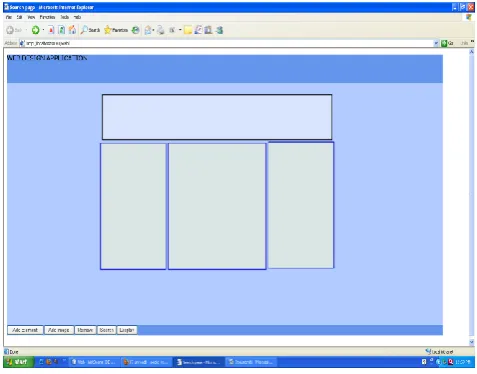
[image:5.595.314.553.298.485.2]Below figure shows the snapshot of Layout Designer, when the designer draws the wireframe as a query.
Figure 9. User Interface with wireframe drawn
[image:5.595.316.551.547.712.2]On pressing “search” button, the results page is generated as follows.
Figure 10. Results page
was submitted by the designer as search query. In figure 12. We can see 9th result among the 11 results shown on the results page. It is somewhat different than the exact result that was expected. This is show by blue square. Thus we can observe that the tool displays eleven results and shows them in descending order of match. As we go down in the results page the layout differs than the one expected. Thus, less matched pages are shown below.
[image:6.595.52.276.185.332.2]These pages are arranged according to the scores that are calculated in the search module. Page with least score is the best matched page and is displayed first.
Figure 11. First result from the results page
Figure 12. Last result from the results page
The next step is editing the selected web page. This functionality is an addition to the previously proposed applications. This feature of Layout designer allows the designer to customize the designer as he likes using his skills. He can lively edit the page while it is displayed in the browser itself. Once the designer does primary changes using CKEditor, and saves the webpage, he can display that page in the browser and then start editing if required, in the browser itself. This would definitely cut-off the additional time of the designer.
6.
CONCLUSION
Layout designer thus, helps designers, especially novice designers, in designing the web pages. Using this web application, designers can quickly provide the overall design of the desired web page and find similar web pages. This helps novice designers to learn the basics of web page designing, and improve themselves gradually by producing improved designs by interacting with the web application repeatedly. Emphasize is on web page layouts and their design. The previous work in this area, which supported only
static features of web pages, is addressed in this proposed work. This application also supports the dynamic features like taking into account the scripts and CSS while retrieving the web pages from Internet, etc. there are some changes made to the rendering engine that will help to incorporate this feature. The scope of this application is restricted till the designing of the web page developing business login and implanting it, is to be done by the developer himself.
7.
ACKNOWLEDGMENTS
Authors are thankful to the Institution with which they are associated to allow them to participate in journal publishing programs, which provide a platform for their research and implementation work to showcase to the world.
8.
REFERENCES
[1] Retrieving Web Page Layouts using Sketches to Support Example-based Web by DesignYasunari Hashimoto Takeo Igarashi
[2] http://sixrevisions.com/web_design/a-guide-on-layout-types-in-web-design/
[3] PANT G., SRINIVASAN P., MENCZER F.: Crawlingthe Web. In M. Levene and A. Poulovassilis, editors: Web Dynamics, Springer-Verlag (2004)
[4] HU W.C., CHEN Y.: An Overview of World WideWeb Search Technologies. In Proc. of 5th World Multi- Conference on System, Cybernetics and Informatics,(2001)
[5] MultiCrawler: A Pipelined Architecture for Crawling and Indexing Semantic Web Data by Andreas Harth, J¨urgen Umbrich, and Stefan Decker
[6] Web Interface Development Environment (WIDE):Software Application for Automatic Generation of Web Application Interfaces Sohei Okamoto, University of Nevada, Reno, USA, Sergiu Dascalu, University of Nevada, Reno, USA,Dwight Egbert, University of Nevada, Reno, USA
[7] http://www.websiteoptimization.com/speed/tweak/blink/ [8] Testing Web Sites with Eye-Tracking. User Interface
Engineering.
http://world.std.com/~uieweb/eyetrack1.htm
[9] CULLEN J.F., HULL J.J., HART P.E.: Document Image Database Retrieval and Browsing using Texture Analysis. ICDAR , (1997) 718-721.
[10] BOUILLON L., VANDERDONCKT J., CHOW K.C.:Flexible Re-engineering of Web Sites, In Proc. of the international conference on Intelligent User Interfaces,( 2004), 132-139.
[11] CAETANO A., GOULART N., FONSECA M., JORGEA.: JavaSketchIt: Issues in Sketching the Look of User Interfaces. In Proc. of the 2002 AAAI Spring Symposium-Sketch Understanding (2002), 9-14. [12] PETRAKIS E.G.M.: Design and Evaluation of Spatial
Similarity Approaches for Image Retrieval. Image and Vision Computing, 1, 20 (2002), 59-76
[image:6.595.54.240.366.485.2]Practice for Web Site Design. In CHI Letters: Human Factors in Computing Systems, 2, 1(2000), 510-517. [14]
http://www.impliedbydesign.com/articles/what-is-the- difference-between-web-design-and-web-development.html
[15] A Graph-Theoretic Approach to Webpage Segmentation Deepayan Chakrabarti Ravi Kumar Kunal Punera
[16] VIPS: a Vision-based Page Segmentation Algorithm Deng Cai, Shipeng Yu ,Ji-Rong Wen, Wei-Ying Ma [17]
17.http://www.chromaticsites.com/blog/dos-and-donts-guide-to-great-web-design/
![Fig.2 web creation task distribution [17]](https://thumb-us.123doks.com/thumbv2/123dok_us/8119531.793754/2.595.79.255.87.233/fig-web-creation-task-distribution.webp)