Analysis, Design and Implementation of a General
Framework for Remote Lab
Yasser H. Elawady
College of Computers and Information Technology
Taif University,
Taif, KSA
.
A.S. Tolba
Faculty of Computer Studies
Arab Open University,
HQ, Kuwait.
ABSTRACT
Hands-on laboratory experiments are a vital part of engineering and physical sciences education, having a strong impact on students' learning outcomes. With the increased usage of electronic kits in the educational laboratories, and the need for training a huge number of students on these kits, it is imperative to enable to remote access to a physical laboratory, either as part of an on-site or distance learning course. In addition to the convenience provided to students, there are also cost and safety related benefits. Many institutions can not afford the expensive equipment provided in a physical lab. Such laboratories are very convenient and effective for learning hardware design concepts and elaborating hardware-based graduation projects. This paper addresses the hardware (HW) and software (SW) tools necessary for building a general framework for remote laboratory access. The proposed system allows performing experiments remotely across the Internet via web interface as well as locally in the classroom. In addition, it introduces enhancements for the remote lab activities leading to improving its performance and makes the data transfer more secure.
Keywords
-Remote laboratory access, Virtual laboratory, FPGA, E-learning.
1.
INTRODUCTION
Within the disciplines of Engineering and Physical Sciences, laboratory work is considered to be at the heart of learning and can have a strong impact on students’ learning outcomes. Laboratory-based sessions are widely used in order to provide physical evidence of theoretical principles and to teach practical skills. When used appropriately they can enthuse, motivate and inspire students [1].
Remote laboratories embody an attractive solution to conduct live experiments from any location, obtaining time saving and reduction of costs for measurement instruments, and technical personnel. Moreover, the achievement of remote control of an instrument has proved to be an optimal solution to share an instrument among different Universities or industrial users, without the need of transporting it or outing of personnel [2]. Most of the remote labs focus on engineering laboratories as the engineering discipline contains the biggest portion of laboratory studies. In other words, engineering is an applied science. Remote laboratories are
becoming widely accepted in universities for providing distance education and for augmenting traditional laboratories. There is a lot of interest in remote laboratories from pedagogical point of view [3].With the increasing popularity and use of FPGAs and Microcontrollers (µC), it becomes necessary to develop a mechanism for training a broad range of computing students on FPGA and µC technologies.
This paper introduced a general framework for a proposed remote lab access that allows performing experiments remotely across the Internet via web interface. In addition, it introduces enhancements for the remote lab activities leading to improving its performance and makes the data transfer more secure.
The rest of this paper is organized as follows: Section II introduces the related work. Section III introduces the design of the remote laboratory system architecture. Section IV presents the remote lab Case Study. Section V introduces results and discussion. The conclusion summarizes the obtained results and proposes further work for enhancing the performance of remote laboratories.
2.
RELATED
WORK
Remote lab access is a relatively new concept. With the growth of the Internet and increasing connectivity, the popularity of remote labs has surged. Some interesting efforts are described below.
sizes, one key drawback is portability to other classroom environments where these exact resources do not exist.
Hashemian and Riddley [5] have designed an FPGA e-Lab, remote access system targeted for digital design courses using FPGAs based on Xilinx’s Spartan-3E Starter Kit. The e-Lab uses Windows XP Remote Desktop to connect the remote user with the FPGA, data acquisition hardware, and LabView, Integrated webcam and GPIO to connect LEDs, switches, and control hardware on the actual FPGA. An obvious advantage of such a system is the low start-up costs associated with acquiring the Spartan Starter Kit and software tools, but the use of Windows XP Remote Desktop slows the system.
Nedic [6] reported on NetLab from the University of South Australia which aims to address the common concerns of remote laboratories. With a similar design to the previous efforts, NetLab incorporates a variety of laboratory equipment and even goes so far as to allow collaboration between students. The paper concludes that while the remote lab setup did not directly outperform conventional real labs, the authors suggest a mix of real and remote labs throughout the education curriculum.
Corter et al [7] developed a model that investigates the relative effectiveness of hands-on labs, remote labs and simulated labs. The labs conducted were focused on the kinematics and dynamics of mechanisms such as linkages, cams and gears. To draw a fair comparison, out of the six labs given to the class, three were given in traditional format and three were given in hands-on traditional format. In addition to the student outcomes and student satisfaction, student preferences for remote labs were related to student characteristics, in thinking style and ability. The results obtained by Corter et al show that among other criteria like preparatory instructions, lab report, and team work, “physical presence in the lab” was rated least important by the students. Also, actual learning outcomes were assessed by questions on the midterm and final that was related to the content of the labs.
Lab on the Web [8] is a virtual laboratory that aims to achieve flexibility in digital and analog circuit design keeping in mind the cost, scalability and modularity. An
FPGA board is used as it allows for implementation of almost any circuit. Here, the interface to the remote lab is achieved by combining Virtual Network Computing (VNC) and secure remote desktop. Test suites were developed that are lab experiments which can be used by students. The test suites include an Analog Circuit - a simple circuit is set up which can demonstrate the use of a power supply, oscilloscope, a switch matrix and a function generator all of which can be controlled Remotely, FPGA Programming - illustrates that the FPGA can be used Remotely via the Internet, Digital Signal Processing Experiment - An analog signal is captured then using the ADC interface it is digitized. The signal is then passed to the FPGA using VHDL. This system also provides a webcam so the users can look at the FPGA board. This system was evaluated and it was found suitable for undergraduate courses.
“eLab” [9], implemented by the University of Bordeaux in France is an effort toward increasing Remote education for Electrical Engineering. The components that make up this system are a pool of instruments that can be controlled remotely, a group of servers and dedicated software. The digital circuits implemented by this lab include Differential Pair Amplifier, Linear OpAmp operation, and RC filter. Again, a camera is placed in the eLab’s room that allows a live view of the instruments and servers. The eLab webpage also contains various textbooks that are required for the courses that use these labs. The web interface is a simple one that allows users to set data points, frequency values and voltages. The results of these inputs can be then measured in new pop-up window which allows users to save the output. An interesting feature in this system is that a “notebook” is automatically created that stores the results and measurements of the user.
Gurkan et. al [10] presented a remote laboratory for an optical circuit’s course. The strategy used in this facility is to first introduce the students to the concepts in theory and then proceed to pre laboratory activities. The pre laboratories include an orientation video, simulation and laboratory procedures on-line. This work also includes assessment of the learning outcomes and teaching methods. Here, the students connect to the server using a Web-based client that connects to the LabView Web Server. Three experiments were conducted; Optical Source Characterization, Optical Fiber Link Attenuation and Fiber Connectors, Hands-On Skills Transferred From RemoteLabs, based on performance of the students on these experiments, student success was measured. A student opinion survey was conducted too.
Austin J. Che [11] at the Massachusetts Institute of Technology (MIT), explains the benefits of setting up remote lab for biology using the iLab technology developed by MIT. Che states that a general lab for biology that can be done remotely, leads to shared costs, efficient use of resources and higher work efficiency.
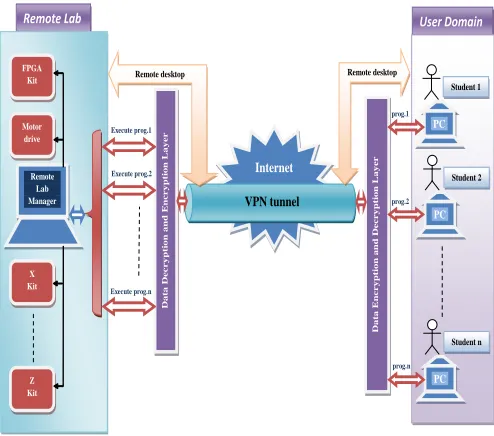
User Domain Da ta En c r y p tio n a n d De c r y p ti o n La y e r Internet VPN tunnel PC Student n PC Student 1 PC Student 2 Da ta De c r y p ti o n a n d E n c r y p ti o n La y e r Execute prog.2 Execute prog.1 Execute prog.n Remote desktop Remote desktop Remote Lab prog.1 prog.2 prog.n X Kit Z Kit Motor drive FPGA Kit Remote Lab Manager
3.
DESIGN
OF
REMOTE
LABORATORY
SYSTEM
ARCHITECTURE
3.1
System Architecture
The structure of the proposed remote lab access is shown in Fig.1. The system simply represents the remote lab with single structure of a computer to interact with the client (student) through the internet via a VPN connection. It consists of two sections, the user domain and the remote lab. The user domain enables the client in his place outside the lab to send his programs and data to the remote lab to be executed and installed on the kits connected to the remote lab manager. The second section, the remote lab, is simply the physical location for the client to execute his experiments on the kits connected to the remote lab manager through a permission access to the lab remotely.
There are data encrypting and decrypting layers in both sections to improve the security of data transfer.
3.2 Remote lab Hardware
From the standardization point of view, the hardware requirements of the remote lab in terms of the experimentation unit are dependent on the type of the experiment to be conducted. The remote lab manager, power supply unit, the electronic kits, some aided electronic circuits to connect the kits to remote lab manager
terminal (i.e. USB terminal), and internet connection are typical laboratory instruments needed. They may be augmented or changed based on the type of the experiment needed to be set-up. The main
requirement is that the measuring device be accessible via some well-known interface for control selection and setup, as well as remote data collection.
In our remote lab we have three types of kits as follow:
i. FPGA kits (Xilinx Spartan_3A)
ii. Microcontroller PIC_16F876 for Motor drive. iii. Wireless sensors (temperature, light)
They are connected to the remote lab manager through USB cables. The remote lab can be extended to have more kits simply by connecting these kits to the remote lab manager and installing the driver of these kits on the remote lab manager.
3.3 Remote lab Software
Our remote lab is programmed with C# and the software needed to run the kits are different due to the kit chosen to be run by the client. Each kit has its own driver and installed on the remote lab manager. The client connects to the lab through internet in a secured tunnel with VPN technology. Our remote lab is a client/server package that contains two applications:
Lab Manager Application. Student Front-end application.
3.3.1
Lab Manager Application:
This application is a windows application that works as a server; the lab instructor is the administrator of this application. The operations will be done locally on the lab manager machine.
The application has the following main features:
1-
Connection Administration.2-
Student administration.3-
Work Space administration.4-
Lab Terminals Administration.5-
Executing Experiments.6-
Network-Fail Safety protocol.3.3.2
Student Front-end Application:
This application works as a client and student is the user of this application. The student can do these operations:
1. Login to the Lab Manager.
2. Upload/Edit/Delete Experiments in his work space. 3. Execute experiments.
[image:3.612.44.291.324.542.2]4. Get Remote desktop.
3.4
Object-Oriented Design of the proposed
system .
A software system can be said to have two distinct characteristics: a structural, "static" part and a behavioral, "dynamic" part. In addition to these two characteristics, an additional characteristic that a software system possesses is related to implementation. The static characteristic of a system is essentially the structural aspect of the system that defines what parts the system is made up of. It includes Use case diagram and Class diagram. The dynamic characteristics of a system are essentially the behavioral features of that system including Object diagram, State diagram, Activity diagram, Sequence diagram, and Collaboration diagram.
The implementation characteristic of a system describes the different elements required for deploying a system, including Component diagram and Deployment diagram [12].
For the proposed system, we presented the two structural components (Use case diagram and Class diagram), and two behavioral features (Sequence diagram and Activity diagram), using Microsoft Visio 2010 for depicting these diagrams.
3.4.1
Remote Lab Use Cases
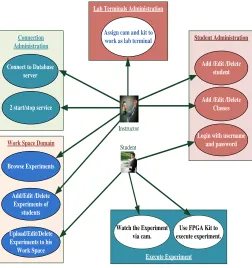
The use cases of the remote lab are shown in Fig.2. Chat
Student Instructor
Lab Terminals Administration
Assign cam and kit to work as lab terminal Connection
Administration
2 start/stop service Connect to Database
server
Student Administration
Add /Edit /Delete student
Add /Edit /Delete Classes
Login with username and password Work Space Domain
Upload/Edit/Delete Experiments to his
Work Space Add/Edit /Delete
Experiments of students Browse Experiments
Execute Experiment
Watch the Experiment via cam.
Use FPGA Kit to execute experiment.
3.4.2
Remote Lab Activity diagram
The remote lab activity diagram is shown in Fig.3
End Video Thread End Receive Thread Start Application
Load Config Xml File and Load Kits Drivers
Connect to Database Server
Start Services
Create Server Socket and start listening
Handel Command
GUI Application Control
Administrator Command
Accept Connection
connect
Accept Connection
Create New Session
Create Connection
Receive Xml Message
Xml Message
Dispatch
Handel Xml Request
Upload Experiment Execute Experiment
Create File Transfer connection
Send Port
Wait Client to connect
Receive File Create Video
connection
Send Port
Wait Client to connect
Sending Frames Start
Yes
No Connect to
Database Server
Main Thread Listen Thread
[image:4.612.320.559.68.694.2]Start Session Thread
Fig.2.Remote Lab Use Cases
[image:4.612.40.292.373.641.2]3.4.3
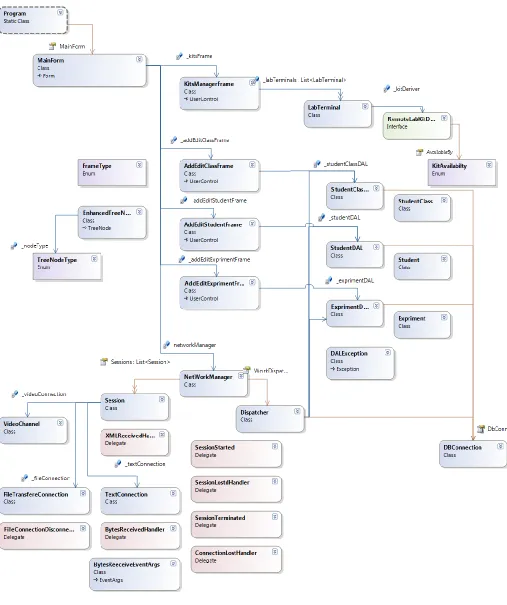
Remote –Lab Class Diagram
[image:5.612.57.564.112.717.2]3.4.4
Remote Lab Sequence Diagram
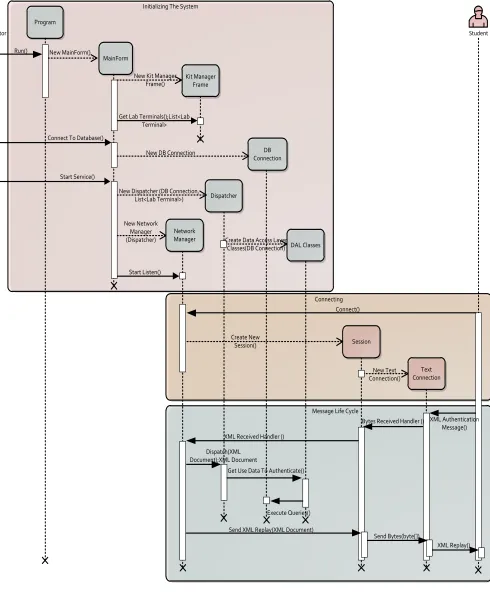
The remote lab sequence diagram is shown in Fig.5
Message Life Cycle Connecting Initializing The System
Program
MainForm
DB Connection Kit Manager
Frame
Dispatcher
Network Manager
DAL Classes
Administrator Student
Session
Text Connection
Run() New MainForm()
New Kit Manager Frame()
Connect To Database()
Start Service()
Get Lab Terminals();List<Lab Terminal>
New DB Connection
New Dispatcher (DB Connection, List<Lab Terminal>)
New Network Manager (Dispatcher)
Start Listen()
Create Data Access Layer Classes(DB Connection)
Create New Session()
New Text Connection() Connect()
XML Authentication Message() Bytes Received Handler ()
Send Bytes(byte[])
XML Replay() Dispatch(XML
Document);XML Document
Get Use Data To Authenticate()
Execute Queries()
[image:6.612.76.566.108.700.2]3.5
Data Encryption
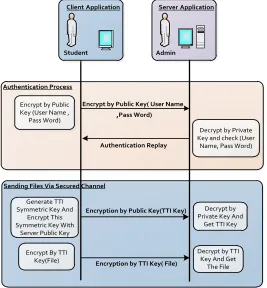
For securing data transfer an Encryption-Decryption layer is built at both sides of the proposed remote lab.
The policy of the Data Encryption-Decryption in the proposed remote lab is as follow:
i. Server application has RSA keys (public and private key). ii. Client application encrypt all vital small data with server public key so only the server application can decrypt and get the data.
iii. When client application needs to send large amount of data (like files) it generates symmetric key like Text To Image (TTI) and encrypt this key by public key and send it to the server then server can decrypt it by private key and get the symmetric key. Client application will encrypt this file with symmetric key and send it to the server.
The Data Encryption-Decryption Sequence Diagram is shown in Fig. 6
4.
REMOTE
LAB
CASE
STUDY
The remote lab has two modes of operation available for the choice of the client as follow:
i. Direct execution
(The client writs the program on his home PC then he uploads the file to the remote lab manager remotely and download this (.bin) file to the kit through the port connection with remote lab manager, Remote desktop not needed)
ii. Remote desktop
(The client starts programming the file on the remote Lab manager remotely then downloads this file to the kit)
In the next section we will introduce a case study for direct execution mode of the proposed remote lab with FPGA design and test using Xilinx Spartan_3A kit.
4.1
FPGA Design And Test Using Xilinx
Spartan_3A Kit
Modern large FPGA devices have capacity equivalent to millions of equivalent gates and contain big amount of embedded multipliers, Digital Signal Processing (DSP) blocks, hierarchical memory subsystems, hard cores etc. The proposed remote lab is equipped with a Xilinx Spartan-3A Starter Kit whose hardware is interfaced with a remote lab manager via an interactive Graphical User Interface (GUI) and acquisition hardware through USB ports. The access to the remote lab manager from a Remote location will be through a VPN connection for more secure data transfer.
A typical FPGA design procedure includes the following steps:
1. Project description and specification.
2. Design entry through schematic capture and/or Hardware Description Languages such as VHDL or Verilog.
3. Functional simulation and design verification. 4. Design synthesis.
5. Design implementation, post place and route simulation. 6. FPGA hardware reconfiguration.
7. Design verification: testing and debugging.
Stages 1 through 5 can be accomplished using only Electronic Design Automation (EDA) software tools. Stages 6 and 7 require access to the real FPGA hardware.
In direct execution mode the client will carry out the first 5 stages to get the program and then completes the process by executing Stages 6 and 7 on the real FPGA hardware in the remote lab. In this mode, the client uploads the (.bit) file to the work space, and downloads it to the FPGA kit using a batch file for the impact program such as the following example.
Example: Full-adder
1- Run client application.
2- Login to the lab using (class number, user name and password) as shown in Fig.7.
Sending Files Via Secured Channel
Decrypt by TTI Key And Get
The File Generate TTI
Symmetric Key And Encrypt This Symmetric Key With
Server Public Key Authentication Process
ServerApplication
Admin
Encrypt by Public Key (User Name ,
Pass Word)
Encrypt by Public Key ( User Name
,
Pass Word)
Decrypt by Private Key and check (User
Name, Pass Word) Authentication Replay
Decrypt by Private Key And
Get TTI Key
Encrypt By TTI Key(File)
Encryption by Public Key(TTI Key)
Encryption by TTI Key ( File)
ClientApplication
Student
[image:7.612.33.300.301.589.2]3- Add experiment by inserting (experiment name, experiment description and upload (.bit) file to the work space) as shown in Fig.8.
4- The client executes the experiment on the server.
5- The client Selects the kit and chooses execute as shown in Fig.9
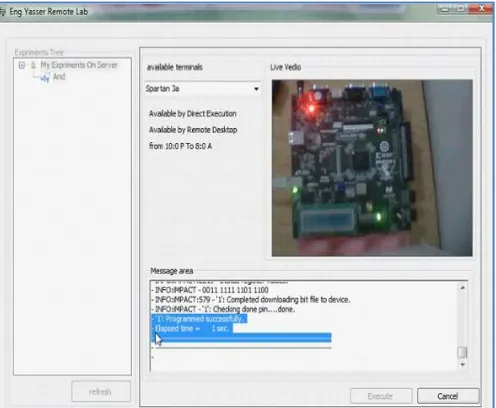
6- The client will receive success message in the message area after program download on the kit is completed. From live video, the kit led will light to ensure that the process is completed as shown in Fig.10
5.
RESULTS
AND
DISCUSSION
As a case study of up to five students have an access to the remote lab manager at the same time, we test the average waiting time for the students to execute their experiments in the two modes remote desktop (ordinary mode in most of remote labs) and direct mode of the proposed remote lab.
The bar chart in Fig.11 shows that the direct execution reduces
waiting time for the clients and enhances lab performance.
0
5
10
15
20
25
30
35
1
2
3
4
5
T
otal
av
era
ge
wai
ti
ng
la
te
nc
y
(mi
n)
Number of students Remote Desktop
[image:8.612.45.300.116.474.2]Direct Execution
[image:8.612.314.562.127.331.2]Fig.7. Login screen
Fig.8 Add Experiment Screen.
Fig.9 Select Kit and Execute Screen.
[image:8.612.318.556.484.686.2]Fig.10 Success Message and Live Video Screen.
[image:8.612.46.298.508.705.2]A comparative analysis of the two modes of the remote lab access is shown in table 1.
Table 1 A comparison between the two modes of the remote lab
Remote Desktop Direct Execution
Speed Slow Very Fast
Machine Resources
Needs high machine resources and high speed internet connection
Doesn't Need high machine resources and low speed internet connection can Work
Users Can Access The Lab
Only One user More than one user
Security low high
6.
CONCLUSION
In conclusion, we proposed a general framework for remote laboratory which enhances the remote lab activities leading to improving its performance and makes the data transfer more secure. So, the following conclusions are drawn,
Remote lab access reduces the waiting time of accessing the lab through direct execution users.
Remote lab access is more secure for data transfer using VPN technology (tunnel), RSA for (User Name and Pass Word), and TTI encryption for the file uploaded to the lab.
From the standardization point of view, the most significant difference of the work described in this paper is that it is comparatively more scalable in the sense that the hardware and software are both flexible to fit in different environments.
As a future work, for further analysis, the concept of Internet Of Things (IOT) can be employed to increase the interactivity between the components of the remote lab.
7.
REFERENCES
[1] Ben Hanson, Peter Culmer, Justin Gallagher, Kate Page, Elizabeth Read, Andrew Weightman and Martin Levesley,
“ReLOAD: Real Laboratories Operated At Distance”, IEEE
Transactions on Learning Technologies, November, 2009.
[2] Landi, Liccardo and Polese, “Remote Laboratory Activities to
Support Experimental Session for Undergraduate
Measurements Courses”, IMTC - Instrumentation and
Measurement, Technology Conference, Sorrento, Italy, April, 2006.
[3] Dervis Deniz, Atilla Bulancak and Gökhan Özcan, “A Novel
Approach to Remote Laboratories”, 33rd ASEE/IEEE Frontiers
in Education Conference, Nov., 2003.
[4] Karadimas and Efstathiou, "An integrated platform, implementing real, remote lab-experiments for electrical
engineering courses". In WBED’07: Proceedingsof the sixth
conference on IASTED International Conference Web-Based Education, Anaheim, CA, USA, 2007. ACTA Press.
[5] Hashemian and Riddley, "FPGA e-lab, a technique to remote
access a laboratory to design and test". IEEE International
Conference on Microelectronic Systems Education, MSE07, June 2007.
[6] Nedic, Machotka, and Nafalski, "Remote laboratories versus
virtual and real laboratories". Frontiers in Education (FIE
2003) 33rd Annual, 2003.
[7] Corter, Nickerson, Esche, Chassapis, S. Im, and J. Ma.,"Constructing reality: A study of remote, hands-on, and
simulated laboratories". ACM Transaction, Computer-Human
Interaction, 2007.
[8] Pawan, Pepic, Wong, and Gulak, "Lab on the web". In Proceedings of the 4th IEEE International Conference for Upcoming Engineers (ICUE), volume 4. IEEE, May 2005.
[9] Zimmer, Billaud, and Geoffroy, "A remote laboratory for
electrical engineering education". In Proceedings of the 23rd
International Conference on Machine Computing, Washington DC, USA, 2006, IEEE Computer Society.
[10] Gurkan, Mickelson, and Benhaddou,"Remote laboratories for
optical Circuits", IEEE Transactions on Education, Feb. 2008.
[11] A. Che., "Remote biology labs". In Education without borders, IEEE Computer Society, Washington DC, USA, 2005.
[12] Mandar Chitnis, Pravin Tiwari, and Lakshmi Ananthamurthy , "UML Overview", 2010.
www.bscheele.com/xhtml/classes/ssd3/ssd3/uml_handout.doc
[13] Zafer Aydogmus, and Omur Aydogmus, “A Web-Based Remote
Access Laboratory Using SCADA”, IEEE Transactions on
Education, Vol. 52, No. 1, February 2009
[14] Mario Bochicchio and Antonella Longo “Hands on Remote Labs: Collaborative Web Laboratories as a Case Study for IT
Engineering Classes”, Accepted by IEEE Transactions On
Learning Technologies, 2010
[15] Milos Drutarovsky, Jan Saliga and Ingrid Hroncova,”
Hardware Infrastructure Of Remote Laboratory For
Experimental Testing Of FPGA Based Complex Reconfigurable
Systems”, Acta_ Electrotechnique and Information Vol. 9, No.
1, 2009.
AUTHORS PROFILE
Yasser H. Elawady is a Lecturer in the Department of Computer
Engineering, Faculty of Computers and Information technology, Taif University, Taif, KSA. He received his M.Sc. from the Department of Computer Engineering, Faculty of Engineering, Mansoura University, Mansoura, Egypt, in 2003. His subject of interest includes Remote Access, FPGA programming, Hardware Design, computer architecture and organization and Networking.
A. S. Tolba is a full professor at Mansoura University, Egypt. He is
Cybernetics and Systems, Digital Signal Processing, Pattern Analysis and Applications, Biomedical Research, International Journal of Hybrid Intelligent Systems, International Journal of signal Processing, International Journal of Computers and Applications and IJCSNS International Journal of Computer Science and Network Security) and conferences in the areas of Face Recognition, Neural Networks, Glove-Based Gesture Recognition, Speaker Recognition, MRI Compression, Data mining, Automated Visual Inspection of Flat Surfaces, Combined Classifiers, Signature Recognition and eLearning. He has served as the director of the national project "ICT in Higher Education Development in the Egyptian Universities". He is the founder and director of the eLearning Center at Mansoura University, Egypt during the period (2005-2007) and served as the Director of the National eLearning Center (2006-2007).