A Secured Bluetooth Based Social Network
Nateq Be-Nazir Ibn Minar
American International University-Bangladesh Kemal Ataturk A venue, Banani
Dhak a, Bangladesh
Mohammed Tarique
American International University-Bangladesh
Kemal Ataturk A venue, Banani Dhak a, Bangladesh
ABSTRACT
Bluetooth is a technology for short range wireless real-time data transfer between devices. It is becoming increasingly more prevalent in modern society, with technical gadget s now ranging from mobile phones and game controllers to PDAs and personal computers. In Bangladesh, use of technology has not reached its maximum potential and it is yet to spread among the majority of population and devices like PDA/Smart phones/Laptops that consist of WLAN feature is not widely used in public environments. But the use of basic mobile phones (consisting of Bluetooth feature) is greatly increasing over the years. This paper proposes a way to implement the Bluetooth Standard as a communication medium for a social network like a university in order to send and receive valuable information and services which can be used as a cheaper solution and replacement to WLAN devices.However, Bluetooth has security threats too; hence this paper also addresses the potential weaknesses and vulnerabilities in security protocols of this technology so that protection against malicious attacks, identity theft and eavesdropping can be insured. Due to the public nature of this network some application level security features have been incorporated to make it a safer network. Finally, the paper concludes w ith some recommendations for the future works regarding this Bluetooth networking concept.
General Terms
Wireless, Bluetooth, networking, Piconet, security threats, counter measures.
Keywords
Bluetooth network, Bluetooth security, university network, social network, wireless networking.
1.
INTRODUCTION
Bluetooth has been considered as a cheap, reliable, and power-efficient replacement of cables for devices with varying applications. Bluetooth technology was officially introduced in the summer of 1999. Since then it is widely used in various electronic equipments. Today, the Bluetooth Special Interest Group (SIG) is comprised of over 14,000 members who are the leaders in the telecommunications, computing, automotive, music, apparel, industrial automation, and network industries [1]. By using hardware and smart software algorithms Bluetooth achieves the status of an efficient, flexible and secure wireless communication system [2-3]. The Bluetooth radio chip provides the communication between devices. Each Bluetooth chip has an identity coding and different types of links. Two devices must have the same type of link in order to establish communication. The concept behind a Bluetooth communication is the use of
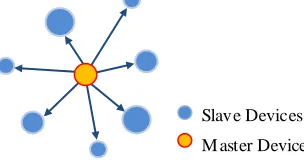
„masters‟ and „slaves‟. The master device works as the moderator in the communication between itself and the slave devices as well as between the slave devices themselves. Figure.1 illustrates the master and slave concept.
[image:1.612.364.516.251.331.2]
Figure 1: Basic Bluetooth Architecture
Trusted relationships between devices called Pairing are formed by exchanging shared secret codes, referred to as PINs [4]. A master device has the option of pairing with up to seven slave devices establishing what is called a Piconet. Two or more Piconets form together a Scatternet, which can be used to eliminate Bluetooth range restrictions. Scatternets are formed when devices act as master or slaves in multiple Piconets at the same time [5-6]. Some key technical features of this technology have been summarized in Table 1.
Table 1. Bluetooth Technical S pecification
Connection Frequency Hopping Spread Spectrum
Frequency band 2.4 GHZ ISM (license-free) M odulation Technique Gaussian Frequency Shift
Keying(GFSK) MAC Scheduling scheme FH-CDMA
Transmission Power >20 dBm Aggregate Data Rate 0.721-1 M bps
Range 10m-100m
Supported Stations 8 devices (per Piconet)
Voice Channels 3
Authentication key 128 bit
Encryption key 8-128 bits (configurable)
Although the Bluetooth standard is considered a very popular technology, it has some security weaknesses that make it vulnerable. In this paper, these security issues have been addressed. The rest of the paper is organized as follows. Section 2 contains vulnerabilities of this technology. A secured
[image:1.612.318.566.482.641.2]Bluetooth based university network has been proposed in Section 3 and Section 4 concludes the paper.
2.
BLUETOOTH NETWORK
VULNERABILITIES
Since there are now billions of Bluetooth devices in use, malicious security violations are expected to increase in the near future. Bluetooth security architecture needs constant upgrading to prevent new unknown threats. Since Bluetooth is a wireless communication system, there is always a possibility that the transmission could be deliberately jammed or intercepted, or that false or modified information could be passed to the devices by attackers and cyber-criminals [7-9]. Security threats in Bluetooth can be divided into three major categories:
Disclosure threat – the information can leak from the target system to an eavesdropper that is not authorized to access the information.
Integrity threat – the intentional alteration of information in an attempt to mislead the recipient.
Denial of Service (DoS) threat – blocking access to a service to make it either unavailable or severely limiting its availability to an authorized user.
The problems regarding Bluetooth security have been around since its inception. But it became a significant problem when it was incorporated into mobile devices [10-15]. Some of the recent and significant incidents about the security issues are enlisted below:
In 2003, Bend and Adam from A.L. Digital Ltd. discovered and published serious flaws in the Bluetooth regarding the protocol that could lead to loss of personal information [16].
In 2004, the first Bluetooth virus was reported as a proof-of-concept. It proved a “potential” threat to the technology [17].
In January 2005, a mobile „malware‟ called Lasco was detected; it was a self replicating worm which was successful in rendering mobile devices unstable before infecting another device [18].
In April 2005, Cambridge University published a paper documenting actual passive attacks by implementing offline PIN Cracking [19].
In August 2005, thieves used Bluetooth-enabled phones to track other mobile device left inside of the cars [20]. In April 2006, researchers from Secure Network and F-Secure published a report addressing that a large number of devices were left in a visible state which posed the possibility of spread of a Bluetooth worm [21].
In October 2007, Kevin Finistere and Thierry Zoller demonstrated at a conference a remote root shell via Bluetooth on M ac OS X v10.3.9 and v10.4. They also demonstrated the first Bluetooth PIN and Link keys cracking process [22].
Bluetooth devices are most exposed to malicious intervention during the process of pairing with another device. These weaknesses are primarily due to flaws in the link key establishment protocol, which is required for devices to pair, and
the fact that encryption of a session is optional and created at the end of the pairing process. This means that various types of attacks can be performed well before pairing is complete. Even after the pairing is complete, attackers can still sniff the airwaves to gain enough information to steal link keys so that they can deceptively authenticate or perform M an-in-the-M iddle (M ITM ) attacks to impersonate other devices. These security flaws have been discussed in the literatures [23-26] which includes some common attacks:
MAC Spoofing Attack. PIN Cracking Attack.
M an-in-the-M iddle/Impersonation Attack. BlueJacking Attack.
BlueSnarfing Attack. BlueBugging Attack. BluePrinting Attack. Bloover Attack.
Off-Line PIN Recovery Attack. Brute-Force Attack.
Reflection Attack. Backdoor Attack. DoS Attacks. Cabir Worm. Skulls Worm. Lasco Worm.
The descriptions of all these attacks are beyond the scope of this paper. In the following section, we propose a secure Bluetooth based university network that will have the ability to prevent some of the attacks mentioned above.
3. BLUETOOTH BASED UNIVERSITY
NETWORK
There are four major components of this Bluetooth network:
Hardware Implementation – Bluetooth „hotspots‟ are positioned on specific areas of the campus based on the range and the density of users.
Software Implementation – Developing a client side (mobile phone) and server side (computer server) versions of the applications to interact between the server and clients over the network.
Setup Cost factors – it is an important part of the whole design of the system because the VUES BT-NET project must be financially viable in order to be implemented. Strong Security Policy – Due to the social nature of this network, the system must have adequate security measures against the common attacks as described earlier in this paper. Strong countermeasures are therefore necessary to prevent most of the attacks at different p rotocol levels.
3.1 Hardware Imple mentation
„Hotspots‟ are managed in this Bluetooth Network by Bluetooth Access Points. Bluetooth Access Point is a Bluetooth router-like device that connects to a server via LAN/WLAN and it is capable of handling mass amounts of users via Bluetooth interface [29]. A recommended Bluetooth Access Point product can be the Parani-M SP1000 manufactured by SENA Technologies, CA, USA. It can simultaneously connect 28-40 devices under an operating range of 150m - 1000m (with extended antenna). Access Point devices can set up a connection automatically similar to a WLAN router, but works only for Bluetooth based devices. These Bluetooth Access Points will be connected to a main server running the server side software. Users will use these „hotspots‟ to interact with the BT-NET network interface via mobile phones. The hardware required to build the network are the Bluetooth Access Point Devices (Class-1 device) and connecting cables (CAT-6). The Bluetooth Access Points are to be placed at specific locations with maximum user density including student lobby, study Area, canteen, library and faculty lounge. These areas are usually crowded with users who can easily access the network from their mobile phones to exchange information. CAT -6 cables are required to connect the Bluetooth Access Points via LAN to a central local server of a single campus. The hardware should be implemented in such a way that will create a huge Scatternet for each campus based on several Piconets thus eliminating the range restrictions within each campus. The hardest part of this project is managed by the software applications. The hardware implementation is very much simple and also cost effective compared to other wireless solutions.
3.2 Software Imple mentation
The system can be built by first developing a Bluetooth client side application for the mobile phones using J2M E platform. It can be called “BT-NET Client”. This can be done by the programmers of the VUES department. Subsequently, a server side application will also have to be developed using dotNet platform for Windows OS or other platforms suitable for the existing server operating system that will use the Bluetooth Stacks to manage the network services. The server application can be named “BT-NET Server”. The client side software will
be installed on every registered cell phone under the network and provide a list of services available to each user from the server and an interface to communicate and request information to or from the server. The main challenging work involves in integrating and linking each user‟s registered phone to their respective VUES account with the university‟s master database. This can become a tedious task and it is essential for creating the M obile ID and M obile Wallet for each user which is explained later in this paper.
3.3 Setup Cost Estimates
The main hardware is the Bluetooth Access Point Device. The Access Point devices costs between USD 150 - 450 (at the time of writing this paper) which is less expensive compared to any other professional grade WLAN router devices. With respect to the size of the campus area for which this network will be designed and according to the network architecture there may be varying cost factors but for our research purposes, we have assumed the calculations according to our university campus size and it requires 3 hotspots for every campus and by implementing this in 2 campuses for beta testing the system requires 6 Access Point devices. The CAT -6 cables are readily available. The estimated hardware costs can add up to around USD 3000 – this cost can be very much affordable for a university in order to implement this system as a prototype.
3.4 Security Conce rns
Security between the users and the server is crucial because it is a massive public place and any attacker can harm the system or steal private information if adequate measures are not taken. Therefore, in addition to the pairing of each device with a strong key, establishing maximum allowed bits of encryption for each registered user in the network and using strong antivirus and firewall software on both client and server side devices can improve security against malicious attacks. There must also be an application level unique security code or password that will be used by each user every time to access the VUES BT-NET, thereby minimizing the risk of being exposed to open attacks. The code should have a timeout of 10-20 s econds of idle time after which the user will have to login again. This will be more effective as an added layer of security over the standard protocols and it can greatly increase the reliability of the system. It will be less prone to common attacks described earlier in this paper due to the short time of live idle connection to the network. There are much more security features as discussed in [30] that can be integrated to this system but it is beyond the scope of this paper.
3.5 Network Services
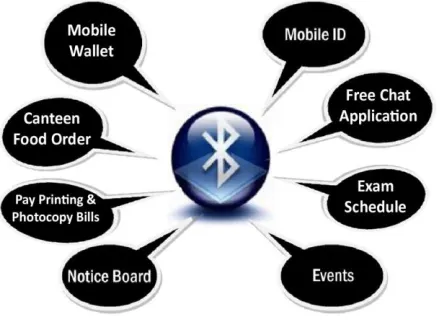
Figure 2, illustrates the different types of services that can be offered under the Bluetooth network. The routine tasks/services that can be carried out over the VUES BT -NET right from the user‟s mobile phone can include:
Creating a M obile ID as an alternative to standard IDs by registering respective user‟s cell phone into the VUES BT-NET.
ID cards, M obile ID will be registered into the Bluetooth network as soon as the student approaches the entrance gate and the system acknowledges the presence of the student on campus with a “Welcome to Campus-#” message. Where “#” represents the campus number of respective buildings since Bluetooth is a short range communication each campus will have their own set of Bluetooth Piconets.
Send regular notices directly to the mobile phones of students/staff members as an alternative to conventional notice boards.
Send updates or announcements of events or contest results over the network to the mobile phones to keep recipients updated on the campus activities.
Send exam schedule or other important dates directly to mobile phones.
Send campus location specific notices based on each Bluetooth network on every campus.
All users will be able to order food from campus canteen and pay for it directly from the mobile phone over the Bluetooth network.
There can be a chat and file sharing application which can be used for social interaction within the community. M obile Bluetooth Payment System – An application that acts as a financial M obile Wallet can be used to pay for various services within the university. This application shall be linked with the student or staff member‟s financial account with VUES and at the end of every month it will debit the main account for the payments made via the mobile payment system. The mobile wallet will act like a debit or credit card where each user will load a certain amount of credit to their mobile account which may be used to pay for various services. Services may include ordering food from the canteen, acquiring stationary items, pay photocopy or printing bills, etc. The payment method to load credit on the mobile wallet can be post-paid, i.e. at the end of every month, the total due payment is debited from the main VUES account of each respective user or the payment can be pre-paid, where a user first p ays for the number of credits to load on the mobile wallet and can then use the credits at anytime with no more liability. Pre-paid system is safer, will work better and is easier to implement because the there is no need to charge each user for monthly bills which can be tedious to manage and there may be cases where someone fails to make payment and becomes a defaulter, therefore pre-paid system is the preferred method to load credit in the M obile Wallet. This method of payment, if possible to implement successfully can be a huge leap towards digital communication under Bluetooth network. There is high probability that all the users of this system will be very much attracted to this mobile payment service. Details of its implementation are beyond the scope of this paper but our research on this subject is ongoing.
All the services can be provided by the university at a very cheap rate to compensate for the investments and efforts made to develop and manage such a huge network. This fee should be very minimum because this Bluetooth system and its services do not require any expenses paid to the mobile carrier (i.e. no use of internet, gprs, sms, mms or any other kind of mobile
[image:4.612.328.548.142.304.2]network services) which is very cost effective and also it acts as a mobile wallet with no huge fees or interest charges that credit cards have, thus making this system ideal for every user to get a low cost and effective solution for mobile communications.
Figure 2: Example of services under VUES BT-NET
3.6 The Network Architecture
The VUES BT-NET system must have an accurate architecture in order to provide the desired services in the specific highly populated areas and exchange information flawlessly. Figure 3, illustrates the basic structure of the network. The VUES Server maintains the current university network and BT-NET Server is a separate server managing the VUES BT-NET system. Each campus has its own BT-NET Local Server which interacts with the Bluetooth Access Points that are placed at various locations around the campus. Each campus has a different network in accordance to its perimeter range. All user devices in that vicinity will work only under that network range in that specific campus. The Bluetooth Access Points are conveniently placed at optimum locations inside the campus, for example the faculty lounge, lobby, entrance gate, and study area. Each Bluetooth Access Point acts as a M aster device for that specific area and all user devices under its vicinity work as Slaves thus forming a Piconet for that specific area. A campus has several Piconets at different locations (i.e. lobby, faculty lounge etc.) and they all together form a Scatternet which reports to the respective Local Server. Each Local Server is connected to the main BT-NET Server which makes it a part of the entire VUES university network currently under operation.
3.7 Network Access Setup
The users with a Bluetooth enabled device (mobile phone) will pair with a nearby campus „hotspot‟ (via the Bluetooth Access Points) which can be done by the application software running on their mobile devices. Subsequently this pairing will be maintained by the device and the „hotspot‟. When user goes out of range, the device can go to standby mode thus enabling the hotspot to communicate with other users in the vicinity. This can be done dynamically even when user is in range and not requesting information to enable other users to access. Proper user traffic queuing and Bandwidth allocation needs to be maintained to offer users, smooth access to network services. The BT-NET Client application running on the phone will carry
out an authentication protocol for VUES BT-NET (which is an application layer security measure to prevent unauthorized access to VUES BT-NET). After authentication the server will accept requests/push information based on user preferences.
[image:5.612.67.535.239.643.2]A general concern in using Bluetooth is that only 8 devices can connect to the network at a time under a single Piconet but this limitation can be overcome because the Bluetooth Access Point device allows at least 28-40 multipoint simultaneous connections and the users can access the network in a queued system similar to GSM traffic management techniques. So the BT-NET system can control every device in the Piconet to actively reconfigure users in active, parked and standby modes to manage the number of connected users at an instance.
3.8 Limitations
The proposed solution for creating the M obile ID as an alternative to the standard ID cards may have some issues like the mobile phone being stolen or lost, forgotten, or changed to a new mobile phone, therefore one must submit that change to the concerning department for issuing a new PIN code and password to register with VUES BT -NET and remove the old paired device respectively.
Another limitation of Bluetooth enabled devices is they have some range limits, outside a certain range they might not work properly although it can be overcome by effective network infrastructure design using efficient Scatternet planning and high grade Access Point devices which can extend the range up to 1000m. Also, unfortunately there is no mechanism to identify that the Bluetooth device user is the actual owner of that device, therefore in special cases, physical inspection via standard ID cards will be necessary (like during exams and other important events).
4. CONCLUSION
Bluetooth is a wireless technology which can do much more than just replace data cables between devices. With the release of the Bluetooth version 4.0 specification supporting higher data rates, greater range and safer security measures, Bluetooth is clearly a good choice for Wireless Networks. This paper shows a unique way of utilizing this amazing technology to achieve efficient ways of communication. The use of Bluetooth communication has always been at a p ersonal level but never before at a public environment with high user density. This project proposed a system which can be used in mass public environments like a university. It has also been shown in this paper that a careful design of such network can ensure effective security . Some limitations of this network have also been discussed which may have solutions in the future through further ongoing research.
5. REFERENCES
[1] Bluetooth Special Interest Group. https://www.bluetooth.org/About/bluetooth_sig.htm
[2] Bluetooth SIG, Specification of the Bluetooth System: Volume 1, Core, Version 1.1, Feb. 22, 2001.
[3] Bluetooth SIG, Specification of the Bluetooth System: Volume 2, Profile, Version 1.1, Feb. 22, 2001.
[4] Bluetooth Special Interest Group, “Simple Pairing White Paper”, V10r00, August 2006, http:// bluetooth.com /NR/rdonlyres/0A0B3F36-D15F -4470-85A6-F2CCFA26F70F/0/SimplePairing_WP_ V10r00.pdf
[5] "How Bluetooth
Works"http://en.kioskea.net/contents/bluetooth/blueto oth-fonctionnement.php3.
[6] Jochen Schiller, “M obile Communications” (second edition), Addison Wesley Publications, 2003. pp. 290, 292, 316.
[7] Haataja, Keijo, “Security Threats and Countermeasures in Bluetooth-Enabled Systems”, Kuopio University Library, 2009, Department of Computer Science, Kuopio, FINLAND. pp. 66-67.
[8] Christian Gehrmann Christian,” Bluetooth Security White Paper”, Bluetooth Special Interest Group,April 2002.
[9] C. Gehrmann, J. Persson, and B. Smeets, “Bluetooth Security”, Computer Security Series, Artech House, 2004.
[10] Y. Lu, W. M eier, and S. Vaudenay, “The Conditional Correlation Attack: A Practical Attack on Bluetooth Encryption”, In the Proceedings of The 25th Annual International Cryptology Conference, Santa Barbara, California, August 2005. pp. 97-117.
[11] M arek Bialoglowy, “Bluetooth Security Review, Part 2”. http://www.securityfocus.com/infocus/1836
[12] M ark Rowe, Tim Hurman,” Bluetooth Security Issues, Threats and Consequences”, Pentest Limited. http://www.pentest.co.uk/documents/wbf_slides.pdf
[13] Juha T. Vainio, “Bluetooth Security”, Helsinki University of Technology, September 2010 http://www.niksula.cs.hut.fi/~jiitv/bluesec.html
[14] Korzeniowski, Paul. 2005, “Bluetooth Security Threats Starting to Spread”, TechNewsWorld, February 02, 2005
[15] Kotadia, M unir, “Bluesnarfing tools spreading quickly”, ZDNet, February 17, 2004, http://news.zdnet.co.uk/internet/security/0,39020375,3 9146427,00.htm
[16] Adam Laurie, “The BlueBug”, A.L. Digital Ltd. http://trifinite.org/trifinite_stuff_bluebug.html
[17] John Oates, “Virus attacks mobiles via Bluetooth”, http://www.theregister.co.uk/2004/06/15/symbian_vir us/
[18] F-Secure Article on Lasco.A Worm. http://www.f-secure.com/v-descs/lasco_a.shtml
[19] Ford-Long Wong, Frank Stajano, Jolyon Clulow, “Repairing the Bluetooth pairing protocol”. University of Cambridge Computer Laboratory. http://www.cl.cam.ac.uk/research/dtg/~fw242/publica tions/2005-WongStaClu-bluetooth.pdf
[20] “Phone pirates in seek and steal mission", Cambridge Evening News. http://www.cambridge-news.co.uk/news/region_wide/ 2005/08/17/06967453-8002-45f8-b520-66b9bed6f29f.lpf
[21] "Going Around with Bluetooth in Full Safety”, F-Secure.http://www.securenetwork.it/ricerca/whitepape r/download/bluebag_brochure.pdf
Services (M obiSys), Seattle, WA, June 2005, pp. 39-50.
[23] Keijo Haataja, “Security Threats and Countermeasures in Bluetooth-Enabled Systems”, Kuopio University Library, 2009. pp. 68-80.
[24] Colleen Rhodes, “Bluetooth Security”, East Carolina University, pp. 6-9.
[25] Karen Scarfone and John Padgette, (Bluetooth Threats) - “Guide to Bluetooth Security”, Computer Security Division - National Institute of Standards and Technology, US Department of Commerce, 2008. pp. 25, 26.
[26] Prof. Raquel Hill and Billy Falotico, “Bluetooth Wireless Technology Security Threats and Vulnerabilities”, Indiana University Bloomington, 2008. pp. 7, 8.
[27] M alik Zaka Ullah, “An Analysis of the Bluetooth Technology”, Blekinge Institute of Technology Sweden, 2009. pp. 40-44.
[28] Sailesh Rathi, “Bluetooth Protocol Architecture”, M icroware Architect, M icroware Systems Corporation.http://www.omimo.be/magazine/00q4/20 00q4_p028.pdf
[29] SENA Technologies - a leading manufacturer of Bluetooth Access Points – company profile and portal.http://www.sena.com/products/industrial_blueto oth/msp1000.php
[30] Lamm, Gregory, Gerlando Faluato, Jorge Estrada, Jag Gadiyaram. "Bluetooth Wireless Networks Security Features." In the Proceedings of the 2001 IEEE Workshop on Information Assurance and Security United States M ilitary Academy, West Point, NY, 5-6 June, 2001, pp. 25-65-272