Page | 1
Analysis of Mobile Banking Malware
on the Android Operating System
Dan Xu
Submitted in total fulfilment of the requirements for the
degree of Master by Research
School of Science, IT & Engineering
Federation University Australia
PO Box 663
University Drive, Mount Helen
Ballarat Victoria 3353
Australia
Page | 2
ABSTRACT
The Android platform is the fastest growing smartphone operating system to date. Consequently, malware on Android OS has been increasing at an alarming rate. Similar to Windows-based malware, Android malware also have different families which are
responsible for different malicious activities.
In this thesis, we focused on one particular group of Android malware which is designed to target banks and financial institutions. These banking malware use different techniques to attack bank clients and banking servers. A coherent framework to analyse the behaviour of these malware needs to be developed, so the impact of theirs attacks could be minimised. This thesis investigates a systematic analysis to understand these malware’s behaviour and distribution method. From public and private sources, 37 samples of banking malware have been collected which represent eight major Android Banking malware families. In addition, we also analysed malware source code by reverse engineering all malware samples. As a result of analysis, a clear overview and better understanding of mobile banking malware on Android OS was established. The results indicated that Android banking malware is evolving in technique and will become more difficult to analyse in the future.
Page | 3
STATEMENT OF AUTHORSHIP
Except where explicit reference is made in the text of the thesis, this thesis contains no material published elsewhere or extracted in whole or in part from a thesis by which I have qualified for or been awarded another degree or diploma. No other person’s work has been relied upon or used without due acknowledgement in the main text and bibliography of the thesis.
Signed: Signed:
Dated: 30/11/2017 Dated: 30/11/2017 NAME: Dan Xu NAME: Iqbal Gondal Candidate Principal Supervisor
Page | 4
ACKNOWLEDGMENTS
I would like to express my deepest gratitude to my supervisors: A/Prof Iqbal Gondal and Dr. Robert Layton for their continuous support throughout my thesis. I would never been able to finish this research without their excellent guidance, patience and immense knowledge. Their guidance helped me in all the time of research and writing of this thesis. I could not have imagined having a better supervisor and mentor for my Masters study. I would also like to thank all the researchers in Internet Commerce Security Lab (ICSL) and Dr. Paul Watters for their support.
Page | 5
Table of Contents
Table of Contents ... 5
CHAPTER 1: Introduction ... 10
1.1 Research Objectives ... 12
1.2 Android banking malware ... 12
1.3 Behaviour Analysis of Android Banking Malware ... 13
1.4 Static analysis of samples ... 14
1.5 Framework for Systematic Analysis of Mobile Banking Malware (FAM) ... 14
1.6 Thesis Contribution ... 15
1.7 Thesis Outline ... 15
1.8 Chapter Conclusion ... 16
CHAPTER 2: Mobile Malware Behaviours ... 18
2.1 Banking malware ... 19
2.2 Banking malware families ... 21
2.3 Android malware ... 23
2.4 Android Banking malware ... 24
2.5 Static (Code) VS. Dynamic (Behaviour) Analysis Malware ... 26
2.6 Malware Lab Setup ... 27
2.7 Chapter Conclusions... 29
CHAPTER 3: Android Banking Malware Family Behaviour and Distribution ... 30
3.1 Chapter Introduction ... 31
3.2 Dataset ... 31
3.3 AV Detection and Malware Family ... 32
3.3 Android Banking Malware Family and Distribution ... 35
3.3.1 Zitmo, Spitmo, and Citmo ... 36
3.3.2 Perkele ... 40 3.3.3 smsSpy - Pincer ... 42 3.3.4 smsSpy - Marcher ... 43 3.3.5 Fakebank ... 44 3.3.6 Sypeng ... 45 3.3.7 iBanking ... 49
Page | 6
3.4.1 Distribution and Installation ... 52
3.4.2 Privilege and Permission ... 52
3.4.3 Targeting region ... 53
3.4.4 Android Emulator vs. Native Device ... 53
3.5 Automated Dynamic Analysis ... 53
3.5.1 Broadcast Receivers ... 55
3.5.2 Started Services ... 56
3.5.3 SMS Sent ... 57
3.6 Chapter Conclusion ... 58
CHAPTER 4: Android Banking Malware Static Analysis and Evolution in Techniques ... 59
4.1 Chapter Introduction ... 60 4.2 Tools ... 60 4.2.1 APKtool ... 60 4.2.2 Dex2jar ... 61 4.2.3 JD-GUI... 61 4.3 Static Analysis... 61 4.3.1 AndroidManifest.xml ... 62 4.3.2 classes.dex... 65 4.4 Evolution in techniques... 68 4.4.1 Anti-SDK/VM ... 70 4.4.2 AES Encryption ... 71 4.4.3 Code Obfuscation ... 72 4.5 Chapter Conclusion ... 73 CHAPTER 5: Conclusion ... 75 5.1 Future Work ... 77 Appendix A ... 79
REMnux: A Linux Toolkit for Reverse-Engineering and Analyzing Malware ... 79
Appendix B ... 82
MobiSec - Mobile security testing live environment ... 82
Appendix C ... 88
Glossary: basic terminology of the Android platform ... 88
Appendix D ... 94
Permission in Manifest class ... 94
Page | 7
LIST OF TABLES
Table 1 – Malware Family and Number of Variants ... 32
Table 2 - AV Detection ... 34
Table 3 – AV Detection Rate by year ... 35
Table 4 - Archive that APK files contain ... 62
Table 5 - APK user permission distribution ... 64
Page | 8
LIST OF FIGURES
Figure 1 – How fraud Works - FBI ... 20
Figure 2 - Lab Environment ... 29
Figure 3 - Zitmo Distribution ... 37
Figure 4 - Zitmo installation: From left to right: after sample 1 installed, when sample 1 was executed, after sample 2 installed, when sample2 was executed ... 38
Figure 5 - Spitmo: From left to right: “system” application is showing under application management on infected device, permissions of this “system” application ... 38
Figure 6 - Citmo distribute by QR code ... 39
Figure 7 - Citmo verify phone number: From left to right: sample 1 verifying phone number, sample 2 verifying phone number ... 40
Figure 8 - Perkele installation: From left to right: permissions required for installation, after malware execution... 41
Figure 9 – Perkele Network traffic shows the communication to external IPs immediately after installation ... 42
Figure 10 – Pincer ... 42
Figure 11 – Marcher: From left to right: application permissions when install, loading page when executed, after application loaded, after tap “Generate” button. ... 43
Figure 12 – FakeBank targets Korean Bank. From left to right: fake Google App Store application permissions when installed; genuine Korean banking application on the device, fake banking application permission when install, fake banking application when execute ... 45
Figure 13 - Fakebank targets European banks. From left to right: Fakebank sample 1 permissions when installing, sample 1 executed, Fakebank sample 2 permissions when installing, sample 2 executed ... 45
Figure 14 - Svpeng activating device administrator. From left to right: Device administrator access required when install, password required when delete the application ... 47
Figure 15 – Svpeng malware overlay attacks bank & Google Play: From left to right: fake page overlays on top of Russian bank app when opened, fake card page asking for credit card information overlays on top of Google Play store when opened ... 48
Figure 16 – Svpeng Ransomware : From left to right: fake FBI violation notice, specify MoneyPak as the payment method for the fine , indicate where to buy MoneyPak vouchers ... 49
Figure 17 - iBanking malware Installation Guide ... 50
Figure 18 - iBanking malware ask for device administrator access ... 51
Figure 19 – Citmo Tree Graph ... 55
Figure 20 - Fakebank Broadcast Receiver ... 56
Page | 9
Figure 22 - user permissions declared in AndroidManifest.xml ... 63
Figure 23 - smsParser.class ... 66
Figure 24 – hackSMS method ... 67
Figure 25 –Contents of arrays.xml from ... 68
Figure 26 – Malware code to steal device info ... 69
Figure 27 – iBanking malware Emulator Detection Code ... 71
Figure 28 – iBanking malware AES Encryption ... 72
Page | 10
Page | 11
Android became the world’s leading smartphone platform at the end of 2010. As of 2011, Android has the largest installed base of any mobile OS[1] and as of 2013, its devices also sell more than Windows, iOS, and Mac OS devices combined.[2] As of July 2013 the Google Play store has had over 1 million Android apps published, and over 50 billion apps downloaded.[3] A developer survey conducted in April–May 2013 found that 71% of mobile developers develop using Android.[4] In 2014, Google revealed that there were over 1 billion active monthly Android users (that have been active for 30 days), up from 538 million in June 2013.[5]
At the same time, the number of Android mobile malware is growing significantly. In 2013, Kaspersky Lab detected 3,905,502 installation packages that were used by cybercriminals to distribute mobile malware, which contributes to overall approximately 10,000,000 unique malicious installation packages. Android remains a prime target for malicious attacks as 98.05% of all malware detected by Kaspersky Lab in 2013 targeted Android OS, confirming both the popularity of this mobile OS and the vulnerability of its architecture.[ 6]
While banks are profiting from online and mobile banking, so are the cyber criminals that target these services with highly specialized banking malware. It is observed that the number of banking malware on mobile channel has increased and are a dominant mobile malware threat.[7] Malware can be characterised by attack vectors e.g. browser exploits, application (e.g. PDF, office) exploits, code insertions and buffer manipulation etc. There is a need to understand what are the main attack vectors used by mobile banking malware on Android OS, as compared to similar attacks on internet banking, such as inserting code into the browser, modifying the application code, patching the network stack etc. to steal
information, manipulate transactions or make unauthorized and fraudulent money transfers. In this research, a framework has been developed to systematically analyse Android
malware targeting banks and financial institutions. Then this framework is adopted to analyse 37 samples, which have been collected from the security researcher community, both within Australia and internationally. The earliest sample was discovered in June 2011, and the latest was detected in May 2014.
All samples were analysed in an isolated test environment with realistic scenarios from mobile banking. Static and dynamic analysis were performed on all samples; malware
Page | 12
classes and method calls were profiled and analysed methodically. Analysis also showed technique evolution of some mobile banking malware families over the time. These new techniques were adopted to impede forensic analysis.
In addition to systematically analysing malware binaries, analysis of the whole lifecycle of these Android banking malware samples was performed, including malware distribution, infection and AV detection.
1.1 Research Objectives
Due to the emergence of smartphone-based business and banking transactions, there are significant threats present in the mobile networking environment. In this thesis, a
systematic approach has been adopted to understand the nature of the threat of mobile banking malware especially for Android devices. A Framework for Systematic Analysis of Mobile Banking Malware(FAM)has been adopted in responding to critical research questions:
What are the major Android banking malware families and what are their properties?
How is Android banking malware distributed to its victims?
What common features do different Android banking malware families have?
Where do Android banking malware originate from?
Does Android malware utilise anti-forensic techniques to avoid being detected or analysed?
In this thesis, we focus on analysing malware samples, detecting of malware is beyond the scope of this thesis but will be looked at for future work.
1.2 Android banking malware
Android banking malware are a subcategory of mobile banking malware. The relationship can be understood with a hierarchy structure:
Page | 13
In analysing ABM, it is logical to adopt and evaluate methodologies by parent and higher levels malware types. It is imperative to understand the banking malware profit model e.g. how cybercriminals make money from malware, so similar models could be studied for ABM. To study attack models, Android malware attack vectors and common Windows-based malware analysis methods (dynamic vs. static) need to be studied in a secure analysis environment.
1.3 Behaviour Analysis of Android Banking Malware
To conduct behaviour analysis, there is a need to scan the collected mobile malware samples with a view to understanding the time of each sample was first seen, Anti-Virus engine detection rate and the timeline of each malware family. Then manual execution of malware in a lab environment should be adopted to examine the behaviour. Behaviour analysis can be automated using existing tools available, but without proper interaction with malware the results from automatic behaviour analysis are not as granular as those from the manual analysis. This analysis should aid in understanding malware families, AV
malware Banking malware Mobile Banking Malware Android Banking Malware (ABM) iOS Banking malware Other mobile OS Banking malware PC Banking malware
Other malware e.g Ransomware, adware, spyware etc
Page | 14
detection and distribution methods. In this thesis, 37 Android banking malware samples were categorised into 8 different malware families.
1.4 Static analysis of samples
Static analysis requires analysis of important files to explain the main functions of
different Android banking malware families. Here, in-depth understanding of functions and techniques used by the malware developer are studied. Static and behavioural analyses are complementary. In this study, it was observed that new techniques have been adopted by Android malware over the years; this observation was possible with the help of static analysis. Particularly, there have been significant improvements in coding techniques, obfuscation, encryption and anti-SDK etc.
1.5 Framework for Systematic Analysis of Mobile
Banking Malware (FAM)
This work proposes FAM, the Framework for Systematic Analysis of Mobile Banking Malware. FAM aims to be a systematic strategy to analyse ABMs in the quickest possible way, so harm caused by new types of malware could be minimised and their behaviour could be understood, so mitigating techniques could be employed. FAM presents a methodology, which has been adopted to conduct studies in this thesis. Following are the steps of the framework:
1) Identification of common attack vectors of Android banking malware, 2) Android malware feature analysis
3) Systematic dynamic and static analysis of the malware sample binaries 4) Life cycle analysis of Android banking malware: distribution, infection and AV
detection
Page | 15
1.6 Thesis Contribution
This thesis will address following research questions by adopting the above proposed Framework for systematic Analysis of Android Banking Malware (FAM):
What are the major Android banking malware families and how are they distributed?
What common features do different Android banking malware families have?
What techniques are used in recent Android banking malware to prevent them from being analysed?
Android banking malware are posing new threats to financial institutions and consumers, and indications are that these threats will become more severe in the future. Therefore, there is need to study these emerging threats and develop strategies to analyse the behaviour of these malware for harm minimisation purposes. This thesis makes the following contributions:
a) Extensive literature review - there is significant shortage of literature on mobile banking malware, so chapter 2 of the thesis presents literature in a very coordinated manner;
b) Development of a generalised framework for systematic analysis of mobile banking malware;
c) Collection of mobile banking malware samples and behavioural analysis of the samples;
d) Static analysis of the collected malware samples; and
e) Validation of proposed framework results and life-cycle analysis of mobile malware banking samples.
These contributions have been made in chapters 2, 3 and 4.
Page | 16
This thesis makes contribution in presenting investigative studies conducted on samples of mobile banking malware. Thesis presents studies in very coherent ways. Following is the outline of the remaining thesis:
Chapter 2 presents a literature review, covering banking malware, banking malware families, Android malware, static and dynamic analysis of malware, and testing lab setup.
Chapter 3 presents studies on Android Banking Malware Family Behaviour and Distribution. This chapter also highlights the details of the datasets captured and used in the studies. Anti-virus studies done on the samples are also presented. Finally, Android banking malware family and distribution details are presented.
Chapter 4 presents Android Banking Malware Static Analysis and Evolution in Techniques and introduces the tools used in conducting static analysis on the samples. Analysis of samples from the same malware family at different time period reveals the improvements and evolutions of techniques in malware coding.
Chapter 5 presents the findings after analysis of the samples in terms of behavioural and static fashions. This chapter also makes detailed recommendation on the findings of the thesis.
1.8 Chapter Conclusion
This chapter has presented high level introduction of Android banking malware and has indicated that these malware are a subset of mobile malware, where mobile malware are subset of malware in general. The research objectives have been presented, as well as a framework to symmetrically analyse malware samples by conducting life-cycle analysis, behavioural analysis and static analysis. Thesis contributions and organisation have been presented.
Chapter 2 presents a background and literature review supporting the research on life cycle and behavioural and static analysis, which are presented in chapter 3 and 4 respectively.
Page | 18
Page | 19
2.1
Banking malware
Banking malware, sometimes referred as financial malware, is a category of malware which is developed to defraud customers of banks and financial institutions, making it possible to transfer funds from the victim’s account to the attacker's using electronic fund transfers(EFT).
Banking malware can be generic or targeted. A generic banking malware is developed to steal user login credential from any Secure Socket Layer (SSL) or Transport Layer Security (TLS) sessions, not only Internet banking web sites. A targeted banking malware has particular bank or financial institutions configured in their configuration files, and make use of the configuration file to trigger Man-In-The-Browser attack[8], which is a
technique that takes advantage of vulnerabilities in browser security to modify webpages, modify transaction content or insert additional transactions, all in a completely covert fashion invisible to both the user and the host web application.[9] Historically, only sensitive information like online banking are protected by SSL, however, in recent years, SSL is used widely to protect any confidential information online. And the data volume in SSL sessions is becoming so big that it’s hard for the cybercriminals to extract useful data to perform fraud transactions against the banks. This has made the generic banking malware less effective. Most attackers have now moved on to targeted banking malware. In this research, we refer banking malware as targeted banking malware.
Banking malware is normally distributed via phishing email or drive-by downloads. Phishing email distribution is more targeted but has a lower infection rate, as malware can be detected and blocked by email server anti-virus (AV) program. Drive-by
downloads may happen when a user visits a website or clicks on a deceptive pop-up window. Victims often click on the window by mistaken belief that, for instance, an error report from the computer's operating system itself is being acknowledged, or that an innocuous advertisement pop-up is being dismissed. In such cases, the "supplier" may claim that the user "consented" to the download, although actually the user was
Page | 20
unaware of having started an unwanted or malicious software download[10]. Drive-by downloads are more generic in nature and attackers always use different techniques to obfuscate the malicious code so that AV software is unable to recognize it. In recent time, this has become a popular way to distribute banking malware.
After banking malware is distributed and executed on the victim’s PC, it normally stays in the background unobtrusively until the victim visits an online banking site in the browser. Most banking malware have an ability to intercept submitted credentials by logging the user's keystrokes, which are then sent to cybercriminals who defraud the bank later using these stolen credentials. The Federal Bureau of Investigation (FBI) published a fraud scheme in October 2010, which described how cybercriminals commit fraud using one of the infamous malware - Zeus (figure below). Zeus, also refered as ZeuS, or Zbot is a Trojan horse malware package that runs on versions of Microsoft Windows. While it can be used to carry out many malicious and criminal tasks, it is often used to steal banking information by man-in-the-browser keystroke logging and form grabbing. Although Zeus is not Android malware, it was heavily used in Android
malware distribution. Below figure shows very clearly that banking malware is playing a critical role in cyber theft ring.
Page | 21
To mitigate fraud risks from credential stealing malware, many banks employ virtual keyboard. Virtual keyboard is a software technology that displays an on-screen keyboard, requiring the user to use their mouse to click virtual keys to enter sensitive details such as password. The corresponding key will be typed into the selected textbox on the screen. In this case, the use of traditional keyboard is nullified so that banking malware could not intercept anything from monitoring keyboard events. Thus sensitive and personal information can be protected. However, cybercriminals improved banking malware to defeat this control as well. Advanced banking malware were developed to take screenshots on the mouse click event, all screenshots are then uploaded to the malware control and command server which is managed by the cybercriminal. Even worse, some more advanced banking malware can even record video of user’s online banking session, and upload video files to cybercriminals’ servers.
Besides credential stealing, cybercriminals have also worked on malware “automation”, some complex malware even have the ability to manipulate bank customer initiated payment details, automate EFT in the background, or add additional fraud EFT when the victim makes genuine transactions.
2.2
Banking malware families
Malware are generally grouped at two hierarchical levels: “variant” and “family”; where “variant” refers to a different version of the original malicious code, and “family”
indicates the distinct or original piece of malware.[12]
A few very large malware families are responsible for the majority of Internet banking related fraud through malware, due to their advanced functionalities. The most notable of these malware families are Zeus, Citadel, SpyEye and Carberp.[13]
Zeus malware, also referred as Zbot, is one of the original banking malware. It was first identified in 2007 and became more wide spread in 2009. This infamous banking malware is normally spread through drive-by downloads and phishing campaigns. It mainly steals online banking credentials by Man-In-The-Browser keystroke logging and
Page | 22
form grabbing. Functionally, malware in the Zeus family has two main components: a builder that can generate a bot executable and a Control and Command (C&C) server to monitor and control the malware. Zeus source code was leaked in May 2011, which allowed other malware developers to study and create malware based on its code. New malware families like Ice IX, Citadel, Gameover Zeus, P2P Zeus are all different variations based on Zeus source code. Citadel was one of the most successful successors of Zeus[14]. Besides newer and more dynamic features of the malware, the creators of Citadel
adopted an open-source development model that let anyone review its code and improve upon it. In June 2013, Microsoft, along with law enforcement agencies and other security companies, conducted an operation that helped to disrupt many Citadel-based botnets. Microsoft then claimed that 88% of the botnets spawned by Citadel malware had been taken down[15]. SpyEye was designed by a rival group to compete with Zeus in 2010. Function-wise, it was similar to Zeus in a lot of ways. To compete with Zeus, the latest SpyEye versions contained an interesting feature called “Kill Zeus”, which could take over an infected PC when it’s infected by both Zeus and SpyEye. Although SpyEye had some success in its early days, the run almost ended after a series of cybercriminal arrests in 2012[16]. Like Zeus, Carberp has the ability to steal sensitive data from infected machines and download new data from command-and-control servers. It has complex rootkit functionalities allowing the malware to remain
undetected by antivirus on the victim’s system. Carberp source code was leaked to the public in June 2013, and security researchers soon discovered a new malware called Zerp with combined features of both Zeus and Carberp[17].
These major banking malware families have been heavily analyzed by researchers from different angles. Some researchers focused on malware functionality[1819], and
configuration[2021], and others focus on the techniques that malware employs to deter analysis e.g code obfuscation[22], or malware detection[23]. Malware source code leaks and extensive analysis of these malware have led to an enhanced understanding how many of these malware work.
Page | 23
2.3
Android malware
Due to the popularity of Android OS, it has rapidly become a significant target for malware attacks.
In, August 2010, the first known SMS malware for Android was discovered and reported by Dennis Mashlennikov from Kaspersky Lab. This malware disguises itself as a movie player and sends SMS to two premium rate numbers without the owner’s knowledge. The cost of each message is $5, resulting in big bills to owners from premium messaging providers. The malware only targeted Russian users and it was not found on Android Market (which was renamed to Google Play in 2012)[24].
In the same month as the discovery of first SMS malware for Android, Symantec
discovered a GPS spyware which had the ability to collect and send GPS coordinates to a remote server every 15 minutes without the mobile phone owner’s knowledge[25]. Because the malware was not found in Android Market and not widespread, the impact was minimal at that time.
At the end of 2010, mobile security company Lookout announced their discovery of Android malware Geinimi, which was the most sophisticated malware for Android found in the wild[26]. Geinimi is an example of repackaging a legitimate application with
malicious code, and demonstrated the possibility of “Trojanization” in the Android world. More “Trojanized” versions of legitimate apps were discovered and reported in 2011. Given they were all hosted in unofficial app stores and app download sites, the golden rule for Android users was to only download and install apps from official app store – Android Market. However, this recommendation became less effective when Lookout discovered more than 50 apps containing DroidDream malware in the official Android Market[27].
In May 2011, a new malware named DroidKungFu was discovered in the official Android Market by researchers at North Carolina State University[28]. DroidKungFu was a
Page | 24
information and installing an Android malware downloader app. Unlike DroidDream, DroidKungFu encrypts the exploits using AES to evade AV detection[29].
Years 2010 and 2011 were the beginning of Android malware epidemic, which can be clearly verified by security industry statistics. According to Juniper Networks, in 2010 Android malware only comprised 0.5% of total mobile malware. One year later, this number became 46.7%[30]; by the end of 2011, Android malware increased to 47% of total mobile malware threat, and this number doubled over 2012, reaching 92% in March 2013[31]. Kaspersky Lab reported in February 2014 that 98.05% of all malware detected in 2013 targeted Android platform[32].
The rampant growth of Android malware has led to research from both academia and industry. Some researchers focused on collecting Android samples, systematically analysing and characterising the data set, in order to gain better understanding of Android malware attack vectors and infection behaviours from different malware families[33]. There are a few tools and systems created by researchers to assist Android malware analysis. DroidScope is an example[34], developed as a platform that continues the tradition of virtualization-based malware analysis.
Android malware detection and prevention has also been heavily researched, based on malware behaviour or code patterns; a few tools have been developed to assist
assessing Android applications and detecting malicious or risky apps. For example, RiskRanker is developed as an automated system to analyse whether a particular app exhibits dangerous behaviour (e.g., launching a root exploit or sending background SMS messages)[35].
2.4
Android Banking malware
Mobile banking is undergoing tremendous growth as customers increasingly choose smart devices over bank tellers, which has resulted in banks closing branches and investing in online services. Many banks also believe that mobile devices are a secure secondary method of out-of-band authentication. To authenticate the people who have
Page | 25
phones, many banks built their second factor authentication solutions on short message services (SMS), which is one of the most widely available protocols, but this protocol has its own security flaws. With the perception of extra layer authentication control, bank customers are allowed to carry out riskier transactions. This makes it more attractive to cybercriminals, because they can potentially steal more money if this authentication layer is circumvented.
On September 25th, 2010, a Spanish-based data security company S21sec detected a malware which targets Symbian and BlackBerry OS. The malware was working in conjunction with Zeus malware; and developed to forward Mobile Transaction
Authentication Number (mTAN) to the attackers. S21sec published this threat on their blog.[36] This became the first Zeus in the Mobile (ZitMo) malware detected.
On 21 February 2011, the second ZitMo attack analysis was published by a Polish blogger, the malware was developed clearly targeting specific organizations: ING and mBank.[37]
Various modifications of ZitMo have been detected since then; and other PC-based malware also started to incorporate the same technique to develop their mobile
versions. A number of mobile variants of PC-based malware have been seen e.g. SpyEye in the Mobile (SPitMo) in 2011[38], and Carberp in the Mobile (CitMo) in 2012. [39]
Although initially mobile banking malware targeted Symbian and BlackBerry OS, but with the increasing popularity of Android OS and significant growth of malware on this
platform, Android OS has become the primary target by Mobile banking malware in recent years.
Although a lot of research has been done to counter Android malware, but there is very little research focusing on a particular subset – Android banking malware. This might be because the volume of Android banking malware was low and there were not enough samples for researchers to do the study. However, this has changed in recent two years. In 2013, there was a dramatic increase in the number of Android banking malware. Kaspersky Lab quoted this increase as “Trend of the year”, because they only had 67 Android banking malware in January 2013, but collected 1321 unique samples by the
Page | 26
end of the year[40]. Furthermore, Kaspersky Lab reported that in the first quarter of 2014, the number of mobile banking malware almost doubled from 1321 to 2503. These
malware started initially targeting users from Russian and Commonwealth of
Independent States (CIS), and then it was found that these malware have been affecting users in other countries: Germany, Sweden, France, Italy, the UK and the US[41].
Kaspersky also reported that 98.5% mobile malware that were collected by Kaspersky Lab were targeting Android OS, which indicated that almost all of mobile banking malware they reported were Android banking malware.
Despite dramatic growth, the total number of Android banking malware is still relatively small. There is no existing Android banking malware sample dataset that are publically available to the research community. In this research, we managed to collect samples from different sources including Internet, other security researchers and financial
institutions in Australia and internationally, we believe that our malware sample dataset is a good representation of past and current Android banking malware.
Like Windows-based malware, Android malware can also be categorized into different malware families. Some family names are based on the PC malware name that they work together with, for example ZitMo means Zeus in the Mobile; Some family names are based on the malware author’s name, e.g Perkele; There are also some malware with generic family names, e.g SmsSpy. We have detailed analysis on Android banking families in Chapter 3.
2.5 Static (Code) VS. Dynamic (Behaviour) Analysis
Malware
There are two types of malware analysis – Static and Dynamic. Both static and dynamic analyses accomplish the same goal of explaining how malware works, but from different perspectives.
Page | 27
Static analysis, also referred as code analysis, is widely used by antivirus industries. It is based on malicious binary inspection, looking for malicious functions in malware source code. On the other hand, dynamic or behaviour analysis involves executing the sample in a controlled and sanitized environment to record and analyse its behaviour using pre-installed tools in order to understanding malware execution traces.
Static analysis can reveal all malicious functions used by the malware. However, it is time consuming due to the fact that techniques like code obfuscation can really slow static analysis down. Cybercriminals may deliberately obfuscate code to conceal malware purpose or its logic, in order to deter reverse engineering. Code obfuscation is commonly employed by Windows malware and is expected in Android malware. The Android SDK includes a tool named Proguard[42] for obfuscating Apps. Furthermore, bytecode randomization techniques can be used to completely hide the internal logic of a Dalvic bytcode program[43].
Dynamic analysis is considered relatively faster and immune to code obfuscation. With the malware being executed, analyst is able to see the malicious behaviour on an actual
execution path. The downside of dynamic analysis is that it only exploits one execution path, and it may not be effective if user interaction is needed to trigger the malicious activity. Although it can be ameliorated by exploiting multiple execution paths or a user action can be configured to trigger malware activity, but additional understanding of the malware will be required prior to the analysis.
In this research, both static and dynamic analyses were performed to gain a complete understanding on how that particular malware functions. Analysis of malware distribution method was also performed.
2.6 Malware Lab Setup
Setting up of a controlled and sanitized environment is absolutely essential for analysing malware, regardless the Operating System.
Page | 28
The research computer had Windows 7 installed with the following specifications: Intel(R) Xeon(R) CPU E5620 @ 2.40 GHz 2.39 GHz (2 processors), 4 GB RAM DDR3 and 100 GB hard disk.
On the research PC, we installed virtual machine VMware Workstation version 9.03 build-1410761. Inside the virtual machine we have a few virtual machines installed:
MobiSec OS is installed for Android malware analysis. MobiSec is a bootable Linux
distribution designed for mobile devices, applications and infrastructure analysis. MobiSec is a single environment with several excellent open source mobile malware analysis tools pre-installed and configured. Tools like dex2jar, apktools, JD-GUI, DroidBox are all used later in the research. Android emulators are also available in the live environment. MobiSec is maintained as an open source project on Source Forge[44].
During the research, it has been discovered that many Android banking malware are
associated closely with traditional Windows based malware. Therefore we installed REMnux version4 to assist with Windows malware analysis. REMnux is a lightweight Linux
distribution to assist malware analysts with reverse-engineering malicious software on Windows OS. The distribution is based on Ubuntu and is maintained by Lenny Zeltser[45].Two Windows virtual machine: Windows 7 and Windows XP (SP2) were installed for Windows malware analysis.
Android SDK [46] - A Software Development Kit that allows users to create and test Android applications - was installed on the host research PC. An Android Virtual Device can be created using the Android Virtual Device Manager within Android SDK.
In case malware can detect virtualized environment or emulator, a native Android test device - Samsung Galaxy S2 was also employed. This test device specs are: Model number: GT-I9100; Android version: 4.1.2(Jelly Bean); Baseband version: I9100XXLS9; Kernel version: 3.0.31-889555, dpi@Dell144 #3, SMP PREEMPT Tue Feb 10 11:18:12, KST 2013; Build number: JZO54K.I9100XWLSH. The test device was connected to the same network as the host research computer, and has several tools (e.g traffic analysis tool: SharkForRoot) installed for malware analysis. Figure 2 shows how the test lab was set up.
Page | 29
Figure 2 - Lab Environment
2.7 Chapter Conclusions
Malware analysis is very time-consuming and tedious work, so there is need to understand existing standalone malware analysis techniques in PC environment and formulate a
comprehensive malware analysis framework for banking Android malware. This thesis work has collected significant samples of Android banking malware, and then has conducted experiments to complete the analysis using the proposed framework. Application of the framework is dependent on the nature of the malware sample. The following chapters present studies done on various aspects of the framework.
Internet Router Physical Host(Win7) Vmware Workstation
MobiSec REMnux4 Windows7 Windows XP
Android SDK
Samsung Galaxy 2
Page | 30
CHAPTER 3: Android Banking Malware Family
Behaviour and Distribution
Page | 31
3.1 Chapter Introduction
In this chapter, we first present an overview of the collected samples created using the VirusTotal[47] online tool. VirusTotal uses up to 54 different antivirus products and scan engines to check for viruses, which provides us more detailed information about the
samples. Secondly, we dynamically analyse all collected malware samples manually. Manual dynamic analysis involves installing the malware in a controlled and sanitized environment, and observing malware presentation, behaviour and network communication using various tools. Both an Android emulator and a native test Android device were used for manual dynamic analysis, in case any malware has the ability to detect a virtual or emulated
environment. When possible, screenshots from analysis were captured and are presented to demonstrate the “look and feel” of each malware family. We also researched and analysed how Android banking malware were distributed. Malware distribution methods will help us understand the full life cycle of each attack. For each malware family, we collected
information about where the samples were originally gathered using primary and secondary sources, and summarized each Android banking malware families history and attack lifecycle. Thirdly, we present the results of automated analysis using Droidbox, an Android malware sandbox tool, against all the samples in the data set. From the automated analysis reports we found some similarities and commonalities between Android banking malware
behaviours, which could assist with Android banking malware identification and detection in the future.
Although some of the samples were a few years old and previously studied and analysed by researchers and industry malware analysts, our research aimed to cluster them based on presentation, distribution technique, and attack flow and explore differences and
similarities between malware software. In addition, by dynamically analysing all samples in a consistent environment, we verify previous analysis.
Page | 32
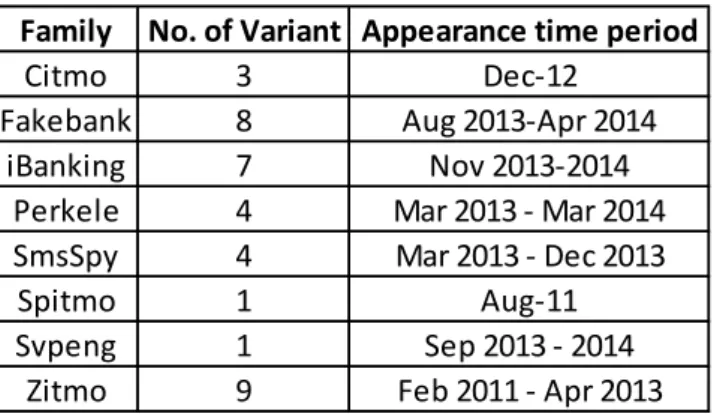
The dataset comprises 37 samples that were collected from publicly-available such as GitHub and private sources such as security industry forums etc.. Based on source code structure and development group, malware samples in the dataset has been categorized in to 8 different malware families: Citmo, Fakebank, iBanking, Perkele, smsSpy, Spitmo , Svpeng and Zitmo.
Table 1 – Malware Family and Number of Variants
Virus Total was employed to scan the collected mobile malware samples to gain an understanding about the time of each sample was first seen, Anti-Virus engine detection rates and the timeline of each malware family. Different antivirus engines normally assign different names to the same malware sample; we also used this information to validate the family that a sample belongs to. The "first-seen" date is taken to mean the date when the malware was first uploaded to VirusTotal for analysis. Although it is not the date of malware release, it is a good indication of when malware was discovered.
3.3 AV Detection and Malware Family
From the VirusTotal scan, we recorded the malware MD5, first-seen dates and detection rates from various antivirus engines, which are presented in Table 2 below. The MD5 algorithm is a widely used hash function producing a 128-bit hash value, It has be used as a
Family No. of Variant Appearance time period
Citmo 3 Dec-12
Fakebank 8 Aug 2013-Apr 2014
iBanking 7 Nov 2013-2014
Perkele 4 Mar 2013 - Mar 2014
SmsSpy 4 Mar 2013 - Dec 2013
Spitmo 1 Aug-11
Svpeng 1 Sep 2013 - 2014
Page | 33
checksum to verify data integrity. MD5 has been used by anti-virus company as virus identifier for a long time, it has been the fastest and shortest generated hash, although it was found vulnerable to collision attack[48], it doesn’t impact this research. The VirusTotal scan results suggest a timeline for the emergence of each malware family. We can see that most *itMo(Zitmo, Spitmo, Citmo) malware were seen from 2010 to 2012, followed by Perkele, smsSpy, FakeBank, Svpeng in 2013, and most iBanking in 2014.
Page | 34
Table 2 - AV Detection
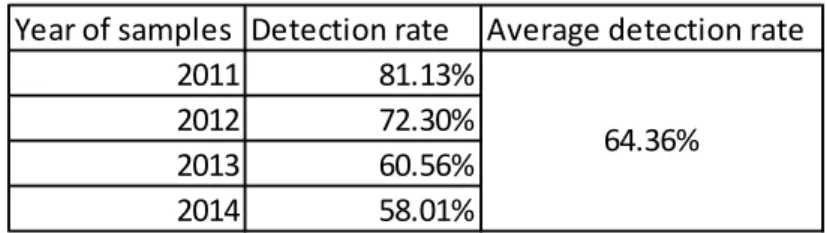
Although some of these samples were originally detected several years ago, the AV detection rates were only at an average of 64.36%. We also observed that older
Family MD5 First seen AV Detection Detection ratio
07d2ee88083f41482a859cd222ec7b76 13/12/2012 38/54 70.37% 117d41e18cb3813e48db8289a40e5350 15/12/2012 38/54 70.37% f27d43dfeedffac2ec7e4a069b3c9516 13/12/2012 38/54 70.37% 37dff309cc911a1dc16cce4e51f9827b 16/08/2013 33/54 61.11% 67e7bb573eaa1f25772809a471cda327 16/08/2013 33/54 61.11% 7276e76298c50d2ee78271cf5114a176 14/11/2013 29/54 53.70% 8bf10991f292ec7d165086506e8f0eda 22/09/2013 35/54 64.81% 98eea1d94a479e022e46d69b0fbe2453 5/11/2013 32/53 60.38% a0721023ec39948251818306a15d3268 22/09/2013 35/54 64.81% a15b704743f53d3edb9cdd1182ca78d1 3/04/2014 30/54 55.56% aac4d15741abe0ee9b4afe78be090599 13/02/2014 28/54 51.85% 009e60205b8fbc780a2dd3083cdd61cb 4/02/2014 33/54 61.11% 1f68addf38f63fe821b237bc7baabb3d 17/12/2013 34/54 62.96% d1059b52b6127b758581eb86247bc34f 4/02/2014 34/54 62.96% df1c6dfb6830ba845231af26d80354de 5/04/2014 31/54 57.41% e1b86054468d6ac1274188c0c579ccaf 19/11/2013 35/54 64.81% f06af629d33f17938849f822930ae428 29/12/2013 34/53 64.15% f1bc8520754d2ac4a920b3ef5c732380 26/02/2014 33/53 62.26% 22d67d86493e9f16e7e5a8cd87ca177c 8/03/2013 31/54 57.41% 4efa9b64dd3171bc584becc8c5e3bebb 19/04/2013 26/54 48.15% 9f42936cdc6fb3a4cf146c85b376f85a 7/03/2014 28/51 54.90% b597850b04140e0e28749e0a11cc0118 5/05/2013 32/54 59.26% 98951168215955a1f14198b19a134b14 6/05/2013 28/51 54.90% 74e09c5f57d5a040c86a86cdad7f04fa 3/05/2013 33/52 63.46% b226a66a2796e922302b96ae81540d5c 12/03/2013 40/54 74.07% e29cec3924426dda960633fe56e0b86a 12/12/2013 27/55 49.09% Spitmo cfa9edb8c9648ae2757a85e6066f6515 10/08/2011 44/53 83.02% Svpeng a3eb6b30e23146d9d44103addc71a41b 15/09/2013 34/54 62.96% 1cf41bdc0fdd409774eb755031a6f49d 19/04/2013 34/54 62.96% 2dfccca5a9cdf207fb43a54b2194e368 19/06/2012 39/54 72.22% 6ddaae38a49cefcb1445871e0955bef3 19/06/2012 39/54 72.22% a1593777ac80b828d2d520d24809829d 4/04/2012 39/53 73.58% b1ae0d9a2792193bff8c129c80180ab0 13/06/2012 42/54 77.78% d1cf8ab0987a16c80cea4fc29aa64b56 19/06/2012 41/54 75.93% e9068f116991b2ee7dcd6f2a4ecdd141 19/06/2012 39/54 72.22% e98791dffcc0a8579ae875149e3c8e5e 8/08/2012 36/53 67.92% ecbbce17053d6eaf9bf9cb7c71d0af8d 2/06/2011 42/53 79.25% Citmo Fakebank iBanking Perkele Zitmo SmsSpy
Page | 35
malware samples have better detection rates (Table 3). However, this detection rate might be low as not all antivirus engines used by VirusTotal were able to detect mobile malware[49].
Table 3 – AV Detection Rate by year
3.3 Android Banking Malware Family and
Distribution
3
In order to understand malware behaviour, each malware sample was manually installed and executed in a sandboxed environment or isolated native Android device in cases where the malware could detect the virtual environment. We then observed the appearance and behaviour of the malware. The distribution method of each malware family was
investigated and compared in order to understand the whole malware attack flow.
Banking malware that target Windows OS are normally distributed via phishing emails and drive-by downloads. This distribution is non-targeted but effective, because these malware are normally configured to target multiple banks and financial institutions. When the infected user logs in to their online banking, if the online banking URL matches the URL wildcard in malware configuration file – which is basically the malware’s target list, the malware injects itself into browser processes to hook selected APIs, and then steal user’s credentials or manipulate user’s online banking session.
Banking malware that target Android OS, on the other hand, are more targeted. Most samples in the dataset works in tandem with the traditional Windows desktop malware, aiming to steal the second factor passed via mobile phone, which could be later used to
Year of samples Detection rate Average detection rate
2011 81.13%
2012 72.30%
2013 60.56%
2014 58.01%
Page | 36
complete fraudulent transactions together with the login username and password that were captured in Windows.
3.3.1
Zitmo, Spitmo, and Citmo
We put Zitmo, Spitmo and Citmo together to analyse because they share the same “surname” - *itmo. The name of the malware families indicated the Windows malware families they are working in tandem with – Zeus, Spyeye, Carberp.
On a high level, Android malware Zitmo, Spitmo and Citmo are served as malicious payloads by their Windows “brothers” - Zeus, Spyeye and Carberp. While these windows malware can steal Online Banking login credentials, Zitmo, Spitmo and Citmo play the part to compromise the mobile component in order to complete an unauthorized transaction. Technically, Zitmo, Spitmo and Citmo malware are distributed via Windows malware’s webinjects[50] in online banking sessions; when a user on an infected PC authenticates to an online banking session using SMS authentication, the Windows malware injects malicious code components that can modify the bank web pages which are being displayed in the victim’s browser.
Page | 37
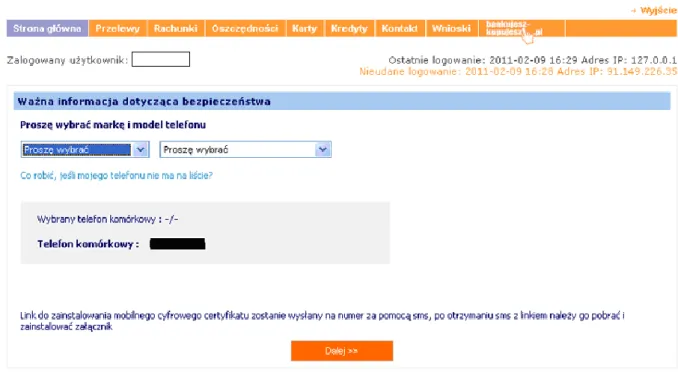
Figure 3 - Zitmo Distribution[51]
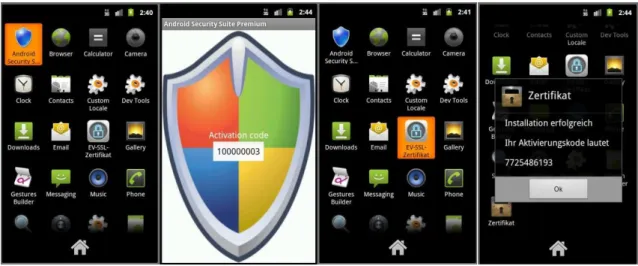
Figure 3 is an example of how the Zeus malware distributed Zitmo: a webinject from Zeus requires the installation of new “security update” to user’s mobile device, the user is asked to provide mobile phone model and number in order to receive and install the new “security update”. After providing mobile phone information, the user will receive an SMS with a link to click and download the “security update” to his/her mobile device, alternatively, a link is injected to the online banking session and displayed on the screen for the user to type in his/her mobile phone. After installation, the user sees a new icon on the dashboard. Once the app is started, a “security code” will be generated. Figure 4 below shows two examples of Zitmo app after installation, and the look when it’s started.
Page | 38
Figure 4 - Zitmo installation: From left to right: after sample 1 installed, when sample 1 was executed, after sample 2 installed, when sample2 was executed
The distribution method of Spitmo is very similar to Zitmo, however after installation, there’s no new item added to the dashboard. Under application management function, we found a new application called “System”, which did not exist before the malware installation. This app has permission to receive, read, edit, send messages, access Internet, as well as intercept outgoing phone calls (See Figure 5 below).
Figure 5 - Spitmo: From left to right: “system” application is showing under application management on infected device, permissions of this “system” application
Page | 39
Citmo utilize webinjects from Carberp malware, and is distributed to potential victims in the same way as Zitmo and Spitmo. Some Citmo variants even employ Quick Response (QR) code for distribution. QR code is normally injected to the webpage by Carberp malware so that the mobile user can scan the code to download and install the Citmo malware. This distribution technique not only made the malware installation easier, but also potentially reduces the risk of being suspected by the potential victim – people tend to be more careful when they key in a URL than scan a QR code[52].
Figure 6 - Citmo distribute by QR code[53]
A bank-themed icon will be added after Citmo malware installation. When started, the user will be asked to enter his/her phone number to get verified. Below screenshots are from 2 different samples:
Page | 40
Figure 7 - Citmo verify phone number: From left to right: sample 1 verifying phone number, sample 2 verifying phone number
It is worthwhile to point out that, these three Citmo samples in the dataset were uploaded to Google play (Russia) on 30th November 2012. Google removed them quickly, however, these three malware applications were downloaded over 150 times.
Although the Citmo samples in the dataset only target Russian banks, after the July 2013 leak of Carberp source code[54], anyone can modify Carberp, it’s possible to see new Citmo variants targeting users in other countries.
Some *itmo variants also target other mobile operating systems such as BlackBerry[55]; however investigating these variants is not in scope of this research.
3.3.2
Perkele
The release of the *itmo malware was later followed by the next Android banking malware family – Perkele. In March 2013, the Perkele malware was uncovered by Brain Krebs on underground Russian-language forums[56]. “Perkele” is a Finnish curse word for “devil” or “damn”, and was used as nickname by the malware coder. This Android malware is designed to work in tandem with Windows malware webinjects. Unlike its *itmo predecessors, Perkele is able to work with any Windows banking malware family that supports webinjects –it can essentially be loaded as an add-on by the malware. When the victim attempts to log in to their bank account using their infected PC, malware webinject
Page | 41
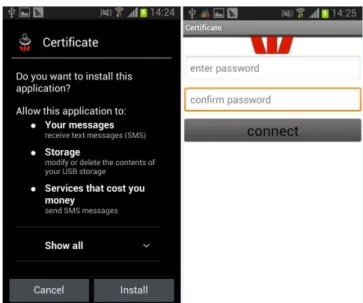
informs the victim that in order to complete the second, mobile authentication portion of the login process, the user will need to install a special security certificate on their phone. The victim is then prompted to enter their mobile device’s model, OS and number
information. A link is sent to the mobile device which, when clicked on, installs Perkele on the device. During installation, the malware requests the permissions to read and send SMS messages. When started, the Perkele malware asks for a password and password
confirmation. After providing and confirming the password, a “certificate” and a number is showed on the screen. See Figure 7 below.
Figure 8 - Perkele installation: From left to right: permissions required for installation, after malware execution
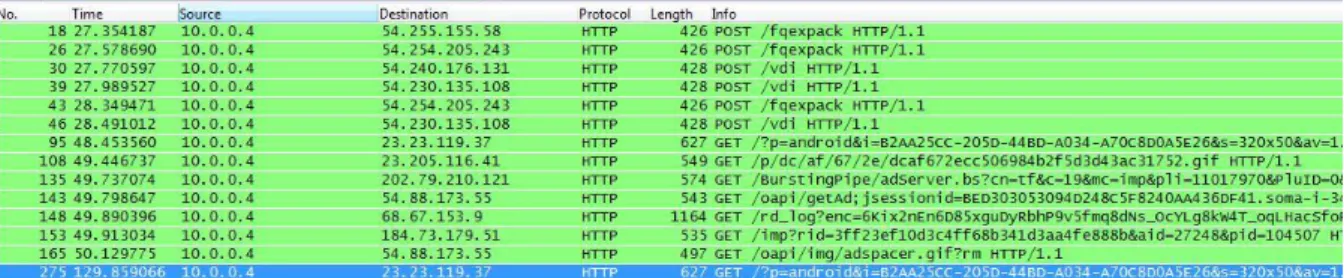
We also monitored incoming and outgoing network traffic from the infected device under dynamic analysis. It is observed that once the mobile “security” app was installed, it
Page | 42
Figure 9 – Perkele Network traffic shows the communication to external IPs immediately after installation
3.3.3
smsSpy - Pincer
Pincer was one of the main variant from smsSpy family. It was first uncovered by a Finnish security firm F-Secure in April 2013. It comes disguised as a security certificate and,
according to F-Secure notes, is designed to surreptitiously intercept and forward text messages[57]. In our dataset, malware with MD5:98951168215955a1f14198b19a134b14 is a Pincer sample. Below is a screenshot of Pincer being started after installation:
Figure 10 – Pincer
Pincer has not been found on Google Play and was not heavily distributed. It appears to be meant for precise attacks, as opposed to being aimed at as many users as possible[58].
Page | 43
3.3.4
smsSpy - Marcher
Marcher was the other main variant from smsSpy family. The sample with MD5:
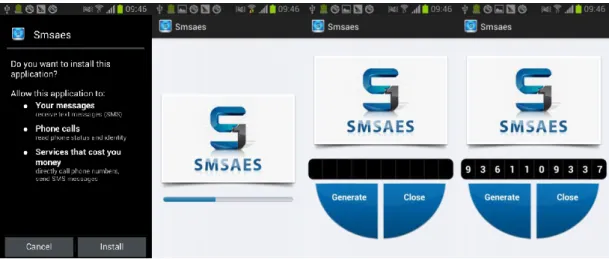
e29cec3924426dda960633fe56e0b86a in our dataset is a Marcher sample. AVG ThreatLabs described this malware as a malicious Android app used to interrupt the normal operations of an Android device and gain access to private information stored in it. One example of malicious behaviour is to disguise as legitimate banking applications and steal bank credentials when the user logs in. Below are some screenshots that were taken when this sample was installed and run. Upon installation, the app requires the permission to receive and send SMS, and also requests the permission to read phone status and make phone calls directly. It is branded as “SMSAES” and has a function to generate code and close the application.
Figure 11 – Marcher: From left to right: application permissions when install, loading page when executed, after application loaded, after tap “Generate” button.
The major malicious function of this group of malware is spying on SMS, as indicated by its generic name. The distribution method varies from Instant Messaging over mobile phone to phishing email.
Page | 44
3.3.5
Fakebank
The next malware family in our dataset was Fakebank. Fakebank malware was first uncovered in mid-2013, and appears to target online banking users from South Korea. According to Symantec’s research, this FakeBank Android malware was distributed by a Windows malware called Trojan.Droidpak[59]. When infected, it drops a DLL file on the Windows PC and ensures its persistence across reboots by registering a new system service. It then downloads a configuration file from a remote server that contains the malicious APK (Android application package) file called AV-cdk.apk. The Windows malware downloads the malicious APK, as well as the Android Debug Bridge (ADB) command line tool that allows users to execute commands on Android devices connected to a PC. ADB is part of the official Android Software Development Kit (SDK). The malware executes the “adb.exe install AV-cdk.apk” command repeatedly to ensure that if an Android device is connected to the host computer at any time, the malicious APK is silently installed on it. However, this approach has a limitation—it will work only if “USB debugging” is enabled on the Android device. USB debugging setting is normally used by Android developers, but it’s also required for some operations that are not directly related to development, like gaining root/privilege user access to the OS, taking screen captures on devices running old Android versions or installing custom Android firmware. Even if this feature is rarely used, users who turn it on once to perform a particular task may forget to disable it when they don’t need it
anymore.[60]
When the user installs this malware, it creates an icon like Google Play and calls itself Google App Store. After installation, the malware looks for certain Korean online banking applications on the compromised device and, if found, prompts users to delete them and install malicious versions. When users starts the disguised smart banking apps it asks them to fill in their account information, and submits the information to a malicious server.
Page | 45
Figure 12 – FakeBank targets Korean Bank. From left to right: fake Google App Store application permissions when installed; genuine Korean banking application on the device, fake banking application permission
when install, fake banking application when execute
Fakebank Android malware variants have been seen targeting some European banks too. Below are some screenshots of permission requests upon installation (Figure 13).
Figure 13 - Fakebank targets European banks. From left to right: Fakebank sample 1 permissions when installing, sample 1 executed, Fakebank sample 2 permissions when installing, sample 2 executed
Page | 46
We have only one sample for the Svpeng malware family, because it is still relatively new and few samples are available for research. Svpeng malware was first uncovered and reported by Kaspersky Lab in 2013. It disguises itself as an Adobe Flash Player update, and spread via spam emails. Like other Android banking malware, upon installation, the sample requires permission to access personal information and networks; receive, read and send SMS; and read and make phone calls. In addition, Svpeng also requires permissions for storage access (modify or delete the contents of USB storage), hardware controls (record audio), development tools (test access to protected storage) and System tools (e. g, change network connectivity, connect and disconnect from WiFi, disable screen lock , close other apps, run at start up).
Once installed, the application displays an icon with a letter "F" on a red background. When started, the app requires activating the "device administrator" feature of the mobile device.
The Android Device Administration API was introduced by Android 2.2, and provides mobile
device administration features at system level[61]. With the device administrator privilege,
an app can prompt the user to set a new password, lock the device immediately or wipe the device’s data without the user’s knowledge. Furthermore, the device administration API supports additional policies, in this case, “set storage encryption” is the policy supported.
This policy was introduced in Android 3.0 and allows an application to specify that the storage area should be encrypted if the device supports it. Device administrator privileges can be disabled from the device settings; however, this malware displays a lock screen and asks for a passcode in order to de-activate device administrator privileges. Without the right passcode, this privilege cannot be disabled.
Page | 47
Figure 14 - Svpeng activating device administrator. From left to right: Device administrator access required when install, password required when delete the application
Besides the extensive permissions the Svpeng sample asks for installation, this sample in our dataset doesn’t seem to be very banking-related. Later versions of Svpeng have more
malicious functions, which makes it more effective as banking malware. Kaspersky Lab reported a variant of Svpeng malware with the ability to carry out overlay attacks[62]. After infection, the attack starts as soon as the victim clicks on his or her banking app. Following a click on the app, Svpeng generates a window that looks like the banking app that was just launched, which is presented on top of the actual app. This fools the victim into thinking that he or she is interacting with the legitimate app, but is actually feeding credentials to the malware. This is not a typical HTML injection attack as we know them from the Windows world, but rather a dedicated phishing window displayed on top of the genuine app. Using a similar method, the malicious program also tries to steal information about the user’s credit cards. When the user launches Google Play, the malware displays a window requesting card info on top of the Google Play window. Below are some screenshots from Kaspersky Lab’s research:
Page | 48
Figure 15 – Svpeng malware overlay attacks bank & Google Play[63]: From left to right: fake page overlays on top of Russian bank app when opened, fake card page asking for credit card information overlays on top of
Google Play store when opened
In addition to the overlay attack, at the beginning of 2014, Kaspersky Lab uncovered a new modification of Svpeng with ransomware capabilities[64]. Just as PC ransomware attacks scare and force the victim into paying the attacker money to regain control or access to the infected device, infected users receive a message on the device, which claims to have been sent by the FBI, explaining that the infected device has been used to access some prohibited content. The malware then locks the mobile device unless the user pays $200 ransom. It also takes a photo using the front camera and displays on the ransom message window. The malware accepts MoneyPak vouchers for the ransom payments, and indicates where the vouchers can be purchased. Figure 16 shows some relevant screenshots from Kaspersky Lab's research.
Page | 49
Figure 16 – Svpeng Ransomware[65] : From left to right: fake FBI violation notice, specify MoneyPak as the payment method for the fine , indicate where to buy MoneyPak vouchers
According to Kaspersky Lab’s analysis, the ransomware function of Svpeng completely blocks the mobile device, and persists after rebooting.
3.3.7
iBanking
iBanking was the last malware family investigated. iBanking malware was uncovered by researchers at Symantec in 2013, and became available for purchase at a major Eastern European underground forum in September 2013, replete with a broad range of malicious functionalities. In February 2014, RSA reported the leak of iBanking mobile bot source code. The leaked files also included a bash script builder that can un-pack the existing iBanking APK file and re-pack it with different configurations. Such malware source code leaks are always a double-edged sword, it allowed security researchers and analysts to understand more about this malware family, it also provided fraudsters with the means to create their own unique mobile malware.
Similar to other mobile banking malware, iBanking also uses social engineering tactics to lure victims into downloading and installing the malware on their Android devices. The
Page | 50
victim is usually already infected with a banking malware on their Windows computer. When they visit a banking or social networking website, the Windows malware will generate a pop up message or inject malicious content in the web session, asking the victim to install a mobile app as an additional security measure.
The user is prompted for their phone number, and the device will then be sent a download link for the fake software by SMS. If the user fails to receive the message for any reason, the attackers also provide a direct link and QR code as alternatives for installing the software. In some later version of iBanking malware distribution, we saw an “Installation Guide” injected to the victim’s internet banking session, which aims to guide the user to install the “security certificate”. The “Installation Guide” has 5 steps, instructing the user to download, install, and use the app. In order to have the malware installed successfully, the installation guide also shows the user how to lower their mobile security by enabling unknown sources app installation and activating device administrator for the app. Figure 17 is a screenshot of an installation guide of one sample in the dataset.
Page | 51
iBanking malware are normally configured to look like official mobile applications from a range of different banks and social networks; both the installation APK and the installed application are target-brand themed.
Like other Android banking malware, iBanking malware requires various permissions upon installation, including but not limited to: personal information; receive, read, edit and send SMS; network communication; storage; phone calls; hardware controls; system tools; and development tools. These permissions give the attacker almost complete access to the handset including the capability to intercept voice and SMS communications.
When a user starts iBanking malware, the malware asks the user to activate device administrator, which allows the application to erase the phone’s data without warning by performing a factory data reset, and controls how and when the screen locks. (Figure 18 below).
Figure 18 - iBanking malware ask for device administrator access
After activating device administrator privileges, a target-brand-themed interface displays with a button to generate an “activation code”. This code is required to complete the “security certificate” installation from the user’s Internet banking session. After filling in the activation code on the fake Internet banking page, the user is redirected to their normal Internet banking pages.
Page | 52
3.4 Android Banking Malware Family Analysis
3.4.1
Distribution and Installation
All samples use social engineering techniques to spread.
Zitmo, Spitmo, Citmo, Perkele, FakeBank, and iBanking malware work in tandem with traditional banking malware on Windows OS, using webinjects for distribution. SmsSpy and Svpeng malware are spread via spam emails and SMS or instant messages on mobile devices. Social engineering techniques are also applied to the appearance of these Android banking malware - all of the samples in the dataset had been disguised as applications that provide extra security or imitate well known applications such as Google Play Store and Adobe Flash Update.
Of all the samples, only three Citmo samples had been found on Google Play. For all other samples, the potential victims must enable “Unknown Sources” from the device settings to be able to install the malware.
3.4.2
Privilege and Permission
All samples requests permissions for SMS functions, which was used by many banks to deliver their second-factor to authenticate an electronic funds transfer. Permissions to access personal information, network, phone calls and storage are also heavily required from the samples.
Two malware families, iBanking and Svpeng, require the device administrator privilege to be activated upon application start. The iBanking malware family require basic device
administrator privilege while Svpeng invoke a policy of setting storage encryption. To sustain this powerful privilege, the Svpeng family configure the device to prevent administrator privilege from being deactivated by a password.
Page | 53
3.4.3
Targeting region
We observed that samples from the Zitmo, Spitmo, Citmo, Perkele , Svpeng and iBanking families initially targeted Russian-speaking users, some were then spread to other European countries and English speaking counties (mainly US). The Fakebank family was first seen targeting Korean speaking users, then found targeting European banks.
3.4.4
Android Emulator vs. Native Device
During manual dynamic analysis, all but one malware sample ran successfully in both the emulator environment and on native device. The exception was a sample of the iBanking family; it crashes on launch in the emulator.
3.5 Automated Dynamic Analysis
Automated dynamic analysis was performed to understand how the malware behaves when executed, e.g which C&C service it communicates with, what application is installed, and what service is enabled when the application is executed etc.. As a part of this analysis, we used the Android application sandbox - Droidbox[66] to generate behavioural graphs for each sample, and these provide the basis of the development patterns to aid in malware
identification and detection.
DroidBox is a dynamic analysis tool for Android applications targeting Android OS. The tool is based on TaintDroid[67] for detecting information leaks but has been extended, by
modifying the Android framework, to monitor API calls of interest invoked by an application. Applications are executed within the Android SDK emulator, and logs are collected in the
Page | 54
host operating system each monitored behaviour. For each sample, DroidBox created a log file and generated two graphs visualizing the behaviour.
DroidBox was designed to collect information about a sample and its activities during
interaction over a fixed
![Figure 1 – How fraud Works - FBI [11]](https://thumb-us.123doks.com/thumbv2/123dok_us/970704.2627290/20.892.156.777.736.1050/figure-how-fraud-works-fbi.webp)
![Figure 6 - Citmo distribute by QR code [53]](https://thumb-us.123doks.com/thumbv2/123dok_us/970704.2627290/39.892.281.608.397.546/figure-citmo-distribute-by-qr-code.webp)